





Revolutionizing Finance: Google Cloud’s Role in Auditoria.AI’s Success

1252
Of your peers have already read this article.
4:00 Minutes
The most insightful time you'll spend today!
Be it marketing, sales, or even security, most departments in large organizations today have a range of SaaS tools at their disposal to help make their work more efficient. But people in corporate finance and accounting have been underserved in that respect. Their days are still spent on routine, mundane tasks that keep them away from more stimulating work. Auditoria.AI aims to change that by automating those functions with AI and natural language technology.
We strive to improve the lives of finance and accounting professionals by automating the routine, repetitive, and laborious parts of the finance function, such as copy-and-pasting data, validating documents, and checking for errors on spreadsheets, freeing these teams to focus instead on providing valuable, strategic insights to the business.
To that end, the problems we’re solving affect three major finance functions:
- Accounts Payable, responsible for sending money out of the company, such as bill payments.
- Accounts Receivable, responsible for bringing money into the company, such as invoicing for services.
- General accounting, a broader term consisting of functions of the general ledger team and the CFO, including closing books.
Historically, making these processes more efficient entailed dedicating more personnel to them. But this didn’t necessarily mean more work was done faster and to the highest standards. Many finance professionals are often overworked, dedicating extra hours, weekends, and sometimes holidays to process invoices, collect payments, and close the books on time.
We created solutions for these three finance functions, with our SmartBots taking care of the back-and-forth communications between finance teams, vendors, and customers. In large companies, these micro-transactions add up to thousands per day, resulting in finance professionals spending entire days reading inquiries, interpreting requests, looking for relevant information, and answering as many as possible. But with our AR helpdesk, for example, accounts receivable tasks, such as a request for a copy of an invoice, get automated. Our technology reads emails and attachments to understand what is being requested. Then it connects to the Enterprise Resource Planning (ERP) software to grab the relevant information and attach it to the email, so the recipient gets a response within 60 seconds.
Building the smart assistant that finance teams need
In our automation flow, we constantly handle different types of documents, from invoices and tax forms to receipts and email messages. But processing the interaction between computers and human language is complex. You must detect intent and facts, and understand the context before finding the specific slots of information extraction that may be relevant to specific processes and requests. Our solution adds value by extracting the right information in the right context, from the right document, for the relevant finance function. Instead of building everything from scratch, we turned to Google Cloud’s Document AI to support extracting data from unstructured documents to understand and analyze them.
Document AI comes with pre-built models that help analyze specific parts of our post-production lifecycle. For example, Invoice Parser extracts text and values from invoices, including invoice number, supplier name, invoice amount, tax amount, and invoice due date, all of which are necessary for our SmartBots to execute an extraction workflow. These out-of-the-box features significantly accelerate our own product development process and time-to-market, which are critical for the performance of a startup such as ours.
To ensure a high quality of information extraction, we used to do document readings in-house. Having automated some of that with Document AI, we’re at 85% accuracy extracting files, and with some additional customization efforts, we will achieve 95%+ extraction accuracy.
Meanwhile, we have now streamlined internal processes, which ultimately translates into faster services for our customers. For example, assuming all the information has been provided, it generally took up to 15 minutes to process a tax form. We now do that in seconds.
The value of automation doesn’t stop there. Using DocumentAI to automate structured data extraction from documents, we have managed to:
- Speed up the collection of general ledger entries by 90%+
- Reduce errors and omissions by 85%+
- Close books 20% faster
- Improved the productivity of full-time employees by 60%+
- Reduce process workload by 75%+
- Improve vendor serviceability by 75%+
- Reduce vendor risk and fraud by 50%+
Leveraging automation to focus on more innovation
Automating some of our processes with Document AI also means we have more time to focus on developing new features and further improving our solution. 80-90% of the time used for extracting custom fields from documents has now been automated with an OCR metadata library.
With Document AI taking care of standard extraction, we focus on the intelligence we add to post-extraction. For example, when an invoice comes in from a vendor, our application needs to figure out which vendor it is to match it to the correct records in the ERP. But variations in the documents could interfere with that extraction process. The vendor’s trading name might be slightly different from the company’s name registered in our internal system, delaying the process. With more time on our hands, we’re now working on features enabling our models to leverage logos and other elements extracted from documents to swiftly match them to the correct company registered in our systems.
With the benefits we’ve seen thus far, we look forward to accelerating our international growth. We’ll be relying on Google Cloud’s Document AI to automate operations, potentially in different languages, as we continually remove friction from the work lives of finance and accounting people worldwide.

5210
Of your peers have already downloaded this article
2:30 Minutes
The most insightful time you'll spend today!
For as long as business intelligence (BI) has been around, visualization tools have played an important role in helping analysts and decision-makers quickly get insights from data.
In our current era of big data analytics, that premise still holds. To provide an integrated platform for building BI dashboards on top of big data, GCP offers the combination of Google BigQuery, a cloud-native data warehouse that helps you analyze petabytes of data quickly, and Google Data Studio, a free tool that helps you quickly create beautiful reports.
First, imagine that you work for an online retailer that bases important decisions on customer interaction data in the form of large amounts (multiple TBs) of usage logs stored as date-partitioned tables in a BigQuery dataset called usage. To get business value out of that data as quickly as possible, you want to build a dashboard for analysts that will provide visualizations of trends and patterns in your data.
The good news is that a connector is available that lets you query data stored in BigQuery directly from Data Studio.
Learn how to build a BI dashboard with Data Studio as the front end, and powered by BigQuery on the back end (with some help from Google App Engine for added efficiency). Download this how-to now.
SEED: The 4 Areas of a Well-functioning and Responsible AI

4338
Of your peers have already read this article.
2:00 Minutes
The most insightful time you'll spend today!
The future of AI is better AI—designed with ethics and responsibility built in from the start. This means putting the brakes on AI-driven transformation until you have a well-functioning strategy and process in place to ensure your models deliver fair outcomes. Failing to recognize this imperative is a threat to your bottom line. The following post provides a simple framework to follow to keep your business on the right track as you place more trust in algorithms.
AI is inherently sociotechnical. AI systems represent the interconnectedness of humans and technology. They are designed to be used by and to inform humans within specific contexts, and the speed and scale of AI means that any lack of responsibility—such as bias, safety, privacy, scientific excellence etc—will also replicate at that same speed and scale. Without ethics and responsibility built in by design, AI systems lack the critical “inputs” or societal context that enable long term success.
Lawsuits stemming from AI systems that are biased towards certain groups are stacking up. In August 2020, IBM was forced to settle a lawsuit with the city of Los Angeles for misappropriating data it collected for its weather channel app. Health services company, Optum, is being investigated by regulators for creating an algorithm that allegedly recommended that doctors and nurses pay more attention to white patients than to sicker black patients. And Facebook, which granted Cambridge Analytica, a political firm, access to the personal data of more than 50 million people, is buried in legal work. Google has also run into its share of issues with algorithms making egregious mistakes.
While lawsuits are real, the foundational reason ethical AI is critical to your bottom line is trust. Without it, increasingly, consumers will ignore you and choose a brand they do trust. Research from Kantar, which runs one of the largest global brand equity studies (4 million consumers, 18,000 brands, across 50 markets), revealed that almost 9% of a brand’s equity is driven by corporate reputation, of which responsibility is a key attribute. Over the last decade, the importance of responsibility to consumers in relation to making brand choices has tripled.
The study stated brands perceived to be among the world’s most trusted and responsible shared three crucial factors that proved particularly important for building consumer trust and confidence, even when a brand might be new to a market. These are:
- Honesty and openness
- Respect and inclusion
- Identifying with and caring for customers
Brands that develop these associations more strongly tend to outperform their competitors in defending and growing their brand value.
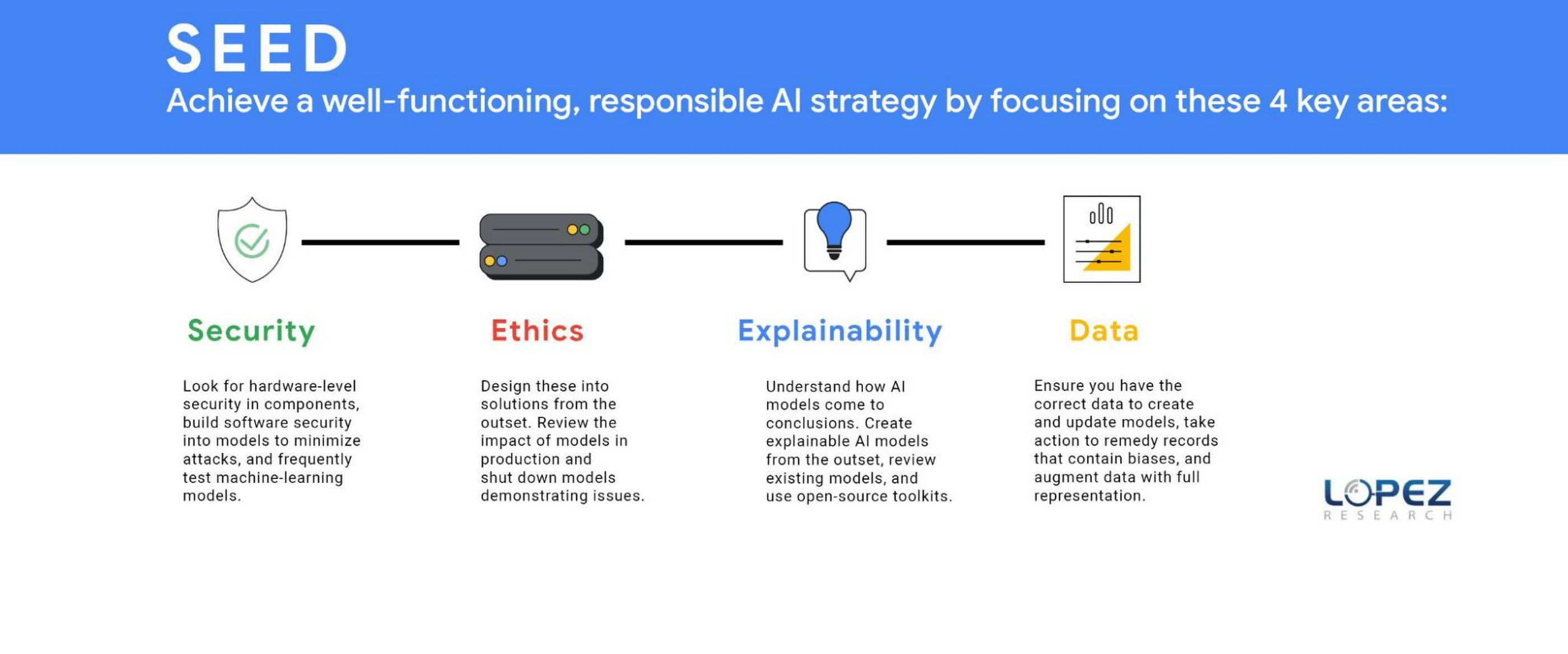
Technology and business leaders need to focus on four areas to accomplish a well-functioning ethical AI strategy. Lopez Research refers to this group of tasks as SEED, which stands for security, ethics, explainability, and data (SEED). Each of these topics could be an article in itself, but this post will define several essential components.
SECURITY (S)
It might not seem obvious, but a robust AI strategy requires an embedded security strategy. Companies should look for hardware-level security in components such as GPUs and CPUs. IT leaders should build software security into models to minimize attacks such as poisoning, evasion, deepfakes, backdoors, and model extraction. The threat of adversarial data poisoning attacks machine learning models by maliciously introducing inaccurate data designed to corrupt the model’s ability to be accurate. Another security threat is model extraction, also known as model cloning, where a hacker finds a way to either reconstruct a black-box machine learning model or extract the training data. The first line of defense against all security attacks is to design security at the outset, but the next best step is to frequently test models to ensure they are operating as planned. Business leaders, data science experts, and IT leaders must work together to regularly review the outcomes of AI models.
ETHICS (E)
Today, organizations must understand that ethics should be designed into the solution at its outset. The ethics process starts with defining the potential positive and negative outcomes of the model that your business is creating. Once the team has evaluated potential harmful effects, which means unpacking the systems, beliefs, power hierarchies and dynamics that interconnect with the technology, it’s your responsibility to eliminate or minimize the impact of these outcomes. It’s also critically important to review the impact of models in production and shut down models demonstrating issues. An example of this was the public beta release of the Tay chatbot that Microsoft deployed and rapidly shut down because it propagated negative biases.
Yet, many organizations aren’t taking this action. The FICO study revealed that 93% of companies said responsible AI was critical for success but only 33% of these companies were measuring AI model outputs to ensure these models were operating as expected (measuring for model drift). Another survey by Pew Research revealed that 68% believe that ethical principles focused primarily on the public good will not be employed in most AI systems by 2030.
Regulations may turn this tide, regardless of whether organizations plan to adopt an ethical AI framework. Laws governing the ethical use of data in AI are expected to be finalized as soon as 2022, such as the European Commission’s proposed legal framework for AI. Organizations that start with ethical use of AI in mind will be better positioned to deal with customer privacy concerns and regulatory compliance.
EXPLAINABILITY(E)
As models have become more sophisticated, it’s also become increasingly difficult to explain why a model created a specific outcome. In the FICO Responsible AI report, 65% of respondents could not explain how specific AI model decisions or predictions are made, and only 35% said their organization made an effort to use AI in a way that was transparent and accountable. However, it’s never been more important to clarify how AI models came to conclusions such as why a loan was denied, why a particular strategy should be implemented, and how AI selected a set of resumes to review for a position. The goal is to create an explainable AI model from the outset but many of today’s models lack this capability. Every business should review its existing models and use open-source toolkits that can be found on Github.com that support the interpretability and explainability of machine learning models.
Keep in mind that explainability isn’t one-size-fits-all. Different stakeholders need different types of information. Much of explainability to date has focused on “opening the black box” which gets equated to information that is only useful for other data scientists. That’s important, but it doesn’t help the line of business users whose workflows AI is integrated into, or end users who deserve information about how decisions are made; or policymakers who don’t have data science backgrounds, and so on.
DATA (D)
An equally important item in ethics is data. Ethics starts with ensuring you have the correct data to create and update models. Three main issues include representative data, inherent biases within existing data, and inaccurate data. A critical issue that most companies miss in creating models is that current data sets frequently lack full market representation. A recent Capgemini Research Institute report revealed that 65% of executives “were aware of the issue of discriminatory bias” with these systems.
Awareness is the first step, but organizations must take action to remedy this issue. Historical data may no longer serve a company’s current needs for model creation. Historical records may contain biases against certain groups. For example, historical criminal data records show an imbalance in ethnic groups’ incarceration, which would lead to model biases. Additionally, laws and societal norms also change. Certain groups were prosecuted for sexual preference in the past, but today this information would create an inaccurate model.
Companies have also discovered that using demographic data, a common practice in marketing, can also lead to model bias. For example, individuals that primarily used cash for transactions and others that lived in specific zip codes were at a disadvantage in banking models to determine creditworthiness. To minimize these issues, a company needs to augment its data with full representation in areas such as ethnicity, gender, age, behavioral and economic profiles.

Design AI models with a continuous feedback loop
Another, more prominent, yet tricky issue is data accuracy. As the adage says, garbage in, equals garbage out. The least appreciated but arguably the most essential component of the AI model lifecycle is ensuring the model has accurate data at all times. Inaccurate data from either poor data hygiene or data that was tampered with for security purposes can cause model failures. Organizations need to invest the time and resources to ensure they have the correct data. Data privacy is another key element that businesses must address, but the concepts of data privacy, sovereignty, and security are significant enough that we will come back to this in a separate article.
Overall, it’s clear that while we may have an abundance of data, it most likely doesn’t represent what we want to model for the future. A successful AI strategy is an ethical AI strategy that requires the organization to be thoughtful in its model creation by ensuring it has a broad representation of accurate data and testing the outcomes to ensure the models are secure and operating as expected.
Organizations that define an AI model lifecycle with a continuous feedback loop will reap the benefits of better intelligence. This will increasingly mean stronger, longer lasting trust with customers and staying on the right side of new laws and regulations.
Contact Center AI (CCAI) with Agent Assist can Lower Opex and Handle 28% More Chats

4829
Of your peers have already read this article.
1:30 Minutes
The most insightful time you'll spend today!
Contact Center AI (CCAI) brings Google’s innovation in conversational AI to solve the most challenging customer service needs while lowering operational costs. More than a thousand customers have deployed CCAI and are steadily turning it on to power their production contact centers.
Today, we’re excited to announce that we’ve made CCAI even stronger with Agent Assist for Chat, now in public preview.
Agent Assist provides your human agents with continuous support during their calls and now chats by identifying the customers’ intent and providing them with real-time recommendations such as articles and FAQs as well as responses to customer messages to more effectively resolve the conversation.
Customers using Agent Assist for Chat have been able to manage up to 28% more conversations concurrently, while also driving up customer satisfaction by 10%. Additionally, we’ve seen them respond up to 15% faster to chats, reducing chat abandonment rates and solving more customer problems.
Agent Assist provides two key components to help agents manage conversations better:
- Smart Reply provides response suggestions to agents so they can quickly and appropriately respond to customer messages. These suggestions can be taken from your top performing agents as well as modified even further to ensure suggestions properly reflect the tone and voice of your brand. Agent Assist learns when and what recommendations to make by building a custom model that’s trained on your (and only your) data.
- Knowledge Assist unlocks the power of your knowledge base to provide articles and FAQ suggestions to agents in real-time as the conversation progresses. When using Knowledge Assist, agents no longer need to make the customer wait while they navigate multiple applications and data to find the resolution to the customer’s issue — the answer is delivered right to them.
“We’ve been very impressed by the chat capabilities of Agent Assist,” said Chris Smith, Vice President of Digital Service at Optus, one of the largest telecommunications companies in Australia
Optus has been using CCAI Dialogflow CX to send queries to virtual agents and sees great potential to use Agent Assist to provide recommendations to their customer support representatives. They expect Agent Assist to help minimize repetitive tasks by providing response and typeahead suggestions, helping improve the efficiency of their agents and the quality and consistency of service they provide.
Another customer, LoveHolidays, is using Agent Assist to support their agents and customers in the travel industry.
“Agent Assist has been a beneficial aid to agents and our customers alike… It gives us the power to flex our contact center staff levels in hours not weeks,” said Eugene Neale, Director of CX Engineering & Business IT at LoveHolidays
Analysts say online chat is becoming one of the most popular ways to reach out to businesses for customer support. IDC research finds that single-function contact centers worldwide are increasingly rare — in 2020, although phone/voice is still responsible for most interactions (at around 18%); email is responsible for around 13% of interactions, and live chat (without automation) is responsible for around 8% of interactions, according to IDC, Toward the AI-Powered Contact Center, Doc # EUR147017320, December 2020.
Deploying CCAI with Agent Assist for Chat
As part of Google’s Contact Center AI suite, Agent Assist provides a seamless handoff from chats managed by your Dialogflow CX virtual agents. If a conversation or customer requires a live agent, Agent Assist will help your team pick it up quickly and drive it to a satisfying resolution.
Historically, when managers saw contact center volumes increase they had two choices: allow customers to wait longer to speak to someone (lowering customer satisfaction) or bring on more agents (increasing cost to serve). Deploying CCAI provides contact center leaders with a third choice: equip agents with tools like, Agent Assist for Chat, to efficiently manage customer interactions while maintaining high quality service.
Global CCAI partners support Agent Assist for Chat
Agent Assist for Chat is a set of public APIs that your engineering team can integrate directly into an agent desktop to control the agent experience from end-to-end. For a more out-of-the-box solution, we have partnered with LivePerson and 247.ai to build Agent Assist directly into their agent desktops.
“Integrating our Conversational Cloud directly with Agent Assist means agents can leverage cutting-edge productivity AI to build even further on the massive ROI of conversational commerce, from reduced agent effort and time-to-respond to increased customer satisfaction and revenue,” said Alex Spinelli, CTO of LivePerson.
More Agent Assist resources
To learn more, check out the Agent Assist webpage. Give Agent Assist a try by training a model and then testing it using the Agent Assist simulator.
Streamline Your Business Processes with Google Cloud’s Custom Document Splitter
933
Of your peers have already read this article.
3:30 Minutes
The most insightful time you'll spend today!
Businesses rely on processing an inflow of documents to drive processes and make decisions. Many such documents are combined into a single file. For example, a loan application may have a driver’s license, paystub, W2, bank statement, and other document types within a single file. The complexity of handling many document types within a single file makes it difficult for businesses to manage at scale.
At Google Cloud, we’re committed to solving these challenges with continued investment in our Document AI solutions suite which offers machine learning products for document processing and insights. Document AI Workbench helps users quickly build ML models with world-class accuracy, trained for their specific use cases. In February 2023, we launched the Custom Document Extractor (CDE) in General Availability (GA) to help users extract structured data from documents in production use cases. In March 2023, we launched the Custom Document Classifier (CDC) in GA to help automatically classify document types. Today, we announce the newest feature of Document AI Workbench, Custom Document Splitter (CDS) in GA to help users automatically split and classify multiple documents within a single file.
CDS provides tangible business value to customers by helping them sort and classify documents. For example, businesses can validate if they have all the needed documents from an applicant. Furthermore, individually classified documents enable businesses to better automate downstream processes, including selecting the proper storage, analysis, or processing steps based on the document type. The efficiencies enabled by CDS helps businesses lower their document processing time and cost.
Benefits of splitting and classification models in Document AI Workbench
Document AI Workbench can save time and money by simplifying model training, from dataset management, to testing, to deployment. CDS helps businesses achieve higher automation rates to scale processes while lowering costs.
Sean Earley, VP of Delivery Services at Zencore said, “We completed a project for a large bank using Document AI Workbench to split, classify, and extract data from documents to automate Home Mortgage Disclosure Act reporting. Given the accuracy of the models we built, our client estimated increasing loan reporting coverage from 20% to 100% while eliminating thousands of errors per year, drastically reducing the operational cost of the bank’s compliance reporting procedures.”
Fabian Beckmann, Manager Artificial Intelligence & Data at Deloitte Consulting GmbH said, “By leveraging Document AI’s Custom Document Splitter, our client, Commerzbank, a large european bank, can effortlessly segment customer submissions tailored to their back-office requirements, significantly diminishing the need for extra manual sorting or routing. This integration paves the way towards seamless automation within the Document AI pipeline, delivering substantial business benefits.“
According to Kaïs Albichari – ML Tribe Tech Lead, G Cloud at IT services firm Devoteam, “Custom Document Splitter (CDS) has helped one of our clients in the financial services industry save significant time and improve data accuracy. By identifying which parts of documents they can discard and which they retain for entity extraction, CDS has helped the company automate its document processing tasks. The implementation resulted in a more efficient and streamlined workflow, freeing employees to focus on other tasks. Devoteam’s G Cloud team helped the company implement CDS and achieve these benefits.”
Frank Neugebauer, a Google Cloud Insurance Solutions Consultant, worked with a Fortune 100 insurance company and used CDS to create a model to split and classify millions of insurance documents with up to 98% accuracy. With this information, the insurer can better understand the nature of their unstructured data to inform business strategy, including volume for specific document types to inform extraction work. The customer considers this level of insight unprecedented in their 200+ year history.
How to use Custom Document Splitter
You can leverage a simple interface in the Google Cloud Console and a set of public APIs to prepare training data, create and evaluate models, deploy a model into production, and call an API endpoint to split and classify document types. You can follow the documentation for instructions to create, train, evaluate, deploy, and run predictions with models.
Import and prepare training data
To get started, import and label documents to train and evaluate an ML model.
To quickly build a training dataset, import single documents, one document per file, and bulk label them with the relevant document type. You can import one folder or multiple folders at once and choose the correct document type per folder. As shown in the next image, one import could have a folder with 200 bank statements, another folder with 200 W2s, another folder with 200 paystubs, etc., all of which are labeled at once while imported. Up to 30,000 documents and 100,000 pages can be inputted for training. This way, you can build a training dataset with hundreds of labeled documents per class in minutes. As always, if documents are already labeled using other tools, simply import labels with JSON in the Document format.
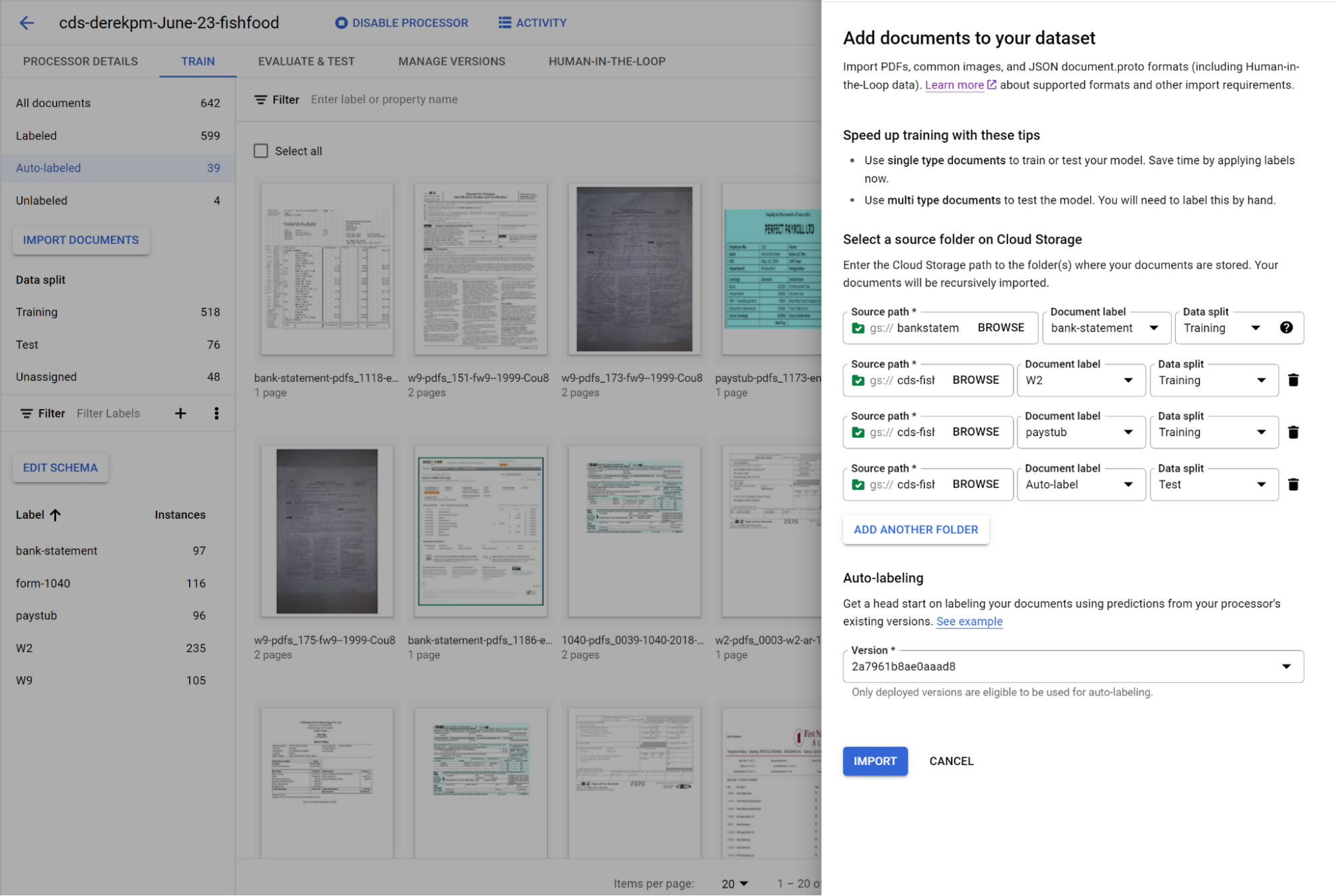
You can initiate training with a click of a button. Once you have trained a model, you can use it to automatically label documents added to your dataset, letting you quickly build robust test and training datasets to evaluate and improve model performance.
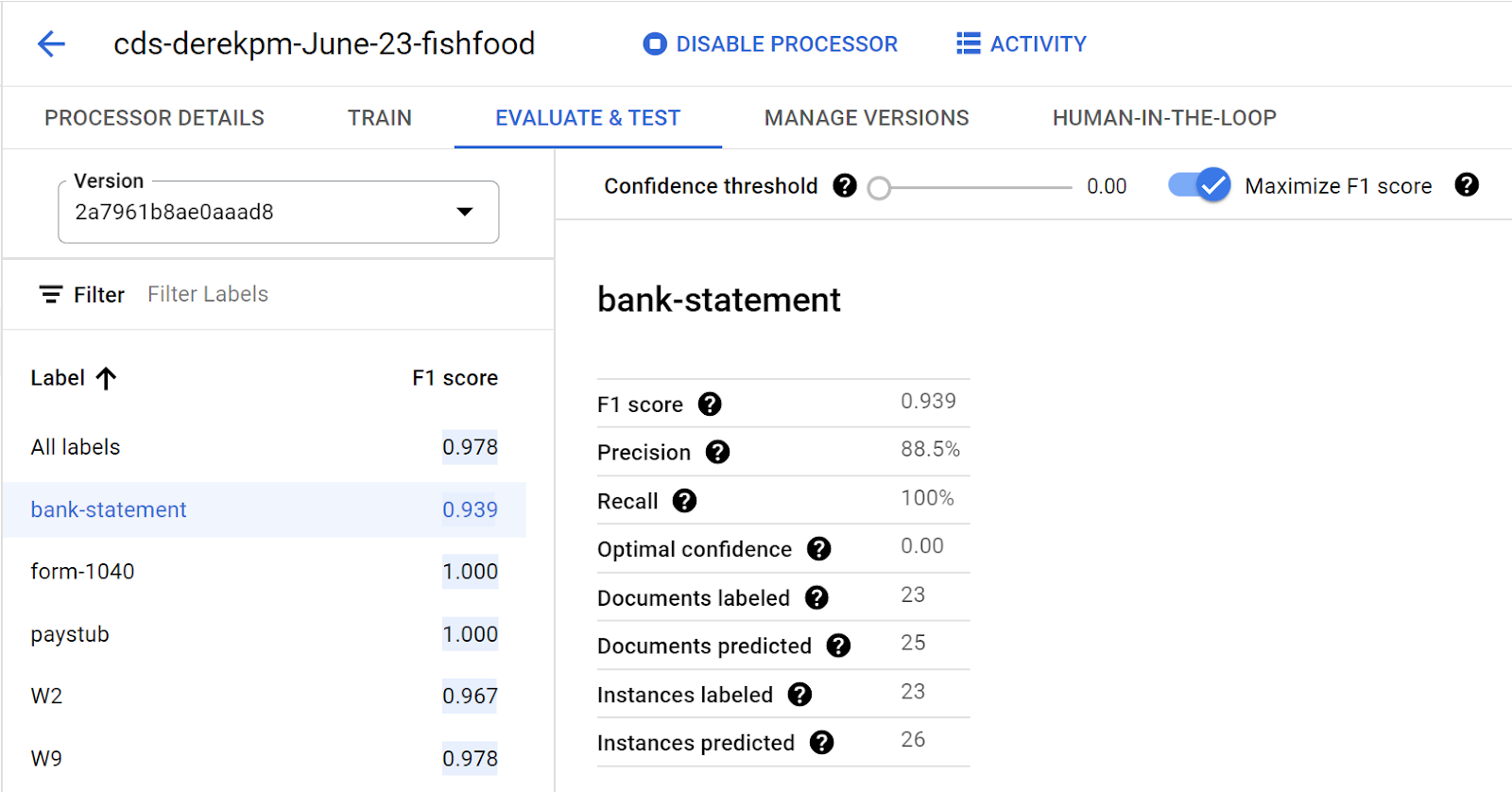
To accurately evaluate a CDS model, import files which contain multiple document types within the same file and assign them to the test dataset. Then, use a simple interface to define document boundaries and types.
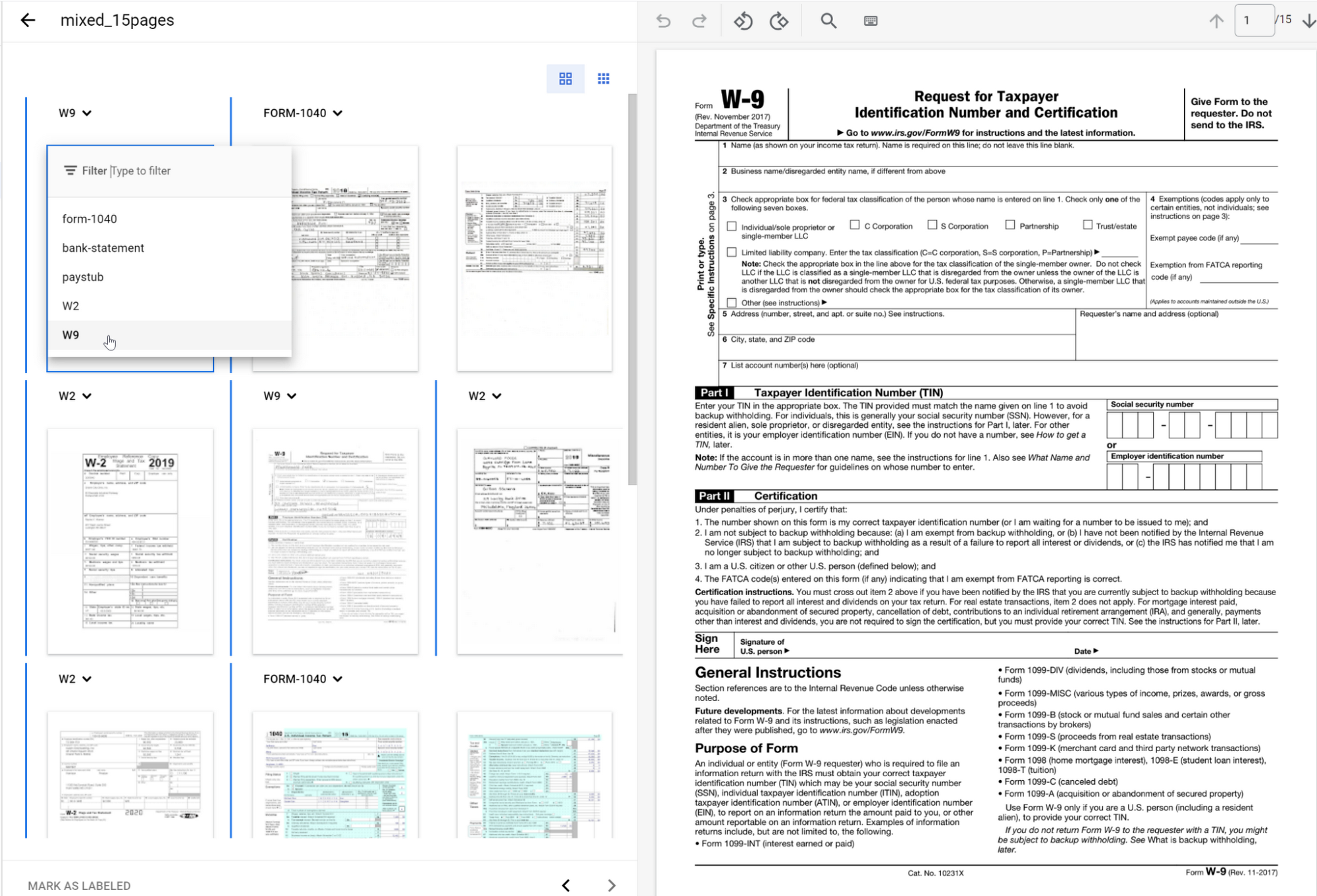
The ground truth you label in the test dataset is used to evaluate splitting and classification predictions from the CDS model.
Going into production
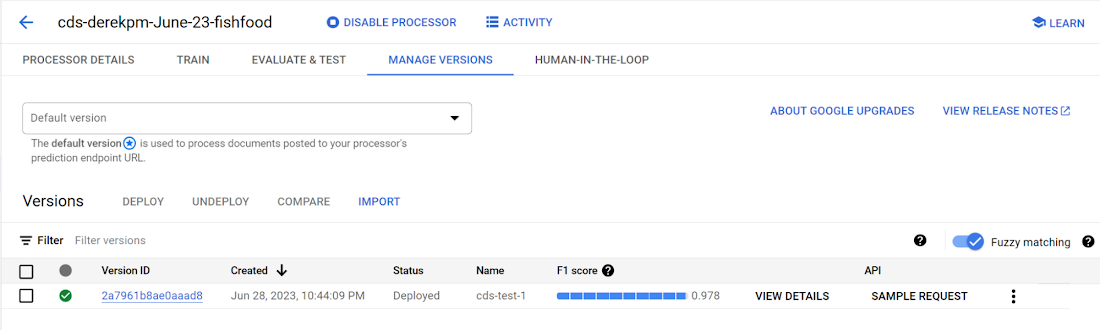
Once a model meets accuracy targets, it’s time to deploy into production and call the API endpoint to split and classify document types.
Getting started with Document AI Workbench
Custom Document Splitter is publicly available in GA and ready to help customers automate document splitting and classification. Learn more via our Document AI Workbench web page, Document AI Workbench documentation or try it out in the Google Cloud Console.
Revolutionizing Finance: Google Cloud’s Role in Auditoria.AI’s Success
1253
Of your peers have already read this article.
4:00 Minutes
The most insightful time you'll spend today!
Be it marketing, sales, or even security, most departments in large organizations today have a range of SaaS tools at their disposal to help make their work more efficient. But people in corporate finance and accounting have been underserved in that respect. Their days are still spent on routine, mundane tasks that keep them away from more stimulating work. Auditoria.AI aims to change that by automating those functions with AI and natural language technology.
We strive to improve the lives of finance and accounting professionals by automating the routine, repetitive, and laborious parts of the finance function, such as copy-and-pasting data, validating documents, and checking for errors on spreadsheets, freeing these teams to focus instead on providing valuable, strategic insights to the business.
To that end, the problems we’re solving affect three major finance functions:
- Accounts Payable, responsible for sending money out of the company, such as bill payments.
- Accounts Receivable, responsible for bringing money into the company, such as invoicing for services.
- General accounting, a broader term consisting of functions of the general ledger team and the CFO, including closing books.
Historically, making these processes more efficient entailed dedicating more personnel to them. But this didn’t necessarily mean more work was done faster and to the highest standards. Many finance professionals are often overworked, dedicating extra hours, weekends, and sometimes holidays to process invoices, collect payments, and close the books on time.
We created solutions for these three finance functions, with our SmartBots taking care of the back-and-forth communications between finance teams, vendors, and customers. In large companies, these micro-transactions add up to thousands per day, resulting in finance professionals spending entire days reading inquiries, interpreting requests, looking for relevant information, and answering as many as possible. But with our AR helpdesk, for example, accounts receivable tasks, such as a request for a copy of an invoice, get automated. Our technology reads emails and attachments to understand what is being requested. Then it connects to the Enterprise Resource Planning (ERP) software to grab the relevant information and attach it to the email, so the recipient gets a response within 60 seconds.
Building the smart assistant that finance teams need
In our automation flow, we constantly handle different types of documents, from invoices and tax forms to receipts and email messages. But processing the interaction between computers and human language is complex. You must detect intent and facts, and understand the context before finding the specific slots of information extraction that may be relevant to specific processes and requests. Our solution adds value by extracting the right information in the right context, from the right document, for the relevant finance function. Instead of building everything from scratch, we turned to Google Cloud’s Document AI to support extracting data from unstructured documents to understand and analyze them.
Document AI comes with pre-built models that help analyze specific parts of our post-production lifecycle. For example, Invoice Parser extracts text and values from invoices, including invoice number, supplier name, invoice amount, tax amount, and invoice due date, all of which are necessary for our SmartBots to execute an extraction workflow. These out-of-the-box features significantly accelerate our own product development process and time-to-market, which are critical for the performance of a startup such as ours.
To ensure a high quality of information extraction, we used to do document readings in-house. Having automated some of that with Document AI, we’re at 85% accuracy extracting files, and with some additional customization efforts, we will achieve 95%+ extraction accuracy.
Meanwhile, we have now streamlined internal processes, which ultimately translates into faster services for our customers. For example, assuming all the information has been provided, it generally took up to 15 minutes to process a tax form. We now do that in seconds.
The value of automation doesn’t stop there. Using DocumentAI to automate structured data extraction from documents, we have managed to:
- Speed up the collection of general ledger entries by 90%+
- Reduce errors and omissions by 85%+
- Close books 20% faster
- Improved the productivity of full-time employees by 60%+
- Reduce process workload by 75%+
- Improve vendor serviceability by 75%+
- Reduce vendor risk and fraud by 50%+
Leveraging automation to focus on more innovation
Automating some of our processes with Document AI also means we have more time to focus on developing new features and further improving our solution. 80-90% of the time used for extracting custom fields from documents has now been automated with an OCR metadata library.
With Document AI taking care of standard extraction, we focus on the intelligence we add to post-extraction. For example, when an invoice comes in from a vendor, our application needs to figure out which vendor it is to match it to the correct records in the ERP. But variations in the documents could interfere with that extraction process. The vendor’s trading name might be slightly different from the company’s name registered in our internal system, delaying the process. With more time on our hands, we’re now working on features enabling our models to leverage logos and other elements extracted from documents to swiftly match them to the correct company registered in our systems.
With the benefits we’ve seen thus far, we look forward to accelerating our international growth. We’ll be relying on Google Cloud’s Document AI to automate operations, potentially in different languages, as we continually remove friction from the work lives of finance and accounting people worldwide.
More Relevant Stories for Your Company

How Vertex AI NAS is Suitable for Most Advanced ML Workloads
Vertex AI launched with the premise “one AI platform, every ML tool you need.” Let’s talk about how Vertex AI streamlines modeling universally for a broad range of use cases. The overall purpose of Vertex AI is to simplify modeling so that enterprises can fast track their innovation, accelerate time to market,

How Connected-Stories Uses BigQuery and AI/ML to Craft Personalized Ad Experiences
Editor’s note: The post is part of a series highlighting our awesome partners, and their solutions, that are Built with BigQuery In the field of producing engaging video content such as ads, many marketers ignore the power of data to improve their creative efforts to meet the consumers' need for


Bra Fit or Brad Pitt? Fun Moments of Using AI for Contact Centers
For many enterprises, the wish to tap into the power of AI is negated only by a lack of know-how: How AI works, what sort and how much data they will need to gather and structure correctly, and how to use the platforms that make AI adoption easier. Google understands

The 40 Most Astounding Stories of Tech-Enabled Innovation
These business and technology innovators are leveraging cloud computing, machine learning, APIs, collaborative platforms, among others to advance healthcare, financial services, retail, media and entertainment, manufacturing, and government. They include some of the biggest brands in the world, as well as some you've probably never heard of. But they all
