






5836
Of your peers have already downloaded this article
4:23 Minutes
The most insightful time you'll spend today!
Simplifying Unstructured Data Analytics with BigQuery ML and Vertex AI: A Comprehensive Guide

1548
Of your peers have already read this article.
6:30 Minutes
The most insightful time you'll spend today!
Unstructured data such as images, speech and textual data can be notoriously difficult to manage, and even harder to analyze. The analysis of unstructured data includes use cases such as extracting text from images using OCR, sentiment analysis on customer reviews and simplifying translation for analytics. All of this data needs to be stored, managed and made available for machine learning.
The new BigQuery ML inference engine empowers practitioners to run inferences on unstructured data using pre-trained AI models. The results of these inferences can be analyzed to extract insights and improve decision making. This can all be done in BigQuery, using just a few lines of SQL.
In this blog, we’ll explore how the new BigQuery ML inference engine can be used to run inferences against unstructured data in BigQuery. We’ll demonstrate how to detect and translate text from movie poster images, and run sentiment analysis against movie reviews.
BigQuery ML’s new inference engine
Google Cloud is home to a suite of pre-trained AI models and APIs. The BigQuery ML inference engine can call these APIs and manage the responses on your behalf. All you have to do is define the model you want to use and run inferences against your data. All of this is done in BigQuery using SQL. The inference results are returned in JSON format and stored in BigQuery for analysis.
Why run your inferences in BigQuery?
Traditionally, working with AI models to run inferences required expertise in programming languages like Python. The ability to run inferences in BigQuery using just SQL can make generating insights from your data using AI simple and accessible. BigQuery is also serverless, so you can focus on analyzing your data without worrying about scalability and infrastructure.
The inference results are stored in BigQuery, which allows you to analyze your unstructured data immediately, without the need to move or copy your data. A key advantage here is that this analysis can also be joined with structured data stored in BigQuery, giving you the opportunity to deepen your insights. This can simplify data management and minimize the amount of data movement and duplication required.
Which models are supported?
For now, the BigQuery ML inference engine can be used with these pre-trained Vertex AI models:
- Vision AI API: This model can be used to extract features from images managed by BigQuery Object Tables and stored on Cloud Storage. For example, Vision AI can detect and classify objects, or read handwritten text.
- Translation AI API: This model can be used to translate text in BigQuery tables into over one hundred languages.
- Natural Language Processing API: This model can be used to derive meaning from textual data stored in BigQuery tables. For example, features like sentiment analysis can be used to determine whether the emotional tone of text is positive or negative.
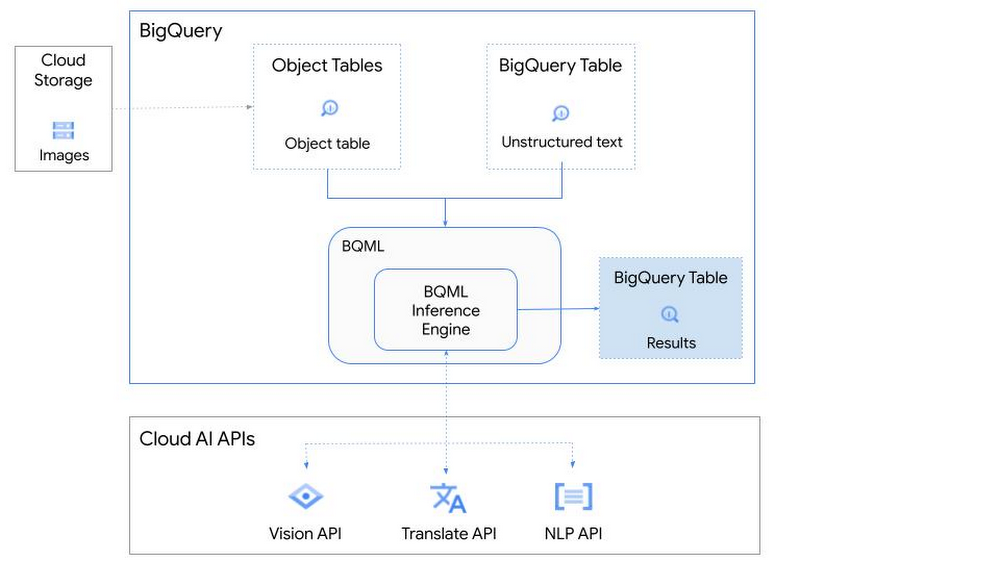
So, how does this work in practice? Let’s look at an example using images of movie posters

- We will define our pre-trained models for Vision AI, Translation AI and NLP AI in BigQuery ML.
- We’ll then use Vision AI to detect the text from some classic movie posters images.
- Next, we’ll use Translation AI to detect any foreign posters and translate them to a language of our choosing – English in this case.
- Finally, we’ll combine our unstructured data with structured data in BigQuery.
We’ll use the extracted movie titles from our movie posters to look up the viewer reviews from the BigQuery IMDB public dataset. We can then run sentiment analysis against these reviews using NLP AI.
Note: The BigQuery ML inference engine is currently in Preview. You will need to complete this enrollment form to have your project allowlisted for use with the BQML Inference Engine.
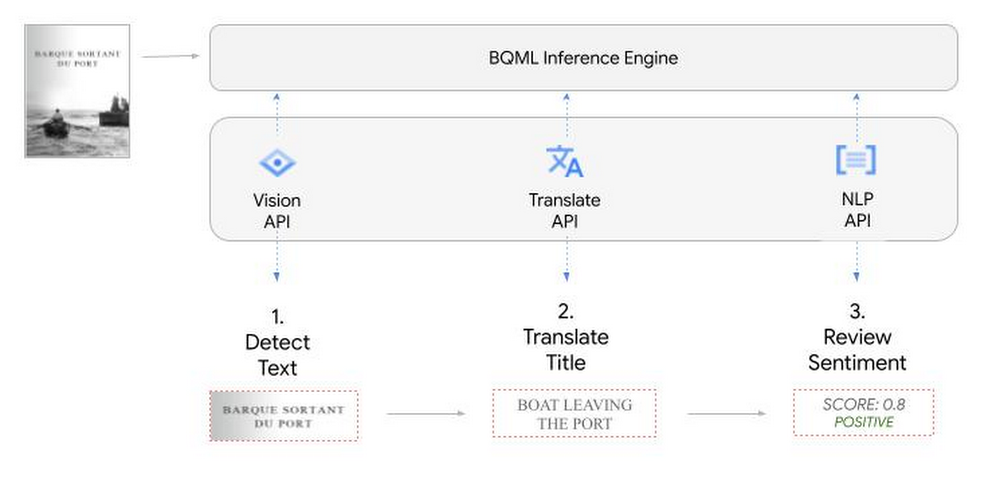
We’ll give examples of the BigQuery SQL needed to define your models and run your inferences. You’ll want to check out our notebook for a detailed guide on how to get this up and running in your Google Cloud project.
1. Define your AI Models in BigQuery
You will need to enable the APIs listed below, and also create a Cloud resource connection to enable BigQuery to interact with these services.
| API | Model Name |
| Vision AI API | Cloud_ai_vision_v1 |
| Translation AI API | Cloud_ai_translate_v3 |
| NLP AI API | Cloud_ai_natural_language_v1 |
You can then run the CREATE MODEL query for each AI service to create your pretrained models, replacing the model_name as required.
CREATE OR REPLACE MODEL
`{PROJECT_ID}.{DATASET_ID}.{VISION_MODEL_NAME}`
REMOTE WITH
CONNECTION `{PROJECT_ID}.{REGION}.{CONN_NAME}`
OPTIONS ( remote_service_type = '<model_name>' );
2. Use the Vision AI API to detect text in images stored in Cloud Storage
You will need to create an object table for your images in Cloud Storage. This read-only object table provides metadata for images stored in Cloud Storage:
CREATE OR REPLACE EXTERNAL TABLE
`{PROJECT_ID}.{DATASET_ID}.{OBJECT_TABLE_NAME}`
WITH
CONNECTION `{REGION}.{CONN_NAME}`
OPTIONS (object_metadata = 'SIMPLE', uris = ['{BUCKET_LOCATION}/*']);
To detect the text from our posters, you can then use ML.ANNOTATE_IMAGE and specify the text_detection feature.
SELECT
       ml_annotate_image_result.full_text_annotation.text AS text_content,
       *
FROM
       ML.ANNOTATE_IMAGE(
         MODEL `{PROJECT_ID}.{DATASET_ID}.{VISION_MODEL_NAME}`,
         TABLE `{DATASET_ID}.{OBJECT_TABLE_NAME}`,
         STRUCT(['TEXT_DETECTION'] AS vision_features));
A JSON response will be returned to BigQuery that includes the text content and language code of the text. You can parse the JSON to a scalar result using the dot annotation highlighted above.

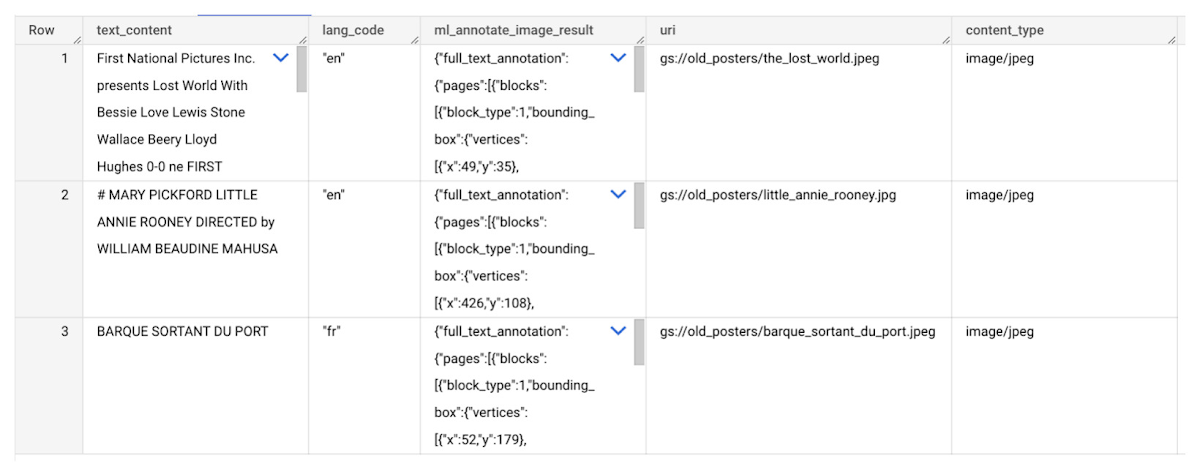
3. Use the Translation AI API to translate foreign movie titles
ML.TRANSLATE can now be used to translate the foreign titles we’ve extracted from our images into English. You just need to specify the target language and the table of the movie posters for translation:
SELECT
text_content,
STRING(ml_translate_result.translations[0].detected_language_code)
as original_language,
STRING(ml_translate_result.translations[0].translated_text)
as translated_title
FROM
  ML.TRANSLATE(
MODEL `{PROJECT_ID}.{DATASET_ID}.{TRANSLATE_MODEL_NAME}`,
TABLE `{DATASET_ID}.image_results`,
STRUCT('TRANSLATE_TEXT' as translate_mode, "en" as target_language_code));
Note: The table column with the text you want to translate must be named text_content:
The table of results will include json that can be parsed to extract both the original language and the translated text. In this case, the model has detected that title text is in French and has translated it to English:

4. Finally, use natural language processing (NLP) to run sentiment analysis against movie reviews
You can easily join inference results from your unstructured data with other BigQuery datasets to bolster your analysis. For example, we can now join the movie titles we extracted from our posters with thousands of movie reviews stored in BigQuery’s IMDB public dataset `bigquery-public-data.imdb.reviews`.
You can use ML.UNDERSTAND_TEXT with the analyze_sentiment feature to run sentiment analysis against some of these reviews to determine whether they are positive or negative:
SELECT
   primary_title, start_year, text_content AS review,
   FLOAT64(ml_understand_text_result.document_sentiment.score) AS score,
   FLOAT64(ml_understand_text_result.document_sentiment.magnitude) AS magnitude,
FROM
   ML.UNDERSTAND_TEXT(
     MODEL `{PROJECT_ID}.{DATASET_ID}.{NLP_MODEL_NAME}`,
           (
           SELECT
             primary_title, start_year, review AS text_content
           FROM
             `bigquery-public-data.imdb.title_basics` titles
           JOIN
             `bigquery-public-data.imdb.reviews` reviews
           ON
             reviews.movie_id = titles.tconst
           WHERE
             UPPER(titles.primary_title) = 'THE LOST WORLD' AND
             start_year = 1925
           ),
      STRUCT("analyze_sentiment" AS nlu_option)) ;
Note: The table column with the text you want to analyze must be named text_content:
The JSON response will include a score and magnitude. The score indicates the overall emotion of the text while the magnitude indicates how much emotional content is present:
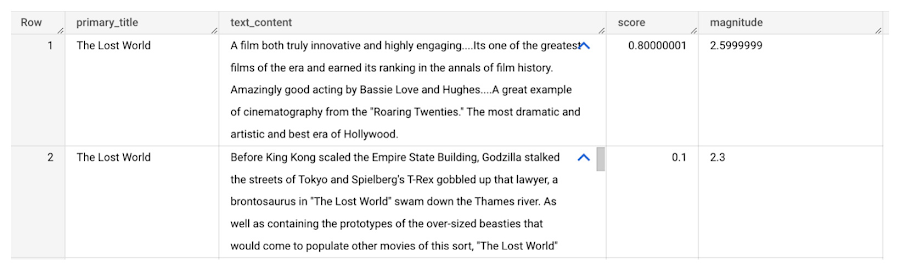
So, how did the Lost World compare with other movies that year?
To wrap up, we’ll compare the average review score of the 1925 Lost World movie to other movies released that year to see which was more popular. This can be done using familiar SQL analysis:
SELECT
 primary_title, start_year,
 AVG(FLOAT64(ml_understand_text_result.document_sentiment.score))AS av_score,
 AVG(FLOAT64(ml_understand_text_result.document_sentiment.magnitude)) AS av_magnitude
FROM
 ML.UNDERSTAND_TEXT(
   MODEL `{PROJECT_ID}.{DATASET_ID}.{NLP_MODEL_NAME}`,
         (
         SELECT
           primary_title, start_year, movie_id, review AS text_content
         FROM
           `bigquery-public-data.imdb.title_basics` titles
         JOIN
           `bigquery-public-data.imdb.reviews` reviews
         ON
           reviews.movie_id = titles.tconst
         WHERE
           start_year = 1925
         ),
   STRUCT("analyze_sentiment" AS nlu_option))
GROUP BY
   primary_title, start_year
ORDER BY
   av_score DESC;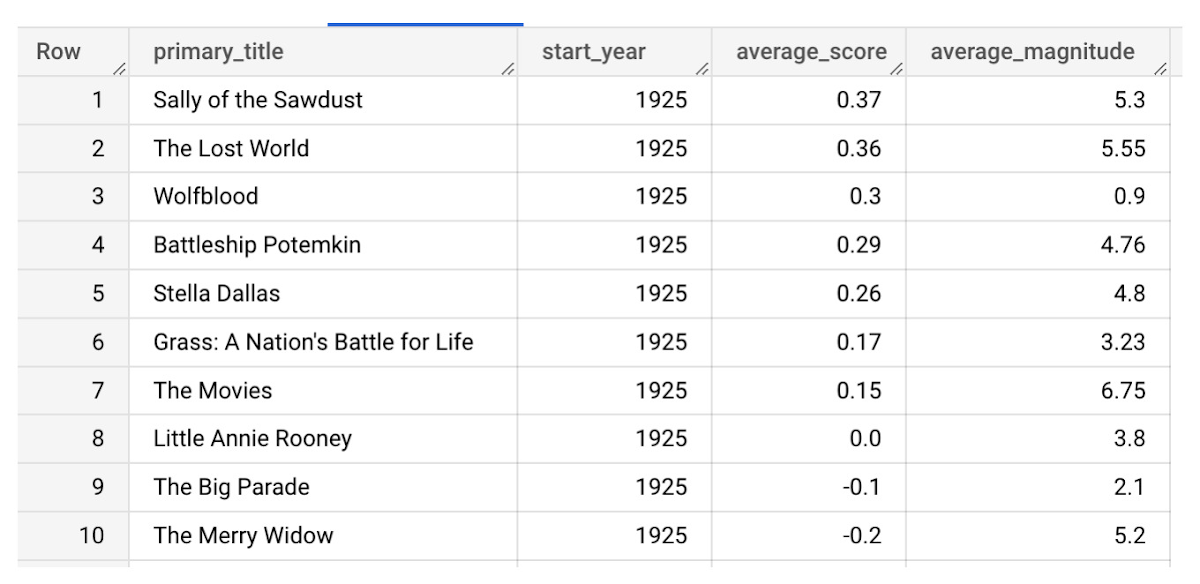
It looks like The Lost World narrowly missed out on the top spot to Sally of the Sawdust!
Want to learn more?
Check out our notebook for a step by step guide on using the BQML inference engine for unstructured data in Google Cloud. You can also check out our Cloud AI service table-valued functions overview page for more details. Curious about pricing? The BQML Pricing page gives a breakdown of how costs are applied across these services.
BigQuery ML for Sentiment Analysis: How to Make the Most of Your Data

1813
Of your peers have already read this article.
4:30 Minutes
The most insightful time you'll spend today!
Introduction
We recently announced BigQuery support for sparse features which help users to store and process the sparse features efficiently while working with them. That functionality enables users to represent sparse tensors and train machine learning models directly in the BigQuery environment. Being able to represent sparse tensors is a useful feature because sparse tensors are used extensively in encoding schemes like TF-IDF as part of data pre-processing in NLP applications and for pre-processing images with a lot of dark pixels in computer vision applications.
There are numerous applications of sparse features such as text generation and sentiment analysis. In this blog, we’ll demonstrate how to perform sentiment analysis with the space features in BigQuery ML by training and inferencing machine learning models using a public dataset. This blog also highlights how easy it is to work with unstructured text data on BigQuery, an environment traditionally used for structured data.
Using sample IMDb dataset
Let’s say you want to conduct a sentiment analysis on movie reviews from the IMDb website. For the benefit of readers who want to follow along, we will be using the IMDb reviews dataset from BigQuery public datasets. Let’s look at the top 2 rows of the dataset.
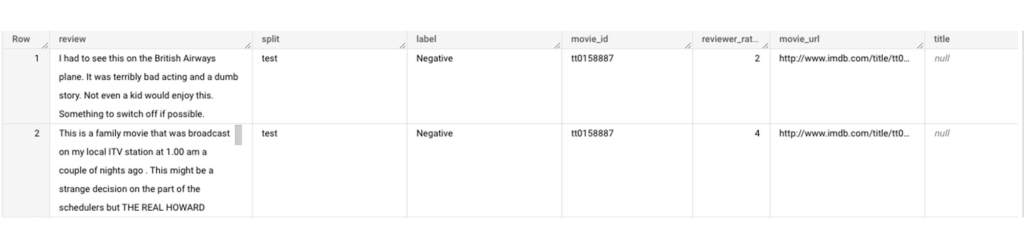
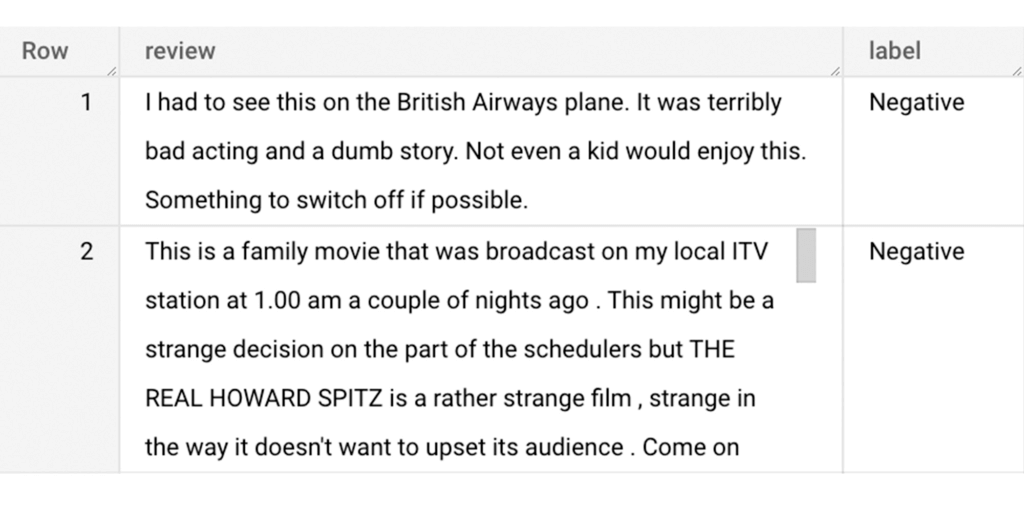
Although the reviews table has 7 columns, we only use reviews and label columns to perform sentiment analysis for this case. Also, we are only considering negative and positive values in the label columns. The following query can be used to select only the required information from the dataset.
SELECT
 review,
 label,
FROM
 `bigquery-public-data.imdb.reviews`
WHERE
 label IN ('Negative', 'Positive')
The top 2 rows of the result is as follows:
Methodology
Based on the dataset that we have, the following steps will be carried out:
- Build a vocabulary list using the review column
- Convert the review column into sparse tensors
- Train a classification model using the sparse tensors to predict the label (“positive” or “negative”)
- Make predictions on new test data to classify reviews as positive or negative.
Feature engineering
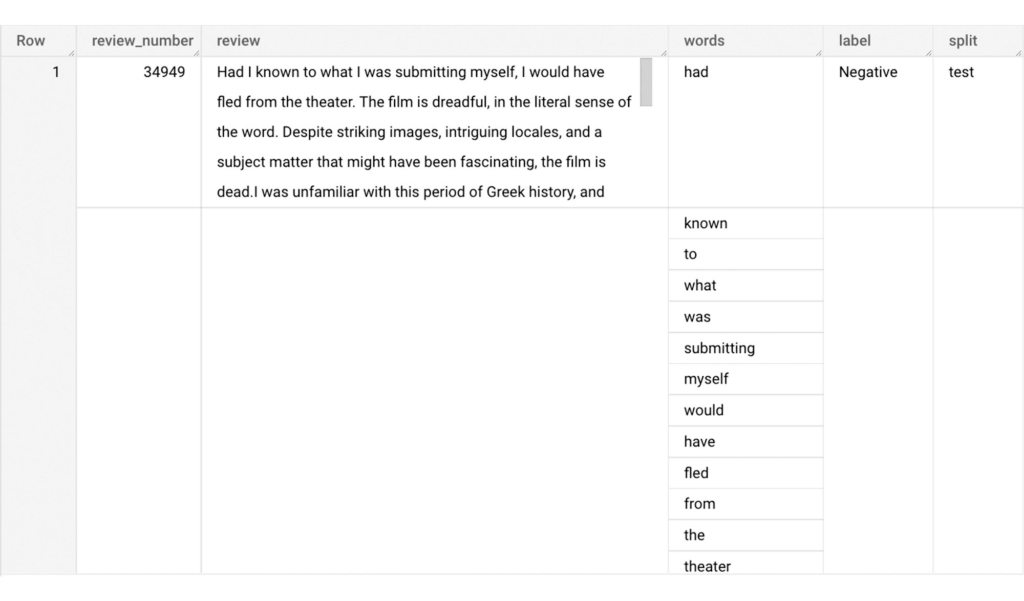
In this section, we will convert the text from the reviews column to numerical features so that we can feed them into a machine learning model. One of the ways is the bag-of-words approach where we build a vocabulary using the words from the reviews and select the most common words to build numerical features for model training. But first, we must extract the words from each review. The following code creates a dataset and a table with row numbers and extracted words from reviews.
-- Create a dataset named `sparse_features_demo` if doesn’t exist
CREATE SCHEMA IF NOT EXISTS sparse_features_demo;


-- Select unique reviews with only negative and positive labels
CREATE OR REPLACE TABLE sparse_features_demo.processed_reviews AS (
 SELECT
   ROW_NUMBER() OVER () AS review_number,
   review,
   REGEXP_EXTRACT_ALL(LOWER(review), '[a-z]{2,}') AS words,
   label,
   split
 FROM (
   SELECT
     DISTINCT review,
     label,
     split
   FROM
     `bigquery-public-data.imdb.reviews`
   WHERE
     label IN ('Negative', 'Positive')
 )
);
The output table from the query above should look like this:
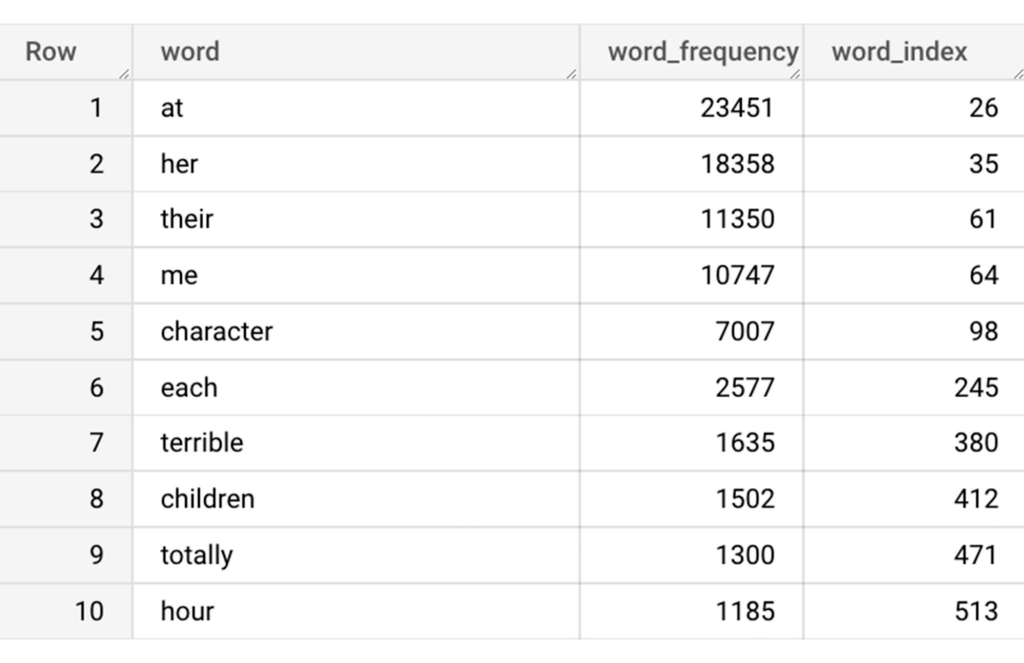
The next step is to build a vocabulary using the extracted words. The following code creates a vocabulary including word frequency and word index from reviews. For this case, we are going to select only the top 20,000 words to reduce the computation time.
-- Create a vocabulary using train dataset and select only top 20,000 words based on frequency
CREATE OR REPLACE TABLE sparse_features_demo.vocabulary AS (
 SELECT
   word,
   word_frequency,
   word_index
 FROM (
   SELECT
     word,
     word_frequency,
     ROW_NUMBER() OVER (ORDER BY word_frequency DESC) - 1 AS word_index
   FROM (
     SELECT
       word,
       COUNT(word) AS word_frequency
     FROM
       sparse_features_demo.processed_reviews,
       UNNEST(words) AS word
     WHERE
       split = "train"
     GROUP BY
       word
   )
 )
 WHERE
   word_index < 20000 # Select top 20,000 words based on word count
);
The following shows the top 10 words based on frequency and their respective index from the resulting table of the query above.
Creating a sparse feature
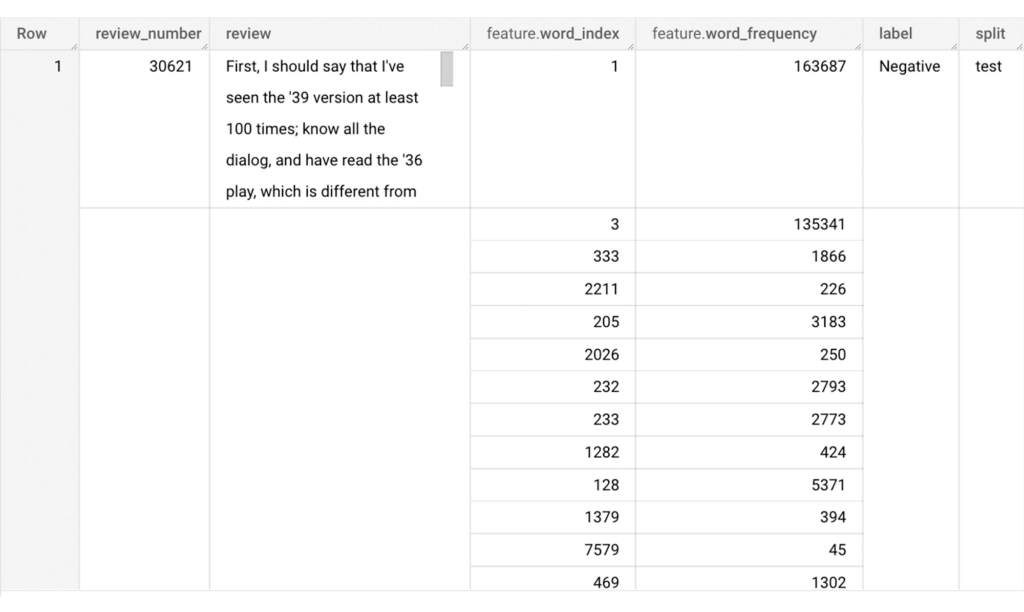
Now we will use the newly added feature to create a sparse feature in BigQuery. For this case, we aggregate word_index and word_frequency in each review, which generates a column as ARRAY[STRUCT] type. Now, each review is represented as ARRAY[(word_index, word_frequency)].
-- Generate a sparse feature by aggregating word_index and word_frequency in each review.
CREATE OR REPLACE TABLE sparse_features_demo.sparse_feature AS (
 SELECT
   review_number,
   review,
   ARRAY_AGG(STRUCT(word_index, word_frequency)) AS feature,
   label,
   split
 FROM (
   SELECT
     DISTINCT review_number,
     review,
     word,
     label,
     split
   FROM
     sparse_features_demo.processed_reviews,
     UNNEST(words) AS word
   WHERE
     word IN (SELECT word FROM sparse_features_demo.vocabulary)
 ) AS word_list
 LEFT JOIN
   sparse_features_demo.vocabulary AS topk_words
   ON
     word_list.word = topk_words.word
 GROUP BY
   review_number,
   review,
   label,
   split
);
Once the query is executed, a sparse feature named `feature` will be created. That `feature` column is an `ARRAY of STRUCT` column which is made of `word_index` and `word_frequency` columns. The picture below displays the resulting table at a glance.
Training a BigQuery ML model
We just created a dataset with a sparse feature in BigQuery. Let’s see how we can use that dataset to train with a machine learning model with BigQuery ML. In the following query, we will train a logistic regression model using the review_number, review, and feature to predict the label:
-- Train a logistic regression classifier using the data with sparse feature
CREATE OR REPLACE MODEL sparse_features_demo.logistic_reg_classifier
 TRANSFORM (
   * EXCEPT (
       review_number,
       review
     )
 )
 OPTIONS(
   MODEL_TYPE='LOGISTIC_REG',
   INPUT_LABEL_COLS = ['label']
 ) AS
 SELECT
   review_number,
   review,
   feature,
   label
 FROM
    sparse_features_demo.sparse_feature
 WHERE
   split = "train"
;
Now that we have trained a BigQuery ML Model using a sparse feature, we evaluate the model and tune it as needed.
-- Evaluate the trained logistic regression classifier
SELECT * FROM ML.EVALUATE(MODEL sparse_features_demo.logistic_reg_classifier);
The score looks like a decent starting point, so let’s go ahead and test the model with the test dataset.

-- Evaluate the trained logistic regression classifier using test data
SELECT * FROM ML.EVALUATE(MODEL sparse_features_demo.logistic_reg_classifier,
 (
   SELECT
     review_number,
     review,
     feature,
     label
   FROM
     sparse_features_demo.sparse_feature
   WHERE
     split = "test"
 )
);
The model performance for the test dataset looks satisfactory and it can now be used for inference. One thing to note here is that since the model is trained on the numerical features, the model will only accept numeral features as input. Hence, the new reviews have to go through the same transformation steps before they can be used for inference. The next step shows how the transformation can be applied to a user-defined dataset.
Sentiment predictions from the BigQuery ML model
All we have left to do now is to create a user-defined dataset, apply the same transformations to the reviews, and use the user-defined sparse features to perform model inference. It can be achieved using a WITH statement as shown below.
WITH
 -- Create a user defined reviews
 user_defined_reviews AS (
   SELECT
     ROW_NUMBER() OVER () AS review_number,
     review,
     REGEXP_EXTRACT_ALL(LOWER(review), '[a-z]{2,}') AS words
   FROM (
     SELECT "What a boring movie" AS review UNION ALL
     SELECT "I don't like this movie" AS review UNION ALL
     SELECT "The best movie ever" AS review
   )
 ),


 -- Create a sparse feature from user defined reviews
 user_defined_sparse_feature AS (
   SELECT
     review_number,
     review,
     ARRAY_AGG(STRUCT(word_index, word_frequency)) AS feature
   FROM (
     SELECT
       DISTINCT review_number,
       review,
       word
     FROM
       user_defined_reviews,
       UNNEST(words) as word
     WHERE
       word IN (SELECT word FROM sparse_features_demo.vocabulary)
   ) AS word_list
   LEFT JOIN
     sparse_features_demo.vocabulary AS topk_words
     ON
       word_list.word = topk_words.word
   GROUP BY
     review_number,
     review
 )


-- Evaluate the trained model using user defined data
SELECT review, predicted_label FROM ML.PREDICT(MODEL sparse_features_demo.logistic_reg_classifier,
 (
   SELECT
     *
   FROM
     user_defined_sparse_feature
 )
);
Here is what you would get for executing the query above:
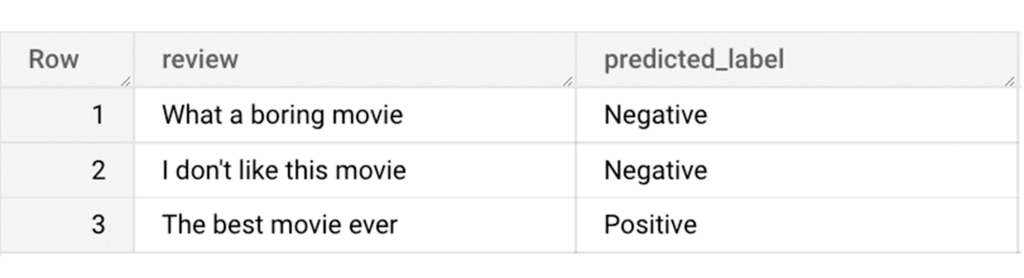
And that’s it! We just performed a sentiment analysis on the IMDb dataset from a BigQuery Public Dataset using only SQL statements and BigQuery ML. Now that we have demonstrated how sparse features can be used with BigQuery ML models, we can’t wait to see all the amazing projects that you would create by harnessing this functionality.
If you’re just getting started with BigQuery, check out our interactive tutorial to begin exploring.
Leading Verve Group’s CX Innovation with Google Cloud Vertex AI

905
Of your peers have already read this article.
2:30 Minutes
The most insightful time you'll spend today!
Verve Group is an ecosystem of demand and supply technologies fusing data, media, and technology to deliver results and growth to both advertisers and publishers – no matter the screen or location, no matter who, what, or where a customer is. Classifying massive amounts of this unstructured data at scale is the first step in helping to surface relevant, high-quality content to users—and that’s where natural language processing (NLP) comes in.
Verve Group uses the NLP API from Google Cloud’s Vertex AI to fetch data for their internal content classification quality verification and as an additional source for building categorization models. By leveraging the NLP API’s Content Classification models, which are now generally available and offer Google’s latest large language model (LLM) technology, Verve Group powers classification through an updated and expanded training data set with over 1,000 labels and support for 11 languages (Chinese, French, German, Italian, Japanese, Korean, Portuguese, Russia, Spanish, and Dutch join previously-available English).
Verve Group has been using Google Cloud’s NLP API since day one, because of both the ease of implementation and the quality compared to competing NLP products. With documentation that is “comprehensive and self-explanatory,” the NLP API “allows for fast adoption and implementation, from test models all the way to production,” said Rami Alanko, GM of Verve Group.
Leveraging the NLP API has facilitated Verve Group’s fast go-to-market motions by enabling its customers to quickly discover and classify new content. “Operating on a global level with tens of different regions and languages, we have still been able to maintain high quality for our product and high retention rates with our clients,” Rami shared. “In a recent client case, we achieved 82% improvement in CTR when optimized with content quality measurements enabled by the API. In another client case, we drove brand safety risk down to 0.16% from 4% thanks to classification quality. Along with the new functionalities of the Google NLP, I can only see this trend continuing to strengthen.”
Verve Group is excited to further expand their NLP use cases by leveraging the new Content Classification models, which have already helped them expand their classification inventory, improve the quality and performance of their quality verification for customers, and unlock new use cases for NLP. “Our classification model accuracy improved 41% using Google NLP as a verification partner,” said Rami.
Additionally, Verve Group is now using the API for metadata analysis on a large image database. “We browse the database and run the image metadata via our classification. This flow enables us to classify images reliably aligned with our standard classification. We pretty much use the same data flow for our runtime in-app textual content analysis, therefore allowing for close to real-time consumer engagement,” Rami added.
To learn more about how companies are leveraging NLP API from Google Cloud Vertex AI, click here, and to learn more about Google Cloud’s work with foundation models and generative AI, read The Prompt on Transform with Google Cloud.
Use No-Cost Solutions To Bring ML Into Your Medical Research

2495
Of your peers have already read this article.
3:30 Minutes
The most insightful time you'll spend today!
There’s a lot we can learn from combining technology with science to help support the development of amazing discoveries. By using an AI system to predict protein shapes, we have the potential to accelerate research in every field of biology. Inside every cell in your body, billions of tiny molecular machines are hard at work. They are what allow your eyes to detect light, your neurons to fire, and the ‘instructions’ in your DNA to be read.
These intricate machines are known as proteins.
The protein folding puzzle
Protein folding is something that occurs naturally so that proteins become biologically functional, but it’s a complex process that sometimes fails. For decades, scientists have been trying to find a method to reliably predict a protein’s structure from its sequence of amino acids so we can better understand how proteins work.
The challenge? There are over 200 million known distinct proteins. Each one has a unique 3D shape that determines how it works and what it does. Because there are so many sequences and determining their 3-D structure experimentally is so time-consuming and expensive, scientists only know the exact structure of a tiny fraction of the proteins. And these experimental methods still fall far short of reliable statistical accuracy.
Deepmind’s gigantic leap
In 2020, Alphabet’s artificial intelligence research arm, DeepMind, made a massive breakthrough in predicting protein structures using a deep learning model called AlphaFold.
AlphaFold is trained on publicly available data consisting of about 170,000 protein structures, and is the first computational method that can regularly predict the 3D shape of a protein, at scale with a high degree of accuracy.
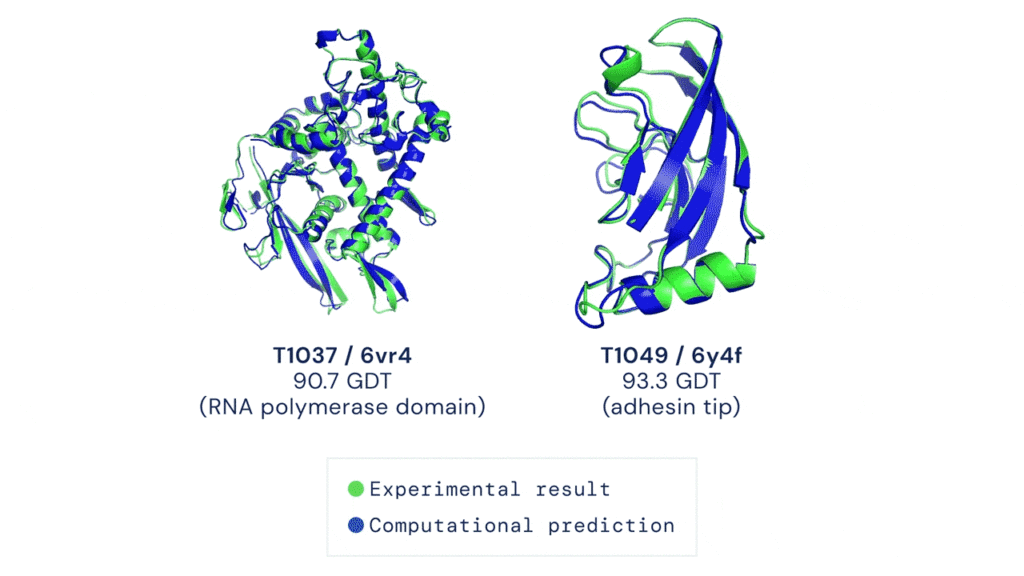
AlphaFold has already sent waves throughout the scientific community and has demonstrated the potential for AI to aid fundamental scientific discovery. Recently, Deepmind has made AlphaFold predictions available and open source to anyone. To date, more than 500,000 researchers from 190 countries have accessed the AlphaFold protein structure database to get closer to finding life-saving cures for diseases like Leishmaniasis and Chagas.
And now Deepmind has expanded the set of available predictions by more than 200 times (from nearly 1 million to nearly 214 million) to cover almost all cataloged proteins found in nature.
Open source predictions available on Google Cloud
Together, Google Cloud and Deepmind have released this dataset of predicted protein structures for plants, bacteria, animals, and other organisms as part of the Google Cloud Public Dataset program to enable bulk downloads at no cost. That means you can also create custom queries of the dataset using BigQuery!
Running AlphaFold on Google Cloud Vertex AI
Let’s say you want to run AlphaFold on your own in order to get protein structure predictions against your own set of data. There are a few challenges to keep in mind:
- You need to set up feature engineering against genetic sequence databases
- Preprocess data
- And run those inputs against pre-trained models
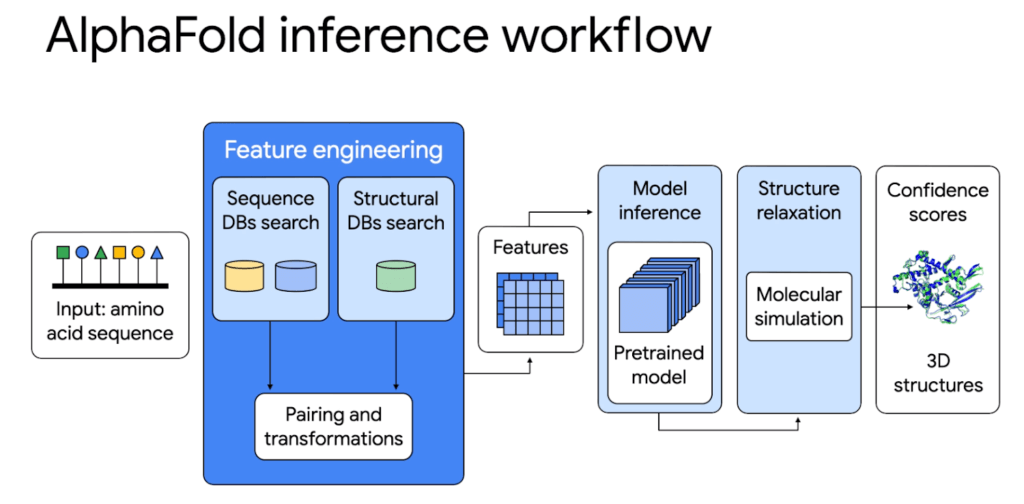
All of this requires allocating CPUs or GPUs, hosting a notebook environment, and scaling up for larger experiments. It’s hard to build and configure an on-premise system or cloud server to use AlphaFold whether you just want to try it out or run it at scale as a large organization.
That’s why we’re excited to share a deep integration between Google Cloud and Deepmind. On top of the Public Datasets program we have created end-to-end code samples for AlphaFold on Vertex AI, a managed end-to-end ML platform, to help address these challenges and speed up deployment. With AlphaFold on Vertex AI, you can manage a data science or machine learning workflow in a single development environment. You get access to pre-configured compute, storage, and end-to-end production notebooks. We have removed the heavy lifting needed to set up new ML environments, automate orchestration, and manage large clusters.
The AlphaFold inference workflow can be simplified with Vertex AI: from data preparation to feature engineering and deployment. Unlike the manual set up, the orchestrator makes it possible to parallelize steps, get predictions faster, and with better tracking.
Try it out first using Vertex AI Workbench
For those of you who want to try out a simplified version of AlphaFold, we have a Colab notebook that uses no templates (homologous structures) and a selected portion of the BFD database. You can deploy right on Vertex AI Workbench, which lets you specify a custom container image that we’ve already created for you. You’ll be able to:
- Configure access to genetic databases
- Configure GPU acceleration
- Search against genetic databases
- Use the pre-processed results as inputs to the AlphaFold model locally
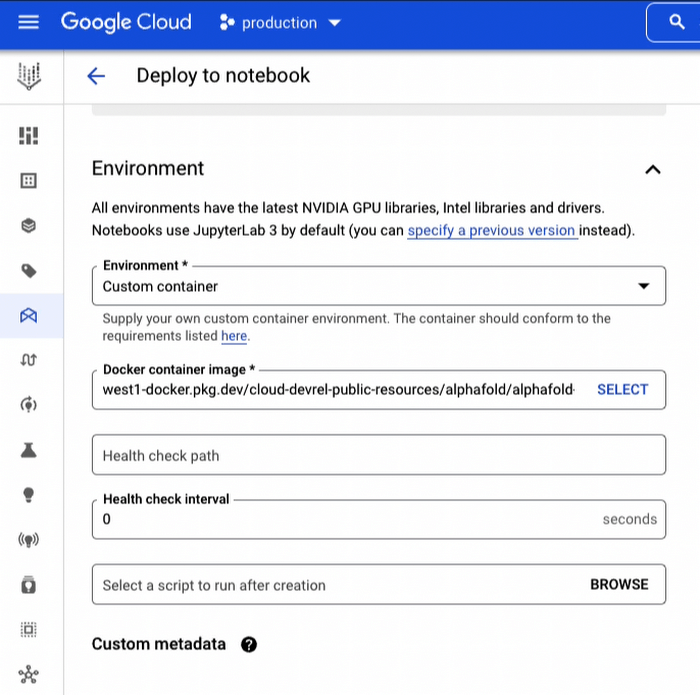
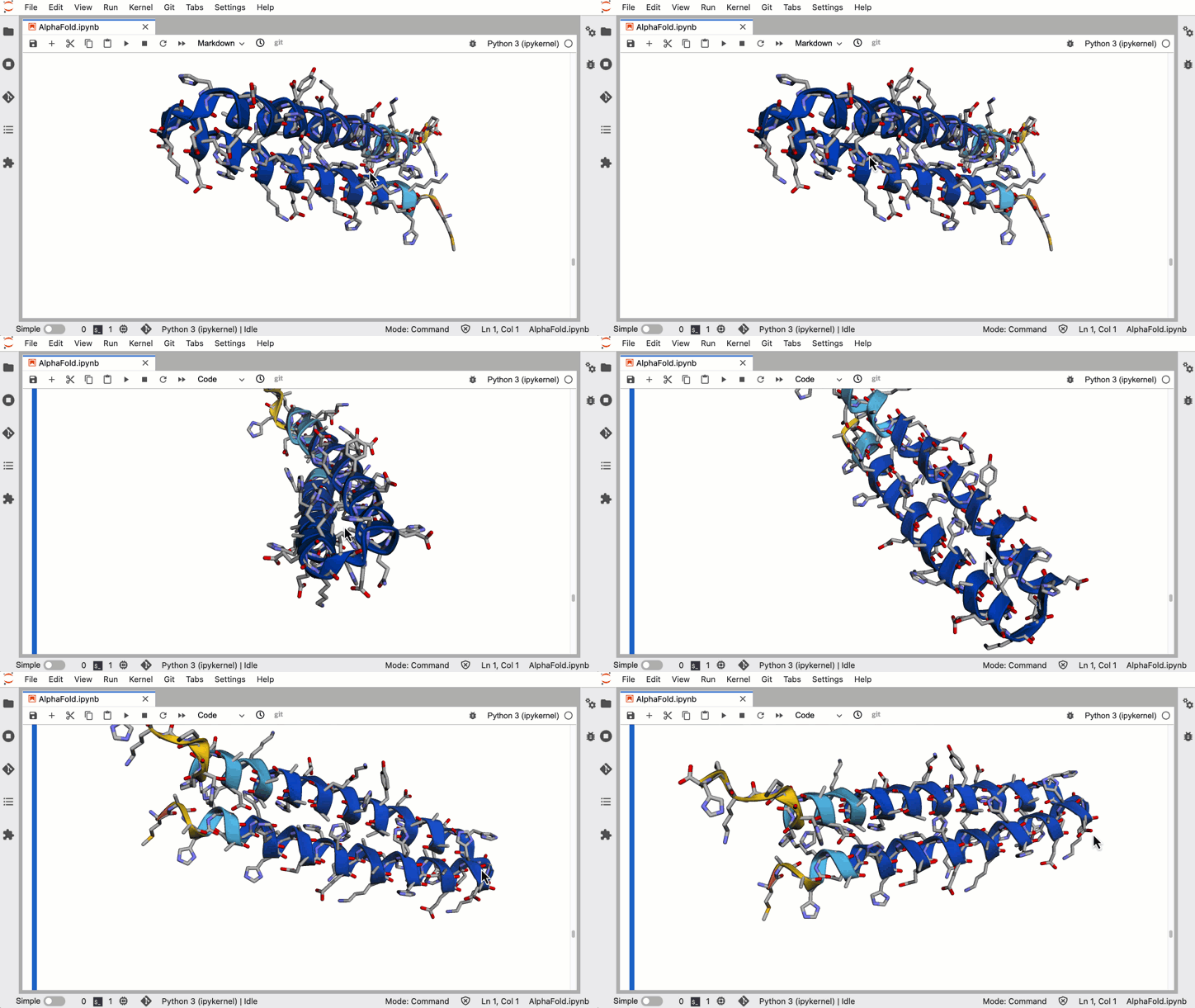
In a little over an hour you can harness the power of AlphaFold to generate 3-D protein structures from amino acid sequences.
Run hundreds of experiments reliably using Vertex AI Pipelines
For organizations that want to run a full blown version of AlphaFold for many protein folding experiments a week, you’ll want an ML pipeline orchestrator. The AlphaFold Batch Inference solution is a set of code samples that uses Vertex AI Pipelines to support hundreds of concurrent inference pipelines with higher throughput to help you run experiments at scale. The solution uses Vertex AI Pipelines as an orchestrator and runtime, Vertex ML Metadata for metadata and artifacts, and Cloud Filestore to manage databases.
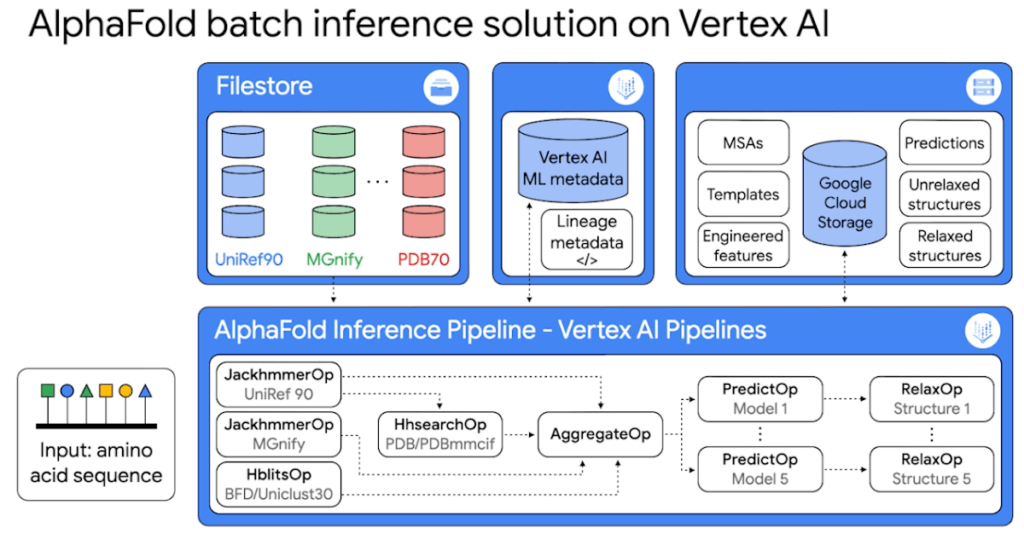
Because it’s built on Vertex AI Pipelines, you can automate, monitor, and experiment with interdependent parts of an ML workflow. The minimized inference elapsed times mean what normally would take you days, can now take you hours.
The solution includes two example pipelines:
1. The universal pipeline solution mirrors the exact logic in DeepMind’s open source inference script but decoupled into discrete tasks so you can run the same experiments faster, more efficiently, and with better tracking.
2. The customized pipeline solution shows you how to further optimize the inference workflow by parallelizing feature engineering steps so you can plug in your own database sources.
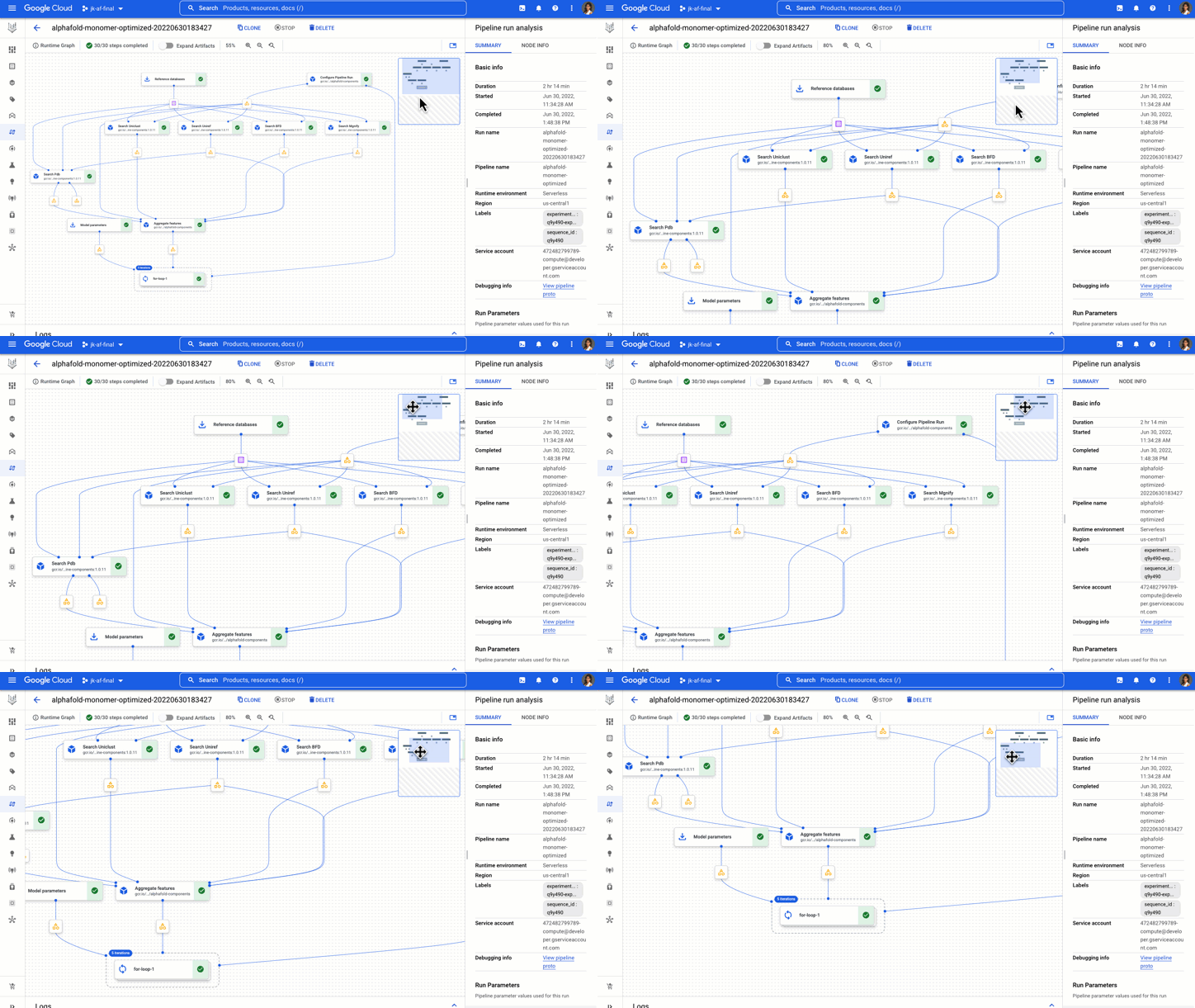
You get example components, pipelines, and notebooks to start, analyze, and recompile pipelines on different GPUs.
The AlphaFold Vertex AI Workbench solution is great for experimental use, while the AlphaFold Batch Inference solution on Vertex AI Pipelines is great for doing protein folding at scale with a strong process for reproducibility and tracking.
Now go forth and save the world!
Okay maybe that’s a bit hyperbolic, but this is inspiring stuff! What started as a 50 year challenge, to the discovery of AlphaFold, to being able to run it on Google Cloud, researchers, developers, and science enthusiasts now have access to one of the most pivotal advancements in the medical world. Even a non-specialist can easily use a Vertex AI notebook to exercise a simplified version of AlphaFold. The next answers to the mysteries of life and discovery of disease treatments have never felt more attainable. With these no-cost solutions to run AlphaFold on Vertex AI and the Public Dataset, you can help propel us in this worldwide endeavor.
Learn more about healthcare and life sciences solutions on Google Cloud here.
If you have feedback or want to share your experience with me, reach out to me at @stephr_wong.

3397
Of your peers have already listened to this podcast
30:54 Minutes
The most insightful time you'll spend today!
AI-as-a-Service is Here. It’s Really Almost Plug-and-Play
As a customer experience platform, Genesys helps clients nurture great relationships with customers, and creates seamless user journeys across all channels and devices. Its technologies are used by more than 10,000 companies in over 100 countries, making Genesys the top provider of its kind for 25 years in a row.
To improve data efficiency and communication across the company, Genesys turned to Analytics Pros, a digital analytics agency. Together, they used the power of Google Data Studio to transform the way teams across Genesys accessed and used data.
Communicating With Data
The marketing and product teams at Genesys had always been passionate about using data to optimize their user experience and marketing channels. But the problem was showing the data. The different offices and executives around the world had trouble logging in to view the data—and once they did, the reports were intimidating and confusing.
After learning more about the capabilities of Data Studio, Genesys decided to run a pilot project. Analytics Pros helped the company combine multiple data sets into self-service, fully-customizable dashboards on Data Studio. And it was a huge success. Regional teams were thrilled to have meaningful dashboards, and even executives started using and sharing reports.
More Relevant Stories for Your Company

Google Cloud’s Firebase Realtime Database and BigQuery AllowsCastbox to Ramp Up Customer Experience
Demand for spoken audio content such as podcasts remains robust despite the proliferation of video services and other entertainment options for consumers. Shibin Li, Co-founder of Castbox, credits growth of the global podcast platform to the following: speed and availability, market-leading features, the proliferation of smart devices to deliver audio content,
Trend 2: Google Research on Machine Learning Themes for 2022 and Beyond!
Trend 2: Continued Efficiency Improvements for MLImprovements in efficiency — arising from advances in computer hardware design as well as ML algorithms and meta-learning research — are driving greater capabilities in ML models. Many aspects of the ML pipeline, from the hardware on which a model is trained and executed

Reasons to Leverage Vertex AI Custom Training Service
At one point or another, many of us have used a local computing environment for machine learning (ML). That may have been a notebook computer or a desktop with a GPU. For some problems, a local environment is more than enough. Plus, there's a lot of flexibility. Install Python, install




Satellites Can Help Map Carbon Emissions By Looking at Images of Power Plants!
Did you know that Satellites can now help track power plants and determine if they are on or off? And did also know that compute processing that classifies over 59 trillion bytes of data from over 11,000 sensors from 300 satellites is done on on Google Cloud? Google Cloud's sustainability
