





Global Communication Made Easy with Translation Hub

2509
Of your peers have already read this article.
3:30 Minutes
The most insightful time you'll spend today!
Hello! ¡Hola! 你好! नमस्ते! Bonjour! Being greeted in your own language can instantly put a smile on your face, and organizations around the world recognize that messages become more inclusive and powerful when translated into many languages.
As the Head of Product Management for Translation AI at Google Cloud, I am always looking to make our user’s lives easier when it comes to language tools—like Google Cloud’s Document Translation API, which has been used to translate over 2.5 billion documents across Google Translate and our Cloud customers.
But during my time working on translation products, I have seen enterprise users making compromises, like sacrificing cost and speed of translation for quality, or paying much more for high-quality translations and making peace with the slow turnaround times and high costs. That’s why we are excited to see momentum building behind Translation Hub, which launched earlier this year. Built to address organizations’ localization and translation challenges and delight users with an incredibly intuitive and administratively simple offering, Translation Hub makes it easy to translate content at scale—users just need to select the files to be translated, choose the output languages, and then they’re off and running.
In this article, we’ll take a closer look at Translation Hub’s powerful features, and the ways it is helping customers do more with their content.
Enterprise translation, reimagined: fast, lean, and intuitive
Translation Hub is a fully-managed, self-serve translation offering, powered by Google AI and built for the enterprise. With Translation Hub, businesses can instantaneously translate content into 135 languages with a single click, via an intuitive interface that integrates human reviews (i.e., a “human in the loop”) where required.
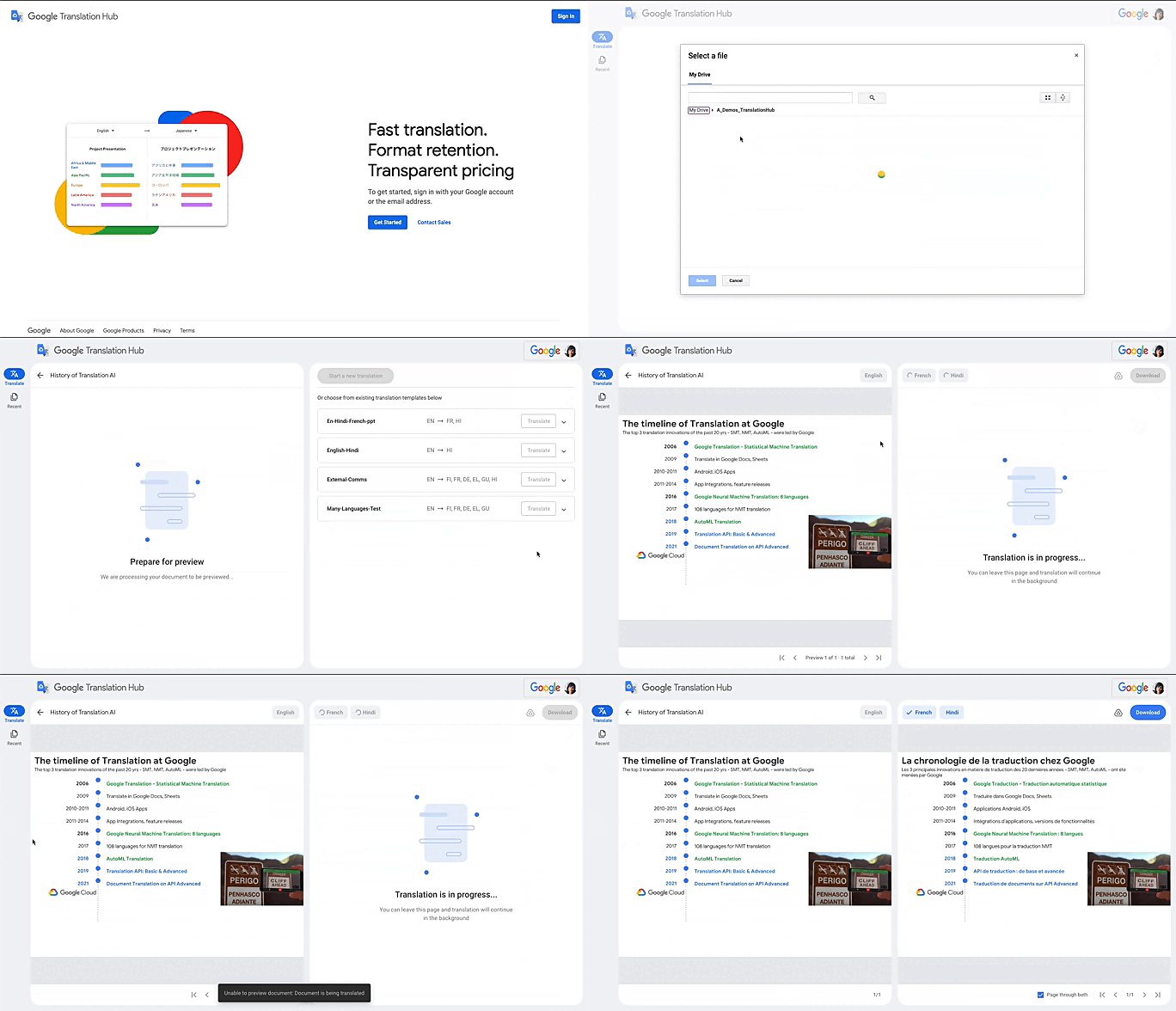
Translation Hub is designed to be both easy to manage and use. Each organization’s Translation Hub administrator uses the Google Cloud console to onboard and manage business users, typically by adding their email, which triggers an invite to the business user. Once a business user is added, they can sign in and start requesting translations and post-editing reviews.
With advanced features like “Glossary” and “Custom Translation Models (AutoML Translation),” Translation Hub makes it easy for enterprises to control the terminology and inject domain-specific context to meet their unique needs. Furthermore, Translation Hub ensures that organizations own their Translation Memory, for use in future translations or to leverage as a rich, human-validated source of training data for custom translation models (e.g., AutoML Translation). For example, when a user edits a phrase or segment through Translation Hub, this is immediately captured and used in the next translation for all future users who initiate translation where the same content or segment appears.
One of my favorite features is that Translation Hub preserves the layout and format of documents, saving both time and money. And while Translation Hub works with Google Drive (you can ingest and export documents to Drive) and is compatible with all our Google Workspace content sources (e.g., Slides, Docs etc.), it also supports many of the most commonly used formats, like documents and presentations created in Microsoft Office, and scanned and native PDFs.
Organizations need to be able to share the output of AI-powered translation with localization teams or agencies, for review. They need to save time by leveraging glossaries or customer machine learning (ML) models. They need these capabilities in one cohesive platform—and they need all of this to be user-friendly for all kinds of business users. It’s the difference between being able to automate translations in a few scenarios and being able to translate at scale. Google Cloud’s mission is to accelerate every organization’s ability to digitally transform, and with Translation Hub, our customers can leverage the best of AI for their content translations without sacrificing speed, quality or cost.
All of Google’s Translation Innovations within a single product
Translation Hub uses Google Cloud’s Translation API, AutoML Translation, and innovations in Neural Machine Translation Quality Prediction and Translation Memory—all technologies we’ve put to good use inside Google. For example, our localization teams have realized more than $80 million in cost avoidance and savings since 2021, using Google Cloud AutoML Translation and localization expertise.
“In just three months of using Translation Hub and AutoML translation models, we saw our translated page count go up by 700% and translation cost reduced by 90%,” said Murali Nathan, digital innovation and employee experience lead, at materials science company Avery Dennison. “Beyond numbers, Google’s enterprise translation technology is driving a feeling of inclusion among our employees. Every Avery Dennison employee has access to on-demand, general purpose, and company-specific translations. English language fluency is no longer a barrier, and our employees are beginning to broadly express themselves right in their native language.”
To get started with Translation Hub, visit our solution page, and for a deep dive, check out this Google Next ‘22 session, including more details about Avery Dennison’s use case.
SystemsResearch@Google (SRG) to Revamp the Future of Hyperscaler Systems

2993
Of your peers have already read this article.
2:00 Minutes
The most insightful time you'll spend today!
For over two decades, Google has helped lead the invention of modern cloud systems—defining, designing and deploying warehouse-scale computing as the foundation for reliable, performant, and secure global-scale information services delivered to billions of users around the world. This leadership involves significant innovation across a broad range of systems technologies, including distributed systems, storage systems, databases, analytics, operating systems, wide area and data center networking, cluster computing, ML, video acceleration and more.
Today, we are announcing a significant step in continuing Google’s tradition of innovation and charting its path into the future: the formation of SystemsResearch@Google (SRG). SRG will be a new research team, positioned in the heart of Google’s Cloud and Infrastructure engineering organization, with the mission of shaping the future of hyperscaler systems design for Google and its ecosystem. It is focused on inventing, incubating, and infusing new concepts, designs, and technologies into Google’s applications, systems, and data centers. The team’s position will allow seamless engagement with engineering and product teams, enabling joint exploration in concert with transformative workloads. Beyond Google, the SRG team will look to forge strong relationships with external research communities working on the most pressing systems-research problems.
Critical research at a pivotal time
We are at a time of enormous transition and opportunity, as nearly all large-scale computing is moving to cloud infrastructure, classical technology trends are hitting limits, new programming paradigms and usage patterns are taking hold, and most levels of systems design are being restructured. We are seeing wholesale change with the introduction of new applications around ML training and real-time inference to massive-scale data analytics and processing workloads fed by globally connected edge and cellular devices. This is all happening while the performance and efficiency gains we’ve relied on for decades are slowing dramatically from generation to generation. And while reliability is more important than ever as we deploy societally-critical infrastructure, we are challenged by increasing hardware entropy as underlying components approach angstrom scale manufacturing processes and trillions of transistors.
In the last twenty years, much of the world’s population has gained real-time access to the world’s information and to one another in ways that were previously the stuff of science fiction. The next decade will see computing and associated capabilities undergo an even more profound transformation, bringing real-time insights, sensing, and actuation to trillions of network-connected devices spanning all of the world’s population. Doing so will require fundamental advances in security, reliability, programming models, data analysis, systems for machine learning, networking, storage systems, hardware architecture, and software systems.
SystemsResearch@Google will be co-led by David Culler and Hank Levy, who bring a combination of academic and industrial experience, plus a long history of successful and impactful research in computer systems. Culler is the former Chair of EECS at UC Berkeley, where he worked to create the Division of Data Sciences and became its founding Dean. His research has focused on parallel architectures, clusters, embedded wireless networks, planetary-scale internet services, and sustainability design. He was the founding faculty director of Intel Research Berkeley, co-founded two startups, and worked with Sun Microsystems for a decade. Levy is the former Chair of Computer Science & Engineering at University of Washington, where he worked to create the Paul G. Allen School and became its founding Director. His research has focused on operating systems, distributed systems, computer architecture, and hardware multithreading. Before UW, Levy spent a decade at Digital Equipment Corporation (DEC), where he worked on operating systems and early-generation clustered computer systems; he has also co-founded two startups. Culler and Levy are both Members of the National Academy of Engineering and Fellows of the IEEE and the ACM.
SRG will be located across sites in Google’s Bay Area and Seattle facilities. We are currently building the SRG team, bringing together leading networked systems thinkers from around the world and inside Google. If you are interested in learning more please reach out to us at systemsresearch@google.com.
4 Methods How AI/ML Boosts Innovation and Reduces Costs

2939
Of your peers have already read this article.
2:30 Minutes
The most insightful time you'll spend today!
“Cloud Wisdom Weekly: for tech companies and startups” is a new blog series we’re running this fall to answer common questions our tech and startup customers ask us about how to build apps faster, smarter, and cheaper. In this installment, we explore how to leverage artificial intelligence (AI) and machine learning (ML) for faster innovation and efficient operational growth.
Whether they’re trying to extract insights from data, create faster and more efficient workflows via intelligent automation, or build innovative customer experiences, leaders at today’s tech companies and startups know that proficiency in AI and ML is more important than ever.
AI and ML technologies are often expensive and time-consuming to develop, and the demand for AI and ML experts still largely outpaces the existing talent pool. These factors put pressure on tech companies and startups to allocate resources carefully when considering bringing AI/ML into their business strategy. In this article, we’ll explore four tips to help tech companies and startups accelerate innovation and reduce costs with AI and ML.
4 tips to accelerate innovation and reduces costs with AI and ML
Many of today’s most innovative companies are creating services or products that couldn’t exist without AI—but that doesn’t mean they’re building their AI and ML infrastructure and pipelines from scratch. Even for startups whose businesses don’t directly revolve around AI, injecting AI into operational processes can help manage costs as the company grows. By relying on a cloud provider for AI services, organizations can unlock opportunities to energize development, automate processes, and reduce costs.
1. Leverage pre-trained ML APIs to jumpstart product development
Tech companies and startups want their technical talent focused on proprietary projects that will make a difference to the business. This often involves the development of new applications for an AI technology, but not necessarily the development of the AI technology itself. In such scenarios, pre-trained APIs help organizations quickly and cost-effectively establish a foundation on which higher-value, more differentiated work can be layered.
For example, many companies building conversational AI into their products and services leverage Google Cloud APIs such as Speech-to-Text and Natural Language. With these APIs, developers can easily integrate capabilities like transcription, sentiment analysis, content classification, profanity filtering, speaker diarization, and more. These powerful technologies help organizations focus on creating products rather than having to build the base technologies.
See this article for examples of why tech companies and startups have chosen Google Cloud’s Speech APIs for use cases that range from deriving customer insights to giving robots empathetic personalities. For an even deeper dive, see
- our AI product page to explore other APIs, including Translation, Vision, and more;
- and the Google Cloud Skills Boost for ML APIs.
2. Use managed services to scale ML development and accelerate deployment of models to production
Pre-trained models are extremely useful, but in many cases, tech companies and startups need to create custom models to either derive insights from their own data or to apply new use cases to public data. Regardless of whether they’re building data-driven products or generating forecasting models from customer data, companies need ways to accelerate the building and deployment of models into their production environments.
A data scientist typically starts a new ML project in a notebook, experimenting with data stored on the local machine. Moving these efforts into a production environment requires additional tooling and resources, including more complicated infrastructure management. This is one reason many organizations struggle to bring models into production and burn through time and resources without moving the revenue needle.
Managed cloud platforms can help organizations transition from projects to automated experimentation at scale or the routine deployment and retraining of production models. Strong platforms offer flexible frameworks, fewer lines of code required for model training, unified environments across tools and datasets, and user-friendly infrastructure management and deployment pipelines.
At Google Cloud, we’ve seen customers with these needs embrace Vertex AI, our platform for accelerating ML development, in increasing numbers since it launched last year. Accelerating time to production by up to 80% compared to competing approaches, Vertex AI provides advanced end-to-end ML Ops capabilities so that data scientists, ML engineers, and developers can contribute to ML acceleration. It includes low-code features, like AutoML, that make it possible to train high performing models without ML expertise.
Over the first half of 2022, our performance tests found that the number of customers utilizing AI Workbench increased by 25x. It’s exciting to see the impact and value customers are gaining with Vertex AI Workbench, including seeing it help companies speed up large model training jobs by 10x and helping data science teams improve modeling precision from the 70-80% range to 98%.
If you are new to Vertex AI, check out this video series to learn how to take models from prototype to production. For deeper dives, see
- this article about Vertex AI’s role in an ambitious project to measure climate change with AI;
- BigQuery has built-in Machine Learning (ML) and Analytics that you can use to create no-code predictions using just SQL queries.
- this blog about how Vertex AI and BigQuery work together to make data analysis easier and more powerful;
- and this blog about Example-based explanations, one of our most recent updates to make model iteration more intuitive and efficient.
3. Harness the cloud to match hardware to use cases while minimizing costs and management overhead
ML infrastructure is generally expensive to build, and depending on the use case, specific hardware requirements and software integrations can make projects costly and complicated at scale. To solve for this, many tech companies and startups look to cloud services for compute and storage needs, attracted by the ability to pay only for resources they use while scaling up and down according to changing business needs.
At Google Cloud, customers share that they need the ability to optimize around a variety of infrastructure approaches for diverse ML workloads. Some use Central Processing Units (CPUs) for flexible prototyping. Others leverage our support for NVIDIA Graphics Processing Units (GPUs) for image-oriented projects and larger models, especially those with custom TensorFlow operations that must run partially on CPUs. Some choose to run on the same custom ML processors that power Google applications—Tensor Processing Units (TPUs). And many use different combinations of all of the preceding.
Beyond matching use cases to the right hardware and benefiting from the scale and operational simplicity of a managed service, tech companies and startups should explore configuration features that help further control costs. For example, Google Cloud features like time-sharing and multi-instance capabilities for GPUs — as well as features like Vertex AI Training Reduction Server — are built to optimize GPU costs and usage.
Vertex AI Workbench also integrates with the NVIDIA NGC catalog for deploying frameworks, software development kits and Jupyter Notebooks with a single click—another feature that, like Reduction Server, speaks to the ways organizations can make AI more efficient and less costly via managed services.
4. Implement AI for operations
Besides using pre-trained APIs and ML model development to develop and deliver products, startup and tech companies can improve operational efficiency, especially as they scale, by leveraging AI solutions built for specific business and operational needs, like contract processing or customer service.
Google Cloud’s DocumentAI products, for instance, apply ML to text for use cases ranging from contract lifecycle management to mortgage processing. For businesses whose customer support needs are growing, there’s Contact Center AI, which helps organizations build intelligent virtual agents, facilitate handoffs as appropriate between virtual agents and human agents, and generate insights from call center interactions. By leveraging AI to help manage operational processes, startups and tech companies can allocate more resources to innovation and growth.
Next steps toward an intelligent future
The tips in this article can help any tech company or startup find ways to save money and boost efficiency with AI and ML. You can learn more about these topics by registering for Google Cloud Next, kicking off October 11, where you’ll hear Google Cloud’s latest AI news, discussions, and perspectives—in the meantime, you can also dive into our Vertex AI quickstarts and BigQuery ML tutorials. And for the latest on our work with tech companies and startups, be sure to visit our Startups page.
Can Your Company Use Video AI? You’d Be Surprised at the Answer

5749
Of your peers have already read this article.
4:30 Minutes
The most insightful time you'll spend today!
Video AI is a powerful way to enable content discovery and engaging video experiences.
Here, try it out right now!
Google Cloud’s easy-to-access video AI solutions can accomplish a bunch of things. Here are a few:
Precise video analysis: Video Intelligence API automatically recognizes more than 20,000 objects, places, and actions in stored and streaming video. It also distinguishes scene changes and extracts rich metadata at the video, shot, or frame level. Use in combination with AutoML Video Intelligence to create your own custom entity labels to categorize content. Imagine being able to categorise hundreds of videos of customer interactions quickly to improve service training!
Recommended content: Build a content recommendation engine with labels generated by Video Intelligence API and a user’s viewing history and preferences. This will simplify content discovery for your users and guide them to the most relevant content that they want.
Simplify media management: Find value in vast archives by making media easily searchable and discoverable. Easily search your video catalog the same way you search text documents. Extract metadata that can be used to index, organize, and search your video content, as well as control and filter content for what’s most relevant.Imagine being able to locate insight in hundreds of enterprise videos to improve productivity and customer experience!
Easily create intelligent video apps: Gain insights from video in near real time using the Video Intelligence Streaming Video APIs, and trigger events based on objects detected. Build engaging customer experiences with highlight reels, recommendations, interactive videos, and more. Marketers, imagine being able to trigger a customer workflow, in real time, based on a live customer interactions.
Automate expensive workflows: Reduce time and costs associated with transcribing videos and generating closed captions, as well as flagging and filtering inappropriate content.
Content moderation: Identify when inappropriate content is being shown in a given video. You can instantly conduct content moderation across petabytes of data and more quickly and efficiently filter your content or user-generated content.
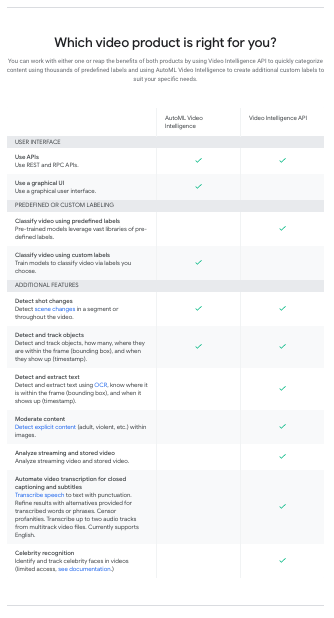
What can your organisation do with video AI?
Learn to Deploy Custom Models on Vertex AI

3034
Of your peers have already read this article.
2:00 Minutes
The most insightful time you'll spend today!
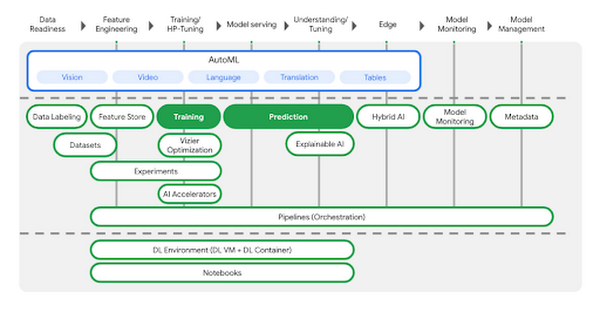
In May we announced Vertex AI, our new unified AI platform which provides options for everything from using pre-trained models to building your models with a variety of frameworks. In this post we’ll do a deep dive on training and deploying a custom model on Vertex AI. There are many different tools provided in Vertex AI, as you can see in the diagram below. In this scenario we’ll be using the products highlighted in green:
AutoML is a great choice if you don’t want to write your model code yourself, but many organizations have scenarios that require building custom models with open-source ML frameworks like TensorFlow, XGBoost, or PyTorch. In this example, we’ll build a custom TensorFlow model (built upon this tutorial) that predicts the fuel efficiency of a vehicle, using the Auto MPG dataset from Kaggle.
If you’d prefer to dive right in, check out the codelab or watch the two minute video below for a quick overview of our demo scenario: https://www.youtube.com/embed/bHoAXR26hWo?enablejsapi=1&
Environment setup
There are many options for setting up an environment to run these training and prediction steps. In the lab linked above, we use the IDE in Cloud Shell to build our model training application, and we pass our training code to Vertex AI as a Docker container. You can use whichever IDE you’re most comfortable working with, and if you’d prefer not to containerize your training code, you can create a Python package that runs on one of Vertex AI’s supported pre-built containers.
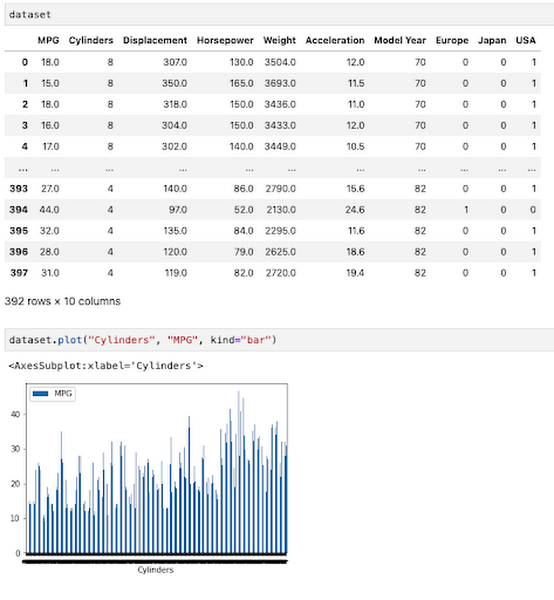
If you would like to use Pandas or another data science library to do exploratory data analysis, you can use the hosted Jupyter notebooks in Vertex AI as your IDE. For example, here we wanted to inspect the correlation between fuel efficiency and one of our data attributes, cylinders. We used Pandas to plot this relationship directly in our notebook.
To get started, you’ll want to make sure you have a Google Cloud project with the relevant services enabled. You can enable all the products we’ll be using in one command using the gcloud SDK:
gcloud services enable compute.googleapis.com \containerregistry.googleapis.com \aiplatform.googleapis.com
Then create a Cloud Storage bucket to store our saved model assets. With that, you’re ready to start developing your model training code.
Containerizing training code
Here we’ll develop our training code as a Docker container, and deploy that container to Google Container Registry (GCR). To do that, create a directory with a Dockerfile at the root, along with a trainer subdirectory containing a train.py file. This is where you’ll write the bulk of your training code:
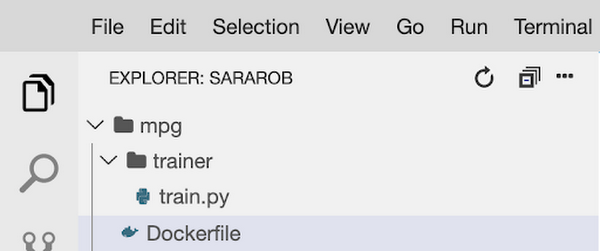
To train this model, we’ll build a deep neural network using the Keras Sequential Model API:
model = keras.Sequential([layers.Dense(64, activation='relu', input_shape=[len(train_dataset.keys())]),layers.Dense(64, activation='relu'),layers.Dense(1)])
We won’t include the full model training code here, but you can find it in this step of the codelab. Once your training code is complete, you can build and test your container locally. The IMAGE_URI in the snippet below corresponds to the location where you’ll deploy your container image in GCR. Replace $GOOGLE_CLOUD_PROJECT below with the name of your Cloud project:
IMAGE_URI="gcr.io/$GOOGLE_CLOUD_PROJECT/mpg:v1"docker build ./ -t $IMAGE_URIdocker run $IMAGE_URI
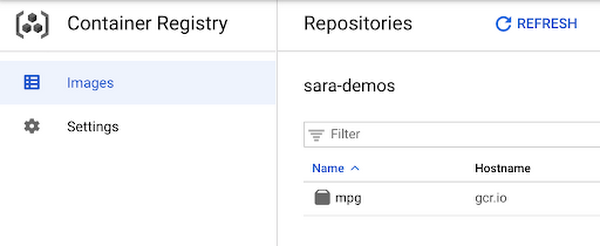
All that’s left to do is push your container to GCR by running docker push $IMAGE_URI. In the GCR section of your console, you should see your newly deployed container:
Running the training job
Now you’re ready to train your model. You can select the container you created above in the models section of the platform. You can also specify key details like the training method, compute preferences (GPUs, RAM, etc.) and hyperparameter tuning if required.
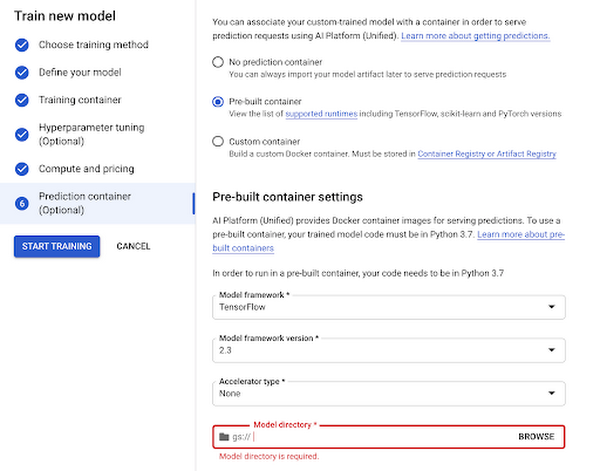
Now you can hand over training your model and let Vertex do the heavy lifting for you.
Deploy to endpoint
Next, let’s get your new model incorporated into your app or service. Once your model is done training you will see an option to create a new endpoint. You can test out your endpoint in the console during your development process. Using the client libraries, you can easily create a reference to your endpoint and get a prediction with a single line of code:
from google.cloud import aiplatformendpoint = aiplatform.Endpoint(endpoint_name="projects/YOUR-PROJECT-NUMBER/locations/us-central1/endpoints/YOUR-ENDPOINT-ID"). . .endpoint.predict(test_instances)
Start building today
Ready to start using Vertex AI? We have you covered for all your use cases spanning from simply using pre-trained models to every step of the lifecycle of a custom model.
- Use Jupyter notebooks for a development experience that combines text, code and data
- Fewer lines of code required for custom modeling
- Use MLOps to manage your data with confidence and scale
Get started today by trying out this codelab yourself or watching this one hour workshop.
Global Communication Made Easy with Translation Hub
2510
Of your peers have already read this article.
3:30 Minutes
The most insightful time you'll spend today!
Hello! ¡Hola! 你好! नमस्ते! Bonjour! Being greeted in your own language can instantly put a smile on your face, and organizations around the world recognize that messages become more inclusive and powerful when translated into many languages.
As the Head of Product Management for Translation AI at Google Cloud, I am always looking to make our user’s lives easier when it comes to language tools—like Google Cloud’s Document Translation API, which has been used to translate over 2.5 billion documents across Google Translate and our Cloud customers.
But during my time working on translation products, I have seen enterprise users making compromises, like sacrificing cost and speed of translation for quality, or paying much more for high-quality translations and making peace with the slow turnaround times and high costs. That’s why we are excited to see momentum building behind Translation Hub, which launched earlier this year. Built to address organizations’ localization and translation challenges and delight users with an incredibly intuitive and administratively simple offering, Translation Hub makes it easy to translate content at scale—users just need to select the files to be translated, choose the output languages, and then they’re off and running.
In this article, we’ll take a closer look at Translation Hub’s powerful features, and the ways it is helping customers do more with their content.
Enterprise translation, reimagined: fast, lean, and intuitive
Translation Hub is a fully-managed, self-serve translation offering, powered by Google AI and built for the enterprise. With Translation Hub, businesses can instantaneously translate content into 135 languages with a single click, via an intuitive interface that integrates human reviews (i.e., a “human in the loop”) where required.
Translation Hub is designed to be both easy to manage and use. Each organization’s Translation Hub administrator uses the Google Cloud console to onboard and manage business users, typically by adding their email, which triggers an invite to the business user. Once a business user is added, they can sign in and start requesting translations and post-editing reviews.
With advanced features like “Glossary” and “Custom Translation Models (AutoML Translation),” Translation Hub makes it easy for enterprises to control the terminology and inject domain-specific context to meet their unique needs. Furthermore, Translation Hub ensures that organizations own their Translation Memory, for use in future translations or to leverage as a rich, human-validated source of training data for custom translation models (e.g., AutoML Translation). For example, when a user edits a phrase or segment through Translation Hub, this is immediately captured and used in the next translation for all future users who initiate translation where the same content or segment appears.
One of my favorite features is that Translation Hub preserves the layout and format of documents, saving both time and money. And while Translation Hub works with Google Drive (you can ingest and export documents to Drive) and is compatible with all our Google Workspace content sources (e.g., Slides, Docs etc.), it also supports many of the most commonly used formats, like documents and presentations created in Microsoft Office, and scanned and native PDFs.
Organizations need to be able to share the output of AI-powered translation with localization teams or agencies, for review. They need to save time by leveraging glossaries or customer machine learning (ML) models. They need these capabilities in one cohesive platform—and they need all of this to be user-friendly for all kinds of business users. It’s the difference between being able to automate translations in a few scenarios and being able to translate at scale. Google Cloud’s mission is to accelerate every organization’s ability to digitally transform, and with Translation Hub, our customers can leverage the best of AI for their content translations without sacrificing speed, quality or cost.
All of Google’s Translation Innovations within a single product
Translation Hub uses Google Cloud’s Translation API, AutoML Translation, and innovations in Neural Machine Translation Quality Prediction and Translation Memory—all technologies we’ve put to good use inside Google. For example, our localization teams have realized more than $80 million in cost avoidance and savings since 2021, using Google Cloud AutoML Translation and localization expertise.
“In just three months of using Translation Hub and AutoML translation models, we saw our translated page count go up by 700% and translation cost reduced by 90%,” said Murali Nathan, digital innovation and employee experience lead, at materials science company Avery Dennison. “Beyond numbers, Google’s enterprise translation technology is driving a feeling of inclusion among our employees. Every Avery Dennison employee has access to on-demand, general purpose, and company-specific translations. English language fluency is no longer a barrier, and our employees are beginning to broadly express themselves right in their native language.”
To get started with Translation Hub, visit our solution page, and for a deep dive, check out this Google Next ‘22 session, including more details about Avery Dennison’s use case.
More Relevant Stories for Your Company

Google Cloud Helps Northwell Health to Boost Caregiver Productivity and Access to Right Care Using AI
Lung cancer is the leading cause of cancer death in the United States and like any cancer, early detection is crucial to survival. Screening at-risk populations is an important part of reducing mortality, and if concerning nodules are found on imaging, further testing may be required. Today, we’ll share how

AI and Machine Learning Get Marketers One Step Closer to Relevance at Scale
Artificial intelligence and machine learning are already transforming the technological landscape. From digital assistants to image-recognition software to self-driving cars, what was once the stuff of science fiction is now becoming a reality. But what exactly does it mean for marketing and advertising executives? It could get us closer to

Customer Voices: How Firms from Across Industries Leverage Google Cloud
From powering everyday operations and accelerating application innovation, to providing tools for specific business needs and executing on big ideas, to advancing the security of technology solutions, companies from across industries have leveraged Google Cloud for business benefits. Companies from across industries have turned to Google Cloud for transforming their

UKG Ready: Meeting the Needs of Complex Machine Learning Models and Distributed Data Sets
Business ProblemUKG Ready primarily operates in the Small and Medium Business (SMB) space, so inherently many customers are forced to operate and make key business decisions with less Workforce Management (WFM) / Human Capital Management (HCM) data. In addition to volume, SMB lacks the variety of data needed to create
