





Demystifying Transactional Locking in Cloud Spanner

3008
Of your peers have already read this article.
3:30 Minutes
The most insightful time you'll spend today!
Cloud Spanner is a fully managed relational database with unlimited scale, strong consistency, and up to 99.999% availability. It is designed for highly concurrent applications that read and update data, for example, to process payments or for online game play. To ensure the consistency across multiple concurrent transactions, Cloud Spanner uses a combination of shared locks and exclusive locks to control access to the data. In this blog, we will explore the different types of locks present in Cloud Spanner. We will also discuss some common cases of transactional locking in Cloud Spanner, and what to look out for to detect when these cases might be occurring.
What is a lock?
Before we get into the details, let us first quickly recap and define a lock in the context of database systems.
“Locks” in databases are a mechanism for concurrency control. Locks are typically held on a resource, which may mean rows, columns, tables or even entire databases. When a resource is locked by a transaction, it cannot be accessed by another transaction until the lock is released.
Timeline view of transactions
Before we proceed to discuss transaction locking in the context of read and read-write transactions, it is important to recap the timeline view of the transactions in Spanner.
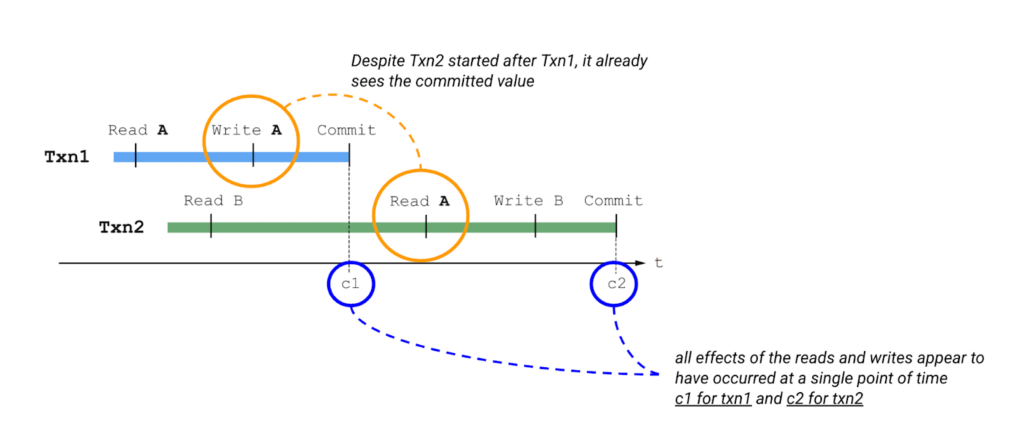
Please also keep in mind the concept of write buffering in transactions, since we refer to it in the Common Transaction Patterns section below. Write buffering refers to the Cloud Spanner server(s) accepting the writes. Note that these writes are not durable until a commit has been performed.
Types of locks in Cloud Spanner
Cloud Spanner operations acquire locks when the operations are part of a read-write transaction. Read-only transactions do not acquire locks. Unlike other approaches that lock entire tables or rows, the granularity of transactional locks in Spanner is a cell, or the intersection of a row and a column. This means that two transactions can read and modify different columns of the same row at the same time. To maximize the number of transactions that have access to a particular data cell at a given time, Cloud Spanner uses different lock modes.
Here is a brief description of the different lock types. Learn more about each lock type in the Cloud Spanner documentation.
- ReaderShared Lock – Acquired when a read-write transaction reads data.
- WriterShared Lock – Acquired when a read-write transaction writes data without reading it.
- Exclusive Lock – Acquired when a read-write transaction which has already acquired a ReaderShared lock tries to write data after the completion of read. It is a special case for a transaction to hold both the ReaderShared lock and WriterShared lock at the same time.
- WriterSharedTimestamp Lock – Special type of lock acquired when inserting new rows with the transaction’s commit timestamp as part of the primary key.
Handling Lock Conflicts
Since read-write transactions use locks to execute atomically, they run the risk of deadlocking. For example, consider the following scenario: transaction Txn1 holds a lock on record A and is waiting for a lock on record B, and Txn2 holds a lock on record B and is waiting for a lock on record A. The only way to make progress in this situation is to abort one of the transactions so it releases its lock, allowing the other transaction to proceed.
Cloud Spanner uses the standard “wound-wait” algorithm to handle deadlock detection. Under the hood, Spanner keeps track of the age of each transaction that requests conflicting locks. It also allows older transactions to abort younger transactions, where “older” means that the transaction’s earliest read, query, or commit happened sooner.
Common Transaction Patterns
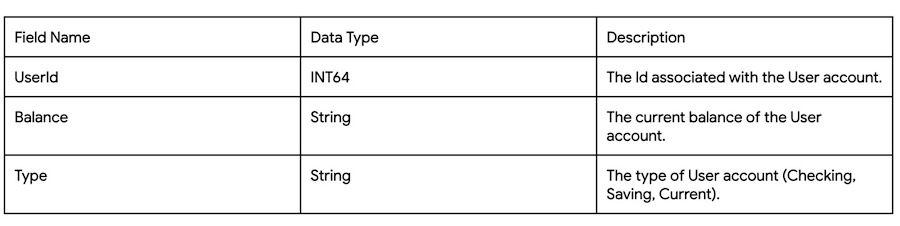
Armed with the basics of transactions and locks in Cloud Spanner, we will now walk through a few practical use-cases. We take the example of an application which queries and updates users’ balance in a table named accounts. The accounts table has the following columns –
Case 1: Transaction waiting to get exclusive lock because of higher priority shared-lock
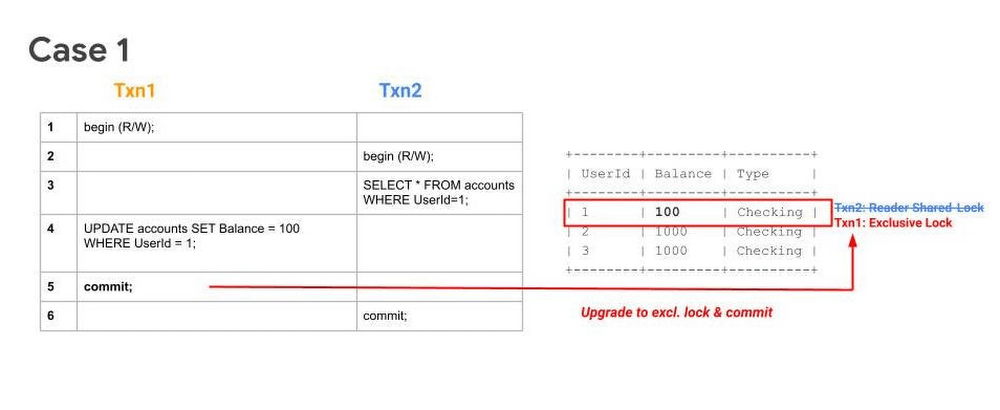
Sequence
- Txn1 begins.
- Txn2 begins.
- Txn2 reads the table and acquires a ReadShared Lock.
- Txn1 buffers its write.
- Txn1 tries to commit, but since Txn2 has higher priority (because it has executed its first operation first), Txn1 will have to wait until Txn2 releases the ReadShared Lock.
After committing, Txn2 releases its ReadShared Lock. Txn1 is now able to upgrade to an Exclusive Lock. It acquires the Exclusive Lock and commits.
Note 1: UPDATE WHERE is always transformed into SELECT WHERE, so an UPDATE statement is not a blind write, but a read-write operation.
Note 2: While the above example considers the use-case of querying and updating a single row, the same transaction pattern is also applicable across a key-range.
What to watch out for
- Timeouts due to Transactions waiting for acquiring locks. Refer to transaction statistics and lock statistics to understand how to detect this.
When does this typically happen
- Concurrent updates to a single key/key-range in a table.
Case 2: Transaction aborted because of concurrent execution succeeding
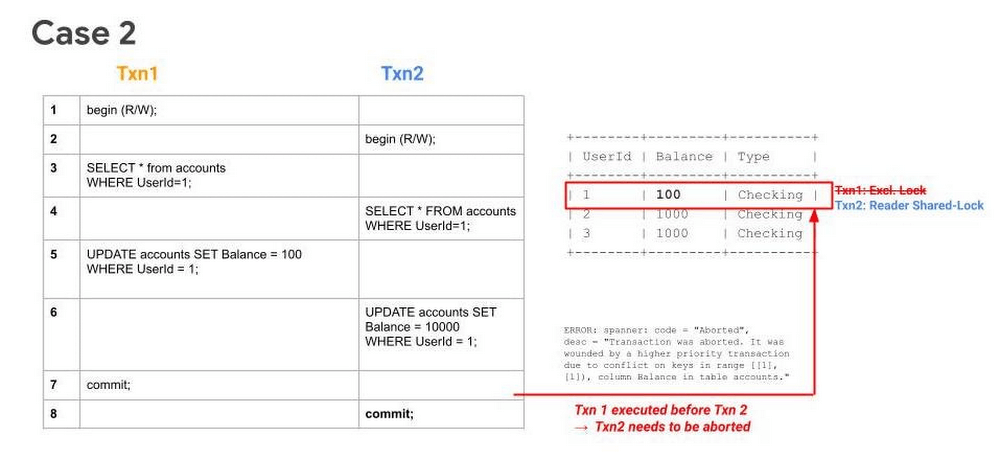
Sequence
- Txn1 begins.
- Txn2 begins.
- Txn1 reads a row from the table and acquires a ReadShared Lock.
- Txn2 reads the same row as Txn1 and acquires a ReadShared Lock.
- Txn1 buffers its write.
- Txn2 buffers its write.
- Txn1 tries to commit, has higher priority (because it has executed its first operation first), it will get priority in upgrading to an Exclusive Lock. It acquires the Exclusive Lock and commits.
Since Txn1 has committed and was the higher priority transaction, Txn1 will abort Txn2.. The abort will likely happen before Txn2 tries to commit.
What to watch out for
- High number of transaction aborts due to wounding of transactions. Refer to transaction statistics and lock statistics to understand how to detect this.
When does this typically happen
- Concurrent updates to a single key/key-range. Typically this happens in the case of hot keys being present in the table.
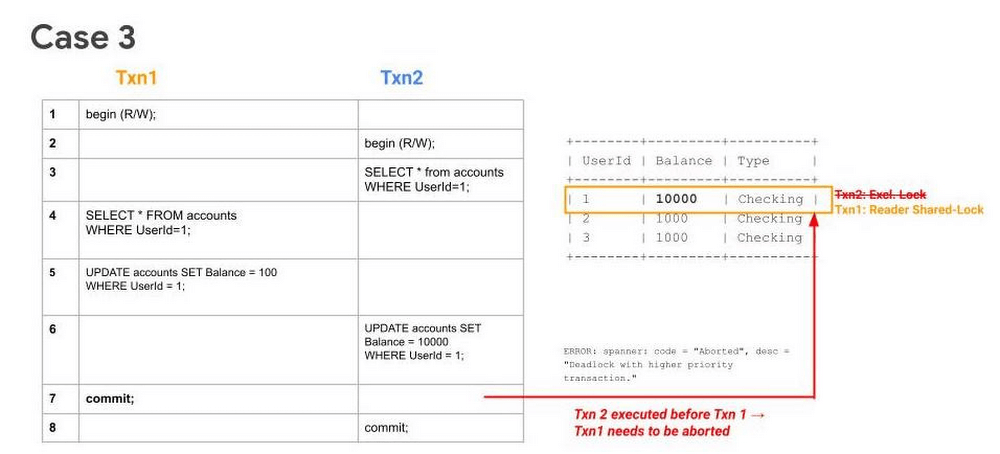
Case 3: Transaction waiting to get exclusive lock because of higher priority shared-lock & getting aborted because of prior succeeding concurrent execution
Sequence
- Txn1 begins.
- Txn2 begins.
- Txn2 reads the table and acquires a ReadShared Lock.
- Txn1 reads the table and acquires a ReadShared Lock.
- Txn1 buffers its write.
- Txn2 buffers its write.
- Txn1 tries to commit, but since Txn2 holds a ReadShared Lock, it has to wait until it gets cleared.
- Since Txn2 has higher priority (because it has executed its first operation first), it will acquire the Exclusive Lock first. Txn2 upgrades its ReaderShared Lock to an Exclusive Lock and commits.
Finally, after Step 8, when Txn1 tries to commit (since ReaderShared Lock from Txn2 is now cleared) it gets aborted. This is done to prevent deadlock with the higher priority transaction (Txn2).
Note: In Case 1, even though Txn2 had acquired a ReaderShared Lock earlier as in Case 3, it never upgraded to an Exclusive Lock (since there were no writes). Hence there was no need to abort Txn1, it could simply wait for Txn2 to release its ReaderShared lock and then commit.
What to watch out for
- High number of transaction aborts due to high contention between transactions. Refer to transaction statistics and lock statistics to understand how to detect this.
When does this typically happen
- Concurrent updates to a single key/key-range. Typically this happens in the case of hot keys being present in the table.
Recommendations
In order to mitigate these issues and reduce their occurrence. We recommend adopting the following best practices:
- If you need to perform more than one read at the same timestamp, and know in advance that you only need to read, consider using a read-only transaction. Because read-only transactions don’t write, they don’t hold locks and they don’t block other transactions. Further, read-only transactions never abort, so you don’t need to wrap them in retry loops.
- Always acquire ReadShared Locks on the smallest subset of keys or key ranges. This reduces the chances of lock contention.
- Analyze your code to only include critical path code within a transaction. Avoiding unneeded remote calls or complex, long-running business logic is a good way to ensure a transaction process quickly.
- Analyze your needs for multi-split transactions. Since transactions that update more than one split use a 2-phase commit protocol, they hold locks for a longer duration, thereby increasing chances of lock contention.
Get started today
Spanner’s unique architecture allows it to scale horizontally without compromising on the consistency guarantees that developers rely on in modern relational databases. Try out Spanner today for free for 90 days or for as low as $65 USD per month.
BURGER KING Germany: Serving Up Marketing Insights and Supply Chain Visibility Easily

13976
Of your peers have already read this article.
8:30 Minutes
The most insightful time you'll spend today!
Do hamburgers really come from Hamburg? This may still be a matter of debate, but the popularity of American-style burger joints not just in Hamburg but all over Germany, is clear. Germany’s top two fast food companies are both burger chains. One of them is BURGER KING®, a global brand that welcomes more than 11 million customers worldwide every day. The company arrived in Germany in 1976, when its first restaurant opened in Berlin. It now operates more than 100 restaurants across Germany, with franchisees operating more than 600 restaurants of their own.
“In the fast food industry, being able to move quickly is very important. That means delivering the right promotion to our app or launching a viral campaign within days. To do that across more than 700 restaurants, we need the support of the right technology.”
—Oliver Mielentz, IT Manager, BURGER KING® Deutschland GmbH
Previously a subsidiary of the U.S. business, BURGER KING® Germany became an independent company in 2015. As a result, it needed to develop its own IT infrastructure, and the changeover needed to happen fast. “We had to put in place systems that would work for the entire network of franchisees and enable us to easily roll out campaigns,” explains Oliver Mielentz, IT Manager at BURGER KING® Deutschland GmbH.
With the help of Google Cloud Premier partner Cloudwürdig, BURGER KING® Germany chose Google Cloud and G Suite as the right combination to suit its needs.
“In the fast food industry, being able to move quickly is very important,” says Oliver. “That means delivering the right promotion to our app or launching a viral campaign within days. To do that across more than 700 restaurants, we need the support of the right technology.”
Building a franchisee platform in just three months
When a business has multiple franchisees, it’s important to make sure everyone is on the same page, especially in the fast-paced fast food environment. “We have to collate data from all our franchisees and produce reports quickly in order to react to changes in customer behavior,” explains Oliver. “That means processing every transaction that takes place in our restaurants.” Following the restructure, BURGER KING® Germany also needed to build a secure invoicing system with data storage and optimize its communication channels.
“Using Tableau with BigQuery, we’re able to produce reports very quickly. Previously, it took much longer, as data had to be fetched manually. Our reaction time is now almost a business day faster.”
—Oliver Mielentz, IT Manager, BURGER KING® Deutschland GmbH
With support from Witter-IT, BURGER KING® Germany chose Cloudwürdig to build its BKD Connect internal platform on Google Cloud. Thanks to the ready-to-go tools on Google Cloud, it was able to put its invoicing system and data warehouse in place in just three months.
For the BURGER KING® Germany data warehouse, Cloudwürdig built an ETL pipeline that channels ticket data for every sale into BigQuery. “Data is gathered from the restaurants,” says Oliver, “and using Tableau with BigQuery, we’re able to produce reports very quickly. Previously, it took much longer, as data had to be fetched manually. Our reaction time is now almost a business day faster.”
As the ticket data for every transaction is stored in BigQuery, the marketing team can easily see exactly which products are selling well. That’s crucial for tweaking promotions as well as monitoring the supply chain to make sure enough produce is delivered to restaurants in response to changes in demand.
“Thanks to BigQuery, we have a speedy data pipeline that enables us to react on the same day to changes in the market and eliminate bottlenecks in production,” says Oliver.
Switching to G Suite to improve communication
To enable franchisees to sign in to its BKD Connect Platform, BURGER KING® Germany needed a secure authentication system. To solve that problem, it chose to provide franchisees with G Suite accounts. “It’s really easy to set up a new franchisee on the platform. I just create a new G Suite account and Drive folder for it, and it’s ready to go,” says Oliver. G Suite also helps the franchise network to run efficiently, as daily reports are automatically saved to Drive and shared to the appropriate regional network. “Thanks to that system, it’s much easier for any team at headquarters to access the information it needs,” Oliver explains.
BURGER KING® Germany also recently extended its use of G Suite across the whole company. “Following an evaluation of our previous email and productivity software, I made the decision to switch solely to G Suite,” says Oliver. BURGER KING® Germany employees now use Gmail, Calendar, and Drive for their day-to-day productivity needs. “We only just completed the migration, but already, everyone’s happy,” says Oliver. “It’s so easy to share a file using Drive or set up a meeting on Calendar.”
“We’re big fans of Hangouts Meet, and we have two rooms here at our Hanover headquarters equipped with Hangouts Meet hardware,” Oliver adds. “The speech quality is good, and it’s helpful to be able to see every participant, especially when you’re running a meeting with multiple franchisees.”
Optimizing infrastructure to power innovative campaigns
The BURGER KING® app, available for iOS and Android, helps the company to deliver a great customer experience. Through their MyBK accounts, guests can access coupons and special promotions. “We had a really interesting campaign for Easter: guests used the app to hunt for virtual Easter eggs,” explains Oliver. “We knew it was going to be big, and our previous back end wouldn’t have been able to handle the traffic.”
To enable the marketing campaign to go ahead, BURGER KING® Germany moved the back end of the app, along with its website, to Google Cloud. For developing and running its web and app back ends, it now uses App Engine and virtual machines on Compute Engine, as well as Memorystore and Cloud Functions. For monitoring and logging, it uses Stackdriver, and Cloud CDN and Cloud DNS to easily handle its traffic.
“We ran the campaign without any performance issues, even though we were receiving several million hits a day,” says Oliver. Since migrating the back end to Google Cloud, the marketing team also launched the popular “Escape the Clown” campaign. “That campaign blew our minds!” says Oliver. “It wouldn’t have been possible without Google Cloud, because it required a lot of back end capacity.”
To develop the app infrastructure it needs, BURGER KING® Germany relies on Cloudwürdig. “Working with Cloudwürdig is great because the team has the same agile mindset as us,” says Oliver. “When we have a new idea, we just set up a meeting, and in a couple of days the new infrastructure is in place. For Escape the Clown, it only took a few weeks to get everything ready to launch.”
Leveraging integrated tools to grow the business
Using Google Cloud together with G Suite enables BURGER KING® Germany to run its franchise network efficiently, while keeping its IT team lean. “Google Cloud and G Suite are the perfect fit for the way of working at BURGER KING® Germany,” says Oliver. “Many of the company’s operatives are often on the road, visiting restaurants and franchisees. With these tools, they can work flexibly and react quickly to the situation on the ground.”
“In order to grow the business, we need to use the data we receive every day to understand exactly what is happening in our restaurants. With the tools provided by Google Cloud, we can get more guests through the door and offer them a better experience.”
—Oliver Mielentz, IT Manager, BURGER KING® Deutschland GmbH
It also helps to keep infrastructure costs under control. “With Google Cloud, we only pay for what we use, which is really important for us,” Oliver explains. “It means we can scale up quickly if we see an opportunity to react to a trend in customer behavior and launch a new marketing campaign that resonates with the moment. When it’s finished, we can then scale down again, and that definitely saves us money.”
BURGER KING® is now working with Cloudwürdig to add more functionality to the BURGER KING® app using Google Kubernetes Engine. “We like to work with customers long-term to support their digital transformation. BURGER KING® Germany is a great example of how one project can develop into a great collaboration,” says Benny Woletz, Managing Director of Cloudwürdig.
BURGER KING® also plans to expand its presence in Germany and gain a greater market share by further tailoring both its marketing and the way it runs its restaurants to answer its guests’ needs. “In order to grow the business, we need to use the data we receive every day to understand exactly what is happening in our restaurants,” says Oliver. “With the tools provided by Google Cloud, we can get more guests through the door and offer them a better experience.”
Unifying Data and AI: Bringing Unstructured Data Analytics to BigQuery

4188
Of your peers have already read this article.
2:30 Minutes
The most insightful time you'll spend today!
Over one third of organizations believe that data analytics and machine learning have the most potential to significantly alter the way they run business over the next 3 to 5 years. However, only 26% of organizations are data driven. One of the biggest reasons for this gap is that a major portion of the data generated today is unstructured, which includes images, documents, and videos. It is estimated to cover roughly up to 80% of all data, which has so far remained untapped by organizations.
One of the goals of Google’s data cloud is to help customers realize value from data of all types and formats. Earlier this year, we announced BigLake, which unifies data lakes and warehouses under a single management framework, enabling you to analyze, search, secure, govern and share unstructured data using BigQuery.
At Next ‘22, we announced the preview of object tables, a new table type in BigQuery that provides a structured record interface for unstructured data stored in Google Cloud Storage. This enables you to directly run analytics and machine learning on images, audio, documents and other file types using existing frameworks like SQL and remote functions natively in BigQuery itself. Object tables also extend our best practices of securing, sharing and governing structured data to unstructured, without needing to learn or deploy new tools.
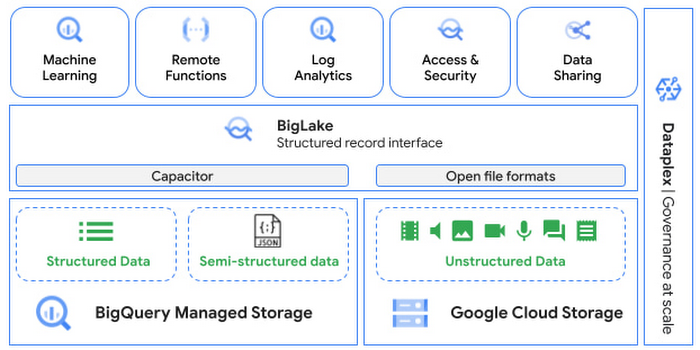
Directly process unstructured data using BigQuery ML
Object tables contain metadata such as URI (Uniform Resource Identifier), content type, and size that can be queried just like other BigQuery tables. You can then derive inferences using machine learning models on unstructured data with BigQuery ML. As part of preview, you can import open source TensorFlow Hub image models, or your own custom models to annotate the images. Very soon, we plan to enable this for audio, video, text and many other formats, and pre-trained models to enable out-of-the box analysis. Check out this video to learn more and watch a demo.
Create an object table
CREATE EXTERNAL TABLE my_dataset.object_table
WITH CONNECTION us.my_connection
OPTIONS(uris=["gs://mybucket/images/*.jpg"],
object_metadata="SIMPLE", metadata_cache_mode="AUTOMATIC");
# Generate inferences with BQML
SELECT * FROM ML.PREDICT(
MODEL my_dataset.vision_model,
(SELECT ML.DECODE_IMAGE(data) AS img FROM my_dataset.object_table)
);By analyzing unstructured data natively in BigQuery, businesses can
- Eliminate manual effort as pre-processing steps such as tuning image sizes to model requirements are automated
- Leverage the simple and familiar SQL interface to quickly gain insights
- Save costs by utilizing existing BigQuery slots without needing to provision new forms of compute
Adswerve is a leading Google Marketing, Analytics and Cloud partner on a mission to humanize data. Twiddy & Co. is Adswerve’s client – a vacation rental company in North Carolina. By combining structured and unstructured data, Twiddy and Adswerve used BigQuery ML to analyze images of rental listings and predict the click-through rate, enabling data-driven photo editorial decisions.
“Twiddy now has the capability to use advanced image analysis to stay competitive in an ever changing landscape of vacation rental providers – and can do this using their in-house SQL skills.” said Pat Grady, Technology Evangelist, Adswerve
Process unstructured data using remote functions
Customers today use remote functions (UDFs) to process structured data for languages and libraries that are not supported in BigQuery. We are extending this capability to process unstructured data using object tables.
Object tables provide signed URLs to allow remote UDFs running on Cloud Functions or Cloud Run to process the object table content. This is particularly useful for running Google’s pre-trained AI models, including Vision AI, Speech-to-Text, Document AI, open source libraries such as Apache Tika, or deploying your own custom models where performance SLAs are important.
Here’s an example of an object table being created over PDF files that are parsed using an open source library running as a remote UDF.
SELECT uri, extract_title(samples.parse_tika(signed_url)) AS title<br>FROM EXTERNAL_OBJECT_TRANSFORM(TABLE pdf_files_object_table,<br>["SIGNED_URL"]);
Extending more BigQuery capabilities to unstructured data
Business intelligence – The results of analyzing unstructured data either directly in BigQuery ML or via UDFs can be combined with your structured data to build unified reports using Looker Studio (at no charge), Looker or any of your preferred BI solutions. This allows you to gain more comprehensive business insights. For example, online retailers can analyze product return rates by correlating them with the images of defective products. Similarly, digital advertisers can correlate ad performance with various attributes of ad creatives to make more informed decisions.
BigQuery search index – Customers are increasingly using the search functionality of BigQuery to power search use cases. These capabilities now extend to unstructured data analytics as well. Whether you use BigQueryML to produce inference on images or use remote UDFs with Doc AI to produce document extraction, the results can now be search indexed and used to support search access patterns.
Here’s an example of search index on data that is parsed from PDF files:
CREATE SEARCH INDEX my_index ON pdf_text_extract(ALL COLUMNS);
SELECT * FROM pdf_text_extract WHERE SEARCH(pdf_text, "Google");Security and governance – We are extending BigQuery’s row-level security capabilities to help you secure objects in Google Cloud Storage. By securing specific rows in an object table, you can restrict the ability of end users to retrieve the signed URLs of corresponding URIs present in the table. This is a shared responsibility security model, for which administrators need to ensure that end users don’t have direct access to Google Cloud Storage, and use signed URLs from object tables as the only access mechanism.
Here’s an example of a policy for PII images that are secured to be first processed through a blur pipeline:
CREATE ROW ACCESS POLICY pii_data ON object_table_images
GRANT TO ("group:admin@example.com")
FILTER USING (ARRAY_LENGTH(metadata)=1 AND
metadata[OFFSET(0)].name="face_detected")
Soon, Dataplex will support object tables, allowing you to automatically create object tables in BigQuery and manage and govern unstructured data at scale.
Data sharing – You can now use Analytics Hub to share unstructured data with partners, customers and suppliers while not compromising on security and governance. Subscribers can consume the rows of object tables that are shared with them, and use signed URLs for unstructured data objects.
Getting Started
Submit this form to try these new capabilities that unlock the power of your unstructured data in BigQuery. Watch this demo to learn more about these new capabilities.
Special thanks to engineering leaders Amir Hormati, Justin Levandoski and Yuri Volobuev for contributing to this post.
Want to Code for the Cloud? Get Started with the Native App Development Track

6754
Of your peers have already read this article.
2:00 Minutes
The most insightful time you'll spend today!
Earlier this year, we launched the Google Cloud skills challenge, which provides 30 days of free access to training to build your cloud knowledge and an opportunity to earn skill badges that showcase your Google Cloud competencies. Today, we’re adding a Native App Development track to the skills challenge, joining the Getting Started, Data Analytics, Kubernetes, Machine Learning (ML) and Artificial Intelligence (AI) tracks.
The Native App Development track is designed for cloud developers who want to learn to build serverless web apps and Google Assistant applications on Google Cloud using Cloud Run and Firebase. Specifically, you’ll have an opportunity to earn three skill badges in the Native App Dev track: Serverless Firebase Development, Serverless Cloud Run Development, and Build Interactive Apps with Google Assistant. To earn a skill badge, you complete a series of hands-on labs and take a final assessment challenge lab to test your skills.
Here’s an overview of each badge.
Serverless Firebase Development
To earn this skill badge, you’ll learn how to build serverless web apps, import data into a serverless database, and build Google Assistant applications using Firebase, Google’s backend-as-service platform for creating mobile and web applications.
Serverless Cloud Run Development
For this badge, you’ll discover how to use Cloud Run, a fully managed serverless platform, to connect and leverage data stored in Cloud Storage. You’ll learn how to use Cloud Run to build a resilient, asynchronous system with Pub/Sub, build a REST API gateway as well as build and expose services.
Build Interactive Apps with Google Assistant
To earn the final skills badge, you’ll build Google Assistant applications by creating a project in the Actions console, integrating Dialogflow, testing your action in the Actions simulator, and adding Cloud Translation API to your assistant application.
Ready to jump into the skills challenge? Sign up here.
You can also check out this quick video below to learn how to join the skills challenge.
6093
Of your peers have already watched this video.
1:30 Minutes
The most insightful time you'll spend today!
Explore the Innovations and Architecture Powering Spanner and BigQuery
Previously, databases had architectures with tightly coupled storage and compute. This resulted in higher latency, and with faster networks these constraints no longer surface. With Google Cloud’s BigQuery and CloudSpanner, the storage and compute architecture have been separated, allowing for better scalability and availability to address businesses’ high throughput data needs.
Watch the video to understand how these database and analysis products leverage Google’s distributed storage system, in-house custom network hardware and software, internal cluster management system and more!
Why–and How–You Should Migrate Oracle Workloads to Google Cloud

3960
Of your peers have already read this article.
1:20 Minutes
The most insightful time you'll spend today!
If you are like many of your peers you are looking to Google Cloud to reduce overheads, drive innovation, and agility with a wide variety of databases for your Oracle workloads. From Bare Metal Solution to cloud-native databases, Google Cloud offers the infrastructure to meet your needs.
The Benefits
Optimizing your Oracle workloads with Google Cloud solutions has a number of benefits.
Dramatically reduce TCO: Reduce up-front hardware, software, and maintenance costs. Migrating Oracle workloads to Google Cloud could result in up to 78% in TCO savings.
High scale and high availability: Mission-critical applications need dependable databases that scale with your business. Google Cloud offers SLA-backed databases to protect your apps.
Simplify operation: Reduce data center and database management by leveraging managed infrastructure and fully managed database services.
Migration Strategies
Google Cloud provides multiple strategies for your specific migration journey to help you with licensing, maintenance cost, and manageability.
Rehost: To migrate Oracle workloads with specific configurations, Google Cloud offers Bare Metal Solution, where you can simply lift and shift your workloads. Bare Metal Solution provides hardware, hardware support, and integrated billing and support. This infrastructure is connected with a highly resilient interconnect and connects to all native Google Cloud services with less than 2ms latency.
Replatform: Keep your core application code and migrate to compatible platforms to help reduce licensing fees and maintenance costs. You can migrate to an open source database such as Cloud SQL for PostgreSQL that has a certain amount of compatibility with PL/SQL and stored procedure. You can also offload data analytics-centric workloads to SQL-compatible data warehousing solutions like BigQuery.
Rewrite: Rewrite your application to take full advantage of cloud-native databases. If your application requires a relational database with global scalability, you can migrate to Cloud Spanner, which provides scalability with industry-leading high availability of 99.999% SLA.
More Relevant Stories for Your Company

Google Leads the Pack in Big Data NoSQL Market: Forrester Research
NoSQL has become critical for all businesses to support modern business applications. It has gone from supporting simple schemaless apps to becoming a mission-critical data platform for large Fortune 1000 companies. It has already disrupted the database market, which was dominated for decades by relational database vendors. Today, half of

Dataplex: Google Cloud’s Intelligent Data Fabric to Manage Data and Analytics at Scale
Enterprises are struggling to make high quality data easily discoverable and accessible for analytics, across multiple silos, to a growing number of people and tools within their organization. They are often forced to make tradeoffs—to move and duplicate data across silos to enable diverse analytics use cases or leave their



Behind the Scenes: How eBay Provides its Customers New Shopping Experiences
“If it exists in the world, you are likely to find it on eBay.” So they say. With 180 million buyers and a global presence in over 190 markets, it’s probably true. A company that emerged out of the ashes of the dot-com bubble, eBay today is one of the

New Capabilities in BigQuery to Ease Anomalies Detection in the Absence of Labeled Data
When it comes to anomaly detection, one of the key challenges that many organizations face is that it can be difficult to know how to define what an anomaly is. How do you define and anticipate unusual network intrusions, manufacturing defects, or insurance fraud? If you have labeled data with
