





Google Cloud Offering a Natural Migration Path for Developers Accustomed to Heroku

2784
Of your peers have already read this article.
1:30 Minutes
The most insightful time you'll spend today!
Modern developers worldwide have grown accustomed to the comfort of writing code, pushing to a remote Git repository and having that code be deployed at an accessible URL without having to worry about how it is deployed. This was a workflow popularized by Heroku years ago which brought joy and productivity to developers even if it did impose some loss of flexibility for operation teams.
To address that loss of flexibility when meeting security and integration requirements, Heroku introduced Private Spaces. Private Spaces provide network isolation from the internet since any application or datastore provisioned by Heroku is accessible to the internet by default.
Cloud Run is quickly becoming the “swiss army knife” of serverless here at Google Cloud and it’s a natural migration path for developers accustomed to Heroku. The fundamentals are all there:
- Continuously Deploy via Git push using open source Buildpacks or Dockerfiles
- Set CPU and Memory requirements for each instance
- Horizontally scalable apps that scale from zero to thousands of instances to meet traffic demands automatically
So while devs are kept happy, can Cloud Run do something for the Ops folks? Yes. Here are some things available right in the Cloud Run UI:
- Proper Secret Management with IAM based access control. No more setting secrets as environment variables.
- Traffic management between different revisions for blue-green or canary deployments.
- Define SLIs and SLOs with ease. Eg: 90% of requests have to be served under 200ms in a calendar month.
- Secure your service with tools such as Software Delivery Shield, Binary Authorization, and Cloud Armor. Definitely deserves its own blog post.
Recreating Private Spaces on Cloud Run
Let’s focus on network isolation now, let’s say you have an internet-facing app and a private backend API that talks to a private database. Simplest architecture ever, it conceptually looks a bit like this:
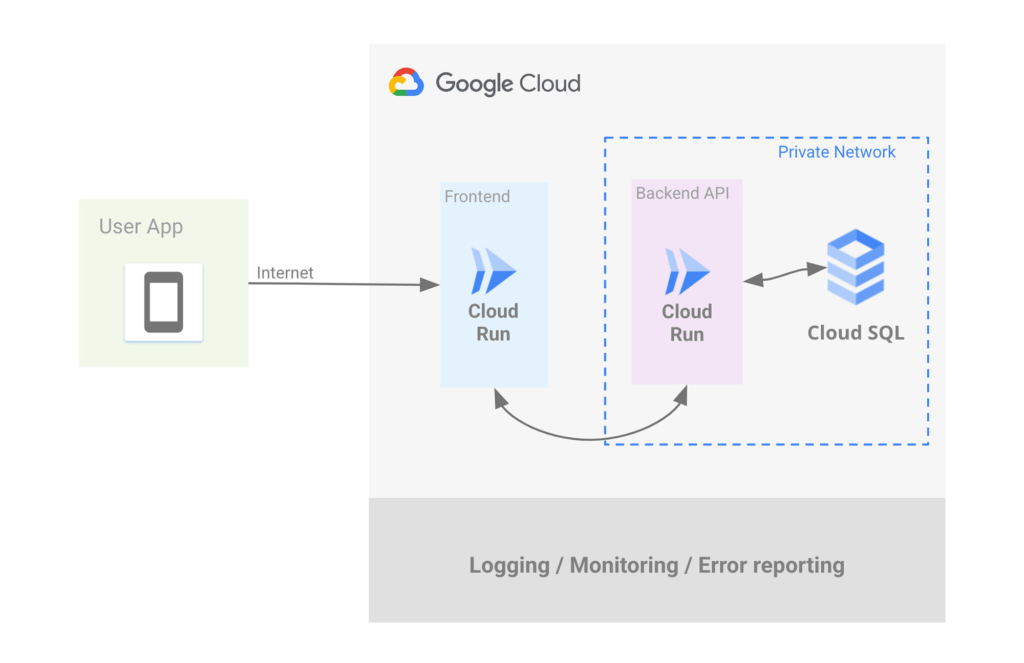
Let’s address the database first. If you want to use Postgres then Cloud SQL is most likely what you want, but do keep in mind that we have other datastores that speak Postgres such as AlloyDB and Spanner.
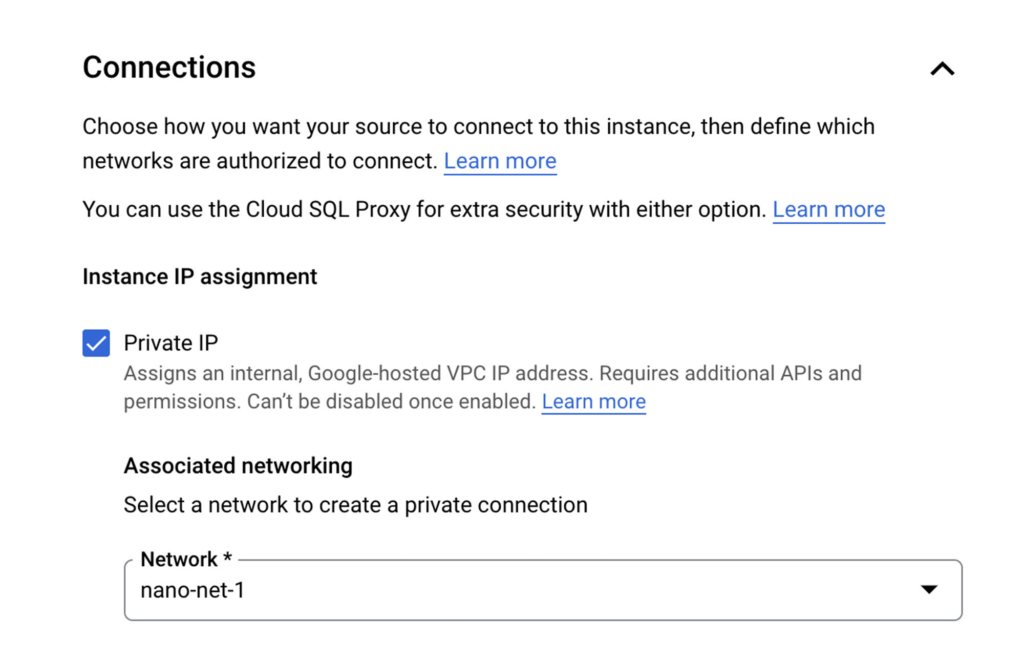
Cloud SQL allows you to create a Postgres instance that’s isolated from the internet by simply unchecking the Public IP checkbox and checking the Private IP checkbox. This will assign an IP address to your Postgres instance on your project’s network.
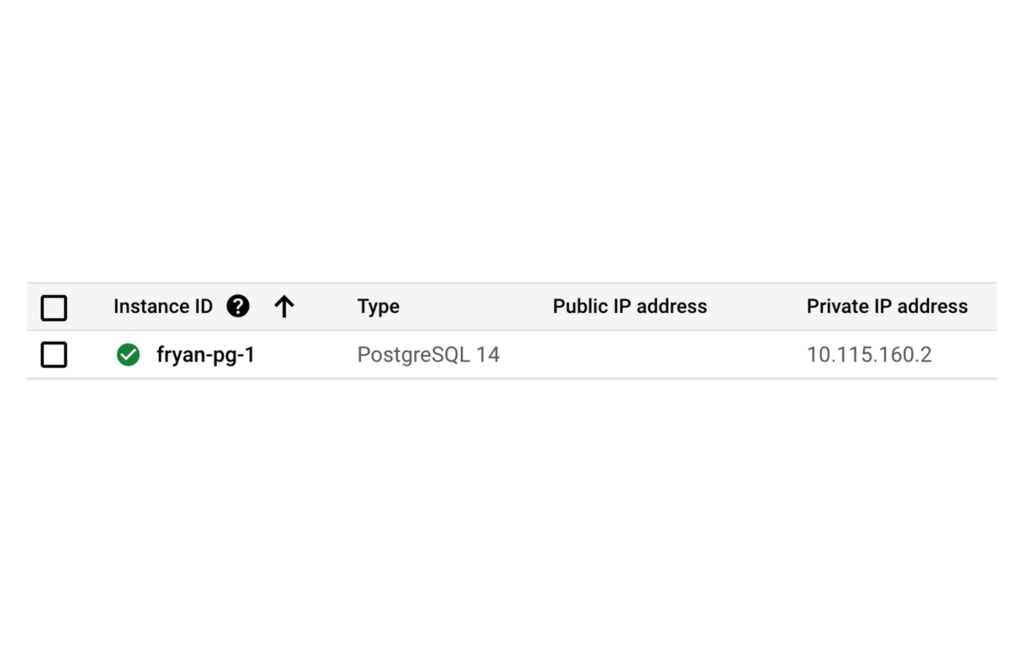
Once the DB is provisioned you’ll see the IP clearly listed, such as:
Of course there’s so much more to say about CloudSQL, to learn more please take a look at our documentation.
Ok now that you’ve dealt with Postgres, let’s address the private backend API on Cloud Run.
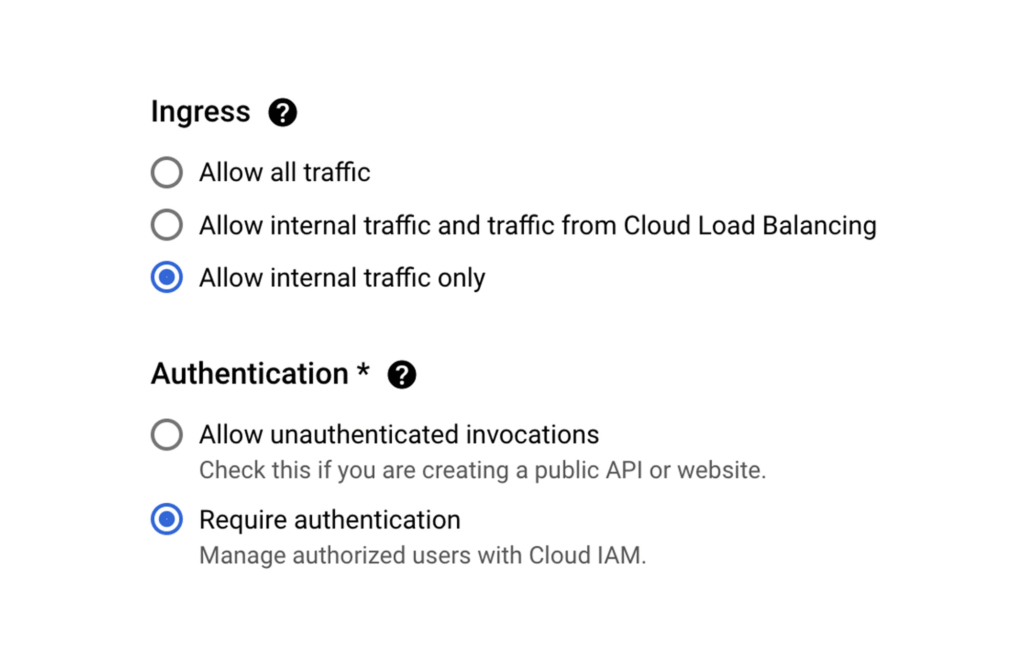
When creating a new Cloud Run service via the Google Cloud Console, Ingress can be limited to “Internal traffic only” so only traffic from internal sources, including your VPC, can access the service. In other words, the internet can not touch it.
As an additional level of security, it’s also possible to enforce that only requests from authorized users be served, In this case a “user” is most likely another service using its associated service account which will need the “roles/run.invoker” in order to call this service.
Now let’s make sure that our Backend API Service can reach the Postgres instance by configuring a VPC Connector. This will allow Cloud Run services to reach into the VPC and therefore, the internal IP for the Postgres instance.
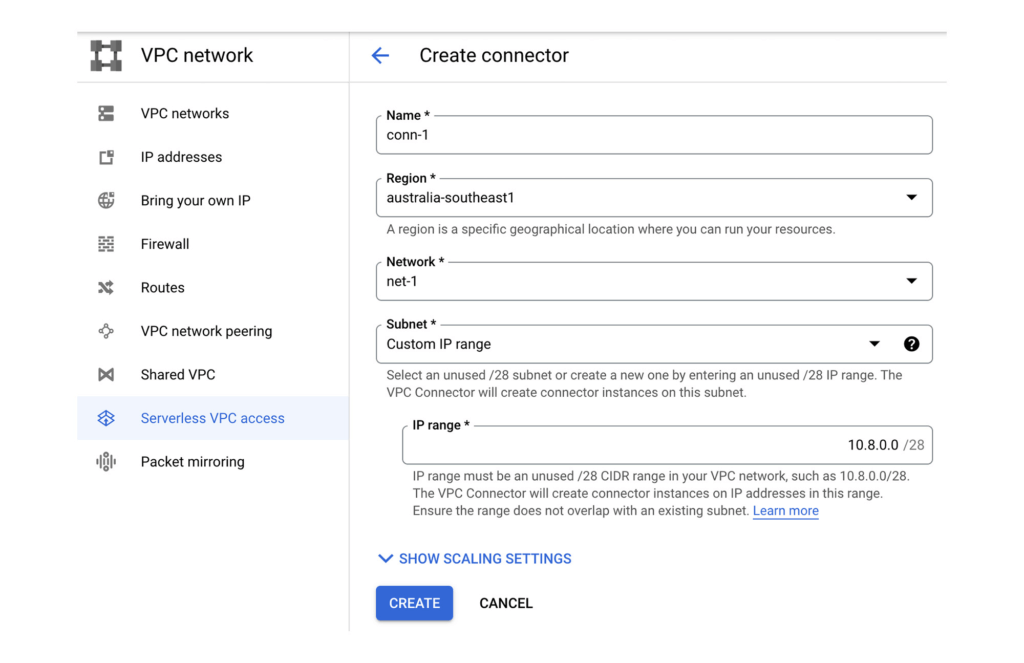
Once the VPC Connector is created, you can associate it with a Cloud Run service.
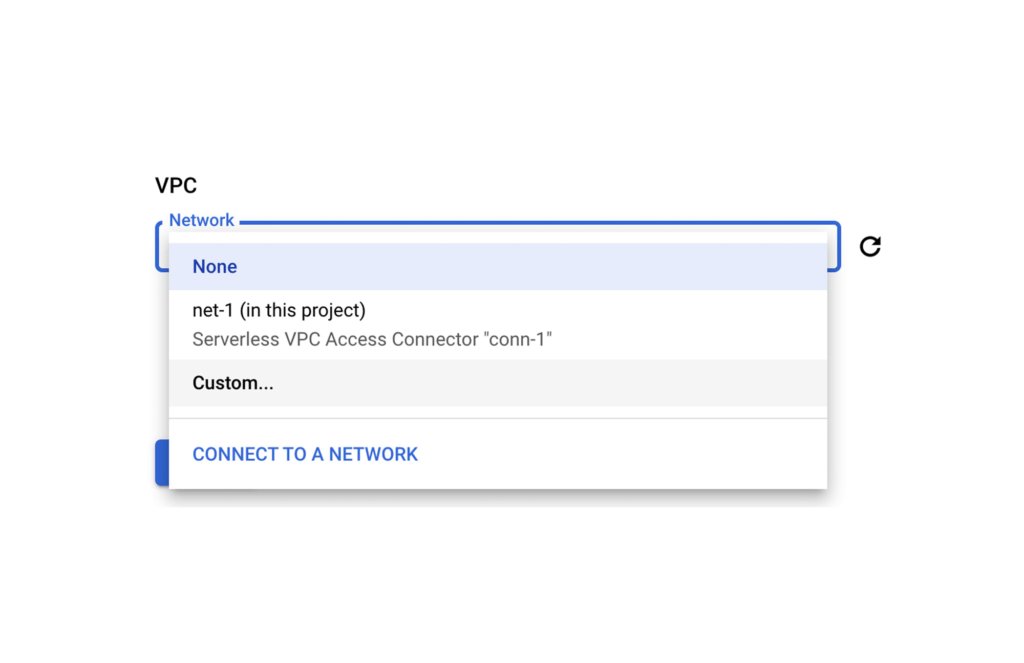
Then it’s just a matter of configuring your code to use the Postgres instance’s private IP address. A good 12-Factor app friendly spot to do that is with a connection string in an environment variable as part of the Cloud Run service configuration. Better yet, as this may contain a DB password, you can use Secret Manager to mount this environment variable from an encrypted and protected secret.
Finally, let’s now set up that Front End Cloud Run service which will respond to requests from the internet, and securely communicate with the backend API service.
For the frontend service choose to “Allow all traffic” and also “Allow unauthenticated invocations” so anyone on the web can access our URL. We could of course choose the middle option and use Cloud Load Balancing in conjunction with Cloud Armor which provides defenses against DDoS and application attacks, and offers a rich set of WAF rules. However, let’s keep it simple for now.
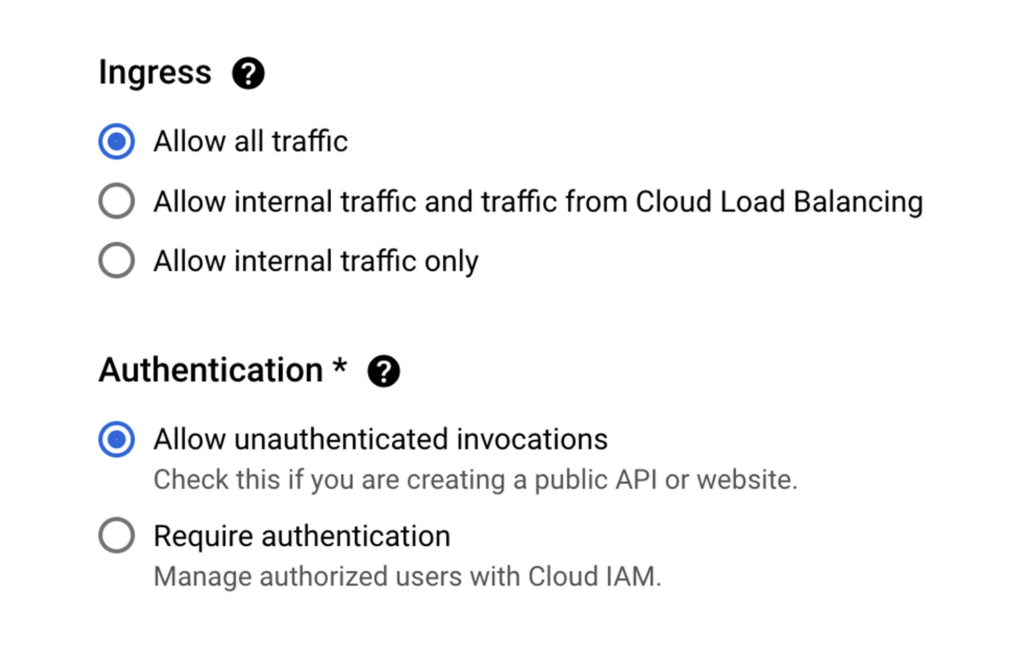
Keep in mind that our Backend service will only accept requests from within our VPC network, and that we don’t have a private IP address for Cloud Run.
So let’s ensure that all egresses from our Frontend actually get routed to the VPC Connector, this way when our Frontend calls a Backend API via it’s URL endpoint, the Backend will receive the request from within the VPC and allow it in.
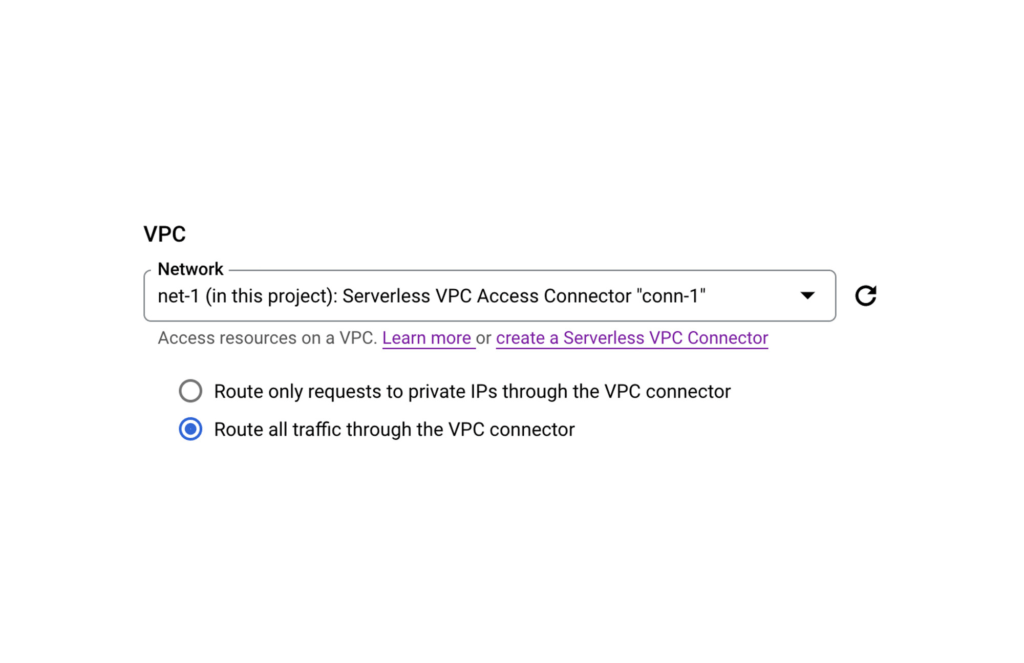
PS: If your Backend requires authentication don’t forget to create a Service Account for your Frontend Service and then give it the necessary role following a service-to-service auth pattern.
And that’s it. You now have an operationally acceptable private space like environment with an app composed of two Cloud Run services where the Backend service and Postgres instance are network isolated from the Internet. If after reading this blog you would like to get hands-on experience with the technologies mentioned above, then take a look at Google Cloud Skills Boost. There you will find learning paths, quests, and labs curated to boost your cloud skills in a particular area.
For example here’s a great lab that takes you through developing a REST API on Cloud Run using Go.
How to Decide Whether to Run a Database on Kubernetes

5613
Of your peers have already read this article.
3:30 Minutes
The most insightful time you'll spend today!
Today, more and more applications are being deployed in containers on Kubernetes—so much so that we’ve heard Kubernetes called the Linux of the cloud.
Despite all that growth on the application layer, the data layer hasn’t gotten as much traction with containerization. That’s not surprising, since containerized workloads inherently have to be resilient to restarts, scale-out, virtualization, and other constraints. So handling things like state (the database), availability to other layers of the application, and redundancy for a database can have very specific requirements. That makes it challenging to run a database in a distributed environment.
However, the data layer is getting more attention, since many developers want to treat data infrastructure the same as application stacks.
Operators want to use the same tools for databases and applications, and get the same benefits as the application layer in the data layer: rapid spin-up and repeatability across environments. In this blog, we’ll explore when and what types of databases can be effectively run on Kubernetes.
Before we dive into the considerations for running a database on Kubernetes, let’s briefly review our options for running databases on Google Cloud Platform (GCP) and what they’re best used for.
- Fully managed databases. This includes Cloud Spanner, Cloud Bigtable and Cloud SQL, among others. This is the low-ops choice, since Google Cloud handles many of the maintenance tasks, like backups, patching and scaling. As a developer or operator, you don’t need to mess with them. You just create a database, build your app, and let Google Cloud scale it for you. This also means you might not have access to the exact version of a database, extension, or the exact flavor of database that you want.
- Do-it-yourself on a VM. This might best be described as the full-ops option, where you take full responsibility for building your database, scaling it, managing reliability, setting up backups, and more. All of that can be a lot of work, but you have all the features and database flavors at your disposal.
- Run it on Kubernetes. Running a database on Kubernetes is closer to the full-ops option, but you do get some benefits in terms of the automation Kubernetes provides to keep the database application running. That said, it is important to remember that pods (the database application containers) are transient, so the likelihood of database application restarts or failovers is higher. Also, some of the more database-specific administrative tasks—backups, scaling, tuning, etc.—are different due to the added abstractions that come with containerization.
Tips for running your database on Kubernetes
When choosing to go down the Kubernetes route, think about what database you will be running, and how well it will work given the trade-offs previously discussed.
Since pods are mortal, the likelihood of failover events is higher than a traditionally hosted or fully managed database. It will be easier to run a database on Kubernetes if it includes concepts like sharding, failover elections and replication built into its DNA (for example, ElasticSearch, Cassandra, or MongoDB). Some open source projects provide custom resources and operators to help with managing the database.
Next, consider the function that database is performing in the context of your application and business. Databases that are storing more transient and caching layers are better fits for Kubernetes. Data layers of that type typically have more resilience built into the applications, making for a better overall experience.
Finally, be sure you understand the replication modes available in the database. Asynchronous modes of replication leave room for data loss, because transactions might be committed to the primary database but not to the secondary database(s). So, be sure to understand whether you might incur data loss, and how much of that is acceptable in the context of your application.
After evaluating all of those considerations, you’ll end up with a decision tree looking something like this:
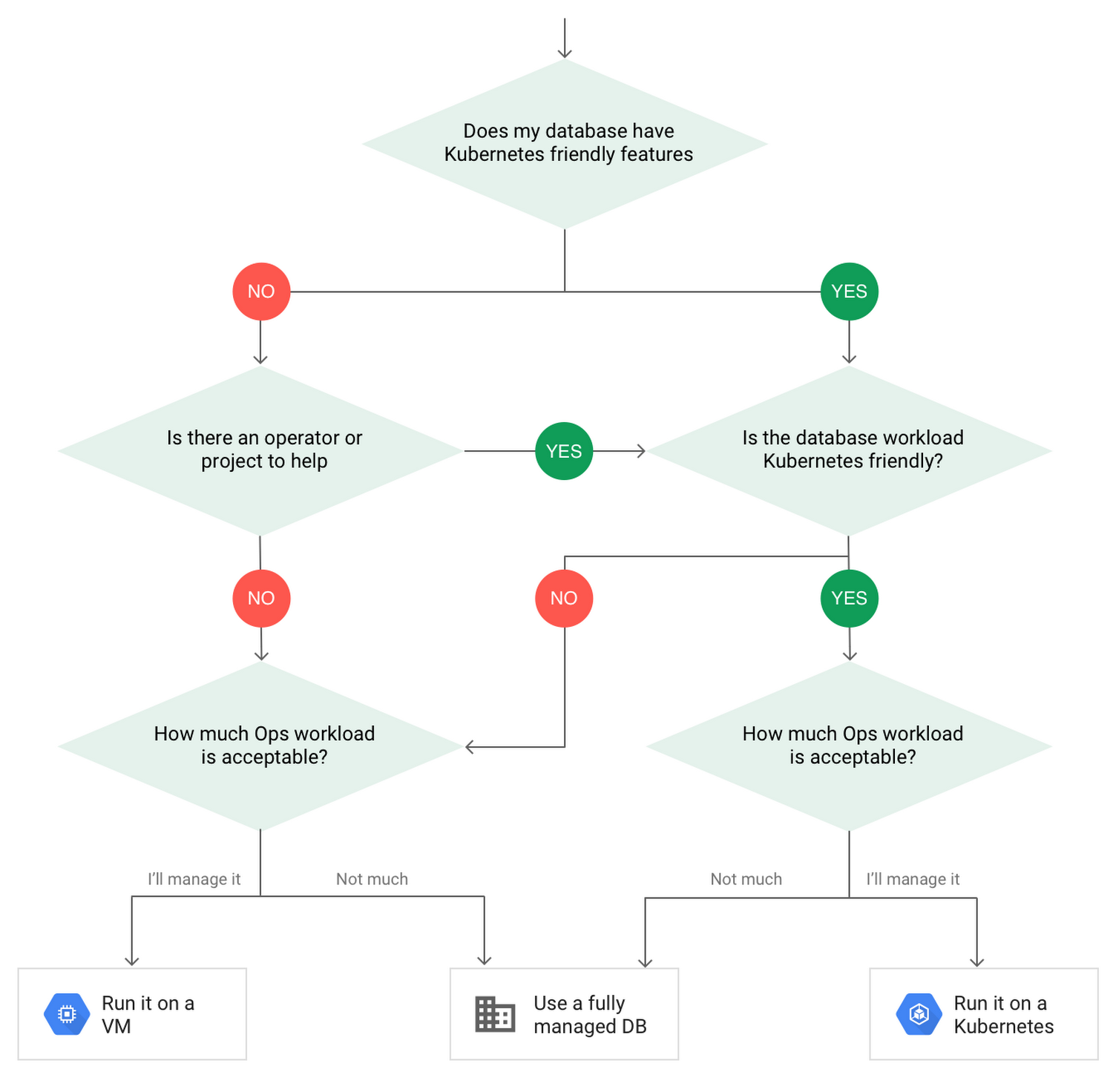
How to deploy a database on Kubernetes
Now, let’s dive into more details on how to deploy a database on Kubernetes using StatefulSets.
With a StatefulSet, your data can be stored on persistent volumes, decoupling the database application from the persistent storage, so when a pod (such as the database application) is recreated, all the data is still there.
Additionally, when a pod is recreated in a StatefulSet, it keeps the same name, so you have a consistent endpoint to connect to. Persistent data and consistent naming are two of the largest benefits of StatefulSets. You can check out the Kubernetes documentation for more details.
If you need to run a database that doesn’t perfectly fit the model of a Kubernetes-friendly database (such as MySQL or PostgreSQL), consider using Kubernetes Operators or projects that wrap those database with additional features. Operators will help you spin up those databases and perform database maintenance tasks like backups and replication. For MySQL in particular, take a look at the Oracle MySQL Operator and Crunchy Data for PostgreSQL.
Operators use custom resources and controllers to expose application-specific operations through the Kubernetes API. For example, to perform a backup using Crunchy Data, simply execute pgo backup [cluster_name]. To add a Postgres replica, use pgo scale cluster [cluster_name].
There are some other projects out there that you might explore, such as Patroni for PostgreSQL. These projects use Operators, but go one step further. They’ve built many tools around their respective databases to aid their operation inside of Kubernetes. They may include additional features like sharding, leader election, and failover functionality needed to successfully deploy MySQL or PostgreSQL in Kubernetes.
While running a database in Kubernetes is gaining traction, it is still far from an exact science. There is a lot of work being done in this area, so keep an eye out as technologies and tools evolve toward making running databases in Kubernetes much more the norm.
When you’re ready to get started, check out GCP Marketplace for easy-to-deploy SaaS, VM, and containerized database solutions and operators that can be deployed to GCP or Kubernetes clusters anywhere.
3250
Of your peers have already watched this video.
24:00 Minutes
The most insightful time you'll spend today!
Building Cloud-native Apps at Scale with Kubernetes and Other Dev Tools
Developer productivity is directly linked to customer value generation, higher levels of customer satisfaction and faster time to market. To help build cloud-native applications that cater to customer demands and at scale, experts at Google Cloud share insights on CI/CD tools, processes and interfaces for deploying and developing Google Kubernetes Engine applications. Watch the video on Modernizing App Development and Delivery with the Google Cloud Golden Path from Next ’21 to also learn about developer tools like Cloud Code and Skaffold.
How Cloud Networks Enable CSPs to Deliver 5G

5132
Of your peers have already read this article.
3:00 Minutes
The most insightful time you'll spend today!
Communication services providers (CSPs) are experiencing a period of disruption. Overall revenue growth is decelerating and is projected to remain below 1 percent per year, following a trend that started even before the pandemic.1 At the same time, driven by the pandemic, data consumption in 2020 increased by 30 percent relative to 2019, with some operators even reporting increases of 60 percent.2
The combination of pressure on revenues with rising data traffic costs is forcing operators to innovate in three fundamental ways. First, operators are looking to establish new sources of revenue. Second, increased network utilization must be met with a reduction in network cost. And third, there is an opportunity to gain new customers by improving the customer experience.
Fortunately, 5G offers a path forward across each of these three areas. Concepts such as network slicing and private networks allow CSPs to offer differentiated network services to public sector and enterprise customers. The disaggregation of hardware and software allows new vendors with unique strengths to enter the market and to enable CSPs to build, deploy, and operate networks in fundamentally new ways. And the ability to place workloads at the edge permits CSPs to offer compelling experiences to consumers and businesses alike. In this blog, we will discuss how CSPs can create a solid foundation for their cloud networks.
Understanding telecommunications networks
First, it is useful to consider the way telecommunications networks were traditionally built. Initially, networks were built using physical network functions (PNFs) — appliances that used a tight combination of hardware and software to perform a specific function. PNFs offered the benefit of being purpose-built for a specific application, but they were inflexible and difficult to upgrade. As an example, deploying new features frequently required replacing the entire PNF, i.e., deploying a new hardware appliance.
The first step in improving deployment agility came with the concept of virtualized network functions (VNFs), software workloads designed to operate on commercial off-the-shelf (COTS) hardware. Rather than utilizing an integrated hardware and software appliance, VNFs disaggregated the hardware from the software. As such, it became possible to procure the hardware from one vendor and the software from another. It also became possible to separate the hardware and software upgrade cycles.
However, while VNFs offered advantages over PNFs, VNFs were still an intermediate step. First, they typically needed to be run within a virtual machine (VM), and as such required a hypervisor to interface between the host operating system (OS) and the guest OS inside the VM. The hypervisor consumed CPU cycles and added inefficiency. Second, the VNF itself was frequently designed as a monolithic function. This meant that while it was possible to upgrade the VNF separately from the hardware, such an upgrade, even for a feature that affected only a portion of the VNF, required deployment of the entire large VNF. This created risk and operational complexity, which in turn meant that upgrades were delayed just as they were with PNFs.
Creating the foundation for cloud networks
The trick to establishing your cloud based network resides in the challenge of moving from VNFs to containerized network functions (CNFs) — network functions organized as containers as a collection of small programs, each of which can be independently operated.
The concept of containers is not new. In fact, Google has been using containerized workloads for over 15 years. Kubernetes, which Google developed and open-sourced, is the world’s most popular container orchestration system, and is based on Borg, Google’s internal container management system.3 There are lots of benefits to using containers, but fundamentally, it frees developers from worrying about resource scheduling, interprocess communication, security, self-healing, load balancing, and many other tedious (but important!) tasks.
Consider just a couple examples of benefits that containerization brings to network functions. First, when upgrading the network function to implement new features, you no longer need to re-deploy the entire network function. Instead, you only need to re-deploy the containers that are affected by the upgrade. This improves developer velocity and reduces the risk of the upgrade because, rather than infrequent upgrades that each introduce substantial changes, you can now have frequent upgrades that each deploy small changes. Small changes are less risky because they are easier to understand and to roll back in case of anomaly. Incidentally, this also improves your security posture because it reduces the time between when a security vulnerability is discovered and when a patch is deployed.
Speaking of security, another example of the benefits that containerization brings to network functions is an automatic zero-trust security posture. In Kubernetes, the communication among microservices can be handled by a service mesh, which manages mundane aspects of inter-services communication such as retries in case of failure and providing observability into communication. It can also manage other essential aspects such as security. For example, Anthos Service Mesh, which is a fully-managed implementation of the open-source Istio service mesh (also co-developed by Google), includes the ability to authenticate and encrypt all communications using mutual TLS (mTLS) and to deploy fine-grained access control for each individual microservice.
Automation and orchestration for cloud networks
CNFs bring tremendous benefits, but they also bring challenges. In place of a relatively small number of network appliances, we now have a large number of containers, each of which requires configuration, management, and maintenance. In the past, many of these processes were accomplished using manual techniques, but this is impossible to accomplish economically and reliably at the scale required by CNFs.
Fortunately, there are cloud-native approaches to solving these challenges. First, consider the problem of autonomously deploying and maintaining CNFs. The ideal way is to use the concept of Configuration as Data. Unlike imperative techniques such as Infrastructure as Code, which provide a detailed description of a sequence of steps that need to be executed to achieve an objective, Configuration as Data is a declarative method whereby the user specifies the desired end state (i.e., the actual desired configuration) and relies on automated controllers to continuously drive the infrastructure to achieve that state. Kubernetes includes such automated controllers, and the great news is that this method can be used not just for infrastructure but also for the applications residing on top of it, including CNFs. This cloud-native technique frees you from the toil and associated risk of writing detailed configuration procedures, so you can focus on the business logic of your applications.
As another example, consider the problem of understanding your network performance, including anomaly detection, root cause analysis, and resolution. The cloud-native approach starts with creating a data platform where both infrastructure and CNF monitoring data can be ingested, regularized, processed, and stored. You can then correlate data sets against each other to detect anomalies, and with AI/ML techniques, you can even anticipate anomalies before they happen. AI/ML is likewise indispensable in gaining an understanding of why the anomaly is happening, i.e. performing root cause analysis, and automated closed-loop controllers can be developed to correct the problem, ideally before it even happens.
Architecting for the edge
The transition from VNFs to CNFs is a critical piece in addressing the challenge that CSPs face today, but it alone is not enough. CNFs need infrastructure to run on, and not all infrastructure is created equal.
Consider a typical 5G network. There are some functions, such as those associated with an access network, that need to be deployed at the edge. These functions require low latency, high throughput, or even a combination of the two. In 5G networks, examples of such functions include the radio unit (RU), distributed unit (DU), centralized unit (CU), and the user plane function (UPF). The first three are components of the radio access network (RAN), while the last is a component of the 5G core. At the same time, there are some other control plane functions such as the session management function (SMF) or the authentication and mobility management function (AMF) that do not have such tight latency and high throughput requirements and can thus be placed in a more centralized data center. Furthermore, consider an AI/ML use case where a particular model (perhaps for radio traffic steering) needs to run at the network edge because of its latency requirements. While the model itself needs to run at the edge, model training (i.e., generating the model coefficients) is frequently a compute-intensive exercise that is latency-insensitive and is thus more optimal to run in a public cloud region.
All of these use cases have one thing in common: they call for a hybrid deployment environment. Some applications must be deployed at the edge as close to the user as possible. Others can be deployed in a more centralized environment. Still others can be deployed in a public cloud region to take advantage of the large amount of compute and economies of scale available therein. Wouldn’t it be convenient — if not transformational — if you could use a single environment for deploying at the edge, in a private datacenter, and in public cloud, with a consistent set of security, lifecycle management, policy, and orchestration resources across all such locations? This is indeed what Google Distributed Cloud, enabled by Anthos, brings to the table.
With Google Distributed Cloud, you can architect a 5G network deployment such as the one shown below.

Business benefits of cloud networks
Beyond the technical benefits, consider the business benefits of such an architecture. First, by following the best practices of hardware and software disaggregation, it permits the CSP to procure the infrastructure and the network functions from different vendors, spurring competition among vendors. Second, each workload is placed in precisely the right location, enabling efficient utilization of hardware resources and offering compelling low-latency, high-throughput services to users. Third, because the architecture utilizes a common hybrid platform (Anthos), it makes it easy to move workloads across infrastructure locations. Fourth, the separation of workloads into microservices accelerates time-to-market when developing new features or applications, such as those enabling enterprise use cases. And finally, the container management platform supports the simultaneous deployment of both network functions and edge applications on the same infrastructure, allowing the operator to deploy new experiences such as AR/VR directly on bare metal as close to the user as possible.
The next generation cloud network is now
There is a lot more we could say, but perhaps the most important takeaway is that this architecture is not a future dream. It exists today, and Google is working with leading CSPs and network vendor partners to deploy it, helping them realize the promise of 5G to deliver new revenues, reduce operating costs, and enable new customer experiences.
To learn more, watch the video series on the cloudification of CSP networks.
Discover what’s happening at the edge: How CSPs Can Innovate at the Edge.
1.Statista, Forecast growth worldwide telecom services spending from 2019 to 2024
2 PricewaterhouseCoopers, Global entertainment and media outlook 2021-2025
3. Borg: The Predecessor to Kubernetes
4169
Of your peers have already watched this video.
1:30 Minutes
The most insightful time you'll spend today!
Video: How Pitney Bowes Leveraged Apigee to Create New Revenue Streams
Headquartered in Stamford, Connecticut, Pitney Bowes helps businesses navigate the complex world of commerce. They enable organizations to send parcels and packages across the globe. Pitney Bowes serves 90 percent of Fortune 500 companies, has 90 plus years of innovation, supports 1.5 million small businesses and has 15,000 employees globally.
The company leveraged the Apigee platform and was able to create a self-service model for both its internal and external customers. The monetization capability of Apigee empowered the organization to create new revenue streams.
“The monetization capability of Apigee has helped us create new revenue streams and business models for Pitney Bowes. Now we have tens and millions of dollars in revenue that we never had in 2016,” says Roger Pilc, Chief Innovation Officer, Pitney Bowes.
Watch the full video to get more insights on how Apigee helped Pitney Bowes boost its business.

6359
Of your peers have already downloaded this article
3:30 Minutes
The most insightful time you'll spend today!
Application programming interfaces, or APIs, are the way software talks to other software so by definition, they’re a technology that connects systems.
Many enterprise leaders think of them primarily in these terms. For example, 57 percent of respondents to Google’s Enterprise Digital Maturity Assessment Tool, Apigee Compass, characterize APIs as systems integration technology.
But APIs are much more. They’re interfaces that enable developers to repeatedly leverage data, functions, and applications to build new products and services. They’re how a business expresses itself via software, and they enable that business to rapidly expand into new contexts or adapt to meet changing user needs and preferences.
Take ridesharing apps. They exist partly because they can leverage existing capabilities made available via others’ APIs. When people order a car, a ridesharing app leverages services such as Google Maps APIs for navigation. In turn, those ridesharing companies express their businesses as APIs. This lets developers build ridesharing into new experiences, such as allowing an end user to order a ride via a voice assistant. When the user pays for a ride with a given digital payments platform, an API enables that transaction too.
Download the E-book and learn quick tricks on you can leverage APIs to delight your customers.
More Relevant Stories for Your Company

How APIs Help Financial Services Firms Enhance Digital CX and Increase Revenue
Faced with changing customer behaviors and demands, tightening margins, and increasing threat from digital competitors, financial services institutions (FSIs) will need to meet customers where they are, open up their services, and establish new ways to monetize their products. Doing so will also enable them to build a better profile

Reference Guide to Get You Started with Development on GKE
Getting started with Kubernetes is often harder than it needs to be. While working with a cluster “from scratch” can be a great learning exercise or a good solution for some highly specialized workloads, often the details of cluster management can be made easier by utilizing a managed service offering. Google Kubernetes Engine (GKE)

The Evolving Landscape of Multicloud: A Journey, Not a Destination
Editor's note: This post is part of an ongoing series on IT predictions from Google Cloud experts. Check out the full list of our predictions on how IT will change in the coming years. Prediction: Over half of all organizations using public cloud will freely switch their primary cloud provider

BPAY: Uncovering New Business Opportunities with APIs
Editor's note: Today we hear from Jon White and Angela Donohoe from BPAY Group. BPAY Group is best known for BPAY, the leading electronic bill payment system in Australia, handling one-third of the market. Learn how BPAY Group is positioning the organization for the future by using APIs to streamline workflows
