





The Evolving Landscape of Multicloud: A Journey, Not a Destination

2707
Of your peers have already read this article.
2:30 Minutes
The most insightful time you'll spend today!
Editor’s note: This post is part of an ongoing series on IT predictions from Google Cloud experts. Check out the full list of our predictions on how IT will change in the coming years.
Prediction: Over half of all organizations using public cloud will freely switch their primary cloud provider as a result of available multicloud capabilities
In the years ahead, companies will use a multicloud strategy not just as a way to hedge their bets, but as a way to switch from their first cloud to their next one. Research shows that the majority of companies are already multicloud, meaning they use more than one hyperscale cloud provider.
More and more, we’re talking to companies that describe using multicloud technologies as a way to do switch not just workloads — but mindshare — to a different cloud. In other words, for many people, multicloud is a phase, not a permanent state.
You may start using one cloud but still need to be able to incorporate existing investments you’ve already made in other clouds without having to move anything. Here at Google Cloud, we’ve made unique investments to make sure we can meet our customers wherever, and in whatever cloud, they are.
For instance, Anthos, our multicloud management plane, ensures consistency when working with your compute and data on other clouds. You can view workloads, deploy services, and apply common security policies across multiple clouds. BigQuery Omni allows you to query data in other cloud storage accounts in Amazon S3 or Azure Storage without having to move the data itself, helping to bring analytics to data wherever it resides.
Building new skills and getting comfortable in other clouds is not where multicloud stops. Many organizations are taking it a step further — upgrading technology, moving core data, and continuing to grow cloud adoption with a secondary provider.
What starts out as wanting the best capabilities to achieve IT goals will often lead organizations to swap from their first cloud to their next cloud — and by 2025, we believe that most organizations will be doing just that.
2,602 Uses of AI for Social Good, and What We Learned from Them

5258
Of your peers have already read this article.
12:30 Minutes
The most insightful time you'll spend today!
For the past few years, we’ve applied core Google AI research and engineering to projects with positive societal impact, including forecasting floods, protecting whales and predicting famine. Artificial intelligence has incredible potential to address big social, humanitarian and environmental problems, but in order to achieve this potential, it needs to be accessible to organizations already making strides in these areas. So, the Google AI Impact Challenge, which kicked off in October 2018, was our open call to organizations around the world to submit their ideas for how they could use AI to help address societal challenges.
“Accelerating social good with artificial intelligence” sheds light on the range of organizations using AI to address big problems. It also identifies several trends around the opportunities and challenges related to using AI for social good. Here are some of the things we learned—check out the report for more details.
AI is globally relevant
We received 2,602 applications from six continents and 119 countries, with projects addressing a wide range of issue areas, from education to the environment. Some of the applicants had experience with AI, but 55 percent of not-for-profit organizations and 40 percent of for-profit social enterprises reported no prior experience with AI.
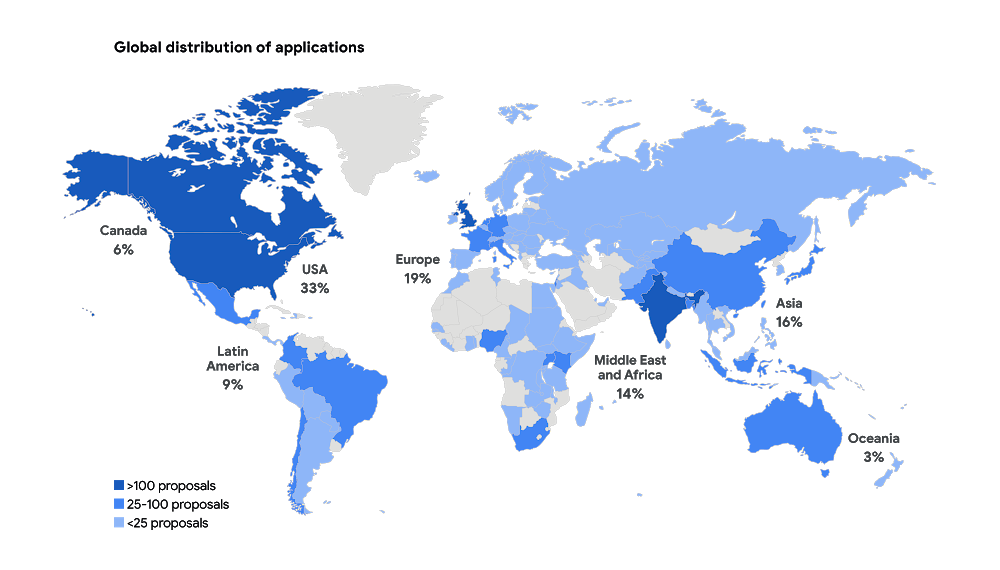
Similar projects can benefit from shared resources
When we reviewed all the applications, we saw that many people are trying to tackle the same problems and are even using the same approaches to do so. For example, we received more than 30 applications proposing to use AI to identify and manage agricultural pests. The report includes a list of common project submissions, which will hopefully encourage people to collaborate and share resources with others working to solve similar problems.
You don’t need to be an expert to use AI for social good
AI is becoming more accessible as new machine learning libraries and other open-source tools, such as Tensorflow and ML Kit, reduce the technical expertise required to implement AI. Organizations no longer need someone with a deep background in AI, and they don’t have to start from scratch. More than 70 percent of submissions, across all sectors and organization types, used existing AI frameworks to tackle their proposed challenge.
Successful projects combine technical ability with sector expertise
Few organizations had both the social sector and AI technical expertise to successfully design and implement their projects from start to finish. The most comprehensive applications established partnerships between nonprofits with deep sector expertise, and academic institutions or technology companies with technical experience.
ML isn’t the only answer
Some problems can be addressed by using alternative methods to AI—and result in faster, simpler and cheaper execution. For example, several organizations proposed using machine learning to match underserved populations to legal knowledge and tools. While AI could be helpful, similar results could be achieved through a well-designed website. While we’ve seen the impact AI can have in solving big problems, you shouldn’t rule out more simple approaches as well.
Global momentum around AI for social good is growing—and many organizations are already using AI to address a wide array of societal challenges. As more social sector organizations recognize AI’s potential, we all have a role to play in supporting their work for a better world.
Anthos Makes Hybrid and Multi-Cloud Deployments Easy

3663
Of your peers have already read this article.
1:30 Minutes
The most insightful time you'll spend today!
Most enterprises have applications in disparate locations—in their own data centers, in multiple public clouds, and at the edge. These apps run on different proprietary technology stacks, which reduces developer velocity, wastes computing resources, and hinders scalability. How can you consistently secure and operate existing apps, while developing and deploying new apps across hybrid and multicloud environments? How can you get centralized visibility and management of the resources? Well, that is why Anthos exists!
This post explores why traditional hybrid and multicloud deployments are difficult, and then shows how Anthos makes it easy to manage applications across multiple environments.
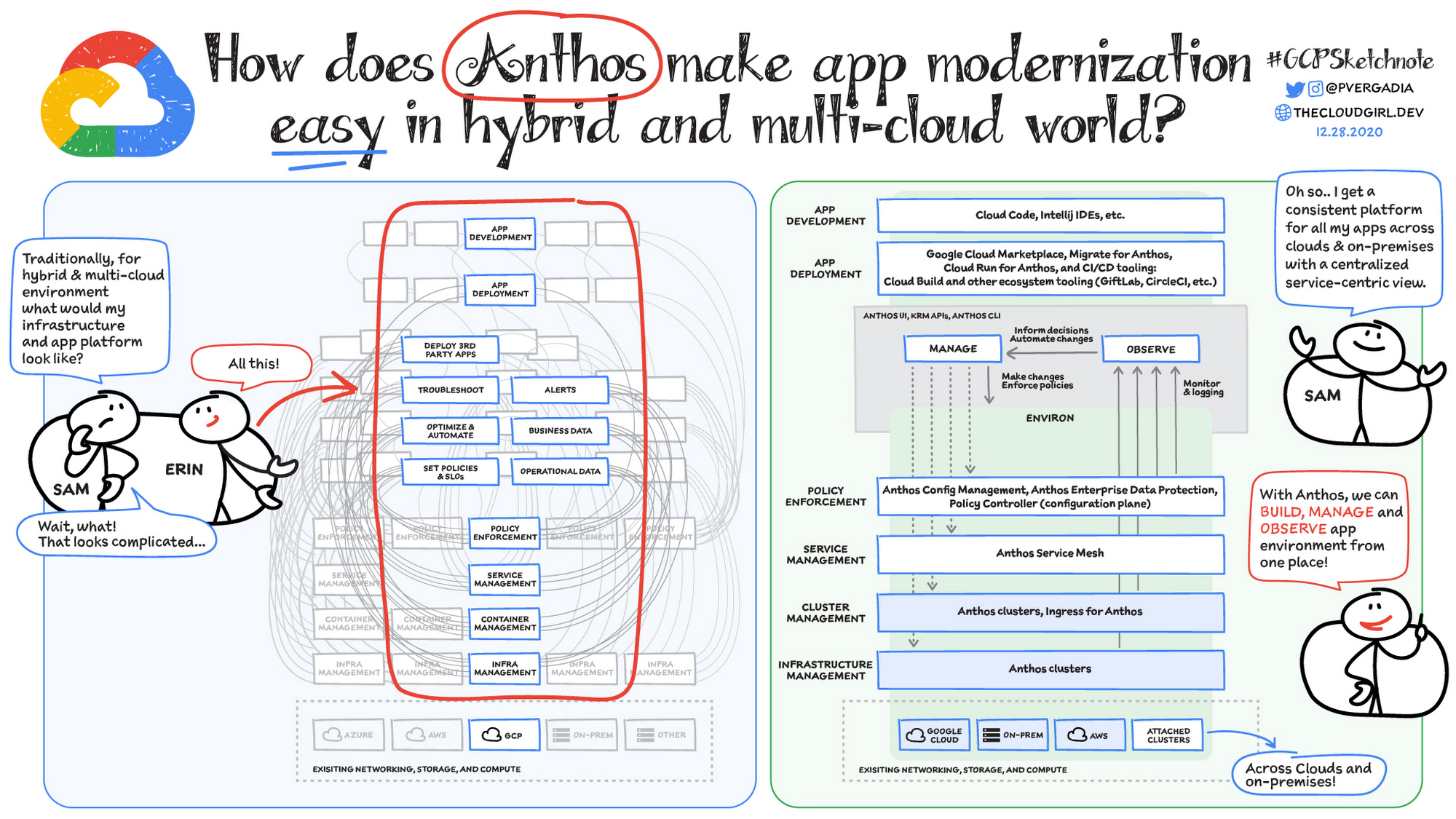
Why is traditional hybrid and multicloud difficult?
In hybrid and multicloud environments, you need to manage infrastructure. Let’s say you use containers on the clouds, and you develop apps using services on Google Cloud and AWS. Regardless of environment, you will need policy enforcement across your IT footprint. To manage your apps across the environment, you need monitoring and logging systems. You need to integrate that data into meaningful categories, like business data, operational data, and alerts.
Digging further, you might use operational data and alerts to inform optimizations, implement automations, and set policies or SLOs. You might use business data to do all those things, and to deploy third-party apps. Then, to actually enact the changes you decide to implement, you need to act on different parts of the system. That means digging into each tool for policy enforcement, securing services, orchestrating containers, and managing infrastructure. Don’t forget, all of this work is in addition to what it takes to develop and deploy your own apps.
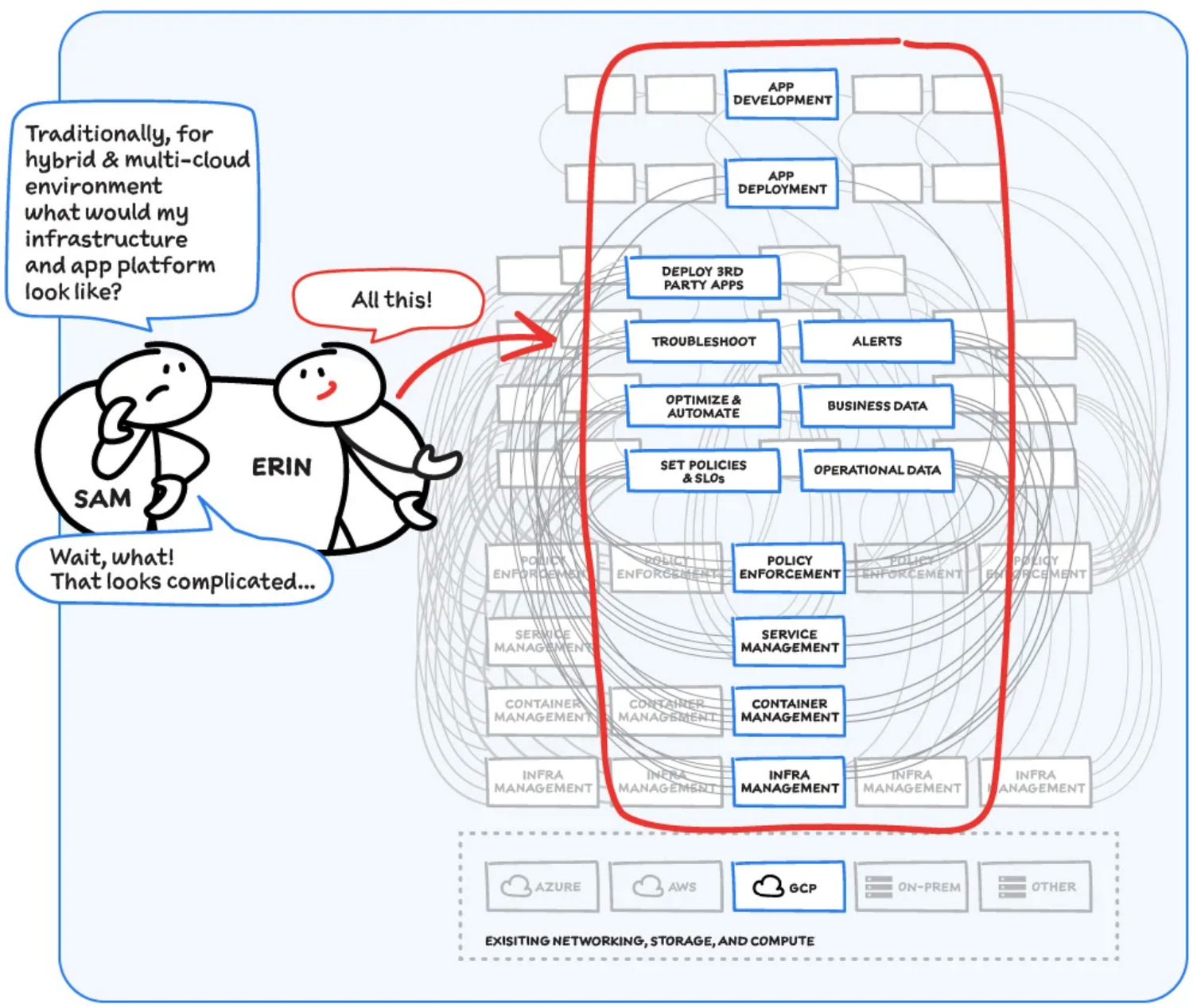
Now, consider repeating this set of tasks across a hybrid and multicloud landscape. It becomes very complex, very quickly. Your platform admins, SREs, and DevOps teams who are responsible for security and efficiency have to do manual, cluster-by-cluster management, data collection, and information synthesis. With this complexity, it’s hard to stay current, to understand business implications, and to ensure compliance (not to mention the difficulty of onboarding a new hire). Anthos helps solve these challenges!
How does Anthos make hybrid and multicloud easy?
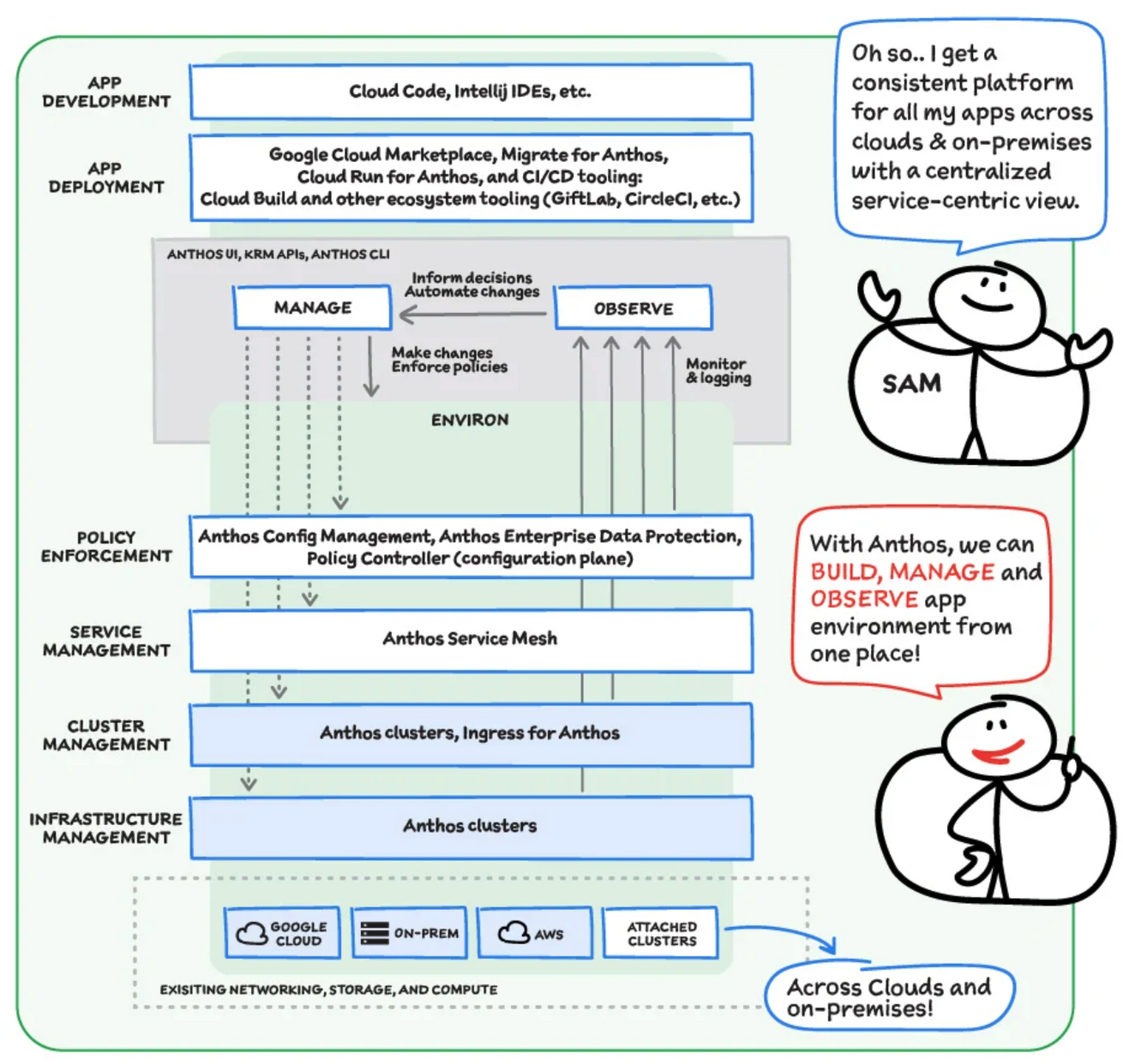
With Anthos, you get a consistent way to manage your infrastructure, with similar infrastructure management, container management, service management, and policy enforcement across your landscape.
As a result, you have observability across all your platforms in one place, including access to business information, alerts, and operations information. With this information you might decide to optimize, automate, and set policies or SLOs.
Digging deeper into Anthos
Environs
You may have different regions that need different policies, and also have different development, staging, or production environments that need different permissions. Some parts of your work may need more security. That’s where environs come in! Environs are a way to create logical sets of underlying Kubernetes clusters, regardless of which platform those clusters live on.
By considering, grouping, and managing sets of clusters as logical environs, you can think about and work with your applications at the right level of detail for what you need to do, be it acquiring business insights over the entire system, updating settings for a dev environment, or troubleshooting data for a specific cluster. Using environs, each part of the functional stack can take declarative direction about configuration, compliance, and more.
Modernize application development
Anthos also helps modernize application development because it uses environs to enforce policies and processes, and abstracts away the cluster and container management from application teams. Anthos enables you to easily abstract away infrastructure from application teams, making it easy for them to incorporate a wide variety of CI/CD solutions on top of environs. It lets you view and manage your applications at the right level of detail, be it business insights for services across the entire system, or troubleshooting data for a specific cluster. Anthos also works with container-based tools like buildpacks to simplify the packaging process. It offers Migrate for Anthos to take those applications out of the VMs and move them to a more modern hosting environment.
What’s in it for platform administrators?
Anthos provides platform administrators a single place to monitor and manage their landscape, with policy control and marketplace access. This reduces person-hours needed for management, enforcement, discovery, and communication. Anthos also provides administrators an out-of-the-box structured view of their entire system, including services, clusters, and more, so they can improve security, use resources more efficiently, and demonstrate measurable success. Administrators also save time and effort by managing declaratively, and they can communicate the success, cost savings, and efficiency of the platforms without needing to manually combine data.
Interested in getting started with Anthos? Check out the free on-demand training here and my YouTube series.
For more resources, you can also read the Anthos ebook at no cost. For more #GCPSketchnote and similar cloud content, follow me on twitter @pvergadia and keep an eye out on thecloudgirl.dev
New Map Customization Features for Enhanced User Experiences

5562
Of your peers have already read this article.
1:30 Minutes
The most insightful time you'll spend today!
A customized map can be key to delivering a frictionless experience that engages users and sets you apart in users’ minds–whether you’re a real estate company fine-tuning points of interest (POIs) on a map to help buyers decide where to live, or a regional pharmacy styling a map to ensure your locations stand out from the competition. That’s why we’ve focused on empowering you with these capabilities through features like POI density and POI filtering controls, zoom level customization, and even industry-optimized map styles. But we’re not done helping you take your map to the next level. Today, we’re making two updates generally available—a new Maps SDK for Android and the extension of Cloud-based maps styling features to our Android and iOS SDKs. Together they enhance the native mobile map experience and make it easier for you to deliver consistent, optimized maps across all your platforms. We’ll also give you an early look at additional features that we’re working on.
Update your Maps SDKs for Android for an enhanced user experience
Developers around the world depend on the Maps SDK for Android to power critical experiences like helping drivers make a delivery or helping retailers visually confirm an order’s shipping address. With consumers spending an increasing amount of time in apps, it’s more important than ever that mobile experiences meet the high consumer expectations that come with essential, everyday use.
Today we released version 18.0.0 of the Maps SDK for Android, which delivers an enhanced map experience to app users, thanks to a new renderer. The new renderer introduces optimizations to our tile serving and rendering architecture, reducing payload size. This can help to reduce network load, on-device processing, and memory consumption for a more stable and smoother end-user experience. You’ll also see specific improvements with map labels. Now more fluid and clearly positioned, they pave the way for future marker management features. We’ve also enhanced overall gesture handling for better animations and smoother panning and zooming.
Because the Maps SDK for Android continues to be distributed as part of the Google Play services SDK, you can upgrade to v18.0.0 along with all its improvements with no increase to your APK size.
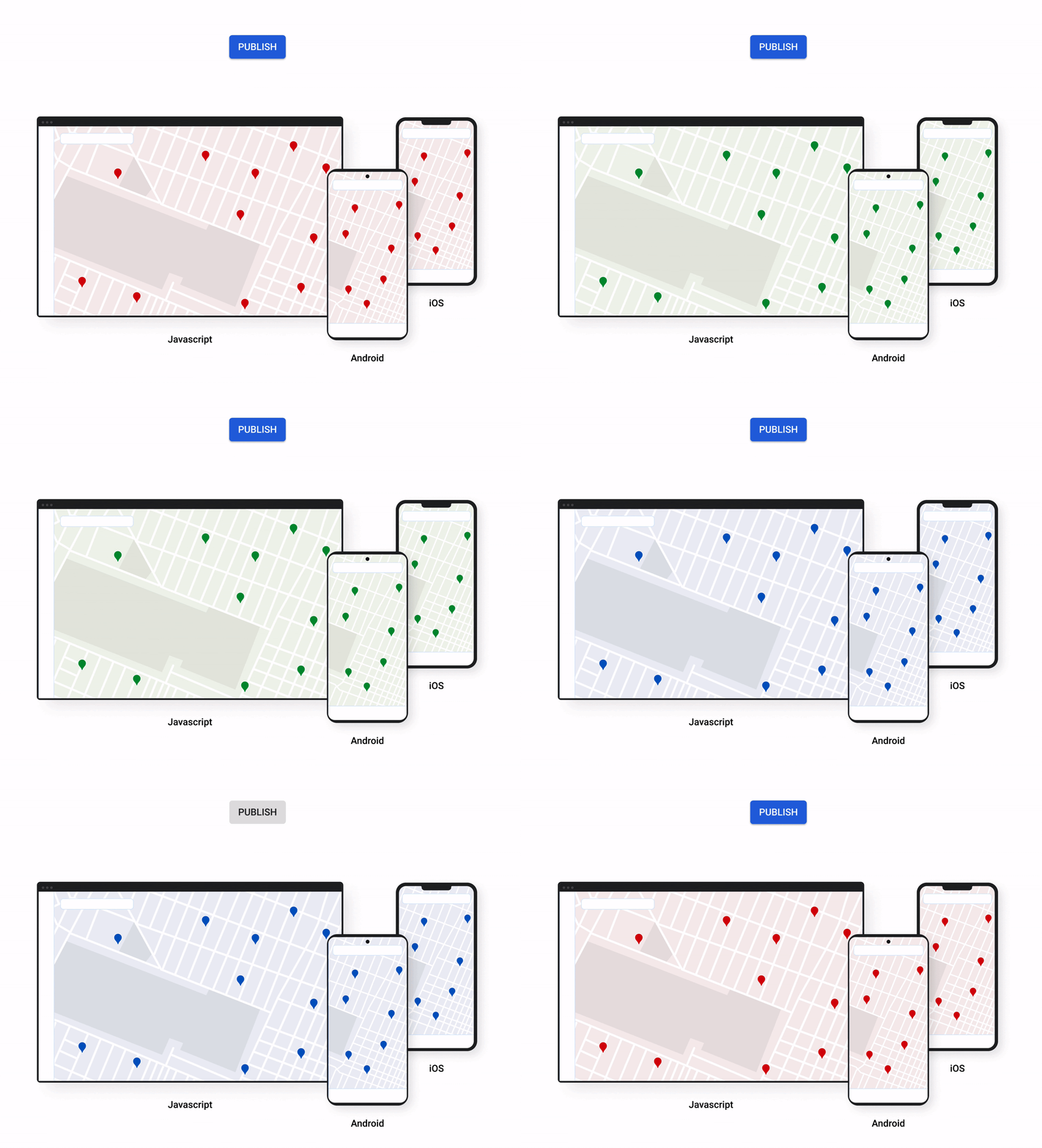
A consistent cross-platform maps experience with Cloud-based maps styling for mobile
Earlier this year at Google I/O, we announced the general availability of Cloud-based maps styling for JavaScript. Since then customers have used the richer customization capabilities and efficient cloud-enhanced deployment workflow to power millions of mapping experiences, from a curated interactive map of Munich to fun virtual Easter egg hunts hosted by Cadbury. Starting today, Cloud-based maps styling features are supported in the GA versions of our Maps SDK for Android (v18+) and Maps SDK for iOS (V5.0+).
Cloud-based maps styling moves map customization code off the client and into the cloud–where it can be easily modified to use new features or test new configurations. This decoupling of client code and customization code makes it easy to manage a single branded and optimized style across any number of apps across all supported platforms. It also makes it possible to simultaneously publish changes to a map style across platforms and install bases with the click of a button. Cloud-based maps styling is the foundation for a growing set of new customization features including POI filtering and POI boosting, zoom level customization, landmarks, and commercial corridor styling.
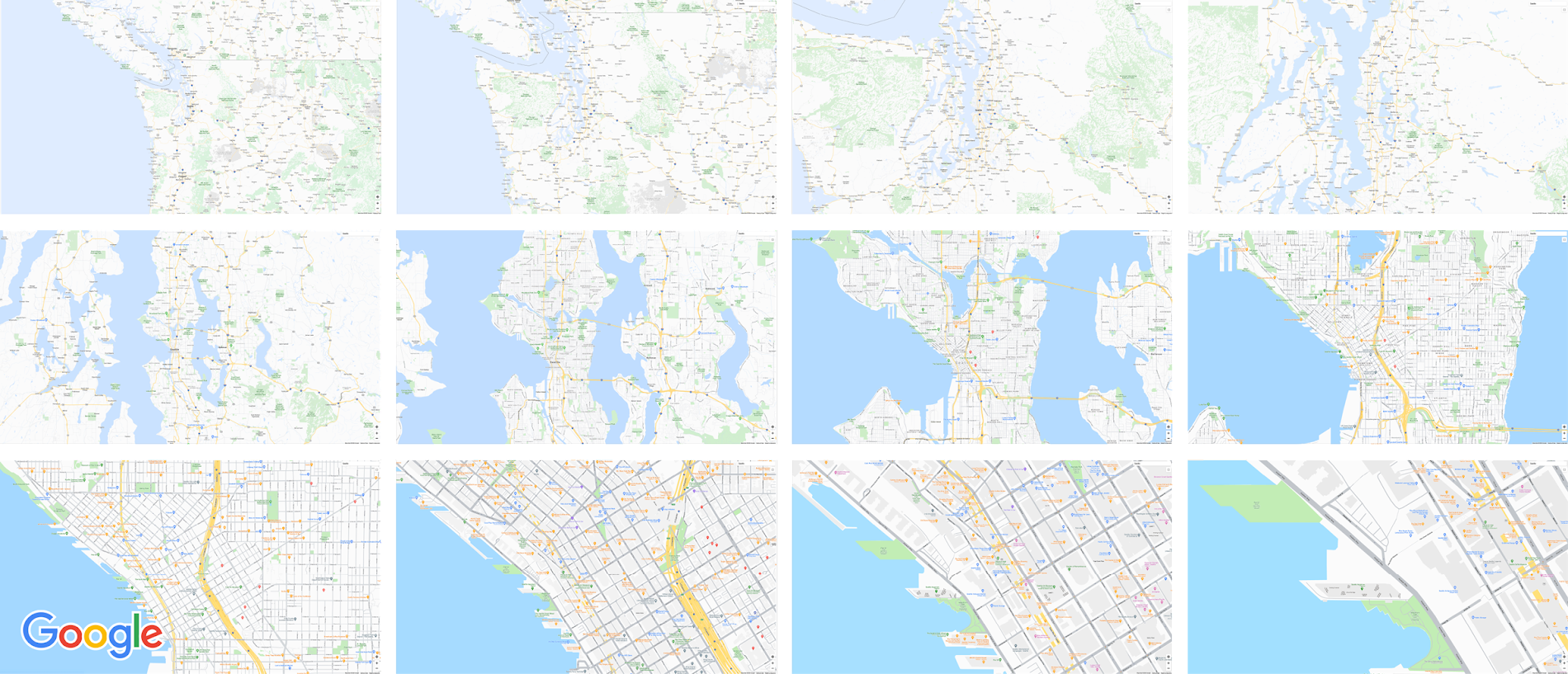
Mobile developers can now take advantage of Cloud-based maps styling features and simple cross-platform customizations for their Dynamic Maps by creating a MapID in Google Cloud Console and using it within their Maps SDK for Android or Maps SDK for iOS. Dynamic maps loaded with a Map ID via our Maps SDK for Android or Maps SDK for iOS will be billed to the same SKU as Maps JavaScript API (Dynamic Maps) and covered under the same $200 monthly credit and volume pricing. Developers can upgrade to the new Maps SDK for Android and continue using client-styled maps for no charge as they always have.
Additional capabilities we’re working on¹
We know you have a range of map customization needs to engage your users with differentiated experiences. We’re working on developing more Cloud-based maps styling features–focused on marker capabilities, map elements, and data-driven styling–to help you do just that. We’re working on a new set of markers capabilities, easier pin customizations, marker collision management, performance optimizations, and the ability to build custom marker elements that you can use to quickly deploy deeply customized, highly optimized marker-driven experiences. For those seeking greater detail in their maps, we’re working on expanding the availability and customization of detailed street maps to even more cities. We’re also working on features to make it easier to programmatically style map elements by exposing new APIs to enable things like the simple creation of choropleths by styling Google geographical boundaries based on your data.
This is just a peek into what we’re excited to be building for our developer community. While we’re working hard to bring these additional features to life, visit our website to learn more and our developer documentation to start customizing and enhancing your mobile maps.
¹Product capabilities, timeframes, and features are subject to change.
KRM Series Part 5: Learn to Manage and Configure Hosted Resources with Kubernetes

3207
Of your peers have already read this article.
3:00 Minutes
The most insightful time you'll spend today!
This is the fifth and final post in a multi-part series about the Kubernetes Resource Model. Check out parts 1, 2, 3, and 4 to learn more.
In part 2 of this series, we learned how the Kubernetes Resource Model works, and how the Kubernetes control plane takes action to ensure that your desired resource state matches the running state.
Up until now, that “running resource state” has existed inside the world of Kubernetes- Pods, for example, run on Nodes inside a cluster. The exception to this is any core Kubernetes resource that depends on your cloud provider. For instance, GKE Services of type Load Balancer depend on Google Cloud network load balancers, and GKE has a Google Cloud-specific controller that will spin up those resources on your behalf.
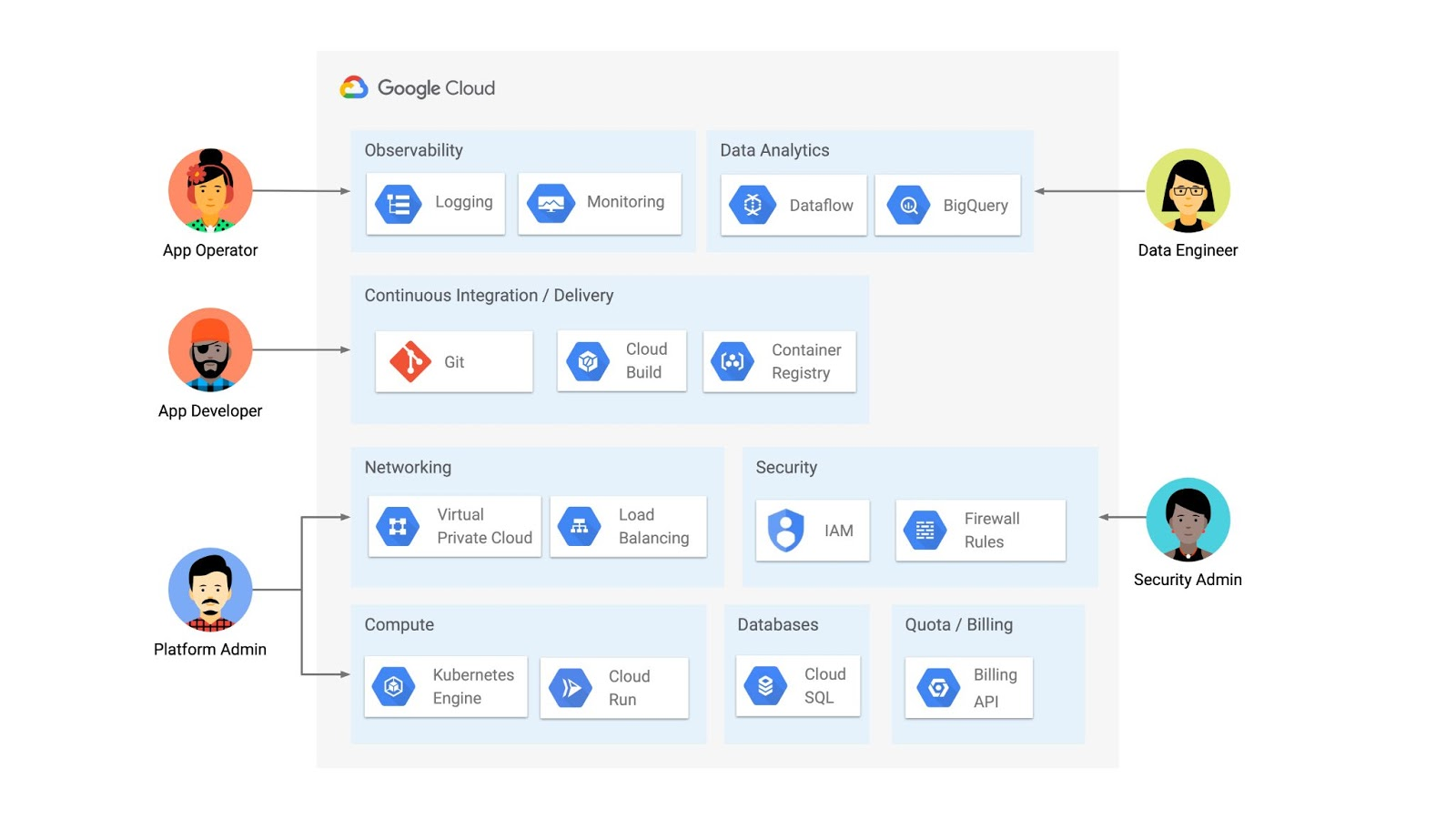
But if you’re operating a Kubernetes platform, it’s likely that you have resources that live entirely outside of Kubernetes. You might have CI/CD triggers, IAM policies, firewall rules, databases. The first post of this series introduced the platform diagram below, and asserted that “Kubernetes can be the powerful declarative control plane that manages large swaths” of that platform. Let’s close that loop by exploring how to use the Kubernetes Resource Model to configure and provision resources hosted in Google Cloud.
Why use KRM for hosted resources?
Before diving into the “what” and “how” of using KRM for cloud-hosted resources, let’s first ask “why.” There is already an active ecosystem of infrastructure-as-code tools, including Terraform, that can manage cloud-hosted resources. Why use KRM to manage resources outside of the cluster boundary?
Three big reasons. The first is consistency. The last post explored ways to ensure consistency across multiple Kubernetes clusters- but what about consistency between Kubernetes resources and cloud resources? If you have org-wide policies you’d like to enforce on Kubernetes resources, chances are that you also have policies around hosted resources. So one reason to manage cloud resources with KRM is to standardize your infrastructure toolchain, unifying your Kubernetes and cloud resource configuration into one language (YAML), one Git config repo, one policy enforcement mechanism.
The second reason is continuous reconciliation. One major advantage of Kubernetes is its control-loop architecture. So if you use KRM to deploy a hosted firewall rule, Kubernetes will work constantly to make sure that resource is always deployed to your cloud provider- even if it gets manually deleted.
A third reason to consider using KRM for hosted resources is the ability to integrate tools like kustomize into your hosted resource specs, allowing you to customize resource specifications without templating languages.
These benefits have resulted in a new ecosystem of KRM tools designed to manage cloud-hosted resources, including the Crossplane project, as well as first-party tools from AWS, Azure, and Google Cloud.
Let’s explore how to use Google Cloud Config Connector to manage GCP-hosted resources with KRM.
Introducing Config Connector
Config Connector is a tool designed specifically for managing Google Cloud resources with the Kubernetes Resource Model. It works by installing a set of GCP-specific resource controllers onto your GKE cluster, along with a set of Kubernetes Custom Resources for Google Cloud products, from Cloud DNS to Pub/Sub.
How does it work? Let’s say that a security administrator at Cymbal Bank wants to start working more closely with the platform team to define and test Policy Controller constraints. But they don’t have access to a Linux machine, which is the operating system used by the platform team. The platform team can address this by manually setting up a Google Compute Engine (GCE) Linux instance for the security admin. But with Config Connector, the platform team can instead create a declarative KRM resource for a GCE instance, commit it to the config repo, and Config Connector will spin up the instance on their behalf.
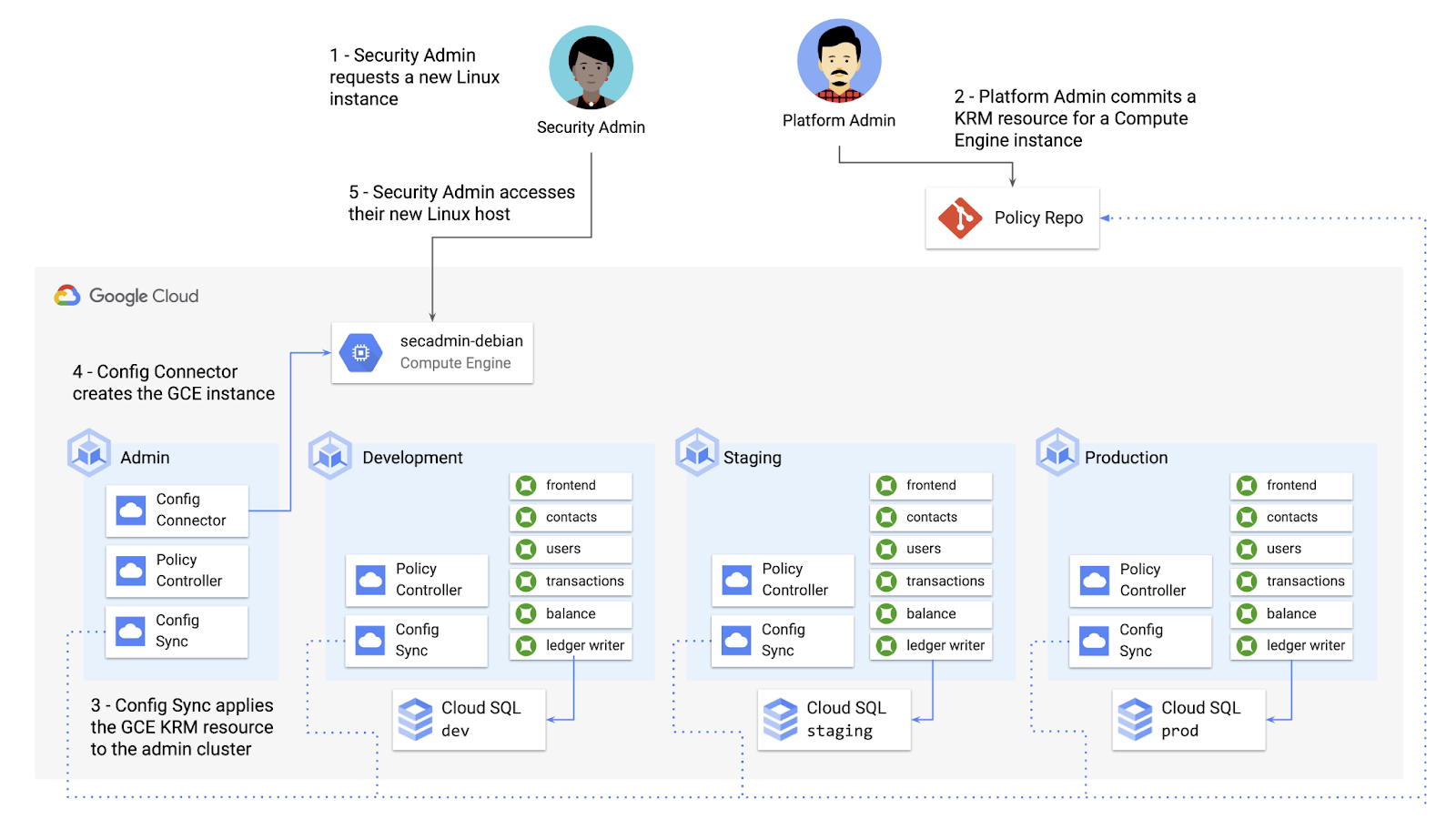
What does this declarative resource look like? A Config Connector resource is just a regular Kubernetes-style YAML file- in this case, a custom resource called Compute Instance. In the resource spec, the platform team can define specific fields, like what GCE machine type to use.
apiVersion: compute.cnrm.cloud.google.com/v1beta1kind: ComputeInstancemetadata:annotations:cnrm.cloud.google.com/allow-stopping-for-update: "true"name: secadmin-debianlabels:created-from: "image"network-type: "subnetwork"spec:machineType: n1-standard-1zone: us-west1-abootDisk:initializeParams:size: 24type: pd-ssdsourceImageRef:external: debian-cloud/debian-9...
Once the platform team commits this resource to the Config Sync repo, Config Sync will deploy the resource to the cymbal-admin GKE cluster, and Config Connector, running on that same cluster, will spin up the GCE resource represented in the file.
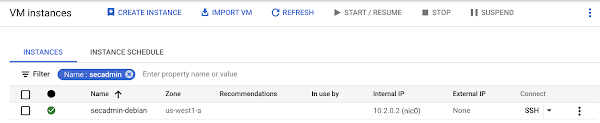
This KRM workflow for cloud resources opens the door for powerful automation, like custom UIs to automate resource requests within the Cymbal Bank org.
Integrating Config Connector with Policy Controller
By using Config Connector to manage Google Cloud-hosted resources as KRM, you can adopt Policy Controller to enforce guardrails across your cloud and Kubernetes resources.
Let’s say that the data analytics team at Cymbal Bank is beginning to adopt BigQuery. While the security team is approving production usage of that product, the platform team wants to make sure no real customer data is imported. Together, Config Connector and Policy Controller can set up guardrails for BigQuery usage within Cymbal Bank.
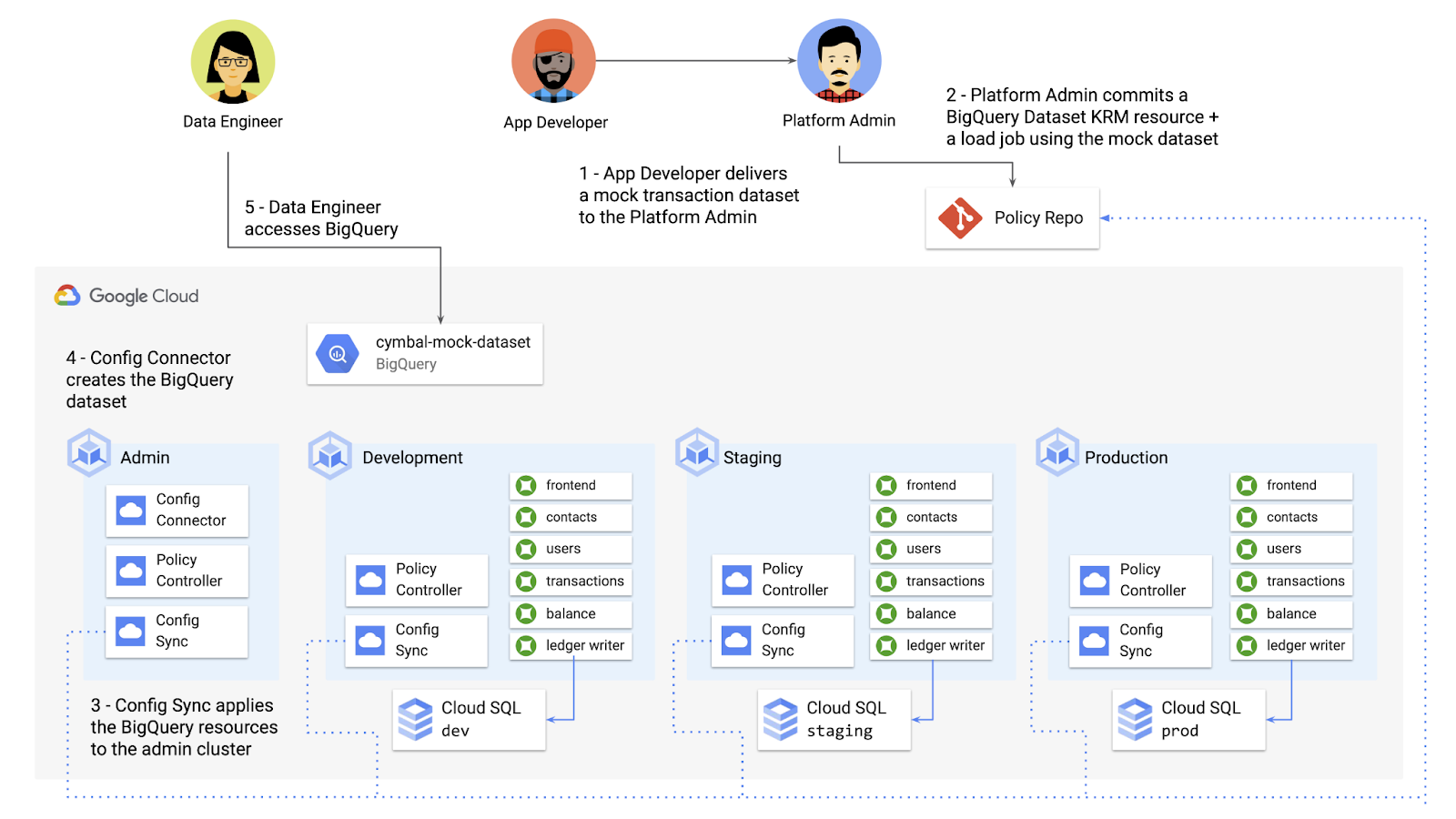
Config Connector supports BigQuery resources, including Jobs, Datasets, and Tables. The platform team can work with the analytics team to define a test dataset, containing mocked data, as KRM, pushing those resources to the Config Sync repo as they did with the GCE instance resource.
apiVersion: bigquery.cnrm.cloud.google.com/v1beta1kind: BigQueryJobmetadata:name: cymbal-mock-load-jobannotations:configsync.gke.io/cluster-name-selector: cymbal-adminspec:location: "US"jobTimeoutMs: "600000"load:sourceUris:- "gs://cymbal-bank-datasets/cymbal-mock-transactions.csv"
From there, the platform team can create a custom Constraint Template for Policy Controller, limiting the allowed Cymbal datasets to only the pre-vetted mock dataset:
rego: |package bigquerydatasetallownameviolation[{"msg": msg}] {input.review.object.kind == "BigQueryDataset"input.review.object.metadata.name != input.parameters.allowedNamemsg := sprintf("The BigQuery dataset name %v is not allowed", [input.review.object.metadata.name])}apiVersion: constraints.gatekeeper.sh/v1beta1
These guardrails, combined with IAM, can allow your organization to adopt new cloud products safely- not only defining who can set up certain resources, but within those resources, what field values are allowed.
Manage existing GCP resources with Config Connector
Another useful feature of Config Connector is that it supports importing existing Google Cloud resources into KRM format, allowing you to bring live-running resources into the management domain of Config Connector.
You can use the config-connector command line tool to do this, exporting specific resource URIs into static files:
config-connector export "//sqladmin.googleapis.com/sql/v1beta4/projects/cymbal-bank/instances/cymbal-dev" \--output cloudsql/
Output:
apiVersion: sql.cnrm.cloud.google.com/v1beta1kind: SQLInstancemetadata:annotations:cnrm.cloud.google.com/project-id: cymbal-bankname: cymbal-devspec:databaseVersion: POSTGRES_12region: us-east1resourceID: cymbal-dev...
From here, we can push these KRM resources to the config repo, and allow Config Sync and Config Controller to start lifecycling the resources on our behalf. The screenshot below shows that the cymbal-dev Cloud SQL database now has the “managed-by-cnrm” label, indicating that it’s now being managed from Config Connector (CNRM = “cloud-native resource management”).
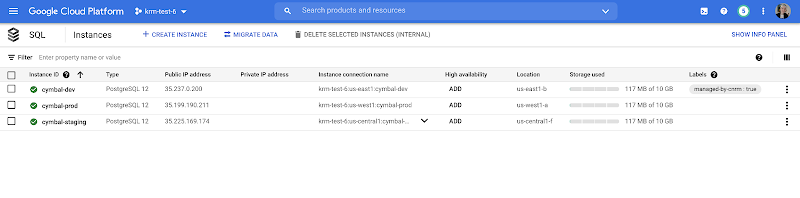
This resource export tool is especially useful for teams looking to try out KRM for hosted resources, without having to invest in writing a new set of YAML files for their existing resources. And if you’re ready to adopt Config Connector for lots of existing resources, the tool has a bulk export option as well.
Overall, while managing hosted resources with KRM is still a newer paradigm, it can provide lots of benefits for resource consistency and policy enforcement. Want to try out Config Connector yourself? Check out the part 5 demo.
This post concludes the Build a Platform with KRM series. Hopefully these posts and demos provided some inspiration on how to build a platform around Kubernetes, with the right abstractions and base-layer tools in mind.
Thanks for reading, and stay tuned for new KRM products and features from Google.
Reference Guide to Get You Started with Development on GKE

5570
Of your peers have already read this article.
1:30 Minutes
The most insightful time you'll spend today!
Getting started with Kubernetes is often harder than it needs to be. While working with a cluster “from scratch” can be a great learning exercise or a good solution for some highly specialized workloads, often the details of cluster management can be made easier by utilizing a managed service offering. Google Kubernetes Engine (GKE) allows for an easier end-to-end developer experience with convenient tooling and built-in integrations along with the convenience of offering Kubernetes clusters as a managed service.
GKE is the most mature container orchestration service available today, delivering a fully-managed service and hands-off experience with the GKE Autopilot mode of operation. GKE provides industry-first capabilities such as release channels, multi-cluster support, unique four-way auto scaling, node auto repair, and can support up to 15K nodes in a single cluster.
Our modern, end-to-end platform is built on cloud-native principles you are already familiar with and prioritizes speed, security, and flexibility, in ways that are highly differentiated from other cloud platforms.
We have put together a new reference guide for you as you begin your journey developing on GKE. It covers every step of your journey from writing, running, operating, to managing code. Even if it isn’t your first time using GKE, this e-book will be a valuable resource highlighting important considerations and best practices. By implementing the technical recommendations, following the steps, and utilizing the tools described, you can reach the following goals:
- Write, deploy, and debug code faster with Cloud Code and Cloud Shell
- Continuously integrate and deliver updates with Cloud Build
- Run easily, securly, cost effectively at scale with GKE
- Monitor and troubleshoot with Google Cloud’s operations suite
Kick-start your journey by downloading the e-book and join us live June 22 at 9am PDT for our half-day Cloud OnBoard event: Getting Started with Google Kubernetes Engine.
More Relevant Stories for Your Company

Modernize your Windows Server Workloads using Google Cloud Platform
Application Modernization is an important enabler of Digital Transformations (DX), which fuel competitive advantage through increased productivity and business agility. Public cloud infrastructure proves to be a solid foundation for application modernization by providing Self-Service Provisioning capabilities, cloud-based & cloud-native technologies, and easier access to technology innovations such as AI/ML.

How Mailjet Sends 1.5 billion Emails a Month with Google Cloud
Mailjet allows companies to create, send, and track millions of emails to their customers and prospects around the world each month. The company’s offerings range from routing these emails to tailor-made tools that allow clients to design and send marketing campaigns with messages related to sales, user clubs, coupons and discounts,

Speeding Up Digital Transformation with Industry Solutions
Most large enterprises started with their own data centers and developed in-house solutions to meet their specific business needs, regulations, and industry specifications. These solutions were based on traditional applications from legacy vendors like Oracle and Microsoft — or even mainframes — and from key technology providers like SAP and

Upgrade Your Contact Center with Knowlarity’s AI-powered Speech Analytics for Higher CX
Did you know, everyday about 56 million hours worth of phone conversations, equalling to 420 billion spoken words are handled by contact centers? Knowlarity, a renowned cloud business communication service provider with nearly 6,000 customers and over a million virtual users, leverages AI-powered speech analytics that offer insights to gauge
