





Enhancing SAP Build Process Automation with Google Document AI and Google Workspace

4146
Of your peers have already read this article.
4:00 Minutes
The most insightful time you'll spend today!
SAP Build Process Automation is designed to optimize business processes and boost efficiency. The platform helps both business users and developers alike digitize core workflows and incorporate artificial intelligence (AI) into time consuming and error-prone manual tasks.
All digital paths can benefit from automation. The pandemic, supply chain shortages, and other disruptive events have upped the pressure on businesses and their workers to perform in more efficient and flexible ways.
Google Cloud and SAP have responded by providing an integrated toolbox that can fundamentally change the way businesses operate — all while creating value for their customers.
With a focus on taking process automation to an even more advanced level and removing inefficiencies from workflows, SAP has introduced integrations with Google Cloud Document AI, and Google Workspace for SAP Build Process Automation customers. This integration can reduce or eliminate many repetitive and error-prone tasks, so that companies can help save money, operate more productively, and scale more easily.
AI unleashes innovation
Continuous advances in digital systems and advanced technology introduce new opportunities to rethink workflows. SAP recognizes the role that AI-powered automation can play in transforming workflows, and that the benefits of doing so extend beyond basic time savings and cost cutting. By plugging Google Cloud Document AI into the application, SAP Build Process Automation’s low-code, no-code platform enables SAP to help its customers in lines of business and IT integrate multiple applications while democratizing access to governed machine learning technology.
Machine learning and process automation can drive efficiency with SAP S/4HANA
Customers using SAP S/4HANA can build workflow improvements into all major core processes, such as order entry, invoice creation, asset posting, and many others, helping them to be faster and more efficient in the process. Google Cloud Document AI extracts key elements — including addresses, article numbers, price, quantity, and more — within emails, PDFs, handwritten notes, and other formats.
Integrated automation can drive results for invoice and purchase order processing
An example of the improvements these integrations have made to SAP Build Process Automation is the use of AI, productivity tools, and automation for processing purchase orders. In the past, workers had to manually select relevant orders in their Gmail accounts and extract key data from large PDF files, including the order date, supplier details, article numbers, quantity, unit price, and the total amount. Then, workers would have to enter all of the individual line items one by one into the SAP S/4HANA system.
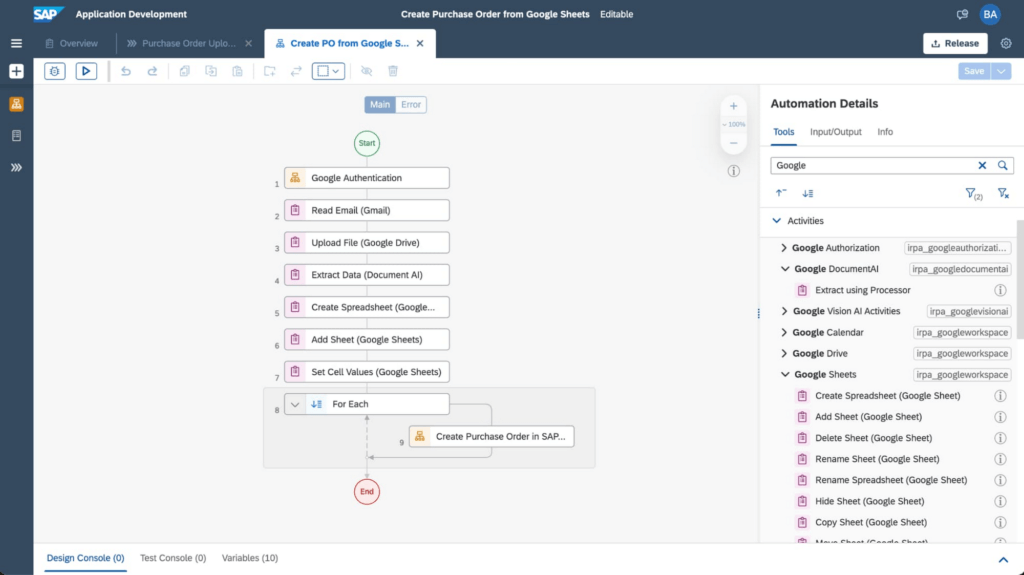
Today, through SAP’s integrated automation platform, customers can automatically extract and organize data by Google Workspace (Google Sheets, Google Drive, and Gmail) and Document AI. This works by extracting data contained in Gmail attachments, downloading it into Google Drive and extracting fields using Document AI’s pretrained models. The tool then enters the consolidated order information from Google Sheets into SAP S/4HANA. For example, the Canton of Zurich in Switzerland experienced a significant reduction of workload to process compensation forms once the organization implemented this automation. Furthermore, implementing the automation can avoid audit and compliance issues, and improve data quality.
The screenshot below shows how a workflow operates within the SAP Build Process Automation software.
Sales, procurement, finance, and other functions are also able to handle more strategic work that delivers greater value to customers with these SAP and Google Cloud integrations. They’ve also boosted both security and regulatory compliance for customers, including those in the financial services space.
For example, the Google Cloud Document AI technology can process thousands of supply chain invoices, validates and systematically approves them. And, over time, the machine learning and AI components improve the analysis process and ensure that data processed with SAP Build Process Automation is adhering to a company’s best practices and essential regulatory requirements.
SAP and Google Cloud put automation to work
Achieving the most accurate, efficient business processes is possible with an automation framework that embeds collaboration and productivity applications while giving lines of business and IT users access to machine learning technology. SAP Build Process Automation combined with Google Cloud Document AI, and Google Workspace has proven to be a catalyst in driving innovation and business transformation for customers across multiple industries, leading to an average of 22% to 30% faster time to market, and significant financial gains, including up to 20% accounts payable savings potential. An example of these improvements includes those experienced by TasNetworks, which had a 25% reduction in back-office processing efforts after implementing these technologies.
To learn more about how Google Cloud and SAP are building solutions for accelerating business value, visit cloud.google.com/solutions/sap. You can find more information about SAP Build Process Automation at sap.com/build-automation.
To start your transformation journey today, choose the SAP Business Technology Platform region that’s best for you. We’re also happy to announce that Google Cloud offers the first and only option to run BTP in the cloud in India — learn more here: Google Cloud’s newest SAP Business Technology Platform Region.
Enabling Real-time AI with Streaming Ingestion in Vertex AI

2511
Of your peers have already read this article.
2:30 Minutes
The most insightful time you'll spend today!
Many machine learning (ML) use cases, like fraud detection, ad targeting, and recommendation engines, require near real-time predictions. The performance of these predictions is heavily dependent on access to the most up-to-date data, with delays of even a few seconds making all the difference. But it’s difficult to set up the infrastructure needed to support high-throughput updates and low-latency retrieval of data.
Starting this month, Vertex AI Matching Engine and Feature Store will support real-time Streaming Ingestion as Preview features. With Streaming Ingestion for Matching Engine, a fully managed vector database for vector similarity search, items in an index are updated continuously and reflected in similarity search results immediately. With Streaming Ingestion for Feature Store, you can retrieve the latest feature values with low latency for highly accurate predictions, and extract real-time datasets for training.
For example, Digits is taking advantage of Vertex AI Matching Engine Streaming Ingestion to help power their product, Boost, a tool that saves accountants time by automating manual quality control work.“Vertex AI Matching Engine Streaming Ingestion has been key to Digits Boost being able to deliver features and analysis in real-time. Before Matching Engine, transactions were classified on a 24 hour batch schedule, but now with Matching Engine Streaming Ingestion, we can perform near real time incremental indexing – activities like inserting, updating or deleting embeddings on an existing index, which helped us speed up the process. Now feedback to customers is immediate, and we can handle more transactions, more quickly,” said Hannes Hapke, Machine Learning Engineer at Digits.
This blog post covers how these new features can improve predictions and enable near real-time use cases, such as recommendations, content personalization, and cybersecurity monitoring.

Streaming Ingestion enables real-time AI
As organizations recognize the potential business impact of better predictions based on up-to-date data, more real-time AI use cases are being implemented. Here are some examples:
- Real-time recommendations and a real-time marketplace: By adding Streaming Ingestion to their existing Matching Engine-based product recommendations, Mercari is creating a real-time marketplace where users can browse products based on their specific interests, and where results are updated instantly when sellers add new products. Once it’s fully implemented, the experience will be like visiting an early-morning farmer’s market, with fresh food being brought in as you shop. By combining Streaming Ingestion with Matching Engine’s filtering capability, Mercari can specify whether or not an item should be included in the search results, based on tags such as “online/offline” or “instock/nostock.”

Mercari Shops: Streaming Ingestion enables real-time shopping experiment
- Large-scale personalized content streaming: For any stream of content representable with feature vectors (including text, images, or documents), you can design pub-sub channels to pick up valuable content for each subscriber’s specific interests. Because Matching Engine is scalable (i.e., it can process millions of queries each second), you can support millions of online subscribers for content streaming, serving a wide variety of topics that are changing dynamically. With Matching Engine’s filtering capability, you also have real-time control over what content should be included, by assigning tags such as “explicit” or “spam” to each object. You can use Feature Store as a central repository for storing and serving the feature vectors of the contents in near real time.
- Monitoring: Content streaming can also be used for monitoring events or signals from IT infrastructure, IoT devices, manufacturing production lines, and security systems, among other commercial use cases. For example, you can extract signals from millions of sensors and devices and represent them as feature vectors. Matching Engine can be used to continuously update a list of “the top 100 devices with possible defective signals,” or “top 100 sensor events with outliers,” all in near real time.
- Threat/spam detection: If you are monitoring signals from security threat signatures or spam activity patterns, you can use Matching Engine to instantly identify possible attacks from millions of monitoring points. In contrast, security threat identification based on batch processing often involves potentially significant lag, leaving the company vulnerable. With real-time data, your models are better able to catch threats or spams as they happen in your enterprise network, web services, online games, etc.
Implementing streaming use cases
Let’s take a closer look at how you can implement some of these use cases.
Real-time recommendations for retail
Mercari built a feature extraction pipeline with Streaming Ingestion.
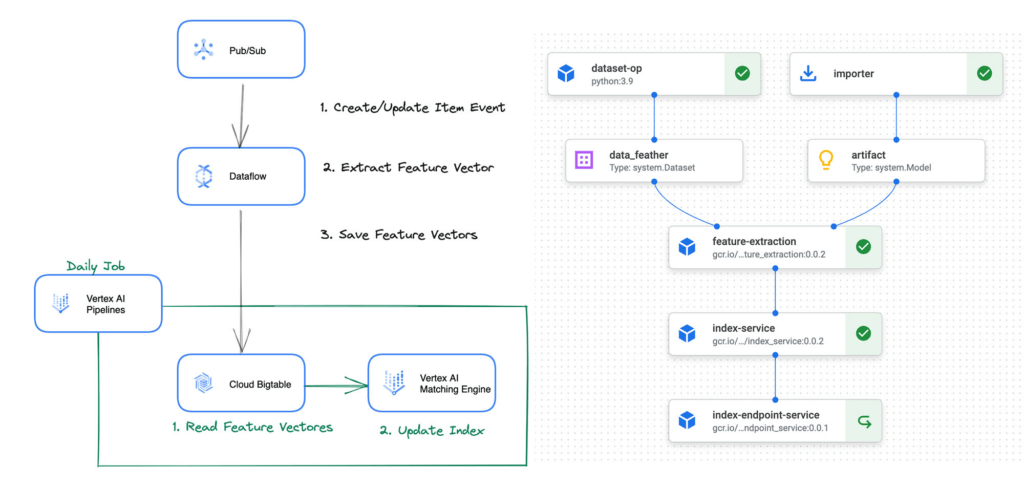
The feature extraction pipeline is defined with Vertex AI Pipelines, and is periodically invoked by Cloud Scheduler and Cloud Functions to initiate the following process:
- Get item data: The pipeline issues a query to fetch the updated item data from BigQuery.
- Extract feature vector: The pipeline runs predictions on the data with the word2vec model to extract feature vectors.
- Update index: The pipeline calls Matching Engine APIs to add the feature vectors to the vector index. The vectors are also saved to Cloud Bigtable (and can be replaced with Feature Store in the future).
“We have been evaluating the Matching Engine Streaming Ingestion and couldn’t believe the super short latency of the index update for the first time. We would like to introduce the functionality to our production service as soon as it becomes GA, ” said Nogami Wakana, Software Engineer at Souzoh (a Mercari group company).
This architecture design can be also applied to any retail businesses that need real-time updates for product recommendations.
Ad targeting
Ad recommender systems benefit significantly from real-time features and item matching with the most up-to-date information. Let’s see how Vertex AI can help build a real-time ad targeting system.
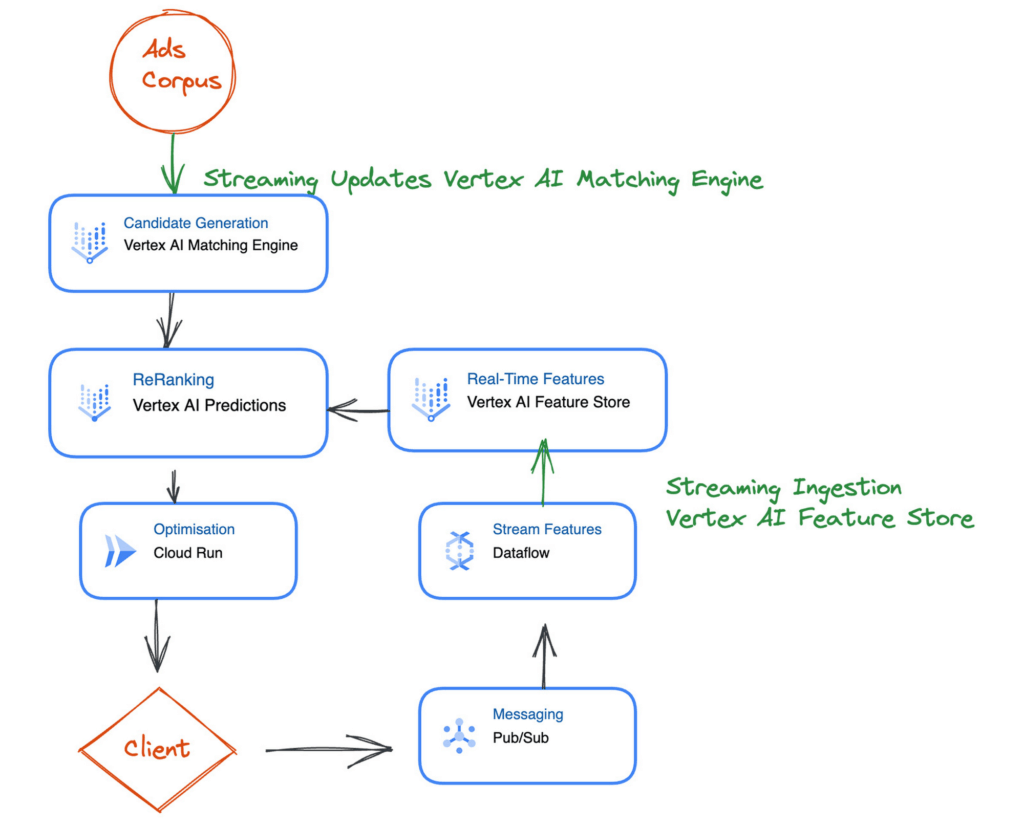
The first step is generating a set of candidates from the ad corpus. This is challenging because you must generate relevant candidates in milliseconds and ensure they are up to date. Here you can use Vertex AI Matching Engine to perform low-latency vector similarity matching, generate suitable candidates, and use Streaming Ingestion to ensure that your index is up-to-date with the latest ads.
Next is reranking the candidate selection using a machine learning model to ensure that you have a relevant order of ad candidates. For the model to use the latest data, you can use Feature Store Streaming Ingestion to import the latest features and use online serving to serve feature values at low latency to improve accuracy.
After reranking the ads candidates, you can apply final optimizations, such as applying the latest business logic. You can implement the optimization step using a Cloud Function or Cloud Run.
What’s Next?
Interested? The documents for Streaming Ingestion are available and you can try it out now. Using the new feature is easy: For example, when you create an index on Matching Engine with the REST API, you can specify the indexUpdateMethod attribute as STREAM_UPDATE.
{
    displayName: "'${DISPLAY_NAME}'",
    description: "'${DISPLAY_NAME}'",
    metadata: {
       contentsDeltaUri: "'${INPUT_GCS_DIR}'",
       config: {
          dimensions: "'${DIMENSIONS}'",
          approximateNeighborsCount: 150,
          distanceMeasureType: "DOT_PRODUCT_DISTANCE",
          algorithmConfig: {treeAhConfig: {leafNodeEmbeddingCount: 10000, leafNodesToSearchPercent: 20}}
       },
    },
    indexUpdateMethod: "STREAM_UPDATE"
}
After deploying the index, you can update or rebuild the index (feature vectors) with the following format. If the data point ID exists in the index, the data point is updated, otherwise, a new data point is inserted.
{

datapoints: [

{datapoint_id: "'${DATAPOINT_ID_1}'", feature_vector: [...]},
        {datapoint_id: "'${DATAPOINT_ID_2}'", feature_vector: [...]}

]
}
It can handle the data point insertion/update at high throughput with low latency. The new data point values will be applied in any new queries within a few seconds or milliseconds (the latency varies depending on the various conditions).
The Streaming Ingestion is a powerful functionality and very easy to use. No need to build and operate your own streaming data pipeline for real-time indexing and storage. Yet, it adds significant value to your business with its real-time responsiveness.
To learn more, take a look at the following blog posts for learning Matching Engine and Feature Store concepts and use cases:
Scaling Machine Learning Operations with Vertex AI AutoML and Pipeline

2556
Of your peers have already read this article.
2:30 Minutes
The most insightful time you'll spend today!
When you build a Machine Learning (ML) product, consider at least two MLOps scenarios. First, the model is replaceable, as breakthrough algorithms are introduced in academia or industry. Second, the model itself has to evolve with the data in the changing world.
We can handle both scenarios with the services provided by Vertex AI. For example:
- AutoML capability automatically identifies the best model based on your budget, data, and settings.
- You can easily manage the dataset with Vertex Managed Datasets by creating a new dataset or adding data to an existing dataset.
- You can build an ML pipeline to automate a series of steps that start with importing a dataset and end with deploying a model using Vertex Pipelines.
This blog post shows you how to build this system. You can find the full notebook for reproduction here. Many folks focus on the ML pipeline when it comes to MLOps, but there are more parts to building MLOps as a “system”. In this post, you will see how Google Cloud Storage (GCS) and Google Cloud Functions manage data and handle events in the MLOps system.
Architecture
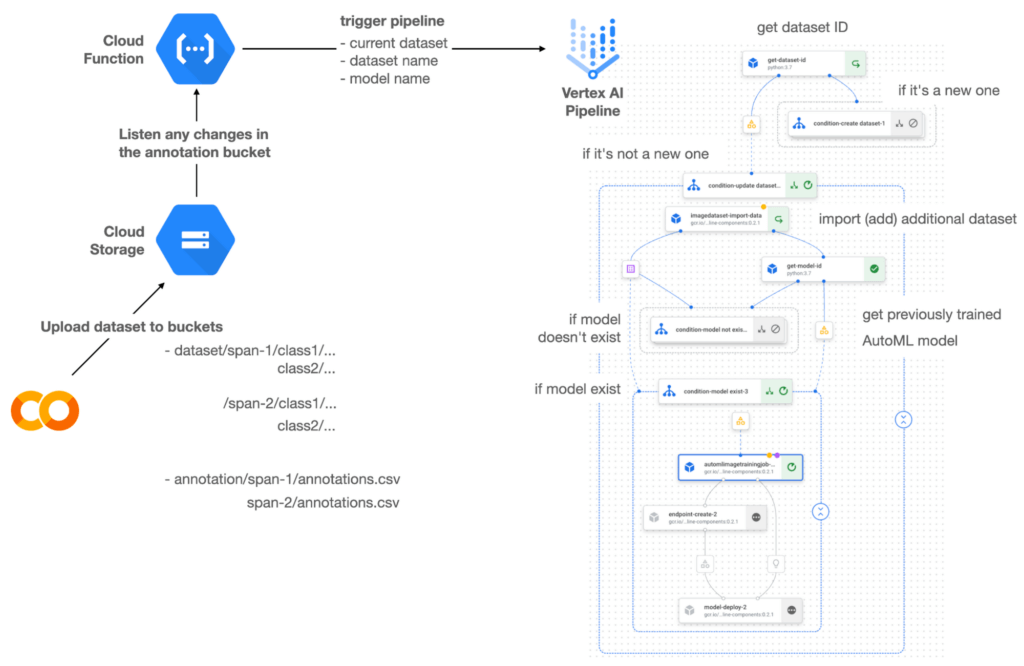

Figure 1 shows the overall architecture presented in this blog. We cover the components and their connection in the context of two common workflows of the MLOps system.
Components
Vertex AI is at the heart of this system, and it leverages Vertex Managed Datasets, AutoML, Predictions, and Pipelines. We can create and manage a dataset as it grows using Vertex Managed Datasets. Vertex AutoML selects the best model without your knowing much about modeling. Vertex Predictions creates an endpoint (RestAPI) to which the client communicates.
It is a simple, fully managed yet somewhat complete end-to-end MLOps workflow moves from a dataset to training a model that gets deployed. This workflow can be programmatically written in Vertex Pipelines. Vertex Pipelines outputs the specification for an ML pipeline allowing you to re-run the pipeline whenever or wherever you want. Specify when and how to trigger the pipeline using Cloud Functions and Cloud Storage.
Cloud Functions is a serverless way to deploy your code in Google Cloud. In this particular project, it triggers the pipeline by listening to changes on the specified Cloud Storage location. Specifically, if a new dataset is added, for example, a new span number is created; the pipeline is triggered to train the dataset, and a new model is deployed.
Workflow
This MLOps system prepares the dataset with either Vertex Dataset’s built-in user interface (UI) or any external tools based on your preference. You can upload the prepared dataset into the designated GCS bucket with a new folder named SPAN-NUMBER. Cloud Functions then detects the changes in the GCS bucket and triggers the Vertex Pipeline to run the jobs from AutoML training to endpoint deployment.
Inside the Vertex Pipeline, it checks if there is an existing dataset created previously. If the dataset is new, Vertex Pipeline creates a new Vertex Dataset by importing the dataset from the GCS location and emits the corresponding Artifact. Otherwise, it adds the additional dataset to the existing Vertex Dataset and emits an artifact.
When the Vertex Pipeline recognizes the dataset as a new one, it trains a new AutoML model and deploys it by creating a new endpoint. If the dataset isn’t new, it tries to retrieve the model ID from Vertex Model and determines whether a new AutoML model or an updated AutoML model is needed. The second branch determines whether the AutoML model has been created. If it hasn’t been created, the second branch creates a new model. Also, when the model is trained, the corresponding component emits the artifact as well.
Directory structure that reflects different distributions
In this project, I have created two subsets of the CIFAR-10 dataset, SPAN-1 and SPAN-2. A more general version of this project can be found here, which shows how to build training and batch evaluation pipelines pipelines. The pipelines can be set up to cooperate so they can evaluate the currently deployed model and trigger the retraining process.
ML Pipeline with Kubeflow Pipelines (KFP)
We chose to use Kubeflow Pipelines to orchestrate the pipeline. There are a few things that I would like to highlight. First, it’s good to know how to make branches with conditional statements in KFP. Second, you need to explore AutoML API specifications to fully leverage AutoML capabilities, such as training a model based on the previously trained one. Last, you also need to find a way to emit artifacts for Vertex Dataset and Vertex Model to consume that Vertex AI can recognize them. Let’s go through these one by one.
Branching strategy
In this project, there are two main conditions and two sub-branches inside the second main branch. The main branches split the pipeline based on a condition if there is an existing Vertex Dataset. The sub-branches are applied in the second main branch, which is selected when there is an exciting Vertex Dataset. It looks up the list of models and decides to train an AutoML model from scratch or a previously trained one.
ML pipelines written in KFP can have conditions with a special syntax of kfp.dsl.Condition. For instance, we can define the branches as follows:
from google_cloud_pipeline_components import aiplatform as gcc_aip


# try to get Vertex Dataset ID
dataset_op = get_dataset_id(...)

with kfp.dsl.Condition(name="create dataset",
                       dataset_op.outputs['Output'] == 'None'):
    # Create Vertex Dataset, train AutoML from scratch, deploy model

with kfp.dsl.Condition(name="update dataset",
                       dataset_op.outputs['Output'] != 'None'):
    # Update existing Vertex Dataset
    ...

    # try to get Vertex Model ID
    model_op = get_model_id(...)

    with kfp.dsl.Condition(name='model not exist',
                           model_op.outputs['Output'] == 'None'):
    # Create Vertex Dataset, train AutoML from scratch, deploy model

    with kfp.dsl.Condition(name='model exist',
                           model_op.outputs['Output'] != 'None'):
        # Create Vertex Dataset, train AutoML based on trained one, deploy model
get_dataset_id and get_model_id are custom KFP components used to determine if there is an existing Vertex Dataset and Vertex Model respectively. Both return “None” if a model is found and some other value if a model isn’t found. They also emit Vertex AI-aware artifacts. You will see what this means in the next section.
Emit Vertex AI-aware artifacts
Artifacts track the path of each experiment in the ML pipeline and display metadata in the Vertex Pipeline UI. When Vertex AI aware artifacts are released into in the pipeline, Vertex Pipeline UI displays links for its internal services such as Vertex Dataset, so that users can visit a web page for more information.
So how could you write a custom component to generate Vertex AI-aware artifacts? To do this, custom components should have Output[Artifact] in their parameters. Then you need to replace the resourceName of the metadata attribute with a special string format.
The following code example is the actual definition of get_dataset_id used in the previous code snippet:
@component(
    packages_to_install=["google-cloud-aiplatform",
                         "google-cloud-pipeline-components"]
)
def get_dataset_id(project_id: str,
                     location: str,
                 dataset_name: str,
                 dataset_path: str,
                      dataset: Output[Artifact]) -> str:
    from google.cloud import aiplatform
    from google.cloud.aiplatform.datasets.image_dataset import ImageDataset
    from google_cloud_pipeline_components.types.artifact_types import VertexDataset


    aiplatform.init(project=project_id, location=location)

    datasets = aiplatform.ImageDataset.list(project=project_id,
                                            location=location,
                                            filter=f'display_name={dataset_name}')

    if len(datasets) > 0:
        dataset.metadata['resourceName'] =
               f'projects/{project_id}/locations/{location}/datasets/{datasets[0].name}'
        return f'projects/{project_id}/locations/{location}/datasets/{datasets[0].name}'
    else:
        return 'None'
As you see, the dataset is defined in the parameters as Output[Artifact]. Even though it appears in the parameter, it is actually emitted automatically. You just need to provide the necessary data as if it is a function variable.
The dataset component retrieves the list of Vertex Dataset by calling the aiplotform.ImageDataset.list API. If the length of it is zero, it simply returns ‘None’. Otherwise, it returns the found resource name of the Vertex Dataset and provides the dataset.metadata[‘resourceName’] with the resource name at the same time. The Vertex AI-aware resource name follows a special string format, which is ‘projects/<project-id>/locations/<location>/<vertex-resource-type>/<resource-name>’.
The <vertex-resource-type>can be anything that points to an internal Vertex AI service. For instance, if you want to specify that the artifact is the Vertex Model, then you should replace <vertex-resource-type> with models. The <resource-name> is the unique ID of the resource, and it can be accessed in the name attribute of the resource found by the aiplatform API. The other custom component, get_model_id, is written in a very similar way as well.
AutoML based on the previous model
You sometimes want to train a new model on top of the previously best model. If that is possible, the new model will probably be much better than the one trained from scratch, because it leverages previously learned knowledge.
Luckily, Vertex AutoML comes with the ability to train a model using a previous model. AutoMLImageTrainingJobRunOp component lets you train a model by simply providing the base_model argument as follows:
training_job_run_op =
gcc_aip.AutoMLImageTrainingJobRunOp(
…,
base_model=model_op.outputs['model'],
…
)
When training a new AutoML model from scratch, you pass ‘None‘ in the base_model argument, and it is the default value. However, you can set it with a VertexModel artifact, and the component will trigger an AutoML training job based on the other model.
One thing to be careful of is that VertexModel artifacts can’t be constructed in a typical way of Python programming That means you can’t create an instance of VertexModel artifact by setting the id found in the Vertex Model dashboard. The only way you can create one is to set the metadata[‘resourceName’] parameters properly. The same rule applies to other Vertex AI-related artifacts such as VertexDataset. You can see how the VertexDataset artifact is constructed properly to get an existing Vertex Dataset to import additional data into it. See the full notebook of this project here.
Cost
You can reproduce the same result from this project with the free $300 credit when you create a new GCP account.
At the time of this blog post, Vertex Pipelines costs about $0.03/run, and the type of underlying VM for each pipeline component is e2-standard-4, which costs about $0.134/hour. Vertex AutoML training costs about $3.465/hour for image classification. GCS holds the actual data, which costs about $2.40/month for 100GiB capacity, and Vertex Dataset is free.
To simulate two different branches, the entire experiment took about one to two hours, and the total cost for this project is approximately $16.59. Please find more detailed pricing information about Vertex AI here.
Conclusion
Many people underestimate the capability of AutoML, but it is a great alternative for app and service developers who have little ML background. Vertex AI is a great platform that provides AutoML as well as Pipeline features to automate the ML workflow. In this article, I have demonstrated how to set up and run a basic MLOps workflow, from data injection to training a model based on the previously-achieved best one, to deploying the model to a Vertex AI platform. With this, we can let our ML model automatically adapt to the changes in a new dataset. What’s left for you to implement is to integrate a model monitoring system to detect data/model drift. One example is found here.
Manhattan Associates and Google Cloud: How the Partnership Accelerates Future of Digital Retail

4969
Of your peers have already read this article.
1:30 Minutes
The most insightful time you'll spend today!
While the shift to digital business and the cloud has been well under way for some years now, organizations today have a new sense of urgency due to COVID-19. Delivering digital transformation is no longer a ‘nice to have’ option, rather, it is an operational imperative. Taking advantage of the infrastructure, platform and solution gains that cloud and microservices architecture provide is a must for brands today.
At Google Cloud, we understand the pressures and challenges organizations of all sizes, across all industries are facing. The pandemic has dramatically impacted global commerce at-large, exposing (for many organizations across multiple sectors) gaps in omnichannel capabilities, business continuity and forecasting plans, not to mention spots in supply chain agility, resilience and responsiveness.
A rapidly evolving consumer-driven commerce landscape has put innovation squarely in the spotlight for supply chain teams all over the world, with the effects of the global pandemic making it increasingly difficult for manufacturers, wholesalers, third party logistics providers and retailers (in particular) to weather the perfect storm of fast-moving consumer trends and a need for ‘always on’ digital innovation.
These same effects have driven increasing interest and uptake of technology like the Manhattan Active® suite of solutions, as well as our own cloud platform; both of which afford organizations the levels of agility, flexibility and scalability needed to insulate their people, processes and long-term business strategies against unforeseen future obstacles such as global pandemics or international trade disputes.
An excellent example of this agility, flexibility and scalability in action is PVH’s response to the global pandemic. One of the most admired fashion and lifestyle companies with such iconic brands as Calvin Klein, TOMMY HILFIGER, Van Heusen, and IZOD, PVH was forced to temporarily close its physical stores and, as a result, experienced a sudden massive increase in online sales. The retailer was able to quickly pivot by adjusting its business rules in Manhattan Distributed Order Management (part of Manhattan Active Omni) to expose store inventory to online consumers and reroute its fulfillment processes. Thanks to Manhattan’s solution delivered through Google Cloud, in a matter of days, PVH was able to leverage both its distribution centers and vast store network to fulfill its online orders.
“The events of 2020 have accelerated retail and ecommerce operations forward,” said David Herridge, executive vice president of Global Value Chain Technologies for PVH. “With quick, creative thinking and the right partner, we were able to pivot operations, satisfy our customers and prepare for the future.”
Manhattan’s products have been recognized for their ability to solve real-world challenges through innovation, and used by many of the world’s top brands to solve some of their most complex commerce and supply chain challenges: the latest recognition is Manhattan’s position as sole leader in the 2021 Forrester Wave™ for Order Management Solutions.
Since December 2018, Google Cloud has been collaborating closely with the team at Manhattan and its ‘always on’, versionless approach to innovation. And, during the last two and a half years, Manhattan has significantly accelerated its cloud-first solutions and market adoption, resulting in tremendous growth in its overall cloud business efforts.
By building cloud native solutions on Google Cloud, the teams at Manhattan continue to deliver the high-performance, elastic, high-redundancy, secure solutions their customers rely on. Moreover, it means both Google Cloud and Manhattan continue to innovate and push the boundaries of what is possible in terms of the supply chain and omnichannel innovations that underpin global commerce – innovation that is needed more now than maybe ever before.
Our commitment to distributed cloud solutions and ongoing innovation, not to mention the fact Google Cloud operates a net carbon-neutral cloud, means that the working partnership between both industry leading teams continues to be a perfect match of brand values; not just from a technology perspective, but also a long-term sustainability and environmental one too.
More information on the partnership can be found here.
2860
Of your peers have already watched this video.
16:00 Minutes
The most insightful time you'll spend today!
Conversational AI in Search, Maps and Online Shopping!
Did you know about 77 percent of customers are likely to make a purchase from a brand they can message with? Direct interaction with the brand to gather product information shortens buyers’ journey and personalizes it with appropriate messages. To helps businesses add speed, simplicity and convenience in brand-customers interaction, Google’s Business Messages helps add chat feature in Search, Maps or other mediums.
Watch the video to learn to integrate conversational AI based on Google’s superior AI and ML features and build interactive and connected chat automation using Google Cloud’s suite of tools and products!
Plainsight Vision AI Available for Google Cloud Customers to Unlock Accurate, Actionable Insights
4682
Of your peers have already read this article.
4:00 Minutes
The most insightful time you'll spend today!
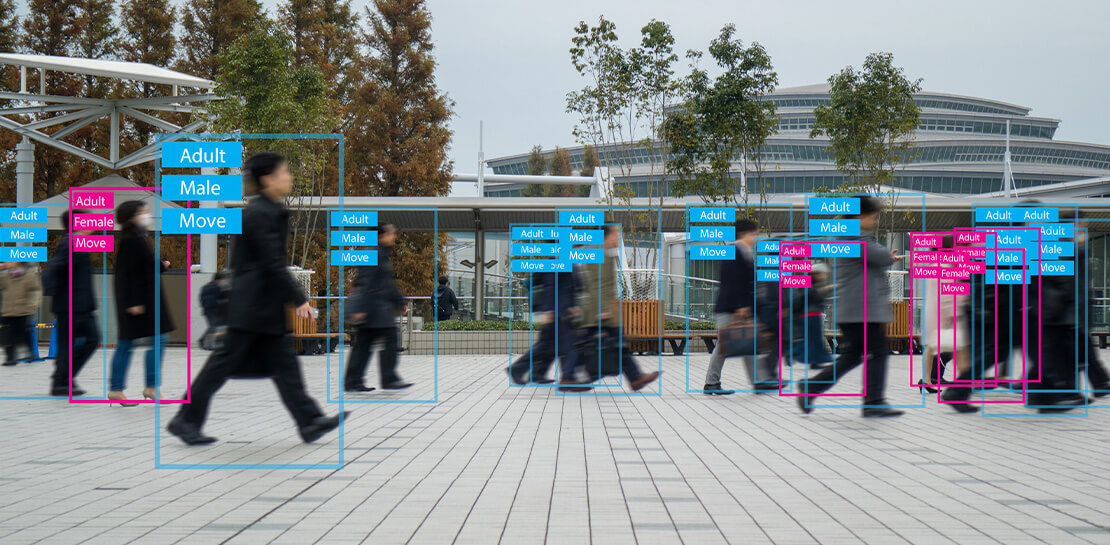
Data-savvy businesses increasingly rely on images and videos for critical functions, and yet are challenged by the sheer mass of information—more than 3.2 billion images and 720,000 hours of video are created daily. This explosion in visual data has paved the way for the growth of computer vision, a form of artificial intelligence (AI) that enables computers to “see” the world similarly to the way people do, but with unblinking consistency, and greater accuracy.
The transformational impact and value of computer vision solutions are significant and has been a guiding objective for companies and AI developers. And yet, even as the applications for computer vision increase dramatically, architecting and implementing vision AI solutions remain highly complex. Visual data, such as images and video, are made up of thousands of pixels of information that represent millions of different patterns and meanings, which can make interpreting even a single image overwhelming from a computational perspective.
Many organizations struggle with deployments and fail to operationalize vision AI solutions due to development delays, machine learning and data science hiring challenges, inaccurate output, a lack of integration with existing infrastructure, difficulty of use, and high cost. Plainsight, with the power of Google Cloud resources, is addressing all these challenges and helping businesses by enabling the deployment of vision AI within enterprise private networks that can be managed easily and scaled economically.
Plainsight has announced availability of its vision AI platform on Google Cloud Marketplace. Businesses can now easily deploy end-to-end vision AI to private clouds to realize the full value of their video and other visual data for accurate, actionable insights across diverse use cases.
Delivering on the Promise of AI: Seeing What’s Hiding In Plain Sight
For organizations to integrate AI and machine learning into their businesses successfully, the technology must be powerful enough to solve real challenges, yet fast, easy, and accessible enough to ensure the innovation potential is realized. Plainsight on Google Cloud delivers the power of enterprise vision AI that’s quick and easy to use with Google Cloud resources that enable global scale, increased security, bolstered privacy, unified billing, and cost savings.
To streamline vision AI workflows, Plainsight facilitates the entire pipeline, from visual data ingestion and annotation, through continuous model training, deployment, and monitoring for easier innovation and faster time-to-production. Our platform accelerates vision AI development in a manner that is complete, accurate, and accessible to non-technical business leaders. We believe that AI should be available and accessible to anyone and everyone—so that teams across entire organizations can reap the benefits.
By integrating Plainsight into their private networks, companies worldwide can now leverage one intuitive platform for centralized control of streamlined vision AI model creation and training with optimized visual data handling for diverse enterprise solutions. These use cases include: social distancing monitoring, medical imaging, drug compound screening, defect detection in manufacturing processes, identifying gas leaks, or even livestock counting and crop health monitoring for agriculture, to name a few.https://www.youtube.com/embed/A7U_0UkjvEg?enablejsapi=1&
We enable customers so they can create successful solutions that enable them to clearly see their business from all angles and to take advantage of the knowledge visual data can reveal by simply and quickly operationalizing practical vision AI applications.
AI-Powered Dataset Creation, Automated Model Training & Easy Deployment Without A Single Line Of Code
For vision AI applications, success is inextricably dependent on the quality and quantity of the datasets required to train the relevant models. To aid enterprises in this vital stage, the Plainsight platform provides built-in data annotation for the fast and easy creation of datasets. This includes AI-powered features that accelerate the speed and quality of labeling such as SmartPoly, for the automated polygon masking of objects, TrackForward, to predict and automatically label objects from frame to frame in video annotations, and AutoLabel for automated object recognition and labeling based on pre-trained machine learning models, to highlight a few.

In addition, to ensure the success of AI integration, we significantly reduce time-intensive processes with Plainsight vision AI’s automated machine learning with continuous model training and easy deployment capabilities. In just a few clicks, users can leverage optimizations for the most reliable model training without endless experimentation cycles. And, models are easily deployed at scale all within one, easy-to-manage model operationalization process for the business.
Growing With Google Cloud
Plainsight is a vision AI innovation leader, developing solutions that address unmet needs for challenger brands and Fortune 500s across vertical markets. As a team recognized for succeeding where others have failed, our expanding partnership with Google Cloud provides a powerful combination that helps customers see and activate the value of their visual data with a suite of services in a secure and private manner.
Our vision AI Platform simplifies building and operationalizing AI to solve business problems enterprises are facing every day—and the demand is increasing. To accelerate our journey to faster, more accessible AI for enterprises, we knew we needed strong support to grow Plainsight and scale our backend tools to match our vision.
Google Cloud delivered everything, and more, in one program. The Startup Program by Google Cloud provided the technology and services for scale and the support we needed to maximize the value the Program provided us. The Startup Program has been a springboard for architecting Plainsight vision AI in the cloud, accelerating our goals and optimizing innovation, efficiency, and growth. The team also helped us optimize Google Ads campaigns, fueling adoption of Plainsight.
After launching the SaaS version of Plainsight Data Annotation in November 2020, we grew our user base by nearly 110x in just three short months. Google Ads has also dramatically increased website traffic, growing new users by nearly 5.75X and page views by over 5X. The Google team helped us identify where Google Cloud offerings could be leveraged instead of developing in-house solutions and offered best practices that enabled us to deliver faster on our initiatives.
Kubernetes was already the underlying component of our platform and leveraging Google Kubernetes Engine (GKE) as a managed service removed a layer of complexity. By combining GKE and Anthos, we were able to standardize our deployments, aligning to how our customers leverage Anthos for enterprise applications in their own organizations. In addition, as a fast-moving, customer-centric company we use Google Workspace to help us centralize and manage our day-to-day work internally. By leveraging multiple products across Google’s ecosystem, we take advantage of a holistic partnership that has helped our business tremendously as we scale.
Leveraging Google’s Partners for Strategic Consultation
To facilitate this expansion of our partnership with Google and to maximize our use of Google Cloud services, we are working with DoiT International, a Google Managed Services Provider and 2020 Global Reseller Partner of the Year. DoiT provides us with ongoing technical consultation for cloud-native architecture, Google Cloud Marketplace integration, production-grade Kubernetes support, Google Cloud cost optimization, and technical support. The DoiT team has been invaluable in compiling best practices, tips, and strategies from their vast experience with various cloud customers to ease our Marketplace integration and is providing input for infrastructure strategy to support our continued rapid growth.
Plainsight Delivers Enterprise Vision AI Through The Google Cloud Platform Marketplace
Plainsight vision AI is now available to Google Cloud Customers on Google Cloud Marketplace enabling organizations across industries to deploy private Plainsight instances within their own environments. Marketplace customers will benefit from Google Cloud privacy, security, scalability and unified billing through their Google Cloud account.
Combining the powerful benefits provided by Google Cloud resources with Plainsight’s vision AI Platform into private networks, enterprises worldwide can now leverage one intuitive platform for centralized control of streamlined vision AI model creation and training with optimized visual data handling for diverse enterprise solutions.
Through our Google partnership, we’re able to leverage a powerful foundation that allows us to rapidly innovate, scale and accelerate delivery on our vision AI platform capabilities. By executing on our vision to make AI easier, faster and more accessible for all users across entire enterprises, we’re helping businesses see more and by seeing more, they’ll have the power to solve more.
If you want to learn more about how Google Cloud can help your startup, visit our page here where you can apply for our Startup Program, and sign up for our monthly startup newsletter to get a peek at our community activities, digital events, special offers, and more.
More Relevant Stories for Your Company

Beany’s Cloud-Based Accounting Solutions Transform Small Business Finance
Many people start a small business that aligns with their passions, but soon discover the day-to-day running of a business is very different than anticipated. Dealing with accounting, finance, and other daily activities can quickly overwhelm even the most promising of new businesses. Recognizing the unique challenges facing small businesses,

Google Cloud’s Firebase Realtime Database and BigQuery AllowsCastbox to Ramp Up Customer Experience
Demand for spoken audio content such as podcasts remains robust despite the proliferation of video services and other entertainment options for consumers. Shibin Li, Co-founder of Castbox, credits growth of the global podcast platform to the following: speed and availability, market-leading features, the proliferation of smart devices to deliver audio content,

Google Products Helps HMH’s Healthcare Staff Work from Anywhere Efficiently and Securely!
Hackensack Meridian Health (HMH) executive Mark Eimer explains how an ambitiously-timed rollout of a comprehensive suite of Google products helped the entire organization—from doctors to IT staff—achieve better security, cultivate a more equitable work environment, and ultimately, improve patient outcomes. How does a recently merged, 17-hospital healthcare system fast-track a platform migration

Mercari’s Big Leap: Supercharging Growth with Google Cloud’s BigQuery
When peer-to-peer marketplace Mercari came to the US in 2014, it had its work cut out for it. Surrounded by market giants like eBay, Craigslist, and Wish, Mercari needed to carve out an approach to compete for new users. Furthermore, Mercari wanted to build a network for buyers and sellers to return
