





Measuring Deforestation in Extractive Supply Chains With ML
2566
Of your peers have already read this article.
2:30 Minutes
The most insightful time you'll spend today!
Introduction
In my experience, I have observed that it’s common in machine learning to surrender to the process of experimenting with many different algorithms in a trial and error fashion, until you get the desired result. My peers and I at Google have a People and Planet AI YouTube series where we talk about how to train and host a model for environmental purposes using Google Cloud and Google Earth Engine. Our focus is inspiring people to use deep learning, and if we could rename the series, we would call it AI for Minimalists since we would recommend artificial neural networks for most of our use cases. And so in this episode we give an overview of what deep learning is and how you can use it for tracking deforestation in supply chains. I also included a summary of the architecture and products you can use in this blog that I presented at the 2022 Geo For Good Summit. For those of you interested in diving even deeper into code, please visit our end-to-end sample (click “open in colab” at the bottom of the screen to view this tutorial in a notebook format).
What’s included in this article
- What is Deep Learning?
- Measuring deforestation in extractive supply chains with ML
- When to build a custom model outside of Earth Engine?
- How to build a model with Google Cloud & Earth Engine?
- Try it out!
What is Deep Learning?
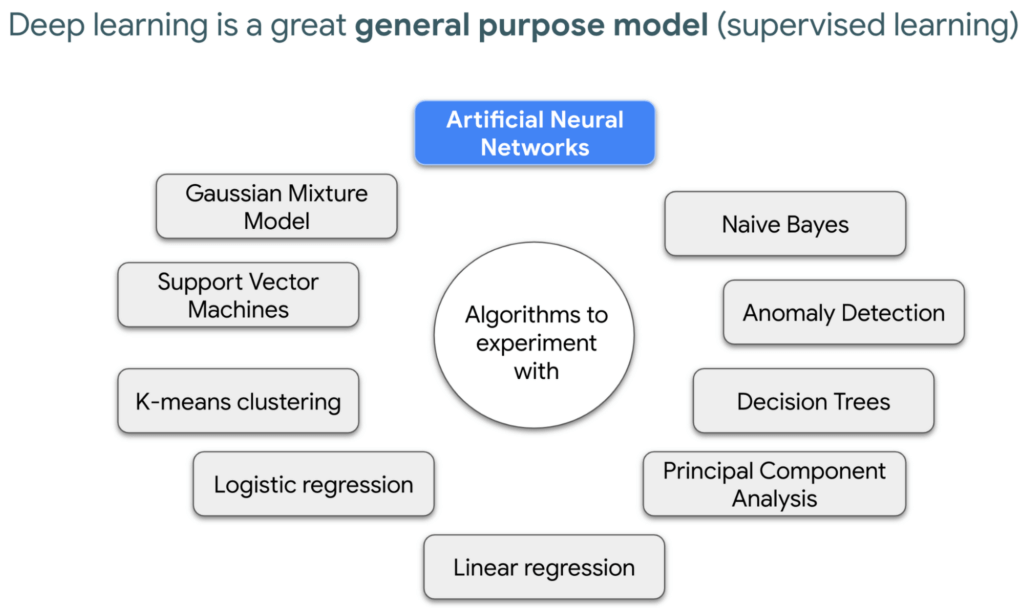
Out of the many ML algorithms out there, I’m happy to share that deep learning or artificial neural networks is a technique that can be used for almost any supervised learning job.
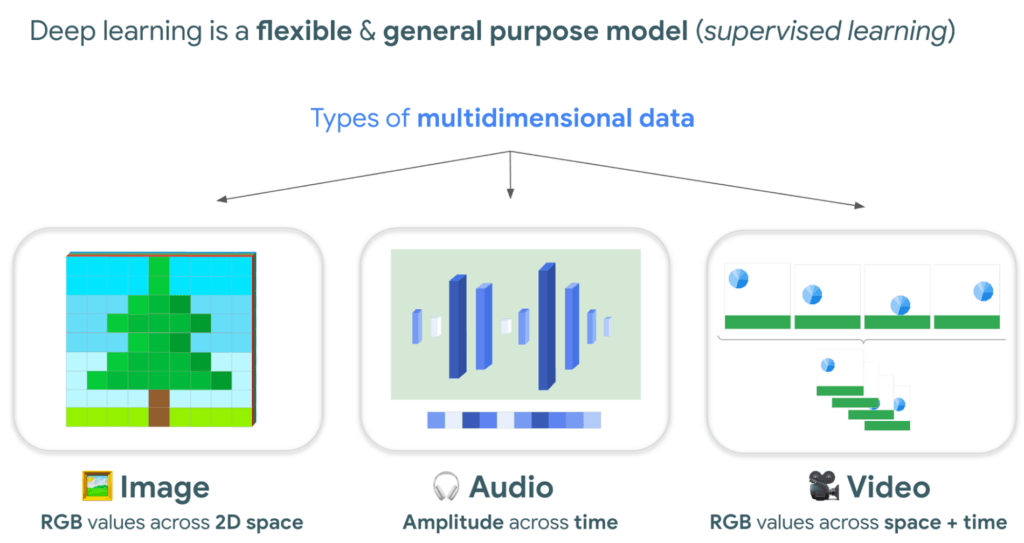
In supervised learning, you tell a computer the right answers to look for, through examples. Deep learning is very flexible, and is a great go-to algorithm. Especially for images, audio, or video files which are types of multidimensional data. This is because each of these data types have one or more dimensions with specific values for each point.
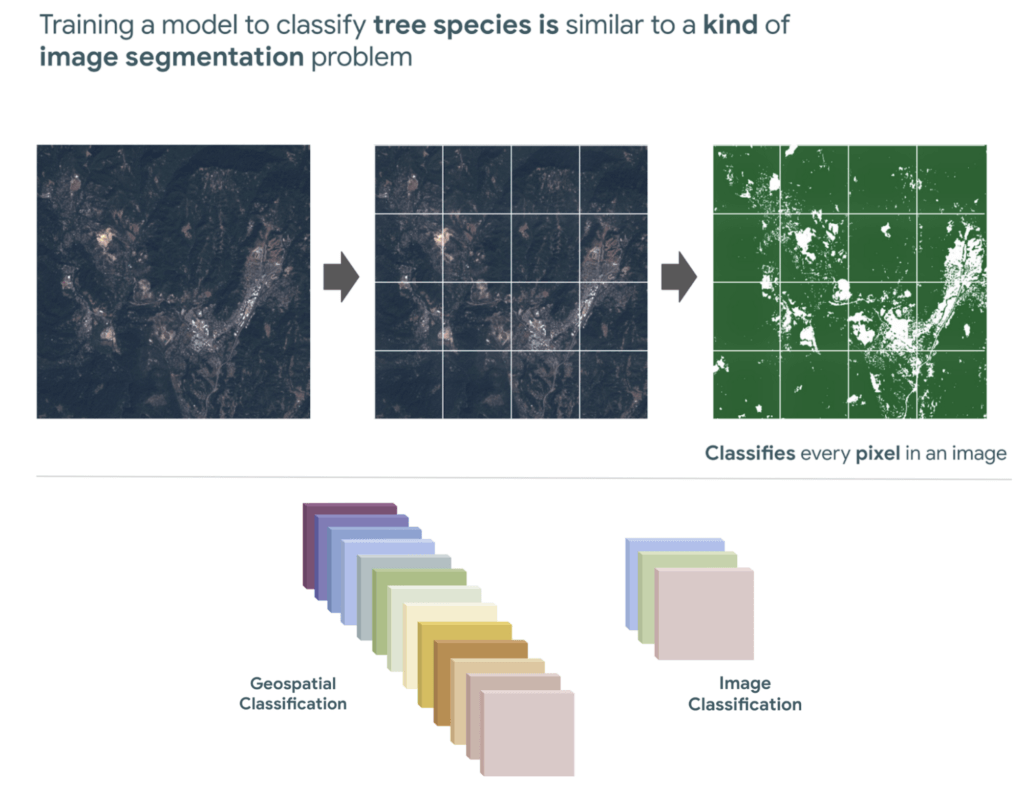
And training a model to classify tree species using satellite images is kind of like an image segmentation problem, where every pixel in the image is classified.
“Deep learning approaches problems differently”
David Cavazos, Developer Programs Engineer
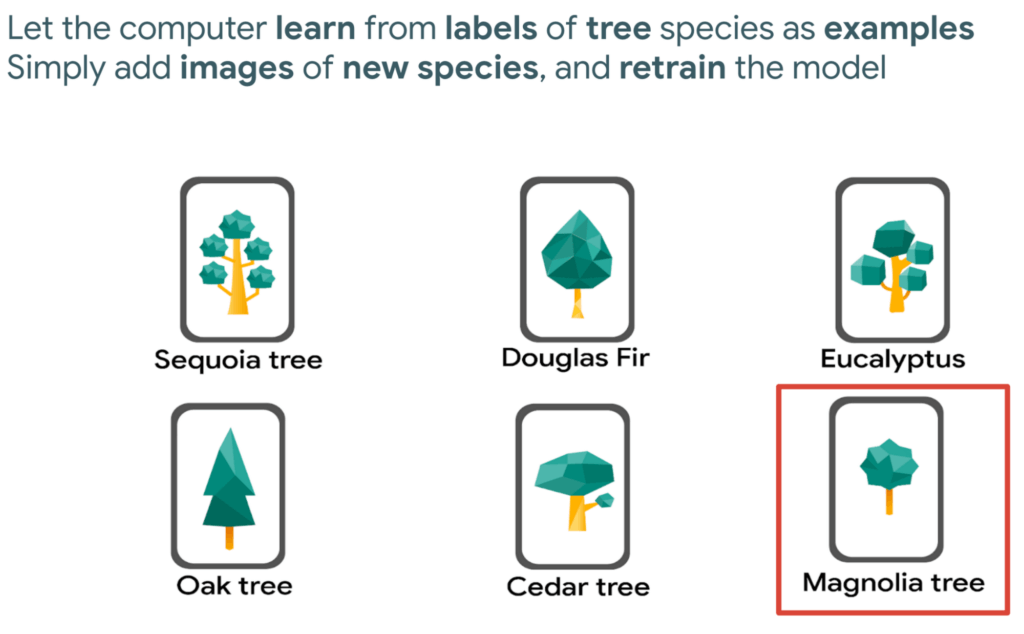
There’s no writing a function with explicit & sequential steps that reviews every single pixel one by one for every image, as traditional software development does. Let’s say you wish to build a model that classifies tree species. You don’t spend time coding all the instructions, but instead give a computer examples of images with tree species labels, and let it learn from these examples. And when you want to add more species, it’s as simple as adding new images of that species to retrain the model.
Measuring deforestation in extractive supply chains with ML
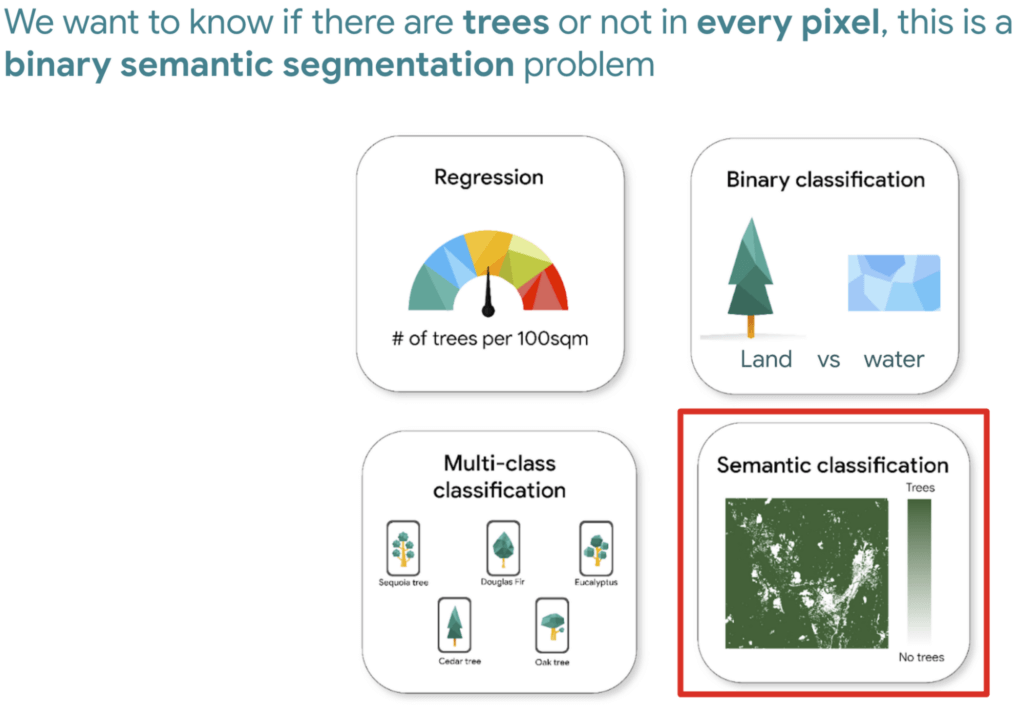
So let’s say we would like to measure deforestation using deep learning; to get started with building a model we first need a dataset that includes satellite images with an even amount of labels marking where there are trees and where there aren’t. Next, we choose a goal, here are a few common ones. In our case, we simply want to know if there are trees or not for every pixel, and so this would be a binary semantic segmentation problem.
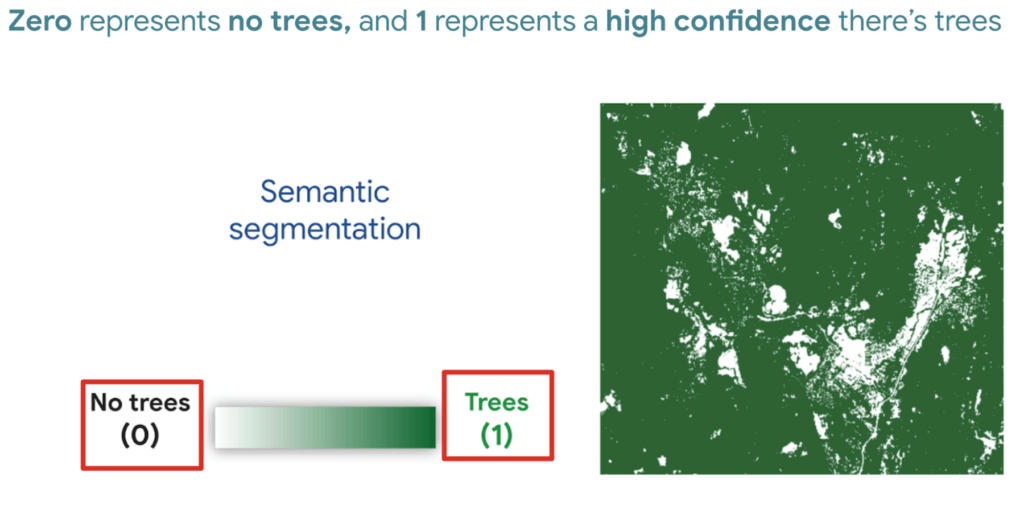
And based on this goal, we expect the outputs to be the percentage of trees for every pixel; as a number between 0 and 1. Zero represents no trees, and one represents a high confidence there are trees.
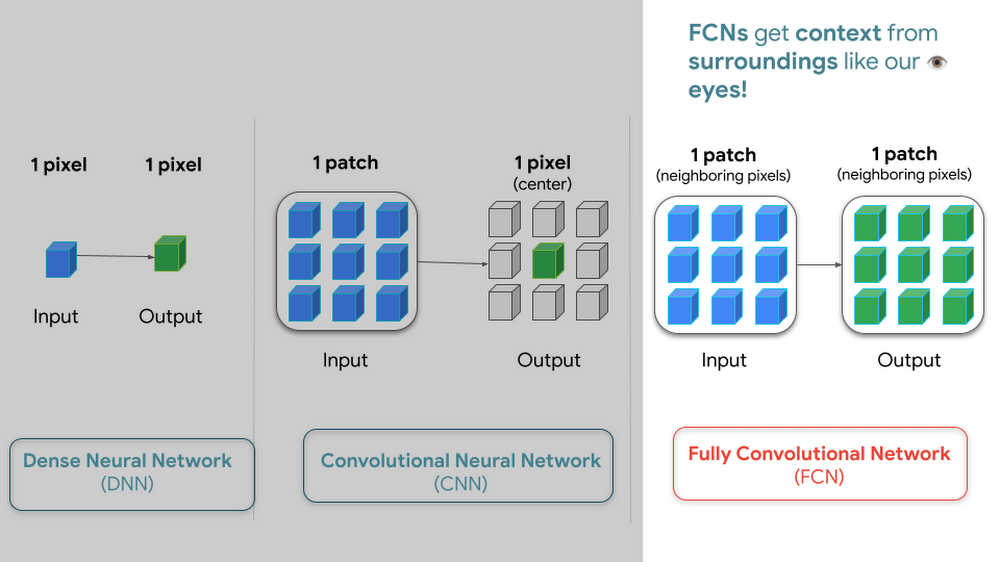
But how do we go from input images into probabilities of trees? Well think about it this way…there are many ways to approach this problem, here are 3 common ways of doing so. My peers and I prefer using Fully convolutional networks when building a map with ML predictions
And since a model is a collection of interconnected layers, we must come up with an arrangement of layers that transforms our data inputs based on our desired outputs. Each layer by the way has something called an activation function, which performs the transformations of each layer before it passes them to the next layer.
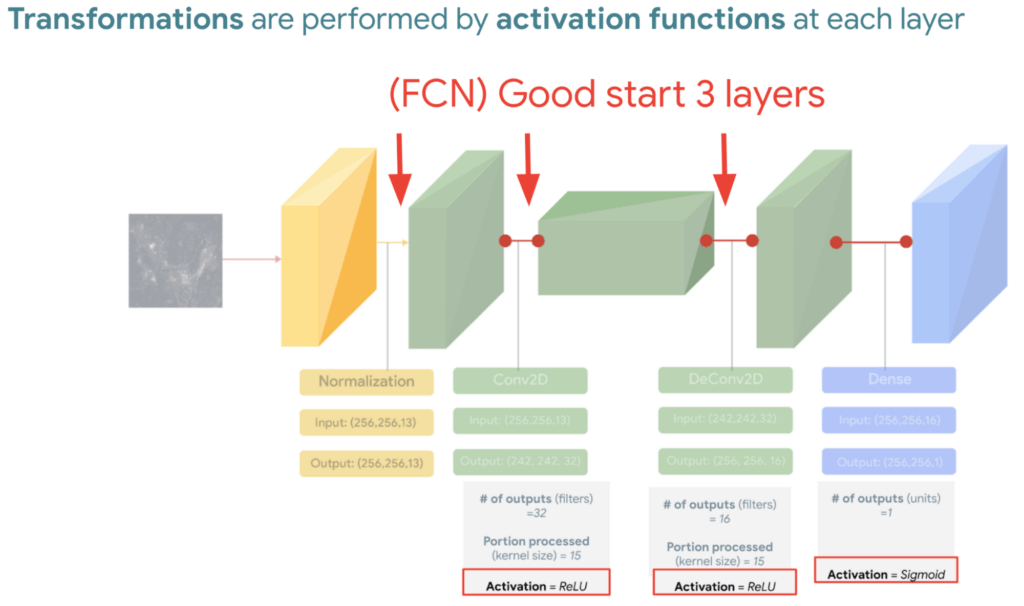
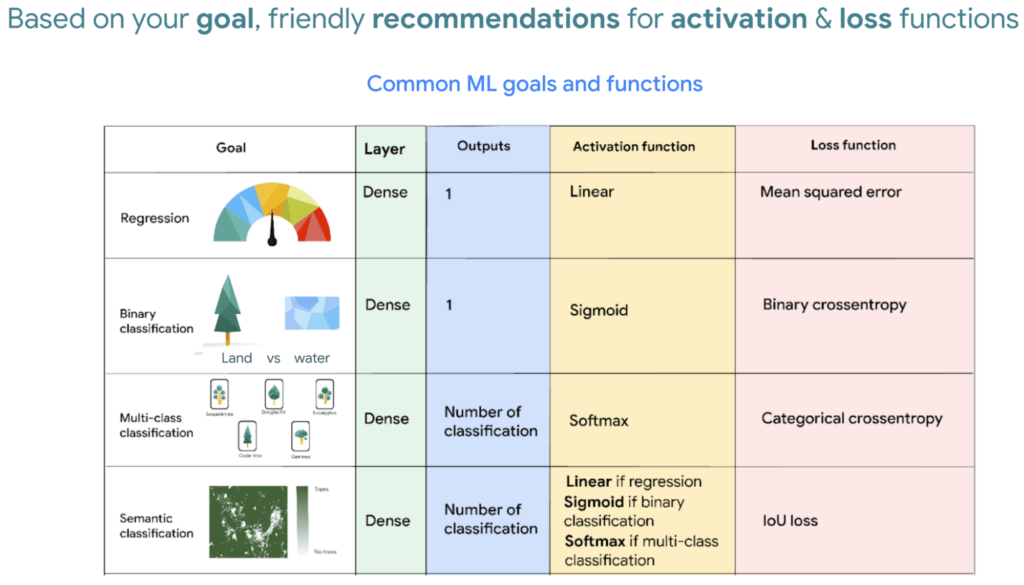
FYI Below is a handy dandy table, with our recommended activation and loss functions to choose from based on your goal. We hope this saves you time.
We then reach the fourth and last layer. Depending on our goals at the beginning, we also choose an appropriate loss function that helps us score how well the model did during training.
After choosing layers and functions you will split your data into training and validation datasets. Just remember that all of this work is about experimenting repeatedly until you reach desired results. Our 8min episode gives this overview more in detail.
When to build a custom model outside of Earth Engine
So now that we covered what is deep learning, the next step is understanding which tools to use to build our deforestation model. For starters it’s important to call out that Google Earth Engine is a wonderful tool that helps organizations of all sizes find insights about changes on the planet, in order to make a climate positive impact. It has built-in machine learning algorithms (classifiers) that let users quickly spin them up, with just a basic machine learning background. This is fantastic place to start when using ML on geospatial data, however there are multiple situations where you will want to opt to build a custom model such as:
- You want to use a popular ML library such as TensorFlow Keras.
- You wish to build a state of the art model to build a global and accurate land cover map product such as Google’s Dynamic World.
- Or because you generally have too much data to process that you can’t execute it in just one task in Earth Engine (and are trying to figure out hacky ways to export your data).
Whenever you identify with any of these options, you will want to roll up your sleeves and dive into building a custom model, which does require expertise and of course working with multiple products. But I have good news, using deep learning is a great go-to algorithm.
How to build a model with Google Cloud & Earth Engine?
To get started, you will need an account with Google Earth Engine which is free for non-commercial entities and Google Cloud account which has a free tier if you are just getting started for all users. I have broken up the products you would use by function.
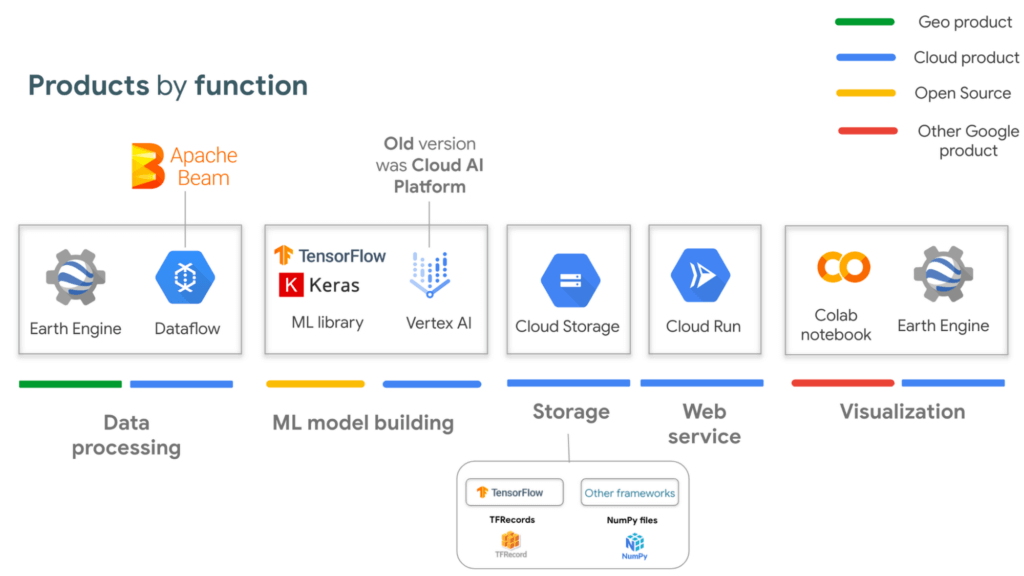
If you are interested in looking deeper into this overview, visit our slides here starting from slide 53 and read the speaker notes. Our code sample also walks through how to integrate with all of these projects end to end (just scroll down and click “open in colab”). But here is a quick visual summary. The main place to start is to identify which are the inputs and which are the outputs.
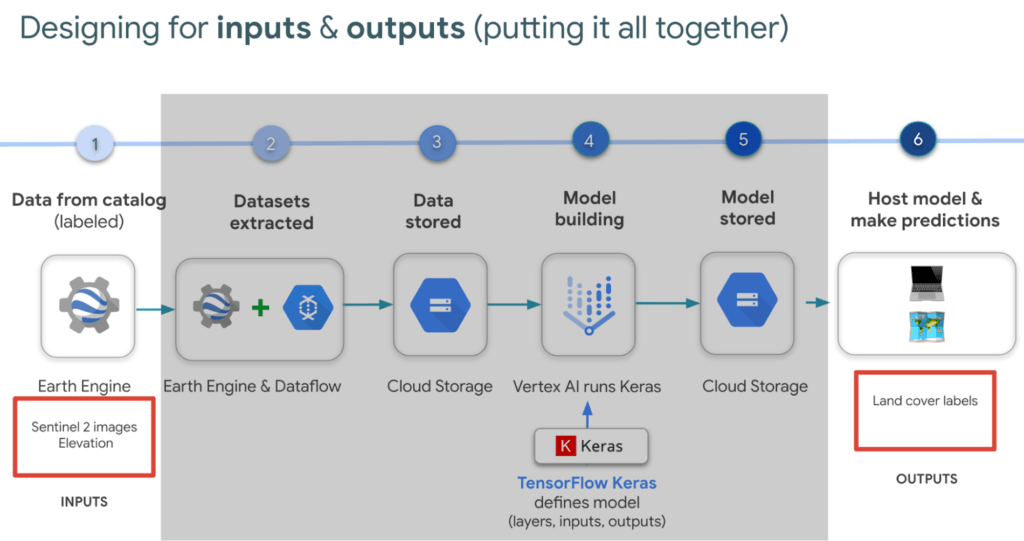
In our latest episodes for our People and Planet AI YouTube series, we walk through how to train a model and then host it in a relatively inexpensive web hosting platform called Cloud Run in episodes of less than 10mins.
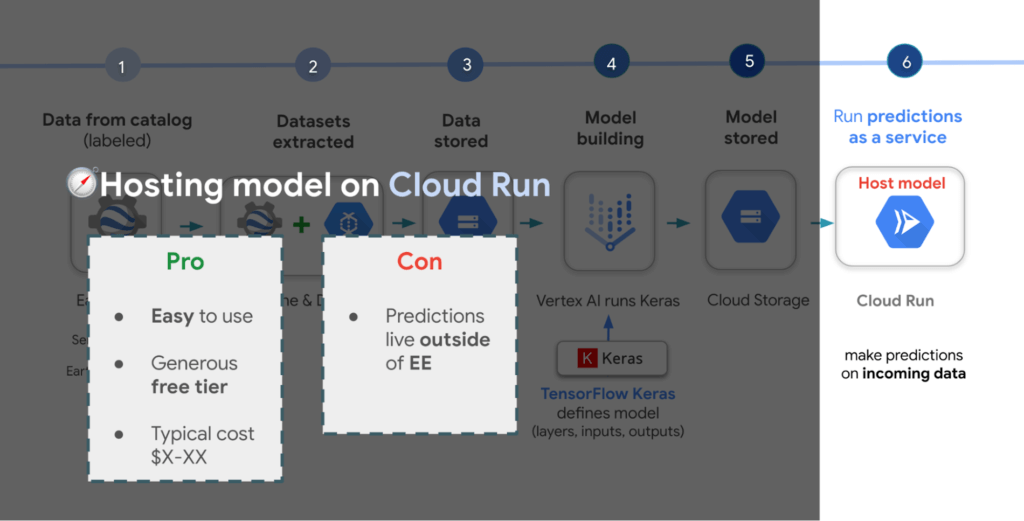
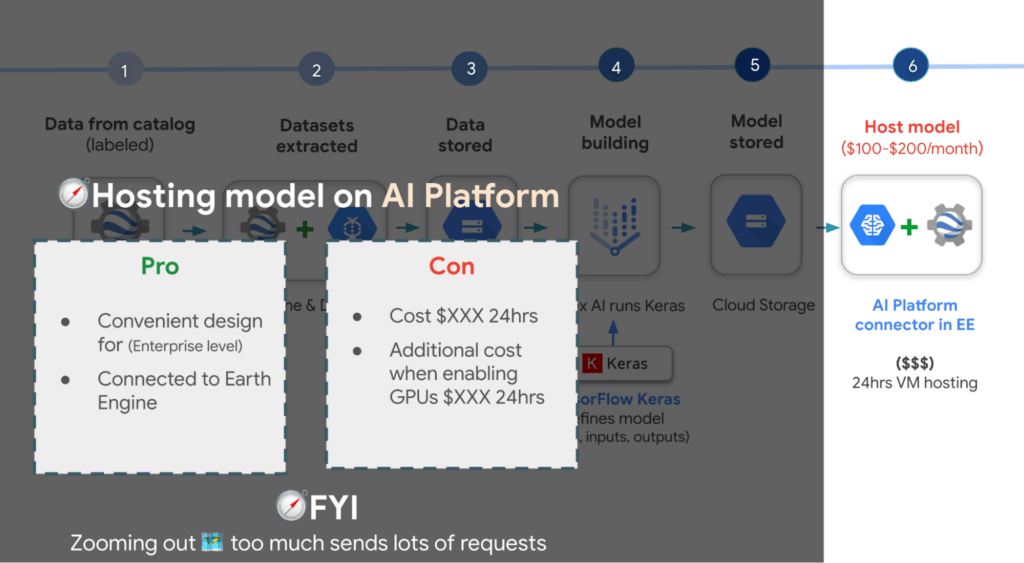
There are a few options presented in the slides, however the current best practice is to train a model using Vertex AI. Do note though that Google Earth Engine is currently not integrated with Vertex AI (we are working on this), but it is with the older (ML predecessor) called Cloud AI Platform (which is the recommended ML platform to use moving forward). As such, if you would like to import your model for detecting deforestation back into Earth Engine after training it in Vertex AI for example, you can host the model in Cloud AI Platform and get predictions. Just note that it’s a 24 hour paid service and so it can cost upwards of $100 or more a month to host your model to stream predictions. It also currently supports the following model building platforms if you don’t wish to use TensorFlow.
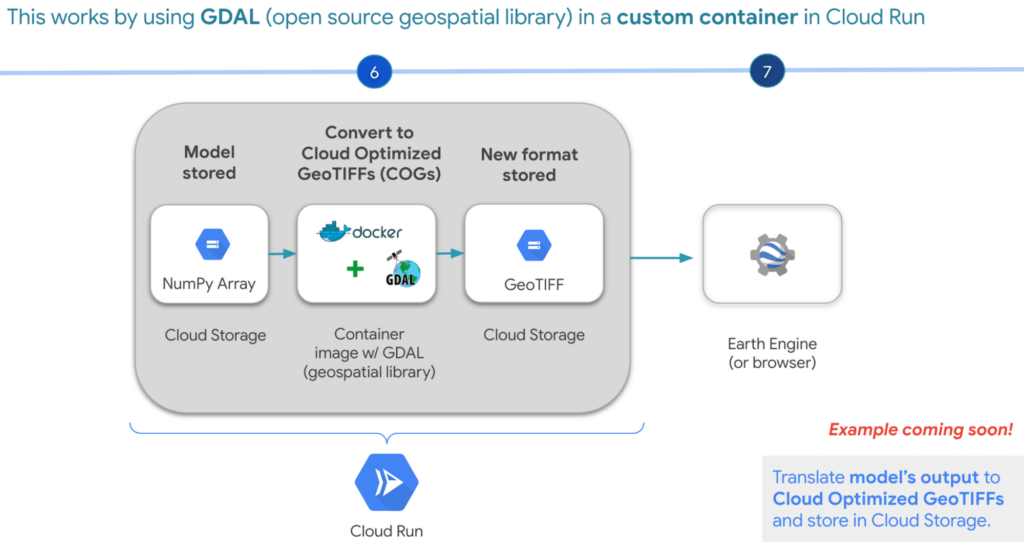
A cheaper alternative but without the convenience AI Platform offers is to manually translate the model’s output, which is NumPy Arrays into Cloud Optimized GeoTIFFs in order to load it back into Earth Engine using Cloud Run. Within this web service you would store the NumPy arrays into a Cloud Storage bucket, then spin up a container image with GDAL, an open source geospatial library in order to convert them into Cloud Optimized GeoTIFF files into Cloud Storage. This way you can view predictions from your browser or Earth Engine.
Try it out
This was a quick overview of deep learning and what Cloud products you can use to solve meaningful environmental challenges like detecting deforestation in extractive supply chains. If you would like to try it out, check out our code sample here (click “open in colab” at the bottom of the screen to view the tutorial in our notebook format or click this shortcut here).
The Future of Retail: Automated Customer Journeys Powered by Technology

3688
Of your peers have already read this article.
1:30 Minutes
The most insightful time you'll spend today!
Editor’s note: To kick off the new year and in preparation for NRF The Big Show, we invited partners from across our retail ecosystem to share stories, best practices, and tips and tricks on how they are helping retailers transform during a time that continues to see tremendous change. Please enjoy this entry from our partner.
If you put a pot of water on the stove, it doesn’t heat up instantly. It simmers slowly at first, eventually picking up steam to reach a rolling boil. The retail landscape is not so different. Capgemini’s research shows the sector has evolved over four generations, from the early days of fragmented outlets to omnichannel and customer-centric focuses, with a fifth generation on the horizon that promises to be centered on consumption.
- Generation 1: Fragmented outlets
- Generation 2: Chain concentration
- Generation 3: Omnichannel
- Generation 4: Consumer-centric
- Generation 5: Consumption-centric
Although incremental change allows companies to experiment and iterate during their digital journeys, the COVID-19 pandemic rapidly accelerated the evolution of online and contactless shopping. Evolution became a revolution, with most Consumer Product and Retail (CPR) companies still mastering the omnichannel generation of their digital transformation to create a seamless shopping experience. Companies that are more digitally mature are already aspiring to the consumer-centric phase, embracing opportunities made possible by technology such as personalization and automation.
What consumers want
Customers have more choices in how they shop and engage with brands. This has made it harder for brands to predict and anticipate needs across customer journeys. And that’s convincing some companies to innovate more quickly as consumer demand drives the need for speed and scale.
Think about your own online behavior. Say you’re shopping for an item and searching online for the closest store in your neighborhood. Google is likely your go-to for finding that information. Looking to troubleshoot an issue with a product or seek out a service? Again, you’ll likely hit up Google first, not even considering going directly to a brand’s website for answers.
Both scenarios point to a disconnect between virtual and physical worlds, a gap technology can bridge in numerous ways such as breaking down silos and integrating fragmented media channels. Interestingly, though, not everything will be centered online all the time. In our recent study on consumer behavior, The great consumer reset, Capgemini discovered 57 percent of shoppers plan to return to brick-and-mortar stores post-pandemic, which is basically unchanged from the 59 percent who often interacted with physical stores before.
But business as usual? Not even close. Consumers have come to expect a frictionless shopping experience (buy online, pick up in store) or an immersive one (products displayed online using augmented reality), and are not content to return to in-store lineups, empty shelves, or a one-size-fits-all approach. Moreover, customers want personalized interactions while ensuring their data and privacy are protected.
So the role of the store is changing. In fact, many online-only brands are opening brick-and-mortar establishments to drive customer experience. In our research on “smart stores,” we found the majority of consumers (66 percent) believe automation can improve their shopping experience by solving the challenges they face at retail stores.
From personalization to serendipity
Retailers must recognize that they have to win consumer trust and confidence. Many consumers believe retailers’ use of tech is focused on reducing costs rather than easing friction. And they’re right. That same Capgemini research found that only one-third (35 percent) of retailers consider “solving customer pain points” as the most important criteria when deciding which automation use cases to implement.
“Retailers are largely in the early stages of adopting automation, and that’s an opportunity to rethink how they’re using technology, not just to smooth out friction and engender consumer trust but to build unexpected consumer benefits,” says Neerav Vyas, Head of Customer First, Co-Chief Innovation Officer, Insights & Data, North America, Capgemini. “We’re trying to move towards this idea of delivering serendipitous experiences to bridge the physical and digital divide.”
The focus is not solely on shoppers seeking out a specific product. “When consumers are in an exploratory mood, retailers can recommend products and services customers didn’t even know they wanted,” says Vyas. For example, business teams that use personalization platforms as part of an integrated media strategy can optimize algorithms against outcomes such as improving conversion and driving engagement.
Vyas says the elevated experience from “personalization to serendipity” fosters trust in the ability of recommendation architectures to persuade and influence consumers’ choices in beneficial ways. A case in point: our research found that half (52 percent) of spending by millennials goes towards experience-related purchases. As always, the key is to meet consumers where they are. Even better, according to Vyas, is to anticipate and understand when signals like customer intent are changing.
How to create value throughout the customer journey
One solution companies can implement right now is an integrated media spend platform that incorporates reporting, planning, and strategy across the entire customer journey. This offers value throughout the customer journey by using technology to reduce friction along the way. Think of it as starting with the customer looking for a product (search and discovery), moving on to the purchase (omnichannel basket, “shoppable” screens) and pick up/delivery (QR code scan in store), and through to post-purchase engagement with the retailer (Google Contact Center AI).
Such a holistic approach also accelerates data acquisition, integration, and reporting using advanced analytics to break down silos and emphasize the importance of privacy and first-party data. This in turn guides end-to-end interventions across customer journeys that enable optimized media spend, empowers businesses to analyze their spend distribution, fine-tunes owned and paid tactics with agencies, and promotes stewardship to support audit efficacy.
A culture of experimentation
With this data-driven focus, CPRs can create a 360-degree perspective of the customer. That intelligence can be used to enhance and humanize automated shopping experiences by putting the customer in control, whether online, in store, or across company brands. Moreover, by using Google Cloud’s emerging technologies such as artificial intelligence (AI), we help companies accelerate value across the spectrum, from supply-chain optimization and customer innovation to consumer experience.
Building a culture of experimentation is a team effort. “It’s not ever just one person who had a big idea. It’s all incremental steps,” says Jennifer Marchand, Google Cloud COE Leader, Capgemini. “Finding the right use case and timing is everything.” Take Google Glass Enterprise, she continues. For greater consumer experience, it can enable in-store associates to better serve with hands-free checkout, customer personalization and recommendations, and special offers. At the same time, Computer Vision and Smart Shelves can help prioritize tasks for employees, notifying them of low stock or a spill in the store.
Marchand points out that companies and consumers alike might not be ready to fully adopt some technology like facial recognition, but since almost everyone has a smartphone these days, they can benefit from automation with ease. “What’s interesting,” she adds, “is the way Google thinks about these types of problems, solving them for the long term.”
The store of tomorrow
Imagine a truly frictionless shopping experience, where state-of-the-art computer vision and AI identifies the products you pick up, put back, and keep, allowing you to head home, completely bypassing the checkout, with a 99 percent accuracy rate and receipts sent directly to your mobile app. That utopian experience is already taking shape at CornerShop, Capgemini’s live experimental store in London, UK.
Jamie MacLoud, Transformation & Strategy Consultant at frog, part of Capgemini, describes the retail space, which runs on Google Cloud, as the store of tomorrow, and not the distant future. It’s an experiential space where retailers and brands can explore, develop, and test technological shopping innovations in real-time. The outcome is a clearer understanding of how digital innovation can enable new ways to progress the customer experience, improve in-store operations, and help consumers to rediscover the joy of in-person retail through new ways to shop and engage with brands.
“We build, test, and learn about store concepts of tomorrow that we believe could be implemented into actual stores in the next one to two years. Getting these experiences in front of real customers in the CornerShop allows us to generate tangible learnings that we can share with our clients and use to shape future store strategy” says MacLeod. CornerShop was opened to the public in two eight-week stints, which allowed real-time testing to see what technologies resonated with customers, which brands can adapt and scale. Frictionless checkout, not surprisingly, was a big win for customers, but the technology underpinning the “virtual try-on” of clothing was deemed more suitable for the store of the future.
So, unlike an innovation lab, CornerShop lets companies experiment risk free, speeding up the process from hypothesis to full-scale implementation. It’s also another step toward solving the challenges customers face, while delivering those serendipitous experiences that build brand loyalty and longevity.
Learn more about how Capgemini is partnering with Google Cloud to help retailers create next-generation shopping experiences today.
We would like to acknowledge Jamie MacLoud, Transformation & Strategy Consultant at frog, part of Capgemini and Neerav Vyas, Head of Customer First, Co-Chief Innovation Officer, Insights & Data, North America at Capgemini who supported with invaluable insights and subject matter expertise in the writing of this blog post.

4661
Of your peers have already listened to this podcast
30:30 Minutes
The most insightful time you'll spend today!
Why it’s Easier Than Ever for Developers to Break Into Machine Learning and Data Science
Introduction
In my experience, I have observed that it’s common in machine learning to surrender to the process of experimenting with many different algorithms in a trial and error fashion, until you get the desired result. My peers and I at Google have a People and Planet AI YouTube series where we talk about how to train and host a model for environmental purposes using Google Cloud and Google Earth Engine. Our focus is inspiring people to use deep learning, and if we could rename the series, we would call it AI for Minimalists since we would recommend artificial neural networks for most of our use cases. And so in this episode we give an overview of what deep learning is and how you can use it for tracking deforestation in supply chains. I also included a summary of the architecture and products you can use in this blog that I presented at the 2022 Geo For Good Summit. For those of you interested in diving even deeper into code, please visit our end-to-end sample (click “open in colab” at the bottom of the screen to view this tutorial in a notebook format).
What’s included in this article
- What is Deep Learning?
- Measuring deforestation in extractive supply chains with ML
- When to build a custom model outside of Earth Engine?
- How to build a model with Google Cloud & Earth Engine?
- Try it out!
What is Deep Learning?
Out of the many ML algorithms out there, I’m happy to share that deep learning or artificial neural networks is a technique that can be used for almost any supervised learning job.
In supervised learning, you tell a computer the right answers to look for, through examples. Deep learning is very flexible, and is a great go-to algorithm. Especially for images, audio, or video files which are types of multidimensional data. This is because each of these data types have one or more dimensions with specific values for each point.
And training a model to classify tree species using satellite images is kind of like an image segmentation problem, where every pixel in the image is classified.
“Deep learning approaches problems differently”
David Cavazos, Developer Programs Engineer
There’s no writing a function with explicit & sequential steps that reviews every single pixel one by one for every image, as traditional software development does. Let’s say you wish to build a model that classifies tree species. You don’t spend time coding all the instructions, but instead give a computer examples of images with tree species labels, and let it learn from these examples. And when you want to add more species, it’s as simple as adding new images of that species to retrain the model.
Measuring deforestation in extractive supply chains with ML
So let’s say we would like to measure deforestation using deep learning; to get started with building a model we first need a dataset that includes satellite images with an even amount of labels marking where there are trees and where there aren’t. Next, we choose a goal, here are a few common ones. In our case, we simply want to know if there are trees or not for every pixel, and so this would be a binary semantic segmentation problem.
And based on this goal, we expect the outputs to be the percentage of trees for every pixel; as a number between 0 and 1. Zero represents no trees, and one represents a high confidence there are trees.
But how do we go from input images into probabilities of trees? Well think about it this way…there are many ways to approach this problem, here are 3 common ways of doing so. My peers and I prefer using Fully convolutional networks when building a map with ML predictions
And since a model is a collection of interconnected layers, we must come up with an arrangement of layers that transforms our data inputs based on our desired outputs. Each layer by the way has something called an activation function, which performs the transformations of each layer before it passes them to the next layer.
FYI Below is a handy dandy table, with our recommended activation and loss functions to choose from based on your goal. We hope this saves you time.
We then reach the fourth and last layer. Depending on our goals at the beginning, we also choose an appropriate loss function that helps us score how well the model did during training.
After choosing layers and functions you will split your data into training and validation datasets. Just remember that all of this work is about experimenting repeatedly until you reach desired results. Our 8min episode gives this overview more in detail.
When to build a custom model outside of Earth Engine
So now that we covered what is deep learning, the next step is understanding which tools to use to build our deforestation model. For starters it’s important to call out that Google Earth Engine is a wonderful tool that helps organizations of all sizes find insights about changes on the planet, in order to make a climate positive impact. It has built-in machine learning algorithms (classifiers) that let users quickly spin them up, with just a basic machine learning background. This is fantastic place to start when using ML on geospatial data, however there are multiple situations where you will want to opt to build a custom model such as:
- You want to use a popular ML library such as TensorFlow Keras.
- You wish to build a state of the art model to build a global and accurate land cover map product such as Google’s Dynamic World.
- Or because you generally have too much data to process that you can’t execute it in just one task in Earth Engine (and are trying to figure out hacky ways to export your data).
Whenever you identify with any of these options, you will want to roll up your sleeves and dive into building a custom model, which does require expertise and of course working with multiple products. But I have good news, using deep learning is a great go-to algorithm.
How to build a model with Google Cloud & Earth Engine?
To get started, you will need an account with Google Earth Engine which is free for non-commercial entities and Google Cloud account which has a free tier if you are just getting started for all users. I have broken up the products you would use by function.
If you are interested in looking deeper into this overview, visit our slides here starting from slide 53 and read the speaker notes. Our code sample also walks through how to integrate with all of these projects end to end (just scroll down and click “open in colab”). But here is a quick visual summary. The main place to start is to identify which are the inputs and which are the outputs.
In our latest episodes for our People and Planet AI YouTube series, we walk through how to train a model and then host it in a relatively inexpensive web hosting platform called Cloud Run in episodes of less than 10mins.
There are a few options presented in the slides, however the current best practice is to train a model using Vertex AI. Do note though that Google Earth Engine is currently not integrated with Vertex AI (we are working on this), but it is with the older (ML predecessor) called Cloud AI Platform (which is the recommended ML platform to use moving forward). As such, if you would like to import your model for detecting deforestation back into Earth Engine after training it in Vertex AI for example, you can host the model in Cloud AI Platform and get predictions. Just note that it’s a 24 hour paid service and so it can cost upwards of $100 or more a month to host your model to stream predictions. It also currently supports the following model building platforms if you don’t wish to use TensorFlow.
A cheaper alternative but without the convenience AI Platform offers is to manually translate the model’s output, which is NumPy Arrays into Cloud Optimized GeoTIFFs in order to load it back into Earth Engine using Cloud Run. Within this web service you would store the NumPy arrays into a Cloud Storage bucket, then spin up a container image with GDAL, an open source geospatial library in order to convert them into Cloud Optimized GeoTIFF files into Cloud Storage. This way you can view predictions from your browser or Earth Engine.
Try it out
This was a quick overview of deep learning and what Cloud products you can use to solve meaningful environmental challenges like detecting deforestation in extractive supply chains. If you would like to try it out, check out our code sample here (click “open in colab” at the bottom of the screen to view the tutorial in our notebook format or click this shortcut here).
Data to Business Outcomes with Google’s Data Analytics Design Pattern

6737
Of your peers have already read this article.
1:30 Minutes
The most insightful time you'll spend today!
Companies today are inundated with vast amounts of data from various sources. This overwhelming amount of data is meant to benefit the company, but often leaves data teams feeling overwhelmed, which can create data bottlenecks and result in a slow time to value. In fact, only twenty seven percent of companies agree that data and analytics projects produce insights and recommendations that are highly actionable (Accenture). This means that nearly 3 in 4 companies are not unlocking value in their data, which poses a huge challenge for organizations trying to move the needle and drive real business results. We at Google Cloud, however, saw opportunity in this challenge, which is why we created Data Analytics Design Patterns: cross-product technical solutions designed to accelerate a customer’s path to value realization with their data. These industry solutions bring together product capabilities alongside design methodology, open source deployable code, data models, and reference architectures to accelerate your business outcomes.

With Data Analytics Design Patterns, you get access to more than 30 ready-to-deploy data analytics solutions. Design patterns leverage the best of Google and our rich partner ecosystem, including Technology Partners & System Integrators. In this blog, we will cover 3 examples on how a design pattern can be applied to unlock the value of data:
- Improve mobile app experience with Unified App Analytics
- Maximize digital shop’s revenue with Price Optimization
- Protect internal systems from security and malware threat with Anomaly Detection
Unified App Analytics
If mobile apps are part of your go-to-market strategy, you have several data sources that can provide invaluable customer insights. In addition to tools such as CRM (e.g. Salesforce) and customer care (e.g. Zendesk), you likely use Google Analytics to log app events and Firebase Crashlytics to gather data about app errors. But can you easily combine back-end server data with app front-end data to unlock customer insights?
The Unified App Analytics design pattern makes it easy to plug all the disparate data sources into a single warehouse (BigQuery) and start analyzing it with a Business Intelligence tool (Looker). Once you have a complete and real time view of your customer experience with your app, you can take action. For example, if you notice an increase in app errors, you can quickly combine your Crashlytics data with your CRM data to narrow down the crashes with the highest revenue impact and prioritize their resolution. Further, you can automate your issue resolution workflow by creating a rule for any future crash that impacts a subset of VIP customers.

With the Unified App Analytics design pattern, you’ll gain access to valuable insights about your user experience with your app so you can inform your future app strategy. For example, NPR, an American media company, increased user engagement by showing content that better mapped to listener interests and behaviors.
Price Optimization
In a competitive and hectic global marketplace, strategic pricing matters more than ever, but often projects are consumed by the tedium of standardizing, cleaning, and preparing data—from transactions, inventory, demand, among other sources.
Price Optimization solution allows retailers to build a data driven pricing model. The solution consists of three main components:
- Dataprep by Trifacta: integrates different data sources into a single Common Data Model (CDM). Dataprep is an intelligent data service for visually exploring, cleaning, and preparing structured and unstructured data for analysis, reporting, and machine learning.
- BigQuery: allows you to create and store pricing models in a consistent and scalable way as a serverless Cloud Data Warehouse service
- Looker dashboards: surface insights and enable business teams to take action with enterprise ready BI platform
With the Price Optimization design pattern from Google Cloud and our partner Trifacta, you’ll be able to rapidly unify multiple data sources and create a real-time and ML-powered analysis, leveraging predictive models to estimate future sales. For example, PDPAOLA, an online jewelry company, doubled sales with dynamic pricing adjustments enabled by a single data view.

Anomaly Detection
Organizations need to anticipate and act on risks and opportunities to stay competitive in a digitally transforming society. Anomaly detection helps organizations identify and respond to data points and data trends in high velocity, high volume data sets that deviate from historical standards and expected behaviors, allowing them to take action on changing user needs, mitigate malicious actors and behaviors, and prevent unnecessary costs and monetary losses.
The Anomaly Detection design pattern uses Google Pub/Sub, BigQuery, Dataflow, and Looker to:
- Stream events in real time
- Process the events, extract useful data points, train the detection algorithm of choice
- Apply the detection algorithm in near-real time to the events to detect anomalies
- Update dashboards and/or send alerts
The challenge of finding the important insights and anomalies in vast amounts of data applies to organizations across all industries and lines of business, but is especially important to protecting the security of an organization. For example, TELUS, a national communications company, modernized their security analytics platform leveraging this pattern, allowing them to detect anomalies in near real time to detect and mitigate suspicious activity.
Get started
Turn your data into business outcomes with Google Cloud and our broad partner ecosystem by deploying Data Analytics Design Patterns at your organization. There are more than 30 Data Analytics Design Patterns ready for you to use. We have more than 200+ more ideas in the pipeline, so be sure to check in regularly as new patterns will be added soon.
To dive deeper and find out more about how Data Analytics Design Patterns can help your organization accelerate use cases and create faster time to value, check out this video.
An Out-of-the-box, End-to-end Solution for Contact Centers!

3578
Of your peers have already read this article.
3:00 Minutes
The most insightful time you'll spend today!
Providing best-in-class customer service is crucial for the success of your business. Contact centers are a critical touch point, as they have to balance between representing your brand and prioritizing customer care. When your customers seek help and support, they expect efficient service that is accessible through modern voice and digital channels. In short, customer expectations are increasing—and that’s a problem if your contact center infrastructure and solutions are becoming outdated.
All of these factors are why today, we’re announcing Google Cloud Contact Center AI Platform, an expansion to Contact Center AI that offers an out-of-box, end-to-end solution for the contact center. It brings together the advantages of AI, cloud scalability, multi-experience capabilities, and tight integration with customer relationship management (CRM) platforms to unify sales, marketing, and support teams around data across the customer journey.
Improving customer experiences from all angles
Google Cloud’s Contact Center AI helps you leverage AI to scale your contact center interactions while maintaining a high level of customer satisfaction. Over the last two years, we have built a large group of partners, including the largest contact center and customer experience ISVs and our system integrator ecosystem, to bring Contact Center AI to customers. Today, we are helping enterprises across industries and geographies to cost-effectively reimagine contact center experiences. For example, Marks & Spencer reduced in-store call volume by 50%, and similarly, The Home Depot improved call containment by 185%, all while significantly increasing customer self-service engagement.
Adding to our Contact Center AI capabilities, Contact Center AI Platform is purpose-built for customer relationship management, extending your ability to offer personalized customer experiences that are consistent across your brand, whether delivered through a virtual agent, a human agent, or a combination of both. It eliminates many long-running pain points, from managing data fragmentation to replacing rigid customer experience flows with more engaging, personalized, and flexible support. With this addition, Contact Center AI now lets you:
- Orchestrate the customer journey by creating modern experiences that can be embedded in their chosen channels with mobile/web software developer kits (SDKs), compatible with iOS and Android;
- Leverage CRM as a single source of insight into the customer experience, to unify content, increase personalization, and automate processing with CRM data unification;
- Manage multiple channels without pivoting across voice, SMS, and chat support;
- Predict customer needs and route calls appropriately with AI-driven routing, based on both historical CRM data and real-time interactions;
- Automate scheduling, schedule adherence monitoring, and manage employee scheduling preferences with Workforce Optimization (WFO) integration;
- Provide customers with self-service via web or mobile interfaces using Visual Interactive Voice Response (IVR).
Helping you do more with contact centers
The addition of Contact Center AI Platform provides your partners the ability to integrate with Contact Center AI, so you can enjoy a more seamless experience operating your customer service center, with a complete view of the customer in a single workspace that includes real-time AI intelligence, native agent call controls, and real-time call transcription. For example, we are expanding our partnership with Salesforce to integrate Contact Center AI with Service Cloud Voice to deliver a unified Service Cloud agent console and Customer 360.
“Customers are continually raising their service expectations, and our research tells us 79% of consumers believe the experience a company provides is as important as its products and services,” said Ryan Nichols, SVP & GM, Contact Center, for Salesforce Service Cloud. “Through intelligence, workflows, and a deeper understanding of the customer, Salesforce’s Service Cloud Voice paired with Google’s Contact Center AI will empower agents with a seamless experience to help them wow customers.”
We are also excited to partner with UJET, an innovative and experienced Contact Center as a Service (CCaaS) provider. UJET offers secure user-centric design, scalability, and mobile-focused solution, with turnkey implementation, strong omnichannel capabilities, and best-in-class user experience, making their product a natural fit into Google’s contact center vision. To learn more about the partnership, see here.
Delivering impact for customers
Contact Center AI is already making a difference for our customers such as OneUnited Bank, the largest Black-owned bank in the U.S. “OneUnited Bank has been in partnership with Google Cloud and UJET, as well as a long-standing customer of Salesforce. The expansion and enhancements of Google Cloud’s Contact Center AI, along with its deeper integration with Salesforce, means better return on investment as we drive towards evolving our contact center to deliver exceptional client experiences,” said Teri Williams, President and Chief Operating Officer at OneUnited Bank.
Fitbit, which boasts more than 29 million active users, is also reaping the benefits. “Fitbit relies on Google Cloud and UJET to provide support to our customers with a mobile-first approach. This collaboration, in combination with a strong Salesforce integration, has helped us modernize our entire customer support experience,” stated Cassandra Johnson, VP, Devices & Services Customer Care & Vendor Management Office, at Google.
According to industry analyst Sheila McGee-Smith of McGee-Smith Analytics, “Google Cloud’s Contact Center AI is already a force in the contact center industry thanks to its early focus on AI for customer experience.” She continued, “Through their partnerships with UJET and Salesforce, as well as these expanded capabilities, Google Cloud’s Contact Center AI Platform will help define the future of customer service by powering more secure, engaging, and personalized customer experiences.”
Contact Center AI Platform is supported by a host of integration partners, including Accenture, CDW, Cognizant, Deloitte, HCL, IBM, Infosys, Quantiphi, Tata Consultancy Services, and Wipro. We will also continue to partner closely with the contact center and customer experience (CX) ISVs that our customers already rely on. If you already have a contact center solution provider, you can still integrate Google Cloud’s Contact Center AI into your existing environment.
To learn more about how you can leverage the power of AI to reimagine your contact center experience, visit our Contact Center AI page.
3104
Of your peers have already watched this video.
21:30 Minutes
The most insightful time you'll spend today!
How Google Cloud is Fortifying the Social Safety Net
The COVID-19 crisis is triggering both immediate and longer-term challenges for state and local governments.
In this video, Denise Winkler, Strategic Business Executive, Google Cloud and Jennifer Ricker, Assistant Secretary – Illinois Department of Innovation & Technology (DoIT), discuss a number of challenges and solutions around the pandemic.
First, they outline the programs that constitute the social safety net and the impact that COVID-19 has had on the social safety net and citizens. Then they share the Google Cloud solutions that have been mobilized to assist these agencies.
Ricker will also share how Google Cloud Contact Center AI supported the Illinois Department of Employment Security.
Finally, they talk about how Google Analytics can help communities open and recover.
Learn how Google Cloud is enabling public officials to gear up to meet unprecedented demand for unemployment and social services programs, launch expanded digital services, and more.
More Relevant Stories for Your Company

Harnessing the Power of Data and AI to Transform Life Science Supply Chains
Global life science supply chains are lengthy and complex with many moving parts. One small disruption can create serious delays and affect your ability to deliver therapeutics for patients. Supply chain disruptors Over the last few years, healthcare organizations have encountered a range of obstacles, from both internal and external


The Strange Phenomenon AI Revealed at Ride-Hailing Company Go-Jek
Go-Jek, Indonesia’s first billion-dollar startup, has seen an incredible amount of growth in both users and data over the past two years. Many of the ride-hailing company's services are backed by machine learning models hosted on Google Cloud Platform. Models range from driver allocation, to dynamic surge pricing, to food

Best Practices for ML Engineering: 43 Rules from the World’s Best
To make great products: do machine learning like the great engineer you are, not like the great machine learning expert you aren’t. Most of the problems you will face are, in fact, engineering problems. Even with all the resources of a great machine learning expert, most of the gains come

How the City of Memphis Uses Technology to Identify 75 Percent More Potholes
At 340 square miles, the City of Memphis is among the largest in the United States in terms of land area. Memphis has over 6,800 lane-miles of city streets, enough to drive back and forth to Los Angeles four times. Keeping these streets well maintained and safe for citizens and visitors is
