





Army Google Workspace is Now Operational and Live

3222
Of your peers have already read this article.
1:00 Minutes
The most insightful time you'll spend today!
Soldiers can now use their CAC cards to log into the service’s newly established Google Workspace account. With it, soldiers who don’t need the full spectrum of information-sharing provided by Army365 can nevertheless find comrades, schedule meetings and coordinate other activities.
“All new entrants to the Army will be provisioned automatically with a Google Workspace account with a new email address … when they receive their CAC card,” Raj Iyer, the service’s chief information officer, said in a social-media post.
“Soldiers will retain their Google account till they fully transition to their first unit after completion of basic training and AIT [advanced infantry training], at which point their commanders will determine if they need an Army365 account.”
The directive applies to all active-duty, reserve, and National Guard soldiers.

3693
Of your peers have already downloaded this article
1:30 Minutes
The most insightful time you'll spend today!
Across industries, CEOs share a top priority—harness technology to jump-start growth, accelerate time to market, and foster innovation. CIOs and other technology leaders recognize that the C-suite depends on them to achieve growth and meet rising expectations for agility.
They increasingly view IT modernization—including migrating to the cloud, adopting new application architectures, and building on cloud-native services—as a way to sustain these goals. To date, however, most companies have not captured the anticipated agility benefits because a number of challenges hinder technology leaders as they push ahead with modernization initiatives.
While many of these challenges are valid, there are some false tradeoffs that can be avoided. New McKinsey research highlights that cloud migration needs to be combined with a comprehensive organizational approach to allow for a much more effective agile transformation. CIOs need to promote the transformation mind-set of focusing on differentiated business value by adopting agile processes, automating policies, and upskilling talent across the entire organization. They need to look beyond technology to change the way their IT organization operates across three foundational elements—people, processes, and policies.
Priorities include upskilling existing talent and creating new roles (such as site reliability engineers, full-stack engineers, and data scientists), revamping procedures by adopting agile
development processes with security integrated into every step, and enforcing policies through automation.
Download this McKinsey research report to understand the practices of leaders versus that of laggards and get the key “unlocks” that can help organizations move to higher levels of business agility as they pursue increased cloud adoption.
The Total Economic Impact of SAP on Google Cloud Gives Businesses a Transformation Accelerator: Forrester
DOWNLOAD WHITEPAPER3602
Of your peers have already downloaded this article
10:00 Minutes
The most insightful time you'll spend today!
By using Google Cloud, organizations can quickly and easily migrate their SAP applications and data to Google Cloud with minimal disruption to the business, reduce hardware and maintenance costs, and eliminate the complexities and risks of managing SAP applications on-premises. Because of Google Cloud’s pure-cloud infrastructure, organizations can host large instances in a pure-cloud environment, rather than relying on bare-metal servers as part of their public cloud strategies.
Google Cloud commissioned Forrester Consulting to conduct a Total Economic Impact™ (TEI) study and examine the potential return on investment (ROI) enterprises may realize by migrating and deploying SAP on Google Cloud. To better understand the benefits, costs, and risks associated with this investment, Forrester interviewed several customers with years of experience using SAP on Google Cloud and conducted a survey of customers who migrated SAP to Google Cloud, as well as customers who migrated SAP to a different public cloud.
After migrating their SAP infrastructure to Google Cloud, organizations found that they had more flexibility to spin up new SAP instances; reduced cost and effort to maintain SAP systems; and improved reliability, processing speeds, and uptime for SAP applications.
Download this Forrester report to find out the total economic impact of migrating your SAP workloads to Google Cloud.
Mrs. T’s Pierogies Moves SAP Systems to Google Cloud for Faster Analytics Capabilities for its SAP Data

6862
Of your peers have already read this article.
1:30 Minutes
The most insightful time you'll spend today!
Pierogies might just be the ultimate comfort food. But when Mrs. T’s Pierogies — the leading manufacturer of frozen pierogies in the US — learned it needed to transition its existing on-premises SAP ECC to S/4HANA, the company sought a little comfort for itself.
Founded in 1952, Mrs. T’s Pierogies now produces more than 650 million pierogies a year. Moving that many pierogies requires a powerful ERP system — and an equally powerful IT infrastructure on which to run it. Mrs. T’s realized that the SAP-mandated transition of its ERP solution to SAP S/4HANA was an opportunity to move its SAP systems to Google Cloud and gain real-time analytics capabilities for faster sales forecasting, more effective trade promotions, and more sophisticated planning.
From necessity to opportunity
Mrs. T’s successfully ran its SAP ECC solution on its own on-premises servers for years. But after SAP decided to sunset the product, Mrs. T’s realized that it faced multiple challenges, including:
- Migrating its SAP ECC 6.0 system from an on-premises leagcy OS to a cloud-based Linux environment
- Moving data from its SAP DB2 database to HANA
- Transitioning from ECC to SAP S/4HANA
That complex transition needed to take place with little or no downtime, since nearly all of the company’s invoices, warehouse movements, and transfer orders used the Electronic Data Interchange (EDI) protocol. Missing even a few hours of EDI transactions would put significant revenue at stake. Adding to the challenge: Some Mrs. T’s customers would not accept an invoice past five days, which left little room for error. Mrs. T’s chose Rackspace Technology, a longtime Google Cloud partner, to oversee the move.
Mrs. T’s could have chosen to run S/4HANA on its legacy hardware but saw migration to Google Cloud as an opportunity to improve key aspects of its business, in particular data analytics. Historically, sales planning and forecasting involved time-consuming manual processes. But the speed, availability, and scalability of Google Cloud meant that Mrs. T’s could take advantage of S/4HANA’s embedded analytics capabilities. Migrating could also open the door to leveraging Google Cloud’s native integration of SAP data to power Google tools such as BigQuery, Google Cloud AI Building Blocks, and more.
The move to Google Cloud also gave Mrs. T’s an opportunity to update its disaster recovery process. Previously, the company backed up to tape. So, if its SAP systems went down, a member of the IT department would have to drive the most recent tape backups an hour to its cold site, where the disaster recovery partner would load the SAP backup tape, boot the system up, switch network connections to that site, and cross their fingers. Not only would downtime be significant, but restored data would be limited to the periodic tape backup.
“Everything just worked”
Once Mrs. T’s decided to migrate to Google Cloud, the company worked with Rackspace Technology to implement the system. The first phase focused on moving the SAP production environment from on-premises infrastructure to Google Cloud and updating its database to HANA, which took place over 12 weeks. The switchover occurred over a weekend and was all but invisible to users. “We came in on Monday and everything just worked,” recalls Timothy Coyle, Director of Information Systems & Technology. In a second four-month phase, the company transitioned from ECC to S/4.
The move to Google Cloud paid dividends immediately. Batch transactions occurred twice as fast and on-screen end-user transactions rendered instantly. The upgrade also gave the finance team access to embedded analytics and monitoring for the first time. With everything now in the cloud, disaster recovery could be dynamic and nearly instantaneous, with a worst-case scenario of just 5 to 10 minutes of downtime.
“Mrs. T’s needed a skilled and experienced partner that could move its SAP environment to Google Cloud with no negative impacts to its business. We knew this migration was a key initiative in Mrs. T’s digital transformation journey,” says Chuck Britton, Google Partner Development Manager at Rackspace. “We also knew that running SAP on Google Cloud would give the business the fast and flexible analytical capabilities it needed for its SAP data.”
From ideation to production, Mrs. T’s migrated from its legacy on-premises infrastructure to a modern SAP S/4HANA solution on Google Cloud in only seven months, with minimal downtime and zero disruptions. Now that the migration is complete, Mrs. T’s has a flexible, highly scalable environment to run the SAP applications and data that fuel the business. Says Coyle, “Our strategic intent for IT is to make processes simpler, people more productive, and infrastructure more secure. This project fits right square in the middle of that strategic philosophy.”
Learn more about ways in which Google Cloud can transform your SAP experience and about Rackspace Google Cloud solutions for SAP customers.
What to Look for from Cloud CISO Perspective
6643
Of your peers have already read this article.
2:30 Minutes
The most insightful time you'll spend today!
May is a big month for the security industry. It’s been over a year since we gathered for RSA in San Francisco for one of 2020’s last major in-person events. While we likely won’t be together in person this year, it’s an important time for the security community to come together and reflect on many accomplishments, and to consider the challenges still ahead of us. As the world focuses on security incidents and all the risks that still need resolving, it is important to stand back, on occasion, and also note that immense progress has been made by large numbers of small, medium and large enterprises to protect themselves and their customers against increased threats. What is also amazing is to see organizations do this while accelerating their digital transformations, supporting and protecting customers and managing ongoing remote working challenges. We are privileged to play our part in supporting those great teams.
It’s also been a busy month for us here at Google Cloud since our inaugural CISO perspectives blog post in April. Today, I’ll recap our cloud security and industry highlights, a sneak peak of what’s ahead from Google at RSA and more.
Thoughts from around the industry
- Risk Governance of Digital Transformation in the Cloud – In our latest Office of the CISO whitepaper, we shared guidance on both the challenges and opportunities of cloud transformation for Chief Risk Officers, Chief Compliance Officers, Heads of Internal Audit and their teams. A misconception we sometimes see among these executives is that moving to the cloud creates more risk to manage. Having held these leadership positions in previous roles, I believe that the cloud is as much a means of managing security, resilience and other risks as it is a risk in its own right. The whitepaper dives deep into considerations for each of these leadership functions as their organization embarks on a digital transformation journey.
- The importance of meeting global compliance requirements – Compliance is critical for building trust with customers in regulated industries, especially the public sector. It is worth remembering that in any critical industry, where there can be material impact from incidents, strong industry practices and standards to protect customers are vital (I wrote about this last summer). At Google Cloud, we’re regularly adding new compliance and security certifications to meet our customers’ needs globally. Recently, we expanded our list of FedRAMP High-certified products to include Cloud DNS, and helped our customers in the Asia-Pacific region address various compliance requirements to meet new government regulations for security and data protections. Google Cloud was also the only cloud service provider to complete an annual pooled audit with the Collaborative Cloud Audit Group (CCAG), which is a syndicate of 39 leading European financial institutions and insurance companies who depend on cloud infrastructure and technologies to deliver innovative solutions and experiences for their customers. Having spent most of my career in the financial services industry, I know firsthand the importance of managing risk assessments for outsourced vendors to provide the necessary assurances customers need from their cloud providers.
RSA 2021
We have a great lineup of speaking sessions and keynotes from Googlers at RSA this year. Below are the highlights you don’t want to miss:
- I’ll be doing a session on May 20 about supply chain resilience, where a panel of experts will dive into how we can adjust risk and security initiatives to handle the next “punch to the supply chain.” Additionally, on May 18 I’ll join many of my esteemed CISO leaders from various industries and governments for a keynote discussion on our top security insights, lessons learned and best practices for how we move forward as an industry to address the next wave of challenges.
- Google’s Senior Director of Information Security Heather Adkins will deliver a session on how to build secure and reliable systems at scale, which will cover principles from Google’s Site Reliability Engineering book with the same title (available for free download here). I’m most looking forward to Heather’s advice for how we as an industry can reshape our security thinking, based on modern architectures and technologies that can help organizations design scalable and reliable systems that are fundamentally secure.
- Nelly Porter, Senior Product Manager at Google Cloud Security, will participate in a panel discussion with security experts on the importance of Confidential Computing technology, how it’s changing the security landscape and where it’s headed. Google Cloud has made great progress in delivering a Confidential Computing portfolio for our customers in regulated industries over the past year, and we’re excited for new milestones in 2021.
Google cloud security highlights
- Infrastructure and SRE spotlight – Before I joined Google Cloud, I always admired the infrastructure and benefits this organization delivers that are uniquely Google – from the subsea cable innovations to SRE inventions and principles. Security and resiliency are baked into every layer of our infrastructure. Many of the Googlers who build and support our platform have sat in the same seat as our customers, so they understand those needs intimately. Over the last few months it’s been amazing to watch our technical infrastructure team grow, and the direct reliability, operational resilience and security benefits that team brings to our customers. For example, we’ve opened a new region in Poland, announced the first subsea cable that will directly connect the U.S. to Singapore with fiber pairs over an express route, and released an SRE book focused on how organizations can complete a successful cloud migration.
- New security foundations blueprint guide – As part of our mission to deliver the industry’s most trusted cloud, we strive to operate in a shared-fate model for risk management in conjunction with our customers. This includes sharing opinionated step-by-step guidance with key decision points and focus areas for how our customers deploy workloads in Google Cloud. This is why we’ve updated our Google Cloud security foundations guide and corresponding Terraform blueprint scripts. These blueprints are tremendously helpful to many stakeholders within an enterprise, like a CISO that needs to understand our key principles for cloud security, or a C-Suite business leader that needs to quickly identify the skills their teams need to meet an organization’s security, risk, and compliance needs on Google Cloud.
When we think about the types of features to build into products, we have many principles we follow. But the two that I keep coming back to as crucial are:
- The need for secure products not just security products. All products should have security built in and while we do build great security products our security and other teams remain focused on constantly enhancing the base levels of security and the security features in all our products.
- Defense in Depth. We don’t just focus on defense in depth from attacks – for ourselves and our customers. We also prioritize defense in depth from configuration errors or other hazards.
As you see below in some of the highlights of new features and products, these represent our commitment to secure products and all forms of defense in depth.
- Workload identity federation – Service account keys are powerful credentials, and can represent a security risk if they are not managed correctly. A safer approach is to use workload identity federation, using IAM to grant external identities IAM roles, including the ability to impersonate service accounts. This lets you access resources directly and eliminates the maintenance and security burden associated with service account keys. We also offered related overall guidance on the best way to use and authenticate service accounts on Google Cloud.
- VPC-SC Directional Policies – With VPC Service Controls (VPC-SC), admins can define a security perimeter around Google-managed services to control communication to and between those services. Using VPC-SC, you can isolate your production GCP resources from unauthorized VPC networks or the internet. But what if you need to transfer data between isolated environments that you’ve set up? VPC-SC directional policies is a new secure data exchange feature that allows you to configure efficient, private, and secure data exchange between isolated environments.
- Anthos service mesh supports VMs as well as clusters – Most enterprise compute resources are still in VMs and many will remain there for a long time to come. In Anthos 1.7, your VM-based workloads can now take advantage of the same mesh functionality as your container-based workloads.
- Cloud Spanner CMEK and Access Approvals – Cloud Spanner is Google Cloud’s fully managed relational database that offers unlimited scale, high performance, strong consistency across regions and high availability. Spanner now supports customer-managed encryption keys (CMEK) and Access Approval, Google Cloud’s industry-leading controls to require approval before access to your content by Google support and engineering teams.
- External Key Manager enhancements – In early 2020 we launched Cloud External Key Manager (Cloud EKM), the industry’s leading Hold-Your-Own-Key (HYOK) product. Using Cloud EKM, the keys used to protect your data stored and processed in Google Cloud are completely hosted and managed outside of Google Cloud infrastructure. Cloud EKM initially launched with support for BigQuery and GCE/PD; we expanded support for Cloud SQL, GKE, Dataflow Shuffle, and Secret Manager, with CMEK support currently in beta. We also provided in-depth documentation on the functionality, architecture and use cases for Cloud EKM in a new whitepaper.
- Web App and API Protection solution – Web applications and public APIs are increasingly important to how organizations interface with their customers and partners, and we’ve seen increased investment in tools to protect these resources from fraud and abuse. Google Cloud’s new Web App and API protection solution is based on the same technology Google uses to protect its public-facing services against web application exploits, DDoS attacks, fraudulent bot activity, and API targeted threats. It provides protection across clouds and on-premises environments.
- Threat Intel for Chronicle – Most threat intelligence feeds require security teams to do the implementation and legwork. With our new Threat Intel for Chronicle offering, however, our intelligence insights are applied automatically across your security telemetry to present unique observations within your environment. Threat Intel for Chronicle is exclusively curated for enterprise customers by Uppercase, Google Cloud’s intelligence research and applications team to provide our perspective on threats across the internet and surface them as relevant alerts.
That wraps up another month of thoughts and highlights. If you’d like to have this Cloud CISO Perspectives post delivered every month to your inbox, click here to sign-up, and we’ll see you in June!
What You Need to Know About Compute Engines

6559
Of your peers have already read this article.
1:30 Minutes
The most insightful time you'll spend today!
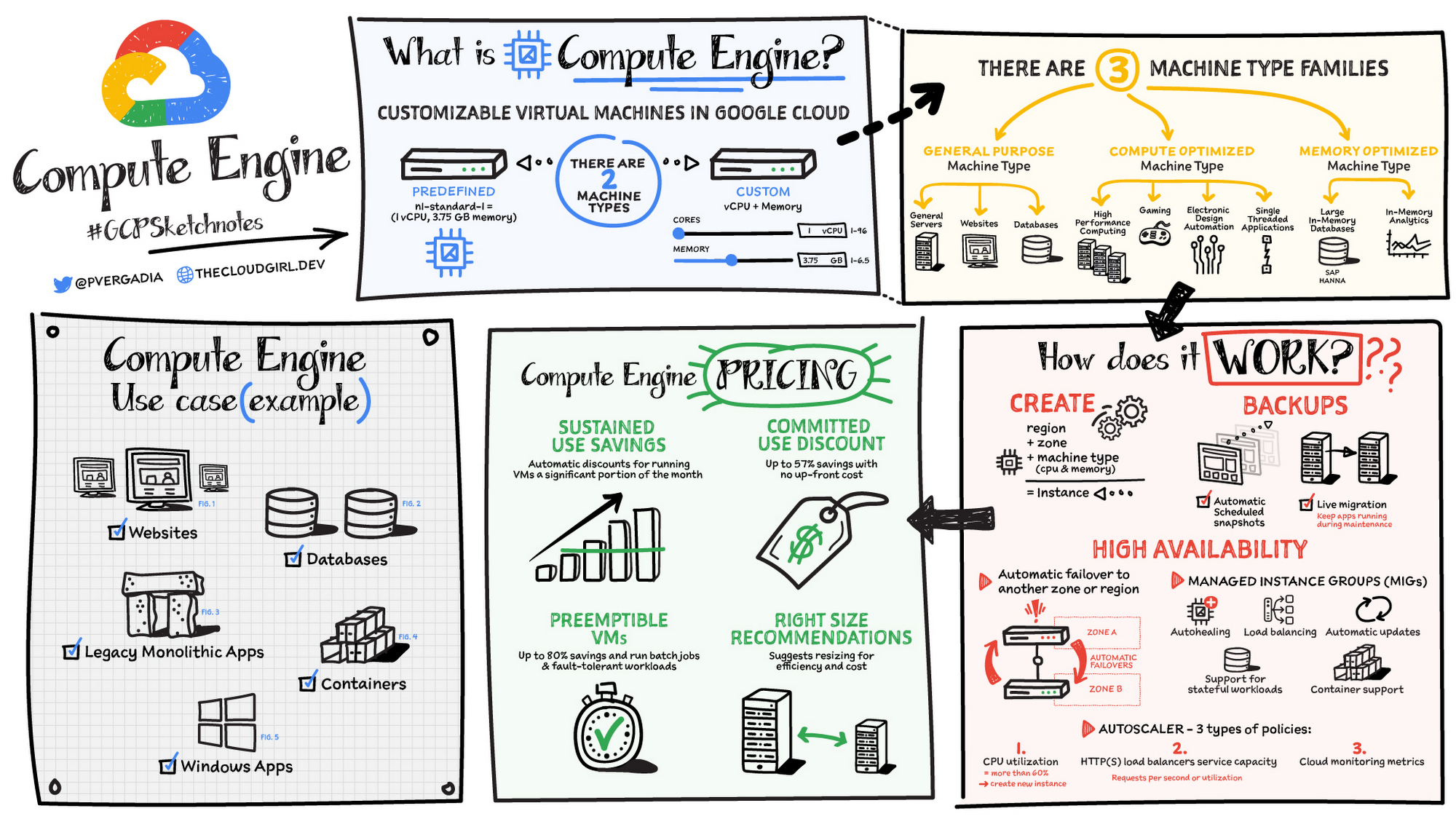
Compute Engine is a customizable compute service that lets you create and run virtual machines on Google’s infrastructure. You can create a Virtual Machine (VM) that fits your needs. Predefined machine types are pre-built and ready-to-go configurations of VMs with specific amounts of vCPU and memory to start running apps quickly. With Custom Machine Types, you can create virtual machines with the optimal amount of CPU and memory for your workloads. This allows you to tailor your infrastructure to your workload. If requirements change, using the stop/start feature you can move your workload to a smaller or larger Custom Machine Type instance, or to a predefined configuration.
Machine types
In Compute Engine, machine types are grouped and curated by families for different workloads. You can choose from general-purpose, memory-optimized, compute-optimized and accelerator-optimized families.
- General-purpose machines are used for Day-to-day computing at a lower cost and for balanced price/performance across a wide range of VM shapes. The use cases that best fit here are web serving, app serving, back office applications, databases, cache, media-streaming, microservices, virtual desktops, development environments.
- Memory-Optimized machine are recommended for ultra high-memory workloads such as in-memory analytics and large in-memory databases such as SAP HANA
- Compute-Optimized machines are recommended for ultra high performance workloads such as High Performance Computing (HPC), Electronic Design Automation (EDA), gaming, video transcoding, single-threaded applications.
- Accelerator-Optimized machines are optimized for high performance computing workloads such as Machine learning (ML), Massive parallelized computations and High Performance Computing (HPC)
How does it work?
You can create a VM instance using a boot disk image, a boot disk snapshot, or a container image. The image can be a public operating system (OS) image or a custom one. Depending on where your users are you can define the zone you want the virtual machine to be created in. By default all traffic from the internet is blocked by the firewall and you can enable the HTTP(s) traffic if needed.
Use snapshot schedules (hourly, daily, or weekly) as a best practice to back up your Compute Engine workloads. Compute Engine offers live migration by default to keep your virtual machine instances running even when software or hardware update occurs. Your running instances are migrated to another host in the same zone instead of requiring your VMs to be rebooted.
Availability
For High Availability (HA) Compute Engine offers automatic failover to other regions or zones in event of a failure. Managed instance groups (MIGs) help keep the instances running by automatically replicating instances from a predefined image. They also provide application based autohealing health checks. If an application is not responding on a VM, the auto healer automatically recreates that VM for you. Regional MIGs let you spread app load across multiple zones. This replication protects against zonal failures. MIGs work with load balancing services to distribute traffic across all of the instances in the group.
Compute Engine offers autoscaling to automatically add or remove VM instances from a managed instance group based on increases or decreases in load. Autoscaling lets your apps gracefully handle increases in traffic, and it reduces cost when the need for resources is lower. You define the autoscaling policy for automatic scaling based on the measured load, CPU utilization, requests per second or other metrics.
Active Assist’s new feature, predictive autoscaling, helps improve response times for your applications–When you enable predictive autoscaling, Compute Engine forecasts future load based on your Managed Instance Group’s (MIG) history and scales it out in advance of predicted load, so that new instances are ready to serve when the load arrives. Without predictive autoscaling, an autoscaler can only scale a group reactively, based on observed changes in load in real time. With predictive autoscaling enabled, the autoscaler works with real-time data as well as with historical data to cover both the current and forecasted load. That makes predictive autoscaling ideal for those apps with long initialization times and whose workloads vary predictably with daily or weekly cycles. For more information, see How predictive autoscaling works or check if predictive autoscaling is suitable for your workload, and to learn more about other intelligent features, check out Active Assist.
Pricing
You pay for what you use. But you can save cost by taking advantage of some discounts! Sustained use saving are automatic discounts applied for running instances for a significant portion of the month. If you know your usage upfront, you can take advantage of committed use discounts which can lead up to significant savings without any upfront cost. And by using short lived preemptive instances you can save up to 80%, they are great for batch jobs and fault tolerant workloads. You can also optimize resource utilization with automatic recommendations. For example if you are using a bigger instance for a workload that can run on a smaller instance you can save costs applying these recommendations.
Security
Compute Engine provides you default hardware security. Using Identity and Access Management (IAM) you just have to ensure that proper permissions are given to control access to your VM resources. All the other basic security principles apply, if the resources are not related and don’t require network communication amongst themselves, consider hosting them on different VPC networks. By default, users in a project can create persistent disks or copy images using any of the public images or any images that project members can access through IAM roles. You may want to restrict your project members so that they can create boot disks only from images that contain approved software that meet your policy or security requirements. You can define an organization policy that only allows Compute Engine VMs to be created from approved images. This can be done by using the Trusted Images Policy to enforce images that can be used in your organization.
By default all VM families are Shielded VMs. Shielded VMs are virtual machine instances that are hardened with a set of easily configurable security features to ensure that when your VM boots, it’s running a verified bootloader and kernel — is the default for everyone using Compute Engine, at no additional charge. For more details on Shielded VMs refer to the documentation here.
For additional security, you also have the option to use Confidential VM to encrypt your data in use, while it’s being processed in Compute Engine. For more details on Confidential VM refer to the documentation here.
Use cases
There are many use cases Compute Engine can serve in addition to running websites and databases. You can also migrate your existing systems onto Google Cloud, with Migrate for Compute Engine, enabling you to run stateful workloads in the cloud within minutes rather than days or weeks. Windows, Oracle or VMware applications have solution sets enabling a smooth transition to Google Cloud. To run windows applications either bring your own license leveraging Sole-tenant nodes or using the included licenced images.
Conclusion
Whatever your application use case may be, from legacy enterprise applications to digital native applications, Compute Engine’s families will fit it. For a more in-depth look into Compute Engine check out the documentation.
For more #GCPSketchnote, follow the GitHub repo. For similar cloud content follow me on Twitter @pvergadia and keep an eye out on thecloudgirl.dev
More Relevant Stories for Your Company

Transform Your Business: Comprehensive Cloud Services and Tailored Pricing Plans
As the saying goes, “it’s hard to make predictions, especially about the future.” Some organizations find it challenging to predict what cloud resources they’ll need in months or years ahead. Every organization is on its own unique cloud journey. To help, we’re developing new ways for customers to consume and

8 Must-Have Google Cloud Products for Startups
Startups worldwide turn to Google Cloud tools to build fast on a strong and easy to use platform that helps them get to market and launch products faster, all while building on the cleanest cloud in the industry. Startups leverage Google Cloud and our Google for Startups Cloud Program to
Google Cloud’s Role in Minimizing Memory Errors Impact for SAP Customers
Every cloud system begins with high-quality hardware infrastructure. Sometimes, however, hardware breaks — and when it happens, our most important goal is to minimize the impact on our customers and their cloud workloads. Memory errors are the most common type of hardware failure, and they're also one of the most

Forrester Study Finds 72% ROI from Moving Expensive, Traditional OS and Software to Google Cloud!
Google Cloud commissioned Forrester Consulting to conduct a Total Economic Impact™ (TEI) study and examined the potential return on investment (ROI) for companies that have migrated to Google Cloud. The study evaluates the risks, benefits and costs associated with Google Cloud migration and the experiences of five customers with large,
