





Workforce Identity Federation: A Seamless Experience for Users

2743
Of your peers have already read this article.
2:30 Minutes
The most insightful time you'll spend today!
At Google Cloud, we’re focused on giving customers new ways to strengthen their security posture. Managing identities and authorization is a core security control that underpins interactions inside and collaboration outside the organization. To address fraud, identity theft, and other security challenges associated with the proliferation of online accounts, many organizations have opted to use centralized identity provider (IdP) products that can help secure and manage identities for their users and SaaS applications, and we want to strengthen support for these solutions and the use cases they support.
Today we’re pleased to announce Workforce Identity Federation in Preview. This new Google Cloud Identity and Access Management (IAM) feature can rapidly onboard workforce user identities from external IdPs and provide direct secure access to Google Cloud services and resources. Workforce Identity Federation uses a federation approach instead of Directory Synchronization, the method currently used by most organizations for onboarding Google Cloud identities. Workforce Identity Federation provides flexibility to support third-party collaboration use cases and business requirements that can be better addressed by using a localized, customer-managed IdP.
Federating existing identities eliminates the need to maintain separate identities across multiple platforms. This means that organizations using Workforce Identity Federation no longer need to synchronize workforce user identities from their existing identity management solutions to Google Cloud. IdPs can include Identity-as-a-Service (IDaaS) and directory products such as those from ForgeRock, Microsoft, Okta, JumpCloud, or Ping Identity.
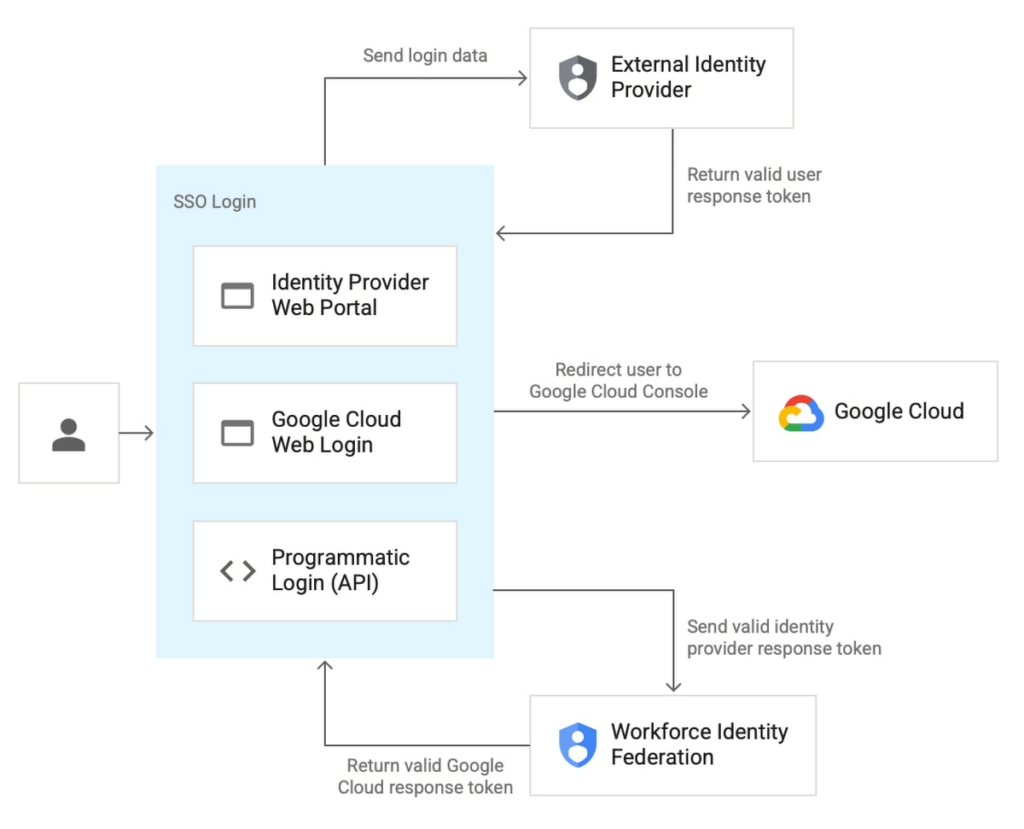
Workforce Identity Federation is another example of how we are working to make Google Cloud’s Invisible Security vision a reality, in this case delivering secure access leveraging customers’ current identity and access management solutions without the need for redundant user administration

VMware is one of our customers using Workforce Identity Federation in Preview. Thiru Bhat, director at VMware, explained why he’s excited for the new feature.
“VMware runs its own IdP and we needed a solution to allow our developers to access their Google Cloud projects while maintaining corporate control over identities and permissions. Syncing of user identities outside of our IdP is not permitted per our InfoSec policies and we deployed Google Cloud’s Workforce Identity Federation to fulfill our identity requirements. Workforce Identity Federation feature meets our needs with a solution that is robust and straightforward to configure.”
Here’s a closer look at a few use cases and the benefits from the new Workforce Identity Federation.
Use case: Employee sign-in and authorization
Streamlined authentication experience with fine-grained access control
Workforce Identity Federation can enable your organization’s users to access Google Cloud through the same login experience they already use for their existing IdP for single sign-on. Workforce Identity Federation also can enable fine-grained access through attribute mapping and attribute conditions. Attributes — which some IdPs call claims — contain additional information about users.
Google Cloud can use these attributes to further inform authentication decisions. Attribute mapping lets your administrators map identity attributes that are defined in your IdP to those that Google Cloud can use. Your administrators can configure Google Cloud with attribute conditions to authenticate conditionally — to let only a subset of external identities authenticate to your Google Cloud project based on attributes.
For example, your administrators might want to let only those employees who are part of the accounting team sign in. To do this, your administrators can configure an IdP attribute, such as EmployeeJobFamily. Using attribute mapping, they could map this attribute to a similar attribute in Google Cloud, such as employee_job_family. Then, they could configure an attribute condition, assertion.employee_job_family=="accounting".
Use case: Secure access for partners and vendors
Restricted and secure access to Google Cloud services from a partner or vendor that has their own IdP and associated privacy and data policies
Today, the modern enterprise depends on partners and vendors more than ever. Partners and vendors can help scale enterprise workflows, but they also can introduce new complexities for IT teams, such as how to secure partner or vendor identities in addition to the rest of their enterprise users.
Workforce Identity Federation can enable enterprises to selectively federate users from partner or vendor IdPs without requiring enterprise IT teams to sync or create a separate identity store to use Google Cloud resources.
One common scenario where Workforce Identity Federation can help is when a company hires a partner or vendor to provide outsourced development services using cloud resources (such as when Google Kubernetes Engine (GKE) DevOps services are outsourced to a partner.) The company creates a separate workforce pool for the partner or vendor’s administrator, who can then use their own IdP to grant access to their workforce.
This use case can also help support organizations who have requirements to store and maintain identity information locally in support of data residency or digital sovereignty initiatives. By using a local IdP, either customer-managed or partner-managed, and federating identities to Google Cloud, organizations can further strengthen control over their identity information.
Seamless experience for users, easy access management for administrators
Before Workforce Identity Federation, organizations would need to duplicate user identities from their IdP by creating user accounts in Google Cloud Identity. Workforce Identity Federation can help you access Google Cloud without having to first create Cloud Identity user accounts. It also reduces toil by eliminating the need to maintain two separate identity management systems.
Identity providers such as ForgeRock see tremendous value in the Workforce Identity Federation, and how Google Cloud can work with them to jointly help customers manage workforce identities. Peter Barker, ForgeRock’s Chief Product Officer, said that his company’s partnership with Google Cloud makes identity management easy and secure for administrators and users alike.
“Our strategic partnership with Google Cloud delivers great value to our customers and we’re excited to continue to expand our relationship. This integration with Google Cloud Workforce Identity Federation enables ForgeRock customers to leverage their current IAM investments and makes it easier for employees, contractors, and partners to securely access Google Cloud resources.”
Getting started with Workforce Identity Federation
Workforce Identity Federation is now available in Preview to customers already using Google Cloud. You can learn more about Workforce Identity Federation by visiting our webpage and watching this video.
Please contact your account manager to see if workforce identity federation is the right fit for your organization. And, you can get started with these new capabilities today using our product documentation.
Boost Security with Google’s reCAPTCHA Enterprise Fraud Prevention

1174
Of your peers have already read this article.
2:30 Minutes
The most insightful time you'll spend today!
Today, we are putting the power of Google’s insights and intelligence in the hands of risk, fraud, and security teams everywhere. We are pleased to announce the general availability of reCAPTCHA Enterprise Fraud Prevention, a new product that uses Google’s own fraud models, machine learning, and intelligence from protecting more than 6 million websites to help stop payment fraud.
reCAPTCHA Enterprise Fraud Prevention can help protect payment transactions by identifying targeted manual attacks and large-scale fraud attempts. It automatically trains fraud models based on behavior and transaction data to identify events that are likely fraudulent and could cause a dispute or chargeback if accepted.
When threat actors are identified and blocked on any site in the reCAPTCHA network, the intelligence is made available to help protect other organizations from those same attackers. Organizations can then use the scores to send the transaction for manual review or directly block suspicious transactions, drive increased trust in their legitimate transactions, reduce the amount of friction for good users, and reduce erroneous rejection rates.
“Being a safe and trusted place to give and receive help is our top priority. We are constantly innovating, refining and enhancing our fraud defenses and Google’s reCAPTCHA Enterprise Fraud Prevention adds another layer of industry-leading protection for our users. Combining Google’s rich security expertise with GoFundMe’s focus on fraud prevention is already showing promising results as we strive to keep our platform the safest place to give online,” said Matthew Murray, director of risk, GoFundMe.
According to data obtained from our customers using reCAPTCHA Enterprise Fraud Prevention in private Preview, the new solution can help drive comprehensive value for organizations by:
- Reducing fraud losses: Get behavior modeling (not just mouse movements), stop financial damage created by account takeovers (ATOs), and connect fraud and abuse intelligence across your site and application.
- Increasing legitimate sales: Fraud Prevention can help businesses increase their revenue by providing insights to understand who good users are, who may otherwise be caught in an overly aggressive, customer restrictive fraud model.*
These benefits are enabled for organizations by:
- Preventing advanced attacks: Stopping sophisticated attacks in an environment where attackers use cloud fraud infrastructure, and data leaks, virtual cards and VPN usage are on the rise
- Increasing trust in good transactions: Focus on good approval rates through a unique combination of supervised and unsupervised models
- Improving customer experience: By preventing fraudulent transactions with zero user friction, Fraud Prevention can help businesses protect legitimate users and increase customer retention
Our customers have used these new capabilities in preview in customer experiences that include online checkouts and payment transactions. Fraud Prevention has been used by merchants and payment processors to block millions of dollars in fraudulent transactions in a frictionless way.
reCAPTCHA Enterprise provides a comprehensive online fraud detection platform that helps prevent fraudulent, spammy, and abusive digital client activity across your web and application footprint. This platform includes Account Defender, which protects users from account takeovers (ATO), frictionless bot management capabilities, and password leak detection to identify compromised accounts. With an additional API call for Fraud Prevention, organizations can leverage a comprehensive solution to secure financial transactions along with core reCAPTCHA Enterprise capabilities.
To get started, organizations can install a score-based site key on each part of the payment user flow front end and send transaction data when a purchase occurs. This site key helps train site-specific fraud models and start returning fraud scores for each transaction.
Ready to put reCAPTCHA Enterprise Fraud Prevention to work? Contact our fraud specialists or your customer success CSM team and sign up with the free tier. You learn more about these new capabilities in reCAPTCHA Enterprise in our product documentation. You can also register for our webinar where our experts will be discussing this capability in great detail on June 1, 2023.
Coming up at our Security Summit on June 13-14, you can hear how reCAPTCHA Enterprise helped GoFundMe secure their donors from fraud. Sign up here for free Security Summit registration.
Center for Internet Security’s Latest Benchmark for Securing Chrome

5389
Of your peers have already read this article.
1:30 Minutes
The most insightful time you'll spend today!
As the way people work continues to evolve, keeping security policies in place that protect organizations but give workers the ability to get things done is more important than ever. IT and security teams must aim to stay a step ahead of web-based security threats that come their organization’s way. To help, the Center for Internet Security (CIS) team has released the latest CIS Benchmark 2.1 for Google Chrome. This Benchmark offers independent recommendations on which Chrome policies to configure to help support organizations’ security and compliance needs. Thanks to Chrome being built with security at its core, in many cases, Chrome default settings are aligned with CIS recommendations.
Chrome is secure by default, but we also pride ourselves on providing customizations for enterprises to allow Chrome to better fit the needs of their business. And with hundreds of policies available through Chrome Browser Cloud Management and Group Policy Objects (Note: The CIS Benchmark is also available as a GPO), organizations can do just that.
Throughout the CIS guide you’ll notice that there are different designations for configuration profiles. Any labeled Level 1, are considered to be a good baseline for an organization. Level 2 profiles are recommended for deployments that require the highest level of security, but note that these settings could have a trade off on user productivity. We recommend looking at each setting and determining if it’s a good fit for your business.
The benchmark is made up of five sections:
- Enforced Defaults — Notes policies that are configured by default when you install Chrome. Enforcing these settings at an enterprise level can prevent these settings from being changed by business users to less secure options.
- Attack Surface Reduction — Details how to disable web features that may not be necessary in your enterprise environment and could reduce your overall attack surface.
- Privacy — Surfaces settings that improve user privacy.
- Data Loss Prevention — Contains settings that can help prevent data loss and protect your organization’s data. (Note: These recommendations cover additional capabilities that can be added to Chrome through BeyondCorp Enterprise).
- Forensics (Post Incident) — Shares recommendations on policies that give insights into post incident forensics and analysis.
Organizations can use these benchmarks to optimize the best way to secure Chrome in their environment. Download the CIS Benchmark here and check out our team’s configuration guide for additional recommendations on how to configure Chrome.
Note: This benchmark was created using a consensus review process composed of subject matter experts. Consensus participants provide perspective from a diverse set of backgrounds such as consulting, software development, audit and compliance, security research, operations, government, and legal. While these recommendations come from a trusted source, it’s important for each organization to weigh which policies make the most sense for their business.
Building Unique Customer Experiences with Speed & Scale: Sprinklr & Google Cloud

8213
Of your peers have already read this article.
2:00 Minutes
The most insightful time you'll spend today!
Enterprises are increasingly seeking out technologies that help them create unique experiences for customers with speed and at scale. At the same time, customers want flexibility when deciding where to manage their enterprise data, particularly when it comes to business-critical applications.
That’s why I’m thrilled that Sprinklr, the unified customer experience management (Unified-CXM) platform for modern enterprises, has partnered with Google Cloud to accelerate its go-to-market strategy and grow awareness among our joint customers. Sprinklr will work closely with our global salesforce, benefitting from our deep relationships with enterprises that have chosen to build on Google Cloud.
Akin to Google Cloud’s mission to accelerate every organization’s ability to digitally transform their business through data-powered innovation, Sprinklr’s primary objective is to empower the world’s largest and most loved brands to make their customers happier by listening, learning, and taking action through insights. With this strategic partnership now in place, Sprinklr and Google Cloud will go-to-market together with the end-customer as our sole focus.
Traditionally, brands have adopted point solutions to manage segments of the customer journey. In isolation, these may work — but they rarely work collaboratively, even when vendors build “Frankenstacks” of disconnected products. These solutions can’t deliver a 360° view of the customer, and often reinforce departmental silos. All of which creates point-solution chaos.
Sprinklr’s approach is fundamentally different and is the way out of the aforementioned point-solution chaos. As the first platform purpose-built for unified customer experience management (Unified-CXM) and trusted by the enterprise, Sprinklr’s industry-leading AI and powerful Care, Marketing, Research, and Engagement solutions enable the world’s top brands to learn about their customers, understand the marketplace, and reach, engage, and serve customers on all channels to drive business growth.
Sprinklr was built from the ground up as a platform-first solution, designed to evolve and grow with the rapid expansion of digital channels and applications. The results? Faster innovation. Stronger performance. And a future-proof strategy for customer engagement on an enterprise scale.
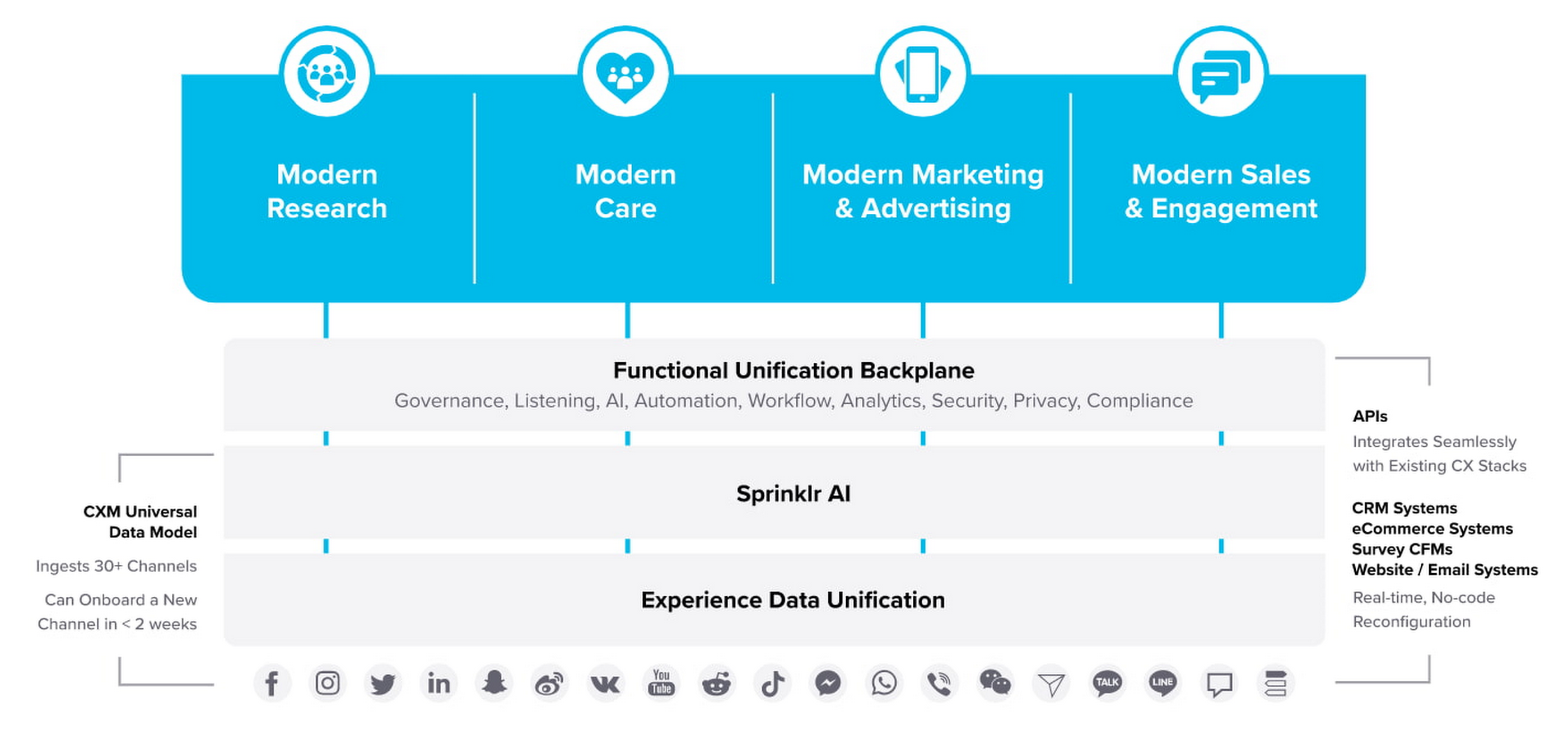
“Sprinklr works with large, global companies that want flexibility when deciding where to manage their enterprise data and consider our platform a business-critical application,” said Doug Balut, Senior Vice President of Global Alliances, Sprinklr. “Giving our customers the opportunity to manage Sprinklr on Google Cloud empowers them to create engaging customer experiences while maintaining the high security, scalability, and performance they need to run their business.”
To learn more about this exciting partnership and the challenges we jointly solve for customers, check out the recent conversation between Google Cloud’s VP of Marketing, Sarah Kennedy, and Sprinklr’s Chief Experience Officer, Grad Conn. Or read the press release on the partnership.
Best Practices for Cost Optimization in the Cloud

5424
Of your peers have already read this article.
3:30 Minutes
The most insightful time you'll spend today!
When customers migrate to Google Cloud Platform (GCP), their first step is often to adopt Compute Engine, which makes it easy to procure and set up virtual machines (VMs) in the cloud that provide large amounts of computing power. Launched in 2012, Compute Engine offers multiple machine types, many innovative features, and is available in 20 regions and 61 zones!
Compute Engine’s predefined and custom machine types make it easy to choose VMs closest to your on-premises infrastructure, accelerating the workload migration process cost effectively. Cloud allows you the pricing advantage of ‘pay as you go’ and also provides significant savings as you use more compute with Sustained Use Discounts.
As Technical Account Managers, we work with large enterprise customers to analyze their monthly spend and recommend optimization opportunities. In this blog, we will share the top recommendations that we’ve developed based on our collective experience working with GCP customers.
Getting ready to save
Before you get started, be sure to familiarize yourself with the VM instance pricing page—required reading for anyone who needs to understand the Compute Engine billing model and resource-based pricing. In addition to those topics, you’ll also find information about the various Compute Engine machine types, committed use discounts and how to view your usage, among other things.
Another important step to gain visibility into your Compute Engine cost is using Billing reports in the Google Cloud Console and customizing your views based on filtering and grouping by projects, labels and more. From there you can export Compute Engine usage details to BigQuery for more granular analysis. This allows you to query the datastore to understand your project’s vCPU usage trends and how many vCPUs can be reclaimed. If you have defined thresholds for the number of cores per project, usage trends can help you spot anomalies and take proactive actions. These actions could be rightsizing the VMs or reclaiming idle VMs.
Now, with these things under your belt, let’s go over the five ways you can optimize your Compute Engine resources that we believe will give you the most immediate benefit.
1. Apply Compute Engine rightsizing recommendations
Compute Engine’s rightsizing recommendations feature provides machine type recommendations that are generated automatically based on system metrics gathered by Stackdriver Monitoring over the past eight days. Use these recommendations to resize your instance’s machine type to more efficiently use the instance’s resources. It also recommends custom machine types when appropropriate. Compute Engine makes viewing, resizing and other actions easier right from the Cloud Console as shown below.
Recently, we expanded Compute Engine rightsizing capabilities from just individual instances to managed instance groups as well. Check out the documentation for more details.

For more precise recommendations, you can install the Stackdriver Monitoring agent which collects additional disk, CPU, network, and process metrics from your VM instances to better estimate your resource requirements. You can also leverage the Recommender API for managing recommendations at scale.
2. Purchase Commitments
Our customers have diverse workloads running on Google Cloud with differing availability requirements. Many customers follow a 70/30 rule when it comes to managing their VM fleet—they have constant year-round usage of ~70%, and a seasonal burst of ~30% during holidays or special events.
If this sounds like you, you are probably provisioning resources for peak capacity. However, after migrating to Google Cloud, you can baseline your usage and take advantage of deeper discounts for Compute workloads. Committed Use Discounts are ideal if you have a predictable steady-state workload as you can purchase a one or three year commitment in exchange for a substantial discount on your VM usage.
We recently released a Committed Use Discount analysis report in the Cloud Console that helps you understand and analyze the effectiveness of the commitments you’ve purchased. In addition to this, large enterprise customers can work with their Technical Account Managers who can help manage their commitment purchases and work proactively with them to increase Committed Use Discount coverage and utilization to maximize their savings.
3. Automate cost optimizations
The best way to make sure that your team is always following cost-optimization best practices is to automate them, reducing manual intervention.
Automation is greatly simplified using a label—a key-value pair applied to various Google Cloud services. For example, you could label instances that only developers use during business hours with “env: development.” You could then use Cloud Scheduler to schedule a serverless Cloud Function to shut them down over the weekend or after business hours and then restart them when needed. Here is an architecture diagram and code samples that you can use to do this yourself.
Using Cloud Functions to automate the cleanup of other Compute Engine resources can also save you a lot of time and money. For example, customers often forget about unattached (orphaned) persistent disk, or unused IP addresses. These accrue costs, even if they are not attached to a virtual machine instance. VMs with the “deletion rule” option set to “keep disk” retain persistent disks even after the VM is deleted. That’s great if you need to save the data on that disk for a later time, but those orphaned persistent disks can add up quickly and are often forgotten! There is a Google Cloud Solutions article that describes the architecture and sample code for using Cloud Functions, Cloud Scheduler, and Stackdriver to automatically look for these orphaned disks, take a snapshot of them, and remove them. This solution can be used as a blueprint for other cost automations such as cleaning up unused IP addresses, or stopping idle VMs.
4. Use preemptible VMs
If you have workloads that are fault tolerant, like HPC, big data, media transcoding, CI/CD pipelines or stateless web applications, using preemptible VMs to batch-process them can provide massive cost savings. In fact, customer Descartes Labs reduced their analysis costs by more than 70% by using preemptible VMs to process satellite imagery and help businesses and governments predict global food supplies.
Preemptible VMs are short lived— they can only run a maximum of 24 hours, and they may be shut down before the 24 hour mark as well. A 30-second preemption notice is sent to the instance when a VM needs to be reclaimed, and you can use a shutdown script to clean up in that 30-second period. Be sure to fully review the full list of stipulations when considering preemptible VMs for your workload. All machine types are available as preemptible VMs, and you can launch one simply by adding “-preemptible” to the gcloud command line or selecting the option from the Cloud Console.
Using preemptible VMs in your architecture is a great way to scale compute at a discounted rate, but you need to be sure that the workload can handle the potential interruptions if the VM needs to be reclaimed. One way to handle this is to ensure your application is checkpointing as it processes data, i.e., that it’s writing to storage outside the VM itself, like Google Cloud Storage or a database. As an example, we have sample code for using a shutdown script to write a checkpoint file into a Cloud Storage bucket. For web applications behind a load balancer, consider using the 30-second preemption notice to drain connections to that VM so the traffic can be shifted to another VM. Some customers also choose to automate the shutdown of preemptible VMs on a rolling basis before the 24-hour period is over, to avoid having multiple VMs shut down at the same time if they were launched together.
5. Try autoscaling
Another great way to save on costs is to run only as much capacity as you need, when you need it. As we mentioned earlier, typically around 70% of capacity is needed for steady-state usage, but when you need extra capacity, it’s critical to have it available. In an on-prem environment, you need to purchase that extra capacity ahead of time. In the cloud, you can leverage autoscaling to automatically flex to increased capacity only when you need it.
Compute Engine managed instance groups are what give you this autoscaling capability in Google Cloud. You can scale up gracefully to handle an increase in traffic, and then automatically scale down again when the need for instances is lowered (downscaling). You can scale based on CPU utilization, HTTP load balancing capacity, or Stackdriver Monitoring metrics. This gives you the flexibility to scale based on what matters most to your application.
High costs do not compute
As we’ve shown above, there are many ways to optimize your Compute Engine costs. Monitoring your environment and understanding your usage patterns is key to understanding the best options to start with, taking the time to model your baseline costs up front. Then, there are a wide variety of strategies to implement depending on your workload and current operating model.
For more on cost management, check out our cost management video playlist. And for more tips and tricks on saving money on other GCP services, check out our blog posts on Cloud Storage, Networking and BigQuery cost optimization strategies. We have additional blog posts coming soon, so stay tuned!
Data Security Excellence: Google Takes the Lead in Forrester’s Wave Report

1291
Of your peers have already read this article.
3:30 Minutes
The most insightful time you'll spend today!
To help organizations confidently move their sensitive data to the cloud, Google Cloud works diligently to earn and maintain customer trust. Our Trusted Cloud is committed to giving you a secure foundation that you can verify and independently control. Discovery and protection of sensitive data are integral parts of Google Cloud’s strategy to safeguard customer data. With this as our longstanding approach to protecting customers, we are happy to share that Forrester Research has ranked Google Cloud a Leader in The Forrester Wave™ Data Security Platforms Q1 2023.
Relentless security innovation leveraging Google’s core strengths
Google keeps more people safe online than anyone else. The scale at which we operate allows us to pioneer approaches to cloud-native security and then bring them to commercial and public sector organizations everywhere they operate. Leveraging our data processing and novel analytics capabilities with artificial intelligence and machine learning (AI/ML) allows our technology to help protect enterprises and their end users. At the core of our data security capabilities is our data loss prevention (DLP) technology, which enables customers to discover, classify, and de-identify data in real-time, on-demand, continuously, and in event-driven workloads.

In their explanation for the ranking, Forrester noted in its report “Cloud-first, Google has notable areas of innovation focus, such as harnessing machine learning (ML) and artificial intelligence (AI), productizing internal innovations, and co-innovation with partners in areas like confidential computing, data sovereignty controls, and external cloud key management services.”
Embedded across multiple Google products
Our platform supports the discovery of corporate assets in Chrome Enterprise and Google Workspace applications including Gmail and Google Drive. We also provide support for discovering production and analytical assets such as object storage, relational databases, data warehouses, data lakes, production apps, and workloads such as migration/ETL. This technology identifies and detects various types of sensitive data using a comprehensive set of built-in infoType detectors that are ready to use out-of-the-box along with flexible custom detection options and rules. Types of sensitive data include personal identifiable information and personal health information (PII/PHI), financial identifiers, health context, multi-cloud credentials/secrets, and ML-based full document classification (including source code, SEC filings, and legal briefings).
Driven by Zero Trust principles
The Forrester Wave identified the 14 top significant data security platform providers. Forrester notes in the report that “[Google] also stands out for manageability and integrations for Zero Trust.” and “Google is a strong choice for organizations considering or currently using GCP as well as those using Google Workspace who are taking a Zero Trust approach to enabling bring your own device (BYOD) and remote work.”
Delivering value for our customers
We are honored to be a Leader in The Forrester Wave™: Data Security Platforms, Q1 2023 report. We look forward to continuing to innovate with you and make your digital transformation journey safer with our Trusted Cloud.
A copy of the full report can be viewed here.
More Relevant Stories for Your Company

Strategic Consulting, Training & Implementation Guidelines with Public Sector PSO Helps Governments Stay Compliant
Did you know that by 2025, enterprise IT spending on public cloud computing will overtake traditional IT spending? In fact, 51% of IT spend in application software, infrastructure software, business process services, and system infrastructure will transition to the public cloud, compared to 41% in 20221.. As enterprises continue to

Google Unveils New Cloud Region in Delhi NCR to Power India’s Digitization
In the past year, Google has worked to surface timely and reliable health information, amplify public health campaigns, and help nonprofits get urgent support to Indians in need. Now, we are continuing to focus on helping India’s businesses accelerate their digital transformation, deepening our commitment to India’s digitization and economic recovery.

Highmark & Google’s Secure-by-design Technique to Bring the Living Health Solution to Life
In an industry as highly regulated as healthcare, building a single secure and compliant application that tracks patient care and appointments at a clinic requires a great deal of planning from development and security teams. So, imagine what it would be like to build a solution that includes almost everything

New Capabilities in Cloud Asset Inventory Allow Better Visibility into Google Cloud Environments
Businesses that operate in complex cloud environments, large fleets, or sophisticated security operations all require visibility into their cloud assets in order to keep their teams nimble and their data secure. Cloud Asset Inventory (CAI) helps these teams understand their Google Cloud and Anthos environments by providing complete visibility, real-time monitoring, and
