





Find the Best Kept Security Secrets to Harness the Power of Organization Policy Service

2689
Of your peers have already read this article.
2:30 Minutes
The most insightful time you'll spend today!
The canvas of cloud resources is vast, ready for an ambitious organization to craft their digital masterpiece (or perhaps just their business.) Yet before the first brush of paint is applied, a painter in the cloud needs to think about their frame: What shape should it take, what material is it made of, how will it look as a border against the canvas of their cloud service. Google Cloud’s Organization Policy Service is just such a frame, a broad set of tools for our customer’s security teams to set broad yet unbendable limits for engineers before they start working.
Google Cloud’s Organization (org) Policy Service is one of our most dramatic features but is often under-appreciated by security teams. It provides for a separation of duties by focusing on what users can do, and lets the administrator set restrictions on specific resources to determine how they can be configured. This drives defense in depth from configuration errors as well as defense in depth from attacks. An org policy lets the administrator enforce compliance and conformance at a higher level than Identity and Access Management, which focuses on which users can access specific resources.
Org policies can reduce toil and can improve security at the scale needed by today’s cloud users. Financial services provider HSBC is one of Google Cloud’s largest customers and has been using org policies for years to help it manage cloud resources across its highly-regulated enterprise environment. As the company explains in this video, HSBC’s creative use of org policies manages more than 15,000 service accounts and 40,000 IT professionals. They control 6.5 million virtual machines per year. That’s 22,500 virtual machines per day, and only 2,500 of those VMs exist for more than 24 hours
HSBC prefers org policies instead of other preventative controls because they are native to Google Cloud and can be enforced independently of how the request originated (such as from Infrastructure-as-Code, Google Cloud services interacting with each other, or a user in the UI.) Detecting resource violations is expensive for many customers, and often comes too late to prevent harm. Org Policies can be deployed to prevent violations from occurring and eliminate detection and remediation costs.
Importantly, HSBC’s custom installation is designed so that org policy violations are immediately discoverable, which can help HSBC personnel quickly understand how to quickly and accurately correct an error condition. When an action violates org policy, an error code is returned telling the resource requester which policy was violated. Corresponding logs are generated for administrators to monitor and provide further troubleshooting.
Here are two additional use cases that further illustrate the power of organization policies.
- Organizations that operate in a region with rigorous data residency requirements can configure and enable the Location org policy to help ensure that all resources created (such as VMs, clusters, and buckets) are deployed in a particular cloud region.
- Admins who want to ensure that only trusted workloads are deployed for Google Kubernetes Engine (GKE) or Cloud Run may want to restrict developers to only use verified images in their deployment processes. They can create a custom org policy that targets GKE cluster resource type and create and update methods to block the creation or update of any clusters that do not have binary authorization enforced.
How it works
Google Cloud offers more than 80 org policies that can be used to restrict and govern interactions with Google Cloud services and resources across important domains such as security, reliability, and compliance. Org policies can help:
- Restrict resource and service access to the organization domain only, secure public access to resources, or stop service account key abuse.
- Enforce use of global or regional DNS, and global or regional load balancing, to Improve service reliability and availability.
- Specify which services can access resources, in which regions, and at what times in support of compliance objectives.
- Secure Virtual Private Cloud (VPC) networks and reduce data exfiltration risk by preventing data from leaving a specific perimeter.
See the Organization Policy Service list of constraints for more about org policies and constraints.
You can also use the recently introduced Custom Organization Policies to tailor guardrails so they meet your specific compliance and security requirements. With Custom Organization Policies, security administrators can create their own constraints using Common Expression Language (CEL) to define which resource configurations are allowed or denied. Administrators can develop and deploy new policies and constraints in minutes.
With great power comes great responsibility, so with that in mind we will soon be introducing Dry Run for Custom Org Policies. It will let users put a policy in an audit-only mode to observe behavior during real operations without putting production workloads at risk.
Getting started
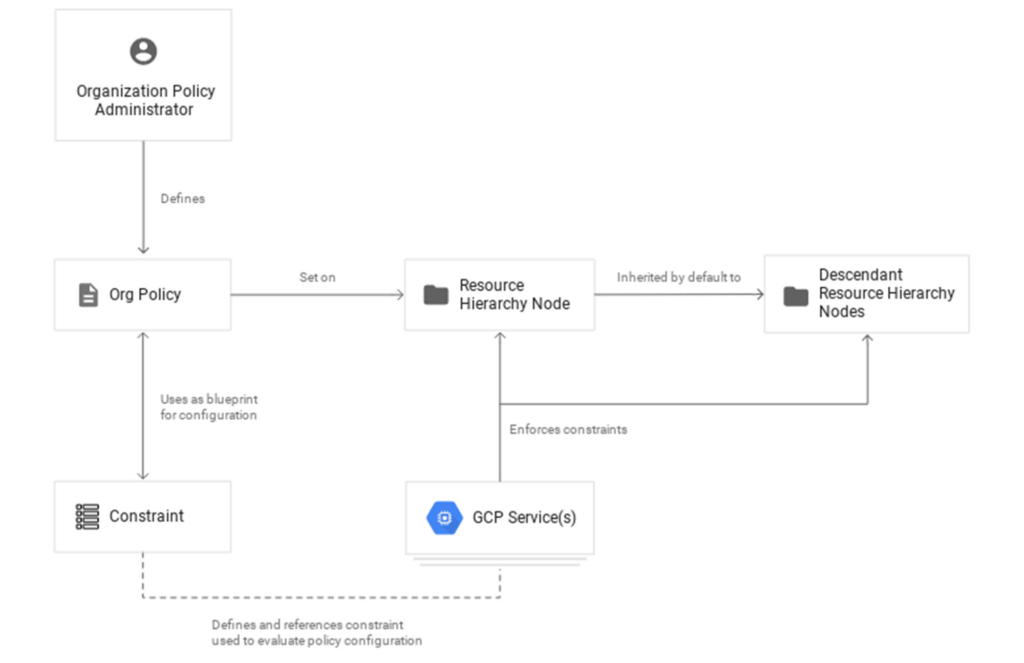
1. Setting up your first org policy is straightforward. An organization policy administrator enables a new organization policy on a Google Cloud organization, folder, or project in scope. Once set, the administrator then determines and applies the constraints. Here’s how it works:Design your constraint, which is a particular type of restriction against either a single Google Cloud service or a group of Google Cloud services. You can choose from the list of available built-in constraints by configuring desired restrictions and exceptions (based on tags) or create custom org policies.
It’s important to remember that descendants of the targeted resource hierarchy node inherit the org policy. By applying an organization policy to the root organization node, you can drive enforcement of that organization policy and configuration of restrictions across your organization.
2. Deploy the org policy to evaluate and allow or deny resource Create, Update, and Delete operations. This can be done through the Google Cloud console, gCloud, or via API.
3. Monitor audit logs and your Security Command Center Premium findings to detect and respond to policy violations.
Do I need an org policy?
Org policies can help maintain security and compliance at scale while also allowing development teams to work rapidly. Because they give you the ability to set broad guardrails, they can help ensure compliance without adding operational overhead and monitor policy violations.
To learn more about org policy, please review these resources:
- Read the Creating and Managing Organizations page to learn how to acquire an organization resource.
- Read about how to create and manage organization policies with the Google Cloud console.
- Learn how to define organization policies using constraints.
- Explore the solutions you can accomplish with organization policy constraints.
- Listen to the podcast where Vandy Ramadurai, Google Cloud’s Org Policy product manager, explains it all.
Google Products Helps HMH’s Healthcare Staff Work from Anywhere Efficiently and Securely!

10198
Of your peers have already read this article.
3:00 Minutes
The most insightful time you'll spend today!
Hackensack Meridian Health (HMH) executive Mark Eimer explains how an ambitiously-timed rollout of a comprehensive suite of Google products helped the entire organization—from doctors to IT staff—achieve better security, cultivate a more equitable work environment, and ultimately, improve patient outcomes.
How does a recently merged, 17-hospital healthcare system fast-track a platform migration and hardware rollout securely and in a way that improves work for everyone, regardless of location or role? These are the questions that kept me up at night in early 2020, when the pandemic demanded a “big bang”—something our legacy laptops and operating systems couldn’t handle.
We began our work with Google in 2020 with the adoption of Chrome as our default browser. As we migrated platforms, keeping patient data safe was of the utmost importance to us, along with providing every staff member with the tools they needed to work virtually. Our staff often experienced issues accessing our web-based applications using Internet Explorer or Edge Browser, a problem that went away when we switched to Chrome. Chrome’s versatile compatibility also made it easier for my team to migrate all of our web-based operations, and Chrome’s security and manageability were key components to making this switch a huge win for the organization.
The success of this migration led us to extend our Google partnership to patient care applications—where Google’s expertise in AI and ML helps scale the use of diagnostics tools and improve other aspects of the patient journey.

Achieving security at every step
Like so many other healthcare organizations, we’ve been concerned about ransomware attacks. This is part of why we moved to Google Workspace and distributed over 3,000 Chrome OS devices in kiosk mode in March of 2020, when many of us went remote due to the pandemic. We were very concerned about team members accessing corporate applications through home devices that were running EOL operating systems (WIN7), as well as a general lack of antivirus and encryption measures.
We were protected by the fact that Google’s software and hardware both had built-in security features that we needed to stave off sophisticated attackers. For example, Chrome OS automatically updates to the latest security update and encrypts data living outside the cloud on the hardware. These features protected us from security-related disruptions, letting us securely move a huge library of file shares and emails across thousands of accounts to Google Chrome OS in just four months.
A year later, in March 2021, we migrated the enterprise over to Google Workspace and saw an immediate reduction in spam by 30% from the inherent built-in AI/ML. This meant staff were less likely to receive (and click through) phishing attempts. My team could connect, create, and collaborate easily and securely—even as more of us were working from home and needed to access sensitive data remotely.
Leveling the playing field
As an organization, we were surprised by how many team members didn’t have personal computers at home. We quickly decided that if we needed team members to work from home, the health network would have to supply hardware. Chromebooks’ lower price tag compared to PCs—on top of their built-in security controls—allowed us to purchase, deploy, and support that initial distribution of 3,000 Chromebooks to team members in less than three weeks, providing devices to every eligible remote employee instead of just a select few. This was vital to reaching our equitable technology goal as part of our diversity and inclusion initiative: everybody has the same tools to do good work.
When all employees have what they need to do their jobs well, we get better patient outcomes. Before we began this cloud adoption journey, patient and staff experiences were different within the hospitals and outside of them.
Now it’s the same wherever our staff is, and we’ve seen efficiency and accessibility benefits extend to the patient side. For example, we built a web-based contact center that supports 80 locations that use Workspace and Chrome OS devices. Since customer service, admin, and providers are all on the same system, it has become a one-stop shop for patients.
Furthermore, through the Grow with Google program, we were able to provide another benefit to employees that drove our equity goals. Google trained 50 non-IT staff members—from environmental services, food and nutrition, and other non-tech areas who were interested in making a career change to IT—on the Google products we were using. They may not have thought about switching to a career in IT before the Grow with Google program came to our organization, but through this partnership, they now have that opportunity.
A strategic, long-term partner
With any large-scale rollout, the work doesn’t end once laptops are in employee hands. Google has shown their commitment to long-term collaboration as they continuously optimize their products for the unique needs of healthcare providers and go the extra mile in tailoring tools to our staff’s workflows.
For example, on the Chrome OS side, the Google team has helped our registration desks and document centers with device integration for hardware like credit card readers and e-signature pads. They’ve also helped us meet security and privacy requirements mandated by state and federal governments around HIPAA, Medicaid, and Medicare reimbursements. Over this next year, we’ll look at a feature roadmap with Google Cloud to deliver further enhancements, iterating on the product itself to meet our needs for the present and the future.

Delivering the future of healthcare
The benefits we’ve seen around security and usability—and the ability to provide all staff with equal access to Google’s technology—are why we’re expanding our partnership with Google to both the administrative and clinical sides of HMH. In addition to further Google rollouts with corporate, next year we’re distributing Chromebooks to all 350 of our ambulatory clinics.
We’re also working with the Google professional services team to create a custom AI model that analyzes 3D mammogram images. This AI model will enable two providers to read mammograms—which adheres to international best practices but is currently rare in the US—without requiring additional time. Conducting double readings of mammograms will yield better health outcomes for our patients, such as a lower patient recall rate and an increased accuracy in detecting breast cancer.
We’re currently building the model using a variety of Google Cloud products, including Cloud Healthcare API. Once complete, this model is expected to be trained, deployed, and maintained in Google’s Vertex AI, allowing our providers to be more productive as they make clinical decisions with AI support. As the model is proven over time, we plan to make the predictive services accessible to other healthcare organizations.
With Google, we’re able to achieve a unified architecture for storing data as well as training and deploying AI models, which enable our staff to work more efficiently and securely from anywhere. While I may not be able to predict the future as accurately as AI can, I foresee our continued partnership with Google as a key part of HMH’s improved provider and patient outcomes.
The Right Datawarehouse Helps Fight Climate Change, While Improving Customer Experience

7061
Of your peers have already read this article.
4:30 Minutes
The most insightful time you'll spend today!
When you think about climate change, you might not consider a daily commute to work or a drive around town as big contributing factors. And yet, transport is the fastest growing source of CO2 emissions from fossil fuel, which in turn is the largest contributor to climate change. This is the key insight behind the mission of Spanish carbon-neutral multinational Acciona. The group, which provides sustainable solutions for infrastructure and renewable energy projects across 65 countries, launched an electric scooter sharing service called Acciona Mobility in 2018.
Aiming to contribute to the decarbonization of the transport sector while helping relieve traffic congestion within cities, Acciona Mobility enables users to rent electric scooters powered 100% by energy from renewable sources. Users can find, reserve, and rent the scooters at the tap of their mobile screens via the Acciona Mobility application and pay on the basis of minutes spent riding. The app, which is available free to download online, is also the gateway through which new users can register for the service, which welcomes anyone with a valid driver’s license for motorbikes. After having their right to drive, identity, and card details validated, citizens can start enjoying the service, available 24 hours a day, every day of the year.
“We needed to deploy a reliable infrastructure for a new service before understanding exactly what its scale and demand would be. Our strategy was to adopt a serverless architecture that can grow with us to sustain our long-term vision. This kind of thinking led us directly to Google Cloud.”
—Jose Luis Rosell, CIO Services Division, Acciona
“Acciona Mobility is exciting because it stems from our vision to make people’s lives easier in a sustainable way,” says Jose Luis Rosell, CIO of Acciona’s Services Division. “40% of the pollution near cities comes from private transportation. We want to help solve that problem with zero-carbon, electric, multimodal transportation that’s also convenient for people to use.”
However, Jose Luis says that building the appropriate IT infrastructure to bring the new service to life required external support. “We needed to deploy a reliable infrastructure for a new service before understanding exactly what its scale and demand would be. Our strategy was to adopt a serverless architecture that can grow with us to sustain our long-term vision,” he explains. “This kind of thinking led us directly to Google Cloud.”
Developing the transportation platform of the future
Because Acciona was already a Google Cloud customer, Jose Luis and his team reached the decision to develop the new service on Google Cloud with ease, as he explains: “We had a very positive experience working closely with the Google Cloud team during Acciona’s first project on Google Cloud, and that collaborative mentality is very important for us. We feel Google Cloud is a trustworthy partner that is willing to take risks with us and is flexible enough to lead us through business uncertainty with the right technology,” he says. “So we were confident that its technology and people could help us bring the Acciona Mobility service from theory to reality.”
This time, Acciona partnered with cloud consultancy Altostratus as well, to consult on a selection of Google Cloud products that would help develop the application quickly by making use of managed services. Acciona’s strategy was to launch the new services first in Madrid, where the company is headquartered, and then spread the vision across more cities later, if the idea worked out well in practice. Due to the scale of the project and its data needs, BigQuery was chosen as the primary data warehouse to store all the information related to the service, such as the location of scooters and their availability status. With all its data readily available on BigQuery, Acciona is able to run specific queries that help it to gain insights such as which urban areas have the highest volume of scooters being rented. Knowing this, Acciona can reorganize availability to make sure there are always enough scooters in that specific location.
Integrating it with Pub/Sub and Dataflow, Acciona ensures that the data generated by scooters is ingested and processed in real time so that users searching for scooters nearby, using the Acciona Mobility application on their phones, can always have up-to-date information at hand. Using Google Maps Platform APIs such as the Directions API, Acciona’s mobile app translates the geographical coordinates of scooters into an easy-to-read address displayed beside a visual map. Using Cloud SQL, Acciona automates the storage capacity management of the database as the number of scooters and active users grow.
Meanwhile, Google Cloud Armor protects the service against cyber breaches and distributed denial of service attacks to keep it running uninterrupted. In addition, Google Cloud itself helps to reinforce the cyber security measures with secure-by-default managed services, such as data encryption. “The managed services mean more resilience and more uptime, because we don’t need to worry about maintenance or external threats,“ says Jose Luis of the solutions protecting all information generated by the new service, which as CIO is a topic he holds dearly. “I face cybersecurity issues more confidently as a Google Cloud partner,” he adds.
“Today, we have data coming in every 15 seconds from 10,000 electric scooters around Europe. BigQuery and Cloud SQL-managed services help us handle that data very carefully and with precision so that our users don’t experience any lags when searching for scooters or returning them.”
—Jose Luis Rosell, CIO Services Division, Acciona
Expanding an 100% sustainable transport solution throughout Spain
Within two months of the decision to deploy Acciona Mobility on Google Cloud, the service was ready for launch, filling the streets of Madrid with 500 electric scooters that run 100% on renewable energy. By 2020, the number of scooters has grown to 10,000 and the service has scaled to multiple cities in and outside of Spain, including Lisbon, Milan, and Rome. To date, more than 3.5 million intracity rides have used the Acciona Mobility app, reducing CO2 emissions by more than 1,000 tons.
“Today, we have data coming in every 15 seconds from 10,000 electric scooters around Europe. BigQuery and Cloud SQL-managed services help us handle that data very carefully and with precision so that our users don’t experience any lags when searching for scooters or returning them,” says Jose Luis of the fast-growing scale of the project.
“Google Cloud enables us to keep our services always available and to scale quickly to respond to its growing demand. Our ratings have been very positive as a result. More importantly, our vision of transportation as a cleaner, more sustainable commodity is really spreading and resonating with the public.”
—Jose Luis Rosell, CIO Services Division, Acciona
Set to continue expanding, Acciona is using Google Kubernetes Engine to make sure the Acciona Mobility application has the computing capacity it needs to continue scaling to reach new markets and serve more users. On that note, Google operations tools (formerly Stackdriver) are also being deployed to help monitor, troubleshoot, and improve the performance of the application as it scales.
“Google Cloud enables us to keep our services always available and to scale quickly to respond to its growing demand. Our ratings have been very positive as a result. More importantly, our vision of transportation as a cleaner, more sustainable commodity is really spreading and resonating with the public,” he concludes.
Building Unique Customer Experiences with Speed & Scale: Sprinklr & Google Cloud

8203
Of your peers have already read this article.
2:00 Minutes
The most insightful time you'll spend today!
Enterprises are increasingly seeking out technologies that help them create unique experiences for customers with speed and at scale. At the same time, customers want flexibility when deciding where to manage their enterprise data, particularly when it comes to business-critical applications.
That’s why I’m thrilled that Sprinklr, the unified customer experience management (Unified-CXM) platform for modern enterprises, has partnered with Google Cloud to accelerate its go-to-market strategy and grow awareness among our joint customers. Sprinklr will work closely with our global salesforce, benefitting from our deep relationships with enterprises that have chosen to build on Google Cloud.
Akin to Google Cloud’s mission to accelerate every organization’s ability to digitally transform their business through data-powered innovation, Sprinklr’s primary objective is to empower the world’s largest and most loved brands to make their customers happier by listening, learning, and taking action through insights. With this strategic partnership now in place, Sprinklr and Google Cloud will go-to-market together with the end-customer as our sole focus.
Traditionally, brands have adopted point solutions to manage segments of the customer journey. In isolation, these may work — but they rarely work collaboratively, even when vendors build “Frankenstacks” of disconnected products. These solutions can’t deliver a 360° view of the customer, and often reinforce departmental silos. All of which creates point-solution chaos.
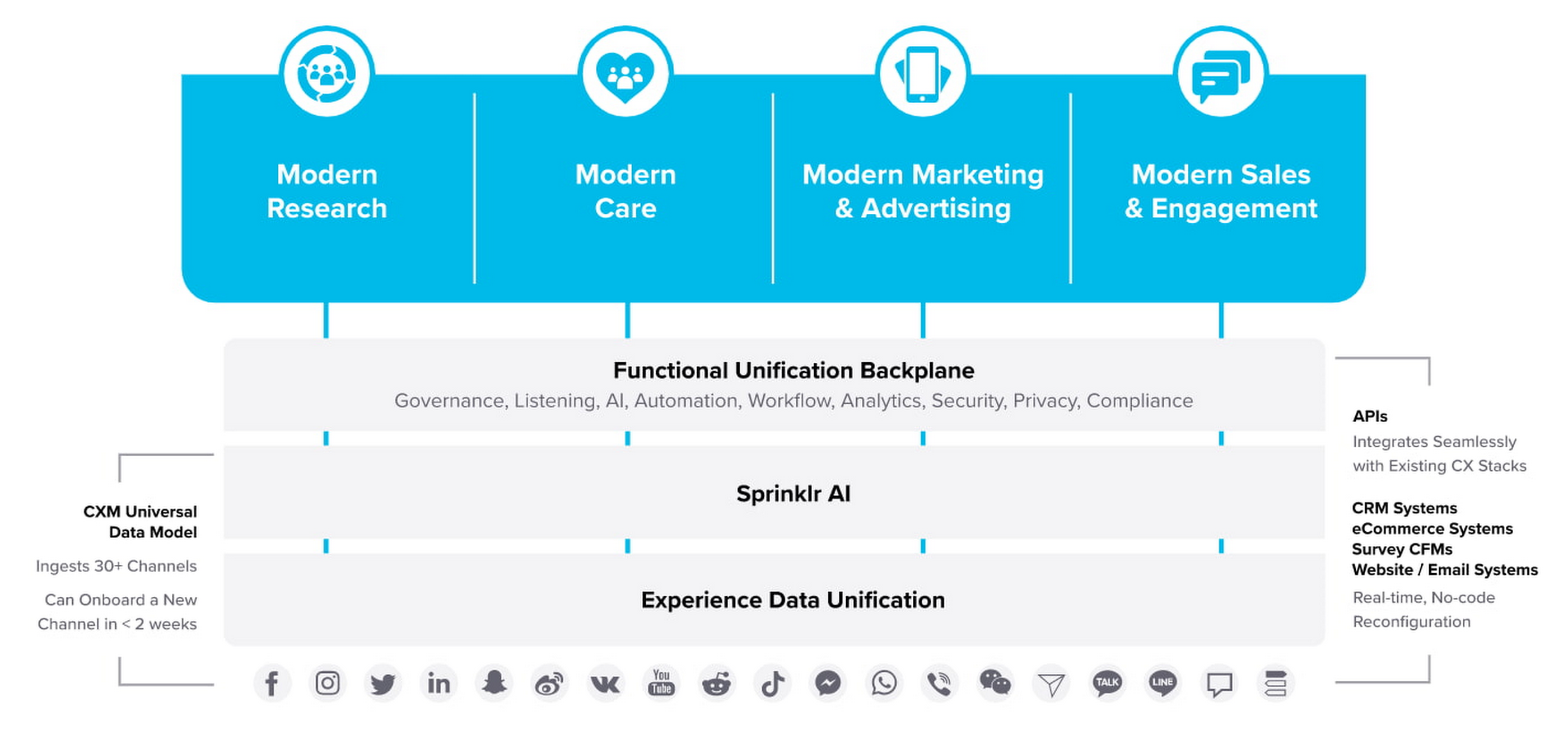
Sprinklr’s approach is fundamentally different and is the way out of the aforementioned point-solution chaos. As the first platform purpose-built for unified customer experience management (Unified-CXM) and trusted by the enterprise, Sprinklr’s industry-leading AI and powerful Care, Marketing, Research, and Engagement solutions enable the world’s top brands to learn about their customers, understand the marketplace, and reach, engage, and serve customers on all channels to drive business growth.
Sprinklr was built from the ground up as a platform-first solution, designed to evolve and grow with the rapid expansion of digital channels and applications. The results? Faster innovation. Stronger performance. And a future-proof strategy for customer engagement on an enterprise scale.
“Sprinklr works with large, global companies that want flexibility when deciding where to manage their enterprise data and consider our platform a business-critical application,” said Doug Balut, Senior Vice President of Global Alliances, Sprinklr. “Giving our customers the opportunity to manage Sprinklr on Google Cloud empowers them to create engaging customer experiences while maintaining the high security, scalability, and performance they need to run their business.”
To learn more about this exciting partnership and the challenges we jointly solve for customers, check out the recent conversation between Google Cloud’s VP of Marketing, Sarah Kennedy, and Sprinklr’s Chief Experience Officer, Grad Conn. Or read the press release on the partnership.
What’s in Line for Google Cloud’s Europe Customers in Regards to the E.U.-U.S. Data Transfer Framework

2950
Of your peers have already read this article.
4:00 Minutes
The most insightful time you'll spend today!
Last week, the European Commission and U.S. Government agreed on a new E.U.-U.S. data transfer framework. Earlier today, Google shared that it welcomes these efforts by the U.S. government to enhance privacy protections for E.U. data and facilitate trusted transatlantic data flows. For our Google Cloud customers, we intend to make the protections offered by this new framework available once it is implemented.
Last year, we reaffirmed our commitment to E.U. businesses after the European Data Protection Board (EDPB) issued its Recommendations on Supplementary Measures, following Europe’s top court ruling invalidating the E.U.-U.S. Privacy Shield Framework and upholding the E.U. Standard Contractual Clauses (SCCs).
Since then, we’ve continued to help our customers meet stringent data protection requirements by offering industry-leading technical controls, contractual commitments, and risk assessment resources. We’ve also continued our advocacy to create more legal certainty around transatlantic data flows.
Today, we would like to provide an update to our customers on this work.
A customer-controlled cloud
Google Cloud1 continues to be a leading provider of technical and security controls to help meet customers’ data protection requirements, as well as their increasing data sovereignty expectations.
We are committed to building our Cloud on Europe’s terms, including by offering customer-managed encryption and data localization for a growing list of key products and collaborating with local partners to provide the highest levels of sovereignty, all while enabling the next wave of growth and transformation for Europe’s businesses and organizations.
Google Cloud Platform
We recently announced the general availability of Assured Workloads for the E.U. This product helps Google Cloud Platform (GCP) customers protect their data by allowing them to:
- Store their data in their choice of E.U. Google Cloud region(s)
- Ensure that only E.U. persons – located in the E.U. – have access to the data and provide customer support
- Deploy cryptographic control for data access, including customer-managed encryption keys
Cloud External Key Manager (EKM) enables customers to encrypt data in a variety of services with keys that are stored and managed in a third-party key management system deployed outside of Google’s infrastructure. Google Cloud continues to be the only cloud provider to enable customers to store and manage encryption keys for cloud-resident data outside the provider’s infrastructure with customer’s control over decryption based on specific justifications, including government access requests.
Key Access Justifications greatly advances the control that GCP customers have over their data by giving customers a justification every time their externally hosted keys have to be used to decrypt data. Signed Access Approval (SAA) adds a layer of extra assurance that requires explicit customer consent for any administrative access to customer data or configurations.
Google Cloud’s Confidential Computing portfolio is a breakthrough technology that allows customers to encrypt their most sensitive data in the cloud while in-use. Ubiquitous Data Encryption further extends data protection by providing cryptographic protection for this data at-rest, in-transit, and in-use. The keys used to encrypt customer data outside of GCP using Cloud EKM are securely shared with applications operating within Confidential environments.
Google Workspace
Our Google Workspace (including Workspace for Education) customers can choose to store their covered data in Europe. Additionally, with Client-Side Encryption, we offer customers direct control of encryption keys and the identity service they choose to access those keys. With Client-Side Encryption, customer data is indecipherable to Google, while users can continue to take advantage of Google’s native web-based collaboration, access content on mobile devices, and share encrypted files externally. Client-Side Encryption is currently available in Public Beta for Google Drive, Docs, Sheets, and Slides, and we plan to extend it to Gmail, Calendar and Meet. Additionally, customers can also benefit by choosing third party solutions that offer similar encryption capabilities with select Google Workspace services.
Legal Basis for International Data Transfers
We updated our data processing terms for GCP and Google Workspace and Cloud Identity to reflect various modules of the new E.U. Standard Contractual Clauses (SCCs) approved by the European Commission on June 4, 2021, as well as separate U.K. SCCs.
Google Cloud plans to adopt the new E.U.-U.S. data transfer framework and offer it as a transfer solution to our cloud customers, as further detailed in our data processing terms.
Advocacy and Additional Helpful Resources
We have adopted the Trusted Cloud Principles with industry peers to demonstrate our commitments to protect the rights of our Google Cloud customers. We will continue to support the ongoing work of the Organisation for Economic Co-operation and Development on government access to data and the negotiation of CLOUD Act Agreements — including between the U.S. and E.U. — as vehicles for surveillance reform.
We will continue to publish additional materials on our Cloud Privacy Resource Center, such as our whitepaper on safeguards for international data transfers with Google Cloud.
Millions of organizations with users in Europe rely on our cloud services to run their businesses every day, and we remain steadfastly committed to helping them meet their regulatory requirements by maintaining a diverse set of compliance tools.
Google Cloud: Google Workspace (including Google Workspace for Education) and Google Cloud Platform (GCP)
Aiming for successful cloud security transformations to help CISOs prepare for future threats

2945
Of your peers have already read this article.
3:30 Minutes
The most insightful time you'll spend today!
Many security leaders head into the cloud armed mostly with tools, practices, skills and ultimately the mental models for how security works that were developed on premise. This leads to cost and efficiency problems that can be solved by mapping their existing mental models to those of the cloud.
When it comes to understanding the differences between on-premises cybersecurity mental models and their cloud cybersecurity counterparts, a helpful place to start is by looking at the kinds of threats each one is attempting to block, detect, or investigate.
Traditional on-premise threats focused on stealing data from databases, file storage, and other corporate resources. The most common defenses of these resources rely on layers of network, endpoint, and sometimes application security controls. The proverbial “crown jewels” of corporate data were not made accessible with an API to the outside world or stored in publicly accessible storage buckets. Other threats aimed to disrupt operations or deploy malware for various purposes, ranging from outright data theft to holding data for ransom.
There are some threats that are specifically aimed at the cloud. Bad actors are always trying to take advantage of the ubiquitous nature of the cloud. One common cloud-centered attack vector that they pursue is constantly scanning IP address space for open storage buckets or internet-exposed compute resources.
As Gartner points out, securing the cloud requires significant changes in strategy from the approach we take to protect on-prem data centers. Processes, tools, and architectures need to be designed using cloud-native approaches to protect critical cloud deployments. And when you are in the early stages of cloud adoption, it’s critical for you to be aware of the division of security responsibilities between your cloud service provider and your organization to make sure you are less vulnerable to attacks targeting cloud resources.
Successful cloud security transformations can help better prepare CISOs for threats today, tomorrow, and beyond, but they require more than just a blueprint and a set of projects. CISOs and cybersecurity team leaders need to envision a new set of mental models for thinking about security, one that will require you to map your current security knowledge to cloud realities.
As a way to set the groundwork for this discussion, the cloud security transformation can start with a meaningful definition of what “cloud native” means. Cloud native is really an architecture that takes full advantage of the distributed, scalable, and flexible nature of the public cloud. (To be fair, the term implies that you need to be born in the cloud to be a native, but we’re not trying to be elitist about it. Perhaps a better term would be “cloud-focused” or doing the security “the cloudy way.”)
However we define it, adopting cloud is a way to maximize your focus on writing code, creating business value, and keeping your customers happy while taking advantage of cloud-native inherent properties—including security. One sure way to import legacy mistakes, some predating cloud by decades, into the future would be to merely lift-and-shift your current security tools and practices into the public cloud environment.
Going cloud-native means abstracting away many layers of infrastructure, whether it’s network servers, security appliances, or operating systems. It’s about using modern tools built for the cloud and built in the cloud. Another way to think about it: You’ll worry less about all these things because you’re going to build code on top of that to help you move more quickly. Abandoning legacy security hardware maintenance requirements is part of the win here. To put another way, security will follow in the steps of IT that has been transformed by the SRE and DevOps revolution.
You can extend this thinking to cloud native security, where some of your familiar tools combine with solutions provided by cloud service providers to take advantage of cloud native architecture to secure what’s built and launched in the cloud. While we talked about the differences between on-prem targeted threats compared to threats targeting cloud infrastructure, here are other vital areas to re-evaluate in terms of a cloud security mental model.
Network security
Some organizations practice network security in the cloud as if it were a rented data center. While many traditional practices that worked reasonably well on-premise for decades, along with many traditional network architectures, are either not applicable in the cloud or not optimal for cloud computing.
However, concepts like a demilitarized zone (DMZ) can be adapted to today’s cloud environments. For example, a more modern approach to DMZ would use microsegmentation and govern access by identity in context. Making sure that the right identity, in the right context, has access to the correct resource gives you strong control. Even if you get it wrong, microsegmentation can limit a breach blast radius.
Becoming cloud native also drives the adoption of new approaches to enterprise network security, such as BeyondProd. It also benefits organizations because it gets them away from traditional network perimeter security to focus on who and what can access your services—rather than where requests for access originated.
Although network security changes driven by cloud adoption can be enormous and transformational, not all areas shift in the same way.
Endpoint security
In the cloud, the concept of a security endpoint changes. Think of it this way: A virtual server is a server. But what about a container? What about microservices and SaaS? With software as a service cloud model, there’s no real endpoint there. All along your cloud security path, users only need to know what happens where.
Here is a helpful mental model translation: An API can be seen as sort of an endpoint. Some of the security thinking developed for endpoints applies to cloud APIs as well. Securing access, permissions, privileged access thinking can be carried over, but the concept of endpoint operating system maintenance does not.
Even with automation of service agents on virtual machines in the cloud, insecure agents may increase risks because they are operating at scale in the cloud. Case in point: This major Microsoft Azure cross-tenant vulnerability highlighted a new type of risk that wasn’t even on the radar of many of its customers.
In light of this, across the spectrum of endpoint security approaches, some disappear (such as patching operating systems for SaaS and PaaS), some survive (such as the need to secure privileged access,) and yet others are transformed.
Detection and response
With a move to the cloud comes changes to the threats you’ll face, and changes to how you detect and respond to them. This means that using on-prem detection technology and approaches as a foundation for future development may not work well. Copying all your on-premises detection tools and their threat detection content won’t reduce risks in the way that most cloud-first organizations will need..
Moving to the cloud provides the opportunity to rethink how you can achieve your security goals of confidentiality, integrity, availability, and reliability with the new opportunities created by cloud process and technology.
Cloud is distributed, often immutable, API-driven, automatically scalable, and centered on the identity layer and often contains ephemeral workloads created for a particular task. All these things combine to affect how you handle threat detection for the cloud environment and necessitate new detection methods and mechanisms.
There are six key domains where threats in the cloud can be best detected: identify, API, managed services, network, compute, and Kubernetes. These provide the coverage needed related to network, identity, compute, and container infrastructure. They also provide specific detection mechanisms for API access logs and network traffic captures.
As with endpoint security, some approaches become less important (such as network IDS on encrypted links), others can grow in importance (such as detecting access anomalies,) while others transform (such as detecting threats from the provider backplane).
Data security
The cloud is changing data security in significant ways, and that includes new ways of looking at data loss prevention, data encryption, data governance, and data access.
Cloud adoption sets you on a path to what we at Google call “autonomic data security.” Autonomic data security means security has been integrated throughout the data lifecycle and is improving over time. At the same time, it makes things easier on users, freeing them from having to define and redefine myriad rules about who can do what, when, and with which data. It lets you keep pace with constantly evolving cyberthreats and business changes, so you can keep your IT assets more secure and make your business decisions faster.
Similar to other categories, some data security approaches wane in importance or disappear (such as manual data classification at cloud scale), some retain their importance from on-prem to cloud unchanged, while others transform (such as pervasive encryption with effective and secure key management).
Identity and access management
The context for identity and access management (IAM) in the cloud is obviously different from your on-premise data center. In the cloud, every person and service has its own identity and you want to be able to control access.
Within the cloud, IAM gives you fine-grained access control and visibility for centrally managing cloud resources. Your administrators authorize who can act on specific resources, giving you full control and visibility to manage cloud resources centrally. What’s more, if you have complex organizational structures, hundreds of workgroups, and a multitude of projects, IAM gives you a unified view into security policy across your entire organization.
With identity and access management tools, you’re able to grant access to cloud resources at fine-grained levels, well beyond project-level access. You can create more granular access control policies to resources based on attributes like device security status, IP address, resource type, and date and time. These policies help ensure that the appropriate security controls are in place when granting access to cloud resources.
The concept of Zero Trust is strongly in play here. It’s the idea that implicit trust in any single component of a complex, interconnected system can create significant security risks. Instead, trust needs to be established via multiple mechanisms and continuously verified. To protect a cloud-native environment, a zero trust security framework requires all users to be authenticated, authorized, and validated for security configuration and posture before being granted or keeping access to cloud-based applications and data.
This means that IAM mental models from on premise security mostly survive, but a lot of underlying technology changes dramatically, and the importance of IAM in security grows significantly as well.
Shared fate for greater trust in cloud security
Clearly, cloud is much more than “someone else’s computer.” That’s why trust is such a critical component of your relationship with your chosen cloud service providers. Many cloud service providers acknowledge shared responsibility, meaning that they supply the underlying infrastructure but leave you responsible for many seemingly inscrutable security tasks.
With Google Cloud, we operate in a shared fate model for risk management in conjunction with our customers. We believe that it’s our responsibility to be active partners as our customers deploy securely on our platform, not delineators of where our responsibility ends. We stand with you from day one, helping you implement best practices for safely migrating to and operating in a trusted cloud.
Get ready to go cloud native
We offer you several great resources to help you prepare for cloud migration, and guide you as you review your current security approaches for signs of on-prem thinking.
Listen to our podcast series where Phil Venables, Vice President, CISO at Google Cloud, and
Nick Godfrey, Director, Financial Services Security & Compliance and member of Office of the CISO at Google Cloud, join me in a discussion on preparing for cloud migration (Podcast 1, Podcast 2). You can deepen your cloud native skills by earning a Professional Cloud Security Engineer certification from Google.
More Relevant Stories for Your Company

Introducing New Capabilities for Secure Transformations
Organizations large and small are realizing that digital transformation and the changing threat landscape require a grounds up effort to transform security. At Google Cloud, we continue to invest in our vision of invisible security where advanced capabilities are engineered into our platforms, operations are simplified, and stronger security outcomes

4 Cloud Security Trends to Watch Out for in 2022
When it comes to cloud security, 2022 will be the year that the past catches up with the future. Trends that businesses have been ignoring for too long will force organizations large and small to confront and control their security debt. That’s according to Google Cloud’s own cybersecurity experts, who

Latest News: Secure Digital Infrastructure Services with Apigee Advanced API Security for Google Cloud
Organizations in every region and industry are developing APIs to enable easier and more standardized delivery of services and data for digital experiences. This increasing shift to digital experiences has grown API usage and traffic volumes. However, as malicious API attacks also have grown, API security has become an important

Google Cloud Security Foundations Guide
Security in public clouds differs intrinsically from customer-owned infrastructure because there is shared responsibility for security between the customer and the cloud provider. Cloud Security is different from on-premises security because of the combination of the following: Differences in security primitives, visibility, and control points within the infrastructure, productsand services.New
