





5 Ways You Need to Know to Reduce Costs with Containers

3181
Of your peers have already read this article.
2:30 Minutes
The most insightful time you'll spend today!
“Cloud Wisdom Weekly: for tech companies and startups” is a new blog series we’re running this fall to answer common questions our tech and startup customers ask us about how to build apps faster, smarter, and cheaper. In this installment, Google Cloud Product Manager Rachel Tsao explores how to save on compute costs with modern container platforms.
Many tech companies and startups are built to operate under a certain degree of pressure and to efficiently manage costs and resources. These pressures have only increased with inflation, geopolitical shifts, and supply chain concerns, however, creating urgency for companies to find ways to preserve capital while increasing flexibility. The right approach to containers can be crucial to navigating these challenges.
In the last few years, development teams have shifted from virtual machines (VMs) to containers, drawn to the latter because they are faster, more lightweight, and easier to manage and automate. Containers also consume fewer resources than VMs, by leveraging shared operating systems. Perhaps most importantly, containers enable portability, letting developers put an application and all its dependencies into a single package that can run almost anywhere.
Containers are central to an organization’s agility, and in our conversations with customers about why they choose Google Cloud, we hear frequently that services like Google Kubernetes Engine (GKE) and Cloud Run help tech companies and startups to not only go to market quickly, but also save money. In this article, we’ll explore five ways to help your business quickly and easily reduce compute costs with containers.
5 ways to control compute costs with containers
Whether your company is an established player that is modernizing its business or a startup building its first product, managed containerized products can help you reduce costs, optimize development, and innovate. The following tips will help you to evaluate core features you should expect of container services and include specific advice for GKE and Cloud Run.
- Identify opportunities to reduce cluster administration
Most companies want to dedicate resources to innovation, not infrastructure curation. If your team has existing Kubernetes knowledge or runs workloads that need to leverage machine types or graphics processing units (GPUs), you may be able to simplify provisioning with GKE Autopilot. GKE Autopilot provisions and manages the cluster’s underlying infrastructure, all while you pay for only the workload, not 24/7 access to the underlying node-pool compute VMs. In this way, it can reduce cluster administration while saving you money and giving you hardened security best practices by default.
- Consider serverless to maximize developer productivity
Serverless platforms continue the theme of empowering your technical talent to focus on the most impactful work. Such platforms can promote productivity by abstracting away aspects of infrastructure creation, letting developers work on projects that drive the business while the platform provider oversees hardware and scalability, aspects of security, and more.
For a broad range of workloads that don’t need machine types or GPUs, going serverless with Cloud Run is a great option for building applications, APIs, internal services, and even real-time data pipelines. Analyst research supports that Cloud Run customers achieve faster deployments with less time spent monitoring services, resulting in reinvested productivity that lets these customers do more with fewer resources.
Designed with high scalability in mind, and an emphasis on the portability of containers, Cloud Run also supports a wide range of stateless workloads, including jobs that run to completion. Moreover, it lets you maximize the skills of your existing team, as it does not require cluster management, a Kubernetes skillset or prior infrastructure experience. Additionally, Cloud Run leverages the Knative spec and a container image as a deployment artifact, enabling an easy migration to GKE if your workload needs change.
With Cloud Run, gone are the days of infrastructure overprovisioning! The platform scales down to zero automatically, meaning your services always have the capacity to meet demand, but do not incur costs if there is no traffic.
- Save with committed use discounts
Committed use discounts provide discounted pricing in exchange for committing to a minimal level of usage in a region for a specified term. If you are able to reliably predict your resource needs, for instance, you can get a 17% discount for Cloud Run (for either one year or three years), and either a 20% discount (for one year) or a 45% discount (for three years) on GKE Autopilot.
- Leverage cost management features
Minimum and maximum instances are useful for ensuring your services are ready to receive requests but do not cause cost overages. For Google Cloud customers, best practices for cost management include building your container with Cloud Build, which offers pay-for-use pricing and can be more cost efficient than steady-state build farms.
Relatedly, if you choose to leverage serverless containers with Cloud Run, you can set minimum instances to avoid the lag (i.e., the cold start) when a new container instance is starting up from zero. Minimum instances are billed at one-tenth of the general Cloud Run cost. Likewise, if you are testing and want to avoid costs spiraling, you can set a maximum number of instances to ensure your containers do not scale beyond a certain threshold. These settings can be turned off anytime, resulting in no costs when your service is not processing traffic. To have better oversight of costs, you can also view built-in billing reports and set budget alerts on Cloud Billing.
- Match workload needs to pricing models
GKE Autopilot is great for running highly reliable workloads thanks to its Pod-level SLA. But if you have workloads that do not need a high level of reliability (e.g., fault tolerant batch workloads, dev/test clusters), you can leverage spot pricing to receive a discount of 60% to 91% compared to regularly-priced pods. Spot Pods run on spare Google Cloud compute capacity as long as resources are available. GKE will evict your Spot Pod with a grace period of 25 seconds during times of high resource demand, but you can automatically redeploy as soon as there is available capability. This can result in significant savings for workloads that are a fit.
Innovation requires balance
Put into practice, these tips can help you and your business to get the most out of containers while controlling management and resource costs. That said, it is worth noting that while managing cloud costs is important, the relationship between “cloud” and “cost” is often complex. If you are adopting cloud computing with only the primary goal of saving money, you may soon run into other challenges. Cloud services can save your business money in many ways, but they can also help you get the most value for your money. This balance between cost efficiency and absolute cost is important to keep in mind so that even in challenging economic landscapes, your tech company or startup can continue growing and innovating.
Beyond cost savings, many tech and startup companies are seeking improved business agility, which is the ability to deploy new products and features frequently and with high quality. With deployment best practices built into GKE Autopilot and Cloud Run, you can transform the way your team operates while maximizing productivity with every new deployment.
You can learn if your existing workloads are appropriate for containers with this fit assessment and these guides for migrating to containers. For new workloads, you can leverage these guides for GKE Autopilot and Cloud Run. And for more tips on cost optimization, check out our Architecture Framework for compute, containers, and serverless.
If you want to learn more about how Google Cloud can help your startup, visit our page here to get more information about our program and apply for our Google for Startups Cloud Program, and sign up for our communications to get a look at our community activities, digital events, special offers, and more.
Want to Code for the Cloud? Get Started with the Native App Development Track

6751
Of your peers have already read this article.
2:00 Minutes
The most insightful time you'll spend today!
Earlier this year, we launched the Google Cloud skills challenge, which provides 30 days of free access to training to build your cloud knowledge and an opportunity to earn skill badges that showcase your Google Cloud competencies. Today, we’re adding a Native App Development track to the skills challenge, joining the Getting Started, Data Analytics, Kubernetes, Machine Learning (ML) and Artificial Intelligence (AI) tracks.
The Native App Development track is designed for cloud developers who want to learn to build serverless web apps and Google Assistant applications on Google Cloud using Cloud Run and Firebase. Specifically, you’ll have an opportunity to earn three skill badges in the Native App Dev track: Serverless Firebase Development, Serverless Cloud Run Development, and Build Interactive Apps with Google Assistant. To earn a skill badge, you complete a series of hands-on labs and take a final assessment challenge lab to test your skills.
Here’s an overview of each badge.
Serverless Firebase Development
To earn this skill badge, you’ll learn how to build serverless web apps, import data into a serverless database, and build Google Assistant applications using Firebase, Google’s backend-as-service platform for creating mobile and web applications.
Serverless Cloud Run Development
For this badge, you’ll discover how to use Cloud Run, a fully managed serverless platform, to connect and leverage data stored in Cloud Storage. You’ll learn how to use Cloud Run to build a resilient, asynchronous system with Pub/Sub, build a REST API gateway as well as build and expose services.
Build Interactive Apps with Google Assistant
To earn the final skills badge, you’ll build Google Assistant applications by creating a project in the Actions console, integrating Dialogflow, testing your action in the Actions simulator, and adding Cloud Translation API to your assistant application.
Ready to jump into the skills challenge? Sign up here.
You can also check out this quick video below to learn how to join the skills challenge.
Cadbury Worldwide Hide: How the Chocolatier Made the Hiding Eggs Ritual Possible with Google Maps

3715
Of your peers have already read this article.
3:00 Minutes
The most insightful time you'll spend today!
Editor’s note: Today’s post is a Q&A with the VCCP London and VCCP CX team. VCCP London conceived of and built the Cadbury Worldwide Hide platform using Google Maps Platform as a way to get consumers ‘hiding’ eggs and engaging with loved ones during a time when they could not be physically together.
How did the team come up with the idea for the ‘Cadbury Worldwide Hide’?
VCCP London is the agency of record for Cadbury both locally in the UK and centrally with the Global team. So, when Cadbury briefed us in May for their Easter 2021 campaign, they wanted us to come up with a creative way to encourage people to hide eggs and get consumers excited about interacting with loved ones. At the time, the pandemic was constantly changing, and it was looking like we were going to continue to be in lock-down for the foreseeable future, into the Easter season.
We then came up with an idea: wouldn’t it be really cool if somehow you could still hide a real Easter egg for someone you love, but do it virtually. And then once it’s found, that real egg could be delivered to the seeker’s home. With the use of some creativity and technology, we brought this idea to life. The experience we developed allowed our users to purchase a real Cadbury Easter Egg, hide it virtually on the map in a special location, then write the recipient a personalized clue for him to find the egg. Once the seeker found the egg, they would receive a real, physical egg the hider bought for her delivered to her home.
We wanted it to be a truly meaningful one-to-one connection, to bring back some lovely memories for people, and to allow a real chocolate egg to be hidden for a loved one no matter where they were.

Why was this important to Cadbury?
Generosity is at the heart of Cadbury’s brand, and Easter is our opportunity to show that ‘there’s a glass and a half in everyone’. As we enter the second year of our campaign ‘Show you care, hide it’, we are flipping the Easter ritual on its head and showing that the generous act is in hiding an egg for someone you love.
Physical connection has been restricted by the global pandemic and that’s why this year’s Easter campaign sets out to connect people across the UK through the power of generosity.
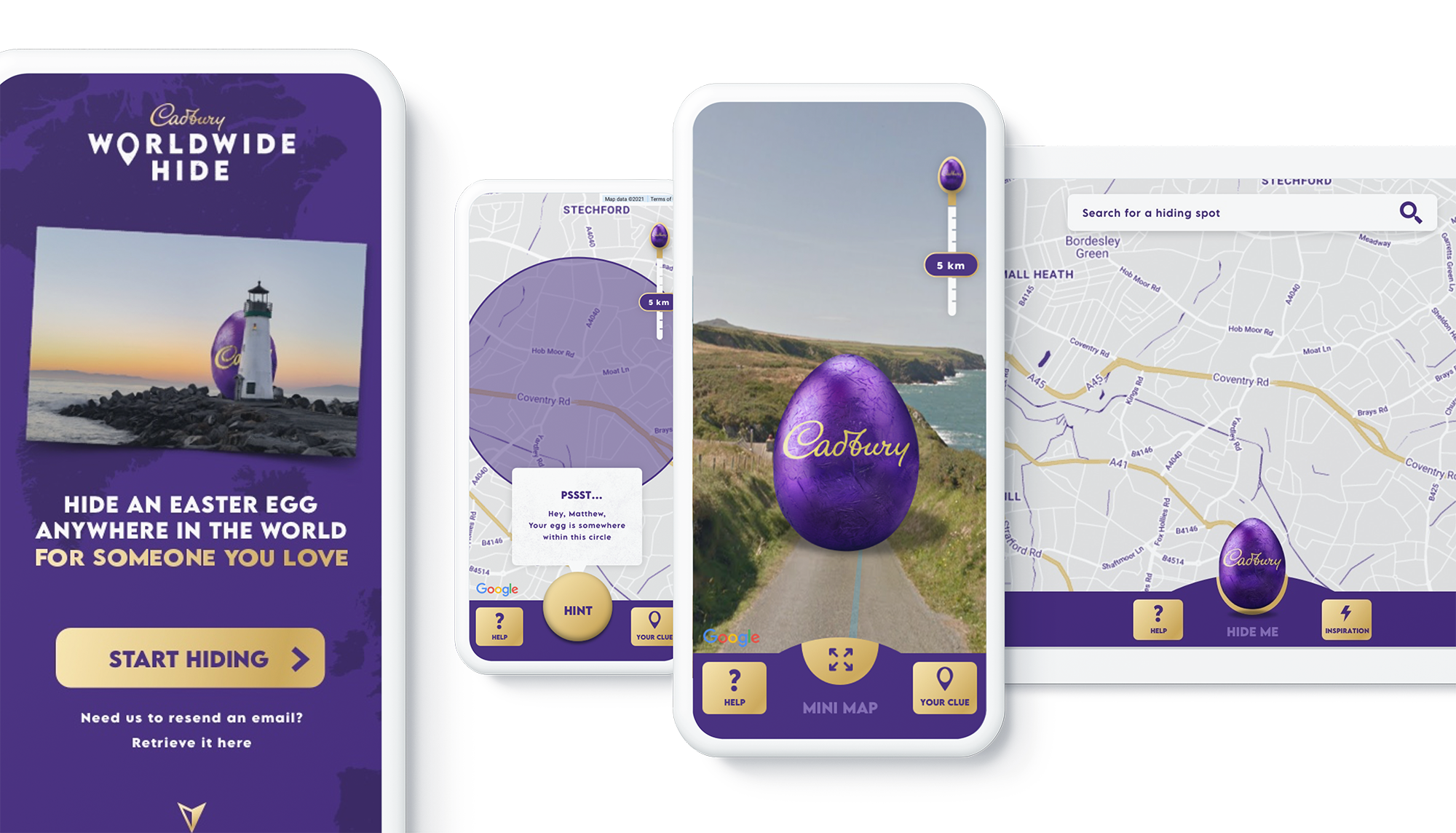
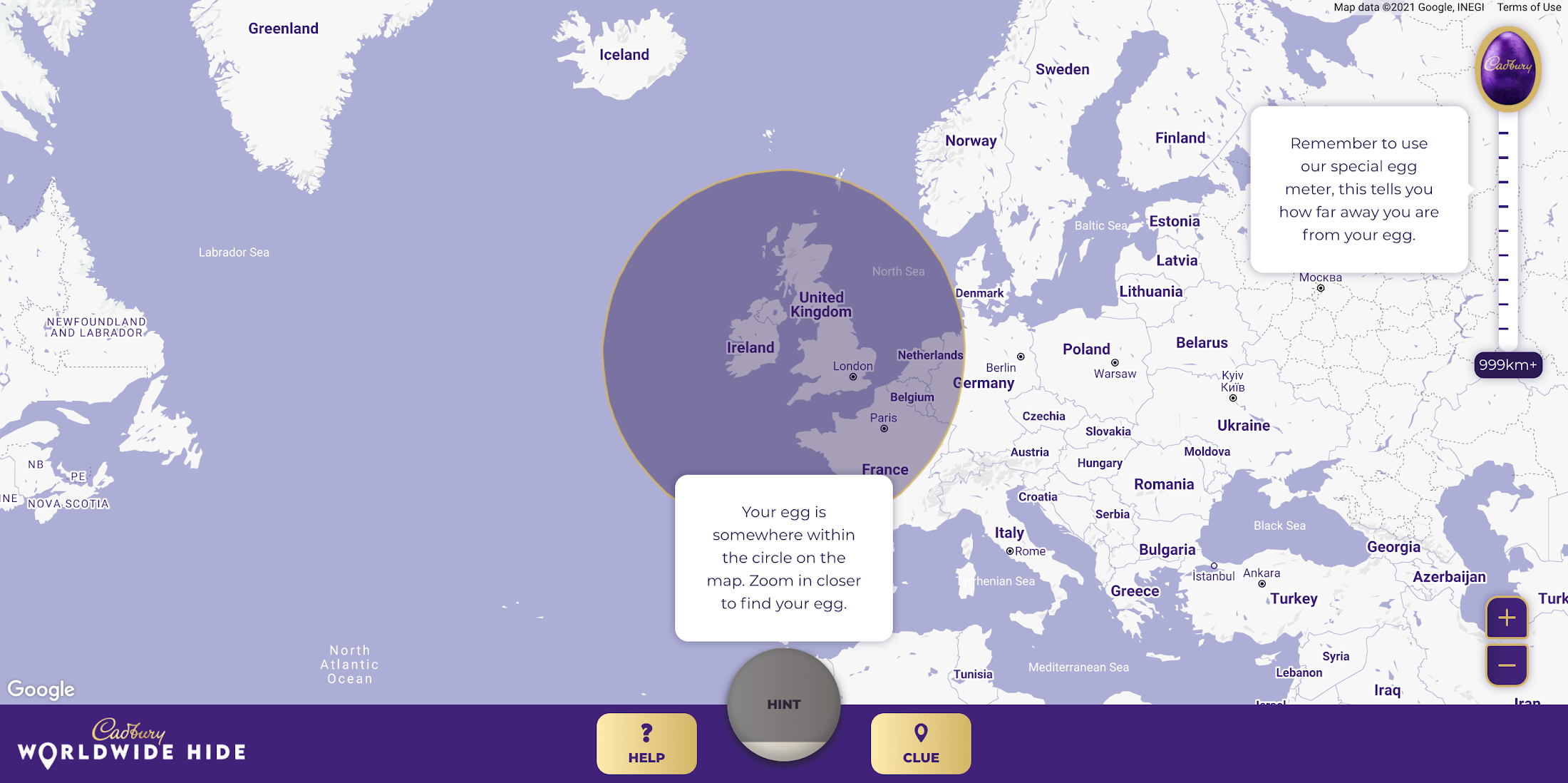
Tell us a little bit about the technical side of the project. Which Google Maps Platform products did you use to create the user experience?
The Cadbury Worldwide Hide launched across 4 markets (UK, IE, AU, NZ) simultaneously. Integration with regional e-commerce and CRM partners brought the activation into the real world with chocolate eggs being delivered throughout the campaign as seekers found them.
Providing an engaging map experience to our users was key to the execution and by leveraging the Google Maps interface consumers already use on a daily basis, we were able to focus on our core campaign message. We built the platform using both the Maps Javascript API to render the 2D maps and the Street View API, which allowed users to hide their egg anywhere in the world for their loved one to find. We also used Place Autocomplete powered search allowing users to search for their favorite location while contextual hints kept hiders on track. Seekers were aided with a distance meter and hints system if they got stuck. Our Design and Engineering team used Google Maps Platform Cloud-based maps styling to customize the map.
To get the campaign to as many people as possible we prioritized accessibility throughout the site, from screen-reader support and relevant tab indexes through to full keyboard shortcuts within the map experience – allowing users to hide (or find!) their egg without ever using a mouse. Real user testing was done throughout the UX, design and development process to ensure best practices were being followed.

How long did it take the VCCP team to build-out the solution?
Discovery to the roll-out of the solution took about 7 months. Our Design and Engineering team started with a 4-week discovery phase in September 2020 where we developed a service blueprint that set the foundations of the project. By visualizing the entire process of a service from start to finish, listing all the activities that happened at each stage, and the different roles, actions, processes and systems involved, the blueprint allowed all stakeholders to align on the solution.
We started iterative cycles of development in November 2020, beginning with UX (prototype for user testing), UI (look and feel and customization of Google Maps using Cloud-based Maps styling), and then kicked off front end and back end development in December. We launched the Cadbury Worldwide Hide platform in early March 2021—just in time for millions of users around the world to enjoy ahead of Easter.
Did you experience any challenges as you developed the experience?
The biggest challenge was actually around adapting to change in plans in response to the desire to launch the platform across more markets than originally intended. During the development phase, we rapidly scaled up to develop the platform for Ireland, Australia and New Zealand in addition to the UK within the same timeframe.
What results were you able to achieve and how did you measure the success of the project?
One week before Easter Sunday, we had sold out of Cadbury Worldwide Hide chocolate eggs. There were over 2.26 million site visits with an average time spent on the platform of almost five minutes. Over 809k virtual eggs were hidden in total and 14.5k real Cadbury Easter eggs bought. The Cadbury Worldwide Hide platform was the number one Mondelēz International website globally, and a couple even used the platform for a marriage proposal!

Would you recommend this type of campaign and user engagement to other B-to-C brands, if so, why?
Direct to consumer capabilities are increasingly important for brands, particularly in the FMCG (Fast Moving Consumer Goods) space. Local lockdowns and restrictions on physical retail have accelerated our adoption of ecommerce. Not only have brands had to adapt quickly, but consumers are beginning to expect direct-to-consumer capabilities from their favorite brands. Cadbury recognized this behavior shift early. What the Cadbury Worldwide Hide did well was to innovate beyond the traditional DTC and ecommerce experience by gamifying the platform and enabling moments of human connection at a time when physical connection was impossible.
What advice would you give to other agencies or brands thinking about creating user experiences with Google Maps Platform?
We learned a great deal taking on this project. Here are just a few highlights:
- Assume anything is possible.
- Our ‘Mobile First’ approach allowed consumers to access the platform from any device with consistent, engaging brand experience.
- Think big and beyond the traditional use of Google Maps and treat it as a foundation platform to build upon.
- Prototype and test early to validate your hypotheses. We created a technical proof of concept which enabled us to test using ‘real’ Google Maps and real people early in our design process.
- Don’t assume everything is accessible to everyone. You may need to build upon the ‘out the box’ functionality to ensure as many people as possible can use your solution.
For more information on Google Maps Platform, visit our website.
A Run-through of an Innovative 2021 with Apigee

3401
Of your peers have already read this article.
1:30 Minutes
The most insightful time you'll spend today!
Apigee is committed to continually innovating new capabilities and solutions for our customers, and 2021 saw new product launches, partnerships, and best practices for managing your expanding range of business-critical use cases. Here are some of our favorite stories from 2021.
Spotting the trends in APIs
Our State of API Economy 2021 Report surveyed over 700 IT leaders globally and identified five key API trends that emerged post-COVID. SaaS and hybrid cloud-based API deployments are increasing with half of all respondents reporting increases in these areas, and AI- and ML-powered API management is also gaining traction, with usage growing 230% year-over-year among Apigee customers. Business metrics like Net Promoter Score (NPS) and speed-to-market are API users’ preferred way to measure success, and API ecosystems are increasingly innovation drivers, with high-maturity organizations much more likely to focus on building a developer ecosystem or B2B partner ecosystem around their API. Finally, API security and governance is more important than ever, as research showed that increased investment in security and governance was a high priority. Check out the blog to explore these five trends in more detail.
Launching new capabilities with Apigee X
We announced Apigee X, our next-generation platform that brings the powerful scale of Google technologies to Apigee API Management and allows enterprises to power API programs for enhanced scale, security, and automation. Apigee X customers can harness the capabilities of Cloud CDN to maximize the availability and performance of APIs across the globe, deploying across more than two dozen Google Cloud regions and enhancing caching at over 100 locations. Apigee X customers can apply solutions like Cloud Armor web application firewall for enhanced API security and Cloud Identity and Access Management (IAM) for authenticating and authorizing access to the Apigee platform. Apigee X also enhances automation by applying Google Cloud’s AI and ML capabilities to historical API metadata to detect anomalies, predict traffic, and ensure compliance. To read more about these features, check out our blogs on Apigee X and Cloud Armor, Apigee X and Cloud CDN, and Apigee X and AI.
Making new connections with Apigee Integration
Apigee brought our successful API-first approach to integration this year with the release of Apigee Integration. This silo-busting solution lets customers connect existing data and applications, and surface them as easily accessible APIs. Apigee Integration brings together the best of API management and integration into one unified platform so IT teams can scale their operations, improve developer productivity, and increase the speed to market. The platform comes with built-in connectors to Salesforce, Cloud SQL (MySQL, PostgreSQL), Cloud Pub/Sub and BigQuery, with connectors for additional third-party applications and databases on their way. Advanced integration patterns also serve our customers with even more use cases. Check out our launch blog and our Next session video for more details.
Managing GraphQL APIs with Apigee
The exponential rise in digital services adoption among enterprises now generates petabytes of data every minute. You can harness the power of this data with query languages like GraphQL, accessing the data your app needs with one single request. The growing popularity of GraphQL APIs and their business-critical use cases mean it’s important to manage them with full life cycle capabilities, much like you manage your REST APIs. Last year we compared REST and GraphQL and introduced best practices for managing GraphQL APIs. You can also read our blog announcing Apigee’s support for the management of GraphQL APIs, and our partnership with StepZen to deliver these capabilities. To dive deeper into building GraphQL APIs, check out our Next session video.
Looking back at the year’s top stories
2021 was the year of the customer, and we published the following stories to show how API management helps enterprises modernize their applications, build digital ecosystems, and generate value for their customers and their own organizations:
- Telco:
- Retail:
- Financial services:
- Energy:
That’s a wrap for 2021! We hope you have a safe and happy holiday season, and we can’t wait to see what the new year brings for us. Stay tuned in 2022 for product launch announcements, partnerships, tips, and stories of how organizations like yours are innovating with Apigee.
Enhancing Developer Productivity with Skaffold v2 GA

2849
Of your peers have already read this article.
2:30 Minutes
The most insightful time you'll spend today!
For years, Google has been committed to maximizing developer productivity. In 2019, we announced the general availability of Skaffold, a command-line tool that facilitates continuous development and delivery for containerized applications. Today, we’re excited to announce that Skaffold V2 is now generally available.
Skaffold V2 expands Skaffold’s supported platforms and architectures with the introduction of Cloud Run as a supported deployer, and now supports building from and deploying to both ARM and x86 architectures. Skaffold V2 also offers enhanced support for CI/CD and GitOps workflows, with the introduction of the skaffold render phase, verify phase, and kpt integration. Best of all, all existing Skaffold configurations are fully compatible with Skaffold V2, and upgrading from V1 is as easy as running skaffold fix.
Expanded platform support
Since its inception, Skaffold has supported deploying applications to Kubernetes, using either kubectl or Helm deployers. Deploying to Kubernetes with Skaffold unlocks the benefits of improved velocity from source to prod, with reusable building blocks for iterative development and CI/CD.
We’re excited to expand these benefits to Cloud Run, Google’s serverless container runtime. Cloud Run provides a fully managed platform for any containerized application, and includes features such as automatic resource scaling and integrated storage, security, and monitoring solutions.
It’s easy to get started with Skaffold and Cloud Run; all you need is a Cloud Run service config and a few small updates to your skaffold.yaml. Skaffold also powers Cloud Deploy’s support of Cloud Run. Check out our documentation to learn more.
In addition to the new deployment target, the expanded set of compatible image-architecture configurations with Skaffold V2 helps developers ensure that the architecture of the machine on which an image is built is compatible with the architecture of the machine on which the image is intended to be run. Skaffold now intelligently checks the architecture of your local machine as well as the target Kubernetes cluster before building your images, allowing you to deploy to ARM, x86 or multi-arch clusters from a x86 or ARM machine without any manual configuration.
Check out our documentation to learn more about deploying to Cloud Run and managing ARM workloads.
CI/CD and DevOps, simplified
Skaffold helps developers implement CI/CD and DevOps workflows by providing a set of reusable building blocks for repeatable build, tag, and deploy steps. With Skaffold, the same config can be shared in development and production, leveraging Skaffold profiles to implement environment-specific configuration.
With Skaffold V2, the Skaffold render phase is now distinct from the deploy phase. The output of the Skaffold render phase is a manifest, hydrated with tagged image names and templated values, which can then be persisted in source control before deployment as part of a GitOps workflow.
In addition to the render phase, Skaffold V2’s new verify phase helps to configure post-deployment tests. This phase can be used to configure a series of test containers that are then monitored to ensure that the deployment was successful. This allows developers to integrate this verification step into reusable deployment pipelines rather than running these tests manually.
Finally, the introduction of kpt as a supported renderer in Skaffold V2 provides a sophisticated syntax for serially transforming and validating your manifests, unlocking additional customizability and verification in your GitOps workflows. Using Skaffold makes it easy to adopt kpt because you can take advantage of kpt’s transformation and validation functionality without needing to write any separate kpt configuration. It’s as easy as adding a few stanzas to your existing skaffold.yaml. Kpt can also be used alongside Skaffold’s pre-existing integrations with renderers Helm and Kustomize.
Check out our documentation to learn more about the Skaffold render phase, verify phase, and kpt integration.
Upgrading to Skaffold V2
Getting started with Skaffold V2 is easy. If you’re new to Skaffold, check out the V2 installation guide for platform-specific installation instructions.
If you’re an existing Skaffold user, upgrading to Skaffold V2 is simple and requires no manual configuration changes. All of your existing Skaffold configurations will continue to work as-is with Skaffold V2. Simply download the Skaffold V2 binary and run skaffold fix to update your config. Check out the V2 upgrade guide for more details.
Finally, check out our documentation for more detailed instructions on taking advantage of all of the new features introduced in Skaffold V2.
What’s next?
If you’re interested in harnessing the power of Skaffold for serverless workloads, check out our documentation for using Skaffold V2 with Cloud Run.
Also, be sure to check out Cloud Deploy, Google’s fully managed continuous delivery offering, which leverages Skaffold to construct reusable deployment pipelines.
We’re excited to hear from you. As always, you can reach out to us on GitHub and Slack.

How The New York Times Increased Speed of Delivery by Using Kubernetes
DOWNLOAD CASE STUDY6176
Of your peers have already downloaded this article
2:40 Minutes
The most insightful time you'll spend today!
When New York Times decided a few years ago to move out of its data centers, its first deployments on the public cloud were smaller and less critical applications that were being managed on virtual machines.
“We started building more and more tools, and at some point, we realized that we were doing a disservice by treating Amazon as another data center,” says Deep Kapadia, Executive Director, Engineering at The New York Times.
Kapadia was tapped to lead a Delivery Engineering Team that would “design for the abstractions that cloud providers offer us.”
The team decided to use Google Cloud Platform and its Kubernetes-as-a-service offering, GKE (Google Kubernetes Engine). Owing to Google Cloud solution and GKE, The New York Times was able to increase the speed of delivery.
Some of the legacy VM-based deployments took 45 minutes; with Kubernetes, that time was “just a few seconds to a couple of minutes,” says Brian Balser, Engineering Manager at The New York Times.
“Teams that used to deploy on weekly schedules or had to coordinate schedules with the infrastructure team, now deploy their updates independently, and can do it daily when necessary,” says Tony Li, Site Reliability Engineer, The New York Times.
Adopting Cloud Native Computing Foundation technologies allowed The New York Times to have a more unified approach to deployment across the engineering staff, and portability for the company.
More Relevant Stories for Your Company

What’s New in Retail: Bits from Google Cloud’s Retail & Consumer Goods Summit
Today we’re hosting our Retail & Consumer Goods Summit, a digital event dedicated to helping leading retailers and brands digitally transform their business. For me, this is a personally exciting moment, as I see tremendous opportunities for those companies that choose to focus on their customers and leverage technology to elevate

Maximizing Reliability, Minimizing Costs: Right-Sizing Kubernetes Workloads
Do you know how much money you could save by adjusting workload requests to better represent their actual usage? If you're not rightsizing your workloads, you might be overpaying for resources that your workloads aren't even using or worse, putting your workloads at risk for reliability issues due to under

Quick Recap on Google Cloud: Latest News, Launches, Updates, Events and More
Want to know the latest from Google Cloud? Find it here in one handy location. Check back regularly for our newest updates, announcements, resources, events, learning opportunities, and more. Tip: Not sure where to find what you’re looking for on the Google Cloud blog? Start here: Google Cloud blog 101: Full list




Case Study: How Texas’ Largest Grocery Chain Successfully Modernized its Legacy Mainframes
H-E-B, like many enterprises, is moving away from legacy mainframes in favor of microservices and public cloud infrastructure. With hundreds of applications powering their 100+ year-old grocery business (with more than 400 stores in Texas and Mexico), H-E-B needs to be confident that the platform they are building will provide
