





Scaling Machine Learning Operations with Vertex AI AutoML and Pipeline

2554
Of your peers have already read this article.
2:30 Minutes
The most insightful time you'll spend today!
When you build a Machine Learning (ML) product, consider at least two MLOps scenarios. First, the model is replaceable, as breakthrough algorithms are introduced in academia or industry. Second, the model itself has to evolve with the data in the changing world.
We can handle both scenarios with the services provided by Vertex AI. For example:
- AutoML capability automatically identifies the best model based on your budget, data, and settings.
- You can easily manage the dataset with Vertex Managed Datasets by creating a new dataset or adding data to an existing dataset.
- You can build an ML pipeline to automate a series of steps that start with importing a dataset and end with deploying a model using Vertex Pipelines.
This blog post shows you how to build this system. You can find the full notebook for reproduction here. Many folks focus on the ML pipeline when it comes to MLOps, but there are more parts to building MLOps as a “system”. In this post, you will see how Google Cloud Storage (GCS) and Google Cloud Functions manage data and handle events in the MLOps system.
Architecture
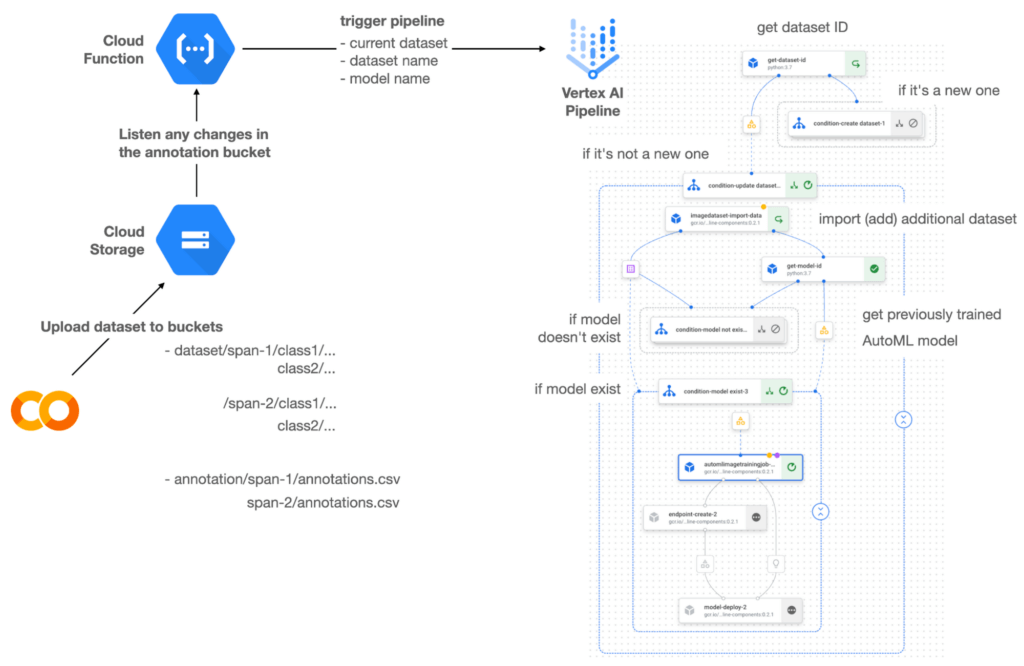

Figure 1 shows the overall architecture presented in this blog. We cover the components and their connection in the context of two common workflows of the MLOps system.
Components
Vertex AI is at the heart of this system, and it leverages Vertex Managed Datasets, AutoML, Predictions, and Pipelines. We can create and manage a dataset as it grows using Vertex Managed Datasets. Vertex AutoML selects the best model without your knowing much about modeling. Vertex Predictions creates an endpoint (RestAPI) to which the client communicates.
It is a simple, fully managed yet somewhat complete end-to-end MLOps workflow moves from a dataset to training a model that gets deployed. This workflow can be programmatically written in Vertex Pipelines. Vertex Pipelines outputs the specification for an ML pipeline allowing you to re-run the pipeline whenever or wherever you want. Specify when and how to trigger the pipeline using Cloud Functions and Cloud Storage.
Cloud Functions is a serverless way to deploy your code in Google Cloud. In this particular project, it triggers the pipeline by listening to changes on the specified Cloud Storage location. Specifically, if a new dataset is added, for example, a new span number is created; the pipeline is triggered to train the dataset, and a new model is deployed.
Workflow
This MLOps system prepares the dataset with either Vertex Dataset’s built-in user interface (UI) or any external tools based on your preference. You can upload the prepared dataset into the designated GCS bucket with a new folder named SPAN-NUMBER. Cloud Functions then detects the changes in the GCS bucket and triggers the Vertex Pipeline to run the jobs from AutoML training to endpoint deployment.
Inside the Vertex Pipeline, it checks if there is an existing dataset created previously. If the dataset is new, Vertex Pipeline creates a new Vertex Dataset by importing the dataset from the GCS location and emits the corresponding Artifact. Otherwise, it adds the additional dataset to the existing Vertex Dataset and emits an artifact.
When the Vertex Pipeline recognizes the dataset as a new one, it trains a new AutoML model and deploys it by creating a new endpoint. If the dataset isn’t new, it tries to retrieve the model ID from Vertex Model and determines whether a new AutoML model or an updated AutoML model is needed. The second branch determines whether the AutoML model has been created. If it hasn’t been created, the second branch creates a new model. Also, when the model is trained, the corresponding component emits the artifact as well.
Directory structure that reflects different distributions
In this project, I have created two subsets of the CIFAR-10 dataset, SPAN-1 and SPAN-2. A more general version of this project can be found here, which shows how to build training and batch evaluation pipelines pipelines. The pipelines can be set up to cooperate so they can evaluate the currently deployed model and trigger the retraining process.
ML Pipeline with Kubeflow Pipelines (KFP)
We chose to use Kubeflow Pipelines to orchestrate the pipeline. There are a few things that I would like to highlight. First, it’s good to know how to make branches with conditional statements in KFP. Second, you need to explore AutoML API specifications to fully leverage AutoML capabilities, such as training a model based on the previously trained one. Last, you also need to find a way to emit artifacts for Vertex Dataset and Vertex Model to consume that Vertex AI can recognize them. Let’s go through these one by one.
Branching strategy
In this project, there are two main conditions and two sub-branches inside the second main branch. The main branches split the pipeline based on a condition if there is an existing Vertex Dataset. The sub-branches are applied in the second main branch, which is selected when there is an exciting Vertex Dataset. It looks up the list of models and decides to train an AutoML model from scratch or a previously trained one.
ML pipelines written in KFP can have conditions with a special syntax of kfp.dsl.Condition. For instance, we can define the branches as follows:
from google_cloud_pipeline_components import aiplatform as gcc_aip


# try to get Vertex Dataset ID
dataset_op = get_dataset_id(...)

with kfp.dsl.Condition(name="create dataset",
                       dataset_op.outputs['Output'] == 'None'):
    # Create Vertex Dataset, train AutoML from scratch, deploy model

with kfp.dsl.Condition(name="update dataset",
                       dataset_op.outputs['Output'] != 'None'):
    # Update existing Vertex Dataset
    ...

    # try to get Vertex Model ID
    model_op = get_model_id(...)

    with kfp.dsl.Condition(name='model not exist',
                           model_op.outputs['Output'] == 'None'):
    # Create Vertex Dataset, train AutoML from scratch, deploy model

    with kfp.dsl.Condition(name='model exist',
                           model_op.outputs['Output'] != 'None'):
        # Create Vertex Dataset, train AutoML based on trained one, deploy model
get_dataset_id and get_model_id are custom KFP components used to determine if there is an existing Vertex Dataset and Vertex Model respectively. Both return “None” if a model is found and some other value if a model isn’t found. They also emit Vertex AI-aware artifacts. You will see what this means in the next section.
Emit Vertex AI-aware artifacts
Artifacts track the path of each experiment in the ML pipeline and display metadata in the Vertex Pipeline UI. When Vertex AI aware artifacts are released into in the pipeline, Vertex Pipeline UI displays links for its internal services such as Vertex Dataset, so that users can visit a web page for more information.
So how could you write a custom component to generate Vertex AI-aware artifacts? To do this, custom components should have Output[Artifact] in their parameters. Then you need to replace the resourceName of the metadata attribute with a special string format.
The following code example is the actual definition of get_dataset_id used in the previous code snippet:
@component(
    packages_to_install=["google-cloud-aiplatform",
                         "google-cloud-pipeline-components"]
)
def get_dataset_id(project_id: str,
                     location: str,
                 dataset_name: str,
                 dataset_path: str,
                      dataset: Output[Artifact]) -> str:
    from google.cloud import aiplatform
    from google.cloud.aiplatform.datasets.image_dataset import ImageDataset
    from google_cloud_pipeline_components.types.artifact_types import VertexDataset


    aiplatform.init(project=project_id, location=location)

    datasets = aiplatform.ImageDataset.list(project=project_id,
                                            location=location,
                                            filter=f'display_name={dataset_name}')

    if len(datasets) > 0:
        dataset.metadata['resourceName'] =
               f'projects/{project_id}/locations/{location}/datasets/{datasets[0].name}'
        return f'projects/{project_id}/locations/{location}/datasets/{datasets[0].name}'
    else:
        return 'None'
As you see, the dataset is defined in the parameters as Output[Artifact]. Even though it appears in the parameter, it is actually emitted automatically. You just need to provide the necessary data as if it is a function variable.
The dataset component retrieves the list of Vertex Dataset by calling the aiplotform.ImageDataset.list API. If the length of it is zero, it simply returns ‘None’. Otherwise, it returns the found resource name of the Vertex Dataset and provides the dataset.metadata[‘resourceName’] with the resource name at the same time. The Vertex AI-aware resource name follows a special string format, which is ‘projects/<project-id>/locations/<location>/<vertex-resource-type>/<resource-name>’.
The <vertex-resource-type>can be anything that points to an internal Vertex AI service. For instance, if you want to specify that the artifact is the Vertex Model, then you should replace <vertex-resource-type> with models. The <resource-name> is the unique ID of the resource, and it can be accessed in the name attribute of the resource found by the aiplatform API. The other custom component, get_model_id, is written in a very similar way as well.
AutoML based on the previous model
You sometimes want to train a new model on top of the previously best model. If that is possible, the new model will probably be much better than the one trained from scratch, because it leverages previously learned knowledge.
Luckily, Vertex AutoML comes with the ability to train a model using a previous model. AutoMLImageTrainingJobRunOp component lets you train a model by simply providing the base_model argument as follows:
training_job_run_op =
gcc_aip.AutoMLImageTrainingJobRunOp(
…,
base_model=model_op.outputs['model'],
…
)
When training a new AutoML model from scratch, you pass ‘None‘ in the base_model argument, and it is the default value. However, you can set it with a VertexModel artifact, and the component will trigger an AutoML training job based on the other model.
One thing to be careful of is that VertexModel artifacts can’t be constructed in a typical way of Python programming That means you can’t create an instance of VertexModel artifact by setting the id found in the Vertex Model dashboard. The only way you can create one is to set the metadata[‘resourceName’] parameters properly. The same rule applies to other Vertex AI-related artifacts such as VertexDataset. You can see how the VertexDataset artifact is constructed properly to get an existing Vertex Dataset to import additional data into it. See the full notebook of this project here.
Cost
You can reproduce the same result from this project with the free $300 credit when you create a new GCP account.
At the time of this blog post, Vertex Pipelines costs about $0.03/run, and the type of underlying VM for each pipeline component is e2-standard-4, which costs about $0.134/hour. Vertex AutoML training costs about $3.465/hour for image classification. GCS holds the actual data, which costs about $2.40/month for 100GiB capacity, and Vertex Dataset is free.
To simulate two different branches, the entire experiment took about one to two hours, and the total cost for this project is approximately $16.59. Please find more detailed pricing information about Vertex AI here.
Conclusion
Many people underestimate the capability of AutoML, but it is a great alternative for app and service developers who have little ML background. Vertex AI is a great platform that provides AutoML as well as Pipeline features to automate the ML workflow. In this article, I have demonstrated how to set up and run a basic MLOps workflow, from data injection to training a model based on the previously-achieved best one, to deploying the model to a Vertex AI platform. With this, we can let our ML model automatically adapt to the changes in a new dataset. What’s left for you to implement is to integrate a model monitoring system to detect data/model drift. One example is found here.
UKG Ready: Meeting the Needs of Complex Machine Learning Models and Distributed Data Sets

3974
Of your peers have already read this article.
2:30 Minutes
The most insightful time you'll spend today!
Business Problem
UKG Ready primarily operates in the Small and Medium Business (SMB) space, so inherently many customers are forced to operate and make key business decisions with less Workforce Management (WFM) / Human Capital Management (HCM) data. In addition to volume, SMB lacks the variety of data needed to create a dynamic and agile organization. This puts SMB at a major disadvantage compared to larger segments.
Project Goals
People Insights module is committed to surfacing insights to customers in the context of their day-to-day duties and aid in decision making. With the SMB customer data limitations mentioned above, the goal of this project was to create a global dataset that augments individual customer data to bring light to less obvious, yet important information.
Challenges
UKG Ready is a highly configurable application that gives customers the opportunity to build solutions on a platform that meets their specific business needs. High configurability gives high flexibility to customers in their usage of the software. However, it becomes nearly impossible to create a global dataset for machine learning and data insights. UKG Ready manages just under 4 million of the US workforce and some 30,000+ customers. Despite the large employee dataset size, machine learning models that are specific to customers are starved for data because the individual customers have a relatively small employee population. Does that mean we cannot support our SMB customers’ decision making with ML?
Result
Partnering with Google, we were able to develop an approach that allowed us to standardize various domain entities (pay categories, time off codes, job titles, etc.) so that we could build a global dataset to augment SMB customer data. Using machine learning we were able to build a common vocabulary across our customer base. This common vocabulary encapsulates the nuances of how our customers manage their business and yet is generalized and standardized such that the data can be aggregated over the variety of customer configurations. This allows us to serve up practical insights to customers through various use cases. Our partnership allowed us to leverage Google Cloud Services to meet the needs of our complex machine learning models, distributed data sets and CI/CD processes.
How
UKG Ready decided to partner with Google for an end-to-end solution for the analytics offering. This allowed us to focus on our core business logic without having to worry about the platform, environment configurations, performance and scalability of the entire solution. We make use of various Google Cloud services such as Cloud Triggers, Cloud Storage, Cloud Functions, Cloud Composer, Cloud Dataflow, Big Query, Vertex AI, Cloud Pub/Sub… to host our analytics solution. Jenkins manages the entire CI/CD pipelines and cloud environments are configured and deployed using Terraform.
The standardization of business entities problem was solved in three distinct steps:
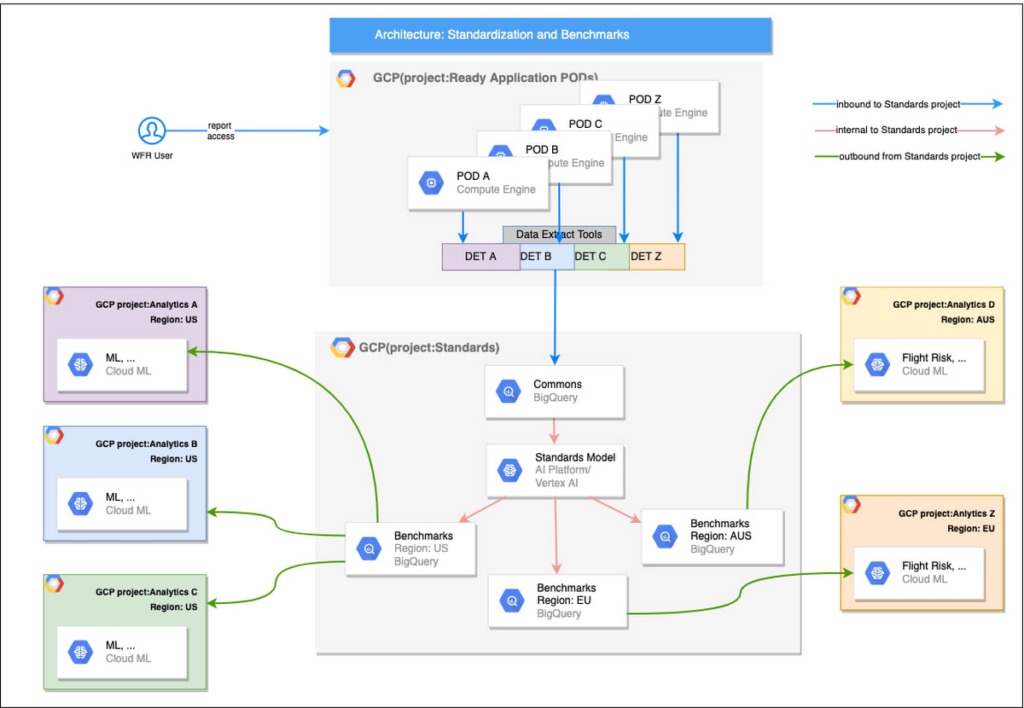
Step 1: Collecting aggregated data
We needed an approach to collect aggregated data from our highly distributed, sharded, multi-tenant data sources. We developed a custom solution that allows us to extract data aggregated at source for PII and GDPR considerations and transfer to Google Cloud Storage in the fastest manner possible. Data is then transformed and stored in Big Query. Services used: GCS, Cloud Functions, DataFlow, Cloud Composer and Big Query. All processes are orchestrated using Cloud Composer and detailed logging is available in Cloud Logging (Stackdriver).
Step 2: Applying NLP (Natural Language Processing)
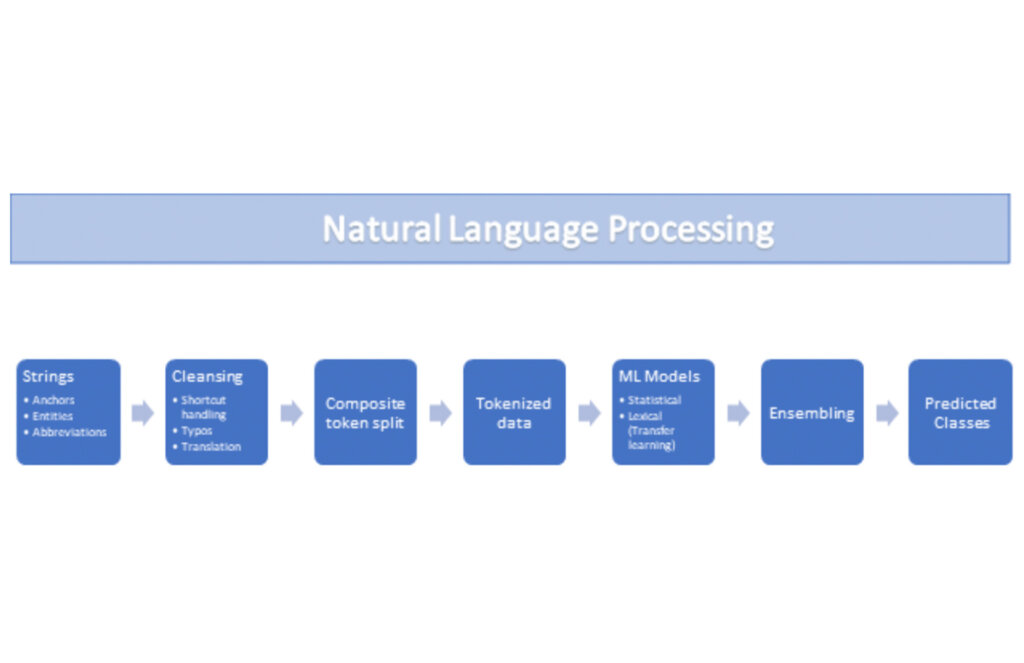
Once we had the variety of customer configurations or the business entities available, we then applied NLP algorithms to categorize and standardize these in buckets. This approach assumes that customers use natural language for configurations like job titles, pay codes etc.
String Preparation
The input data for string preparation process is an entity string or several strings, that describe one entity object (like name-description pair or code-name pair). The output represents set of tokens that may be used to run a classification/clustering model. The process of string preparation tokenizes strings, replaces shortcuts, handles abbreviations, translates tokens, handles grammatical errors and mistypes
ML Models
Statistical
The idea of the model is to use defined target classes (clusters) and assign several tokens (anchors) to each of them an entity that has any of those tokens would be “attracted” to appropriate class. All other tokens are weighted according to frequencies of usage of theses tokens in the entities with anchor tokens:
Using anchor tokens, we are building kind-of Word2Vec - dimensionality of vector is equal to number of target classes. The higher the specific dimension (cluster) value, the higher the probability of entity to be included in appropriate cluster. Final prediction for entity tokens list for specific class is sum of weights of all the tokens included. Predicted cluster is a cluster that has maximal prediction score.
Lexical Model
We managed to generate reasonable amount of labeled data during statistical model implementation and testing. That opens a possibility to build “classical” NLP model that uses labeled data to train classification neural network using pretrained layers to produce token embeddings or even string embeddings. We started experimentation with pre-trained models like GloVe and got good results with single words and bi-grams but started getting issues in handling of n-grams. Our Google account team came to our rescue and recommended some white papers that helped formulate our strategy. We now use Tensorflow nnlm-en-dim128 model to produce string embeddings – it was trained on 200B records English Google News corpus and produces for each input string 128-dimensional vector. After that we use several Dense and Dropout layers to build a classification model.
Ensembling
To perform ensembling all the model results for each class are cast to probabilities using softmax transformation with scale normalization. Final predicted probability is maximal average score of both models among all the classes scores – appropriate class is predicted class.
The machine learning models are deployed on Vertex AI and are used in batch predictions. Model performance is captured at every prediction boundary and monitored for quality in production.
Step 3: Making available common vocabulary
Having the standardized vocabulary, we then needed a mechanism to have the results be available in UKG Ready reports and customer specific models like Flight Risk and Fatigue. For this we again used Google Services for orchestration, data transformation and data storage.
Once the modeling is complete, we made the customer specific models leveraging the above architecture be available in Reports. We utilized our proven existing technology choices in GCP for orchestration, data transformation and data storage
Results
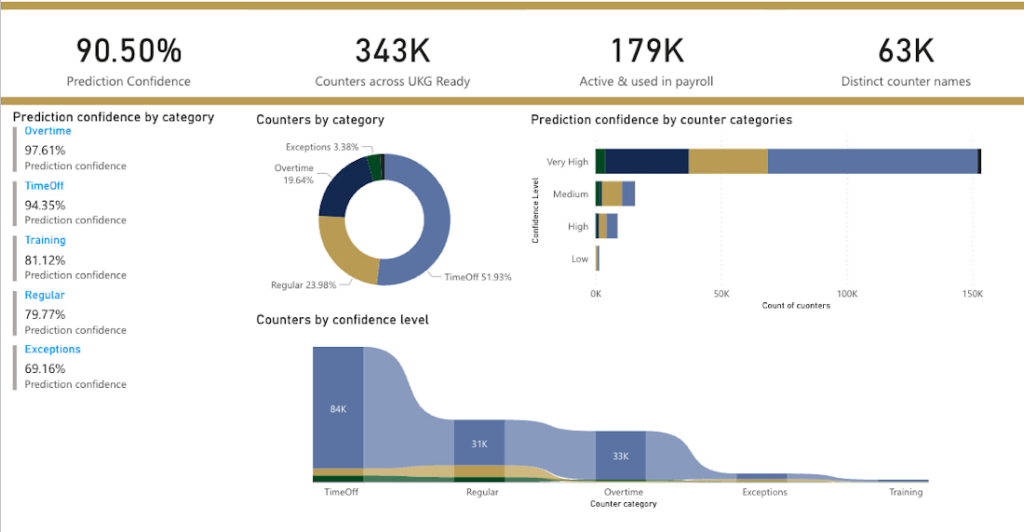
We are able to build a common vocabulary of our customers’ business entities with good confidence. And be an expert advisor to our SMB customers in their decision-making using machine learning. With the advice of our Google account team and using Google services we can add value to our product in a relatively short amount of time. And we are not done! We continue to use this platform for new use cases, complex business problems and innovative machine learning solutions.
Sample result:
Special thanks to Kanchana Patlolla , AI Specialist, Google for the collaboration in bringing this to light
The Future of Language Processing: Google Cloud’s Enhanced NLP Models

1340
Of your peers have already read this article.
1:30 Minutes
The most insightful time you'll spend today!
Natural language understanding (NLU) is getting increasingly better at solving complex problems and these language breakthroughs are creating big waves in Artificial Intelligence. For example, new language models are enabling Everyday Robots to create more helpful robots that can break down user instructions and have even enabled people to generate imaginative visuals from complex text prompts.
These leaps in NLU are powered by neural networks trained to understand human language. This technology has greatly advanced since the introduction of Google’s Transformer architecture in 2017 with the introduction of large models trained on massive amounts of data like GPT-3 and, even more recently, with GLaM, LaMDA, and PaLM. This latest generation of models are called Large Language Models (LLMs) because of their sheer size and the vast volumes of data on which they are trained, and they can be applied to a range of tasks to create more powerful digital assistants, generate better search results and product recommendations, enforce smarter platform curation and safety features, and much more.
For these reasons, we’re pleased to announce we’ve updated the Google Cloud Natural Language (NL) API with a new LLM-based model for Content Classification.
With an expansive pre-trained classification taxonomy, the newest version of Content Classification from the Natural Language API leverages the latest Google research to improve customer use cases spanning actionable insights on user trends, to ad targeting, to content-based filtering. In this article, we’ll explore the NL API’s new capabilities, which are the first of many efforts we’ll be making to bring the power of LLMs to Google Cloud.
How LLMs help machines understand human language
As Google Cloud VP and General Manager of AI and Industry Solutions, Andrew Moore has argued, if computer systems become more conversant with natural human languages, they become a foundation for more sophisticated use cases, able to not only understand user intent but also create complex bespoke solutions. Google has been a leading research force in this space, with LLM projects like LaMDA, PaLM and T5 contributing to the Cloud NL API’s improved v2 classification model.
Parsing language is a difficult AI task for machines due in part to the contextual and individual interpretation of words or phrases. The word “server,” for example, could refer to a computer, a restaurant employee, or a tennis player. To understand the word, a model needs to be trained around not only a basic definition but also the context and positioning of the word within a sentence or conversation and its evolving connotations. Because they process voluminous training data via Transformers, LLMs are well-suited to this type of work.
Thanks to the integration of Google’s latest language modeling technology, and an updated and expanded training data set, the next generation of the Content Classification API not only has over 1,000 labels (up from around 600 previously), but now also supports 11 languages (with Chinese, French, German, Italian, Japanese, Korean, Portuguese, Russia, Spanish, and Dutch joining previously-available English)—and does so with improved accuracy.
AI raises questions about the best way to build fairness, interpretability, privacy, and security into these new systems in order to benefit people and society. At Google, we prioritize the responsible development of AI and take steps to offer products where a responsible approach is built in by design. For Content Classification, we limited use of sensitive labels and conducted performance evaluations. See our Responsible AI page for more information about our commitments to responsible innovation.
Get Started
Today’s announcement is just the first step in bringing LLM capabilities to Google Cloud AI products, and we’re excited to see how our more powerful Natural Language API helps developers, analysts and data scientists generate insights and offer superior experiences. Our early adopters are implementing the API to improve user recommendations, display ad targeting, and insights about new trends.
If you’re ready to get started with this major leap in Google Cloud language services, visit our NL API documentation, and to learn more about Google Cloud’s AI services, visit our AI and machine learning products page.
Google Cloud Modernized Wisconsin Department of Workforce Development to Process 150K+ Unemployment Claims Per Week

2991
Of your peers have already read this article.
2:00 Minutes
The most insightful time you'll spend today!
When confronted with challenges, resilient organizations adapt and innovate to address changing customer needs. Through its partnership with Google Cloud, the Wisconsin Department of Workforce Development exemplifies this evolutionary approach.
Just a few months ago, challenges created by the antiquated unemployment insurance (UI) system threatened the agency’s ability to serve constituents who lost their jobs during the pandemic. Now, and in the months ahead, that continuing evolution will transform how the DWD serves its constituents with the modernization of their UI system, which includes customer experience workflows, predictive analytics, and streamlining and expediting paper applications.
Like many workforce development agencies nationwide, last year, DWD experienced a deluge of claims filed in response to the COVID-19 economic fallout. Unfortunately, DWD’s legacy UI infrastructure — largely written in the COBOL computing language and hosted on a mainframe server – was no match for the volume and complexity of cases. Wisconsin’s multiple technology systems required a large amount of manual processing, with staff using spreadsheets to manually calculate benefit adjustments. As a result, the state just couldn’t keep up with the surge of claims, and it needed to pivot quickly to a new solution to keep up with demand.
DWD initially responded by staffing up call centers, hiring UI application adjudicators, and deploying other personnel–all told, hiring, contracting with, or reassigning more than 1,300 individuals. However, while this enabled DWD to respond to approximately 7 million calls per month, the massive number of incoming claims surged to create a backlog of more than 750,000 claims. Legacy technology issues continued to significantly slow the query-response time.
DWD leaders recognized that staffing alone was not the solution and that innovation was needed to overcome past, inadequate IT investment. To address the inherited issues, Wisconsin turned to Google Cloud. Working together, we were able to scale the state’s response to claims and speed up overall response time. We were also successful in screening out fraudulent claims so that the UI program could be administered–with integrity–to Wisconsinites who needed financial assistance.
Year-to-date, Wisconsin has now disbursed $2 billion in unemployment benefits, in addition to successfully clearing its entire 2020 UI backlog. As a result of our partnership, the state is now processing an average of 157,000 claims each week and releasing most payments to citizens within two to three business days. Before the new system was in place, the response time could be weeks or even months.
Here is how Wisconsin and Google Cloud are modernizing the state’s current legacy system through a modular approach:
- Artificial intelligence (AI)/ machine learning (ML) for predictive analytics: Through the use of Google AI/ML, the state is creating predictive analytics based on historical data to shorten adjudication decision-making for UI claims, enabling it to release payments to eligible claimants faster. Comprehensive data models and confidence scores analyze the backlog data to determine the shortest route to approval and payments, with a high level of confidence and accuracy. DWD is using Google Cloud technology to identify where in the process the claimant was getting stuck in one of the “hold buckets” for processing a UI claim. Using Google Cloud’s data and AI/ML tools, Wisconsin is able to identify problem areas and quickly resolve those issues. This informed DWD’s rewrite of the UI claim application process. And it also helped DWD identify fraudulent claims.
- Document AI (DocAI) for streamlining paper applications: DWD is also partnering with Google Cloud to streamline paper applications and fax documents as part of UI claims processing–enabling documents to be submitted online instead of by fax or hard-copy mail. Our DocAI solution helps Wisconsin staff make faster decisions by rapidly extracting critical data from documents, saving time, and removing manual processes, which allows employees to focus on high-priority activities.
These modernization steps in Wisconsin are resulting in a bold new vision for state unemployment systems across the United States. Through a combination of design thinking, deep partnership with state officials, and modern technology, DWD’s solutions are tailored to maximize benefits to the constituents they’re designed to serve. By joining forces with Google Cloud and utilizing modernizing technology to make informed, data-driven decisions, Wisconsin DWD is helping residents have a better experience that is easier to understand and navigate–all while better serving the community overall.
Revolutionizing Cloud Computing: Introducing G2 VMs with NVIDIA L4 GPUs

1565
Of your peers have already read this article.
2:30 Minutes
The most insightful time you'll spend today!
Organizations across industries are looking to AI to turn troves of data into intelligence, powered by the latest advances in generative AI. Yet for many organizations, there is a barrier to adopting the latest models because they can be costly to train or serve. A new class of cloud GPUs is needed to lower the cost of entry for businesses that want to tap the power of AI.
Today, we’re introducing G2, the newest addition to the Compute Engine GPU family in Google Cloud. G2 is the industry’s first cloud VM powered by the newly announced NVIDIA L4 Tensor Core GPU, and is purpose-built for large inference AI workloads like generative AI. G2 delivers cutting-edge performance-per-dollar for AI inference workloads that run on GPUs in the cloud. By switching from NVIDIA A10G GPUs to G2 instances with L4 GPUs, organizations can lower their production infrastructure costs up to 40%. We also found that customers switching from NVIDIA T4 GPUs to L4 GPUs can achieve 2x-4x better performance. As a universal GPU offering, G2 instances also help accelerate other workloads, offering significant performance improvements on HPC, graphics, and video transcoding. Currently in private preview, G2 VMs are both powerful and flexible, and scale easily from one up to eight GPUs.
Currently organizations require end-to-end enterprise ready infrastructure that will future proof their AI and HPC initiatives for a new era. G2s will be ready to be deployed on Vertex AI, GKE, and GCE, giving customers the freedom to architect their own custom software stack to meet their performance requirements and budget. With optimized Vertex AI support for G2 VMs, AI users can tap the latest generative AI models and technologies. With an easy to use UI and automated workflows, customers can access, tune and serve modern models for video, text, images, and audio without the toil of manual optimizations. The combination of these services with the power of G2 will help customers harness the power of complex machine models for their business.
NVIDIA L4 GPUs with Ada Lovelace Architecture
G2 machine families enable machine learning customers to run their production infrastructure in the cloud for a variety of applications such as language models, image classification, object detection, automated speech recognition, and language translation. Built on the Ada Lovelace architecture with fourth-generation Tensor Cores, the NVIDIA L4 GPU provides up to 30 TFLOPS of performance for FP32, and 242 TFLOPs for FP16. Newly added FP8 support, on top of existing INT8, BFLOAT16 and TF32 capabilities, makes the L4 ideal for ML inference.
With the latest third-generation RT Cores and DLSS 3.0 technology, G2 instances are also great for graphics-intensive workloads such as rendering and remote workstations when paired with NVIDIA RTX Virtual Workstation. NVIDIA L4 provides 3x video encoding and decoding performance, and adds new AV1 hardware-encoding capabilities. For example, G2 can enable gaming customers running game engines such as Unreal and Unity with modern graphics cards to run real-time applications. Likewise, media and entertainment customers that need GPU-enabled virtual workstations can use the L4 to create photo-realistic, high-resolution 3D content for movies, games, and AR/VR experiences using applications such as Autodesk Maya or 3D Studio Max.
What customers are saying
A handful of early customers have been testing G2 and have seen great results in real-world applications. Here are what some of them have to say about the benefits that G2 with NVIDIA L4 GPUs bring:

AppLovin
AppLovin enables developers and marketers to grow with market leading technologies. Businesses rely on AppLovin to solve their mission-critical functions with a powerful, full stack solution including user acquisition, retention, monetization and measurement.
“AppLovin serves billions of AI powered recommendations per day, so scalability and value are essential to our business,” said Omer Hasan, Vice President, Operations at AppLovin. “With Google Cloud’s G2 we’re seeing that NVIDIA L4 GPUs offer a significant increase in the scalability of our business, giving us the power to grow faster than ever before.”

WOMBO
WOMBO aims to unleash everyone’s creativity through the magic of AI, transforming the way content is created, consumed, and distributed.
“WOMBO relies upon the latest AI technology for people to create immersive digital artwork from users’ prompts, letting them create high-quality, realistic art in any style with just an idea,” said Ben-Zion Benkhin, Co-Founder and CEO of WOMBO. “Google Cloud’s G2 instances powered by NVIDIA’s L4 GPUs will enable us to offer a better, more efficient image-generation experience for users seeking to create and share unique artwork.”

Descript
Descript’s AI-powered features and intuitive interface fuel YouTube and TikTok channels, top podcasts, and businesses using video for marketing, sales, and internal training and collaboration. Descript aims to make video a staple of every communicator’s toolkit, alongside docs and slides.
“G2 with L4’s AI Video capabilities allow us to deploy new features augmented by natural-language processing and generative AI to create studio-quality media with excellent performance and energy efficiency” said Kundan Kumar, Head of Artificial Intelligence at Descript.

Workspot
Workspot believes that the software-as-a-service (SaaS) model is the most secure, accessible and cost-effective way to deliver an enterprise desktop and should be central to accelerating the digital transformation of the modern enterprise.
“The Workspot team looks forward to continuing to evolve our partnership with Google Cloud and NVIDIA. Our customers have been seeing incredible performance leveraging NVIDIA’s T4 GPUs. The new G2 instances with L4 GPUS through Workspot’s remote Cloud PC workstations provide 2x and higher frame rates at 1280×711 and higher resolutions” said Jimmy Chang, Chief Product Officer at Workspot.
Pricing and availability
G2 instances are currently in private preview in the following regions: us-central1, asia-southeast1 and europe-west4. Submit your request here to join the private preview, or to receive a notification as when the public preview begins. Support will be coming to Google Kubernetes Engine (GKE), Vertex AI, and other Google Cloud services as well. We’ll share G2 public availability and pricing information later in the year.
AI in Manufacturing Already A Mainstream: Google Cloud Study

5668
Of your peers have already read this article.
3:00 Minutes
The most insightful time you'll spend today!
While the promise of artificial intelligence transforming the manufacturing industry is not new, long-ongoing experimentation hasn’t yet led to widespread business benefits. Manufacturers remain in “pilot purgatory,” as Gartner reports that only 21% of companies in the industry have active AI initiatives in production.
However, new research from Google Cloud reveals that the COVID-19 pandemic may have spurred a significant increase in the use of AI and other digital enablers among manufacturers. According to our data—which polled more than 1,000 senior manufacturing executives across seven countries—76% have turned to digital enablers and disruptive technologies due to the pandemic such as data and analytics, cloud, and artificial intelligence (AI). And 66% of manufacturers who use AI in their day-to-day operations report that their reliance on AI is increasing.

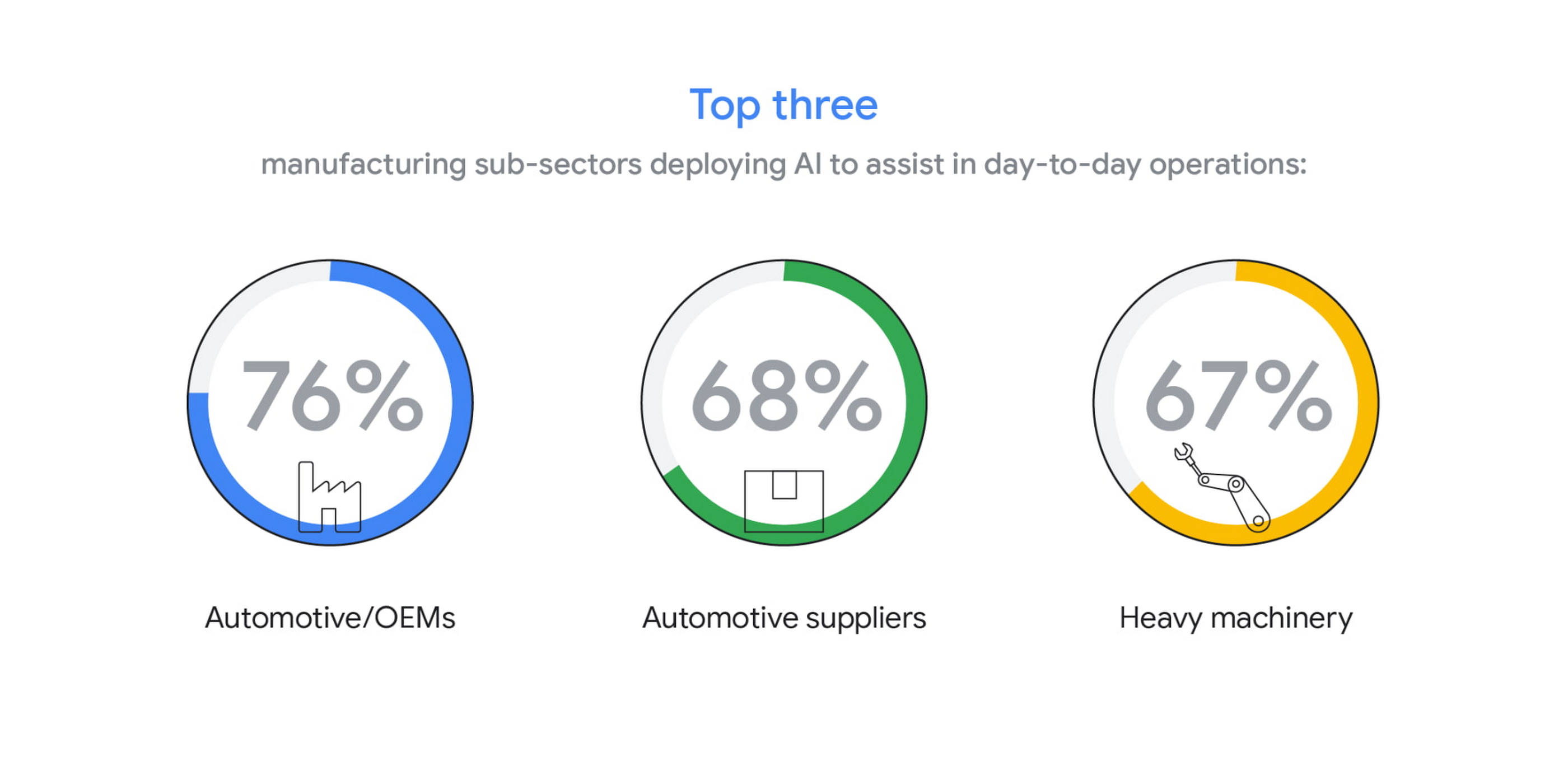
The top three sub-sectors deploying AI to assist in day-to-day operations are automotive/OEMs (76%), automotive suppliers (68%), and heavy machinery (67%).
In fact, Bryan Goodman, Director of Artificial Intelligence and Cloud, Ford Global Data & Insight and Analytics shares, “Our new relationship with Google will supercharge our efforts to democratize AI across our business, from the plant floor to vehicles to dealerships. We used to count the number of AI and machine learning projects at Ford. Now it’s so commonplace that it’s like asking how many people are using math. This includes an AI ecosystem that is fueled by data, and that powers a ‘digital network flywheel.’”
Moving from edge cases to mainstream business needs
Why are manufacturers now turning to AI in increasing numbers? Our research shows that companies who currently use AI in day-to-day operations are looking for assistance with business continuity (38%), helping make employees more efficient (38%), and to be helpful for employees overall (34%). It’s clear that AI/ML technology can augment manufacturing employees’ efforts, whether by providing prescriptive analytics like real-time guidance and training, flagging safety hazards, or detecting potential defects on the assembly line.

In terms of specific AI use cases called out by the research, two main areas emerged: quality control and supply chain optimization. In the quality control category, 39% of surveyed manufacturers who use AI in their day-to-day operations use it for quality inspection and 35% for product and/or production line quality checks. At Google Cloud, we often speak with manufacturers about AI for visual inspection of finished products. Using AI vision, production line workers can spend less time on repetitive product inspections and can instead focus on more complex tasks, such as root cause analysis.
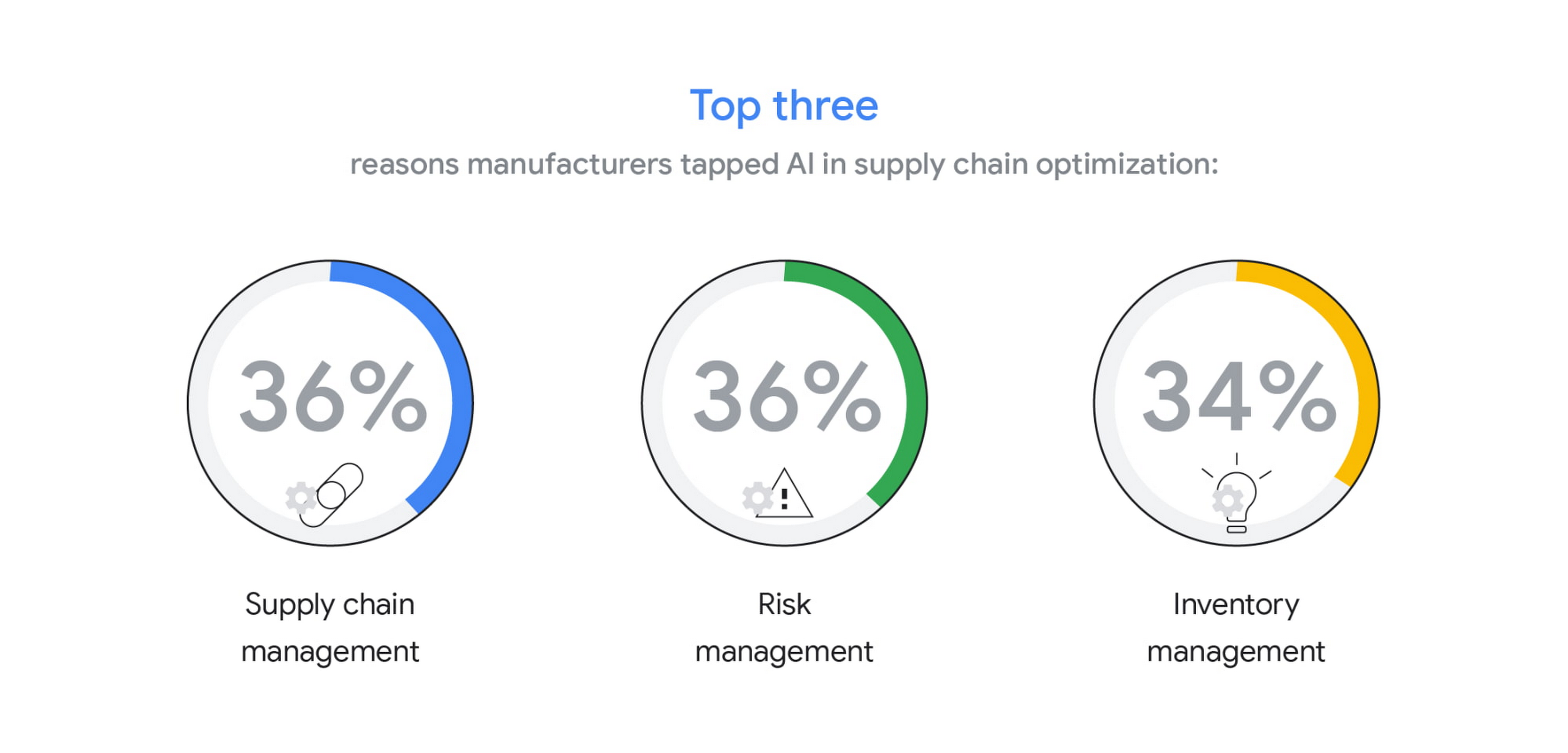
In the supply chain optimization category, manufacturers said they tapped AI for supply chain management (36%), risk management (36%), and inventory management (34%).
In our day-to-day work, we’re seeing many manufacturers rethink their supply chains and operating models to better accommodate for the increased volatility that has been brought about by the pandemic and support the secular trend of consumers asking for increasingly individualized products. We’ll share more on deglobalization in the third installment of our manufacturing insights series.
AI use differs by geography, but not for the reasons you may think
The extent to which AI is already being used today varies quite strongly between geographies, according to our research. While 80% and 79% of manufacturers in Italy and Germany respectively report using AI in day-to-day operations, that percentage plummets in the United States (64%), Japan (50%) and Korea (39%).

It’s tempting to state this disparity is due to an “AI talent gap.” Although the most common barrier, just a quarter (23%) of manufacturers surveyed believe they don’t have the talent to properly leverage AI. Cost, too, does not appear to be a roadblock (21% of those surveyed). Rather, from our observations, the missing link appears to be having the right technology platform and tools to manage a production-grade AI pipeline. This is obviously the focus of our efforts and others in the space, as we believe the cloud can truly help the industry make a step change.
Looking ahead: The Golden Age of AI for manufacturing
The key to widespread adoption of AI lies in its ease of deployment and use. As AI becomes more pervasive in solving real-world problems for manufacturers, we see the industry moving away from “pilot purgatory” to the “golden age of AI.” The manufacturing industry is no stranger to innovation, from the days of mass production, to lean manufacturing, six sigma and, more recently, enterprise resource planning. AI promises to bring even more innovation to the forefront.
To learn more about these findings and more, download our infographic here and our full report here.
Research methodology
The survey was conducted online by The Harris Poll on behalf of Google Cloud, from October 15 – November 4, 2020, among 1,154 senior manufacturing executives in France (n=150), Germany (n=200), Italy (n=154), Japan (n=150), South Korea (n=150), the UK (n=150), and the U.S. (n=200) who are employed full-time at a company with more than 500 employees, and who work in the manufacturing industry with a title of director level or higher. The data in each country were weighted by number of employees to bring them into line with actual company size proportions in the population. A global post-weight was applied to ensure equal weight of each country in the global total.
More Relevant Stories for Your Company

Survey: What Everyone Else In Your Industry is Doing with AI
Across industries and use cases, organizations that have implemented ML report demonstrable return on investment and substantial business benefits ranging from better, faster data analysis to improved efficiency and cost savings. The vast majority of early adopters — nearly 90 percent, according to one study — believe that ML provides
ESG Did the Math: It’s Cheaper and Smarter to Migrate Enterprise Data Warehouses to Google BigQuery. Way Smarter
Enterprise data warehouses (EDWs) are often deemed the most valuable asset in the data center, serving as the backbone of the business. The ongoing insight gained from these solutions has justified the significant up-front capital investments and ongoing operational costs, but the rigidity of the traditional EDW is forcing organizations

Cloud as an Innovation Platform in Capital Markets
Public cloud, big data, and AI technologies offer competitive advantages and cost savings for capital markets firms ready to make the transition. This paper discusses the three phases capital markets firms go through in transitioning to public cloud, and the workloads, benefits, and cultural changes that characterize the three phases:

Google Cloud and Univision Partnership to Up the Ante in UX for Spanish-speaking Audience
The past year has given everyone lots to think about—about our priorities as people and as businesses. As the world retreated behind closed doors, we saw how shared interests and experiences can bring us together. As the world grappled with a common enemy, we witnessed just how differently individuals, communities
