





Defining cloud’s future: How autonomic data security can help

2565
Of your peers have already read this article.
1:30 Minutes
The most insightful time you'll spend today!
“Ninety percent of all data today was created in the last two years—that’s 2.5 quintillion bytes of data per day,” according to business data analytics company Domo. That would be a mind-bending statistic, except that it’s already five years old.
As data usage has undergone drastic expansion and changes in the past five years, so have your business needs for data. Technology such as cloud computing and AI have changed how we use data, derive value from data, and glean insights from data. Your organization is no longer just crunching and re-crunching the same data sets. Data moves, shifts, and replicates, as you mingle data sets and gain new value in the process, as we say in our Data Cloud story. All the while, your data resides in—and is being created in—new places.
Data lives in a myriad of locations now and requires access from different locations and mediums, yet many of today’s security models are not geared towards this. In short, your data has fallen out of love with your security model, but attackers have not. So, how do we realign data and security so they are once again in a healthy relationship?
Google Cloud, as a leader in cloud data management and cloud security, is positioned uniquely to define and lead this effort. We’ve identified some challenges around the classic approach to data security and the changes triggered by the near-ubiquity of the cloud. The case is compelling for adopting a modern approach to data security. We contend that the optimal way forward is with autonomic data security.
A relatively new concept, autonomic data security is security that’s been integrated with data throughout its lifecycle. It can make things easier on users by freeing them from defining and redefining myriad rules about who can do what, when, where. It’s an approach that keeps pace with constantly evolving cyberthreats and business changes.
Autonomic data security can help you keep your IT assets more secure and can make your business and IT processes speedier. For example, data sharing with partners and data access decisions simultaneously becomes faster and more secure. This may sound like magic, but in fact relies on a constant willingness to change and adapt to both business changes and threat evolution.

Taking the precepts, concepts, and forward-looking solutions presented in this paper into consideration, we strongly believe that now is the right time to assess where you and your business are when it comes to data security. Cloud also brings an incredible scale of computing. Where gigabytes once roamed, petabytes are now common. This means that many data security approaches, especially the manual ones, are no longer practical.
To prepare for the future of data security, we recommend you challenge your current model and assumptions and ask critical questions, evaluate where you are, and then start to put a plan in place of how you could start incorporating the autonomic data security pillars into your data security model.
There are two sets of questions organizations need to discover the answers to as they start this journey. The first set of questions will help you identify the nature and status of your data, and inform the answers to the second set.
- What data do I have?
- Who owns it?
- Is it sensitive?
- How is it used?
- What is the value in storing the data?
The second set focuses on higher-level problems:
- What is my current approach to data security?
- Where does it fail to support the business and counter the threats?
- Does it support my business?
- Should I consider making a change? And if yes, in what direction?
The path to improved data security starts by asking the right questions. You can read the full Autonomic Data Security paper for a more in-depth exploration here and learn more about the idea in this podcast episode.
Cloud KMS with Cloud Storage: Better Performance for High-intensity Workloads

3283
Of your peers have already read this article.
2:30 Minutes
The most insightful time you'll spend today!
Encryption is critical for securing sensitive data while it is stored and transits the cloud. Today, Cloud Storage encrypts data server-side with standard Google-managed encryption keys by default, and can also encrypt data with customer-managed encryption keys that are stored and managed by Cloud Key Management Service (Cloud KMS).
While customers have been able to secure their data on Cloud Storage with Cloud KMS keys for some time, we are always updating our encryption offerings to deliver better performance, lower costs and more capabilities that support critical business workloads. In this post, we’ll discuss some of our latest developments in this space—in particular, performance improvements for high-intensity workloads and support for customer-managed encryption keys (CMEK) for object composition.
Why use Cloud KMS with Cloud Storage?
Cloud KMS enables you to centrally manage your keys in a fast and scalable way that helps to meet your security and compliance needs. Cloud KMS generates customer-managed encryption keys (CMEK) which act as an additional layer of protection on top of Google’s default encryption keys. You can set these keys on a Cloud Storage bucket as a default key, and can easily manage key rotation, replacement or disabling right within Cloud KMS.
In addition to software-based CMEKs, Cloud Storage also supports hardware-based CMEKs hosted in hardware security modules that are FIPS 140-2 Level 3 validated as part of our Cloud HSM service. These enable you to protect your most sensitive workloads without needing to manage HSM cluster operations yourself.
Improving KMS performance for high-intensity workloads
While Cloud HSM is often used to protect the most sensitive data for a customer, especially for those in healthcare and financial services industries, the default quota limits for cryptographic operations on Cloud HSM keys may cause performance bottlenecks for customers aiming to run high-intensity workloads when using Cloud Storage, such as analytics workloads on Hadoop.
We are making improvements to the Cloud KMS request behaviour on Cloud Storage that more effectively batches requests to Cloud KMS to reduce request bandwidth and drive down KMS billing. Identical Cloud KMS requests from Cloud Storage will be batched together for newly written objects and across all supported encryption modes in Cloud KMS, including software-backed customer-managed encryption keys. As a result of these changes, when you are using Cloud KMS you may notice faster encrypt, read and write operations for new data, deduplicated Cloud KMS audit logs and lower overall Cloud KMS charges. Customers running high-intensity workloads should see a significant reduction in throughput to KMS, leading to a reduction in KMS cryptographic operation billing costs for all types of KMS keys, as well as enabling customers to scale the throughput of their HSM-encrypted workloads.
Newly written objects encrypted with Cloud KMS will leverage these changes, whether they are encrypted using software-backed or HSM-backed CMEKs, and no configuration change is needed. If you are looking to use Cloud KMS with Cloud Storage, check out the Cloud KMS page to learn more, especially for setting up a hardware-backed HSM.
Supporting Cloud KMS for object composition
Object composition in Cloud Storage is widely used today for different types of applications, from stitching video segments together for a replay to uploading large datasets for analytics workloads. As more and more customers are leveraging Cloud Storage for these applications, we are expanding object composition capabilities to be flexible across different encryption modes.
Object composition is now supported for customer-managed encryption keys in addition to Google-managed encryption keys and customer-supplied encryption keys. This allows you to manage your own encryption keys while performing object composition for business-critical needs such as compiling sensitive financial datasets.
To compose objects that are encrypted with customer-managed encryption keys, specify the resource name of the Cloud KMS key for encrypting the composed object as a query parameter in the compose request. For the JSON API, construct the following HTTP request, while specifying the Cloud KMS key resource name for the query parameter kmsKeyName.
POST https://storage.googleapis.com/storage/v1/b/bucket/o/destinationObject/compose
For the XML API, specify the Cloud KMS key resource name for the request header x-goog-encryption-kms-key-name. You can also specify a Cloud KMS key when using gsutil to perform object composition. Check out our documentation to try out object composition, or to start composing objects encrypted with customer-managed encryption keys.
Get started with better encryption
Being deliberate about encryption is critical for securing your sensitive data on Cloud Storage. Whether you are composing objects or running analytics workloads, leveraging the latest encryption offerings will deliver faster performance, better security and improved workload scalability. We’re always evolving our encryption products to meet your needs and help you achieve your business goals. To get started with encryption on Cloud Storage, check out our documentation to learn more.
Nine Interesting Google Cloud Identity and Environment Features to Know About!

2922
Of your peers have already read this article.
2:00 Minutes
The most insightful time you'll spend today!
I’ve been at Google Cloud just a few weeks, following years of experience as an AWS Hero and building on other clouds. So last week’s Google Cloud Next–my first!—was a bit of a culture shock. On the GCP podcast, I used the word “intentionality” to describe what I’m seeing: a thoughtful, holistic approach that informs so much of how Google Cloud is put together. Not just in the headline-grabbing new announcements like Google Distributed Cloud, but in the everyday things too.
Things like IAM and project setup. Step 1 of any cloud project is to provision access to an environment, and that’s why I always found it so frustrating in my past life when I had to deal with outdated or clunky stuff like:
- Homebrewed, sketchy SSO tooling and config files
- No centralized identity—I was a different person in every cloud account
- Mysterious logouts, redirects, and missing project context within the cloud console
- Account organization features that were “bolted-on” rather than designed the right way from the beginning
In contrast, I recently shared a Twitter thread about how shockingly right Google Cloud gets identity and environments. It’s probably my favorite thing about Google Cloud so far, and so in this post I want to expand on what I’ve learned. If you’re searching for a better way to access and organize your cloud, let me make you one of today’s lucky 10,000.
Nine things to love about Google Cloud identity and environments
1. You are YOU!
Every user is just a Google account (personal or corporate) that works across projects. For beginners, this lowers the barrier to entry and makes cloud feel like an extension of things you already know. For experts, it reduces the friction of having to juggle a bunch of unrelated identities. I love that you can permit any Google account into a cloud project as a collaborator—even a contributor from outside your organization!
2. No non-IAM root accounts
Google Cloud has been designed from the ground up to avoid the chicken/egg problem of requiring a manually configured superuser that sits outside the rest of the identity management infrastructure. In the Google world, humans use Google accounts, and services use IAM-based service accounts —it’s as straightforward as that. (Even non-Google services can be IAM—yay, workload identity federation!)
3. Project discovery for humans
Project, folder, and organization discovery are baked into the console, like browsing a file system scoped to your access level. This hardly even feels like a feature, it’s so subtle and yet absolutely fundamental. But once you see it, you can’t imagine going back to a world where environments exist in a vacuum with no contextual awareness of each other.
The hierarchical organization model also means that project-per-application-per-environment best practices are the path of least resistance; if anything, I’ve erred on the side of setting up *too many* logical groupings. It’s just too much fun to play with projects and folders!
4. Billing that protects you from yourself
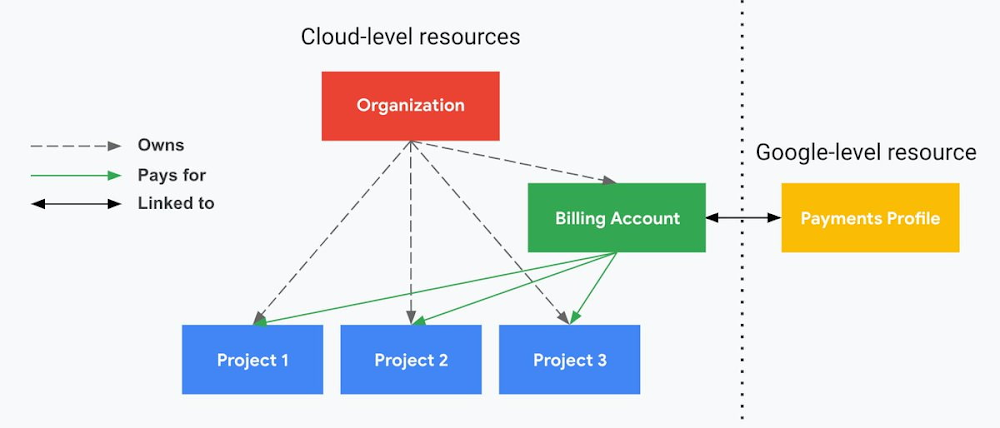
The project context gives you a logical container for the cost of the resources contained within it. My favorite part of this is that your billing entity is managed separately from the project itself. So you can delete a project and feel sure that all associated resources are gone and no longer racking up charges … without also trashing your ability to pay for future projects you might spin up.
(Related: the free tier does not charge you money unless you click a big button that basically says “YES, IT’S OK TO CHARGE ME MONEY.” This guarantee, combined with the familiarity of Google Accounts for access, are the main reasons I now recommend Google Cloud to beginners in my network who are looking for a safe place to learn and explore cloud.)
5. Organizational structure != billing structure
For organizations, billing is decoupled from the organization root. So permissions inheritance is a separate design decision from chargeback, as it should be. This keeps your Google Cloud footprint from converging toward Conway’s Law.
6. SSO that just works
Want to use the CLI? You get SSO out of the box with your Google Account—no corporate organization required, and no manual shuffling with config files and access keys. Or, better yet, you can use Cloud Shell to run gcloud commands right in your browser, even (especially?) on the docs pages. (Random trivia: I think Cloud Shell is the only native cloud service that has the same name across AWS, Azure, and Google Cloud–but Google’s version has been around the longest and as far as I can tell is the most fully-featured.)
7. One group to rule them all
Remember how user entities are just Google accounts? Guess what: you can use Google Groups to manage group access to IAM roles! That’s right: one set of users with permissions across docs, email, and cloud. It’s one reason why Google Workspace makes sense as a core piece of Google Cloud; it really does function like just another cloud service from an identity standpoint.
8. Never lose your place
In other clouds, I’ve experienced a problem I call the Timeout of Doom: when your console session expires, you’re left on a generic error screen and it’s up to you to figure out how to rebuild your context from scratch–starting with remembering what account you used in the first place. Imagine my delight to realize that reaching your Google Cloud console is as easy as bookmarking a single URL. console.cloud.google.com works and remembers who you are (or, at least, suggests the set of people you might be)—no mystery logouts or redirects.
9. Progressive complexity FTW
In my experience it’s been common for cloud providers to design most of their account features for organizations: if you’re an independent developer, you get more exposure to dangerous bills, less access to helpful SSO features, and generally must fend for yourself in a world that wasn’t really created with you in mind.
I love that Google Cloud has found a way to work with enterprises while still maintaining their roots as a cloud that developers love to use. Sign in with your personal Google account, attach it to an organization when-and-if you’re ready, and in the meantime you get the same thoughtfulness around SSO and billing as the giant shop down the street.
I’m not going to tell you my experience has been seamless; there are footguns here (every Google Workspace integration creates a new project?), and I’m still learning. But it’s that “intentionality” thing again. The Google Cloud identity and environment experience feels like it was designed, not just accreted; there’s an elegant simplicity to it that makes cloud feel fresh and exciting to me all over again. I can’t wait to see what’s next.
In the meantime, I highly encourage you to do what I did and spin up a free trial to try things out for yourself. Then hit me up on Twitter with your favorite Google Cloud identity or environment feature!
Quick Recap on Google Cloud: Latest News, Launches, Updates, Events and More

12932
Of your peers have already read this article.
2:00 Minutes
The most insightful time you'll spend today!
Want to know the latest from Google Cloud? Find it here in one handy location. Check back regularly for our newest updates, announcements, resources, events, learning opportunities, and more.
Tip: Not sure where to find what you’re looking for on the Google Cloud blog? Start here: Google Cloud blog 101: Full list of topics, links, and resources.
Week of May 24-May 28 2021
- Google Cloud for financial services: driving your transformation cloud journey–As we welcome the industry to our Financial Services Summit, we’re sharing more on how Google Cloud accelerates a financial organization’s digital transformation through app and infrastructure modernization, data democratization, people connections, and trusted transactions. Read more or watch the summit on demand.
- Introducing Datashare solution for financial services–We announced the general availability of Datashare for financial services, a new Google Cloud solution that brings together the entire capital markets ecosystem—data publishers and data consumers—to exchange market data securely and easily. Read more.
- Announcing Datastream in Preview–Datastream, a serverless change data capture (CDC) and replication service, allows enterprises to synchronize data across heterogeneous databases, storage systems, and applications reliably and with minimal latency to support real-time analytics, database replication, and event-driven architectures. Read more.
- Introducing Dataplex: An intelligent data fabric for analytics at scale–Dataplex provides a way to centrally manage, monitor, and govern your data across data lakes, data warehouses and data marts, and make this data securely accessible to a variety of analytics and data science tools. Read more.
- Announcing Dataflow Prime–Available in Preview in Q3 2021, Dataflow Prime is a new platform based on a serverless, no-ops, auto-tuning architecture built to bring unparalleled resource utilization and radical operational simplicity to big data processing. Dataflow Prime builds on Dataflow and brings new user benefits with innovations in resource utilization and distributed diagnostics. The new capabilities in Dataflow significantly reduce the time spent on infrastructure sizing and tuning tasks, as well as time spent diagnosing data freshness problems. Read more.
- Secure and scalable sharing for data and analytics with Analytics Hub–With Analytics Hub, available in Preview in Q3, organizations get a rich data ecosystem by publishing and subscribing to analytics-ready datasets; control and monitoring over how their data is being used; a self-service way to access valuable and trusted data assets; and an easy way to monetize their data assets without the overhead of building and managing the infrastructure. Read more.
- Cloud Spanner trims entry cost by 90%–Coming soon to Preview, granular instance sizing in Spanner lets organizations run workloads at as low as 1/10th the cost of regular instances, equating to approximately $65/month. Read more.
- Cloud Bigtable lifts SLA and adds new security features for regulated industries–Bigtable instances with a multi-cluster routing policy across 3 or more regions are now covered by a 99.999% monthly uptime percentage under the new SLA. In addition, new Data Access audit logs can help determine whether sensitive customer information has been accessed in the event of a security incident, and if so, when, and by whom. Read more.
- Build a no-code journaling app–In honor of Mental Health Awareness Month, Google Cloud’s no-code application development platform, AppSheet, demonstrates how you can build a journaling app complete with titles, time stamps, mood entries, and more. Learn how with this blog and video here.
- New features in Security Command Center—On May 24th, Security Command Center Premium launched the general availability of granular access controls at project- and folder-level and Center for Internet Security (CIS) 1.1 benchmarks for Google Cloud Platform Foundation. These new capabilities enable organizations to improve their security posture and efficiently manage risk for their Google Cloud environment. Learn more.
- Simplified API operations with AI–Google Cloud’s API management platform Apigee applies Google’s industry leading ML and AI to your API metadata. Understand how it works with anomaly detection here.
- This week: Data Cloud and Financial Services Summits–Our Google Cloud Summit series begins this week with the Data Cloud Summit on Wednesday May 26 (Global). At this half-day event, you’ll learn how leading companies like PayPal, Workday, Equifax, and many others are driving competitive differentiation using Google Cloud technologies to build their data clouds and transform data into value that drives innovation. The following day, Thursday May 27 (Global & EMEA) at the Financial Services Summit, discover how Google Cloud is helping financial institutions such as PayPal, Global Payments, HSBC, Credit Suisse, AXA Switzerland and more unlock new possibilities and accelerate business through innovation. Read more and explore the entire summit series.
- Announcing the Google for Games Developer Summit 2021 on July 12th-13th–With a surge of new gamers and an increase in time spent playing games in the last year, it’s more important than ever for game developers to delight and engage players. To help developers with this opportunity, the games teams at Google are back to announce the return of the Google for Games Developer Summit 2021 on July 12th-13th. Hear from experts across Google about new game solutions they’re building to make it easier for you to continue creating great games, connecting with players and scaling your business. Registration is free and open to all game developers. Register for the free online event at g.co/gamedevsummit to get more details in the coming weeks. We can’t wait to share our latest innovations with the developer community. Learn more.
4899
Of your peers have already watched this video.
1:30 Minutes
The most insightful time you'll spend today!
Accelerate Your Digital Transformation Through a Modern Infrastructure
Learn about the latest advancements to Google Cloud Platform’s unique infrastructure to accelerate enterprise workloads and build planet scalable solutions. Hear how Google Cloud’s infrastructure enables you to solve problems faster, more securely, and at greater scale.
See how Google Cloud is accelerating the support for enterprise workloads like SAP, VMware, and Windows and augmenting new capabilities to better protect and secure your workloads. Discover how Google Cloud enables businesses to build high-scale applications with global scale and reach.
New ML-Powered API Abuse Detection

1586
Of your peers have already read this article.
3:30 Minutes
The most insightful time you'll spend today!
API security incidents are increasingly common and disruptive. With the growth of API traffic, enterprises across the world are also experiencing an uptick in malicious API attacks, making API security a heightened priority. According to our latest API Security Research Report, 50% of organizations surveyed have experienced an API security incident in the past 12 months and of those, 77% delayed the rollout of a new service or application.
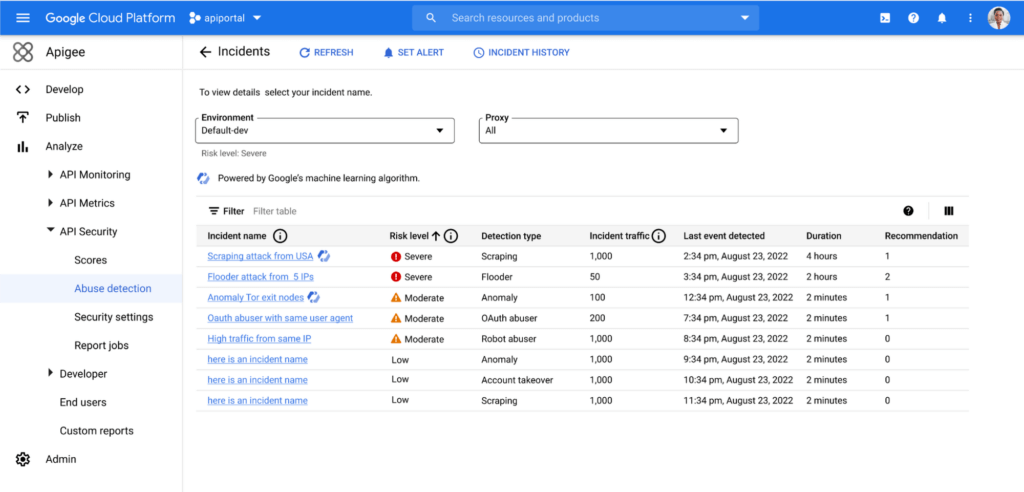
At the RSA Conference 2023 today, we’re making it faster and easier to help detect API abuse incidents with the introduction of Advanced API Security Machine Learning powered abuse-detection dashboards. Our newly introduced Machine Learning models are trained to detect business logic attacks.
These types of attacks are notoriously hard to identify, and target APIs tied to intellectual property, business processes, or sensitive information, such as user data, listing of goods, or crediting accounts. These APIs must be accessible to provide business value, but have also become targets for attackers.
API security incidents can have a considerable impact on an organization’s operations and its bottom line. In June 2022, Imperva released a report titled Quantifying the Cost of API Insecurity, which estimates that lack of secure APIs could result in an average annual API-related total global cyber loss of between $41 billion to $75 billion annually. Furthermore, according to IBM’s 2022 Cost of a Data Breach Report, the average cost of a data breach is $4.35 million. It’s vital that organizations detect and mitigate API abuse incidents early to prevent prolonged fiscal and reputational damage to the business.
However, business logic attacks are harder to detect using static security policies, which allows attackers to manipulate legitimate functionality to achieve a malicious goal without triggering any static security alerts. For example, if a malicious actor gains control of a server and makes subtle changes, the shift in activity patterns of the server is generally undetectable to most monitoring tools. However, in this scenario, the Advanced API Security’s ML-powered API abuse detection model can help differentiate between legitimate and deviant traffic and immediately notify key stakeholders to act quickly and minimize blast radius of the problem.
The ML models that power API abuse detection have been trained and used by Google’s internal teams to help protect our public-facing APIs. The models rely on years of learning and best practices and are now available to all Apigee Advanced API Security customers.
Another challenge in detecting API abuse incidents is the volume of alerts. To reduce the risk of missing key security incidents, many static rules that detect less sophisticated attacks are incredibly sensitive: They generate a high volume of alerts. This makes finding the critical incidents within API traffic and acting to resolve them like “finding a needle in a haystack” for many IT teams. Apigee Advanced Security’s ML-powered dashboards more accurately identify critical API abuses and find similar patterns within the large number of bot alerts to help reduce the time to find and act on most important incidents.
With the help of Apigee Advanced API Security’s ML-powered abuse detection dashboards, customers can uncover critical API abuse incidents, including business logic attacks, scraping, and anomalies, faster. Critical threats are surfaced with clear and concise descriptions to capture the essence of the attack along with the most important characteristics such as the source of the attack, the number of API calls, and the duration of the attack, to help resolve the incident more rapidly.
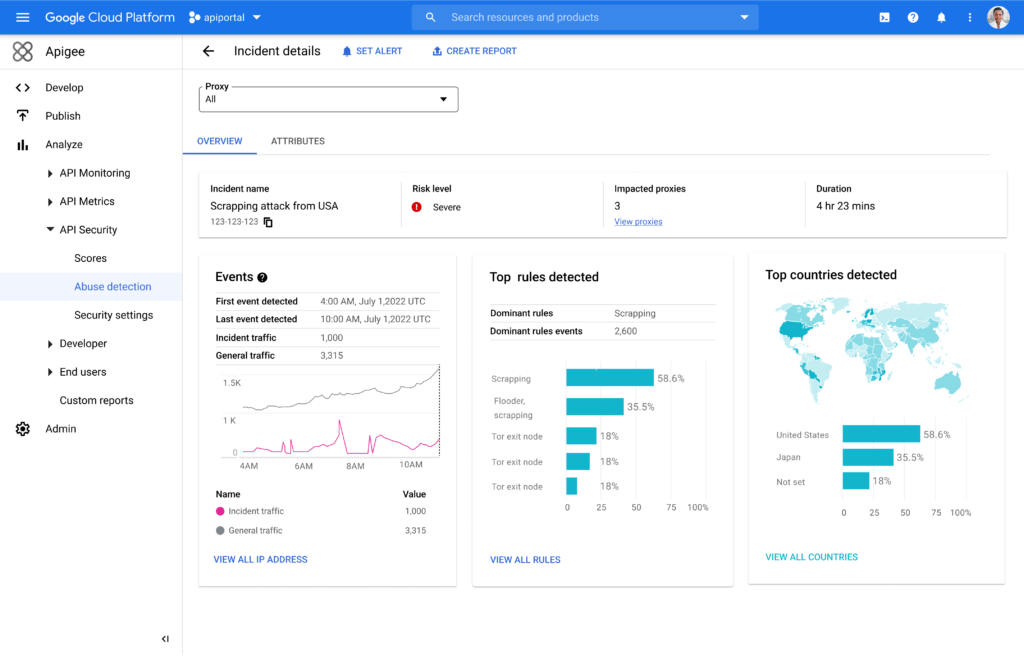
Machine Learning powered abuse-detection dashboards are available in Advanced API Security, a feature of Apigee API management that enables you to more easily detect API security misconfigurations, bad bots, and malicious activities.
To get started with Advanced API Security’s ML-powered dashboards, start your free Apigee trial now.
More Relevant Stories for Your Company

Cloud Computing Boosts Productivity for Small Farms in India
AgroStar launched a multilingual mobile app using Google Cloud that is helping to boost crop yields and increase income for small farmers in India. Google Cloud results Enables technology modules to speed loan processing, identify crop diseases, and enhance supply chain logistics Delivers high rates of analytics processing to serve

Enable high quality curated detections in Chronicle SecOps Suite
A critical component of any security operations team’s job is to deliver high-fidelity detections of potential threats across the breadth of adversary tactics. But increasingly sophisticated threat actors, an expanding attack surface, and an ever-present cybersecurity talent shortage make this task more challenging than ever. Google keeps more people safe




Why Enterprises Should Choose Google Cloud for their SAP Workloads
Change is a constant for SAP customers. Now more than ever, SAP customers need solutions that provide them business agility, rock solid availability and security and true economic value. Learn how Google Cloud can guide your SAP journey to the cloud with simple and no cost migrations, powerful infrastructure and

Ubuntu Pro Images Now Available on Google Cloud
Today, we’re pleased to announce the general availability of Ubuntu Pro images on Google Cloud, providing customers with an improved Ubuntu experience, expanded security coverage, and integration with critical Google Cloud features. In partnership with Canonical, we’re making it even easier for customers that have fully embraced open source to ensure
