





Impact of Cloud FinOps on Your Business Can be Measured with Five Key Metrics!

3103
Of your peers have already read this article.
6:00 Minutes
The most insightful time you'll spend today!
Value of Establishing a Baseline for Metrics
As organizations continue to leverage cloud investments to drive their business growth and top line revenue, business, finance, and technology executives need to become increasingly connected in their efforts to deliver strong business outcomes. More than ever before, executives need to quantify the value of their investments in business and technology capabilities. As such, business and IT leaders need a set of value metrics that cover both operational and strategic outcomes, as well as risks and opportunities. Nevertheless, operational IT metrics are often disconnected from business outcomes, and executives need to establish the connection between technology and business outcomes to facilitate a meaningful dialogue between IT and business leaders.
Like many aspects of IT operations, metrics and KPIs are commonly a journey. Organizations typically start this journey with unit metrics focusing on cloud costs and eventually progress toward a set of clearly defined business value metrics.
As we define the set of metrics across the five key building blocks of Cloud FinOps, which include Accountability & Enablement, Measurement & Realization, Cost Optimization, Planning & Forecasting, and Tools & Accelerators, we ensure that these metrics are easily measurable and commonly attainable across the organizations that are on the journey of digital transformation.
Accountability and Enablement Metric
The Accountability and Enablement pillar is foundational to building a culture of cost and value awareness and charts the course for both the process and cultural transformation journey in cloud FinOps. The primary goal is to help drive financial accountability and accelerate business value realization by streamlining IT financial processes and enabling frictionless cloud governance. Enablement empowers IT, finance, and business teams with training to better understand cloud resources and strategies to efficiently deploy and manage them. Driving accountability and enablement starts with a charter and core governance policies, and then guides the transformation of processes that link finance, IT, and business owners.
We recommend adopting Cloud Enablement % as the standard metric for the accountability and enablement pillar, measured by the # of business leaders trained and certified / total # of business leaders in the organization.

This is an important metric as many organizations fail to adopt Cloud FinOps because of lack of awareness and training. This cloud enablement metric will help business leaders better understand the value of cloud and how it can be an enabler to drive sustainable business outcomes.
The cloud enablement metric can easily be implemented through a set goal based on the number of identified business leaders across the organization. With that said, it is important to utilize the Pareto principle of 80/20 rule here and identifying the key business leaders who are extensively consuming services on the cloud should be the primary focus. Google Cloud recently published a new Cloud Digital Leader certification that is aimed for business leaders and executives. By obtaining the Cloud Digital Leader certification, it ensures the individual is well-versed in basic cloud concepts and can demonstrate a broad application of cloud computing knowledge in a variety of applications and how Google Cloud services can help achieve desired business goals. In addition, the FinOps Foundation also provides training and certification to practitioners in a large variety of cloud, finance and technology roles to validate their FinOps knowledge and enhance their professional credibility.

Ultimately, we see that a target goal of over 70% of business leaders achieving the Cloud Digital Leader certification can significantly drive alignment and adoption of Cloud FinOps across the organization and leverage cloud technologies as an enabler to create sustainable business outcomes.
Measurement and Realization Metric
Foundational to any good process is accurate data and effective metrics, which starts with the notion of cloud costs visibility and traceability. This is driven by proper resource hierarchy and project structure standards and supported by a labeling and tagging data architecture behind your organization’s use of cloud resources. While many common tags include IT-driven designators such as application, environment, and project, it is important to design a direct connection to your P&L into your labeling and tagging architecture, by including cost centers or the chart of accounts as tags. Furthermore, automation of tagging ensures that all taggable resources are deployed with consistent and accurate labels and feed FinOps metrics with reliable data.
Establishing consistent and detailed tagging is essential to attributing cloud resources not only to specific products and projects, but also to detailed cost centers aligned with lines of business and associated P&Ls. In order to establish a full chargeback of typical cloud services, customers will need to attribute costs associated with 3 types of cloud resources. The first and most straightforward will be attributing taggable resources (compute instances, databases, and storage buckets) that are aligned to a specific P&L, such as where a given application is solely consumed by one line of business.
The second situation is where taggable resources are shared across multiple lines of business. Many customers will resort to using traditional P&L allocation models, such as using business revenue or headcount of the associated business units to divy up the costs. In order to more accurately allocate shared application costs, leading-edge customers use elements in their cloud microservices architecture, such as API calls, to specifically measure the relative consumption of shared applications.
The third type of cloud resources are those that cannot be tagged. Common examples include support, networking costs, and third party Marketplace costs. Here, traditional P&L allocation models as described above (using headcount or revenue) are commonly used. Some customers will use the relative distribution of their taggable resource allocations to appropriate non-taggable costs to their business units, while some types of costs, such as networking, are allocated based on API calls.
To measure the effectiveness of the Measurement & Realization pillar of cloud FinOps across these three types of cloud resources, we recommend adopting Cloud Allocation % as the lead metric. This metric is measured as the percentage of total cloud costs (taggable resources consumed by individual business units, taggable resources shared across multiple business units, and non-taggable resources) allocated to responsible business owners.

This metric can be used to support both Showback (cloud costs held in a central IT P&L but reported to business units) and Chargeback models (cloud costs fully charged to business unit P&Ls), and reflects the underlying effectiveness and accuracy of resource tagging and cost attribution to business units. Cloud Allocation % can be implemented in two ways. The basic implementation would qualify costs apportioned by any P&L metric (either by consumption or by traditional P&L allocation such as by revenue or headcount). The more advanced implementation of this metric would only qualify those resources (both specific and shared) that use either tagging or API calls to measure consumption and attribute associated costs to business units.

Customers evolving from a Crawl to a Walk stage of implementation will seek to allocate 70% or more of their total cloud costs, while those moving to a Run state will achieve 90% or greater cost attribution based on direct consumption measures.
Cost Optimization Metric
Cloud cost optimization is not just about cutting costs—it’s about knowing where to spend your money to maximize the business value. It is an iterative and continuous process that provides a consistent methodology to visualize and manage cloud consumption in a most cost effective way. Success in cost optimization can result not only in significant reductions of cloud spend, but sometimes also in improved application performance to manage higher traffic (user requests per seconds or transaction processed) within the same cost envelope.
It is important for an organization to automate reports generated by ingesting billing usage and cost data as well as recommendations generated for optimizations. These optimizations reflect the potential savings (also known as unrealized savings) which allows the team to prioritize implementations to realize the cost savings.
Typically potential savings contains adoption of:
- Pricing optimizations like Committed Use Discounts (resource-based and spend-based), BigQuery reservations, etc.
- Resource optimizations of wasteful resources (including aged snapshots, idle instances, and over-sized databases) that don’t provide any business value.

Capturing this metric is important as it allows the organization to keep a pulse on inefficiencies that exist in the organization and allows businesses to focus on achieving cost savings thereby capturing true value of running their workloads in the cloud.
The cost optimization metric can be implemented by integrating Recommendation Hub in your FinOps workflows. Recommendations Hub is part of Active Assist that contains a portfolio of intelligent tools and capabilities to help you optimize your workloads with minimal effort. It surfaces a summary of all recommendations across your projects along with potential cost savings ($) so you can prioritize your cost optimization effort. We have seen customers realize savings by taking action on recommendations generated by idle VM recommender, Committed Use Discount recommender, VM machine type recommender and many more.

Ultimately we see customers achieving realized savings of over 90% on total cloud service optimizable. We have seen customers reinvest these savings into creating differentiated products and offerings and improving their customer experience, thus accelerating business value realization from the cloud.
Planning and Forecasting Metric
Financial planning is a foundational capability within finance organizations that will directly influence each company’s capabilities of cloud computing forecast accuracy. Financial planning focuses on accurately forecasting financial metrics that are set on an annual basis to guide the company’s financial objectives. The annual plans are measured on a quarterly basis and adjusted based on performance throughout the year; the forecast performance is monitored on a monthly basis to help influence operational results.
Planning and forecasting cloud computing costs is typically the responsibility of the team responsible for cloud operations. Operational forecast planning is based on consumption workload plans, historical trajectory, seasonality and leading indicators. Transformational projects also create material risks to forecast accuracy.
Establishing accurate financial forecasting in the cloud spend requires rethinking traditional approaches to asset depreciation run-outs and trend-based forecasting of maintenance and licensing costs. Using workload-specific forecasting models that leverage a combination of trend-based models for steady-state workloads, driver-based models for scaling applications, as well as monthly variance analysis can greatly improve the accuracy of dynamic cloud needs.
Capturing and measuring forecast accuracy enables companies to understand if they do what they plan. Companies get what they measure and so by measuring and discussing variances to forecast accuracy it enables better control of cloud spend allocations.
Cloud computing forecast accuracy should be included as a topic that Finance and Cloud operations teams discuss at least monthly. The cloud operations team should monitor forecast trajectory during the month and evaluate adjustments when they identify unexpected shifts.
An effective forecast accuracy is one that avoids surprises to company executives and investors. Cloud computing often has more variability and seasonality than depreciation of capex from on prem environments. Coordinating project and sprint agile management can help avoid surprises. If a development change creates an unexpected jump in spending then change management processes should be reviewed to avoid future surprises.
Tools and Accelerators Metric
Employing proper tools and accelerators are important to fully benefiting from FinOps practices. In earlier stages, companies may have limited their ability to report detailed analysis of cloud spend. As practices mature and improve, labeling and tagging of resources proves valuable to understanding costs for specific projects/teams and for building unit cost metrics.
These capabilities can become even more powerful through automated monitoring of resources that offers insights on spend, value, compliance and recommendations.
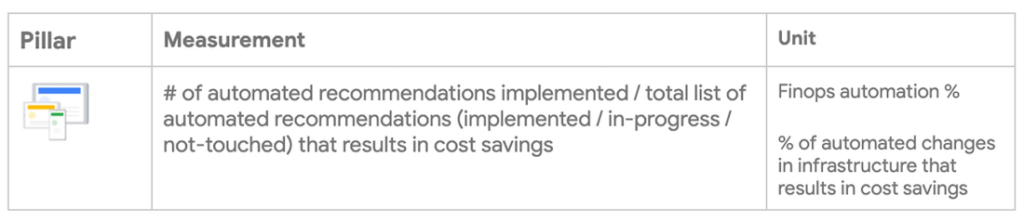
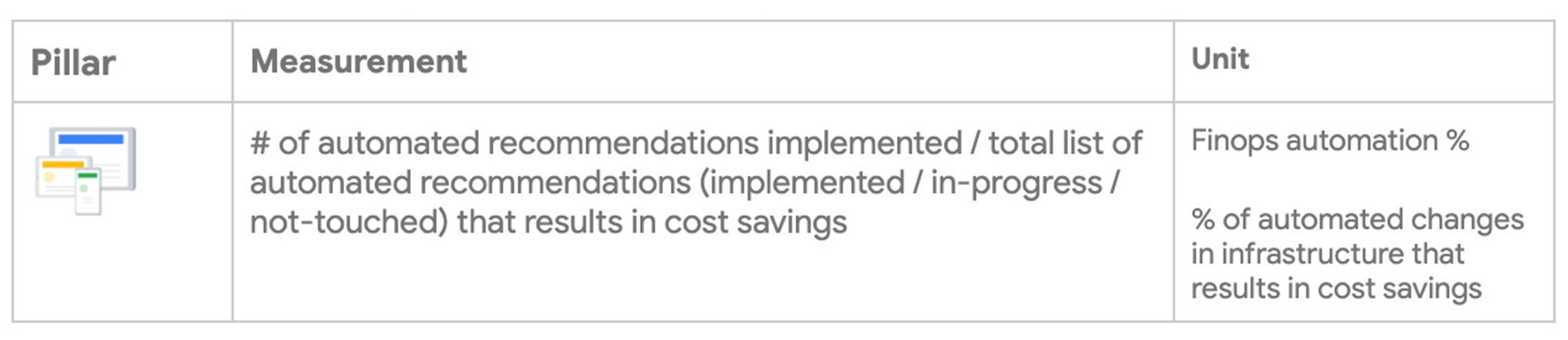
Therefore the recommended measure of Tools & Accelerators maturity is to evaluate the # of automated recommendations that have been implemented as a % of total list of automated recommendations generated that results in cost savings
This is an important metric because as the organization onboards newer workloads to the Cloud environment, lack of robust actionable recommendations and monitoring can lead to increased cloud waste. This has been a key component prohibiting organizations from realizing the total value of their cloud investment.
Customers starting on their tool maturity journey can leverage Google’s out of the box recommendations Hub to get started. The Recommendation Hub is a place in the Google Cloud Console where you can view, prioritize, and apply these recommendations. Some examples include VM right sizing recommendations, BQ slot optimizations, Committed use Discount etc, Idle resource recommendations. This can further be integrated into any existing enterprise tooling using the recommendations API. As organizations mature, they can leverage Cloud Monitoring to create advanced recommendations based on custom business logic.
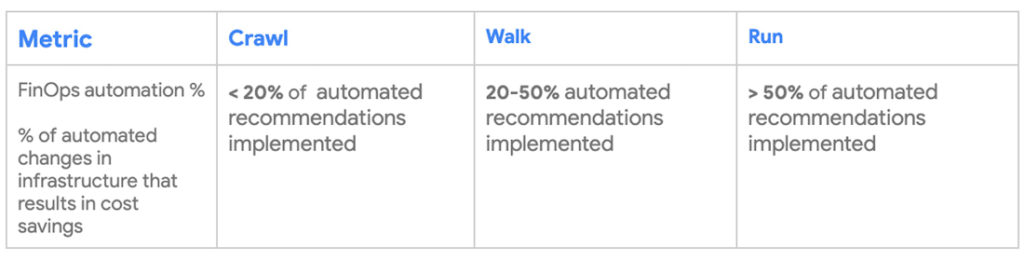
Ultimately, we see that a target goal of over 50% of automated recommendations implemented as the tooling for surfacing recommendations matures and this will ensure that the organization can minimize and eliminate cloud waste to maximize value from cloud investment.
Bringing this together with a Cloud FinOps Dashboard
As technology and business goals continue to evolve over time, it is essential to establish a process where the Cloud FinOps metrics are continuously reviewed whenever the goals change. Furthermore, it is important to note that not all organizations need to achieve the “Run” state of the identified metrics target. The metrics are means to achieve the business outcomes based on the organization’s priorities. By collaborating with cross-functional teams to quantify and measure the impact of the Cloud FinOps metrics, executive leaders can quickly obtain buy-in, highlight common-shared goals, and move fast.
At Google Cloud, we have developed solutions to help our customers build a Cloud FinOps Dashboard to capture these metrics to drive a culture of change and equip the transformation and business leaders with the tools to share and track the results of the key metrics. Successful adoption of the Cloud FinOps metrics enable organizations to focus on the business outcomes and the dashboard provides a meaningful feedback loop to report on the impact and drive visibility across the organization.
So, where are you now in your FinOps journey, and how do you move beyond the challenges ahead? Google can help you start the conversation and accelerate your path to maximizing business value with the cloud.
No matter where you are on the cloud transformation journey, through an interactive session with Google, we can bring executives across the organization together to work toward a shared vision and a plan to accelerate and realize business value in the cloud. If you are interested in more information, please contact us.
Special thanks to Daniel Pettibone, Amitai Rottem, Bruce Warner, Jon Naseath, and Nihar Jhawar for co-authoring and contributing to this blog post and the members of the FinOps Foundation including J.R. Storment, Vas Markanastasakis, Anders Hagman, John McLoughlin, Mike Bradbury, and Rich Hoyer for providing their domain expertise and continuous support to this important cloud FinOps topic.
A Pro’s Tip on Choosing the Right Google Cloud Compute Options

5743
Of your peers have already read this article.
2:00 Minutes
The most insightful time you'll spend today!
Where should you run your workload? It depends…Choosing the right infrastructure options to run your application is critical, both for the success of your application and for the team that is managing and developing it. This post breaks down some of the most important factors that you need to consider when deciding where you should run your stuff!
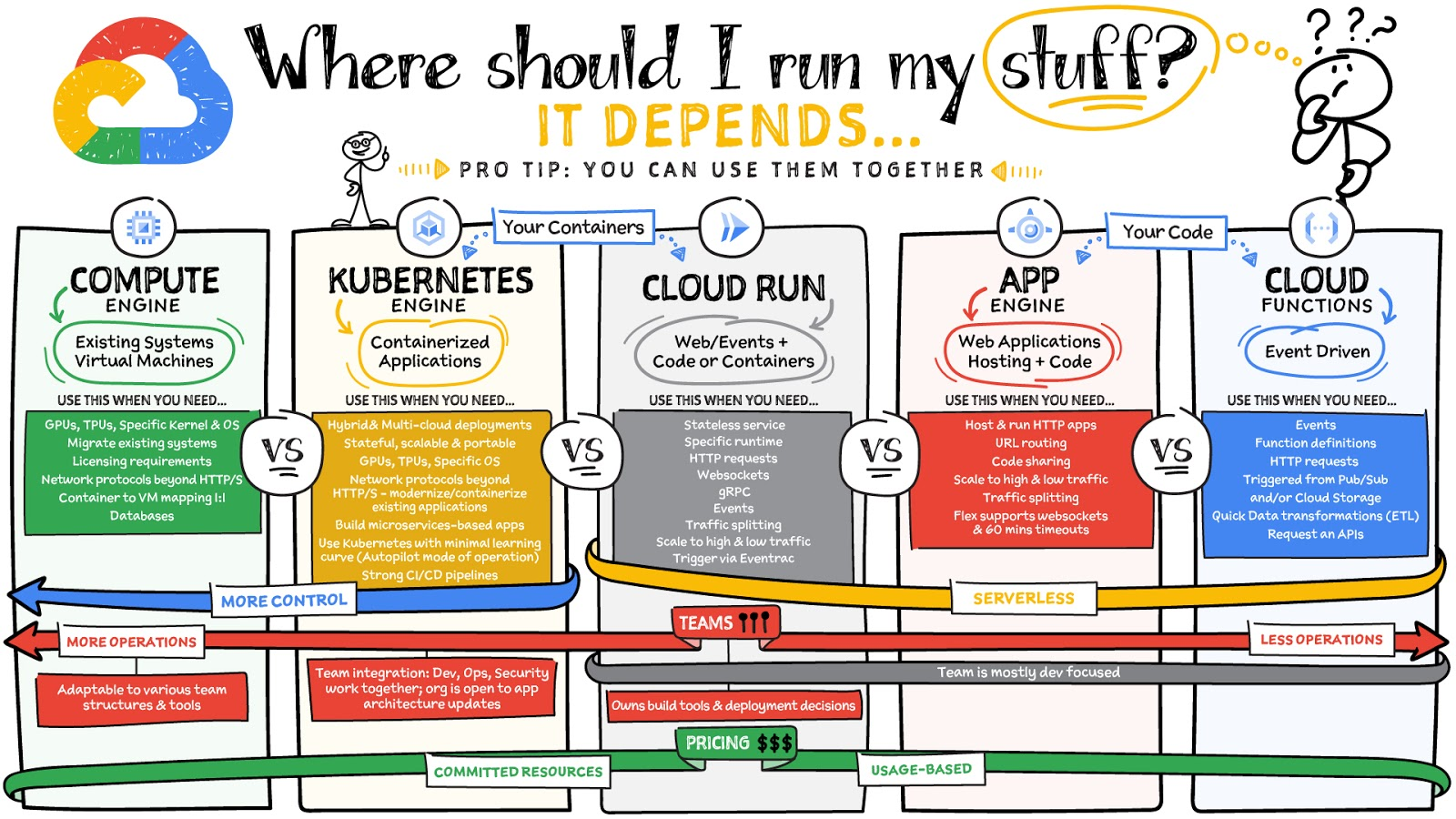
What are these services?
- Compute Engine – Virtual machines. You reserve a configuration of CPU, memory, disk, and GPUs, and decide what OS and additional software to run.
- Kubernetes Engine – Managed Kubernetes clusters. Kubernetes is an open-source system for automating deployment, scaling, and management of containerized applications. You create a cluster and configure which containers to run; Kubernetes keeps them running and manages scaling, updates and connectivity.
- Cloud Run – A fully managed serverless platform that runs individual containers. You give code or a container to Cloud Run, and it hosts and auto scales as needed to respond to web and other events.
- App Engine – A fully managed serverless platform for complete web applications. App Engine handles the networking, application scaling, and database scaling. You write a web application in one of the supported languages, deploy to App Engine, and it handles scaling, updating versions, and so on.
- Cloud Functions – Event-driven serverless functions. You write individual function code and Cloud Functions calls your function when events happen (for example, HTTP, Pub/Sub, and Cloud Storage changes, among others).
What level of abstraction do you need?
- If you need more control over the underlying infrastructure (for example, the operating system, disk images, CPU, RAM, and disk) then it makes sense to use Compute Engine. This is a typical path for legacy application migrations and existing systems that require a specific OS.
- Containers provide a way to virtualize an OS so that multiple workloads can run on a single OS instance. They are fast and lightweight, and they provide portability. If your applications are containerized then you have two main options.
- You can use Google Kubernetes Engine, or GKE, which gives you full control over the container down to the nodes with specific OS, CPU, GPU, disk, memory, and networking. GKE also offers Autopilot, when you need the flexibility and control but have limited ops and engineering support.
- If, on the other hand, you are just looking to run your application in containers without having to worry about scaling the infrastructure, then Cloud Run is the best option. You can just write your application code, package it into a container, and deploy it.
- If you just want to code up your HTTP-based application and leave the scalability and deployment of the app to Google Cloud then App Engine — a serverless, fully-managed option that is designed for hosting and running web applications — is a good option for you.
- If your code is a function and just performs an action based on an event/trigger, then deploying it with Cloud Functions makes sense.
What is your use case?
- Use Compute Engine if you are migrating a legacy application with specific licensing, OS, kernel, or networking requirements. Examples: Windows-based applications, genomics processing, SAP HANA.
- Use GKE if your application needs a specific OS or network protocols beyond HTTP/s. When you use GKE, you are using Kubernetes, which makes it easy to deploy and expand into hybrid and multi-cloud environments. Anthos is a platform specifically designed for hybrid and multi-cloud deployments. It provides single-pane-of-glass visibility across all clusters from infrastructure through to application performance and topology. Example: Microservices-based applications.
- Use Cloud Run if you just need to deploy a containerized application in a programming language of your choice with HTTP/s and websocket support. Examples: websites, APIs, data processing apps, webhooks.
- Use App Engine if you want to deploy and host a web based application (HTTP/s) in a serverless platform. Examples: web applications, mobile app backends
- Use Cloud Functions if your code is a function and just performs an action based on an event/trigger from Pub/Sub or Cloud Storage. Example: Kick off a video transcoding function as soon as a video is saved in your Cloud Storage bucket.
Need portability with open source?
If your requirement is based on portability and open-source support take a look at GKE, Cloud Run, and Cloud Functions. They are all based on open-source frameworks that help you avoid vendor lock-in and give you the freedom to expand your infrastructure into hybrid and multi-cloud environments. GKE clusters are powered by the Kubernetes open-source cluster management system, which provides the mechanisms through which you interact with your cluster. Cloud Run for Anthos is powered by Knative, an open-source project that supports serverless workloads on Kubernetes. Cloud Functions use an open-source FaaS (function as a service) framework to run functions across multiple environments.
What are your team dynamics like?
If you have a small team of developers and you want their attention focused on the code, then a serverless option such as Cloud Run or App Engine is a good choice because you won’t have to have a team managing the infrastructure, scale, and operations. If you have bigger teams, along with your own tools and processes, then Compute Engine or GKE makes more sense because it enables you to define your own process for CI/CD, security, scale, and operations.
What type of billing model do you prefer?
Compute Engine and GKE billing models are based on resources, which means you pay for the instances you have provisioned, independent of usage. You can also take advantage of sustained and committed use discounts.
Cloud Run, App Engine, and Cloud Functions are billed per request, which means you pay as you go.
Conclusion
It’s important to consider all the relevant factors that play a role in picking appropriate compute options for your application. Remember that no decision is necessarily final; you can always move from one option to another.
To explore these points in more detail, please take a look at the “Where Should I Run My Stuff?” video.
For more #GCPSketchnote, follow the GitHub repo & thecloudgirl.dev. For similar cloud content follow us on Twitter at @pvergadia and @briandorsey
Medical Data Breakthrough: Google Aids PicnicHealth’s Growth

4898
Of your peers have already read this article.
3:30 Minutes
The most insightful time you'll spend today!
In the fragmented world of U.S. healthcare, patients often have to wait in line or on hold, navigate multiple patient portals, and fill out numerous request forms—all in pursuit of their own medical history. Healthcare technology startup PicnicHealth is on a mission to put control back with the patient, where it belongs.
PicnicHealth’s growth, from closing successful venture rounds to winning machine learning (ML) competitions, speaks to not only improvements and opportunities in healthcare, but also how startups are leveraging Google Workspace and Google Cloud services to accelerate momentum.
The company does the heavy lifting of collecting records and leverages human-in-the-loop ML to transcribe and validate them with an abstraction team of medical professionals. The records are then structured into a complete medical history that patients can access and share with providers to get better care.
But PicnicHealth helps to improve patient health on more than one front. It allows patients to contribute their data to de-identified medical research, building high-quality, anonymized datasets that researchers and life sciences companies can use to better understand disease progression and treatment in the real world.
Google Workspace has been part of PicnicHealth from day one, helping the founders collaborate and shape the company’s vision using cloud-synced documents and spreadsheets to collaborate and model predictions. “I’ve had a Gmail account since 2006, and in college 100% of people worked out of Google Docs. Workspace continues to be the best choice for online collaboration, and that’s why it’s still the default standard for startups,” said Troy Astorino, CoFounder & CTO of PicnicHealth. “When we started PicnicHealth, my co-founder Noga Leviner was in San Francisco and I was in Southern California, and of course we used Workspace.”
Today, Google Workspace continues to play a central role in the company’s collaboration. “We create design documents in Google Docs, primarily for engineering and product changes, and get really healthy, vibrant discussions through comments,” noted Astorino. “This practice has grown beyond engineering and is used for everything from how the company operates to communication norms.”
Google Workspace offers everything the team needs to collaborate, no matter where employees are. PicnicHealth’s team has spread from San Francisco to being distributed across the country and around the world. Instant collaboration is crucial.
“We work in a complex domain where people need a lot of information to make good decisions,” said Astorino. “Google Workspace allows us to operate in a mode of default transparency, where people can easily get the information they need even if it wasn’t intentionally or directly shared with them. Whether it’s working in Docs or scheduling in Calendar, we can operate much more effectively than we could otherwise.”
By any measure, PicnicHealth’s trajectory is one of record success. The startup is a 2014 alumni of Y Combinator, a program that helped launch household names like Airbnb, DoorDash, and Dropbox. Three years later, the team went on to win the $1 million grand prize at Google’s Machine Learning Competition. And the momentum has continued— PicnicHealth has recently announced a $60 million Series C round, bringing the amount raised to date to over $100 million. With the Series C, PicnicHealth is investing in expanding its reach to more patients across over 30 diseases.
As a healthcare startup, PicnicHealth faced a very particular set of challenges, especially when working with and accessing data. Data fragmentation and interoperability are only some of the challenges of realizing the value of big data in the cloud. The healthcare industry is notoriously difficult to navigate due to sensitive data protection laws and regulations like the Health Insurance Portability and Accountability Act (HIPAA).
PicnicHealth started in the cloud on Amazon Web Services (AWS). However, after migrating over to Kubernetes and facing an expanding list of requirements for HIPAA compliance, the company started to explore alternatives.
“We needed to be HIPAA compliant, which was going to be painful on AWS, and we wanted to get away from managing and operating our own Kubernetes clusters,” recalled Astorino. “We had heard good things about GKE (Google Kubernetes Engine). And particularly valuable for us, — many technical requirements you need for HIPAA compliance are configured by default on Google Cloud.”
PicnicHealth would have had to implement a lot of changes and get specialized instance types to get their existing configuration to work. So, they began experimenting with Google Cloud and discovered a much smoother experience.
“It was a lot easier to manage in terms of product setup and developer experience,” said Astorino. “There is a sane product hierarchy of resources you can access and use through Google Cloud and the relationships between them, from coordinated IAM (identity and access management) to using Google Groups for granting permissions. Overall, it’s cleaner.”
Astorino added that the move has also opened the doors to taking advantage of other services in the Google Cloud ecosystem like Cloud SQL, BigQuery, and Cloud Composer. PicnicHealth also uses Security Command Center because it easily integrates with everything but also helps meet various compliance frameworks’ requirements, providing visibility, near-real-time asset discovery, and security information and event management.
But most importantly, the integrated ecosystem has simplified the work needed for PicnicHealth to create a secure environment for employees to use when working with sensitive medical records while still providing all the tools they need. For example, abstractors not only use Google Workspace but also have Chromebooks because they are easy to manage and secure.
Altogether, Google Cloud helps form a technology stack that has enabled the startup to build a massive labeled dataset containing over 100 million labeled medical data concepts. In turn, it accelerates PicnicHealth’s ability to generate highly-performant AI models and feed other ML pipelines, which has been vital for processing and reviewing data at scale.
To learn more about how Google Workspace and Google Cloud help startups like PicnicHealth accelerate their journey, visit our startups solutions pages for Google Workspace and Google Cloud.
AgroStar: Small farms in India getting big help from the cloud

13263
Of your peers have already read this article.
3:30 Minutes
The most insightful time you'll spend today!
AgroStar has launched a cloud-based mobile app that is helping to boost crop yields and encourage best practices for small farmers in India. Launched as an on-premises ecommerce platform selling farm tools in 2008, the firm turned to Google Cloud Platform (GCP) to expand its offering. It now uses cloud-based analytics and is deploying ML models to provide timely advice in five languages on everything from seed optimization, crop rotation, and soil nutrition to pest control.
A 2018 survey underscored the demand for agricultural planning for Indian farmers. While farming remains a dominant sector in India, employing half of its labor force, 70 percent of small farmers – those cultivating fewer than three acres – said their crops are damaged by unforeseen weather and pests. An even higher number – 74 percent – say they lack access to farming-related information.
Widening that gap is the relative lack of access to new, higher yield seeds and improved soil analyses for small farmers, who must otherwise rely on traditional methods. “It could take a few years for innovative information to trickle down from universities to small, grassroots farmers,” says Pritesh Gudge, AgroStar Software Engineer. “Today, just by clicking through our Android application, farmers learn about new, effective farming practices and receive advice customized to their crop and soil.”
Connecting a million farmers in the cloud
Operating in the Indian states of Gujarat, Maharashtra, Rajasthan, Orissa, Bihar, and Karnataka, AgroStar is closing the knowledge gap with a full-service, cloud-based SaaS solution – the only one of its kind in India. It combines agronomy, data science, and analytics to help farmers by providing a variety of resources.
AgroStar has reached over a million farmers through its Android app, the AgroStar Agri-Doctor. The mobile client is available as a web-based or full-featured native app. Both provide access to the firm’s knowledge base hosted on GCP, a Q&A forum that connects farmers to each other to help understand and better solve problems and to learn about innovative practices and products. Farmers can also click through to follow local and national market trends that help forecast crop prices.
In addition to the self-service knowledge base, AgroStar provides access to agronomy experts who use cloud-based analytics tools and historical data to provide season-and locale-specific advice to each farmer. “We are now tracking thousands of calls in 5 languages each day,” says Pritesh.
The AgroStar app also provides links to purchase and then track the delivery of farm tools and supplies such as cultivators and fertilizers. An in-house platform manages fulfillment centers and a doorstep delivery network simplifies the supply chain while giving farmers what they need, when they need it. By procuring directly from the manufacturers and primary distributors of farm supplies, Agrostar is achieving cost savings, which it passes on to farmers.
Build fast, pivot faster
From the start, the human and environmental variables of farming in India, not to mention the volume of AgroStar’s few hundred thousand monthly active users, made a highly scalable cloud-based solution inevitable. Farmers rely on the firm’s Agri-Doctor app to provide advice in multiple languages on topics that range widely throughout three growing seasons, each with distinct crop nutrition and rotation cycles and farm implementation requirements.
“For farmers, the focus keeps changing every month, and every season,” says Pritesh. “To serve our growing community, we needed a platform that could process images at high volume, fulfill tools and seed orders across thousands of miles, and respond to multilingual queries. We quickly moved away from spreadsheets and server-based solutions – we needed to build fast and pivot faster.”
Ending late-night deployments
The firm’s first cloud experience was with an AWS solution. At the time, AWS was the only cloud provider in India, but AgroStar wanted to find a solution that was easier to use and offered better integration with Android devices. “Deployment and processing costs were very high, and the developer tools and documentation were not as intuitive as we needed,” says Pritesh.
When GCP service arrived in India in October 2017, AgroStar embarked on a platform re-implementation that made possible dramatic changes in the way it developed and deployed its solution. Using Google Kubernetes Engine (GKE) for crop advice management and Compute Engine for its production application services, the firm built the backend for the Agri-Doctor discussion forum in only three weeks. The platform’s microservice architecture is implemented in Python and Golang and deployed on GCP.
AgroStar began to realize significant efficiencies in its build, deploy, and test cycles. “We previously needed to work overnight to deploy to production,” says Pritesh. “Now using Google for Kubernetes containers and a rolling update strategy, we can deploy during the day without any problems or interruptions to service.”
The move to GCP streamlined AgroStar’s stack. “We were running 12 independent instances on AWS,” says Pritesh. “With Google Kubernetes Engine, we are deployed on a single cluster at a cost savings of $1,300 per month and growing.”
Improving customer response times by 85 percent
With a managed deployment capability, AgroStar can devote more time and resources to executing on its platform and Agri-Doctor app development plan. A strategic goal was managing customer response times as the firm grew its base. GCP has helped the firm meet that goal, achieving an 85 percent improvement in customer response times even as traffic grew significantly.
“With our on-premises solution, we could handle around 100 customers daily, which took 30 to 50 minutes for each customer,” says Pritesh. “We now handle thousands of customers daily, taking only 4 to 5 minutes for each one.”
AgroStar used Firebase to implement its Agri-Doctor app. A real-time cloud database, Firebase provides an API that enables the Agri-Doctor advice forum to be synchronized across all its far-flung mobile clients, effectively sharing knowledge base updates with one million users in near real time.
Using cloud tools to manage and monitor
Cloud Pub/Sub, Kafka, and Cloud Dataflow manage data ingestion and queueing of event and transaction data to the analytics layer. BigQuery fetches and persists data to Cloud Storage. Cloud SQL and dashboards powered by Tableau deliver farmer crop and soil profiles within minutes.
Cloud IAM helps AgroStar control access to all its cloud resources. And Stackdriver, the integrated logging aggregation capability for GCP, helps monitor and speed debugging on every tier of the AgroStar solution.
Machine learning to enhance yields
AgroStar is developing a variety of ML components to improve responsiveness and extend its platform offerings.
To speed up the diagnosis of and treatment for crop blight, AgroStar is building a deep learning pipeline using TensorFlow. The pipeline relies on GoogLeNet models that use multi-layered convolutional visual pattern recognition. It will assess uploaded images to support a disease-detection capability on the mobile app. Based on the commercially successful AI algorithms that automated postal code processing, GoogLeNet offers improved performance and computational efficiencies by using a creative layering technique that distinguishes them from older, sequential recognition engines.
To improve its customer search experience, AgroStar is developing an ML pipeline that shrinks fetch times by suggesting tags mapped to stored data. Processed using TPUs, Cloud Natural Language and Video AI, the tags provide a metadata layer that supports queries in any of the ten natural languages that AgroStar farmers can use.
The AgroStar search pipeline consists of Long Short-Term Memory (LSTM) models of Recurrent Neural Networks. Recurrent networks exhibit “memory” through iterative processing and are distinguished from feedforward networks by a feedback loop connected to their past decisions, ingesting their own outputs moment after moment as input.
Implementing a recommendation engine
The firm is also adapting the Random Forests TensorFlow AI model to develop a crop and product recommendation engine. The model is trained by consuming numerical (rainfall, humidity, water availability per acre) and categorical (soil type, water sources) parameters to suggest appropriate products by season, region, and locale.
To simplify the product suggestion experience, AgroStar developers are testing Cloud Dialogflow, the Google Cloud conversational interface, to build a chatbot capability into its mobile app. The bot will track a farmer’s crop schedules and answer simple questions by linking to the recommendation engine.
AgroStar is also extending its analytics platform with AI-powered sales planning and forecasting. Using linear regression models implemented in TensorFlow and powered by Cloud ML Engine, the capability will enhance supply chain logistics as the company scales its operations across India.
To provide a credit on-demand offering for a range of seed-to-harvest cycle products, AgroStar is attempting to use Vision API to create an AI model that will convert uploaded photos of customer application records into standard data formats. The firm’s credit policy features a grace period in which farmers begin paying back loans after harvested crops go to market.
A versatile and friendly development ecosystem
AgroStar credits the convivial tools and documentation that GCP offers and its incremental, pay-as-you-go pricing model for both the firm’s success and its ability to manage growth.
“What Google Cloud offers is extremely good documentation and extremely simple-to-use tools and interfaces across all services,” says Pritesh. “It helped us initially deploy our platform and at every scale that we have required since then, and its cost effectiveness enabled us to staff up to meet new feature milestones.”
Titanium: A Robust Foundation for Workload-optimized Cloud Computing

948
Of your peers have already read this article.
3:30 Minutes
The most insightful time you'll spend today!
Google Cloud is built on world-class technical infrastructure that supports services that are loved and relied on by billions of people across the globe: Google Search, YouTube, Gmail, Google Maps and more. A core tenet at Google Cloud is to leverage Google’s experience building and operating highly available and highly reliable planetary-scale compute, storage and networking systems and data centers.
Google takes a workload-optimized approach to building its infrastructure, employing a combination of dedicated hardware and software components to meet its workloads’ ever-growing demands. Underpinning this infrastructure is Titanium, a system of purpose-built, custom silicon and multiple tiers of scale-out offloads that together power improvements in the performance, reliability, and security of our customers’ workloads (for example, 25% faster block storage IOPS/instance compared to the other two leading hyperscalers). Unveiled today at Google Cloud Next, you’ll find Titanium technology in many of Google Cloud’s recent infrastructure offerings.
10x demands of tomorrow
Meeting the growing performance, reliability, and security demands of both legacy and emerging workloads is a constant challenge for cloud infrastructure providers. And now, these demands are multiplying with the heightened adoption of generative AI across almost every industry. Meanwhile, the benefits of Moore’s law have been declining in recent years. We can’t rely on silicon advances alone to meet tomorrow’s needs.
As just one example, this chart shows the exponential computing demands of large language models.
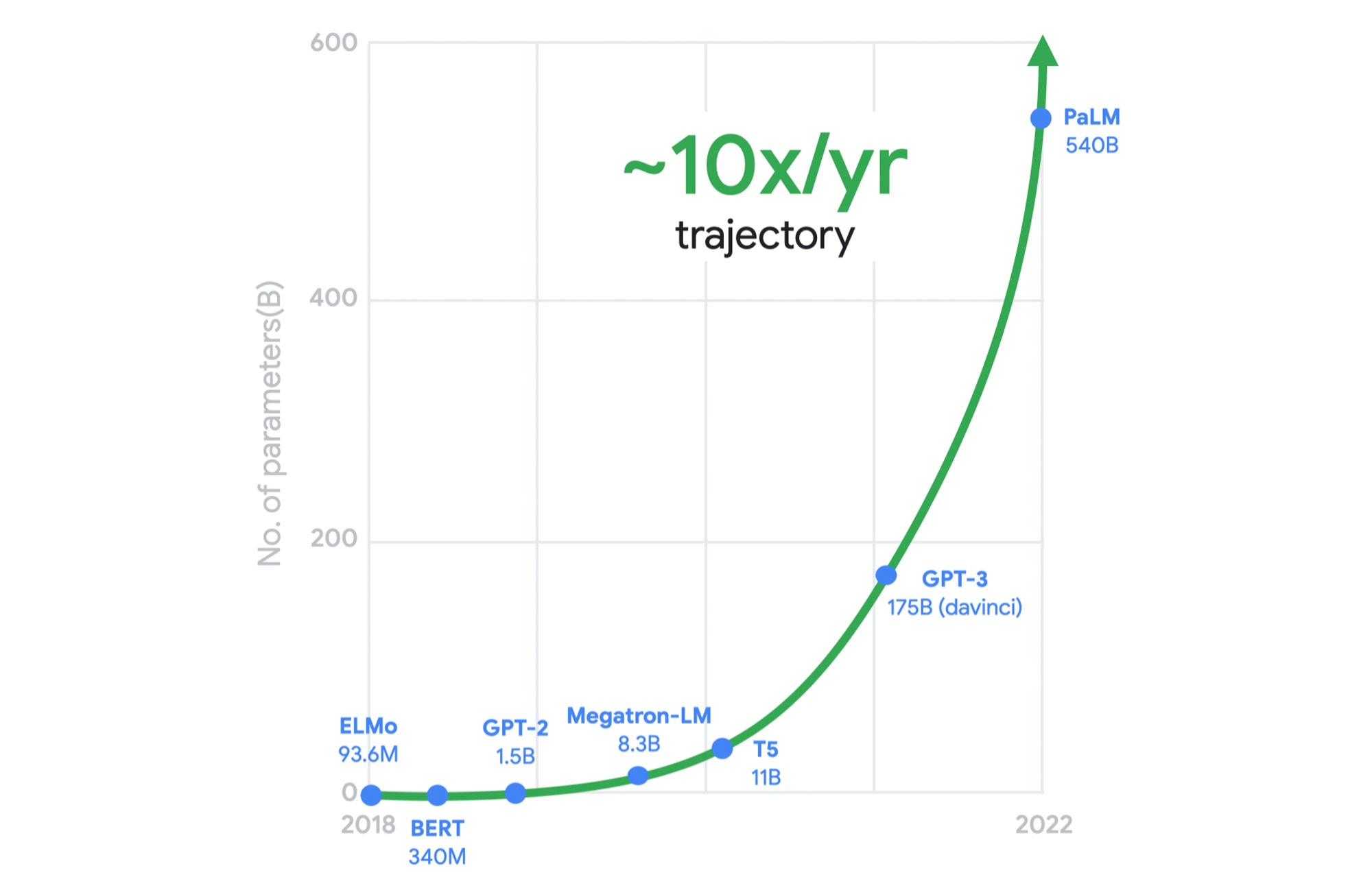
It was clear to us a long time ago that we needed to rethink our infrastructure designs to meet these demands. This is why, for several years, we’ve adopted workload-optimization and intentional design as central principles for our infrastructure platform. We engineer golden paths from silicon to the customer workload, using a combination of purpose-built infrastructure, prescriptive architectures, and an open ecosystem to deliver workload-optimized infrastructure.
Offloads play a pivotal role
Central to this strategy are offload technologies. Traditionally, the CPU wears many hats: It runs the hypervisor, the virtualization stack to enable your workloads, and manages storage and networking I/O; it’s responsible for security isolation for virtual interfaces and physical hardware, etc. In this model, customer workloads running on the CPU contend for resources with these platform tasks.
Offloads on dedicated hardware perform behind-the-scenes security, networking, and storage functions that were previously performed by the host CPU, allowing the CPU to focus on maximizing performance for customer workloads.

A recent example of an on-host offload or accelerator is the Infrastructure Processing Unit (IPU), a system-on-chip that we co-designed with Intel to enable better security isolation and performance on our 3rd gen compute instances. The IPU enables:
- Predictable and efficient compute
- Programmable packet processing for low latency, 200 Gbps networking with 3x the packets per second compared to our previous-generation compute instances
- In-transit encryption with the PSP protocol
Another important example of Google’s on-host hardware is Titan, a secure, low-power microcontroller that helps ensure that every machine in Google Cloud boots from a trusted state.
But we did not stop there. To meet tomorrow’s demands, we knew we needed to go past the performance that could be achieved using the host’s dedicated offload hardware.
A tiered system of offloads
A key component of Titanium is its modern offload architecture, which combines capabilities whose scale and performance are well-established within Google, as well as new capabilities tailored for cloud use cases.
Just as modern workloads scale out horizontally in the cloud, with Titanium, we’ve extended the architecture to augment on-host offloads with an additional tier of scale-out offloads that run outside the host. This system of offloads is deployed fleet-wide and dynamically adjusts to changing workload needs to continually deliver the best performance.

Example 1: Block storage
Titanium scale-out offload enables Hyperdisk block storage to deliver stellar I/O performance. Hyperdisk’s Titanium offload on the host IPU works in tandem with the Titanium scale-out offload tier that distributes I/O across Google’s massive cluster-level filesystem, Colossus.

With traditional offload architectures, higher block storage IOPS requires purchasing larger compute instances. For example, you may need to deploy a data-intensive workload on a compute instance with many more vCPUs than the workload needs just to get sufficient storage performance. This tight coupling results in wasted resources and higher costs for customers. Further, even with large instances, storage performance in the cloud may be inadequate relative to what customers are used to with on-prem storage systems.
With our new block storage, Hyperdisk powered by Titanium, we have decoupled compute-instance size from storage performance. Hyperdisk uses a tier of offloads in our cloud fabric to offload storage I/O from the customer hosts to achieve higher storage performance even with a general-purpose VM.
In fact, today we are announcing that Titanium-powered C3 VMs with Hyperdisk Extreme now support 500K IOPS per compute instance in preview to meet the needs of the most demanding workloads. This is 25% faster IOPS/instance compared to the other two leading hyperscalers, courtesy of the Titanium system.
Example 2: Network routing
Virtual network routing is another example of using a second tier of scale-out offloads (“hoverboards”). With Titanium, Google’s Andromeda virtual networking stack on the IPU offload device sends all packets for which it does not have a route to Hoverboard gateways, which have forwarding information for all virtual networks. Hoverboards are standalone software switches that act as default routers for some flows.

Unlike the traditional gateway model, the control plane dynamically detects flows that exceed a specified usage threshold and programs them to be direct host-to-host flows, bypassing the hoverboards allowing hoverboards to focus on the long tail of less frequent flows. Typically, only a small subset of possible VM pairs in a network communicate with one another, so the VMs only have to store and process a small fraction of the usual network configuration on an individual VM host, improving per-server memory utilization and control-plane CPU scalability.
Titanium already powers your workloads
The Titanium journey began years ago with the component technologies described above. Many of our products already benefit from this architecture, and the newest elements of this architecture are now available with our 3rd gen Compute Engine instances such as C3 and the new Hyperdisk block storage.
Going forward, look for the Titanium architecture to underpin all future generations of our infrastructure offerings, in the process enabling new classes of infrastructure capabilities that move well beyond the confines of a single server.
4 Steps to a Successful Cloud Migration

3961
Of your peers have already read this article.
2:00 Minutes
The most insightful time you'll spend today!
Digital transformation and migration to the cloud are top priorities for a lot of enterprises. At Google Cloud, we’re working hard to make this journey easier. For example, we recently launched Migrate for Compute Engine and Migrate for Anthos to simplify cloud migration and modernization. These services have helped customers like Cardinal Health perform successful, large-scale migrations to GCP.
But we understand that the migration journey can be daunting. To make things easier, we developed a whitepaper on application migration featuring investigative processes and advice to help you design an effective migration and modernization strategy. This guide outlines the four basic steps you need to follow to migrate successfully and efficiently:
- Build an inventory of your applications and infrastructure: Understanding how many items, such as applications and hardware appliances, exist in your current environment is an important first step.
- Categorize your applications: Analyze the characteristics of all of your applications and evaluate them across two dimensions: migration to cloud, and modernization.
- Decide whether or not to migrate an application to the cloud: Not all applications should move to the cloud quite yet. The whitepaper lists the questions to ask to determine whether or not to migrate a given application.
- Pick your migration strategy: For the applications you decided to migrate, decide on your ideal strategy—pure lift and shift, containers, cloud managed services, or a combination thereof.
There’s a lot to consider when you start thinking about digital transformation, and every cloud modernization project has its nuances and unique considerations. The secret to success is understanding the advantages and disadvantages of the options at your disposal, and weighing them against what you want to transform and why. To learn how to migrate and modernize your applications with Google Cloud, download this whitepaper.
More Relevant Stories for Your Company

RISE with SAP on Google Cloud is An Engine of Progress for Cloud Migrations!
The practical benefits of migrating SAP systems to the cloud aren’t lost on most businesses. Running SAP in the cloud lets companies simplify tasks, scale quickly, and reduce costs. But as a growing number of organizations are discovering, the cloud is more than the sum of improved processes and workflows.

YoungCapital CIO: Why I Moved to Google Cloud and G Suite to Grow Our Business
When your business is rapidly adding new employees, expanding to new countries, and always focused on staying ahead of the competition, you have to take a hard look at the tools that are slowing you down—and swap them out for better ones that can keep pace with the company. We’re

Highnote Build the First Flexible, End-to-end Embedded Finance Platform on Google Cloud
The ability to quickly introduce and evolve payment options for products or services is essential for businesses, as nearly 50% of consumers who can’t use a preferred payment method abandon their purchase. At the same time, gift cards, branded credit cards and rewards programs are critical tools that companies rely

Cloud on Europe’s Terms: How Google Sets to Deliver Cloud Services for Driving Digital Sovereignty
Cloud computing is globally recognized as the single most effective, agile and scalable path to digitally transform and drive value creation. It has been a critical catalyst for growth, allowing private organizations and governments to support consumers and citizens alike, delivering services quickly without prohibitive capital investment. European organizations—in both
