





Latest Enhancements in reCAPTCHA Enterprise Helps Govts Sites Protect against Digital Frauds

2989
Of your peers have already read this article.
1:30 Minutes
The most insightful time you'll spend today!
Download our guidebook to learn how reCAPTCHA Enterprise can help strengthen your website security quickly.
Cyber threats on the rise
In 2021, the United States saw 40.5% of website attacks committed through “bad bots” on the internet, with 37.2% of government website traffic being bad bots, according to research by cybersecurity firm Imperva1. As cyber threats increase, government agencies need a way to safely let constituents access digital services. Google Cloud reCAPTCHA Enterprise protects websites by distinguishing between humans and bots. Full-scale implementation of reCAPTCHA Enterprise solution expands on bot detection to protect public sector websites from a broad range of digital fraud. Below are some highlights from our new reCAPTCHA Enterprise guidebook detailing functional enhancements and ways for government agencies to take advantage of enterprise capabilities.
Advanced website protection
reCAPTCHA Enterprise builds upon the existing reCAPTCHA API that has defended 5+ million websites for over a decade. It uses advanced risk analysis techniques to distinguish between humans and bots, protecting sites from spam and abuse as well as detecting other fraudulent activities, including credential stuffing, account takeovers (ATO), and automated account creation.
How it works
Detecting password leaks and credential breaches
With reCAPTCHA Enterprise’s password leak protection, agencies can conduct regular audits of user credentials, such as passwords, to detect leaks and breaches and prevent account takeovers (ATOs), as well as credential stuffing attacks.
UI challenge vs. frictionless
reCAPTCHA Enterprise returns a score, giving you the ability to take a number of actions, including requiring additional factors of authentication or throttling bots that may be scraping content. This functionality allows you to verify if an interaction is legitimate without any user interaction.
User-friendly migration
Google Cloud’s reCAPTCHA Enterprise offers a simple migration process in which your account is moved from the reCAPTCHA Admin to the Google Cloud Platform (GCP) after you create a project to migrate it to. Watch our 10-minute webinar to see how.
A cost-effective upgrade to a standard cybersecurity solution
Google reCAPTCHA Enterprise comes with 99.9%+ uptime, multi-factor authentication, and support for Android, iOS, and web applications. Our reCAPTCHA offering is structured in a way that allows you to fully control your investment and responsibly allocate taxpayer dollars.
reCAPTCHA Enterprise in action
Google Cloud’s reCAPTCHA protects against key automated attacks, including account creation, credential stuffing, cashing out, denial of inventory, and skewing. State governments have found success with using Google Cloud’s reCAPTCHA for cyber risk management. Wisconsin’s Workforce Development Agency used fraud detection and identification, including reCAPTCHA, to mitigate malicious bot logins on its external website, and several agencies in the Commonwealth of Pennsylvania have implemented reCAPTCHA to prevent bots from booking and reselling COVID-19 vaccine appointments.
Protecting public sector websites from bad actors can be challenging, especially with emerging threats from adversaries and extremist groups. Google Cloud’s reCAPTCHA Enterprise offers comprehensive website security solutions to successfully protect against cyber threats.
Download our reCAPTCHA Enterprise guidebook for a detailed look at how you can use reCAPTCHA Enterprise to strengthen your website security and implement the solution quickly and easily.
References:
Find the Best Kept Security Secrets to Harness the Power of Organization Policy Service

2688
Of your peers have already read this article.
2:30 Minutes
The most insightful time you'll spend today!
The canvas of cloud resources is vast, ready for an ambitious organization to craft their digital masterpiece (or perhaps just their business.) Yet before the first brush of paint is applied, a painter in the cloud needs to think about their frame: What shape should it take, what material is it made of, how will it look as a border against the canvas of their cloud service. Google Cloud’s Organization Policy Service is just such a frame, a broad set of tools for our customer’s security teams to set broad yet unbendable limits for engineers before they start working.
Google Cloud’s Organization (org) Policy Service is one of our most dramatic features but is often under-appreciated by security teams. It provides for a separation of duties by focusing on what users can do, and lets the administrator set restrictions on specific resources to determine how they can be configured. This drives defense in depth from configuration errors as well as defense in depth from attacks. An org policy lets the administrator enforce compliance and conformance at a higher level than Identity and Access Management, which focuses on which users can access specific resources.
Org policies can reduce toil and can improve security at the scale needed by today’s cloud users. Financial services provider HSBC is one of Google Cloud’s largest customers and has been using org policies for years to help it manage cloud resources across its highly-regulated enterprise environment. As the company explains in this video, HSBC’s creative use of org policies manages more than 15,000 service accounts and 40,000 IT professionals. They control 6.5 million virtual machines per year. That’s 22,500 virtual machines per day, and only 2,500 of those VMs exist for more than 24 hours
HSBC prefers org policies instead of other preventative controls because they are native to Google Cloud and can be enforced independently of how the request originated (such as from Infrastructure-as-Code, Google Cloud services interacting with each other, or a user in the UI.) Detecting resource violations is expensive for many customers, and often comes too late to prevent harm. Org Policies can be deployed to prevent violations from occurring and eliminate detection and remediation costs.
Importantly, HSBC’s custom installation is designed so that org policy violations are immediately discoverable, which can help HSBC personnel quickly understand how to quickly and accurately correct an error condition. When an action violates org policy, an error code is returned telling the resource requester which policy was violated. Corresponding logs are generated for administrators to monitor and provide further troubleshooting.
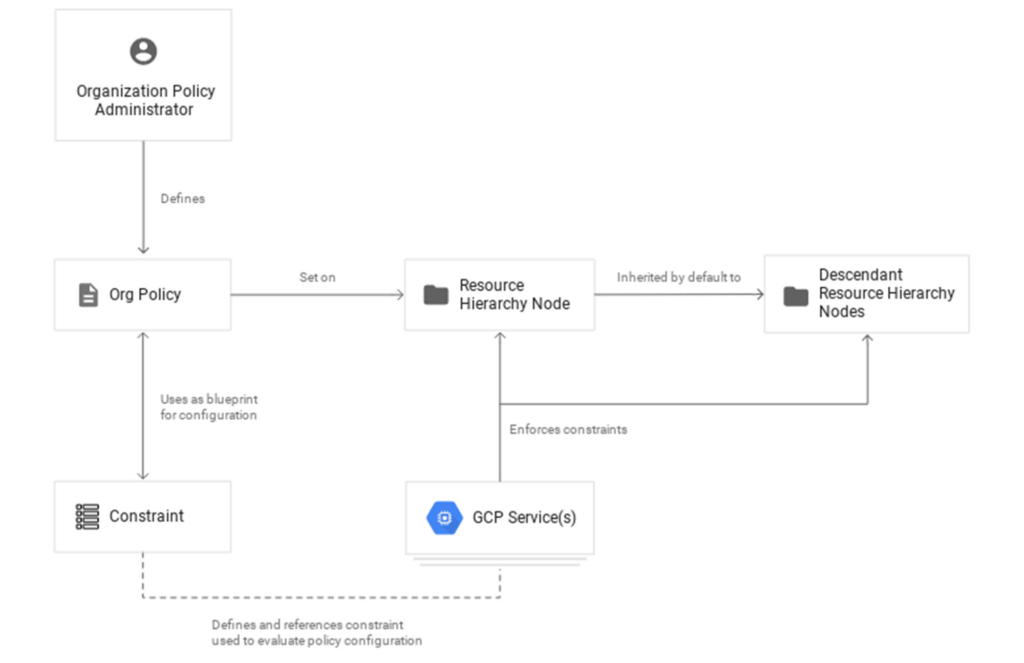
Here are two additional use cases that further illustrate the power of organization policies.
- Organizations that operate in a region with rigorous data residency requirements can configure and enable the Location org policy to help ensure that all resources created (such as VMs, clusters, and buckets) are deployed in a particular cloud region.
- Admins who want to ensure that only trusted workloads are deployed for Google Kubernetes Engine (GKE) or Cloud Run may want to restrict developers to only use verified images in their deployment processes. They can create a custom org policy that targets GKE cluster resource type and create and update methods to block the creation or update of any clusters that do not have binary authorization enforced.
How it works
Google Cloud offers more than 80 org policies that can be used to restrict and govern interactions with Google Cloud services and resources across important domains such as security, reliability, and compliance. Org policies can help:
- Restrict resource and service access to the organization domain only, secure public access to resources, or stop service account key abuse.
- Enforce use of global or regional DNS, and global or regional load balancing, to Improve service reliability and availability.
- Specify which services can access resources, in which regions, and at what times in support of compliance objectives.
- Secure Virtual Private Cloud (VPC) networks and reduce data exfiltration risk by preventing data from leaving a specific perimeter.
See the Organization Policy Service list of constraints for more about org policies and constraints.
You can also use the recently introduced Custom Organization Policies to tailor guardrails so they meet your specific compliance and security requirements. With Custom Organization Policies, security administrators can create their own constraints using Common Expression Language (CEL) to define which resource configurations are allowed or denied. Administrators can develop and deploy new policies and constraints in minutes.
With great power comes great responsibility, so with that in mind we will soon be introducing Dry Run for Custom Org Policies. It will let users put a policy in an audit-only mode to observe behavior during real operations without putting production workloads at risk.
Getting started
1. Setting up your first org policy is straightforward. An organization policy administrator enables a new organization policy on a Google Cloud organization, folder, or project in scope. Once set, the administrator then determines and applies the constraints. Here’s how it works:Design your constraint, which is a particular type of restriction against either a single Google Cloud service or a group of Google Cloud services. You can choose from the list of available built-in constraints by configuring desired restrictions and exceptions (based on tags) or create custom org policies.
It’s important to remember that descendants of the targeted resource hierarchy node inherit the org policy. By applying an organization policy to the root organization node, you can drive enforcement of that organization policy and configuration of restrictions across your organization.
2. Deploy the org policy to evaluate and allow or deny resource Create, Update, and Delete operations. This can be done through the Google Cloud console, gCloud, or via API.
3. Monitor audit logs and your Security Command Center Premium findings to detect and respond to policy violations.
Do I need an org policy?
Org policies can help maintain security and compliance at scale while also allowing development teams to work rapidly. Because they give you the ability to set broad guardrails, they can help ensure compliance without adding operational overhead and monitor policy violations.
To learn more about org policy, please review these resources:
- Read the Creating and Managing Organizations page to learn how to acquire an organization resource.
- Read about how to create and manage organization policies with the Google Cloud console.
- Learn how to define organization policies using constraints.
- Explore the solutions you can accomplish with organization policy constraints.
- Listen to the podcast where Vandy Ramadurai, Google Cloud’s Org Policy product manager, explains it all.
Highmark & Google’s Secure-by-design Technique to Bring the Living Health Solution to Life

6540
Of your peers have already read this article.
3:30 Minutes
The most insightful time you'll spend today!
In an industry as highly regulated as healthcare, building a single secure and compliant application that tracks patient care and appointments at a clinic requires a great deal of planning from development and security teams. So, imagine what it would be like to build a solution that includes almost everything related to a patient’s healthcare, including insurance and billing. That’s what Highmark Health (Highmark)—a U.S. health and wellness organization that provides millions of customers with health insurance plans, a physician and hospital network, and a diverse portfolio of businesses–decided to do.
Highmark is developing a solution called Living Health to re-imagine healthcare delivery, and it is using Google Cloud and the Google Cloud Professional Services Organization (PSO) to build and maintain the innovation platform supporting this forward thinking experience. Considering all the personal information that different parties like insurers, specialists, billers and coders, clinics, and hospitals share, Highmark must build security and compliance into every part of the solution.
In this blog, we look at how Highmark Health and Google are using a technique called “secure-by-design” to address the security, privacy, and compliance aspects of bringing Living Health to life.
Secure-by-design: Preventive care for development
In healthcare, preventing an illness or condition is the ideal outcome. Preventive care often involves early intervention—a course of ideas and actions to ward off illness, permanent injury, and so on. Interestingly, when developing a groundbreaking delivery model like Living Health, it’s a good idea to take the same approach to security, privacy, and compliance.
That’s why Highmark’s security and technology teams worked with their Google Cloud PSO team to implement secure-by-design for every step of design, development, and operations. Security is built into the entire development process rather than waiting until after implementation to reactively secure the platform or remediate security gaps.
It’s analogous to choosing the right brakes for a car before it rolls off the assembly line instead of having an inspector shut down production because the car failed its safety tests. The key aspect of secure-by-design is an underlying application architecture created from foundational building blocks that sit on top of a secure cloud infrastructure. Secure-by-design works to ensure that these building blocks are secure and compliant before moving on to development.
The entire approach requires security, development, and cloud teams to work together with other stakeholders. Most importantly, it requires a cloud partner, cloud services, and a cloud infrastructure that can support it.
Finding the right cloud and services for secure-by-design
Highmark chose Google Cloud because of its leadership in analytics, infrastructure services, and platform as a service. In addition, Google Cloud has made strategic investments in healthcare interoperability and innovation, which was another key reason Highmark decided to work with Google. As a result, Highmark felt that Google Cloud and the Google Cloud PSO were best suited for delivering on the vision of Living Health—its security and its outcomes.
“Google takes security more seriously than the other providers we considered, which is very important to an organization like us. Cloud applications and infrastructure for healthcare must be secure and compliant,” explains Highmark Vice President and Chief Information Security Officer, Omar Khawaja.
Forming a foundation for security and compliance
How does security-by-design with services work? It starts with the creation and securing of the foundational platform, allowing teams to harden and enforce specified security controls. It’s a collaborative process that starts with input from cross-functional teams—not just technology teams—using terms they understand, so that everyone has a stake in the design.
A strong data governance and protection program classifies and segments workloads based on risk and sensitivity. Teams build multiple layers of defense into the foundational layers to mitigate against key industry risks. Google managed services such as VPC Service Controls help prevent unauthorized access. Automated controls such as those in Data Loss Prevention help teams quickly classify data and identify and respond to potential sources of data risk. Automation capabilities help ensure that security policies are enforced.
After the foundational work is done, it’s time to assess and apply security controls to the different building blocks, which are Google Cloud services such as Google Kubernetes Engine, Google Compute Engine, and Google Cloud Storage. The goal is to make sure that these and similar building blocks, or any combination of them, do not introduce additional risks and to ensure any identified risks are remediated or mitigated.
Enabling use cases, step by step
After the foundational security is established, the security-by-design program enables the Google Cloud services that developers then use to build use cases that form Living Health. The service enablement approach allows Highmark to address complexity by providing the controls most relevant for each individual service.
For each service, the teams begin by determining the risks and the controls that can reduce them. The next step is enforcing preventive and detective controls across various tools. After validation, technical teams can be granted an authorization to operate, also called an ATO. An ATO authorizes the service for development in a use case.
For use cases with greater data sensitivity, the Highmark teams validate the recommended security controls with an external trust assessor, who uses the HITRUST Common Security Framework, which maps to certifications and compliance such as HIPAA, NIST, GDPR, and more. A certification process follows that can take anywhere from a few weeks to a few months. In addition to certification, there is ongoing monitoring of the environment for events, behavior, control effectiveness, and control lapses or any deviation from the controls.
The approach simplifies compliance for developers by abstracting compliance requirements away. The process provides developers a set of security requirements written in the language of the cloud, rather than in the language of compliance, providing more prescriptive guidance as they build solutions. Through the secure-by-design program, the Highmark technology and security teams, Google, the business, and the third-party trust assessor all contribute to a secure foundation for any architectural design with enabled Google Cloud services as building blocks.
Beating the learning curve
Thanks to the Living Health project, the Highmark technology and security teams are trying new methods. They are exploring new tools for building secure applications in the cloud. They are paying close attention to processes and the use case steps and, when necessary, aligning different teams to execute. Because everyone is working together collaboratively toward a shared goal, teams are delivering more things on time and with predictability, which has reduced volatility and surprises.
The secrets to success: Bringing everyone to the table early and with humility
Together, Highmark and Google Cloud PSO have created over 24 secure-by-design building blocks by bringing everyone to the table early and relying on thoughtful, honest communication. Input for the architecture design produced for Highmark came from privacy teams, legal teams, security teams, and the teams that are building the applications. And that degree of collaboration ultimately leads to a much better product because everyone has a shared sense of responsibility and ownership of what was built.
Delivering a highly complex solution like Living Health takes significant, more purposeful communication and execution. It is also important to be honest and humble. The security, technology, and Google teams have learned to admit when something isn’t working and to ask for help or ideas for a solution. The teams are also able to accept that they don’t have all the answers, and that they need to figure out solutions by experimenting. Khawaja puts it simply, “That level of humility has been really important and enabled us to have the successes that we’ve had. And hopefully that’ll be something that we continue to retain in our DNA.”
4534
Of your peers have already watched this video.
31:00 Minutes
The most insightful time you'll spend today!
How Google Secures its Data Centers: Watch Video
Security is in the DNA of Google Cloud’s dozens of data centers, complex network and workloads scattered the globe. Take a tour to the nucleus of data center’s six layers of physical security designed to keep unauthorized access at bay, and also learn about Google Cloud’s security fundamentals to leverage the same philosophy on Google Cloud. Watch now!
5 ways a SOAR solution improves SOC analyst onboarding

3031
Of your peers have already read this article.
2:30 Minutes
The most insightful time you'll spend today!
Editor’s note: This blog was originally published by Siemplify on Feb. 19, 2021.
The number of unfilled cybersecurity jobs stretches into the millions, and a critical part of the problem is the length of time it takes to backfill a position.
Industry group ISACA has found that the average cybersecurity position lies vacant for up to six months. Some positions, like security analyst, are difficult to find suitable candidates for thanks to workplace challenges such as lack of management support and burnout.
As the old phrase goes, time is money. So when organizations are fortunate enough to fill a position with the appropriate talent, they want to be able to make up for lost time as quickly as possible. This is especially true for roles in the security operations center, a setting notorious for needing staff to field never-ending alerts generated by an often-disparate collection of security tools.
Training new analysts can be a daunting task. They need time to get acquainted with the SOC’s technology stack and processes. Without documentation, they often ask senior analysts for guidance. This can create distractions and consume time.
A reliance on community knowledge—undocumented, not widely-known information within an organization—creates inconsistency within the SOC that contributes to longer ramp-up times for new analysts. Undocumented processes, combined with security tools that don’t talk to each other, typically mean a SOC will need to spend nearly 100 hours—the equivalent of 2 1/2 weeks—getting a single new analyst up to speed.
Enter automation. Throughout an analyst’s career in the SOC, a security orchestration, automation, and response (SOAR) solution can be their best friend, helping expedite routine tasks and liberating them to perform more exciting work. But the technology can also allow even the most junior analysts to have an auspicious onboarding experience—hitting the ground running on day one, acclimated to their new environment, and feeling comfortable about and confident in their future.
Here are five ways a SOAR solution can, among many other activities, aid in analyst onboarding
1) The SOAR solution deploys automated playbooks
The average SOC receives large numbers of alerts per day, and many will be false positives. That amounts to a lot of dead-ends for analysts to chase and leaves little time to investigate legitimate anomalous network activity. The sheer volume of alerts has even prompted some analysts to turn off high-alert features on detection tools, potentially causing teams to miss something important.
SOAR helps analysts hurdle these roadblocks by allowing teams to create custom, automated playbooks, workflows that equalize resources and knowledge across the SOC, and help maintain consistency in the face of new hires and staff turnover. And if analysts should need to create or edit any of the steps in these playbooks, the optimal SOAR solution will enable them to do this without knowledge of specific coding or query languages, acumen that a novice analyst may lack.
2) The SOAR solution groups related alerts
As multiple alerts from different security tools are generated, some SOAR solutions allow you to automatically consolidate and group these alerts into one cohesive interface. This is what is known as taking a threat-centric approach to investigations, with the SOAR looking for contextual relationships in the alerts and, if identified, grouping these alerts into a single case. Having the ability to work more manageable and focused cases right off the bat will help ensure a smoother transition for new analysts.
3) The SOAR solution pieces together the security stack
https://www.siemplify.co/getstartedFrom next-generation firewalls to SIEM to endpoint detection and response, the security stack in any given organization can be vast and complex. No incoming analyst has reasonable time to familiarize themselves with every tool living within the stack—or to manually tap into these different tools to obtain the appropriate context to apply to alerts. A SOAR solution alleviates this challenge by delivering context-rich data that can be analyzed in one central platform, eliminating the need for multiple consoles for alert triage, investigation and remediation. Plus, with a SOAR solution, there is no need for the SOC to directly touch a detection tool that another group may manage.
4) The SOAR solution streamlines collaboration to enable easy escalation and information sharing
Often the SOC is not capable of responding to every threat, meaning other departments, such as networking, critical ops, or change management need to be involved. In addition, executive personnel are likely interested in security trends happening within the organization. Because not every group communicates in the same way—or consumes information in the same way—breakdowns can occur, and frustrations can mount, especially for a new analyst. A SOAR solution can even the playing field by automatically generating instructions, updates, or reports from the SOC to other teams, and vice versa. SOAR is also a useful solution for collaborating within the SOC team as well, especially in the age of remote and hybrid work.
5) The SOAR solution prevents analysts from quickly burning out.
There is a reason why the SOC has obtained the dubious acronym of “sleeping on chair.” Life in this environment can be a tedious, mental grind, prompting certain inhabitants to literally fall asleep from boredom.
SOAR solutions can counter this tedium in two notable ways. They can prevent analysts from having to stare at a multitude of monitors while working long shifts. They can also free analysts to work on more strategic and thought-provoking assignments, which can help improve the company’s overall security posture—and ensure a new entrant to the SOC doesn’t lose steam immediately.
To learn more about SOAR from Siemplify, now part of Google Cloud SecOps suite, including how to download the free community edition, visit siemplify.co/GetStarted.
Google Cloud Announces General Availability of BigQuery Row-level Security

6594
Of your peers have already read this article.
3:00 Minutes
The most insightful time you'll spend today!
Data security is an ongoing concern for anyone managing a data warehouse. Organizations need to control access to data, down to the granular level, for secure access to data both internally and externally. With the complexity of data platforms increasing day by day, it’s become even more critical to identify and monitor access to sensitive data. In many cases, sensitive data is co-mingled with non-sensitive data, and access restrictions to sensitive data need to be enabled based on factors like data location or presence of financial information. There may also be nuances where data is sensitive for some groups of users, while for others, it is not.
Today, we’re pleased to announce the general availability of BigQuery row-level security, which gives customers a way to control access to subsets of data in the same table for different groups of users. Row-level security (RLS) extends the principle of least privilege access and enables fine-grained access control policies in BigQuery tables. BigQuery currently supports access controls at the project-, dataset-, table- and column-level. Adding RLS to the portfolio of access controls now enables customers to filter and define access to specific rows in a table based on qualifying user conditions—providing much needed peace of mind for data professionals.
“Our digital transformation and migration of data to the cloud magnifies the business value we can extract from our information assets. However, granular data access control is essential to comply with international regulatory and contractual requirements. BigQuery row-level security helps us comply with data residency and export restrictions,” says Jarrett Garcia, Iron Mountain’s Enterprise Data Platform Senior Director. “It enables us to manage fine-grained access controls without replicating data. What used to take months for approval and access provisioning can now be done more efficiently and effectively. We are looking forward to implementing additional data security capabilities on the BigQuery roadmap to address other critical business use cases.”
How BigQuery row-level security works
Row-level security in BigQuery enables different user personas access to subsets of data in the same table. Customers who are currently using authorized views to enable these use cases can leverage RLS for ease of management. To express the concept of RLS, we have introduced a new entity in BigQuery called row access policy. Row access policies map a group of user principals to the rows that they can see, defined by a SQL filter predicate.
Secure logic rules created by data owners and administrators determines which user can see which rows through the creation of a row-level access policy. The row-level access policies created on a target table by administrators or data owners are applied when a query is run on the table. One table can have multiple policies applied to it.
Below is an example, where row-level access policies have been created to filter data based on users’ “region”.

In the illustrated scenario above, row-level access policies have been created to verify a querying user’s region and to give them access only to the subset of data relevant to that region. Access policies are granted to a grantee list which support all types of IAM principles such as individual users, groups, domains or service accounts. In this example, when a user queries the table, row-level access policies are evaluated to assess which, if any, policies are applicable to that user. The group ‘sales-apac’ is granted access to view a subset of rows where region = ‘APAC’ whereas the group ‘sales-us’ is granted access to view a subset of rows where the region = ’US’. Likewise, users in both groups will see rows in both regions, and users in neither group will not see any rows.
Row-level access policies can also be created using the SESSION_USER() function to restrict access only to rows that belong to the user running the query. If none of the row access policies are applicable to the querying user, the user will have no access to the data in the table.
When a user queries a table with a row-level access policy, BigQuery displays a banner notice indicating that their results may be filtered by a row-level access policy. This notice displays even if the user is a member of the `grantee_list`.

When to put BigQuery row-level security to work
Row-level access policies are useful when you have a need to limit access to data based on filter conditions. The row-access policies’ filter predicate supports arbitrary SQL, and is conceptually similar to the WHERE clause of a SQL query. Filter predicates support the SESSION_USER() function to restrict access only to rows that belong to the user running the query. If none of the row access policies are applicable to the querying user, the user will have no access to the data in the table. Currently, the column used for filtering must be in the table, but we anticipate adding support for subqueries in the filter expression, opening up access to use cases where data is filtered based on lookup tables and calculated values. Row-level access policies can be created, updated and dropped using DDL statements. You will be able to see the list of row-level access policies applied to a table using the BigQuery schema pane in the Cloud Console, which simplifies the management of policies per table, or by using the bq command-line tool.
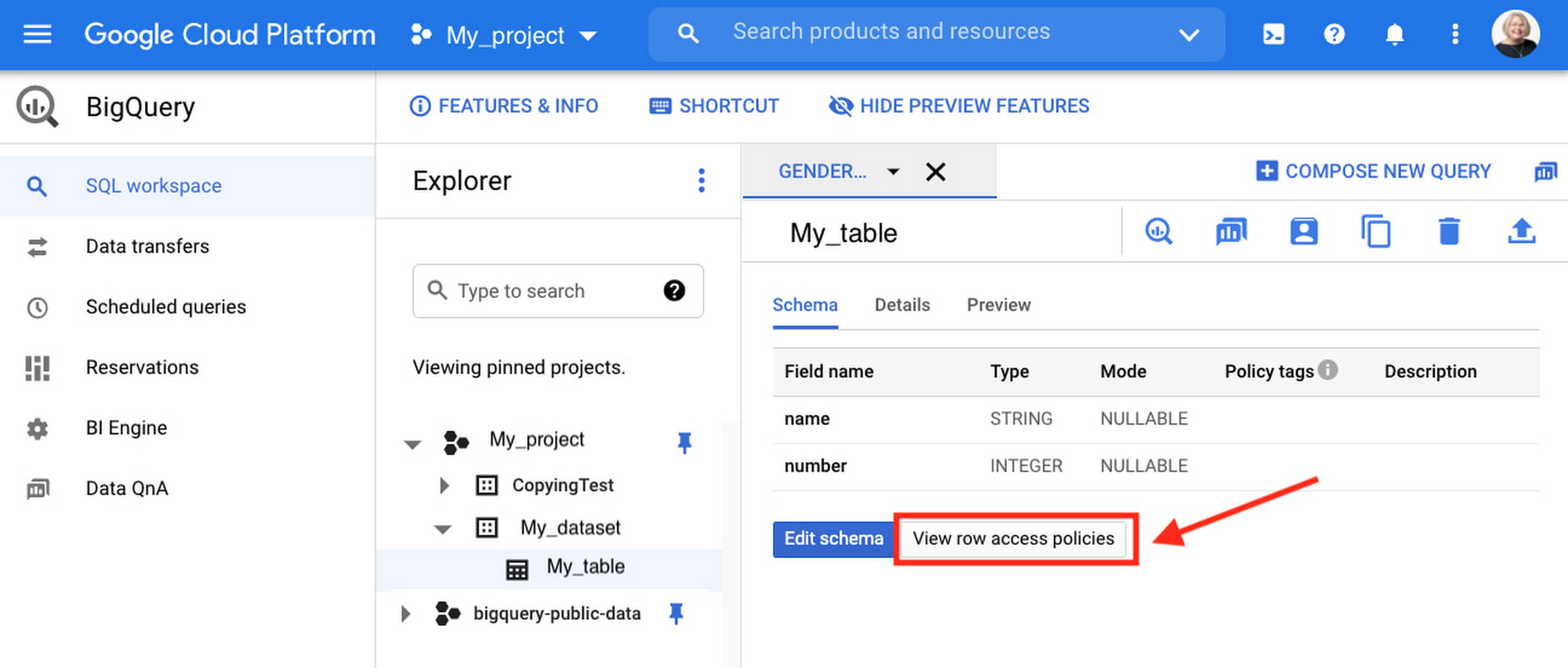
Row-level security is compatible with other BigQuery security features, and can be used along with column-level security for further granularity. Since row-level access policies are applied on the source tables, any actions performed on the table will inherit the table’s associated access policies, to ensure access to secure data is protected. Row-level access policies are applicable to every method used to access BigQuery data (API, Views, etc).
Try it out
We’re always working to enhance BigQuery’s (and Google Cloud’s) data governance capabilities, to provide more controls around managing your data. With row-level security, we are adding deeper protections for your data. You can learn more about BigQuery row-level security in our documentation and best practices.
More Relevant Stories for Your Company

Google Cloud is Every Retailer’s Most Trusted Cloud
Whether they were ready for it or not, the COVID-19 pandemic transformed many retailers into digital businesses. Retailers made huge investments into commerce technologies, customer experience tools, sales and fulfillment technology, and improving digital experiences to continue providing their goods and services to their customers. Now, more than a year




What Makes Google Cloud the Go-to Platform to Build Next-gen Security Services
Join the discussion by the panel of security experts and IT leaders from renowned organizations to examine the role of Google Cloud for security companies in building next-generation security services. Watch the video from the security session of Google Cloud Next '21 to deep dive into Google Cloud's security and

How to Configure GCP for Live Network Forensics
Forensics is the application of science to criminal and civil laws. It is a proven approach for gathering and processing evidence at a crime scene. An integral step in the forensics process is the isolation of the scene without contaminating or modifying the evidence. The isolation step prevents any further

Confidential GKE Nodes: Now Available on Compute Optimized C2D VMs
Today, we are happy to announce that Confidential GKE Nodes are available on compute optimized C2D VMs. Many companies have adopted Google Kubernetes Engine (GKE) as a key component in their application infrastructure. In some cases, the advantages of using containers and Kubernetes can surpass those of traditional architectures, but
