





New Study Suggests Public Sector Firms Must Move Over Legacy Productivity Tools

5025
Of your peers have already read this article.
6:00 Minutes
The most insightful time you'll spend today!
Prior to joining Google Cloud, I spent 20 years in the public sector serving in various security roles, most recently as the head of the cybersecurity division at the newly established Cybersecurity and Infrastructure Security Agency (CISA). I was responsible for delivering services and capabilities to about 100 civilian agencies, as well as our critical infrastructure for state and local partners across the country.
Throughout my time serving in the U.S. government, I spent a great deal of energy working to keep bad actors out of our systems. What I eventually realized was that we were at a disadvantage. We didn’t just have legacy systems to deal with; we also had a legacy mindset. Our policies and capabilities were overly reliant on a perimeter-based approach to defense and introduced layers of friction with tools like VPNs, which inhibited productivity and increased frustration.
I spent the last few years of my time in the government doing my best to modernize this approach to security and supporting the many people who shared this vision. While most of them are still there, doing excellent work, repeated cybersecurity breaches of U.S. government systems have interrupted vital work and cost taxpayers billions of dollars. The SolarWinds breach in 2020, for example, may have cost governments and businesses more than $100 billion and the loss of vital national security information. Yet many government agencies continue to rely on the same legacy productivity software.
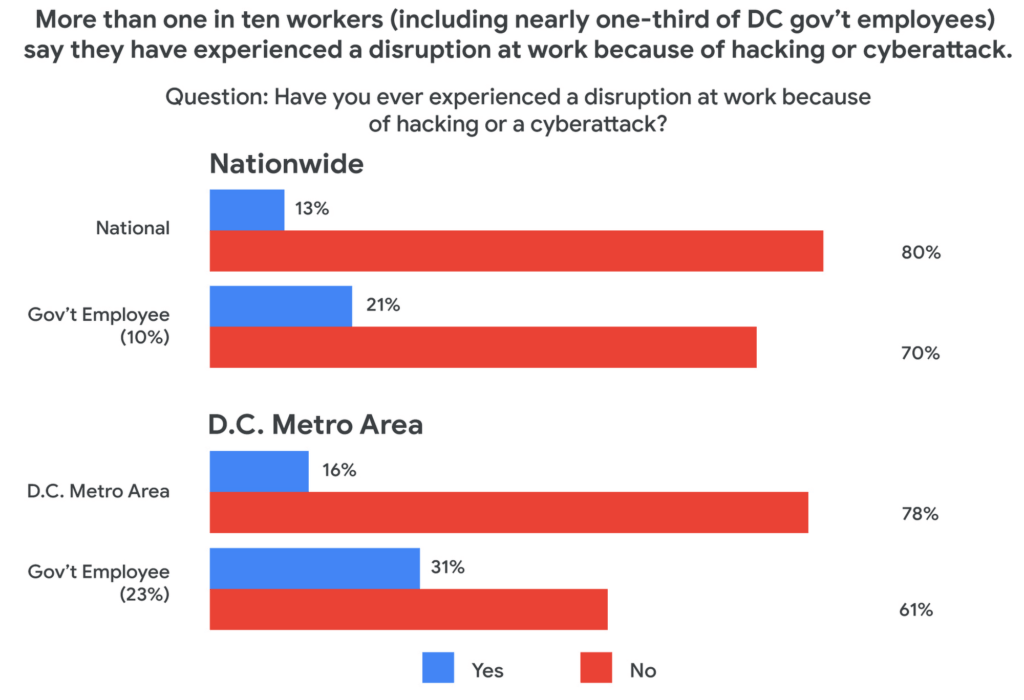
Today, a new survey conducted by Public Opinion Strategies and commissioned by Google Cloud shows that many government workers echo these concerns. The survey—which polled 2,600 working Americans, includes 600 workers from the D.C. metro area and 338 workers employed by federal, state, or local governments across the country—found that the majority of government employees surveyed reported being “very” concerned about cyberattacks striking their employers in the coming years. And nearly one-third of surveyed government employees in the D.C. metro area say they have experienced a disruption at work because of a cyberattack.
Results from the survey also showed a lack of satisfaction with legacy software, with more than 50% of government workers nationally responding that there are other products and services that could help them do their jobs better.
These new findings not only speak to the challenges our government employees face, but also outline an opportunity for improved innovation and security that can help government employees better achieve their missions.
Concerns about cybersecurity
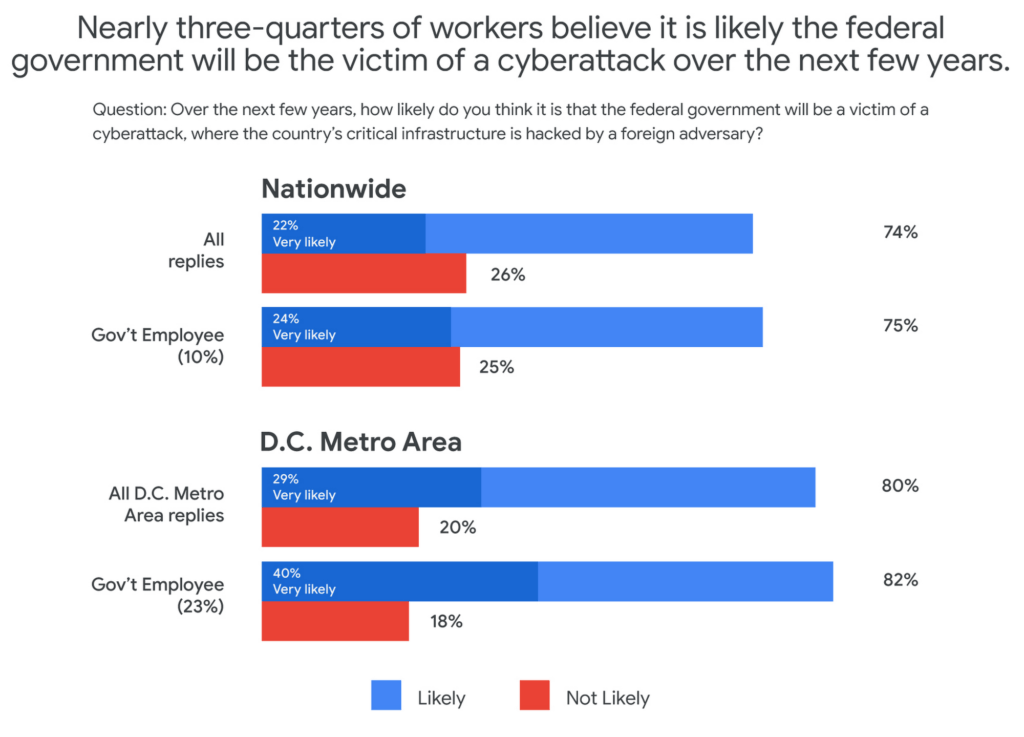
The majority of respondents said they believed it was likely that the federal government would be the victim of a cyberattack in the next few years. This percentage was even higher in the D.C. metro area and among government employees, with 40% of government workers living in metro D.C. saying it was “very likely.”
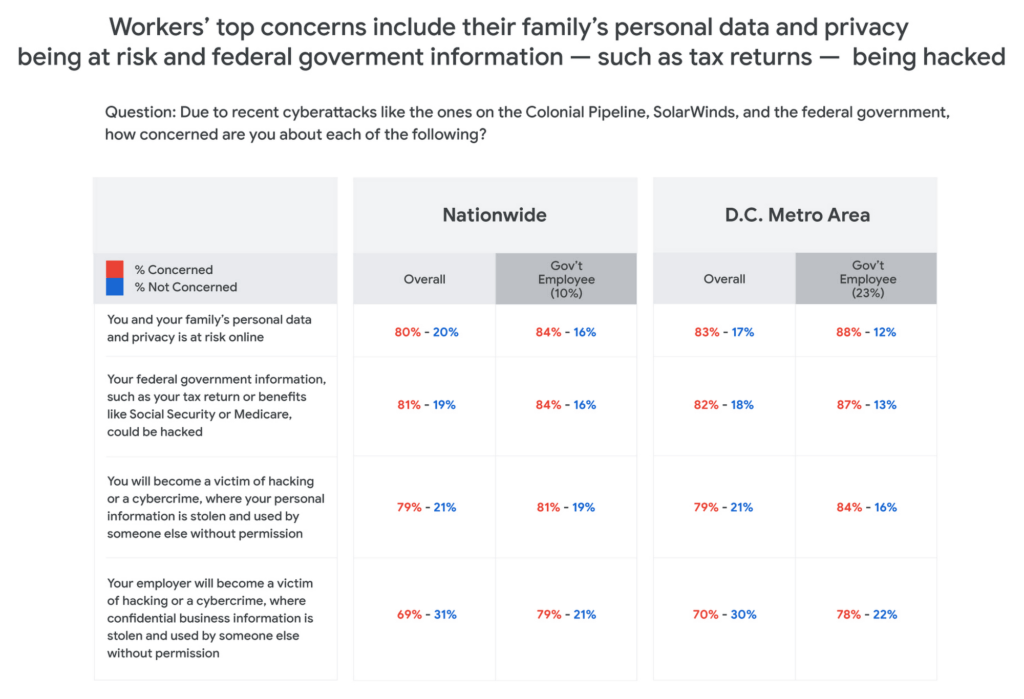
Respondents in all groups—national, D.C. metro, and government employees—were more likely to be concerned about cyberattacks as the perceived threat moved closer to home. For example, 80% of those surveyed said that recent attacks have them concerned about their personal data and privacy, and that of their family members. And for those in the D.C. area or in government jobs, the numbers were consistently higher than the national average.
One likely reason for such broad concern about cyberattacks is that many respondents reported experiencing a cyberattack at work. And while more than one-in-ten workers nationally have experienced disruptions from a cyberattack, the number increased to nearly one-in-three for D.C.-based government employees—nearly three times higher than the national average.
The problem with IT ‘monoculture’
According to survey respondents, 84% of D.C. metro government employees primarily use Microsoft products at work, including Word, Outlook, Teams, and OneDrive. This is confirmed by another recent study by Omdia that found 85% of government employees use Microsoft productivity software, far and away the largest IT productivity vendor by market share.
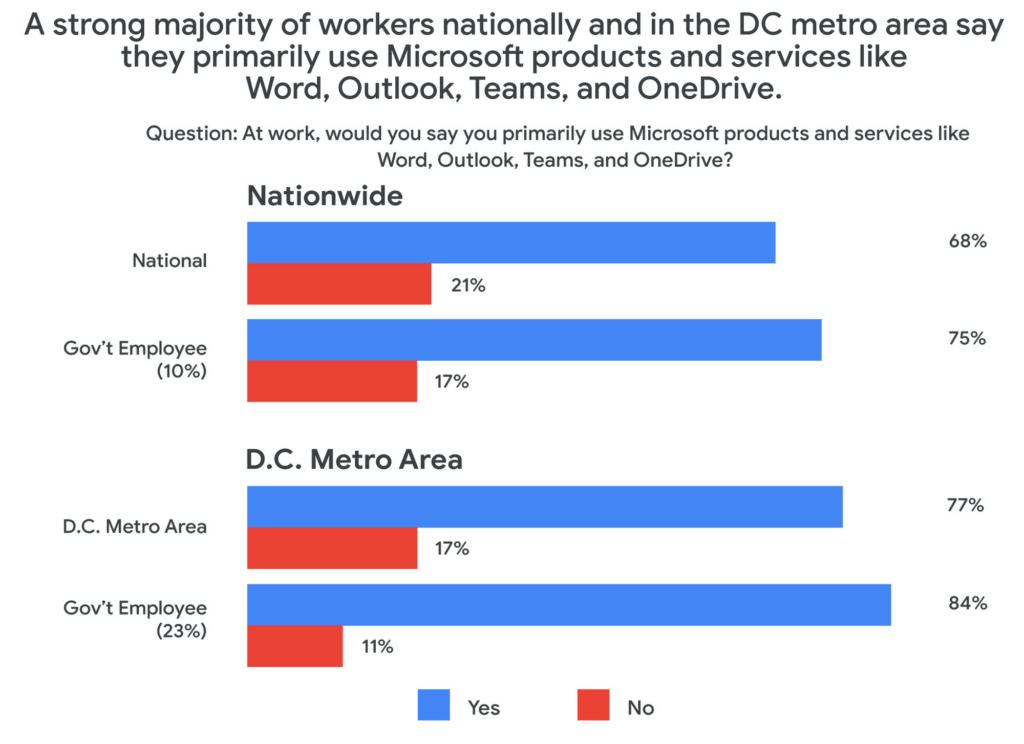
This reliance on a single software suite might suggest that these products are safe and secure, but the Public Opinion Strategies survey found that more than half of all respondents said that the government’s reliance on these Microsoft products actually made the federal government more vulnerable to hacking or cyberattacks.
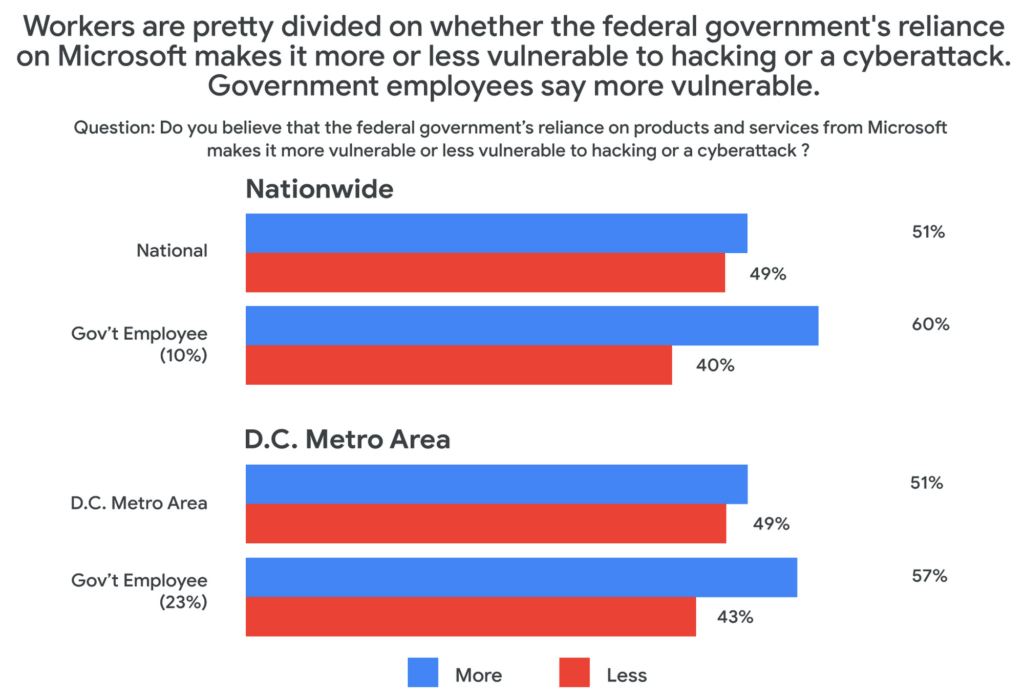
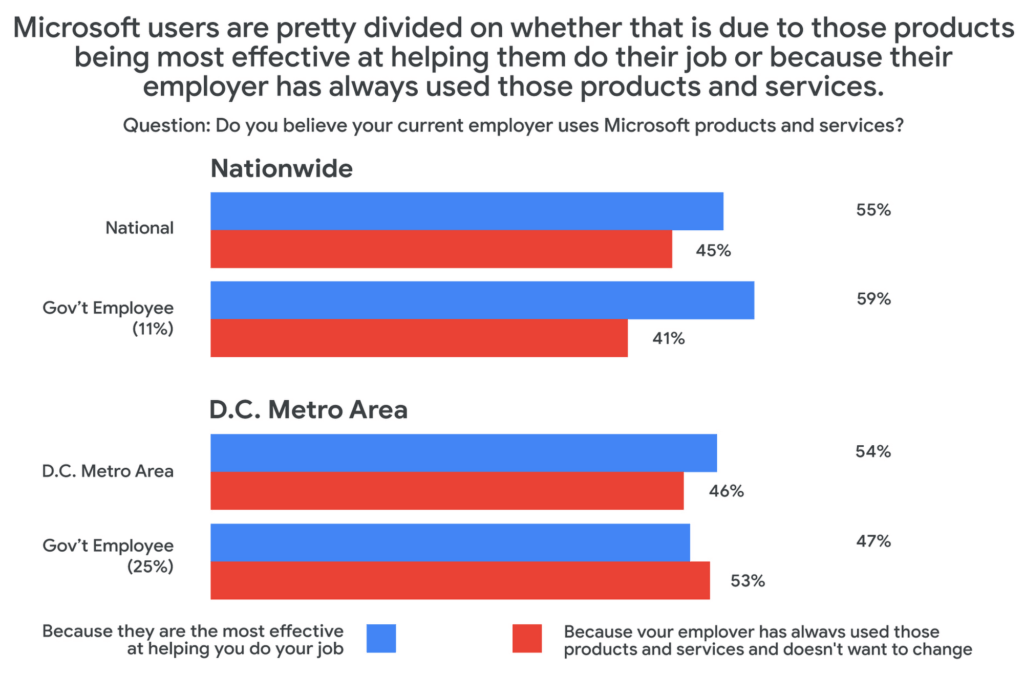
Given these vulnerabilities, why does government IT continue to rely on the same set of productivity tools in the workplace? The reason, according to survey respondents, has more to do with inertia than innovation. When asked why their employers used Microsoft services, around half said that the reason their employer continues to choose legacy, incumbent vendors was more about not wanting to change than wanting the most effective tool for the job.
Choice and shadow IT
Coupled with these concerns about vulnerabilities comes a noted sentiment among those surveyed that their current IT solutions are not best for their needs. About half of those surveyed who primarily use Microsoft at work said that they would prefer to have a choice to use products and services from other companies. And among those who use Microsoft at work, 43% believe there are other products and services that would allow them to do their job better.
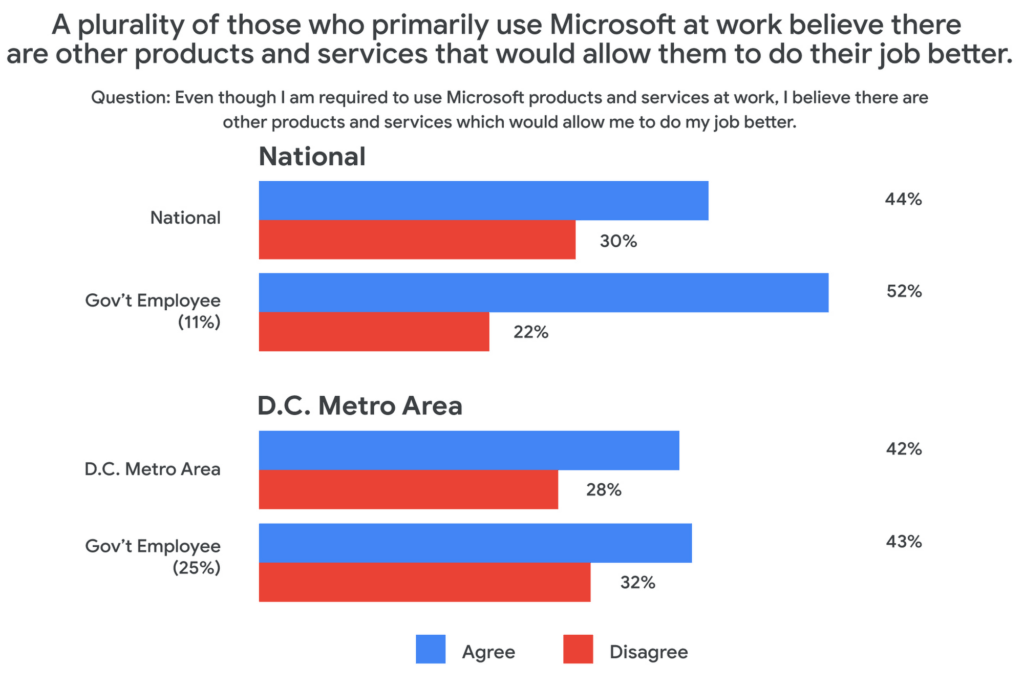
This may be leading workers to adopt “shadow IT,” or using products and services that are not officially approved or endorsed by their IT departments. In fact, the Public Opinion Strategies survey found that 35% of D.C. metro government workers have used shadow IT to get their jobs done. And among workers aged 20 to 34, that number jumps to 41%.
Rethinking IT purchasing priorities
With so many survey respondents reporting that they are dissatisfied with their legacy IT solutions, it may be time for the government to rethink its approach to procurement. In a separate research survey from Omdia in December 2021, 250 people responsible for technology purchasing decisions in the U.S. federal, state, and local governments said that government technology and procurement practices often are more about making things easier for IT vs. choosing what employees feel would be the best solution. In fact, only 27% of officials surveyed in that research cited “user demand” as a factor affecting their purchasing decisions.
As governments work to meet the demands and preferences of their constituents—and their employees—it’s clear that there’s an overreliance on legacy solutions, despite a track record of cybersecurity vulnerabilities and poor user perception.
At Google Cloud, we believe it’s time for more diversity and choice in the tools available for our civil servants across the nation—70% of whom use Gmail outside of work, according to our survey. Government workers have the right to benefit from the same flexible, secure-by-design tools at the office that they use in their personal lives. You can learn more about Google Workspace for Government here.
5 ways a SOAR solution improves SOC analyst onboarding

3040
Of your peers have already read this article.
2:30 Minutes
The most insightful time you'll spend today!
Editor’s note: This blog was originally published by Siemplify on Feb. 19, 2021.
The number of unfilled cybersecurity jobs stretches into the millions, and a critical part of the problem is the length of time it takes to backfill a position.
Industry group ISACA has found that the average cybersecurity position lies vacant for up to six months. Some positions, like security analyst, are difficult to find suitable candidates for thanks to workplace challenges such as lack of management support and burnout.
As the old phrase goes, time is money. So when organizations are fortunate enough to fill a position with the appropriate talent, they want to be able to make up for lost time as quickly as possible. This is especially true for roles in the security operations center, a setting notorious for needing staff to field never-ending alerts generated by an often-disparate collection of security tools.
Training new analysts can be a daunting task. They need time to get acquainted with the SOC’s technology stack and processes. Without documentation, they often ask senior analysts for guidance. This can create distractions and consume time.
A reliance on community knowledge—undocumented, not widely-known information within an organization—creates inconsistency within the SOC that contributes to longer ramp-up times for new analysts. Undocumented processes, combined with security tools that don’t talk to each other, typically mean a SOC will need to spend nearly 100 hours—the equivalent of 2 1/2 weeks—getting a single new analyst up to speed.
Enter automation. Throughout an analyst’s career in the SOC, a security orchestration, automation, and response (SOAR) solution can be their best friend, helping expedite routine tasks and liberating them to perform more exciting work. But the technology can also allow even the most junior analysts to have an auspicious onboarding experience—hitting the ground running on day one, acclimated to their new environment, and feeling comfortable about and confident in their future.
Here are five ways a SOAR solution can, among many other activities, aid in analyst onboarding
1) The SOAR solution deploys automated playbooks
The average SOC receives large numbers of alerts per day, and many will be false positives. That amounts to a lot of dead-ends for analysts to chase and leaves little time to investigate legitimate anomalous network activity. The sheer volume of alerts has even prompted some analysts to turn off high-alert features on detection tools, potentially causing teams to miss something important.
SOAR helps analysts hurdle these roadblocks by allowing teams to create custom, automated playbooks, workflows that equalize resources and knowledge across the SOC, and help maintain consistency in the face of new hires and staff turnover. And if analysts should need to create or edit any of the steps in these playbooks, the optimal SOAR solution will enable them to do this without knowledge of specific coding or query languages, acumen that a novice analyst may lack.
2) The SOAR solution groups related alerts
As multiple alerts from different security tools are generated, some SOAR solutions allow you to automatically consolidate and group these alerts into one cohesive interface. This is what is known as taking a threat-centric approach to investigations, with the SOAR looking for contextual relationships in the alerts and, if identified, grouping these alerts into a single case. Having the ability to work more manageable and focused cases right off the bat will help ensure a smoother transition for new analysts.
3) The SOAR solution pieces together the security stack
https://www.siemplify.co/getstartedFrom next-generation firewalls to SIEM to endpoint detection and response, the security stack in any given organization can be vast and complex. No incoming analyst has reasonable time to familiarize themselves with every tool living within the stack—or to manually tap into these different tools to obtain the appropriate context to apply to alerts. A SOAR solution alleviates this challenge by delivering context-rich data that can be analyzed in one central platform, eliminating the need for multiple consoles for alert triage, investigation and remediation. Plus, with a SOAR solution, there is no need for the SOC to directly touch a detection tool that another group may manage.
4) The SOAR solution streamlines collaboration to enable easy escalation and information sharing
Often the SOC is not capable of responding to every threat, meaning other departments, such as networking, critical ops, or change management need to be involved. In addition, executive personnel are likely interested in security trends happening within the organization. Because not every group communicates in the same way—or consumes information in the same way—breakdowns can occur, and frustrations can mount, especially for a new analyst. A SOAR solution can even the playing field by automatically generating instructions, updates, or reports from the SOC to other teams, and vice versa. SOAR is also a useful solution for collaborating within the SOC team as well, especially in the age of remote and hybrid work.
5) The SOAR solution prevents analysts from quickly burning out.
There is a reason why the SOC has obtained the dubious acronym of “sleeping on chair.” Life in this environment can be a tedious, mental grind, prompting certain inhabitants to literally fall asleep from boredom.
SOAR solutions can counter this tedium in two notable ways. They can prevent analysts from having to stare at a multitude of monitors while working long shifts. They can also free analysts to work on more strategic and thought-provoking assignments, which can help improve the company’s overall security posture—and ensure a new entrant to the SOC doesn’t lose steam immediately.
To learn more about SOAR from Siemplify, now part of Google Cloud SecOps suite, including how to download the free community edition, visit siemplify.co/GetStarted.
Case Study: How Exabeam Unlocked its Ability to Scale for Storage & Ingest Data from More Than 500 Security Vendors

3100
Of your peers have already read this article.
2:30 Minutes
The most insightful time you'll spend today!
Editor’s note: The post is part of a series highlighting our awesome partners, and their solutions, that are Built with BigQuery.
Exabeam, a leader in SIEM and XDR, provides security operations teams with end-to-end Threat Detection, Investigation, and Response (TDIR) by leveraging a combination of user and entity behavioral analytics (UEBA) and security orchestration, automation, and response (SOAR) to allow organizations to quickly resolve cybersecurity threats. As the company looked to take its cybersecurity solution to the next level, Exabeam partnered with Google Cloud to unlock its ability to scale for storage, ingestion, and analysis of security data.
Harnessing the power of Google Cloud products including BigQuery, Dataflow, Looker, Spanner and Bigtable, the company is now able to ingest data from more than 500 security vendors, convert unstructured data into security events, and create a common platform to store them in a cost-effective way. The scale and power of Google Cloud enables Exabeam customers to search multi-year data and detect threats in seconds
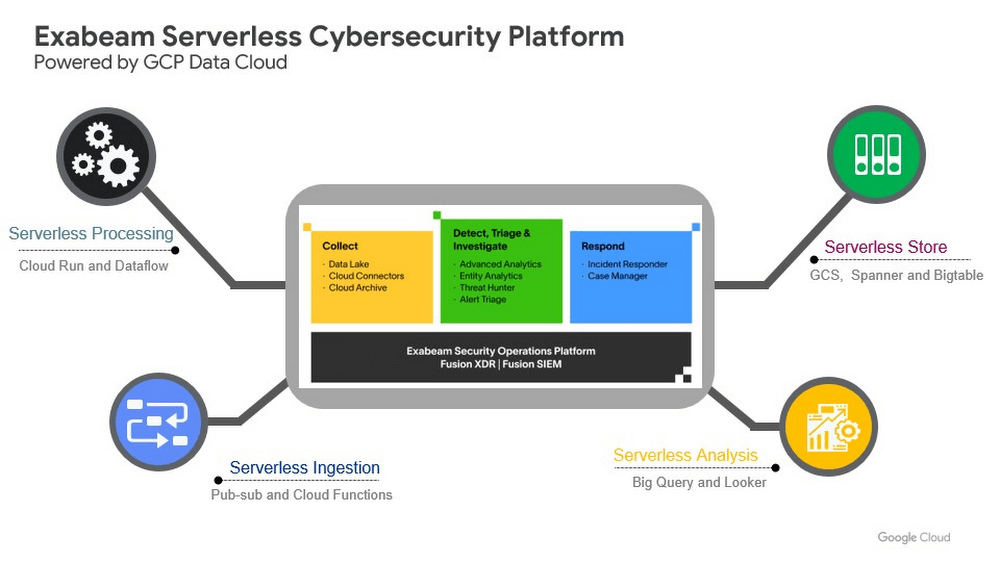
Google Cloud provides Exabeam with three critical benefits.
- Global scale security platform. Exabeam leveraged serverless Google Cloud data products to speed up platform development. The Exabeam platform supports horizontal scale with built-in resiliency (backed by 99.99% reliability) and data backups in three other zones per region. Also, multi-tenancy with tenant data separation, data masking, and encryption in transit and at rest are backed up in the data cloud products Exabeam uses from Google Cloud.
- Scale data ingestion and processing. By leveraging Google’s compute capabilities, Exabeam can differentiate itself from other security vendors that are still struggling to process large volumes of data. With Google Cloud, Exabeam can provide a path to scale data processing pipelines. This allows Exabeam to offer robust processing to model threat scenarios with data from more than 500 security and IT vendors in near-real time.
- Search and detection in seconds. Traditionally, security solutions break down data into silos to offer efficient and cost-effective search. Thanks to the speed and capacity of BigQuery, Security Operations teams can search across different tiers of data in near real time. The ability to search data more than a year old in seconds, for example, can help security teams hunt for threats simultaneously across recent and historical data.
Exabeam joins more than 700 tech companies powering their products and businesses using data cloud products from Google, such as BigQuery, Looker, Spanner, and Vertex AI. Google Cloud announced the Built with BigQuery initiative at the Google Data Cloud Summit in April, which helps Independent Software Vendors like Exabeam build applications using data and machine learning products. By providing dedicated access to technology, expertise, and go-to-market programs, this initiative can help tech companies accelerate, optimize, and amplify their success.
Google’s data cloud provides a complete platform for building data-driven applications like those from Exabeam — from simplified data ingestion, processing, and storage to powerful analytics, AI, ML, and data sharing capabilities — all integrated with the open, secure, and sustainable Google Cloud platform. With a diverse partner ecosystem and support for multi-cloud, open-source tools, and APIs, Google Cloud can help provide technology companies the portability and the extensibility they need to avoid data lock-in.
To learn more about Exabeam on Google Cloud, visit www.exabeam.com. Click here to learn more about Google Cloud’s Built with BigQuery initiative.
Google Cloud & Health-ISAC’s EMEA Collaborate to Boost Healthcare Security

1174
Of your peers have already read this article.
3:30 Minutes
The most insightful time you'll spend today!
Last July, Google Cloud launched our ambassador partnership with the Health Information Sharing and Analysis Center (Health-ISAC) and committed to working with industry leaders to better protect our healthcare ecosystem. Securing healthcare technology and data is a global challenge, and to meet it security professionals need to have better channels for sharing information and effective security practices.
To that end, we’re pleased to announce that our relationship with Health-ISAC is now expanding to include CISOs and security leaders in Europe, the Middle East, and Africa (EMEA).
On May 23, 2023, we’ll join the Health-ISAC on a 17-city tour across the region, starting in Zurich, Switzerland, as part of its European Healthcare Threat Landscape Tour. In each session, we will bring together experts from across the region with cybersecurity practitioners from the Health-ISAC, Google Cloud, law enforcement, and regulatory bodies.
Our goals is to focus the discussions on several topics:
- How the threat landscape is unique to each country we visit;
- How we can better share threat intelligence;
- What are the emerging European laws and regulations that can affect healthcare and cybersecurity;
- How ransomware continues to evolve and the threat that poses to healthcare; organizations;
- What we can do to improve cyber incident response;
- What impact digital sovereignty can have on European healthcare;
- And which initiatives Health-ISAC and Google Cloud are launching to better protect Europe’s healthcare system.
The timing for the tour could not come at a more critical time. Ransomware and digital extortion threatens healthcare and its subsectors, with national health systems in Ireland, UK, Germany, and Spain all recently experiencing extended outages because of ransomware. Threat actors continue to target proprietary data at biotechnology and pharmaceutical firms. Meanwhile, existing regulations such as the Digital Markets Act and GDPR, and new regulations such as the NIS2 Directive (Directive (EU) 2022/2555), which seek to protect EU citizens and businesses from risks posed by the digital world, are raising the bar that CISOs and security leaders must surpass to ensure their businesses can stay compliant and able compete in the global digital economy.
“The European Healthcare Threat Landscape Tour is one of many efforts we have undertaken to build a closer community of trust around threats and cybersecurity practices that keep health organization’s safe,” said Denise Anderson, executive director, Health-ISAC.
“We all rely on these organizations to take care of us and produce therapies that keep us healthy. Delivering these engagements alongside Google Cloud helps us achieve global scale and shows off both organizations’ commitments to building a sustainable, resilient healthcare ecosystem for entire societies.”
Each stop in the tour will provide opportunities to dive deep into these topics, grow an understanding of these challenges, create a space for collaboration, and build closer, trusted partnerships. The meetings are open to member and non-member organizations working in healthcare. Interested participants can contact the Health-ISAC through their contact form or register on their website for the nearest event.
“The Google Cybersecurity Action Team’s mission is to secure customers, secure the cloud, and secure the planet (and beyond). Working with industry groups like Health-ISAC helps us achieve this mission while respecting each other and the unique challenges European health systems face. Myself and our EMEA-based Google Cloud and Mandiant security teams are looking forward to another great collaboration,” said Phil Venables, chief information security officer, Google Cloud.
At Google Cloud, we’re committed to helping build a secure and resilient healthcare ecosystem for everyone. As we hit the road with the Health-ISAC this summer, we’ll be sure to send updates on what we learn through this collaboration and how we can all work together to secure smarter in 2023 and beyond.
Best Practices for Cost Optimization in the Cloud

5434
Of your peers have already read this article.
3:30 Minutes
The most insightful time you'll spend today!
When customers migrate to Google Cloud Platform (GCP), their first step is often to adopt Compute Engine, which makes it easy to procure and set up virtual machines (VMs) in the cloud that provide large amounts of computing power. Launched in 2012, Compute Engine offers multiple machine types, many innovative features, and is available in 20 regions and 61 zones!
Compute Engine’s predefined and custom machine types make it easy to choose VMs closest to your on-premises infrastructure, accelerating the workload migration process cost effectively. Cloud allows you the pricing advantage of ‘pay as you go’ and also provides significant savings as you use more compute with Sustained Use Discounts.
As Technical Account Managers, we work with large enterprise customers to analyze their monthly spend and recommend optimization opportunities. In this blog, we will share the top recommendations that we’ve developed based on our collective experience working with GCP customers.
Getting ready to save
Before you get started, be sure to familiarize yourself with the VM instance pricing page—required reading for anyone who needs to understand the Compute Engine billing model and resource-based pricing. In addition to those topics, you’ll also find information about the various Compute Engine machine types, committed use discounts and how to view your usage, among other things.
Another important step to gain visibility into your Compute Engine cost is using Billing reports in the Google Cloud Console and customizing your views based on filtering and grouping by projects, labels and more. From there you can export Compute Engine usage details to BigQuery for more granular analysis. This allows you to query the datastore to understand your project’s vCPU usage trends and how many vCPUs can be reclaimed. If you have defined thresholds for the number of cores per project, usage trends can help you spot anomalies and take proactive actions. These actions could be rightsizing the VMs or reclaiming idle VMs.
Now, with these things under your belt, let’s go over the five ways you can optimize your Compute Engine resources that we believe will give you the most immediate benefit.
1. Apply Compute Engine rightsizing recommendations
Compute Engine’s rightsizing recommendations feature provides machine type recommendations that are generated automatically based on system metrics gathered by Stackdriver Monitoring over the past eight days. Use these recommendations to resize your instance’s machine type to more efficiently use the instance’s resources. It also recommends custom machine types when appropropriate. Compute Engine makes viewing, resizing and other actions easier right from the Cloud Console as shown below.
Recently, we expanded Compute Engine rightsizing capabilities from just individual instances to managed instance groups as well. Check out the documentation for more details.

For more precise recommendations, you can install the Stackdriver Monitoring agent which collects additional disk, CPU, network, and process metrics from your VM instances to better estimate your resource requirements. You can also leverage the Recommender API for managing recommendations at scale.
2. Purchase Commitments
Our customers have diverse workloads running on Google Cloud with differing availability requirements. Many customers follow a 70/30 rule when it comes to managing their VM fleet—they have constant year-round usage of ~70%, and a seasonal burst of ~30% during holidays or special events.
If this sounds like you, you are probably provisioning resources for peak capacity. However, after migrating to Google Cloud, you can baseline your usage and take advantage of deeper discounts for Compute workloads. Committed Use Discounts are ideal if you have a predictable steady-state workload as you can purchase a one or three year commitment in exchange for a substantial discount on your VM usage.
We recently released a Committed Use Discount analysis report in the Cloud Console that helps you understand and analyze the effectiveness of the commitments you’ve purchased. In addition to this, large enterprise customers can work with their Technical Account Managers who can help manage their commitment purchases and work proactively with them to increase Committed Use Discount coverage and utilization to maximize their savings.
3. Automate cost optimizations
The best way to make sure that your team is always following cost-optimization best practices is to automate them, reducing manual intervention.
Automation is greatly simplified using a label—a key-value pair applied to various Google Cloud services. For example, you could label instances that only developers use during business hours with “env: development.” You could then use Cloud Scheduler to schedule a serverless Cloud Function to shut them down over the weekend or after business hours and then restart them when needed. Here is an architecture diagram and code samples that you can use to do this yourself.
Using Cloud Functions to automate the cleanup of other Compute Engine resources can also save you a lot of time and money. For example, customers often forget about unattached (orphaned) persistent disk, or unused IP addresses. These accrue costs, even if they are not attached to a virtual machine instance. VMs with the “deletion rule” option set to “keep disk” retain persistent disks even after the VM is deleted. That’s great if you need to save the data on that disk for a later time, but those orphaned persistent disks can add up quickly and are often forgotten! There is a Google Cloud Solutions article that describes the architecture and sample code for using Cloud Functions, Cloud Scheduler, and Stackdriver to automatically look for these orphaned disks, take a snapshot of them, and remove them. This solution can be used as a blueprint for other cost automations such as cleaning up unused IP addresses, or stopping idle VMs.
4. Use preemptible VMs
If you have workloads that are fault tolerant, like HPC, big data, media transcoding, CI/CD pipelines or stateless web applications, using preemptible VMs to batch-process them can provide massive cost savings. In fact, customer Descartes Labs reduced their analysis costs by more than 70% by using preemptible VMs to process satellite imagery and help businesses and governments predict global food supplies.
Preemptible VMs are short lived— they can only run a maximum of 24 hours, and they may be shut down before the 24 hour mark as well. A 30-second preemption notice is sent to the instance when a VM needs to be reclaimed, and you can use a shutdown script to clean up in that 30-second period. Be sure to fully review the full list of stipulations when considering preemptible VMs for your workload. All machine types are available as preemptible VMs, and you can launch one simply by adding “-preemptible” to the gcloud command line or selecting the option from the Cloud Console.
Using preemptible VMs in your architecture is a great way to scale compute at a discounted rate, but you need to be sure that the workload can handle the potential interruptions if the VM needs to be reclaimed. One way to handle this is to ensure your application is checkpointing as it processes data, i.e., that it’s writing to storage outside the VM itself, like Google Cloud Storage or a database. As an example, we have sample code for using a shutdown script to write a checkpoint file into a Cloud Storage bucket. For web applications behind a load balancer, consider using the 30-second preemption notice to drain connections to that VM so the traffic can be shifted to another VM. Some customers also choose to automate the shutdown of preemptible VMs on a rolling basis before the 24-hour period is over, to avoid having multiple VMs shut down at the same time if they were launched together.
5. Try autoscaling
Another great way to save on costs is to run only as much capacity as you need, when you need it. As we mentioned earlier, typically around 70% of capacity is needed for steady-state usage, but when you need extra capacity, it’s critical to have it available. In an on-prem environment, you need to purchase that extra capacity ahead of time. In the cloud, you can leverage autoscaling to automatically flex to increased capacity only when you need it.
Compute Engine managed instance groups are what give you this autoscaling capability in Google Cloud. You can scale up gracefully to handle an increase in traffic, and then automatically scale down again when the need for instances is lowered (downscaling). You can scale based on CPU utilization, HTTP load balancing capacity, or Stackdriver Monitoring metrics. This gives you the flexibility to scale based on what matters most to your application.
High costs do not compute
As we’ve shown above, there are many ways to optimize your Compute Engine costs. Monitoring your environment and understanding your usage patterns is key to understanding the best options to start with, taking the time to model your baseline costs up front. Then, there are a wide variety of strategies to implement depending on your workload and current operating model.
For more on cost management, check out our cost management video playlist. And for more tips and tricks on saving money on other GCP services, check out our blog posts on Cloud Storage, Networking and BigQuery cost optimization strategies. We have additional blog posts coming soon, so stay tuned!
Strategic Consulting, Training & Implementation Guidelines with Public Sector PSO Helps Governments Stay Compliant

4723
Of your peers have already read this article.
3:00 Minutes
The most insightful time you'll spend today!
Did you know that by 2025, enterprise IT spending on public cloud computing will overtake traditional IT spending? In fact, 51% of IT spend in application software, infrastructure software, business process services, and system infrastructure will transition to the public cloud, compared to 41% in 20221.. As enterprises continue to rapidly shift to the cloud, government agencies must prioritize and accelerate security and compliance implementation.
In May 2021, the White House issued an Executive Order requiring US Federal agencies to accelerate cloud adoption, embrace security best practices, develop plans to implement Zero Trust architectures, and map implementation frameworks to FedRAMP. The Administration’s focus on secure cloud adoption marks a critical shift to prioritizing cybersecurity at scale. Google Cloud’s Public Sector Professional Services Organization (PSO) has committed to helping customers meet security and compliance requirements in the cloud through specialized consulting engagements.
Accelerating Authority to Operate (ATO)
The Federal Risk and Authorization Management Program (FedRAMP) was established in 2011 as a government-wide program that promotes the adoption of secure cloud services across the federal government. FedRAMP provides a standardized approach to security and risk assessment for cloud technologies and federal agencies. US Federal agencies are required to utilize and implement FedRAMP cloud service offerings as part of the “Cloud First” federal cloud computing strategy.
While Google Cloud provides a FedRAMP-authorized cloud services platform and a robust catalog of FedRAMP-approved products and services (92 services and counting), customers are still tasked with achieving Agency ATO for the products and services they use, and Google Cloud provides many resources to assist customers with this journey. Google Cloud’s FedRAMP package can be accessed by completing the FedRAMP Package Access Request Form and submitting it to info@fedramp.gov. Additionally, customers can use Google’s NIST 800-53 ATO Accelerator as a starting point for documenting control implementation. Finally, Google Cloud’s Public Sector PSO offers the following strategic consulting engagements to help customers streamline the Agency ATO process.
- Cloud Discover: FedRAMP is a six-week interactive workshop to support customers that are just getting started with the ATO process on Google Cloud. Customers are educated on FedRAMP fundamentals, Google’s security and compliance posture, and how to approach ATO on Google Cloud. Through deep-dive interviews and design sessions, PSO helps customers craft an actionable ATO plan, assess FedRAMP readiness, and develop a conceptual ATO boundary. This engagement helps organizations establish a clear understanding and roadmap for FedRAMP ATO on Google Cloud.
- FedRAMP Security Review is a ten to twelve week engagement that aids customers in FedRAMP operational readiness. PSO consultants perform detailed FedRAMP architecture reviews to identify potential gaps in NIST 800-53 security control implementation and Google Cloud secure architecture best practices. Findings from the security reviews are shared with the customer along with configuration guidance and recommendations. This engagement helps organizations prepare for the third-party or independent security assessment that is required for FedRAMP ATO.
- Cloud Deploy: FedRAMP is a multi-month engagement designed to help customers document the details of their FedRAMP System Security Plan (SSP) and corresponding NIST 800-53 security controls, in preparation for Agency ATO on Google Cloud at FedRAMP Low, Moderate, or High. PSO collaborates with customers to develop a detailed technical infrastructure design document and security control matrix capturing evidence of the FedRAMP system architecture, security control implementation, data flows and system components. PSO can also partner with a third-party assessment organization (3PAO) or an independent assessor (IA) to support customer efforts for FedRAMP security assessment. This engagement helps customer system owners prepare for Agency ATO assessment and package submission.
Developing a Zero Trust Strategy
In addition to providing FedRAMP enablement, Public Sector PSO has partnered with the Google Cloud Chief Information Security Officer (CISO) team to assist organizations with developing a zero trust architecture and strategy.
Zero Trust Foundations is a seven-week engagement co-delivered by Google Cloud’s CISO and PSO teams. CISO and PSO educate customers on zero trust fundamentals, Google’s journey to zero trust through BeyondCorp, and defense in depth best practices. The CISO team walks customers through a Zero Trust Assessment (ZTA) to understand the organization’s current security posture and maturity. Insights from the ZTA enable the CISO team to work with the customer to identify an ideal first-mover workload for zero trust adoption. Following the CISO ZTA, PSO facilitates a deep-dive Zero Trust Workshop (ZTW), collaborating with key customer stakeholders to develop a NIST 800-207 aligned, cloud-agnostic zero trust architecture for the identified first-mover workload. The zero trust architecture is part of a comprehensive zero trust strategy deliverable that is based on focus areas called out in the Office of Management and Budget (OMB) Federal Zero Trust Strategy released January 2022.
Scaling Secure Cloud Adoption with PSO
Public Sector PSO enables customer success by sharing our technical expertise, providing cloud strategy, implementation guidance, training and enablement using our proven methodology. As enterprise IT, operations, and organizational models continue to evolve, our goal is to help government agencies accelerate their security and compliance journeys in the cloud. To learn more about the work we are doing with the federal government, visit cloud.google.com/solutions/federal-government.
More Relevant Stories for Your Company

The Tech Tightrope: How the U.S. State & Local Agencies Strive to Balance between Innovation and Budget
State and local government (SLG) agencies are reeling from a combination of unbudgeted COVID-related expenses and reduced tax revenue caused by unemployment and business closures. Any way you look at it, the situation is challenging. To understand how SLG agencies are coping, Google Cloud collaborated with MeriTalk to survey 200

Google Cloud is Every Retailer’s Most Trusted Cloud
Whether they were ready for it or not, the COVID-19 pandemic transformed many retailers into digital businesses. Retailers made huge investments into commerce technologies, customer experience tools, sales and fulfillment technology, and improving digital experiences to continue providing their goods and services to their customers. Now, more than a year

Best Kept Security Secrets: How to Resolve Cloud Trust Paradox with Cloud EKM
Whether driven by government policy, industry regulation, or geo-political considerations, the evolution of cloud computing has led organizations to want even more control over their data and more transparency from their cloud services. At Google Cloud, one of the best tools for achieving that level of control and transparency is
Center for Internet Security’s Latest Benchmark for Securing Chrome
As the way people work continues to evolve, keeping security policies in place that protect organizations but give workers the ability to get things done is more important than ever. IT and security teams must aim to stay a step ahead of web-based security threats that come their organization’s way.
