





RISE with SAP on Google Cloud is An Engine of Progress for Cloud Migrations!

3386
Of your peers have already read this article.
3:00 Minutes
The most insightful time you'll spend today!
The practical benefits of migrating SAP systems to the cloud aren’t lost on most businesses. Running SAP in the cloud lets companies simplify tasks, scale quickly, and reduce costs. But as a growing number of organizations are discovering, the cloud is more than the sum of improved processes and workflows. It offers unique and powerful ways to transform an enterprise.
That’s because the cloud is more than a technology. It’s a foundational layer for business and IT transformation. In the best scenario, it unleashes exponential gains that fundamentally change an enterprise. Organizations achieve greater agility and resilience, and they’re equipped to innovate and disrupt like never before.
RISE with SAP and Google Cloud sit at the intersection of these possibilities. RISE with SAP helps organizations embark on the cloud migration journey with minimal risk and on their own terms. Together with Google Cloud, it enables a more advanced framework for a move to the cloud. Think of RISE with SAP on Google Cloud as business-transformation-as-a-service.
Companies move their SAP systems to the cloud for very clear and compelling reasons: 44% say it fuels digital transformation, and 43% are looking to build out a modern IT infrastructure to lower costs and simplify processes. RISE with SAP on Google Cloud takes direct aim at these challenges.
MSC Industrial Supply Co., a premier North American distributor of metalworking and maintenance, repair, and operations products and services to industrial customers views RISE with SAP on Google Cloud as a way to make its IT systems and the business more flexible and scalable by expanding data access in the cloud. With approximately 2 million products and more than 6,500 associates, that’s no small task for the Melville, New York, company.
In June 2021, MSC successfully migrated to SAP S/4HANA Cloud, private edition, running on Google Cloud infrastructure. Through RISE with SAP, MSC adopted cloud resources that were both reliable and scalable, without any disruption to its business operations. Advanced data analytics, machine learning, and other AI capabilities are now available to MSC.
At the center of this transformation is BigQuery, with which MSC data scientists can pinpoint business insights among vast and complex data sets from diverse sources, including Ads, Maps, Shopping, or the Google Marketing Platform. The net effect is significantly less time needed to manage and analyze rich data sets.
Energizer Holdings Inc., a leading manufacturer and distributor of primary batteries (think Energizer Bunny), portable lights, and auto care products, has turned to RISE with SAP on Google Cloud to power its move to SAP S/4HANA. The company wants to automate essential business processes, improve customer service, and boost innovation. It had been using a private cloud solution but needed to gain flexibility while better containing costs.
After migrating through RISE with SAP on Google Cloud, Energizer is able to share data and intelligence to keep teams better informed. The framework has also helped contain costs and support business growth through reduced licensing costs and a more economical and efficient SaaS model.
Inchcape plc, the leading multi-brand automotive distributor for Toyota, Mercedes, BMW and others, is turning to RISE with SAP on Google Cloud to take its business-critical sales, marketing and operations systems, and data into the cloud. Doing so will allow the UK-based company to join a diverse range of datasets into a centralized, secure, and scalable platform for the first time.
With operations in over 40 markets and geographies, Inchcape has complex logistics requirements. Google Cloud supports and offers the types of advanced analytics and machine learning capabilities the company requires for today’s complex manufacturing environment.
GCP Applied Technologies Inc. (GCPAT) is dedicated to the development of high-performance products and the advancement in construction technologies, simplifying the complexities of construction worldwide and delivering value to its customers. As a part of their business transformation initiatives, the company was looking to move from an on-premise data center to a more modern framework that can keep up with evolving demands. GCPAT considered various solution options like non-cloud colocation, but ultimately opted to move to the cloud through RISE with SAP on Google Cloud.
The platform provides a resilient foundation for accelerating business process improvement and innovation while optimizing maintenance and licensing costs. With the ability to deliver transformative solutions across the enterprise, GCPAT is now well-positioned to handle the pace of business change.
Veolia is an international company with nearly 180,000 employees across the globe and activities in three main service and utility areas: water management, waste management and energy services. Veolia, which aims to become the benchmark company for ecological transformation, was looking to digitize its processes and operations with a modern, cloud-based enterprise management system. Fundamental to Veolia’s success is its ability to continually roll out new, digital services to its industrial and municipal clients, so the company needed an enterprise management system capable of adapting quickly as the company’s business model evolves.
Veolia Poland upgraded to S/4HANA Private Cloud Edition on Google Cloud through RISE with SAP. Not only has the company been able to take advantage of a simplified, fully managed, and shortened cloud implementation, it has also been able to extend its existing Google environment, including BigQuery, to place data at the center of its digitization strategy and develop predictive capabilities using Google Cloud AI.
4 steps to cloud success
These successful transformation stories share four key characteristics in common.
- Low-risk path: Each enterprise reduced its risk of migrating to the cloud while speeding up time-to-value. Subject matter experts from Google Cloud and its partners guided each enterprise through the transition, and they were able to take advantage of incentives to defray infrastructure costs through the Google Cloud Acceleration Program.
- Near-zero downtime: By increasing SAP application availability with Live Migration, our success stories dramatically reduced planned outages due to infrastructure and maintenance updates, down to less than 1 percent.
- Room to innovate: With advanced analytics, artificial intelligence, and machine learning capabilities, these enterprises are improving processes, reducing costs and driving new revenue streams. Additionally, they have the ability to experiment with modern applications faster and more securely using their SAP data with Apigee.
- IT sustainability: By moving SAP applications to smarter and more efficient data centers, these success stories instantly reduced their IT emissions, while eliminating guesswork. Now, they can set goals based on seamless, agentless assessments and track progress with Google Cloud tools, analytics and reporting capabilities.
The engine of progress for cloud migrations
RISE with SAP on Google Cloud delivers a modular and low-risk path to the cloud for organizations at various stages of the migration and transformation path by clearing roadblocks and using performance indicators and industry benchmarks to pinpoint the best place to start.
The result? Reporting that’s 100x faster, as well as embedded AI technology, real-time advanced analytics, streamlined data display, consumer-grade UX across devices, strong sustainability, and a 50% reduction in a company’s data footprint. In practical terms, all the numbers add up to a simple but profound conclusion: RISE with SAP on Google Cloud is an engine of progress for organizations looking to gain an advantage in today’s highly competitive business environment.
To learn more about RISE with SAP on Google Cloud click here.
Two Ways to Deploy SAP HANA System on Google Cloud

7908
Of your peers have already read this article.
4:00 Minutes
The most insightful time you'll spend today!
Many of the world’s leading companies run on SAP—and deploying it on Google Cloud extends the benefits of SAP even further. Migrating your current SAP S/4HANA deployment to Google Cloud—whether it resides on your company’s on-premises servers or another cloud service—provides your organization with a flexible virtualized architecture that lets you scale your environment to match your workloads, so you pay only for the compute and storage capacity you need at any given moment. Google Cloud includes built-in features, such as Compute Engine live migration and automatic restart, that minimize downtime for infrastructure maintenance. And it allows you to integrate your SAP data with multiple data sources and process it using Google Cloud technology such as BigQuery to drive data analytics.
SAP server-side architecture consists of two layers: the SAP HANA database, and the Netweaver application layer. In this blog post, we’ll look at the options and steps for moving the database layer to Google Cloud as a lift and shift or rehost, a straightforward approach that entails moving your current SAP environment unchanged onto Google Cloud.
Deploying an SAP HANA system on Google Cloud
Google Cloud offers SAP-certified virtual machines (VMs) optimized for SAP products, including SAP HANA and SAP HANA Enterprise Cloud, as well as dedicated servers for SAP HANA for environments greater than 12TB. (For a complete list of VM and hardware options, visit the Certified and Supported SAP HANA Hardware Directory.)
Before proceeding with a rehost migration to Google Cloud, your current (source) environment and Google Cloud (target) environments should meet these specifications:
Prerequisites:
- The configuration of the Google Cloud environment (i.e., VM resources, SSD storage capacity) should be identical to that of the source environment. If the underlying hardware is different, however, you must use Option 2 for your migration, detailed below.
- Both environments should be running the same operating system (SUSE or RHEL Linux).
- The HANA version, instance number, and system ID (SID) should be identical.
- Schema names must remain the same.
- Establishing the network connection between the on-premises environment and Google Cloud will be required in this phase to support rehost of the SAP application.you can use Cloud VPN or Dedicated Interconnect. Learn more about Dedicated Interconnect and Cloud VPN.
Note: Depending on your internet connection and bandwidth requirements, we recommend using a Dedicated Interconnect over Cloud VPN for production environments.
We offer a number of automated processes to accelerate your cloud journey. To deploy the SAP HANA system on Google Cloud, you can use the Google Cloud Deployment manager or Terraform and Ansible scripts available on GitHub with configuration file templates to define your installation. For more details, see the Google Cloud SAP HANA Planning Guide.
Note: To deploy SAP HANA on Google Cloud machine types that are certified by SAP for production, please review the Certification for SAP HANA on Google Cloud page.
Moving an SAP HANA Database to Google Cloud
There are two different options you can use to rehost your SAP HANA database to Google Cloud, and each has pros and cons that you should consider when deciding on your approach.
Option 1: Asynchronous replication uses SAP’s built-in replication tool to provide continuous data replication from the source system (also known as the primary system) to the destination or secondary system—in this case residing on Google Cloud. It’s best for mission-critical applications for which minimum downtime is a high priority, and for large databases. In addition, the high level of automation means that the process requires less manual intervention. Here’s where you can learn more on HANA Asynchronous Replication.
Option 2: Backup and restore relies on SAP’s backup utility to create an image of the database that is then transferred to Google Cloud, where it is restored in the new environment. Downtime for this method varies by database size, so large databases may require more downtime via this method vs. asynchronous replication. It also involves more manual tasks. However, it requires fewer resources to perform, making it an attractive option for less urgent use cases. Here’s where you can learn more on SAP HANA database Backup and restore.

How to migrate the SAP HANA database to Google Cloud using Asynchronous Replication

- Create and configure Dedicated Interconnect or Cloud VPN between the current environment and Google Cloud.
- Set up SAP HANA asynchronous replication. You can configure system replication using SAP HANA Cockpit, SAP HANA Studio, or hdbnsutil. See Setting Up SAP HANA System Replication in the SAP HANA Administration Guide.
- Be sure to use the same instance number and HANA SID in the template as the primary instance.
- Configure the Google Cloud instance as the secondary node for using HANA Asynchronous replication.
- Perform data validation once full data replication is completed to the SAP HANA database in Google Cloud. To learn more: HANA System Replication overview.
- Perform an SAP HANA takeover on your standby database. This switches your active system from the current primary system onto the secondary system on Google Cloud. Once the takeover command runs, the system on Google Cloud becomes the new primary system.To learn more: HANA Takeover.
How to migrate the SAP HANA database to Google Cloud using Backup and Restore

- Create a full backup of your SAP HANA database in your current environment.
- Create a new storage bucket in your Google Cloud environment. Visit Creating Storage Buckets in the Google Cloud Storage documentation.
- Download and install gsutil onto the source environment and run it to upload the HANA backup to the Google Cloud storage bucket. To install gsutil utility on any computer or server, visit Install gsutil in the Google Cloud Storage documentation.
Note: You can run parallel multi thread/multi processing in gsutil to copy large files more quickly. - Recover the HANA database on Google Cloud using SAP’s RECOVER DATABASE statement. See RECOVER DATABASE Statement (Backup and Recovery) in the SAP HANA SQL Reference Guide for SAP HANA Platform.
Note: BackInt agent is an integrated SAP interface tool used for HANA database on Google Cloud.Backint agent for SAP HANA can be used to store and retrieve backups directly from Google Cloud Storage. It is supported and certified by SAP on Google Cloud. To learn more: SAP HANA Backint Agent on Google Cloud.
In summary, we recommend using Asynchronous Replication (Option 1) for mission-critical applications that require the lowest downtime window. For all other applications, we recommend Backup and Restore (Option 2), as this approach requires fewer resources. It’s also a great way to implement the backup and restore functionality on Google Cloud.
A rehost migration is the most straightforward path to getting your SAP on HANA system up and running on Google Cloud. And the sooner you migrate, the sooner you can take advantage of the many benefits Google Cloud brings to your SAP solution. For more information on the different migration options please review: SAP on Google Cloud: Migration strategies.
Learn more about deploying SAP on Google Cloud. Technical resources can be found here.
4902
Of your peers have already watched this video.
1:30 Minutes
The most insightful time you'll spend today!
Accelerate Your Digital Transformation Through a Modern Infrastructure
Learn about the latest advancements to Google Cloud Platform’s unique infrastructure to accelerate enterprise workloads and build planet scalable solutions. Hear how Google Cloud’s infrastructure enables you to solve problems faster, more securely, and at greater scale.
See how Google Cloud is accelerating the support for enterprise workloads like SAP, VMware, and Windows and augmenting new capabilities to better protect and secure your workloads. Discover how Google Cloud enables businesses to build high-scale applications with global scale and reach.
Google Introduces ML-based Predictive Autoscaling to Forecast Capacity and Match Scaling Demands

5001
Of your peers have already read this article.
3:00 Minutes
The most insightful time you'll spend today!
At Google Cloud, we believe you get most benefits from the cloud when you scale infrastructure based on changing demand. Compute Engine allows you to configure autoscaling to save costs during periods of low demand, and add capacity to support peak loads.
When you use a managed instance group (MIG), you can have an autoscaler automatically create or delete virtual machine (VM) instances based on increases or decreases in load. However, if your application takes several minutes to initialize, creating VMs in response to growing load might not increase your application’s capacity quickly enough. For example, if there’s a large increase in load (like when users first wake up in the morning), some users might experience delays while your application is initializing on new instances.
A good way to solve this problem would be to create VMs ahead of demand so that your application has enough time to initialize beforehand. This requires knowing upcoming demand. If only we could predict the future… Well, now we can!
Introducing predictive autoscaling
Predictive autoscaling uses Google Cloud’s machine learning capabilities to forecast capacity needs. It creates VMs ahead of growing demand allowing enough time for your application to initialize.
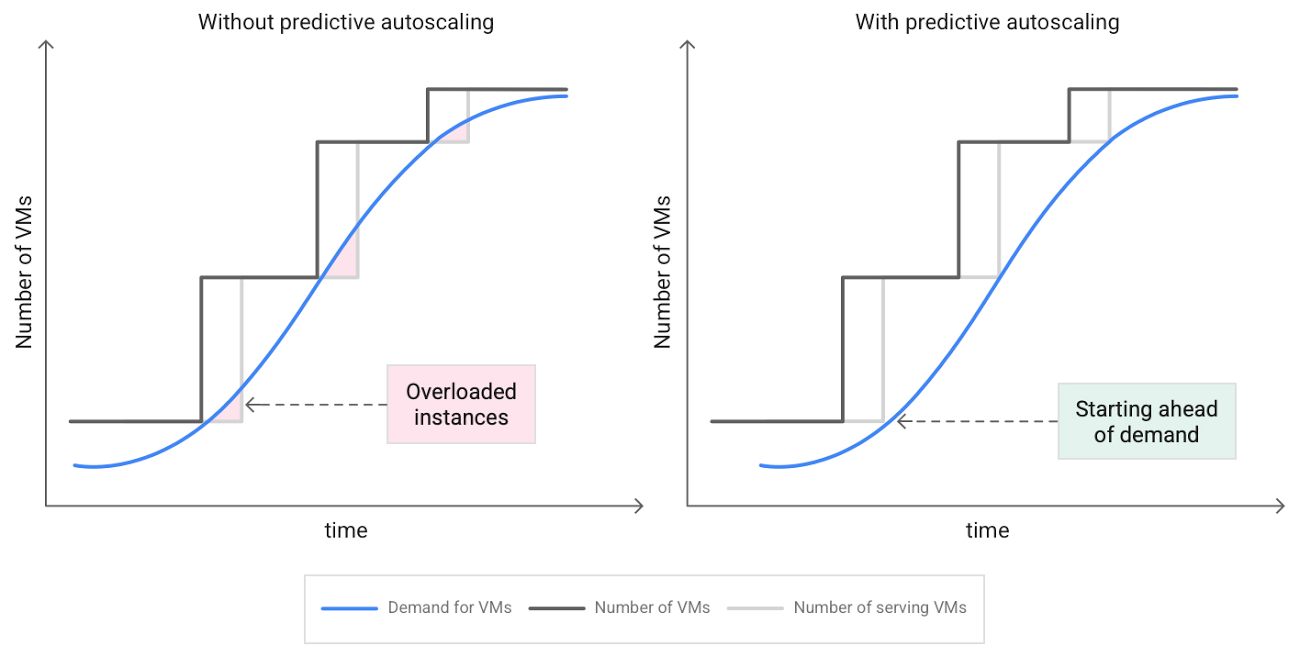
How does it work?
Predictive autoscaling uses your instance group’s CPU history to forecast future load and calculate how many VMs are needed to meet your target CPU utilization. Our machine learning adjusts the forecast based on recurring load patterns for each MIG.
You can specify how far in advance you want autoscaler to create new VMs by configuring the application initialization period. For example, if your app takes 5 minutes to initialize, autoscaler will create new instances 5 minutes ahead of the anticipated load increase. This allows you to keep your CPU utilization within the target and keep your application responsive even when there’s high growth in demand.
Many of our customers have different capacity needs during different times of the day or different days of the week. Our forecasting model understands weekly and daily patterns to cover for these differences. For example, if your app usually needs less capacity on the weekend our forecast will capture that. Or, if you have higher capacity needs during working hours, we also have you covered.
Why should you try it?
Predictive autoscaling continuously adapts forecasted capacity to best match upcoming demand. Autoscaler checks the forecast several times per minute and creates or deletes VMs to match its prediction. The forecast itself is updated every few minutes to match recent load trends so if your growth rate is higher or lower than usual we will adjust the forecast accordingly. This gives you capacity needed to cover peak load while saving on cost when demand goes down.
You can start using predictive autoscaling without worry as it’s fully compatible with the current autoscaler. Autoscaler will calculate enough VMs to cover both forecasted as well as real-time CPU load—whichever is higher. This works with other autoscaling features as well: you can scale based on schedule, your Load Balancer request target or Cloud Monitoring metrics. Autoscaler provides enough capacity to all of your configurations by taking the highest number of VMs needed to meet all your targets.
Getting started
You can enable predictive autoscaling in the Google Cloud Console. Select an autoscaled MIG from the instance groups page and click Edit group. Change predictive autoscaling configuration from Off to Optimize for availability.
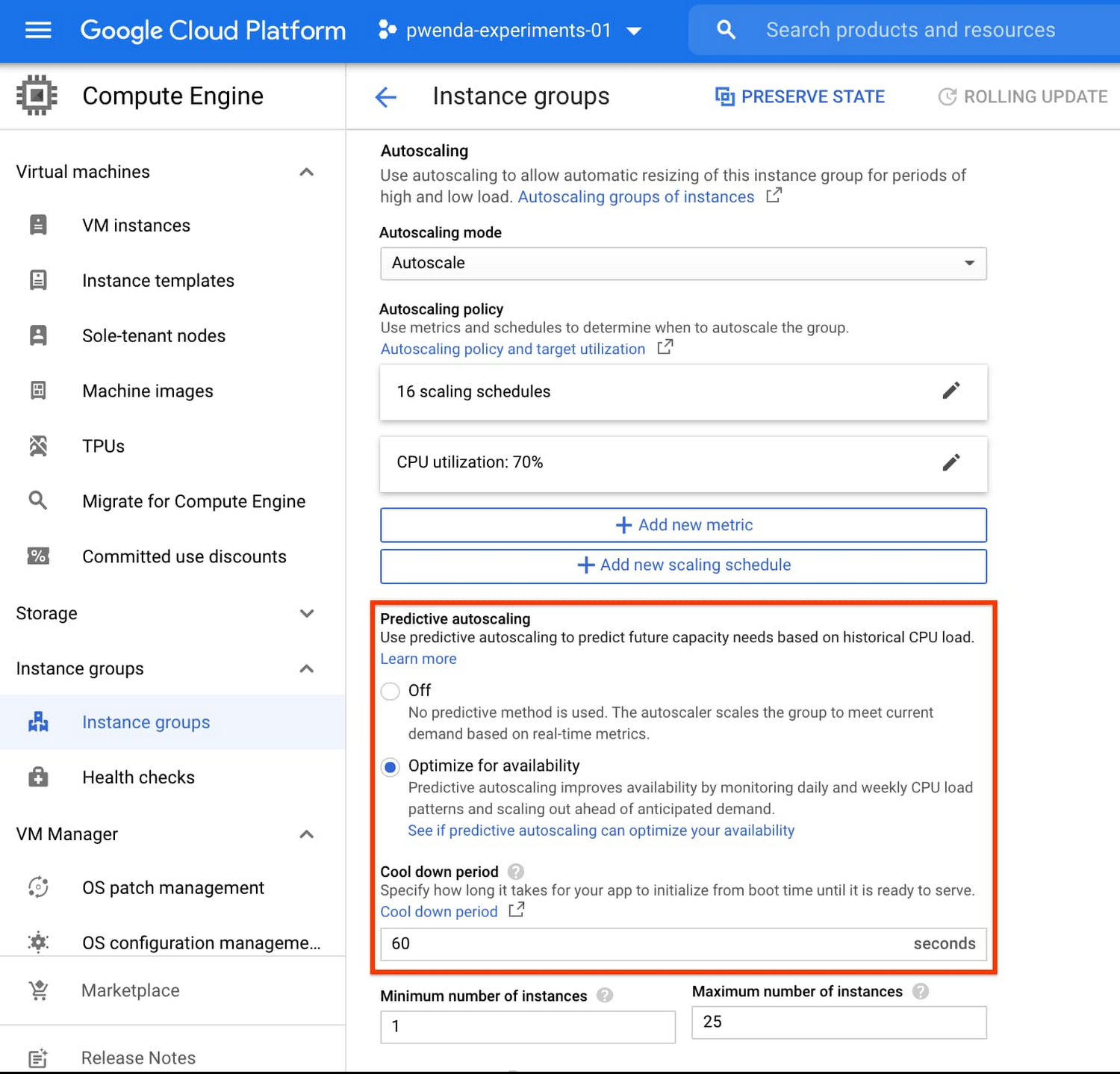
To better understand whether predictive autoscaling is good for your application, click the link See if predictive autoscaling can optimize your availability. This will show you a comparison of the last seven days with your current autoscaling configuration vs. with predictive autoscaling enabled.
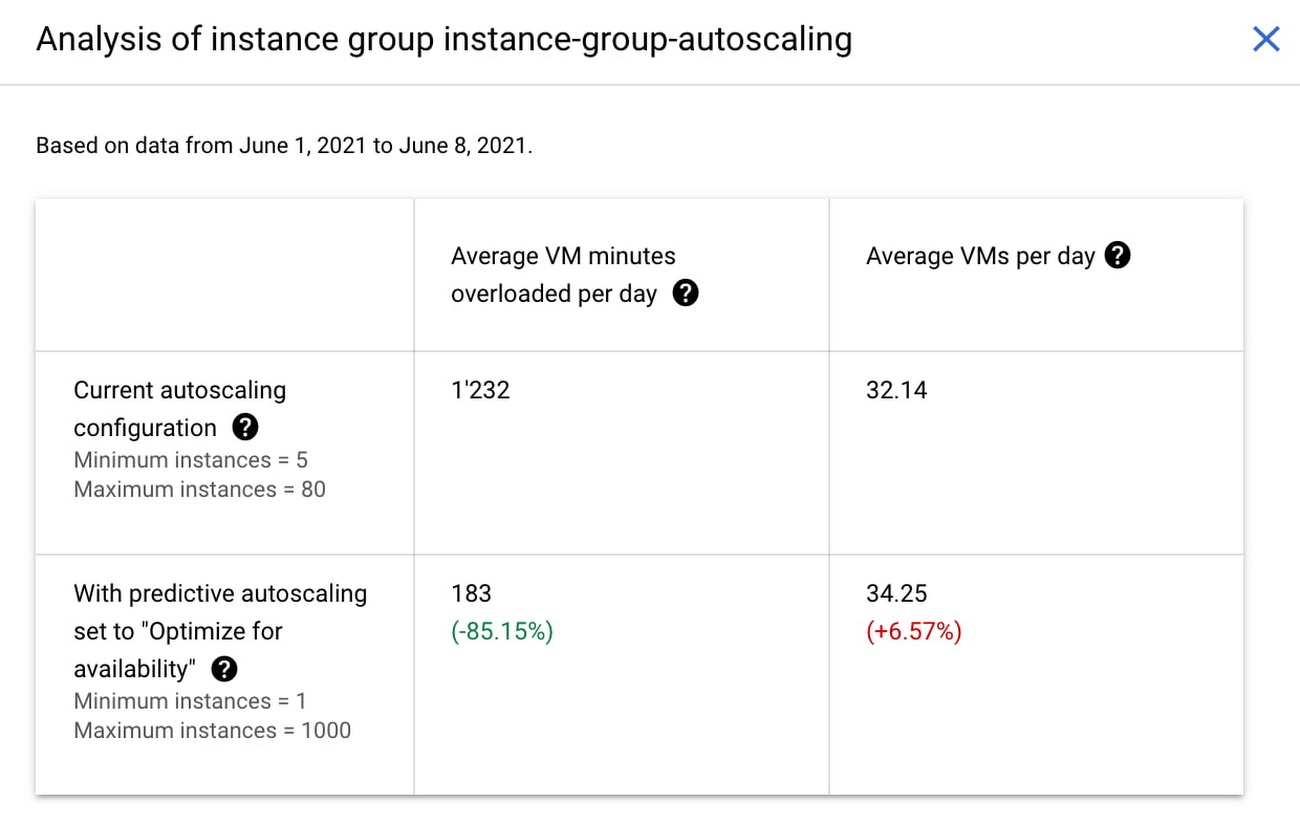
In the above chart,
- Average VM minutes overloaded per day shows how often your VMs exceed your CPU utilization target. This happens when demand is higher than available capacity. Predictive autoscaling can reduce this by starting VMs ahead of anticipated load.
- Average VMs per day is a proxy for cost. This shows how much additional VM capacity you need to keep your CPU utilization within the target you have set. You can optimize your cost by adjusting Minimum instances andCPU utilization as explained below.
Optimizing your configuration
Make sure your Cool down period reflects how long it takes for your application to initialize from VM boot time until it’s ready to serve the load. Predictive autoscaling will use this value to start VMs ahead of forecasted load. If you set it to 10 minutes (600 seconds) your VMs will start 10 minutes before the load is expected to increase.
Review your autoscaling CPU utilization target and Minimum number of instances. With predictive autoscaling you no longer need a buffer to compensate for the time it takes for a VM to start. If your application works best at 70% CPU utilization you don’t need to set target to a much lower value as predictive autoscaling will start VMs ahead of usual load. A higher CPU utilization and lower Minimum number of instances allows you to reduce the cost as you don’t need to pay for additional capacity to prepare for growing demand.
Try predictive autoscaling today
Predictive autoscaling is generally available across all Google Cloud regions. For more information on how to configure, simulate and monitor predictive autoscaling, consult the documentation.
Download the Forrester Study to Explore the Benefits of AI for IT Operations in Cloud Environment

7125
Of your peers have already read this article.
1:30 Minutes
The most insightful time you'll spend today!
Organizations are currently modernizing their businesses in order to meet the increasing complexity of today’s business landscape. In effect, business leaders must evaluate the best way to mitigate the challenges which plague their cloud operations, all while meeting customers’ growing expectations around digital experience (DX) through agility, automation, and proactive incident avoidance.
In this commissioned study, “Modernize With AIOps To Maximize Your Impact”, Forrester Consulting surveyed organizations worldwide to better understand how they’re approaching artificial intelligence for IT operations (AIOps) in their cloud environments, and what kind of benefits they’re seeing.
Within this July 2021 study, you’ll see that AIOps systems and principles are here to help. It covers how AIOps increases efficiency and productivity across day-to-day operations, and how businesses are taking note. In fact, 91% of respondents have implemented AIOps to address at least one cloud operations issue, and expansion is set to skyrocket. Those that wait to act, risk losing out on the efficacy of their cloud investment and falling behind their more efficient competitors.
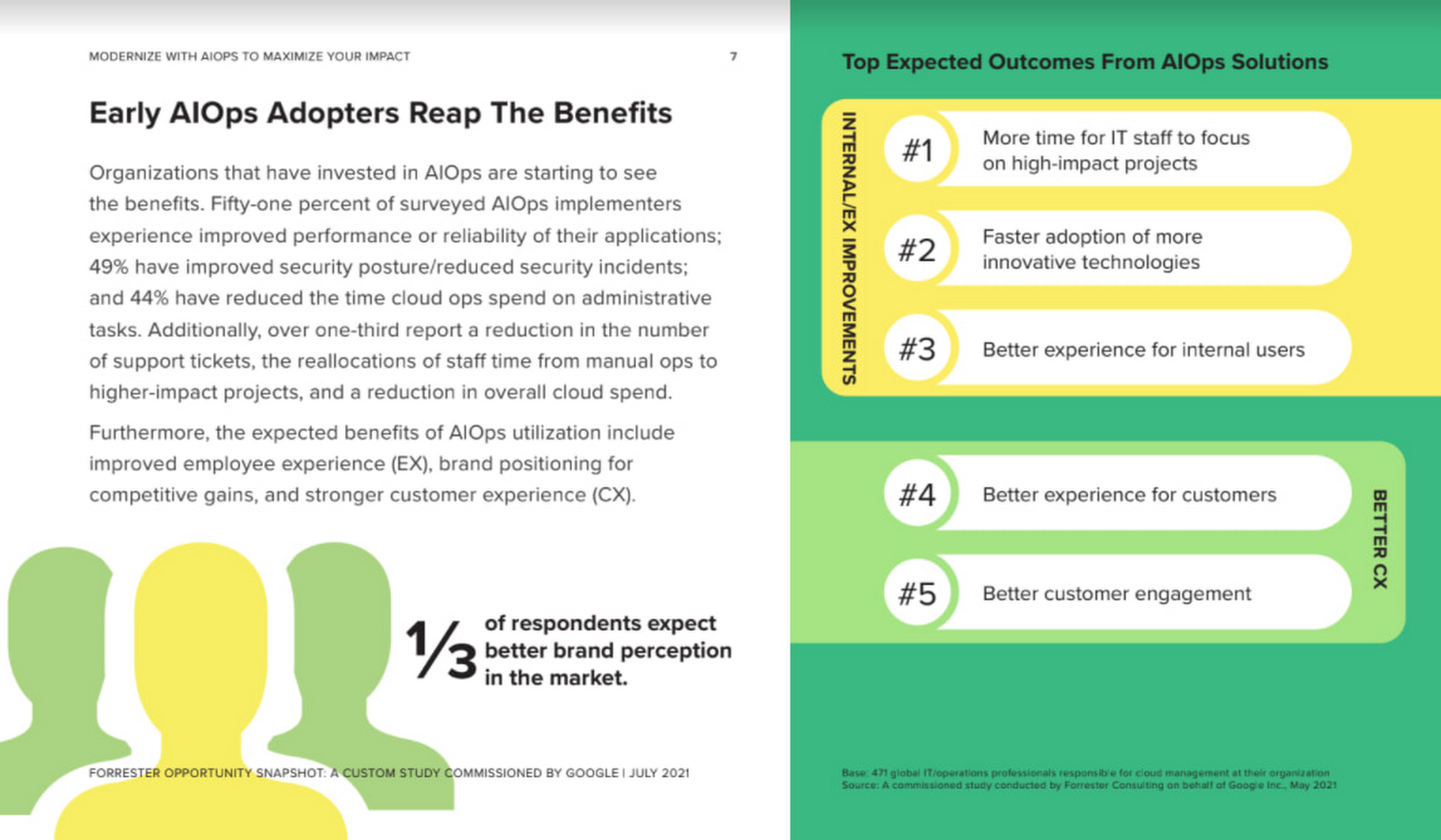
As you can see in the image above, there is a plethora of great information in this complimentary study. So, if you’re looking to enhance your cloud operations and/or adopt AIOps within your organization, be sure to download this free study today.
Google Cloud and StartEd Join Forces to Boost EdTech Startups

1348
Of your peers have already read this article.
2:00 Minutes
The most insightful time you'll spend today!
Over the past few years, as the education sector was going through transformative change, EdTech startups rose to meet the demand of learners and help address some of the biggest challenges in education. At Google Cloud, we’re inspired by how EdTech startups continue to solve challenges with agility, innovative technology, and determination. We’re proud to help EdTechs make learning more personal, safe, and accessible, and we’re working to connect EdTech startups with the right people, products, and best practices that will help them grow
Announcing a new partnership with StartEd
Google Cloud is excited to announce a partnership to offer mentor-based programming for EdTechs with StartEd — an organization that accelerates education innovators addressing Early Childhood, K-12, HigherEd, Workforce, and Adult Learning.
Founded by entrepreneurs nearly ten years ago, StartEd is on a mission to attract and develop a network of innovators working to ensure equitable, quality education and lifelong learning opportunities for all. The company trains and connects thousands of diverse entrepreneurs, educators, and investors at for-profit and not-for-profit organizations each year, working alongside corporations, foundations, and higher education institutions across the United States.
StartEd has helped grow more than 2,500 companies and built a mentor network of over 800 senior leaders with deep expertise in early-stage EdTech companies. The StartEd community now numbers more than 25,000 members.
“I am thrilled to embark on this transformative partnership with Google Cloud,” said Ash Kaluarachchi, StartEd CEO and managing director. “This alliance not only amplifies our mission to empower and nurture the world’s education innovators at every point in their journey, but it also unlocks unprecedented potential for the entire EdTech ecosystem. Together, we’re poised to redefine the future of education and work and to create lasting, positive impact for generations to come.”
Mentoring and networking opportunities for EdTech startups
Through this partnership, U.S.-based EdTech startups can apply to a new program, StartEd sponsored by Google Cloud. The program offers startups access to personal coaching, hands-on training, business support, and a large network of industry experts to help them accelerate their growth and transform education. Beyond the benefits from StartEd, startups will gain access to cloud credits, technical support from Google Cloud, and coaching from Google’s education leadership.
More Relevant Stories for Your Company

Google and Fervo Agreement to Shape-up Plans for 24/7 Carbon-free Energy by 2030
When Google announced our plan to go beyond purchasing renewable power for 100% of our energy usage and operate on 24/7 carbon-free energy by 2030, we noted that achieving this goal will require new transaction structures, advancements in clean energy policy, and innovative new technologies. Today, we’re pleased to announce that one of
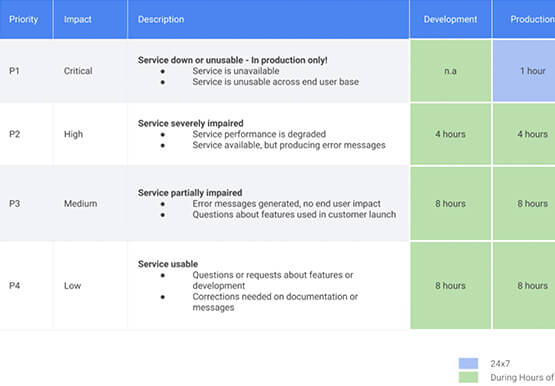



Relax: Support on Google Cloud is Easy and Efficient
To navigate the complexity of today’s cloud environment and to get the most out of your investment, you need robust support that is fast, efficient, and available at the time of need. Google Cloud Platform support checks all the boxes and helps you architect for the inevitable and quickly resolve

Transforming Canadian Healthcare and Medical Research with Google Cloud
Is Cloud an option for Canadian Healthcare healthcare and medical research organizations? Yes, Canadian healthcare and medical research organizations are moving to the cloud. The cloud market is expected to grow in Canada significantly through 2027. There are several reasons why Canadian healthcare and medical research organizations are moving to

A New Milestone: Istio Comes Closer to Cloud-native Ecosystem
Today we are excited to announce that Google and the Istio Steering Committee have submitted the Istio project for consideration as an incubating project within the Cloud Native Computing Foundation (CNCF). This is a significant milestone for Istio and its community, and we are thrilled to reach this next step
