





Giving Customers More Choice: Google Cloud’s New Product and Pricing Options

3287
Of your peers have already read this article.
3:00 Minutes
The most insightful time you'll spend today!
Over the past several years, Google Cloud has made significant investments in our infrastructure product portfolio. We launched new Tau T2D VMs, which deliver 42% better price-performance vs. other leading cloud providers. We upgraded Cloud Storage to offer more flexibility to support customers’ enterprise and analytics workloads, with dual-region buckets and upcoming Turbo Replication. And we’ve delivered numerous improvements to our global network, including expansion to 29 cloud regions.
However, from conversations with customers, we’ve also learned we can do more to align our capabilities and pricing with their varied workloads. So, today, we are announcing we will adjust our infrastructure product and pricing structure to give customers more choice in how they pay for what they use alongside new, flexible SKUs with new product options and capabilities. These changes are designed to help ensure better product fit for our customers’ use cases across a wider array of workloads. They are also designed to better align with how other leading cloud providers charge for similar products, so customers can more easily compare services between leading cloud providers.
Some of these changes will provide new, lower-cost options and features for Google Cloud products. Other changes will raise prices on certain products. Ultimately, our goal is to provide more flexible pricing models and options for how customers are using our cloud services. Here’s an overview of what customers can expect:
Which services are changing? What new services are being introduced?
We are changing prices for some storage, compute, and networking products. The changes provide customers with new ways to optimize their spending based on workload type and size, or data portability needs, as well as reducing costs on some services. Specific changes include:
- Cloud Storage pricing changes for data mobility, including replication of data written to a dual- or multi-region storage bucket, and inter-region data access
- Introduction of a new lower-cost archive snapshot option for Persistent Disk (PD), so that compliance/archiving use cases are charged less than compute-intensive DevOps workloads
- New outbound data processing pricing for Cloud Load Balancing, in line with other leading cloud providers
- New pricing for Network Topology, which will include Performance Dashboard within Network Intelligence Center at no additional charge
Will customers’ bills increase? Decrease?
The impact of the pricing changes depends on customers’ use cases and usage. While some customers may see an increase in their bills, we’re also introducing new options for some services to better align with usage, which could lower some customers’ bills. In fact, many customers will be able to adapt their portfolios and usage to decrease costs. We’re working directly with customers to help them understand which changes may impact them.
When will the new prices go into effect?
Today, we sent customers a six-month notice on the price changes, which go into effect on October 1, 2022. Customers under existing commit contracts with a floating or fixed discount will not face any changes until renewal. Our goal is to help our customers manage any impact of these changes and allow time for them to adjust or modify their implementations.
What should customers do next?
There are a number of things customers can do to prepare for the changes:
- Read through the Mandatory Service Announcement (MSA) sent on March 14.
- Consider what actions, if any, they may want to take based on current storage, networking, and compute needs. Many of these changes may have simple choices associated with them.
- Consider using the Storage Transfer Service to select the right Cloud Storage bucket locations. Storage Transfer Service will be available free-of-cost for transfers within Cloud Storage, starting April 2 until the end of the year.
For those customers under contract, Google Cloud account representatives are available to discuss these changes. Please visit our pricing page and the links below for more details on our updates to storage, networking, and PD pricing, including information on how to modify your implementations if needed. If you do not have an account manager and still have questions please review our public FAQ, which will be updated regularly, as well as the resource links below.
Note: This pricing analysis is valid as of February 2022.
Resources:
30 Guides to Ease Your Cloud Migration Journey

4388
Of your peers have already read this article.
1:30 Minutes
The most insightful time you'll spend today!
Getting started with your migration
One of the challenges with cloud migration is that you’re solving a puzzle with multiple pieces. In addition to a number of workloads you could migrate, you’re also solving for challenges you’re facing, the use cases driving you to migrate, and the benefits you’re looking to gain. Each organization’s puzzle will likely get solved in their own unique way, but thankfully there is plenty of guidance on how you can migrate common workloads in successful ways.
In addition to working directly with our Rapid Assessment and Migration Program (RAMP), we also offer a plethora of self-service guides to help you succeed! Some of these guides, which we’ll cover below, are designed to help you identify the best ways to migrate, which include meeting common organizational goals like minimizing time and risk during your migration, identifying the most enterprise-grade infrastructure for your workloads, picking a cloud that aligns with your organization’s sustainability goals, and more:
- Get started with this cloud migration guide and checklist
- Key considerations for building a migration factory to Google Cloud
- Understanding the cloud migration strategies at your disposal
- Understanding how to migrate key enterprise workloads to Google Cloud
Which workloads are you moving?
In addition to the guides above which help you through your end-to-end migration, it’s also important to understand the specific workloads you’ve got on-premises (or in other clouds). Each workload has their own unique nuances — what works for one might not work perfectly for another. This is where leveraging the expertise of our RAMP team is crucial, and why we have lots of migration guides for specific workloads and end-states. For each workload, we’re highlighting a few guides that we think could be most helpful, but you can also click each topic to learn more or find more guides.
- Modernization path for .NET applications on Google Cloud
- Managed Service for Microsoft Active Directory is GA
- Migrating Microsoft workloads to Google Cloud yields results
- Migrate, scale, and innovate at speed
- Boost Retail Intelligence and Agility in the Cloud
- Retire your tech debt: Move vSphere 5.5+ to Google Cloud VMware Engine
- Financial Services Spotlight: Elevating agility and security in the cloud
- Curious about Google Cloud Bare Metal Solution? Start here
- Getting Started with Google Cloud’s Bare Metal Solution
- Guide – Bring new life to your databases with an Oracle migration
- SAP on Google Cloud: Migration strategies
- Run your SAP workloads on Google Cloud Bare Metal Solution
- eBook – Google Cloud for SAP: The enterprise cloud for business agility, insights, and innovation
- How to transfer your data to Google Cloud
- An Overview of the Transfer Appliance
- Migration to Google Cloud: Transferring your large datasets
- Transferring data from Amazon S3 to Cloud Storage using VPC Service Controls and Storage Transfer Service
- Overview of Database Migration Service
- Database migration: Concepts and principles (Part 1)
- Database migration: Concepts and principles (Part 2)
- Database cloud migrations made easy for PostgreSQL, MySQL
- Migrating data warehouses to BigQuery: Introduction and overview
- Oracle to BigQuery migration
- Amazon Redshift to BigQuery migration guide
- IBM Netezza to BigQuery migration guide
- Teradata to BigQuery migration guide
Take the next step
When it comes to migration, we’re committed to meet every organization where they are. We fully understand the nuances and challenges of cloud migration, and at Google Cloud we have one singular goal: to help you realize true business value through your cloud migrations.
Visit our Migration Architecture Center to find even more guides to use during your migration, or if you’re looking to dive a little deeper into planning, sign up for a free discovery and assessment of your existing IT landscape.

6554
Of your peers have already downloaded this article
5:30 Minutes
The most insightful time you'll spend today!
What’s behind the rising confidence in cloud security? First hand experience, and careful, systematic assessments that tap multiple sources such as detailed audits and comparisons. The most frequent driver of increased confidence was the direct experience of the quality of security in the cloud versus on-premises.
As a result, the use of Cloud is expected to rise to 65 percent of workloads by 2019, according to a recent survey of more than 500 global CIOs conducted on behalf of Google Cloud in association with MIT SMR Custom Studio. Increased confidence in cloud security along with the increased need for agility and speed are driving this growth in cloud adoption.
Download this exclusive report and understand why CIOs have a growing confidence in cloud security, how they are basing their hosting decisions on the flexibility and integration offered by the cloud, and their plans to use the cloud for future workloads.
Consumption Packs Shorten’s Customers Transition to Google Cloud and Boosts Partners’ Financial Growth

3236
Of your peers have already read this article.
2:00 Minutes
The most insightful time you'll spend today!
When we launched Partner Advantage, we committed to making it predictable and easy for partners to drive business with us. Since launch, those commitments have been validated by channel experts like CRN, which gave Partner Advantage a 5-Star award for 2022, and by the fact that our partners have seen impressive growth* across virtually every facet of their business.
I am pleased to announce that our commitments endure today with the launch of Consumption Packs for Deal Acceleration Funds and Partner Services Funds (DAF and PSF for partners). Inspired by partner feedback, these new packages are designed to accelerate all stages of a customer’s journey to the cloud, and make it even easier and faster for partners to do business with us.
Consumption Packs are purpose-built so that partners can plan and initiate customer projects much more quickly, with predictable funding. They include assets and templates that allow partners to deliver Google Cloud designed and validated infrastructure, application migration and modernization plans to customers faster than ever–particularly for customers beginning their journey to the cloud. Based on learnings gathered from thousands of customer deployments, these turnkey packs have been designed by our partners and Google Cloud Partner Engineering and Professional Services’ teams.
Here’s a brief look at Consumption Packs in action:
- Consumption Packs offer pre-approved, curated templates and assets to simplify and shorten the process for most common projects.
- For Deal Acceleration Funds (DAF), packages include everything partners need to conduct assessments, workshops and proofs-of-concept so they can quickly meet customers where they are on their journey to the cloud.
- For Partner Services Funds (PSF), packages are structured so that partners can develop cloud ready foundation and migration plans that align with Google Cloud priority solution areas.
- Packages have pre-determined funding levels to enable faster deployments.
Partners still have the option to engage with Google Cloud Partner Advantage and their customers through customized requests, as they always have. This is ideally suited for projects that require a tailored approach to meet unique customer requirements.
We are launching nine consumption packs today focused on key enterprise workloads, with a vision toward introducing additional packages to cover more solutions. Partners can explore Consumption Packs now by visiting the Partner Advantage portal.
We welcome your continued feedback and suggestions, and look forward to helping our customers achieve new levels of growth and success, together.
See you in the cloud.
- The Google Cloud Business Opportunity For Partners, a commissioned Total Economic Impact™ study conducted by Forrester Consulting, October 2021
Making Weather Predictions Easy with Weather Research and Forecasting (WRF) Models on Google Cloud!

3576
Of your peers have already read this article.
6:00 Minutes
The most insightful time you'll spend today!
Weather forecasting and climate modeling are two of the world’s most computationally complex and demanding tasks. Further, they’re extremely time-sensitive and in high demand — everyone from weekend travelers to large-scale industrial farming operators wants up-to-date weather predictions. To provide timely and meaningful predictions, weather forecasters usually rely on high performance computing (HPC) clusters hosted in an on-premises data center. These on-prem HPC systems require significant capital investment and have high long-term operational costs. They consume a lot of electricity, have largely fixed configurations, and the underlying computer hardware is replaced infrequently.
Using the cloud instead offers increased flexibility, constantly refreshed hardware, high reliability, geo-distributed compute and networking, and a “pay for what you use” pricing model. Ultimately, cloud computing allows forecasters and climate modelers to provide timely and accurate results on a flexible platform using the latest hardware and software systems, in a cost effective manner. This is a big shift compared with traditional approaches to weather forecasting, and can appear challenging. To help, weather forecasters can now run the Weather Research and Forecasting (WRF) modeling system easily on Google Cloud using the new WRF VM image from Fluid Numerics, and achieve the performance of an on-premises supercomputer for a fraction of the price. With this solution, weather forecasters can get a WRF simulation up and running on Google Cloud in less than an hour!
A closer look at WRF
Weather Research and Forecasting (WRF) is a popular open-source numerical weather prediction modeling system used by both researchers and operational organizations. While WRF is primarily used for weather and climate simulation, teams have extended it to support interactions with chemistry, forest fire modeling, and other use cases. WRF development began in the late 1990s through a collaboration between the National Center for Atmospheric Research (NCAR), National Oceanic and Atmospheric Administration (NOAA), U.S. Air Force, Naval Research Laboratory, University of Oklahoma, and the Federal Aviation Administration. The WRF community comprises more than 48,000 users spanning over 160 countries, with the shared goal of supporting atmospheric research and operational forecasting.
The Google Cloud WRF image is built using Google’s MPI best practices for HPC, with the exception that hyperthreading is not disabled by default, and is easily integrated with other HPC solutions on Google Cloud, including SchedMD’s Slurm-GCP. Normally, installing WRF and its dependencies is a time consuming process. With these new WRF VM images, deploying a scalable HPC cluster with WRF v4.2 pre-installed is quick and easy with our Codelab. OpenMPI 4.0.2 was used throughout this work. Google has had good success with Intel MPI, and we intend to study whether further performance gains can be achieved in this context.
Optimizing WRF
Determining the optimal architecture and build settings for performance and cost was a key part of the process in developing the WRF images. We evaluated how to select the ideal compiler, right CPU platform, and the best file system for handling file IO, so you don’t have to. As a test case for assessing performance, we used the CONUS 2.5km benchmark.
Below, the CONUS 2.5km runtime and cost figure shows the run time required for simulating WRF over a two-hour forecast using 480 MPI ranks (a way of numbering processes) for different machine types available on Google Cloud. For each machine type, we’re showing the lowest measured run time from a suite of tests that varied compiler, compiler optimizations, and task affinity.
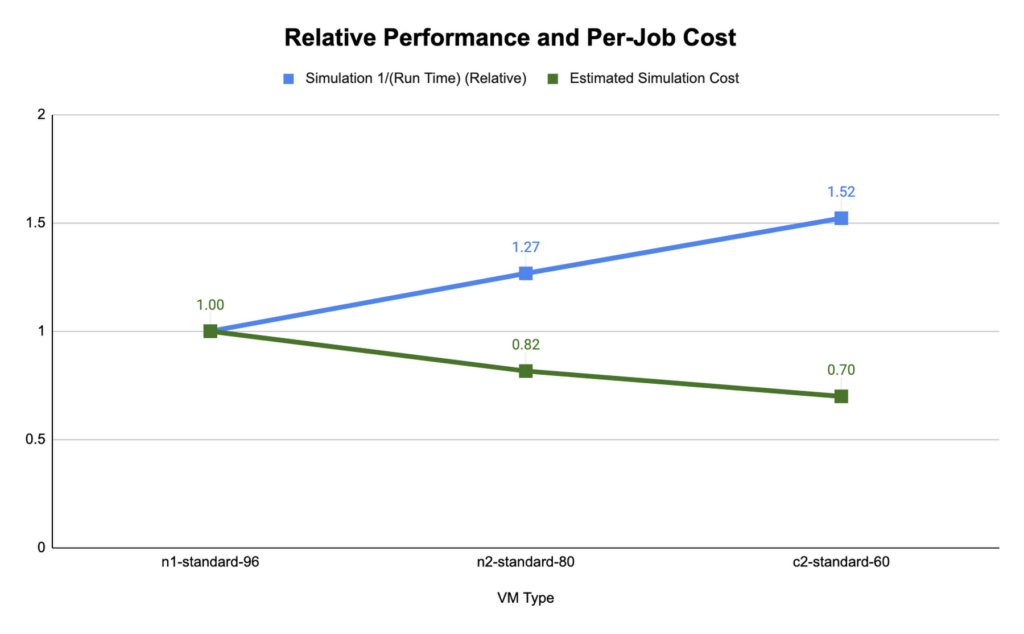
We found that compute-optimized c2 instances provided the shortest run time. The Slurm job scheduler allows you to map the MPI tasks to compute hardware using task affinity flags. When optimizing the runtime and cost for each machine type, we compared using srun –map-by core –bind-to core to launch WRF, which maps each MPI process to a physical core (two vCPU per MPI rank), and srun –map-by thread –bind-to thread, which maps each MPI process to a single vCPU. Mapping by core and binding MPI ranks to cores is akin to disabling hyperthreading.
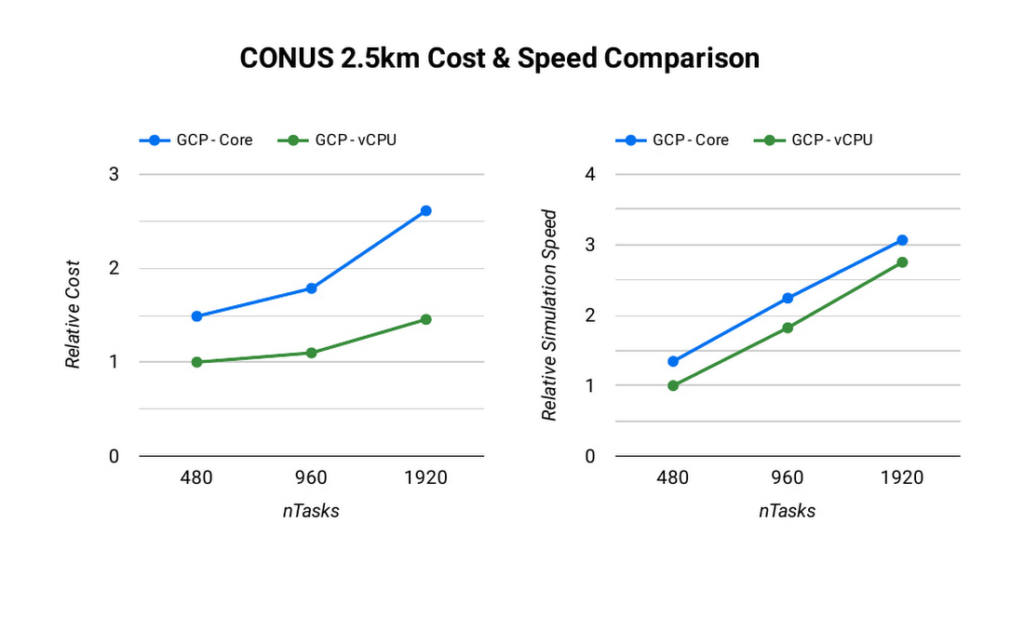
The ideal simulation cost and runtime for CONUS 2.5km for each platform is found when each MPI rank is subscribed to each vCPU. When binding to vCPUs, half as many compute resources are needed when compared to binding to physical cores lowering the per-second cost for the simulation. For CONUS 2.5km, we also found that although mapping MPI ranks to cores results in reduced runtime for the same number of MPI ranks, the performance gains are not significant enough to outweigh the cost savings. For this reason, the WRF-GCP solution does not disable hyperthreading by default.
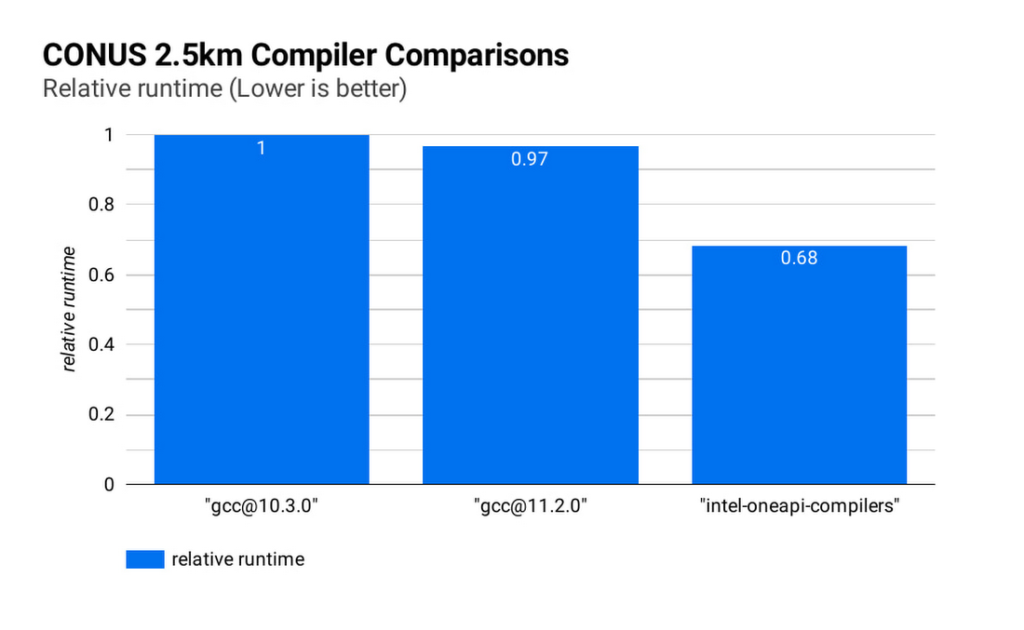
Runtime and simulation cost can be further reduced by selecting an ideal compiler: the figure below (CONUS 2.5km Compiler Comparisons) shows the simulation runtime for the WRF CONUS 2.5km benchmark on eight c2-standard-60 instances, using GCC 10.30, GCC 11.2.0 and the Intel® OneAPI® compilers (v2021.2.0). In all cases, WRF is built using level 3 compiler optimizations and Cascade Lake target architecture flags. By compiling WRF with the Intel® OneAPI® compilers, the WRF simulation runs about 47% faster than the GCC builds, and at about 68% of the cost, on the same hardware. We’ve used OpenMPI 4.0.2 with each of the compilers as the MPI implementation in this work. With other applications, Google has seen good performance with Intel MPI 2018, and we intend to investigate performance comparisons with this and other MPI implementations.
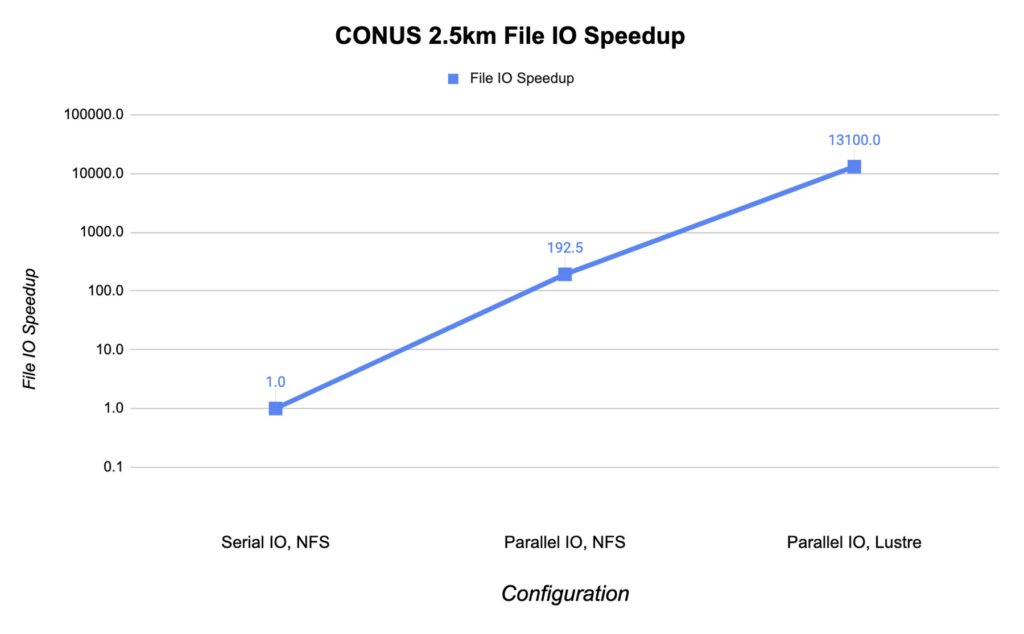
File IO in WRF can become a significant bottleneck as the number of MPI ranks increases. Obtaining the optimal file IO performance requires using parallel file IO in WRF and leveraging a parallel file system such as Lustre.
Below, we show the speedup in file IO activities relative to serial IO on an NFS file system. For this example, we are running the CONUS 2.5km benchmark on c2-standard-60 instances with 960 MPI ranks. By changing WRF’s file IO strategy to parallel IO, we accelerate file IO time by a factor of 60.
We further speed up IO and reduce simulation costs by using a Lustre parallel file system deployed from open-source Lustre Terraform infrastructure-as-code from Fluid Numerics. Lustre is also available with support from DDN’s EXAScaler solution in the Google Cloud Marketplace. In this case, we use four n2-standard-16 instances for the Lustre Object Storage Server (OSS) instances, each with 3TB of Local SSD. The Lustre Metadata Server (MDS) is an n2-standard-16 instance with a 1TB PD-SSD disk. After mounting the Lustre file system to the cluster, we set the Lustre stripe count to 4 so that file IO can be distributed across the four OSS instances. By switching to the Lustre file system for IO, we speed up file IO by an additional factor of 193, which is orders of magnitude faster than a single NFS server with serial IO.
Adding compute resources and increasing the number of MPI ranks reduces the simulation run time. Ideally, with perfect linear scaling, doubling the number of MPI ranks would cut the simulation time in half. However, adding MPI ranks also increases communication overhead, which can increase the cost per simulation. The communication overhead is due to the increased amount of communication necessitated by splitting the problem more finely across more machines.
To assess the scalability of WRF for the CONUS 2.5km benchmark, we can execute a series of model forecasts where we successively double the number of MPI ranks. Below, we show two- hour forecasts on the c2-standard-60 instances with the Lustre file system, varying the number of MPI ranks from 480 to 1920. In all of these runs, MPI ranks are bound to vCPUs so that the number of vCPUs dedicated to each simulation increases with the increase in MPI ranks. While many HPC workloads run best with simultaneous multithreading (SMT) disabled, we find the best performance for CONUS 2.5km with SMT enabled. Thus, the number of MPI ranks in our runs equals the total number of vCPUs.
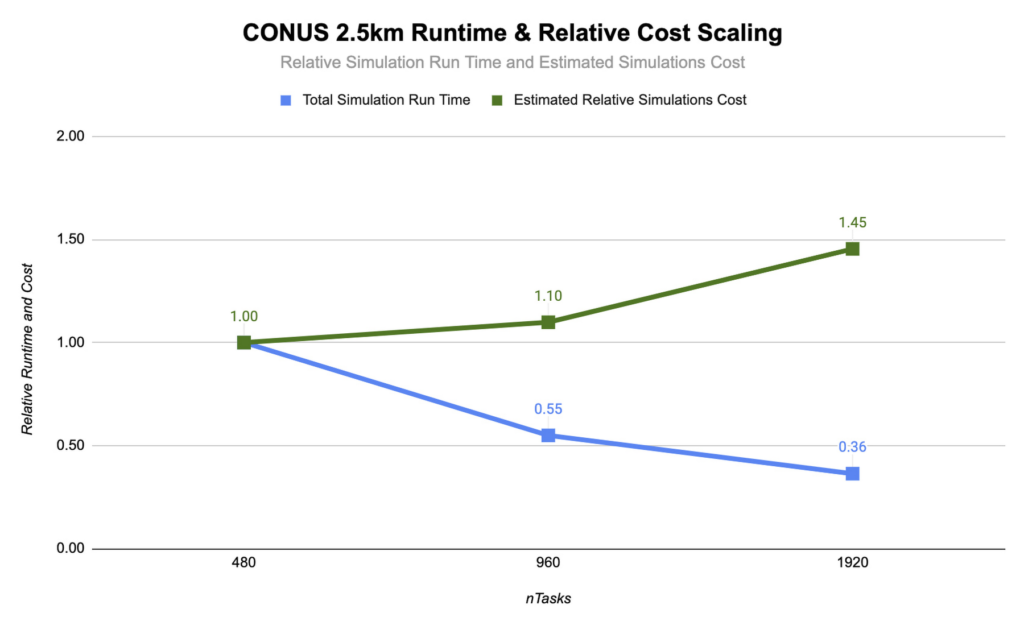
As you can see, the CONUS 2.5km Runtime & Cost Scaling figure shows that the run time (blue bars) decreases as the number of MPI ranks and the amount of compute resources increases, at least up to 1920 ranks. When transitioning from 480 to 960 MPI ranks, the run time drops, yielding a speedup of about 1.8x. Doubling again to 1920 MPI ranks, though, we obtained an additional speedup of just 1.5x. This declining trend in the speedup with increasing MPI ranks is a signature of MPI overhead, which increases with more MPI ranks.
Determining your best fit
Most tightly-coupled MPI applications such as WRF exhibit this kind of scaling behavior, where scaling efficiency decreases with increasing MPI ranks. This makes assessing cost-scaling alongside performance-scaling critical when considering Total Cost of Ownership (TCO). Thankfully, per-second billing on Google Cloud makes this kind of analysis a little bit easier. As shown above, a second doubling of the count from 960 cores to 1920 cores can provide an additional 1.5x speedup, but at a 32% higher cost. In some circumstances, this faster turnaround may be needed and worth the extra cost.
If you want to get started with WRF quickly and experiment with the CONUS 2.5km benchmark, we’ve encapsulated this deployment in Terraform scripts and prepared an accompanying codelab.
You can learn more about Google Cloud’s high performance computing offerings at https://cloud.google.com/hpc, and you can find out more about Google’s partner Fluid Numerics at https://www.fluidnumerics.com.
Explore The New Era of Flexibility: Streamlined AWS-to-Google Cloud Migration

1343
Of your peers have already read this article.
3:30 Minutes
The most insightful time you'll spend today!
As an IT leader, you’re asked to do it all: innovate and optimize your tech stack for business outcomes — all while being secure and compliant. It takes heroic efforts to achieve innovation and progress while also tightening budgets and teams. This is why many of you are considering migrating applications to Google Cloud, for benefits like scalability and flexibility, security and compliance, disaster recovery and business continuity, and cutting-edge technologies at lower costs.
To help you do this, we suggest using Google Cloud’s Migrate to Virtual Machines – part of Migration Center. This managed cloud service lets you lift and shift workloads at scale to Google Cloud Compute Engine with minimal changes and risk.
And recently, we rolled out our latest release which introduces support for workload migration from AWS to Google Compute Engine. With this addition, you can now migrate both your on-prem and AWS workloads at scale. This means centralized management for your end to end workload migration journey from both sources via Cloud Console or APIs.
Simple and easy migrations from AWS and VMware sources to Google Cloud
Migration of AWS EC2 instances directly to Google Compute Engine using Migrate to Virtual Machines follows a well established and easy journey, which means a minimal learning curve for users who are already migrating workloads from VMware. Workload migration is agent-less, which means you do not need to access or alter workloads as a prerequisite for migration, allowing you to execute zero-touch migrations. Migrate instance data with no interruptions to the running workload at the source for a fast cutover to Google Cloud. In addition, our end-to-end cloud console interface surfaces your AWS EC2 inventory, migrations, and groups so you can execute migrations without ever leaving the cloud console interface.
Large-scale migrations
Completing a large-scale migration project in a timely manner calls for careful planning and streamlined migration sprints. The Migrate to Virtual Machines’ Groups construct enables you to group source VMs together in the planning phase. When it’s time to execute the planned migration, VM Groups let you execute migration operations on a group level, or on a subset of the group, streamlining the process at scale.
Minimal downtime and risk
Application uptime is key to keeping your business running. Every migration with this latest release of the service periodically replicates data from the source workload to the destination without manual steps or interruptions to the running workload, minimizing workload downtime and enabling fast cutover to Google Cloud. You can also launch non-disruptive migration tests — referred to as test-clones — to help you validate that these workloads will work properly in the cloud before cutting over. This helps avoid issues that might have otherwise been costly or disruptive to your business.
How the service works
Migrations simply work, at scale, in a managed service fashion. With Migrate to Virtual Machines, there’s no requirement to provision or manage migration-specific resources in the cloud. The service uses replication-based migration technology to lift and shift workloads from source environments to Google Cloud. The Migrate Connection replicates source VM disk snapshots in the background with no interruption to the source workload. Replicated data is encrypted in transit and at rest, and when you instantiate a migrating VM using a test-clone or cut-over, the service seamlessly adapts your source VM operating system to boot and run natively in the cloud — including configuring network settings and deploying Google Cloud guest packages.
The migration journey of an EC2 instance — or VMware VM — to Google Cloud is comprised of the following steps:
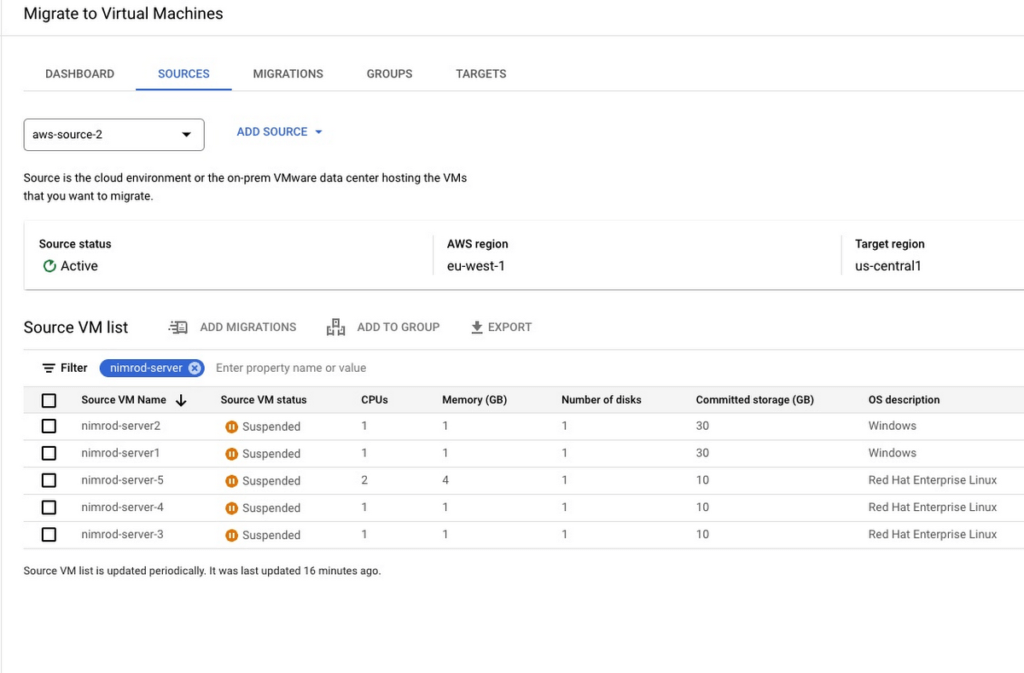
1. Onboarding a source VM for migration: Onboard one or more VMs for migration from the source environment fleet.
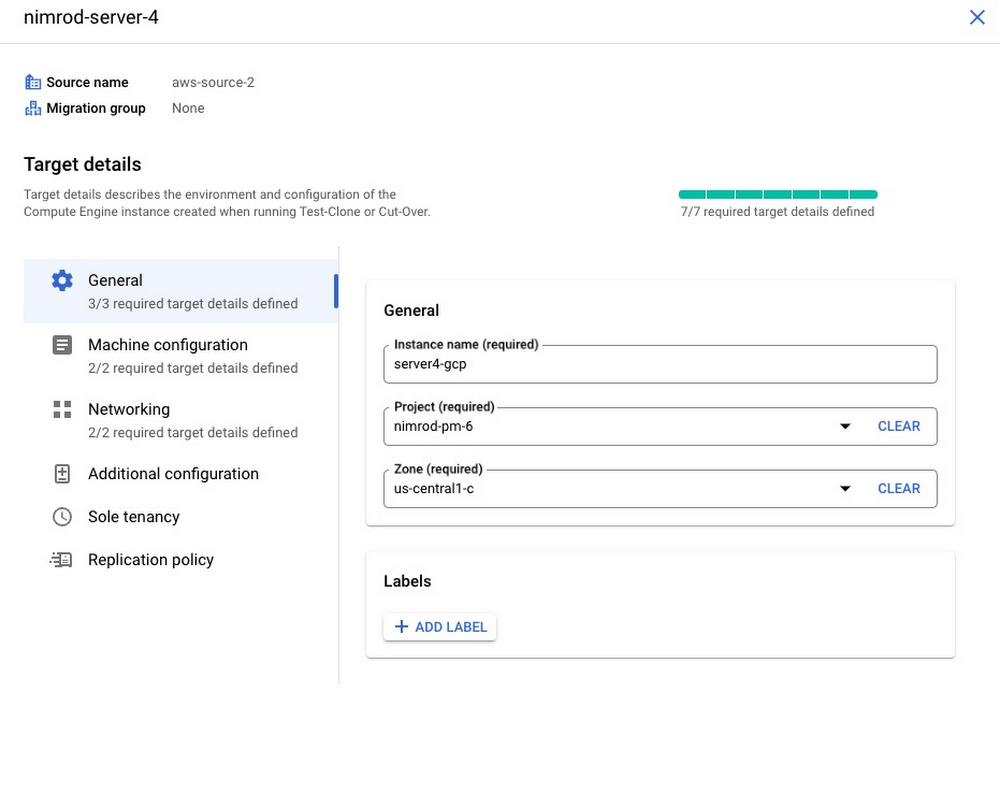
2. Configure landing zone target: You can migrate an instance to any Google Cloud project in your environment and update landing zone details at any time before executing a test-clone or cutover.
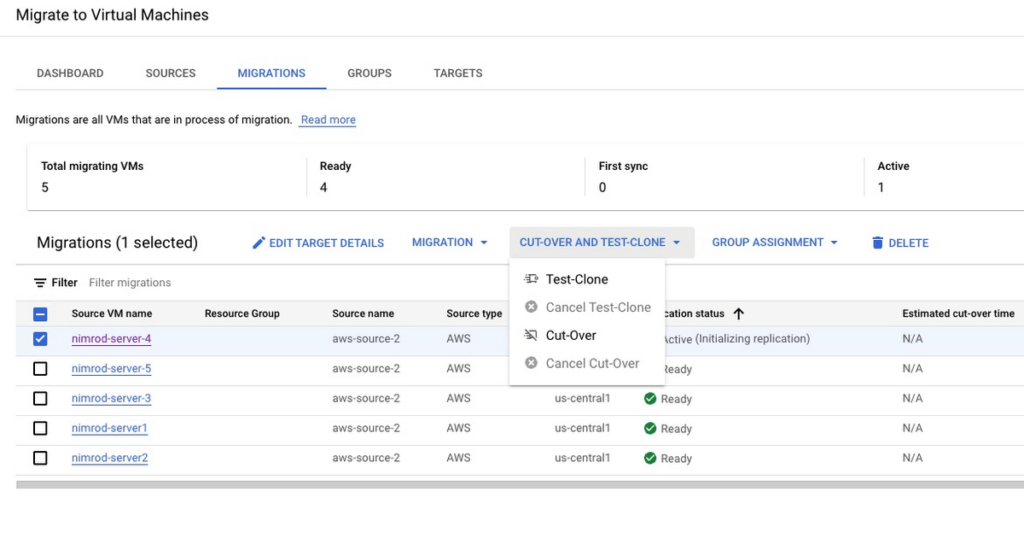
3. Initiate VM data replication of source workload: Migrate to Virtual Machines periodically replicates instance disks to the cloud with no interruption to the source instance. You can control replication frequently and pause or resume at any point in time.
4. Test migrating instance: Test-clone creates a copy of your source instance in the defined landing zone to validate the migrating instance in the cloud before executing a cut-over. You can repeat the test-clone multiple times to multiple landing zones for thorough validation
5. Cutover migrating instance: Cutover operation shuts down your source instance and then performs the short final sync to Google Cloud. Migrated VM is instantiated in the target landing zone.
Getting started with Migrate to Virtual Machines
It’s quick and easy to start migrating your AWS EC2 instances and on-premises VMs today:
- Enable the vmmigration API in a Google Cloud project
- Create an AWS source in your environment
- Onboard and initiate replication of instance data from source
- Set migrating instance target details.
- Perform non-disruptive tests of your migrating instance using test-clone
- Cutover your instance to the cloud with minimal down time
You can also visit our website to learn more about Migrate to Virtual Machines. If you know you have to migrate in 2023 but aren’t sure how to get started, you can sign up for a free discovery and assessment of your current IT landscape so we can help craft the ideal migration plan for you and your business.
More Relevant Stories for Your Company

IndiaMART: Delivering a Compelling Experience for B2B Buyers and Suppliers with Google Cloud
B2B marketplace IndiaMART aims to help businesses escape the restrictions of traditional supply chains. By providing access to a digital platform optimized for access from desktops and mobile devices, businesses can improve their operations and generate more revenue. IndiaMART’s suite of services includes web storefront, enquiry support, priority listings, premium number services,

ATB Financial Focuses on Customer Experience with the Speed it Gains in the Cloud
As senior vice president and head of technology enablement for ATB Financial, Barry Hensch has a mission: creating a seamless experience for the Alberta, Canada-based bank’s nearly 800,000 customers by leveraging the latest digital technology. ATB is a purpose-driven financial institution owned and operated by Alberta’s provincial government, with about




Pega Systems Migrates SAP Servers to Google Cloud in Just 9 Weeks!
Pega Systems' financial data on SAP environs were on a hosting platform that lacked agility. By moving nearly 30 SAP servers to Google Cloud in just 9 weeks, Pega Systems was able to unlock data and integrate BigQuery into SAP HANA to deliver personalization for clients and embark on an

BURGER KING Germany: Serving Up Marketing Insights and Supply Chain Visibility Easily
Do hamburgers really come from Hamburg? This may still be a matter of debate, but the popularity of American-style burger joints not just in Hamburg but all over Germany, is clear. Germany’s top two fast food companies are both burger chains. One of them is BURGER KING®, a global brand that welcomes more
