





How Google Cloud Helps SAP Admins Create Scalable, Secure Networks

6648
Of your peers have already read this article.
3:00 Minutes
The most insightful time you'll spend today!
SAP forms the critical backbone of thousands of enterprises, supporting critical business functions such as finance, supply chain, warehouse management, and more. Google Cloud provides a highly scalable and resilient infrastructure to run such workloads and offers tools, such as Smart Analytics and Machine Learning that can accelerate your organization’s digital transformation.
In fact, a recent study by Forrester found that running SAP on Google Cloud can generate a 160% return on investment and a payback period of six months or less, thanks to legacy infrastructure cost savings, downtime avoidance, and productivity improvements.
How you deploy your SAP systems across your network has a tremendous impact on its availability, resilience, and performance. In addition to separate production and high-availability (HA) environments, SAP deployments typically include sandbox, development, quality assurance (QA), and disaster recovery environments as well.
Because most of the Google network is virtual, SAP administrators can easily design complex landscapes that suit your organization’s SAP deployment and organizational structure while also meeting security and operational requirements.
As you get started with SAP on Google Cloud, you’ll need to decide how to configure your networking to ensure the availability and performance of various SAP systems. Here’s a look at your options.
VPC and shared VPC
A virtual private cloud (VPC) is a secure, isolated private network hosted within Google Cloud. VPCs are global in Google Cloud, so a single VPC can span multiple regions without communicating across the public internet. Similarly, subnets can span across zones within a region. A zone represents a single failure domain, so typical SAP deployments place production and HA systems in different zones to ensure resiliency. Google Cloud simplifies this type of deployment, because subnets containing both production and HA systems can span multiple zones.
This capability also simplifies SAP clustering, since the cluster’s virtual IP (VIP) address can be in the same range as those of the production and HA machines. This configuration shields the floating IP using Google internal load balancers and is applicable to HA clustering of the application layer (ASCS and ERS) and the HANA database layer (HANA Primary and Secondary).
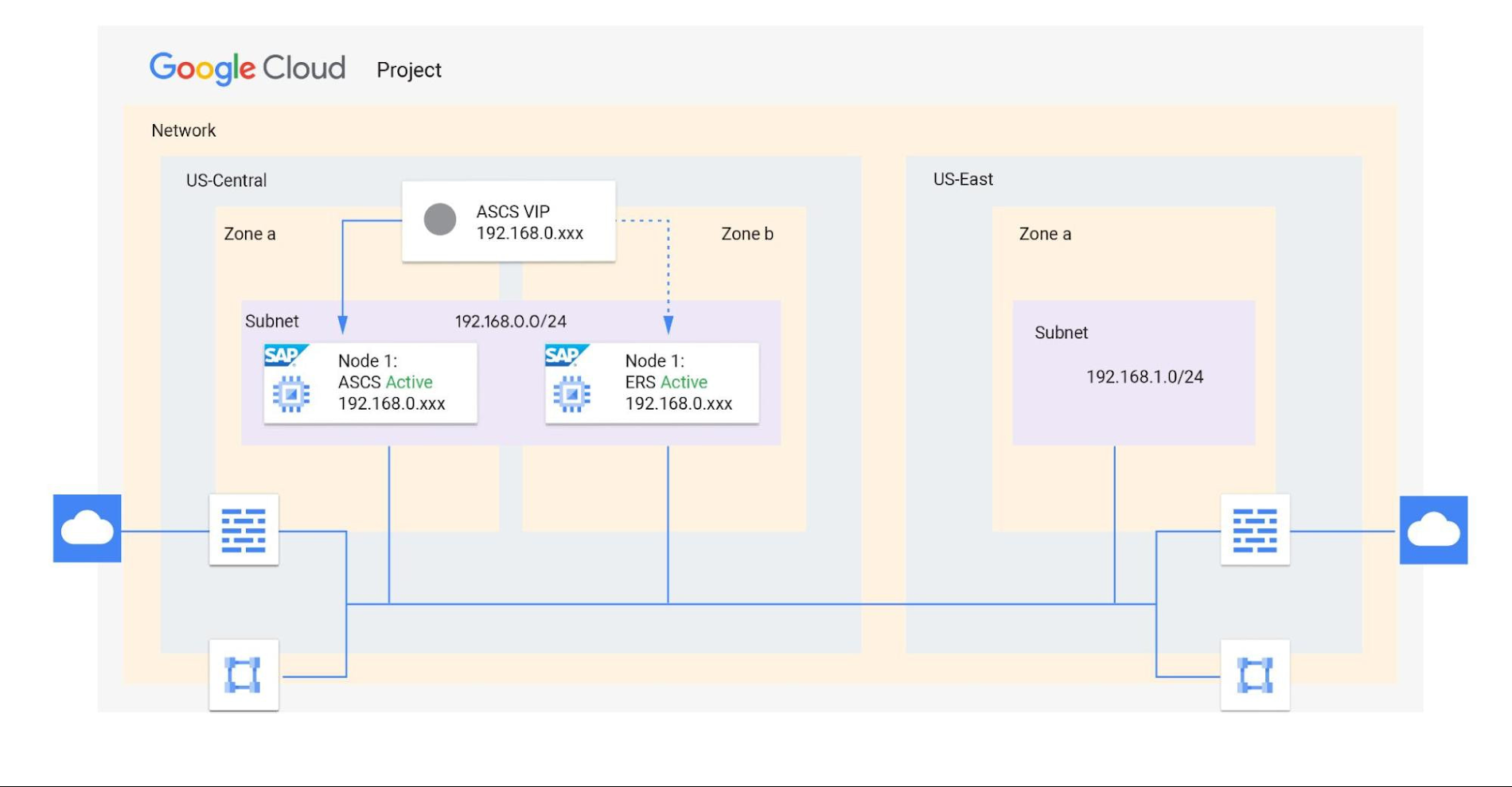
Shared VPCs are a feature unique to Google Cloud that allows an organization to connect resources from multiple projects to a common VPC network. This lets them communicate with each other securely and efficiently using internal IPs. You can also centrally control the network for all SAP projects (service) from the Host project while using firewalls to inspect communication between compute engines in the same subnet, and between those in different subnets. (Best practice is to limit the communication between these systems to only the required ports — typically via SAP remote function call (RFC) communication at Layer 4.)
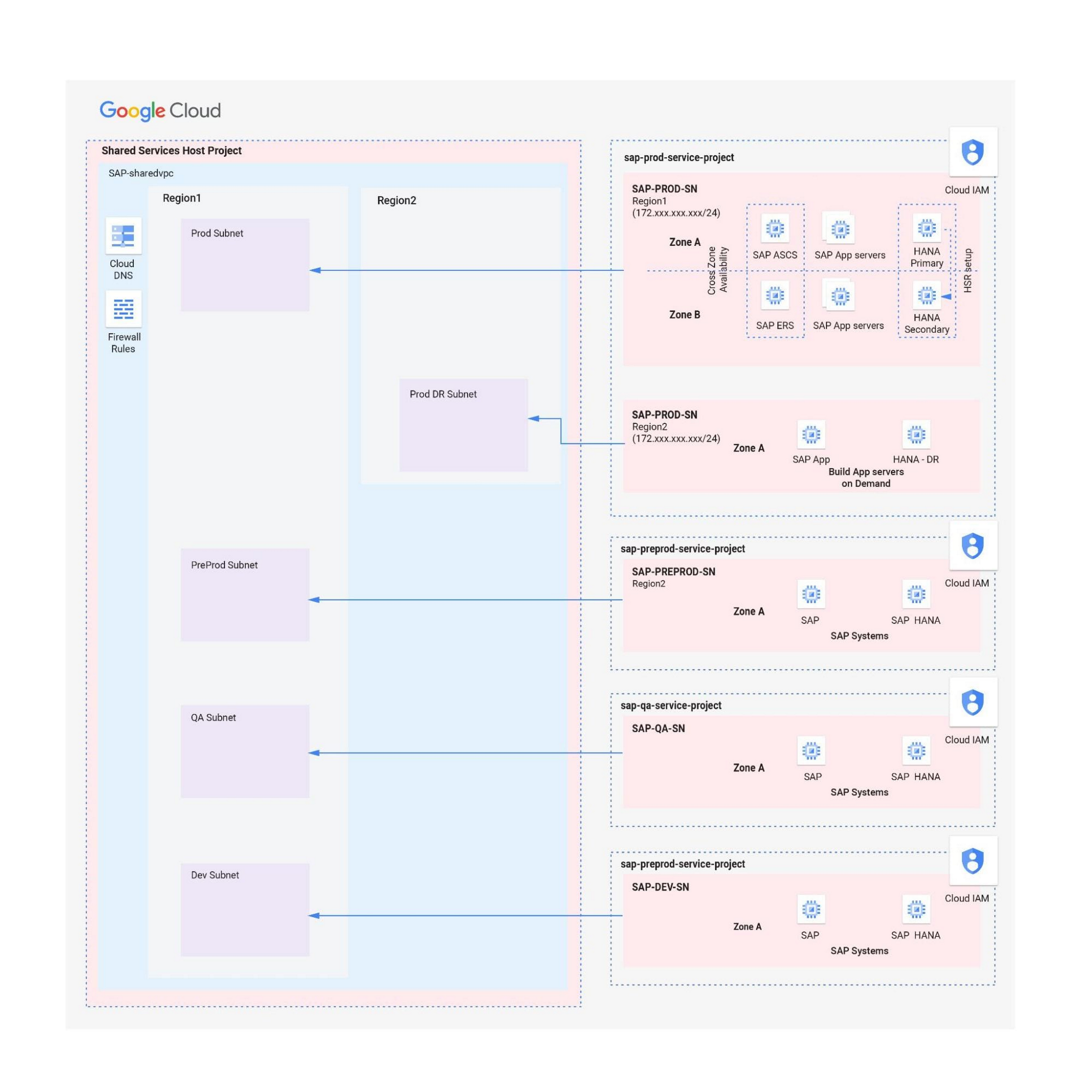
When designing your network, start with a host project containing one or more Shared VPC networks. You can attach additional service projects to a host project, which allows them to participate in the Shared VPC. It’s common practice to have multiple service projects operated and administered by various departments or teams in your organization.
Depending on your needs, you can deploy SAP on a single Shared VPC or multiple ones. The two scenarios differ in terms of network control, SAP environment isolation, and network inspection. Let’s look more closely at these differences.
Scenario 1: Deploying SAP on a single Shared VPC
If you require only a single network inspection, deploying SAP on a single Shared VPC has the advantage of simplicity and reduces administrative overhead.
- Network control: The Shared VPC serves as the network hub, allowing central network management based on identity access management (IAM) roles for the network team(s) in both production and non-production environments.
- SAP environment isolation: You can create projects and subnets for each SAP environment. Projects help group resources together for finer IAM control and billing visibility, while subnets provide network isolation for individual SAP environments. In service projects, compute engines can communicate by default; however, you can adopt simple firewall rules to block communication between compute engines within a subnet or in separate subnets.
- Network inspection: Use Google Cloud firewalls to allow only the required ports for communication between SAP systems. Leverage network tags and service accounts to define granular control for both north-south and east-west traffic.
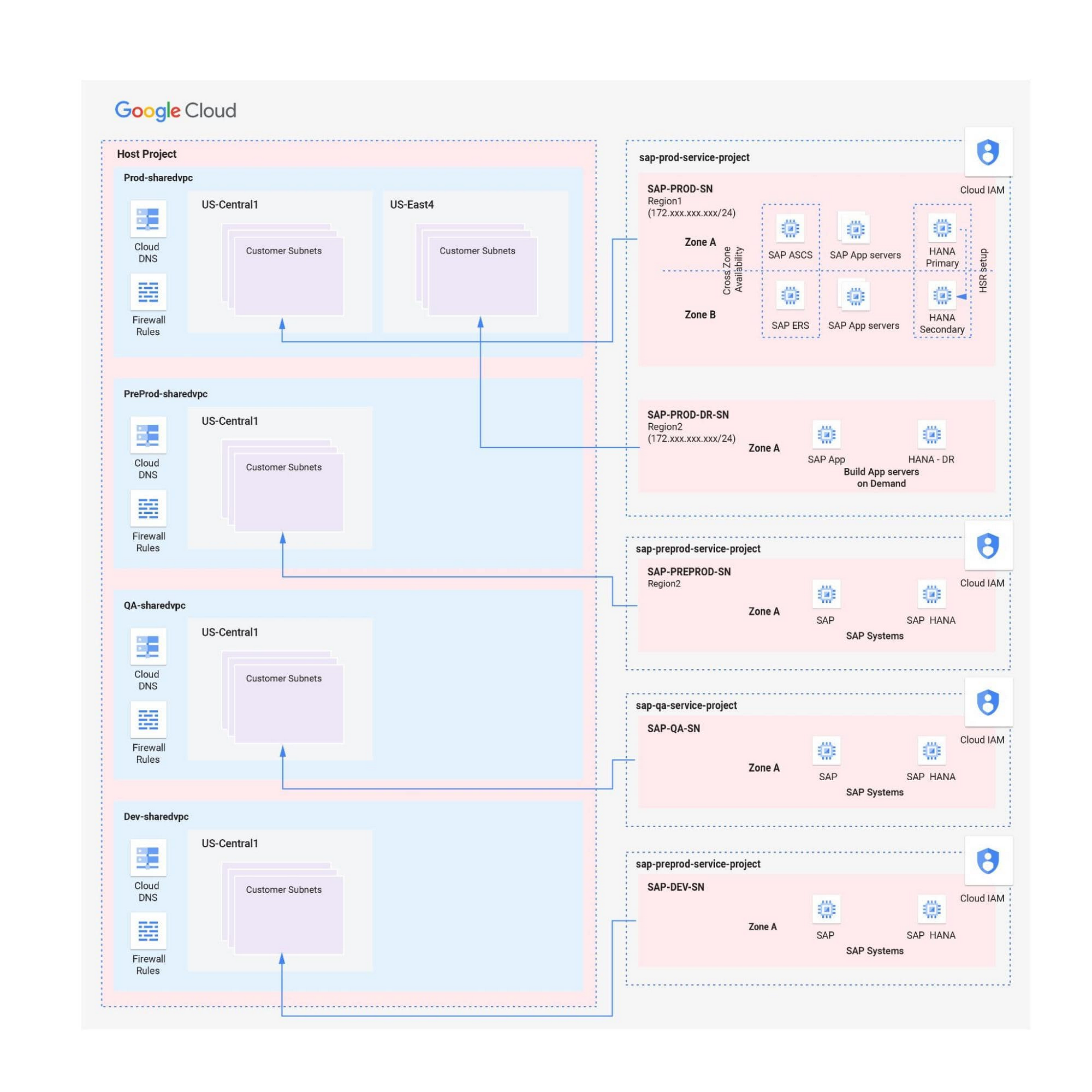
Scenario 2: Multiple Shared VPCs for SAP deployment
In scenarios requiring additional network inspections, you can create multiple Shared VPCs, typically one per environment. Use peering between these Shared VPCs to enable RFC communication among the SAP development, QA, and production systems.
- Network isolation: Multiple Shared VPCs are completely isolated from each other except via specific ports opened in Google Cloud firewalls. This allows additional East-West traffic inspection by a Network Virtual Appliance (NVA) within a Google Cloud network.
- Network control:As the number of Shared VPCs increases, activities such as peering and firewall policies also increase. This diminishes the central network control that Shared VPCs offer, so the network team should plan to manage the policies in each VPC separately.
Hybrid scenarios – for example, one Shared VPC for the production environment and one Shared VPC for all non-production systems — are also possible. This arrangement allows network inspection between production and non-production systems, and limits the number of central network administration layers to two.
Configuring the networking environment for multiple SAP systems can be a complex process. Thanks to Google Cloud’s Shared Virtual Clouds and other tools, SAP administrators can create scalable, secure networks that provide logic, resilience, and visibility to their cloud deployments.Learn more about these networking capabilities and our full offerings for SAP customers.
Taking Partnership forward: Google Cloud VMware Engine Now in VMware Cloud Universal

3470
Of your peers have already read this article.
1:30 Minutes
The most insightful time you'll spend today!
As the pace of digital transformation accelerates, our partnership with VMware continues to focus on helping customers successfully navigate their cloud journey and achieve their business objectives through seamless and rapid migration of business critical VMware workloads.
We announced the general availability of Google Cloud VMware Engine in May 2020. Since then we have worked closely with VMware to make it easier for customers to quickly migrate and run business-critical, VMware-based workloads on Google Cloud. Customers are already leveraging the service across a variety of use cases including application migration, datacenter exit, virtual desktop infrastructure, disaster recovery, and spinning up new capacity quickly to meet business needs.
For example, retailer Carrefour migrated its on-premises VMware workloads to Google Cloud without disruption to shoppers or employees while reducing operating costs by 40% and energy consumption by 45%. Once in the cloud, Carrefour was able to leverage its data and AI to deliver innovative customer experiences across online and in-store channels. Similarly, telecommunications provider Mitel migrated thousands of VMware instances across 30 data centers to Google Cloud in less than 90 days, quickly achieving increased stability, scale, and security.
Today, we announced the continued growth of the Google Cloud and VMware partnership with the addition of Google Cloud VMware Engine within VMware Cloud Universal. Google Cloud VMware Engine delivers a cloud-native VMware experience and enables you to rapidly migrate to the cloud without changes to your apps, policies, or tools. Once you migrate your VMware workloads to Google Cloud, you can accelerate digital transformation through seamless access to services such as BigQuery for real-time data analytics and cloud-native container-based architectures on Kubernetes.
With VMware Cloud Universal, you will be able to accelerate migrations of your workloads and applications to Google Cloud through purchase of Google Cloud VMware Engine from VMware and its partners, allowing you to flexibly purchase credits, and leverage existing spend and unused VMware Cloud Universal credits. The program will offer the following benefits:
- Financial flexibility by letting you redeem VMware Cloud Universal credits for Google Cloud VMware Engine
- Streamlined consumption by enabling you to burn down your Google Cloud commits while purchasing from VMware
- Use of existing VMware licensing investments through the VMware Cloud Universal program for Google Cloud VMware Engine
With Google Cloud VMware Engine, you can take advantage of Google Cloud’s highly performant, scalable infrastructure with fully redundant and dedicated 100 Gbps networking, providing 99.99% availability to meet the needs of the most demanding workloads at very low costs. By providing a consistent VMware environment natively in Google Cloud, you can quickly migrate your VMware workloads to Google Cloud without changes. Deep and unique networking integrations and capabilities such as multi-region and multi-VPC connectivity, further ease the migration of complex enterprise networking topologies to Google Cloud. With rapid provisioning of private clouds across 13 global regions, you can also take advantage of on-demand capacity to serve your infrastructure needs with a cloud-native VMware environment in Google Cloud.Once in the cloud, you can take advantage of other Google Cloud services such as BigQuery and Cloud Operations to gain data-driven insights and unify operations.
Getting started
With Google Cloud VMware Engine as part of VMware Cloud Universal, Google Cloud is a compelling cloud destination for your VMware workloads. You can learn more about how to get started with the service and get additional detail around use cases and pricing on our website.
6325
Of your peers have already watched this video.
2:00 Minutes
The most insightful time you'll spend today!
Google Cloud’s ML-based Image Classification App: A Key to Global Wildlife Conservation
Wildlife provides critical benefits to support nature and people. Unfortunately, wildlife is slowly but surely disappearing from our planet and we lack reliable and up-to-date information to understand and prevent this loss. By harnessing the power of technology and science, we can unite millions of photos from [motion sensored cameras] around the world and reveal how wildlife is faring, in near real-time…and make better decisions
wildlifeinsights.org/about
3706
Of your peers have already watched this video.
1:26 Minutes
The most insightful time you'll spend today!
How Sri Lanka’s Largest Ride-hailing Company Fixed its App and Improved Business
PickMe is Sri Lanka’s largest ride-hailing company.
“(Almost) every Sri Lankan is our customer. We have passengers who use us on a daily basis. We have drivers who use the platform to make a living. So obviously, the ecosystem is pretty big,” says Jiffry Zulfe, Founder & CEO, PickMe.
Before the company used Google Cloud, it hosted in a local data center. That strategy caused problems.
The first was the local provider’s ability to keep up.
“We were a company that was growing very fast. So the number of customers, the number of drivers, the volumes, would double every couple of months. And that required computer power, which the local provider struggled to do.”
The company also faced reliability issues. It’s servers would go down sometimes, which would slow down some of the services and affected customer experience.
That’s when they decided to get on the Google Cloud Platform.
“By bringing GCP into our platform, we saw a huge improvement in our latency. And also, we have had great reliability. The customers have gained confidence that when you open that app, it works all the time,” says Mithila Somasiri, Chief Technology Officer at PickMe.
2756
Of your peers have already downloaded this article
4:30 Minutes
The most insightful time you'll spend today!
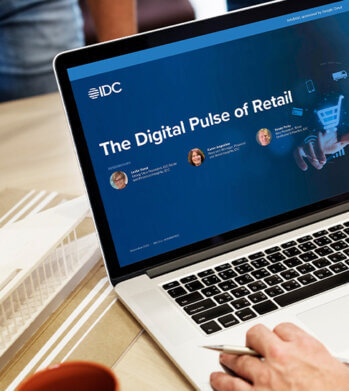
Google partnered with IDC Retail Insights to conduct a survey of retailers across the globe to assess the state of transformation and develop an index of digital maturity. Learn more about the changes in digital resilience over the last year and the areas of innovation over the next 12 months.
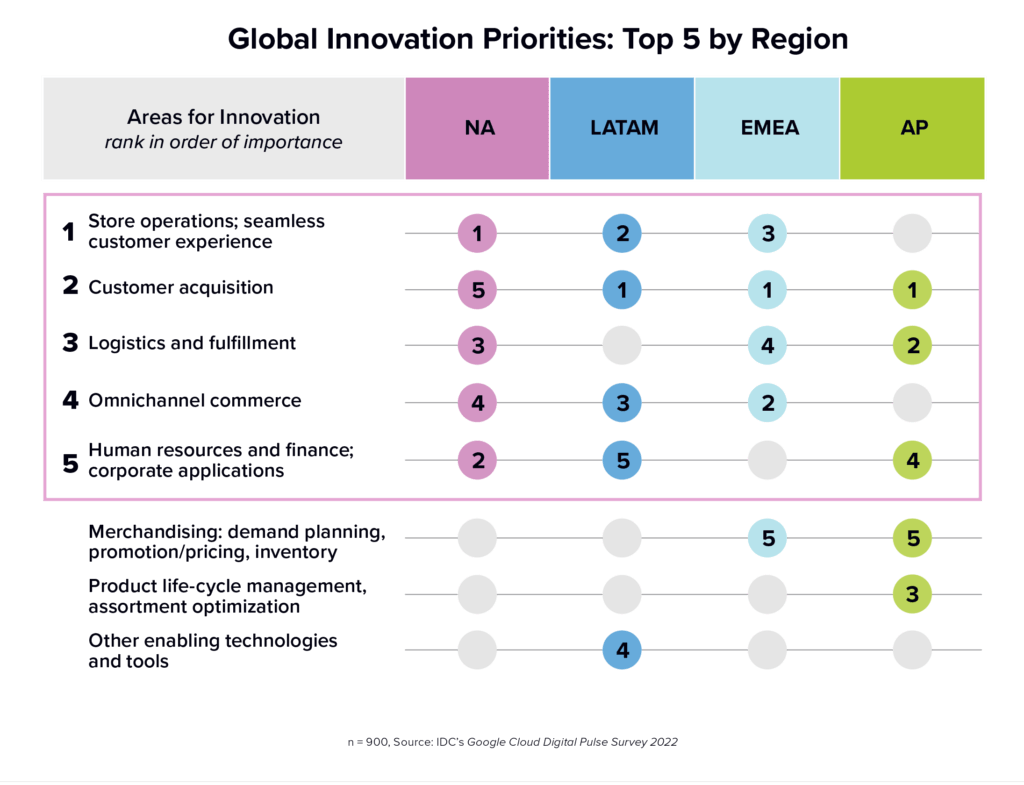
In this IDC Infobrief, you will learn:
- Where retailers stand on the path to digital resilience
- Top challenges retailers face with digitization and how that’s changed in the last 12 months
- Key areas for innovation and use cases among retailers at different stages of digital maturity
- How innovation can help organizations advance and respond evolving customer expectations
5419
Of your peers have already downloaded this article
4:30 Minutes
The most insightful time you'll spend today!
Security is often a deciding factor when choosing a public cloud provider. At Google Cloud, security is of the utmost importance and the security strategy encompass authentication, integrity, and encryption, for both data at rest and in transit.
Hence, Google Cloud encrypts and authenticates all data in transit at one or more network layers when data moves outside physical boundaries not controlled by Google or on behalf of Google. Data in transit inside a physical boundary controlled by or on behalf of Google is generally authenticated but not necessarily encrypted.
In addition, Google works actively with the industry to help bring encryption in transit to everyone, everywhere. It has several open-source projects that encourage the use of encryption in transit and data security on the Internet at large including Certificate Transparency, Chrome APIs, and secure SMTP.
Download this whitepaper and understand Google’s approach to the encryption of data in transit, where it is applied, and why Google is the industry leader in encryption in transit.
More Relevant Stories for Your Company

A Quick Guide to Cloud Monitoring
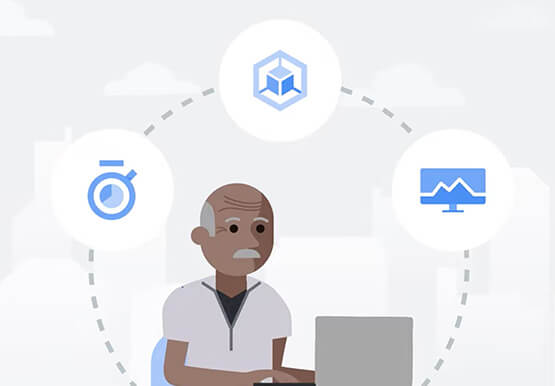
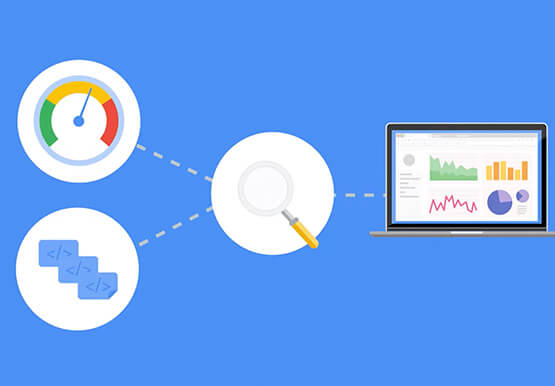
Cloud Monitoring is a tool that allows you to gain visibility into the performance, availability, and health of your applications and infrastructure. In this video, we show you what Cloud Monitoring is and how you can use it to custom define service-level objectives (SLOs), monitor application metrics, and the overall

Google Invests 1 Billion Euros on Germany to Support Growing Businesses
In September 2001, the first-ever German Google employee switched on their computer in Hamburg. Since then, we’ve grown to more than 2,500 employees in four offices across Germany. Berlin, Frankfurt, Hamburg and Munich have long been our home, and we continue to invest in the growth of the local economy.

Speed Up Data-driven Innovation in Life Sciences with Google Cloud
The last few years have underscored the importance of speed in bringing new drugs and medical devices to market, while ensuring safety and efficacy. Over this time, healthcare and life sciences organizations have transformed the way they research, develop, and deliver patient care by embracing agility and innovation. Now, the
Recapping Google Cloud VMware Engine’s Latest Milestones
We’ve made several updates to Google Cloud VMware Engine in recent weeks—today’s post provides a recap of our latest milestones. Google Cloud VMware Engine delivers an enterprise-grade VMware stack running natively in Google Cloud. This cloud service is one of the fastest paths to the cloud for VMware workloads without making changes
