





6423
Of your peers have already watched this video.
1:30 Minutes
The most insightful time you'll spend today!
Value Realization with Google Cloud for Retail SAP Data
Retail engagements have changed drastically over the last few years, and by the virtue of COVID-19 pandemic, retail data and customers’ expectations plummeted. To drive value and transformation across the entire value-chain retailers can make most of Google Cloud’s secure, reliable IaaS by migrating their SAP systems and taking advantage of integrations, insights and innovations. In times of change retail companies can gain maximum visibility of SAP data unlocking Google Cloud’s infrastructure modernization and Big Data and analytics capabilities. Watch the video to understand how Google Cloud and SAP partnership is a golden handshake for retail businesses’ future.

3573
Of your peers have already downloaded this article
3:30 Minutes
The most insightful time you'll spend today!
Defending the world’s largest network against persistent and constantly evolving cyber threats has driven Google to architect, automate, and develop advanced tools to help keep it ahead. Understanding how Google has built and evolved it’s defenses can help you make smart architectural decisions of your own as you move forward.
- At Google every minute:
- 10 million spam messages are prevented from reaching Gmail customers.
- 694,000 indexed Web pages are scanned for harmful software.
- 7,000 deceitful URLs, executables, and browser extensions that may carry viruses, unwanted content, or phishing attempts are spotted and stopped.
- 6000 instances of unwanted software and nearly 1,000 instances of suspected malware are reported to Chrome users.
- 2 phishing sites and 1 malware site are found and labeled.
Download this e-book to know more about Google’s security at scale.
RAMPing Up Cloud Migration Process

3183
Of your peers have already read this article.
1:30 Minutes
The most insightful time you'll spend today!
As enterprises accelerate their migration to the cloud, they experience more notable mid- and late-phase migration challenges. Specifically, 41% face challenges when optimizing apps in the cloud post-migration, and 38% struggle with performance issues on workloads migrated to the cloud. Further, organizations have also increased reliance on outside consultants and other service providers for early-stage cloud migration tasks to ongoing management post-implementation.1
To help customers through these challenges with a simple, quick path to a successful cloud migration, Google Cloud created our comprehensive Rapid Assessment & Migration Program (RAMP). And we’ve got some exciting developments to share with our customers and partners:
Expanded focus on post-migration TCO/ROI
Given the complex nature of cloud migrations, we are committed to meeting our customers where they’re at in their cloud journeys and partnering with them to achieve their business goals — be it building customer value through innovation, driving cost efficiencies, or increasing competitive differentiation and productivity. RAMP is a holistic framework based on tangible customer TCO and ROI analyses, that supports our customers’ journeys all the way through: from assessing their digital landscapes across multiple sources including on-prem and other clouds, and identifying prioritized target workloads to building a comprehensive migration and modernization plan.
Accelerate positive outcomes with expert partners
Customers can also now expect a more streamlined migration experience through our ecosystem of partners who have completed their cloud migration specialization. Last week, we announced industry-leading updates to our partner funding programs with new assessment and consumption packages that simplify and accelerate our customers’ journey to Google Cloud, at little-to-no cost. These packages offer prescriptive pathways for infrastructure and application modernization initiatives, empowering our partners to support our customers at every stage — from discovery and planning to migration and modernization.
Through our partner ecosystem, our customers can expect:
- Distinct funding packages for assessment, planning, and migration
- Faster approval processes for accelerated deployments
- More partners eligible to participate in RAMP and access these new funding packages
Sustainability through migration
Another major focus area for RAMP is helping enterprises optimize their migration planning and maximize their ROI by including their business and technical considerations early in the process and including any sustainability goals they may have. To aid with their sustainability efforts, we are excited to share that customers can now receive a Digital Sustainability Report along with their IT assessments – enabling sustainability to be built into their migration strategies. The report provides actionable insights to measure and reduce their environmental impact, and is based on some of Google Cloud’s own best practices, having been carbon-neutral for decades and looking to run on carbon-free energy by 2030.
We are committed to solving complex problems for our customers and partners, and these updates are a reflection of the feedback we receive. Simplify your cloud migration strategy today by requesting your free assessment, finding a partner to work with, or talking to your existing partner to get started.
1. Forrester Consulting, State Of Public Cloud Migration; A study commissioned by Google, 2022
3930
Of your peers have already watched this video.
40:00 Minutes
The most insightful time you'll spend today!
Attention CFOs: How to Save Money on the Cloud
Cutting down on wastage, saving cost, and having a better control are some of the key priorities of organizations when it comes to the cloud. According to the 2018 State of the Cloud report by Rightscale, 35% of customer cloud spend is wasted, 58% of users cite cost savings as their top focus, and 76% consider spend control to be a challenge.
No wonder, customers are constantly looking to control costs and get the most capability out of every cloud dollar spent by their organizations.
Google Cloud’s simple, flexible, and fair pricing principles ensure that customers end up saving a lot more when they use Google Cloud and pay only for what they use and nothing more. Automatic discounts, recommendations, and smart tools to monitor and control usage, ensure that customers are treated fairly.
Watch this webinar to find out how you can save even more money on the cloud.
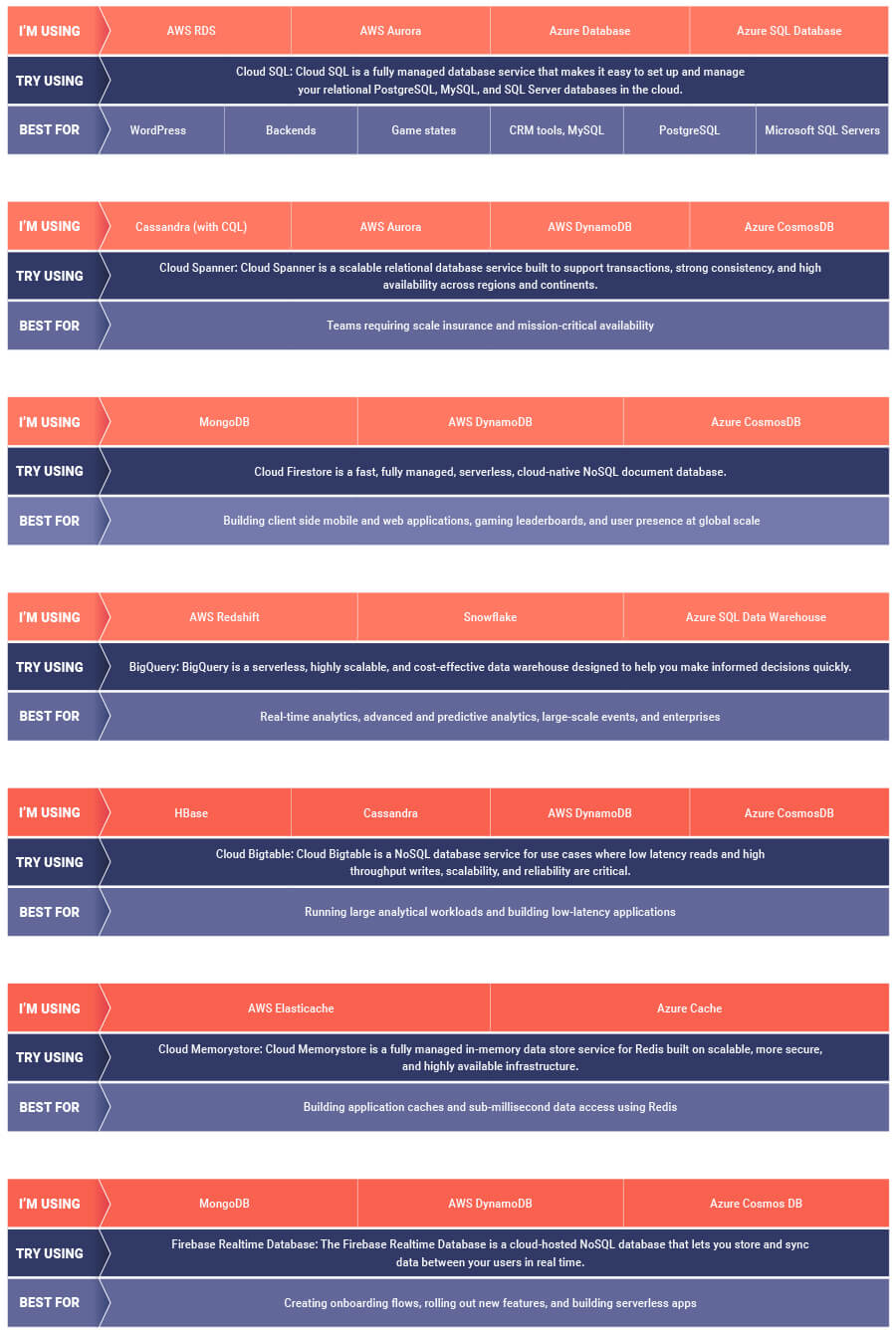
AWS to Google Cloud Translator: Which AWS Database Service Is Equal to Google Cloud Database?

6292
Of your peers have already read this article.
2:30 Minutes
The most insightful time you'll spend today!
There are multiple reasons a growing number of database administrators, enterprise architects, application developers and other technology practitioners are moving to Google Cloud’s various database services.
Some are being driven by missing features in offering from other providers such as AWS. In Gartner’s Magic Quadrant for Operational Database Management Systems, the research and advisory firm points out that, “AWS’s surveyed reference customers scored its overall product capabilities one standard deviation (STD) below the mean. Their responses identified missing features such as multiregion writes and autosharding.”
Others are moving to database services on Google Cloud Platform driven by a few benefits. According to Gartner, “Reference customers repeatedly commented on Google’s ease of use and implementation, reliability and integration (with other services and other systems). Reference customers scored Google a full STD above the mean for satisfaction with GCP’s pricing; it received the second-highest satisfaction score of any vendor in this Magic Quadrant.
If you are looking to leverage the power of Google Cloud database offerings—but were unsure of which database services comes closest to the service you are currently using, here’s a handy map to find your way.
End Security Risks with the Unattended Projects Recommender Feature

6104
Of your peers have already read this article.
3:00 Minutes
The most insightful time you'll spend today!
In fast-moving organizations, it’s not uncommon for cloud resources, including entire projects, to occasionally be forgotten about. Not only such unattended resources can be difficult to identify, but they also tend to create a lot of headaches for product teams down the road, including unnecessary waste and security risks.
To help you prune your idle cloud resources, we’re excited to introduce Unattended Project Recommender. It’s a new feature of Active Assist that provides you with a one-stop shop for discovering, reclaiming, and shutting down unattended projects. With actionable and automatic recommendations, you no longer have to worry about wasting money or mitigating security risks presented by your idle resources. Unattended Project Recommender uses machine learning to identify, with a high degree of confidence, projects that are likely abandoned based on API and networking activity, billing, usage of cloud services, and other signals. This feature is available via the Recommender API today, making it easy for you to integrate with your company’s existing workflow management and communication tools, or export results to a BigQuery table for custom analysis.
Thousands of projects can be unattended in large organizations, presenting major security risks
Your cloud projects can go abandoned or unattended for a number of reasons — ranging from a test environment that’s no longer needed, to project cancellation, to project owner switching jobs, and more. Not only can such projects contribute to your cloud bill (waste) but they may contain security issues such as open firewalls or privileged service account keys that attackers can exploit to get a hold of your cloud resources for cryptocurrency mining or, worse, compromise your company’s sensitive data. These security risks tend to grow over time because the latest best practices and patches are usually not applied to unattended projects.
We experience this issue here at Google, too… In fact, it has been on Google’s internal security team’s radar for some time now, so we joined forces and looked into this problem together, starting with our very own “google.com” organization cloud projects. We quickly found some projects that were unattended, but remediating this issue was easier said than done due to challenges in several areas:
- Detection: With lots of signals available to you via sources like Cloud Monitoring, what are the right ones you should look at (e.g. API, networking, user activity)? How can you tell the difference between an unattended project and a project that has a low level of activity by design (e.g. a “shell” project that holds an auth token)?
- Remediation: Once you have identified a project that seems abandoned, how do you go about ensuring that it’s indeed an unattended project? How do you reduce the risk of deleting something that might be essential to a production workload, causing irreversible data loss? How do you solve this at the scale of your entire organization, beyond a one-time cleanup?
Over the course of 2021 we built and tested a Google-internal prototype first, cleaning up many of our internal unattended projects, and then worked with a number of Google Cloud customers to build and tune this feature based on real-life data (thank you to all of our early adopters for working with us and your generous feedback that helped us shape this feature!) It was not uncommon for us to come across organizations with thousands of unattended projects, and we’re very excited to bring Unattended Project Recommender to all customers, in public preview.
Discovering and acting on unattended project recommendations
Unattended Project Recommender analyzes usage activity across all projects under your organization, including the following data:
- API activity (e.g. service accounts with authentication activity, API calls consumed)
- Networking activity (ingress and egress)
- Billing activity (e.g. services with billable usage)
- User activity (e.g. active project owners)
- Cloud services usage (e.g. number of active VMs, BigQuery jobs, storage requests)
Based on these signals, it can generate recommendations to clean up projects that have low usage activity (where “low usage” is defined using a machine learning model that ranks projects in your organization by level of usage), or recommendations to reclaim projects that have high usage activity but no active project owners. Here’s what an example post-processed summary list of recommendations can look like for the “foobar” organization that has 3 projects:
Project ID: demo-project-307815Recommendation: CLEANUP_PROJECTProject ID: new-projectRecommendation: N/AProject ID: bobs-playground-projectRecommendation: RECLAIM_PROJECT
In addition to the recommendations, you can also examine the underlying project activity insights that the recommendations are based upon. The insights provide additional information that can be useful for integration with your organization’s existing workflows and automation (e.g. send an auto-generated email or chat message to project owners based on the list provided by the owners field). Here’s an example insight payload:
content:activeAppengineInstanceDailyCount: 0activeCloudsqlInstanceDailyCount: 0activeGceInstanceDailyCount: 3activeServiceAccountDailyCount: 1apiClientDailyCount: 18922 // Daily average API calls producedbigqueryInflightJobDailyCount: 0bigqueryInflightQueryDailyCount: 0bigqueryStorageDailyBytes: 0bigqueryTableDailyCount: 0consumedApiDailyCount: 0 // Daily average API calls consumeddatastoreApiDailyCount: 0gcsObjectDailyCount: 11gcsRequestDailyCount: 0gcsStorageDailyBytes: 2663548hasActiveOauthTokens: false // OAuth tokens used in the last 180 dayshasBillingAccount: truenumActiveUserOwners: 1owners: // List of project owners- activeOnProject: falsemember: user:user1@example.com- activeOnProject: truemember: user:user2@example.comserviceWithBillableUsage:– Cloud Storage- Compute EnginevpcEgressDailyBytes: 264456938 // Daily average VPC egress bytesvpcIngressDailyBytes: 392435047 // Daily average VPC ingress bytesusagePercentile: 20 // Level of usage relative to other projects
GCP projects are used in many different ways and for many different purposes. In case you get a recommendation to delete a project that’s being used in a way that’s out of the scope for this feature, you can dismiss the recommendation and it will stop showing up for the given project.
Restoring deleted projects
When you choose to shut down a project using the projects.delete() method, it gets marked for deletion. After a project is marked for deletion, it becomes unusable, all resources within that project are shut down, and a 30-day wait period for the project and all of its data to get fully deleted begins.
In case a useful project is accidentally shut down, you have the option to restore the project within that 30-day wait period. Since restoring allows you to recover most but not necessarily all of your project data and resources, we recommend carefully examining the utilization insights associated with a project and considering any additional utilization signals that may not be captured by the Unattended Project Recommender before taking the cleanup action.
Early customer success stories
A number of enterprise customers are already using Unattended Project Recommender to keep their organizations clean of unattended projects and resources.
Decathlon, a French sporting goods retailer, is excited for the insight Unattended Project Recommender will bring to their environment, and are already deploying it as a part of their latest cloud security initiatives.
“After a thorough test of this feature and the validation of our CISO, we ended up deleting our first 775 projects, and no one complained! A great help to improve our security. The next step for us will be to operationalize it at scale, and implement a company wide policy for unattended resource management.” —Adeline Villette, Cloud Security Officer
For Veolia, one of the world’s largest water, waste and energy management companies, not only does this feature reduce security risks and waste, but also helps drive cultural shift and alignment with its ecological transformation strategy.
“This feature allows us to reduce our costs and security debt on assets that are no longer in use, and is also fully in line with Veolia’s philosophy of limiting its carbon footprint. After having tested Unattended Project Recommender on more than 3,000 projects throughout our organization, we are looking to bring it as proactive alerts to our project owners at scale.”—Thomas Meriadec, Product Manager
Box, a secure cloud content management provider, views it as a foundation for building a repeatable process to remediate unused resources.
“Unattended Project Recommender is a great fit for us. It gives us a unified view of project usage across our entire organization and enables us to address security risks of legacy projects in a systematic and organized manner, ensuring an even safer environment.” —Matt Bowes, Staff Security Engineer
Getting started with the Unattended Project Recommender
To help you get started, we’ve prepared a Cloud Shell tutorial (source code) that you can use to find unattended project recommendations within your own Projects/Folders/Organization. Click this button to clone the tutorial from GitHub and run in your Cloud Shell environment:

As you can see, listing recommendations for your projects only takes a few clicks with the tutorial (special thanks to Lanre Ogunmola, Security & Compliance Specialist, for making this look so easy)! For additional detail on using the gcloud CLI or API to discover unattended project recommendations, please refer to the documentation page.
You can also automatically export all recommendations from your Organization to BigQuery and then investigate the recommendations with DataStudio or Looker, or use Connected Sheets that let you use Google Workspace Sheets to interact with the data stored in BigQuery without having to write SQL queries.
As with any other Recommender, you can choose to opt out of data processing at any time by disabling the appropriate data groups in the Transparency & control tab under Privacy & Security settings.
We hope that you can leverage Unattended Project Recommender to improve your cloud security posture and reduce cost, and can’t wait to hear your feedback and thoughts about this feature! Please feel free to reach us at active-assist-feedback@google.com and we also invite you to sign up for our Active Assist Trusted Tester Group if you would like to get early access to the newest features as they are developed.
More Relevant Stories for Your Company

withVR Uses the Power of VR to Prep People with Speech Disorders for Real-life Speaking Situations
Editor’s note: Meet Gareth Walkom, an entrepreneur dedicated to helping others with speech disorders. Turning life experience into innovation Did you know that 3% of Americans have a speech disorder, while 1% of the world’s population have a stutter? Just getting what they need in everyday interactions can be stressful,

S4 Agtech Transforms Agriculture with Google Cloud
Like countless other industries, farming is going digital and undergoing big changes—driven by access to more actionable information. The agriculture business can now gather and analyze georeferenced data from satellites, combined with data from IoT sensors in fields, crop rotation and yield histories, weather patterns, seed genotypes and soil composition to help

Marxent Leverages Google Cloud to Elevate Customer Journeys on Retail Apps with 3D Shopping Experiences
As ecommerce for home goods exploded in popularity during COVID, furniture and DIY retailers looked to find new ways to grow online transaction sizes to in-store levels. Shopping for furniture and home improvement projects has always been challenging online. Furniture, kitchen cabinets, fixtures, and appliances become a part of daily

Google Cloud: Craft Your Successful Migration Path
There is no one-size-fits-all solution to cloud migration. Every approach has unique considerations, so you need to understand the trade-offs of each to execute an effective migration plan. We’ve outlined the key things to consider when crafting your migration journey, including: The benefits of having your applications in the cloud.
