





Google Workspace Now Available to Over 3 Billion Users!

3805
Of your peers have already read this article.
3:00 Minutes
The most insightful time you'll spend today!
Over the past year, Google Workspace rapidly evolved to meet the needs of users as we collectively grappled with remote and hybrid work. First, we launched Google Workspace to commercial customers, which brought together the powerful individual apps people know and love into a single, integrated solution. Then we made Google Workspace available to nonprofits, governments, and schools. And in June, we brought the power of Google Workspace to everyone, enabling more than 3 billion users to transform the way they connect, create, and collaborate. To extend these experiences further, we’ve seen a stunning 4.8 billion apps installed in Google Workspace to date. We’re excited to see so many users personalize their experience by adding third-party apps or by building their own to create a more powerful engine for productivity and collaboration.
As we celebrate the more than 5,300 public apps in the Google Workspace Marketplace that provide users with the opportunity to extend their experience, we’re increasing our investment in the underlying platform. Developers have been able to build applications that integrate with Gmail, Drive, and Docs for years. And today, we’re announcing significant enhancements to the Google Workspace platform by making it just as easy for developers to build applications and integrate with Google Meet, Chat and Spaces.
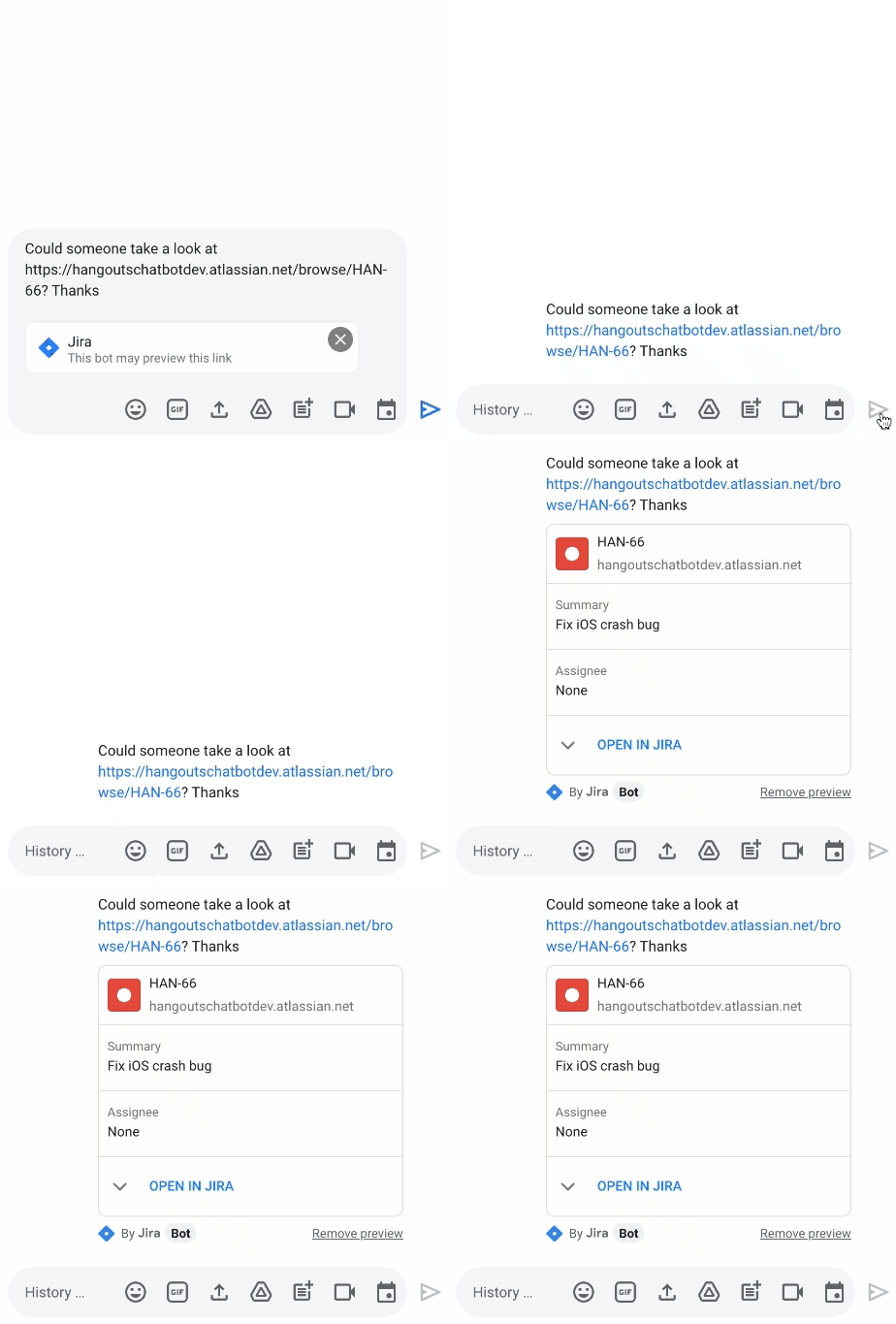
We’re releasing a new Jira integration for Google Chat and Spaces. This integration enables users to create new tickets quickly, see actionable previews, and monitor issues as they come into the space they’re already using for collaboration.
“Modern work requires people to switch contexts and tools faster than ever before. We believe an open ecosystem and tight integrations among the tools that users rely on every day is vital to their success. Since 2017, our Trello integration with Gmail has been installed by more than 7 million people. Today, we are excited to build on the partnership between Atlassian and Google to propel work collaboration further with the integration of Jira with Google Chat and Spaces,” said Joff Redfern, Chief Product Officer, Atlassian.
As work continues to evolve, we’re especially committed to the concept of collaboration equity: the ability for everyone to participate and drive impact no matter their location, technical ability, language preference, or device. Carrefour Property – Carmila is evolving how they innovate by connecting frontline workers to those in the office with our no-code development platform AppSheet. For example, after discovering a problem, onsite managers previously had to send an email, enter data into a spreadsheet, and sometimes attend a meeting to explain the issue. Now, with AppSheet, they can simply input the data on their phone in a single step, and the team back at headquarters can see and act on the issue while also tracking all the other issues being reported from other locations.
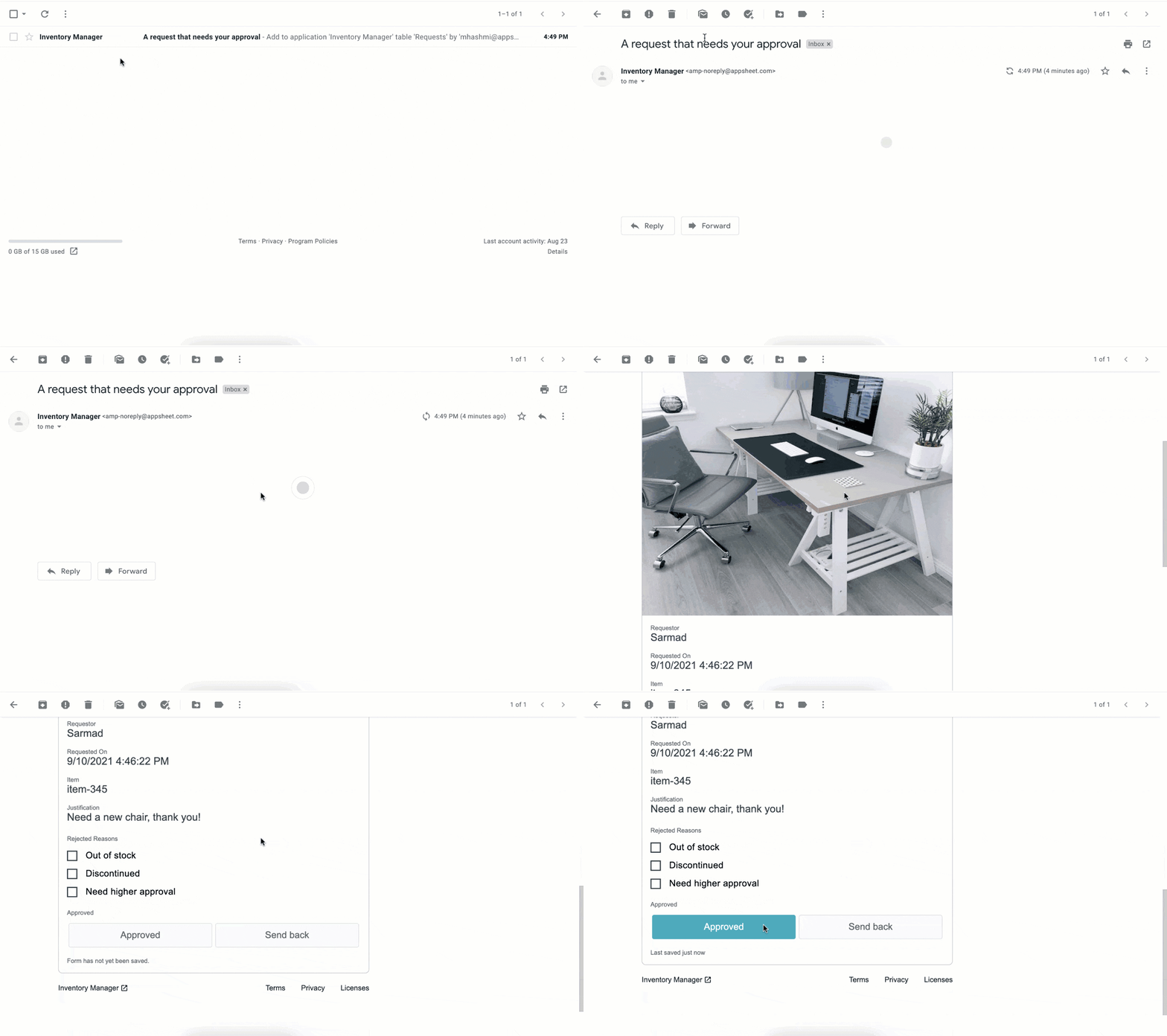
We continue to empower frontline workers and IT teams alike, bringing more flexibility into Google Workspace by integrating AppSheet into Gmail. This new integration allows anyone—regardless of their coding experience—to reclaim time with custom, no-code apps and automations. Budgets and vacation requests can be approved, inventories and asset management systems can be updated, and much more—all with AppSheet and directly from your inbox.
New investments in security
As we continue to deliver delightful new experiences for users, we are keeping security at the forefront; it’s infused in every layer of our product design so that customers have the flexibility and trust needed to operate in a secure environment. To build on this commitment, we’re announcing Google’s new Work Safer offering to help organizations, their employees, and partners collaborate and communicate securely and privately in today’s hybrid work environment. Work Safer will provide companies with access to best-in-class security for email, meetings, and messages, documents, and more. It uniquely brings together the cloud-native, zero-trust solutions of Google Workspace with industry-leading solutions from across Google and its cybersecurity partners, CrowdStrike and Palo Alto Networks.
To further strengthen security and privacy across the Google Workspace platform, we’re also announcing four key new capabilities:
- In June, we announced that Client-side encryption (CSE) was available in beta for Drive, Docs, Sheets, and Slides. Now we’re bringing CSE to Google Meet, giving customers complete control over encryption keys while helping them meet data sovereignty and compliance requirements. We’re also pleased to announce the beta of our Key Access Service Public APIs, which enables customers to directly manage their encryption keys without the need for a third-party partner.
- Data Loss Prevention (DLP) for Chat is now in beta. This is a continuation of our ongoing commitment to help organizations protect their sensitive data and information from getting into the wrong hands, without impacting the end-user experience. With DLP for Chat, you can enable the power of spontaneous conversation between individuals and teams, while preventing sensitive and confidential information from leaving your organization. Interested customers can sign up for the Client-side encryption and DLP for Chat betas today.
- Drive labels are now generally available. Organizations are now able to classify files stored in Drive based on their sensitivity level. Labels integrate with Google Workspace Data Loss Prevention, making it easier to manage external sharing, downloading, and printing of sensitive files.
- We’re rolling out additional protections to safeguard against abusive content and behavior. If a user opens a file that we think is suspicious or dangerous, we’ll display a warning to the user to help protect them and their organization from malware, phishing, and ransomware. This functionality is now available in Google Docs and will be rolling out soon for Google Sheets and Slides.
Fueling the future of work and collaboration
Our mission is to empower everyone with an innovative and seamless experience that gives people—no matter their location or technical ability—the opportunity to drive real impact. At its core, the vision of the Google Workspace platform is to help you build your own innovation momentum, while providing a foundation of security and privacy. I hope you’ll join me at the Google Cloud Next ’21 event where you can learn more about the Google Workspace vision, and even better, see these new experiences in action.
How Russia’s Largest Housing Developer Reduced Construction Planning Time from Two Weeks to One Hour

4608
Of your peers have already read this article.
2:30 Minutes
The most insightful time you'll spend today!
PIK Group is the leading developer of large-scale residential housing projects in Russia. Founded in 1994, PIK Group has built more than 300,000 apartments – 19 million square meters of residential real estate in Moscow and other cities.
To achieve and maintain its position at the top of the real estate industry, PIK Group has made innovation central to its business model, whether creating new building techniques or embracing automation. New technology, in particular, enables the company to achieve efficiencies at scale and streamline processes, such as with PIK Group’s app, developed in-house, through which engineers can send photographs as evidence of the quality of building work.
PIK Group looked for a reliable, fast way for teams to collaborate across multiple offices, on the road, and at construction sites. Because the company handles large volumes of sensitive customer data, security was a key concern. To create a collaboration platform ready to pull the company together, PIK Group looked for a cloud solution to streamline processes and improve productivity.
“The construction industry is progressing,” says Ilya Tikhomirov, CIO at PIK Group. “There are new ways of working, new construction processes, and new materials. PIK wants to lead change in that external context with an internal transformation.”
Automating collaborative processes for greater efficiency
“One team has information about the layout and condition of our buildings and can count the areas that need work, but then needs to match prices and the required work to that information. Previously, we would spend two to three weeks matching all the lists. Now, using Google Apps Script and Sheets, we can run calculations for a building in one hour.”
– Sergey Fuksman, Deputy CIO, PIK Group
Real estate companies of any size have to communicate between office-based staff and teams on the move. For PIK Group, with more than 7,000 employees and 70 offices in the Moscow region alone, communication has to operate at scale. Because each project involves multiple participants and numerous stages, the right collaboration tools can generate major efficiencies.
“Take costing and scheduling work in an apartment. What might sound simple is a complex process with numerous stages, says Ilya. “We need to define each and every step, and the materials required. One group of employees says what the task requires, then another group of employees cost the materials and labor, and yet another group matches the costs to the plan. That process alone requires a lot of communication and collaboration, and it’s just one of many in a single project.” To enhance collaboration, PIK Group looked to give staff instant access to a central, highly secure file repository from anywhere at anytime.
“It’s so much easier to work with our 2,000 suppliers when we share Docs and Sheets instead of emailing back and forth. The speed and convenience of this new way of working is immediately clear. A number of our third-party contractors have been so impressed that they’ve implemented G Suite at their own firms.”
– Ilya Tikhomirov, CIO, PIK Group
To do that, PIK Group implemented the full range of G Suite collaborative tools across more than 7,000 employees. “G Suite has helped change the way employees think about the work they do,” says Ilya. “It has helped them to foster the culture of a small start-up, with all of the agility associated with that.” Now staff at more than 70 offices in the Moscow region managing the construction and sale of apartment blocks, meet and communicate using Google Hangouts and collaborate over distance on Google Sheets and Google Docs, reducing the need to travel and increasing their efficiency by approximately 20%.
In order to reduce the complex, laborious work of prototyping projects, PIK Group automates aspects of the process using Google Apps Script to match lists in different Sheets and generate documents, as Sergey Fuksman, Deputy CIO at PIK Group explains: “One team has information about the layout and condition of our buildings and can count the areas that need work, but then need to match prices and the required work to that information. Previously, we would spend two to three weeks matching all the lists. Now, using Apps Script and Sheets, we can run calculations for a building in one hour.”
Migrating to the cloud for machine learning at scale
With over 7,000 G Suite accounts implemented, PIK Group has set its sights on migrating local infrastructure to Google Cloud Platform. “We have a big IT department with many developers, and we want to redirect them to important projects instead of IT maintenance,” says Ilya. “With machine learning and TensorFlow, we plan to use data from over 50 systems to inform business decisions.”
PIK Group’s internal change is already yielding external results. “It’s so much easier to work with our 2,000 suppliers when we share Docs and Sheets instead of emailing back and forth,” says Ilya. “The speed and convenience of this new way of working is immediately clear. A number of our third-party contractors have been so impressed that they’ve implemented G Suite at their own firms.”
Learn to Easily Administer Multi-cluster Kubernetes Environs: Part 4 KRM Series

5576
Of your peers have already read this article.
4:00 Minutes
The most insightful time you'll spend today!
This is part 4 in a multi-part series about the Kubernetes Resource Model. See parts 1, 2, and 3 to learn more.
Kubernetes clusters can scale. Open-source Kubernetes supports up to 5,000 Nodes, and GKE supports up to 15,000 Nodes. But scaling out a single cluster can only get you so far: if your cluster’s control plane goes down, your entire platform goes down; if the Cloud region running your cluster has a service interruption, so does your app.
Many organizations choose, instead, to operate multiple Kubernetes clusters. Besides availability, there are lots of reasons to consider multi-cluster, such as allocating a cluster to each development team, splitting workloads between cloud and on-prem, or providing burst capability for traffic spikes.
But operating a multi-cluster platform comes with its own challenges. How to consistently administer many clusters at once? How to keep the clusters secure? How to deploy and monitor applications running across multiple clusters? How to seamlessly fail over from one region to another?
This post introduces a few tools that can help platform teams more easily administer a multi-cluster Kubernetes environment.
The platform base layer, with Config Sync
In the last post, we explored how thoughtful platform abstractions can help reduce toil for app developers- including for a multi-cluster environment, where automation such as CI/CD handles all interactions with the staging and production clusters. But equally important is the platform base layer, the Kubernetes resources and configuration that are shared across services. Your platform base layer might consist of Namespaces, role-based access control, and shared workloads like Prometheus.
Platform abstractions depend on the existence of these base-layer resources. And so does the security and stability of your platform as a whole. It’s important that these resources not only get deployed, but also stay put. CI/CD is great for deploying resources, but what about making sure resources stay deployed? What if a Kubernetes Namespace gets deleted? Or a Prometheus StatefulSet is modified?
Kubernetes’ job is to ensure that the cluster’s actual state matches the desired state. But sometimes, the “desired” state isn’t desired at all – it’s a developer who mistakenly modified a resource, or a bad actor that’s gained access into the system. For this reason, a platform base layer needs more than a one-and-done CI/CD pipeline. A tool called Config Sync can help with this.
Config Sync is a Google Cloud product that can sync Kubernetes resources from a Git repository to one or more GKE or Anthos clusters. Unlike CI/CD tools like Cloud Build, Config Sync watches your clusters constantly, making sure that the intended resource state in the cluster always matches what’s in Git. Config Sync is designed primarily for base-layer resources like namespaces and RBAC. In this way, Config Sync is complementary to, not a replacement for, CI/CD.
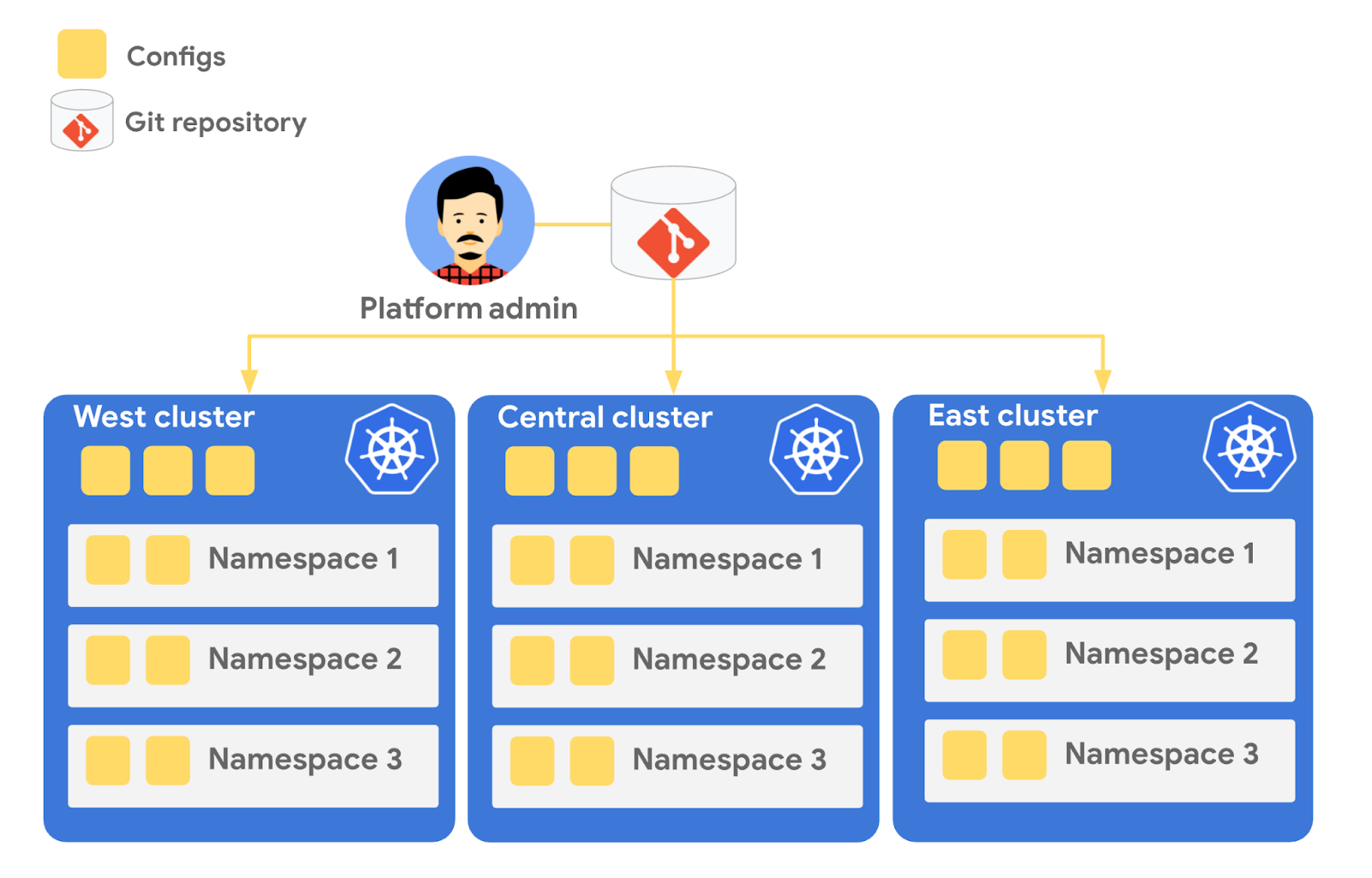
Config Sync runs in a Pod inside your Kubernetes cluster, watching your Git config repo for changes, and also watching the cluster itself for any divergence from your desired state in Git. If any configuration drift is detected from what’s stored in Git, Config Sync will update the API Server accordingly.
You can point multiple Config Sync deployments at the same Git repo, allowing you to manage the base-layer platform resources for multiple clusters using the same source of truth. And by using Git as the landing zone for config, you can benefit from some of the GitOps principles we discussed in part 2, including the ability to audit and roll back configuration changes.
Let’s walk through an example of how to manage base-layer resources with Config Sync.
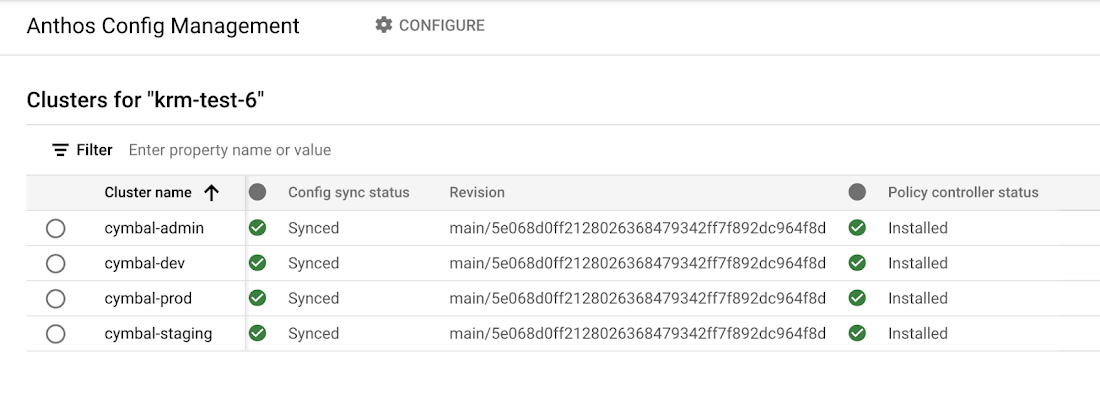
The Cymbal Bank platform consists of four GKE clusters: admin, dev, staging, and prod. We can install Config Sync on all four clusters using the gcloud tool or the Google Cloud Console, pointing all four clusters at a single Git repository, called cymbalbank-policy. Note that this repo is separate from the application source and config repos, and is managed by the platform team. From the Console, we can see that all four clusters are synced to the same commit of the cymbalbank-policy repo.
Now, let’s say that the Cymbal Bank platform team wants to limit the amount of CPU and memory resources each application team can request for their service. Kubernetes ResourceQuotas help impose these limits, and prevent unexpected Pod evictions.
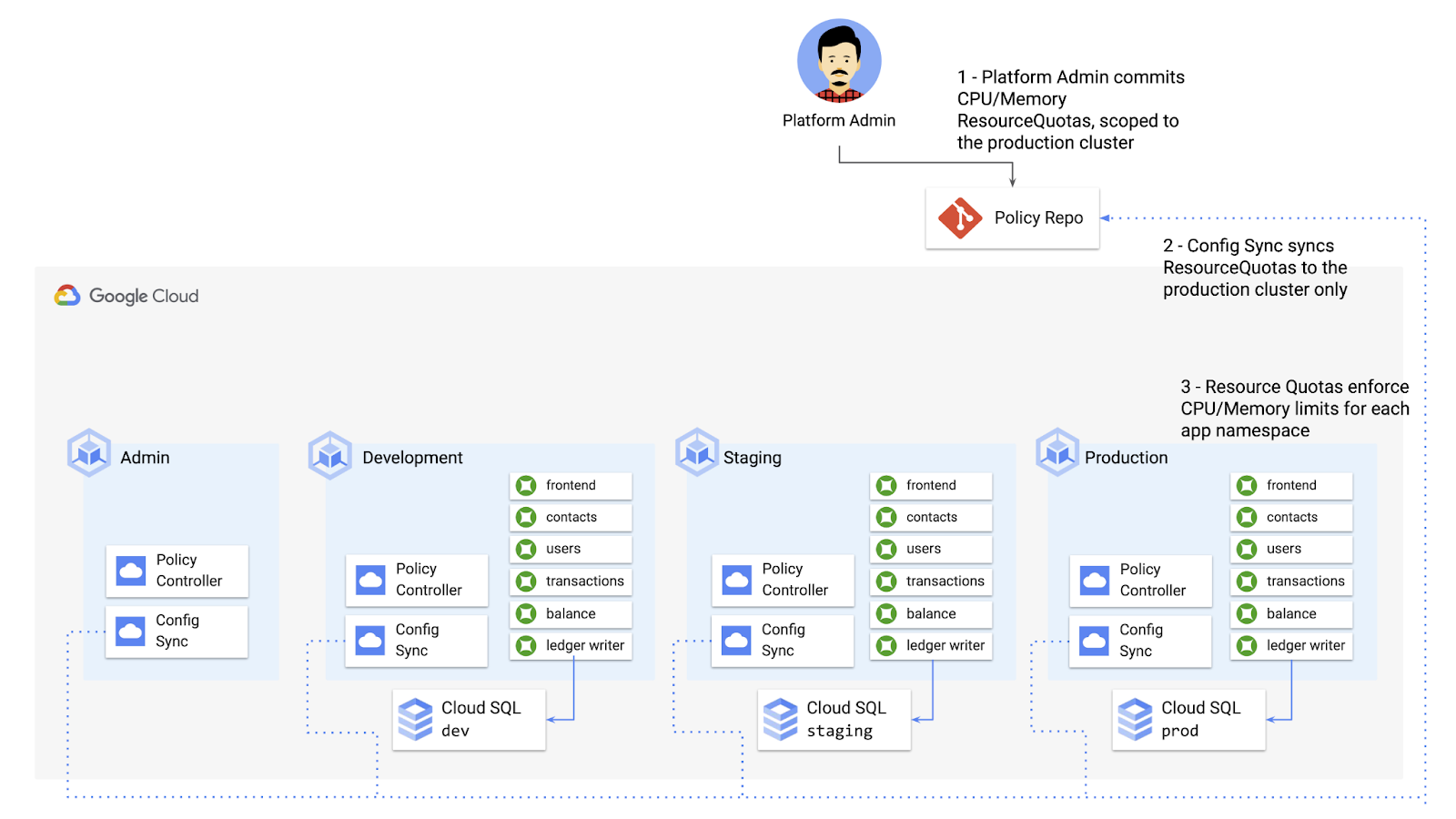
The platform team can define a set of ResourceQuotas for each application namespace. They can also scope the resources to only be applied to a subset of clusters – for instance, to the production cluster only. (If no cluster name selector is specified, Config Sync will deploy the resource to all clusters by default.)
apiVersion: v1kind: ResourceQuotametadata:name: production-quotanamespace: frontendannotations:configsync.gke.io/cluster-name-selector: cymbal-prodspec:hard:cpu: 700mmemory: 512Mi
From here, the platform team can commit the resources to the cymbalbank-policy repo, and Config Sync, always watching the policy repo, will deploy the resources to the production cluster:
NAMESPACE NAME AGE REQUEST LIMITbalancereader production-quota 6m56s cpu: 300m/700m, memory: 612Mi/512Mi
If a developer tries to delete one of the ResourceQuotas, Config Sync will block the request, helping to ensure that these base-layer resources stay put.
error: You must be logged in to the server (admission webhook "v1.admission-webhook.configsync.gke.io" denied the request: requester is not authorized to delete managed resources)
In this way, Config Sync can help platform teams ensure the stability of that platform base-layer, as well as ensure resource consistency across multiple clusters at once. This, in turn, can help organizations mitigate the complexity of adding new clusters to their environment.
Enforce policies on Kubernetes resources
Config Sync is a powerful tool on its own, and can work with any Kubernetes resource that your cluster recognizes. This includes Custom Resource Definitions (CRDs) installed with add-ons like Anthos Service Mesh.
But Config Sync, by default, doesn’t have an idea of “good or bad” Kubernetes resources. It will deploy whatever resources land in Git, even resources that might pose a security risk to your organization. Security is an essential feature of any developer platform, and when it comes to Kubernetes, it’s important to think about security from the initial software design stages, and set up your clusters with security best-practices in mind.
But it’s just as important to think about security at deploy-time. Who and what can access your clusters? What kinds of Kubernetes resources – and fields within those resources- are allowed? These decisions will depend on lots of factors, including the kinds of data your application deals with, and any industry-specific regulations.
One common security use case for KRM is the need to monitor incoming Kubernetes resources, whether they’re coming in through kubectl, CI/CD, or Config Sync. But if you have multiple clusters, your Kubernetes environment has multiple API Servers, and therefore multiple entry points.
A Google tool called Policy Controller can help automate resource monitoring across multiple clusters. Policy Controller is a Kubernetes admission controller that can accept or reject incoming resources based on custom policies you define. Policy Controller is based on the OpenPolicyAgent Gatekeeper project, and it allows you to define policies, or “Constraints,” as KRM. This means you can deploy them using Config Sync, via Git. Once deployed, Policy Controller uses your Constraints as a set of rules to evaluate all incoming KRM, rejecting resources that fall out of compliance.
Let’s walk through an example. Say that the Cymbal Bank security team wants to ensure that no code in development is accessible to the public. Kubernetes Services of type LoadBalancer expose public IP addresses by default, so the platform team wants to define a PolicyController constraint that blocks Services of that type on the development GKE cluster.
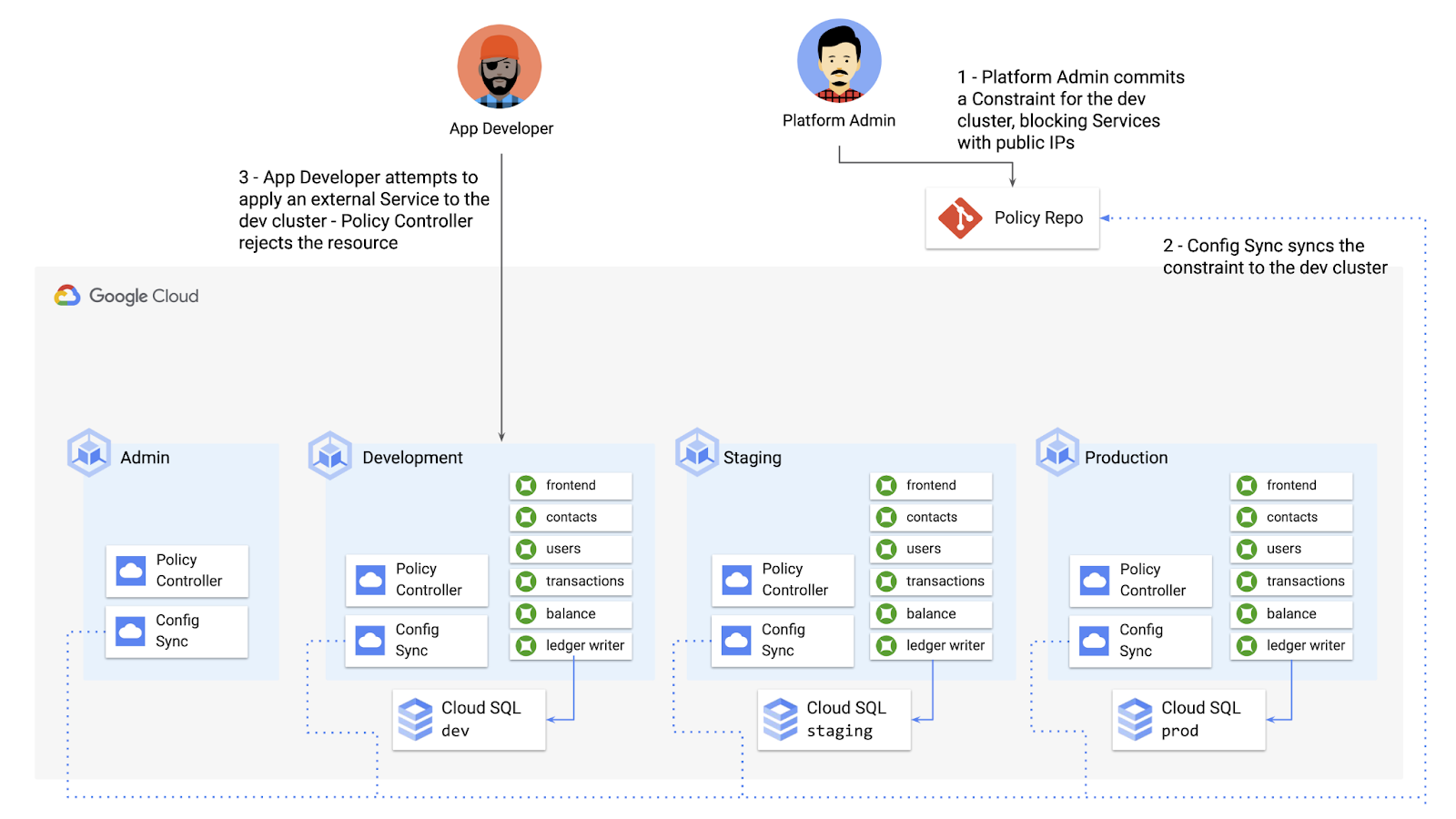
To do this, the platform team can define a Policy Controller Constraint as KRM. This Constraint uses a Constraint Template, provided through the pre-installed Constraint Template library. The ConstraintTemplate defines the logic of the policy itself, and the Constraint makes the template concrete, populating any variables needed to execute the policy logic. Here, we’re also adding a Config Sync cluster name annotation, to scope this resource to apply only to the development cluster.
apiVersion: constraints.gatekeeper.sh/v1beta1kind: K8sNoExternalServicesmetadata:name: dev-no-ext-servicesannotations:configsync.gke.io/cluster-name-selector: cymbal-devspec:internalCIDRs: []
The platform team can then commit the resource to the cymbalbank-policy repo, and Config Sync will deploy the resource to the development cluster.
From here, if an app developer tries to create an externally-accessible Kubernetes Service, Policy Controller will block the resource from being created.
for: "constraint-ext-services/contacts-svc-lb.yaml": admission webhook "validation.gatekeeper.sh" denied the request: [denied by dev-no-ext-services] Creating services of type `LoadBalancer` without Internal annotation is not allowed
The platform team can define as many of these Constraints as they want, each defining a separate policy.
Writing custom policies
The Policy Controller Constraint Template library provides a lot of functionality, from blocking privileged containers, to requiring certain resource labels, to preventing app teams from deploying into certain namespaces. But if you want to enforce custom logic on your organization’s KRM, you can do so by writing a custom Constraint Template.
Constraint Templates are written in a query language called Rego. Rego was designed for policy rule evaluation, and it can introspect Kubernetes resource fields to make a conclusion as to whether the resource is allowed or not.
For instance, let’s say that the platform team wants to limit the number of containers allowed inside a single application Pod. Too many containers per Pod can cause outage risks— when one container crashes, the entire Pod crashes.
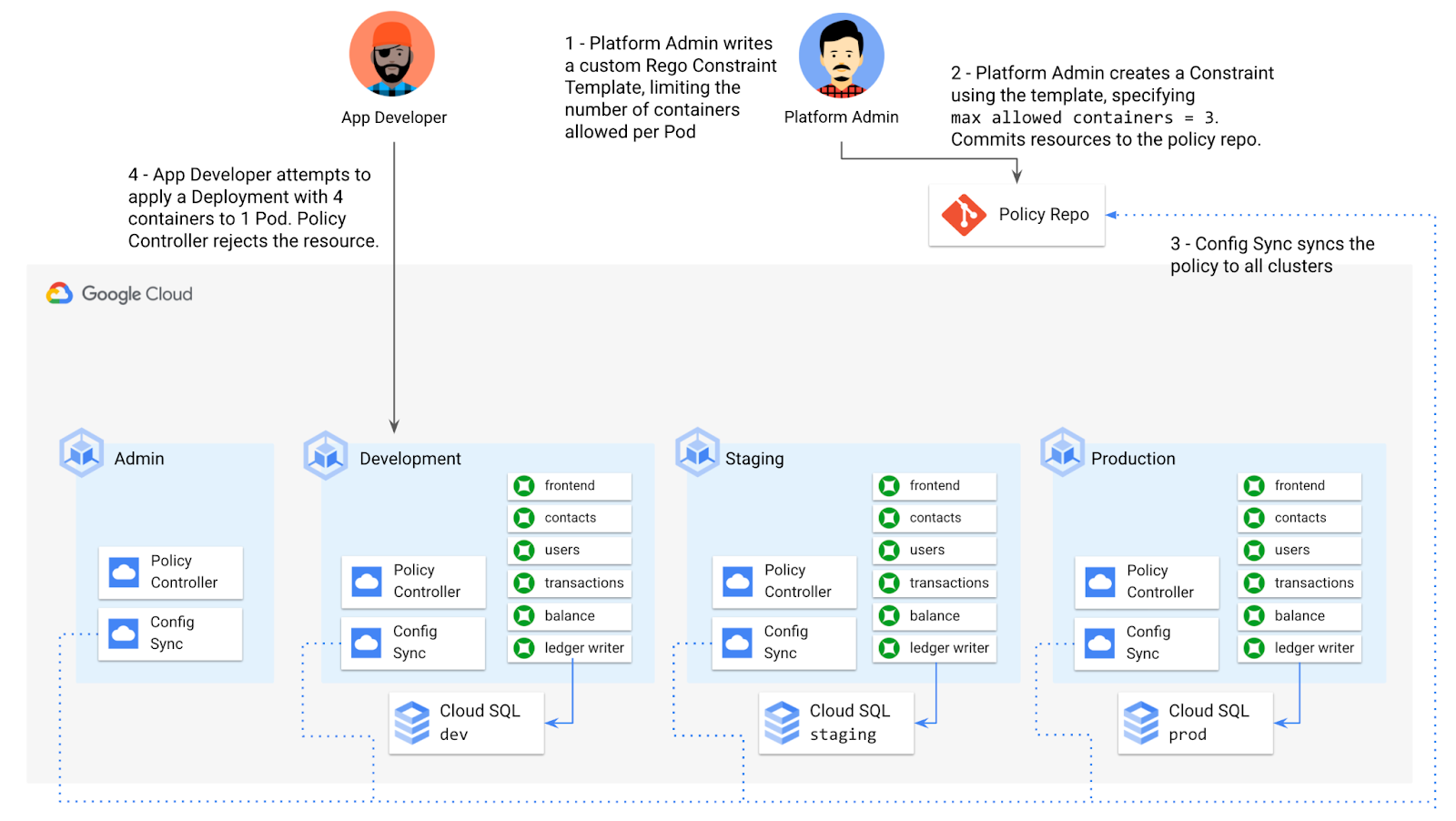
To enforce this policy, the platform team can define a Constraint Template, using the Rego language, that looks inside a resource to ensure that the number of containers per Pod is within the allowed limit:
apiVersion: templates.gatekeeper.sh/v1beta1kind: ConstraintTemplatemetadata:name: k8slimitcontainersperpodspec:crd:spec:names:kind: K8sLimitContainersPerPodvalidation:openAPIV3Schema:properties:allowedNumContainers:type: integertargets:- target: admission.k8s.gatekeeper.shrego: |package k8slimitcontainersperpodnumTemplateContainers := count(input.review.object.spec.template.spec.containers)numRunningContainers := count(input.review.object.spec.containers)containerLimit := input.parameters.allowedNumContainerstemplate_containers_over_limit = true {numTemplateContainers > containerLimit}running_containers_over_limit = true {numRunningContainers > containerLimit}violation[{"msg": msg}] {template_containers_over_limitmsg := sprintf("Number of containers in template (%v) exceeds the allowed limit (%v)", [numTemplateContainers, containerLimit])}violation[{"msg": msg}] {running_containers_over_limitmsg := sprintf("Number of running containers (%v) exceeds the allowed limit (%v)", [numRunningContainers, containerLimit])}Then, the platform team can define a concrete Constraint, using this Constraint Template, to set the number of allowed containers per Pod to 3:apiVersion: constraints.gatekeeper.sh/v1beta1kind: K8sLimitContainersPerPodmetadata:name: limit-three-containersspec:parameters:allowedNumContainers: 3
Finally, the platform team can push these resources to the cymbalbank-policy repo, and Config Sync will deploy the policy to all four clusters. If a developer tries to define a Kubernetes Deployment containing more containers per pod than what’s allowed, the resource will be blocked at deploy time:
Error from server ([limit-three-containers] Number of containers in template (4) exceeds the allowed limit (3)): error when creating "constraint-limit-containers/test-workload.yaml": admission webhook "validation.gatekeeper.sh" denied the request: [limit-three-containers] Number of containers in template (4) exceeds the allowed limit (3)
Custom Constraint Templates can give platform teams lots of flexibility in the types of policies they define and enforce in a Kubernetes environment.
Integrating policy checks into CI/CD
As we explored earlier, Config Sync and CI/CD are complementary tools. Config Sync works great for base-layer platform resources and policies, whereas CI/CD works well for application tests and deployment.
But one pitfall of having two separate KRM deployment mechanisms is that app developers may not know that their resources are out of policy until they try to deploy them into production. This is especially true if some policies are scoped only to production, as we saw with the ResourceQuota example. Ideally, the platform team has a way to empower developers and code reviewers to know ahead of time whether new or modified resources are still in compliance. We can enable this use case by integrating policy checks into the existing Cymbal Bank CI/CD.
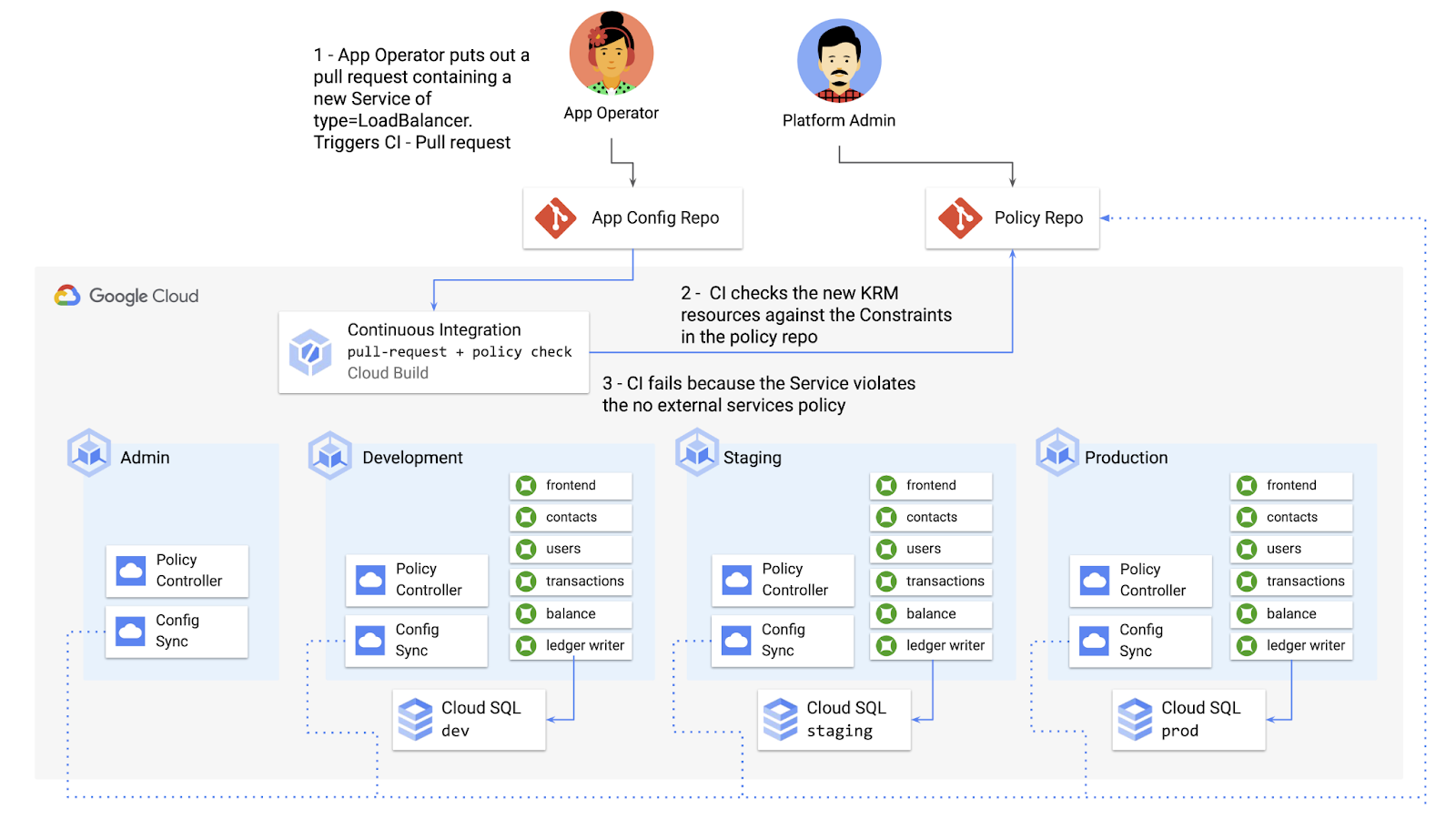
Policy Controller operates, by default, as a Kubernetes Admission Controller running inside the cluster. But Policy Controller also provides a “standalone” mode, running inside a container, that can be used outside of a cluster, such as from inside a Cloud Build pipeline.
In the example below, Cloud Build executes Policy Controller checks by getting the cymbalbank-app-config manifests, cloning the cymbalbank-policy resources, and using the “policy-controller-validate” container image to evaluate the app manifests against the policies.
steps:- id: 'Render prod manifests'name: 'gcr.io/google.com/cloudsdktool/cloud-sdk'entrypoint: '/bin/sh'args: ['-c', 'mkdir hydrated-manifests && kubectl kustomize overlays/prod > hydrated-manifests/prod.yaml']- id: 'Clone cymbalbank-policy repo'name: 'gcr.io/kpt-dev/kpt'entrypoint: '/bin/sh'args: ['-c', 'kpt pkg get https://github.com/$$GITHUB_USERNAME/cymbalbank-policy.git@main constraints&& kpt fn source constraints/ hydrated-manifests/ > hydrated-manifests/kpt-manifests.yaml']secretEnv: ['GITHUB_USERNAME']- id: 'Validate prod manifests against policies'name: 'gcr.io/config-management-release/policy-controller-validate'args: ['--input', 'hydrated-manifests/kpt-manifests.yaml']availableSecrets:secretManager:- versionName: projects/${PROJECT_ID}/secrets/github-username/versions/1env: 'GITHUB_USERNAME'timeout: '1200s' #timeout - 20 minutes
From here, an app developer or operator can know if their resources violate org-wide policies, by looking at the Cloud Build output for their Pull Request:
Status: Downloaded newer image for gcr.io/config-management-release/policy-controller-validate:latestError: Found 1 violations:[1] Number of containers in template (4) exceeds the allowed limit (3)
By integrating policy checks into CI/CD, app development teams can understand whether their resources are in compliance, and platform teams add an additional layer of policy checks to the platform.
Overall, Config Sync and Policy Controller can provide a powerful toolchain for standardizing base-layer config across a multi-cluster environment. Check out the Part 4 demo to try out each of these examples.
And stay tuned for Part 5, where we’ll learn how to use KRM to manage cloud-hosted resources.
No-code Development Platforms Help Employees Reclaim their Time and Talent

3894
Of your peers have already read this article.
4:00 Minutes
The most insightful time you'll spend today!
As offices reopen, businesses aren’t keeping to a single formula. Many are embracing hybrid models, with employees splitting time between home and the office. Some are staying 100% remote. Others are returning the full workforce to offices with a greater focus on digitization.
Regardless of their model, one thing is certain: technology is more central than ever to organizations’ ability to work smarter and more effectively. In particular, organizations need technology that can be tailored to specific business needs. For example, a retail store manager may need a way to ensure improved sanitation practices, or office workers may need to create an app to manage desk reservations.
Google Workspace can help by bringing together everything you need to get things done, all in one place—including the ability to build custom apps and automations with AppSheet. AppSheet, Google Cloud’s no-code development platform, lets employees–even those with no programming experience–reclaim their time and talent by building custom apps and automations.
Building solutions with AppSheet is often easier and faster than traditional coding, as AppSheet leverages Google’s machine learning expertise to help you quickly go from idea to solution, helping your business to match the pace and agility that today’s landscape requires. In this article, we’ll explore how you can use AppSheet to create custom solutions that will help your business adapt to shifting business needs. To illustrate, we’ll focus on a use case many businesses face: reservation and management of meeting rooms and other office resources, but this process can easily be adapted for a wide variety of use cases, from apps for retail pickup to incident reporting and more.
Simplify and centralize with apps
The first thing to consider is whether your solution would be best managed via a custom interface. If you’re trying to simplify a process for someone, such as inspections or inventory tracking, or centralize information, such as resource portals or events calendars, creating a custom app is the way to go.
For this example app, we created a simple Google Sheet to hold our backend data. Sheets are ideal backend data sources when we know the amount of data will not grow exponentially, especially when piloting to a first office or group of users. We can switch our data seamlessly at any time to a scalable Google Cloud SQL database or other database if needed.
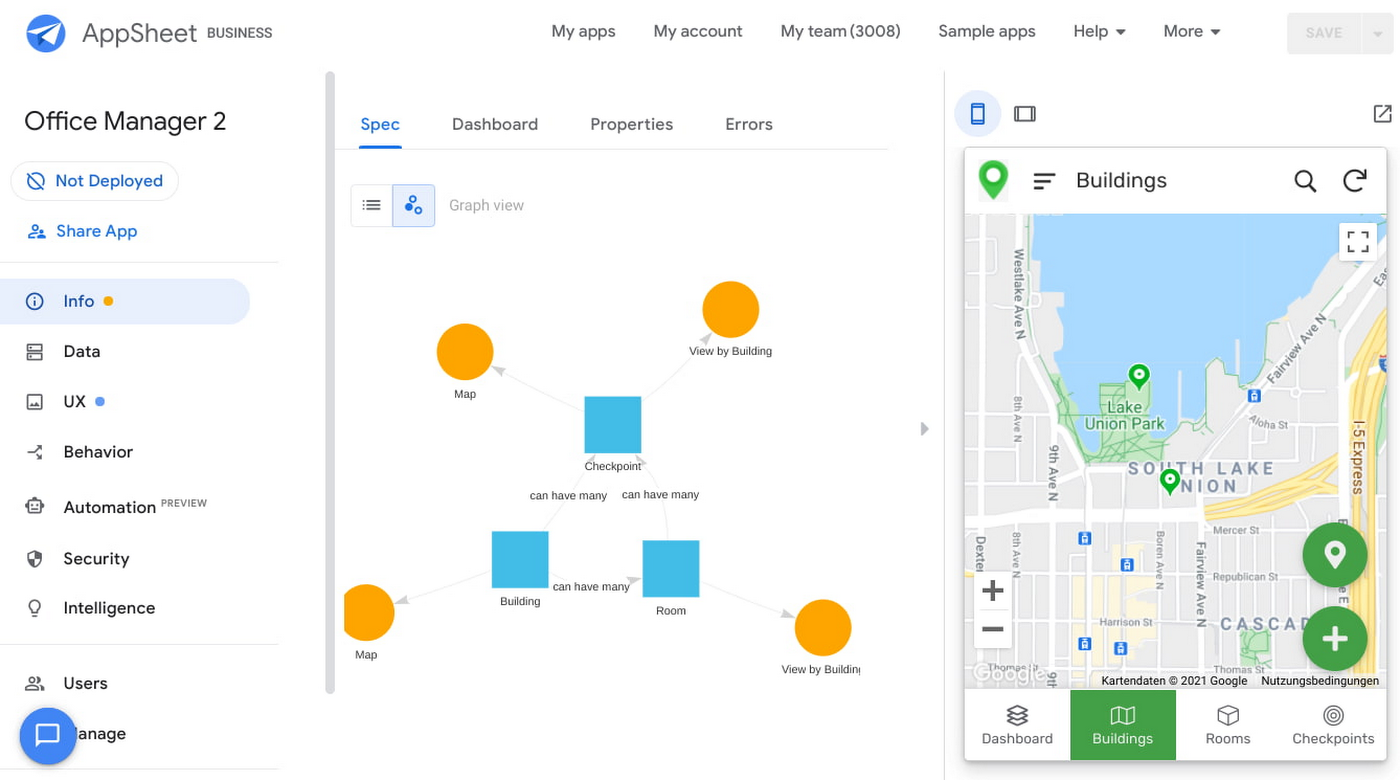
The example app has several worksheets to manage the different buildings, rooms, checkpoints and people (including their roles).

We can build an app in AppSheet directly from our Sheet by selecting Tools > AppSheet > Create an App.
After creating our app, we see an overview of the data that we’ve connected, how pieces of data relate to each other, the views that are presented to the user, and a live interactive preview of the app. Refining the app is intuitive. When you input keywords, for instance, AppSheet surfaces appropriate functionality options that can be further customized. If we have address or location data, it’s automatically turned into a map view that we can further customize.
Our office management app will offer building managers and cleaners administrative features for managing equipment, disinfection schedules, and maintenance information, and it will also offer views for employees to check occupancy and safely reserve desks and equipment.
Opening an office and then a room in the app gives us an overview of both the floorplan and the occupancy and reservations for spaces and equipment in the room.
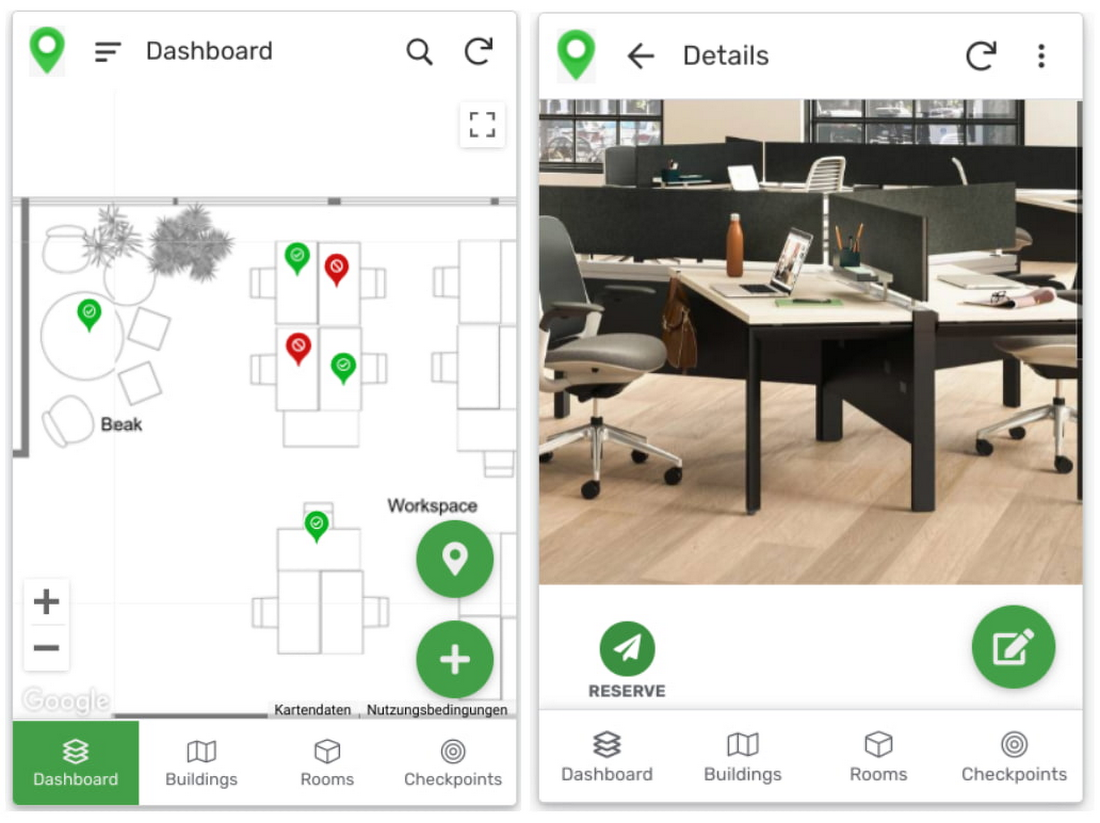
Users can then reserve spaces and equipment in the app, without having to first search for a form or page in the intranet, or even log onto their work computer. The reservation is an automation routine in AppSheet, which performs pre-configured actions when triggered.
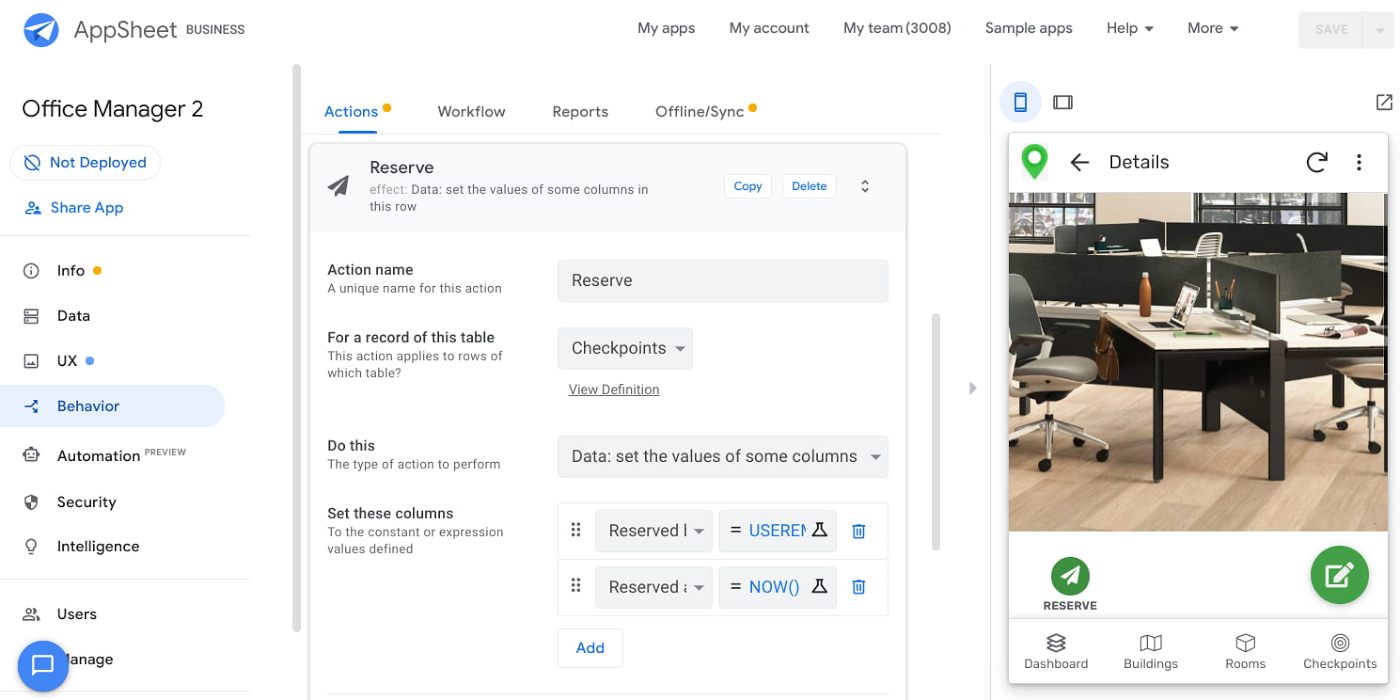
As illustrated in the screenshot above, when the action is triggered either by pressing a button in the app, scanning a QR code, or tapping an RFC tag, the action simply sets the “Reserved by” and “Reserved at” columns to the current user and timestamp.
Streamline with automations
AppSheet Automation, which was recently made generally available, makes it possible to reduce repetitive tasks and streamline processes even further.
In this example, one challenge you may encounter is that users often forget to release a desk or resource when they’re finished, which means those reservations stay blocked until an administrator releases all blocked reservations. However, it’s also important that resources aren’t immediately released, as they first need to be cleaned and disinfected before being made available to new users.
AppSheet Automation can solve this challenge by periodically checking all resources that have been reserved for longer than four hours, then alerting the user to either re-reserve them or release them to be cleaned. If there is no answer, the automation can trigger the resources to be cleaned, then released.

We can configure this as a recurring event, and create a bot that sends the notifications and triggers actions based on the user input (or lack of input).
Optimize for multiple roles
Creating an app for one user is one thing–creating an app that fits the needs of multiple types of users is another. AppSheet has you covered for this kind of complexity because it lets you build multiple roles into a single app.
In our office management app, for example, the office manager can have a particular view and dashboard, and workers in the office can have their own views and functionalities front and center. This makes it possible to automate tasks for all types of users with a single app.
Likewise, AppSheet Automation lets you easily react to real-time changes in data, send notifications to groups of users, and initiate additional workflows using data shared between the app and the users. If a group needs to reserve a conference space for an important late-breaking meeting, for example, there might be ripple effects across a number of user groups. The ability to automate all these updates and interactions can ultimately save a lot of time and effort.
AppSheet also supports advanced features such as QR codes, NFC, and bluetooth sensor integration. This could help users check into locations or workspaces, further streamlining the task of helping people safely navigate and collaborate within the office.
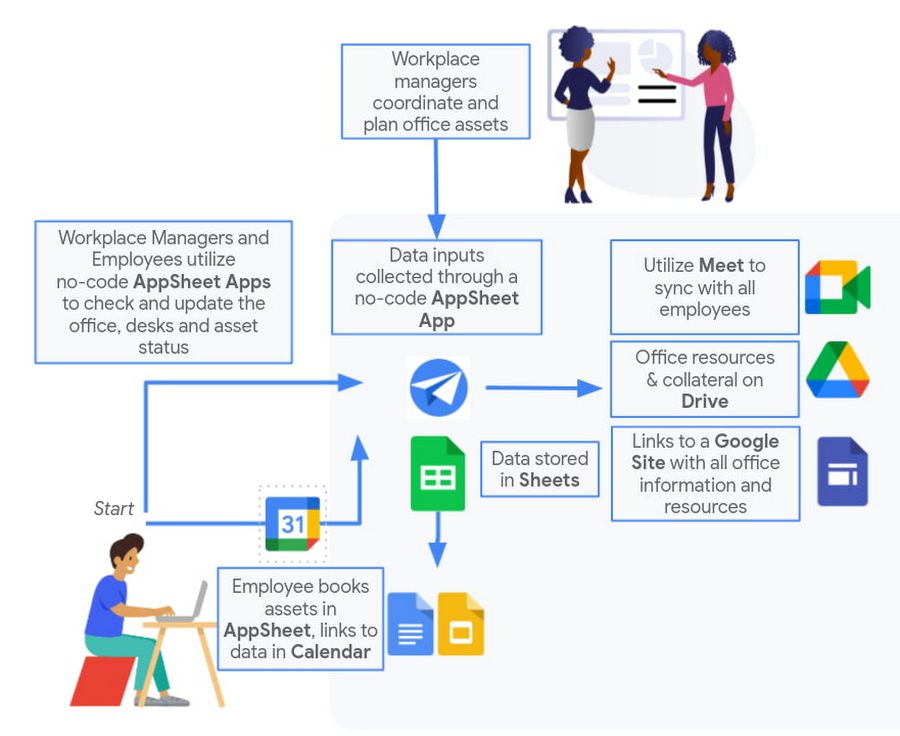
Mission critical solutions, faster than ever
In the past, the type of app explored in this article would have required a central data store, distribution to specific groups of users, management and dashboard capabilities, as well as smartphone sensor integration for NFC and image capturing. This would have necessitated a mammoth implementation project and a team of professional coders.
But with no-code, you can effectively design and implement these requirements in hours and days rather than months and years. Changes can be made on the fly in any browser, including pushing out new versions to users. Though AppSheet opens up app building and digital automations to any knowledge worker, it also includes robust security and governance controls, ensuring that as you manage getting employees back into office, you don’t neglect IT security.
Try out your own back-to-the-office app for free today at AppSheet.com, or explore and copy our sample app.
Google Dataflow Named Leader in The 2021 Forrester Wave™: Streaming Analytics

6658
Of your peers have already read this article.
2:00 Minutes
The most insightful time you'll spend today!
We are excited to announce that Google has been named a Leader in The Forrester Wave™: Streaming Analytics, Q2 2021 report. Thank you to our strong community of customers and partners for working with us to deliver a customer focused product. We believe Forrester’s recognition is an acknowledgement of our leadership across an integrated set of capabilities that rely on data to drive transformation. We were also honored to be named a leader in The Forrester Wave™: Cloud Data Warehouse, Q1 2021.
Forrester gave Dataflow a score of 5 out of 5 across 12 different criteria and according to the report: “Google Cloud Dataflow has strengths in data sequencing, advanced analytics, performance, and high-availability. Google Dataflow’s sweet spot is for enterprises that have a preponderance of real-time data generated on Google Cloud Platform or wish to simplify all data processing by using a single platform that unifies both streaming and batch jobs.”
Harnessing the power of real-time data
The speed with which businesses are able to respond to change is the difference between those that successfully navigate the future and those that get left behind. In order to accelerate their digital transformation, reimagine their business and leverage the power of real-time data, today’s data leaders require a streaming analytics platform that provides both depth and breadth.
Cloud Pub/Sub and Cloud Dataflow, based on more than a decade of experience in internet scale systems for Google’s own needs, provide customers with a reliable, scalable, performant platform. In addition, we’ve designed these products for ease of use to make streaming analytics accessible to more users, which is why customers such as Sky and others from across all industries use Dataflow to run streaming analytics workloads.
5 out of 5 across key streaming analytics criteria
While Forrester gave Dataflow a score of 5 out of 5 in 12 criteria, the product achieved the highest possible scores in areas that are top of mind for our customers.
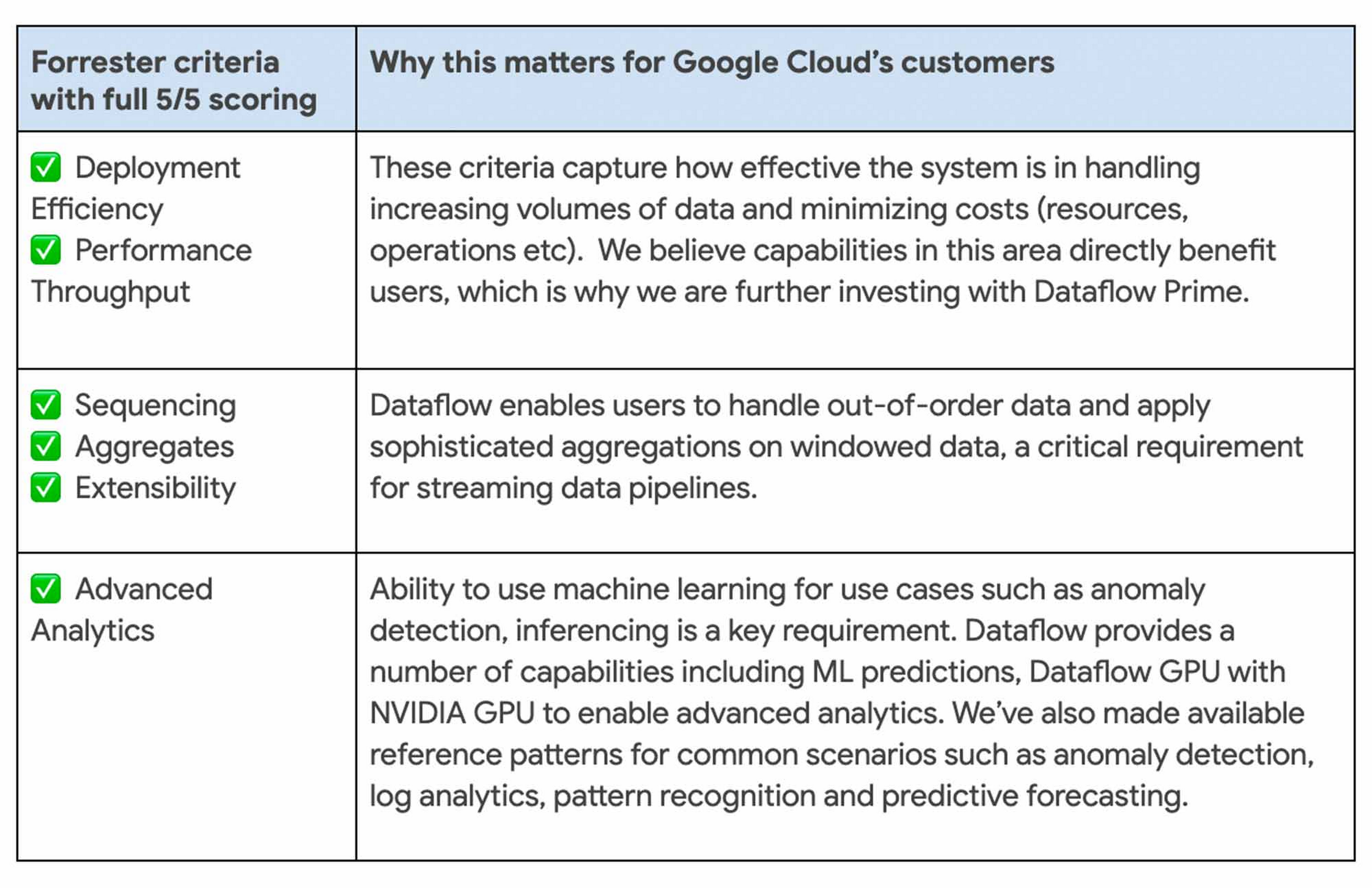
We continue to be focused on solving problems that matter to you. For example, just in the last month we announced Dataflow Prime and Auto Sharding for BigQuery – two new auto tuning capabilities that bring efficiency and simplicity to your streaming pipelines.
Dataflow achieves highest score possible in strategy
With Google, organizations gain an industry leading product and a partner that has the vision and strategy to help you tackle new business challenges and provide delightful experiences to your customers.

In summary, we are honored to be a Leader in The Forrester Wave™, Streaming Analytics, and look forward to continuing to innovate and partner with you on your digital transformation journey.
Download the full report: The Forrester Wave™: Streaming Analytics, Q2 2021 and check out these smart analytics reference patterns. To learn more about Dataflow, visit our website and get to know the product by taking an interactive tutorial. You can also watch recordings from the Data Cloud Summit event (May 2021), where we provided an in-depth view of new product innovations in Dataflow and other data analytics products.
6 ways Google Workspace helps IT admins safely use BYOD

4194
Of your peers have already read this article.
6:30 Minutes
The most insightful time you'll spend today!
Many organizations, including Google, have moved quickly to embrace working from home. With this widespread remote work, it’s never been more important for IT admins to be certain that every device in their organization is secure, even when that device isn’t company-owned.
We pioneered zero-trust security through our BeyondCorp strategy and leverage it to offer advanced security for G Suite* users to protect secure access for all devices. Admins can enforce these controls across G Suite and other corporate applications and data, ensuring consistent security and user experience across your organization.
Today, we’re laying out six key controls that IT admins can use within G Suite to help keep their organizations safe when using the bring your own device approach (BYOD). You can also review our detailed security checklist here, and learn more from our course on Managing G Suite here.
Secure mobile and desktop devices with endpoint management

BYOD devices can differ widely across an organization, with a range of OS versions, hardware modes, patch versions, and more, so it’s impossible to rely on a one-size-fits-all approach to device management. With Google endpoint management, IT admins can easily support a variety of mobile and desktop devices by enforcing measures like minimum software versions and blocking jailbroken or rooted devices, in many cases without requiring full device rights for employee privacy.
When it comes to managing mobile devices, G Suite offers basic and advanced mobile device management:
- With basic mobile device management, BYOD devices are secured with baseline security features with no end user friction. Admins can enforce a passcode, get a device inventory, wipe Google accounts remotely, and even remotely install applications on Android devices.
- With advanced mobile device management, admins can apply more policy controls over BYOD devices, and Android users can keep their personal data private and separate from their work data with Android Work Profiles. You can also allow and manage work apps on iOS and Android devices.
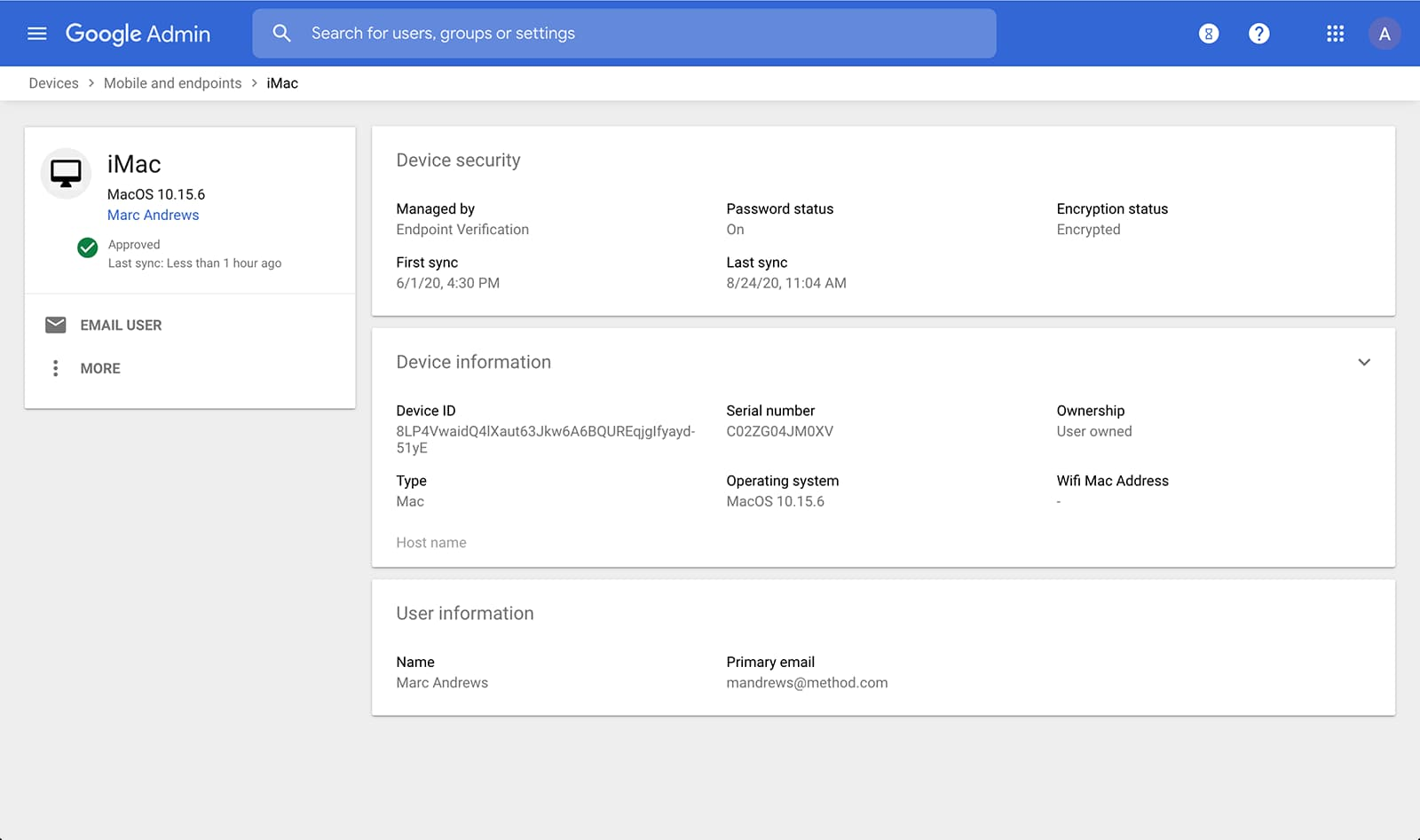
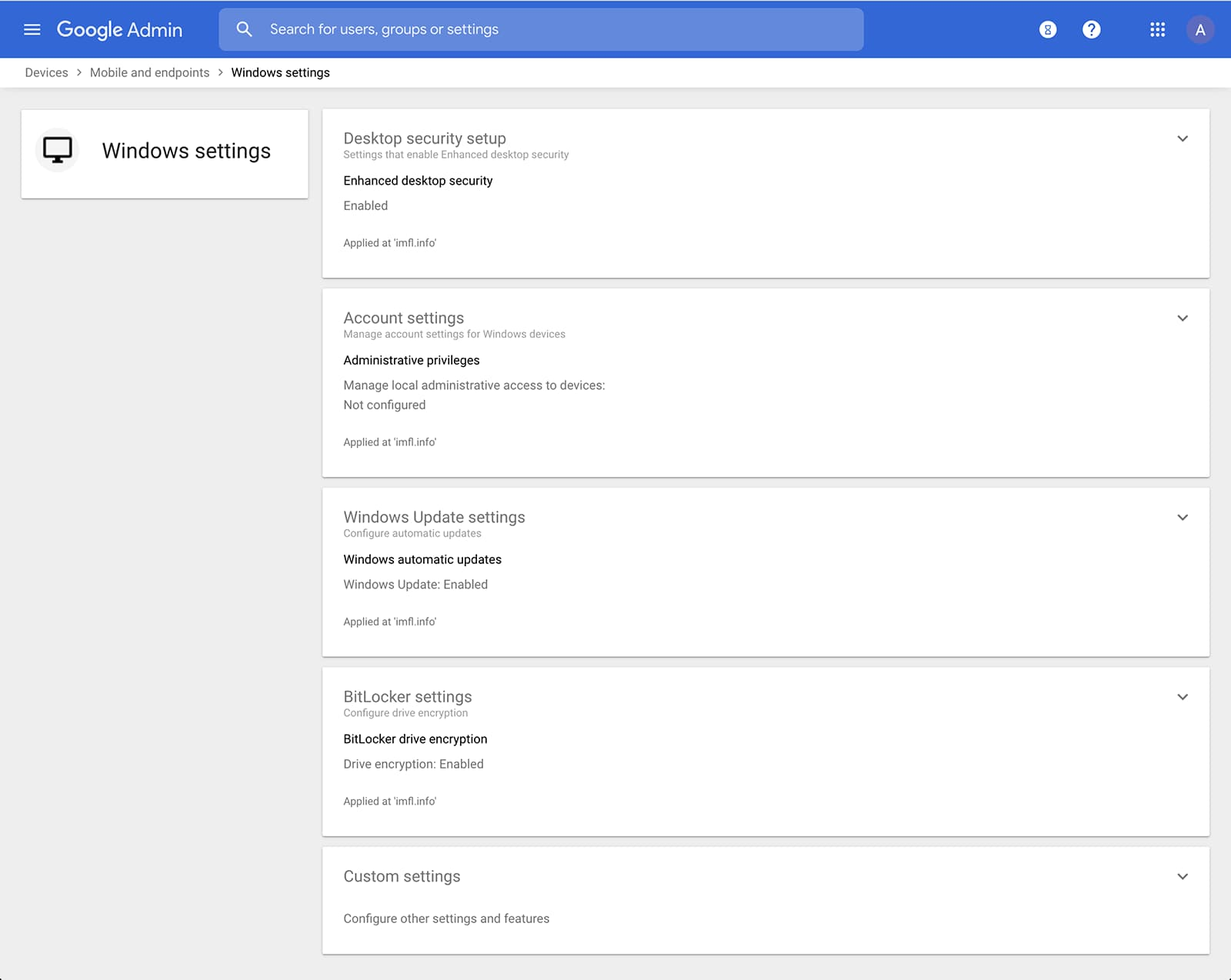
Admins can also manage and secure desktop devices with fundamental device management and enhanced desktop security for Windows. With fundamental device management, when a user logs into G Suite through any browser on a Windows, Mac, Chrome, or Linux device, that device will be automatically enrolled with endpoint management. This provides a base level of security to every desktop device that accesses G Suite data. With enhanced desktop security for Windows, admins can easily manage and secure Windows 10 devices through the admin console.
Enable secure connections without a corporate VPN using context-aware access
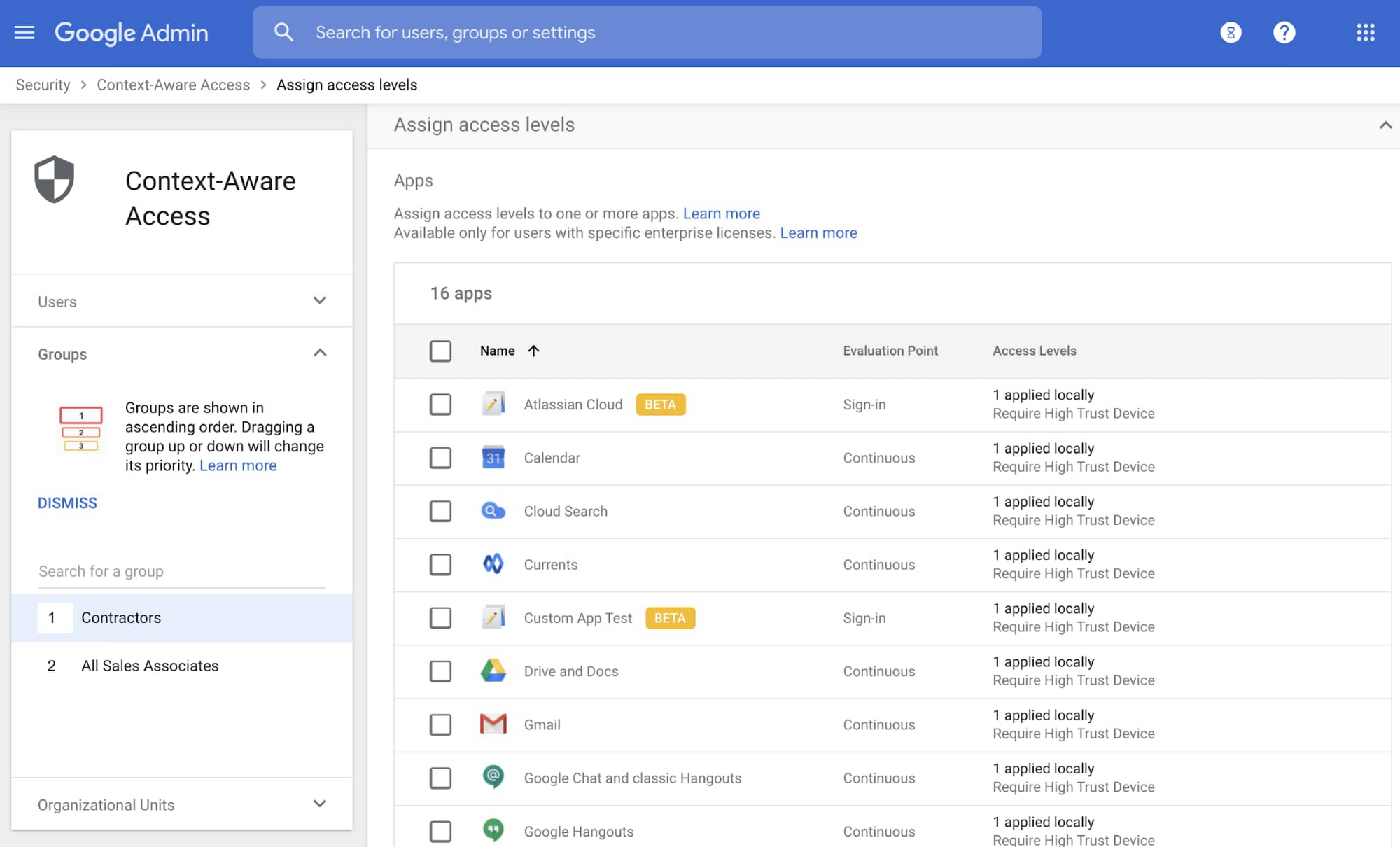
Context-aware access offers protection from unwanted access to G Suite services without the need for a VPN, and allows admins to set up different access levels based on a user’s identity and the context of the request, taking into account factors such as the country, device security status, and IP address of the request. For example, you can require BYOD devices accessing G Suite to meet encryption and password requirements, or restrict contractors from accessing G Suite from company managed Chromebooks.
Control data access with app access control
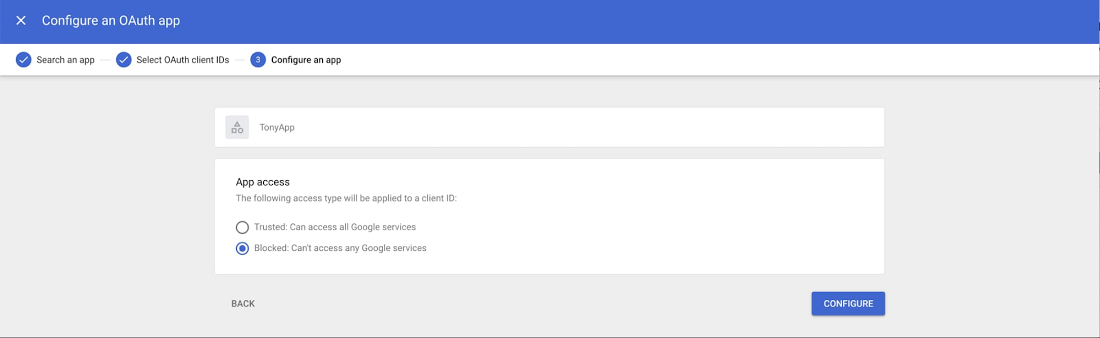
It’s important to protect all devices in your organization—corporate or BYOD—from malicious apps trying to gain access to corporate data. Using app access control, admins can take steps to prevent these apps from tricking users into mistakenly granting access to corporate data. With this feature, admins can choose which third-party apps are allowed to access users’ G Suite data by explicitly trusting, limiting, or blocking access for apps.
Enforce 2-Step Verification
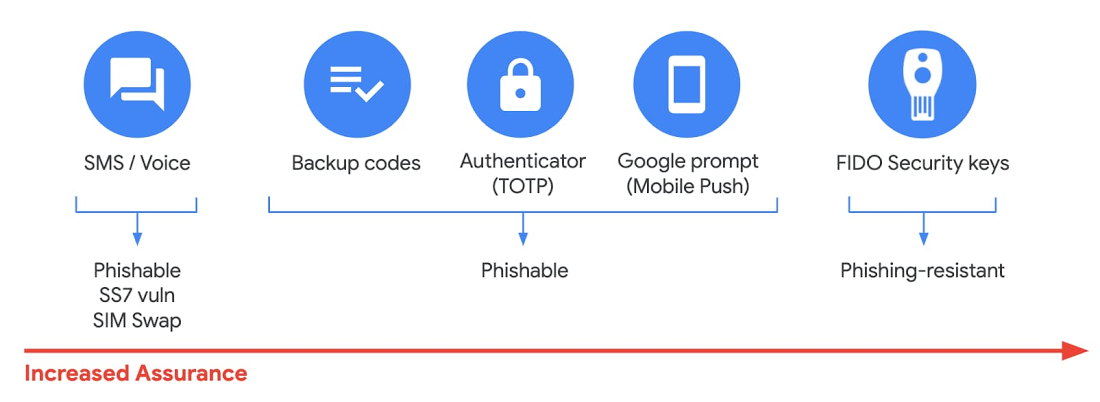
With 2-Step Verification, admins can reduce the risk of unauthorized access by asking users for additional proof of identity when signing in. And you can now use the Advanced Protection Program—our strongest protection for users at risk of targeted attacks. With the Advanced Protection Program for the enterprise, we’ll enforce a specific set of policies for enrolled users including security key enforcement, blocking access to untrusted apps and enhanced scanning for email threats
If you choose not to use security keys for any reason, you have multiple other options to enforce 2-Step Verification on BYOD devices. For Android and iOS, you can use Google prompt, Google Authenticator, text message, or phone call options for a second verification step.
Prevent data loss and leakage with data loss prevention
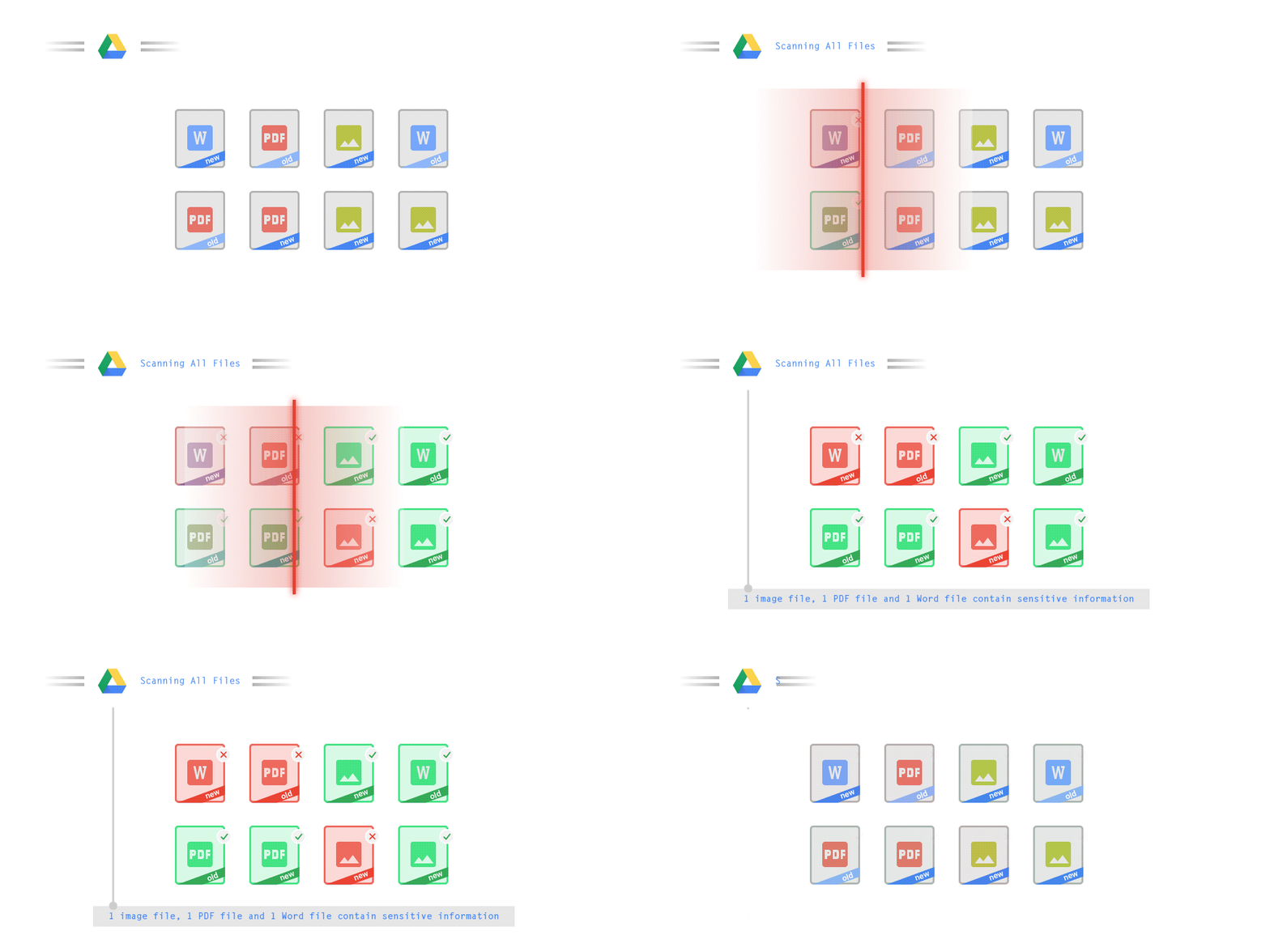
We know that as an admin, one of your highest priorities is to keep internal information safe and secure. That’s why we developed data loss prevention (DLP) policies to help protect sensitive information in Drive, Docs, Sheets, Slides, and Gmail from loss, misuse, or being accessed by unauthorized users. With G Suite DLP, admins can choose which types of data are sensitive and exactly how to protect them. Our controls enable easy detection of a wide variety of common info types, and administrators can supplement this with custom content detectors to meet their organization’s needs. You can also classify files in Drive automatically using DLP rules (beta) to categorize your data by sensitivity levels. DLP works on all the devices in your organization, including BYOD ones, since the protection is at the data and application level.
In addition to DLP, you can use DXP for iOS devices to restrict the copy/pasting of G Suite data to other accounts, personal or otherwise. DXP for iOS can also restrict users’ ability to drag and drop files from specific apps within their G Suite account. Similarly, you can use Google endpoint management to configure Android devices to prevent data sharing between personal and work profiles.
Make retention and eDiscovery possible on all your devices with Vault

To support your organization’s retention and eDiscovery needs, Vault enables corporate data that’s stored in G Suite and accessed by BYOD devices to be available for all your information governance needs. No matter the owner of the device, your organization’s data stored in Gmail, Drive, Chat, Groups, Voice, and Meet are accessible to Vault.
Using the zero-trust security model, the G Suite features above work together to keep your data protected and organization secure across all devices, whether they’re corporate-owned or BYOD.
(*Google Workspace was previously G Suite)
More Relevant Stories for Your Company




PwC uses Connected Sheets to scale data insights
It’s important for teams across the business to understand customer adoption of products and services, whether it’s the product team tracking usage of a newly released feature or the support team trying to anticipate incoming service requests. Similarly, IT teams need to analyze the adoption of an organization’s internal applications

Five Reasons Your Business Should Move to AI-Enabled, Smarter, Spreadsheets
When it comes to data analysis, it’s easy to fall into routine. But no matter how much of a whiz you are at formulas or pivot tables, superb spreadsheet skills only take you so far if you’re working with multiple versions or outdated datasets. On average, your employees spend up

Active Assist Expands Globally: Unleashing Cloud Optimization Insights Worldwide
Active Assist provides insights and recommendations to help Google Cloud customers proactively optimize their cloud environments for cost, security, performance, and sustainability. If you’re like most customers, you’ve likely encountered these insights and recommendations in the console — either in the Recommendations Hub or embedded on a resource page, like IAM or

In sync for better efficiency: Effective collaboration strategies for distributed workforces
Workplace collaboration continues to evolve as hybrid work expands its footprint. While both “same-time” and “staggered-time” (or asynchronous) collaboration modes each have their place in the hybrid work environment, organizations and teams sometimes overuse one mode over another. That’s probably because in-person meetings or collaborating in real time have been
