





Google Cloud’s Professional Service Organization: How it Accelerates Operational Health Review Cloud Migration

3382
Of your peers have already read this article.
2:00 Minutes
The most insightful time you'll spend today!
Introduction
The Google Cloud Professional Services Organization’s (PSO) mission is to help our customers get the most out of Google products. PSO is responsible for customer success by sharing our technical expertise in order to unlock business value from the cloud by providing cloud strategy and best practice advice, implementation guidance, and training using our proven methodology.
In this blog post, we want to focus specifically on Operational Health Reviews and how PSO engages in a myriad of activities to ensure the overall success and health of a customer engagement while ensuring we are meeting customer expectations and objectives, managing risk, and ultimately delivering value during or after the Google Cloud migration. We will discuss the assets, methodology, and tools that we leverage to ensure this success.
What is an Operational Health Review and what purpose does it serve?
Operational Health Reviews (OHR) are regular reviews to proactively address the below topics:
- A customer’s support experience
- Analysis of trends in key operational metrics
- Analysis of trends in Google Cloud usage
- Status reports for high-priority cloud projects
- Discussion of upcoming events
- Discussion of potential opportunities for training
- Review of feature requests
The core aim of an OHR is to measure progress and advise customers on the overall health of the account and migration progress while providing recommendations as a team on what adjustments should be considered to ensure continued success. During the OHR, we will address any pain points as well as identify and remediate any negative trends in support interfaces and usage metrics.
The intention of the activity is to also perform a blameless reflection for continuous improvement. This supports the effort to maintain common ground and obtain mutual optimism for the next phase of the customer’s journey on Google Cloud.
Let’s dive a little deeper into some of the activities that go into an OHR.
Support experience
One of the Google Cloud’s Support Organization’s goals is to simplify and streamline our customer’s support experience with a scalable and flexible set of offerings built with the customer needs at the center. This includes supporting an ongoing partnership model, with a proactive and collaborative approach. Premium Support is our top-tier support model which is a paid support offering designed for enterprises that run mission critical workloads and require fast response times, platform stability, and increased operational efficiencies. As part of this offering, customers are provided with a Technical Account Manager (TAM) who is in charge of delivering frequent touchpoints, including OHRs.
During the support experience section of an OHR, some of the following topics may be reviewed:
- Case volume by priority
- Case volume by product
- Cases linked to Google Cloud incidents
- Escalated cases or incidents
- Case initial response time (IRT)
- Case IRT SLO Met Rate
- Case total resolution time (TRT) hours
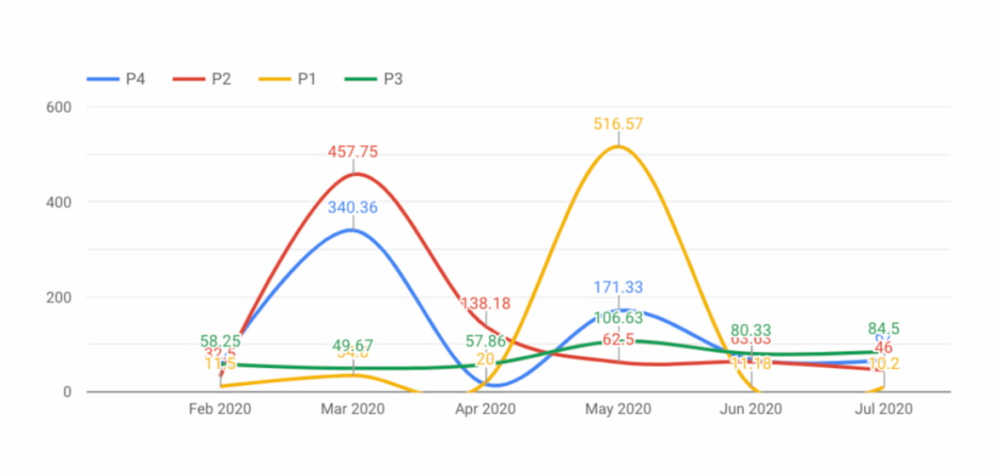
The purpose of this activity is to better understand the efficiency of both the customer’s and Google’s cloud operations from a support trend perspective. The goal is to celebrate any positive trends, but also to identify potential negative trends and proactively determine a remediation strategy.
Status reports for high-priority cloud projects
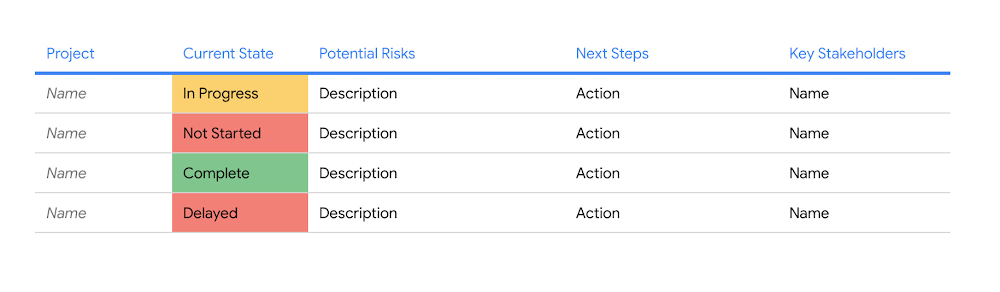
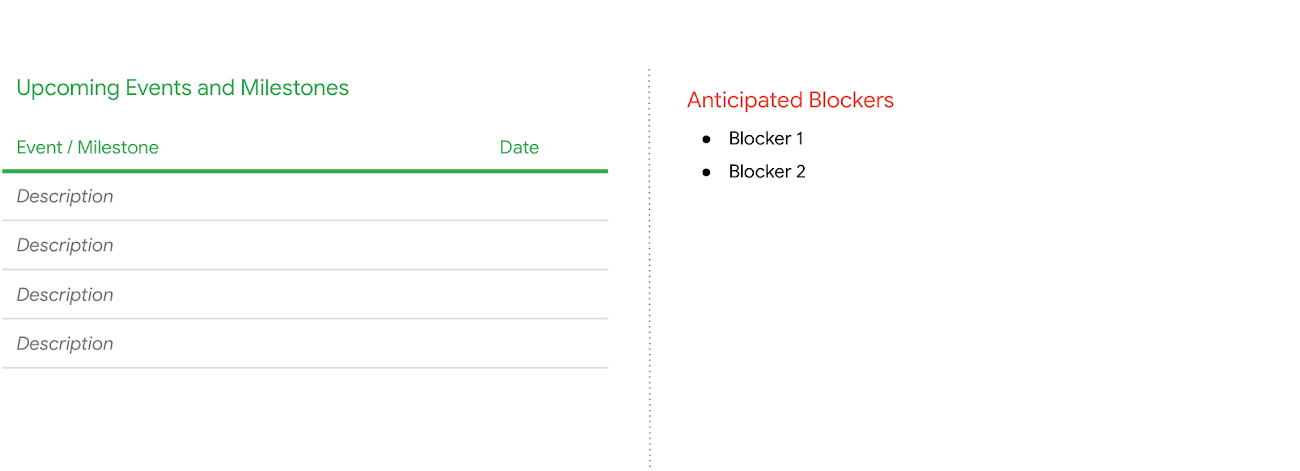
The purpose of this part of the OHR is to ensure the senior management stakeholders have continued visibility into the status of all their high-priority cloud initiatives with an easy-to-read, sometimes color-coded assessment on the status of each project. The assessment [Figure 1] may include, but is not limited to potential identified risks, key next steps, key stakeholders, and a mitigation plan for any high priority issues that may occur during their migration engagement. Additionally, the TAM may also cover any upcoming milestones or events, as well as any potential anticipated future blockers [Figure 2].
Review trends in Google Cloud usage
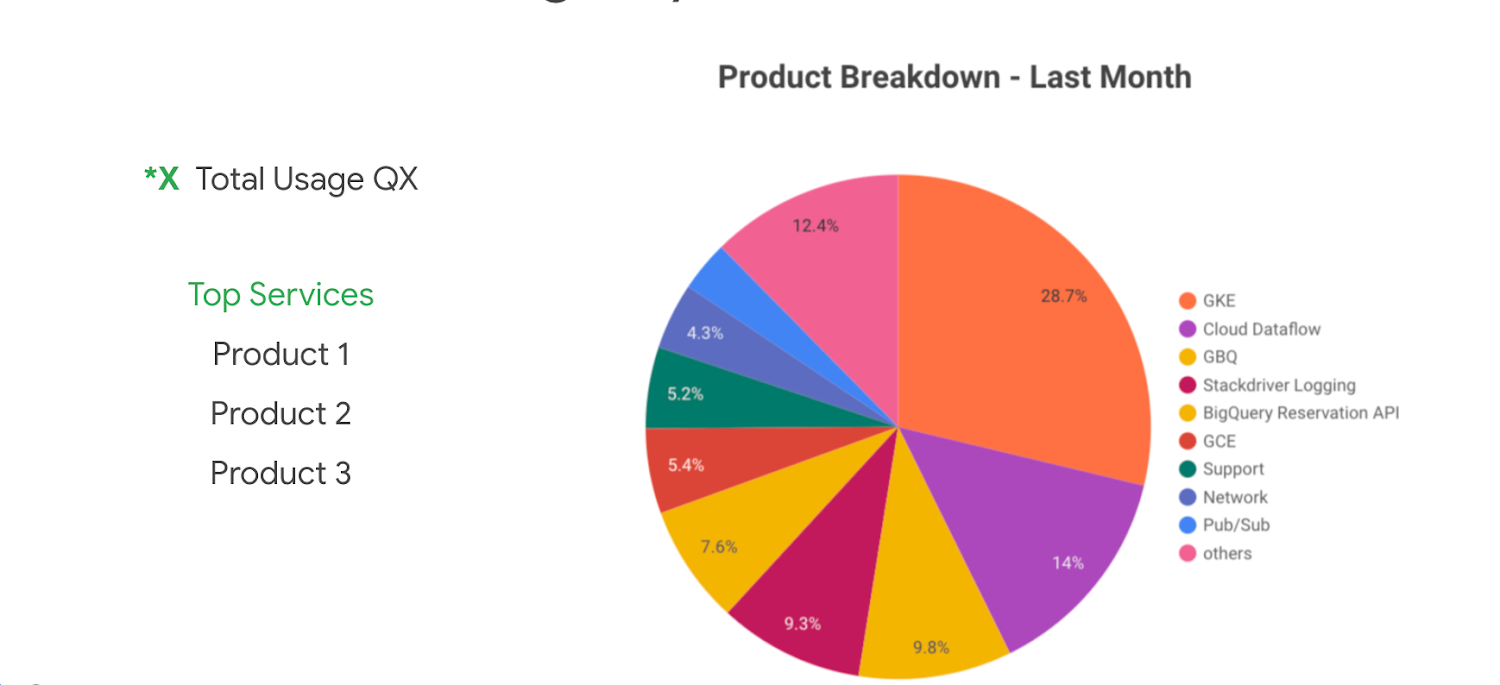
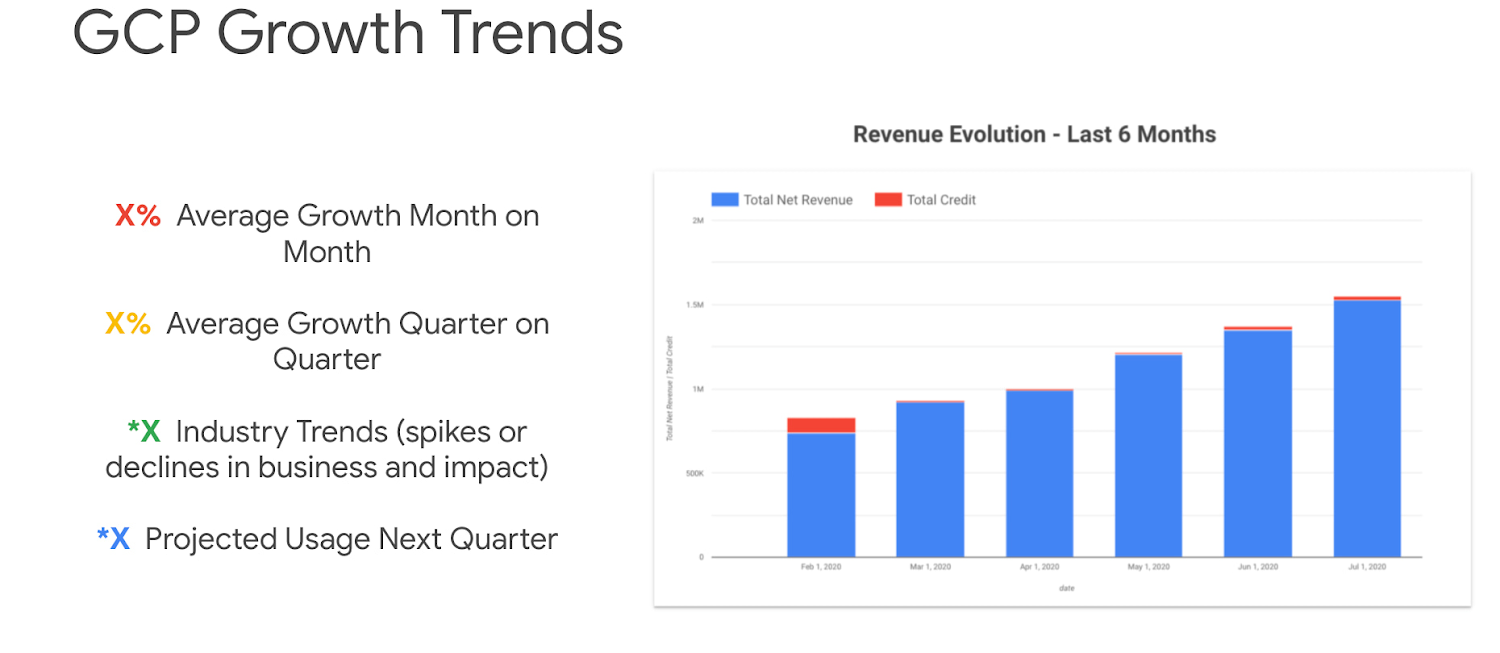
This part of the OHR is meant to provide the customer with a holistic view of their overall Google Cloud usage. The purpose is to provide understanding around what products are being used on Google Cloud and also where cost is generally being allocated for overall cost management and budget tracking purposes. This can help customers with their overall cost optimization efforts. Some of the metrics we may cover in this section are:
- Current Google Cloud usage by service
- Google Cloud growth trends
- Google Cloud growth trends by service
- Google Cloud growth trends by project
- Review of used and available service credits
Feature request review and advocacy
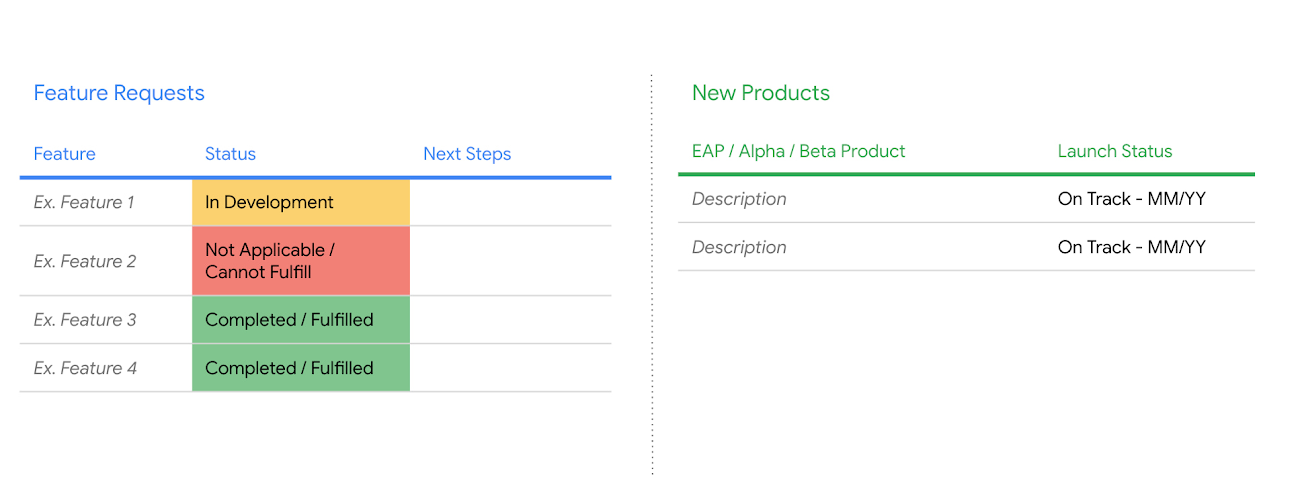
TAMs will work with customers to help identify product needs and advocate for feature requests with Google Product Management and Engineering teams. While feature request advocacy is an ongoing activity, during the OHR, the TAM will review any high priority feature requests that have previously been submitted, providing updates on status including potential release dates.
When a feature is coming up for the release, the TAM can help the customer prepare for implementation (providing early Preview access, coordinating a meeting with the Product Manager to review the feature, etc.) and then continue to provide support until the feature is successfully implemented in the customer environment. Similarly, if a high priority or technical blocking feature is not yet coming available, the TAM can help offer an alternative solution that can unblock the customer in the short term.
The OHR is also a great time for the TAM to work with the customer to ensure they have early access to new and exciting features that are in Alpha or Beta, and that would be beneficial to the customer and their environment.
Training strategy
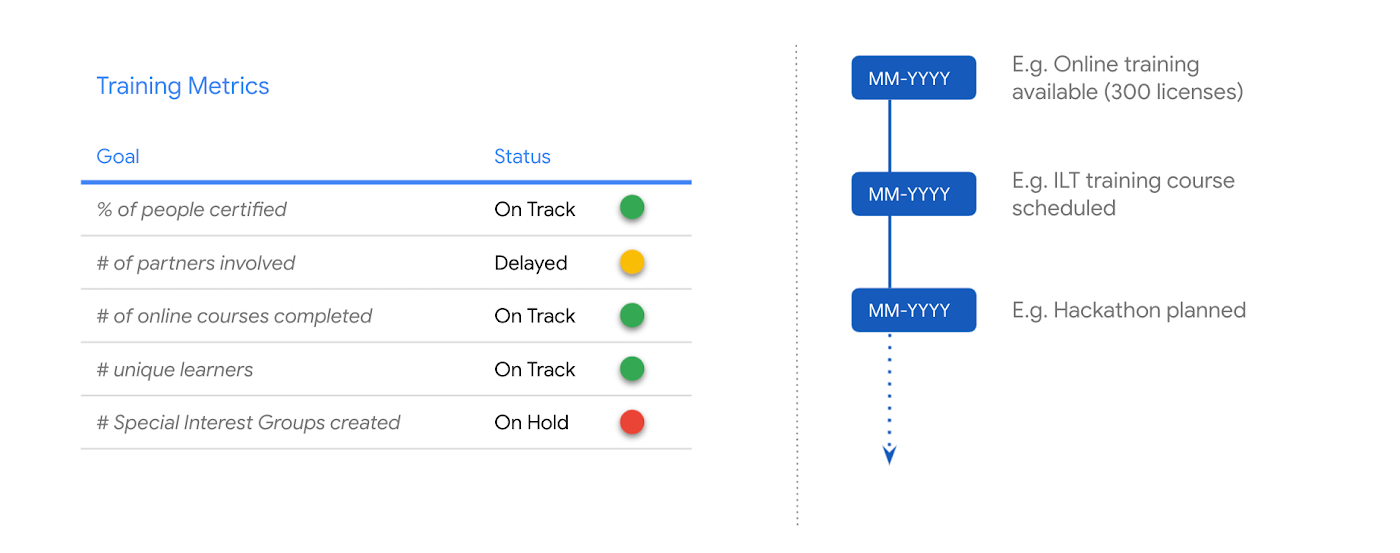
Training is a primary component to ensuring the overall success in adopting Google Cloud. During the OHR, a review of training metrics will be provided. This may include tracking metrics to determine how the customer is tracking towards an initially agreed upon learning plan or coming up with additional upskilling strategies as necessary. Additionally, throughout an engagement, the customer’s TAM will provide opportunities for both free and paid Google Cloud training.
Conclusion
PSO is the voice of customer health, maintaining priority to proactively and strategically guide large enterprise customers to operate effectively and efficiently in the cloud, both during and after the migration process. The OHR is an efficient and effective way to maintain alignment, ensure expectations and objectives are being met, manage risk, and overall ensure the success of the customer.
Learn more about our methodology and get started with Google Cloud by completing a free discovery and assessment of your migration. Alternatively, if you’d like to engage directly with our PSO team on your migration, contact us!

APAC’s Retail Digital Pulse by Google Cloud and IDC Retail Index
DOWNLOAD TREND ANALYSIS3433
Of your peers have already downloaded this article
15:00 Minutes
The most insightful time you'll spend today!
In the post COVID-19 pandemic world, some retail businesses have aced digital transformation while others are still lagging behind. The Google Cloud commissioned IDC Retail Insights analyzed over 1, 108 retailers across seven nations in the Asia Pacific region and across eight different segments (online, drugstores, speciality shops, convenience stores, department stores, restaurants, supermarkets and hypermarkets/big box stores) to develop Google Cloud Retail Digital Index. The digital maturity was reviewed in five dimensions that define the digital pulse like strategy, people, data, technology and process.
Apart from empowering retail brands to live up to customer expectations, technology is the backbone to back-office operations and still ranks low in the digital pulse. Download the Google-ODC InfoBrief to catch up on the latest, detailed insights on Asia Pacific’s Retail Digital Index along with essential guidance on driving digital transformation, use cases and more!
Ease Your Migration and Modernization Journey with Microsoft and Windows on Google Cloud Demo Center

8305
Of your peers have already read this article.
2:00 Minutes
The most insightful time you'll spend today!
If you’re looking to migrate and modernize your Microsoft and Windows workloads, Google Cloud is your premiere destination. No matter what migration strategy you’ve selected or what value you’re looking to achieve, with Google Cloud you’re able to:
- simplify your migration and modernization journey
- reduce your on-prem footprint and increase agility
- optimize license usage to reduce costs
- modernize to reduce single-vendor dependencies
- rely on enterprise-class support backed by Microsoft
Whether you’re looking to migrate applications running on Windows virtual machines, adopt Windows containers in Google Kubernetes Engine (GKE), convert SQL databases to Cloud SQL, or something else, Google Cloud offers you the first-class experience you need.
But we don’t want you to take our word for it. Try it out yourself with our new online Microsoft and Windows on Google Cloud Demo Center without any commitment or friction.

The demo center uses hands-on guided simulations to walk you through several scenarios for solving business critical challenges with Google Cloud’s Microsoft and Windows solutions. Because these are all simulated, you’ll see how it works without any deployment, configuration, or commitment. It’s a seamless way for you to see exactly how Google Cloud can help you.
Run dedicated hardware and optimize with sole tenant
Sometimes you might want to run your workloads on dedicated hardware (with oversubscription options) for compliance, licensing, and management. Google Cloud provides sole-tenant nodes that allow you to easily deploy your virtual machines onto dedicated machines to avoid “noisy neighbor” issues, address regulatory or licensing constraints, and optimize inter-VM communications.
Plus, the CPU Overcommit option allows oversubscribing sole-tenant node resources by up to 2x, therefore helping save on per-physical core licensing for many licensed workloads like SQL Server.
Learn how to set up a sole tenant group and node.
Optimize license costs with premium images & custom VMs
One of the easiest ways to optimize your cloud experience with virtual machines (VM) is to pick the right VM image. Google Cloud provides premium license-included VM images that are thoroughly tested and optimized, including SQL Server options with pay-as-you-go licensing. These are great for workloads that don’t need to run all the time or when you do not have spare licenses for bring your own license (BYOL).
Explore some Windows & SQL images and learn how CPU/Memory options can help optimize deployment and save on licensing.
Modernize your databases with Managed SQL Server
Sometimes you need to manage your SQL Server instance to achieve certain business or operational goals. But more often, managing SQL Server deployments can be undifferentiated: backups, high-availability, updates, and patching are just some of the many things you have to take care of when going the do-it-yourself route. One way to modernize your database tier is to migrate to a managed service like Cloud SQL, which is a fully managed Relational Database service for SQL.
Explore the process of creating an instance in just a few clicks!
Extract apps from VMs and move to containers in GKE with Migrate for Anthos
Many Windows workloads running on virtual machines such as Internet Information Services (IIS) are ideal candidates for migrating to containers without major changes like rewriting or rearchitecting. However, doing this migration manually can be tedious, which is why Migrate for Anthos can help easily re-platform a .NET app running on IIS into a container-based app.
Simulate intelligently extracting, migrating, and modernizing applications to run natively on containers in GKE and Anthos clusters.
Move .NET applications to GKE on Windows without code changes
When you’re looking to go fully cloud native, you can leverage Windows containers in GKE without rewriting your .NET applications. Simply create clusters with Windows nodes and deploy containerized Windows workloads in a few clicks, even alongside Linux containers. These deployments reduce operational overhead with features such as auto-upgrade, auto-repair, and release channels.
Learn how easy it is to build a GKE cluster with a Windows node and deploy an app.
Now that you’ve gotten a feel for what’s available, go check out the Demo Center. You can also visit us at Windows and Microsoft on Google Cloud to learn more.
4555
Of your peers have already watched this video.
3:30 Minutes
The most insightful time you'll spend today!
Strategies for Migrating to the Cloud
What are the technologies that are helping enterprises scale, adapt, and modernize? Are there any strategies that enterprises can adopt for moving to the cloud?
What this webinar to find out the different migration patterns to the cloud and learn how enterprises can choose the right strategies based on their business and technical environments, and the tooling that can help them get there.
A Pro’s Tip on Choosing the Right Google Cloud Compute Options

5742
Of your peers have already read this article.
2:00 Minutes
The most insightful time you'll spend today!
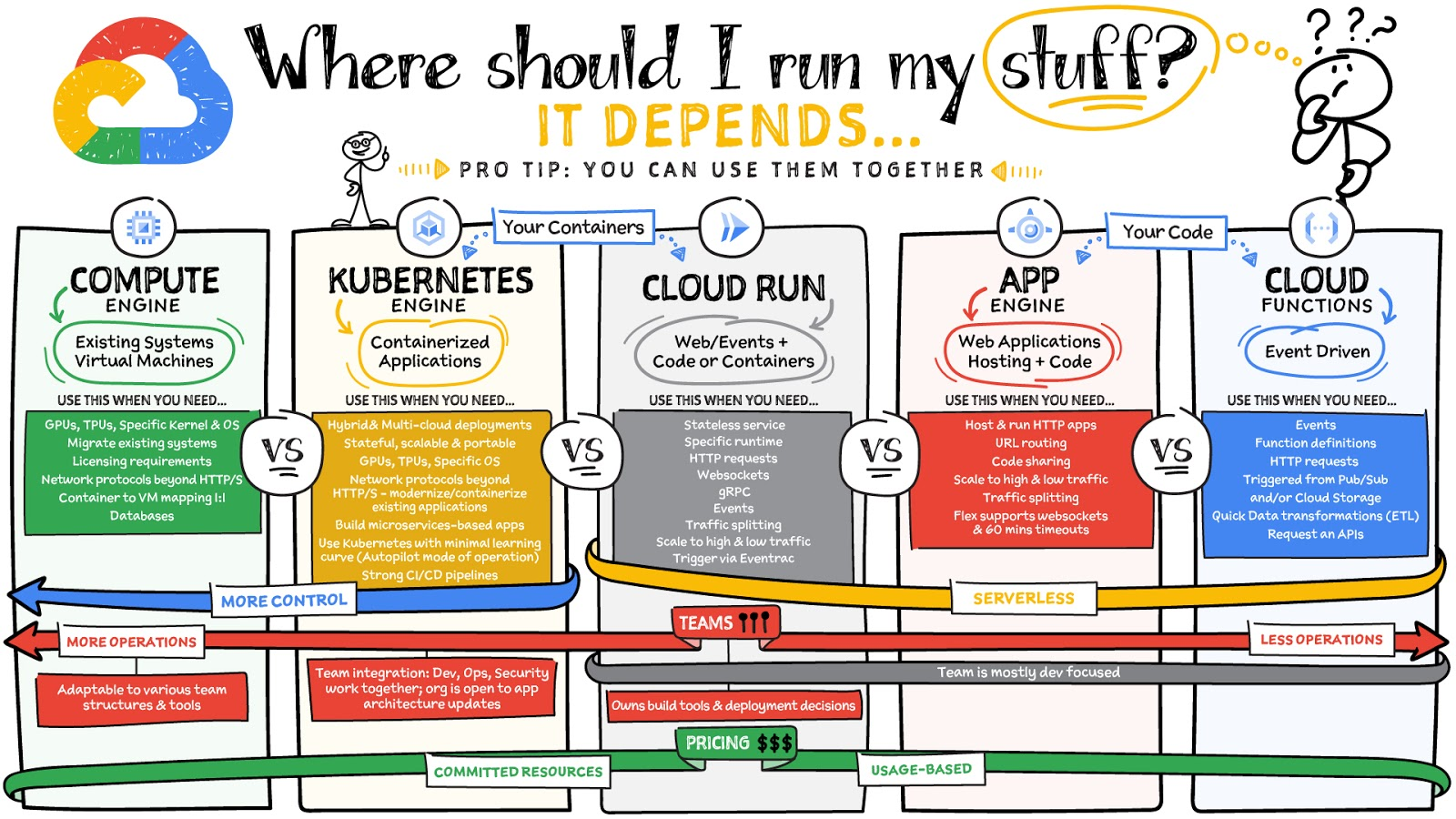
Where should you run your workload? It depends…Choosing the right infrastructure options to run your application is critical, both for the success of your application and for the team that is managing and developing it. This post breaks down some of the most important factors that you need to consider when deciding where you should run your stuff!
What are these services?
- Compute Engine – Virtual machines. You reserve a configuration of CPU, memory, disk, and GPUs, and decide what OS and additional software to run.
- Kubernetes Engine – Managed Kubernetes clusters. Kubernetes is an open-source system for automating deployment, scaling, and management of containerized applications. You create a cluster and configure which containers to run; Kubernetes keeps them running and manages scaling, updates and connectivity.
- Cloud Run – A fully managed serverless platform that runs individual containers. You give code or a container to Cloud Run, and it hosts and auto scales as needed to respond to web and other events.
- App Engine – A fully managed serverless platform for complete web applications. App Engine handles the networking, application scaling, and database scaling. You write a web application in one of the supported languages, deploy to App Engine, and it handles scaling, updating versions, and so on.
- Cloud Functions – Event-driven serverless functions. You write individual function code and Cloud Functions calls your function when events happen (for example, HTTP, Pub/Sub, and Cloud Storage changes, among others).
What level of abstraction do you need?
- If you need more control over the underlying infrastructure (for example, the operating system, disk images, CPU, RAM, and disk) then it makes sense to use Compute Engine. This is a typical path for legacy application migrations and existing systems that require a specific OS.
- Containers provide a way to virtualize an OS so that multiple workloads can run on a single OS instance. They are fast and lightweight, and they provide portability. If your applications are containerized then you have two main options.
- You can use Google Kubernetes Engine, or GKE, which gives you full control over the container down to the nodes with specific OS, CPU, GPU, disk, memory, and networking. GKE also offers Autopilot, when you need the flexibility and control but have limited ops and engineering support.
- If, on the other hand, you are just looking to run your application in containers without having to worry about scaling the infrastructure, then Cloud Run is the best option. You can just write your application code, package it into a container, and deploy it.
- If you just want to code up your HTTP-based application and leave the scalability and deployment of the app to Google Cloud then App Engine — a serverless, fully-managed option that is designed for hosting and running web applications — is a good option for you.
- If your code is a function and just performs an action based on an event/trigger, then deploying it with Cloud Functions makes sense.
What is your use case?
- Use Compute Engine if you are migrating a legacy application with specific licensing, OS, kernel, or networking requirements. Examples: Windows-based applications, genomics processing, SAP HANA.
- Use GKE if your application needs a specific OS or network protocols beyond HTTP/s. When you use GKE, you are using Kubernetes, which makes it easy to deploy and expand into hybrid and multi-cloud environments. Anthos is a platform specifically designed for hybrid and multi-cloud deployments. It provides single-pane-of-glass visibility across all clusters from infrastructure through to application performance and topology. Example: Microservices-based applications.
- Use Cloud Run if you just need to deploy a containerized application in a programming language of your choice with HTTP/s and websocket support. Examples: websites, APIs, data processing apps, webhooks.
- Use App Engine if you want to deploy and host a web based application (HTTP/s) in a serverless platform. Examples: web applications, mobile app backends
- Use Cloud Functions if your code is a function and just performs an action based on an event/trigger from Pub/Sub or Cloud Storage. Example: Kick off a video transcoding function as soon as a video is saved in your Cloud Storage bucket.
Need portability with open source?
If your requirement is based on portability and open-source support take a look at GKE, Cloud Run, and Cloud Functions. They are all based on open-source frameworks that help you avoid vendor lock-in and give you the freedom to expand your infrastructure into hybrid and multi-cloud environments. GKE clusters are powered by the Kubernetes open-source cluster management system, which provides the mechanisms through which you interact with your cluster. Cloud Run for Anthos is powered by Knative, an open-source project that supports serverless workloads on Kubernetes. Cloud Functions use an open-source FaaS (function as a service) framework to run functions across multiple environments.
What are your team dynamics like?
If you have a small team of developers and you want their attention focused on the code, then a serverless option such as Cloud Run or App Engine is a good choice because you won’t have to have a team managing the infrastructure, scale, and operations. If you have bigger teams, along with your own tools and processes, then Compute Engine or GKE makes more sense because it enables you to define your own process for CI/CD, security, scale, and operations.
What type of billing model do you prefer?
Compute Engine and GKE billing models are based on resources, which means you pay for the instances you have provisioned, independent of usage. You can also take advantage of sustained and committed use discounts.
Cloud Run, App Engine, and Cloud Functions are billed per request, which means you pay as you go.
Conclusion
It’s important to consider all the relevant factors that play a role in picking appropriate compute options for your application. Remember that no decision is necessarily final; you can always move from one option to another.
To explore these points in more detail, please take a look at the “Where Should I Run My Stuff?” video.
For more #GCPSketchnote, follow the GitHub repo & thecloudgirl.dev. For similar cloud content follow us on Twitter at @pvergadia and @briandorsey

3531
Of your peers have already downloaded this article
5:30 Minutes
The most insightful time you'll spend today!
When moving to the cloud, many organizations concentrate their focus on the change in technology and overlook an area just as complex and impactful: cultural change. Having your people ready to embrace the change — supporting them with the right processes, equipping them with the right skills — is as important as getting the technology right.
To realize the full value of cloud technologies, many organizations are rethinking their IT organizational structure. There are a variety of potential talent implications too — from adopting agile ways of working to hiring for more cloud-centric skills to looking at redeploying current IT skills and reskilling and upskilling current teams.
As one of the organizations that pioneered hyperscale infrastructure, which led to the creation of the cloud, Google has spent years nurturing its culture and workforce to best operate in the cloud. We leverage this experience every day to help organizations ready their workforce for the change, and in this whitepaper, we aim to pass that experience along to you.
More Relevant Stories for Your Company

Google Invests 1 Billion Euros on Germany to Support Growing Businesses
In September 2001, the first-ever German Google employee switched on their computer in Hamburg. Since then, we’ve grown to more than 2,500 employees in four offices across Germany. Berlin, Frankfurt, Hamburg and Munich have long been our home, and we continue to invest in the growth of the local economy.

Learn to Access Process Metrics for Full-visibility into Software and Infrastructure behind Your Apps
When you are experiencing an issue with your application or service, having deep visibility into both the infrastructure and the software powering your apps and services is critical. Most monitoring services provide insights at the Virtual Machine (VM) level, but few go further. To get a full picture of the

Vizrt’s Story of ‘Lift and Shift’ and Delivering Phenomenal Performance with Google Cloud
When moving software applications from on-premise hardware to the cloud, it often "just works," but it's never guaranteed. This is especially the case for applications that are hardware intensive. This blog post examines what happened when a media company took software for real-time video broadcasts into the cloud. We'll share

Vimeo Looks to Google Cloud for High-Quality Video Delivery Service
Vimeo is a video-sharing platform that’s home to imaginative video creators and hundreds of millions of viewers. Sixty million people create, host, and sell high-quality videos on Vimeo, including more than 800,000 who subscribe to the service’s premium tools. Over 240 million people in more than 150 countries watch videos
