





Google Invests 1 Billion Euros on Germany to Support Growing Businesses

3552
Of your peers have already read this article.
2:00 Minutes
The most insightful time you'll spend today!
In September 2001, the first-ever German Google employee switched on their computer in Hamburg. Since then, we’ve grown to more than 2,500 employees in four offices across Germany. Berlin, Frankfurt, Hamburg and Munich have long been our home, and we continue to invest in the growth of the local economy.
Today, 20 years after the start of “Google Germany”, we are pleased to present one of our most important investment programs to date in this country. With the expansion of our Cloud Region in Frankfurt in a new Google-owned Hanau facility, a new Google Cloud region in Berlin-Brandenburg, and a broad investment plan in renewable energy, our commitment is clear: Google is investing in Germany’s potential and supporting the transition to a digital and sustainable economy. Between now (2021) and 2030, this investment in digital infrastructure and clean energy will total approximately 1 billion euros.
Expanding our Frankfurt cloud region to support growing demand from German businesses and organizations
In Hanau, only 20 kilometers from the DE-CIX Internet hub in Frankfurt, Google is proud to be nearing completion of an additional cloud facility that will be fully operational in 2022. This expansion of our existing Frankfurt Google Cloud region will serve the growing demand for Google Cloud services in Germany.
The 4-story building is 10,000 square meters and was sustainably constructed with energy efficient infrastructure and adherence to our circular economy model for waste. The symbolic handover of the keys from developer NDC-Garbe, together with local government officials, took place on site yesterday.
A new cloud region in Berlin-Brandenburg
In addition to the Hanau expansion of our Google Cloud region in Frankfurt, we are pleased to announce that a new Google Cloud region will be located in Berlin-Brandenburg, further extending our ability to meet growing demand for cloud services in the country. When open, this will be our second Google Cloud region in Germany, providing enterprise customers with faster access to secure infrastructure, smart analytics tools and an open platform. Designed and dedicated to providing enterprise services and products for Google Cloud customers of all sizes and industries in Germany, the Berlin-Brandenburg region will have three zones to protect against service disruptions and join the existing network of 27 Google Cloud regions connected via our high-performance network.
One of the cleanest clouds in the industry becomes even cleaner
Since 2017, Google has matched 100% of our global, annual electricity use with renewable energy. Last year, we set out to run our business on carbon-free energy everywhere and at all times by 2030, enabling us to offer cloud customers one of the cleanest clouds in the industry, while helping Europe achieve its ambitious climate goals.
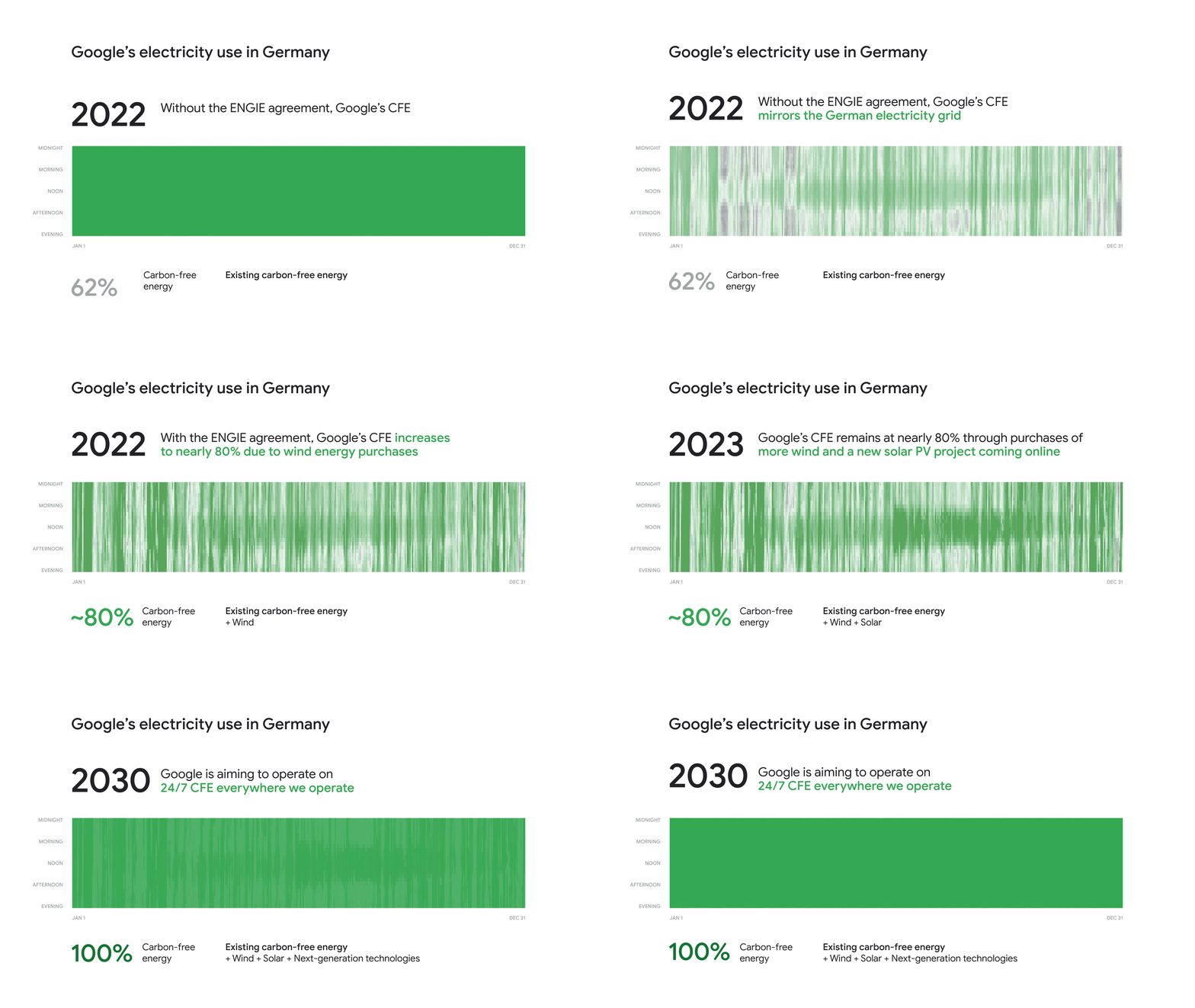
Today, we’re excited to announce that ENGIE Deutschland has been selected as Google’s carbon-free energy supplier in Germany. Under the terms of the agreement, ENGIE will assemble and develop, on Google’s behalf, a 140 megawatt (MW) carbon-free energy portfolio in Germany that has the ability to flex and grow with us as our needs change. This includes a new 39MW solar Photovoltaic system, and 22 wind parks in five federal states that will see their lives extended so they continue to produce electricity instead of being dismantled. This portfolio will ensure that the energy delivered to Google’s German facilities will be nearly 80% carbon-free by 2022 when measured on an hourly basis. This is a first but important step on Google’s journey to reach our goal of full electricity decarbonization by 2030.
This is the first energy supply of its kind in Europe, with a focus on sourcing carbon-free energy for every hour of Google’s operations. Not only will this new agreement draw the roadmap for the industry and more 24/7 carbon-free energy contracts in Europe, but it provides our cloud customers with two more regions where they can lower their carbon footprint. And importantly, by working with our energy suppliers to transform how clean energy is delivered to customers, Google is supporting the broader decarbonization of the German electricity grid.
What customers and partners are saying
As companies continue to grapple with changing customer demands, technology has played a critical role, and we’ve been fortunate to partner with and serve people, companies, and government institutions in Germany and around the world to help them adapt. The Google Cloud region in Berlin-Brandenburg and the expansion of our Google Cloud region in Hanau will help our customers — such as BMG, Delivery Hero, and Deutsche Bank — adapt to new requirements, new opportunities and new ways of working.
“We are very pleased about the symbolic handover of the keys to the building here in Hanau to Google Cloud,” said Hanau Mayor Claus Kaminsky. “With Google, we have a strong partner at our side who is supporting us in setting up Hanau’s economic future, both digitally and sustainably. The data center facility of Google Cloud embodies this transformation: We bring the cloud to us in Hanau and thus support the digital transformation of companies and public authorities. Not only in our city and Hesse, but throughout Germany and Europe. The new building meets high sustainability standards and the clean energy initiative presented today by Google is in line with our aspirations for sustainable digitalization.”
“Sustainability is a central pillar of Deutsche Bank’s strategy and we have made strong public commitments to be part of the solution,” said Bernd Leukert, Chief Technology, Data and Innovation Officer and Member of the Management Board at Deutsche Bank. “We welcome the new Google Cloud region in Germany, which will enable us to deliver additional resilience and performance for our German client base.”
Ralf Bernhard, Senior Originator Renewables, ENGIE, said: “ENGIE is excited to collaborate with Google based on a first-of-a-kind agreement which will support the company with its sustainability goals and ambitious carbon-free energy target. Thanks to our expertise in energy and risk management, we can seamlessly integrate renewable energy from existing plants and develop new assets to design a tailor made product that meets Google’s needs and plans to go even greener.”
20 years since Google first touched down in Germany, our commitment to helping Germany continue to lead in technical innovation is stronger than ever. We are excited to continue working with our partners in Hesse, Berlin and Brandenburg and across Germany to advance infrastructure and clean energy projects, help accelerate digital transformation, and secure a sustainable future for German and European companies and organizations.
This Chart, from Home Depot, Dramatically Demonstrates the Power of a Cloud Data Warehouse

7622
Of your peers have already read this article.
2:30 Minutes
The most insightful time you'll spend today!
The Home Depot (THD) is the world’s largest home-improvement chain, growing to more than 2,200 stores and 700,000 products in four decades. Much of that success was driven through the analysis of data. This included developing sales forecasts, replenishing inventory through the supply chain network, and providing timely performance scorecards.
However, to compete in today’s business world, THD has taken this data-driven approach to an entirely new level of success on Google Cloud, providing capabilities not practical on legacy technologies.
The pressures of contemporary growth that drove much of the work are familiar to many businesses. In addition to everything it was doing, THD needed to better integrate the complexities in its related businesses, like tool rental and home services. It needed to better empower teams, including a fast-growing data analysis staff and store associates with mobile computing devices. It wanted to better use online commerce and artificial intelligence to meet customer needs, while maintaining better security.
Even before addressing these new challenges, THD’s existing on-premises data warehouse was under stress as more data was required for analytics and data analysts were utilizing the data with increasingly complex use cases. This drove rapid growth of the data warehouse, but also created constant challenges for the team in managing priorities, performance, and cost.
In order to add capacity to the environment, it was a major planning, architecture, and testing effort. In one case, adding on-premises capacity took six months of planning and a three-day service outage. Within a year, capacity was again scarce, impacting performance and ability to execute all the reporting and analytics workloads required. The capacity refresh cycles were shrinking, and the expecations for data were growing. There had to be a better way.
Still, THD did not take its move to the cloud lightly. A large-scale enterprise data warehouse migration involves tremendous effort among people, process, and technology. After careful consideration, THD chose Google Cloud’s BigQuery for its cloud enterprise data warehouse.
BigQuery, a scalable serverless data warehouse, was better on cost, infrastructure agility, and analytics capability, driving better insights with improved performance. There are no service interruptions when capacity is added, and that capacity can be added within a week (and soon same day). It doesn’t require complex system administration, and its standard SQL support means people can easily ramp up quickly. Valuable BigQuery products like Identity and Access Management meant THD could create many separate Google Cloud projects, while ensuring that different teams weren’t interfering with each other or accessing protected data.
THD also utilizes BigQuery’s flat-rate monthly pricing model that allows teams to budget their capacity based on need and provides billing predictability. The capacity not being used by a given project is available for enterprise use. This ensures no surprises when the monthly bill arrives and provides all analytical users access to significant computing power.
While THD’s legacy data warehouse contained 450 terabytes of data, the BigQuery enterprise data warehouse has over 15 petabytes. That means better decision-making by utilizing new datasets like website clickstream data and by analyzing additional years of data.
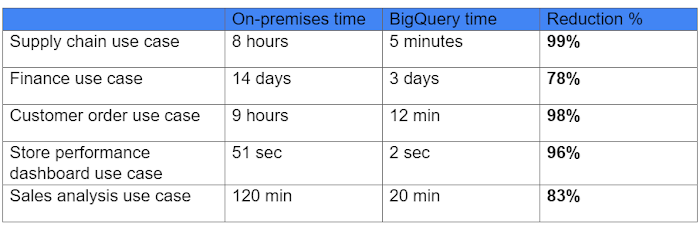
As for performance, look at this chart:
With the cloud EDW migration complete, and the legacy on-premises data warehouse retired, analysts now execute more complex and demanding workloads that they would not have been able to complete before, such as utilizing Datalab for orchestrating analytics through Python Notebooks, utilizing BigQuery ML for machine learning directly against the BigQuery data (no movement of large datasets), and AutoML to help determine the best model for predictions.
Additionally, engineers at THD have adapted BigQuery to monitor, analyze, and act on application performance data across all its stores and warehouses in real time, something that was not practical in the on-premises system.
With over 600 projects that THD now has on Google Cloud, the BigQuery story is just one of the many ways that Google Cloud is working with THD to deliver meaningful business results, every day.
End Security Risks with the Unattended Projects Recommender Feature

6140
Of your peers have already read this article.
3:00 Minutes
The most insightful time you'll spend today!
In fast-moving organizations, it’s not uncommon for cloud resources, including entire projects, to occasionally be forgotten about. Not only such unattended resources can be difficult to identify, but they also tend to create a lot of headaches for product teams down the road, including unnecessary waste and security risks.
To help you prune your idle cloud resources, we’re excited to introduce Unattended Project Recommender. It’s a new feature of Active Assist that provides you with a one-stop shop for discovering, reclaiming, and shutting down unattended projects. With actionable and automatic recommendations, you no longer have to worry about wasting money or mitigating security risks presented by your idle resources. Unattended Project Recommender uses machine learning to identify, with a high degree of confidence, projects that are likely abandoned based on API and networking activity, billing, usage of cloud services, and other signals. This feature is available via the Recommender API today, making it easy for you to integrate with your company’s existing workflow management and communication tools, or export results to a BigQuery table for custom analysis.
Thousands of projects can be unattended in large organizations, presenting major security risks
Your cloud projects can go abandoned or unattended for a number of reasons — ranging from a test environment that’s no longer needed, to project cancellation, to project owner switching jobs, and more. Not only can such projects contribute to your cloud bill (waste) but they may contain security issues such as open firewalls or privileged service account keys that attackers can exploit to get a hold of your cloud resources for cryptocurrency mining or, worse, compromise your company’s sensitive data. These security risks tend to grow over time because the latest best practices and patches are usually not applied to unattended projects.
We experience this issue here at Google, too… In fact, it has been on Google’s internal security team’s radar for some time now, so we joined forces and looked into this problem together, starting with our very own “google.com” organization cloud projects. We quickly found some projects that were unattended, but remediating this issue was easier said than done due to challenges in several areas:
- Detection: With lots of signals available to you via sources like Cloud Monitoring, what are the right ones you should look at (e.g. API, networking, user activity)? How can you tell the difference between an unattended project and a project that has a low level of activity by design (e.g. a “shell” project that holds an auth token)?
- Remediation: Once you have identified a project that seems abandoned, how do you go about ensuring that it’s indeed an unattended project? How do you reduce the risk of deleting something that might be essential to a production workload, causing irreversible data loss? How do you solve this at the scale of your entire organization, beyond a one-time cleanup?
Over the course of 2021 we built and tested a Google-internal prototype first, cleaning up many of our internal unattended projects, and then worked with a number of Google Cloud customers to build and tune this feature based on real-life data (thank you to all of our early adopters for working with us and your generous feedback that helped us shape this feature!) It was not uncommon for us to come across organizations with thousands of unattended projects, and we’re very excited to bring Unattended Project Recommender to all customers, in public preview.
Discovering and acting on unattended project recommendations
Unattended Project Recommender analyzes usage activity across all projects under your organization, including the following data:
- API activity (e.g. service accounts with authentication activity, API calls consumed)
- Networking activity (ingress and egress)
- Billing activity (e.g. services with billable usage)
- User activity (e.g. active project owners)
- Cloud services usage (e.g. number of active VMs, BigQuery jobs, storage requests)
Based on these signals, it can generate recommendations to clean up projects that have low usage activity (where “low usage” is defined using a machine learning model that ranks projects in your organization by level of usage), or recommendations to reclaim projects that have high usage activity but no active project owners. Here’s what an example post-processed summary list of recommendations can look like for the “foobar” organization that has 3 projects:
Project ID: demo-project-307815Recommendation: CLEANUP_PROJECTProject ID: new-projectRecommendation: N/AProject ID: bobs-playground-projectRecommendation: RECLAIM_PROJECT
In addition to the recommendations, you can also examine the underlying project activity insights that the recommendations are based upon. The insights provide additional information that can be useful for integration with your organization’s existing workflows and automation (e.g. send an auto-generated email or chat message to project owners based on the list provided by the owners field). Here’s an example insight payload:
content:activeAppengineInstanceDailyCount: 0activeCloudsqlInstanceDailyCount: 0activeGceInstanceDailyCount: 3activeServiceAccountDailyCount: 1apiClientDailyCount: 18922 // Daily average API calls producedbigqueryInflightJobDailyCount: 0bigqueryInflightQueryDailyCount: 0bigqueryStorageDailyBytes: 0bigqueryTableDailyCount: 0consumedApiDailyCount: 0 // Daily average API calls consumeddatastoreApiDailyCount: 0gcsObjectDailyCount: 11gcsRequestDailyCount: 0gcsStorageDailyBytes: 2663548hasActiveOauthTokens: false // OAuth tokens used in the last 180 dayshasBillingAccount: truenumActiveUserOwners: 1owners: // List of project owners- activeOnProject: falsemember: user:user1@example.com- activeOnProject: truemember: user:user2@example.comserviceWithBillableUsage:– Cloud Storage- Compute EnginevpcEgressDailyBytes: 264456938 // Daily average VPC egress bytesvpcIngressDailyBytes: 392435047 // Daily average VPC ingress bytesusagePercentile: 20 // Level of usage relative to other projects
GCP projects are used in many different ways and for many different purposes. In case you get a recommendation to delete a project that’s being used in a way that’s out of the scope for this feature, you can dismiss the recommendation and it will stop showing up for the given project.
Restoring deleted projects
When you choose to shut down a project using the projects.delete() method, it gets marked for deletion. After a project is marked for deletion, it becomes unusable, all resources within that project are shut down, and a 30-day wait period for the project and all of its data to get fully deleted begins.
In case a useful project is accidentally shut down, you have the option to restore the project within that 30-day wait period. Since restoring allows you to recover most but not necessarily all of your project data and resources, we recommend carefully examining the utilization insights associated with a project and considering any additional utilization signals that may not be captured by the Unattended Project Recommender before taking the cleanup action.
Early customer success stories
A number of enterprise customers are already using Unattended Project Recommender to keep their organizations clean of unattended projects and resources.
Decathlon, a French sporting goods retailer, is excited for the insight Unattended Project Recommender will bring to their environment, and are already deploying it as a part of their latest cloud security initiatives.
“After a thorough test of this feature and the validation of our CISO, we ended up deleting our first 775 projects, and no one complained! A great help to improve our security. The next step for us will be to operationalize it at scale, and implement a company wide policy for unattended resource management.” —Adeline Villette, Cloud Security Officer
For Veolia, one of the world’s largest water, waste and energy management companies, not only does this feature reduce security risks and waste, but also helps drive cultural shift and alignment with its ecological transformation strategy.
“This feature allows us to reduce our costs and security debt on assets that are no longer in use, and is also fully in line with Veolia’s philosophy of limiting its carbon footprint. After having tested Unattended Project Recommender on more than 3,000 projects throughout our organization, we are looking to bring it as proactive alerts to our project owners at scale.”—Thomas Meriadec, Product Manager
Box, a secure cloud content management provider, views it as a foundation for building a repeatable process to remediate unused resources.
“Unattended Project Recommender is a great fit for us. It gives us a unified view of project usage across our entire organization and enables us to address security risks of legacy projects in a systematic and organized manner, ensuring an even safer environment.” —Matt Bowes, Staff Security Engineer
Getting started with the Unattended Project Recommender
To help you get started, we’ve prepared a Cloud Shell tutorial (source code) that you can use to find unattended project recommendations within your own Projects/Folders/Organization. Click this button to clone the tutorial from GitHub and run in your Cloud Shell environment:

As you can see, listing recommendations for your projects only takes a few clicks with the tutorial (special thanks to Lanre Ogunmola, Security & Compliance Specialist, for making this look so easy)! For additional detail on using the gcloud CLI or API to discover unattended project recommendations, please refer to the documentation page.
You can also automatically export all recommendations from your Organization to BigQuery and then investigate the recommendations with DataStudio or Looker, or use Connected Sheets that let you use Google Workspace Sheets to interact with the data stored in BigQuery without having to write SQL queries.
As with any other Recommender, you can choose to opt out of data processing at any time by disabling the appropriate data groups in the Transparency & control tab under Privacy & Security settings.
We hope that you can leverage Unattended Project Recommender to improve your cloud security posture and reduce cost, and can’t wait to hear your feedback and thoughts about this feature! Please feel free to reach us at active-assist-feedback@google.com and we also invite you to sign up for our Active Assist Trusted Tester Group if you would like to get early access to the newest features as they are developed.
Two Ways to Deploy SAP HANA System on Google Cloud

7904
Of your peers have already read this article.
4:00 Minutes
The most insightful time you'll spend today!
Many of the world’s leading companies run on SAP—and deploying it on Google Cloud extends the benefits of SAP even further. Migrating your current SAP S/4HANA deployment to Google Cloud—whether it resides on your company’s on-premises servers or another cloud service—provides your organization with a flexible virtualized architecture that lets you scale your environment to match your workloads, so you pay only for the compute and storage capacity you need at any given moment. Google Cloud includes built-in features, such as Compute Engine live migration and automatic restart, that minimize downtime for infrastructure maintenance. And it allows you to integrate your SAP data with multiple data sources and process it using Google Cloud technology such as BigQuery to drive data analytics.
SAP server-side architecture consists of two layers: the SAP HANA database, and the Netweaver application layer. In this blog post, we’ll look at the options and steps for moving the database layer to Google Cloud as a lift and shift or rehost, a straightforward approach that entails moving your current SAP environment unchanged onto Google Cloud.
Deploying an SAP HANA system on Google Cloud
Google Cloud offers SAP-certified virtual machines (VMs) optimized for SAP products, including SAP HANA and SAP HANA Enterprise Cloud, as well as dedicated servers for SAP HANA for environments greater than 12TB. (For a complete list of VM and hardware options, visit the Certified and Supported SAP HANA Hardware Directory.)
Before proceeding with a rehost migration to Google Cloud, your current (source) environment and Google Cloud (target) environments should meet these specifications:
Prerequisites:
- The configuration of the Google Cloud environment (i.e., VM resources, SSD storage capacity) should be identical to that of the source environment. If the underlying hardware is different, however, you must use Option 2 for your migration, detailed below.
- Both environments should be running the same operating system (SUSE or RHEL Linux).
- The HANA version, instance number, and system ID (SID) should be identical.
- Schema names must remain the same.
- Establishing the network connection between the on-premises environment and Google Cloud will be required in this phase to support rehost of the SAP application.you can use Cloud VPN or Dedicated Interconnect. Learn more about Dedicated Interconnect and Cloud VPN.
Note: Depending on your internet connection and bandwidth requirements, we recommend using a Dedicated Interconnect over Cloud VPN for production environments.
We offer a number of automated processes to accelerate your cloud journey. To deploy the SAP HANA system on Google Cloud, you can use the Google Cloud Deployment manager or Terraform and Ansible scripts available on GitHub with configuration file templates to define your installation. For more details, see the Google Cloud SAP HANA Planning Guide.
Note: To deploy SAP HANA on Google Cloud machine types that are certified by SAP for production, please review the Certification for SAP HANA on Google Cloud page.
Moving an SAP HANA Database to Google Cloud
There are two different options you can use to rehost your SAP HANA database to Google Cloud, and each has pros and cons that you should consider when deciding on your approach.
Option 1: Asynchronous replication uses SAP’s built-in replication tool to provide continuous data replication from the source system (also known as the primary system) to the destination or secondary system—in this case residing on Google Cloud. It’s best for mission-critical applications for which minimum downtime is a high priority, and for large databases. In addition, the high level of automation means that the process requires less manual intervention. Here’s where you can learn more on HANA Asynchronous Replication.
Option 2: Backup and restore relies on SAP’s backup utility to create an image of the database that is then transferred to Google Cloud, where it is restored in the new environment. Downtime for this method varies by database size, so large databases may require more downtime via this method vs. asynchronous replication. It also involves more manual tasks. However, it requires fewer resources to perform, making it an attractive option for less urgent use cases. Here’s where you can learn more on SAP HANA database Backup and restore.

How to migrate the SAP HANA database to Google Cloud using Asynchronous Replication

- Create and configure Dedicated Interconnect or Cloud VPN between the current environment and Google Cloud.
- Set up SAP HANA asynchronous replication. You can configure system replication using SAP HANA Cockpit, SAP HANA Studio, or hdbnsutil. See Setting Up SAP HANA System Replication in the SAP HANA Administration Guide.
- Be sure to use the same instance number and HANA SID in the template as the primary instance.
- Configure the Google Cloud instance as the secondary node for using HANA Asynchronous replication.
- Perform data validation once full data replication is completed to the SAP HANA database in Google Cloud. To learn more: HANA System Replication overview.
- Perform an SAP HANA takeover on your standby database. This switches your active system from the current primary system onto the secondary system on Google Cloud. Once the takeover command runs, the system on Google Cloud becomes the new primary system.To learn more: HANA Takeover.
How to migrate the SAP HANA database to Google Cloud using Backup and Restore

- Create a full backup of your SAP HANA database in your current environment.
- Create a new storage bucket in your Google Cloud environment. Visit Creating Storage Buckets in the Google Cloud Storage documentation.
- Download and install gsutil onto the source environment and run it to upload the HANA backup to the Google Cloud storage bucket. To install gsutil utility on any computer or server, visit Install gsutil in the Google Cloud Storage documentation.
Note: You can run parallel multi thread/multi processing in gsutil to copy large files more quickly. - Recover the HANA database on Google Cloud using SAP’s RECOVER DATABASE statement. See RECOVER DATABASE Statement (Backup and Recovery) in the SAP HANA SQL Reference Guide for SAP HANA Platform.
Note: BackInt agent is an integrated SAP interface tool used for HANA database on Google Cloud.Backint agent for SAP HANA can be used to store and retrieve backups directly from Google Cloud Storage. It is supported and certified by SAP on Google Cloud. To learn more: SAP HANA Backint Agent on Google Cloud.
In summary, we recommend using Asynchronous Replication (Option 1) for mission-critical applications that require the lowest downtime window. For all other applications, we recommend Backup and Restore (Option 2), as this approach requires fewer resources. It’s also a great way to implement the backup and restore functionality on Google Cloud.
A rehost migration is the most straightforward path to getting your SAP on HANA system up and running on Google Cloud. And the sooner you migrate, the sooner you can take advantage of the many benefits Google Cloud brings to your SAP solution. For more information on the different migration options please review: SAP on Google Cloud: Migration strategies.
Learn more about deploying SAP on Google Cloud. Technical resources can be found here.
Google Cloud Next ’22 to Commence in October: Block Your Calendar!

7935
Of your peers have already read this article.
1:30 Minutes
The most insightful time you'll spend today!
We’re excited to announce that Google Cloud Next returns on October 11–13, 2022.
Join us for keynotes from industry luminaries and engage live with Google developers. Explore dynamic content across various learning levels, and dive deep into technologies and solutions spanning the Google Cloud and Google Workspace portfolios. Participate in breakout sessions, demos, and hands-on training. Hear from the world’s leading companies about their digital transformation journeys. You’ll have opportunities to connect with experts, get inspired, and boost your skills. We can’t wait to see you at Next ’22!
It’s too early to determine how the event experience will span the digital and physical worlds, so please stay tuned for updates as we plan with the health and safety of the attendees in mind. In the meantime, mark October 11–13 in your calendar, and visit our event site for updates. For more inspiration, rediscover Next ’21, now available on demand.
Ulta Beauty: Managing Holiday Surges and Architecting Innovation

2742
Of your peers have already read this article.
3:30 Minutes
The most insightful time you'll spend today!
As we enter the holiday season, retailers are working behind the scenes to ensure they can provide the best experiences for customers, in store and online. Challenges in retail do not begin or end during the holiday season as sudden shifts in customer preferences, supply chain nuances, and overall demand ebbs and flows take place year round and retailers must be prepared to adapt swiftly.
Google Cloud’s retail customers globally, in total, saw more online traffic in the first six months of 2022 than all of 2019. This year, retailers can expect an early launch to holiday shopping activities, as 50% of consumers plan to start purchasing goods before the traditional Black Friday kick-off.
The very same improvements made to automate and improve retail infrastructure can prepare it for holiday surges and support year-round innovation. Let’s take a look at how Ulta Beauty, the largest beauty retailer in the U.S., is partnering with Google Cloud, MongoDB Atlas, commercetools, and HCLTech to cover these two areas and more.
Architecting for innovation
Creating personalized shopping experiences in stores and online is key to Ulta Beauty’s success. This commitment is best demonstrated through Ulta Beauty’s Virtual Beauty Advisor. Built on Google Cloud, this tool enhances shoppers’ experiences with personalized recommendations in addition to the ability to try on makeup virtually with GLAMLab.
As innovators in support of the best possible guest experience, Ulta Beauty needed to re-architect its infrastructure for greater agility and stability.
To start, Ulta Beauty chose to use Google Kubernetes Engine (GKE) as the backbone and orchestrator to build and deploy cloud-native applications. The Google Cloud deployments coincided with an organizational move from end-to-end application development to one that focuses on individual features, specific modules, and micro-applications.
This strategic change allowed Ulta Beauty to fix bugs, experiment with new offerings, and drive customer experiences faster and more efficiently. Thanks to the transformation and GKE, Ulta Beauty’s developer team now accelerates time to market for new products and services, and delivers new ways to engage with customers more quickly. These efforts all ladder to create ‘WOW’ experiences for the retailers’ guests who have emotional and personal connections to beauty and wellness. They can now discover and experience products that are served to them based on individual preferences.
Adapting to the new environment comes with its own set of challenges. “Microservices are not a silver bullet,” says Sethu Madhav Vure, IT Architect, Ulta Beauty. “For Ulta Beauty, the biggest challenge was how to break up a monolithic environment into multiple applications. We had to evolve our core systems—without impacting today’s services—and address what was needed for the future.”
Google Cloud partner HCLTech provided expert guidance throughout the re-architecting process, defining the solution blueprint and cloud-native deployment architecture through cross-functional workshops. HCLTech then assisted with the actual migration and platform setup, paving the way for fully automated, continuous integration and continuous delivery (CI/CD) pipelines to support faster rollouts and deployment architecture to drive higher availability and scalability.
Ulta Beauty took a domain-driven design approach to identify operations that could be grouped together to reduce complexity and improve scalability. Now, the applications are based on multiple domains, such as Commerce, Promotions, Catalog, Order, Customer, and Inventory. The new architecture prompted a fresh look at storage requirements to scale dynamically alongside its modernized applications.
For Ulta Beauty, MongoDB Atlas proved to be the best database solution for dynamic scaling, ease-of-use, and integrations with Google Cloud. The company also leveraged an entry-level plan to prove the value of MongoDB Atlas before investing in the technology.
“MongoDB Atlas offers a free tier that gave us an opportunity to quickly demonstrate tangible benefits of a proof of concept,” says Vure. “Once we proved the value of MongoDB Atlas, we benefited from the straightforward resource allocation supported by Google Cloud and MongoDB.”
Integrations between MongoDB Atlas and Google Cloud allow Ulta Beauty to take an iterative approach to new projects. The company creates new clusters in an existing project, then piggybacks them onto an existing Private Service Connect setup between a MongoDB project and Google Cloud project.
By removing complexities within infrastructure management, Ulta Beauty can manage its incredible amount of data, such as member preferences and purchases, that fuels its event-driven architecture. The much more agile infrastructure enables Ulta Beauty to deploy and scale offerings faster than ever.
“We recently had an unplanned traffic surge that impacted our domain services. It took less than an hour for MongoDB Atlas to scale up to the next level of the cluster and manage that traffic,” says Vure. “The on-demand, dynamic scaling, plus GKE, has saved the day more than once.”
Preparing for a happy holiday season
This holiday season, Ulta Beauty has a stronger technical foundation to manage demand surges and provide customers seamless shopping experiences. Previously, the company used 50 pods in a cluster, each with 6 GB of RAM without domain stores, to handle about 100 transactions each second. With domain stores, the same 6 GB of RAM with just 20 GKE pods was able to scale up to 2,400 transactions per second.
With Google Cloud as its technology foundation, Ulta Beauty partnered with Google Cloud partner commercetools to evolve its application APIs as products and properly separate interfaces and capabilities.
Ulta Beauty uses event-based integrations within commercetools to identify how best to leverage Cloud Pub/Sub middleware on top of MongoDB Atlas integrations. Patterns established here were extended into MongoDB change streams and in turn improved business processes.
“Working with the right technology partners has helped us to avoid analysis paralysis that can happen when developer teams spend a lot of time trying to understand and manage every detail,” says Vure. “Instead, we convert a proof of concept into a working solution, and quickly bring it to market. It’s been a major shift in our IT culture as we try out new things weekly and see incredible support from leadership.”
The improvements enable Ulta Beauty to maintain a high level of innovation, performance, and customer service year-round. Now, when the holiday shopping season begins, Ulta Beauty is prepared to handle surges in traffic through auto-scaling with Google Cloud and MongoDB Atlas. Customers get what they want, when they want, free from the frustrations of outages.
“With these changes, we are ready for a holiday season that everyone–even those of us in IT—gets to enjoy. We’re positioned to continuously focus on new, better ways to serve our guests,” says Vure.
Check out MongoDB and commercetools on Google Cloud Marketplace to learn more about what these partners can do for your business.
More Relevant Stories for Your Company

IBM Spectrum LSF and Google Collab: Leverage Google Cloud’s Scalability and Compute Engine Infrastructure
High Performance Computing (HPC) is prevalent today across many industries, including financial services, life sciences, higher education research, manufacturing, and energy. More and more businesses are deploying HPC workloads in the cloud to take advantage of its elasticity, scalability, and availability. Job schedulers are critical for HPC applications given the nature of

You Can Now ‘Listen’ to Over 50 Tech Blogs on Google Cloud Reader
🎧 Prefer to listen? Check out this episode on the Google Cloud Reader podcast If you’re anything like me, you love reading, but also appreciate that sometimes your eyes need to be doing other things; whether it’s finding your exit off the highway, or keeping your puppy from destroying the couch. And

How The New York Times Increased Speed of Delivery by Using Kubernetes
When New York Times decided a few years ago to move out of its data centers, its first deployments on the public cloud were smaller and less critical applications that were being managed on virtual machines. "We started building more and more tools, and at some point, we realized that

FAQs: Everything Your Need to Know About Cloud Computing
There are a number of terms and concepts in cloud computing, and not everyone is familiar with all of them. To help, we’ve put together a list of common questions, and the meanings of a few of those acronyms. You can find all these, and many more, in our learning resources.
