





Minimum Instances for Cloud Functions to Keep Performances Going for Serverless Apps

3370
Of your peers have already read this article.
2:00 Minutes
The most insightful time you'll spend today!
Cloud Functions, Google Cloud’s Function as a Service (FaaS) offering, is a lightweight compute platform for creating single-purpose, standalone functions that respond to events, without needing an administrator to manage a server or runtime environment.
Over the past year we have shipped many new important capabilities on Cloud Functions: new runtimes (Java, .NET, Ruby, PHP), new regions (now up to 22), an enhanced user and developer experience, fine-grained security, and cost and scaling controls. But as we continue to expand the capabilities of Cloud Functions, the number-one friction point of FaaS is the “startup tax,” a.k.a. cold starts: if your function has been scaled down to zero, it can take a few seconds for it to initialize and start serving requests.
Today, we’re excited to announce minimum (“min”) instances for Cloud Functions. By specifying a minimum number of instances of your application to keep online during periods of low demand, this new feature can dramatically improve performance for your serverless applications and workflows, minimizing your cold starts.
Min instances in action
Let’s take a deeper look at min instances with a popular, real-world use case: recording, transforming and serving a podcast. When you record a podcast, you need to get the audio in the right format (mp3, wav), and then make the podcast accessible so that users can easily access, download and listen to it. It’s also important to make your podcast accessible to the widest audience possible including those with trouble hearing and those who would prefer to read the transcript of the podcast.
In this post, we show a demo application that takes a recorded podcast, transcribes the audio, stores the text in Cloud Storage, and then emails an end user with a link to the transcribed file, both with and without min instances.
Approach 1: Building the application with Cloud Functions and Cloud Workflows
In this approach, we use Cloud Functions and Google Cloud Workflows to chain together three individual cloud functions. The first function (transcribe) transcribes the podcast, the second function (store-transcription) consumes the result of the first function in the workflow and stores it in Cloud Storage, and the third function (send-email) is triggered by Cloud Storage when the transcribed result is stored and sends an email to the user to inform them that the workflow is complete.

Cloud Workflows executes the functions in the right order and can be extended to add additional steps in the workflow in the future. While the architecture in this approach is simple, extensible and easy to understand, the cold start problem remains, impacting end-to-end latency.
Approach 2: Building the application with Cloud Functions, Cloud Workflows and min instances
In this approach, we follow all the same steps as in Approach 1, with a slightly modified configuration that enables a set of min instances for each of the functions in the given workflow.

This approach presents the best of both worlds. It has the simplicity and elegance of wiring up the application architecture using Cloud Workflows and Cloud Functions. Further, each of the functions in this architecture leverages a set of min instances to mitigate the cold-start problem and time to transcribe the podcast.
Comparison of cold start performance
Now consider executing the Podcast transcription workflow using Approach 1, where no min instances are set on the functions that make up the app. Here is an instance of this run with a snapshot of the log entries. The start and end timestamps are highlighted to show the execution of the run. You can see here that the total runtime in Approach 1 took 17 s.
Approach 1: Execution Time (without Min Instances)

Now consider executing the podcast transformation workflow using Approach 2, where min instances are set on the functions. Here is an instance of this run with a snapshot of the log entries. The start and end timestamps are highlighted to show the execution of the run, for a total of 6 s.
Approach 2: Execution Time (with Min Instances)
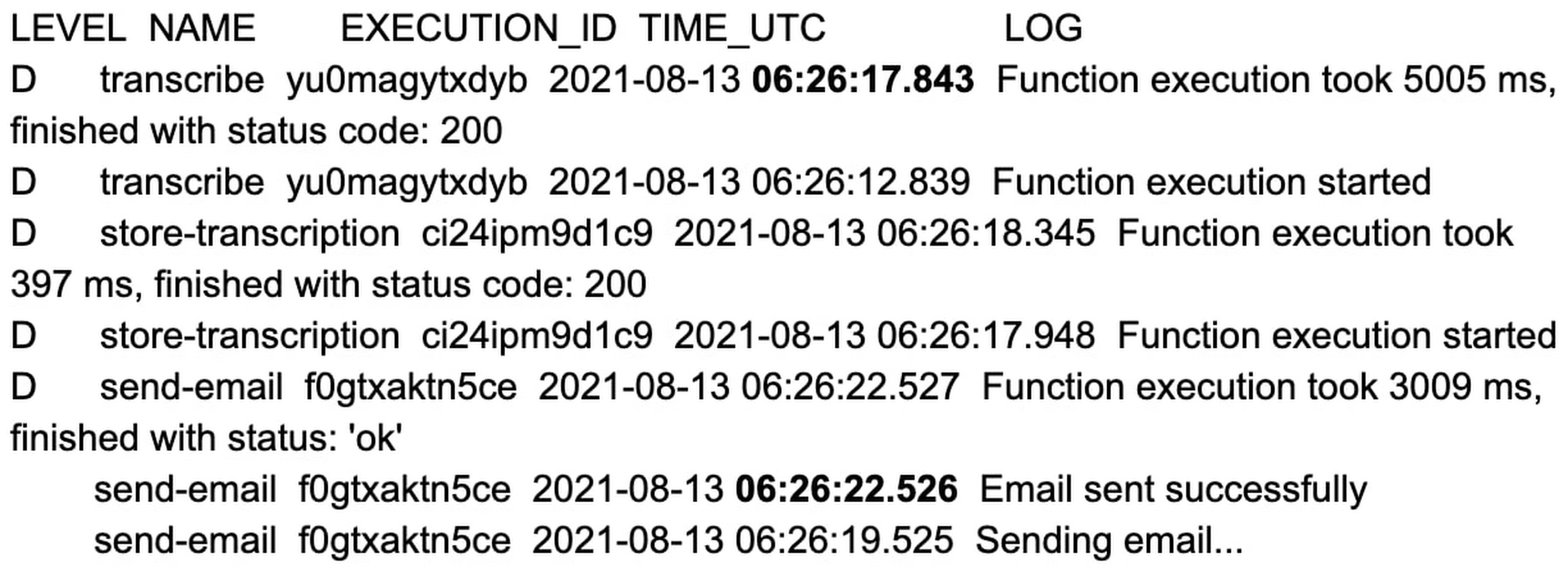
That’s an 11 second difference between the two approaches. The example set of functions are hardcoded with a 2 to 3 second sleep during function initialization, and when combined with average platform cold-start times, you can clearly see the cost of not using min instances.
You can reproduce the above experiment in your own environment using the tutorial here.
Check out min instances on Cloud Functions
We are super excited to ship min instances on Cloud Functions, which will allow you to run more latency-sensitive applications such as podcast transcription workflows in the serverless model. You can also learn more about Cloud Functions and Cloud Workflows in the following Quickstarts: Cloud Functions, Cloud Workflows.
Secret Manager: Keeping Your Organization’s Secrets Safer!

3285
Of your peers have already read this article.
2:00 Minutes
The most insightful time you'll spend today!
Secret Manager is a Google Cloud service that provides a secure and convenient way to store API keys, passwords, certificates, and other sensitive data. It is the central place and single source of truth to manage, access, and audit secrets across Google Cloud. Since its launch, Secret Manager has helped secure millions of workloads and continues to provide industry-first features like replication policies and support for VPC perimeters. This blog post explores new Secret Manager capabilities and integrations that will help keep your secrets safer.
New tier, free of charge
No, you’re not dreaming – Secret Manager now has a tier that is free of charge! With this tier, each month per billing account you can have up to:
- 6 secret versions
- 3 rotation events
- 10,000 API calls
This enables you to experience the value of Secret Manager with minimal financial risk and pairs nicely with existing services that offer a free tier like Cloud Run and Cloud Functions. For existing Secret Manager customers, this change will go into effect next billing cycle. Learn more about the Secret Manager free tier in the documentation.
Increased SLA
To meet the growing availability and reliability requirements of our customers, the Secret Manager SLA is now 99.95%! With this update, Secret Manager guarantees that all valid requests will succeed 99.95% of the time. This means you can depend on Secret Manager for even your most critical workloads. Additional details are available in the updated Secret Manager SLA.
Geo-expansion
In addition to the free tier and increased SLA, Secret Manager is now available in all public Google Cloud regions! With Secret Manager’s replication policies, you can choose the specific regions in which to replicate your secret, which means you can store secret payloads in geographical proximity to your workloads or users to reduce latency. This is also very useful if you have legal or regulatory requirements to store data in a particular locality. For more information, check out the list of Secret Manager locations in the documentation.
Compliance certifications
For customers wishing to use Secret Manager to store and process regulated data, Secret Manager is validated for compliance use cases including ISO 27001, ISO 27017, ISO 27018, SOC 1, SOC 2, SOC 3, PCI DSS, and HIPAA. Combined with the increased SLA and geographical availability, this makes Secret Manager suitable for use with regulated workloads.
Customer-Managed Encryption Keys (CMEK)
Secret Manager has always encrypted payloads in transit with TLS and at rest with AES-256. For customers that want additional control over the keys used to encrypt their secret payloads, Secret Manager now supports Customer-Managed Encryption Keys (CMEK). Secret Manager CMEK supports software-backed keys via Cloud KMS, hardware-backed keys via Cloud HSM, and even externally-managed keys via Cloud EKM. Learn how to enable CMEK support for Secret Manager in our tutorial.
Expiration and TTLs
While it was previously possible to expire access to a secret using IAM conditions, the underlying secret would continue to exist. Secret Manager now supports auto-expiring secrets which permanently deletes a secret at a specified timestamp or TTL. Since it is also possible to update a secret’s TTL, services can “lease” a secret and renew their lease on a periodic basis. If the service does not extend the lease by updating the TTL, the secret is automatically deleted.
Expiring secrets can be used in combination with IAM conditions to more safely expire secrets. For more information on expiring secrets and safety measures, see the guide on creating and managing expiring secrets.
Etags and server-side filtering
For customers that create or manage Secret Manager secrets via the API or an SDK, concurrency controls and performance are extremely important. This is why Secret Manager now supports Etags and server-side filtering! Etags help prevent concurrent modifications to the same secret by providing optimistic concurrency controls, while server-side filtering can dramatically reduce payload size and client-side computational overhead. Together, these enable stronger consistency guarantees and performance improvements to your applications. Learn more about Secret Manager Etags and Secret Manager server-side filtering in the documentation.
Code, build, run, deploy, monitor, and orchestrate
Secrets – like API keys, passwords, and certificates – are an integral part of most modern software applications. It is crucial that developers, operators, and security teams are empowered to build, operate, and observe software securely. That is why Secret Manager is now integrated with popular tools and technologies used throughout the application development lifecycle:
- Code – Software engineers can create and access secrets directly from their preferred IDEs with Cloud Code. In VS Code, IntelliJ, or the Cloud Shell Editor, developers can browse secrets and insert code snippets for access secrets, all from the comfort of their local IDE.
- Build – Release engineers can access secrets as part of CI builds using the Cloud Build Secret Manager integration. This could be used, for example, to authenticate to a Docker registry or communicate with the GitHub API. For customers that use other CI systems, there is also a GitHub Action for accessing Secret Manager secrets.
- Run (on serverless) – Developers can mount secrets to be available as environment variables or via the filesystem through the native Cloud Run Secret Manager integration. Since the secrets are resolved in Cloud Run’s control plane, developers can use this integration to avoid a tight coupling between their applications and Secret Manager to enable hybrid cloud deployments or better local development experiences.
- Run (on Kubernetes) – Developers can mount secrets from GKE, Anthos, or any Kubernetes cluster using the Secret Manager CSI driver. This vendor-agnostic driver exposes secrets via environment variables or the filesystem and enables hybrid cloud deployments using the same interface as other public cloud providers and HashiCorp Vault.
- Deploy – To complement the existing Secret Manager Terraform integration, operators can now manage Secret Manager via Kubernetes Config Connector (KCC). KCC allows operators to manage Google Cloud resources through Kubernetes and the familiar Kubernetes APIs.
- Monitor – With the Secret Manager Cloud Asset Inventory (CAIS) integration, security teams can understand secret usage across specific projects, folders, or the entire organization.
- Orchestrate – Secret Manager Event Notifications enable DevOps and security teams to subscribe to Pub/Sub topics for when secrets or secret versions are changed. This enables customers to create deeply-integrated workflows, such as creating a ServiceNow ticket when a new secret version is added. Additionally, Secret Manager Rotation Scheduling enables DevOps teams to build automatic rotation flows like the ones described in the rotation guide.
Best practices
The Secret Manager best practices guide ensures customers get the maximum security benefits from Secret Manager. Security is non-binary, and this guide covers nuanced topics like access controls, coding practices, and secret administration. While not an exhaustive list, the Secret Manager best practices guide answers some of the most common questions and concerns around using Secret Manager in production deployments.
Towards seamless security
Secrets management is an important part of every organization’s security toolkit. With Secret Manager, you can easily manage, audit, and access secrets like API keys and credentials across Google Cloud, Anthos, and on-premises. These new features and integrations make it easy to adopt Secret Manager whether you are a hobbyist working on a side project or a large enterprise with thousands of employees.
To get started, check out the Secret Manager documentation.
Master AI Prompt Engineering with 6 Proven Tips

1040
Of your peers have already read this article.
2:30 Minutes
The most insightful time you'll spend today!
As AI-powered tools become increasingly prevalent, prompt engineering is becoming a skill that developers need to master. Large language models (LLMs) and other generative foundation models require contextual, specific, and tailored natural language instructions to generate the desired output. This means that developers need to write prompts that are clear, concise, and informative.
In this blog, we will explore six best practices that will make you a more efficient prompt engineer. By following our advice, you can begin creating more personalized, accurate, and contextually aware applications. So let’s get started!
Tip #1: Know the model’s strengths and weaknesses
As AI models evolve and become more complex, it is essential for developers to comprehend their capabilities and limitations. Understanding these strengths and weaknesses can help you, as a developer, avoid making mistakes and create safer, more reliable applications.
For example, an AI model that is trained to recognize images of blueberries may not be able to recognize images of strawberries. Why? Because the model was only trained on a dataset of blueberry images. If a developer uses this model to build an application that is supposed to recognize both blueberries and strawberries, the application would likely make mistakes, leading to an ineffective outcome, and poor user experience.
It’s important to note that AI models have the ability to be biased. This is due to AI models being trained on data that is collected from the real world, and so it can reflect the inequitable power dynamics inherently rooted in our social hierarchy. If the data that is used to train an AI model is biased, then the model will also be biased. This can lead to problems if the model is used to make decisions that affect people by reinforcing societal biases. Addressing these biases is important to ensure that data is fair, promoting equality, and ensuring the responsibility of AI technology. Prompt engineers should be aware of training limitations or biases so they can craft prompts more effectively and understand what kind of prompting is even possible for a given model.

Tip #2: Be as specific as possible
AI models have the ability to comprehend a variety of prompts. For instance Google’s PaLM 2 can understand natural language prompts, multilingual text, and even programming codes like Python and JavaScript. Although AI models can be very knowledgeable, they are still imperfect, and have the ability to misinterpret prompts that are not specific enough. In order for AI models to navigate ambiguity, it is important to tailor your prompts specifically to your desired outcome.
Let’s say you would like your AI model to generate a recipe for 50 vegan blueberry muffins. If you prompt the model with “what is a recipe for blueberry muffins?”, the model does not know that you need to make 50 muffins. It is thus unlikely to list the larger volume of ingredients you’ll need or include tips to help you more efficiently bake such a large number of muffins. The model can only go off the context that is provided. A more effective prompt would be “I am hosting 50 guests. Generate a recipe for 50 blueberry muffins.” The model is more likely to generate a response that is relevant to your request and meets your specific requirements.
Tip #3: Utilize contextual prompts
Utilize contextual information in your prompts to help the model gain an in-depth understanding of your requests. Contextual prompts can include the specific task you want the model to perform, a replica of the output you’re looking for, or a persona to emulate, from a marketer or engineer to a high school teacher. Defining a tone and perspective for an AI model gives it a blueprint of the tone, style, and focused expertise you’re looking for to improve the quality, relevance, and effectiveness of your output.
In the case of the blueberry muffins, it is important to prompt the model using the context of the situation. The model might need more context than generating a recipe for 50 people. If it needs to be aware that the recipe must be vegan friendly, you might prompt the model by asking it to answer by emulating a skilled vegan chef.
By providing contextual prompts, you can help ensure that your AI interactions are as seamless and efficient as possible. The model will be able to more quickly understand your request and it will be able to generate more accurate and relevant responses.
Tip #4: Provide AI models with examples
When creating prompts for AI models, it is helpful to provide examples. This is because prompts act as instructions for the model, and examples can help the model to understand what you are asking for. Providing a prompt with an example looks something like this: “here are several recipes I like – create a new recipe based on the ones I provided.” The model can now understand the your ability and needs in order to make this pastry,
Tip #5: Experiment with prompts and personas
The way you construct your prompt impacts the model’s output. By creatively exploring different requests, you will soon have an understanding of how the model weighs its answers, and what happens when you interfuse your domain knowledge, expertise, and lived experience with the power of a multi-billion parameter large language model.
Try experimenting with different keywords, sentence structures, and prompt lengths to discover the perfect formula. Allow yourself to step into the shoes of various personas, from work personas such as “product engineer” or “customer service representatives,” to parental figures or celebrities such as your grandmother, a celebrity chef, and explore everything from cooking to coding!
By crafting unique, and innovative, requests replete with your expertise and experience, you can learn which prompts provide you with your ideal output. Further refining your prompts, known as ‘tuning,’ allows the model to have a greater understanding and framework for your next output.
Tip #6: Try chain-of-thought prompting
Chain of thought prompting is a technique for improving the reasoning capabilities of large language models (LLMs). It works by breaking down a complex problem into smaller steps, and then prompting the LLM to provide intermediate reasoning for each step. This helps the LLM to understand the problem more deeply, and to generate more accurate and informative answers. This will help you to understand the answer better and to make sure that the LLM is actually understanding the problem.
Conclusion
Prompt engineering is a skill that all workers, across industries and organizations, will need as AI-powered tools are becoming more prevalent. Remember to incorporate these five essential tips the next time you communicate with an AI model, so you can generate the accurate outputs that you desire. AI will forever continue to develop, constantly refining itself as we use it, so I encourage you to remember that learning, for mind and machine, is a never ending journey. Happy Prompting!
Can Your Company Use Video AI? You’d Be Surprised at the Answer

5730
Of your peers have already read this article.
4:30 Minutes
The most insightful time you'll spend today!
Video AI is a powerful way to enable content discovery and engaging video experiences.
Here, try it out right now!
Google Cloud’s easy-to-access video AI solutions can accomplish a bunch of things. Here are a few:
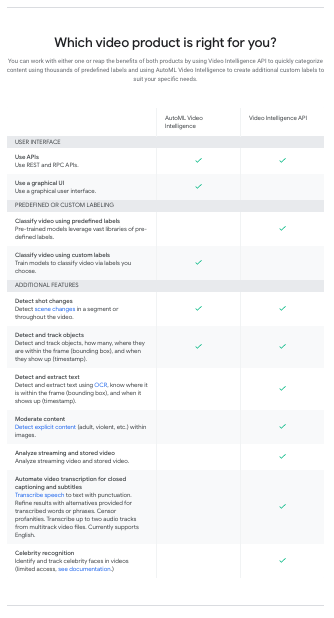
Precise video analysis: Video Intelligence API automatically recognizes more than 20,000 objects, places, and actions in stored and streaming video. It also distinguishes scene changes and extracts rich metadata at the video, shot, or frame level. Use in combination with AutoML Video Intelligence to create your own custom entity labels to categorize content. Imagine being able to categorise hundreds of videos of customer interactions quickly to improve service training!
Recommended content: Build a content recommendation engine with labels generated by Video Intelligence API and a user’s viewing history and preferences. This will simplify content discovery for your users and guide them to the most relevant content that they want.
Simplify media management: Find value in vast archives by making media easily searchable and discoverable. Easily search your video catalog the same way you search text documents. Extract metadata that can be used to index, organize, and search your video content, as well as control and filter content for what’s most relevant.Imagine being able to locate insight in hundreds of enterprise videos to improve productivity and customer experience!
Easily create intelligent video apps: Gain insights from video in near real time using the Video Intelligence Streaming Video APIs, and trigger events based on objects detected. Build engaging customer experiences with highlight reels, recommendations, interactive videos, and more. Marketers, imagine being able to trigger a customer workflow, in real time, based on a live customer interactions.
Automate expensive workflows: Reduce time and costs associated with transcribing videos and generating closed captions, as well as flagging and filtering inappropriate content.
Content moderation: Identify when inappropriate content is being shown in a given video. You can instantly conduct content moderation across petabytes of data and more quickly and efficiently filter your content or user-generated content.
What can your organisation do with video AI?
6887
Of your peers have already watched this video.
14:21 Minutes
The most insightful time you'll spend today!
How Anthos Helps Organizations Implement Multi and Hybrid Cloud Strategy
Organizations have become increasingly focused on using modernization solutions to build competitive advantage, for faster time to market, serve customers better and seamlessly operate in hybrid and multi-cloud environments. Anthos by Google Cloud, a managed application platform plays an important role in application modernization and also in empowering customers to deploy a hybrid or multi-cloud strategy with opensource technologies and platforms like Kubernetes.
Watch the video to refer to the real use-cases of Anthos for application modernization and hybrid/multi cloud deployment across retail, digital natives, banking and manufacturing space.
Also, explore the latest tool, Migrate for Anthos if you are a traditional enterprise looking to skip rewriting of applications and lift-and-shift process!
Wunderkind Leverages Google Cloud to Address the Growing Needs of its Customer Base

5337
Of your peers have already read this article.
1:30 Minutes
The most insightful time you'll spend today!
Editor’s note: We’re hearing here how martech provider Wunderkind easily met the scaling demands of their growing customer base on multiple use cases with Cloud Bigtable and other Google Cloud data solutions.
Wunderkind is a performance marketing channel and we mostly have two kinds of customers: online retailers, and publishers like Gizmodo Media Group, Reader’s Digest, The New York Post and more. We help retailers boost their e-commerce revenue through real-time messaging solutions designed for email, SMS, onsite, and advertising. Brands want to provide a one-to-one experience to more of their customers, and we use our extensive history with best practices in email marketing and technology to help brands reach more customers through targeted messaging and personalized shopping experiences. With publishers, it’s a different value proposition, we use the same platform to provide a non disruptive and personalized ad experience for their website. For example, if you are on their site and then you left, we might show an ad tailored to you when you come back later – depending on the campaign.
After running into limitations with our legacy database system, we turned to Cloud Bigtable and Google Cloud, which helped us be more flexible and easily scale for high traffic demand – which can be a stable 40,000 requests per second, and meet the needs of our growing number of data use cases.
Three different databases power our core product
In our core offering, companies send us user events from their websites. We store these events and later decide (using our secret sauce) if and how to reach out to those users on behalf of our customers. Because many of our customers are retailers, Black Friday and Cyber Monday are big traffic days for us as. On such days, we can get 31 billion events, sometimes as many as 200K events per second. We show 1.6 billion impressions that have seen close to 1 billion pageviews. And at the end of all this, we securely send about 100 million emails. We noticed the same thing for election time; traffic reached the same high volume. We need scalable solutions to support this level of traffic as well as the elasticity to let us pay only for what we use, and that’s where Google Cloud comes in.
So how does this work? Our externally facing APIs, which are running on Google Kubernetes Engine, receive those user events—up to hundreds of thousand per second. All the components in our architecture need to be able to handle this demand. So from our APIs, those events go to Pub/Sub, Dataflow and from there they are written to Bigtable and BigQuery, Google Cloud’s serverless, and highly scalable data warehouse. This business user activity data underpins almost all our products. Events can be things like product views or additions to shopping carts. When we store this data in Bigtable, we use a combination of email address and the customer ID as the Bigtable key and we record the event details in that record.
What do we do with this information next? It’s important to mention that we also mark the last time we received an event about a user in Memorystore for Redis, Google Cloud’s fully managed Redis service. This is important because we have another service that is periodically checking Memorystore for users that have not been active for a campaign-specific period of time (it can be 30 minutes, for example), then deciding whether to reach out to them.
How we decide when we reach out is an intelligent part of our product offering, based on the channel, message, product, etc. When we do reach out, we use Memorystore for Redis as a rate limiter or token bucket. In order not to overwhelm the email or texting providers we send API requests to, we throttle those requests using Memorystore. (We prefer to preemptively throttle the outgoing API requests as opposed to handling errors later.)
When we do reach out, often we will need details for a specific product—let’s say if the website belongs to a retailer. We usually get that information from the retailer through various channels and we store product information in Cloud SQL for MySQL. We pull that information when we need to send an email with product information, and we use Memorystore for Redis to cache that information, since many of the products are repeatedly called. Our Cloud SQL instance has 16 vCPUs, 60GBs of memory and 0.5TB of disk space and when we perform those product information updates, we have about a thousand write transactions per second. We are also in the process of migrating some tables from a self managed MySQL instance, and we keep those tables synchronized with Cloud SQL using Datastream.
Our user history database was originally stored in AWS DynamoDB, but we were running into problems with how they structured the data, and we’d often get hot shards but with no way to determine how or why. That led to our decision to migrate to Bigtable. We set up the migration first by writing the data to two locations from Pub/Sub, performed some backfill of data until that was up and running, and then started working on the reading. We performed this over a few short months, then switched everything to Bigtable.
So, as mentioned, we are using Bigtable for multiple databases. The instance that stores our user events has about 30 TB with about 50 nodes.
Profile management
A second use case for Bigtable is for user profile management, where we track, for example, user attributes based on subscription activity, whether they’ve opted in or out of various lists, and where we apply list-specific rules that determine which targeted emails we send out to users.
Our very own URL shortener
Our third use case for Bigtable is our URL shortener. When our customers build out campaigns and choose a URL, we append tracking information to the query string of the URLs and they become long. Many times, we are sending them via SMS texts, so the URLs need to be short. We originally used an external solution, but made the determination that they couldn’t support our future demands. Our calls tend to be very bursty in nature, and we needed to plan for a future state of supporting higher throughput. We use a separate table in Bigtable for this shortened URL. We generate the short slug that is 62 bit-encoded and use it as the rowkey. We use the long slug as a Protobuf-encoded data structure in one of the row cells and we also have a cell for counting how many times it was used. We use Bigtable’s atomic increment to increase that counter to track how many times the short slug was used.
When the user receives a text message on their phone, they click the short URL, which goes through to us, and we expand it to the long slug (from Bigtable) and redirect them to the appropriate site location. Obviously, for the URL shortener use case, we need to make the conversion very quickly. Bigtable’s low latency helps us meet that demand and we can scale it up to meet higher throughput demands.
Meeting the future with Google Cloud
Our business has grown considerably, and as we keep signing up new clients, we need to scale up accordingly, and Bigtable has met our scaling demands easily. With Bigtable and other Google Cloud products powering our data architecture, we’ve met the demand of incredibly high traffic days in the last year, including Black Friday and Cyber Monday. Traffic for these events went much higher than expected, and Bigtable was there, helping us easily scale on demand.
We are working on leveraging a more cloud native approach and using Google Cloud managed services like GKE, Dataflow, pub/sub, Cloud SQL , Memorystore, BigQuery and more. Google has those 1st party products and we don’t see the value in rolling out or self managing such solutions ourselves..
Thanks to Google Cloud, we now have reliable and flexible data solutions that will help us meet the needs of our growing customer base, and delight their users with fast, responsive, personalized shopping messaging and experiences.
Learn more about Wunderkind and Cloud Bigtable. Or check out our recent blog exploring the differences between Bigtable and BigQuery.
More Relevant Stories for Your Company

Google Cloud’s Transfer Services Helps Move Nuro’s Petabytes of Data from Edge to the Cloud
Engineers that build last-mile delivery services belong to an elite order, a hallowed subcategory. Delivery customers are incredibly demanding when it comes to speed and convenience, and the services they use must take variables like increased traffic, road conditions, human error, and even driver availability into account every day. Nuro




Ship Faster, Spend Less by Going Multi-Cloud with Anthos
Today's success depends more than ever on making the most of both on-premises investments and the various cloud offerings available to you. Learn about how Google Cloud is bringing simplified operations everywhere to help ensure success in a world of hybrid, multi cloud and edge scenarios that could otherwise threaten

Project to Platform: Financing Digital Transformation
Financing digital transformation poses a significant problem for many enterprises we work with. It’s not because the C-suite doesn’t support it: the need to become more agile, digital, and data-driven is nearly ubiquitous in executive public pronouncements. But most large organizations look at IT investment in a way that’s ineffective

3 Ways To Reduce App Downtime With Google Cloud’s API Monitoring Tools
How many times have you closed an application when you encounter the “spinning wheel of death” (a melodramatic way of saying an application that is taking too long to load)? In today’s digital economy where many organizations rely on applications as a primary source of revenue, that spinning wheel of
