





Build A Movie Recommender System based on Reinforcement Learning (RL) with Vertex AI

3334
Of your peers have already read this article.
3:00 Minutes
The most insightful time you'll spend today!
Reinforcement learning (RL) is a form of machine learning whereby an agent takes actions in an environment to maximize a given objective (a reward) over this sequence of steps. Applications of RL include learning-based robotics, autonomous vehicles and content serving. The fundamental RL system includes many states, corresponding actions, and rewards to those actions. Translate that into a movie recommender system: The ‘state’ is the user, the ‘action’ is the movie to recommend to the user, and the ‘reward’ is the user rating of the movie. RL is a great framework for optimizing ML models, as mentioned by Spotify in the keynote in the Applied ML Summit 2021.
In this article, we’ll demonstrate an RL-based movie recommender system executed in Vertex AI and built with TF-Agents, a library for RL in TensorFlow. This demo has two parts: (1) a step-by-step guide leveraging Vertex Training, Hyperparameter Tuning, and Prediction services; (2) a MLOps guide to build end-to-end pipelines using Vertex Pipelines and other Vertex services.
TF-Agents meets Vertex AI
In reinforcement learning (RL), an agent takes a sequence of actions in a given environment according to some policy, with the goal of maximizing a given reward over this sequence of actions. TF-Agents is a powerful and flexible library enabling you to easily design, implement and test RL applications. It provides you with a comprehensive set of logical modules that support easy customization:
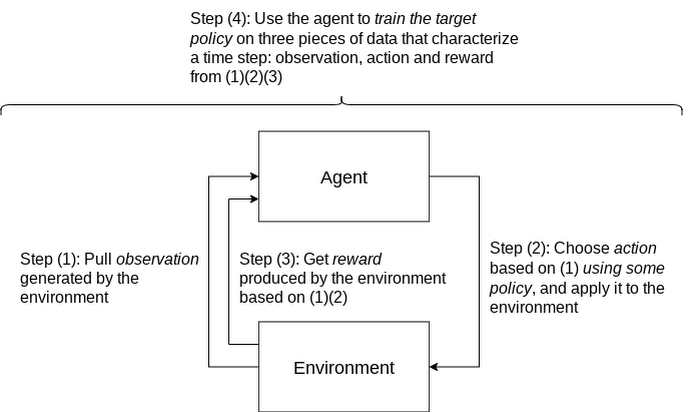
- Policy: A mapping from an environment observation to an action or a distribution over actions. It is the artifact produced from training, and the equivalent of a “Model” in a supervised learning setup.
- Action: A move or behavior that is outputted by some policy, and chosen and taken by an agent.
- Agent: An entity that encapsulates an algorithm to use one or more policies to choose and take actions, and trains the policy.
- Observations: A characterization of the environment state.
- Environment: Definition of the RL problem to solve. At each time step, the environment generates an observation, bears the effect of the agent action, and then given the action taken and the observation, the environment responds with a reward as feedback.
A typical RL training loop looks like the following:
A typical process to build, evaluate, and deploy RL applications would be:
- Frame the problem: While this blog post introduces a movie recommendation system, you can use RL to solve a wide range of problems. For instance, you can easily solve a typical classification problem with RL, where you can frame predicted classes as actions. One example would be digit classification: observations are digit images, actions are 0-9 predictions and rewards indicate whether the predictions match the ground truth digits.
- Design and implement RL simulated experiments: We will go into detail on simulated training data and prediction requests in the end-to-end pipeline demo.
- Evaluate performance of the offline experiments.
- Launch end-to-end production pipeline by replacing the simulation constituents with real-world interactions.
Now that you know how we’ll build a movie recommendation system with RL, let’s look at how we can use Vertex AI to run our RL application in the cloud. We’ll use the following Vertex AI products:
- Vertex AI training to train a RL policy (the counterpart of a model in supervised learning) at scale
- Vertex AI hyperparameter tuning to find the best hyperparameters
- Vertex AI prediction to serve trained policies at endpoints
- Vertex Pipelines to automate, monitor, and govern your RL systems by orchestrating your workflow in a serverless manner, and storing your workflow’s artifacts using Vertex ML Metadata.
Step-by-step RL demo
This step-by-step demo showcases how to build the MovieLens recommendation system using TF-Agents and Vertex AI services, primarily custom training and hyperparameter tuning, custom prediction and endpoint deployment. This demo is available on Github, including a step-by-step notebook and Python modules.
The demo first walks through the TF-Agents on-policy (which is covered in detail in the demo) training code of the RL system locally in the notebook environment. It then shows how to integrate the TF-Agents implementation with Vertex AI services: It packages the training (and hyperparameter tuning) logic in a custom training/hyperparameter tuning container and builds the container with Cloud Build. With this container, it executes remote training and hyperparameter tuning jobs using Vertex AI. It also illustrates how to utilize the best hyperparameters learned from the hyperparameter tuning job during training, as an optimization.
The demo also defines the prediction logic, which takes in observations (user vectors) from prediction requests and outputs predicted actions (movie items to recommend), in a custom prediction container and builds the container with Cloud Build. It deploys the trained policy to a Vertex AI endpoint, and uses the prediction container as the serving container for the policy at the Vertex AI endpoint.
End-to-end workflow with a closed feedback loop: Pipeline demo
Pipeline architecture
Building upon our RL demo, we’ll now show you how to scale this workflow using Vertex Pipelines. This pipeline demo showcases how to build an end-to-end MLOps pipeline for the MovieLens recommendation system, using Kubeflow Pipelines (KFP) for authoring and Vertex Pipelines for orchestration.
Highlights of this end-to-end demo include:
- RL-specific implementation that handles RL modules, training logic and trained policies as opposed to models
- Simulated training data, simulated environment for predictions and re-training
- Closing of the feedback loop from prediction results back to training
- Customizable and reproducible KFP components
An illustration of the pipeline structure is shown in the figure below.
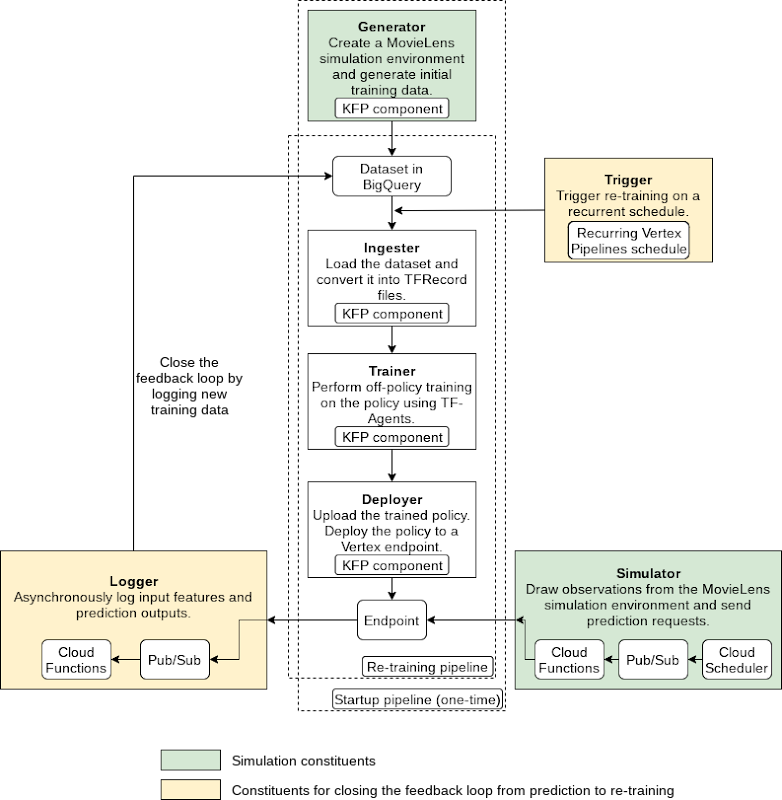
The pipeline consists of the following components:
- Generator: to generate MovieLens simulation data as the initial training dataset using a random data-collecting policy, and store in BigQuery [executed only once]
- Ingester: to ingest training data in BigQuery and output TFRecord files
- Trainer: to perform off-policy (which is covered in detail in the demo) training using the training dataset and output a trained RL policy
- Deployer: to upload the trained policy, create a Vertex AI endpoint and deploy the trained policy to the endpoint
In addition to the above pipeline, there are three components which utilize other GCP services (Cloud Functions, Cloud Scheduler, Pub/Sub):
- Simulator: to send recurring simulated MovieLens prediction requests to the endpoint
- Logger: to asynchronously log prediction inputs and results as new training data back to BigQuery, per prediction requests
- Trigger: to recurrently execute re-training on new training data
Pipeline construction with Kubeflow Pipelines (KFP)
You can author the pipeline using the individual components mentioned above:
@dsl.pipeline(pipeline_root=PIPELINE_ROOT,name=f"{PIPELINE_NAME}-startup")def pipeline(# Pipeline configsproject_id: str,raw_data_path: str,training_artifacts_dir: str,# BigQuery configsbigquery_dataset_id: str,bigquery_location: str,bigquery_table_id: str,bigquery_max_rows: int = 10000,# TF-Agents RL configsbatch_size: int = 8,rank_k: int = 20,num_actions: int = 20,driver_steps: int = 3,num_epochs: int = 5,tikhonov_weight: float = 0.01,agent_alpha: float = 10) -> None:"""Authors a RL pipeline for MovieLens movie recommendation system.Integrates the Generator, Ingester, Trainer and Deployer components. Thispipeline generates initial training data with a random policy and runs onceas the initiation of the system.Args:project_id: GCP project ID. This is required because otherwise the BigQueryclient will use the ID of the tenant GCP project created as a result ofKFP, which doesn't have proper access to BigQuery.raw_data_path: Path to MovieLens 100K's "u.data" file.training_artifacts_dir: Path to store the Trainer artifacts (trained policy).bigquery_dataset: A string of the BigQuery dataset ID in the format of"project.dataset".bigquery_location: A string of the BigQuery dataset location.bigquery_table_id: A string of the BigQuery table ID in the format of"project.dataset.table".bigquery_max_rows: Optional; maximum number of rows to ingest.batch_size: Optional; batch size of environment generated quantities eg.rewards.rank_k: Optional; rank for matrix factorization in the MovieLens environment;also the observation dimension.num_actions: Optional; number of actions (movie items) to choose from.driver_steps: Optional; number of steps to run per batch.num_epochs: Optional; number of training epochs.tikhonov_weight: Optional; LinUCB Tikhonov regularization weight of theTrainer.agent_alpha: Optional; LinUCB exploration parameter that multiplies theconfidence intervals of the Trainer."""# Run the Generator component.generate_op = create_component_from_func(func=generator_component.generate_movielens_dataset_for_bigquery,output_component_file=f"generator-{OUTPUT_COMPONENT_SPEC}",packages_to_install=["google-cloud-bigquery==2.20.0","tensorflow==2.5.0","tf-agents==0.8.0",])generate_task = generate_op(project_id=project_id,raw_data_path=raw_data_path,batch_size=batch_size,rank_k=rank_k,num_actions=num_actions,driver_steps=driver_steps,bigquery_tmp_file=BIGQUERY_TMP_FILE,bigquery_dataset_id=bigquery_dataset_id,bigquery_location=bigquery_location,bigquery_table_id=bigquery_table_id)# Run the Ingester component.ingest_op = create_component_from_func(func=ingester_component.ingest_bigquery_dataset_into_tfrecord,output_component_file=f"ingester-{OUTPUT_COMPONENT_SPEC}",packages_to_install=["google-cloud-bigquery==2.20.0","tensorflow==2.5.0",])ingest_task = ingest_op(project_id=project_id,bigquery_table_id=generate_task.outputs["bigquery_table_id"],bigquery_max_rows=bigquery_max_rows,tfrecord_file=TFRECORD_FILE)# Run the Trainer component and submit custom job to Vertex AI.train_op = create_component_from_func(func=trainer_component.training_op,output_component_file=f"trainer-{OUTPUT_COMPONENT_SPEC}",packages_to_install=["tensorflow==2.5.0","tf-agents==0.8.0",])train_task = train_op(training_artifacts_dir=training_artifacts_dir,tfrecord_file=ingest_task.outputs["tfrecord_file"],num_epochs=num_epochs,rank_k=rank_k,num_actions=num_actions,tikhonov_weight=tikhonov_weight,agent_alpha=agent_alpha)worker_pool_specs = [{"containerSpec": {"imageUri":train_task.container.image,},"replicaCount": TRAINING_REPLICA_COUNT,"machineSpec": {"machineType": TRAINING_MACHINE_TYPE,"acceleratorType": TRAINING_ACCELERATOR_TYPE,"acceleratorCount": TRAINING_ACCELERATOR_COUNT,},},]train_task.custom_job_spec = {"displayName": train_task.name,"jobSpec": {"workerPoolSpecs": worker_pool_specs,}}# Run the Deployer components.# Upload the trained policy as a model.model_upload_op = gcc_aip.ModelUploadOp(project=project_id,display_name=TRAINED_POLICY_DISPLAY_NAME,artifact_uri=training_artifacts_dir,serving_container_image_uri=f"gcr.io/{PROJECT_ID}/{PREDICTION_CONTAINER}:latest",)# Model uploading has to occur after training completes.model_upload_op.after(train_task)# Create a Vertex AI endpoint. (This operation can occur in parallel with# the Generator, Ingester, Trainer components.)endpoint_create_op = gcc_aip.EndpointCreateOp(project=project_id,display_name=ENDPOINT_DISPLAY_NAME)# Deploy the uploaded, trained policy to the created endpoint. (This operation# has to occur after both model uploading and endpoint creation complete.)model_deploy_op = gcc_aip.ModelDeployOp(project=project_id,endpoint=endpoint_create_op.outputs["endpoint"],model=model_upload_op.outputs["model"],deployed_model_display_name=TRAINED_POLICY_DISPLAY_NAME,machine_type=ENDPOINT_MACHINE_TYPE)
The execution graph of the pipeline looks like the following:
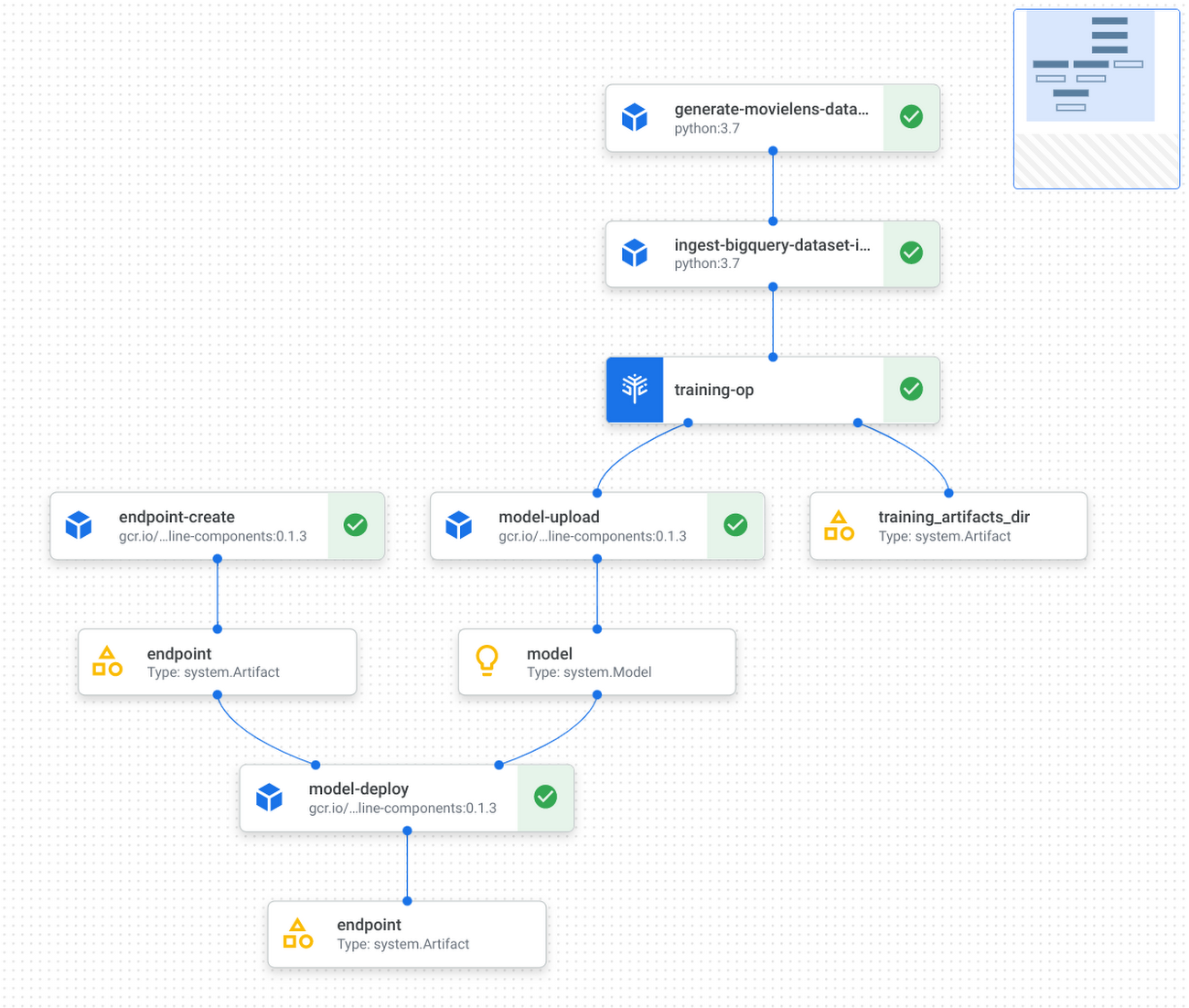
Refer to the GitHub repo for detailed instructions on how to implement and test KFP components, and how to run the pipeline with Vertex Pipelines.
Applying this demo to your own RL projects and production
You can replace the MovieLens simulation environment with a real-world environment where RL quantities like observations, actions and rewards capture relevant aspects of said real-world environment. Based on whether you can interact with the real world in real-time, you may choose either on-policy (showcased by the step-by-step demo) or off-policy (showcased by the pipeline demo) training and evaluation.
If you were to implement a real-world recommendation system, here’s what you’d do:
You would represent users as some user vectors. The individual entries in the user vectors may have actual meanings like age. Alternatively, they may be generated through a neural network as user embeddings. Similarly, you would define what an action is and what actions are possible, likely all items available on your platform; you would also define what the reward is, such as whether the user has tried the item, how long/much the user has spent on the item, user rating of the item, and so on. Again, you have the flexibility to decide on representations for framing the problem that maximize performance. During training or data pre-collection, you may randomly sample users (and build the corresponding user vectors) from the real world, use those vectors as observations to query some policy for items to recommend, and then apply that recommendation to users and obtain their feedback as rewards.
This RL demo can also be extended to ML applications other than recommendation system. For instance, if your use case is to build an image classification system, then you can frame an environment, where observations are the image pixels or embeddings, actions are the predicted classes, and rewards are feedback on the predictions’ correctness.
Conclusion
Congratulations! You have learned how to build reinforcement learning solutions using Vertex AI in a fully managed, modularized and reproducible way. There is so much you can achieve with RL, and you now have many Vertex AI as well as Google Cloud services in your toolbox to support you in your RL endeavors, be it production systems, research or cool personal projects.
Additional resources
- [Recap] step-by-step demo link: GitHub link
- [Recap] end-to-end pipeline demo: GitHub link
- TF-Agents tutorial on bandits: Introduction to Multi-Armed Bandits
- Vertex Pipelines tutorial: Intro to Vertex Pipelines
Discover Latest Resources on Google Cloud’s Datasets Solution

6342
Of your peers have already read this article.
3:00 Minutes
The most insightful time you'll spend today!
Editor’s note: With Google Cloud’s datasets solution, you can access an ever-expanding resource of the newest datasets to support and empower your analyses and ML models, as well as frequently updated best practices on how to get the most out of any of our datasets. We will be regularly updating this blog with new datasets and announcements, so be sure to bookmark this link and check back often.
August 2021
New dataset: Google Cloud Release Notes
- Looking for a new way to access Google Cloud Release Notes besides the docs, the XML feed, and Cloud Console? Check out the Google Cloud Release Notes dataset. With up-to-date release notes for all generally available Google Cloud products, this dataset allows you to use BigQuery to programmatically analyze release notes across all products, exploring security bulletin updates, fixes, changes, and the latest feature releases.
- Access the dataset

July 2021
Best practice: Use Google Trends data for common business needs
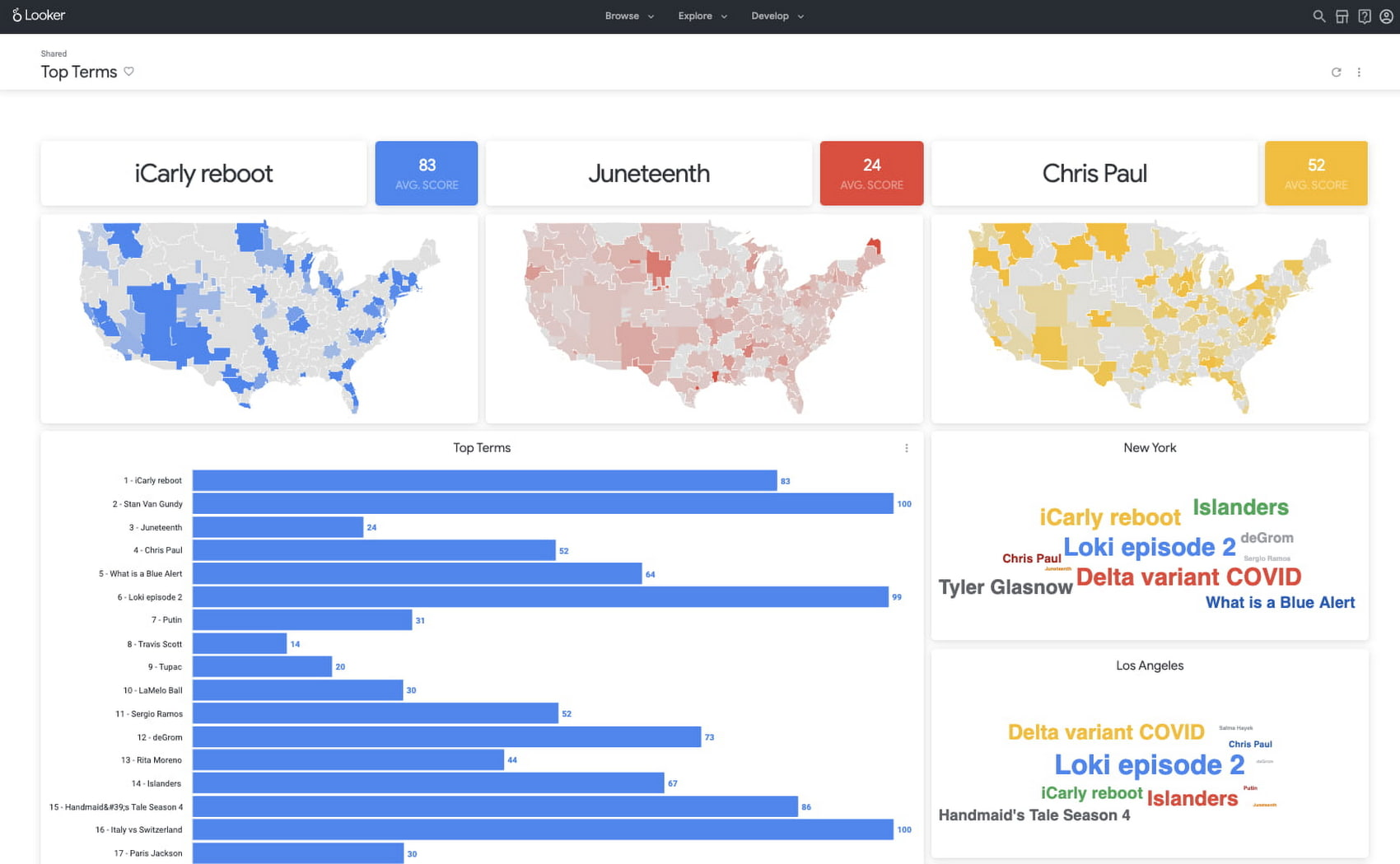
- The Google Trends dataset represents the first time we’re adding Google-owned Search data into Datasets for Google Cloud. The Trends data allows users to measure interest in a particular topic or search term across Google Search, from around the United States, down to the city-level. You can learn more about the dataset here, and check out the Looker dashboard here! These tables are super valuable in their own right, but when you blend them with other actionable data you can unlock whole new areas of opportunity for your team. To learn how to make informed decisions with Google Trends data, keep reading.
- Access the dataset
New dataset: COVID-19 Vaccination Search Insights
- With COVID-19 vaccinations being a topic of interest around the United States, this dataset shows aggregated, anonymized trends in searches related to COVID-19 vaccination and is intended to help public health officials design, target, and evaluate public education campaigns. Check out this interactive dashboard to explore searches for COVID-19 vaccination topics by region.
- Access the dataset

June 2021
New dataset: Google Diversity Annual Report 2021
- Since 2014, Google has disclosed data on the diversity of its workforce in an effort to bring candid transparency to the challenges technology companies like Google face in recruitment and retention of underrepresented communities. In an effort to make this data more accessible and useful, we’ve loaded it into BigQuery for the first time ever. To view Google’s Diversity Annual Report and learn more, check it out.
- Access the dataset
New dataset: Google Trends Top 25 Search terms
- The most popular and surging Google Search terms are now available in BigQuery as a public dataset. View the Top 25 and Top 25 rising queries from Google Trends from the past 30-days, including 5 years of historical data across the 210 Designated Market Areas (DMAs) in the US. Keep reading.
- Access the dataset
New dataset: COVID-19 Vaccination Access
- With metrics quantifying travel times to COVID-19 vaccination sites, this dataset is intended to help Public Health officials, researchers, and Healthcare Providers to identify areas with insufficient access, deploy interventions, and research these issues. Check out how this data is being used in a number of new tools.
- Access the dataset


Best practice: Leveraging BigQuery Public Boundaries datasets for geospatial analytics
- Geospatial data is a critical component for a comprehensive analytics strategy. Whether you are trying to visualize data using geospatial parameters or do deeper analysis or modeling on customer distribution or proximity, most organizations have some type of geospatial data they would like to use – whether it be customer zipcodes, store locations, or shipping addresses. However, converting geographic data into the correct format for analysis and aggregation at different levels can be difficult. In this post, we’ll walk through some examples of how you can leverage the Google Cloud platform alongside Google Cloud Public Datasets to perform robust analytics on geographic data. Keep reading.
- Access the dataset

Get the metadata and try BigQuery sandbox
When you’ve learned about many of our datasets and pre-built solutions from across Google, you may be ready to start querying them. Check out the full dataset directory and read all the metadata at g.co/cloud/marketplace-datasets, then dig into the data with our free-to-use BigQuery sandbox account, or $300 in credits with our Google Cloud free trial.
2865
Of your peers have already watched this video.
16:00 Minutes
The most insightful time you'll spend today!
Conversational AI in Search, Maps and Online Shopping!
Did you know about 77 percent of customers are likely to make a purchase from a brand they can message with? Direct interaction with the brand to gather product information shortens buyers’ journey and personalizes it with appropriate messages. To helps businesses add speed, simplicity and convenience in brand-customers interaction, Google’s Business Messages helps add chat feature in Search, Maps or other mediums.
Watch the video to learn to integrate conversational AI based on Google’s superior AI and ML features and build interactive and connected chat automation using Google Cloud’s suite of tools and products!
Enhance Dev Workflows with Duet AI’s AI-Powered Support

1196
Of your peers have already read this article.
3:00 Minutes
The most insightful time you'll spend today!
Last week we announced the private preview of Duet AI for Google Cloud, an always-on AI collaborator that uses generative AI to provide help to developers and cloud users. This article gives you a detailed look at Duet AI for developers, showing how Duet AI can help provide developers with real-time code suggestions, chat assistance, and enterprise-focused customization. You can sign-up here to join our waitlist for Google Cloud’s AI trusted tester program.
We believe that addressing these use cases with large language models (LLMs) will usher in a major leap in productivity in enterprise development. Duet AI uses Codey, a family of code models built on PaLM 2.
Developers continuously seek ways to improve their productivity and, over the past few decades, these efforts have resulted in massive productivity leaps due to technological changes. From advanced debuggers and online developer communities, to modern IDEs/notebooks and cloud computing, each advance brought massive changes in productivity. Despite these improvements, developers still face numerous challenges, some of which are unique to cloud development:
- Disruptive context switching and friction when integrating a new tool or service
- Excessive time spent on repetitive tasks
- Time required to understand a new code base or project
- Large cognitive workload when working on large code bases or complex APIs
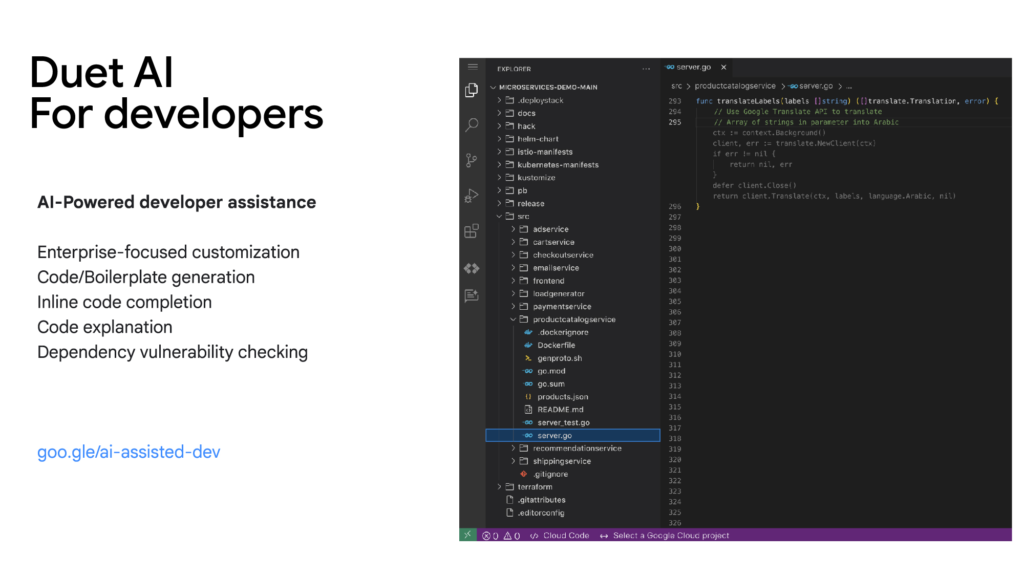
Duet AI for developers focuses on challenges and tasks across the development lifecycle:
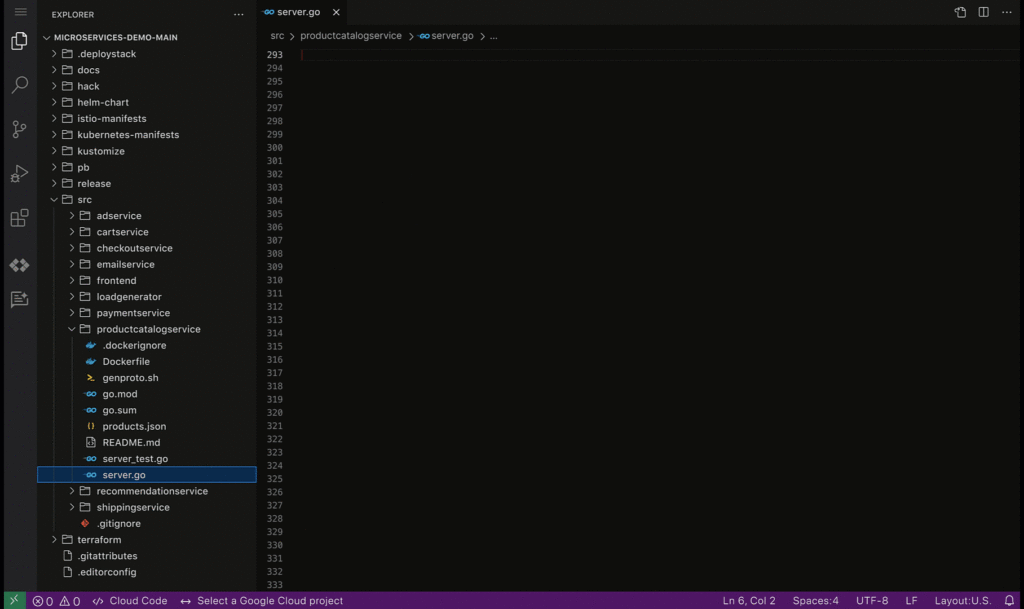
Code/Boilerplate Generation — Developers can describe the tasks they have in mind as a comment or function name, such as creating a Cloud Pub/Sub topic. Duet AI will generate a reference implementation that can be reviewed and modified, so developers don’t need to spend time reading through multiple documentation pages.
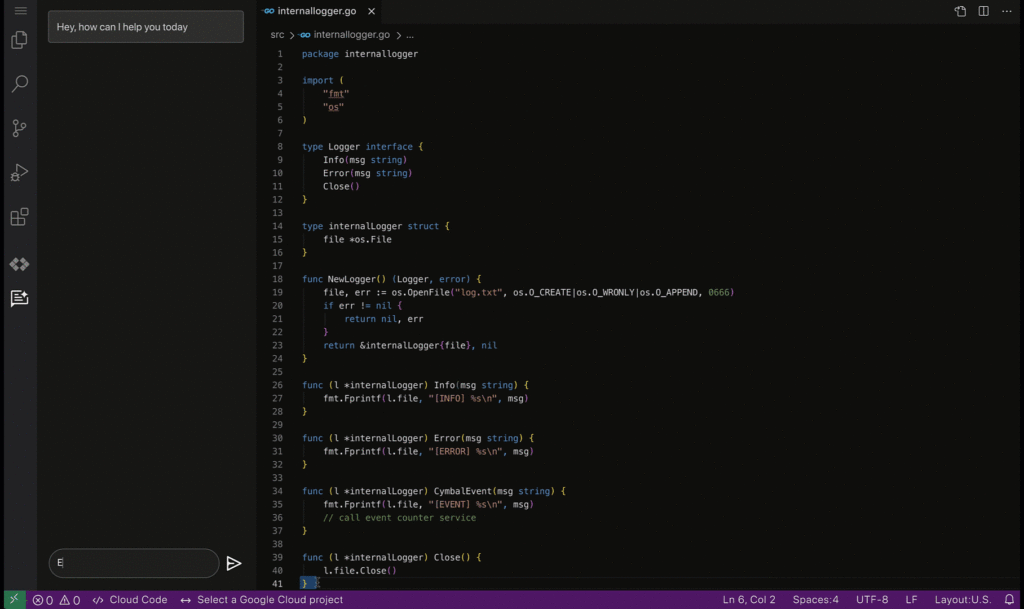
Inline Code Completion — To reduce the time spent on repetitive tasks and minimize the cognitive workload of tasks such as writing repetitive code or retrieving variable names, Duet AI provides intelligent, context-aware code completion, helping reduce the time spent on coding and enhancing the quality of the written code.
Enterprise Customization — Organizations frequently have massive code bases and specific recommended frameworks and best practices, which generic code assistance solutions may not be best positioned to support. With Vertex AI, developers will be able to tune and customize the underlying models and connect them to the Duet AI experience, allowing for assistance optimized to the needs of the organization.
Code Explanation — Developers spend significant time and effort reading and understanding code written by their peers or external contributors. To help assist in this process, Duet AI for code assistance provides an “Explain this code” option available whenever a developer selects their code, allowing them to more quickly understand, map, and navigate unfamiliar code bases.
Code security guardrails — Code generated by Duet AI can also be scanned for vulnerable dependencies via Source Protect, helping surface known public vulnerabilities impacting code, along with suggested fixes when available, bringing additional security.
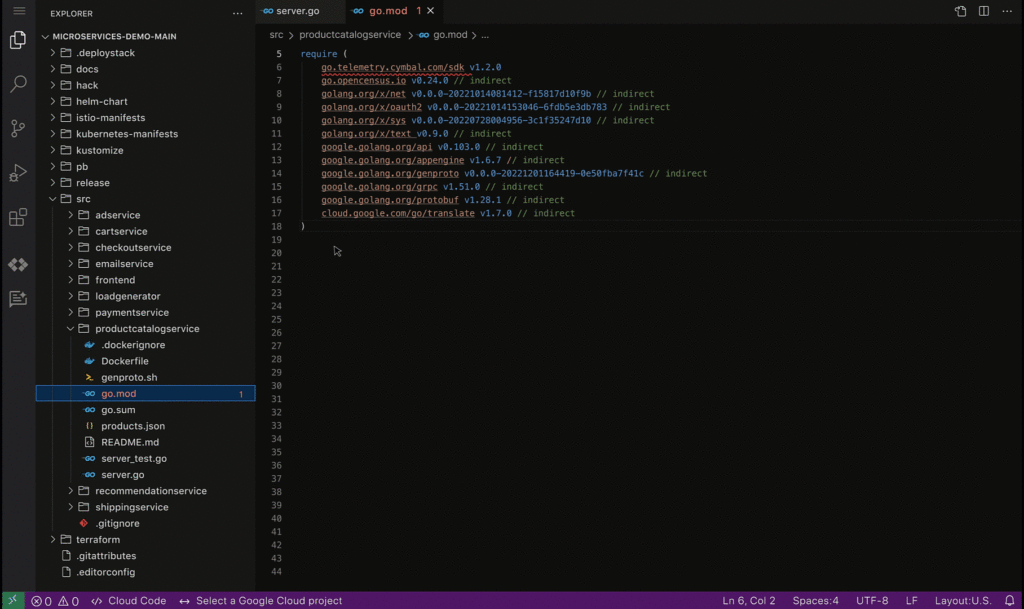
By harnessing the power of AI-driven developer assistance such as the one provided by Duet AI for developers, businesses can unlock unprecedented levels of productivity and efficiency in software development, paving the way for a new era of innovation and growth.
These early features of Duet AI for Google Cloud will be available for limited users and we will be expanding access very soon. Sign up here to join Google Cloud’s AI Trusted Tester Program.
Personalization with Recommendation AI Improves Reader Experience on Newsweek Platform

2970
Of your peers have already read this article.
1:30 Minutes
The most insightful time you'll spend today!
Newsweek provides the latest news, in-depth analysis, and ideas about international issues, technology, business, culture, and politics to its readers around the world. While editors pick the best articles to display on the home page and topic pages, it is also critical for Newsweek to offer a personalized experience by delivering fresh and relevant article recommendations tailored to the unique interests of each reader. This need became even more important during the pandemic as readers wanted to be kept informed about the latest news and understand its impact on their own lives and businesses.
Personalization with Recommendations AI
Google has spent years delivering recommended content across flagship properties such as Google Ads, Google Search, and YouTube. Recommendations AI takes advantage of Google’s expertise in recommendations and is powered by state-of-the-art machine learning models. It is also a fully managed service with automated model training and recommendation serving infrastructure that have helped to meet Newsweek’s planet-scale needs.
Newsweek had been concerned that a sizable fraction of their users left the website after reading only one article and as a result was evaluating deploying ML-based recommendations on their article detail page to increase user engagement. Newsweek and Google Cloud expected that highly personalized recommendations from Recommendations AI would help readers find the articles they would be most interested in, thereby significantly increasing the click-through rate (CTR) of recommendations being shown.
Newsweek ran A/B tests on both desktop and mobile to compare their existing solution with content recommendations from Recommendations AI which leverage a user’s reading history along with article metadata such as categories, titles, and article publish time to ensure that recommendations are relevant, fresh, and personalized. The result was a strong improvement in business metrics.
“Google Cloud Recommendations AI has not only improved our CTR by 50%-75% and subscription conversion rate by 10%, but also allowed us to increase total revenue per visit by 10%,” says Michael Lukac, Newsweek’s Chief Technology Officer. “The fully managed service, advanced AI, and real-time personalization have allowed us to make an improvement in our user engagement. It has improved the diversity of content and personalized assets to the individual reader. Newsweek has been able to easily create and edit models from the dashboard while retraining them daily to handle changing catalogs.”
Next Steps
Newsweek has seen tremendous benefit from Recommendations AI’s ability to create a superior reader experience with personalization, and sees opportunities to further improve the reader’s journey by having Google cover more real estate on their site, app, and on other channels such as personalized newsletters. To explore what Google Cloud’s Recommendations AI can do for your business, click here.
Next-Level Search: Discover the Game-Changing Capabilities of Enterprise Search on Gen App Builder

1201
Of your peers have already read this article.
4:30 Minutes
The most insightful time you'll spend today!
In our conversations with customers, few generative AI use cases have driven as much enthusiasm as generative search. Leaders at enterprises know the limits of traditional enterprise search, with queries producing a list of links based on pattern matching, and significant manual investigation required to find the more relevant answers. In generative AI, these leaders see an opportunity to leverage their data more effectively and deeply, including applying it to conversational apps that can answer complex questions, produce accurate summaries that synthesize many sources, and help people get the information they need, faster.
Enterprise Search on Generative AI App Builder (Gen App Builder) lets organizations create custom chatbots and semantic search applications in as little as a few minutes, with minimal coding needed to get started and enterprise-grade management and security built in. Customers can combine their internal data with the power of Google’s search technologies and generative foundation models, delivering relevant, personalized search experiences for enterprise applications or consumer-facing websites.
To date, most approaches to combining generative AI and search technology have been inadequate for the scale and reliability needed for enterprise use. For example, building search by breaking long documents into chunks and feeding each segment into an AI assistant typically isn’t scalable and doesn’t effectively provide insights across multiple sources. Likewise, many solutions are limited in the data types they can handle, prone to errors, and susceptible to data leakage. Bespoke, do-it-yourself approaches are generally no easier, with production-grade solutions often requiring complex tasks like integrating embeddings data with foundation models and significant use case data testing. Even when organizations make these efforts, the resulting solutions still tend to lack feature completeness and reliability, with significant investments of time and resources required to achieve high-quality results.
These challenges demonstrate that to effectively implement generative search, organizations typically need more than access to powerful foundation models. They also likely need the ability to ground model outputs in specific data, so that outputs are more relevant and less likely to include mistakes or “hallucinations.” They generally need safeguards that protect their data, how it is accessed, and how it is used. And they generally need the process to be high-performant and scalable out of the box, making the functionality easy to use even if the organization lacks data science and machine learning expertise.
Let’s look at how Enterprise Search on Gen App Builder helps customers bypass these scale and reliability challenges, so they can start leveraging generative search quickly.
The intersection of generative AI and enterprise data
Enterprise Search on Gen App Builder lets developers create search engines that help ground outputs in specific data sources for accuracy and relevance, can handle multimodal data such as images, and include controls over how answer summaries are generated. Multi-turn conversations are supported so that users can ask follow up questions as they peruse outputs, and customers have control over their data—including the ability to support HIPAA compliance for healthcare use cases. All of this is available as a fully managed service, so developers can focus on building rather than cloud complexity.
Gen App Builder’s out-of-box capabilities can remove the need for data chunking, generating embeddings, or managing indexes, hiding complexity behind a straightforward interface that lets developers build apps in minutes with little or no coding and no prior machine learning experience. With the ability to ingest large volumes of documents and support for both unstructured and structured data, apps built with Gen App Builder help customers solve the long-standing headache of finding relevant information across the organization, turning tasks that used to take hours into quick searches or conversational explorations with an app.
These capabilities are underpinned by both Google’s foundation models and a variety of Google Search technologies, including:
- Semantic search, which helps deliver more relevant results than traditional keyword-based search techniques by using natural language processing and machine learning techniques to infer relationships within the content and intent from the user’s query input.
- Google’s understanding of how users search for information.
- Google’s expertise in understanding relevance, which considers factors such as content popularity and user personalization of content when determining the order in which search results are displayed.
For more advanced use cases, Gen App Builder can be easily integrated with Vertex AI for in-depth foundation model tuning, enabling flexible input and output search formats.
As always with our AI products, Gen App Builder has been evaluated for alignment with our AI Principles, which is reflected by the product’s many safeguards against bias, toxic content, and unhelpful outputs. Whether for prototypes built in minutes or apps with many custom components, Enterprise Search on Gen App Builder offers a robust suite of user-friendly tools for customers across industries and levels of expertise.
How customers are innovating with Enterprise Search
After gaining access to Enterprise Search on Gen App Builder via our trusted tester program, a number of customers are already leveraging the product for novel use cases.
Priceline is harnessing Gen App Builder and Vertex AI for a range of projects, including internal search engines for employees and a new chatbot to assist customers as they make travel plans. Slated to be available across both desktop and mobile experiences, Priceline’s chatbot will help customers find the right information faster via always-on, personalized experiences, including answering nuanced questions like, “What are the best 4-star hotel options in midtown Manhattan within walking distance to Central Park?” and “Can you help me extend my hotel reservation for an additional night?”
“Priceline is charting a course to transform the novelty of generative AI into lasting value for our customers and our business. We believe it’s not just about having the latest technology; it’s also about practically targeting innovation to the right challenges and opportunities,” said Marty Brodbeck, Chief Technology Officer, Priceline. “With Google Cloud as our AI innovation partner, we’re doubling down on our commitment to delivering the fastest, most seamless and informative booking experience for our customers, from personalized planning and travel inspiration to customer service.”
Vodafone is experimenting with Enterprise Search and foundation models on Gen App Builder to build a tool that can rapidly and securely query documents, search, and understand specific commercial terms and conditions. Vodafone Voice and Roaming Services has over 10,000 contracts with other telecommunications companies worldwide, in a variety of formats such as PDFs, images, and complex tables. Searching this document repository is often a time consuming process for employees.
“Every day we introduce and manage new services like 5G to a roaming footprint comprising more than 700 operators in 210 countries to ensure both Vodafone and our partners’ business customers, holidaymakers, and Internet of Things devices stay connected when abroad. With Enterprise Search on Gen App Builder, we are building an intelligent assistant to securely and quickly search contracts.” said Sherif Bakir, CEO of Vodafone Voice and Roaming Services. “With generative AI, we’re accelerating otherwise protracted processes, increasing productivity and operational efficiency.”
Software startup Trender.ai, which creates customer monitoring and intelligence solutions for B2B relationships, is using Gen App Builder to build a product that can synthesize information from social media, public sources, and CRM data so that users can form more productive, personal relationships with prospects and customers.
“With Enterprise Search on Gen App Builder, we have been able to do things in the last month that we had projected to take 12-18 months on our prior roadmap,” said Betsy Bilhorn, co-founder at Trender.ai. “We had expected it would take at least 12 months to build and train models from an individual’s public social, web, and other data, and to then be able to ask questions like ‘What things are most important to this person?’ or ‘When and how is the best way to make an introduction to this prospect that they’ll respond to?’ Last year, we thought getting to this vision was a bit of a moonshot for a startup our size — but now we were able to achieve this in under a month.”
Stop searching for solutions — start discovering insights
We’re excited to see how customers use Enterprise Search on Gen App Builder to leverage data in powerful ways, discover new insights, and create useful, personal, and efficient experiences.
Today, we’re pleased to help our customers accomplish these goals, with the general availability of Enterprise Search on Gen App Builder for customers on the allowlist (i.e., approved for access). Please contact your Google Cloud sales team for access and pricing details. We are also launching two new features within Enterprise Search on Gen App Builder that are available today in our preview offering: multi-turn search, which supports asking follow-up questions, and content recommendations to find semantically relevant content. Access to the preview offering is available via Google Cloud’s trusted tester program. Read more about Enterprise Search on Gen App Builder and sign up for access on our webpage.
We’re also bringing generative AI features of Enterprise Search to our existing solutions like Contact Center AI and Document AI. As an example, starting this month, customers can preview generative AI-powered search in Document AI Warehouse. To keep up with our latest generative AI news, don’t miss The Prompt or our generative AI primer for executives on Transform with Google Cloud.
More Relevant Stories for Your Company

What’s New in Retail: Bits from Google Cloud’s Retail & Consumer Goods Summit
Today we’re hosting our Retail & Consumer Goods Summit, a digital event dedicated to helping leading retailers and brands digitally transform their business. For me, this is a personally exciting moment, as I see tremendous opportunities for those companies that choose to focus on their customers and leverage technology to elevate

How Connected-Stories Uses BigQuery and AI/ML to Craft Personalized Ad Experiences
Editor’s note: The post is part of a series highlighting our awesome partners, and their solutions, that are Built with BigQuery In the field of producing engaging video content such as ads, many marketers ignore the power of data to improve their creative efforts to meet the consumers' need for

Say Goodbye to Manual W2 & Payslip Processing with Document AI
Documents like payslips and W2s are crucial to processes such as employment and income verification for mortgage loans, personal loans, personal finance, and benefits processing. Unfortunately, efficiently extracting data from these documents at scale can be challenging and time-consuming, with many organizations relying on manual examination of documents or automated

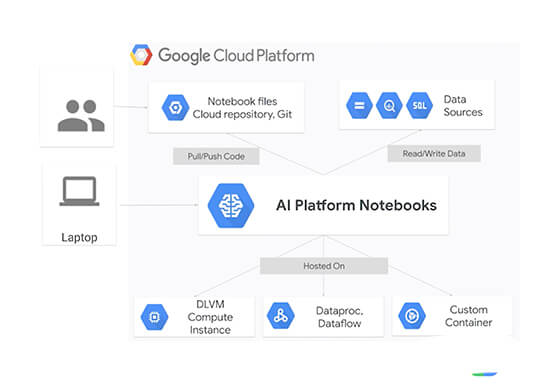

Overview of AI Notebooks on Google Cloud
Artificial intelligence and machine learning are one of the most disruptive technologies that enterprises have encountered in the last four or five years. And AI and ML will continue to disrupt enterprises going forward for the next 10 years. The key to unlocking value with artificial intelligence starts with a
