





How to Configure GCP for Live Network Forensics

3046
Of your peers have already read this article.
3:00 Minutes
The most insightful time you'll spend today!
Forensics is the application of science to criminal and civil laws. It is a proven approach for gathering and processing evidence at a crime scene. An integral step in the forensics process is the isolation of the scene without contaminating or modifying the evidence. The isolation step prevents any further contamination or tampering with possible evidence. The same philosophy can be applied to the investigation of digital events.
In this post we will review methods, tactics and architecture designs to isolate an infected VM while still making it accessible to forensic tools. The goal is to allow access so that data and evidence can be captured while protecting other assets. There are many forensic tools for networking that can be used to analyze the captured traffic. This post does not cover these tools but rather how to configure GCP to capture live traffic in the most efficient and secured way. Once traffic is captured, customers can use whatever tools they prefer to run the analysis. More details about these tools and required agents can be found here and details about open source tooling that Google and others are developing are available here.
In cloud security context, when a VM shows signs of compromise, the most common immediate reaction is to take a snapshot, shut down the instance and relocate the image snapshot to an isolated environment, a method known as “dead analysis”. However, shutting down the instance will impede an important step in the investigation and digital forensics, as some important information in a buffer or the RAM may be lost.
The other forensic approach is “live analysis”, in which the VM is kept on and evidence is gathered from the VM directly. Live forensics enables the imaging of RAM, bypasses most hard drives and software encryption, determines the cause of abnormal traffic, and is extremely useful when dealing with active network intrusions. This process is usually performed by forensic analysts. For example, if there is a good chance the malware resides only in memory then live forensics is, in some cases, the only way to capture and analyze the malware. In this method, in addition to disk and memory evidence, a forensic analysis can also capture live-network from data sent over the compromised VM network interfaces. Some of the benefits of collecting live networks are reconstruction and visualizing traffic flow in real-time, in particular during active network intrusions or attacks.
In the cloud, a VM must be isolated when it becomes apparent that an incident has happened, in order to protect other VMs from being infected. Our Cloud Forensics 101 session covers the process and required artifacts, such as logs, that need to be collected for cloud forensics.
What happens when your image is compromised
Let’s now assume that one of the VMs in your infrastructure has been compromised and alarms are coming from products such as GCP’s Cloud Security and Command Center, Chronicle backstory or your SIEM.
An incident response plan consists of 3 phases: preparation (actions taken before an attack), detection (actions taken during an attack) and response (actions taken after an attack). During the detection phase, the Computer Security Incident Response Team (CSIRT) or threat analysts decide whether live acquisition analysis is required. If live forensics is required, for example when it is vital to acquire a VM’s RAM, then one of the first courses of action is to isolate and contain the VM from the rest of the world and connect the Forensics VPC to the VM for investigation. The forensics VPC resides in a forensics GCP project, it includes digital forensics tools to capture evidence from the VM such as SANS Investigative Forensics Toolkit – SIFT, The Sleuth Kit, Autopsy, Encase, FTK and alike. These tools are already installed, configured, tested and ready to use. The forensics project will also save and preserve evidence such as disk and memory images for forensic review.
We’ll cover two scenarios in this post, the first scenario is to isolate the image and connect the forensics VPC to the image for live acquisition.
In the second scenario we will also capture live traffic from the isolated image for live network digital forensics. To capture live traffic from the infected VM, we will leverage the GCP Packet Mirroring service to duplicate all traffic going in and out of the VM and send it to a Forensics VPC for analysis. Network forensics analysis tools such as Palo Alto VM-Series for IDS, ExtraHop Reveal(x), CheckPoint CloudGuard, Arkime (formerly Moloch), Corelight are installed, configured and ready for deployment in the Forensics VPC, these tools will be used to analyze the duplicate network traffic.
Isolating the infected VM from other resources and connecting the forensics VPC
As part of the Incident Response plan preparation phase, the CSIRT created a Google Cloud Forensics Project. Since the Forensics project will be used only when needed, it’s better to automate the creation of the project and its resources with a tool such as Terraform. It is important to grant access to this project only to individuals and groups who deal with incident response and forensics, such as CSIRT. As shown in figure 1, the Forensics project on the right includes its own VPC, non-overlapped subnet and VM images with pre-installed and pre-configured forensics tools. Internal load-balancer and instance-groups are also configured, we will use these resources to capture live traffic, as described later in this post.
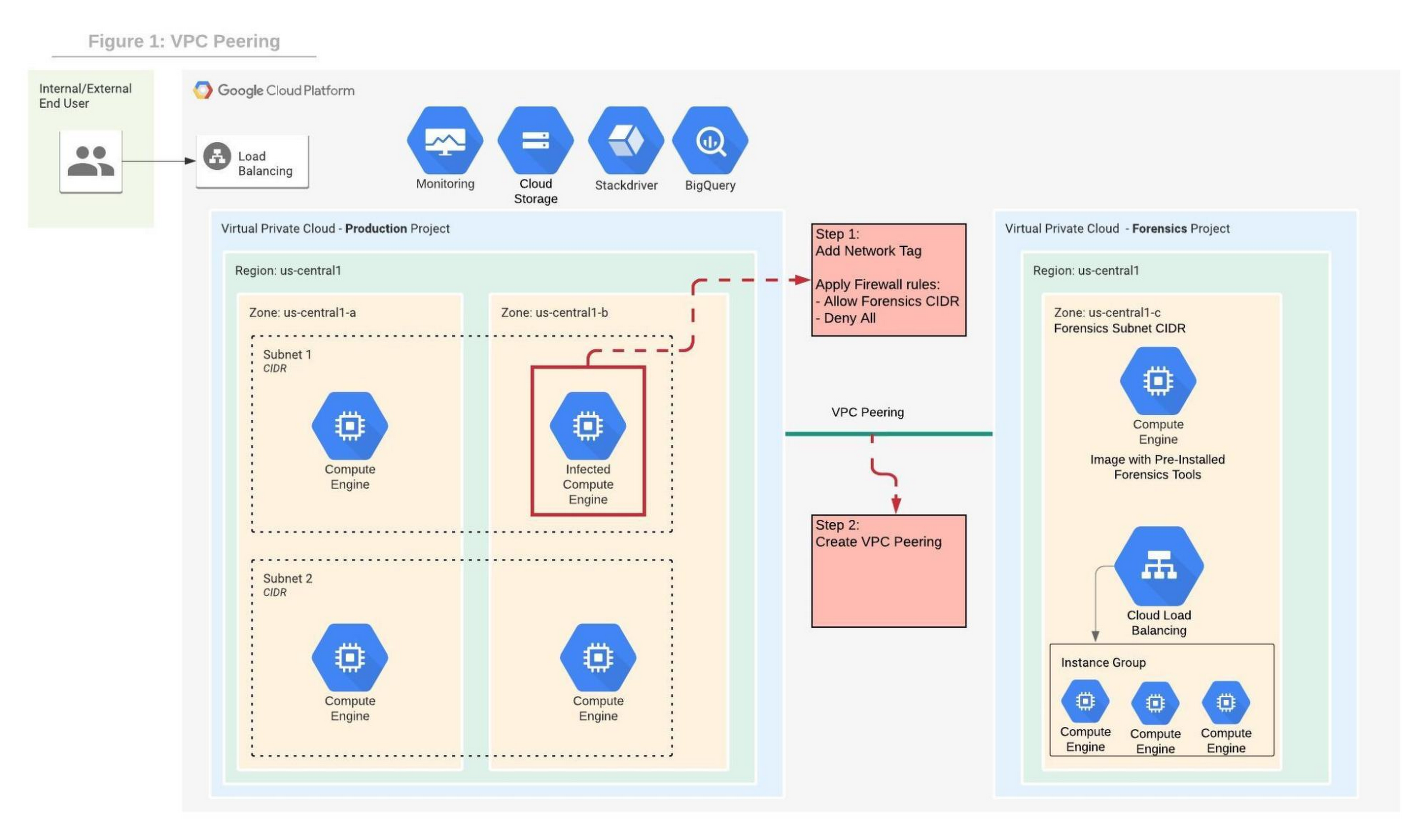
In order to contain the spread of any malware or network activity, such as data exfiltration, we’ll isolate the VM with VPC firewall rules. The GCP VPC firewall is a distributed firewall that always enforces its rules, protecting the instances regardless of their configuration and operating systems. In other words, the compromised VM cannot override the firewall enforcement if its policies follow the principle of least privilege . Rules can be applied to all instances in the network, target network tags or service accounts.
Step 1 in the diagram above shows how an infected VM is isolated from the rest of the network by firewall rules that deny any ingress and egress traffic from any CIDR beside the forensics subnet CIDR. The infected VM is tagged with a unique network tag, for example “<image-name>_InfectedVM”, then firewalls rules are applied on the network tag. This ensures that the infected VM is isolated from the project and the Internet while enabling access to the VM via VPC peering which we’ll configure in step-2. You can learn more about VPC firewalls rules here.
In step 2, the VPC from the forensics project is peered with the VPC in the production project. When VPC peering is established routes are exchanged between the VPCs. By default, VPC peering exchanges all subnet routes, however, custom routes can also be filtered if required. At this point, the VM from the forensics project can communicate with the infected VM and start the live forensics analysis job using the pre-installed and pre-configured forensics tools.
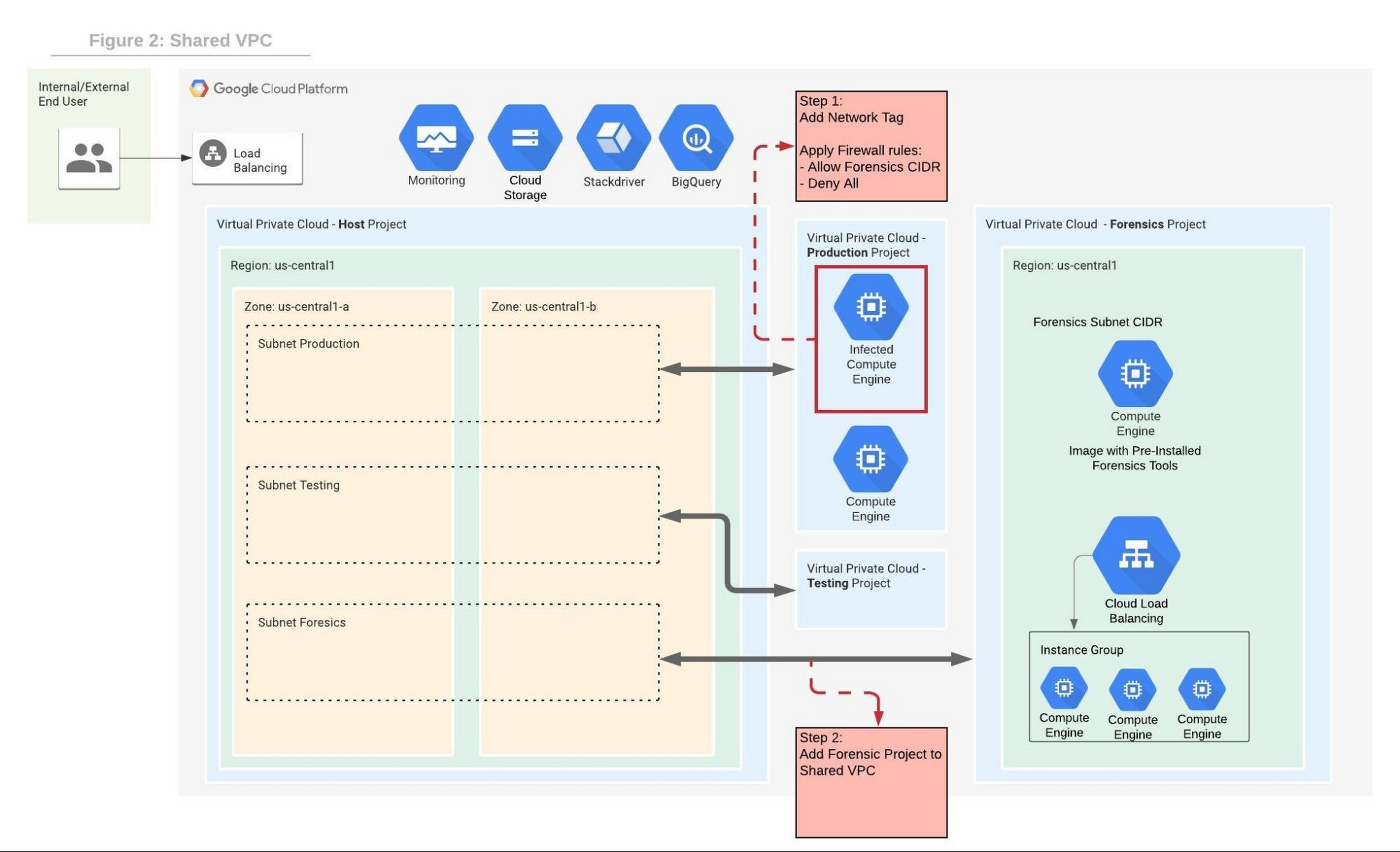
Shared VPC is a network construct that allows you to connect resources from multiple projects, called service-projects, to a common VPC in a host-project. VPCs from different projects can securely communicate with each other via the hosted project network while centralizing the network administration. Figure 2 depicts Shared VPC topology, rather than using VPC peering, during step 2 the Forensics project is simply attached to the host project. After the attachment, the Shared VPC allows the forensics tools to communicate with the infected VMs.
Capturing live network traffic with Google Traffic Mirroring
If live network forensics is required, for example during active network intrusions, then the incoming and outgoing traffic needs to be duplicated and captured. While VPC Flow logs capture the networking metadata telemetry, this is not enough for live network forensics analysis. GCP Packet Mirroring clones the traffic of a specified instance in a VPC and forwards it to a specified internal load balancer which collects the mirrored traffic and sends it to an attached instance group. Packet mirroring captures all the traffic from the specified subnet, network tags, or instance name.
Figure 3 depicts the steps that allow the compromised VM to communicate with the rest of the world (for example beaconing with C&C) while capturing all traffic for investigation in a peered VPC deployment.
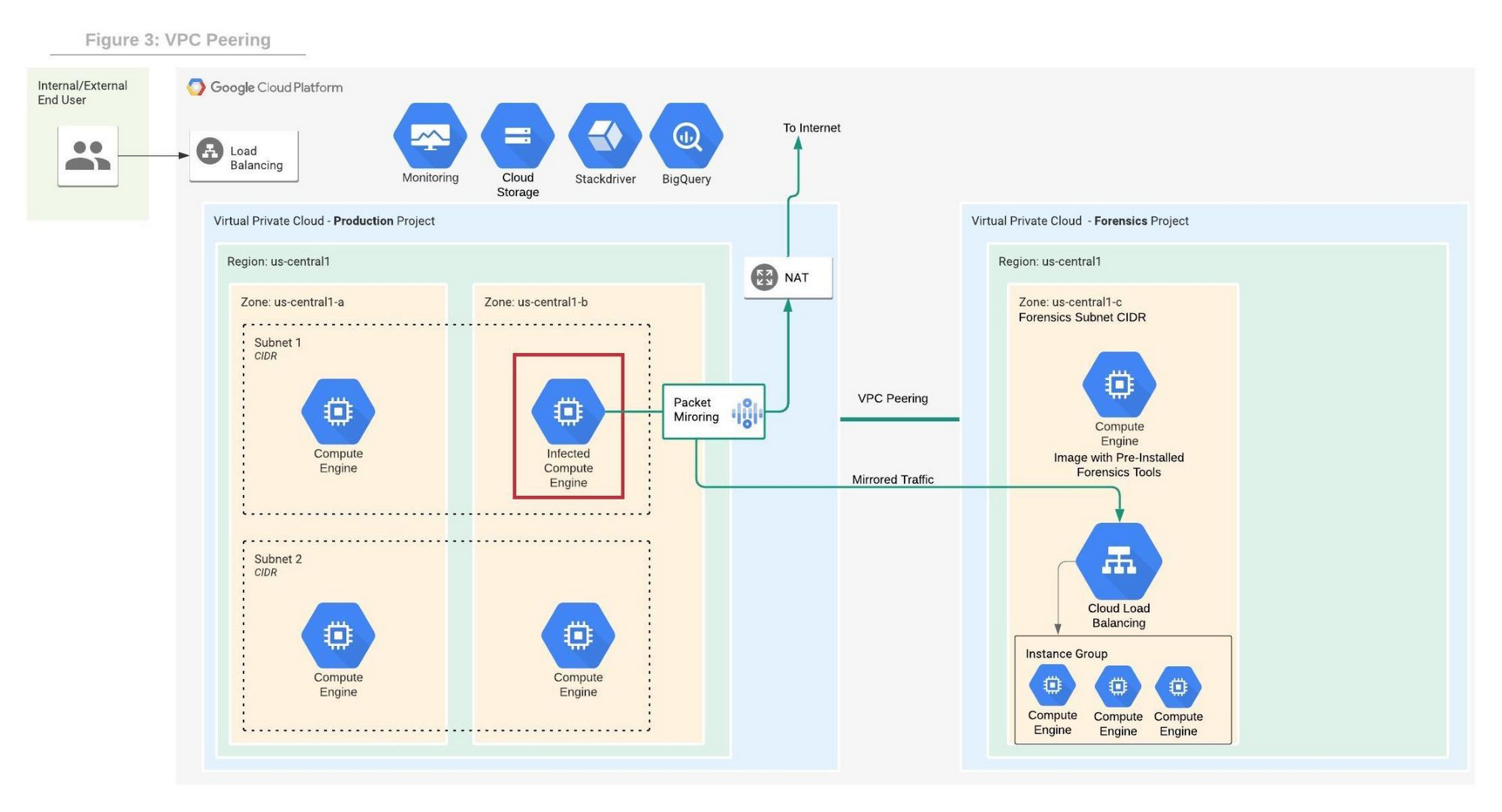
Figure 4 depicts the steps that allow the compromised VM to communicate with the rest of the world while capturing all traffic for investigation in a shared VPC deployment.
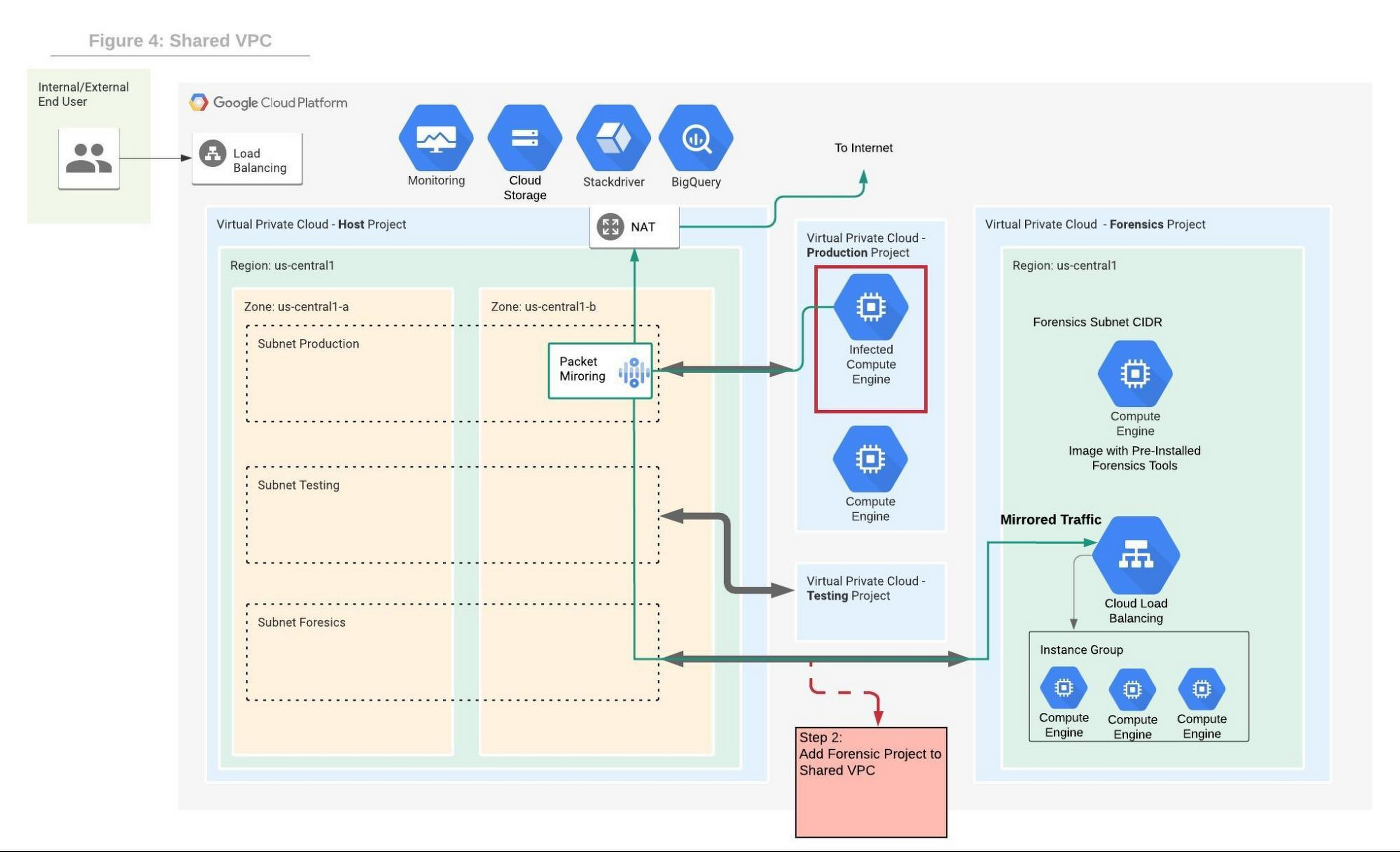
We will use the Forensics’ project internal load balancer and the instance group VMs which include packet capture and analysis tools. Note that production and forensics networks must be in the same region. Detailed steps to configure packet mirroring are available on this page.
If you are using a Shared VPC then check the Packet Mirroring configuration for Shared VPC for configuration details. Figure 4 depicts the packet mirroring flow in a shared VPC topology.
It is recommended to automate and periodically test the process to make sure that in case of an incident, the entire setup and Forensics toolchain can be quickly deployed. If after initial investigation a suspicious destination, such as a Command and Control [C&C] Server, has been identified, then the Packet Mirroring policy can be adjusted with a policy filter that only mirrors traffic from that C&C server IP address.
An incident management plan must be in place for companies using cloud services, and this plan should also include the option of using live acquisition when necessary. design and preparation for forensics acquisition allows the company to build the infrastructure that can be deployed and connected to the appropriate VM automatically. The architectures described in this post can help the process of collecting and preserving vital evidence for the forensic process, while the incident response team resolves the incident.

6555
Of your peers have already downloaded this article
5:30 Minutes
The most insightful time you'll spend today!
What’s behind the rising confidence in cloud security? First hand experience, and careful, systematic assessments that tap multiple sources such as detailed audits and comparisons. The most frequent driver of increased confidence was the direct experience of the quality of security in the cloud versus on-premises.
As a result, the use of Cloud is expected to rise to 65 percent of workloads by 2019, according to a recent survey of more than 500 global CIOs conducted on behalf of Google Cloud in association with MIT SMR Custom Studio. Increased confidence in cloud security along with the increased need for agility and speed are driving this growth in cloud adoption.
Download this exclusive report and understand why CIOs have a growing confidence in cloud security, how they are basing their hosting decisions on the flexibility and integration offered by the cloud, and their plans to use the cloud for future workloads.
Google’s ASO to Help U.S. Public Sector Achieve M-21-31 and EO 14028

3138
Of your peers have already read this article.
3:00 Minutes
The most insightful time you'll spend today!
As sophisticated cyberattack campaigns increasingly target the U.S. public and private sectors during the COVID era, the White House and federal agencies have taken steps to protect critical infrastructure and remote-work infrastructure. These include Executive Order 14028 and the Office of Management and Budget’s Memorandum M-21-31, which recommend adopting Zero Trust policies, and span software supply chain security, cybersecurity threat management, and strengthening cyberattack detection and response.
However, implementation can be a challenge for many agencies due to cost, scalability, engineering, and a lack of resources. Meeting the requirements of the EO and OMB guidance may require technology modernization and transformational changes around workforce and business processes.
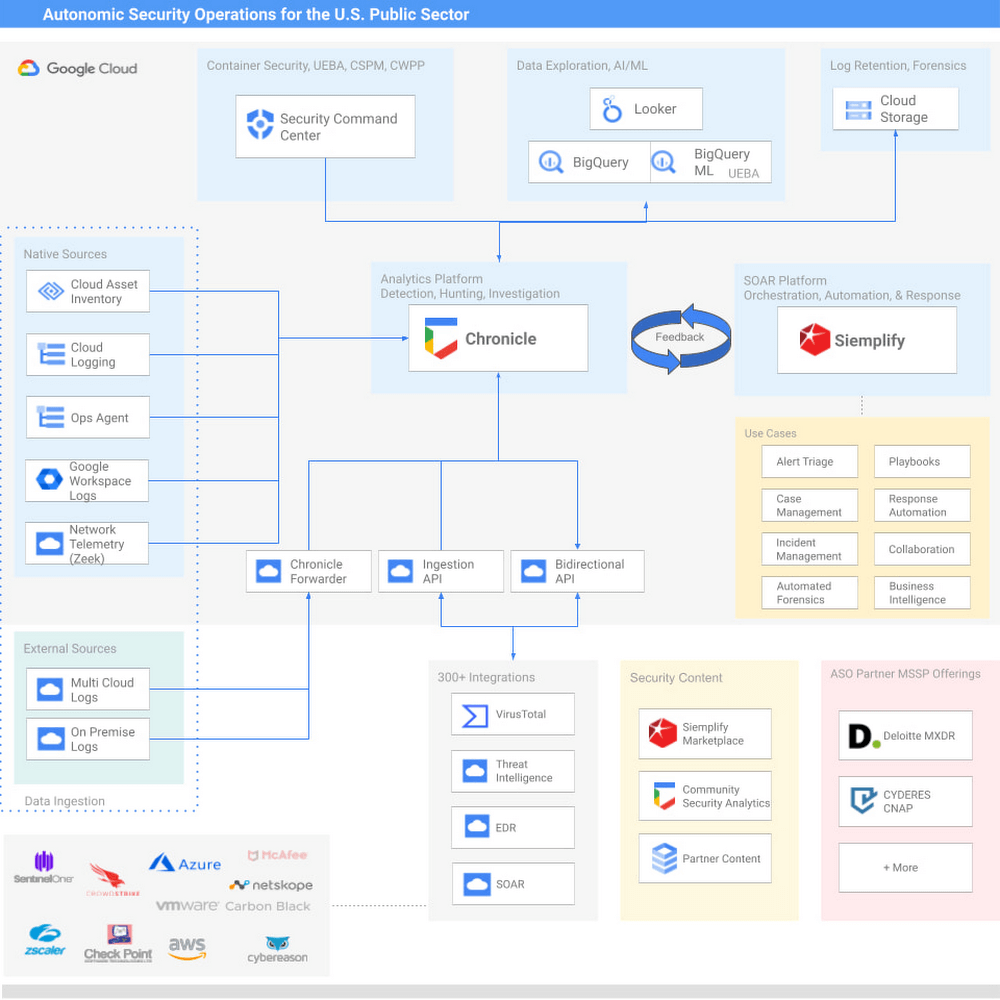
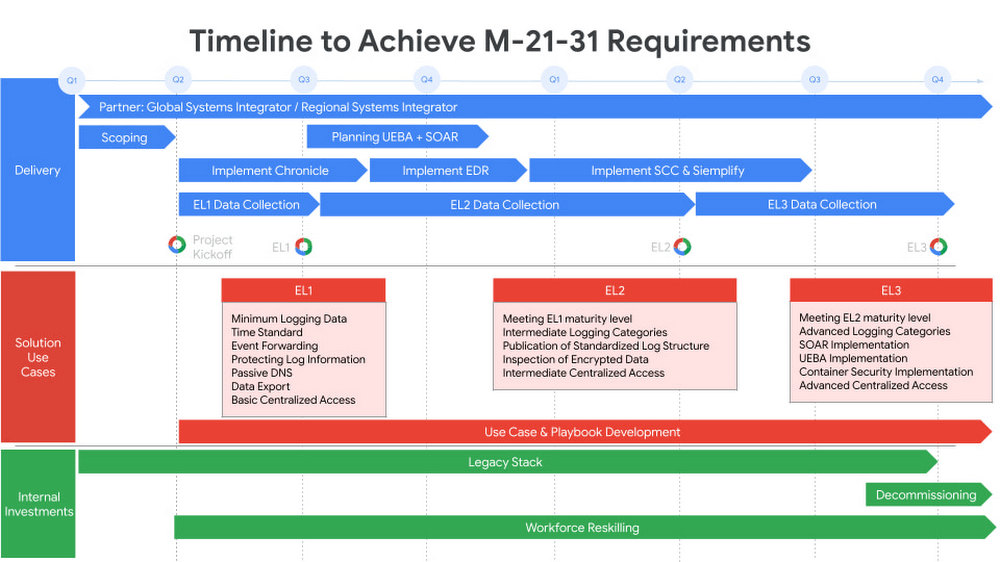
Today we are announcing Autonomic Security Operations (ASO) for the U.S. public sector, a solution framework to modernize cybersecurity analytics and threat management that’s aligned with the objectives of EO 14028 and OMB M-21-31. Powered by Google’s Chronicle and Siemplify, ASO helps agencies to comprehensively manage cybersecurity telemetry across an organization, meet the Event Logging Tier requirements of the White House guidance, and transform the scale and speed of threat detection and response. ASO can support government agencies in achieving continuous detection and continuous response so that security teams can increase their productivity, reduce detection and response time, and keep pace with – or ideally, stay ahead of – attackers.
While the focus of OMB M-21-31 is on the implementation of technical capabilities, transforming security operations will require more than just technology. Transforming processes and people in the security organization is also important for long-term success. ASO provides a more comprehensive lens through which to view the OMB event logging capability tiers, which can help drive a parallel transformation of security-operations processes and personnel.
Modern Cybersecurity Threat Detection and Response
Google provides powerful technical capabilities to help your organization achieve the requirements of M-21-31 and EO 14028:
Security Information & Event Management (SIEM) – Chronicle provides high-speed petabyte-scale analysis, and is capable of consuming log types outlined in the Event Logging (EL) tiers in a highly cost-effective manner.
Security Orchestration, Analytics, and Response (SOAR) – Siemplify offers dozens of out-of-box playbooks to deliver agile cybersecurity response and drive mission impact, including instances of automating 98% of Tier-1 alerts and driving an 80% reduction in caseload.
User and Entity Behavior Analytics (UEBA) – For agencies that want to develop their own behavioral analytics, agencies can use BigQuery, Google’s petabyte scale data lake, to store, manage, and analyze diverse data types from many sources. Telemetry can be exported out of Chronicle, and custom data pipelines can be built to import other relevant data from disparate tools and systems, such as IT Ops, HR and personnel data, and physical security data. From there, users can leverage BQML to readily generate machine learning models without needing to move the data out of BigQuery. For Google Cloud workloads, our Security Command Center Premium product offers native, turnkey UEBA across GCP workloads.
Endpoint Detection and Response (EDR) – For most agencies, EDR is a heavily adopted technology that has broad applicability in Security Operations. We offer integrations to many EDR vendors. Take a look at our broad list of Chronicle integrations here.
Threat intelligence – Our solution offers a native integration with VirusTotal, has the ability to operationalize threat intelligence feeds natively in Chronicle, and integrates with various TI and TIP solutions.
Community Security Analytics
To increase collaboration across public-sector and private-sector organizations, we recently launched our Community Security Analytics (CSA) repository, where we’ve partnered with the MITRE Engenuity Center for Threat-Informed Defense, CYDERES, and others to develop open-source queries and rules that support self-service security analytics for detecting common cloud-based security threats. CSA queries are mapped to the MITRE ATT&CK® framework of tactics, techniques and procedures (TTPs) to help you evaluate their applicability in your environment and include them in your threat model coverage.
“Deloitte is excited to collaborate with Google Cloud on their transformational public sector Autonomic Security Operations (ASO) solution offering. Deloitte has been recognized as Google Cloud’s Global Services Partner of the Year for four consecutive years, and also as their inaugural Public Sector Partner of the Year in 2020,” said Chris Weggeman, managing director of GPS Cyber and Strategic Risk, Google Cloud Cyber Alliance Leader, Deloitte & Touche LLP. “Our deep bench of more than 1,000 Google Cloud certifications, capabilities spanning the Google Cloud security portfolio, and decades of delivery experience in the government and public sector makes us well-positioned to help our clients undertake critical Security Operations Center transformation efforts with Google Cloud ASO.”
Cost-effective for government agencies
To help Federal Agencies meet the requirements of M-21-31 and the broader EO, Google’s ASO solutions can drive efficiencies and help manage the overall costs of the transformation. ASO can make petabyte-scale data ingestion and management more viable and cost-effective. This is critical at a time when M-21-31 is requiring many agencies to ingest and manage dramatically higher volumes of data that had not been previously budgeted for.
Partners
We’re investing in key partners who can help support U.S. government agencies on this journey. Deloitte and CYDERES both have deep expertise to help transform agencies’ Security Operations capabilities, and we continue to expand our partners to support the needs of our clients. A prototypical journey can be seen below.
“Cyderes shares Google Cloud’s mission to transform security operations, and we are honored to deliver the Autonomic Security Operations solution to the U.S. public sector. As the number one MSSP in the world (according to Cyber Defense Magazine’s 2021 Top MSSPs List) with decades of advisory and technology experience detecting and responding to the world’s biggest cybersecurity threats, Cyderes is uniquely positioned to equip federal agencies and departments to go far beyond the requirements of the executive order to transform their security programs entirely via Google’s unique ASO approach,” said Robert Herjavec, CEO of CYDERES. “As an original launch partner of Google Cloud’s Chronicle, our deep expertise will propel our joint offering to modernize security operations in the public sector, all with significant cost efficiency compared to competing solutions.” said Eric Foster, President of CYDERES.
Embracing ASO
Autonomic Security Operations can help U.S. government agencies advance their event logging capabilities in alignment with OMB maturity tiers. More broadly, ASO can help the U.S. government undertake a larger transformation of technology, process, and people, toward a model of continuous threat detection and response. As such, we believe that ASO can help address a number of challenges presently facing cybersecurity teams, from the global shortage of skilled workers, to the overproliferation of security tools, to poor cybersecurity situational awareness and analyst burnout caused by an increase of data without sufficient context or tools to automate and scale detection and response.
We believe that by embracing ASO, agencies can help agencies achieve:
10x technology, through the use of cloud-native tools that help agencies meet event logging requirements in the near term, while powering a longer-term transformation in threat management;
10x process, by redesigning workflows and using automation to achieve Continuous Detection and Continuous Response in security operations;
10x people, by transforming the productivity and effectiveness of security teams and expanding their diversity; and
10x influence across the enterprise through a more collaborative and data-driven approach to solving security problems between security teams and non-security stakeholders.
To learn more about Google’s Autonomic Security Operations solution for the U.S. public sector, please read our whitepaper. More broadly, Google Cloud continues to provide leadership and support for a wide range of critical public-sector initiatives, including our work with the MITRE Engenuity Center for Threat-Informed Defense, the membership of Google executives on the President’s Council of Advisors on Science and Technology and the newly established Cyber Safety Review Board; Google’s White House commitment to invest $10 billion in Zero Trust and software supply chain security, and Google Cloud’s introduction of a framework for software supply chain integrity. We look forward to working with the U.S. government to make the nation more secure.
Visit our Google Cloud for U.S. federal cybersecurity webpage.
Related posts:
Autonomic Security Operations for the U.S. Public Sector Whitepaper
“Achieving Autonomic Security Operations: Reducing toil”
“Achieving Autonomic Security Operations: Automation as a Force Multiplier”
“Advancing Autonomic Security Operations: New resources for your modernization journey”
Nine Interesting Google Cloud Identity and Environment Features to Know About!

2914
Of your peers have already read this article.
2:00 Minutes
The most insightful time you'll spend today!
I’ve been at Google Cloud just a few weeks, following years of experience as an AWS Hero and building on other clouds. So last week’s Google Cloud Next–my first!—was a bit of a culture shock. On the GCP podcast, I used the word “intentionality” to describe what I’m seeing: a thoughtful, holistic approach that informs so much of how Google Cloud is put together. Not just in the headline-grabbing new announcements like Google Distributed Cloud, but in the everyday things too.
Things like IAM and project setup. Step 1 of any cloud project is to provision access to an environment, and that’s why I always found it so frustrating in my past life when I had to deal with outdated or clunky stuff like:
- Homebrewed, sketchy SSO tooling and config files
- No centralized identity—I was a different person in every cloud account
- Mysterious logouts, redirects, and missing project context within the cloud console
- Account organization features that were “bolted-on” rather than designed the right way from the beginning
In contrast, I recently shared a Twitter thread about how shockingly right Google Cloud gets identity and environments. It’s probably my favorite thing about Google Cloud so far, and so in this post I want to expand on what I’ve learned. If you’re searching for a better way to access and organize your cloud, let me make you one of today’s lucky 10,000.
Nine things to love about Google Cloud identity and environments
1. You are YOU!
Every user is just a Google account (personal or corporate) that works across projects. For beginners, this lowers the barrier to entry and makes cloud feel like an extension of things you already know. For experts, it reduces the friction of having to juggle a bunch of unrelated identities. I love that you can permit any Google account into a cloud project as a collaborator—even a contributor from outside your organization!
2. No non-IAM root accounts
Google Cloud has been designed from the ground up to avoid the chicken/egg problem of requiring a manually configured superuser that sits outside the rest of the identity management infrastructure. In the Google world, humans use Google accounts, and services use IAM-based service accounts —it’s as straightforward as that. (Even non-Google services can be IAM—yay, workload identity federation!)
3. Project discovery for humans
Project, folder, and organization discovery are baked into the console, like browsing a file system scoped to your access level. This hardly even feels like a feature, it’s so subtle and yet absolutely fundamental. But once you see it, you can’t imagine going back to a world where environments exist in a vacuum with no contextual awareness of each other.
The hierarchical organization model also means that project-per-application-per-environment best practices are the path of least resistance; if anything, I’ve erred on the side of setting up *too many* logical groupings. It’s just too much fun to play with projects and folders!
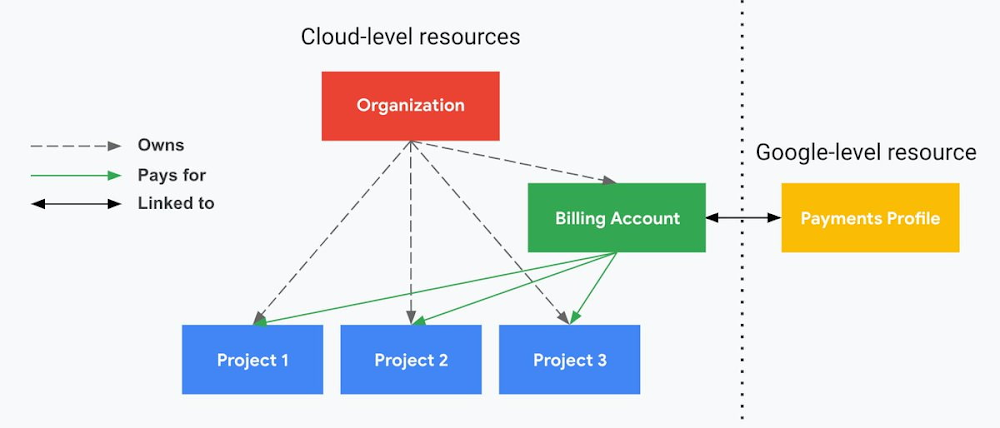
4. Billing that protects you from yourself
The project context gives you a logical container for the cost of the resources contained within it. My favorite part of this is that your billing entity is managed separately from the project itself. So you can delete a project and feel sure that all associated resources are gone and no longer racking up charges … without also trashing your ability to pay for future projects you might spin up.
(Related: the free tier does not charge you money unless you click a big button that basically says “YES, IT’S OK TO CHARGE ME MONEY.” This guarantee, combined with the familiarity of Google Accounts for access, are the main reasons I now recommend Google Cloud to beginners in my network who are looking for a safe place to learn and explore cloud.)
5. Organizational structure != billing structure
For organizations, billing is decoupled from the organization root. So permissions inheritance is a separate design decision from chargeback, as it should be. This keeps your Google Cloud footprint from converging toward Conway’s Law.
6. SSO that just works
Want to use the CLI? You get SSO out of the box with your Google Account—no corporate organization required, and no manual shuffling with config files and access keys. Or, better yet, you can use Cloud Shell to run gcloud commands right in your browser, even (especially?) on the docs pages. (Random trivia: I think Cloud Shell is the only native cloud service that has the same name across AWS, Azure, and Google Cloud–but Google’s version has been around the longest and as far as I can tell is the most fully-featured.)
7. One group to rule them all
Remember how user entities are just Google accounts? Guess what: you can use Google Groups to manage group access to IAM roles! That’s right: one set of users with permissions across docs, email, and cloud. It’s one reason why Google Workspace makes sense as a core piece of Google Cloud; it really does function like just another cloud service from an identity standpoint.
8. Never lose your place
In other clouds, I’ve experienced a problem I call the Timeout of Doom: when your console session expires, you’re left on a generic error screen and it’s up to you to figure out how to rebuild your context from scratch–starting with remembering what account you used in the first place. Imagine my delight to realize that reaching your Google Cloud console is as easy as bookmarking a single URL. console.cloud.google.com works and remembers who you are (or, at least, suggests the set of people you might be)—no mystery logouts or redirects.
9. Progressive complexity FTW
In my experience it’s been common for cloud providers to design most of their account features for organizations: if you’re an independent developer, you get more exposure to dangerous bills, less access to helpful SSO features, and generally must fend for yourself in a world that wasn’t really created with you in mind.
I love that Google Cloud has found a way to work with enterprises while still maintaining their roots as a cloud that developers love to use. Sign in with your personal Google account, attach it to an organization when-and-if you’re ready, and in the meantime you get the same thoughtfulness around SSO and billing as the giant shop down the street.
I’m not going to tell you my experience has been seamless; there are footguns here (every Google Workspace integration creates a new project?), and I’m still learning. But it’s that “intentionality” thing again. The Google Cloud identity and environment experience feels like it was designed, not just accreted; there’s an elegant simplicity to it that makes cloud feel fresh and exciting to me all over again. I can’t wait to see what’s next.
In the meantime, I highly encourage you to do what I did and spin up a free trial to try things out for yourself. Then hit me up on Twitter with your favorite Google Cloud identity or environment feature!
5224
Of your peers have already watched this video.
17:00 Minutes
The most insightful time you'll spend today!
AppSheet: Reduce Shadow IT and Accelerate Development of Enterprise-grade Apps
Google Cloud findings suggest that nearly 40 percent of organizations’ investments are consumed by shadow IT and can be a detractor to the adoption of cutting-edge tools and solutions. Also, about 51 percent of the surveyed executives are of the opinion that the inability to adapt to digital transformation trends and practices are at the risk of going out of business in the next 3-4 years. However, enterprises need not be blindsided by the mounting expenses involved with the implementation and optimization of solutions and tools meant for empowering employees. AppSheet, Google Cloud’s no-code application development and automation platform is at the helm of empowering organizations to custom build apps for employees without relying on third-party services.
Watch the video from the Google Workspace sessions of Next ’21 to hear experts’ insights on AppSheet to effectively govern workforce and ward off security threats to helps employees build enterprise-grade applications!
Announcement: Merger of Google’s Data Processing Terms into CDPA

2900
Of your peers have already read this article.
1:30 Minutes
The most insightful time you'll spend today!
At Google, we are constantly looking to improve our products, services, and contracts so that we can better serve our customers. To this end, we are pleased to announce that we have updated and merged our data processing terms for Google Cloud, Google Workspace (including Workspace for Education), and Cloud Identity (when purchased separately) into one combined Cloud Data Processing Addendum (the “CDPA”).
The CDPA maintains the benefits of the previously separate Data Processing and Security Terms for Google Cloud customers and Data Processing Amendment for Google Workspace and Cloud Identity customers, while streamlining and strengthening Google’s data processing commitments. A corresponding new CDPA (Partners) offers equivalent commitments to Google Cloud partners.
As part of this update, we have also incorporated the new international data transfer addendum issued by the U.K. Information Commissioner (“U.K. Addendum”). The U.K. Addendum allows the EU Standard Contractual Clauses (“SCCs”) to be used for transfers of personal data under the U.K. GDPR, replacing the separate U.K. SCCs that previously formed part of our terms. For an overview of the European legal rules for data transfers and our approach to implementing the EU SCCs and U.K. Addendum, please see our updated whitepaper. You can view our SCCs here.
While our data processing terms have been renamed, consolidated, and updated, our commitment to protecting the data of all Google Cloud, Workspace and Cloud Identity customers and all Google Cloud partners, and to enabling their compliance with data transfer and other regulatory requirements, remains unchanged.
For more information about our privacy commitments for Google Cloud, Google Workspace, and Cloud Identity, please see our Privacy Resource Center.
More Relevant Stories for Your Company

Strengthening Your Network: The Benefits of Network Firewall Policies Over VPC Firewall Rules
In the fall of 2022, we announced new policy constructs for Google Cloud Firewall, a scalable, cloud-first firewall service that helps secure traffic flow to and from workloads in Google Cloud, and whose distributed architecture enables simplified, granular control including micro-segmentation. Whereas legacy VPC firewall rules included network tags that were not governed

Cloud Security : The First Priority for Enterprises
Cloud-based solutions were a technology life raft for organizations during the COVID-19 pandemic as employees took to the virtual office and companies scrambled to adjust to a distributed, remote reality. However, these rapid and substantial changes in the role of cloud technologies on the business came with an increased focus



Accelerate Your Digital Transformation Through a Modern Infrastructure
Learn about the latest advancements to Google Cloud Platform’s unique infrastructure to accelerate enterprise workloads and build planet scalable solutions. Hear how Google Cloud’s infrastructure enables you to solve problems faster, more securely, and at greater scale. See how Google Cloud is accelerating the support for enterprise workloads like SAP,

IT Team Figures Out Easiest Way to Build Data Pipelines and Create ML Models
Building a strong brand in today's hyper-competitive business environment takes vision. It also requires a flexible, easily managed approach to digital asset management (DAM), so marketing professionals and other stakeholders can easily share, store, track, and manipulate assets to build the brand. Many of today's leading companies, including JetBlue, Slack,
