






How to Build a BI Dashboard With Google Data Studio and BigQuery
READ FULL INTRODOWNLOAD AGAIN5189
Of your peers have already downloaded this article
2:30 Minutes
The most insightful time you'll spend today!

1281
Of your peers have already downloaded this article
4:30 Minutes
The most insightful time you'll spend today!
Google Cloud’s managed database services can help you innovate faster and reduce operational overhead. The migration tools and resources included in this whitepaper will help you plan your migration.
This whitepaper provides guidance on:
- Managing services for maximum compatibility with your workloads
- Leveraging services that are compatible with the most popular commercial and open source engines, such as MySQL, PostgreSQL, and Redis
- Using robust tools and services to make migrations simple, secure, and fast with minimal downtime
- Understanding the value of using Google Cloud’s managed database services
OCR Engine Upgrade: Document AI Introduces 3 New Capabilities

2486
Of your peers have already read this article.
2:30 Minutes
The most insightful time you'll spend today!
Documents are indispensable parts of our professional and personal lives. They give us crucial insights that help us become more efficient, that organize and optimize information, and that even help us to stay competitive. But as documents become increasingly complex, and as the variety of document types continues to expand, it has become increasingly challenging for people and businesses to sift through the ocean of bits and bytes in order to extract actionable insights.
This is where Google Cloud’s Document AI comes in. It is a unified, AI-powered suite for understanding and organizing documents. Document AI consists of Document AI Workbench (state-of-the-art custom ML platform), Document AI Warehouse (managed service with document storage and analytics capabilities), and a rich set of pre-trained document processors. Underpinning these services is the ability to extract text accurately from various types of documents with a world-class Document Optical Character Recognition (OCR) engine.
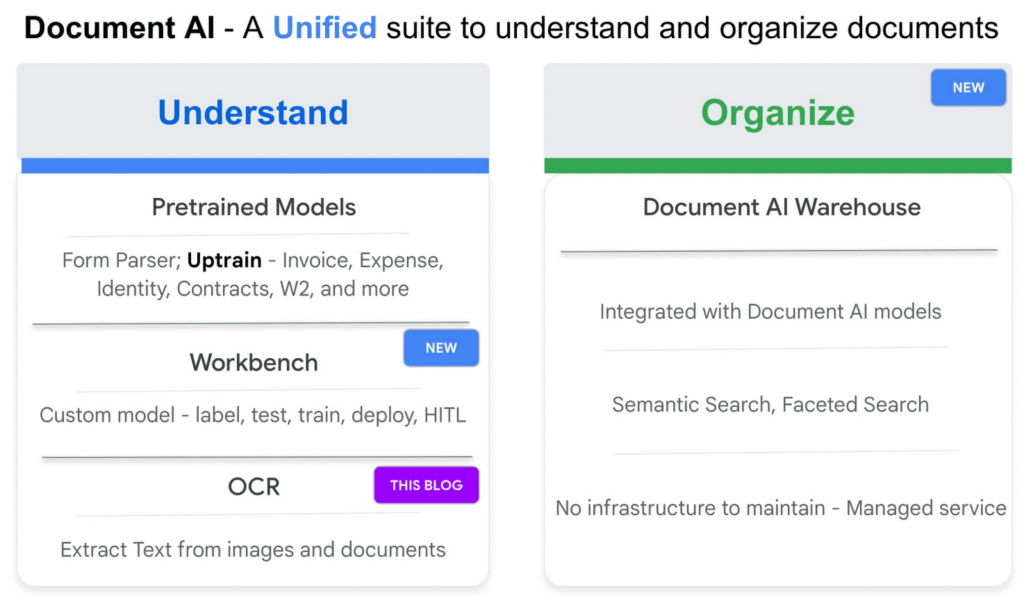
Google Cloud’s Document AI OCR takes an unstructured document as input and extracts text and layout (e.g., paragraphs, lines, etc.) from the document. Covering over 200 languages, Document AI OCR is powered by state-of-the-art machine learning models developed by Google Cloud and Google Research teams.
Today, we are pleased to announce three new OCR features in Public Preview that can further enhance your document processing workflows.
1. Assess page-level quality of documents with Intelligent Document Quality (IDQ)
With Document AI OCR, Google Cloud customers and partners can programmatically extract key document characteristics – word frequency distributions, relative positioning of line items, dominant language of the input document, etc. – as critical inputs to their downstream business logic. Today, we are adding another important document assessment signal to this toolbox: Intelligent Document Quality (IDQ) scores.
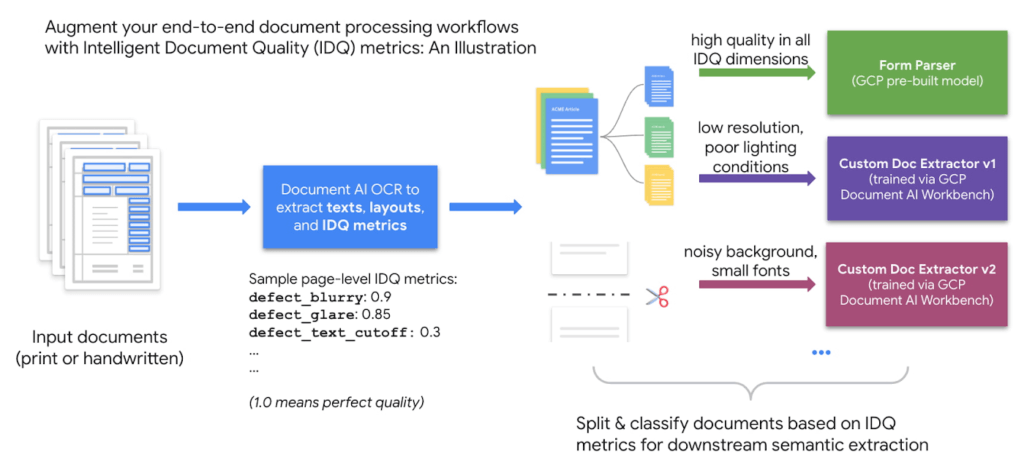
IDQ provides page-level quality metrics in the following eight dimensions:
- Blurriness
- Level of optical noise
- Darkness
- Faintness
- Presence of smaller-than-usual fonts
- Document getting cut off
- Text spans getting cut off
- Glares due to lighting conditions
Being able to discern the optical quality of documents helps assess which documents must be processed differently based on their quality, making the overall document processing pipeline more efficient. For example, Gary Lewis, Managing Director of lending and deposit solutions at Jack Henry, noted, “Google’s Document AI technology, enriched with Intelligent Document Quality (IDQ) signals, will help businesses to automate the data capture of invoices and payments when sending to our factoring customers for purchasing. This creates internal efficiencies, reduces risk for the factor/lender, and gets financing into the hands of cash-constrained businesses quickly.”
Overall, document quality metrics pave the way for more intelligent routing of documents for downstream analytics. The reference workflow below uses document quality scores to split and classify documents before sending them to either the pre-built Form Parser (in the case of high document quality) or a Custom Document Extractor trained specifically on lower-quality datasets.
2. Process digital PDF documents with confidence with built-in digital PDF support
The PDF format is popular in various business applications such as procurement (invoices, purchase orders), lending (W-2 forms, paystubs), and contracts (leasing or mortgage agreements). PDF documents can be image-based (e.g., a scanned driver’s license) or digital, where you can hover over, highlight, and copy/paste embedded text in a PDF document the same way as you interact with a text file such as Google Doc or Microsoft Word.
We are happy to announce digital PDF support in Document AI OCR. The digital PDF feature extracts text and symbols exactly as they appear in the source documents, therefore making our OCR engine highly performant in complex visual scenarios such as rotated texts, extreme font sizes and/or styles, or partially hidden text.
Discussing the importance and prevalence of PDF documents in banking and finance (e.g., bank statements, mortgage agreements, etc.), Ritesh Biswas, Director, Google Cloud Practice at PwC, said, “The Document AI OCR solution from Google Cloud, especially its support for digital PDF input formats, has enabled PwC to bring digital transformation to the global financial services industry.”
3. “Freeze” model characteristics with OCR versioning
As a fully managed cloud-based service, Document AI OCR regularly upgrades the underlying AI/ML models to maintain its world-class accuracy across over 200 languages and scripts. These model upgrades, while providing new features and enhancements, may occasionally lead to changes in OCR behavior compared to an earlier version.
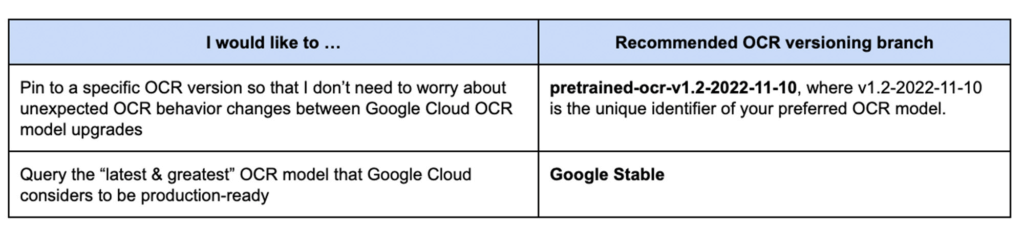
Today, we are launching OCR versioning, which enables users to pin to a historical OCR model behavior. The “frozen” model versions, in turn, give our customers and partners peace of mind, ensuring consistent OCR behavior. For industries with rigorous compliance requirements, this update also helps maintain the same model version, thus minimizing the need and effort to recertify stacks between releases. According to Jaga Kathirvel, Senior Principal Architect at Mr. Cooper, “Having consistent OCR behavior is mission-critical to our business workflows. We value Google Cloud’s OCR versioning capability that enables our products to pin to a specific OCR version for an extended period of time.”
With OCR versioning, you have the full flexibility to select the versioning option that best fits your business needs.
Getting Started on Document AI OCR
Learn more about the new OCR features and tutorials in the Document AI Documentation or try it directly in your browser (no coding required). For more details on what’s new with Document AI, don’t forget to check out our breakout session from Google Cloud Next 2022.
How the Telegraph is Reimagining Media with Google Cloud

10157
Of your peers have already read this article.
3:30 Minutes
The most insightful time you'll spend today!
Whether they’re reading the newspaper on the way to work, or catching up on the latest headlines on their smartphones, readers expect up-to-the-minute news wherever and whenever makes the most sense for them. As a result, media companies are increasingly looking for ways to improve, expand, and simplify their offerings, and they’re increasingly looking to the cloud to do it.
For more than 160 years The Telegraph has been counted on by readers across the United Kingdom and globally for award-winning news and journalism. An early adopter of cloud technology, it’s been a G Suite customer since 2008 and has already been using Google Cloud Platform to analyze digital behaviors to improve engagement and advertising performance since 2016.
Recently, The Telegraph announced it’s migrating fully to Google Cloud. By migrating all their production and pre-production services, they aim to deliver content faster, provide compelling experiences to readers, and reduce environmental impact.
“We are delighted to announce our newest collaboration with Google Cloud,” said Chris Taylor, Chief Information Officer, The Telegraph. “We have always worked closely with Google as they help us to provide our readers with great experiences on our digital products, collaboration software and internet scale through search. Their continued leadership in projects such as Kubernetes are enabling us to build flexible development environments that truly support DevOps.”
Powering the Digital Publishing Ecosystem
The Telegraph produces large volumes of digital content every day. It was imperative for them to find a cloud provider they could trust to support this ecosystem. By working with Google Cloud they have changed the way they see and engage with data: they can collect new information about their products every second and use that to continually hone their strategy. The Telegraph are placing more confidence and trust in the data captured about their content and now have one of the best available pieces of technology for capturing and analyzing the stories they publish in real-time.
Leveraging AI to support journalists
Time is critical when journalists are on a story, and The Telegraph wants to put important data in the hands of its journalists right when they need it. To do this, it will be using AutoML to classify content for journalists and make it more discoverable. For example, a reporter will be able to bring up relevant assets that link to their stories. It will also apply AutoML to classify Telegraph stock photos to help journalists attach compelling visual content to their stories faster.
Building compelling reader experiences with the help of APIs
Readers have an ever-increasing expectation of personalization. To meet this need, The Telegraph launched My Telegraph, currently live in beta, to offer registered readers personalized news experiences based on their interests or the particular journalists they want to follow. My Telegraph was developed on an API management platform provided by Google Cloud’s Apigee. You can learn more about how it’s applying API management to My Telegraph, in this blog post.
Working for environmental good
The Telegraph is the biggest selling quality newspaper in the UK, an accolade which requires it to print and distribute hundreds of thousands of copies each day. Optimal management of print production is important, and by using a combination of the cloud and machine learning, The Telegraph is better able to predict demand for physical newspapers, maximizing sales and minimizing waste. This makes great business sense for The Telegraph but also has great environmental benefit.
Transform ‘Dark Data’ from Documents with Document AI, Cloud Functions and Workflows

8186
Of your peers have already read this article.
2:00 Minutes
The most insightful time you'll spend today!
At enterprises across industries, documents are at the center of core business processes. Documents store a treasure trove of valuable information whether it’s a company’s invoices, HR documents, tax forms and much more. However, the unstructured nature of documents make them difficult to work with as a data source. We call this “dark data” or unstructured data that businesses collect, process and store but do not utilize for purposes such as analytics, monetization, etc. These documents in pdf or image formats, often trigger complex processes that have historically relied on fragmented technology and manual steps. With compute solutions on Google Cloud and Document AI, you can create seamless integrations and easy to use applications for your users. Document AI is a platform and a family of solutions that help businesses to transform documents into structured data backed by machine learning. In this blog post we’ll walk you through how to use Serverless technology to process documents with Cloud Functions, and with workflows of business processes orchestrating microservices, API calls, and functions, thanks to Workflows.
At Cloud Next 2021, we presented how to build easy AI-powered applications with Google Cloud. We introduced a sample application for handling incoming expense reports, analyzing expense receipts with Procurement Document AI, a DocAI solution for automating procurement data capture from forms including invoices, utility statements and more. Then organizing the logic of a report approval process with Workflows, and used Cloud Functions as glue to invoke the workflow, and do analysis of the parsed document.

We also open sourced the code on this Github repository, if you’re interested in learning more about this application.

In the above diagram, there are two user journeys: the employee submitting an expense report where multiple receipts are processed at once, and the manager validating or rejecting the expense report.
First, the employee goes to the website, powered by Vue.js for the frontend progressive JavaScript framework and Shoelace for the library of web components. The website is hosted via Firebase Hosting. The frontend invokes an HTTP function that triggers the execution of our business workflow, defined using the Workflows YAML syntax.
Workflows is able to handle long-running operations without any additional code required, in our case we are asynchronously processing a set receipt files. Here, the Document AI connector directly calls the batch processing endpoint for service. This API returns a long-running operation: if you poll the API, the operation state will be “RUNNING” until it has reached a “SUCCEEDED” or “FAILED” state. You would have to wait for its completion. However, Workflows’ connectors handle such long-running operations, without you having to poll the API multiple times till the state changes. Here’s how we call the batch processing operation of the Document AI connector:
- invoke_document_ai:call: googleapis.documentai.v1.projects.locations.processors.batchProcessargs:name: ${"projects/" + project + "/locations/eu/processors/" + processorId}location: "eu"body:inputDocuments:gcsPrefix:gcsUriPrefix: ${bucket_input + report_id}documentOutputConfig:gcsOutputConfig:gcsUri: ${bucket_output + report_id}skipHumanReview: trueresult: document_ai_response
Machine learning uses state of the art Vision and Natural Language Processing models to intelligently extract schematized data from documents with Document AI. As a developer, you don’t have to figure out how to fine tune or reframe the receipt pictures, or how to find the relevant field and information in the receipt. It’s Document AI’s job to help you here: it will return a JSON document whose fields are: line_item, currency, supplier_name, total_amount, etc. Document AI is capable of understanding standardized papers and forms, including invoices, lending documents, pay slips, driver licenses, and more.
A cloud function retrieves all the relevant fields of the receipts, and makes its own tallies, before submitting the expense report for approval to the manager. Another useful feature of Workflows is put to good use: Callbacks, that we introduced last year. In the workflow definition we create a callback endpoint, and the workflow execution will wait for the callback to be called to continue its flow, thanks to those two instructions:
- create_callback:call: events.create_callback_endpointargs:http_callback_method: "POST"result: callback_details...- await_callback:try:call: events.await_callbackargs:callback: ${callback_details}timeout: 3600result: callback_requestexcept:as: esteps:- update_status_to_error:...
In this example application, we combined the intelligent capabilities of Document AI to transform complex image documents into usable structured data, with Cloud Functions for data transformation, process triggering, and callback handling logic, and Workflows enabled us to orchestrate the underlying business process and its service call logic.
Going further
If you’re looking to make sense of your documents, turning dark data into structured information, be sure to check out what Document AI offers. You can also get your hands on a codelab to get started quickly, in which you’ll get a chance at processing handwritten forms. If you want to explore Workflows, quickstarts are available to guide you through your first steps, and likewise, another codelab explores the basics of Workflows. As mentioned earlier, for a concrete example, the source code of our smart expense application is available on Github. Don’t hesitate to reach out to us at @glaforge and @asrivas_dev to discuss smart scalable apps with us.
Increasing Production Efficiency: How AI Can Improve Asset Utilization and Minimize Downtime

2689
Of your peers have already read this article.
1:30 Minutes
The most insightful time you'll spend today!
Today, manufacturers are advancing on their factory digitalization journey, betting on innovative technologies to strengthen competitiveness, deliver sustainable growth, and offer new services. Macroeconomic factors – such as high energy costs, increasing labor, and raw material shortages – drive the need for urgent operational optimizations and automation.
Cloud capabilities have matured at an accelerated pace, giving manufacturers practical avenues to achieve these goals. Manufacturers are finding new ways to bring AI and machine learning (ML) to practical use cases, like predictive maintenance, anomaly detection, and asset utilization management. However, manufacturers struggle to adopt AI at scale due to challenges around data accessibility, infrastructure, and technology.
Google Cloud created purpose-built tools and solutions to organize manufacturing data, make it accessible and useful, and help manufacturers quickly take significant steps on this journey by reducing the time to value. In this post, we will explore a practical example of how manufacturers can use Google Cloud manufacturing solutions to train, deploy and extract value from ML-enabled capabilities to predict asset utilization and maintenance needs.
The journey to machine learning insights starts with accessible data
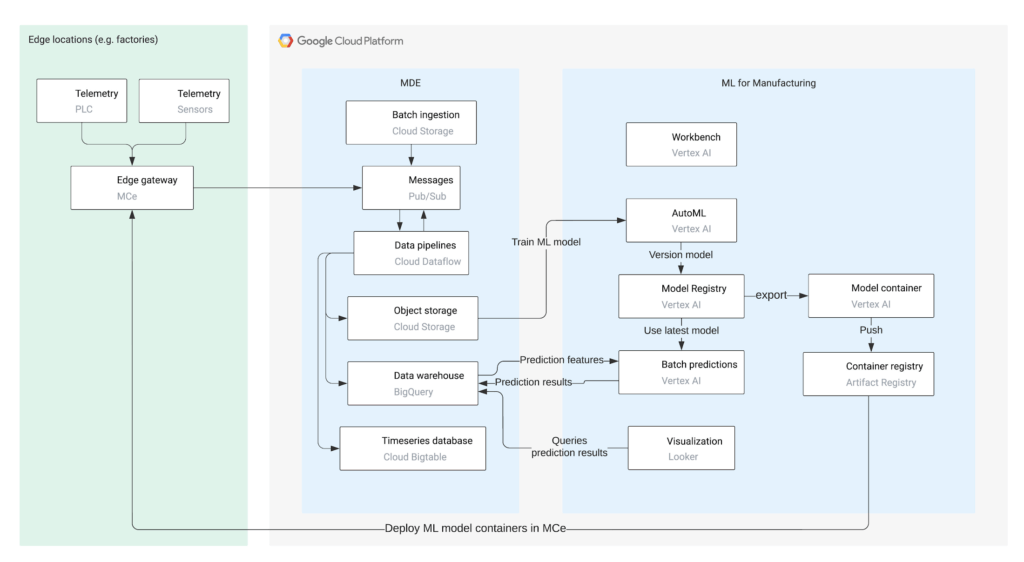
The first step to a successful machine learning project is to unify necessary data in a common repository. For this, we will use Manufacturing Connect, the factory edge platform co-developed with Litmus Automation, to connect to manufacturing assets and stream the asset telemetries to Pub/Sub.
After the telemetry messages are published to Pub/Sub, Dataflow will identify each message based on its structure and apply corresponding normalizations and transformations, which are preconfigured in Manufacturing Data Engine. Once the messages are processed, the messages will be routed to Cloud Storage, BigQuery, and/or Cloud BigTable based on user configuration.
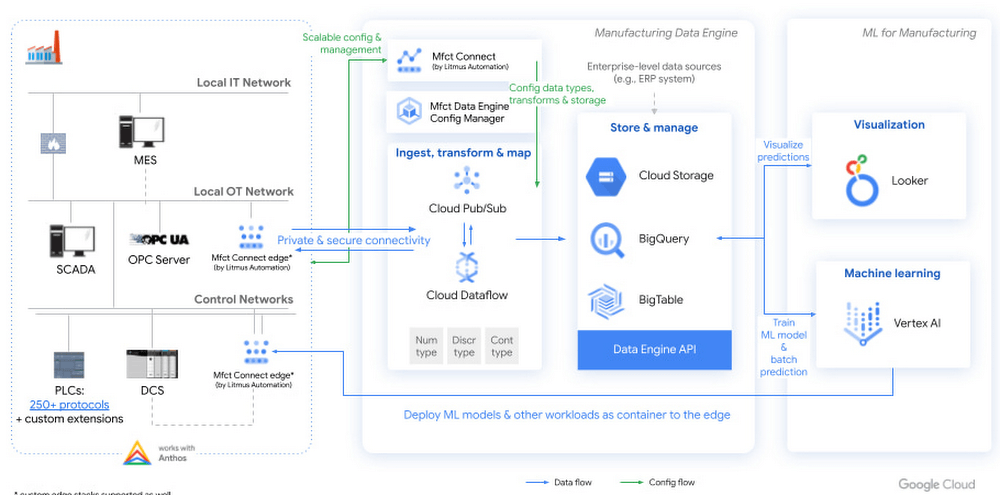
Figure 1. High level architecture diagram of machine learning with Manufacturing Data Engine
To train a machine learning model, manufacturers can use Vertex AI AutoML to build a no-code model based on the training data stored in the Manufacturing Data Engine.
Then, users can trigger a batch prediction job in Vertex AI or export the AutoML model to run on the edge component of Manufacturing Connect for real-time prediction. Regardless of the model deployment methods, the prediction and explanation results will be ingested into Manufacturing Data Engine, which can be analyzed and visualized in Looker.
A blueprint for classifying asset condition
The following scenario is based on a hypothetical company, Cymbal Materials. This company is a factitious discrete manufacturing company that runs 50+ factories in 10+ countries. 90% of Cymbal Materials manufacturing processes involve milling, which are accomplished using industrial computer numerical control (CNC) milling machines. Although their factories implement routine maintenance checklists, there are unplanned and unknown failures that happen occasionally. However, many of the Cymbal Materials factory workers lack the experience to identify and troubleshoot failures due to labor shortage and high turnover rate in their factories. Hence, Cymbal Materials is working with Google Cloud to build a machine learning model that can identify and analyze failures on top of Manufacturing Connect, Manufacturing Data Engine, and Vertex AI.
For the pilot, Cymbal Materials forms a team of manufacturing engineers and data scientists to evaluate the feasibility of solving the tool wear detection problem. To avoid compliance concern, the Cymbal Materials team chooses to start with a public tool wear detection dataset hosted on Kaggle. This dataset is collected from running machining experiments on 2″ x 2″ x 1.5″ wax blocks in a CNC milling machine. The dataset contains measurements from the 4 motors (X,Y, Z axes and spindle) and program values in the CNC machine, which maps well to the data that Cymbal Materials collects for their CNC milling machines.
To start, the Cymbal Materials data scientists download the tool wear detection dataset from Kaggle and upload the dataset to Cloud Storage. Then, the data scientists use Vertex AI to:
- Perform exploratory data analysis using Vertex AI Workbench
- Train machine learning models using Vertex AI AutoML
- Deploy machine learning models to perform batch prediction and export AutoML models for edge deployment
- Interpret predictions using Vertex Explainable AI
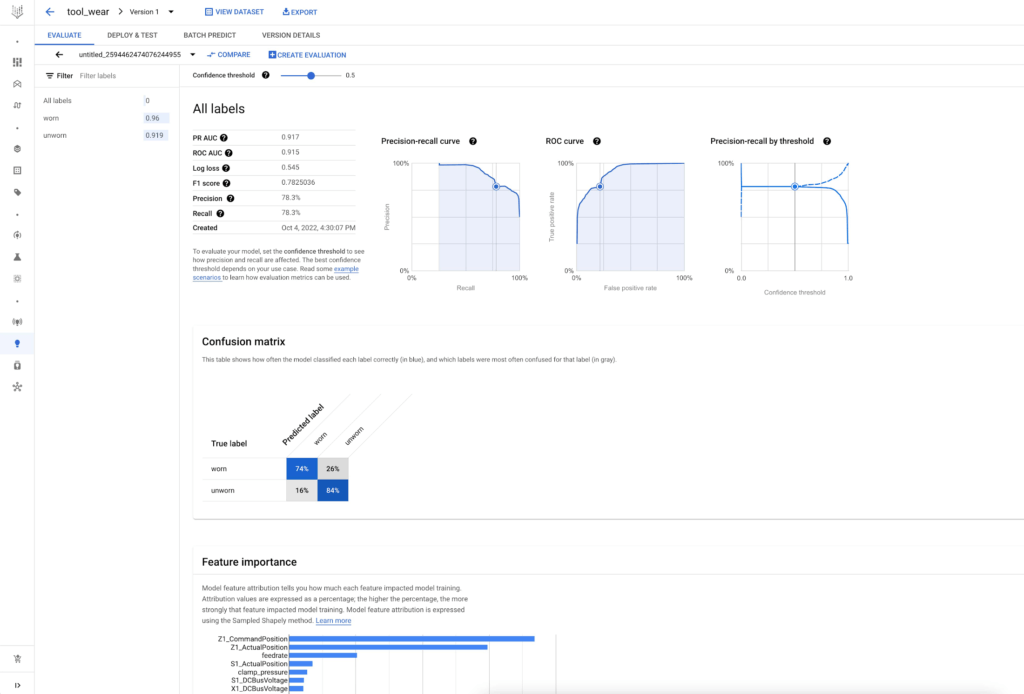
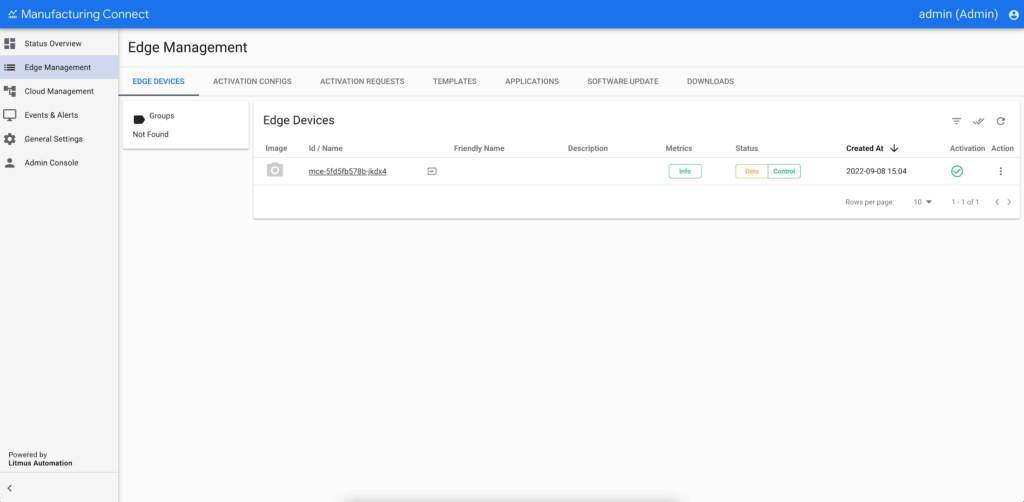
After seeing great performance of the AutoML tabular model, the Cymbal Materials data scientists decide to use the AutoML model to predict on the actual CNC milling machine telemetries from their factories and validate the generalizability of the AutoML model. They ask the manufacturing engineers to deploy Manufacturing Connect in a Cymbal Materials factory and stream telemetries for one CNC milling machine to the Manufacturing Data Engine.
Manufacturing Connect includes an edge component that can gather data from manufacturing assets via an extensive library of 250+ communication protocols. The edge component of Manufacturing Connect comes with built-in Node-RED and Docker runtime, which support running custom workflows and machine learning models at the edge.
Using pre-defined hierarchies, Manufacturing Connect pushes asset telemetries and states to Pub/Sub.
After the factory operational data are ingested into Pub/Sub, Cymbal Materials uses Manufacturing Data Engine to:
- Normalize, transform, and contextualize real-time operational data with slowly changing metadata
- Batch ingest historical operational data and prediction results
- Route data dynamically to Cloud Storage, BigQuery, and/or Cloud BigTable
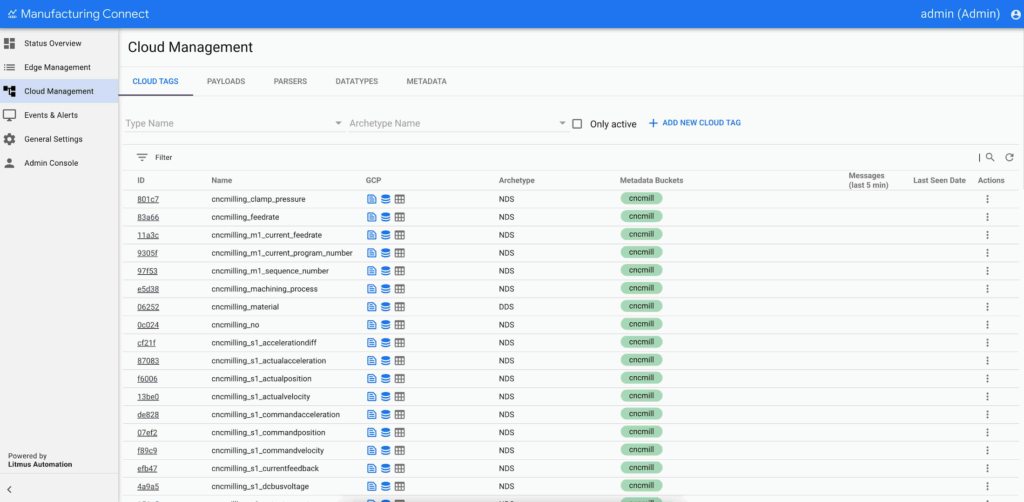
Figure 5. Manufacturing Data Engine configuration in Manufacturing Connect.
Using the trained AutoML tabular model and real-time telemetries from CNC milling machines, the data scientists trigger a batch prediction job on the CNC milling machine telemetries in BigQuery. The data scientists configure the batch prediction to output prediction results in Cloud Storage such that Manufacturing Data Engine can batch ingest the prediction results after the batch prediction job completes.
To consume the prediction results, the Cymbal Materials manufacturing engineers use Looker to create visualizations. The dashboard allows the manufacturing engineers to:
- Visualize the CNC milling machine actual and predicted tool conditions over time
- Explain the prediction results by summarizing the top attributing features
- Create alerts based on the predicted tool condition for their assets
- Take actions by contacting the supplier and/or scheduling maintenance for their assets
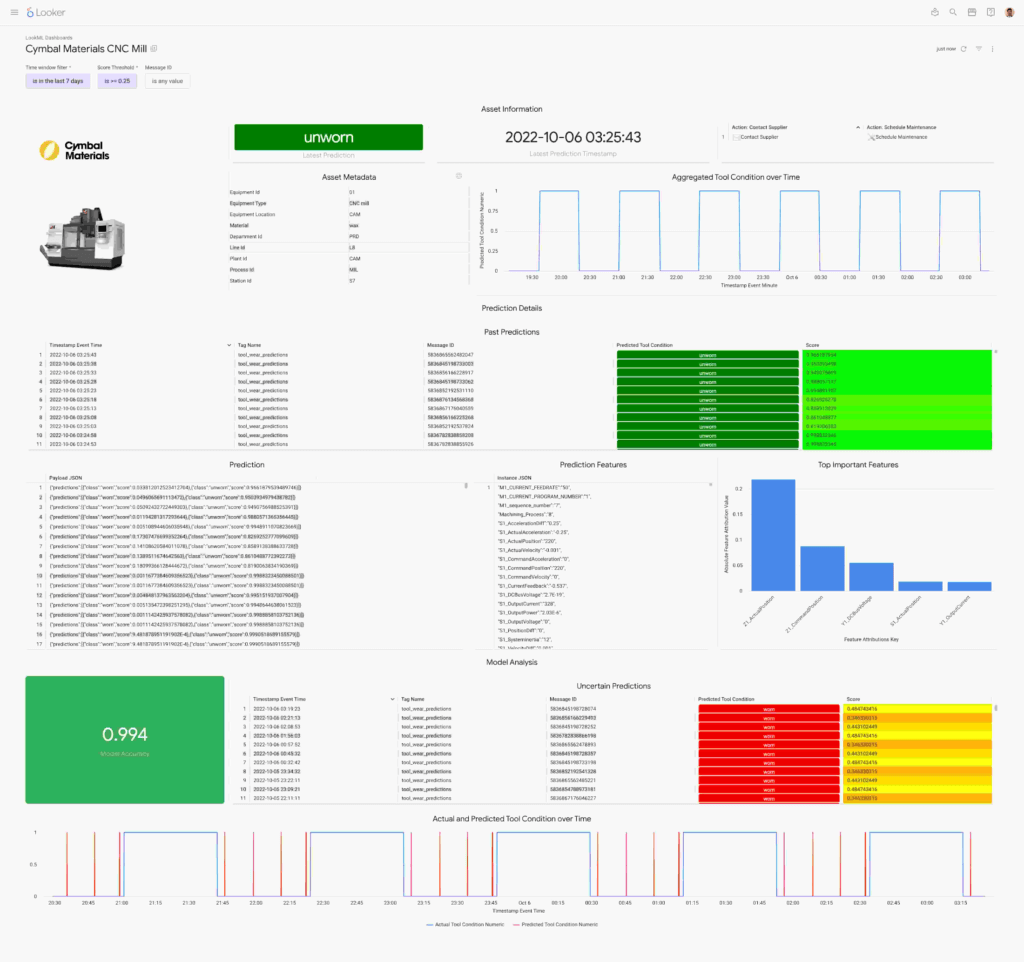
Figure 6. CNC mill wear prediction displayed in a Looker dashboard.
From edge to cloud, improving production efficiency for manufacturers
To support the entire factory digitalization value journey, manufacturers are looking for capabilities from simple visualizations to predictive ML models. Robust solutions, such as the one covered here, provide rapid paths for engineers to extract insight from their factory data.
Having a common data repository for manufacturing data, industry-leading machine learning platform, and versatile dashboard components accelerate manufacturer’s digital transformation.
This solution brings the best of Google Cloud’s data analytics and artificial intelligence capabilities in an industrial environment. Manufacturing Connect creates the link between industrial machinery and Manufacturing Data Engine, the cloud platform where the manufacturing data are processed, normalized, contextualized, and stored in a ready-to-consume format. Vertex AI can build, deploy, and scale machine learning models using data stored in the Manufacturing Data Engine. Vertex AI includes AutoML and Workbench for training models without code and training custom models with code-first experience respectively.
Learn more about how Google Cloud is transforming manufacturing to meet changing customer expectations at our Google Cloud Next Manufacturing playlist.
What’s next
More Relevant Stories for Your Company


AI-as-a-Service is Here. It’s Really Almost Plug-and-Play
What is the one thing that enterprises want providers to do vis-à-vis AI? To decomplexify it. Today, the path to AI adoption is confusing, and requires skills that are out of reach for most enterprises. That’s what Google Cloud is addressing. “It used to be—still is true—that AI's a pretty




Google Cloud’s ML-based Image Classification App: A Key to Global Wildlife Conservation
Wildlife provides critical benefits to support nature and people. Unfortunately, wildlife is slowly but surely disappearing from our planet and we lack reliable and up-to-date information to understand and prevent this loss. By harnessing the power of technology and science, we can unite millions of photos from [motion sensored cameras]

Woolaroo App and Vision AI are Helping Users Explore Native Languages
One of the most vibrant elements of culture is the use of native languages and the time-honored tradition of storytelling. Anthropologists and linguists have been vocal on the role that language plays in the preservation of culture and how it contributes to the appreciation of heritage. Unfortunately, of the more

Simplifying Unstructured Data Analytics with BigQuery ML and Vertex AI: A Comprehensive Guide
Unstructured data such as images, speech and textual data can be notoriously difficult to manage, and even harder to analyze. The analysis of unstructured data includes use cases such as extracting text from images using OCR, sentiment analysis on customer reviews and simplifying translation for analytics. All of this data
