





Simplifying Unstructured Data Analytics with BigQuery ML and Vertex AI: A Comprehensive Guide

1533
Of your peers have already read this article.
6:30 Minutes
The most insightful time you'll spend today!
Unstructured data such as images, speech and textual data can be notoriously difficult to manage, and even harder to analyze. The analysis of unstructured data includes use cases such as extracting text from images using OCR, sentiment analysis on customer reviews and simplifying translation for analytics. All of this data needs to be stored, managed and made available for machine learning.
The new BigQuery ML inference engine empowers practitioners to run inferences on unstructured data using pre-trained AI models. The results of these inferences can be analyzed to extract insights and improve decision making. This can all be done in BigQuery, using just a few lines of SQL.
In this blog, we’ll explore how the new BigQuery ML inference engine can be used to run inferences against unstructured data in BigQuery. We’ll demonstrate how to detect and translate text from movie poster images, and run sentiment analysis against movie reviews.
BigQuery ML’s new inference engine
Google Cloud is home to a suite of pre-trained AI models and APIs. The BigQuery ML inference engine can call these APIs and manage the responses on your behalf. All you have to do is define the model you want to use and run inferences against your data. All of this is done in BigQuery using SQL. The inference results are returned in JSON format and stored in BigQuery for analysis.
Why run your inferences in BigQuery?
Traditionally, working with AI models to run inferences required expertise in programming languages like Python. The ability to run inferences in BigQuery using just SQL can make generating insights from your data using AI simple and accessible. BigQuery is also serverless, so you can focus on analyzing your data without worrying about scalability and infrastructure.
The inference results are stored in BigQuery, which allows you to analyze your unstructured data immediately, without the need to move or copy your data. A key advantage here is that this analysis can also be joined with structured data stored in BigQuery, giving you the opportunity to deepen your insights. This can simplify data management and minimize the amount of data movement and duplication required.
Which models are supported?
For now, the BigQuery ML inference engine can be used with these pre-trained Vertex AI models:
- Vision AI API: This model can be used to extract features from images managed by BigQuery Object Tables and stored on Cloud Storage. For example, Vision AI can detect and classify objects, or read handwritten text.
- Translation AI API: This model can be used to translate text in BigQuery tables into over one hundred languages.
- Natural Language Processing API: This model can be used to derive meaning from textual data stored in BigQuery tables. For example, features like sentiment analysis can be used to determine whether the emotional tone of text is positive or negative.
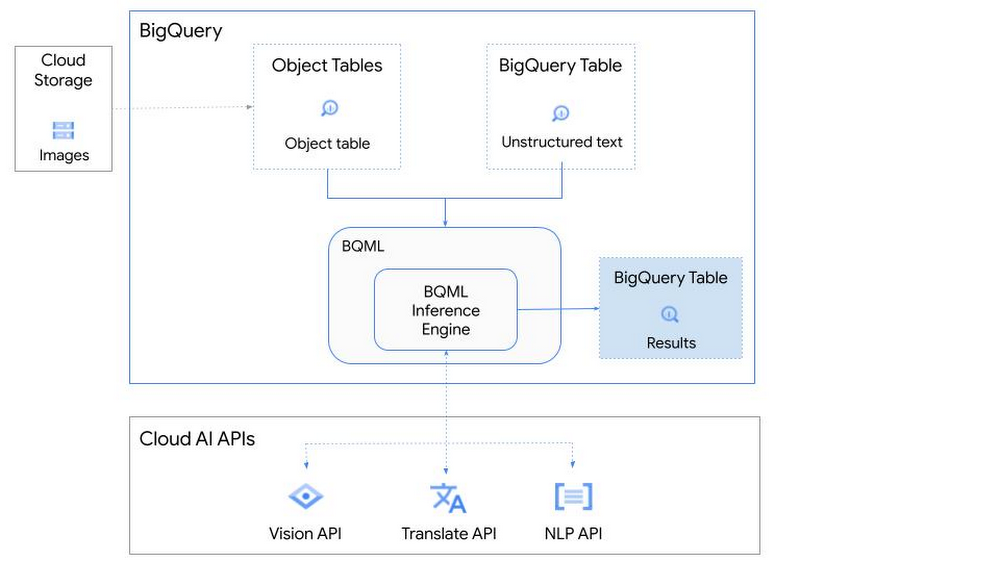
So, how does this work in practice? Let’s look at an example using images of movie posters

- We will define our pre-trained models for Vision AI, Translation AI and NLP AI in BigQuery ML.
- We’ll then use Vision AI to detect the text from some classic movie posters images.
- Next, we’ll use Translation AI to detect any foreign posters and translate them to a language of our choosing – English in this case.
- Finally, we’ll combine our unstructured data with structured data in BigQuery.
We’ll use the extracted movie titles from our movie posters to look up the viewer reviews from the BigQuery IMDB public dataset. We can then run sentiment analysis against these reviews using NLP AI.
Note: The BigQuery ML inference engine is currently in Preview. You will need to complete this enrollment form to have your project allowlisted for use with the BQML Inference Engine.
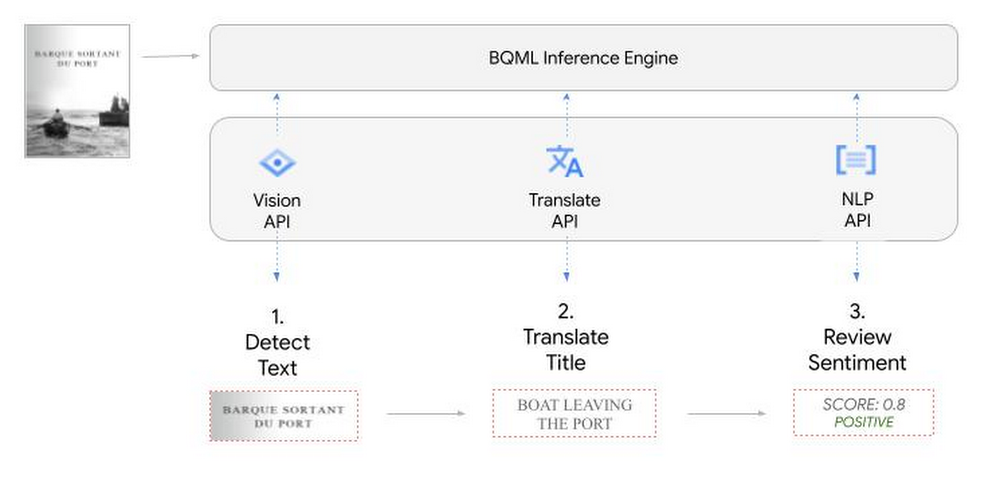
We’ll give examples of the BigQuery SQL needed to define your models and run your inferences. You’ll want to check out our notebook for a detailed guide on how to get this up and running in your Google Cloud project.
1. Define your AI Models in BigQuery
You will need to enable the APIs listed below, and also create a Cloud resource connection to enable BigQuery to interact with these services.
| API | Model Name |
| Vision AI API | Cloud_ai_vision_v1 |
| Translation AI API | Cloud_ai_translate_v3 |
| NLP AI API | Cloud_ai_natural_language_v1 |
You can then run the CREATE MODEL query for each AI service to create your pretrained models, replacing the model_name as required.
CREATE OR REPLACE MODEL
`{PROJECT_ID}.{DATASET_ID}.{VISION_MODEL_NAME}`
REMOTE WITH
CONNECTION `{PROJECT_ID}.{REGION}.{CONN_NAME}`
OPTIONS ( remote_service_type = '<model_name>' );
2. Use the Vision AI API to detect text in images stored in Cloud Storage
You will need to create an object table for your images in Cloud Storage. This read-only object table provides metadata for images stored in Cloud Storage:
CREATE OR REPLACE EXTERNAL TABLE
`{PROJECT_ID}.{DATASET_ID}.{OBJECT_TABLE_NAME}`
WITH
CONNECTION `{REGION}.{CONN_NAME}`
OPTIONS (object_metadata = 'SIMPLE', uris = ['{BUCKET_LOCATION}/*']);
To detect the text from our posters, you can then use ML.ANNOTATE_IMAGE and specify the text_detection feature.
SELECT
       ml_annotate_image_result.full_text_annotation.text AS text_content,
       *
FROM
       ML.ANNOTATE_IMAGE(
         MODEL `{PROJECT_ID}.{DATASET_ID}.{VISION_MODEL_NAME}`,
         TABLE `{DATASET_ID}.{OBJECT_TABLE_NAME}`,
         STRUCT(['TEXT_DETECTION'] AS vision_features));
A JSON response will be returned to BigQuery that includes the text content and language code of the text. You can parse the JSON to a scalar result using the dot annotation highlighted above.

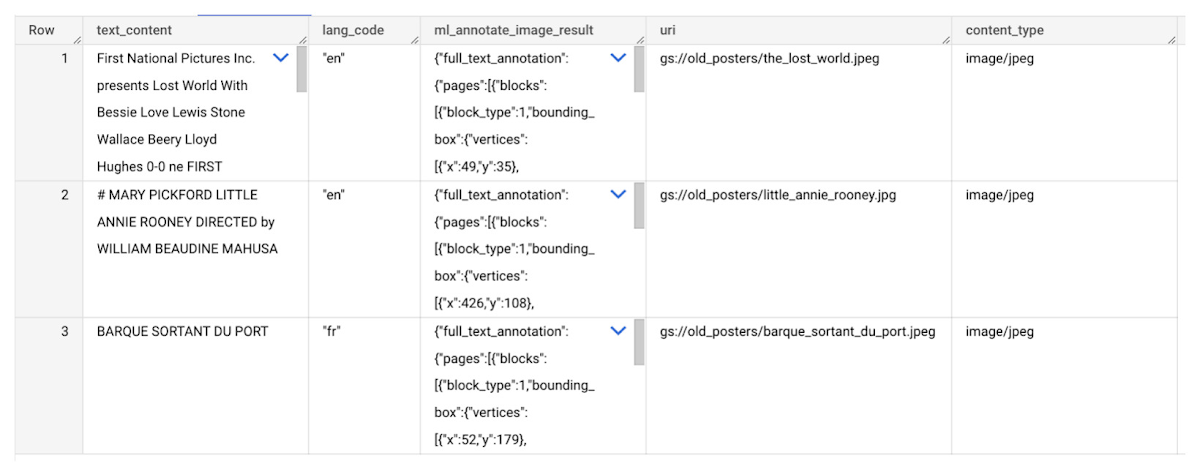
3. Use the Translation AI API to translate foreign movie titles
ML.TRANSLATE can now be used to translate the foreign titles we’ve extracted from our images into English. You just need to specify the target language and the table of the movie posters for translation:
SELECT
text_content,
STRING(ml_translate_result.translations[0].detected_language_code)
as original_language,
STRING(ml_translate_result.translations[0].translated_text)
as translated_title
FROM
  ML.TRANSLATE(
MODEL `{PROJECT_ID}.{DATASET_ID}.{TRANSLATE_MODEL_NAME}`,
TABLE `{DATASET_ID}.image_results`,
STRUCT('TRANSLATE_TEXT' as translate_mode, "en" as target_language_code));
Note: The table column with the text you want to translate must be named text_content:
The table of results will include json that can be parsed to extract both the original language and the translated text. In this case, the model has detected that title text is in French and has translated it to English:

4. Finally, use natural language processing (NLP) to run sentiment analysis against movie reviews
You can easily join inference results from your unstructured data with other BigQuery datasets to bolster your analysis. For example, we can now join the movie titles we extracted from our posters with thousands of movie reviews stored in BigQuery’s IMDB public dataset `bigquery-public-data.imdb.reviews`.
You can use ML.UNDERSTAND_TEXT with the analyze_sentiment feature to run sentiment analysis against some of these reviews to determine whether they are positive or negative:
SELECT
   primary_title, start_year, text_content AS review,
   FLOAT64(ml_understand_text_result.document_sentiment.score) AS score,
   FLOAT64(ml_understand_text_result.document_sentiment.magnitude) AS magnitude,
FROM
   ML.UNDERSTAND_TEXT(
     MODEL `{PROJECT_ID}.{DATASET_ID}.{NLP_MODEL_NAME}`,
           (
           SELECT
             primary_title, start_year, review AS text_content
           FROM
             `bigquery-public-data.imdb.title_basics` titles
           JOIN
             `bigquery-public-data.imdb.reviews` reviews
           ON
             reviews.movie_id = titles.tconst
           WHERE
             UPPER(titles.primary_title) = 'THE LOST WORLD' AND
             start_year = 1925
           ),
      STRUCT("analyze_sentiment" AS nlu_option)) ;
Note: The table column with the text you want to analyze must be named text_content:
The JSON response will include a score and magnitude. The score indicates the overall emotion of the text while the magnitude indicates how much emotional content is present:
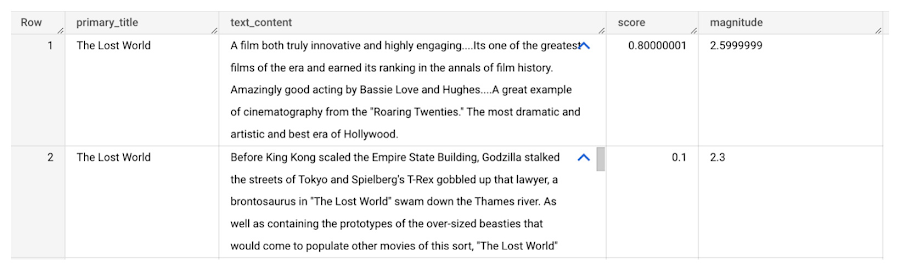
So, how did the Lost World compare with other movies that year?
To wrap up, we’ll compare the average review score of the 1925 Lost World movie to other movies released that year to see which was more popular. This can be done using familiar SQL analysis:
SELECT
 primary_title, start_year,
 AVG(FLOAT64(ml_understand_text_result.document_sentiment.score))AS av_score,
 AVG(FLOAT64(ml_understand_text_result.document_sentiment.magnitude)) AS av_magnitude
FROM
 ML.UNDERSTAND_TEXT(
   MODEL `{PROJECT_ID}.{DATASET_ID}.{NLP_MODEL_NAME}`,
         (
         SELECT
           primary_title, start_year, movie_id, review AS text_content
         FROM
           `bigquery-public-data.imdb.title_basics` titles
         JOIN
           `bigquery-public-data.imdb.reviews` reviews
         ON
           reviews.movie_id = titles.tconst
         WHERE
           start_year = 1925
         ),
   STRUCT("analyze_sentiment" AS nlu_option))
GROUP BY
   primary_title, start_year
ORDER BY
   av_score DESC;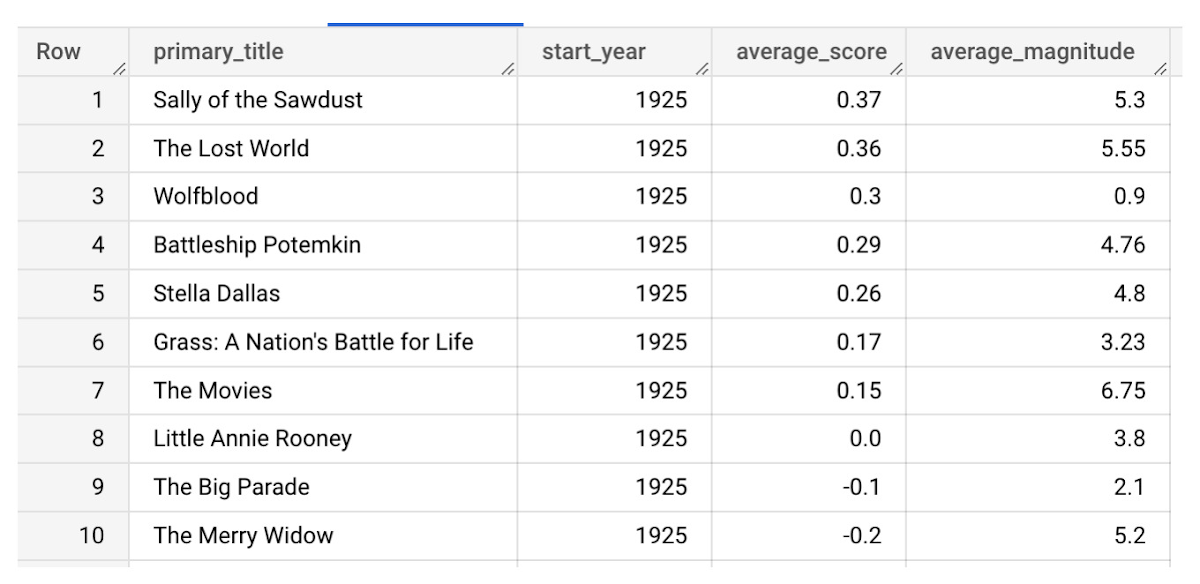
It looks like The Lost World narrowly missed out on the top spot to Sally of the Sawdust!
Want to learn more?
Check out our notebook for a step by step guide on using the BQML inference engine for unstructured data in Google Cloud. You can also check out our Cloud AI service table-valued functions overview page for more details. Curious about pricing? The BQML Pricing page gives a breakdown of how costs are applied across these services.
4 Methods How AI/ML Boosts Innovation and Reduces Costs

2920
Of your peers have already read this article.
2:30 Minutes
The most insightful time you'll spend today!
“Cloud Wisdom Weekly: for tech companies and startups” is a new blog series we’re running this fall to answer common questions our tech and startup customers ask us about how to build apps faster, smarter, and cheaper. In this installment, we explore how to leverage artificial intelligence (AI) and machine learning (ML) for faster innovation and efficient operational growth.
Whether they’re trying to extract insights from data, create faster and more efficient workflows via intelligent automation, or build innovative customer experiences, leaders at today’s tech companies and startups know that proficiency in AI and ML is more important than ever.
AI and ML technologies are often expensive and time-consuming to develop, and the demand for AI and ML experts still largely outpaces the existing talent pool. These factors put pressure on tech companies and startups to allocate resources carefully when considering bringing AI/ML into their business strategy. In this article, we’ll explore four tips to help tech companies and startups accelerate innovation and reduce costs with AI and ML.
4 tips to accelerate innovation and reduces costs with AI and ML
Many of today’s most innovative companies are creating services or products that couldn’t exist without AI—but that doesn’t mean they’re building their AI and ML infrastructure and pipelines from scratch. Even for startups whose businesses don’t directly revolve around AI, injecting AI into operational processes can help manage costs as the company grows. By relying on a cloud provider for AI services, organizations can unlock opportunities to energize development, automate processes, and reduce costs.
1. Leverage pre-trained ML APIs to jumpstart product development
Tech companies and startups want their technical talent focused on proprietary projects that will make a difference to the business. This often involves the development of new applications for an AI technology, but not necessarily the development of the AI technology itself. In such scenarios, pre-trained APIs help organizations quickly and cost-effectively establish a foundation on which higher-value, more differentiated work can be layered.
For example, many companies building conversational AI into their products and services leverage Google Cloud APIs such as Speech-to-Text and Natural Language. With these APIs, developers can easily integrate capabilities like transcription, sentiment analysis, content classification, profanity filtering, speaker diarization, and more. These powerful technologies help organizations focus on creating products rather than having to build the base technologies.
See this article for examples of why tech companies and startups have chosen Google Cloud’s Speech APIs for use cases that range from deriving customer insights to giving robots empathetic personalities. For an even deeper dive, see
- our AI product page to explore other APIs, including Translation, Vision, and more;
- and the Google Cloud Skills Boost for ML APIs.
2. Use managed services to scale ML development and accelerate deployment of models to production
Pre-trained models are extremely useful, but in many cases, tech companies and startups need to create custom models to either derive insights from their own data or to apply new use cases to public data. Regardless of whether they’re building data-driven products or generating forecasting models from customer data, companies need ways to accelerate the building and deployment of models into their production environments.
A data scientist typically starts a new ML project in a notebook, experimenting with data stored on the local machine. Moving these efforts into a production environment requires additional tooling and resources, including more complicated infrastructure management. This is one reason many organizations struggle to bring models into production and burn through time and resources without moving the revenue needle.
Managed cloud platforms can help organizations transition from projects to automated experimentation at scale or the routine deployment and retraining of production models. Strong platforms offer flexible frameworks, fewer lines of code required for model training, unified environments across tools and datasets, and user-friendly infrastructure management and deployment pipelines.
At Google Cloud, we’ve seen customers with these needs embrace Vertex AI, our platform for accelerating ML development, in increasing numbers since it launched last year. Accelerating time to production by up to 80% compared to competing approaches, Vertex AI provides advanced end-to-end ML Ops capabilities so that data scientists, ML engineers, and developers can contribute to ML acceleration. It includes low-code features, like AutoML, that make it possible to train high performing models without ML expertise.
Over the first half of 2022, our performance tests found that the number of customers utilizing AI Workbench increased by 25x. It’s exciting to see the impact and value customers are gaining with Vertex AI Workbench, including seeing it help companies speed up large model training jobs by 10x and helping data science teams improve modeling precision from the 70-80% range to 98%.
If you are new to Vertex AI, check out this video series to learn how to take models from prototype to production. For deeper dives, see
- this article about Vertex AI’s role in an ambitious project to measure climate change with AI;
- BigQuery has built-in Machine Learning (ML) and Analytics that you can use to create no-code predictions using just SQL queries.
- this blog about how Vertex AI and BigQuery work together to make data analysis easier and more powerful;
- and this blog about Example-based explanations, one of our most recent updates to make model iteration more intuitive and efficient.
3. Harness the cloud to match hardware to use cases while minimizing costs and management overhead
ML infrastructure is generally expensive to build, and depending on the use case, specific hardware requirements and software integrations can make projects costly and complicated at scale. To solve for this, many tech companies and startups look to cloud services for compute and storage needs, attracted by the ability to pay only for resources they use while scaling up and down according to changing business needs.
At Google Cloud, customers share that they need the ability to optimize around a variety of infrastructure approaches for diverse ML workloads. Some use Central Processing Units (CPUs) for flexible prototyping. Others leverage our support for NVIDIA Graphics Processing Units (GPUs) for image-oriented projects and larger models, especially those with custom TensorFlow operations that must run partially on CPUs. Some choose to run on the same custom ML processors that power Google applications—Tensor Processing Units (TPUs). And many use different combinations of all of the preceding.
Beyond matching use cases to the right hardware and benefiting from the scale and operational simplicity of a managed service, tech companies and startups should explore configuration features that help further control costs. For example, Google Cloud features like time-sharing and multi-instance capabilities for GPUs — as well as features like Vertex AI Training Reduction Server — are built to optimize GPU costs and usage.
Vertex AI Workbench also integrates with the NVIDIA NGC catalog for deploying frameworks, software development kits and Jupyter Notebooks with a single click—another feature that, like Reduction Server, speaks to the ways organizations can make AI more efficient and less costly via managed services.
4. Implement AI for operations
Besides using pre-trained APIs and ML model development to develop and deliver products, startup and tech companies can improve operational efficiency, especially as they scale, by leveraging AI solutions built for specific business and operational needs, like contract processing or customer service.
Google Cloud’s DocumentAI products, for instance, apply ML to text for use cases ranging from contract lifecycle management to mortgage processing. For businesses whose customer support needs are growing, there’s Contact Center AI, which helps organizations build intelligent virtual agents, facilitate handoffs as appropriate between virtual agents and human agents, and generate insights from call center interactions. By leveraging AI to help manage operational processes, startups and tech companies can allocate more resources to innovation and growth.
Next steps toward an intelligent future
The tips in this article can help any tech company or startup find ways to save money and boost efficiency with AI and ML. You can learn more about these topics by registering for Google Cloud Next, kicking off October 11, where you’ll hear Google Cloud’s latest AI news, discussions, and perspectives—in the meantime, you can also dive into our Vertex AI quickstarts and BigQuery ML tutorials. And for the latest on our work with tech companies and startups, be sure to visit our Startups page.
5486
Of your peers have already downloaded this article
10:30 Minutes
The most insightful time you'll spend today!
Modernizing your data warehouse is one way to keep up with evolving business requirements and harness new technology. For many companies, cloud data warehousing offers a fast, flexible, and cost-effective alternative to traditional on-premises solutions.
In a report sponsored by Google Cloud, TDWI examines the rise of cloud-based data warehouses and identifies associated opportunities, benefits, and best practices.
Featuring strategic advice from Google experts, it answers questions such as:
- What’s driving businesses to consider the cloud for their data warehousing strategy?
- What are the advantages of a cloud-native data warehouse?
- How can you coordinate data warehouse modernization with other modernization projects?
- What’s the first step in migrating your data warehouse to the cloud?
- How will cloud data warehousing affect your business’s security posture?
Download the complete report to learn more about cloud data warehousing and how it can help your business transform with the times — and prepare for the future.
Hike: Processing Analytics Queries 20X Faster with Google Cloud Platform

5570
Of your peers have already read this article.
2:30 Minutes
The most insightful time you'll spend today!
After a seamless migration to Google Cloud Platform with CloudCover and Google Cloud Professional Services, Hike has reduced its costs by 20% and processed analytics queries 20 times faster than with its previous cloud provider. The business is also using AI and machine learning to enhance the experience provided by a new sticker-based messaging app, Hike Sticker Chat.
India is a market of opportunity for businesses that provide messaging apps to consumers. With more than 1.3 billion people, the country is the second most populous in the world. However, global messaging app providers face a robust market challenge from Hike, a home-grown internet and technology startup. Launched in 2012, Hike provides innovative products such as Hike Messenger and more recently the AI- and machine-learning-enabled Hike Sticker Chat, a service that enables young people in the country to express themselves through digital stickers.
The business says it understands the people of India and communication like no one else, while its mission is to reduce individuals’ dependency on the keyboard. To do this, Hike is building one of the largest repositories of AI and machine-learning-enabled stickers for Hike Sticker Chat. This messaging platform is, according to Hike, the only product of its type that enables conversations through stickers covering more than 40 languages and local dialects.
Google Cloud Results
- Processes analytics queries 20X faster than previously
- Doubles compute throughput
- Uses Google Cloud Machine Learning Engine managed, distributed capabilities to train complex models on TensorFlow that provide delightful local sticker recommendations through Hike Sticker Chat
Founded by Kavin Bharti Mittal, the Delhi-based venture is backed by SoftBank, Tencent, Tiger Global, Foxconn, and Bharti. To date, Hike has raised $261 million in funding. In August 2016, Hike raised its Series D round of funding, led by Tencent and Foxconn, at a valuation of $1.4 billion. The business is one of the fastest Indian startups to achieve Unicorn status, doing so in less than four years.
Hike started operations on a multinational cloud service. However, as user numbers and usage grew, the business began exploring options to improve performance and stability, reduce costs, and cut administration loads. In particular, Hike wanted to reduce latency between cloud data centers.
Focus on product development
“We aimed to move away from a technology stack with single points of failure to a horizontally scaled, highly reliable, distributed systems and managed services environment that enabled us to focus on product development rather than operations,” says Aditya Gupta, Director, Engineering, Hike.
Hike then began exploring the opportunities presented by Google Cloud Platform. The business held a number of executive-level meetings with Google to understand the capabilities, roadmap, and track record of the cloud service. It then decided to proceed with a proof of concept with Google Cloud Premier Partner CloudCover.
The proof of concept revealed that when Cloud Load Balancing was operating, latency between the Google Cloud data center in Taiwan and Delhi, India, was less than the latency between the incumbent cloud provider’s data center and Delhi. Further, compute throughput was up to two times greater on Compute Engine than on the equivalent service, while Hike could complete more then 1 million connections on Compute Engine – up from 500,000 connections on the incumbent service.
Migrate to GCP
The success of the exercise prompted Hike to migrate its messaging app to Google Cloud Platform. “We chose Google Cloud Platform because of its very broad set of services and features,” explains Gupta. “In addition, Google’s innovation mindset and the richness of the partnership would allow us to be onboarded quickly to machine learning services such as Cloud Machine Learning Engine.”
The business called on Google Cloud Professional Services (Technical Account Management) to help ensure a seamless lift-and-shift migration over two months. Google Cloud Professional Services initially undertook a technical infrastructure kickoff to establish a foundation for architecture requirements such as identity and access management and security.
Google Cloud Professional Services team delivers smooth migration
Google Cloud Professional Services worked closely with Hike to map out and deliver the Google Cloud Platform architecture that would deliver the greatest value to the business. The Professional Services team also worked with Hike to resolve product and support queries quickly; provided project background for product and support teams; and organized project meetings and early adopter program access.
In addition, Professional Services team members worked on site at least once a week, coordinated external support during critical migration periods, and coordinated teams in five countries for a single, 17-hour migration marathon. Over 60 days, the business migrated 7,000 processor cores, running virtual machine instances used for messaging infrastructure and analytics, to Google Cloud Platform.
Throughout the exercise, Google Cloud Professional Services worked with CloudCover to educate the customers’ technology teams to achieve proficiency with Google Cloud Platform. The teams soon built up skills and knowledge of best practices and began applying them to the Google Cloud Platform environment.
The Hike Google Cloud Platform architecture comprises virtual machine instances running in Compute Engine; Cloud Storage for unified object storage; networking; a BigQuery analytics data warehouse; Cloud Dataflow to transform and enrich data; Cloud Load Balancing to distribute workloads to maximize efficiency; and Cloud Dataproc to run Hadoop clusters.
Hike is also stepping up its AI & machine learning capabilities. It uses Google Cloud Machine Learning Engine managed, distributed computing capabilities to train complex models on TensorFlow. This powers key use cases such as delightful local sticker recommendations on Hike Sticker Chat. Hike is also investing heavily on AI and machine learning research.
Hike has achieved a range of benefits from its Google Cloud Platform deployment. As well as reduced latency, improved compute throughput, and increased connection handling, Google Cloud Platform managed services have enabled the business to reduce the time and effort required to administer core infrastructure, with the saved resources allocated to improving its messaging product.
“Managed services are beginning to reduce our operational overheads,” says Gupta. “For example, managed instance groups and Cloud Load Balancing are reducing our instance count and costs, thereby reducing involvement from DevOps and developer teams.”
Google Cloud Platform 20% cheaper
Gupta and his team have calculated that running for three years on Google Cloud Platform will cost, including the cost of migration, 20 percent less than on its previous platform. BigQuery is processing queries 20 times faster than a similar service offered by the previous provider, while storing 125TB of data and streaming 1.5TB of data daily. Furthermore, Hike’s analytics pipeline costs 80 percent less than in its previous environment.
“Google Cloud Platform has played an important role in enabling us to continue to innovate and realize our mission of reducing dependency on the keyboard,” says Gupta.

Anthos for Manufacturing: Tackle DevOps Complexities and Drive Digital Transformation
DOWNLOAD E-BOOK6249
Of your peers have already downloaded this article
2:00 Minutes
The most insightful time you'll spend today!
How the Telegraph is Reimagining Media with Google Cloud

10163
Of your peers have already read this article.
3:30 Minutes
The most insightful time you'll spend today!
Whether they’re reading the newspaper on the way to work, or catching up on the latest headlines on their smartphones, readers expect up-to-the-minute news wherever and whenever makes the most sense for them. As a result, media companies are increasingly looking for ways to improve, expand, and simplify their offerings, and they’re increasingly looking to the cloud to do it.
For more than 160 years The Telegraph has been counted on by readers across the United Kingdom and globally for award-winning news and journalism. An early adopter of cloud technology, it’s been a G Suite customer since 2008 and has already been using Google Cloud Platform to analyze digital behaviors to improve engagement and advertising performance since 2016.
Recently, The Telegraph announced it’s migrating fully to Google Cloud. By migrating all their production and pre-production services, they aim to deliver content faster, provide compelling experiences to readers, and reduce environmental impact.
“We are delighted to announce our newest collaboration with Google Cloud,” said Chris Taylor, Chief Information Officer, The Telegraph. “We have always worked closely with Google as they help us to provide our readers with great experiences on our digital products, collaboration software and internet scale through search. Their continued leadership in projects such as Kubernetes are enabling us to build flexible development environments that truly support DevOps.”
Powering the Digital Publishing Ecosystem
The Telegraph produces large volumes of digital content every day. It was imperative for them to find a cloud provider they could trust to support this ecosystem. By working with Google Cloud they have changed the way they see and engage with data: they can collect new information about their products every second and use that to continually hone their strategy. The Telegraph are placing more confidence and trust in the data captured about their content and now have one of the best available pieces of technology for capturing and analyzing the stories they publish in real-time.
Leveraging AI to support journalists
Time is critical when journalists are on a story, and The Telegraph wants to put important data in the hands of its journalists right when they need it. To do this, it will be using AutoML to classify content for journalists and make it more discoverable. For example, a reporter will be able to bring up relevant assets that link to their stories. It will also apply AutoML to classify Telegraph stock photos to help journalists attach compelling visual content to their stories faster.
Building compelling reader experiences with the help of APIs
Readers have an ever-increasing expectation of personalization. To meet this need, The Telegraph launched My Telegraph, currently live in beta, to offer registered readers personalized news experiences based on their interests or the particular journalists they want to follow. My Telegraph was developed on an API management platform provided by Google Cloud’s Apigee. You can learn more about how it’s applying API management to My Telegraph, in this blog post.
Working for environmental good
The Telegraph is the biggest selling quality newspaper in the UK, an accolade which requires it to print and distribute hundreds of thousands of copies each day. Optimal management of print production is important, and by using a combination of the cloud and machine learning, The Telegraph is better able to predict demand for physical newspapers, maximizing sales and minimizing waste. This makes great business sense for The Telegraph but also has great environmental benefit.
More Relevant Stories for Your Company

Transforming the Contact Center Experience with Artificial Intelligence
We meet daily with contact center owners and customer experience (CX) execs across all industries, geographies, and business sizes. Looking back at these conversations, it’s crystal clear that 2022 was a high-stakes year for call centers, with three primary challenges trending across all customers and continuing in 2023: Many organizations

Speak Now to Book a Flight: easyJet’s Uses AI to Improve Customer Experience
With a growing fleet of 325 aircraft that cover more than 1,000 routes across 158 airports, easyJet is one of Europe’s most popular airlines. And easyJet serves an average of 90 million passengers each year, so a helpful mobile experience for its customers is a top priority. Travellers today are

Building Unique Customer Experiences with Speed & Scale: Sprinklr & Google Cloud
Enterprises are increasingly seeking out technologies that help them create unique experiences for customers with speed and at scale. At the same time, customers want flexibility when deciding where to manage their enterprise data, particularly when it comes to business-critical applications. That’s why I’m thrilled that Sprinklr, the unified customer

Adapting Regulatory Frameworks to Manage AI/ML Risks in Financial Services
Advances in artificial intelligence (AI) and machine learning (ML) have led to increased adoption in the financial services sector. A prominent use for this technology is to assist in key compliance and risk functions, including the detection of fraud, money laundering, and other financial crimes and illicit finance, as well
