





Project to Platform: Financing Digital Transformation

4212
Of your peers have already read this article.
3.45 Minutes
The most insightful time you'll spend today!
Financing digital transformation poses a significant problem for many enterprises we work with. It’s not because the C-suite doesn’t support it: the need to become more agile, digital, and data-driven is nearly ubiquitous in executive public pronouncements. But most large organizations look at IT investment in a way that’s ineffective for a successful digital transformation effort.
A varied combination of factors affect an organization’s success in the digital ecosystem, and a lack of alignment between IT and business leaders can hamper even the most digitally sophisticated organizations. Empirical research by the Apigee Institute shows clear evidence that a solid digital transformation effort, aligned across business and marketing, whose progress is carefully tied to core enterprise metrics, must be supported by an investment strategy that uses a “real options” portfolio approach.
Let’s explore ways to think about funding digital transformation.
Planning for the Unimaginable
Common IT investment strategies are focused on straight-line net present value (NPV) business case calculations, which emphasize linear solutions and impacts. These methods ignore the value of enabling a range of options and potential future use cases, which an API program, with its reusable, highly consumable digital assets, makes available for the enterprise. In addition, these methods often ignore the value of the new categories of business data generated by such programs, as well as business capabilities that were impossible to imagine before the capabilities came online.
One media company we’re working with was astounded by a project that now makes key sales provisioning available to large distribution partners within two months, when previous estimates predicted two years and many millions of dollars, each.
More importantly, that functionality will now be reused across all of their numerous current partners and sales channels, and is enabling exciting new partnerships that were too costly before. This functionality was an unexpected by-product of their original API effort—it wasn’t even the main focus of the initial project.
There was no way that the impact of this capability or its implications on new business could have been predicted at the outset, and no way to formally model the outsized impact this functionality will have on the enterprise. Any attempts to do so would have been deemed ludicrous.
Breaking from the Status Quo
So how do you fund an API-driven digital transformation, which by nature emphasizes speed and optionality to unlock new ways of doing business, instead of the business-as-usual single-use, point-to-point integrations that perpetuate status quo thinking? For a world where the latter is the dominant paradigm and you don’t have a clear C-level mandate, here are three suggestions.
1. Enable your web/e-commerce teams. Many such teams find their responsibilities expanded to include mobile, kiosk, and many other digital initiatives, while being trapped in the traditional web server, do-it-yourself paradigm. These teams are actually quite open to technology, and often harbour weekend hackers who love to explore the new capabilities that are expanding the digital ecosystem at light speed. Tapping this passion by funding new approaches and quickly realizing immediate projects can create first the technical, and then the business proof points that resonate with a strategy team. These capabilities must be nurtured to move out of the lab into production, where real results are created.
2. Focus on partnerships. Opening and accelerating your relationships with partners via APIs (read more about partner API initiatives here) is high-impact and relatively easy to model. This business area can prove out an API platform, and in our experience creates clear business value that can support future justifications for other business units. What’s best about these wins is that sales operations groups are typically very tactical and demanding, so when they see the value, these groups will send a message to the rest of the organization that APIs have business value. Further, your enterprise’s core partnerships have the focus of executive attention. Adding value here will elevate the stature of the API program in the C-suite.
3. Work on your CFO/financial organization. Using your successes in e-commerce and partnerships, you can propose a more robust investment using a real options approach that leads to treatment of APIs as products. This path is predicated on what research has proven to work: the adoption of a digital KPI target, coupled with a portfolio of programs whose net result is to achieve the target KPI.
Building Toward the Big Vision
But what about the visions of ground-breaking business models, ubiquitous connectivity, and enablement of an ever-shifting set of opportunities on big platforms and with unlimited partnership possibilities? Yes, these are still the endpoints to work toward, and fundamentally comprise the strategic reasons to embark on a digital transformation. If your enterprise has the C-Level leadership (in the form of a CDO or CDO-like figure), supported by a well-funded, sophisticated investment approach, by all means, build that new world now.
However, should that vision be shared only within your business unit, a forward-thinking IT group, or a dedicated innovation team, the most important thing to do is to build your team’s capability—and your program’s credibility—while delivering value along the way. The approach we suggest here has been proven in many of the organizations we work with; once your organization begins working faster and at lower costs by orders of magnitude, you’ll have created enough leverage to change the way your organization invests in its API program.
4057
Of your peers have already watched this video.
2:20 Minutes
The most insightful time you'll spend today!
Telstra Leverages APIs To Accelerate Digital Transformation
Telstra is Australia’s leading telecommunications and technology company, offering a full range of communication services and competing in all telecommunications markets.
In Australia, it provides 17.7 million retail mobile services, 4.9 million retail fixed voice services and 3.6 million retail fixed broadband services.
But owing to legacy infrastructure the company was unable to boost business efficiency and agility. To address these challenges, the company decided to leverage the Apigee platform.
“One of the key challenges that Apigee helped us solve was ensuring greater efficiency. Efficiency in business is absolutely critical. The more efficient you become the quicker you can solve problems and hence lower costs of solving those problems,” says David Freeman, General Manager of API enablement, Telstra.
Freeman also highlights that the Apigee platform has helped Telstra reduce the cycle time of delivery from months to days and sometimes even minutes. It also empowered the organization to efficiently track their developer community as well.
“Apigee was not only able to take systems and services and turn them into APIs but it also provided an analytics capability where we could keep an eye on the developer community, we could see what the developers were doing with APIs. On top of that, it also provided a great way to monetize APIs. This ensures that our developers can quickly and easily consume APIs,” says Freeman.
Watch this short video and get greater insights into how Apigee is helping Telstra accelerate digital transformation.

3713
Of your peers have already downloaded this article
5:23 Minutes
The most insightful time you'll spend today!
APIs power all digital marketing channels and the apps we use today. APIs are a window on your company’s digital assets, exposing them so developers and partners can build mobile apps and become part of your innovation engine.
Thanks to the open API economy, you can build mobile apps that use a mix of APIs; you can combine location APIs with targeted promotions, or map your morning run with a calorie counter. Wrapping an API around your digital assets gets you into the game and builds value that wins customer loyalty and revenue. Marketing is about highlighting value, and promoting that value to customers.
This eBook highlights how APIs are evolving as the business technology that brings the CIO and CMO together. They bridge the gap between what the CMO needs to create value for customers and what the CIO needs to deliver a platform for a digital business. With alignment in place and technology that’s purpose-built for the requirements of the digital world, the potential to grow and succeed is limitless.
Google Announces Cloud Functions’ Native Integration with Secret Manager

3283
Of your peers have already read this article.
2:00 Minutes
The most insightful time you'll spend today!
Google Cloud Functions provides a simple and intuitive developer experience to execute code from Google Cloud, Firebase, Google Assistant, or any web, mobile, or backend application. Oftentimes that code needs secrets—like API keys, passwords, or certificates—to authenticate to or invoke upstream APIs and services.
While Google Secret Manager is a fully-managed, secure, and convenient storage system for such secrets, developers have historically leveraged environment variables or the filesystem for managing secrets in Cloud Functions. This was largely because integrating with Secret Manager required developers to write custom code… until now. We listened to customer feedback and today we are announcing Cloud Functions has a native integration with Secret Manager!
This native integration has many key benefits including:
- Zero required code changes. Cloud functions that already consume secrets via environment variables or files bundled with the source upload simply require an additional flag during deployment. The Cloud Functions service resolves and injects the secrets at runtime and the plaintext values are only visible inside the process.
- Easy environment separation. It’s easy to use the same codebase across multiple environments, e.g., dev, staging, and prod, because the secrets are decoupled from the code and are resolved at runtime.
- Supports the 12-factor app pattern. Because secrets can be injected into environment variables at runtime, the native integration supports the 12-factor pattern while providing stronger security guarantees.
- Centralized secret storage, access, and auditing. Leveraging Secret Manager as the centralized secrets management solution enables easy management of access controls, auditing, and access logs.
Cloud Functions’ native integration with Secret Manager is available in preview to all Google Cloud customers today. Let’s take a deeper dive into this new integration.
Example
Suppose the following cloud function invoked via HTTP uses a secret token to invoke an upstream API:
const https = require('https');const token = process.env.TOKEN;exports.secretDemo = (req, res) => {https.get(`https://upstream-api.example.com?token=${token}`, (innerRes) => {innerRes.on('end', () => { res.send('OK') });}).on('error', (err) => {res.send(`Error: ${err}`);});}
Without Cloud Functions’ native integration with Secret Manager, this function is deployed via:
$ gcloud functions deploy "secretDemo" \--runtime "nodejs14" \--trigger-http \--allow-unauthenticated \--set-env-vars "TOKEN=abcd1234"
This approach has a number of drawbacks, the biggest of which being that anyone with viewer permissions on the Google Cloud project can see the environment variables set on a cloud function.
To improve the security of this code, migrate the secret to Secret Manager in the same project:
$ gcloud secrets create "token" \--replication-policy "automatic" \--data-file - <<< "abcd1234"
Finally, without changing any code in the function re-deploy with slightly different flags:
$ gcloud beta functions deploy "secretDemo" \--runtime "nodejs14" \--trigger-http \--allow-unauthenticated \--set-secrets "TOKEN=my_token:latest"
It’s truly that easy to migrate from hard-coded secrets to using secure secret storage with Secret Manager! To add even more layers of security, consider running each cloud function with a dedicated service account and practice the principle of least privilege. Learn more in the Secret Manager Best Practices guide.
Making security easy
Security and proper secrets management are core pillars of modern software development, and we’re excited to provide customers a way to improve the security of their cloud functions. To learn more about the new native integration, check out the Cloud Functions documentation. You can also learn more about Cloud Functions or learn more about Secret Manager.
Rollouts Made Simple: Cloud Deploy’s Deploy Hooks

925
Of your peers have already read this article.
2:30 Minutes
The most insightful time you'll spend today!
Cloud Deploy is a fully managed continuous delivery platform that automates the delivery of your application. Recently, we’ve heard from users that they want Cloud Deploy to also perform self-defined pre- and post-deployment operations to reduce the amount of additional toil required for each rollout. Examples of such operations include database schema updates, application infrastructure deployment, and network configuration adjustment.
Today, we are pleased to announce the public preview availability of Cloud Deploy deploy hooks. With this launch, Cloud Deploy now offers an easy way to define and execute pre- and post-deployment operations as part of a rollout.
Deploy hooks
The ability to run user defined actions immediately before and after deployment is a powerful feature that allows DevOps organizations to build out complete CI/CD pipelines to meet their specific deployment needs.
With the introduction of deploy hooks in Cloud Deploy, you can now take advantage of this capability by configuring your delivery pipeline to include pre-deploy and post-deploy actions. These actions take advantage of the custom actions defined through Skaffold. When enabled, two new jobs — predeploy and postdeploy — will be performed when deploying a rollout into a target.
Deploy hooks are supported for all target types (GKE, Cloud Run, Anthos, and Multi-Target) and can be used with all deployment strategies, such as canary deployments.
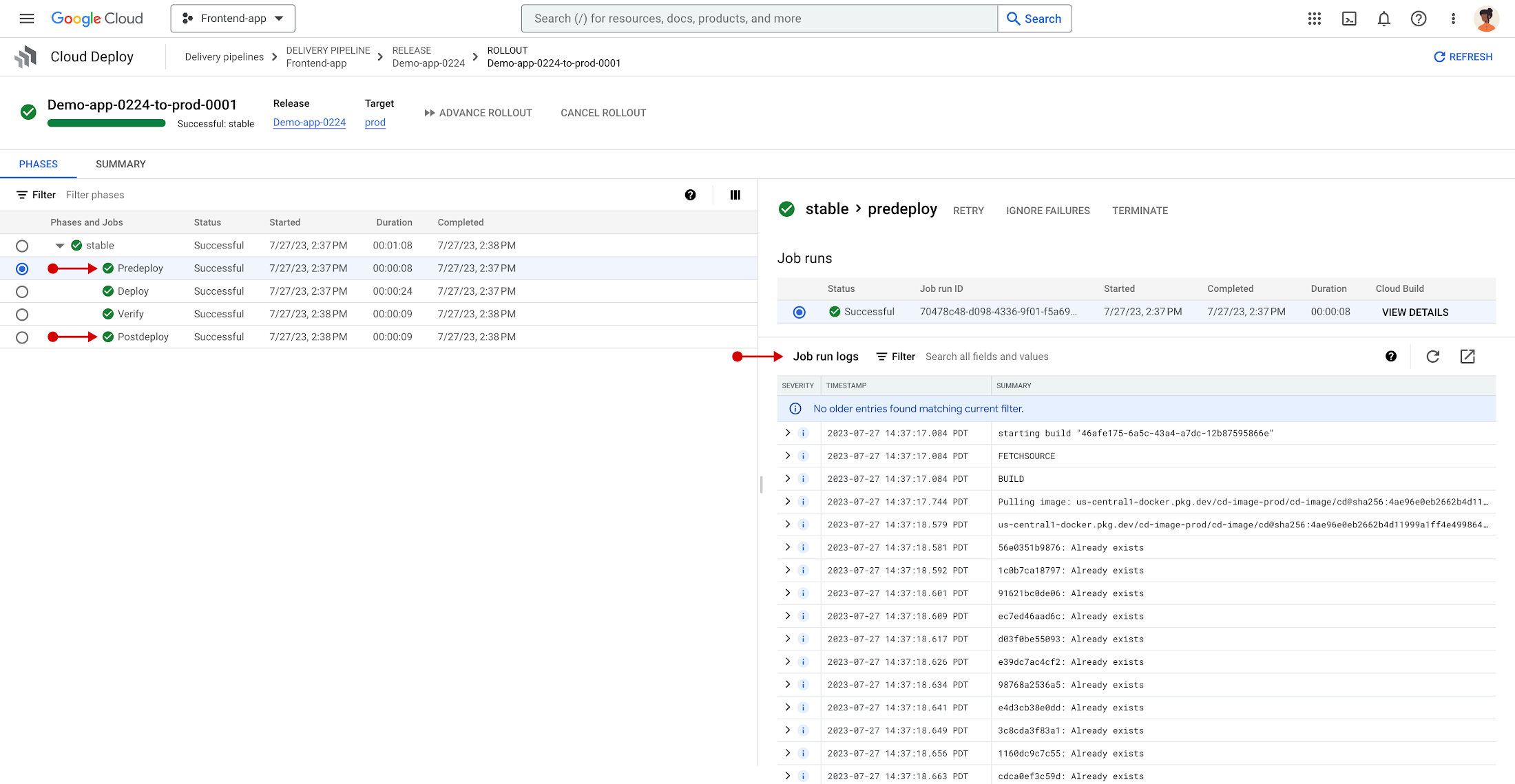
As enabled, deploy hooks can be used in a variety of ways, such as:
- Performing a database migration prior to deployment
- Performing infrastructure deployment prior to application deployment
- Interacting with third-party platforms post deployment, such as sending out an email or updating an open task tracker
Like other rollout jobs, Cloud Deploy provides the same observability and control for predeploy and postdeploy jobs. This includes the ability to view logs and perform control over individual jobs, such as retry, terminate, or ignore — all within the same rollout details interface.
Interested in exploring deploy hooks for yourself? Get started now with our quickstart and documentation!
The future
Comprehensive, easy-to-use, and cost-effective DevOps tools are key to building an efficient software delivery capability, and it’s our hope that Cloud Deploy will help you implement complete CI/CD pipelines. Stay tuned as we introduce exciting new capabilities and features to Cloud Deploy in the months to come.
In the meantime, check out the product page, documentation, quickstarts, and tutorials. Finally, If you have feedback on Cloud Deploy, you can join the conversation. We look forward to hearing from you!
Deploying Ray on GKE: Distributed Computing Made Easy

968
Of your peers have already read this article.
3:30 Minutes
The most insightful time you'll spend today!
The rapidly evolving landscape of distributed computing demands efficient and scalable frameworks. Ray.io is an open-source framework to easily scale up Python applications across multiple nodes in a cluster. Ray provides a simple API for building distributed, parallelized applications, especially for deep learning applications.
Google Kubernetes Engine (GKE) is a managed container orchestration service that makes it easy to deploy and manage containerized applications. GKE provides a scalable and flexible platform that abstracts away the underlying infrastructure.
KubeRay enables Ray to be deployed on Kubernetes. You get the wonderful Pythonic unified experience delivered by Ray, and the enterprise reliability and scale of GKE managed Kubernetes. Together, they offer scalability, fault tolerance, and ease of use for building, deploying, and managing distributed applications.
In this blog post, we share a solution template to get you started easily with Ray on GKE. We discuss the components of the solution and showcase an inference example using Ray Serve for Stable Diffusion.
Overview of the Solution
In this solution template we use KubeRay, an OSS solution for managing Ray clusters on Kubernetes, as the operator for provisioning our workloads. Follow the step-by-step instructions in the README file to get started. The solution contains two groups of resources: platform-level and user-level.
Platform-level resources are expected to be deployed once for each development environment by the system administrator. These include the common infrastructure and GCP service integrations that are shared by all users.
- GKE cluster and node pool. Configurations can be changed in the main.tf file. This module deploys a GKE cluster with a GPU node pool, including required Nvidia drivers for GPUs. You can replace these with other machine types.
- Kubernetes system namespace and service accounts, along with the necessary IAM policy bindings. This allows the platform administrator to provide fine-grained user access control and quota policies for Ray cluster resources.
- KubeRay operator. The operator is responsible for watching for changes in KubeRay resources and reconciling the state of the KubeRay clusters.
- Logging. The `logging_config` section enables logs from system components and workloads to write logs to Cloud logging.
- Monitoring. The `monitoring_config` section enables Managed Prometheus integration. This allows the deployment to automatically scrape system-level metrics and writes them to the managed metrics service.
- Workload identity. This enables your workloads to authenticate with other GCP services using Google IAM service accounts.
User-level resources are expected to be deployed once by each user in the development environment.
- KubeRay cluster. This is the actual Ray cluster that we will be used for your workloads. It is configured to use a Workload Identity pool and a IAM-binded service account that provides fine-grained access to GCP services. You can customize the Ray cluster settings by editing the kuberay-values.yaml file.
- Logging. The solution adds a side car container deployed alongside each KubeRay worker node. This uses fluentbit to forward Ray logs from the head node to Cloud logging. You can edit the fluentbit-config file to change how the logging container filters and flushes logs.
- Monitoring. This module provides a PodMonitoring resource that scrapes metrics from the user’s Ray cluster and uploads data points to Google Managed Prometheus. An optional installation for Grafana dashboard is included and can be accessed through a web browser.
- JupyterHub server. This module installs a JupyterHub notebook server in the user namespace, enabling users to interact directly with their Ray clusters.
Run a Workload on Your Ray Cluster
Let’s try running the provided example with Ray Serve to deploy Stable Diffusion. This example was originally taken from the Ray Serve documentations here. To open the example in Jupyter notebook, go to the external IP for proxy-public in your browser (instructions to get the IP). And then click on File -> Open from URL, and input the raw URL of the notebook to open it.
Since the notebook runs in the same Kubernetes cluster as the Ray cluster, it is able to talk directly to the latter using its cluster-internal service endpoint – thus there is no need to expose the Ray cluster to public internet traffic. For production workloads, you should secure your endpoints with GCP account credentials. Google Cloud Identity Aware Proxy (IAP) can be used to enable fine-grained access control to user resources, such as our Ray cluster, to protect your GCP resources from unnecessary exposure. A full tutorial on how to enable IAP on your GKE cluster can be found here.
The notebook contains code for deploying a pre-trained model to a live endpoint. The last cell makes a call to the created service endpoint:prompt = “a cute cat is dancing on the grass.”input = “%20″.join(prompt.split(” “))resp = requests.get(f”http://example-cluster-kuberay-head-svc:8000/imagine?prompt={input}”)with open(“output.png”, ‘wb’) as f: f.write(resp.content)
Executing the notebook will generate a file with a unique picture of a cute cat. Here is an example we got:

Congratulations! You have now deployed a large model for image generation on GKE.
Logging and Monitoring
As mentioned earlier, this solution enables logging and monitoring automatically. Let’s find those logs.
In your Cloud Console, open up Logging -> Log Explorer. In the query text box, enter the following:resource.type=”k8s_container”resource.labels.cluster_name=%CLUSTER_NAME%resource.labels.pod_name=%RAY_HEAD_POD_NAME%resource.labels.container_name=”fluentbit”
You should see the Ray logs from your cluster forwarded here.
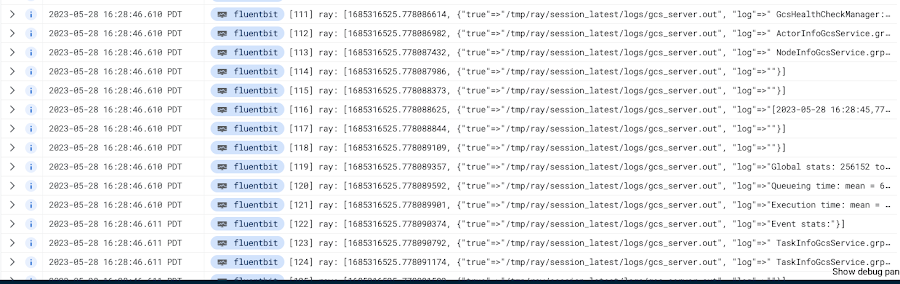
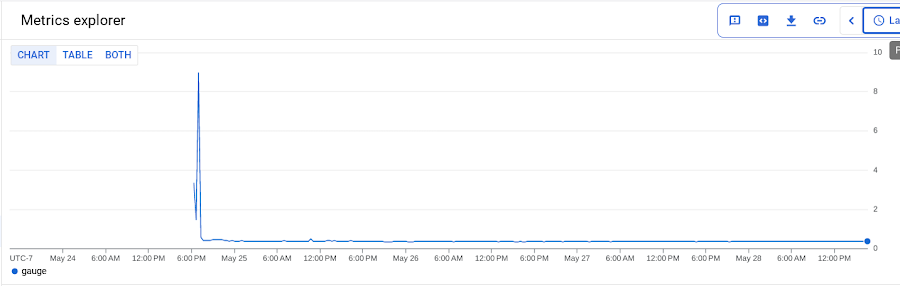
To see your monitoring metrics, go to Metrics Explorer in the Cloud Console. Under the menu for “Target”, select “Prometheus Target” and then “Ray”. Select the metric that you want to see, for instance `prometheus/ray_component_cpu_percentage/gauge`:
The deployment also comes with a Grafana deployment. Follow this guide to open it up and view your Ray cluster’s metrics.
Conclusion
The combination of Ray and GKE offers a simple and powerful solution for building, deploying, and managing distributed applications. Ray’s simplicity makes it an attractive choice for data and model developers while GKE’s scalability and reliability is the defacto choice for enterprise platforms. The solution template presented in this blog post offers a convenient way to get started quickly with KubeRay, the recommended approach to deploy Ray on GKE.
If you have any questions for building Ray on Kubernetes and GKE, you can contact us directly at ray-on-gke@google.com or comment in GitHub. Learn more about building AI Platforms with GKE by visiting our User Guide.
More Relevant Stories for Your Company

6 Common Errors to Sidestep in RESTful API Design
Imagine ordering a “ready-to-assemble” table online, only to find that the delivery package did not include the assembly instructions. You know what the end product looks like, but have little to no clue how to start assembling the individual pieces to get there. A poorly designed API tends to create

Quick Recap on Google Cloud: Latest News, Launches, Updates, Events and More
Want to know the latest from Google Cloud? Find it here in one handy location. Check back regularly for our newest updates, announcements, resources, events, learning opportunities, and more. Tip: Not sure where to find what you’re looking for on the Google Cloud blog? Start here: Google Cloud blog 101: Full list

Cloud IoT Core Helps Businesses Leverage their IoT Data to Build a Competitive Edge
The ability to gain real-time insights from IoT data can redefine competitiveness for businesses. Intelligence allows connected devices and assets to interact efficiently with applications and with human beings in an intuitive and non-disruptive way. After your IoT project is up and running, many devices will be producing lots of



Application Development with Kpt
Learn how to create and customize configuration packages with Kpt to build applications and adhere to configuration-as-data philosophy.
