





Quilkin: How the Open-source UDP Proxy Enables High-performance Multiplayer Gaming

3345
Of your peers have already read this article.
4:00 Minutes
The most insightful time you'll spend today!
Traditionally, dedicated game servers for real time multiplayer games have used bespoke UDP protocols for communication and synchronization of gameplay among the players within a game. This communication is most often bundled into monolithic game servers and clients, pairing the technical functionality of communication protocols, such as custom network physics synchronisation, security, access control, telemetry and metrics, with the extremely high computational requirements of physics simulations, AI computation and more.
Developed in collaboration with Embark Studios, Quilkin is a UDP proxy, tailor-made for high performance real-time multiplayer games. Its aim is twofold:
- Pull common functionality, such as security, access control, telemetry and metrics out of monolithic dedicated game servers and clients.
- Provide this common functionality in a composable and configurable way, such that it can be reused across a wide set of multiplayer games.
This reusable foundation then allows game developers to spend more of their time focusing on building the game-specific aspects of building their multiplayer communication protocols, rather than these common aspects.
Challenges with multiplayer Game Server communication
In fast-paced, multiplayer games, the full simulation of a session of gameplay generally occurs within the memory of a monolithic dedicated game server, whose responsibility covers everything from network physics and AI simulation to communications from client back to server and more.
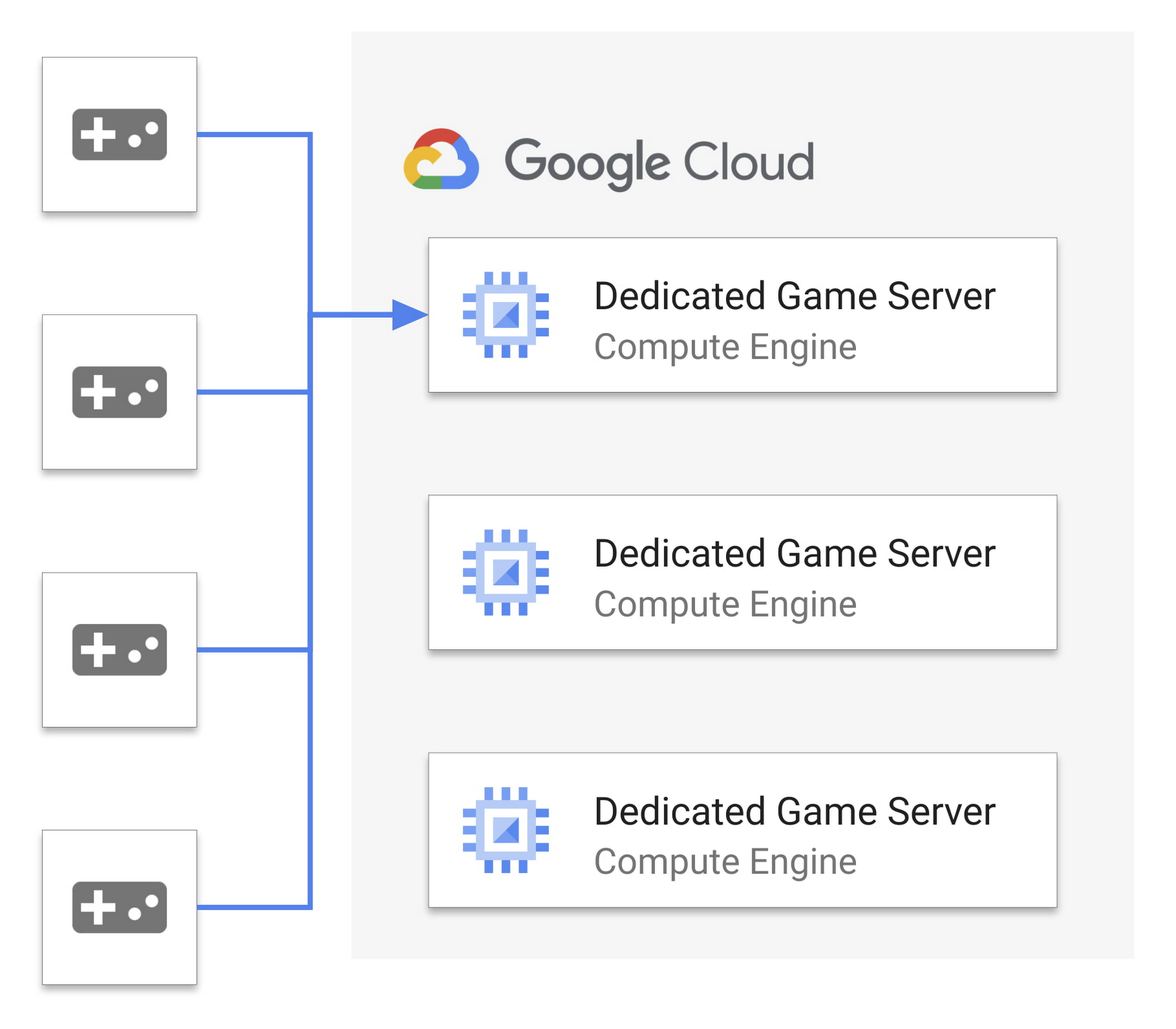
Since the entire state of the game is memory resident, each client connects directly to the dedicated game server the player is playing on, which presents several challenges:
- Each dedicated game server is a single point of failure. If it goes down, then the whole game session (or sometimes multiple sessions) fails. This makes it a target for malicious actors.
- The IP and port of connection to the game server is public, and exposed to the game client, making it easy to discover and target.
- Multiple aspects of game server simulation and network communication are tightly coupled in the same process, making reuse and modularity more difficult, and expanding risk of performance issues.
If we look at both web and mobile technologies over the past several years, some of these challenges start to look very familiar. Thankfully, one of the solutions to help drive dedicated server workloads to more redundant and distributed orchestration is the utilisation of traffic proxies!
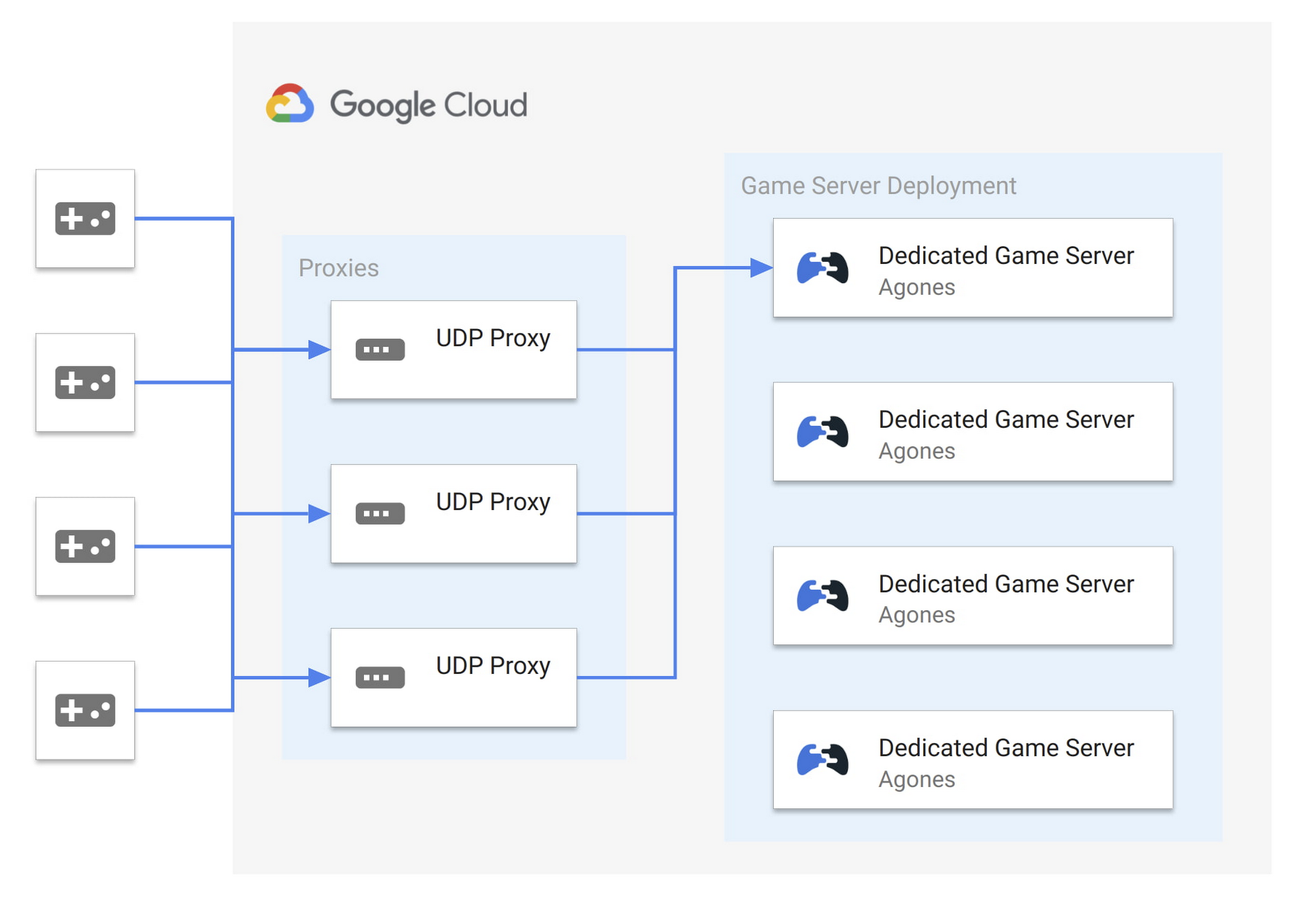
By using a proxy for multiplayer UDP traffic, in front of our dedicated games servers within a low latency network such as what is available on Google Cloud, we can address these key challenges as follows:
- Greater reliability. Proxies provide redundant points of communication entry. UDP packets can be sent to any number of proxies and routed to the dedicated game server. While a dedicated game server will still generally be a single point of failure, proxies improve redundancy and potential failover at the communication layer.
- Greater security. The IP and port of the dedicated game server is no longer public. Game clients may only have visibility into a subset of the proxy pool, limiting a potential attack surface.
- Greater scalability. We start to break apart the single process, as we can move aspects of the communication protocol, metrics, communication security and access control into the proxy. This removes the non-game specific computation out of your game server’s processing loop.
As a result, the entire system is now more resilient as proxies can be scaled independently, not only for performance reasons but also to distribute load in case of malicious actors.
Introducing Quilkin: The UDP proxy for Game Servers
Embark Studios and Google Cloud came together and built Quilkin, to provide a standard, open source solution. Based out of Stockholm, Embark Studios is a (relatively) new studio made up of seasoned industry veterans. They were the perfect collaboration partner to create Quilkin with, given their team’s experience with large scale real time multiplayer games.
Quilkin is an open-source, non-transparent UDP proxy specifically designed for use with large scale multiplayer dedicated game server deployments, to ensure security, access control, telemetry data, metrics and more.
Quilkin is designed to be used behind game clients as well as in front of dedicated game servers, and offers the following major benefits:
- Obfuscation. Non-transparent proxying of UDP data, making the internal state of your game architecture less visible to bad actors.
- Out of the box metrics. For UDP packet traffic and communication.
- Visibility. A composable set of processing filters that can be applied for routing, access control, rate limiting, and more.
- Flexibility. Ability to to be utilised as a standalone binary, with no client/server changes required or as a Rust library, depending on how deep an integration you wish for your system and/or custom processing Filters you wish to build.
- Compatibility. Can be integrated with existing C/C++ code bases via Rust FFI, if required.
- Onboarding. Multiple integration patterns, allowing you to choose the level of integration that makes sense for your architecture and existing platform.
Until now, these sorts of capabilities are only available to large game studios with resources to build their own proprietary technology.
We think leveling the playing field for everyone in the games industry is an important and worthy endeavor. That’s why we collaborated with Google Cloud and initiated this project together.
At Embark, we believe open source is the future of the games industry and that open, cross-company collaboration is the way forward, so that all studios, regardless of size, are able to achieve the same level of technical capabilities. —Luna Duclos, Tech Lead, Embark Studios
Google Cloud is excited to announce Quilkin as the latest entry in our portfolio of open-source solutions for gaming. Quilkin complements our existing OSS solutions including Agones for game servers, Open Match for matchmaking, and Open Saves for persistence. These are designed to work together as an open and integrated ecosystem for gaming. We’re proud to include Embark Studios as our latest open source collaborator for gaming along with Ubisoft, Unity, and 2K Games. Google Cloud will continue to work closely with our partners in industry and the community to offer planet-scale solutions to power the world’s largest games. —Rob Martin, Chief Architect, Google Cloud for Games
Getting started with Quilkin
While Quilkin can support more advanced deployment scenarios like above, the easiest way to get started with Quilkin is to deploy it as a sidecar to your existing dedicated game server. This may initially limit some of the benefits, but it’s an easy path to getting metrics and telemetry data about your UDP communication, with a very low barrier to entry and the ability to expand over time.
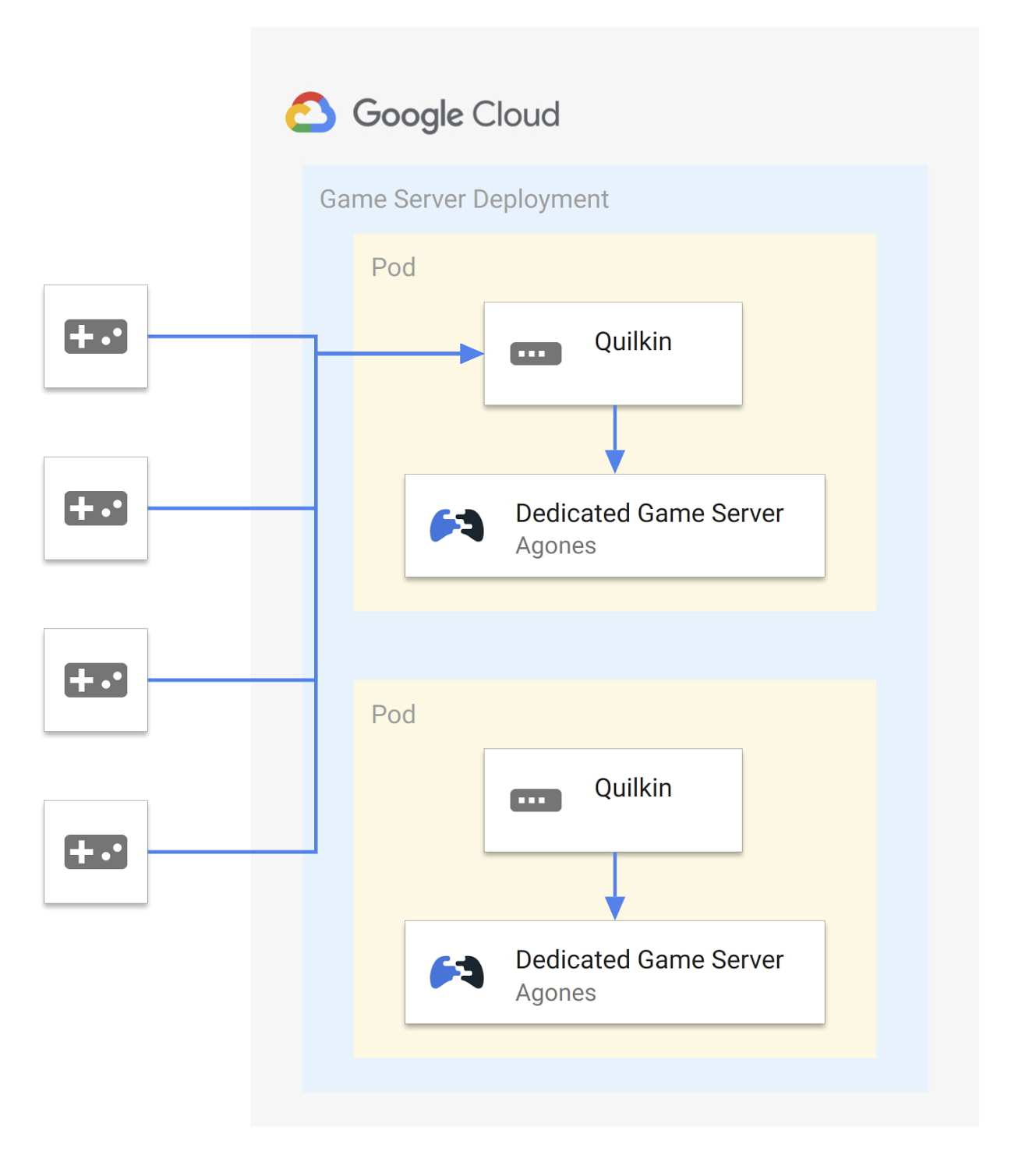
While Quilkin is released as both binaries and container images, and is not tied to any specific hosting platform, we’ll use Agones and Google Cloud Game Servers as our game server hosting platform for this example.
First we will create a ConfigMap to store the yaml for a static configuration for Quilkin that will accept connections on port 26001 and route then to the Xonotic (an open source, multiplayer FPS game) dedicated game server on port 26000:
apiVersion: v1kind: ConfigMapmetadata:name: quilkin-configdata:quilkin.yaml: | # quilkin configurationversion: v1alpha1proxy:port: 26001static:endpoints:- address: 127.0.0.1:26000
Second, we’ll take the example container that Agones provides for the Xonotic dedicated game server, and run Quilkin alongside each dedicated game server as a sidecar, in an Agones Fleet of game servers like so:
apiVersion: "agones.dev/v1"kind: Fleetmetadata:name: xonotic-sidecarspec:replicas: 2template:spec:container: xonoticports:- name: defaultcontainerPort: 26001container: quilkinhealth:initialDelaySeconds: 30periodSeconds: 60template:spec:containers:- name: xonoticimage: gcr.io/agones-images/xonotic-example:0.8- name: quilkin # quilkin sidecarimage: us-docker.pkg.dev/quilkin/release/quilkin:0.1.0volumeMounts:- name: configmountPath: "/etc/quilkin"livenessProbe:httpGet:path: /liveport: 9091initialDelaySeconds: 3periodSeconds: 2volumes:- name: configconfigMap:name: quilkin-config
Once applied, when we query the cluster for the running GameServers, everything looks the same as it would without Quilkin! Nothing else in our system needs to be aware that the traffic is being intercepted, and we can freely take advantage of the functionality of Quilkin without adjusting either client or server code.
$ kubectl get gameserversNAME STATE ADDRESS PORT NODE AGExonotic-sidecar-gdpgn-2pfkc Ready 34.95.106.201 7929 gke-0f7d8adc 25mxonotic-sidecar-gdpgn-c8bds Ready 34.95.106.201 7028 gke-0f7d8adc 25m
If this has piqued your interest, make sure to have a look at the walkthrough, where we step through this same scenario and then extend it to compress UDP packets from the game client to server, without having to change either programs.
This just scratches the surface, however: there’s even more to Quilkin, including an xDS compliant admin API, a variety of existing Filters to manipulate and route UDP packets and more.
What’s next for Quilkin
Quilkin is still in its early stages, with this 0.1.0 alpha release, but we’re very happy with the foundation that has been laid.
There are a variety of features in the roadmap, from enhanced metrics and telemetry, new filters and filter types, and more.
If you would like to try out this release, you can grab the binaries or container images from our releases page, step through our quickstarts and review different integration options with your dedicated game servers.
To get involved with the project, please:
- Check out our Github repository
- Join our Discord community
- Join the quilkin-discuss mailing list
- Follow us on Twitter
Embark Studios has also released their own announcement blog post, going deeper into the plans they have for their own production game backend infrastructure, and where Quilkin fits in.
Thanks to everyone who has been involved with this project across Google Cloud and Embark Studios, and we look forward to the future for Quilkin!
STAC-M3 Tick History Analytics in Google Cloud Benchmark Results Reveals it is 18X Faster than Previous Version

4757
Of your peers have already read this article.
5:00 Minutes
The most insightful time you'll spend today!
The Securities Technology Analysis Center (STAC®), an organization that improves technology discovery and assessment in the finance industry through dialog and research, recently audited the STAC-M3™ benchmark suite on Google Cloud (SUT ID KDB211210). These enterprise tick-analytics benchmarks assess the ability of a solution stack such as database software, servers, and storage, to perform a variety of I/O-intensive and compute-intensive operations on historical market data.
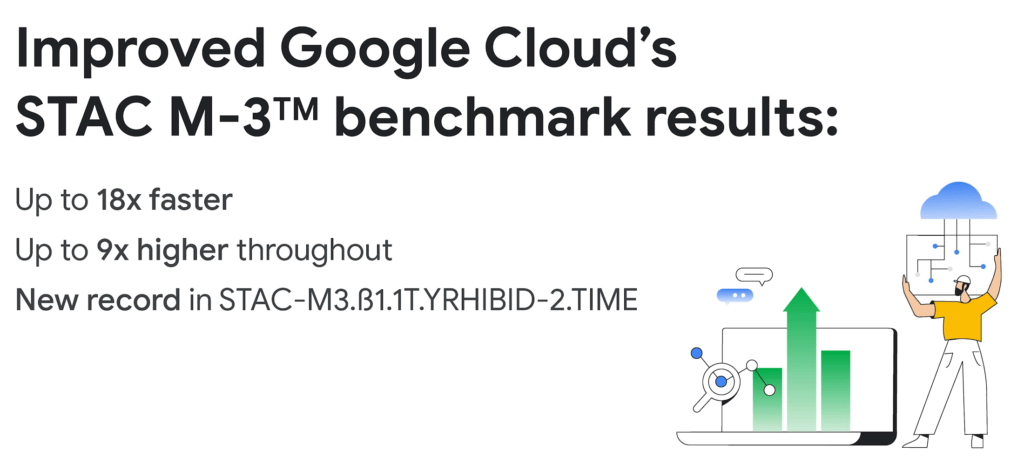
Following up on our previous STAC-M3 benchmark audit (SUT ID KDB181001), a redesigned Google Cloud architecture leveraged the most recent version of kdb+ 4.0, the time-series database from KX, and achieved significant improvements: 35 out of 41 benchmarks ran faster in the new cluster – by up to 18x faster than Google Cloud’s prior results. Key highlights include the following:
Compared to the previous STAC-M3 Antuco suite results on Google Cloud:
- Was faster in 13 of 17 mean response-time benchmarks
- Was 18x faster – a 94% reduction in run time – in the version of Year-High Bid that allows caching (STAC-M3.ß1.1T.YRHIBID-2.TIME), which also set an overall record for all published results
- Had 9x higher throughput in Year-High Bid (STAC-M3.ß1.1T.YRHIBID.MBPS)
Compared to the previous STAC-M3 Kanaga suite results on Google Cloud:
- Was faster in 22 of 24 mean response-time benchmarks
- Was over 10x faster in all four Market Snapshot workloads (STAC-M3.ß1.10T.YR[2,3,4,5]-MKTSNAP.TIME)
- Had 5x the throughput in Year-High Bid involving 2 years of data (STAC-M3.ß1.1T.2YRHIBID.MBPS)
“The STAC-M3 standard was designed by financial firms to reveal the performance of tick analytics stacks. Generational improvements like those exhibited by Google Cloud’s most recent STAC-M3 audit, are important data points for firms evaluating new architectures for performance and scale,” said Peter Nabicht, President of STAC.
These performance results may translate to real-world advantages that may be difficult for investment firms to achieve in static and costly on-premises environments: immediate answers in high data velocity markets, more thoroughly explored research theories by adding data or new quantitative approaches, and reduced costs by releasing cloud resources more quickly.
STAC-M3: High-speed tick analytics
Designing for record-breaking results
In our STAC-M3 audit, the stack under test (SUT) was designed to take advantage of horizontal scalability in the cloud by sharding data across independent compute nodes. The cluster of 12 Google Compute Engine N2 instances was powered by Intel Cascade Lake, with each node using 32 vCPUs, 160GiB of memory, and 9TiB of local NVMe SSDs. The full STAC-M3 Antuco and Kanaga data set was split across the cluster and kdb+ scripts distributed queries between nodes.
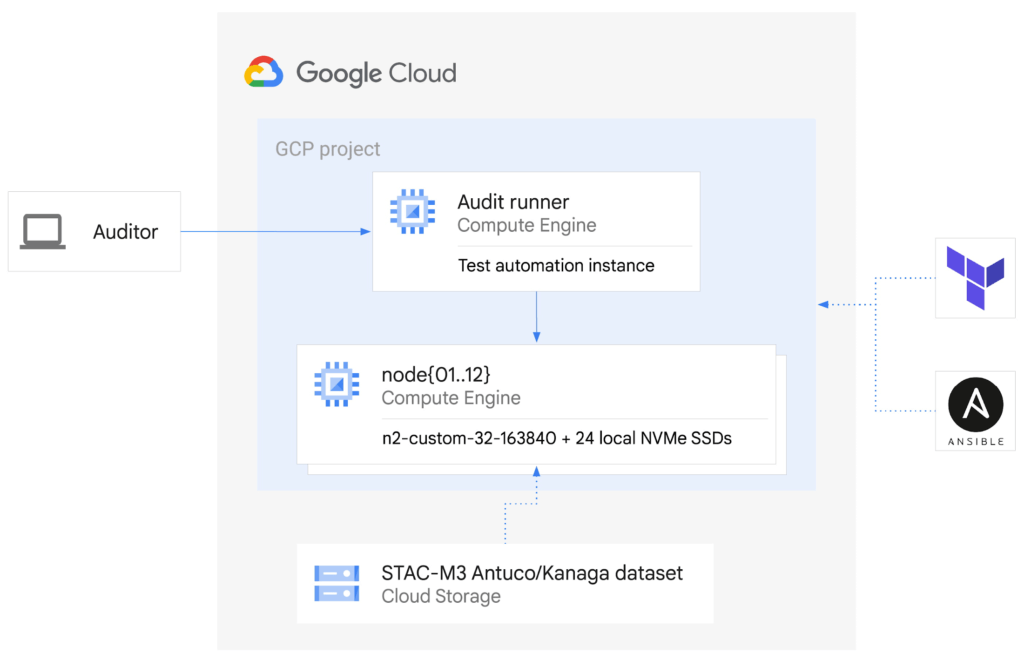
This configuration was the sweet spot for this particular workload, but this architecture does not need to be limited to 12 nodes for other workloads – the data sharding algorithm could scale to any number of nodes as required by workload demands. Since scaling out the cluster in this manner increases the total pool of available storage, this architecture can continue scaling out to petabytes of storage across hundreds of nodes.
The ability to spawn large clusters with hundreds of thousands of processors on demand at low cost, and to delete the resources when jobs complete, not only changes the economics of running computations on large financial data sets, it also opens up opportunities to explore solutions to new types of problems that were previously overlooked due to the constraints of fixed hardware on-premises. You can check the pricing of this VM configuration using the Google Cloud Pricing Calculator. The costs can be reduced even further by using preemptible VMs.
While the new cluster used a similar number of nodes, cores, and total memory as the previously-audited cluster, the redesigned architecture allowed us to harness the low latency and high throughput of Local NVMe SSDs.
Resources on demand
The cluster was created on demand using Terraform and Ansible during testing and auditing. The use of infrastructure as code (IaC) techniques ensured that the cluster, fully loaded with the STAC-M3 data set, could be created when needed and then removed when benchmarking was complete. It also meant that the cluster configuration was enforced by code on each deployment, eliminating configuration variance and drift. The full IaC definition to create the cluster can be retrieved from the report in the STAC Vault.
Each time the cluster was created, data was streamed to Local SSDs from Google Cloud Storage, our reliable and secure object storage, at up to the line rate of 32Gbps per node. The entire 57TiB STAC-M3 Antuco and Kanaga data was replicated from Cloud Storage to local storage in approximately 20 minutes.
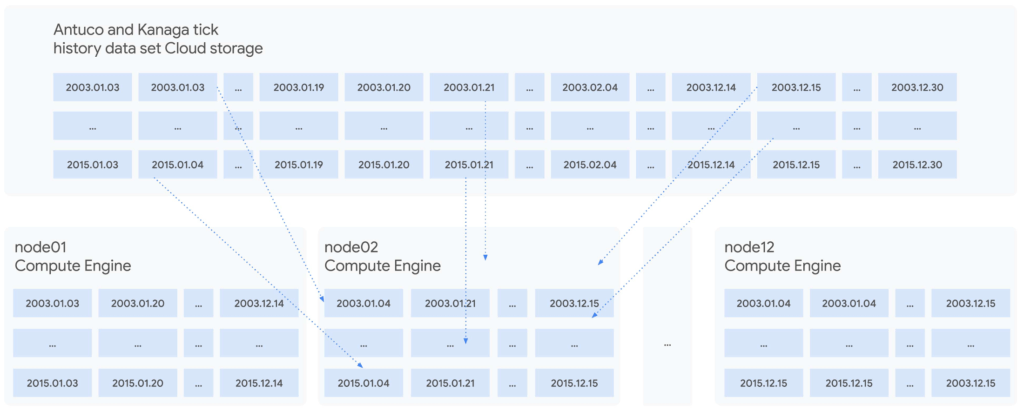
Since each node was independent and responsible for its own shard of data, doubling the cluster size would cut the synchronization time in half, or copy twice as much data in the same amount of time. Using higher bandwidth options of up to 100Gbps would triple the possible throughput for a relatively small incremental cost, trading an approximately 11%-23% price increase at current list prices for a 200% data synchronization performance increase. Taking advantage of fast networking to cache sharded data in parallel to a large cluster makes storing bulk data in Cloud Storage viable for even the largest workloads.
For quants working on vast data sets in sprawling compute clusters, the ability to fully describe infrastructure as declarative code, create elastic resources on demand, cache data quickly from cheap bulk storage, and turn resources off when computations complete is a dramatic change compared to waiting months to grow on-premises clusters – and a compelling reason to use cloud infrastructure.
To see how we designed and optimized the cluster for API-driven cloud resources, read our new whitepaper.
STAC-A2™: Calculating derivatives risk
In 2018, we showed that cloud instances can outperform bare metal when analyzing large tick history data sets in the demanding suite of STAC-M3 benchmarks. Last year, Google Cloud’s partner Appsbroker showed that the same was true for calculating derivatives risk in STAC-A2 on Google Cloud. You can read about how Appsbroker built its record-breaking STAC-A2 compute cluster on Google Cloud in its blog post, or access the STAC Report directly. Here are the highlights:
Compared to all other publicly reported solutions, this solution, based on a cluster of 10 virtual machines, had:
- The highest throughput (STAC-A2.β2.HPORTFOLIO.SPEED)
- The fastest cold time in the large problem size (STAC-A2.β2.GREEKS.10-100k-1260.TIME.COLD)
Compared to a solution involving an 8-node, on-premises cluster (SUT ID INTC181012), this 10-node, cloud-based solution:
- Had 5 times the maximum paths (STAC-A2.β2.GREEKS.MAX_PATHS)
- Had 10% greater throughput (STAC-A2.β2.HPORTFOLIO.SPEED)
- Was 18% faster in cold runs of the large problem size (STAC-A2.β2.GREEKS.10-100k-1260.TIME)
- Was 9% faster in cold runs of the baseline problem size (STAC-A2.β2.GREEKS.TIME.COLD)
Finding market advantages with Google Cloud
Across the investment management industry, every firm is seeking many of the same competitive advantages. However, finding unique opportunities and managing larger and larger data sets is becoming a major strain. Cloud is fundamentally changing how quants tackle the problem while empowering them to manage risk and generate higher returns.
Building on-premises computing clusters with tens or hundreds of thousands of cores and petabytes of storage requires huge up-front investments and lead time measured in months or years. Google Cloud makes the same scale available to its customers, provisioned on demand and paid per use. More importantly, the elasticity of cloud resources enables agility that is simply not available in a fixed data center cluster – the agility to explore, experiment, iterate, and respond to markets faster than before.
Scaling out to tens of thousands of cores in minutes and then removing the resources immediately not only changes the speed at which questions can be answered; it encourages different and more frequent questions, asked simultaneously on many independent clusters, free from the constraints of fixed on-premises hardware.
It is this flexibility and power that enables financial services firms to leverage larger data sets and get results, backtest, research, and analyze large amounts of data, faster and whenever they need it.
Download our whitepaper to learn more about our latest STAC-M3 tick history analytics benchmark results and how to optimize cloud infrastructure for high-speed market data analysis.

3360
Of your peers have already downloaded this article
10:00 Minutes
The most insightful time you'll spend today!
Operational resilience continues to be a key focus for financial services firms. Regulators from around the world are refocusing supervisory approaches on operational resilience to support the soundness of financial firms and the stability of the financial ecosystem. Our new white paper discusses the continuing importance of operational resilience to the financial services sector, and the role that a well-executed migration to Google Cloud can play in strengthening it.
3 Important Factors to Consider for Moving Large-scale On-prem Data to Cloud with Storage Transfer Service

3523
Of your peers have already read this article.
1:30 Minutes
The most insightful time you'll spend today!
Organizations have been moving their on-premises data and applications to the cloud for the past several years, driven by reasons as varied as application modernization and content delivery to archival. In particular, we have seen migration momentum pick up in sectors like media and entertainment, where customers are rethinking how they monetize and store their valuable historical content, often while exploring Google Cloud’s many analytical and AI solutions.
Many of these customers are interested in moving their unstructured data from on-premises appliances to Google’s Cloud Storage. Over the past year, we’ve noticed an uptick in larger migrations, where customers move tens of petabytes or more of on-premises file data to Google’s flexible, secure object storage.
For customers like Telecom Italia/TIM Brasil, Google’s fully managed Storage Transfer Service played a key role in making this transformation possible by moving data from on-premises filesystems to extensible, low-cost Cloud Storage over the network.
“Storage Transfer Service helped us move petabyte-scale data from on-premises filesystem to Google Cloud in a highly performant and fully-managed way,” said Auana Mattar, CIO at Telecom Italia/TIM Brasil. “Setting up the transfer pipeline required performing some tests to figure out the ideal number of agents and networking settings in our on-prem environment. Once the initial setup was done, transferring data was seamless, and the service was able to saturate a 20 Gbps Partner Interconnect link.”
While large-scale cloud migrations can be intimidating, there are a number of actions that customers can take to ensure that a multi-petabyte data transfer goes as smoothly as possible. In the past, we’ve shared general architectural guidance for customers new to their cloud journey. And for customers looking for options, Google has multiple paths to move on-premises file data to the cloud, including our fully offline Transfer Appliance.
In this blog post, we’ll provide an updated perspective focused on how to use Storage Transfer Service to move data from on-prem to the cloud. Specifically, we’ll look at three different factors to consider prior to moving large amounts of data from your on-premises filesystem to Cloud Storage with our Storage Transfer Service.
Understanding the source files and filesystem
If you are moving data from an on-premises filesystem, you should be aware of how your source files, and your source filesystem, can impact transfer performance.
Each copy you make to Cloud Storage incurs some overhead from associated operations like metadata transfer, checksumming, and encryption. This means that, for a given amount of storage, transferring large numbers of very small files will take longer. As a rule of thumb, Storage Transfer Service will be most performant when moving files that are 16 MB or larger.
If you have a large number of smaller files, you may choose to batch them using tools like tar and upload as a single object. This will improve transfer performance but will limit how you can use those files in Cloud Storage. It’s an option best considered for use cases like archival storage, where the data transferred to Google Cloud may not be managed or accessed regularly. Our Nearline, Coldline, and Archive archival tiers offer excellent performance should you ever need to retrieve the archived data.
The source filesystem may also slow down transfer performance, particularly if the filesystem has limited read throughput. Tools like Fio can be used to test read throughput. We’ve included a command below to run a series of 1MB sequential read operations in Fio and to generate a report:
#Install fio> sudo apt install -y fio#Create a new directory fiotest> TEST_DIR=/mnt/mnt_dir/fiotest> sudo mkdir -p $TEST_DIR#Test read throughput> sudo fio --directory=$TEST_DIR --direct=1 --rw=randread --randrepeat=0 --ioengine=libaio --bs=1M --iodepth=8 --time_based=1 --runtime=180 --name=read_test --size=1G
Fio will then generate a report. The final line labeled ‘bw’ represents the total aggregate bandwidth of all threads, and it can be used as a proxy for read throughput. In general, you should strive for read throughput (‘bw’) that is 1.5x of your desired upload throughput or speed. (And one easy way to increase read throughput is to ensure that the filesystem itself is not imposing any limits on maximum throughput.)
Optimizing Storage Transfer Service resources
Within the Storage Transfer Service, there are a few settings that we can adjust ahead of time to ensure optimal performance for a larger workload.
First, we should ensure that we have the right number of transfer agents for our source data. We would advise that, for any transfer job larger than 1 GB, you start with at least three agents in separate VMs, with each agent assigned at least 4 vCPU and 8 GB of RAM. In addition to providing a foundation for performant data transfer, this architecture also ensures that the transfer is fault tolerant should one agent machine become unavailable.
Google Cloud supports up to 100 concurrent agents for a given Google Cloud project. To help you identify the right number of agents to support your workload, you should start your larger transfer first, then wait three minutes after adding each agent to ensure that throughput has stabilized.
In general, each agent can facilitate roughly 1 Gbps of throughput for up to 10 agents, at which point it may be necessary to add more agents for a very large amount of network bandwidth. For example, in one larger migration, a customer with 20 Gbps of dedicated network capacity ran ~30 agents at once. These numbers illustrate what was required at one enterprise data center. Across all of your environments, it is important to test and monitor your throughput via Cloud Monitoring to ensure you have the right configuration for your transfer goals.
Another area to optimize is where and how you install your agents. As we mentioned earlier, agents should be installed in separate VMs, and each host machine should dedicate at least 4 vCPUs and 8 GB of memory per agent. This is a starting off point, and larger, long-running transfers may require additional CPU or memory. For those longer jobs, we advise that you monitor CPU utilization and unused memory closely to ensure optimal performance. You should provision more CPUs when utilization exceeds 70%. Similarly, you should be ready to provision additional memory when the agent has less than 1GB of unused memory.
Preparing your network for large-scale data transfer
The third and final area to consider is your network connectivity. While it can be easy to reduce this to the bandwidth between the source filesystem and the Google Cloud bucket, the network includes two other components that can be easier to configure: first, the network interface from the on-premises agents to the WAN; and second, the agents’ connection to the on-premises filesystem.
For the first component, the network interface from the on-premises agents to the WAN, the general guidance is to not let this become a bottleneck. Specifically, you should ensure that this interface is greater than or equal to the bandwidth you require to read from the filesystem, plus the upload bandwidth to write to Google Cloud. In other words, if you plan on moving 10 Gbps of data from on-premises to Google Cloud, you will need 20 Gbps of bandwidth between the on-premises agents to the WAN: 10 Gbps to read from the networked filesystem, and 10 Gbps to transfer and write to Google Cloud.
On-premises filesystems, and on-premises networks, come in many flavors. For the second component, how the agents connect to an on-premises filesystem, our general rule is to be mindful of latency and to test regularly. It is essential to ensure that agents run on machines that can access a networked filesystem with very low latency.
Finally, if you are trying to maximize transfer performance, make sure you’ve configured your network to avoid bandwidth restrictions between on-premises filesystem and Google Cloud that might impact transfer speed. Storage Transfer Service will allow you to cap the bandwidth used by transfer, making it easy to minimize any impact on other production applications. Consider using tools like lperf3, tcpdump, and gsutil to measure the network bandwidth available to upload to Cloud Storage.
In particular, gsutil is worth some additional detail. Gsutil is a Python tool that can help you perform a number of object storage management tasks in Google Cloud, including checking your agent’s connection to the Cloud Storage APIs. It can be installed via the Google Cloud SDK, or separately. In this case, you should also ensure that gsutil is available in the same on-premises VM as the Storage Transfer Service agent.
If you’d like to use gsutil to test connectivity to Google Cloud, here’s the command:
gsutil cp test.txt gs://my-bucketReplace:my-bucket with the name of your Cloud Storage bucket.
CP is a copy command that lets you copy data from on-premises to the cloud. In this case, gsutil is copying a test document, test.txt, to ensure that you have a connection with the Google Cloud APIs. You will need to create a test document before running this command.
Test twice, transfer once
One overarching theme across all factors is that testing can help you understand performance. For many customers, a large-scale data transfer from an on-premises filesystem to Google Cloud is an unusual event. And as with any unusual event in enterprise IT, it is a great idea to make sure that each party – from network administrators to filesystem and storage experts to cloud architects – is able to test their domain multiple times, to ensure the event will proceed seamlessly.
As you fine tune your testing in advance of a data transfer, you may want to learn more about your options for obtaining more network bandwidth, orchestrating transfer from SMB filesystems, or even how to make the right choices to save money on object storage. And we plan to share more in our blog about how customers have used our transfer offerings in the months ahead. Advanced agent setup | Cloud Storage Transfer Service Documentation
For more information about Storage Transfer Service and how to get started, please take a look at our documentation or get started via the Google Cloud console.
Datashare for Financial Services: Securing the Publishers and Consumers’ Access to Market Data

8566
Of your peers have already read this article.
4:30 Minutes
The most insightful time you'll spend today!
Access to the cloud has advanced the distribution and consumption of financial information on a global scale. In parallel, the global financial data landscape has been transformed by an influx of alternative data sources, including social media, meteorological data, satellite imagery, and other data. Exchanges and market data providers now find they need to include these new datasets to enrich their products and compete, which has meant they now must consider cloud-based models to keep up with the demands of their customers who expect easy, quick, flexible and cost-efficient ways to consume market data.
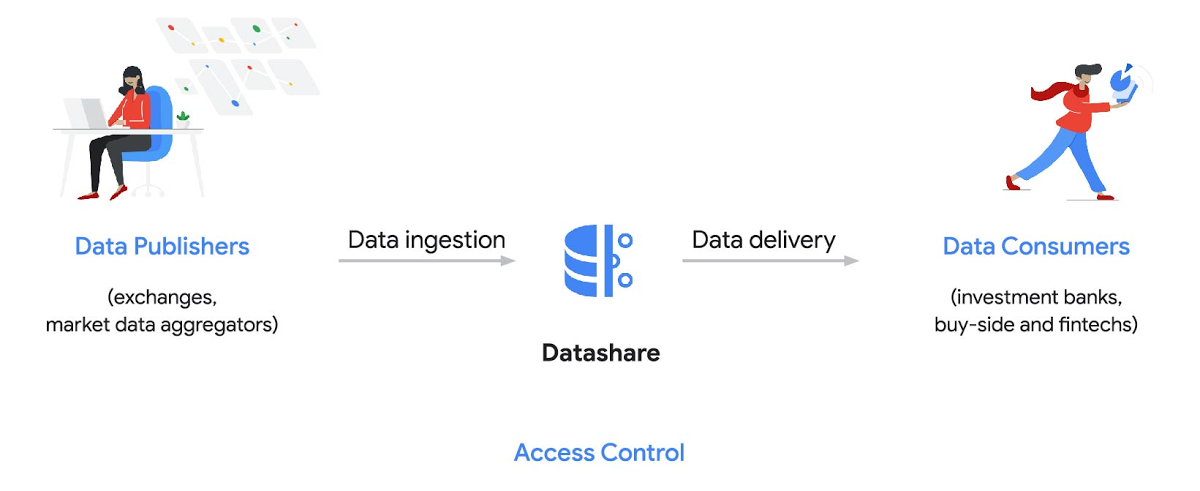
To address these needs, today we’re announcing the general availability of Datashare for financial services, a new Google Cloud solution that brings together the entire capital markets ecosystem—data publishers, and data consumers—to exchange market data securely and easily.
Datashare helps organize third-party financial information, making it accessible and useful to market data publishers and data consumers. We open-sourced the entire Datashare solution so market data publishers can now onboard their licensed datasets to Google Cloud securely, quickly and easily, while data consumers can consume that data as a service in tools of their preference, such as BigQuery.
Three ways to distribute and consume your data
Batch data delivery
Datashare provides a batch data delivery mechanism for data publishers to deliver their reference data, historical tick data, alternative market data sources and more via BigQuery, reducing the administrative burden on data consumers to extract insights from data.
Real-time data streaming delivery
By using this event-based data delivery channel for rapidly changing instrument prices, tick data, orders, news and others via Pub/Sub, data consumers can reliably process individual messages or rewind to a point in time to replay a prior market scenario and test model changes.
Monetizing licensed datasets
Market data publishers can onboard their licensed datasets to Google Cloud and make them available via a one-stop-shop on Google Cloud Marketplace, enabling a new sales channel to expand market reach.
Reference architecture
Check out the diagram below to see how you can share your batch and real-time data directly to your Google Cloud customers with BigQuery and Pub/Sub.

As you can see in the above reference architecture, both publishers and consumers can derive several benefits from the solution:
Benefits for data publishers
- You no longer have to maintain your own delivery and licensing infrastructure.
- You can easily package and deliver granular data products and experiments with SQL.
- You can have a solution that scales with your business as data volumes and number of customers grow.
Benefits for data consumers
- Your data is ready for analysis and machine learning (ML)— you no longer have to maintain extract, transform, and load (ETL) pipelines to load files and transform data.
- You can avoid the expense and burden of maintaining multiple copies of large data files.
- You can be more targeted with consumption of data using BigQuery queries, improving performance, and compliance, and reducing cost.
Accessing the datasets
Google Cloud has been working with multiple industry firms on innovating in the market data space. By using Datashare for publishing, data publishers can make their entire datasets available on Google Cloud. Early adopters of Datashare include firms such as OneTick and Accern. OneTick’s datasets include reference and historical futures data (that can be accessed in our console with your login). Accern’s datasets include alternative data such as market sentiment and credit analysis data (that can be accessed in our console with your login).
To make it more helpful, we partnered with Accern to create a hypothetical scenario to describe the data acquisition and analytics process step-by-step.
Accern use case
As a sustainability analyst, you require an economic, social and governance (ESG) dataset to determine which sector is the most widely covered ESG sector by analysts, and to also identify the sector with the lowest ESG sentiment score. Now, you can discover and acquire an ESG dataset in Google Cloud.
Step 1. Navigate to the Financial Services solutions page in the Google Cloud console:

Step 2. Click a dataset, for example Accern AI-Generated ESG Insights, then review the overview details, plans and pricing, documentation and support information. To view the available pricing tiers, click ‘View All Plans’. Once you’ve decided on a tier that you would like to subscribe to, click ‘Select’, choose a billing account and review and accept the terms of service to complete the subscription. Once the steps are complete, click ‘Subscribe’ at the bottom. An overlay window will appear, click ‘Register with Accern’ to activate and complete the subscription.
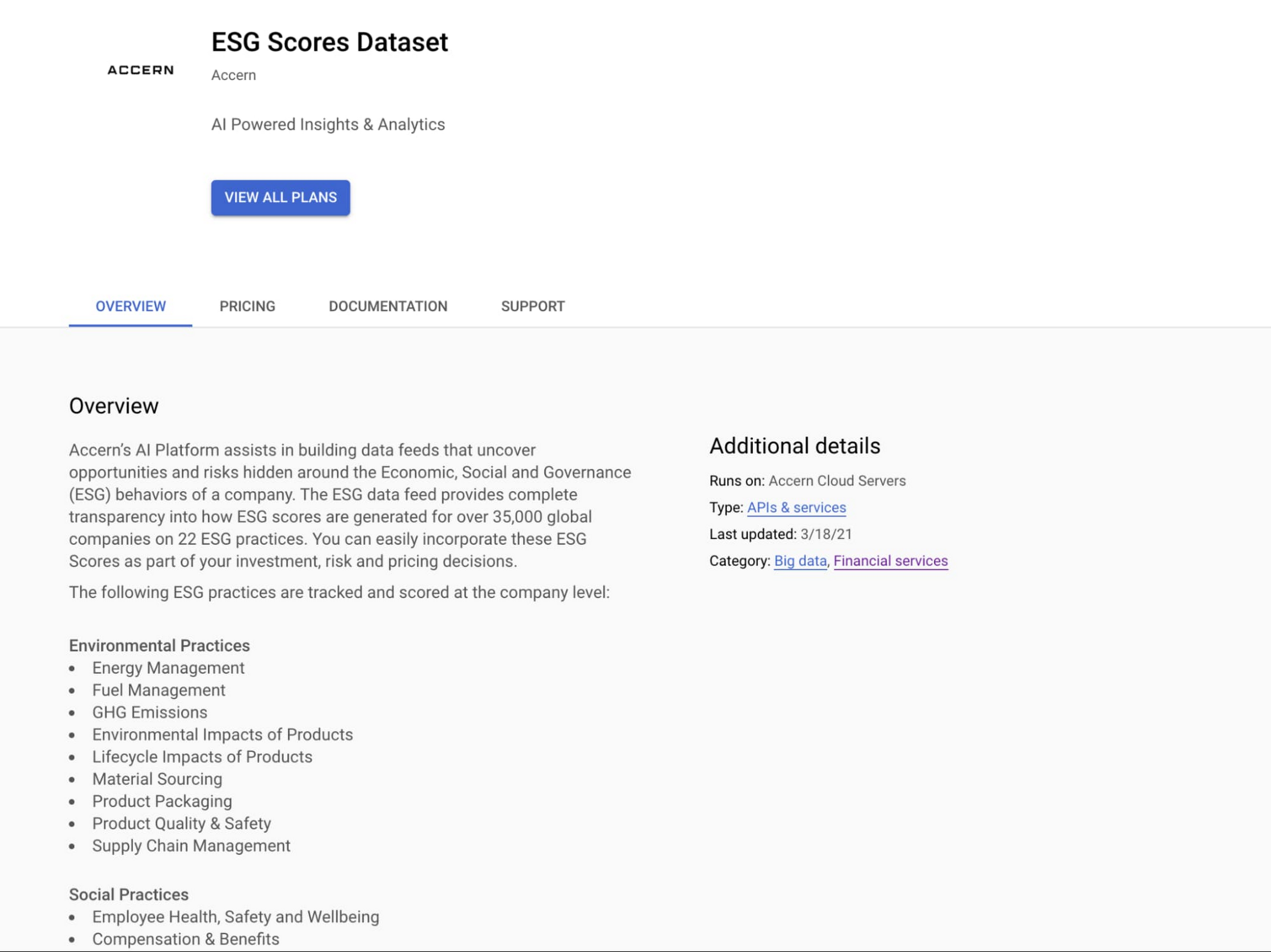

Step 3. Once activation is complete, you’ll be directed to the Datashare ‘My Products’ screen. Voila! You are now subscribed to Accern’s ESG Scores dataset and can access it in your Google Cloud instance using BigQuery. To access the data, click the hour glass icon on the corresponding ‘My Products’ record that you just purchased. An overlay will present you with the details on the dataset and/or table. Click the ‘Navigate to Table’ button to navigate through to the BigQuery console.

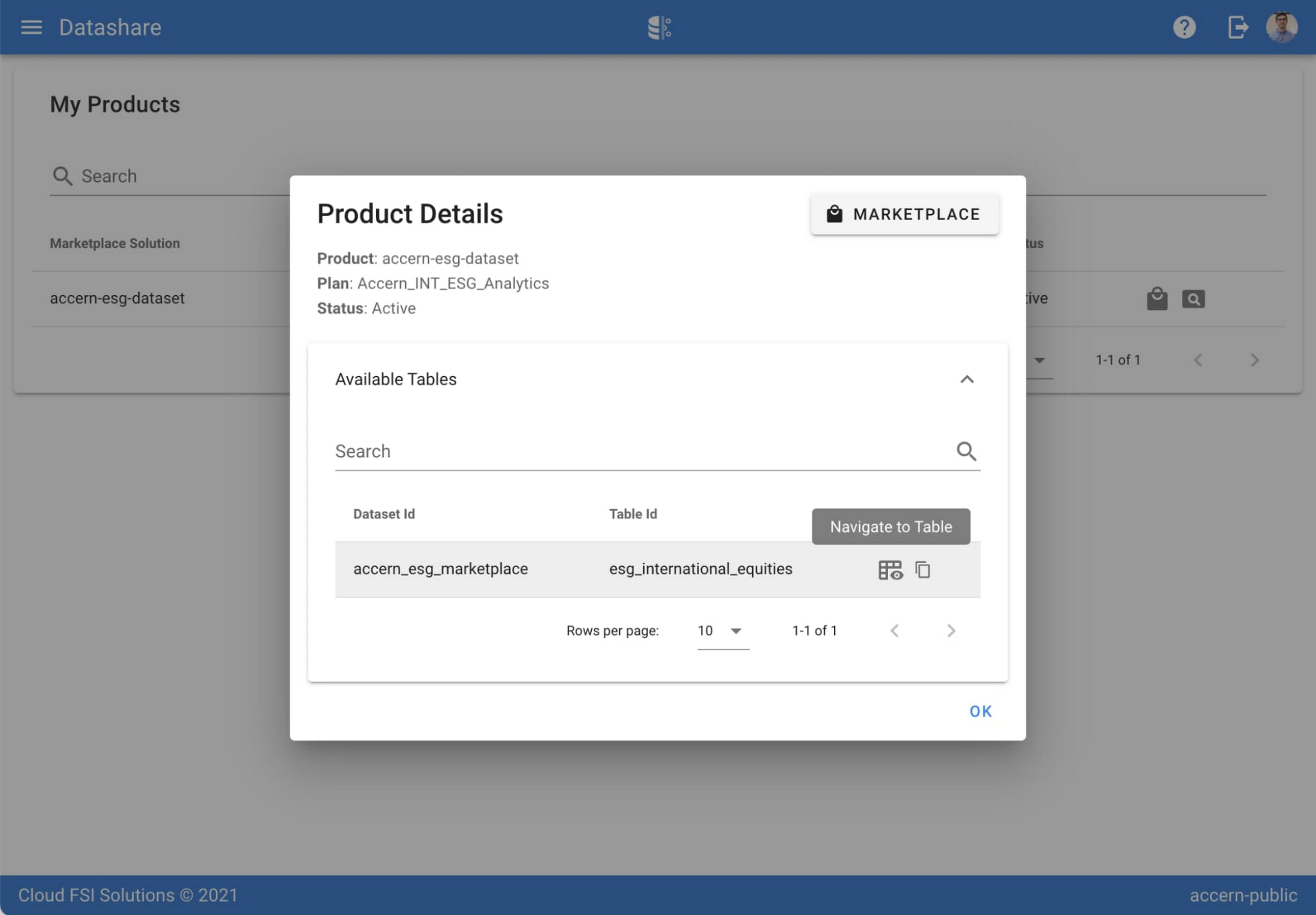

Step 4. Now that you have access and are in the BigQuery console, it’s time to generate data insights.
For this example, we’ve eliminated the company identifying information that is included as part of the subscription and aggregated company ESG in a view where each row represents a day, an industry sector, a specific identified ‘ESG Issues’ (event_group and event) and the respective ‘ESG Sentiment’ per issue.

For example, row 1 indicates that within the ‘Healthcare’ sector, there was a ‘Social – Civil Society’ issue identified and it had a negative ESG sentiment score of -15.35.
Step 5. Generate a report by exporting it to Data Studio to build visualizations and conduct additional analysis on the ESG data.
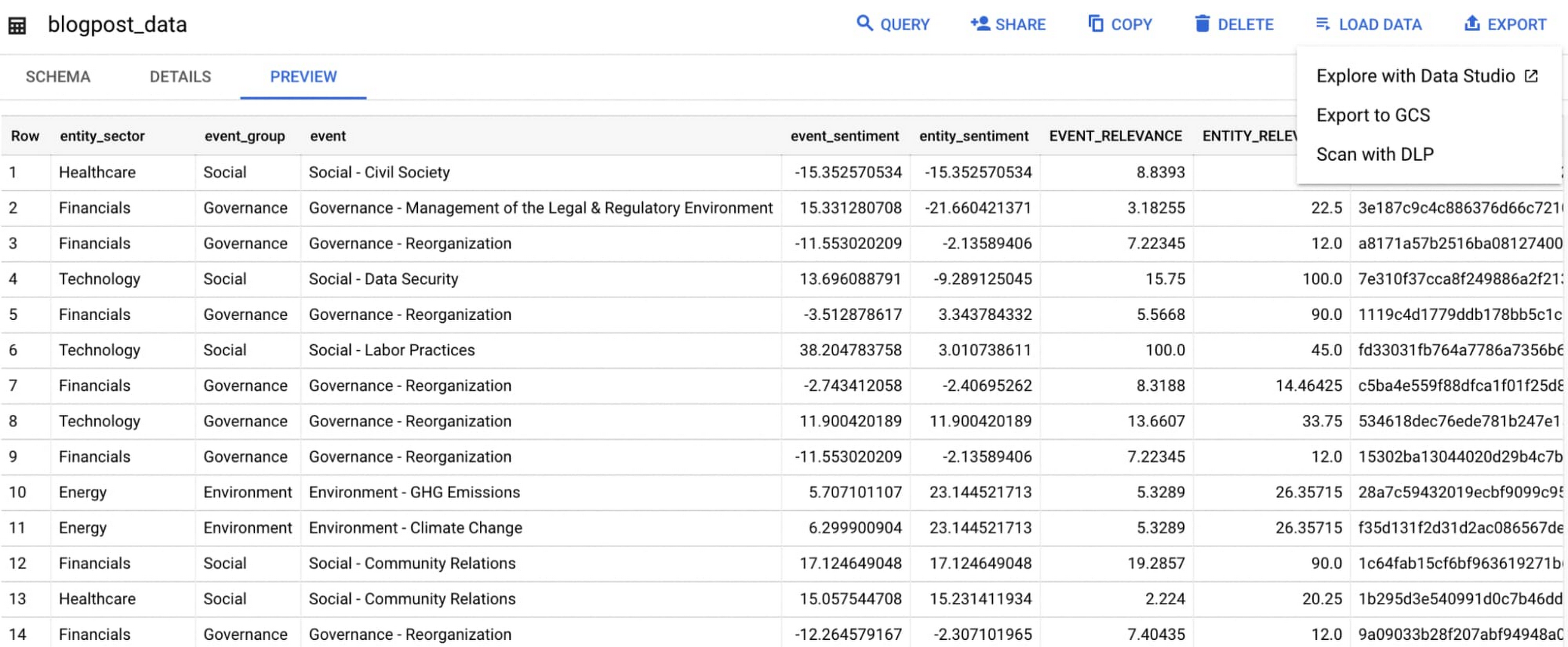
Select ‘Export’ and ‘Explore with Data Studio’.
Step 6. Build a simple/basic report.
Now that the ESG data appears in Data Studio, you can start by building a simple chart to help you understand which industry sectors have the highest volume of discussions around ESG and the overall ESG Sentiment per industry sector.
To build the chart:
- Select the chart type ‘Table’.
- Include
Entity_Sectoras your dimension to aggregate results by ‘Industry Sector.’ - Include
Signal_IDas a measure to count the number of ESG passages identified per ‘Industry Sector.’ - Include
AVG(Event_Sentiment)as a measure to display the overall ESG Sentiment per ‘Industry Sector’ across ESG Issues.

You can see sectors that are most discussed when it comes to ESG related topics and their corresponding ‘ESG Sentiment’ scores.
Step 7. Build your final report in Data Studio.
As a next step you can further drill into the data to understand ESG data specific to each ‘Industry Sector’ and identify positive and negative ESG practices.
Accern has built a more complex sample dashboard and made it available publicly here. You can interact with this report and play around with the data. The dashboard can help to identify material ESG insights for each sector to inform your investment and risk processes. If you have additional questions, you can reach out to Accern directly.

Discovering, accessing and analyzing licensed datasets is quick and easy. Stay tuned for more updates on new licensed datasets.
Publishing your data via Datashare
If you are a publisher of market data, alternative, or exotic data, you can use Datashare to get it published on Google Cloud Marketplace.
Start by joining the Partner Advantage program by registering for the Partner Advantage Portal and applying for the Partner Advantage Build Model engagement. Visit our getting started guide for information to get started on publishing licensed datasets in the Marketplace. Stay tuned for a future blog post about using Datashare to publish datasets in the Marketplace.
More solutions for capital markets
Check out other Google Cloud solutions for capital markets.

3835
Of your peers have already downloaded this article
2:30 Minutes
The most insightful time you'll spend today!
Every business is a digital business. That’s what you’ll hear from technology folks these days. But, what exactly is a digital business? How does one define it?
Simply put, digital businesses are those that have thoroughly capitalized on the opportunity to connect people with technology. There are four parts to a digital business:
Real-time data and analytics: To stay relevant in the age of Big Data, businesses must analyze copious amounts of data to derive actionable insights—both from historical data, and in real time.
Fast, flexible application development: Rapid and continuous delivery of software to your stakeholders is no longer optional. Businesses need platforms for their applications strategy — from using container-based development tools to fully managed serverless platforms.
Secure, reliable infrastructure: How secure is your on-prem datacenter? What happens if it goes down? How many dedicated security engineers do you have on staff? What’s the cost of a system upgrade? What digital businesses need is a secure and reliable infrastructure that can power their applications.
Constant collaboration and productivity: Digital businesses are designed to keep teams seamlessly connected not only to each other, but also to the applications that keep the company running. This enables everything and everyone to work together, no matter where they sit—across the office or across the ocean.
Download this infographic to know more.
More Relevant Stories for Your Company

Earth Week: Google Cloud at the Heart of Sustainability
Today’s Google Doodle reminds us of the enormous changes our planet is experiencing due to climate change. Everyone, from businesses to governments to technologists, has the opportunity to meet this challenge — transforming themselves and their organizations to be more sustainable. For this Earth Day 2022, and indeed Earth Week,

Forrester Surveyed Indian Retailers About Digital Transformation. Here’s What They Found
As today’s empowered consumers demand more of the retail experience than ever before, leading retailers and brands in India are investing to rethink and reinvent in their customers’ cross-touchpoint experiences. Our survey results demonstrate that retail decision makers understand that better customer experience can yield financial benefits, including faster revenue

Making Weather Predictions Easy with Weather Research and Forecasting (WRF) Models on Google Cloud!
Weather forecasting and climate modeling are two of the world's most computationally complex and demanding tasks. Further, they’re extremely time-sensitive and in high demand — everyone from weekend travelers to large-scale industrial farming operators wants up-to-date weather predictions. To provide timely and meaningful predictions, weather forecasters usually rely on high

Google Cloud’s Professional Service Organization: How it Accelerates Operational Health Review Cloud Migration
Introduction The Google Cloud Professional Services Organization's (PSO) mission is to help our customers get the most out of Google products. PSO is responsible for customer success by sharing our technical expertise in order to unlock business value from the cloud by providing cloud strategy and best practice advice, implementation guidance, and
