






AI and Machine Learning Get Marketers One Step Closer to Relevance at Scale
READ FULL INTRODOWNLOAD AGAIN4886
Of your peers have already downloaded this article
1:30 Minutes
The most insightful time you'll spend today!
Smart Reply: How the AI-augmented Chat Helps Scale Google’s Tech Support Operations

2893
Of your peers have already read this article.
3:00 Minutes
The most insightful time you'll spend today!
As Googlers transitioned to working from home during the pandemic, more and more turned to chat-based support to help them fix technical problems. Google’s IT support team looked at many options to help us meet the increased demand for tech support quickly and efficiently.
More staff? Not easy during a pandemic.
Let service levels drop? Definitely not.
Outsource? Not possible with our IT requirements.
Automation? Maybe, just maybe…
How could we use AI to scale up our support operations, making our team more efficient?
The answer: Smart Reply, a technology developed by a Google Research team with expertise in machine learning, natural language understanding, and conversation modeling. This product provided us with an opportunity to improve our agents’ ability to respond to queries from Googlers by using our corpus of chat data. Smart Reply trains a model that provides suggestions to techs in real time. This reduces the cognitive load when multi-chatting and helps a tech drive sessions towards resolution.

In the solution detailed below, our hope is that IT teams in a similar situation can find best practices and a few shortcuts to implementing the same kind of time saving solutions. Let’s get into it!
Challenges in preparing our data
Our tech support service for Google employees—Techstop—provides a complex service, offering support for a range of products and technology stacks through chat, email, and other channels.
Techstop has a lot of data. We receive hundreds of thousands of requests for help per year. As Google has evolved we’ve used a single database for all internal support data, storing it as text, rather than as protocol buffers. Not so good for model training. To protect user privacy, we want to ensure no PII (personal identifiable information – e.g. usernames, real names, addresses, or phone numbers) makes it into the model.
To address these challenges we built a FlumeJava pipeline that takes our text and splits each message sent by agent and requester into individual lines, stored as repeated fields in a protocol buffer. As our pipe is executing this task, it also sends text to the Google Cloud DLP API, removing personal information from the session text, replacing it with a redaction that we can later use on our frontend.
With the data prepared in the correct format, we are able to begin our model training. The model provides next message suggestions for techs based on the overall context of the conversation. To train the model we implemented tokenization, encoding, and dialogue attributes.
Splitting it up
The messages between the agent and customer are tokenized: broken up into discrete chunks for easier use. This splitting of text into tokens must be carefully considered for several reasons:
- Tokenization determines the size of the vocabulary needed to cover the text.
- Tokens should attempt to split along logical boundaries, aiming to extract the meaning of the text.
- Tradeoffs can be made between the size of each token, with smaller tokens increasing processing requirements but enabling easier correlation between different spans of text.
There are many ways to tokenize text (SAFT, splitting on white spaces, etc.), here we chose sentence piece tokenization, with each token referring to a word segment.
Prediction with encoders
Training the neural network with tokenized values has gone through several iterations. The team used an Encoder-Decoder architecture that took a given vector along with a token and used a softmax function to predict the probability that the token was likely to be the next token in the sentence/conversation. Below, a diagram represents this method using LSTM-based recurrent networks. The power of this type of encoding comes from the ability of the encoder to effectively predict not just the next token, but the next series of tokens.
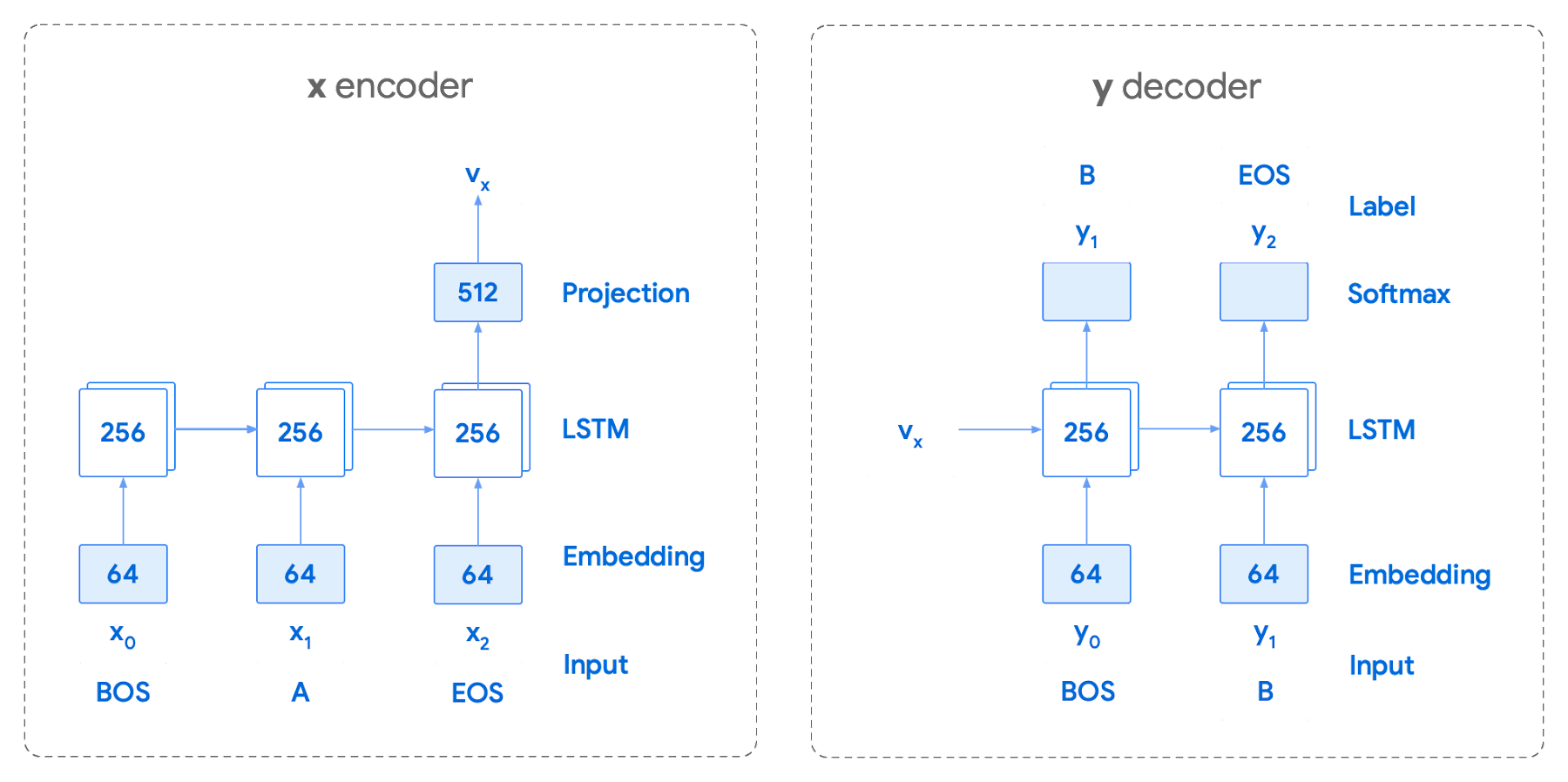
This has proven very useful for Smart Reply. In order to find the optimal sequence, an exponential search over each tree of possible future tokens is required. For this we opted to use beam search over a fixed-size list of best candidates, aiming to avoid increasing the overall memory use and run time for returning a list of suggestions. To do this we arranged tokens in a trie, and used a number of post processing techniques, as well as calculating a heuristic max score for a given candidate, to reduce the time it takes to iterate through the entire token list. While this improves the run time, the model tends to prefer shorter sequences.
In order to help reduce latency and improve control we decided to move to an Encoder-Encoder architecture. Instead of predicting a single next token and decoding a sequence of following predictions with multiple calls to the model, it instead encodes a candidate sequence with the neural network.
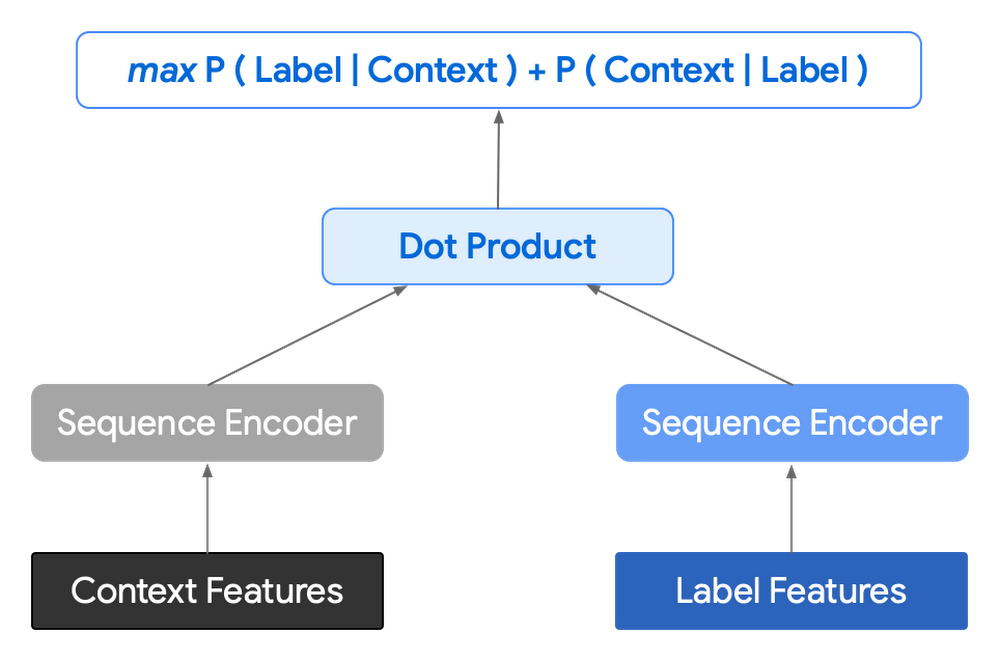
In practice, the two vectors – the context encoding and the encoding of a single candidate output – are combined with dot product to arrive at a score for the given candidate. The goal of this network is to maximize the score for true candidates – e.g. candidates that did appear in the training set – and minimize false candidates.
Choosing how to sample negatives affects the model training greatly. Below are some strategies that can be employed:
- Using positive labels from other training examples in the batch.
- Drawing randomly from a set of common messages. This assumes that the empirical probability of each message is sampled correctly.
- Using messages from context.
- Generating negatives from another model.
As this encoding generates a fixed list of candidates that can be precomputed and stored, each time a prediction is needed, only the context encoding needs to be computed, then multiplied by the matrix of candidate embeddings. This reduces both the time from the beam search method and the inherent bias towards shorter responses.
Dialogue Attributes
Conversations are more than simple text modeling. The overall flow of the conversation between participants provides important information, changing the attributes of each message. The context, such as who said what to whom and when, offers useful bits of input for the model when making a prediction. To that end the model uses the following attributes during its prediction:
- Local User ID’s – we set a finite number of participants for a given conversation to represent the turn taking between messages, assigning values to those participants. In most cases for support sessions there are 2 participants, requiring ID 0, and 1.
- Replies vs continuations – initially modeling focused only on replies. However, in practice conversations also include instances where participants are following up on the previously sent message. Given this, the model is trained for both same-user suggestions and “other” user suggestions.
- Timestamps – gaps in conversation can indicate a number of different things. From a support perspective, gaps may indicate that the user has disconnected. The model takes this information and focuses on the time elapsed between messages, providing different predictions based on the values.
Post processing
Suggestions can then be manipulated to get a more desirable final ranking. Such post-processing includes:
- Preferring longer suggestions by adding a token factor, generated by multiplying the number of tokens in the current candidate.
- Demoting suggestions with a high level of overlap with previously sent messages.
- Promoting more diverse suggestions based on embedding distance similarities.
To help us tune and focus on the best responses the team created a priority list. This gives us the opportunity to influence the model’s output, ensuring that responses that are incorrect can be de-prioritized. Abstractly it can be thought of as a filter that can be calibrated to best suit the client’s needs.
Getting suggestions to agents
With our model ready we now needed to get it in the hands of our techs. We wanted our solution to be as agnostic to our chat platform as possible, allowing us to be agile when facing tooling changes and speeding up our ability to deploy other efficiency features. To this end we wanted an API that we could query either via gRPC or via HTTPs. We designed a Google Cloud API, responsible for logging usage as well as acting as a bridge between our model and a Chrome Extension we would be using as a frontend.
The hidden step, measurement
Once we had our model, infrastructure, and extension in place we were left with the big question for any IT project. What was our impact? One of the great things about working in IT at Google is that it’s never dull. We have constant changes, be it planned or unplanned. However, this does complicate measuring the success of a deployment like this. Did we improve our service or was it just a quiet month?
In order to be satisfied with our results we conducted an A/B experiment, with some of our techs using our extension, and the others not. The groups were chosen at random with a distribution of techs across our global team, including a mix of techs with varying levels of experience ranging from 3 to 26 months.
Our primary goal was to measure tech support efficiency when using the tool. We looked at two key metrics as proxies for tech efficiency:
- The overall length of the chat.
- The number of messages sent by the tech.
Evaluating our experiment
To evaluate our data we used a two-sample permutation test. We had a null hypothesis that techs using the extension would not have a lower time-to-resolution, or be able to send more messages, than those without the extension. The alternative hypothesis was that techs using the extension would be able to resolve sessions quicker or send more messages in approximately the same time.
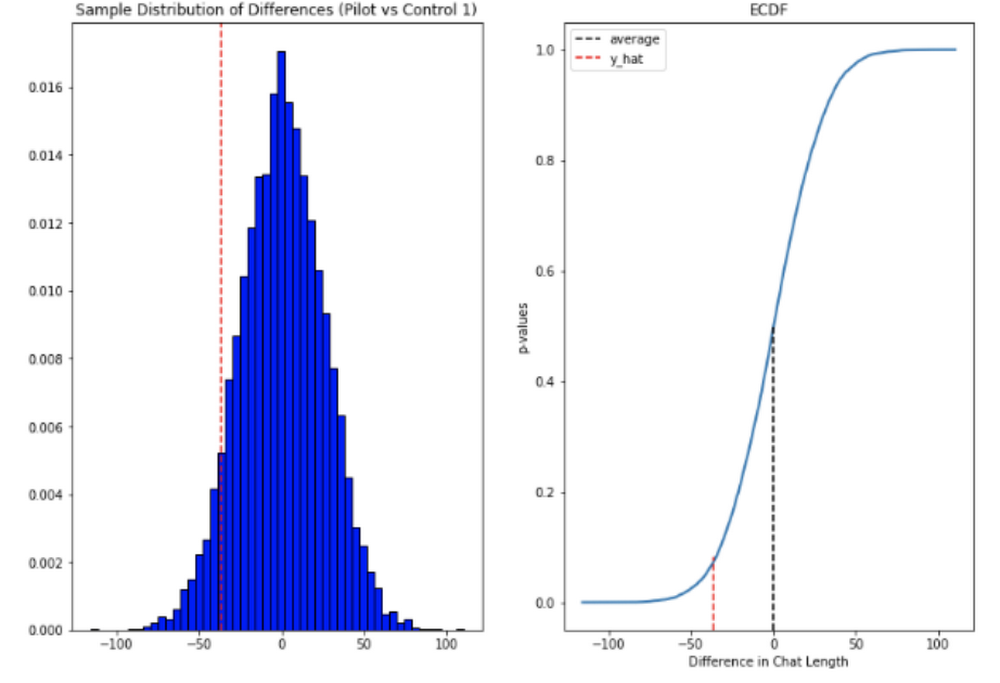
We took the mid mean of our data, using pandas to trim outliers greater than 3 standard deviations away. As the distribution of our chat lengths is not normal, with significant right skew caused by a long tail of longer issues, we opted to measure the difference in means, relying on central limit theorem (CLT) to provide us with our significance values. Any result with a p-value between 1.0 and 9.0 would be rejected.
Across the entire pool we saw a decrease in chat lengths of 36 seconds.
In reference to the number of chat messages we saw techs on average being able to send 5-6 messages more in less time.
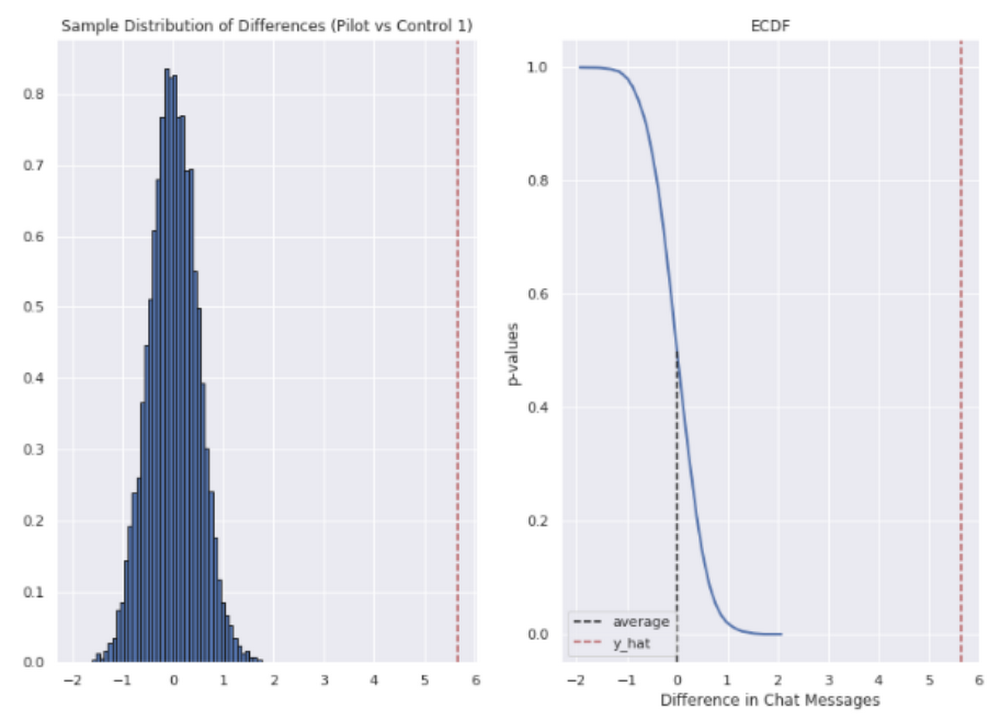
In short, we saw techs were able to send more messages in a shorter period of time. Our results also showed that these improvements increased with support agent tenure, and our more senior techs were able to save an average of ~4 minutes per support interaction.
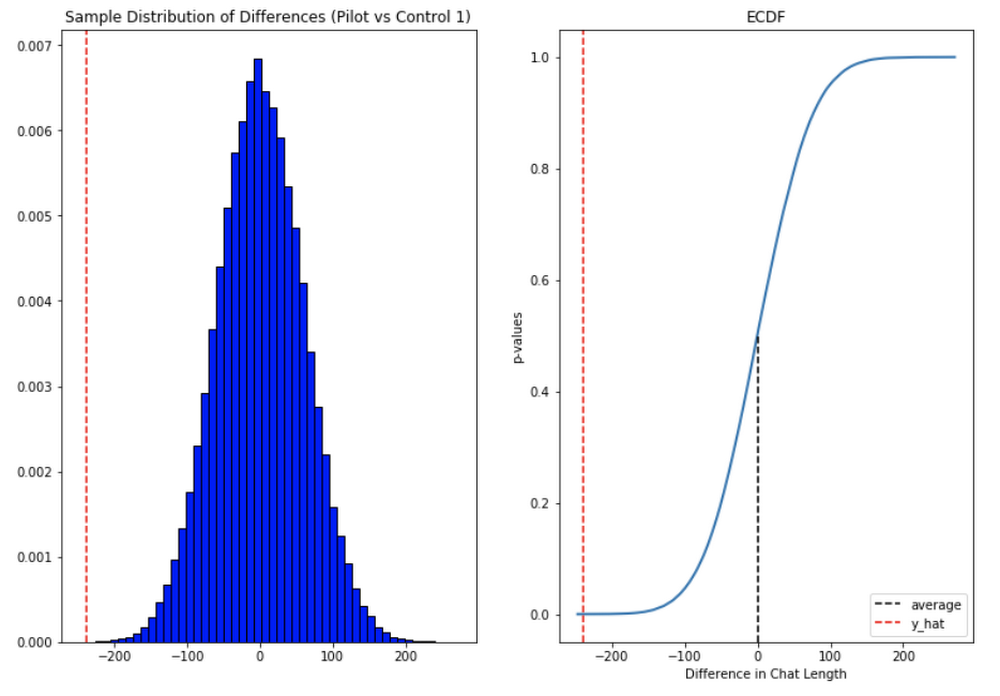
Overall we were pleased with the results. While things weren’t perfect, it looked like we were onto a good thing.
So what’s next for us?
Like any ML project, the better the data the better the result. We’ll be spending time looking into how to provide canonical suggestions to our support agents by clustering results coming from our allow list. We also want to investigate ways of making improvements to the support articles provided by the model, as anything that helps our techs, particularly the junior ones, with discoverability will be a huge win for us.
How can you do this?
A successful applied AI project always starts with data. Begin by gathering the information you have, segmenting it up, and then starting to process it. The interaction data you feed in will determine the quality of the suggestions you get, so make sure you select for the patterns you want to reinforce.
Our Contact Center AI allows tokenization, encoding and reporting, without you needing to design or train your own model, or create your own measurements. It handles all the training for you, once your data is formatted properly.
You’ll still need to determine how best to integrate its suggestions to your support system’s front-end. We also recommend doing statistical modeling to find out if the suggestions are making your support experience better.
As we gave our technicians ready-made replies to chat interactions, we saved time for our support team. We hope you’ll try using these methods to help your support team scale.

3967
Of your peers have already listened to this podcast
23:38 Minutes
The most insightful time you'll spend today!
How Apna is using data and AI to drive the gig economy in India
Artificial intelligence and machine learning are already transforming the technological landscape. From digital assistants to image-recognition software to self-driving cars, what was once the stuff of science fiction is now becoming a reality. But what exactly does it mean for marketing and advertising executives?
It could get us closer to one of advertising’s most-sought goals: relevance at scale. Before then, we’re going to see changes to the way we do business.
Technological advances have always created new opportunities for storytelling and marketing. Just as the advent of TV brought an era of truly mass advertising and reach, and the internet and mobile brought a new level of targeting and context, AI will change how people interact with information, technology, brands, and services.
A big part of the opportunity for marketers is how AI will help us fully realize personalization—and relevance—at scale. With platforms like Search and YouTube reaching billions of people everyday, digital ad platforms finally can achieve communication at scale. This scale, combined with customization possible through AI, means we’ll soon be able to tailor campaigns to consumer intent in the moment. It will be like having a million planners in your pocket.
Find out how you can achieve relevance at scale. Download now!
Collateral IT: Leveraging Google Cloud for Enhanced Asset Allocation at HSBC

2590
Of your peers have already read this article.
2:30 Minutes
The most insightful time you'll spend today!
Have you ever heard of an optimization problem? Imagine you have a million marbles, all of different sizes, colors, patterns, and weights. You need to fill up 1,000 jars of different sizes with them, but each jar has restrictions as to which colors, patterns, and how many marbles of each type it can hold. After filling all the jars, you may keep any leftover marbles, so you want to ensure that these are the shiniest ones in the bunch. How do you go about solving this puzzle? There are many possibilities, but what would be the most efficient way to guarantee you’ll reach the best possible outcome every time?
At HSBC, our Collateral Treasury desk and Collateral Management team have been solving a similar problem, but instead of marbles and jars, we work with around 50,000 assets that can be used as collateral, and 1,000s of collateral accounts.
Our Collateral Treasury Trading desk helps finance our Markets business by providing the required collateral, such as certain debt or equities, to cover its obligations to a client. The collateral could be used by HSBC for its margin requirements, CCPs (Central Counterparty Clearing Houses), or for securities financing transactions. Each obligation can have different eligibility criteria about what assets can be used as collateral for each client. These rules and restrictions revolve around the type of asset allowed or daily liquidity factors.
The process of matching collateral to obligations is known as an allocation, and it can get complicated the more diverse the collateral pool and the more customers you have. It is important to allocate collateral in the most efficient way and, traditionally, this business problem has been managed manually or by a third party against a set of simple rules.
But by collaborating with Google Cloud, we can improve collateral allocation through automation. Even small efficiency gains have the potential to make a significant difference when the amount of collateral inventory managed is tens of billions of dollars. It means the Collateral Treasury desk is much more efficient when managing its own funding costs or regulatory ratios such as the Liquidity Coverage Ratio (a key financial resource measure for banks that ensures sufficient high quality assets are readily available to survive periods of liquidity stress).
Leveraging AI to tackle a complex business problem
Our solution is OPTIC, a HSBC platform utilizing Google Operation Research Tools, or OR-Tools, an open-source optimization library provided by Google AI. Its main goal is to allow the Collateral Treasury desk to automate the collateral allocation process in the most optimal way on any given day. OPTIC’s architecture is based on microservices and provides the ability to handle large volumes of data, for which a scalable and self-managed infrastructure is needed. OPTIC runs on Google Kubernetes Engine, which provides it with workload rebalancing, auto-scaling capabilities, and high availability.
Additionally, we collaborated with Google Operations Research, which gave us access to the experience of Google AI engineers who were able to advise us on the best way to implement their optimization libraries to solve our business problem.
We’ve found that using linear programming solvers such as Google OR-Tools is the best way to achieve the optimization capability that fundamentally changes how we manage our inventory. It enables us to optimize for multiple outcomes and be certain that we are doing this in the most efficient way possible.
Finding the optimal way forward with automation
OPTIC works by consuming data feeds from a multitude of systems, then it standardizes the data, and combines with decision-making parameters and weightings Google OR-Tools can use, to understand and arrive at an optimal outcome. OPTIC can also provide insights and metrics that help optimize business decisions such as which assets can be added or removed in the future to make collateral allocation even more efficient.
Looking forward, this project makes us optimistic about using Google Kubernetes Engine to manage more of our microservices in other platforms. This will mean that we can scale without worrying about hardware or making big changes to our environment. With this solution, we’ll be able to mobilize and optimize our collateral according to our own view of the value and quality of the collateral, as well as the best fit for our exposures at any given time.
Over time, the project can bring visible long-term benefits to HSBC’s Markets business, including decreased operational risks and potential to save significant funding costs. Next, we will continue to add new capabilities and data sources to our solution to continue solving some of the most complex business challenges in our industry.
Vector Search: The Tech Powering Billions of Search Results for Google Users

4539
Of your peers have already read this article.
1:30 Minutes
The most insightful time you'll spend today!
Recently, Google Cloud partner Groovenauts, Inc. published a live demo of MatchIt Fast. As the demo shows, you can find images and text similar to a selected sample from a collection of millions in a matter of milliseconds:
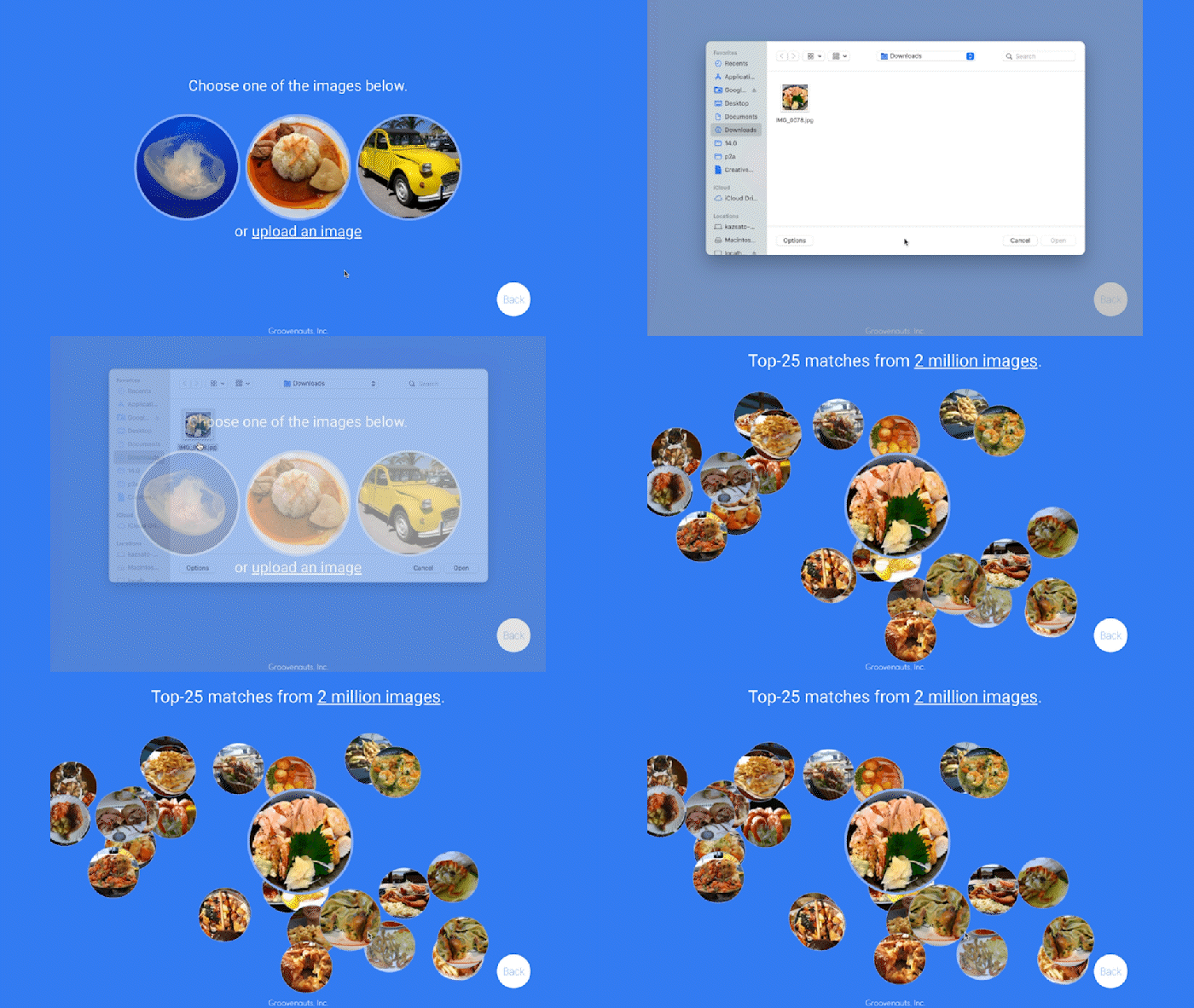
Give it a try — and either select a preset image or upload one of your own. Once you make your choice, you will get the top 25 similar images from two million images on Wikimedia images in an instant, as you can see in the video above. No caching involved.
The demo also lets you perform the similarity search with news articles. Just copy and paste some paragraphs from any news article, and get similar articles from 2.7 million articles on the GDELT project within a second.
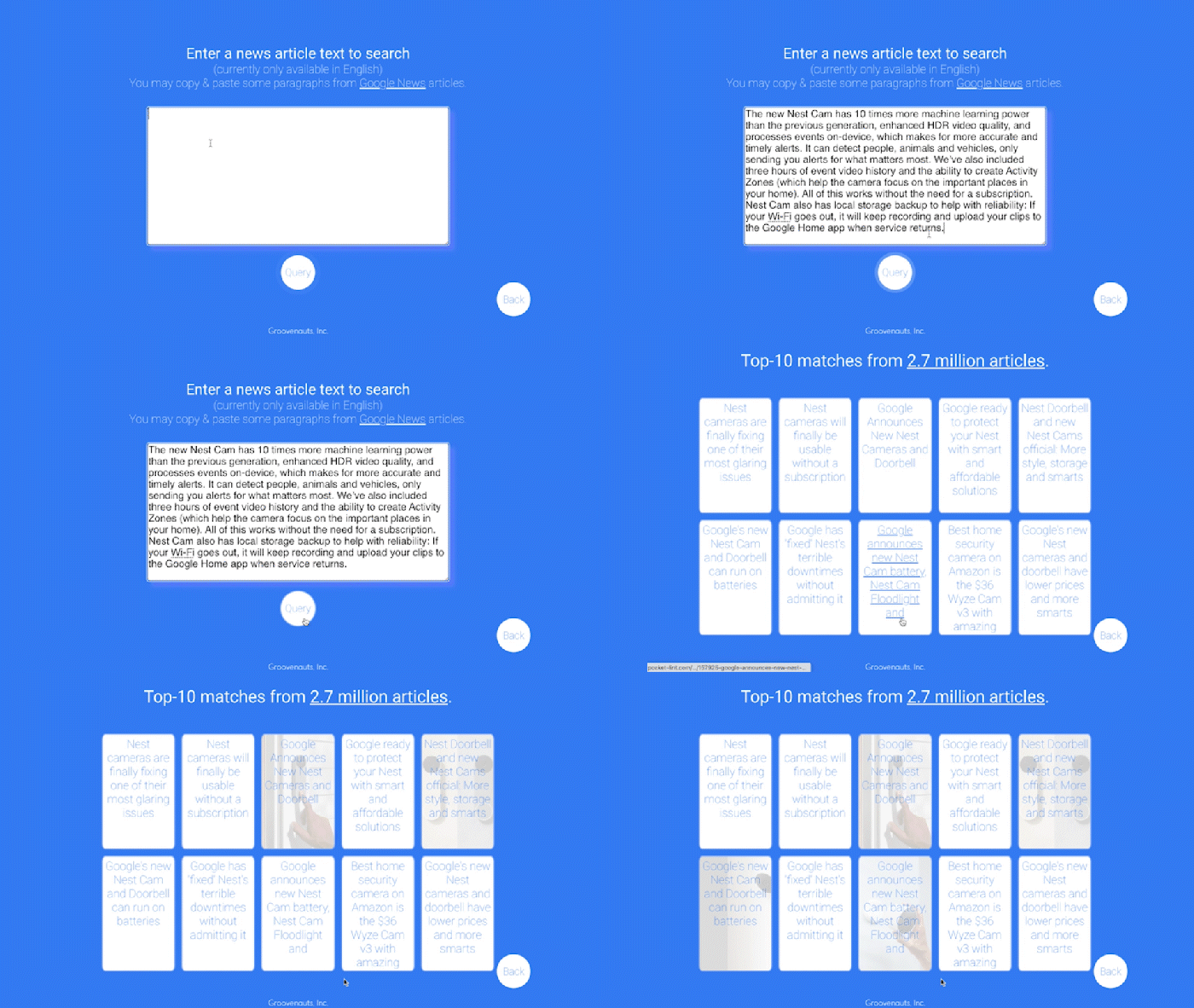
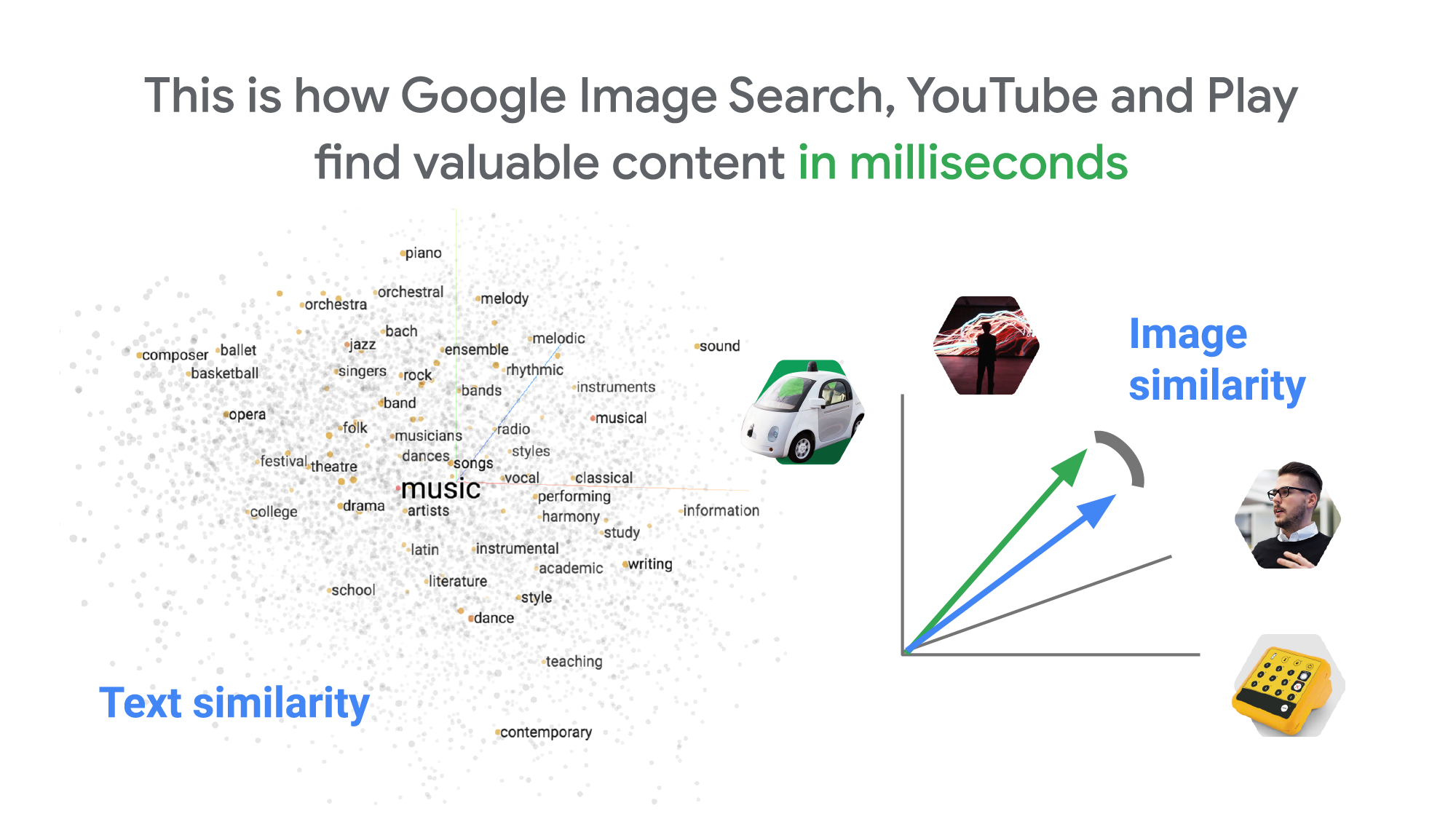
Vector Search: the technology behind Google Search, YouTube, Play, and more
How can it find matches that fast? The trick is that the MatchIt Fast demo uses the vector similarity search (or nearest neighbor search or simply vector search) capabilities of the Vertex AI Matching Engine, which shares the same backend as Google Image Search, YouTube, Google Play, and more, for billions of recommendations and information retrievals for Google users worldwide. The technology is one of the most important components of Google’s core services, and not just for Google: it is becoming a vital component of many popular web services that rely on content search and information retrieval accelerated by the power of deep neural networks.
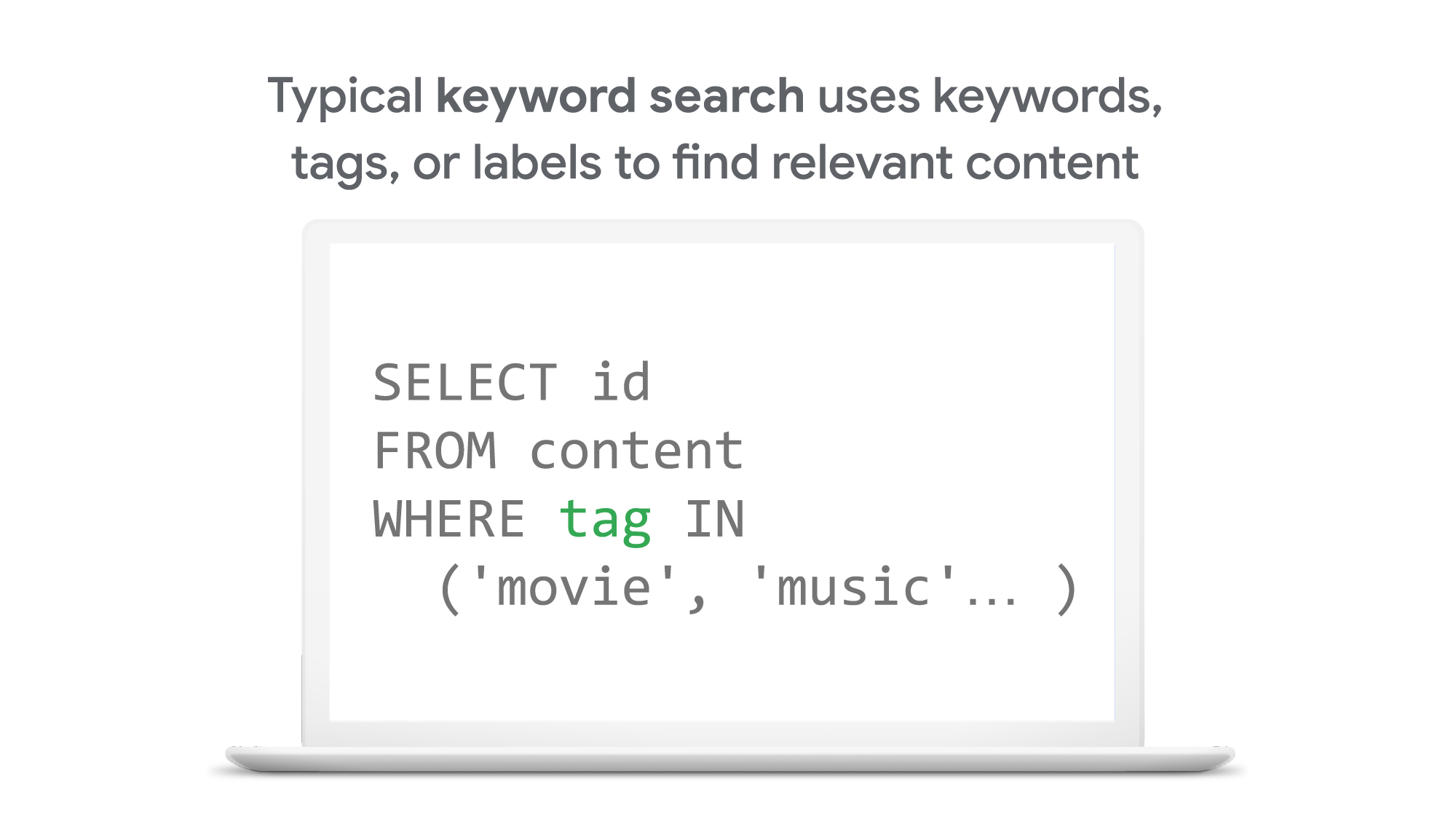
So what’s the difference between traditional keyword-based search and vector similarity search? For many years, relational databases and full-text search engines have been the foundation of information retrieval in modern IT systems. For example, you would add tags or category keywords such as “movie”, “music”, or “actor” to each piece of content (image or text) or each entity (a product, user, IoT device, or anything really). You’d then add those records to a database, so you could perform searches with those tags or keywords.
In contrast, vector search uses vectors (where each vector is a list of numbers) for representing and searching content. The combination of the numbers defines similarity to specific topics. For example, if an image (or any content) includes 10% of “movie”, 2% of “music”, and 30% of “actor”-related content, then you could define a vector [0.1, 0.02, 0.3] to represent it. (Note: this is an overly simplified explanation of the concept; the actual vectors have much more complex vector spaces). You can find similar content by comparing the distances and similarities between vectors. This is how Google services find valuable content for a wide variety of users worldwide in milliseconds.
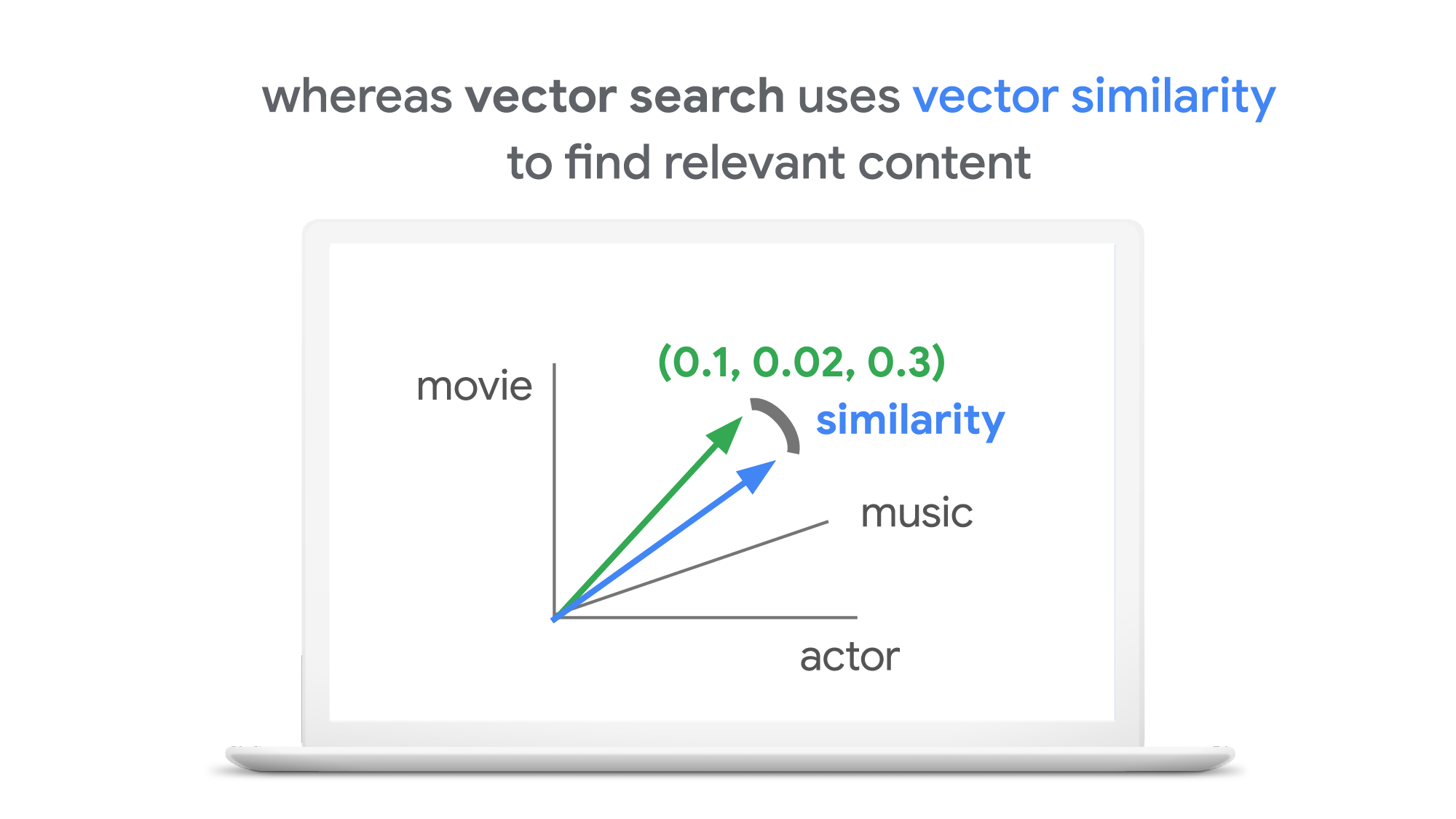
With keyword search, you can only specify a binary choice as an attribute of each piece of content; it’s either about a movie or not, either music or not, and so on. Also, you cannot express the actual “meaning” of the content to search. If you specify a keyword “films”, for example, you would not see any content related to “movies” unless there was a synonyms dictionary that explicitly linked these two terms in the database or search engine.
Vector search provides a much more refined way to find content, with subtle nuances and meanings. Vectors can represent a subset of content that contains “much about actors, some about movies, and a little about music”. Vectors can represent the meaning of content where “films”, “movies”, and “cinema” are all collected together. Also, vectors have the flexibility to represent categories previously unknown to or undefined by service providers. For example, emerging categories of content primarily attractive to kids, such as ASMR or slime, are really hard for adults or marketing professionals to predict beforehand, and going back through vast databases to manually update content with these new labels would be all but impossible to do quickly. But vectors can capture and represent never-before-seen categories instantly.
Vector search changes business
Vector search is not only applicable to image and text content. It can also be used for information retrieval for anything you have in your business when you can define a vector to represent each thing. Here are a few examples:
- Finding similar users: If you define a vector to represent each user in your business by combining the user’s activities, past purchase history, and other user attributes, then you can find all users similar to a specified user. You can then see, for example, users who are purchasing similar products, users that are likely bots, or users who are potential premium customers and who should be targeted with digital marketing.
- Finding similar products or items: With a vector generated from product features such as description, price, sales location, and so on, you can find similar products to answer any number of questions; for example, “What other products do we have that are similar to this one and may work for the same use case?” or “What products sold in the last 24 hours in this area?” (based on time and proximity)
- Finding defective IoT devices: With a vector that captures the features of defective devices from their signals, vector search enables you to instantly find potentially defective devices for proactive maintenance.
- Finding ads: Well-defined vectors let you find the most relevant or appropriate ads for viewers in milliseconds at high throughput.
- Finding security threats: You can identify security threats by vectorizing the signatures of computer virus binaries or malicious attack behaviors against web services or network equipment.
- …and many more: Thousands of different applications of vector search in all industries will likely emerge in the next few years, making the technology as important as relational databases.
OK, vector search sounds cool. But what are the major challenges to applying the technology to real business use cases? Actually there are two:
- Creating vectors that are meaningful for business use cases
- Building a fast and scalable vector search service
Embeddings: meaningful vectors for business use cases
The first challenge is creating vectors for representing various entities that are meaningful and useful for business use cases. This is where deep learning technology can really shine. In the case of the MatchIt Fast demo, the application simply uses a pre-trained MobileNet v2 model for extracting vectors from images, and the Universal Sentence Encoder (USE) for text. By applying such models to raw data, you can extract “embeddings” – vectors that map each row of data in a space of their “meanings”. MobileNet puts images that have similar patterns and textures closer to one another in the embedding space, and USE puts texts that have similar topics closer.
For example, a carefully designed and trained machine learning model could map movies into an embedding space like the following:
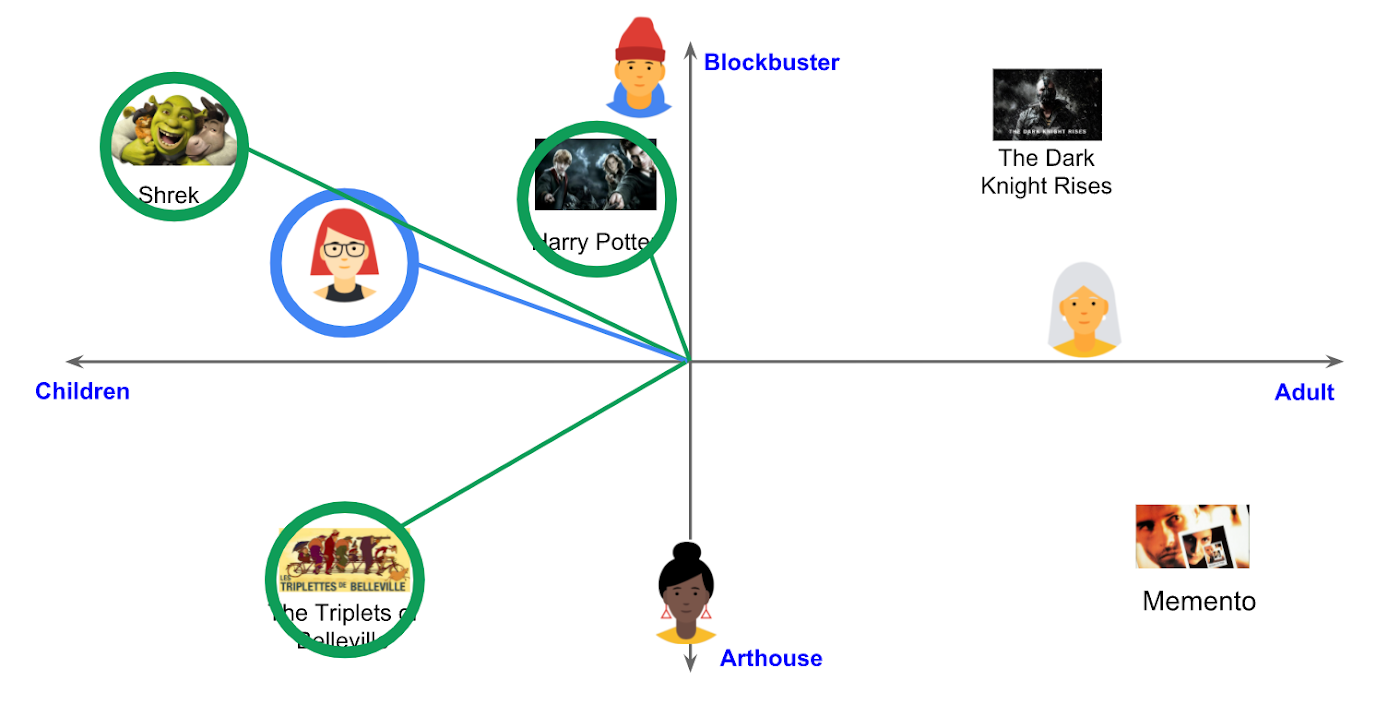
With the embedding space shown here, users could find recommended movies based on the two dimensions: is the movie for children or adults, and is it a blockbuster or arthouse movie? This is a very simple example, of course, but with an embedding space like this that fits your business requirements, you can deliver a better user experience on recommendation and information retrieval services with insights extracted from the model.
For more about creating embeddings, the Machine Learning Crash Course on Recommendation Systems is a great way to get started. We will also discuss how to extract better embeddings from business data later in this post.
Building a fast and scalable vector search service
Suppose that you have successfully extracted useful vectors (embeddings) from your business data. Now the only thing you have to do is search for similar vectors. That sounds simple, but in practice it is not. Let’s see how the vector search works when you implement it with BigQuery in a naive way:https://www.youtube.com/embed/wHNJspvxj2w?enablejsapi=1&
It takes about 20 seconds to find similar items (fish images in this case) from a pool of one million items. That level of performance is not so impressive, especially when compared to the MatchIt Fast demo. BigQuery is one of the fastest data warehouse services in the industry, so why does the vector search take so long?
This illustrates the second challenge: building a fast and scalable vector search engine isn’t an easy task. The most widely used metrics for calculating the similarity between vectors are L2 distance (Euclidean distance), cosine similarity, and inner product (dot product).
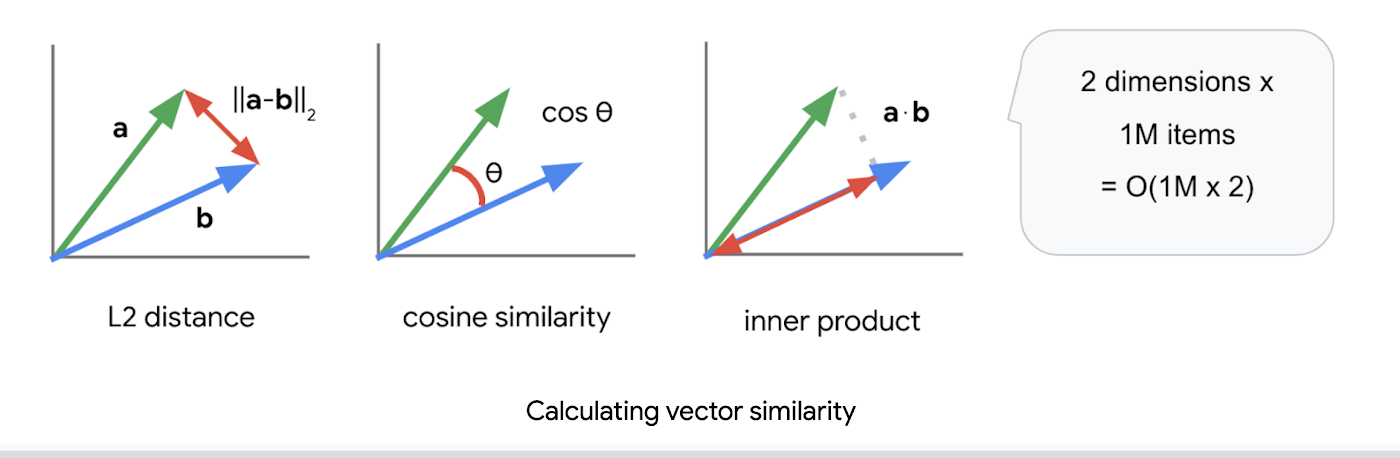
But all require calculations proportional to the number of vectors multiplied by the number of dimensions if you implement them in a naive way. For example, if you compare a vector with 1024 elements to 1M vectors, the number of calculations will be proportional to 1024 x 1M = 1.02B. This is the computation required to look through all the entities for a single search, and the reason why the BigQuery demo above takes so long.
Instead of comparing vectors one by one, you could use the approximate nearest neighbor (ANN) approach to improve search times. Many ANN algorithms use vector quantization (VQ), in which you split the vector space into multiple groups, define “codewords” to represent each group, and search only for those codewords. This VQ technique dramatically enhances query speeds and is the essential part of many ANN algorithms, just like indexing is the essential part of relational databases and full-text search engines.
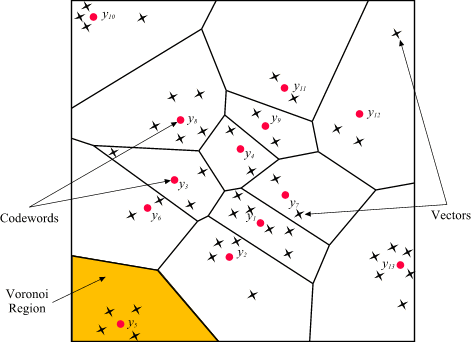
As you may be able to conclude from the diagram above, as the number of groups in the space increases the speed of the search decreases and the accuracy increases. Managing this trade-off — getting higher accuracy at shorter latency — has been a key challenge with ANN algorithms.
Last year, Google Research announced ScaNN, a new solution that provides state-of-the-art results for this challenge. With ScaNN, they introduced a new VQ algorithm called anisotropic vector quantization:
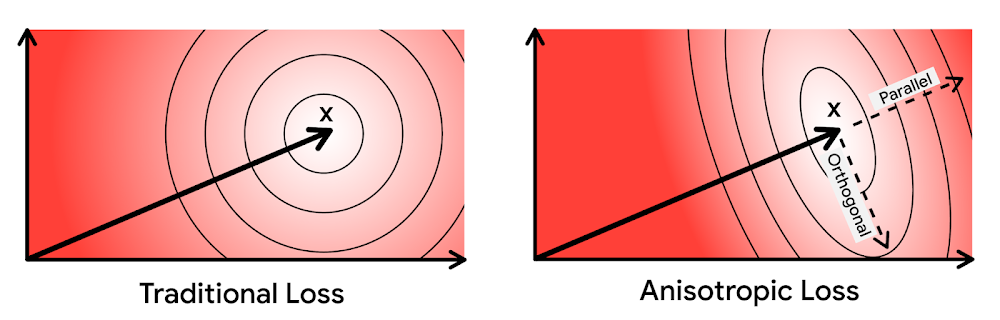
Anisotropic vector quantization uses a new loss function to train a model for VQ for an optimal grouping to capture farther data points (i.e. higher inner product) in a single group. With this idea, the new algorithm gives you higher accuracy at lower latency, as you can see in the benchmark result below (the violet line):
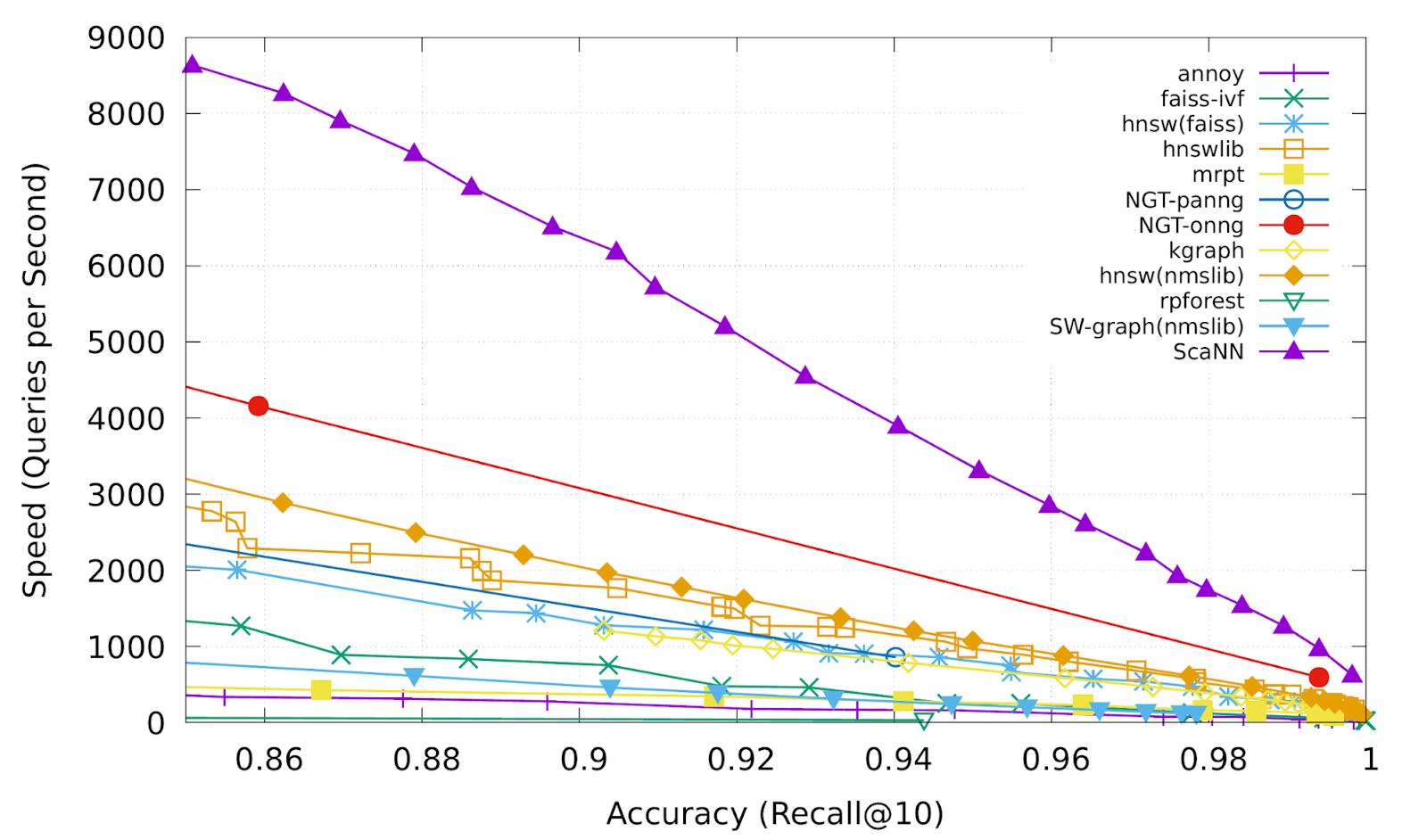
This is the magic ingredient in the user experience you feel when you are using Google Image Search, YouTube, Google Play, and many other services that rely on recommendations and search. In short, Google’s ANN technology enables users to find valuable information in milliseconds, in the vast sea of web content.
How to use Vertex AI Matching Engine
Now you can use the same search technology that powers Google services with your own business data. Vertex AI Matching Engine is the product that shares the same ScaNN based backend with Google services for fast and scalable vector search, and recently it became GA and ready for production use. In addition to ScaNN, Matching Engine gives you additional features as a commercial product, including:
- Scalability and availability: The open source version of ScaNN is a good choice for evaluation purposes, but as with most new and advanced technologies, you can expect challenges when putting it into production on your own. For example, how do you operate it on multiple nodes with high scalability, availability, and maintainability? Matching Engine uses Google’s production backend for ScaNN, which provides auto-scaling and auto-failover with a large worker pool. It is capable of handling tens of thousands of requests per second, and returns search results in less than 10 ms for the 90th percentile with a recall rate of 95 – 98%.
- Fully managed: You don’t have to worry about building and maintaining the search service. Just create or update an index with your vectors, and you will have a production-ready ANN service deployed. No need to think about rebuilding and optimizing indexes, or other maintenance tasks.
- Filtering: Matching Engine provides filtering functionality that enables you to filter search results based on tags you specify on each vector. For example, you can assign “country” and “stocked” tags to each fashion item vector, and specify filters like “(US OR Canada) AND stocked” or “not Japan AND stocked” on your searches.
Let’s see how to use Matching Engine with code examples from the MatchIt Fast demo.
Generating embeddings
Before starting the search, you need to generate embeddings for each item like this one:
{"Id":"b5c65fea9b0b8a57bfa574ea","Embedding": [0.16329009830951691,0.92436742782592773,0.00095699273515492678,0.011479727923870087,0.0089491046965122223,0.019959751516580582,0.031516745686531067,0.0066015380434691906,0.46404418349266052,...
This is an embedding with 1280 dimensions for a single image, generated with a MobileNet v2 model. The MatchIt Fast demo generates embeddings for two million images with the following code:
class Vectorizer:def __init__(self):self._model = tf.keras.Sequential([hub.KerasLayer("https://tfhub.dev/google/imagenet/mobilenet_v2_100_224/feature_vector/5", trainable=False)])self._model.build([None, 224, 224, 3]) # Batch input shape.def vectorize(self, jpeg_file):...snip...embedding = self._model.predict({"inputs": input_tensor})[0].tolist()return embedding
After you generate the embeddings, you store them in a Google Cloud Storage bucket.
Configuring an index
Then, define a JSON file for the index configuration:
{"contentsDeltaUri": "gs://match-it-fast-us-central1/wikimedia_images/index-1","config": {"dimensions": 1280,"approximateNeighborsCount": 150,"distanceMeasureType": "SQUARED_L2_DISTANCE","algorithm_config": {"treeAhConfig": {"leafNodeEmbeddingCount": 1000,"leafNodesToSearchPercent": 5}}}}
You can find a detailed description for each field in the documentation, but here are some important fields:
contentsDeltaUri: the place where you have stored the embeddingsdimensions: how many dimensions in the embeddingsapproximateNeighborsCount: the default number of neighbors to find via approximate searchdistanceMeasureType: how the similarity between embeddings should be measured, either L1, L2, cosine or dot product (this page explains which one to choose for different embeddings)
To create an index on the Matching Engine, run the following gcloud command where the metadata-file option takes the JSON file name defined above.
gcloud --project=gn-match-it-fast beta ai indexes create \--display-name=wikimedia-images \--description="Wikimedia Image Demo" \--metadata-file=metadata/wikimedia_images_index_metadata.json \--region=us-central1
Run the search
Now the Matching Engine is ready to run. The demo processes each search request in the following order:
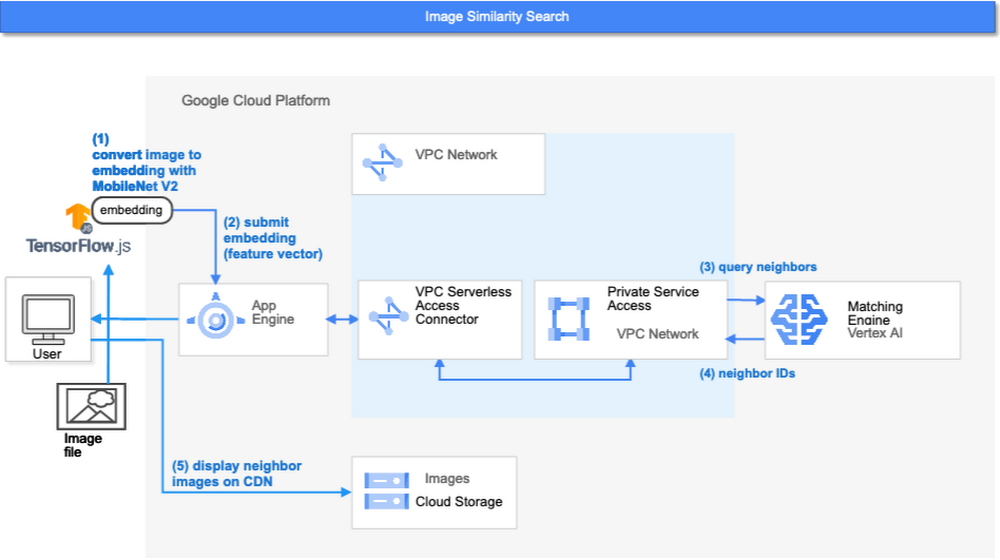
- First, the web UI takes an image (the one chosen or uploaded by the user) and encodes it into an embedding using the TensorFlow.js MobileNet v2 model running inside the browser. Note: this “client-side encoding” is an interesting option for reducing network traffic when you can run the encoding at the client. In many other cases, you would encode contents to embeddings with a server-side prediction service such as Vertex AI Prediction, or just retrieve pre-generated embeddings from a repository like Vertex AI Feature Store.
- The App Engine frontend receives the embedding and submits a query to the Matching Engine. Note that you can also use any other compute services in Google Cloud for submitting queries to Matching Engine, such as Cloud Run, Compute Engine, or Kubernetes Engine, or whatever is most suitable for your applications.
- Matching Engine executes its search. The connection between App Engine and Matching Engine is provided via a VPC private network for optimal latency.
- Matching Engine returns the IDs of similar vectors in its index.
Step 3 is implemented with the following code:
class MatchingQueryClient:...snip...def query_embedding(self, embedding, num_neighbors=30):request = match_service_pb2.MatchRequest()request.deployed_index_id = self._deployed_index_idfor v in embedding:request.float_val.append(v)request.num_neighbors = num_neighborsresponse = self._stub.Match(request)return response
The request to the Matching Engine is sent via gRPC as you can see in the code above. After it gets the request object, it specifies the index id, appends elements of the embedding, specifies the number of neighbors (similar embeddings) to retrieve, and calls the Match function to send the request. The response is received within milliseconds.
Next steps: Making changes for various use cases and better search quality
As we noted earlier, the major challenges in applying vector search on production use cases are:
- Creating vectors that are meaningful for business use cases
- Building a fast and scalable vector search service
From the example above, you can see that Vertex AI Matching Engine solves the second challenge. What about the first one? Matching Engine is a vector search service; it doesn’t include the creating vectors part.
The MatchIt Fast demo uses a simple way of extracting embeddings from images and contents; specifically it uses an existing pre-trained model (either MobileNet v2 or Universal Sentence Encoder). While those are easy to get started with, you may want to explore other options to generate embeddings for other use cases and better search quality, based on your business and user experience requirements.
For example, how do you generate embeddings for product recommendations? The Recommendation Systems section of the Machine Learning Crash Course is a great resource for learning how to use collaborative filtering and DNN models (the two-tower model) to generate embeddings for recommendation. Also, TensorFlow Recommenders provides useful guides and tutorials for the topic, especially on the two-tower model and advanced topics. For integration with Matching Engine, you may also want to check out the Train embeddings by using the two-tower built-in algorithm page.
Another interesting solution is the Swivel model. Swivel is a method for generating item embeddings from an item co-occurrence matrix. For structured data, such as purchase orders, the co-occurrence matrix of items can be computed by counting the number of purchase orders that contain both product A and product B, for all products you want to generate embeddings for. To learn more, take a look at this tutorial on how to use the model with Matching Engine.
If you are looking for more ways to achieve better search quality, consider metric learning, which enables you to train a model for discrimination between entities in the embedding space, not only classification:
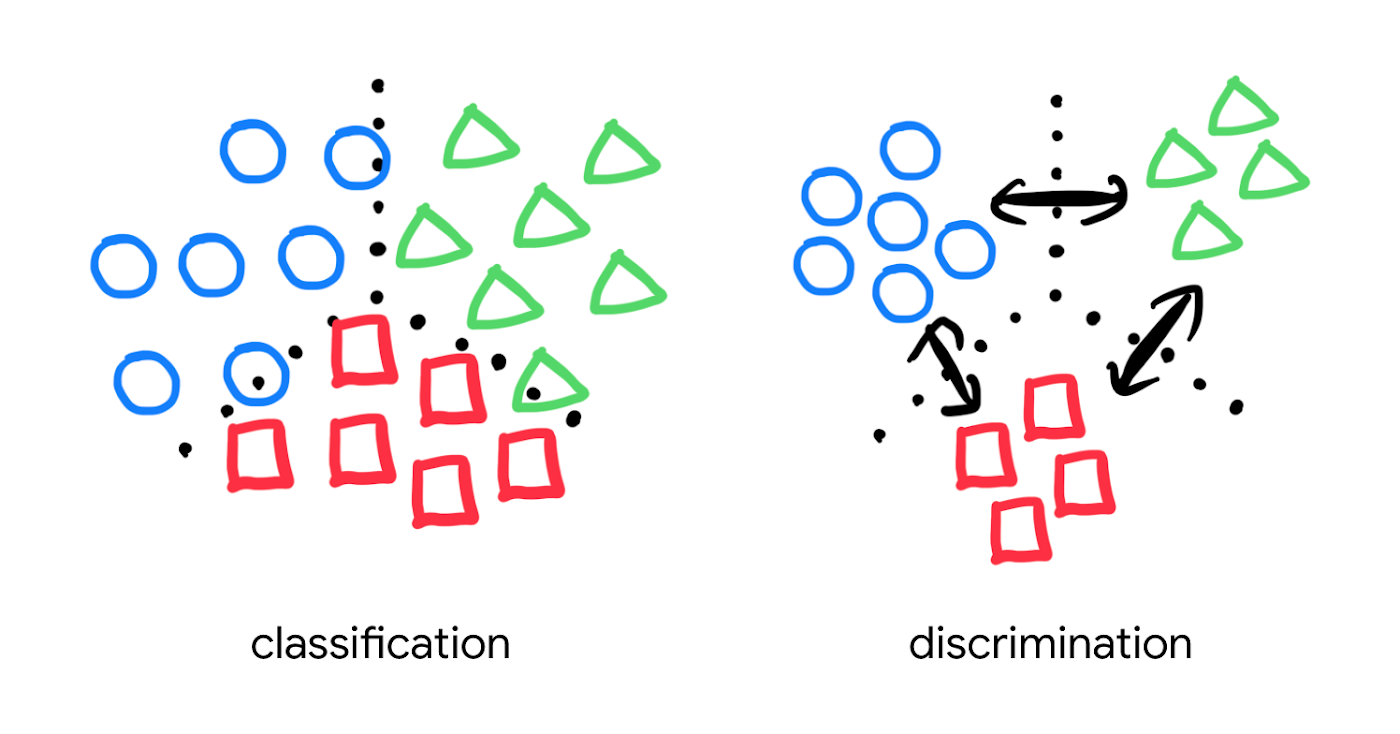
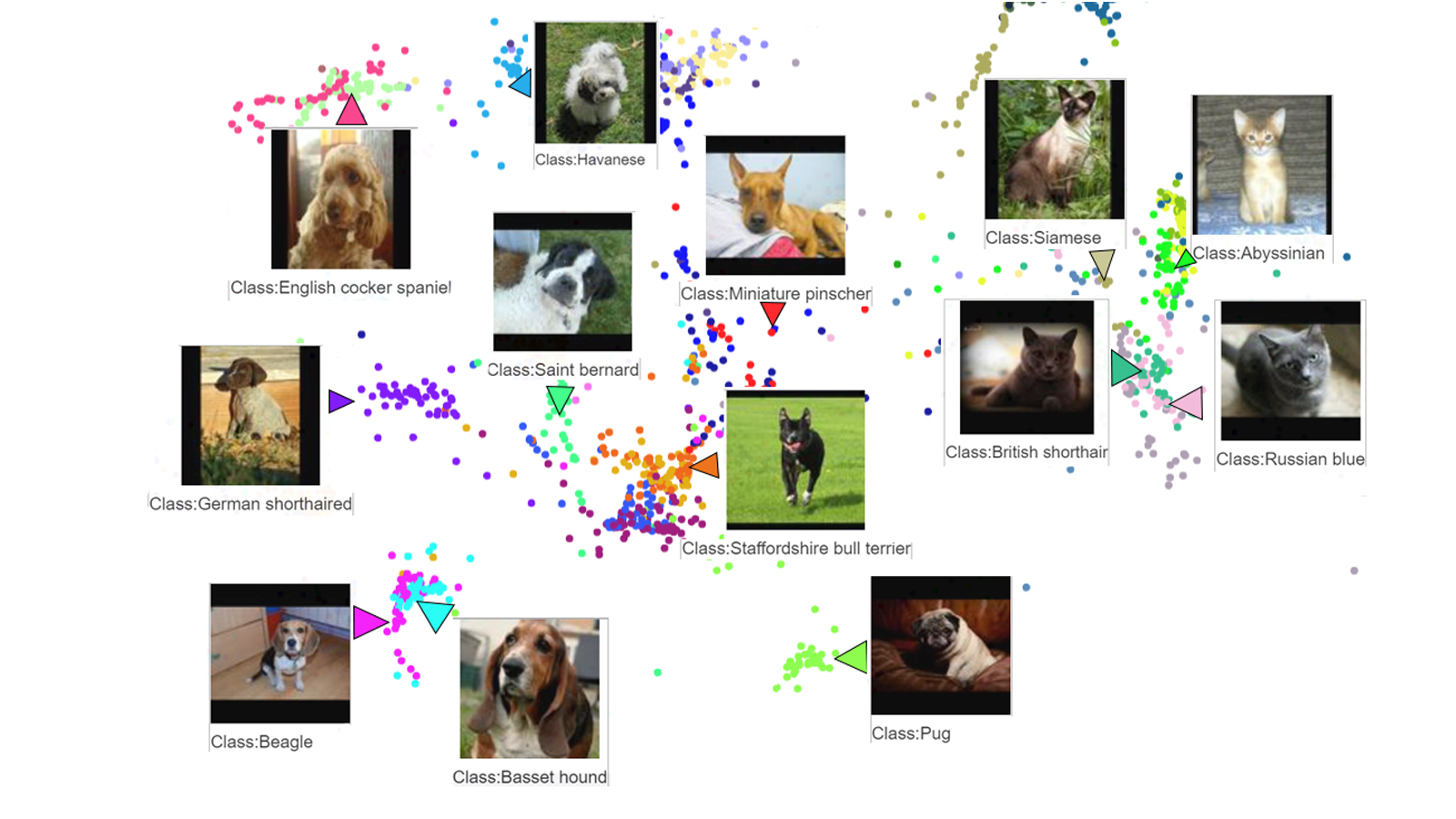
Popular pre-trained models such as the MobileNet v2 can classify each object in an image, but they are not explicitly trained to discriminate the objects from each other with a defined distance metric. With metric learning, you can expect better search quality by designing the embedding space optimized for various business use cases. TensorFlow Similarity could be an option for integrating metric learning with Matching Engine.
Interested? Today, we’re just beginning the migration from traditional search technology to new vector search. Over the next 5 to 10 years, many more best practices and tools will be developed in the industry and community. These tools and best practices will help answer many questions, like… How do you design your own embedding space for a specific business use case? How do you measure search quality? How do you debug and troubleshoot the vector search? How do you build a hybrid setup with existing search engines for meeting sophisticated requirements? There are many new challenges and opportunities ahead for introducing the technology to production. Now’s the time to get started delivering better user experiences and seizing new business opportunities with Matching Engine powered by vector search.
Acknowledgements
We would like to thank Anand Iyer, Phillip Sun, and Jeremy Wortz for their invaluable feedback to this post.
Google Cloud and Univision Partnership to Up the Ante in UX for Spanish-speaking Audience

6858
Of your peers have already read this article.
1:00 Minutes
The most insightful time you'll spend today!
The past year has given everyone lots to think about—about our priorities as people and as businesses. As the world retreated behind closed doors, we saw how shared interests and experiences can bring us together. As the world grappled with a common enemy, we witnessed just how differently individuals, communities and indeed entire countries can experience a situation. And as we faced seemingly unending obstacles to making it through the pandemic, we saw how making smart decisions based on data can drive meaningful solutions—fast.
That’s why we here at Google Cloud are so proud to partner Univision, the country’s leading Spanish-language content and media company. By partnering with Google Cloud, Univision will be able to accelerate growth across its portfolio of properties, deliver an enhanced user experience for Spanish-speaking audiences and provide the enterprise solutions needed to create the Spanish-language media company of the future.
According to Instituto Cervantes, there are over 580 million Spanish language speakers worldwide. Those viewers, like people everywhere, are avid consumers of streaming content. In Q4 of 2020 alone, viewing time for that content increased by 44%1, and in 2020, from 50%2 more sources. With that surge in demand, Univision needed a cloud provider whose infrastructure could reach Hispanic viewers around the world. With two-plus decades spent building out its network and data centers, as well as global content-delivery capabilities, Google Cloud has the infrastructure Univision needs to reach viewers across the Spanish-speaking world.
At the same time, with such a diverse audience for their content, Univision needs to target that content to viewers’ specific preferences. By applying Google Cloud’s artificial intelligence (AI) and machine learning (ML) technology across its content, Univision intends to personalize content based on shows users have previously watched, enhancing their engagement and viewing experience.
And as Univision transforms the user experience, it can use Google Cloud’s data and analytics suite to garner deeper insights into its audience and forge stronger relationships with them on an individual basis. With Looker and BigQuery, Univision employees will have access to real-time data to help them make business decisions about programming.
Univision will also migrate video distribution and production operations to Google Cloud, where we’ll help them streamline media workflows and develop innovative new capabilities. Meanwhile, Google Cloud’s tight business and technical integration with other Google services will help ensure Univision reaches viewers on the device of their choice, wherever they are in the world. For example, in the coming years, Univision will expand its global YouTube partnership and will integrate with entertainment features on Google Search that help people better discover TV shows and movies. The company will also use Google Ad Manager for global ad decisioning and Google’s Dynamic Ad Insertion for PrendeTV and future video-on-demand offerings. Finally, Univision will distribute its content and services on Google Play across Android phones and tablets, as well as Google TV and other Android TV OS devices.
We’re thrilled to partner with Univision to help them reach the Spanish-speaking world with their content. With our cloud portfolio, we can help them reach individual viewers around the world, with personalized content that they can consume however they see fit. Best of all, together, we can help them achieve this vision fast, leveraging established cloud, content delivery, and data analytics technologies. You can learn more about the partnership here.
More Relevant Stories for Your Company

How Cleartrip.com is leveraging Google Cloud to survive the slump in the travel industry
With the novel coronavirus COVID-19 sweeping across continents and fatalities climbing every day, it was only a matter of time before countries closed their borders to contain its spread. In the wake of this decision, travel and tourism, the linchpins of many economies, were among the worst affected. According to

Simplifying Unstructured Data Analytics with BigQuery ML and Vertex AI: A Comprehensive Guide
Unstructured data such as images, speech and textual data can be notoriously difficult to manage, and even harder to analyze. The analysis of unstructured data includes use cases such as extracting text from images using OCR, sentiment analysis on customer reviews and simplifying translation for analytics. All of this data

Gyfted: Finding the Right Man for the Job Using Google Cloud AI/ML Tools
It’s no secret that many organizations and job seekers find the hiring process exhausting. It can be time consuming, costly, and somewhat risky for both parties. Those are just some of the experiences we wanted to change when we started Gyfted, a pre-vetted talent marketplace for people who complete tech

Combining IoT and Analytics to Warn Manufacturers of Line Break Downs and Increase Profitability
Oden Technologies is using the Internet of Things (IoT) to improve the factories of today. The giant network of “things” (including people) connected to each other via the Internet has the potential to reduce waste, increase efficiency, and improve safety across all walks of life. Oden is leading IoT innovation in
