





Google Cloud’s Suite of DevOps Speeds Up ForgeRock’s Development

5685
Of your peers have already read this article.
3:00 Minutes
The most insightful time you'll spend today!
Editor’s note: Today we hear from ForgeRock, a multinational identity and access management software company with more than 1,100 enterprise customers, including a major public broadcaster. In total, customers use the ForgeRock Identity Platform to authenticate and log in over 45 million users daily, helping them manage identity, governance, and access management across all platforms, including on-premises and multicloud environments.
Operating at that kind of scale isn’t easy. In this blog post, ForgeRock Engineering Director, Warren Strange discusses the three things that help make their developers efficient and productive, and the Google Cloud tools they use along the way.
At ForgeRock, we’ve been an early adopter of Kubernetes, viewing it as a strategic platform. Running on Kubernetes allows us to drive multicloud support across Google Kubernetes Engine (GKE), Amazon (EKS), and Azure (AKS). So no matter which cloud our customers are running on, we are able to seamlessly integrate our products into customers’ environments.
Making it easier for ForgeRock’s developers and operators to build, deploy and manage applications has been crucial in our ability to continually provide high quality solutions for our customers. We’re always looking for tools to improve productivity and keep our developers focused on coding instead of configuration. Google Cloud’s suite of DevOps tools have streamlined three specific practices to help keep our developers productive:
1. Make developers productive within IDEs
Developer productivity is core to the success of any organization, including ForgeRock. Since developers spend most of their time within their IDE of choice, our goal at ForgeRock has been to make it easier for our developers to write Kubernetes applications within the IDEs they know and love. Cloud Code helps us precisely with that: it makes the process of building, deploying, scaling, and managing Kubernetes infrastructure and applications a breeze.
In particular, working with the Kubernetes YAML syntax and schema takes time, and a lot of trial and error to master. Thanks to YAML authoring support within Cloud Code, we can easily avoid the complicated and time consuming task of writing YAML files at ForgeRock. With YAML authoring support, developers save time on every bug. Cloud Code’s inline snippets, completions, and schema validation, a.k.a. “linting,” further streamline working with YAML files.
The benefits of Cloud Code extend to local development as well. Iterating locally on Kubernetes applications often requires multiple manual steps, including building container images, updating Kubernetes manifests, and redeploying applications. Doing these steps over and over again can be a chore. Cloud Code supports Skaffold under the hood, which tracks changes as they come and automatically rebuilds and redeploys—reducing repetitive development tasks.
Finally, developing for Kubernetes usually involves jumping between the IDE, documentation, samples etc. Cloud Code reduces this context switching with Kubernetes code samples. With samples, we can get new developers up and running quickly. They spend less time learning about configuration and management of the application—and spend more time on writing and evolving the code.
2. Drive end-to-end automation
To further improve developer productivity, we’ve focused on end-to-end automation: from writing code within IDEs, to automatically triggering CI/CD pipelines and running the code in production. In particular, Tekton, Cloud Build, Container Registry, and GKE have been critical to Forgerock as we streamline the flow of code, feedback and remediation through the build and deployment processes. The process looks something like this:
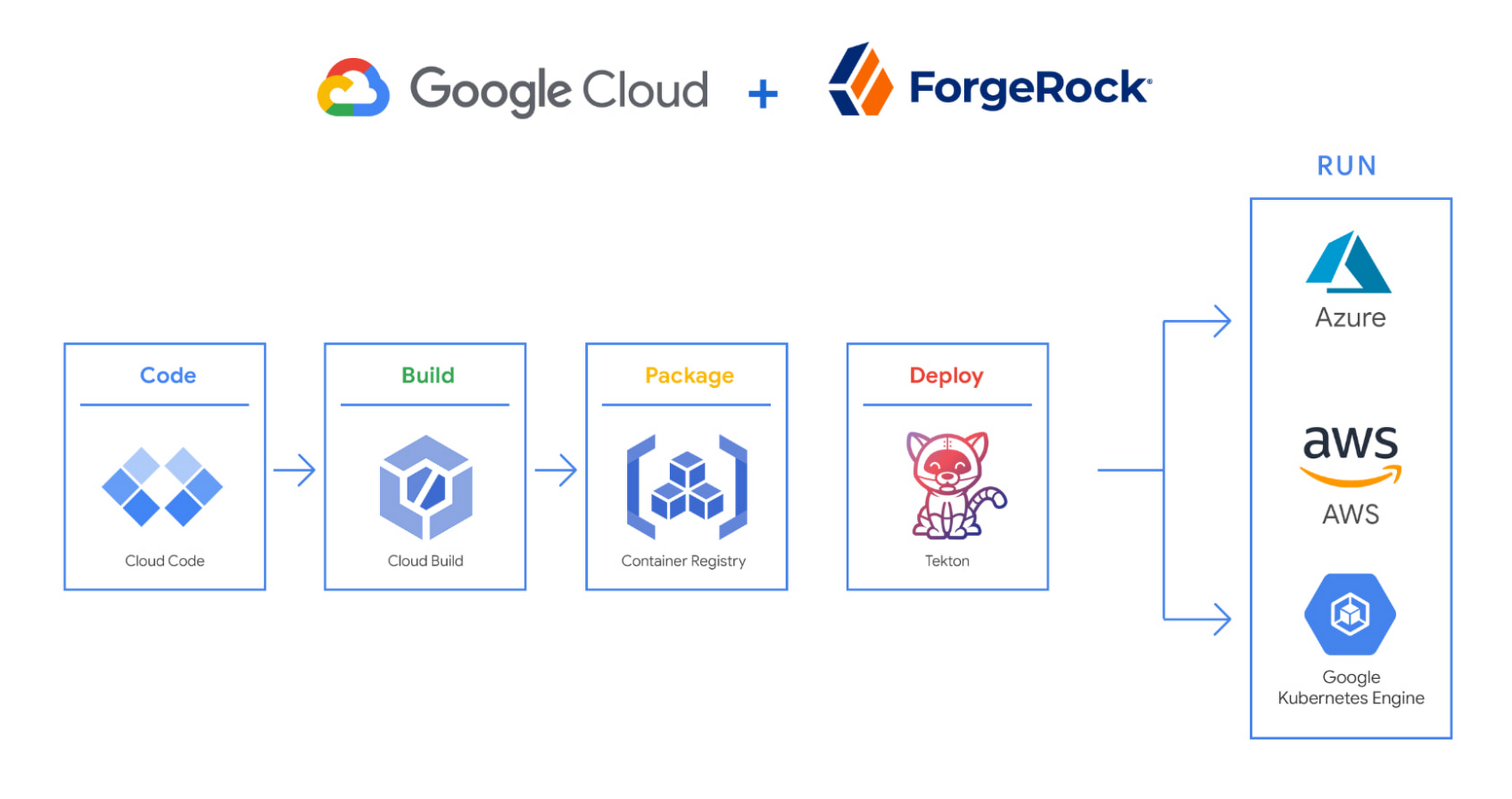
We begin by developing Kubernetes manifests and dockerfiles using Cloud Code. Then we use Skaffold to build containers locally, while Cloud Build helps with continuous integration (CI). The Cloud Build GitHub app allows us to automate builds and tests as part of our GitHub workflow. Cloud Build is differentiated from other continuous integration tools since it is fully serverless. It scales up and scales down in response to load, with no need for us to pre-provision servers or pay in advance for additional capacity. We pay for the exact resources we use.
Once the image is built by Cloud Build, it is stored, managed, and secured in Google’s Container Registry. Just like Cloud Build, Container Registry is serverless, so we only pay for what we use. Additionally, since Container Registry comes with automatic vulnerability scanning, every time we upload a new image to Container Registry, we can also scan it for vulnerabilities.
Next, a Tekton pipeline is triggered, which deploys the docker images stored in Container Registry and Kubernetes manifests to a running GKE cluster. Along with Cloud Build, Tekton is a critical part of our CI/CD process at ForgeRock. Most importantly, since Tekton comes with standardized Kubernetes-native primitives, we can create continuous delivery workflows very quickly.
After deployment, Tekton triggers a functional test suite to ensure that the applications we deploy perform as expected. The test results are posted to our team Slack channel so all developers have instant access and insights about each cluster. From there, we are able to provide our customers with their finished product request.
3. Leverage multicloud patterns and practices
The industry has seen a shift towards multicloud. Organizations have adopted multicloud strategies to minimize vendor lock-in, take advantage of best-in-class solutions, improve cost-efficiencies, and increase flexibility through choice.
At ForgeRock, we’re big proponents of multicloud. Part of that comes from the fact that our identity and access management product works across Google Cloud, AWS, and Azure. Developing products using open-source technologies such as Kubernetes has been particularly helpful in driving this interoperability.
Tekton has been another critical project that has allowed us to prevent vendor lock-in. Thanks to Tekton, our continuous delivery pipelines can deploy across any Kubernetes cluster. Most importantly, since Tekton pipelines run on Kubernetes, these pipelines can be decoupled from the runtime. Like Tekton and Kubernetes, both Cloud Build and Container Registry are based on open technologies. Community-contributed builders and official builder images allow us to connect to a variety of tools as a part of the build process. And finally, with support for open technologies like Google Cloud buildpacks within Cloud Build, we can build containers without even knowing Docker.
Making it easier for developers and operators to build, deploy and manage applications is critical for the success of any organization. Driving developer productivity within IDEs, leveraging end-to-end automation, and support for multi-cloud patterns and practices are just some of the ways we are trying to achieve this at ForgeRock. To learn more about ForgeRock, and to deploy the ForgeRock Identity Platform into your Kubernetes cluster, check out our open-source ForgeOps repository on GitHub.
Hybrid Cloud: The Trade-offs IT Leaders Hate–and a Way Around Them

3534
Of your peers have already read this article.
3:30 Minutes
The most insightful time you'll spend today!
What do CIOs and CTOs deliver for the company? If you said “technology,” that’s just the beginning. According to their research, McKinsey found that 85% of CIOs and CTOs interviewed in the spring of 2019 said they were essential for at least two of the three most common CEO priorities—revenue acceleration, improved agility and time to market, and cost reduction.
IT modernization – including migrating to the cloud – is key to business growth and agility.
Yet, according to a recent McKinsey study, 80% of CIOs report that regardless of their level of cloud migration, they still haven’t reached their projected agility and business benefits.
Sometimes, this is because of issues like training and skills gaps in the IT workforce. Surprisingly often though, the barrier to reaching the goals is based on trade-offs that CIOs themselves feel they must make to strike a balance between the perfect and the possible.
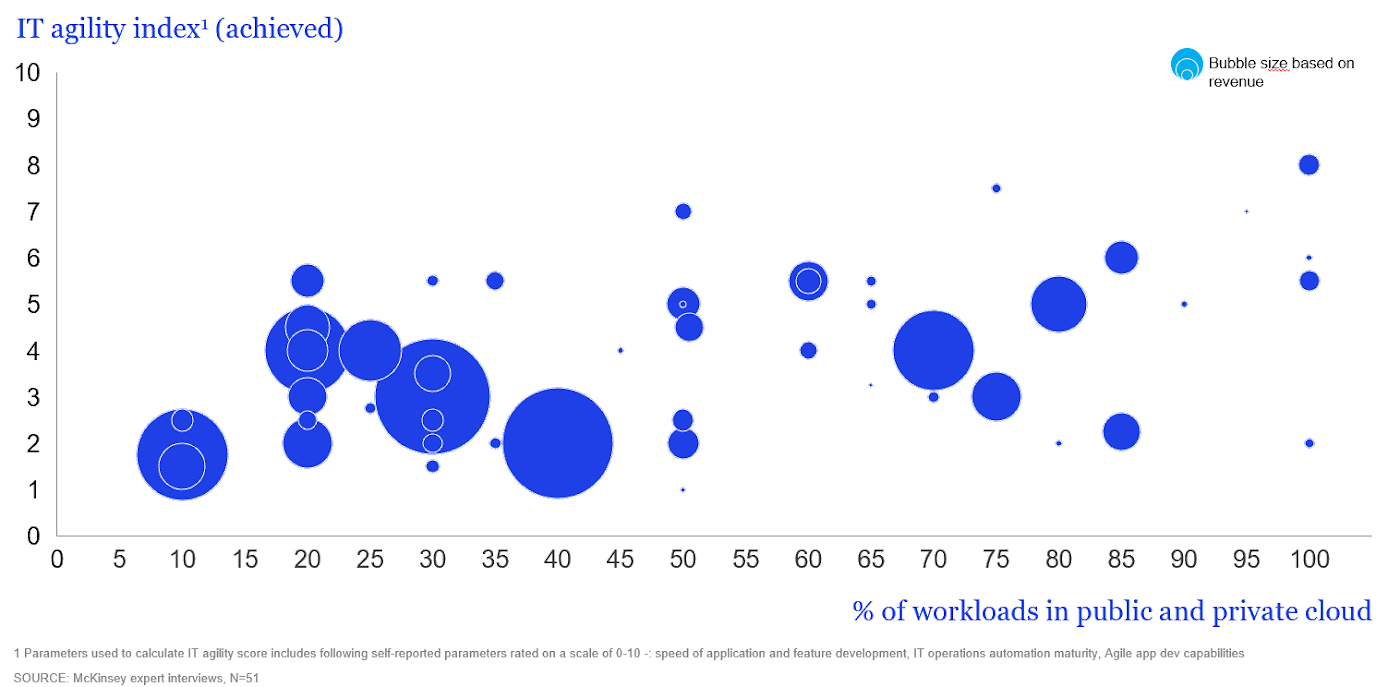
But what if you could have it all without the trade-offs? As Will Grannis, Managing Director of the CTO Office at Google, and Arul Elumalai, Partner at McKinsey & Company discussed in our recent digital conference, many of the compromises CIOs make can be avoided with new technology, modern architectures and by encouraging a transformation mindset across the business.
In interviews, CIOs explained how they’ve leveraged the best of the cloud without compromising on security, agility, and flexibility. Here’s how these leaders avoid three of the top perceived trade-offs—both with technology and by transforming their operating model.
Trade-off #1: Developer agility vs. control and governance
Moving to the cloud offers new opportunities for speed, but 69% of organizations indicate that stringent security guidelines and code review processes can slow developers significantly.
One CISO of a multinational company mentioned that cloud development was so fast that they had to institute manual checks on their developers’ code. So much for agility.
To overcome this trade-off and maintain both speed and security, some respondents found success in DevOps, hiring security-experienced talent and introducing automation for security and quality. Building in security into the CI/CD pipeline and increasing automation don’t just eliminate the tradeoff, they result in higher quality and faster innovation.
At Google Cloud, we’ve also observed that customers with strong DevOps practices have increased speed-to-market and product/service quality. From our own journey, we’ve learned seven critical lessons essential to adopting a DevOps model, ranging from taking up small projects and embracing open source to building an overall DevOps culture.
Trade-off #2: Single-vendor benefits vs. freedom from lock-in
CIOs perceive benefits to using the fewest number of clouds, specifically avoiding introducing multiple systems that require their teams to develop and maintain multiple skillsets. Unfortunately, 83% of the CIOs interviewed said that while they would prefer fewer clouds, the potential financial and technical lock-in drives them to multiple providers.
Successful CIOs said that they can avoid lock-in pitfalls not just with contractual guardrails and executive and board education, but with evolving hybrid cloud technologies that provide additional choices.
Hybrid cloud platforms based on containers can further mitigate the risk of using a single cloud vendor. The key to successful hybrid architectures is the infrastructure abstraction and portability that containers create for them, enabling disparate environments to work together.
This notion has been at the heart of our strategy at Google Cloud with Anthos, which provides an abstraction layer and an application modernization platform for hybrid and multi-cloud environments.
Enterprises can use Anthos to modernize how they develop, secure, and operate hybrid-cloud environments and enable consistency across cloud environments.
Trade-off #3: Best-of-breed tools vs. standardization and familiarity
Optimizing tool chains for different environments can improve productivity, but many CIOs believe that this means reduced functionality and tools.
While 77% of CIOs said they had to standardize to the lowest common denominator, some have found a better solution. Rather than giving up the languages, libraries, and frameworks that their teams prefer, effective leaders said that they found success by investing in training programs to upscale talent and adopting new open and vendor-agnostic solutions. Architectures that are based on open-source components have been the keys that helped remove this tradeoff, and eliminate the notion of a lowest common denominator.
This is why we have built Anthos on open-source components like Kubernetes, Istio and Knative. Anthos gives your business the choice you need. With the ability to create code that works in most environments using the tools, languages, and systems you prefer, you can do more without major changes to how you work.
Regardless of your current cloud adoption level, check out “Unlock business acceleration in a hybrid cloud world” to discover more about McKinsey’s findings, including how CIOs drive agility, methods to make trade-offs unnecessary, and how to prepare your team for the cloud. Then, stay tuned for subsequent posts that take a closer look at how hybrid solutions and strategies can help CIOs drive a transformation mindset across the business—without compromising on security, agility, and flexibility.
Take a Look at 30 Eventrac Locations!

4920
Of your peers have already read this article.
2:00 Minutes
The most insightful time you'll spend today!
New locations in Eventarc
Back in August, we announced more Eventarc locations (17 new regions, as well as 6 new dual-region and multi-region locations to be precise). This takes the total number of locations in Eventarc to more than 30. You can see the full list in the Eventarc locations page or by running gcloud eventarc locations list .
What does location mean in Eventarc?
An Eventarc location usually refers to the single region that the Eventarc trigger gets created in. However, depending on the trigger type, the location can be more than a single region:
- Pub/Sub triggers only support single-region locations.
- Cloud Storage triggers support single-region, dual-region, and multi-region locations.
- Cloud Audit Logs triggers support single-region locations and the special
globalregion.
Before looking into trigger location in more detail, let’s look at other locations relevant in Eventarc.
What other locations are relevant in Eventarc?
Triggers connect event sources to event targets:
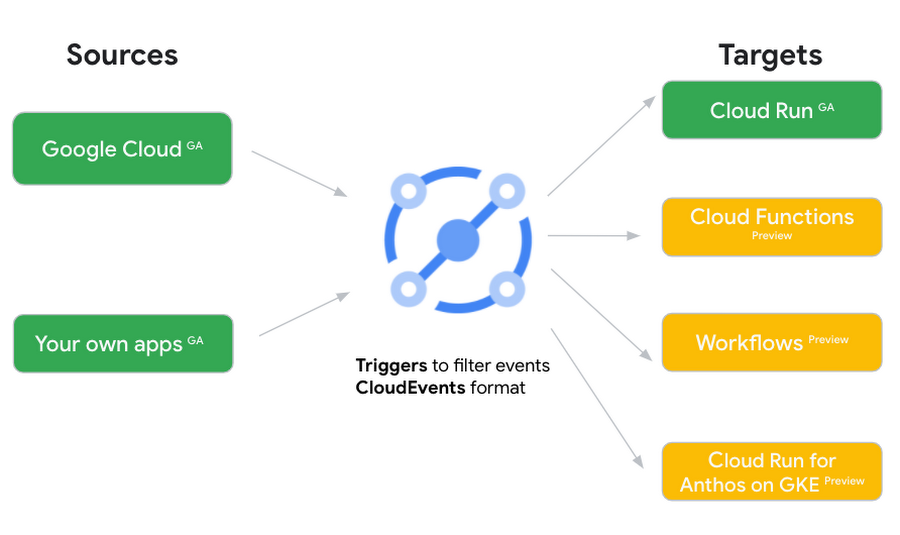
Each event source, event target, and trigger has its own location. Sometimes, these locations have to match and sometimes they can be different.
Here’s an example of a trigger connecting Cloud Storage events from a bucket in the europe-west1 region to a Cloud Run service in the us-central1 region with a trigger located in the europe-west1 region:
gcloud eventarc triggers create trigger-storage \--destination-run-service=hello \--destination-run-region=us-central1 \--location=europe-west1 \--event-filters="type=google.cloud.storage.object.v1.finalized" \--event-filters="bucket=my-bucket-in-europe-west1-region" \--service-account=$PROJECT_NUMBER-compute@developer.gserviceaccount.com
In many cases, you don’t have control over the location of the event source. In the example above, the Cloud Storage bucket is in the europe-west1 region. That’s the location that you need to work with and it has implications for the trigger location (which I’ll get to later).
The location of the event target is the region of the service where you want the events to go. You get to choose this from one of the supported regions when you deploy your Cloud Run service. You typically want this to be in the same region as your event source for latency and data locality reasons (but this is not strictly a requirement). In the example above, the event source (bucket) is in europe-west1 but the event target (Cloud Run service) is in us-central1 as specified by the --destination-run-region flag.
The location of the trigger is dictated by the event source location, but the trigger type also comes into play. It is specified by the –location flag. Let’s take a look at the trigger location for each trigger type in more detail.
Location in Pub/Sub triggers
In a Pub/Sub trigger, you connect a Pub/Sub topic to an event target. Pub/Sub topics are global and not tied to a single region. However, when you create a Pub/Sub trigger, you need to specify a region for it (because Eventarc triggers need to live in a region) with the --location flag as follows:
gcloud eventarc triggers create trigger-pubsub \--destination-run-service=hello \--destination-run-region=us-central1 \--location=us-central1 \--event-filters="type=google.cloud.pubsub.topic.v1.messagePublished" \--transport-topic=projects/your-projectid/topics/your-topic
By specifying a location, Eventarc automatically configures the geofencing feature in Pub/Sub such that events only persist in the specified location. As I noted above, you typically want to (but are not required to) choose the same region for the trigger and the Cloud Run service for lower latency and data locality. You can also use regional Pub/Sub service endpoints to publish to the topic to ensure that all of the data stays in a single region.
Location in Cloud Storage triggers
In a Cloud Storage trigger, you connect a Cloud Storage bucket to an event target. A Cloud Storage bucket can be in a single-region (e.g. europe-west1), dual-region (e.g. eur4), or multi-region (e.g. eu) location. The location of the bucket dictates the location of the trigger and they have to match. The earlier trigger example was for a bucket in the europe-west1 single-region location. Here’s another trigger connecting Cloud Storage events from a bucket in the eu multi-region location. Notice how the location flag matches the bucket region:
gcloud eventarc triggers create trigger-storage \--destination-run-service=hello \--destination-run-region=us-central1 \--location=eu \--event-filters="type=google.cloud.storage.object.v1.finalized" \--event-filters="bucket=my-bucket-in-eu-multi-region" \--service-account=$PROJECT_NUMBER-compute@developer.gserviceaccount.com
If the bucket region and the trigger region do not match, you’ll see an error:
ERROR: (gcloud.eventarc.triggers.create) INVALID_ARGUMENT: The request was invalid: Bucket "my-bucket-in-eu-multi-region" location "eu" does not match trigger location "europe-west1". Try again by creating the trigger in "eu".
Location in Cloud Audit Logs triggers
In a Cloud Audit Logs trigger, you connect any event source that emits Audit Logs to an event target. The location of the event source will dictate the trigger location. This is typically a single region but there is a special global region that’s necessary in some cases.
For example, if you want to read Cloud Storage events from a bucket in the europe-west1 region with an Audit Logs trigger, you will create the trigger with the same location. Note that this will match all buckets in the europe-west1 region as there’s no filter by bucket in Audit Logs:
gcloud eventarc triggers create trigger-auditlog \--destination-run-service=hello \--destination-run-region=us-central1 \--location=europe-west1 \--event-filters="type=google.cloud.audit.log.v1.written" \--event-filters="serviceName=storage.googleapis.com" \--event-filters="methodName=storage.objects.create" \--service-account=$PROJECT_NUMBER-compute@developer.gserviceaccount.com
On the other hand, if you want to match a dual-region or a multi-region bucket such as eu, you will create the trigger with the global location as Audit Logs triggers only support a single or global region. Note that this will match all buckets in all regions globally:
gcloud eventarc triggers create trigger-storage \--destination-run-service=hello \--destination-run-region=us-central1 \--location=global \--event-filters="type=google.cloud.storage.object.v1.finalized" \--event-filters="bucket=my-bucket-in-europe-west1-region" \--service-account=$PROJECT_NUMBER-compute@developer.gserviceaccount.com
As you can see from this example, if you want to read Cloud Storage events, the native Cloud Storage trigger is a much better option, but this example illustrates a typical case in which a global Audit Log trigger is necessary.
That wraps up this closer look at locations in Eventarc. Feel free to reach out to me on Twitter @meteatamel for any questions or feedback.
Google Cloud Featured at TechCrunch Disrupt 2021

4918
Of your peers have already read this article.
1:30 Minutes
The most insightful time you'll spend today!
Startups need to move quickly and focus their limited resources on areas where they can differentiate. If infrastructure isn’t your differentiator, don’t put a lot of energy into your infrastructure when someone else can do it for you. What’s more, time-to-market matters to startups more now than ever. Successful early stage companies know this, and leverage existing tools, libraries, frameworks and innovations whenever possible.
Next week Google Cloud will be featured at TechCrunch Disrupt, the iconic annual event where “founders and investors shaping the future of disruptive technology” come together to share stories, network, and learn from each other. Google Cloud will host a session and Google Cloud engineers will be available in a virtual booth to answer startup questions.
The session, “Demo Derby – How startups are disrupting the status quo with innovative data analytics, AI and modern app development” will be a fun, fast-paced set of presentations showing short demos of startups and startup projects built with Google Cloud.
Demo Derby Presenters
- Andrea Le Vot, Chief Data Protection Officer with startup BlueZoo will deliver a demo showing how they are revolutionizing the property insurance industry with AI and Cloud – and doing so while actually protecting people’s privacy.
- Dale Markowitz and Zack Akil, Applied AI Engineers, will show how easy it is to use AI for everything from video search to editing to automated translation.
- Vidya Nagarajan, Group Product Manager from Google Cloud will deliver a fast paced demo that shows how startups can drive developer productivity with serverless innovations.
“Disrupt is iconic for its engagement with founders, investors, and the broad community of early stage companies,” said Andrea Le Vot, Chief Data Protection Officer at BlueZoo. “We are thrilled to share our insights with others in our community, and to show how we have partnered with Google Cloud to innovate faster than most of the larger, well funded insurance companies in our market.”
The series of snippet sized demos will be followed by a roundtable discussion with the demo developers focused on lessons learned, best practices, how to reduce time-to-market, and how to focus on where you can most effectively differentiate.
The session will air on Day One of the event: Tuesday September 21, 2021 at 1pm PT and will be available on demand after the event for all Disrupt attendees.

4064
Of your peers have already downloaded this article
11:30 Minutes
The most insightful time you'll spend today!
The banking and financial services industry (BFSI) in India is going through a period of unprecedented innovation.
Customers in India have more information than ever before to make better-informed decisions and can pick the banking and other financial services they need from a wide range of providers.
New players like fintech startups and large tech firms are responding to changing customer expectations with faster, better, and cheaper services, altering the competitive landscape.
However, many BFSI executives are still exploring the potential of digital technologies in pockets of their firms or striving to digitize the customer lifecycles from end to end. To succeed, BFSI firms must increasingly focus on how to deliver on customer outcomes through digital customer experience, digital operational excellence, digital innovation, and digital ecosystems.
Forward-thinking BFSI firms are increasingly turning to cloud to support their businesses as they attempt to keep pace with evolving customer needs. Cloud has become a strategic priority; ensuring its support in the market will only enable digital business and accelerate innovation.
Find out cloud adoption trends in Indian BFSI, including the perceived
challenges, drivers, and benefits of cloud investments.
Download Forrester’s Report today.
3566
Of your peers have already downloaded this article
1:30 Minutes
The most insightful time you'll spend today!
IDC’s research demonstrates the value of running SAP environments on Google Cloud. Customers interviewed by IDC described achieving strong value through improved agility, high performance, and cost and staff efficiencies.
The business and operational benefits of running SAP environments on Google Cloud range from lowering downtime to improving productivity to enhanced efficiency.
Download this IDC infographic to understand the business value of migrating SAP environments top Google Cloud.
More Relevant Stories for Your Company

Google Cloud: Craft Your Successful Migration Path
There is no one-size-fits-all solution to cloud migration. Every approach has unique considerations, so you need to understand the trade-offs of each to execute an effective migration plan. We’ve outlined the key things to consider when crafting your migration journey, including: The benefits of having your applications in the cloud.

Marxent Leverages Google Cloud to Elevate Customer Journeys on Retail Apps with 3D Shopping Experiences
As ecommerce for home goods exploded in popularity during COVID, furniture and DIY retailers looked to find new ways to grow online transaction sizes to in-store levels. Shopping for furniture and home improvement projects has always been challenging online. Furniture, kitchen cabinets, fixtures, and appliances become a part of daily

If You Run Your Country’s Largest Retail Franchise, How Do You Pull Together, in Sync?
In 1984, Mario Maio set up a small business manufacturing electrical transformers in his Johannesburg garage. Over the next two decades, the ACDC Dynamics company he created came to dominate manufacturing, import, and distribution in South Africa’s electrical goods sector. Then, in 2007, Mario’s son, Ricardo Maio, founded a retail arm to

Pacemaker’s Automated Alerts and Alert Reporting: No More Outages for SAP Systems on Google Cloud!
When critical services fail, businesses risk losing revenue, productivity, and trust. That’s why Google Cloud customers running SAP applications choose to deploy high availability (HA) systems on Google Cloud. In these deployments Linux operating system clustering provides application and guest awareness for the application state and automates recovery actions in
