





Embedded Intelligence Helps Businesses Prepare for the Unknown

9167
Of your peers have already read this article.
3:00 Minutes
The most insightful time you'll spend today!
The disruptions of 2020 elevated the importance of having the right data and insights to pivot quickly when necessary. Here’s a look at how businesses can use embedded intelligence to prepare for uncertainty and meet ever-changing customer expectations.

At work and in life, some unpredictability is always a part of the package. Ten years ago, your business might have experienced sudden product demand or a system outage that slowed down deliveries. Servers or data platforms might have run out of capacity earlier than expected.
In 2020, though, the concept of unpredictability in business reached new heights. These disruptions have elevated the importance of embedded intelligence—that is, having machine learning built into the tools people use every day, so that when a pivot is necessary, everyone has the data and insights they need at their fingertips. In fact, 2020 was so disruptive, with so many changes in customer behavior and so many ripple effects, a lot of historical data and forecasting assumptions may not be helpful in 2021. This only increases the onus on businesses to make the freshest data actionable for more of the workforce.
A decade or so ago, the idea of embedded intelligence might have seemed like science fiction. You might remember hearing that analytics would be able to make predictions, and that technology would be able to take on the complex work of predicting retail demand or helping to create a responsive supply chain. But insufficient hardware, older architecture models, slow queries, and untrustworthy data often got in the way.
Now, that concept has become reality as enterprise decision-making has moved from legacy tools to cloud-powered data intelligence services. Today, it’s possible to perform complex analytics tasks and obtain valuable, trusted outputs much faster than ever before. That speed and scale has allowed businesses to tackle entirely new projects and release new features and products very quickly. In addition, APIs have become a lot more intelligent, making it easy to connect siloed solutions. No matter the industry, businesses can access the technology to get to the bottom of what customers need.
Related: Top 5 trends for API-powered digital transformation in 2021
Meeting ever-changing customer expectations with embedded ML
Bringing embedded analytics to real-world uses continues to evolve, with a number of inspiring examples surfacing in the past year. As a result of the pandemic and shifting public health guidelines, many businesses didn’t know month by month if they’d be interacting with customers primarily through in-person or digital channels. And even if both channels were available, it wasn’t obvious how changing customer behaviors would net out.
At patient engagement platform Force Therapeutics, for example, daily activity on their virtual care platform went up by over 140% during the pandemic. With such a large influx of incoming data, it would have been difficult—if not impossible—for a team of humans to gather, organize, and draw insights from all of that information, especially in a timely enough manner to be of use to healthcare providers.
To deliver the necessary care when and how it was needed, Force Therapeutics required a machine learning solution that could identify patient needs based on a wide range of data. Using an embedded analytics platform, they created an application that allowed them to monitor the progress of post-op patients, answer questions, or triage concerns remotely. The platform also enabled providers to check for spikes and anomalies, in order to identify patients who needed to come in due to a critical issue.
Amidst all of the disruption, it became clear that teamwork is essential, and that effective teamwork relies on having the right data-driven tools to get the job done.
Likewise, home delivery became a bigger part of consumers’ routines. This increased pressure on companies to adapt quickly to changes that might prevent packages from arriving on time, such as worsening weather conditions or upstream supply chain disruptions. Amidst all of the disruption, it became clear that teamwork is essential, and that effective teamwork relies on having the right data-driven tools to get the job done.
One example of this can be seen in Google Cloud customers who are using public data to accelerate their journey from data to actionable insights. Some retailers are utilizing the Google Cloud Public Datasets Program to leverage NOAA’s Global Surface Summary of the Day (GSOD) and Severe Weather Data Inventory datasets in order to better understand disruptive weather events, reroute their supply chains to prevent disruptions, and predict their in-store inventory needs to support communities as they recover from natural disasters.
Implementing ML without the complexity
The idea of embedded ML has been hyped for years, but for many use cases, the status quo tools have not caught up to the enthusiasm. Many business intelligence tools rooted in older database architectures require intense engineering work to deliver insights, queries are often slow, and the output is not always consistent or accurate. Part of the challenge is that building ML pipelines is difficult. Data in a database or data warehouse typically needs to move to an intelligence platform so models can be trained, and the models then need to be deployed and integrated into business workflows.
But modern data warehouses such as BigQuery let users train models in the warehouse itself, without having to move the data—and once the models are created, they can be applied and integrated into business processes using simple SQL. When it comes to embedding ML into enterprise processes, these modern approaches significantly lower the barrier for entry. Plus, tools like Looker, Google Cloud’s platform for modern BI and data applications, were created specifically for modern data needs, with the assumption that data needs would constantly evolve and that iterations should be made quickly without eating up inordinate engineering resources.
For Commonwealth Care Alliance (CCA), Looker was originally implemented to alleviate their pain points around data bottlenecks and data chaos. But when the pandemic hit, the nonprofit, community-based healthcare organization pivoted to make use of Looker’s tools to better serve patients. CCA used BigQuery and Looker to combine numerous datasources, create a predictive model that assesses risk, and distribute that model to its clinicians. This has given response teams the insights to determine who is too high risk to come in for care so they can reach out with home care solutions.
This kind of agility is not a one-time antidote to a one-time disruption, but rather the norm to which organizations must aspire if they want to remain competitive and protect themselves against future disruptions.
This same functionality is also helping businesses like SoundCommerce. Retailers like Constellation Brands, Eddie Bauer, and FTD/ProFlowers use SoundCommerce’s out-of-the-box data platform, which is powered by BigQuery and Looker, to collect retail data from any source and build a model around the metrics and relationships that are most crucial to retail. This has saved brands hundreds of manual reporting hours each month, and reduced platform licensing costs by almost 75%. Just as importantly, during the uncertain times of 2020, brands that used SoundCommerce were able to align real-time and predictive business decisions across marketing and operations with critical retail KPIs like contribution margin and customer lifetime value (CLV).
As 2020 showed us, we can never predict the future—but we can prepare for unpredictability by having the agility to always improve, and by positioning ourselves to make quick, intelligent pivots when the time comes. Last year was in many ways a rubicon: This kind of agility is not a one-time antidote to a one-time disruption, but rather the norm to which organizations must aspire if they want to remain competitive and protect themselves against future disruptions.
Looking for an ‘easy button’ to speed up your BI workloads running on BigQuery? Check out our latest announcement about BI Engine on the Google Cloud Blog.
Debanjan Saha is GM of Data Analytics at Google Cloud, where he leads the strategy and execution of analytics services in GCP. Prior to joining Google, Debanjan was VP of Amazon Aurora and RDS at Amazon Web Services. Earlier in his career Debanjan held multiple executive and technical leadership positions at IBM and Tellium, an optical networking pioneer that he helped grow from an early stage start-up to a public company.
Debanjan is a Fellow of the IEEE and a Distinguished Scientist of the ACM. He has co-authored a book, 50 patent applications, and numerous technical articles including award winning papers and Internet standards. He received MS and PhD degrees from the University of Maryland, and a B.Tech from IIT, all in Computer Science. In 2019, Business Insider named him as one of the top 10 technology executives transforming business.
6202
Of your peers have already watched this video.
13:00 Minutes
The most insightful time you'll spend today!
Google Cloud’s 2021 Data Analytics Launches
Google Cloud announced closed to 15 services and programs spanning database, analytics, business intelligence and AI to help businesses gain value out of their data. Here’s a rundown of announcements throughout 2021 on analytics solutions and services such as Dataplex, an intelligent data fabric solution, Datastream, a serverless change data capture and replication service and Google Cloud analytics hub. Watch the video to get started with Google Cloud’s Data Analytics offerings.
Discover Gen App Builder: Transform Search and Conversational Experiences Through Generative AI

1252
Of your peers have already read this article.
3:30 Minutes
The most insightful time you'll spend today!
If you’ve been exploring recently-launched consumer generative AI tools like Bard and thinking about how to build similar experiences for your business, Generative AI App Builder, or Gen App Builder for short, is here to get you started.
Gen App Builder is part of Google Cloud’s recently announced generative AI offerings and lets developers, even those with limited machine learning skills, quickly and easily tap into the power of Google’s foundation models, search expertise, and conversational AI technologies to create enterprise-grade generative AI applications.
“Google Cloud’s leading AI technology enables STARZ customers to discover more relevant content, increasing engagement with, and the likelihood of completing the content served to them,” says Robin Chacko, EVP Direct-to-Consumer, STARZ. “We’re excited about how generative AI-powered search will help users find the most relevant content even easier and faster.”
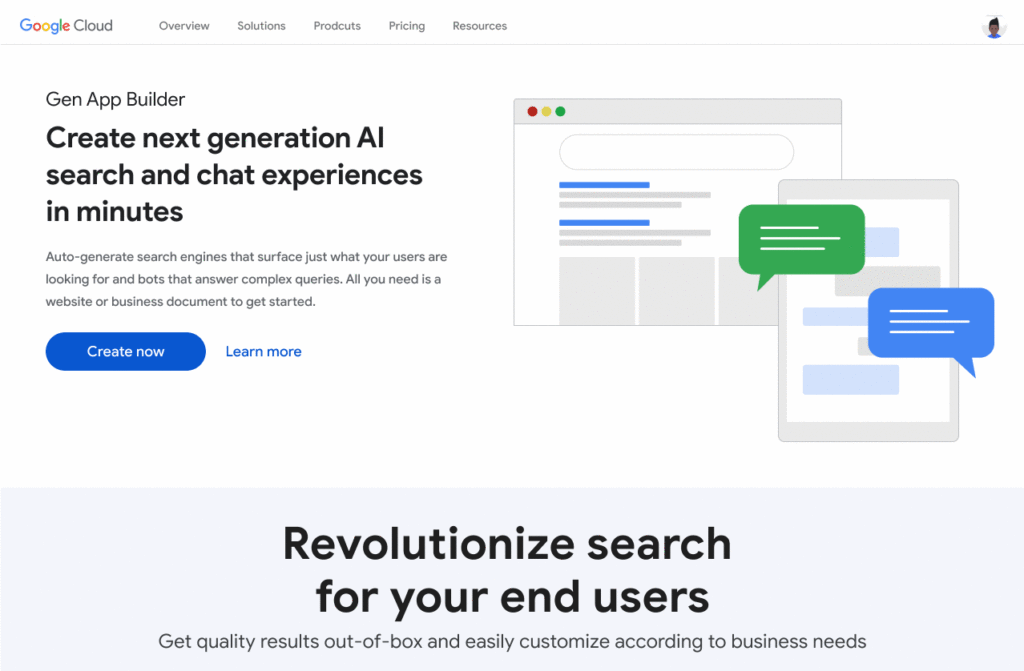
Gen App Builder is exciting because unlike most existing generative AI offerings for developers, it offers an orchestration layer that abstracts the complexity of combining various enterprise systems with generative AI tools to create a smooth, helpful user experience. Gen App Builder provides step-by-step orchestration of search and conversational applications with pre-built workflows for common tasks like onboarding, data ingestion, and customization, making it easy for developers to set up and deploy their apps. With Gen App Builder developers can:
- Build in minutes or hours. With access to Google’s no-code conversational and search tools powered by foundation models, organizations can get started with a few clicks and quickly build high-quality experiences that can be integrated into their applications and websites.
- Combine the power of foundation models with information retrieval to find relevant, personalized information. Enterprises can build apps that understand user intent via natural language, and surface the right information with associated citations and attributions from a company’s public and private data. They can also fully control what data their applications access and the content or topics they want to address.
- Build multimodal apps that can respond with text, images, and other media. Gen App Builder supports not just text, but also other modalities such as images and videos. It allows developers to build apps using a combination of text and images as inputs to find information across documents, photos, and video content, enabling richer customer interactions.
- Combine natural conversations with structured flows. Developers can granularly blend the output of foundation models with controls to ground answers in enterprise content, and step-by-step conversation orchestration to guide customers to the right answers.
- Provide the ability to transact and connect to third party apps and services. Gen App Builder makes it simple to create digital assistants and bots that not only serve content, but also connect to purchasing and provisioning systems to enable transactions from the conversational UI, and escalate customer conversations to a human agent when the context demands.
A new generation of conversational AI experiences and assistants
Consumers of enterprise applications expect to interact with technology in a seamless, conversational way to quickly find the information they need and act on it. Gen App Builder can help reinvent these customer and employee experiences by ingesting large, complex datasets that are specific to your company–from websites, documents, and transactional systems like billing and inventory, to emails, chat conversations, and more. These AI-powered apps can synthesize information across all of these sources to provide specific, actionable responses, using only the data you have provided.
Some of the most popular uses are in customer service, where generative apps can contribute to increasing revenue, customer satisfaction, and customer loyalty. For example, if a retail customer reaches out to modify an order, a virtual agent can help them change it to another product. The customer doesn’t even need to provide the new product name—they can just upload an image and let the agent guide them through the rest. Watch this demo to see how a retail chatbot can use multimodal capabilities to help a consumer navigate various options on the website, including giving the customer ideas on how to use the product and even helping them complete the purchase with the ability to transact within the conversational UI. This scenario could apply to multiple industries and use cases, ranging from consumer goods and public services, to finance and internal corporate systems like intranets.
Combining the power of Google-quality search with foundation models
Finding the right information from data across the organization is a critical requirement within any enterprise. Yet it can be challenging to build high-quality enterprise search experiences with existing tools. Current systems struggle to understand user intent, are difficult to implement and customize, and don’t provide a high-quality user experience.
One of the most exciting features of Gen App Builder is the ability to combine the power of Google-quality search with generative AI to help enterprises find the most relevant and personalized information when they need it. With Gen App Builder, enterprises can build conversational search experiences across their public and private data in minutes or hours with no coding experience.
Enabling multimodal search across text, images and video within the enterprise is a key aspect of the search experiences in Gen App Builder. In addition to providing high-quality search results, Gen App Builder can conveniently summarize the results and provide corresponding citations in a natural, human-like fashion. Gen App Builder also automatically extracts key information from the data and enables personalized results for users. Watch this demo to see how these capabilities can come together to transform the search experience for employees at a financial services firm. The ability to integrate Google-quality search within the enterprise’s applications means they can enjoy a new level of data utilization, drive increased process efficiencies, and provide delightful experiences to their employees and customers.
“Customers have been shopping at Macy’s for generations. Being able to deliver 360° personalization and contextual recommendations will help ensure that Macy’s is still providing future generations of shoppers with a seamless, exceptional experience,” said Bennett Fox-Glassman, Senior Vice-President, Customer Journey, Macy’s. “We’ve already realized an increase in revenue per visit and conversion rates had great success using Google Cloud’s AI technology and are looking forward to exploring how these latest announcements bring together Natural Language Processing and Generative AI capabilities to deliver next-gen search and conversational experiences for our customers.”
The ability to intuitively interact with complex data across a variety of sources allows organizations to better serve their customers and deliver more relevant offerings. Combined with conversational and fulfillment abilities, the potential for improving customer engagement and employee productivity is immense. We’re excited to see how developers and enterprises use a mix of these capabilities to power new experiences and revenue opportunities.
If you’re interested in a closer look at the Gen App Builder, tune into this session at the Data Cloud & AI Summit. Take a step forward to getting hands-on and join the waitlist for our trusted tester program. And finally, bookmark our generative AI landing page to keep abreast of the latest news, updates and possibilities from this exciting new world of Gen Apps.
An Out-of-the-box, End-to-end Solution for Contact Centers!

3581
Of your peers have already read this article.
3:00 Minutes
The most insightful time you'll spend today!
Providing best-in-class customer service is crucial for the success of your business. Contact centers are a critical touch point, as they have to balance between representing your brand and prioritizing customer care. When your customers seek help and support, they expect efficient service that is accessible through modern voice and digital channels. In short, customer expectations are increasing—and that’s a problem if your contact center infrastructure and solutions are becoming outdated.
All of these factors are why today, we’re announcing Google Cloud Contact Center AI Platform, an expansion to Contact Center AI that offers an out-of-box, end-to-end solution for the contact center. It brings together the advantages of AI, cloud scalability, multi-experience capabilities, and tight integration with customer relationship management (CRM) platforms to unify sales, marketing, and support teams around data across the customer journey.
Improving customer experiences from all angles
Google Cloud’s Contact Center AI helps you leverage AI to scale your contact center interactions while maintaining a high level of customer satisfaction. Over the last two years, we have built a large group of partners, including the largest contact center and customer experience ISVs and our system integrator ecosystem, to bring Contact Center AI to customers. Today, we are helping enterprises across industries and geographies to cost-effectively reimagine contact center experiences. For example, Marks & Spencer reduced in-store call volume by 50%, and similarly, The Home Depot improved call containment by 185%, all while significantly increasing customer self-service engagement.
Adding to our Contact Center AI capabilities, Contact Center AI Platform is purpose-built for customer relationship management, extending your ability to offer personalized customer experiences that are consistent across your brand, whether delivered through a virtual agent, a human agent, or a combination of both. It eliminates many long-running pain points, from managing data fragmentation to replacing rigid customer experience flows with more engaging, personalized, and flexible support. With this addition, Contact Center AI now lets you:
- Orchestrate the customer journey by creating modern experiences that can be embedded in their chosen channels with mobile/web software developer kits (SDKs), compatible with iOS and Android;
- Leverage CRM as a single source of insight into the customer experience, to unify content, increase personalization, and automate processing with CRM data unification;
- Manage multiple channels without pivoting across voice, SMS, and chat support;
- Predict customer needs and route calls appropriately with AI-driven routing, based on both historical CRM data and real-time interactions;
- Automate scheduling, schedule adherence monitoring, and manage employee scheduling preferences with Workforce Optimization (WFO) integration;
- Provide customers with self-service via web or mobile interfaces using Visual Interactive Voice Response (IVR).
Helping you do more with contact centers
The addition of Contact Center AI Platform provides your partners the ability to integrate with Contact Center AI, so you can enjoy a more seamless experience operating your customer service center, with a complete view of the customer in a single workspace that includes real-time AI intelligence, native agent call controls, and real-time call transcription. For example, we are expanding our partnership with Salesforce to integrate Contact Center AI with Service Cloud Voice to deliver a unified Service Cloud agent console and Customer 360.
“Customers are continually raising their service expectations, and our research tells us 79% of consumers believe the experience a company provides is as important as its products and services,” said Ryan Nichols, SVP & GM, Contact Center, for Salesforce Service Cloud. “Through intelligence, workflows, and a deeper understanding of the customer, Salesforce’s Service Cloud Voice paired with Google’s Contact Center AI will empower agents with a seamless experience to help them wow customers.”
We are also excited to partner with UJET, an innovative and experienced Contact Center as a Service (CCaaS) provider. UJET offers secure user-centric design, scalability, and mobile-focused solution, with turnkey implementation, strong omnichannel capabilities, and best-in-class user experience, making their product a natural fit into Google’s contact center vision. To learn more about the partnership, see here.
Delivering impact for customers
Contact Center AI is already making a difference for our customers such as OneUnited Bank, the largest Black-owned bank in the U.S. “OneUnited Bank has been in partnership with Google Cloud and UJET, as well as a long-standing customer of Salesforce. The expansion and enhancements of Google Cloud’s Contact Center AI, along with its deeper integration with Salesforce, means better return on investment as we drive towards evolving our contact center to deliver exceptional client experiences,” said Teri Williams, President and Chief Operating Officer at OneUnited Bank.
Fitbit, which boasts more than 29 million active users, is also reaping the benefits. “Fitbit relies on Google Cloud and UJET to provide support to our customers with a mobile-first approach. This collaboration, in combination with a strong Salesforce integration, has helped us modernize our entire customer support experience,” stated Cassandra Johnson, VP, Devices & Services Customer Care & Vendor Management Office, at Google.
According to industry analyst Sheila McGee-Smith of McGee-Smith Analytics, “Google Cloud’s Contact Center AI is already a force in the contact center industry thanks to its early focus on AI for customer experience.” She continued, “Through their partnerships with UJET and Salesforce, as well as these expanded capabilities, Google Cloud’s Contact Center AI Platform will help define the future of customer service by powering more secure, engaging, and personalized customer experiences.”
Contact Center AI Platform is supported by a host of integration partners, including Accenture, CDW, Cognizant, Deloitte, HCL, IBM, Infosys, Quantiphi, Tata Consultancy Services, and Wipro. We will also continue to partner closely with the contact center and customer experience (CX) ISVs that our customers already rely on. If you already have a contact center solution provider, you can still integrate Google Cloud’s Contact Center AI into your existing environment.
To learn more about how you can leverage the power of AI to reimagine your contact center experience, visit our Contact Center AI page.
Smart Reply: How the AI-augmented Chat Helps Scale Google’s Tech Support Operations

2900
Of your peers have already read this article.
3:00 Minutes
The most insightful time you'll spend today!
As Googlers transitioned to working from home during the pandemic, more and more turned to chat-based support to help them fix technical problems. Google’s IT support team looked at many options to help us meet the increased demand for tech support quickly and efficiently.
More staff? Not easy during a pandemic.
Let service levels drop? Definitely not.
Outsource? Not possible with our IT requirements.
Automation? Maybe, just maybe…
How could we use AI to scale up our support operations, making our team more efficient?
The answer: Smart Reply, a technology developed by a Google Research team with expertise in machine learning, natural language understanding, and conversation modeling. This product provided us with an opportunity to improve our agents’ ability to respond to queries from Googlers by using our corpus of chat data. Smart Reply trains a model that provides suggestions to techs in real time. This reduces the cognitive load when multi-chatting and helps a tech drive sessions towards resolution.
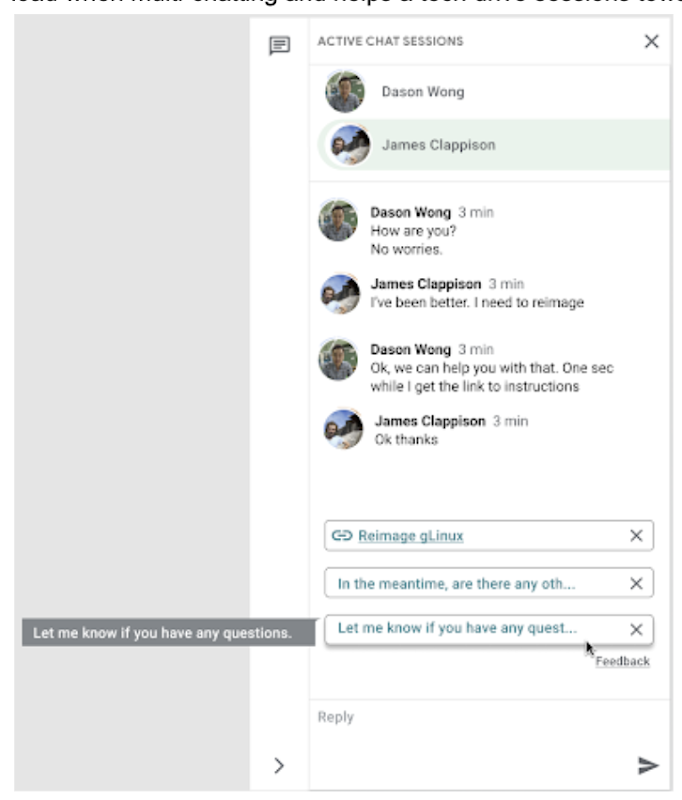
In the solution detailed below, our hope is that IT teams in a similar situation can find best practices and a few shortcuts to implementing the same kind of time saving solutions. Let’s get into it!
Challenges in preparing our data
Our tech support service for Google employees—Techstop—provides a complex service, offering support for a range of products and technology stacks through chat, email, and other channels.
Techstop has a lot of data. We receive hundreds of thousands of requests for help per year. As Google has evolved we’ve used a single database for all internal support data, storing it as text, rather than as protocol buffers. Not so good for model training. To protect user privacy, we want to ensure no PII (personal identifiable information – e.g. usernames, real names, addresses, or phone numbers) makes it into the model.
To address these challenges we built a FlumeJava pipeline that takes our text and splits each message sent by agent and requester into individual lines, stored as repeated fields in a protocol buffer. As our pipe is executing this task, it also sends text to the Google Cloud DLP API, removing personal information from the session text, replacing it with a redaction that we can later use on our frontend.
With the data prepared in the correct format, we are able to begin our model training. The model provides next message suggestions for techs based on the overall context of the conversation. To train the model we implemented tokenization, encoding, and dialogue attributes.
Splitting it up
The messages between the agent and customer are tokenized: broken up into discrete chunks for easier use. This splitting of text into tokens must be carefully considered for several reasons:
- Tokenization determines the size of the vocabulary needed to cover the text.
- Tokens should attempt to split along logical boundaries, aiming to extract the meaning of the text.
- Tradeoffs can be made between the size of each token, with smaller tokens increasing processing requirements but enabling easier correlation between different spans of text.
There are many ways to tokenize text (SAFT, splitting on white spaces, etc.), here we chose sentence piece tokenization, with each token referring to a word segment.
Prediction with encoders
Training the neural network with tokenized values has gone through several iterations. The team used an Encoder-Decoder architecture that took a given vector along with a token and used a softmax function to predict the probability that the token was likely to be the next token in the sentence/conversation. Below, a diagram represents this method using LSTM-based recurrent networks. The power of this type of encoding comes from the ability of the encoder to effectively predict not just the next token, but the next series of tokens.
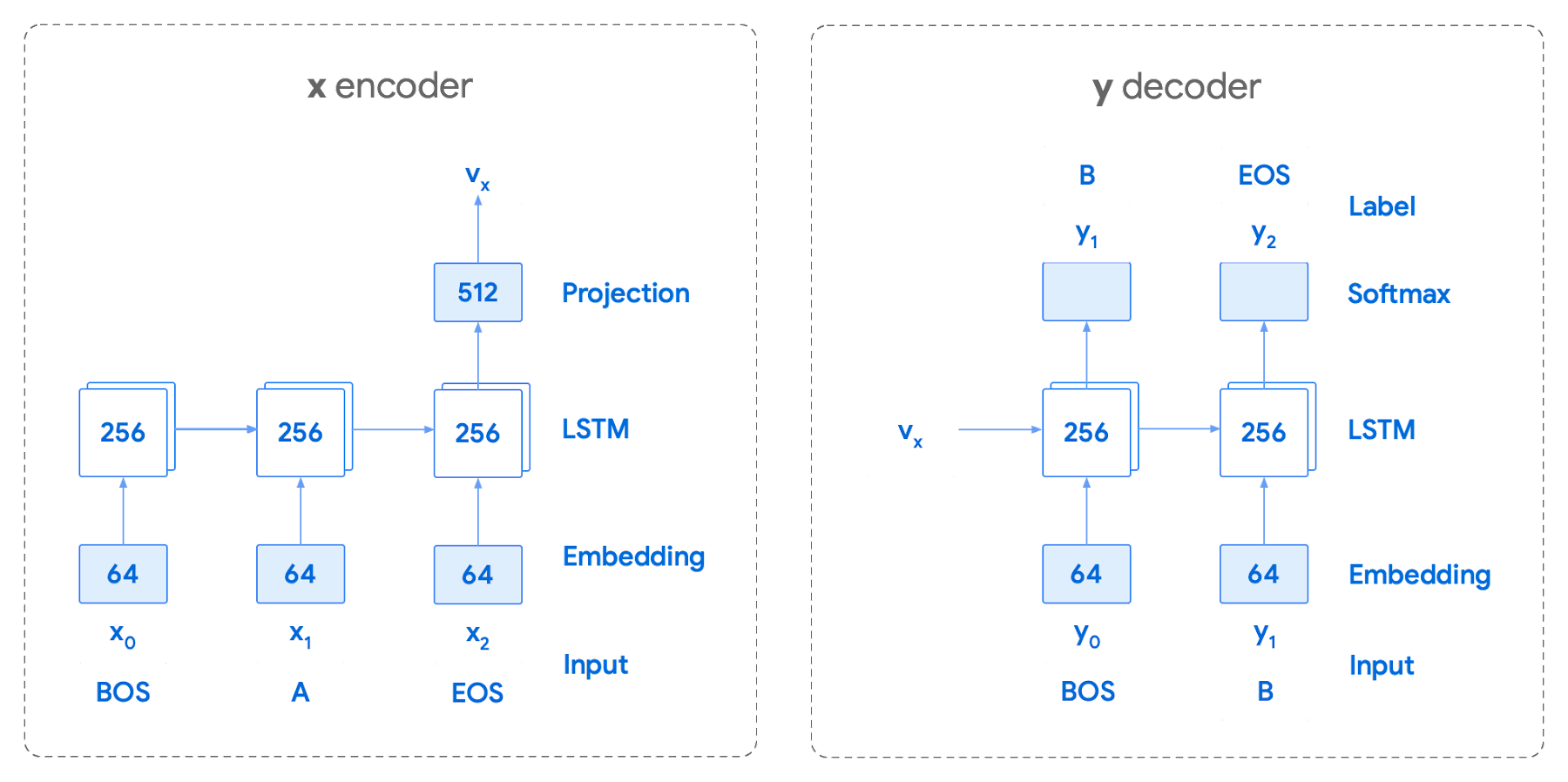
This has proven very useful for Smart Reply. In order to find the optimal sequence, an exponential search over each tree of possible future tokens is required. For this we opted to use beam search over a fixed-size list of best candidates, aiming to avoid increasing the overall memory use and run time for returning a list of suggestions. To do this we arranged tokens in a trie, and used a number of post processing techniques, as well as calculating a heuristic max score for a given candidate, to reduce the time it takes to iterate through the entire token list. While this improves the run time, the model tends to prefer shorter sequences.
In order to help reduce latency and improve control we decided to move to an Encoder-Encoder architecture. Instead of predicting a single next token and decoding a sequence of following predictions with multiple calls to the model, it instead encodes a candidate sequence with the neural network.
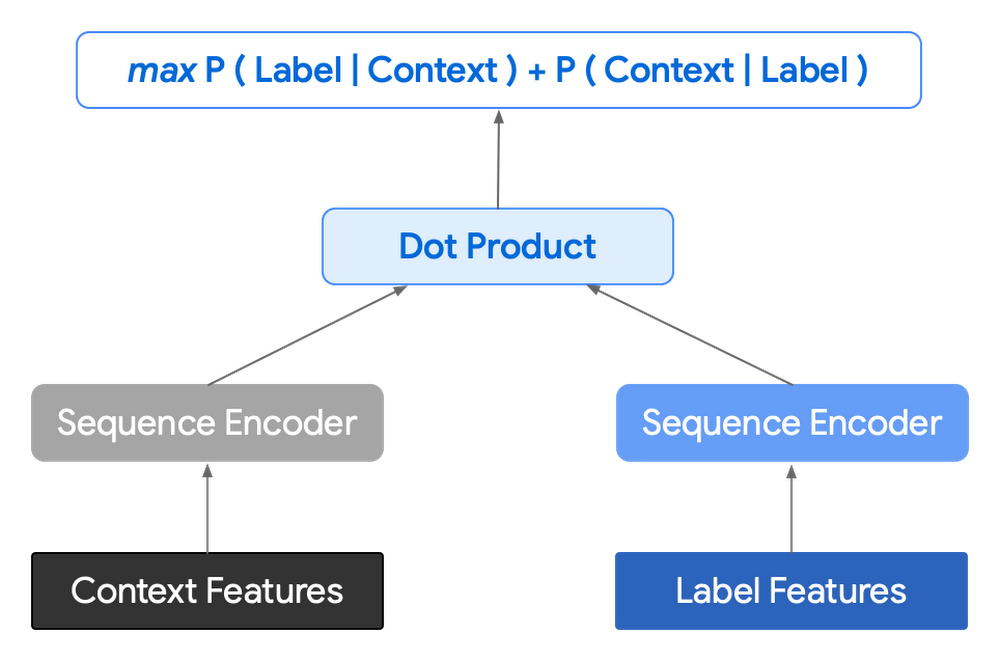
In practice, the two vectors – the context encoding and the encoding of a single candidate output – are combined with dot product to arrive at a score for the given candidate. The goal of this network is to maximize the score for true candidates – e.g. candidates that did appear in the training set – and minimize false candidates.
Choosing how to sample negatives affects the model training greatly. Below are some strategies that can be employed:
- Using positive labels from other training examples in the batch.
- Drawing randomly from a set of common messages. This assumes that the empirical probability of each message is sampled correctly.
- Using messages from context.
- Generating negatives from another model.
As this encoding generates a fixed list of candidates that can be precomputed and stored, each time a prediction is needed, only the context encoding needs to be computed, then multiplied by the matrix of candidate embeddings. This reduces both the time from the beam search method and the inherent bias towards shorter responses.
Dialogue Attributes
Conversations are more than simple text modeling. The overall flow of the conversation between participants provides important information, changing the attributes of each message. The context, such as who said what to whom and when, offers useful bits of input for the model when making a prediction. To that end the model uses the following attributes during its prediction:
- Local User ID’s – we set a finite number of participants for a given conversation to represent the turn taking between messages, assigning values to those participants. In most cases for support sessions there are 2 participants, requiring ID 0, and 1.
- Replies vs continuations – initially modeling focused only on replies. However, in practice conversations also include instances where participants are following up on the previously sent message. Given this, the model is trained for both same-user suggestions and “other” user suggestions.
- Timestamps – gaps in conversation can indicate a number of different things. From a support perspective, gaps may indicate that the user has disconnected. The model takes this information and focuses on the time elapsed between messages, providing different predictions based on the values.
Post processing
Suggestions can then be manipulated to get a more desirable final ranking. Such post-processing includes:
- Preferring longer suggestions by adding a token factor, generated by multiplying the number of tokens in the current candidate.
- Demoting suggestions with a high level of overlap with previously sent messages.
- Promoting more diverse suggestions based on embedding distance similarities.
To help us tune and focus on the best responses the team created a priority list. This gives us the opportunity to influence the model’s output, ensuring that responses that are incorrect can be de-prioritized. Abstractly it can be thought of as a filter that can be calibrated to best suit the client’s needs.
Getting suggestions to agents
With our model ready we now needed to get it in the hands of our techs. We wanted our solution to be as agnostic to our chat platform as possible, allowing us to be agile when facing tooling changes and speeding up our ability to deploy other efficiency features. To this end we wanted an API that we could query either via gRPC or via HTTPs. We designed a Google Cloud API, responsible for logging usage as well as acting as a bridge between our model and a Chrome Extension we would be using as a frontend.
The hidden step, measurement
Once we had our model, infrastructure, and extension in place we were left with the big question for any IT project. What was our impact? One of the great things about working in IT at Google is that it’s never dull. We have constant changes, be it planned or unplanned. However, this does complicate measuring the success of a deployment like this. Did we improve our service or was it just a quiet month?
In order to be satisfied with our results we conducted an A/B experiment, with some of our techs using our extension, and the others not. The groups were chosen at random with a distribution of techs across our global team, including a mix of techs with varying levels of experience ranging from 3 to 26 months.
Our primary goal was to measure tech support efficiency when using the tool. We looked at two key metrics as proxies for tech efficiency:
- The overall length of the chat.
- The number of messages sent by the tech.
Evaluating our experiment
To evaluate our data we used a two-sample permutation test. We had a null hypothesis that techs using the extension would not have a lower time-to-resolution, or be able to send more messages, than those without the extension. The alternative hypothesis was that techs using the extension would be able to resolve sessions quicker or send more messages in approximately the same time.
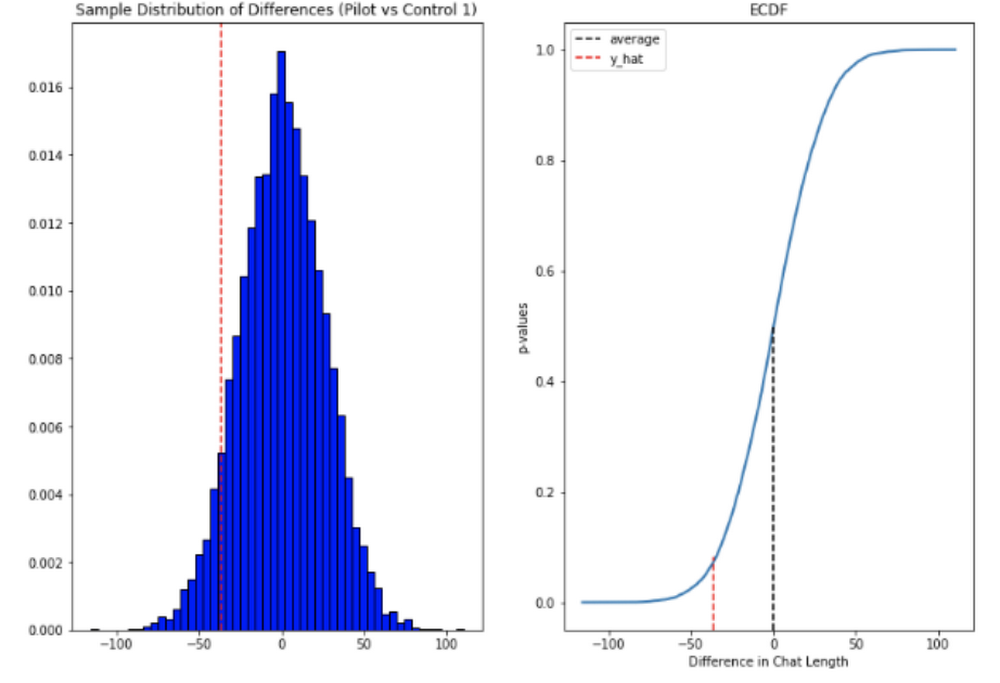
We took the mid mean of our data, using pandas to trim outliers greater than 3 standard deviations away. As the distribution of our chat lengths is not normal, with significant right skew caused by a long tail of longer issues, we opted to measure the difference in means, relying on central limit theorem (CLT) to provide us with our significance values. Any result with a p-value between 1.0 and 9.0 would be rejected.
Across the entire pool we saw a decrease in chat lengths of 36 seconds.
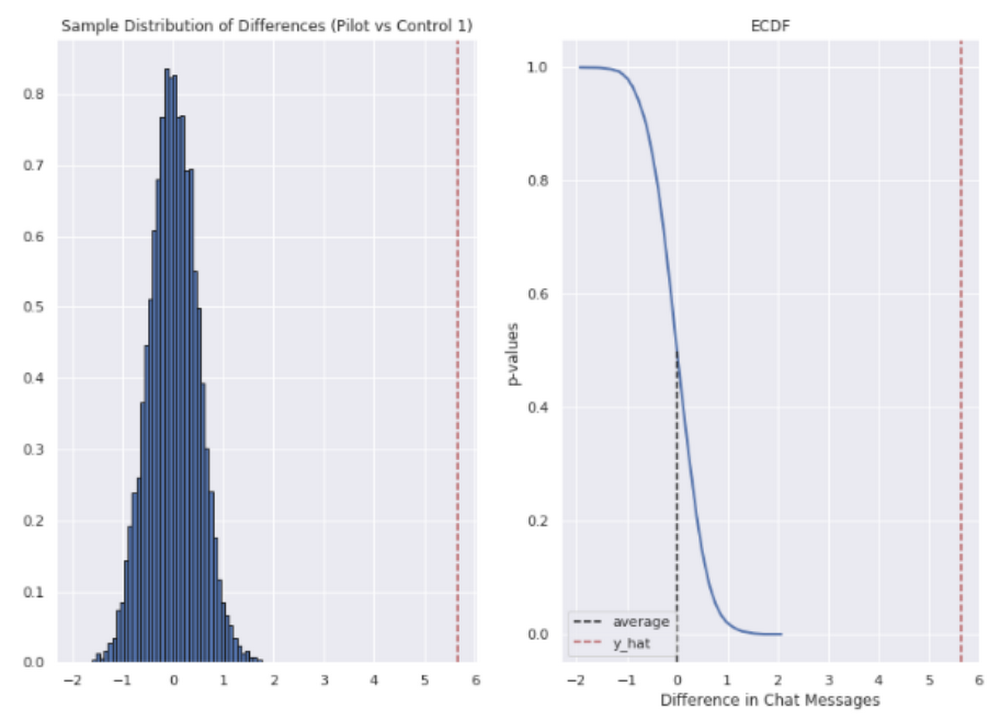
In reference to the number of chat messages we saw techs on average being able to send 5-6 messages more in less time.
In short, we saw techs were able to send more messages in a shorter period of time. Our results also showed that these improvements increased with support agent tenure, and our more senior techs were able to save an average of ~4 minutes per support interaction.
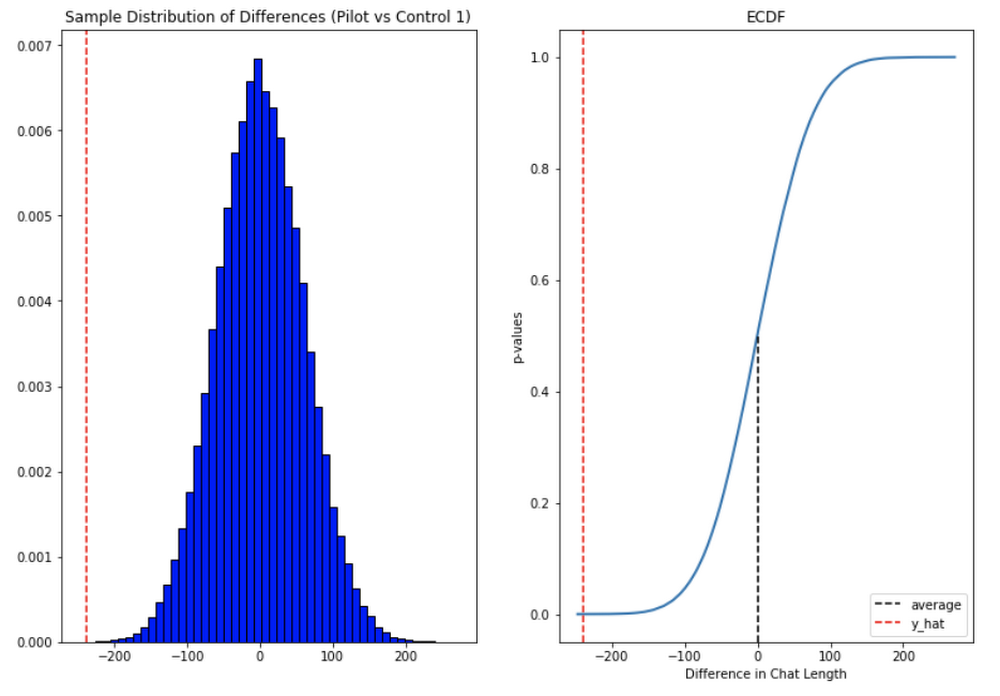
Overall we were pleased with the results. While things weren’t perfect, it looked like we were onto a good thing.
So what’s next for us?
Like any ML project, the better the data the better the result. We’ll be spending time looking into how to provide canonical suggestions to our support agents by clustering results coming from our allow list. We also want to investigate ways of making improvements to the support articles provided by the model, as anything that helps our techs, particularly the junior ones, with discoverability will be a huge win for us.
How can you do this?
A successful applied AI project always starts with data. Begin by gathering the information you have, segmenting it up, and then starting to process it. The interaction data you feed in will determine the quality of the suggestions you get, so make sure you select for the patterns you want to reinforce.
Our Contact Center AI allows tokenization, encoding and reporting, without you needing to design or train your own model, or create your own measurements. It handles all the training for you, once your data is formatted properly.
You’ll still need to determine how best to integrate its suggestions to your support system’s front-end. We also recommend doing statistical modeling to find out if the suggestions are making your support experience better.
As we gave our technicians ready-made replies to chat interactions, we saved time for our support team. We hope you’ll try using these methods to help your support team scale.
Startup Success Blueprint: Insights on Cloud Provider Selection from One AI

913
Of your peers have already read this article.
4:30 Minutes
The most insightful time you'll spend today!
From the newsroom to the boardroom, everywhere we turn these days the topic of conversation is artificial intelligence (AI). From the smallest startups to the largest enterprises, every business is looking for ways to incorporate generative AI technology into their products or services.
Generative AI is a new breed, able to not only discern patterns in data but generalize from them and create new data—and it’s moving fast. With new technologies rapidly emerging, there’s a lot to consider when choosing a tech stack that’s right for your startup.
Our mission is to empower startups to build generative AI applications quickly, efficiently, and responsibly. In addition to our technology, we offer a variety of fresh educational and consulting initiatives, as well as comprehensive plans tailored to specific industry applications.
At the recent Google Cloud Startup Summit, leaders from One AI and MongoDB weighed in on various decisions startups face when choosing a development platform to integrate AI into their products. (You can watch the full conversation here.) They shared key insights into the challenges startups face when applying AI technology to real-world business and product use cases.
In this blog, we’ll explore why One AI – a platform that empowers businesses to deploy tailored AI solutions – relies on MongoDB on Google Cloud for performance, scale, functionality, and TCO. We will also cover the things that startups should keep in mind when building their generative AI stack.
Fine-tuning generative AI for startups
First, let’s start with a little background.
AI-based capabilities have been around for decades now, but generative AI is distinct. It’s a more mature version of AI, powered by models pre-trained on very large datasets composed of massive quantities of images, text, and data. These models are known as foundation models, and they include large language models (LLMs), text-to-image models, multimodal models, and more. Foundation models let intelligent applications generate new images, text, and data based on queries or prompts. This in turn allows companies to deploy those capabilities in their products and services faster since they don’t have to retrain the whole AI from scratch.
Over the course of their diverse startup careers, Amit Ben, CEO at One AI and his team have built AI-based capabilities from the ground up for various products in various fields.
“And each time, we had to rebuild the tech stack over again,” Amit explains. “With the advent of generative AI, startups now have the ability to deploy much faster — with a lower TCO and higher confidence — and deliver the capabilities they need into their products and services. It finally makes sense for every company to have AI in its product portfolio.”
“For us to be able to focus on that,” Amit adds, “we need to make sure we have a rock-solid foundation that we can build on.”
That foundation is MongoDB on Google Cloud.
Helping startups build fast and with flexibility
Startups can scale from ideation to growth with Google Cloud’s global availability, market-leading sustainability, and the same zero-trust security model that Google itself depends on.
With MongoDB, startups can take advantage of iteration cycles that are 3-5X faster, reduce sprawl and complexity, and benefit from the scalable infrastructure and advanced analytics tools on Google Cloud.
With MongoDB on Google Cloud, Amit and his team are confident they can adapt to new schemas, to new data, and to the scale they need for both writing and reading, all while operating on a scalable platform and infrastructure they can rely on for the long haul.
A common mistake for startups is turning to niche, single-point solutions. But this can backfire when they realize their solution doesn’t provide the security, scalability, and performance they need to grow.
Additionally, startups tend to have tight iteration cycles as they find their ideal product market fit. The ability to build fast and with improved flexibility is a key differentiator in a startup environment.
From cutting-edge automation to rock-solid redundancy and performance, there are many reasons why startups choose MongoDB on Google Cloud. And now, a dedicated partnership helps startups like One AI scale more quickly, more securely, and more successfully.
Google Cloud and MongoDB for startups
Choosing the right technology to accelerate time to market is critical to a startup’s success. Not only is it easy to get started, but Google Cloud and MongoDB also provide the foundation for users to scale without limits — so startups can focus on innovating and growing their businesses.
Learn more about the powerful startup programs available from Google Cloud and MongoDB.
More Relevant Stories for Your Company

How Google Cloud’s PSO Supports Customers’ Migration Goals
Google Cloud’s Professional Services Organization (PSO) engages with customers to ensure effective and efficient operations in the cloud, from the time they begin considering how cloud can help them overcome their operational, business or technical challenges, to the time they’re looking to optimize their cloud workloads. We know that all parts of

Adapting Regulatory Frameworks to Manage AI/ML Risks in Financial Services
Advances in artificial intelligence (AI) and machine learning (ML) have led to increased adoption in the financial services sector. A prominent use for this technology is to assist in key compliance and risk functions, including the detection of fraud, money laundering, and other financial crimes and illicit finance, as well

Apigee and Vision API: ICICI Prudential Life Insurance’s Journey of Speeding Document Processing
Google Cloud results Helps enable instant document approval with optical character recognition by Vision APIProcesses 100,000 documents in 20 minutes with automated document processing product Recognic, powered by Vision API and ApigeeHelps increase the number of applications processed by 30% within the same timeframe The insurance landscape in India has seen
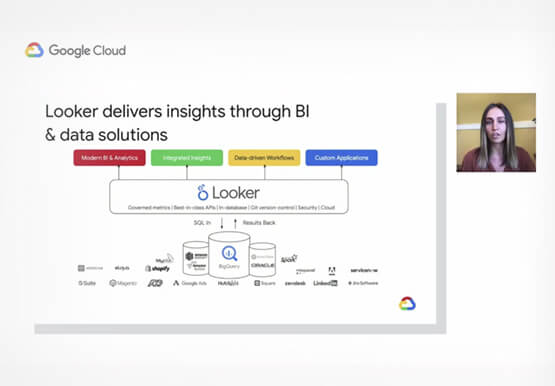
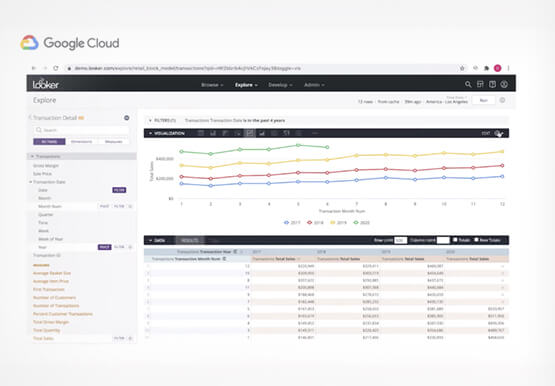
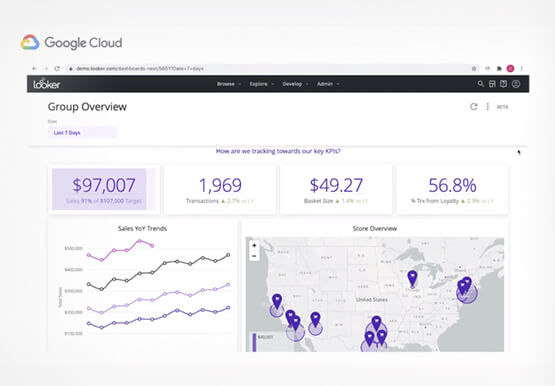

Technical deep dive on Looker: The enterprise BI solution for Google Cloud
Thousands of users accessing petabytes of data on a daily basis: This is a challenging proposition for enterprises, without a doubt. But Looker makes it possible. Beyond just accessing data though, Looker’s platform transforms your company’s relationship with data. Go under the hood of Looker, with Olivia Morgan, Enterprise CE,
