





3250
Of your peers have already watched this video.
3:00 Minutes
The most insightful time you'll spend today!
Why CISOs Need to Know This to Protect Users From Unsafe Websites
Unsafe web resources include social engineering sites—such as phishing and deceptive sites—and sites that host malware or unwanted software. For CISOs and their teams, this can quickly become an insurmountable challenge if it’s not nipped in the bud.
But there’s a way to enable companies to find unsafe URLs before their users do, identify phishing and deceptive sites, as well as sites that host malware or unwanted software.
Google Cloud’s Web Risk API was built to help admins protect users from unsafe websites. If a URL is known to be unsafe, Web Risk API responds with the threat type and the amount of time during which the website should be considered unsafe.
The Web Risk API can be integrated into both cloud-based and on-premises hosted applications and websites.
Watch this three-minute video to find out how Web Risk APIs can break the chain of malicious attacks and protect the data of your customers and users.
Your Cloud Defense Enhanced: Google Introduces End-to-End TDIR in Chronicle Security Operations

1178
Of your peers have already read this article.
4:30 Minutes
The most insightful time you'll spend today!
As cloud adoption continues to grow, so too does the number of cloud-born security threats. However, cloud environments can present significant opportunities to improve security with the right tools and processes in place.
When it comes to effective threat detection, investigation and response (TDIR) in the cloud, modern solutions must ensure that the entire security operations workflow — from data analysis through detection to response — are working in tandem to deliver the insights, context, and processes needed for cyber defenders to respond to threats with speed and precision.
At Google Cloud, we believe that modern security operations should rely less on customer engineering and more on packaged outcomes delivered by solution providers. With this in mind, we are excited to announce today at our annual Security Summit that Chronicle Security Operations now provides turnkey TDIR for Google Cloud. By integrating with our cloud-focused Security Command Center Premium (SCC) and Google Cloud telemetry, Chronicle can collect and analyze data from Google Cloud, detect and investigate threats, and automate responses to mitigate risks.
In our recent State of Cloud Threat Detection and Response Survey, 71% of respondents said that “entire classes of threats are eliminated by migrating to the cloud,” and 82% stated that “the cloud affords the ability to process more data, including on-prem data, which can improve detection across the board.”
To take advantage of all that the cloud can do for security, organizations should to do more than “lift and shift” their existing security tools and processes to the cloud. The cloud presents a different attack surface, often across several cloud services and data repositories, and each can have different attack tactics, potential misconfigurations, and context.
This update to Chronicle helps enable teams to:
- Detect with confidence. Out-of-the-box detection rule sets developed by Google threat researchers surface cloud attack vectors and provide high fidelity, contextualized alerts that quickly give insight into potential threats in your Google Cloud environment.
- Investigate with full context. Visualize threat storylines, complete with cloud-specific context that is correlated with additional data and context from across your environment for fast and efficient investigations.
- Respond with speed and precision. Streamline workflows and automate response actions with prebuilt playbooks and best practices designed specifically for Google Cloud. Chronicle SOAR’s case management and team collaboration help ensure fast and timely response.
- Simplify data ingestion. Chronicle automatically ingests, normalizes and contextualizes cloud telemetry from a variety of Google Cloud services (such as Cloud Asset Inventory, Google Kubernetes Engine, Google Compute Engine, cloud audit logs, and Cloud DLP), reducing the need for complex and time-consuming engineering.
Putting Google Cloud TDIR to work
Let’s take a closer look at how our end-to-end cloud TDIR workflow manages a potential Google Cloud attack.
Setting up cloud TDIR in Chronicle only takes a few clicks. Security Command Center’s built-in threat detection identifies attacks against Google Cloud resources. These findings, as well as audit, NAT, DNS, and firewall logs, are ingested into Chronicle to provide additional insight and context into Google Cloud threats.
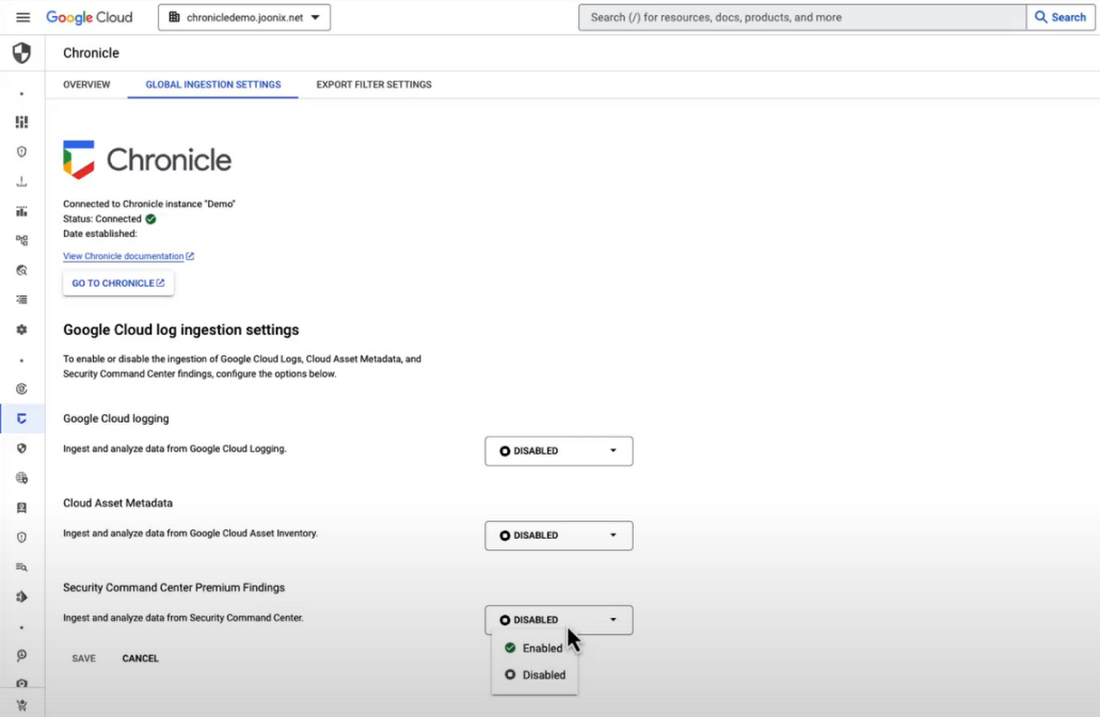
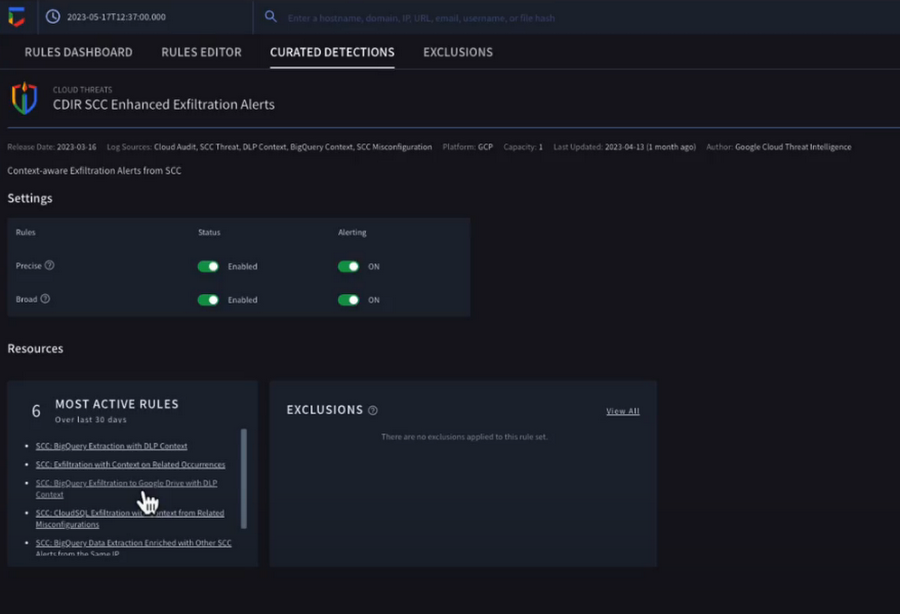
Chronicle now provides detection rules for Google Cloud threats. These rules correlate SCC findings with Chronicle’s advanced detection engine to reveal the broad scope of malicious activity, giving you visibility and more contextual information into what’s going on in your environment. In our example, Chronicle alerts on suspicious activity that can indicate an attempt to exfiltrate data from BigQuery.
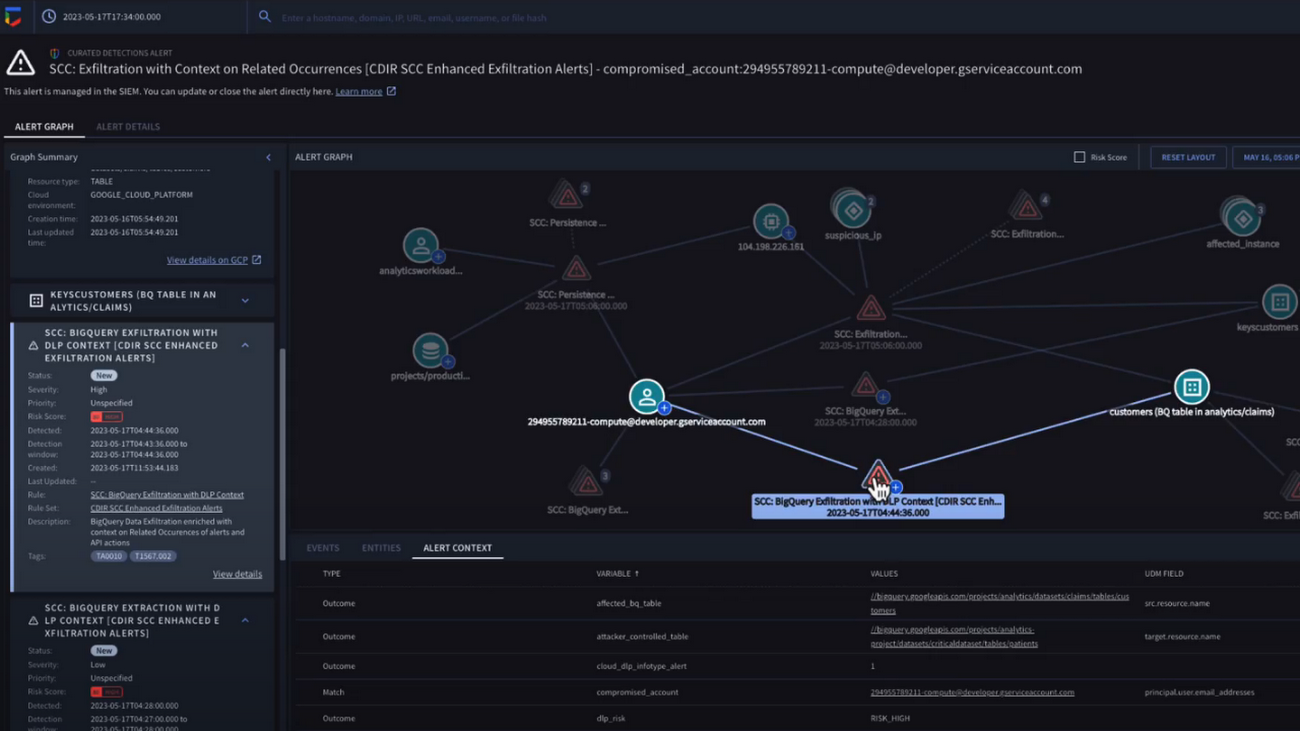
The new Chronicle Alert Graph surfaces key details of primary alerts you’re investigating in seconds. Combining cloud alerts and telemetry and correlating that with vital context from other sources (such as user data, endpoint data, and threat intelligence,) you can explore the visual representation of an alert’s relationship to other alerts and entities, dig into the potential attack paths, get quick summaries of implicated security artifacts, and pivot into your Google Cloud Console to do a deeper dive into potentially-impacted resources.
In our example, we can see a BigQuery exfiltration event associated with a customer and that it’s associated with a particular service account tied to a Google Cloud org. Alert context below tells us more about what’s been impacted. It shows us that cloud credentials in the form of encryption keys and email addresses were associated with the event.
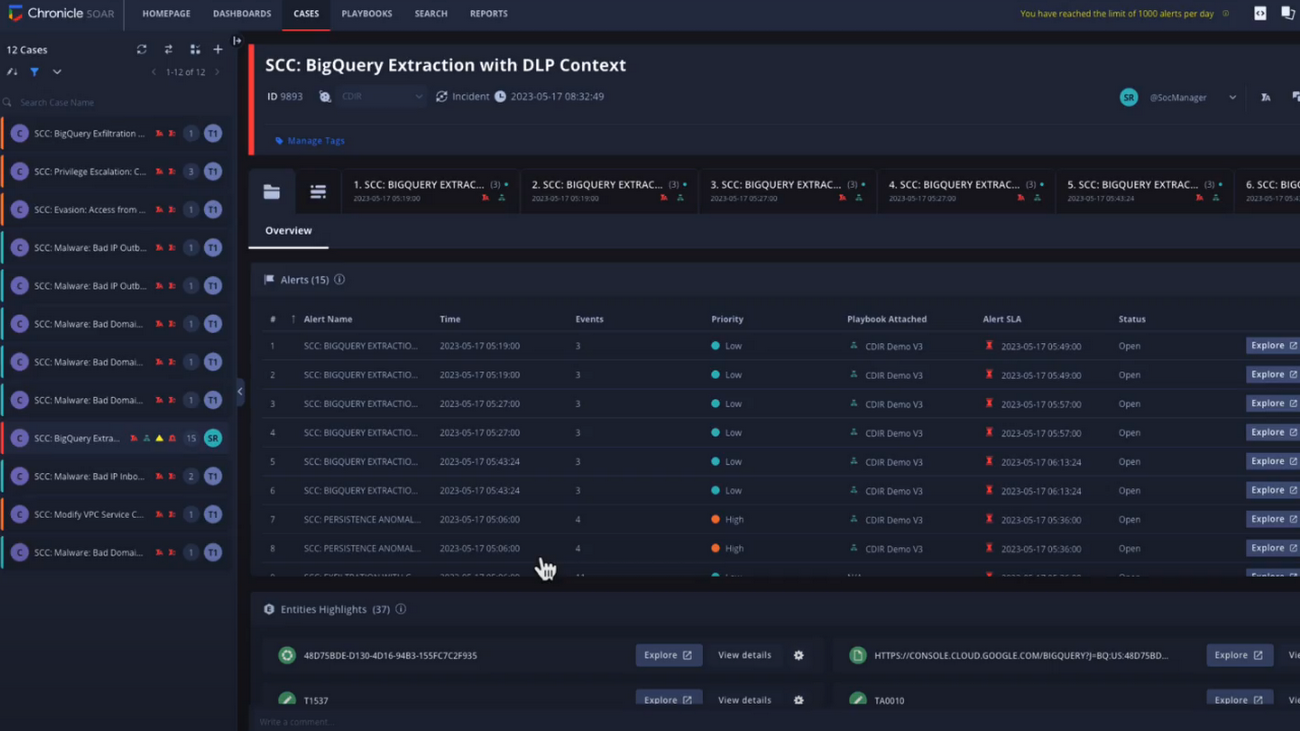
Chronicle case management automatically groups any related alerts into threat-centric cases, uniting the information that matters and making it simple for you to see and understand the scope of the event.
In our example, Chronicle groups these alerts together based on common source address and username, and the case wall provides the summary of the alerts and actions that are taking place across the entire case.
Chronicle playbooks, designed specifically for Google Cloud, automate your desired response processes. In our example, when an alert was generated a playbook automatically ran through predefined steps that gathered data, enrichment, and took automated remediation steps to prevent this service account and instance from continuing.
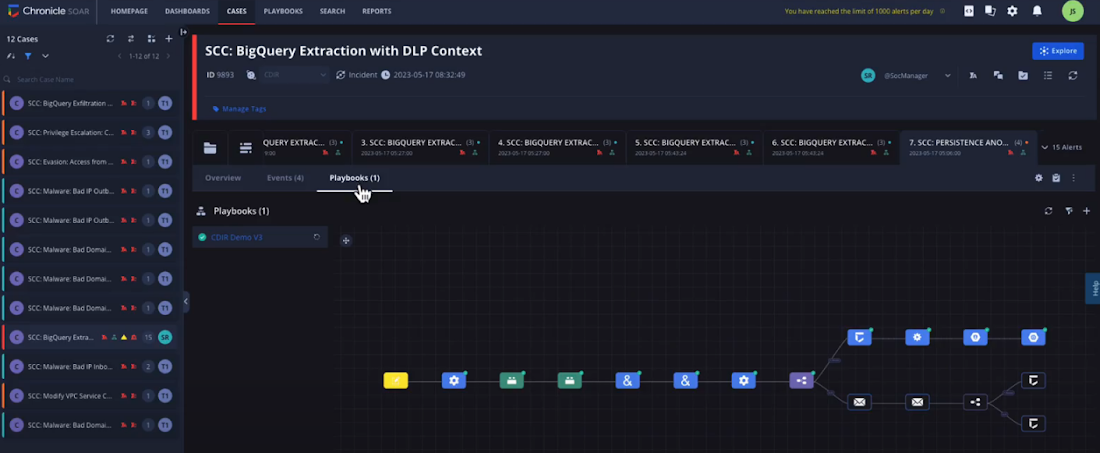
Ready to detect with confidence, investigate with broad context, respond with speed and precision, and simplify data ingestion? Chronicle Security Operations is your go-to for turnkey, end-to-end threat detection, investigation, and response on Google Cloud.
Tune in to our Security Summit session to learn more and see a demo of the new Google Cloud TDIR capabilities.
5236
Of your peers have already watched this video.
17:00 Minutes
The most insightful time you'll spend today!
AppSheet: Reduce Shadow IT and Accelerate Development of Enterprise-grade Apps
Google Cloud findings suggest that nearly 40 percent of organizations’ investments are consumed by shadow IT and can be a detractor to the adoption of cutting-edge tools and solutions. Also, about 51 percent of the surveyed executives are of the opinion that the inability to adapt to digital transformation trends and practices are at the risk of going out of business in the next 3-4 years. However, enterprises need not be blindsided by the mounting expenses involved with the implementation and optimization of solutions and tools meant for empowering employees. AppSheet, Google Cloud’s no-code application development and automation platform is at the helm of empowering organizations to custom build apps for employees without relying on third-party services.
Watch the video from the Google Workspace sessions of Next ’21 to hear experts’ insights on AppSheet to effectively govern workforce and ward off security threats to helps employees build enterprise-grade applications!
Latest Update: Keep Your Accounts Secure with Sensitive Actions

2744
Of your peers have already read this article.
2:00 Minutes
The most insightful time you'll spend today!
At Google Cloud, we operate in a shared fate model, working in concert with our customers to help achieve stronger security outcomes. One of the ways we do this is to identify potentially risky behavior to help customers determine if action is appropriate. To this end, we now provide insights on what we are calling Sensitive Actions.
Sensitive Actions, now available in Preview, are focused on understanding IAM account, or user account, behavior. They are changes made in a Google Cloud environment that are security relevant — and therefore important to be aware of and evaluate — because they may be precursors to an attack, an effort to make other attacks possible, or part of an effort to monetize a compromised account. They can quickly highlight potentially malicious activities that are facilitated by authentication cookie theft, and are another defense-in-depth mechanism that Google Cloud offers to help address this attack vector.
The Sensitive Actions that are detected today will appear in two places. They are available in Security Command Center Premium, the primary source for security and risk alerts in Google Cloud, as Observations from the Sensitive Actions Service. They are also available in Cloud Logging, where we recommend that customers integrate them into their monitoring workflows.
Sensitive Actions include the following list of action names (mapped to the MITRE ATT&CK tactics that these actions may correspond to) and descriptions:
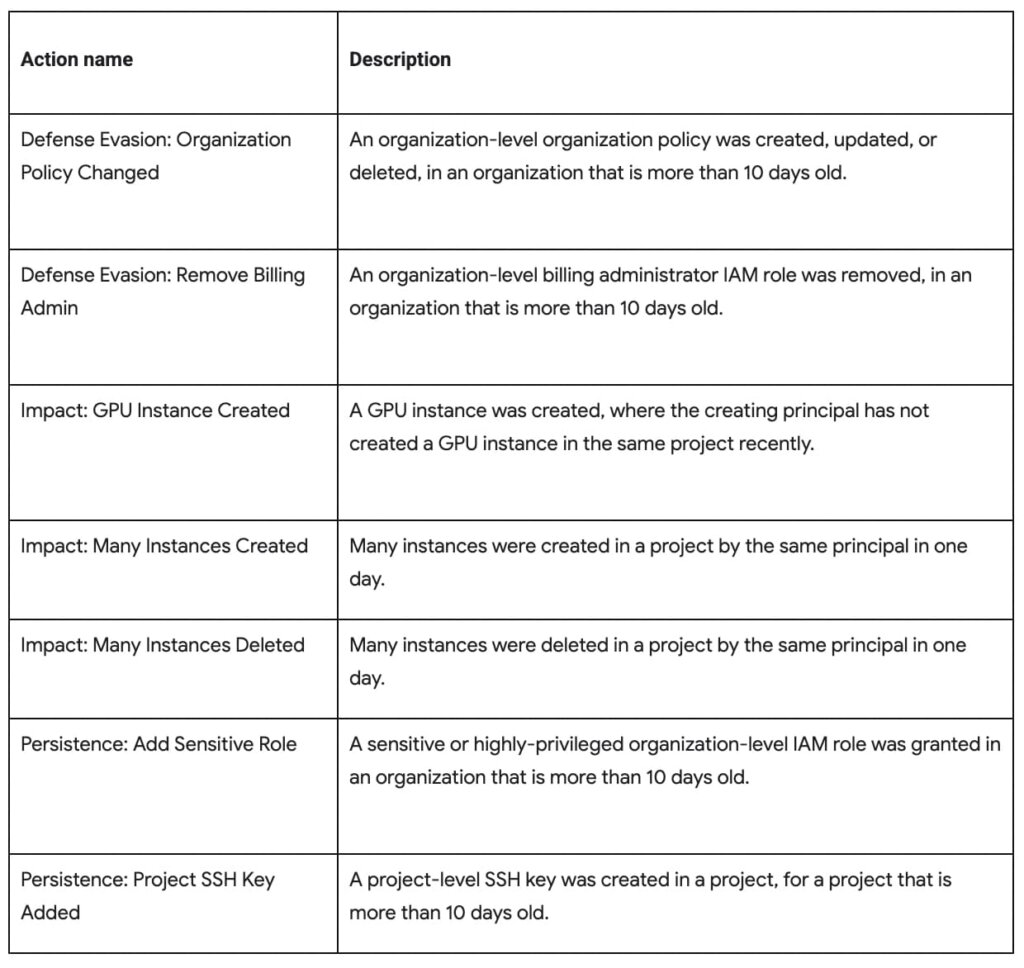
To ensure that adversaries do not have mechanisms to disable this protection or hide logs from users, Sensitive Actions is an on-by-default service now enabled for Cloud customers. In cases where customers have certain privacy controls or policy restrictions applied to their logging pipeline, their logs will not be analyzed by this service.
You can learn more about Sensitive Actions and our overall recommendations for keeping your account secure by visiting our documentation here.
Redefining Network Security with Google Cloud’s Secure Web Proxy

1200
Of your peers have already read this article.
3:30 Minutes
The most insightful time you'll spend today!
Google Cloud provides multiple layers of security to help customers stay ahead of evolving threats and keep their cloud workloads safe. Today at our annual Security Summit, we are excited to announce the general availability of Secure Web Proxy, a new cloud-first network security offering that provides web egress traffic inspection, protection, and control. Secure Web Proxy (Cloud SWP) can help networking and security teams implement Zero Trust networking principles, discover malicious activity, and support forensic investigations
How Secure Web Proxy works
You configure workloads to use Secure Web Proxy as a gateway. Web requests can originate from virtual machine (VM) instances, containers, serverless environments, and workloads outside of Google Cloud connected by Cloud VPN or Cloud Interconnect. Policies and rules in Cloud SWP will be applied to traffic sent from these workloads to the internet.
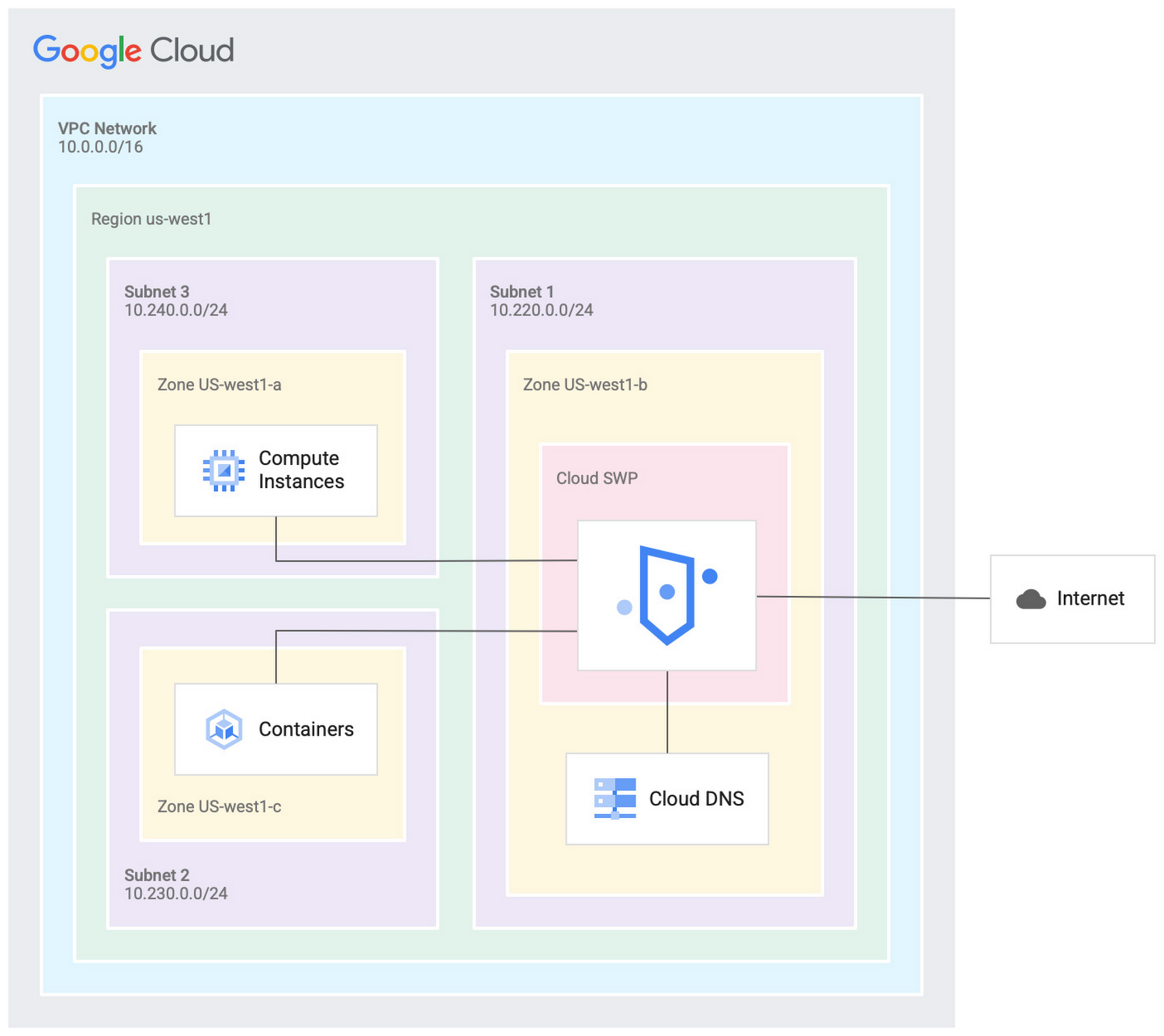
Cloud SWP helps enable organizations to enforce granular access policies, limiting egress web traffic based on source, identities, destination, or request types. With Cloud SWP you can create policies with Google Cloud Identity Access Management (IAM) context using service accounts and secure tags to block egress. For example, you can set a policy to limit a service account to sending traffic to a specific outbound destination.
Secure Web Proxy offers a scalable TLS inspection service that lets you intercept TLS traffic, inspect the encrypted request, and enforce your policies. Cloud SWP integrates with Cloud Logging to record metrics and transaction logs for requests handled by the proxy.
Common use cases for Secure Web Proxy
Many organizations employ a proxy like Cloud SWP to programmatically restrict workload access to only trusted external web services.
You can also use Cloud SWP to monitor outbound access. The proxy identifies traffic that doesn’t conform to policy and logs it to Cloud Logging. This allows you to monitor internet usage, discover and disrupt threats on your network by spotting command and control traffic or anomalous data transfers. Logs can be also used in forensics to investigate security events and incidents involving egress web traffic.
Operational benefits
Secure Web Proxy is another example of how Google Cloud continues to deliver built-in, cloud-first security capabilities that offer operational efficiencies for our customers.
Cloud SWP is easy to deploy and manage because it is a managed service. Unlike frequently deployed proxy solutions, it does not require users to configure virtual machines (VMs) to run and scale the proxy. Security patching is handled automatically. As your business and outbound traffic grows, Cloud SWP takes care of growing your proxy infrastructure for you.
Secure Web Proxy can also help make cloud migrations more seamless. If you are using an on-premises proxy, you can easily port the existing proxy’s policies to Cloud SWP when you migrate the app, maintaining the same egress protection in the cloud as you had on-premises.
Customer testimonials
Preview customers validated the operational and security value of implementing Cloud SWP:
“Google’s Secure Web Proxy is a powerful tool that can help businesses of all sizes protect their cloud workloads from online threats. By using the granular policy controls and TLS inspection, we are ensuring that our cloud applications only access approved external destinations. Additionally we are able to comply with data security regulations,” said David Saleh, director, Cloud Architecture and Application Security, ATB Financial.
“Secure Web Proxy has helped us to improve our security in Google Cloud. We are now able to filter outbound HTTP and HTTPS traffic from our applications. In addition, having a native solution will allow us to replace the VM-based solution we currently have, providing us with cost savings and continuing to deliver on our strategy of replacing products with cloud native services,” said Roberto Vega, cloud analyst, Carrefour.
Getting started with Secure Web Proxy
You can get started with Cloud SWP by visiting our documentation page to learn more about Cloud SWP prerequisite requirements and configuration options. If you want to quickly evaluate Cloud SWP for your cloud environment, use the SWP evaluation guide for step-by-step instructions. Be sure to check out all our sessions at this year’s Google Cloud Security Summit.
3440
Of your peers have already watched this video.
2:30 Minutes
The most insightful time you'll spend today!
Learn to Use reCAPTCHA Enterprise to Protect Your Website from Fraud
One of the top questions enterprises have is: How can I use reCAPTCHA Enterprise to protect my website from online fraudulent activity?
Fraudulent web activities cost enterprises billions of dollars each year. Security teams need to keep the bad actors out of their websites and ensure that their customers can always get in.
Google reCAPTCHA has been defending millions of sites for almost a decade, and the reCAPTCHA Enterprise service built on this technology with capabilities designed specifically for enterprise security concerns.
In this demo, you can see how reCAPTCHA Enterprise identifies the difference between a real user and a bad actor and how you can view this within the Admin Analytics dashboard to see what is happening with your website.
More Relevant Stories for Your Company

Improving Your Security Posture: Integrating Cloud DLP with Security Command Center
Our Cloud Data Loss Prevention (Cloud DLP) discovery service can monitor and profile your data warehouse to bring awareness of where sensitive data is stored and processed. Profiling is also useful for confirming that data is not being stored and processed where you don’t want it. But how can you

Google Cloud’s BeyondCorp Framework Helps Govts Adopt Zero Trust Approach to Security
For more than a decade, Google has applied a Zero Trust approach to most aspects of our operations. Zero Trust’s core tenet–that implicit trust in any single component of a complex, interconnected system can create serious security risks–is fundamental to how we operate and build our security architecture. Early in

Bringing Multiple Security Elements Together: Chrome
Security and the way we’ve been able to advance user protections over the years is hands down one of my favorite topics when it comes to Chrome. I’ve been on the Chrome team for over 14 years and have seen the browser evolve to become a critical tool that helps

More and More Businesses Trust the Cloud. Here’s Why.
What’s behind the rising confidence in cloud security? First hand experience, and careful, systematic assessments that tap multiple sources such as detailed audits and comparisons. The most frequent driver of increased confidence was the direct experience of the quality of security in the cloud versus on-premises. As a result, the
