





4541
Of your peers have already watched this video.
31:00 Minutes
The most insightful time you'll spend today!
How Google Secures its Data Centers: Watch Video
Security is in the DNA of Google Cloud’s dozens of data centers, complex network and workloads scattered the globe. Take a tour to the nucleus of data center’s six layers of physical security designed to keep unauthorized access at bay, and also learn about Google Cloud’s security fundamentals to leverage the same philosophy on Google Cloud. Watch now!
Chrome OS’s Hybrid Work Model Powers Google’s Return to Work Strategy

7487
Of your peers have already read this article.
1:30 Minutes
The most insightful time you'll spend today!
The pandemic continues to deeply affect our lives around the globe. In some places, new cases are surging and returning to work is the last thing on people’s minds. In other areas, conditions are improving and companies are starting to think about transitioning their workforce back to the office.
Exactly when and how to do this remains complex and varies by country, industry, and company. What’s certain is that hybrid work will become an essential part of the business world moving forward. And finding solutions that bridge the gap between “in-person” and “somewhere else” are crucial.
At Google, we’ve been focused on what the hybrid transformation means for us. To prepare for hybrid work, using modern solutions is a key enabler.
Chrome OS: Supporting Google’s return to office strategy
At Google, we’ll move to a hybrid work week where most Googlers spend approximately three days in the office and two days wherever they work best. It’s no surprise that as the modern, secure, cloud-first platform, Chrome OS is playing a key role in our transition to a hybrid work model. Because Chrome OS devices can easily be shared, more flexible working models and spaces are now possible. And with user profiles stored in the cloud and collaboration solutions like Google Workspace, employees can log in to any Chrome OS device, access what they need and pick up where they left off.
Here are just a few ways we are using Chrome OS and its tools to support the return to the office:
- In select office locations, Googlers can reserve desks through an internal booking tool set up with a high-performance Chromebox, keyboard, mouse, and monitor. Employees can log in to the Chromebox which syncs their cloud profile, and start working with the same environment they have on all their Chrome OS devices.
- We’re announcing new docking stations that are designed for Chrome OS devices and allow employees to bring in their Chromebook from home, connect to the dock with one USB-C cable, and use a monitor, keyboard, and mouse for a full desktop experience.
- Every Chrome OS device enables a zero-trust security working model with BeyondCorp Enterprise providing our workforce with simple and secure access to applications while providing additional security controls for IT.
- We’ve deployed the new Chrome OS Readiness Tool to our extended workforce to identify employees that are able to switch to Chrome OS. This allows us to expand the latest security, deployment, and manageability benefits to more of the workforce.
Additional ways Chrome OS is helping organizations with return to office
We aren’t the only ones supporting our return to office and hybrid work strategy with Chrome OS. We’ve heard more ways our customers are using Chrome OS to make the transition as smooth as possible. These include:
- Streamlining deployment and management of Chrome OS devices using zero-touch enrollment which allows devices to automatically enroll into a corporate domain without IT configuration.
Grab & Go Chromebooks being used for frontline and hybrid information workers, allowing employees to grab a Chromebook from a cart and get to work right away. - Parallels Desktop for Chrome OS being deployed to allow employees to access Windows or legacy apps locally on their Chrome OS devices.
- Existing Windows and Mac devices being modernized and repurposed to run a Chrome OS experience using CloudReady. (Google is currently offering a CloudReady promotion. Learn more here.)
While the Chrome OS team has been working towards making remote working as seamless as possible for IT, we’ve also made advancements in supporting traditional technology that’s required in the office.
- In October, we announced Chrome Enterprise Recommended: a collection of identity, printing, productivity, communications, and virtualization solutions that are verified to run great on Chrome OS.
- With the increased usage of video conferencing on Chrome OS devices, we’ve made improvements to Google Meet and Zoom performance including camera and video improvements to reduce any unnecessary processing and features that intelligently adapt to your device, your network, and what you are working on.
- For improved access to Windows and legacy apps, VMware Horizon introduced multi-monitor support and USB redirection and Citrix Workspace released a tech preview with webcam enhancements and Microsoft Teams optimizations.
- We integrated with the Okta Workflows platform, so IT administrators can include Chrome OS in it’s access logic and deploy quickly without code. Recently, we’ve added the ability to require users to reauthenticate on their Chrome OS device once Okta has detected that the user has changed their password. Try out this new capability by signing up for our Trusted Tester program.
- We’ve increased our support for direct IP printing with additional printer models since the beginning of 2020. In addition, we have made improvements to management features, including support for multiple print servers and launched policy APIs to provide a better IT admin experience.
Join us for a digital event with Modern Computing Alliance and its newest member HP
Last year we announced the launch of the Modern Computing Alliance—a collaboration of industry leaders including Box, Chrome Enterprise, Citrix, Dell, Google Workspace, Imprivata, Intel, Okta, RingCentral, Slack, VMware, and Zoom aim to create the pioneering solutions that businesses need. We are thrilled to introduce HP, who brings their innovative hardware and enterprise hardware expertise to the Modern Computing Alliance and has been working closely with the alliance to ensure true silicon-to-cloud innovation.
As an alliance, we’ve been deeply engaged in the hybrid work shift. We invite you to join us for a digital event where we discuss questions about returning to work. Like how product design can encourage participation and collaboration regardless of where employees are, important security issues to keep in mind, and what factors businesses should consider to support a safe, working environment.
Home. Heading back. Hybrid.
Hear from the experts on hybrid work and return to office.
Date: May 20th, 2021
Register here.
If you are ready to try Chrome OS today, it’s easy to get started. You can contact us to get connected to a partner, sign up for a free 30-day trial of Chrome Enterprise Upgrade to start managing Chrome OS devices, or deploy the Chrome OS Readiness Tool to identify employees that are ready to switch to Chrome OS.POSTED IN:
Cloud Security : The First Priority for Enterprises

3338
Of your peers have already read this article.
2:00 Minutes
The most insightful time you'll spend today!
Cloud-based solutions were a technology life raft for organizations during the COVID-19 pandemic as employees took to the virtual office and companies scrambled to adjust to a distributed, remote reality. However, these rapid and substantial changes in the role of cloud technologies on the business came with an increased focus on security.
The accelerated move to the cloud also meant companies needed to rapidly evolve existing security practices to protect everything that matters at the core of business—from their people and their operational and transactional data to customers and their most sensitive personal information. Suddenly, enterprises were keenly aware of where business practices, employee training, and security policies were falling short.
A recent Google-commissioned study by IDG explored the details behind the heightened focus on security solutions since the start of the pandemic while highlighting the role cloud-based security solutions are playing in helping keep customers safe. The survey of 2,000 global IT leaders serves to illustrate that in this new and unfamiliar world, enterprises are more ready than ever to embrace cloud security.LEARN MOREIT Leaders Research ReportWhat are the biggest IT priorities in 2021? Explore insights from a survey of 2,000 Senior IT leaders conducted by IDG, in collaboration with Google Cloud.
Security is an even higher priority post-pandemic
In the wake of the pandemic, many organizations are facing a broader attack surface than ever before as employees moved to temporarily working from remote home offices (and in some cases, encouraged to stay there for the foreseeable future). With fewer inherent security protections on personal internet connections and more work meetings happening via video conferencing, attackers have launched a cyber pandemic of their own designed to take advantage of and exploit new weaknesses.
However, even as businesses amp up security initiatives and preventative measures, the growing wave of threats continue to keep security top of mind for IT leaders. Security risks and concerns remain one of the top pain points impeding innovation according to the IDG study respondents—only surpassed by insufficient IT and developer skills.
Enterprises looking to cloud providers for help with security
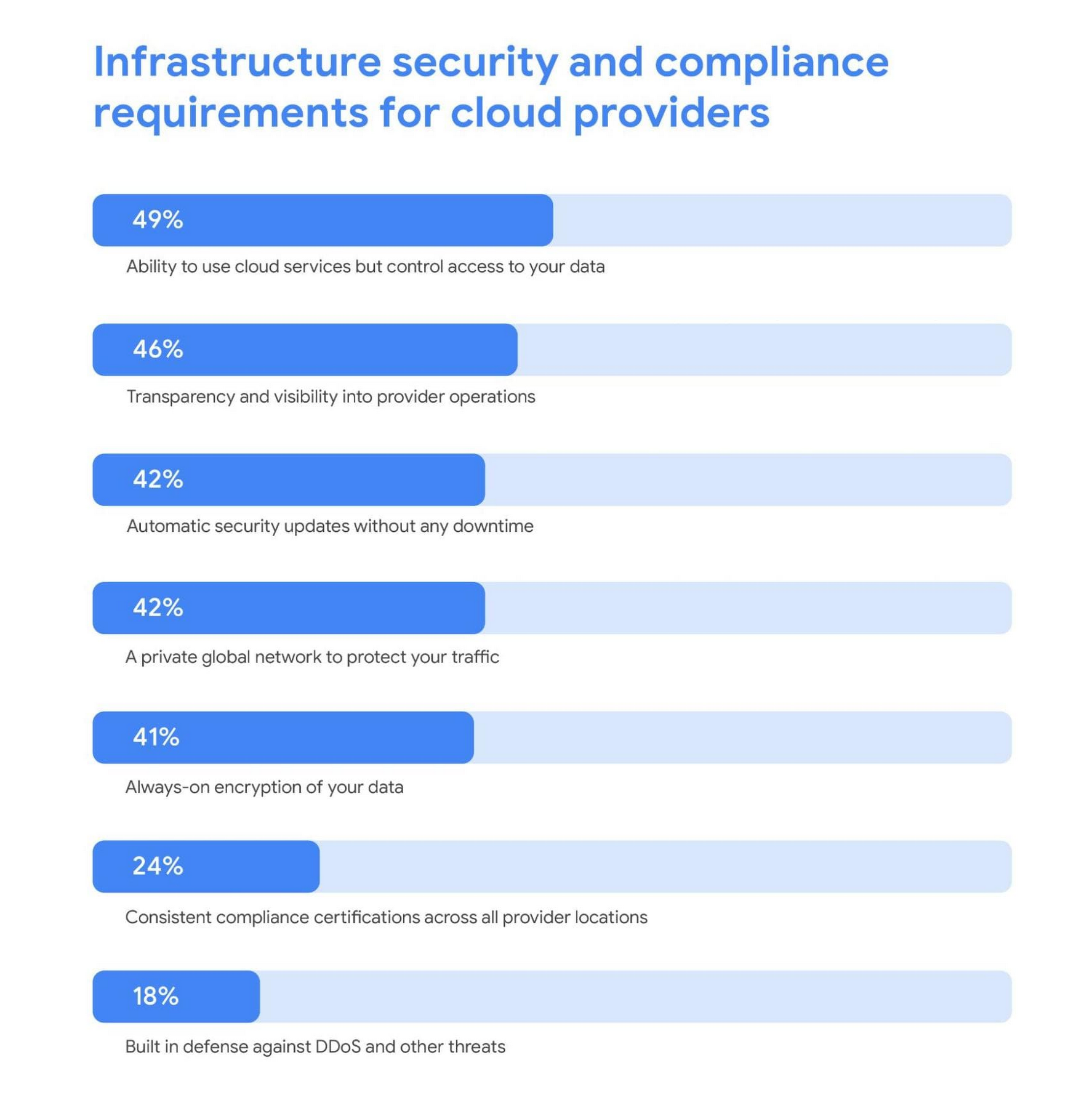
As a result, addressing security risks is a leading area where IT leaders turn to cloud providers for support. For these organizations, the ability to control access to data while using cloud services was the most required infrastructure security and compliance features from a cloud provider.
Cloud security is more trusted than ever
A deeper look into the results also revealed a shift in perspective about whether cloud security is really up to the task of protecting enterprises against modern attacks. Despite skepticism in the past, the majority of IT leaders are now comfortable with using cloud-based security solutions.
Confidence in the security of cloud infrastructure is extremely high with 85% of respondents stating they feel secure (or more secure) than on-premises infrastructure—compared to just 15% who believe on-premises is still safer.
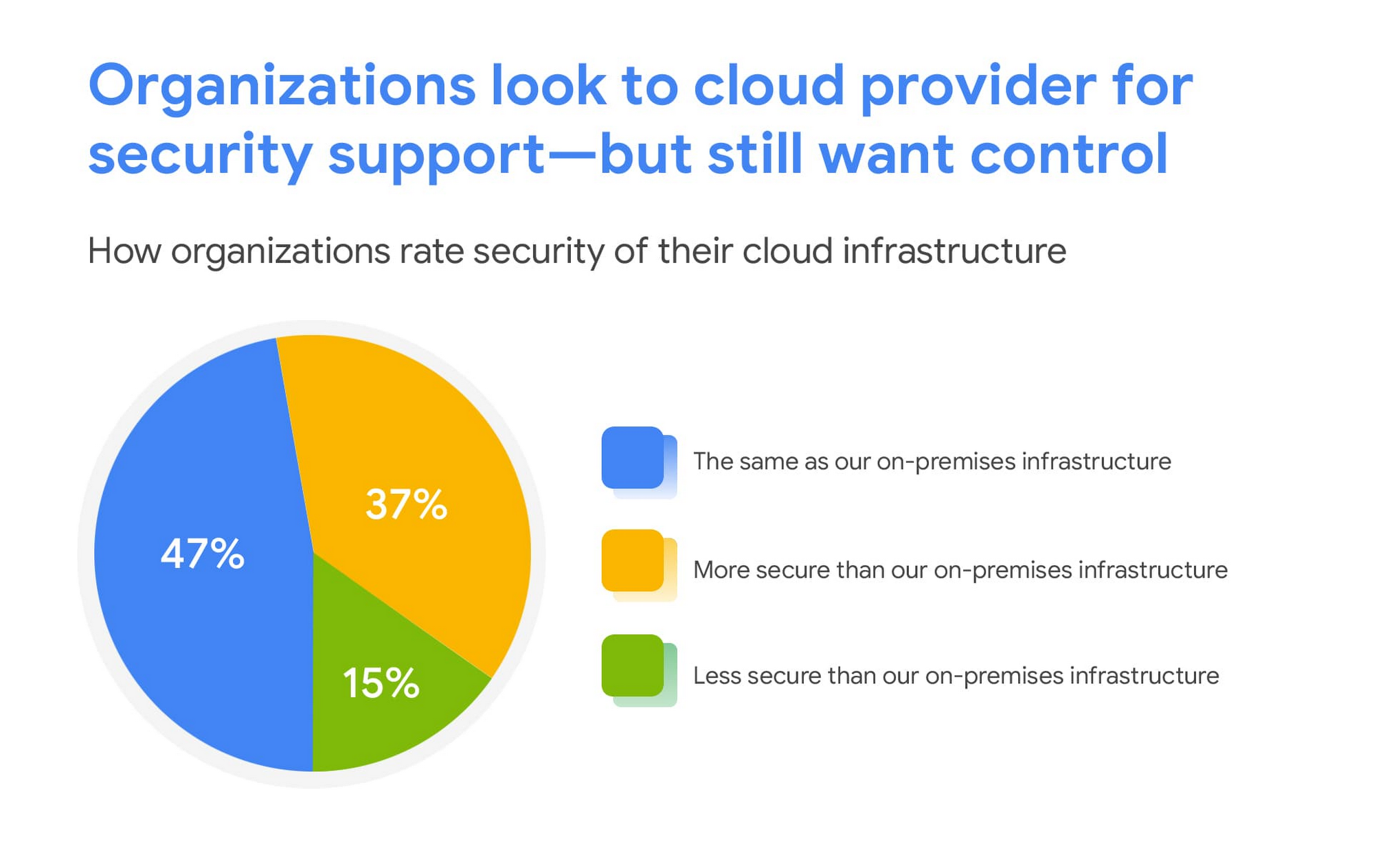
This is a clear indication that there are fewer reservations around the efficacy of cloud-based security solutions, signaling an increase in trust as organizations invest in cloud-based infrastructure and solutions.
We are committed to safe, secure solutions
Google Cloud protects your data, applications, and infrastructure, as well as your customers, from fraudulent activity, spam, and other types of online abuse. We protect you against a growing list of cybersecurity threats using the same infrastructure foundation and security services that we use for our own operations, so you never have to compromise between ease of use and advanced security.
To learn more about the IDG findings and how IT leaders are addressing security concerns post-COVID, download the full report.
Interested in how Google Cloud’s commitment to providing safe, secure solutions helps you address your security needs?
Our networking, data storage, and compute services encrypt data at rest and in transit to ensure the integrity, authenticity, and privacy of your data and your customers’ data. We also offer the ability to encrypt data in use, while it’s being processed in VM and container workloads, and our advanced security tools support compliance and data confidentiality with minimal operational overhead.
Google Cloud Content Protection: Unlock the Power of CSAP for Security

1302
Of your peers have already read this article.
2:45 Minutes
The most insightful time you'll spend today!
Content production is increasingly happening in the cloud. While moving a creative process that spans three centuries into the modern era brings challenges and risks, MovieLabs is one organization that takes digital transformation seriously.
A nonprofit research and development group founded by a consortium of the major Hollywood studios, MovieLabs describes their mission as “exploring innovative solutions to industry challenges shared by both our member studios and the broader production, post-production and distribution ecosystem.”
In more than 50 pages of densely-packed ideas and principles, MovieLab’s The Evolution of Media Production lays out an ambitious and revelatory vision for streamlining media production in the cloud. The key themes are summarized in 10 declarative statements, which envision a new modality for media production by the year 2030:
- All assets are created or ingested straight into the cloud and do not need to be moved.
- Applications come to the media.
- Propagation and distribution of assets is a “publish” function.
- Archives are deep libraries with access policies matching speed, availability and security to the economics of the cloud.
- Preservation of digital assets includes the future means to access them and edit them.
- Every individual on a project is identified and verified, and their access permissions are efficiently and consistently managed.
- All media creation happens in a highly secure environment that adapts rapidly to changing threats.
- Individual media elements are referenced, accessed, tracked and interrelated using a universal linking system.
- Media workflows are non-destructive and dynamically created using common interfaces, underlying data formats and metadata.
- Workflows are designed around real-time iteration and feedback.
The four bolded statements above are further explored in a follow-up whitepaper from MovieLabs, The Evolution of Production Security, which likewise offers six statements about what secure production in the cloud should look like:
- Security is Intrinsic and does not Inhibit Creative Processes
- The Security Architecture Addresses Challenges Specific to Cloud Workflows
- Production Workflows, Processes, and Assets are Secure, even on Untrusted Infrastructure
- The Content Owner Controls Security and Workflow Integrity
- The Security Can Be Scaled to Appropriate Levels and Can Integrate
- The Security Architecture Limits the Spread of any Breach and is Adaptable
The key to understanding these two papers is repeated in their titles: Evolution. Neither document is meant to outline solely what’s possible today; rather they are beacons guiding us toward a future in which the movie business is truly transformed by the cloud operating model. That means a future where media productions run much more like software supply chains: with speed, agility, and scale, and without sacrificing availability or security.
The good news is that it is possible to deploy secure production workloads in the cloud today. Using some of the built-in security features of Google Cloud, content producers can achieve Common Security Architecture for Production (CSAP) “Level 100” security for their assets (using the CSAP scale L100-L300).
However, we think that “evolution” word is important. As many companies have learned, operating an infrastructure cloud can be costly and often presents new threat vectors for attackers. Our mission at Google Cloud is to provide scalable, reliable services for traditional IT functions and to accelerate the abilities of every organization to digitally transform its business.
We believe the era of the transformation cloud is dawning, and companies who have been successfully operating in the cloud for years are now looking for ways to reduce costs while maintaining the cloud-scale advantages of agility and global reach. This aligns perfectly with the evolutionary vision of the MovieLabs papers, which envision media workflows changing radically to embrace cloud dynamism without all the unnecessary asset movement and complexity.
An important part of that vision from Google Cloud is that cloud service providers should remain open and interoperable with other clouds and infrastructures.
Here is a quickstart guide to mapping the L100 CSAP requirements to Google Cloud:
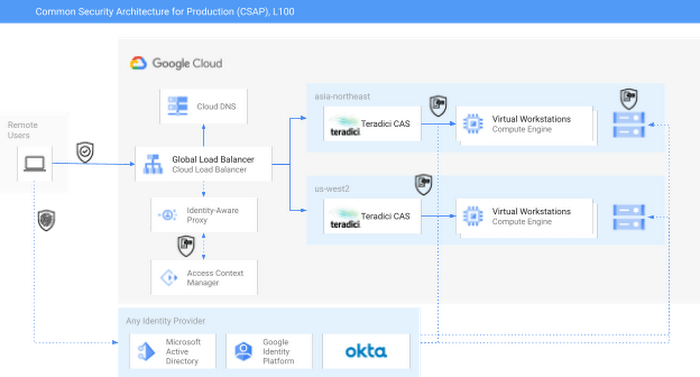
As you can see in the diagram, external identity providers (IdPs) such as Okta or Active Directory can serve as core security components of a CSAP L100 architecture. Alternatively, Google Cloud services such as Cloud Identity or Managed AD could be substituted.
Next, Google Cloud’s Identity-Aware Proxy (IAP) can be used in combination with Access Context Manager (ACM) to act as the first Policy Enforcement Point. This is an optional step, since it is somewhat redundant with the routing and authorization function performed by the native HP/Teradici Connection Brokers. However, IAP and ACM are core components of Google Cloud’s BeyondCorp architecture, on which CSAP is based. Additionally, adopting IAP with ACM offers productions the ability to swap out the Teradici PCoIP protocol for an alternative, such as Unity’s Parsec, without sacrificing security.
The Teradici Connection Broker is also a Policy Enforcement Point, since groups and role membership can be used to enforce access to specific workstations.
Finally, the identity context for each user is passed through to the storage layer. For some productions, Google Cloud Storage (GCS) buckets may offer enough functionality; GCS offers an S3-compatible API which should make it easy to immediately adopt OSS tools built for S3. Other options for this include the managed NetApp Cloud Volumes and Dell PowerScale for Google Cloud services. Both of these are managed shared storage services which offer file-level access controls using standard SMB/NFS permissions. There are also a variety of third-party filers available in the Google Cloud Marketplace, such as Nasuni. You can read more about those here.
For added security, both NetApp and PowerScale should be configured to use the private services access model in Google Cloud. This effectively limits any external access to these resources by only allowing traffic from user-managed VPCs into the Google-managed and peered VPC.
Following this architecture, you can see how to achieve CSAP L100 compliance by using either only Google Cloud services or a mix of managed and cloud-first services. In either scenario, access is managed through a unified control plane and based on both user identity and role. Zero Trust principles such as context-aware access and dynamic rulesets could further be applied to the Authentication step using either Google Cloud IAP or the equivalent services from Okta, Active Directory, or others.
At this weekend’s National Association of Broadcasters conference, Google experts will be talking about the cloud and content production, and the intersection of AI and media. The journey to 2030 is only just beginning.

3298
Of your peers have already downloaded this article
11:30 Minutes
The most insightful time you'll spend today!
Today’s security professionals face not only an ever-expanding list of threats, old and new, but also an excruciating choice of security approaches and tools.
Nearly 2000 security vendors are trying to sell to large enterprises and small businesses. Most organizations have already invested heavily in cybersecurity solutions. From firewalls to proxies and endpoint protection to DLP, the average firm has more than 40 types of security technologies in place, each generating telemetry that grows every year.
With employees, contractors, partners, and customers all accessing online business processes that were once hidden in a back office, corporate network traffic has also increased significantly. There is more noise than ever before, hiding more attacks than ever before — with greater impacts than ever before.
Security analytics promises to help analysts make sense of this data, to find useful signals in the noise before it’s too late.
For most organizations, however, an effective security analytics solution is an expensive and complex exercise in systems integration, with heavy IT operations support required simply to keep the system up and
running as it grows.
As CIOs migrate corporate IT to the cloud, CISOs roll out advanced threat protection such as EDR and network traffic analyzers to protect the pieces
that remain under their control.
In theory, a SIEM or centralized log management product consolidates and correlates all of this information, but in practice, SIEMs buckle under large data volumes.
Moreover, high-volume telemetry from EDR systems is rarely fed into a SIEM. If high volume telemetry is ingested, it’s typically only retained for a few weeks, if at all.
While it sounds counter-intuitive that we need another type of a tool, the world has changed dramatically and many existing security tools did not evolve fast enough to maintain relevance.
Today, organizations still operate legacy systems, have vast on-premise IT presence, but also a large cloud presence, often across multiple cloud providers. The types of security telemetry they collect expands,
and the volumes grow.
Manage IAM permissions with the Google Cloud mobile app

1210
Of your peers have already read this article.
2:00 Minutes
The most insightful time you'll spend today!
What’s new with Permissions Management on the Cloud Mobile App
Identity and Access Management (IAM) is the foundation of a strong cloud security posture, ensuring that the right access and permissions for cloud resources are granted across your organization. The Google Cloud mobile app gives cloud administrators the ability to quickly and easily manage their organization’s cloud identities and access from the mobile platform of their choice.
Permissions management is one of the top user-requested features for the Cloud mobile app based on feedback we’ve received. The Permissions tab is used by more than half of our mobile users every month, highlighting the importance of easily managing permissions on-the-go.
We are excited to announce the availability of enhanced permissions management on the Google Cloud mobile app. This new capability enables you to easily view, assign and search for all the roles in your organization.
Manage permissions easily on-the-go
The Cloud mobile app has expanded beyond supporting the three basic roles of Owner, Editor, and Reader, to supporting all the roles in your organization. Administrators are not only able to see all the roles but also assign these roles across their organization:
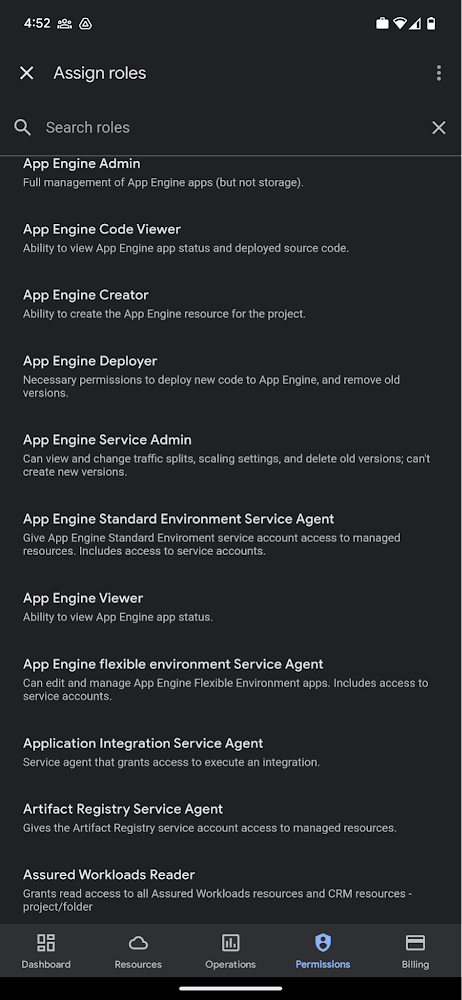
Administrators can also easily view a list of users, and click into each to see all the roles assigned to each user. On top of that, you can easily leverage the search capability to check if a role is assigned and modify its assignment. You can even assign multiple roles at the same time for easy editing. The app will show you a summary of changes before you will proceed.
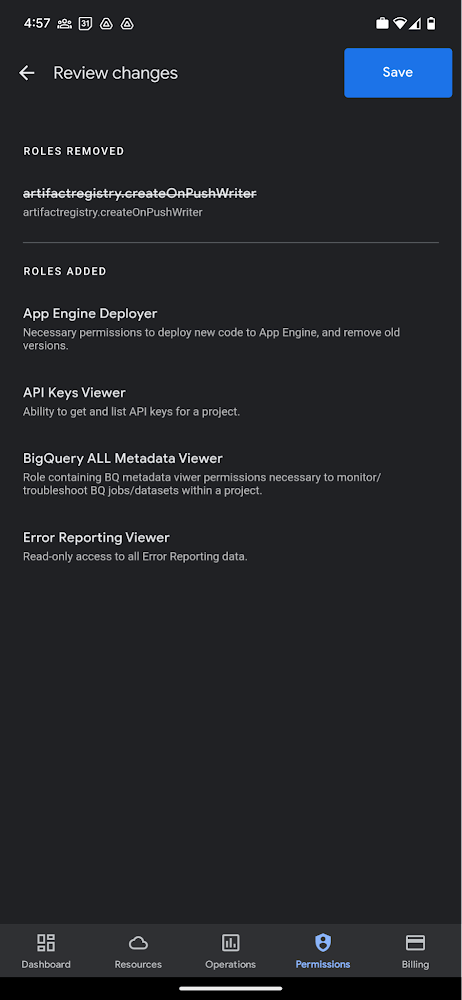
The layout is optimized for mobile, with the categories of information organized for easy viewing. Currently assigned roles are always displayed on the top of the screen so they are easily accessible. Basic roles appear below, followed by all other roles grouped by Google Cloud products.
Get started on the Google Cloud app today
To summarize we’ve enhanced permissions management on the Google Cloud mobile app with:
- Smoother navigation
- Support for all the roles in your organization
- Easy search for assigned roles
- Ability to review changes before applying
Give enhanced permission management a try and explore the possibilities by downloading the app today from Google Play or the Apple App Store. If you have any feedback, we would love to hear from you – simply click on the “send feedback” button in the app to share your experience.
More Relevant Stories for Your Company

New Capabilities in Cloud Asset Inventory Allow Better Visibility into Google Cloud Environments
Businesses that operate in complex cloud environments, large fleets, or sophisticated security operations all require visibility into their cloud assets in order to keep their teams nimble and their data secure. Cloud Asset Inventory (CAI) helps these teams understand their Google Cloud and Anthos environments by providing complete visibility, real-time monitoring, and

Best Practices for Cost Optimization in the Cloud
When customers migrate to Google Cloud Platform (GCP), their first step is often to adopt Compute Engine, which makes it easy to procure and set up virtual machines (VMs) in the cloud that provide large amounts of computing power. Launched in 2012, Compute Engine offers multiple machine types, many innovative features, and is available in

Google Cloud Accelerates Financial Organizations’ Journey towards Digital Transformation
When I reflect back on the past year and the pandemic, I’m struck by how the reliance on remote work and operations has changed the fundamentals of business forever. For the financial services industry, this rings particularly true. Many conversations I’m having right now with organizations revolve around embracing a transformation

How AI-powered ML Models Helps Run Unemployment Claims Verification at Scale
With unemployment application submissions reaching record numbers over the past year, state and local agencies in the United States have faced the challenge of processing unprecedented numbers of claims per week. The digital infrastructure most agencies have in place is unable to handle this volume, resulting in constituents waiting longer,
