





3106
Of your peers have already watched this video.
21:30 Minutes
The most insightful time you'll spend today!
How Google Cloud is Fortifying the Social Safety Net
The COVID-19 crisis is triggering both immediate and longer-term challenges for state and local governments.
In this video, Denise Winkler, Strategic Business Executive, Google Cloud and Jennifer Ricker, Assistant Secretary – Illinois Department of Innovation & Technology (DoIT), discuss a number of challenges and solutions around the pandemic.
First, they outline the programs that constitute the social safety net and the impact that COVID-19 has had on the social safety net and citizens. Then they share the Google Cloud solutions that have been mobilized to assist these agencies.
Ricker will also share how Google Cloud Contact Center AI supported the Illinois Department of Employment Security.
Finally, they talk about how Google Analytics can help communities open and recover.
Learn how Google Cloud is enabling public officials to gear up to meet unprecedented demand for unemployment and social services programs, launch expanded digital services, and more.
2915
Of your peers have already watched this video.
14:00 Minutes
The most insightful time you'll spend today!
Productionizing TensorFlow on Google Cloud with TensorFlow Enterprise
Machine learning is transforming every aspect of our lives and developers and enterprises are using ML to build impactful solutions that drive business value.
TensorFlow is one of the most widely used production-ready frameworks for machine learning and it’s open-sourced by Google so that everyone can take advantage of these powerful tools.
But if you are an enterprise trying to use ML there are some challenges you may face.
To address the needs of AI-enabled businesses, Google recently introduced TensorFlow Enterprise. It incorporates enterprise-grade support, cloud scale performance, and Google Cloud-managed services.
Watch Sandeep Gupta, Product Manager, TensorFlow, to learn how to get started and why the best way for businesses to experience TensorFlow is with TensorFlow Enterprise.
Southwire Completes SAP Migration to Google Cloud as a First Step of its Tech Evolution

4939
Of your peers have already read this article.
1:30 Minutes
The most insightful time you'll spend today!
“Talk about tough times, right?”
That’s how Dan Stuart, Senior Vice President of IT Services at Southwire Company, refers to the months following a December 2019 ransomware event, and the COVID crisis that began in spring of 2020. Those events hit just as the company was preparing for an overhaul of their SAP environment. This comprehensive plan included three key elements. First, the company wanted to upgrade their SAP ECC environment to take advantage of the latest functionality available for this critical ERP system. Second, Southwire aimed to deploy SAP Business Warehouse on SAP HANA to accelerate vital reporting for all business users. Third, the company wanted to upgrade to the latest version of SAP Process Orchestration—an essential component that touches key manufacturing interfaces in all Southwire facilities.
Southwire had looked at multiple options for the upgrades, including remaining entirely on-premises, colocation, and full cloud migration. “Going to the cloud seemed a lot more compelling,” says Joe Schleupner, Southwire’s Senior Director of PMO & ITS planning and implementation. “We were going to the cloud eventually, so why take these intermediary steps? Let’s just get it done.”
After looking at several options, Southwire decided to migrate to Google Cloud. “We wanted to be on a platform for SAP that was flexible, scalable, and secure; that we could count on to get up and running quickly,” says Stuart. “We chose Google Cloud not only for those reasons, but also because we recognize that Google has other assets that we may be able to take advantage of down the line, such as technologies like artificial intelligence (AI).”
More stability, less worry
As one of the leading manufacturers of wire and cable used in the transmission and distribution of electricity, Southwire aids the delivery of power to millions of people worldwide. They have more than 30 manufacturing facilities across the United States running 24/7. Any downtime directly affects productivity and revenue. With help from Google Cloud and their implementation partner NIMBL, Southwire completed the SAP migration to Google Cloud over a planned maintenance weekend on July 4th.
The migration itself, while complex, went quickly and smoothly. “Just moving to the cloud was quite a feat because we were dealing with so much data, but in total the SAP system was down for only ~16 hours,” says Schleupner.
“As a project manager, I always felt that Google Cloud had my back” Schleupner says. The Process Orchestration (PO) migration was of particular concern, considering that it controlled all of Southwire’s manufacturing interfaces across the entire company. “Every critical piece of information that goes from SAP down to the manufacturing system goes through that system,” says Schleupner.
Even after migrating, Southwire discovered that making changes to the system was fast, easy, and resulted in no downtime. Normally, certain types of changes would have involved taking down SAP for at least an hour.
The Southwire team also appreciates the fact that the modern cloud architecture means spending less time on routine infrastructure maintenance. “It’s one less thing for me to worry about,” Stuart says, “I can focus on the business side of the house and move the technology and responsibilities to what we do within the Google Cloud Platform.”
What comes next?
While the cloud migration will increase stability, uptime, performance, and security, there is much more to come. Southwire is currently working on a disaster recovery implementation for their SAP environment on Google Cloud. Stuart and Schleupner are excited about where Google Cloud can further take Southwire. They are considering an SAP Hybris e-commerce implementation as well as connected factory and/or factory automation initiatives that can take advantage of artificial intelligence and machine learning.
To Stuart and Schleupner, the migration of Southwire’s SAP environment to Google Cloud, as important as it was, really represents the first step in the company’s tech evolution. Now that much of the heavy lifting is complete, Southwire’s digital transformation can begin in earnest. “There’s no shortage of areas where I think Google Cloud will come into play,” Stuart says, “and we intend to look at these things with an open mind to understand how we can leverage current investments to take our organization where we want to go.”
Learn more about Southwire’s SAP on Google Cloud deployment and how Google Cloud can transform the way you work with your SAP enterprise applications. Visit cloud.google.com/solutions/sap.
Leave the Tax Filing to ML: Lending Doc AI’s Automation Classifying and Parsing IT Documents

2993
Of your peers have already read this article.
3:00 Minutes
The most insightful time you'll spend today!
In the United States, Tax Season descends upon the country every April, requiring millions of Americans to spend hours deciphering cryptic documents and performing complex math just to figure out what they owe. Wouldn’t it be grand if there was a way for a computer to take all the relevant documents and extract out exactly what the IRS is looking for? Lending Document AI from Google Cloud supports common document types used for Income Tax Filing, such as W-2s and 1099s. These advancements in machine learning technology now makes it possible to alleviate some anxiety leading up to April 15th.
Lending Document AI is a Document Understanding solution that allows for classification and parsing of documents commonly used in the mortgage lending industry. The data in these unstructured files is then converted into a structured format, which can be stored in a database or used for analysis and calculations. You can read more about the product in the announcement blog post. For this tax filing use case, we will focus on automatically classifying and parsing the 2020 editions of the following forms:
W-2
1099-DIV
1099-INT
1099-MISC
1099-NEC
This sample application creates an automated pipeline where the user can bulk upload a collection of PDFs, the Lending Document Splitter & Classifier will classify each document and send each PDF to the appropriate specialized parser to extract the data, which can then be used to calculate an individual tax return and fill out a 1040 Form.
Overview
Let’s explore how this application works. You can check out the sample code in this GitHub Repository.
Here is an outline of the architecture of this application. As you can see, it utilizes Cloud Run and Firestore in Native Mode for the web application in addition to Document AI.
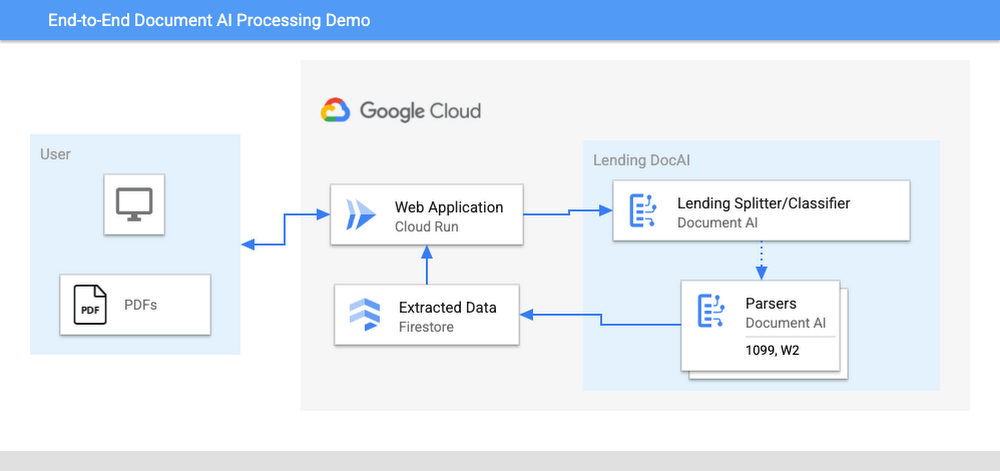
The User uploads multiple PDF files to the web application, hosted on Cloud Run.
An API call is made to the Lending Document Splitter & Classifier for each PDF file.
The output of the classifier (e.g. W-2, 1099-MISC, etc.) is then mapped to an appropriate specialized parser in the Google Cloud Project.
Each document file is sent to the appropriate specialized parser that matches the document type.
The entities are extracted by the parser processor and the data is written to Firestore.
The raw data is now retrieved from Firestore and displayed to the User showing the file classification and extracted values from each form.
The data values from all the forms are used together to calculate an individual income tax return.
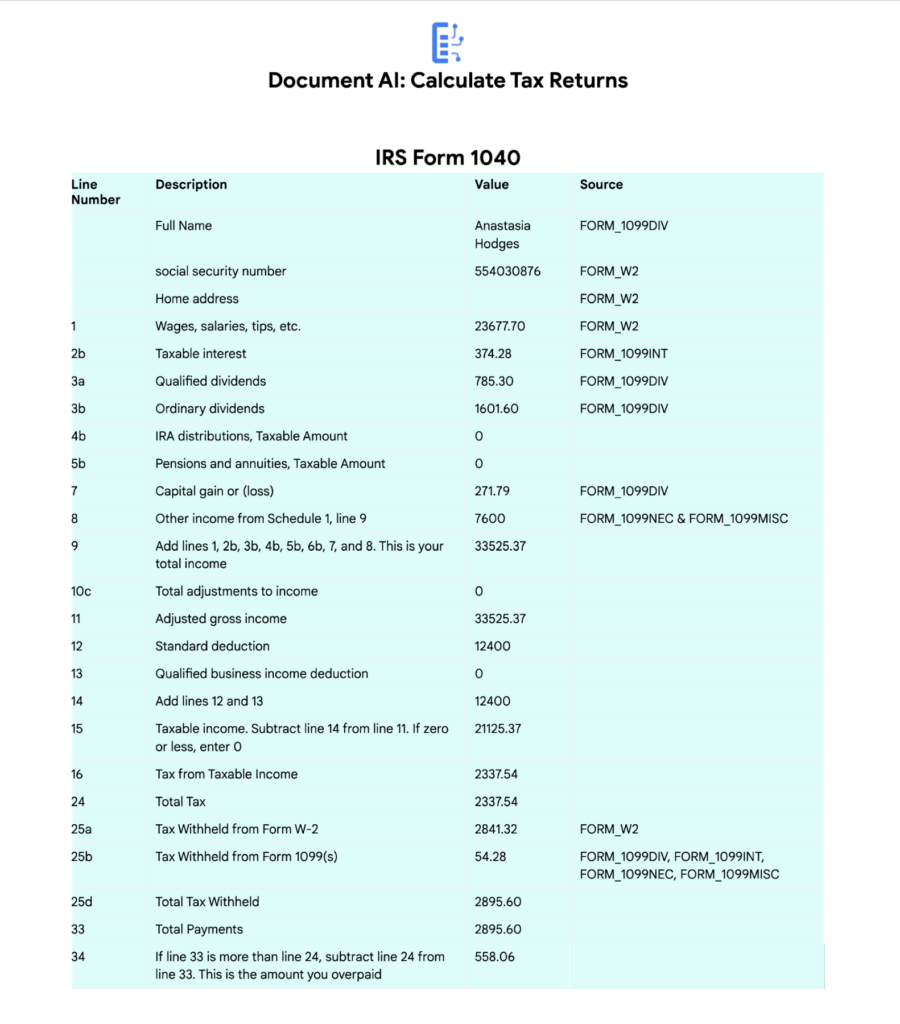
The Calculated Tax Rates/Incomes/Deductions are displayed to the User in a Tabular Format matching the IRS Form 1040. The app also displays which form data was used for each field. (Some output fields use values from multiple forms, such as line 25b.)
Step-by-Step directions
Want to try this out for yourself? Here’s how you can deploy and run this application using a Google Cloud Project. You can run this in Cloud Shell (Quickstart) or on your local machine.
NOTE: The Lending Processors in this Demo are in Limited GA as of March 2022. If you have a business use case for these processors, you can fill out and submit the Document AI limited access customer request form.
Install dependencies
- Clone the GitHub Repository to get the sample code.
git clone https://github.com/GoogleCloudPlatform/document-ai-samples.git
- Enter the directory for the tax pipeline demo
cd document-ai-samples/tax-processing-pipeline-python
- Install Python and the Google Cloud SDK if they aren’t already installed.
- Install the python libraries:
pip install -r requirements.txt
- Create a new Google Cloud project, and enable billing if you don’t already have one.
- Enable the Document AI API:
gcloud services enable documentai.googleapis.com
- Setup application default credentials:
gcloud auth application-default login
Deploy demo application
- Edit the config.yaml file, adding your own Project Details docai_processor_location: us # Document AI Processor Location (us OR eu)
docai_project_id: YOUR_PROJECT_ID # Project ID for Document AI Processors
firestore:
collection: tax_demo_documents # Set with your preferred Firestore Collection Name
project_id: YOUR_PROJECT_ID # Project ID for Firestore Database - Run setup scripts to create the processors and Cloud Run app in your project. python3 setup.py
gcloud run deploy tax-demo –source . - Visit the Deployed Web Page (You should get a link from the deployment command)
Calculate Tax Returns Homepage
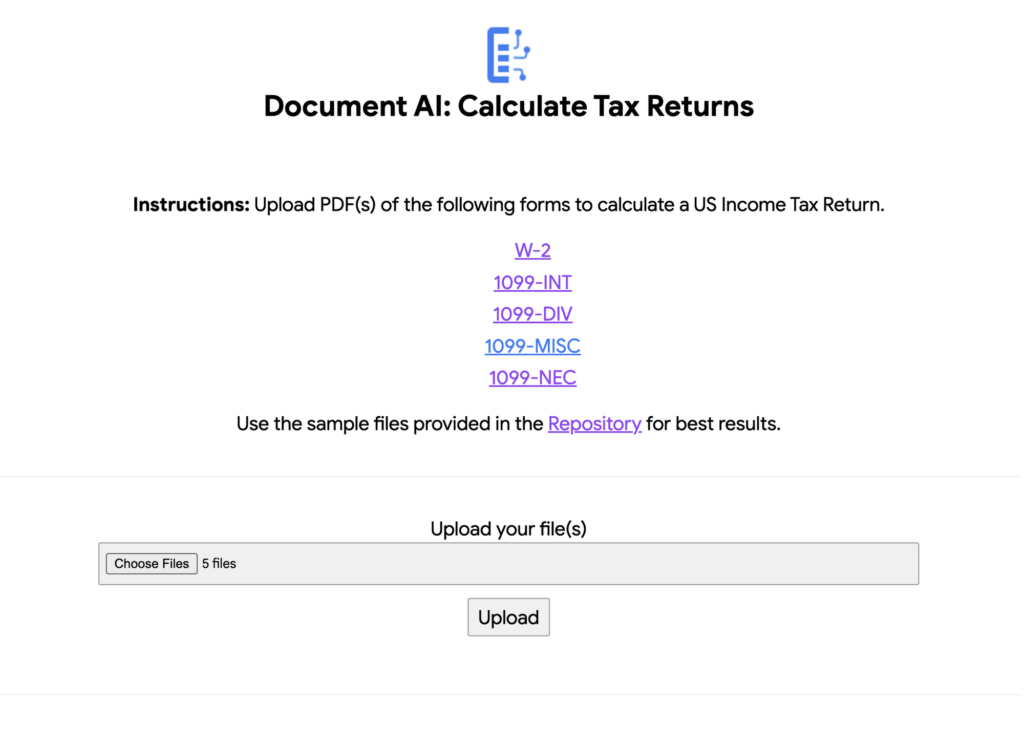
- Upload Documents. I created some sample documents you can download from the sample-docs folder of the repository.
This demo currently supports the following Document Types (2020 Editions)
W-2
1099-DIV
1099-INT
1099-MISC
1099-NEC
- Click “Upload” Button, wait for processing to complete.
The page will display the steps completed for each document file. These are also written to stdout for troubleshooting purposes.
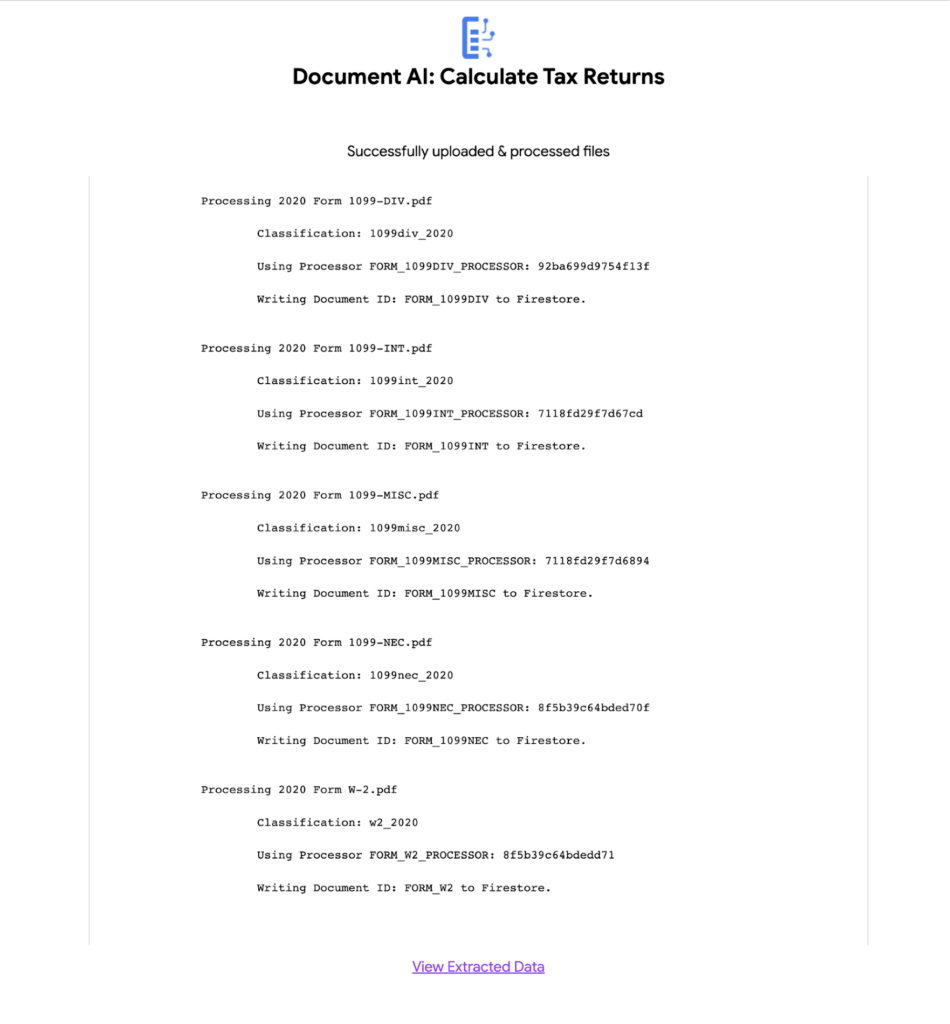
6. View the extracted values from each file.
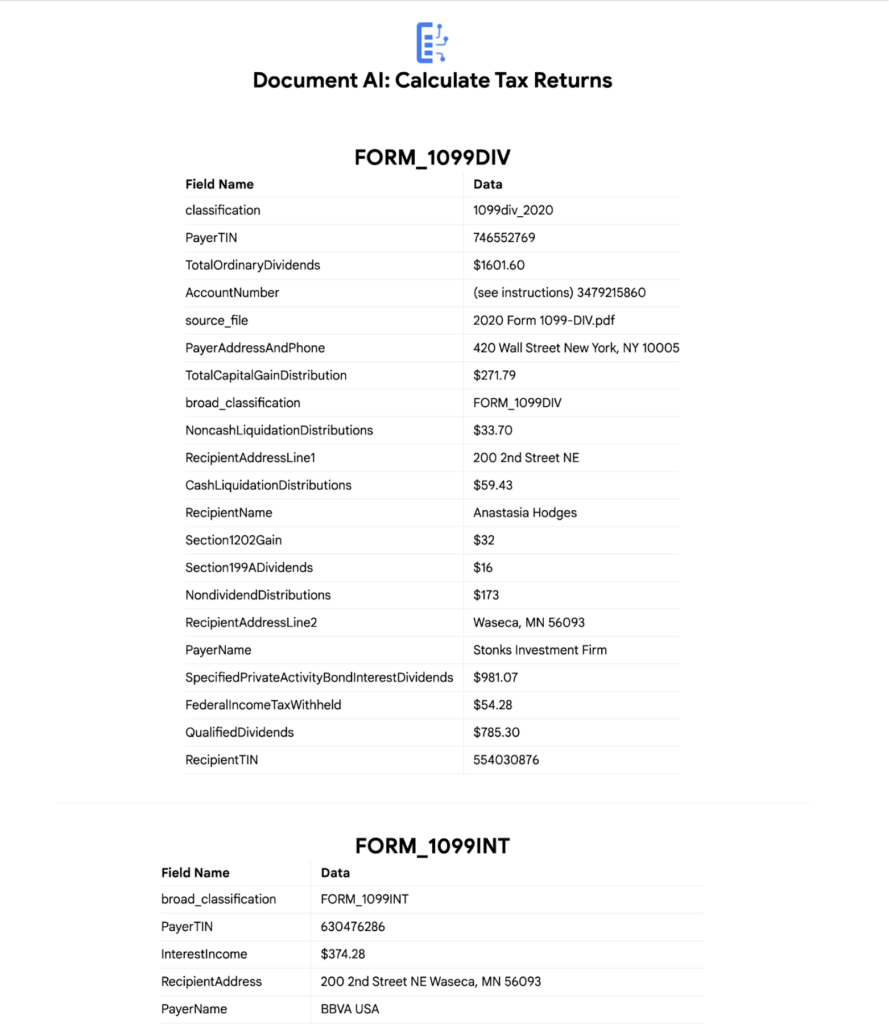
7. Click “Calculate Taxes” to see the tax calculation output
Conclusion
Warning: This is NOT financial advice, for educational purposes only.
Congratulations! You now have a fully functional tax processing application that can also be modified for use with other workflows that require data from multiple specialized documents.
The Document AI API is flexible and modular enough that most of the code in this example can be reused for any specialized processor.
Now tax returns can be filed with minimal manual effort!
If you want to learn more about Document AI, check out the Cloud Documentation and these videos:
- Getting started with the Document AI platform
- Process billions of pages and cut operational costs with DocAI
And if you want more hands-on experience, I recommend following these step-by-step codelabs to get started with the key features of Document AI:
A Road to Possibilities: Google Maps Platform Website

7261
Of your peers have already read this article.
2:00 Minutes
The most insightful time you'll spend today!
For more than 15 years, developers have used Google Maps Platform to deliver location-based experiences to their end users and used location intelligence to optimize their businesses. Along this journey, we’ve made a variety of changes to better support our community as needs have changed and new industries and technologies have emerged. We started rolling out a new website experience, at https://mapsplatform.google.com, to help you better understand the products and solutions best suited to address your objectives. Plus, now you can directly connect to the developer documentation for each product to get started quickly, and you can visualize usage and associated costs to have a better idea of what to expect before getting started.
Getting to your solution faster
Maps, Routes, Places are building blocks that let you develop implementations for any use case. Building for specific use cases, however, typically requires using a combination of APIs and SDKs. To help you quickly understand what’s possible and what you need to build for your use case, you can now visit the solutions tab to select from a list of popular use cases or industries. Once you’ve selected a use case or industry, you’re taken to a page where you can explore relevant products, read helpful blog posts, see how other customers have deployed for similar use cases, and more.

Direct access to developer documentation
Did you know there are more than a thousand pages of developer documentation created to help you get started, unblock you when you’re stuck, and share best practices? Now when you explore a product or solution from the Google Maps Platform website, you can easily navigate back and forth between our website and documentation. Just tap on JS, iOS, Android or API under the product name to get to the documentation you need.

Budgeting for your project
To help you calculate pricing for your project, we’ve introduced a new pricing calculator. Once you find the product and API or SDK you plan to use, pull the slider to reflect your estimated number of monthly requests. This will automatically update the “monthly cost” column for each product and API or SDK you plan to use. If your estimated monthly requests exceed the slider limit, contact our sales team to learn about volume discounts that start at 20% off.

We hope our new website makes it easier to discover our products and solutions, estimate your budget, and start building with our documentation so you can deliver helpful experiences to your users and optimize your business.
For more information on Google Maps Platform, visit https://mapsplatform.google.com.
DocAI Lowers Customer’s Document Processing Cost by 60 Percent. Learn How

5616
Of your peers have already read this article.
2:00 Minutes
The most insightful time you'll spend today!
Some of the most important data at your company isn’t living in databases, but in documents, and most business processes begin, involve or end with a document.
Yet most companies are still manually entering data and reliant on guesswork to make sense of it all as the volume and variety of data explodes. Organizations are also leaving heaps of value on the table in the form of new and better customer experiences that can be unlocked with artificial intelligence (AI) applied to documents.
The latest releases of Document (Doc) AI platform, Lending DocAI and Procurement DocAI, built on decades of AI innovation at Google, bring powerful and useful solutions to these challenges. Under the hood are Google’s industry-leading technologies:
- Computer vision (including OCR) and Natural Language Processing (NLP) that creates pre-trained models for high-value, high-volume documents.
- Google Knowledge Graph to validate and enhance the fields in your documents.
- Training and creation of your own custom document models.
- Human interaction with AI to ensure accuracy where needed.
Google Cloud DocAI platform, Lending DocAI and Procurement DocAI are now generally available. Thousands of customers have tried these products in the preview phase—and DocAI has already processed tens of billions of pages of documents across lending, insurance, government and other industries.
“The vast majority of enterprise content still resides in unstructured sources like documents. Google Cloud’s Document AI brings a fresh new perspective to the problem informed by the company’s decades of experience making sense of the largest unstructured corpus in the world—the world wide web.” —Ritu Jyoti, VP of AI Research, IDC
Cut document processing costs by up to 60%
Lending DocAI helps banks, mortgage brokers and other lending institutions fast track the loan application process from weeks to days, dramatically reducing the cost of issuing a loan. And Procurement DocAI enables companies to automate procurement data capture at scale, lowering processing costs by up to 60%.
These solutions are built on DocAI platform, a unified console for document processing that lets you quickly access all parsers and tools. From the platform, you can automate and validate documents to streamline workflows, reduce guesswork, and keep data accurate and compliant.
Get more value from AI with DocAI’s industry-specific solutions
According to Accenture’s AI: Built to Scale report: “Companies that scale successfully see 3x the return on their AI investments compared to those who have not fully rolled out AI capabilities.”
Core to our strategy at Google Cloud is the creation of industry-specific solutions that help companies get maximum value out of their investments in AI. We announced Lending DocAI, our first solution designed specifically for the financial services industry, at the Mortgage Bankers Association convention last year. It processes borrowers’ income and asset documents using a set of specialized machine learning (ML) models, and automates routine document reviews so that mortgage providers can focus on more important work.
Lending DocAI is now generally available and includes more specialized parsers for critical loan documents including paystubs, bank statements, and more. Our goal is to provide the right tools to help borrowers and lenders have a better experience and close home loans faster. For more, watch this video.
Procurement DocAI is also now generally available. This solution helps companies accelerate document processing for invoices, receipts, and other valuable documents in the procurement cycle.
Automating data capture is helping our customers increase accuracy and also lower their procure-to-pay processing costs. We are continually expanding the types of documents Procurement DocAI can process—the latest is a utility parser for electric, water and other bills. In addition, Procurement DocAI leverages Google Knowledge Graph to validate and enrich parsed information to make the data even more useful. Check out this overview video for more details.
One company that lives and breathes AI-enabled document management is AODocs. It uses Procurement DocAI to simplify invoice processing for enterprise customers and launched a new Gmail add-on, Invoice to Sheet, for SMB customers who just want to track their invoices in Google Sheets.
“Google Cloud’s Procurement DocAI service allows our document management platform to better automate the processing of invoices; AODocs customers who have tested our new account payables workflow estimate that the productivity of their A/P team has more than doubled, thanks to the reduction of manual data input brought by the Procurement DocAI.”—Stéphan Donzé, Founder and CEO, AODocs
The new specialized parsers for Lending and Procurement DocAI can be used alongside our existing AutoML Text & Document Classification and AutoML Document Extraction services. These technologies provide a state-of-the-art toolset for creating new document models and have been widely deployed by customers in financial services and other industries.
Partner to accelerate your AI deployment and results
Having the right partner to ease the complexity of rolling out your AI-strategy in mortgage document processing is critical to transforming your customers’ experience. We’re excited to announce a partnership with Mr. Cooper, a leader in mortgage servicing, to provide customers with more automation and workflow tools throughout their entire mortgage life cycle. As part of this agreement, both companies will collaborate on digitizing Mr. Cooper’s core mortgage platform, creating a more personal customer experience utilizing AI, and driving a broader culture of innovation to imagine and develop services and solutions that will transform the mortgage experience for American homeowners.
“Over the last few years, we have made substantial investments in our servicing technology and core mortgage platform that have revolutionized the customer experience, while providing dramatic efficiencies in operating cost. Our partnership with Google Cloud AI will build on those advances and help make these technologies available for the mortgage industry.” —Jay Bray, Chairman and CEO, Mr. Cooper Group
This builds upon the robust partner ecosystem we’re creating to help customers revolutionize the home loan experience, which includes last year’s partnership announcement with Roostify.
Integrate human review into ML predictions
Next up is the general availability of Human-in-the-Loop AI, a new DocAI feature that will help companies achieve higher document processing accuracy with the assurance of human review. Adding human review can increase accuracy and help businesses interpret predictions using purpose-built tools to enable those reviews.
Processing documents quickly and cost-effectively is important. But it’s often necessary to have a high level of assurance on data accuracy for compliance. CIOs and IT decision-makers need highly accurate ML predictions to fulfill compliance requirements, improve employee experience (e.g. less rework), and raise customer satisfaction (e.g. fewer data errors). Including human participation in ML processes allows AI and humans to work together for the best possible results.

Human-in-the-Loop AI provides the workflow to manage human review tasks and produces a percentage confidence score of how “sure” it is that the AI ingested the document correctly. Document AI extracts data from documents with ML, and when paired with Human-in-the-Loop AI, human reviewers are able to verify the data captured. This system is customizable, providing the flexibility to set different thresholds and assign individual groups of reviewers to various stages of the workflow. With Human-in-the-Loop AI, developers can choose trusted reviewers to assign to the task; these reviewers can be from within their own or partner organizations.
More Document AI resources
To learn more, check out the Document AI webpage and watch a demo of how to process sample forms in AI Platform notebooks to inspect data extraction and confidence scores. For more on how customers and partners like Workday, AODocs, and Mr. Cooper are using Document AI, listen to our fireside chat. And stay tuned for the exciting evolution of these technologies in future releases of DocAI.
More Relevant Stories for Your Company

Supercharging Security with Generative AI
At Google Cloud, we continue to invest in key technologies to progress towards our true north star on invisible security: making strong security pervasive and simple for everyone. Our investments are based on insights from our world-class threat intelligence teams and experience helping customers respond to the most sophisticated cyberattacks. Customers can tap into

Poor Product Discovery Causes Shoppers’ Abandonment, Time to Augment ‘Search Experience’ with Google’s Retail Search!
How many times has a shopper searched for a product on a store’s website only to get results that aren’t relevant—or worse, provided no search results at all? While most ecommerce sites have search capabilities, few accomplish their ultimate goal: making it easy for customers to discover the products they

How Vertex Vizier’s Automated Hyperparameter Tuning Improves ML Models
We recently launched Vertex AI to help you move machine learning (ML) from experimentation into production faster and manage your models with confidence—speeding up your ability to improve outcomes at your organization. But we know many of you are just getting started with ML and there’s a lot to learn! In tandem

Google Cloud’s No-Cost Skill Badge: Up Your Generative AI Game
Generative AI is a rapidly expanding technology with a wide range of potential applications. Google Cloud Learning is thrilled to offer a new, no-cost Generative AI Fundamentals skill badge. This skill badge is designed for anyone eager to learn about the power of generative AI. No technical skills or prior knowledge
