





6082
Of your peers have already watched this video.
1:30 Minutes
The most insightful time you'll spend today!
Explore the Innovations and Architecture Powering Spanner and BigQuery
Previously, databases had architectures with tightly coupled storage and compute. This resulted in higher latency, and with faster networks these constraints no longer surface. With Google Cloud’s BigQuery and CloudSpanner, the storage and compute architecture have been separated, allowing for better scalability and availability to address businesses’ high throughput data needs.
Watch the video to understand how these database and analysis products leverage Google’s distributed storage system, in-house custom network hardware and software, internal cluster management system and more!

Is it Cheaper to Run Oracle Workloads on Google Cloud Than On-Prem? Yes, By 78%
DOWNLOAD RESEARCH REPORTS4233
Of your peers have already downloaded this article
3:30 Minutes
The most insightful time you'll spend today!
On-premises relational database management systems (RDBMS) are the traditional heart of many core business operations, but cloud-based relational databases provide the agility and scalability of the cloud while eliminating many of the onerous tasks associated with maintaining your own infrastructure.
To find out how much more value cloud-based relational databases provide, research firm ESG compared an on-premises RDBMS strategy against hosting the same data on one of Google Cloud’s database offerings, called Cloud Spanner.
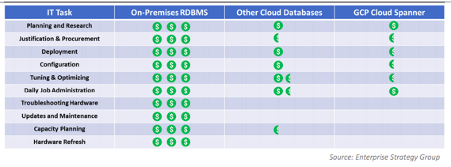
Its analysis showed that hosting the same data using Google Cloud Spanner is 78% less expensive than using on-premises servers–and up to 37% less expensive than using other cloud databases.
Here’s a quick snapshot of where those benefits stem from:
To read the full report and discover how Google Cloud Spanner ranked against other cloud-based database offerings, download ESG’s report, Analyzing the Economic Benefits of Google Cloud Spanner Relational Database Service.
Memorystore for Redis Read Replicas to Scale App Read Requests by 6X

5518
Of your peers have already read this article.
2:00 Minutes
The most insightful time you'll spend today!
Modern applications need to process large-scale data at millisecond latency to provide experiences like instant gaming leaderboards, fast analysis of streaming data from millions of IoT sensors, or real-time threat detection of malicious websites. In-memory datastores are a critical component to deliver the scale, performance, and availability required by these modern applications.
Memorystore makes it easy for developers building applications on Google Cloud to leverage the speed and powerful capabilities of the most loved in-memory store: Redis. Memorystore for Redis standard tier instances are a popular choice for applications requiring a highly available Redis instance. Standard tier provides a failover replica across zones for redundancy and provides fast failover with a 99.9% SLA. However, in some cases, your applications will require more read throughput from a standard tier instance. One of the common patterns customers use to scale read queries in Redis is leveraging read replicas.
Introducing Memorystore for Redis Read Replicas
Today we are excited to announce the public preview of Memorystore for Redis Read Replicas, which allows you to seamlessly scale your application’s read requests by 6X with the click of a button.
With read replicas, you can easily add up to five replicas and leverage the read endpoint to automatically load balance read queries across all the available replicas, increasing read performance linearly with each replica added. Additionally, Memorystore’s support for Redis 6 introduced multi-thread I/O, increasing performance significantly for M3 and higher configurations. Combined, you can achieve read requests of more than a million requests per second.
You will benefit from this new functionality in several ways. You will be able to scale on demand with up to five read replicas and use read endpoint with any redis client to easily load balance read queries across multiple replicas. This new functionality will also improve availability with automatic distribution of replicas across multiple zones. With read replicas, you will also be able to minimize application downtime with fast failover to the replica with the least replication lag. In the future, Memorystore will also easily enable read replicas on existing standard tier instances to increase read throughput.
You can learn more about how to configure and use read replicas in the Read Replicas Overview.
Improving performance with Read Replicas and Redis 6
With the launch of read replicas, you can easily increase the read throughput of a Memorystore instance. You can further enhance the read performance by leveraging Redis version 6 along with read replicas.
To understand why combining read replicas and Redis 6 can significantly improve your application’s read performance, let’s look at the various Memorystore configurations that you can use with your applications today. Memorystore Basic and Standard offerings provide different capacity tiers. The capacity tier determines the single node performance of a basic and standard tier instance.
The table below outlines the configuration of the various capacity tiers:
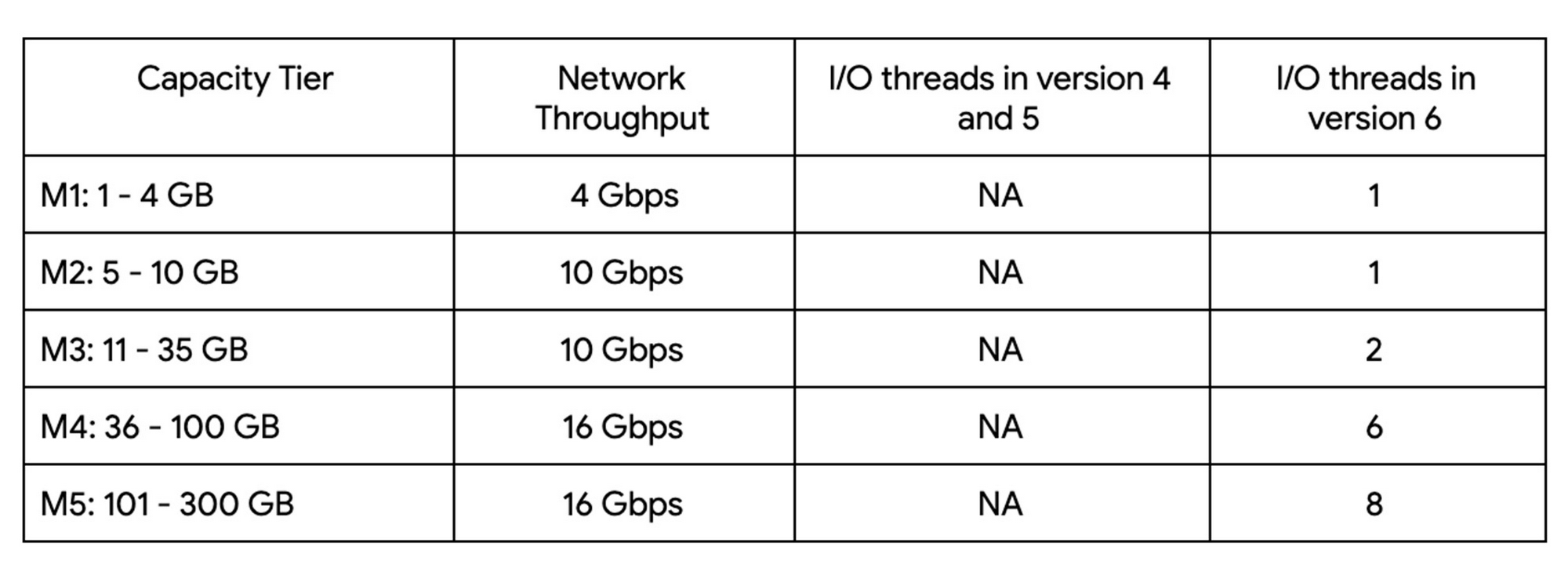
Up until version 5, Redis processed commands using a single thread. The processing involved reading the request, parsing the request, processing the request, and writing the response back to the socket. This approach means that all of the processing, which includes writing the response, was sequentially processed by a single vCPU regardless of the number of vCPUs available in the instance.
Redis 6 introduced I\O threading which allows writing the response using parallel threads. This functionality enables Redis 6 to more effectively leverage available vCPUs, thereby increasing the overall throughput compared to lower versions. Memorystore for Redis version 6 leverages I\O threading and automatically configures the optimal number of I\O threads to achieve the best possible performance for the various capacity tiers. We have also improved the overall network throughput for all redis versions by leveraging improvements in the Google Cloud infrastructure. Together these improvements deliver significant performance improvements and come at no additional cost to you.
So what can you expect from using Redis 6? As outlined in the table, Redis version 5 and lower uses a single thread to process the write requests for all tiers while Redis 6 uses a larger number of I\O threads at higher capacity tiers which provides substantially incremental throughput for higher capacity tiers.
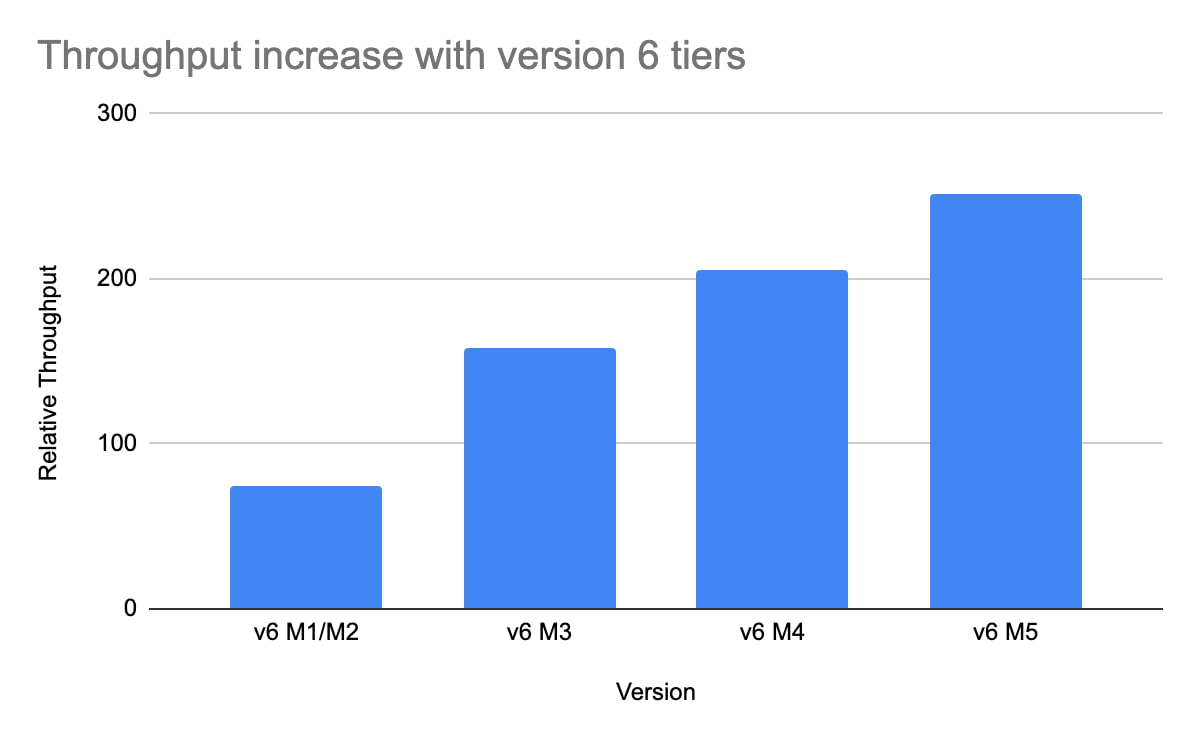
For example, using a Redis 6 standard tier instance with a capacity of 101 GB (M5), we have observed up to a 200% improvement in read/write performance compared to version 5, though the actual value you’ll see is dependent on your workload. You can get the benefits of Redis 6 by upgrading an existing instance or by deploying a new instance.
By enabling read replicas on an instance using Redis 6, you can further improve the read performance. Read throughput scales linearly with the number of replicas so you can increase your read queries on an instance by up to 500% using five read replicas. By combining Redis 6 and read replicas, you can see a 10X increase in read performance compared to a version 5 standard tier instance with no read replicas.
We are excited about the launch of read replicas but this is just one step in our journey to deliver the scale you need at the best price-performance. You can learn more about read replicas pricing on our Memorystore pricing page and get started using the Read Replicas Overview.
What Differences in Functionalities Can I Expect Between Google Cloud’s SQL Database and Standard MySQL?

3968
Of your peers have already read this article.
5:30 Minutes
The most insightful time you'll spend today!
In general, the MySQL functionality provided by a Google Cloud’s SQL Database (Cloud SQL) instance is the same as the functionality provided by a locally-hosted MySQL instance.
However, there are a few differences between a standard MySQL instance and a Cloud SQL for MySQL instance.
Unsupported Features
Unsupported Statements
Sending any of the following types of SQL statements will generate an error with the message “Error 1290: The MySQL server is running with the google option so it cannot execute this statement”:
- LOAD DATA INFILE
- Note that LOAD DATA LOCALINFILE is supported.
- SELECT … INTO OUTFILE
- SELECT … INTO DUMPFILE
- INSTALL PLUGIN …
- UNINSTALL PLUGIN
- CREATE FUNCTION … SONAME …
Unsupported Statements for Second Generation Instances
The following statements are not supported because Second Generation instances use GTID replication:
- CREATE TABLE … SELECT statements
- CREATE TEMPORARY TABLE statements inside transactions
- Transactions or statements that update both transactional and nontransactional tables
For more information, see the MySQL documentation.
Unsupported Functions
- LOAD_FILE()
Unsupported Client Program Features
- mysqlimport without using the –local option. This is because of the LOAD DATA INFILE restriction. If you need to load data remotely, use the Cloud SQL import function.
- mysqldump using the –tab option or options that are used with –tab. This is because the FILE privilege is not granted for instance users. All other mysqldump options are supported.
- If you want to import databases with binary data into your Cloud SQL for MySQL instance, you must use the –hex-blob option with mysqldump.
- Although hex-blob is not a required flag when you are using a local MySQL server instance and the mysql client, it is required if you want to import any databases with binary data into your Cloud SQL instance. For more information about importing data, see Importing Data.
- Not all MySQL options and parameters are enabled for editing as Cloud SQL flags.
- To request the addition of a configurable Cloud SQL flag, use the Cloud SQL Discussion group.
- For Second Generation instances, InnoDB is the only supported storage engine. For help with converting tables from MyISAM to InnoDB, see the MySQL documentation.
- You cannot import or export triggers, functions, stored procedures, or views into Cloud SQL. However, you can create and use these elements on a Cloud SQL instance.
Notable MySQL Options
Cloud SQL runs MySQL with a specific set of options. If an option might impact how your applications work, we note it here for your information.
skip-name-resolve
This flag impacts how hostnames are resolved for client connections. Learn more.
Cloud SQL for PostgreSQL
Features
- Fully managed PostgreSQL databases in the cloud, based on the Cloud SQL Second Generation platform.
- Custom machine types with up to 416 GB of RAM and 64 CPUs.
- Up to 10TB of storage available, with the ability to automatically increase storage size as needed.
- Create and manage instances in the Google Cloud Platform Console.
- Instances available in US, EU, or Asia.
- Customer data encrypted on Google’s internal networks and in database tables, temporary files, and backups.
- Support for secure external connections with the Cloud SQL Proxy or with the SSL/TLS protocol.
- Data replication between multiple zones with automatic failover.
- Import and export databases using SQL dump files.
- Support for PostgreSQL client-server protocol and standard PostgreSQL connectors.
- Automated and on-demand backups.
- Instance cloning.
- Integration with Stackdriver logging and monitoring.
Some features are not yet available for Cloud SQL for PostgreSQL:
- Point-in-time recovery (PITR)
- Import/export in CSV format using GCP Console or the gcloud command-line tool.
Supported Extensions
Cloud SQL for PostgreSQL supports many PostgreSQL extensions. For a complete list, see PostgreSQL Extensions.
Supported Procedural Languages
Cloud SQL for PostgreSQL supports the PL/pgSQL SQL procedural language.
Supported Languages
You can use Cloud SQL for PostgreSQL with App Engine applications running in the flexible environment that are written in Java, Python, PHP, Node.js, Go, and Ruby. You can also use Cloud SQL for PostgreSQL with external applications using the standard PostgreSQL client-server protocol.
Differences between Cloud SQL and standard PostgreSQL functionality
In general, the PostgreSQL functionality provided by a Cloud SQL instance is the same as the functionality provided by a locally-hosted PostgreSQL instance. However, there are a few differences between a standard PostgreSQL instance and a Cloud SQL for PostgreSQL instance.
Unsupported Features
- Any features that require SUPERUSER privileges. An exception to this rule is made for the CREATE EXTENSION statement, but only for supported extensions.
- Custom background workers
- The psql client in Cloud Shell does not support operations that require a reconnection, such as connecting to a different database using the \c command.
Notable Differences
There are a number of PostgreSQL options and parameters that are not enabled for editing as Cloud SQL flags.
To request the addition of a configurable Cloud SQL flag, use the Cloud SQL Discussion group.
Spot Slow MySQL Queries Fast with Stackdriver Monitoring

4035
Of your peers have already read this article.
4:30 Minutes
The most insightful time you'll spend today!
When you’re serving customers online, speed is essential for a good experience. As the amount of data in a database grows, queries that used to be fast can slow down.
For example, if a query has to scan every row because a table is missing an index, response times that were acceptable with a thousand rows can turn into multiple seconds of waiting once you have a million rows.
If this query is executed every time a user loads your web page, their browsing experience will slow to a crawl, causing user frustration. Slow queries can also impact automated jobs, causing them to time out before completion.
If there are too many of these slow queries executing at once, the database can even run out of connections, causing all new queries, slow or fast, to fail.
The popular open-source databases MySQL and Google Cloud Platform‘s fully managed version, Cloud SQL for MySQL, include a feature to log slow queries, letting you find the cause, then optimize for better performance.
However, developers and database administrators typically only access this slow query log reactively, after users have seen the effects and escalated the performance degradation.
With Stackdriver Logging and Monitoring, you can stay ahead of the curve for database performance with automatic alerts when query latency goes over the threshold, and a monitoring dashboard that lets you quickly pinpoint the specific queries causing the slowdown.
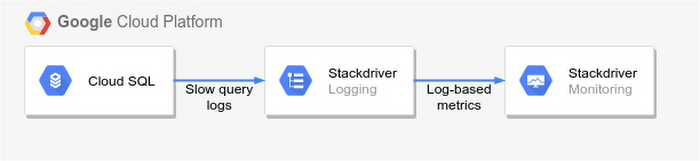
To get started, import MySQL’s slow query log into Stackdriver Logging.
Once the logs are in Stackdriver, it’s straightforward to set up logs-based metrics that can both count the number of slow queries over time, which is useful for setting up appropriate alerts, and also provide breakdowns by slow SQL statement, allowing speedy troubleshooting.
What’s more, this approach works equally well for managed databases in Cloud SQL for MySQL and for self-managed MySQL databases hosted on Compute Engine.
For a step-by-step tutorial to set up slow query monitoring, check out Monitoring slow queries in MySQL with Stackdriver. For more ideas about what else you can accomplish with Stackdriver Logging, check out Design patterns for exporting Stackdriver Logging.
How BigQuery’s Unique Features Support Your Data at Petabyte-scale

4800
Of your peers have already read this article.
3:00 Minutes
The most insightful time you'll spend today!
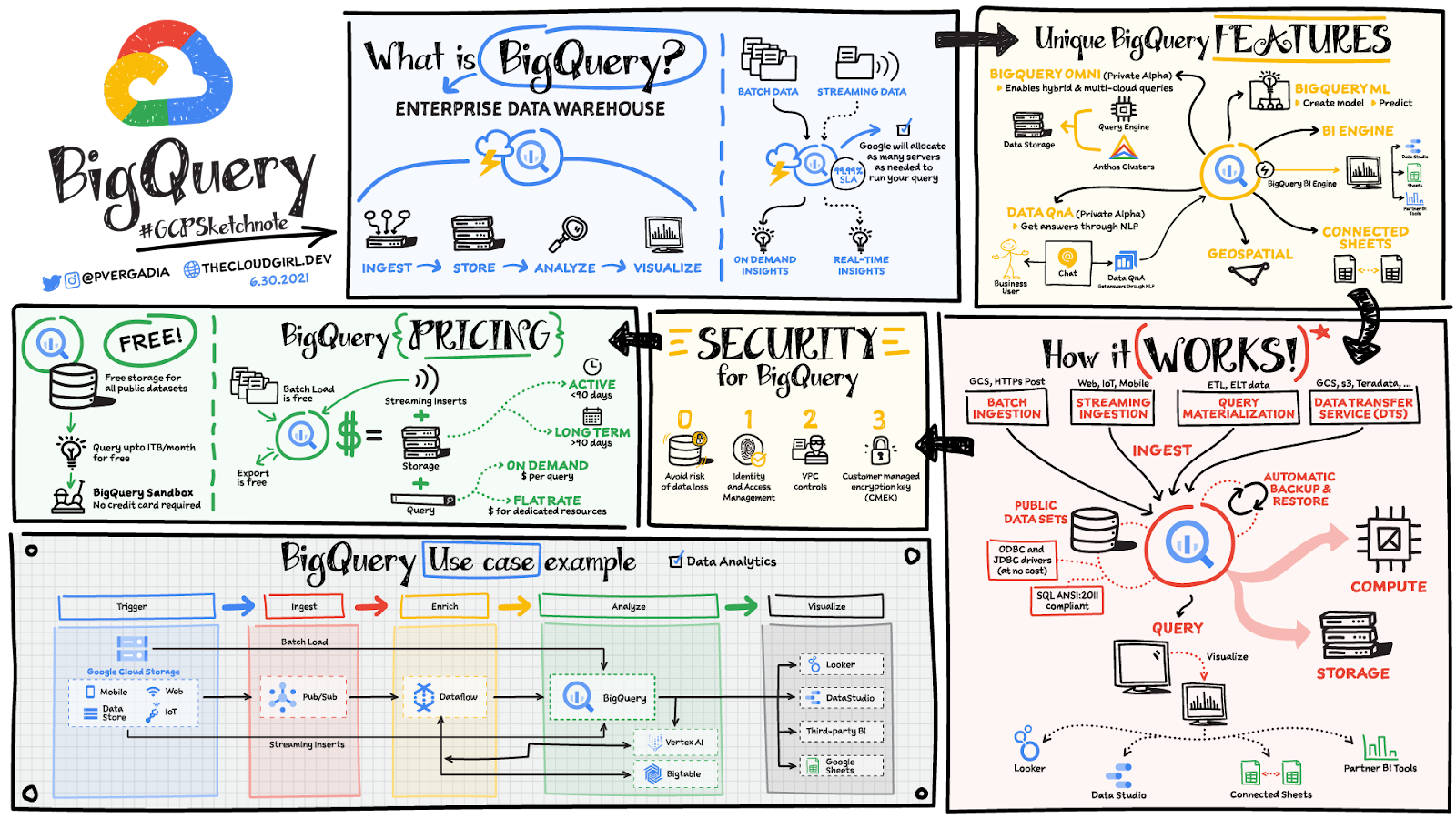
Organizations rely on data warehouses to aggregate data from disparate sources, process it, and make it available for data analysis in support of strategic decision-making. BigQuery is the Google Cloud enterprise data warehouse designed to help organizations to run large scale analytics with ease and quickly unlock actionable insights. You can ingest data into BigQuery either through batch uploading or by streaming data directly to unlock real-time insights. As a fully-managed data warehouse, BigQuery takes care of the infrastructure so you can focus on analyzing your data up to petabyte-scale. BigQuery supports SQL (Structured Query Language), which you’re likely already familiar with if you’ve worked with ANSI-compliant relational databases.
BigQuery unique features
BI Engine – BigQuery BI Engine is a fast, in-memory analysis service that provides subsecond query response times with high concurrency. BI Engine integrates with Google Data Studio and Looker for visualizing query results and enables integration with other popular business intelligence (BI) tools.
BigQuery ML: BigQuery ML is unlocking machine learning for millions of data analysts. It enables data analysts and data scientists to build and operationalize machine learning models directly within BigQuery, using simple SQL.
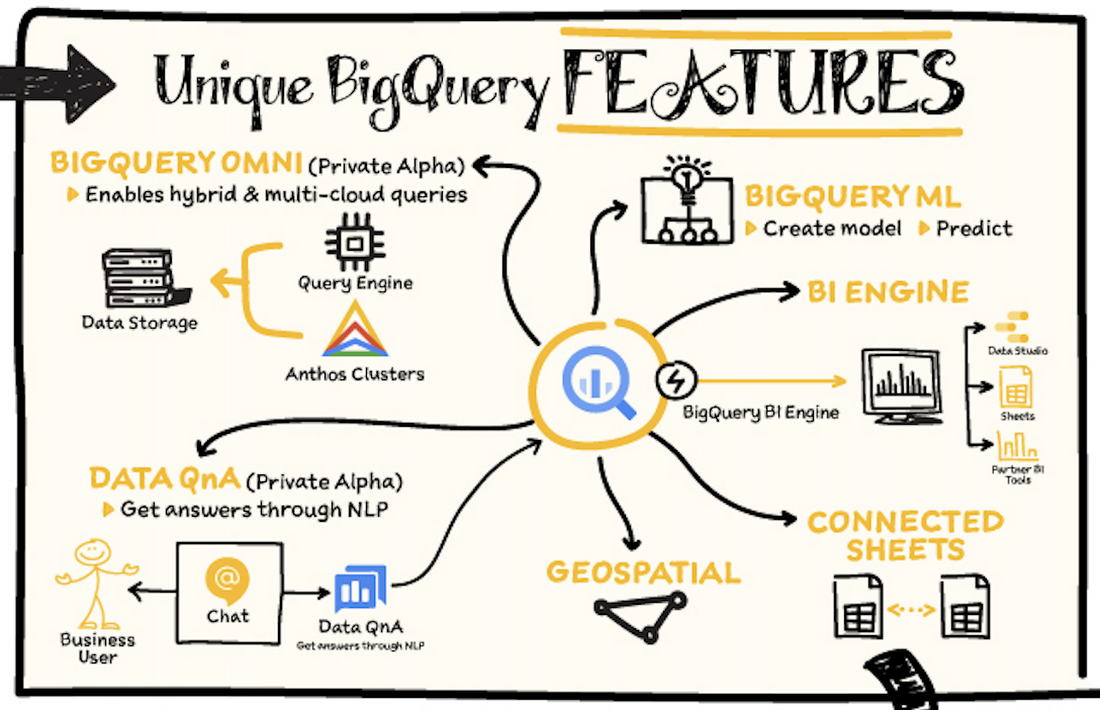
BigQuery Omni – BigQuery Omni is a flexible, multi-cloud analytics solution powered by Anthos that lets you cost-effectively access and securely analyze data across Google Cloud, Amazon Web Services (AWS), and Azure, without leaving the BigQuery user interface (UI). Using standard SQL and familiar BigQuery APIs, you can break down data silos and gain critical business insights from a single pane of glass.
Data QnA: Data QnA enables self-service analytics for business users on BigQuery data as well as federated data from Cloud Storage, Bigtable, Cloud SQL, or Google Drive. It uses Dialogflow and enables users to formulate free-form text analytical questions, with auto-suggested entities while users type a question.
Connected Sheets -The native integration between Sheets and BigQuery makes it possible for all business stakeholders, who are already quite familiar with spreadsheet tools, to get their own up-to-date insights at any time.
Geospatial data – BigQuery offers accurate and scalable geospatial analysis with geography data types. It supports core GIS functions – measurements, transforms, constructors, and more – using standard SQL.
How does it work?
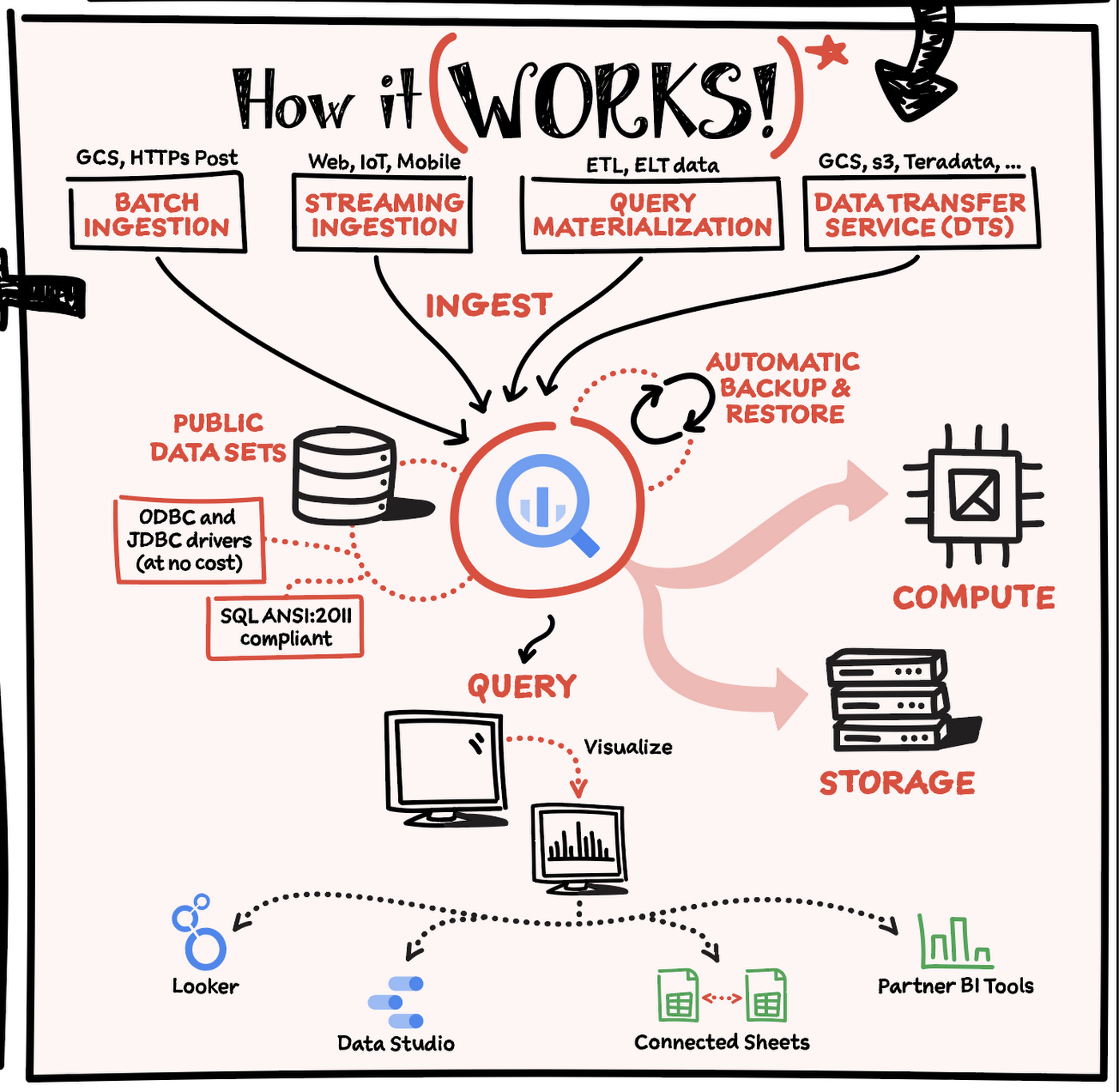
Here’s how it works: You ingest your own data into BigQuery or use data from the public datasets. Storage and compute are decoupled and can scale independently on demand. This offers immense flexibility and cost control for your business as you don’t need to keep expensive compute resources up and running all the time. As a result, BigQuery is much more cost-effective than traditional node-based cloud data warehouse solutions or on-premises systems. BigQuery also provides automatic backup and restore of your data.
You can ingest data into BigQuery in batches or stream real-time data from web, IoT, or mobile devices via Pub/Sub. You can also use Data Transfer Service to ingest data from other clouds, on-premises systems or third-party services. BigQuery also supports ODBC and JDBC drivers to connect with existing tools and infrastructure.
Interacting with BigQuery to load data, run queries, or create ML models can be done in three different ways. You can use the UI in the Cloud Console, the BigQuery command-line tool, or the API via client libraries available in several languages.
When it comes time to visualize your data, BigQuery integrates with Looker as well as several other business intelligence tools across the Google partner ecosystem.
What about security?
BigQuery offers built-in data protection at scale. It provides security and governance tools to efficiently govern data and democratize insights within your organization.
- Within BigQuery, users can assign dataset-level and project-level permissions to help govern data access. Secure data sharing ensures you can collaborate and operate your business with trust.
- Data is automatically encrypted both while in transit and at rest, ensuring that your data is protected from intrusions, theft, and attacks.
- Cloud DLP helps you discover and classify sensitive data assets.
- Cloud IAM provides access control and visibility into security policies.
- Data Catalog helps you discover and manage data.
How much does it cost?
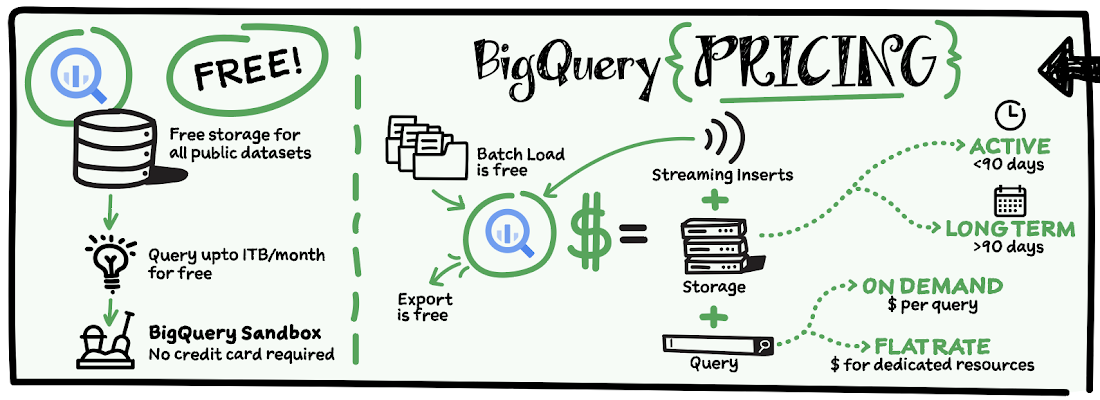
The BigQuery sandbox lets you explore BigQuery capabilities at no cost and confirm that BigQuery fits your needs. With BigQuery you get predictable price-performance: you pay for storing and querying data, and for streaming inserts. Loading and exporting data are free of charge. Storage costs are based on the amount of data stored, and have two rates based on how often the data is changing. Query costs can be either:
- On-demand – you are charged per query by the amount of data processed
- Flat-rate – if you prefer to purchase dedicated resources
You can start with the pay-as-you-go, on-demand option and later move to flat-rate if that better suits your usage. Or, start with flat-rate, get a better understanding of your usage and move to the pay-as-you-go models for additional workloads.
To explore BigQuery and its capabilities a bit more, check out the sandbox; and when you’re ready to modernize your data warehouse with BigQuery then check out the documentation to streamline your migration process here. https://www.youtube.com/embed/So-tVyBQt8E?enablejsapi=1&
For more #GCPSketchnote, follow the GitHub repo. For similar cloud content follow me on Twitter @pvergadia and keep an eye out on thecloudgirl.dev.
More Relevant Stories for Your Company

Meesho’s Zero Downtime Success: Cloud CDN Migration Made Easy
Meesho is an Indian online marketplace that serves millions of customers every day. Recently, the company decided to adopt a multi-cloud strategy, leveraging Google Cloud’s scalable and reliable infrastructure to drive operational efficiency, modernize and scale for growth. To do so, they needed to migrate billions of static files and images

Dataplex: Google Cloud’s Intelligent Data Fabric to Manage Data and Analytics at Scale
Enterprises are struggling to make high quality data easily discoverable and accessible for analytics, across multiple silos, to a growing number of people and tools within their organization. They are often forced to make tradeoffs—to move and duplicate data across silos to enable diverse analytics use cases or leave their

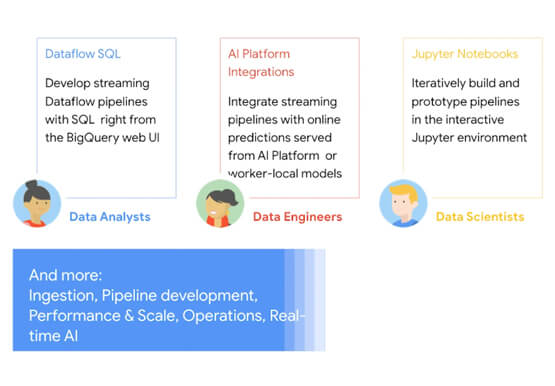
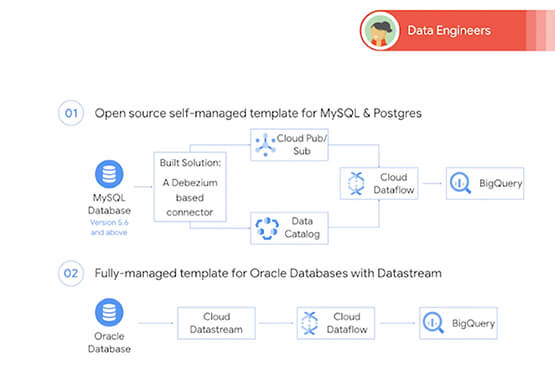

Easy Access to Stream Analytics with Google Cloud
By 2025, more than a quarter of the data created in the global datasphere will be real-time in nature. “This is important because in the real-time world, “the window of opportunity diminishes and goes away really fast. You want to be able to respond to your customer needs, their asks,

NCR’s Emerald Leverages Google Cloud to Help Grocers Boost Operational Agility
In recent years, the grocery industry has had to shift to facilitate a wider variety of checkout journeys for customers. This has meant ensuring a richer transaction mix, including mobile shopping, online shopping, in-store checkout, cashierless checkout or any combination thereof like buy online, pickup in store (BOPIS). What’s more,
