





4902
Of your peers have already watched this video.
4:00 Minutes
The most insightful time you'll spend today!
Application Development with Kpt
Learn how to create and customize configuration packages with Kpt to build applications and adhere to configuration-as-data philosophy.
Canada’s Climate Scientists Use Google Earth Engine to Observe Foliage Density in Near-real Time
3401
Of your peers have already read this article.
1:30 Minutes
The most insightful time you'll spend today!
Climate scientists face a deluge of environmental data to analyze and interpret from real-time sensors and satellites across the globe. The stakes are as high as our planet’s long-term future, but rapidly changing conditions are already impacting communities through extreme events like floods and wildfires as well as management of everyday resources. In this context, detailed environmental maps are key sources for urgent global issues like food security, water quality, and vegetation levels.
Scientists, researchers, and developers rely on state-of-the-art cloud computing tools like Google Earth Engine (EE) to detect changes, map trends, and quantify differences on the Earth’s surface. EE leverages the compute power of Google Cloud to combine a multi-petabyte catalog of satellite imagery and geospatial datasets with planetary-scale analysis capabilities.
To find out more about how climate scientists address these complex research challenges, I spoke to Dr. Richard Fernandes, Research Scientist at Natural Resources Canada (NRCan). Dr. Fernandes is also a 2022-23 member of the Google Research Innovators Program, which provides technical and professional support to a global cohort of leading researchers. I asked him to describe how cloud computing and machine learning (ML) tools can support climate resilience research and drive awareness about climate sustainability.
Dr. Fernandes, can you give me an overview of your research in climate sciences?
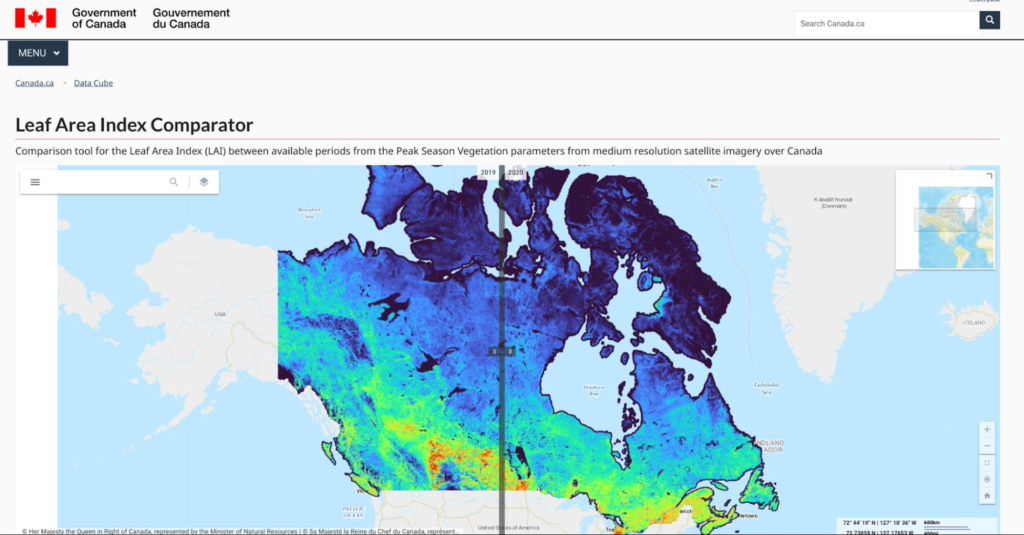
My research focuses on mapping the status and trends of vegetation over Canada. Every month we generate maps of vegetation parameters, such as canopy cover at 20m resolution, to support environmental monitoring and assessment. These maps contribute to global datasets that are used to reduce uncertainty in weather and climate forecasts.
Canada has approximately 10 million square kilometers of land and the annual data volume of these maps is equivalent to streaming HD movies for over 750 hours non-stop. And that’s only the tip of the iceberg: the volume of input data we need to generate those maps is typically 100 times more. Unlike movie streaming services, we have to independently process each input pixel to locate it accurately, screen for clouds (and even the shadows of clouds), and then transform it into a vegetation parameter value like canopy cover using ML algorithms.
The volume of high-resolution data and the amount of compute we need are challenging and ever-increasing. Rather than dedicating servers 24/7 for constant monitoring, we rely on cloud computing and ML. Cloud computing allows us to manage all this data in a useful and accessible way. We have also been able to successfully use the Google Artificial Intelligence (AI) Platform to calibrate new ML models for third-party datasets.
How did you start working with Google Cloud?
I started using EE together with open source APIs for integration with Google Drive about four years ago. With the pandemic my research group has transitioned to using EE, Google Cloud, and Google Drive for both our Canada-wide mapping as well as for R&D activities. In January we developed and released the LEAF toolbox, which builds on EE satellite data to create customizable maps of foliage density in near real-time. We do all of the pixel processing in EE and leverage the ability to integrate our own functions using their APIs. We combine EE with Google Cloud to handle and manage output datasets. Fortunately, EE has most of the input data already at hand so we don’t need to deal with that 100x larger volume.
What impact do you expect LEAF will have now–and down the road?
Both the Canadian federal government and provinces already use our data products as inputs to permafrost, crop status, and water resource models. Agriculture Canada had been using a conventional Geographic Information System (GIS) and approached us to ask how we manage our data. They want to use LEAF to assess how crops are progressing, which impacts local economies and the global food supply. We’re in a pilot with them to apply EE to their crop condition assessments.
Also exciting is that the Province of Alberta is integrating the LEAF toolbox within a system for monitoring the reclamation status of oil and gas wells and mines. They want to know how to rehabilitate sites that were developed for mineral and gas deposits. This is another great use case but many others are possible. The technology itself is cool, but that’s not even the point. ML algorithms are constantly evolving and improving. New ML algorithms use active learning that detects mistakes and makes updates on the fly. The technology will be different in five years — or five months! — so our priority is making these tools accessible and useful now.
Why is state-of-the-art technology for climate research so important?
Scientific research must be validated, transparent, and rigorous to drive the best solutions to our complex and changing ecosystem. Climate action needs greater public awareness, which requires more knowledge, which demands the best data. By democratizing information and decision-making, we can create an ecosystem of openness and public-private partnerships. We can lower the barrier to entry for advanced research and help scientists validate and reproduce their results. Also, scientists don’t want to have to become software engineers for these custom highly specific solutions. They want user-friendly tools that let them focus on their analyses and share their insights with the world. That’s one of the major appeals of the Google Research Innovators Program for me: I want to share LEAF with colleagues and collaborate with other researchers who are using new tools in new ways.
Do you have any parting words about your mission?
We’re so fortunate to have Canadian taxpayers and the Government of Canada funding our work. We have worked with many scientists over the past two decades to develop and validate the algorithms we use, especially Fred Baret and Marie Weiss at INRA France, who have championed the idea of free and open access to algorithms and knowledge, and data.
I really believe in democratic access to information. I like the fact that the terms of service of Google products allows us to offer not only maps but the actual processing system in a free and open manner to everyone. I also like that EE provides a simple-to-use user interface that works on mobile devices. We designed LEAF not just for experts, but for individuals. My mom was able to make maps of a nearby park in real time on her tablet. It is my hope that expanding access to critical environmental information will increase our collective awareness of how our actions impact both near and far places — and make us active in the cause of a sustainable future.
That’s an inspiring note to end on. Thank you for your time!
Thanks for having me!
Click here to learn more about Google’s commitment to renewable energy. Or try the LEAF toolbox for yourself!
Combining IoT and Analytics to Warn Manufacturers of Line Break Downs and Increase Profitability

7604
Of your peers have already read this article.
2:45 Minutes
The most insightful time you'll spend today!
Oden Technologies is using the Internet of Things (IoT) to improve the factories of today. The giant network of “things” (including people) connected to each other via the Internet has the potential to reduce waste, increase efficiency, and improve safety across all walks of life. Oden is leading IoT innovation in manufacturing by combining wireless connectivity, big data, and cloud computing.
The use of data to improve manufacturing is practically as old as manufacturing itself. But the computerization of manufacturing has resulted in broad and rapid changes to the way data is collected and processed, as well as the sheer volume of data available.
Oden’s goal is to help manufacturers tap into this data to quickly identify process trends and even warning signs of machine breakdown. Such visibility can reveal opportunities to improve manufacturing and maintenance processes that reduce waste and increase profit margins.
Oden designs and develops data collection devices that can plug into almost any kind of machine and can wirelessly transmit data with minimal complexity and setup time.
Once devices are installed, the Oden technology platform processes data to give manufacturers cutting-edge analytics that are easy to comprehend. Analysis produced by the platform provides factory engineers with data points such as detailed root-cause analysis down to the second, factory-wide performance in real-time, and trend analysis.
Improving cloud delivery
Oden’s previous cloud platform performed satisfactorily, but the company evaluated alternatives in search of potential reductions in cost and complexity and increases in performance.
When evaluating Google Cloud Platform, Oden discovered it would require fewer virtual machine (VM) instances for equivalent performance, which would cut costs. Furthermore, Oden could gain more sophisticated data analytics and machine learning capabilities compared with its existing cloud provider.
Today, Oden runs its entire platform on Google Cloud Platform including Google Compute Engine, Google Cloud Pub/Sub, Google Cloud Bigtable, Google Stackdriver, and Google Kubernetes Engine.
“In order to serve our customers, we need a cloud platform that can scale reliably while keeping costs low, perform under heavy loads, and consistently deliver sophisticated features such as machine learning,” says Willem Sundblad, CEO and Founder at Oden Technologies. “Google Cloud Platform is way ahead in all of these areas compared to our previous cloud provider.”
Capturing tens of millions of metrics a day
Using Google Cloud Platform, Oden can help an average factory capture and store approximately 10 million metrics on a single manufacturing line every day.
Metrics can include extremely granular detail, such as the amount of electricity going to machines, the amount of raw material consumed, and the volume of material produced. Sensors can also capture and transmit environmental information such as temperature, humidity, and dew point so that manufacturers can identify weather-related and seasonal impacts on production.
The updated Oden Cloud Platform uses Kubernetes Engine—powered by the open source Kubernetes system—to run application program interfaces (APIs) that capture data from Oden’s wireless devices on the factory floor.
Google Cloud Pub/Sub then sends the data in real time to Google Cloud Bigtable, where data is processed using Oden’s proprietary analytics tools. Google Stackdriver supports Google Cloud Platform monitoring, logging, and diagnostics, which help Oden deliver its cloud platform with confidence.
Oden Technologies builds dashboards powered by Kubernetes Engine, which pull analyzed data from Google Cloud Bigtable. The dashboards provide customers with real-time visibility into their manufacturing lines. Oden Factory Cloud dashboards allow customers to delve deeper into their data to fine-tune production processes or discover the root causes of production issues.
With the previous cloud provider, Oden required 80 VM instances to run the dashboards. With Google Cloud Platform that number has been cut to 45, which dramatically reduces costs and complexity.
“We migrated from our previous cloud provider to Google Cloud Platform in just one month,” says Willem. “Further, our storage and data analytics costs have decreased by 30%. Cost savings like these allow us to protect customers from rising expenses, keeping us focused on bringing the best products possible to market.”
Faster data access; more efficient factories
With Google Cloud Platform, Oden can now deliver a complete factory analytics picture to manufacturers. In environments where thousands of variables affect the bottom line, businesses can now automatically and perpetually record machine and performance measurement. Oden Factory Cloud gives customers access to comprehensive data insights and can eliminate reliance on onsite infrastructure investments to run their own analytics.
Because manufacturers have access to live data and can analyze production data quickly, they can troubleshoot and resolve problems in minutes rather than months. Such information helps improve product quality, minimize unplanned downtime, cut costs, and improve profitability.
“With the help of Google Cloud Platform, we are helping our customers to be data-driven, which wasn’t possible before,” adds Willem. “They now understand that data is their most important asset. That allows them to be more innovative and continually improve their production processes.”
Pacemaker’s Automated Alerts and Alert Reporting: No More Outages for SAP Systems on Google Cloud!

3264
Of your peers have already read this article.
6:00 Minutes
The most insightful time you'll spend today!
When critical services fail, businesses risk losing revenue, productivity, and trust. That’s why Google Cloud customers running SAP applications choose to deploy high availability (HA) systems on Google Cloud.
In these deployments Linux operating system clustering provides application and guest awareness for the application state and automates recovery actions in case of failure — including cluster node, resource or node failover or failed action.
Pacemaker is the most popular software Linux administrators use to manage their HA clusters, which includes automating notifications about events — including failover fencing and node, attribute, and resource events — and reporting on events. With automated alerts and reports, Linux administrators can not only learn about events as they happen, but they can also make sure other stakeholders are alerted to take action when critical events occur. They can even discover past events to assess the overall health of their HA systems.
Here, we break down the steps to setting up automated alerts for HA cluster events and alert reporting.
How to Deploy the Alert Script
To set up event-based alerts, you’ll need to take the following steps to execute the script.
1. Download the script file ‘gcp_crm_alert.sh’ from
https://github.com/GoogleCloudPlatform/pacemaker-alerts-cloud-logging
2. Under root user, add exec flag for the script and execute deployment with:
chmod +x ./gcp_crm_alert.sh./gcp_crm_alert.sh -d
3. Confirm that the deployment runs successfully. If it does, you will see the following INFO log messages:
In the Red Hat Enterprise Linux (RHEL) system:
gcp_crm_alert.sh:2022-01-24T23:48:30+0000:INFO:'pcs alert recipient add gcp_cluster_alert value=gcp_cluster_alerts id=gcp_cluster_alert_recepient options value=/var/log/crm_alerts_log' rc=0
In the SUSE Linux Enterprise Server (SLES):
gcp_crm_alert.sh:2022-01-25T00:13:27+00:00:INFO:'crm configure alert gcp_cluster_alert /usr/share/pacemaker/alerts/gcp_crm_alert.sh meta timeout=10s timestamp-format=%Y-%m-%dT%H:%M:%S.%06NZ to { /var/log/crm_alerts_log attributes gcloud_timeout=5 gcloud_cmd=/usr/bin/gcloud }' rc=0Now, in the event of a cluster node, resource, node failover, or failed action, Pacemaker will start the alert mechanism. For further details on the alerting agent, check out the Pacemaker Explained documentation.
How to Use Cloud Logging for Alert Reporting
Alerted events are published in Cloud Logging. Below is an example of the log record payload, where the cluster alert key-value pairs get recorded in the jsonPayload node.
{
"insertId": "ktildwg1o3fbim", "jsonPayload": { "CRM_alert_recipient": "/var/log/crm_alerts_log", "CRM_alert_attribute_name": "", "CRM_alert_kind": "resource", "CRM_alert_status": "0", "CRM_alert_rsc": "STONITH-sapecc-scs", "CRM_alert_rc": "0", "CRM_alert_timestamp_usec": "", "CRM_alert_interval": "0", "CRM_alert_node_sequence": "21", "CRM_alert_task": "start", "CRM_alert_nodeid": "", "CRM_alert_timestamp": "2022-01-25T00:17:06.515313Z", "CRM_alert_timestamp_epoch": "", "CRM_alert_desc": "ok", "CRM_alert_target_rc": "0", "CRM_alert_version": "1.1.15", "CRM_alert_attribute_value": "", "CRM_alert_node": "sapecc-ers", "CRM_alert_exec_time": "" }, "resource": { "type": "global", "labels": { "project_id": "gcp-tse-sap-on-gcp-lab" } }, "timestamp": "2022-01-25T00:17:09.662557309Z", "severity": "INFO", "logName": "projects/gcp-tse-sap-on-gcp-lab/logs/sapecc-ers%2F%2Fvar%2Flog%2Fcrm_alerts_log", "receiveTimestamp": "2022-01-25T00:17:09.662557309Z" }
To get notified of a resource event — for example, when the HANA topology resource monitor fails — you can use the following filter for the alerting definition:
jsonPayload.CRM_alert_node=("hana-venus" OR "hana-mercury") -jsonPayload.CRM_alert_status="0" jsonPayload.CRM_alert_rsc="rsc_SAPHanaTopology_SBX_HDB00" jsonPayload.CRM_alert_task="monitor" To define an alert for a fencing event, your can apply this filter: jsonPayload.CRM_alert_node=("hana-venus" OR "hana-mercury") jsonPayload.CRM_alert_kind="fencing" The fencing log entry gets recorded with warning severity to give you deeper insight, and this additional information is also helpful for more specific filtering criteria: {   "insertId": "1plznskfjsxt82",   "jsonPayload": {     "CRM_alert_attribute_value": "",     "CRM_alert_recipient": "/var/log/crm_alerts_log",     "CRM_alert_rsc": "",     "CRM_alert_rc": "0",     "CRM_alert_timestamp_usec": "529261",     "CRM_alert_desc": "Operation reboot of hana-mercury by hana-venus for crmd.2361@hana-venus: OK (ref=2a9bf814-9adf-4247-af3f-94ac254fc3ca)", "CRM_alert_target_rc": "",     "CRM_alert_nodeid": "",     "CRM_alert_kind": "fencing",     "CRM_alert_node_sequence": "33",     "CRM_alert_task": "st_notify_fence",     "CRM_alert_status": "",     "CRM_alert_exec_time": "",     "CRM_alert_attribute_name": "",     "CRM_alert_timestamp_epoch": "1643072786",     "CRM_alert_version": "1.1.19",     "CRM_alert_timestamp": "2022-01-25T01:06:26.529261Z",     "CRM_alert_interval": "",     "CRM_alert_node": "hana-mercury"   },   "resource": {     "type": "global",     "labels": {       "project_id": "gcp-tse-sap-on-gcp-lab"     }   },   "timestamp": "2022-01-25T01:06:27.267017052Z",   "severity": "WARNING",   "logName": "projects/gcp-tse-sap-on-gcp-lab/logs/hana-venus%2F%2Fvar%2Flog%2Fcrm_alerts_log", "receiveTimestamp": "2022-01-25T01:06:27.267017052Z"
}
Alerts can be delivered through multiple channels, including text and email. Below is an example of an email notification for our earlier example, when we defined an alert for a HANA topology resource monitor failure:
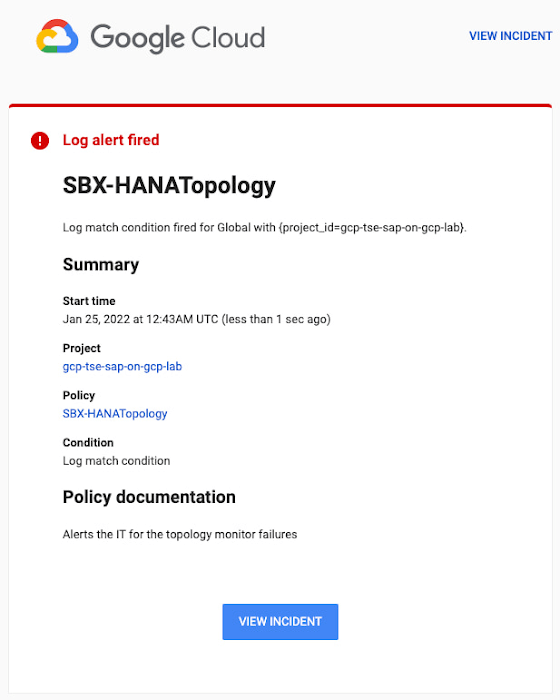
You can write and apply filters to your log-based alerts to isolate certain types of incidents and analyze events over time. For example, the following script will surface a resource event occurring within a two-hour window on a specific date:
timestamp>="2022-01-25T00:00:00Z" timestamp<="2022-01-25T02:00:00Z"
jsonPayload.CRM_alert_kind="resource"
With the ability to analyze these logged alerts over time, determine whether event patterns warrant any action.
[SIDEBAR]
The alert script prints details in the standard output and in the log file /var/log/crm_alerts_log, and this can grow over time. We recommend that the log file is set with the Linux logrotate service in order to limit the file system space. Use the following command to create the necessary logrotate setting for the alerting log file:
cat > /etc/logrotate.d/crm_alerts_log << END-OF-FILE /var/log/crm_alerts_log { create 0660 root root rotate 7 size 10M missingok compress delaycompress copytruncate dateext dateformat -%Y%m%d-%s notifempty } END-OF-FILE [END SIDEBAR]
Tips for Troubleshooting When you first deploy your alert script, how can you tell for certain that you’ve done it correctly? Use the following commands to test it out:
In RHEL:
pcs alert show
In SLES:
sudo crm config show | grep -A3 gcp_cluster_alert
You should see the following if the script is correct:
In RHEL:
Alerts: Alert: gcp_cluster_alert (path=/usr/share/pacemaker/alerts/gcp_crm_alert.sh) Description: "Cluster alerting for hana-node-X" Options: gcloud_cmd=/usr/bin/gcloud gcloud_timeout=5 Meta options: timeout=10s timestamp-format=%Y-%m-%dT%H:%M:%S.%06NZ Recipients: Recipient: gcp_cluster_alert_recepient (value=gcp_cluster_alerts) Options: value=/var/log/crm_alerts_log In SLES:
alert gcp_cluster_alert "/usr/share/pacemaker/alerts/gcp_crm_alert.sh" \ meta timeout=10s timestamp-format="%Y-%m-%dT%H:%M:%S.%06NZ" \ to "/var/log/crm_alerts_log" attributes gcloud_timeout=5 gcloud_cmd="/usr/bin/gcloud" If the commands do not display the alerts properly, re-deploy the script.
In case there is an issue with the script, or if the Cloud Logging records are not presenting as expected, examine the script log file /var/log/crm_alerts_log. The errors and warning can be filtered with:
egrep '(ERROR|WARN)' /var/log/crm_alerts_log
Any Pacemaker alert failures will be recorded in the messages and/or Pacemaker log. To examine recent alert failures, use the following command:
egrep '(gcp_crm_alert.sh|gcp_cluster_alert)' \ /var/log/messages /var/log/pacemaker.log
Keep in mind, though, that the Pacemaker log location may be different in your system from the one in the example above.
From reactive to proactive
Your SAP applications are too critical to risk outages. The most effective way to manage high availability clusters for your SAP systems on Google Cloud is to take full advantage of Pacemaker’s alerting capabilities, so you can be proactive in ensuring your systems are healthy and available.
Learn more about running SAP on Google Cloud.
Southwire Completes SAP Migration to Google Cloud as a First Step of its Tech Evolution
4947
Of your peers have already read this article.
1:30 Minutes
The most insightful time you'll spend today!
“Talk about tough times, right?”
That’s how Dan Stuart, Senior Vice President of IT Services at Southwire Company, refers to the months following a December 2019 ransomware event, and the COVID crisis that began in spring of 2020. Those events hit just as the company was preparing for an overhaul of their SAP environment. This comprehensive plan included three key elements. First, the company wanted to upgrade their SAP ECC environment to take advantage of the latest functionality available for this critical ERP system. Second, Southwire aimed to deploy SAP Business Warehouse on SAP HANA to accelerate vital reporting for all business users. Third, the company wanted to upgrade to the latest version of SAP Process Orchestration—an essential component that touches key manufacturing interfaces in all Southwire facilities.
Southwire had looked at multiple options for the upgrades, including remaining entirely on-premises, colocation, and full cloud migration. “Going to the cloud seemed a lot more compelling,” says Joe Schleupner, Southwire’s Senior Director of PMO & ITS planning and implementation. “We were going to the cloud eventually, so why take these intermediary steps? Let’s just get it done.”
After looking at several options, Southwire decided to migrate to Google Cloud. “We wanted to be on a platform for SAP that was flexible, scalable, and secure; that we could count on to get up and running quickly,” says Stuart. “We chose Google Cloud not only for those reasons, but also because we recognize that Google has other assets that we may be able to take advantage of down the line, such as technologies like artificial intelligence (AI).”
More stability, less worry
As one of the leading manufacturers of wire and cable used in the transmission and distribution of electricity, Southwire aids the delivery of power to millions of people worldwide. They have more than 30 manufacturing facilities across the United States running 24/7. Any downtime directly affects productivity and revenue. With help from Google Cloud and their implementation partner NIMBL, Southwire completed the SAP migration to Google Cloud over a planned maintenance weekend on July 4th.
The migration itself, while complex, went quickly and smoothly. “Just moving to the cloud was quite a feat because we were dealing with so much data, but in total the SAP system was down for only ~16 hours,” says Schleupner.
“As a project manager, I always felt that Google Cloud had my back” Schleupner says. The Process Orchestration (PO) migration was of particular concern, considering that it controlled all of Southwire’s manufacturing interfaces across the entire company. “Every critical piece of information that goes from SAP down to the manufacturing system goes through that system,” says Schleupner.
Even after migrating, Southwire discovered that making changes to the system was fast, easy, and resulted in no downtime. Normally, certain types of changes would have involved taking down SAP for at least an hour.
The Southwire team also appreciates the fact that the modern cloud architecture means spending less time on routine infrastructure maintenance. “It’s one less thing for me to worry about,” Stuart says, “I can focus on the business side of the house and move the technology and responsibilities to what we do within the Google Cloud Platform.”
What comes next?
While the cloud migration will increase stability, uptime, performance, and security, there is much more to come. Southwire is currently working on a disaster recovery implementation for their SAP environment on Google Cloud. Stuart and Schleupner are excited about where Google Cloud can further take Southwire. They are considering an SAP Hybris e-commerce implementation as well as connected factory and/or factory automation initiatives that can take advantage of artificial intelligence and machine learning.
To Stuart and Schleupner, the migration of Southwire’s SAP environment to Google Cloud, as important as it was, really represents the first step in the company’s tech evolution. Now that much of the heavy lifting is complete, Southwire’s digital transformation can begin in earnest. “There’s no shortage of areas where I think Google Cloud will come into play,” Stuart says, “and we intend to look at these things with an open mind to understand how we can leverage current investments to take our organization where we want to go.”
Learn more about Southwire’s SAP on Google Cloud deployment and how Google Cloud can transform the way you work with your SAP enterprise applications. Visit cloud.google.com/solutions/sap.
Why Moving SAP Workloads to Google Cloud is Beneficial for the Consumer Goods Industry

3644
Of your peers have already read this article.
3:00 Minutes
The most insightful time you'll spend today!
Even before the COVID-19 pandemic struck, the consumer packaged goods (CPG) industry was facing disruption. Consumers have come to expect personalized and seamless experiences at every point in their relationship with a brand. Additionally, consumers are expecting CPG brands to meet rising standards for sustainability, social responsibility, and transparency. Business models are shifting as well. Direct-to-consumer and subscription models have been gaining ground on traditional business models. Add in the CPG industry’s ever-present pressure for wider profit margins and the effects of the global pandemic, and you get a perfect storm of disruption.
Leading CPG companies are responding to these changes by capitalizing on the potential of emerging technologies and leveraging the power of the cloud to create digital enterprises. In doing so, they can unlock value through reduced operational costs, faster innovation, improved marketing ROI, and greater transparency and sustainability—among other benefits. For businesses that run on SAP, accessing these benefits requires creating a digital enterprise with SAP at its heart.
What CPG can expect from SAP on Google Cloud
SAP drives core business processes across most enterprise functions in CPG companies, and modernizing these operations is step one in unlocking next-level data and analytics capabilities. Creating a digital enterprise with SAP at the core requires establishing a digital foundation on a cloud platform capable of supporting and optimizing SAP workloads well into the future. From there, CPG companies can leverage the combination of SAP data and additional data signals to support high-value use cases utilizing the advanced analytics capabilities of the cloud
For CPG companies, running a successful digital enterprise in this climate depends on the power of the cloud because of the unmatched agility, security, scale, and flexibility offered by cloud technologies. More and more, consumer brands are turning to Google Cloud to host their applications—including core enterprise applications such as SAP—to drive business agility and maximize the value of data through smart analytics and machine learning. Google Cloud establishes a digital foundation for SAP customers by simplifying SAP deployments and offering a suite of applications that integrates with and enhances SAP functionality. A Forrester study on the total economic value of Google Cloud for SAP customers found an average payback of less than six months and a total ROI of over 160%. By turning to Google Cloud to run their SAP systems, companies are able to:
- Maximize insights
CPG enterprise data is often fragmented across disparate systems. Google’s analytics tools including BigQuery and Looker allow businesses to connect customer, operational and business data at scale by unifying data from SAP systems with other Google data signals such as Ads, Maps, Shopping or Google Marketing Platform. This precious data is fully democratized, allowing for complex queries to be completed rapidly so companies can uncover and analyze insights and create an end-to-end view of the consumer and the business. - Create an intelligent organization
Google’s AI and machine learning capabilities allow businesses to create built-in intelligence. Instead of reacting to trends, they can accurately predict them. For marketing teams, this could be the ability to evaluate promotions and effectiveness of marketing spend. For forecasting, product quantities and restock timing can be better planned. Supply chain optimization can include external data sources to closely monitor inventory and eliminate stock outs. - Future-proof your business
Running SAP systems on Google Cloud creates an agile, secure and highly available environment that scales quickly as a business grows and as the CPG market evolves. A recent study conducted by IDC showed that SAP on Google Cloud deployments resulted in a 46% lower three-year cost of operations with 83% less frequent unplanned downtime and 56% more efficient IT teams. This frees IT resources to drive innovation and customer centricity. - Deliver on sustainability
Around the globe, consumers are becoming more and more demanding regarding sustainability. The impact of climate change and the abundance of plastic waste is only fueling this trend. Consumers are leaning into social signalling, and CPG companies are taking note. Sustainable IT is step #1, significantly advanced by moving applications to Google Cloud, the cleanest cloud in the industry. We’ve neutralized all of our carbon emissions since our founding in 1998 and matched 100% of our electricity consumption with renewable energy purchases since 2017. Google Cloud allows SAP enterprises to further drive sustainability compliance and business objectives with AI and ML tools that can drive down waste and provide real-time decision making power to support proactive green initiatives.
Rémy Cointreau is in high spirits after deploying SAP in the Google Cloud
Rémy Cointreau, a family-owned international maker of fine spirits, has products that can take up to one-hundred years to produce. But this long production cycle presents some unique challenges in today’s hyper-competitive premium beverage brands market. Since 1724, the company has been consumed with putting its customers first. In 2020, the company realized it was failing to capitalize on the benefits that the cloud can provide and began searching for a business partner that could help with this transformation.
Rémy Cointreau made the move to Google Cloud for many reasons. First, the company could connect its SAP backbone to key SaaS applications like Salesforce. This enabled the creation of a 360-view of data among its ecommerce platform, SAP, and Salesforce to deliver sophisticated customer experiences that reflect the heart of the brand. The Rémy Cointreau team quickly realized they now had the ability to be more agile in their finance, manufacturing, and supply chain functions with easy access to valuable SAP system data that drives decision-making. Sebastien Huet, the company’s CTO, explains: “Now that we’re fully deployed on Google Cloud Platform, anything is possible. We can pull data in from multiple sources via integration and analyze it in a matter of days. We don’t need a three-month project to see value.”
In today’s on-demand, omnichannel world, it’s not enough for CPG brands to understand their consumers. For companies like Rémy Cointreau, it is mission-critical that they anticipate consumer preferences and deliver personalized experiences. The winners will be the companies that can reduce time to insights by treating all their data as strategic assets, breaking down data silos to enable real-time business intelligence. With SAP on Google Cloud, CPGs are transforming consumer relationships and business outcomes.
Are you ready to change how your CPG brand operates? Check out this video and read the Google Cloud for SAP CPG customer white paper and ebook. Learn more about how your peers are leveraging SAP on Google Cloud to evolve their businesses.
More Relevant Stories for Your Company
HarbourBridge Schema Assistant Allows Quick, Bulk Migration to Cloud Spanner
Today we’re announcing the HarbourBridge Schema Assistant, which provides a guided schema-design workflow for migrating from MySQL or PostgreSQL to Spanner. HarbourBridge imports dump files (from mysqldump or pg_dump) or directly connects to your source database, and converts the source database schema to an equivalent Spanner schema. The new Schema Assistant
Guide to Google’s Underwater Infrastructure
From data centers and cloud regions to subsea cables, Google is committed to connecting the world. Our investments in infrastructure aim to further improve our network—one of the world’s largest—which helps improve global connectivity, supporting users and Google Cloud customers. Our subsea cables play a starring role in this work,

Framework for a Unified Approach to the Cloud
Moving to the cloud offers enormous benefits for businesses. Yet there are risks as well. The challenge is multidimensional, with far reaching implications not just for the solutions that will run in the cloud, but also for the technologies that support them, the people who need to implement them, and

How The New York Times Increased Speed of Delivery by Using Kubernetes
When New York Times decided a few years ago to move out of its data centers, its first deployments on the public cloud were smaller and less critical applications that were being managed on virtual machines. "We started building more and more tools, and at some point, we realized that
