






Upgrade Your Contact Center with Knowlarity’s AI-powered Speech Analytics for Higher CX
READ FULL INTRODOWNLOAD AGAIN6205
Of your peers have already downloaded this article
7:00 Minutes
The most insightful time you'll spend today!
3341
Of your peers have already watched this video.
25:30 Minutes
The most insightful time you'll spend today!
Building Globally Scalable Services with Istio and ASM
Building distributed applications is hard! Building globally scalable distributed applications is harder. Maintaining and growing these services as your business grows is even harder.
Learn how to create a globally scalable platform for your business on Google Cloud using service meshes. See how to build a platform on Google Cloud from the ground up.

1102
Of your peers have already downloaded this article
4:30 Minutes
The most insightful time you'll spend today!
Learn about the benefits of a Google Cloud multicloud solution and how Google will partner with you to succeed, regardless of where your data resides or where your applications run.
Announcing Apigee’s Pay-as-you-go pricing to provide flexibility and scale seamlessly

3162
Of your peers have already read this article.
2:30 Minutes
The most insightful time you'll spend today!
Apigee is Google Cloud’s API management platform that enables organizations to build, operate, manage and monetize their APIs. Customers from industries around the world trust Apigee to build and scale their API programs.
While some organizations operate with mature API-first strategies, others might still be working on a modernization strategy. Even within an organization, different teams often end up with diverse use cases and choices for API management. From our conversations with customers, we are increasingly hearing the need to align our capabilities and pricing with such varied workloads.
We’re excited to introduce a Pay-as-you-go pricing model to enable customers to unlock Apigee’s API management capabilities whilst retaining the flexibility to manage their own costs. Starting today, customers will have the option to use Apigee by paying only for what they are using. This new pricing model is offered as a complement to the existing Subscription plans (or) the ability to evaluate it for free.
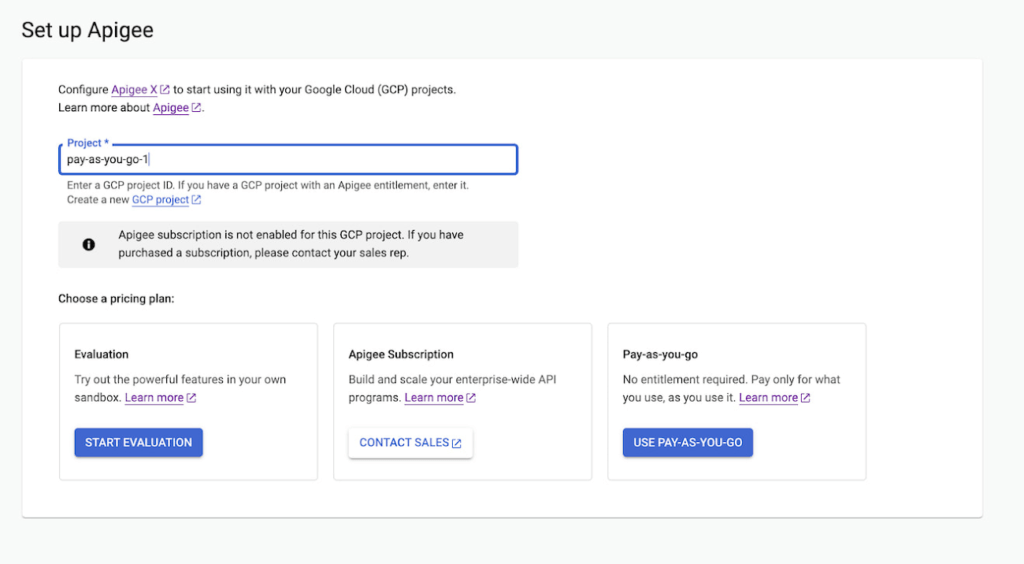
Start small, but powerful with Pay-as-you-go pricing
The new Pay-as-you-go pricing model offers flexibility for organizations to:
- Unlock the value of Apigee with no upfront commitment: Get up and running quickly without any upfront purchasing or commitment
- Maintain flexibility and control in costs: Adapt to ever-changing needs whilst maintaining low costs. You can continue to automatically scale with Pay-as-you-go or switch to Subscription tiers based on your usage
- Provide freedom to experiment: Every API management use case is different and with Pay-as-you-go you can experiment with new use cases by unlocking value provided by Apigee without a long term commitment
Pay-as-you-go pricing works just like the rest of your Google Cloud bills, allowing you to get started without any license commitment or upfront purchasing. As part of the Pay-as-you-go pricing model, you will only be charged based on your consumption of
- Apigee gateway nodes: You will be charged on your API traffic based on the number of Apigee gateway nodes (a unit of environment that processes API traffic) used per minute. Any nodes that you provision would be charged every minute and billed for a minimum of one minute.
- API analytics: You will be charged for the total number of API requests analyzed per month. API requests, whether they are successful or not, are processed by Apigee analytics. Analytics data is preserved for three months.
- Networking usage: You will be charged on the networking (such as IP address, network egress, forwarding rules etc.,) based on usage
When is Pay-as-you-go pricing right for me?
Apigee offers three different pricing models
- Evaluation plan to access Apigee’s capabilities at no cost for 60 days
- Subscription plans across Standard, Enterprise or Enterprise plus based on your predictable but high volume API needs
- Pay-as-you-go without any startup costs
Subscription plans are ideal for use cases with predictable workloads for a given time period, whereas Pay-as-you-go pricing is ideal if you are starting small with a high value workload. Here are a few use cases where organizations would choose Pay-as-you-go if they want to:
- Establish usage patterns before choosing a Subscription model
- Evolve their API program by starting with high value and low volume API use cases
- Manage and protect your applications build on Google cloud infrastructure
- Migrate or modernize your services gradually without disruption
Next steps
Every organization is increasingly relying on APIs to build new applications, adopt modern architectures or create new experiences. In such transformation journeys, Apigee’s Pay-as-you-go pricing will provide flexibility for organizations to start small and scale seamlessly with their API management needs.
- To get started with Apigee’s Pay-as-you-go pricing go to console or try it for free here
Check out our documentation and pricing calculator for further details on Apigee’s Pay-as-you-go pricing for API management. For comparison and other information, take a look at our pricing page.
Accelerate Developer Productivity with Google Workspace

5757
Of your peers have already read this article.
3:30 Minutes
The most insightful time you'll spend today!
The software development process requires complex, cross-functional collaboration while continuously improving products and services. Our customers who build software say that they value Google Workspace for its ability to drive innovation and collaboration throughout the entire software development life cycle. Developers can hold standups and scrums in Google Chat, Meet, and Spaces, create and collaborate on requirements documentation in Google Docs and Sheets, build team presentations in Google Slides, and manage their focus time and availability with Google Calendar.
Development teams also use many other tools to get work done, like tracking issues and tasks in Atlassian’s Jira, managing workloads with Asana, and incident management in PagerDuty. One of the benefits of Google Workspace is that it’s an open platform tailored to improve the performance of your tools by seamlessly integrating them together. We’re constantly expanding our ecosystem and improving Google Workspace, giving you the power to push your software development even further.
Make software development more agile
Google Workspace gives you real-time visibility into project progress and decisions to help you ship quality code fast and stay connected with your stakeholders, all without switching tools and tabs. By leveraging applications from our partners, you can pull valuable information out of silos, making collaborating on requirements, code reviews, bug triage, deployment updates, and monitoring operations easy for the whole team. This allows your teams to stay focused on their priorities while keeping everyone aligned, ensuring collaborators are always in the loop.
Plan and execute together
When combined with integrations, Google Workspace makes the software development planning process more collaborative and efficient. For example, many organizations use Asana—a leading work management platform—to coordinate and manage everything from daily tasks to cross-functional strategic initiatives. To make the experience more seamless, Asana built integrations so users can always have access to their tasks and projects with Google Drive, Gmail, and Chat. With these integrations for Google Workspace, you can turn your conversations into action and create new tasks in Asana—all without leaving Google Workspace.
“We’ve seen exceptional, heavy adoption of tasks being created from within the Gmail add-on. Our customers and community have also shown very strong interest in future development work, which is something we’ll continue to prioritize.” Strand Sylvester, Product Manager, Asana
To date, users have installed the Asana for Gmail add-on over 2.5 million times, as well as over 3.8 million installs of the Asana for Google Workspace add-on for Google Drive.

Start coding quickly
Google Workspace makes it easy for product managers, UX designers, and engineers to agree on what they’re building and why. By bringing all stakeholders, decisions, and requirements into one place—whether it’s a Gmail or Google Chat conversation, or a document in Google Docs, Sheets, or Slides—Google Workspace removes friction, helping your teams finalize product specifications and get started right away.
Integrations like GitHub for Google Chat make the entire development process fit easily into a developer’s workflow. With this integration, teams can quickly push new commits, make pull requests, do code reviews, and provide real-time feedback that improves the quality of their code—all from Google Chat.

Speed up testing
Integrations like Jira for Google Chat accelerate the entire QA process in the development workflow. The app acts as a team member in the conversation, sending new issues and contextual updates as they are reported to improve the quality of your code and keep everyone informed on your Jira projects.

Ship code faster
Developers use Jenkins—a popular open-source continuous integration and continuous delivery tool—to build and test products continuously. Along with other cloud-native tools, Jenkins supports strong DevOps practices by letting you continuously integrate changes into the software build.
With Jenkins for Google Chat, development and operations teams can connect into their Jenkins pipeline and stay up to date by receiving software build notifications directly in Google Chat.

Proactively monitor your services
Improving the customer experience requires capturing and monitoring data sources to improve application and infrastructure observability. Google Workspace supports DevOps teams and organizations by helping stakeholders collaborate and troubleshoot more effectively. When you integrate Datadog with Google Chat, monitoring data becomes part of your team’s discussion, and you can efficiently collaborate to resolve issues as soon as they arise.
The integration makes it easy to start a discussion with all the relevant teams by sharing a snapshot of a graph in any of your Chat spaces. When an alert notification is triggered, it allows you to notify each Chat space independently, precisely targeting your communication to the right teams.

Improve service reliability
Orchestrating business-wide responses to interruptions is a cross-functional effort. When revenue and brand reputation depends on customer satisfaction, it’s important to proactively manage service-impacting events. Google Workspace supports response teams by ensuring that urgent alerts reach the right people by providing teams with a central space to discover incidents, find the root cause, and resolve them quickly.
PagerDuty for Google Chat empowers developers, DevOps, IT operations, and business leaders to prevent and resolve business-impacting incidents for an exceptional customer experience—all from Google Chat. See and share details with link previews, and perform actions by creating or updating incidents. By keeping all conversations in a central space, new responders can get up to speed and solve issues faster without interrupting others.

Accelerate developer productivity
Integrating your DevOps tools with Google Workspace allows your development teams to centralize their work, stay focused on what’s important—like managing their work—build code quickly, ship quality products, and communicate better during service impacting incidents. For more apps and solutions that help centralize your work so you and your teams can connect, create, and get things done, check out Google Workspace Marketplace, where you’ll find more than 5,300 public applications that integrate directly into Google Workspace.
Secret Manager: Keeping Your Organization’s Secrets Safer!

3281
Of your peers have already read this article.
2:00 Minutes
The most insightful time you'll spend today!
Secret Manager is a Google Cloud service that provides a secure and convenient way to store API keys, passwords, certificates, and other sensitive data. It is the central place and single source of truth to manage, access, and audit secrets across Google Cloud. Since its launch, Secret Manager has helped secure millions of workloads and continues to provide industry-first features like replication policies and support for VPC perimeters. This blog post explores new Secret Manager capabilities and integrations that will help keep your secrets safer.
New tier, free of charge
No, you’re not dreaming – Secret Manager now has a tier that is free of charge! With this tier, each month per billing account you can have up to:
- 6 secret versions
- 3 rotation events
- 10,000 API calls
This enables you to experience the value of Secret Manager with minimal financial risk and pairs nicely with existing services that offer a free tier like Cloud Run and Cloud Functions. For existing Secret Manager customers, this change will go into effect next billing cycle. Learn more about the Secret Manager free tier in the documentation.
Increased SLA
To meet the growing availability and reliability requirements of our customers, the Secret Manager SLA is now 99.95%! With this update, Secret Manager guarantees that all valid requests will succeed 99.95% of the time. This means you can depend on Secret Manager for even your most critical workloads. Additional details are available in the updated Secret Manager SLA.
Geo-expansion
In addition to the free tier and increased SLA, Secret Manager is now available in all public Google Cloud regions! With Secret Manager’s replication policies, you can choose the specific regions in which to replicate your secret, which means you can store secret payloads in geographical proximity to your workloads or users to reduce latency. This is also very useful if you have legal or regulatory requirements to store data in a particular locality. For more information, check out the list of Secret Manager locations in the documentation.
Compliance certifications
For customers wishing to use Secret Manager to store and process regulated data, Secret Manager is validated for compliance use cases including ISO 27001, ISO 27017, ISO 27018, SOC 1, SOC 2, SOC 3, PCI DSS, and HIPAA. Combined with the increased SLA and geographical availability, this makes Secret Manager suitable for use with regulated workloads.
Customer-Managed Encryption Keys (CMEK)
Secret Manager has always encrypted payloads in transit with TLS and at rest with AES-256. For customers that want additional control over the keys used to encrypt their secret payloads, Secret Manager now supports Customer-Managed Encryption Keys (CMEK). Secret Manager CMEK supports software-backed keys via Cloud KMS, hardware-backed keys via Cloud HSM, and even externally-managed keys via Cloud EKM. Learn how to enable CMEK support for Secret Manager in our tutorial.
Expiration and TTLs
While it was previously possible to expire access to a secret using IAM conditions, the underlying secret would continue to exist. Secret Manager now supports auto-expiring secrets which permanently deletes a secret at a specified timestamp or TTL. Since it is also possible to update a secret’s TTL, services can “lease” a secret and renew their lease on a periodic basis. If the service does not extend the lease by updating the TTL, the secret is automatically deleted.
Expiring secrets can be used in combination with IAM conditions to more safely expire secrets. For more information on expiring secrets and safety measures, see the guide on creating and managing expiring secrets.
Etags and server-side filtering
For customers that create or manage Secret Manager secrets via the API or an SDK, concurrency controls and performance are extremely important. This is why Secret Manager now supports Etags and server-side filtering! Etags help prevent concurrent modifications to the same secret by providing optimistic concurrency controls, while server-side filtering can dramatically reduce payload size and client-side computational overhead. Together, these enable stronger consistency guarantees and performance improvements to your applications. Learn more about Secret Manager Etags and Secret Manager server-side filtering in the documentation.
Code, build, run, deploy, monitor, and orchestrate
Secrets – like API keys, passwords, and certificates – are an integral part of most modern software applications. It is crucial that developers, operators, and security teams are empowered to build, operate, and observe software securely. That is why Secret Manager is now integrated with popular tools and technologies used throughout the application development lifecycle:
- Code – Software engineers can create and access secrets directly from their preferred IDEs with Cloud Code. In VS Code, IntelliJ, or the Cloud Shell Editor, developers can browse secrets and insert code snippets for access secrets, all from the comfort of their local IDE.
- Build – Release engineers can access secrets as part of CI builds using the Cloud Build Secret Manager integration. This could be used, for example, to authenticate to a Docker registry or communicate with the GitHub API. For customers that use other CI systems, there is also a GitHub Action for accessing Secret Manager secrets.
- Run (on serverless) – Developers can mount secrets to be available as environment variables or via the filesystem through the native Cloud Run Secret Manager integration. Since the secrets are resolved in Cloud Run’s control plane, developers can use this integration to avoid a tight coupling between their applications and Secret Manager to enable hybrid cloud deployments or better local development experiences.
- Run (on Kubernetes) – Developers can mount secrets from GKE, Anthos, or any Kubernetes cluster using the Secret Manager CSI driver. This vendor-agnostic driver exposes secrets via environment variables or the filesystem and enables hybrid cloud deployments using the same interface as other public cloud providers and HashiCorp Vault.
- Deploy – To complement the existing Secret Manager Terraform integration, operators can now manage Secret Manager via Kubernetes Config Connector (KCC). KCC allows operators to manage Google Cloud resources through Kubernetes and the familiar Kubernetes APIs.
- Monitor – With the Secret Manager Cloud Asset Inventory (CAIS) integration, security teams can understand secret usage across specific projects, folders, or the entire organization.
- Orchestrate – Secret Manager Event Notifications enable DevOps and security teams to subscribe to Pub/Sub topics for when secrets or secret versions are changed. This enables customers to create deeply-integrated workflows, such as creating a ServiceNow ticket when a new secret version is added. Additionally, Secret Manager Rotation Scheduling enables DevOps teams to build automatic rotation flows like the ones described in the rotation guide.
Best practices
The Secret Manager best practices guide ensures customers get the maximum security benefits from Secret Manager. Security is non-binary, and this guide covers nuanced topics like access controls, coding practices, and secret administration. While not an exhaustive list, the Secret Manager best practices guide answers some of the most common questions and concerns around using Secret Manager in production deployments.
Towards seamless security
Secrets management is an important part of every organization’s security toolkit. With Secret Manager, you can easily manage, audit, and access secrets like API keys and credentials across Google Cloud, Anthos, and on-premises. These new features and integrations make it easy to adopt Secret Manager whether you are a hobbyist working on a side project or a large enterprise with thousands of employees.
To get started, check out the Secret Manager documentation.
More Relevant Stories for Your Company

How APIs Help National Bank of Pakistan Modernize the Banking Experience
NBP, Pakistan’s largest government-owned bank, serves private and commercial customers and also acts as the government treasury bank. This means that it handles all government transactions—including disbursements and cash collection. In the past, every government transaction had to be handled physically through the NBP branch network. But in a populous

Seven Steps to Making DevOps a Reality
When it comes to creating a business that can thrive in the digital age, the benefits of DevOps are clear. In a recent survey sponsored by Google Cloud, Harvard Business Review Analytic Services found that about two-thirds of the respondents who use DevOps have seen benefits that impact their bottom line, including

Don’t Just Move to the Cloud, Modernize With Google Cloud
Our customers tell us they don’t just want to migrate their applications from point A to point B, they want to modernize their applications with cloud-native technologies and techniques, wherever those applications may be. Today, we’re excited to tell you about a variety of new customers that are using Anthos to transform

Reference Guide to Get You Started with Development on GKE
Getting started with Kubernetes is often harder than it needs to be. While working with a cluster “from scratch” can be a great learning exercise or a good solution for some highly specialized workloads, often the details of cluster management can be made easier by utilizing a managed service offering. Google Kubernetes Engine (GKE)
