





Don’t Just Move to the Cloud, Modernize With Google Cloud

3499
Of your peers have already read this article.
2:00 Minutes
The most insightful time you'll spend today!
Our customers tell us they don’t just want to migrate their applications from point A to point B, they want to modernize their applications with cloud-native technologies and techniques, wherever those applications may be.
Today, we’re excited to tell you about a variety of new customers that are using Anthos to transform their application portfolio, as well as new cloud migration, API management, and application development offerings:
- New customers leveraging Anthos for a variety of on-prem, cloud and edge use cases
- The general availability of Migrate for Anthos
- Apigee hybrid in general availability
- The general availability of Cloud Code
Accelerating app modernization with Anthos
Anthos was the first open app modernization platform to offer a unified control plane and service delivery across diverse cloud environments—managed cloud, on-premises and edge. Since it became generally available in the spring, organizations across a variety of industries and geographies have turned to Anthos to bring the benefits of cloud, containers and microservices to their applications.
According to the findings from Forrester’s Total Economic Impact study, customers adopting Anthos have seen up to 5x return on investment based on the savings from ongoing license and support costs, and the incremental savings from operations and developer productivity. For one customer in the financial services industry, rolling out new features and updates to their core banking application used to take at least a quarter. Now with Anthos, they were able to eliminate months long development and release cycles, and roll out on a weekly basis. That’s a 13x improvement on time to market.
This week, several new European Anthos customers will take the stage at Next UK to talk about how they’re using Anthos to transform their IT operations.
Kaeser Kompressoren SE of Coburg, Germany, is a provider of compressed air products and services. The company needed a consistent platform to deploy and manage existing on-prem SAP workloads, like SAP Data Hub, and also wanted to be able to tap into other services running in Google Cloud to get more value from those environments.
“Application modernization is enabling business innovation for Kaeser,” said Falko Lameter, CIO. “To gain better insights from data, we knew we needed to incorporate advanced machine learning and data analytics in all our applications. We chose Google Cloud’s Anthos because it offered the flexibility to incrementally modernize our legacy application on-premises without business disruption, while allowing us to run other applications on Anthos in Google Cloud and take advantage of its managed data analytics and ML/AI services.”
Then there’s Denizbank. Based in Turkey, Denizbank provides a variety of commercial banking services, and established the first Digital Banking Department in Turkey in 2012. Denizbank turned to Anthos for an open application modernization platform to help it develop its next-generation mobile banking applications.
“We operate in 11 different countries and have to comply with various regulatory requirements like data locality and sovereignty, which mandates some or all applications to reside on premises in certain countries, while the rest of the apps can move to the cloud in other countries,” said Dilek Duman, COO of DenizBank. “We chose Google Cloud’s Anthos for its flexibility to modernize our existing application investments with ease, and to deliver AI/ML powered software faster while improving operational security and governance. Anthos gives us the ability to have a unified management view of our hybrid deployments, giving us a consistent platform to run our banking workloads across environments.”
Anthos is even starting to be deployed to edge locations, where, thanks to its 100% software-based design, it can run on any number of hardware form factors. We’re in advanced discussions with customers in telecommunications, retail, manufacturing and entertainment about using Anthos for edge use cases, as well as with global hardware OEMs.
Move and modernize with Migrate for Anthos
In addition to leveraging cloud technology for their on-premises environments with Anthos, customers also want to simultaneously migrate to the cloud and modernize with containers. That’s why we’re happy to announce the general availability of Migrate for Anthos, which provides a fast, low-friction path to convert physical servers or virtual machines from a variety of sources (on-prem, Amazon AWS, Microsoft Azure, or Google Compute Engine) directly into containers in Anthos GKE.
Migrate for Anthos makes it easy to modernize your applications without a lot of manual effort or specialized training. After upgrading your on-prem systems to containers with Migrate for Anthos, you’ll benefit from a reduction in OS-level management and maintenance, more efficient resource utilization, and easy integration with Google Cloud services for data analytics, AI and ML, and more.
DevFactory aims to offload repetitive tasks in software development so that dev teams can focus on coding and productivity. As advocates for optimization through containers, they found Migrate for Anthos a key way to help deliver on their goals:
“We usually see less than 1% resource utilization in data centers. Migrate for Anthos is a remarkable tool that allows us to migrate data center workloads to the cloud in a few simple steps,” said Rahul Subramaniam, CEO, Devfactory. “By automatically converting servers and virtual machines into containers with Migrate for Anthos, we get better resource utilization and dramatically reduced costs along with managed infrastructure in the end state, which makes this a very exciting and much-needed solution.”
Migrate for Anthos is available at no additional cost, and can be used with or without an Anthos subscription.
API-first, everywhere, with Apigee hybrid
To drive modernization and innovation, enterprises are increasingly adopting API-first approaches to connecting services across hybrid and multi-cloud environments. To address the need for hybrid API management, we’re announcing the general availability of Apigee hybrid, giving you the flexibility to deploy your API runtimes in a hybrid environment, while using cloud-based Apigee capabilities such as developer portals, API monitoring, and analytics. Apigee hybrid can be deployed as a workload on Anthos, giving you the benefits of an integrated Google Cloud stack, with Anthos’ automation and security benefits.
Gap Inc. uses Apigee to publish, secure, and analyze APIs and easily onboard the development teams working with those APIs. Apigee hybrid will help Gap Inc. overcome the traditional tradeoffs between on-premises and cloud, providing the best of both worlds.
“With Apigee hybrid, we can have an easy to manage, localized runtime for scenarios where latency or data sensitivity require it. At the same time, we can continue to enjoy all the benefits of Apigee such as Apigee’s developer portal and its rich API-lifecycle management capabilities,” said Patrick McMichael, Enterprise Architect at Gap Inc.
Simplifying the developer experience
Google Cloud application development tools are designed to help you simplify creating apps for containers and Kubernetes, incorporate security and compliance into your pipelines, and scale up or down depending on demand, so you only pay for what you use.
With these goals in mind, last week, we announced the general availability of Cloud Run and Cloud Run for Anthos. Cloud Run is a managed compute platform on Google Cloud that lets you run serverless containers on on a fully managed environment or on Anthos. With Cloud Run fully managed, you can easily deploy and run stateless containers written in any language, and enjoy serverless benefits such as automatic scale up and scale down and pay-for-use—without having to manage the underlying infrastructure.
Cloud Run for Anthos, meanwhile, brings those same serverless developer experience to Anthos managed clusters, giving developers access to a modern, serverless compute platform while their organization modernizes its on-prem environment with Kubernetes.
Easier Kubernetes development with Cloud Code
Today, we’re excited to announce the general availability of another important member of the Google Cloud application development stack: Cloud Code, which lets developers write, debug and deploy code to Google Cloud or any Kubernetes cluster through extensions to popular Integrated Developer Environments (IDEs) such as Visual Studio Code and IntelliJ.
Developers are most productive while working in their favorite IDE. By embracing developers’ existing workflow and tools, Cloud Code makes working with Kubernetes feel like you are working with a local application, while preserving the investment you’ve made to configure your tools to your own specific needs. Cloud Code dramatically simplifies the creation and maintenance of Kubernetes applications.
In addition, Cloud Code speeds up development against Kubernetes by extending the edit-debug-review “inner loop” to the cloud. You get rapid feedback on your changes, ensuring that they’re of high quality. And when it comes to moving code to the production environment, Cloud Code supports popular continuous integration and delivery (CI/CD) tools like Cloud Build.
Finally, with Cloud Code, diagnosing issues does not require a deep understanding of Kubernetes, thanks to connected debuggers and cluster-wide logging that help you address issues all from the context of your favorite tool.
Toward modern, efficient applications
Application modernization means a lot of things to a lot of people. Depending on your environment, it can mean updating VMs to containers and Kubernetes, it can mean moving them to the cloud, or it can mean distributing them to edge locations and unifying workloads with consistent API and service management. For others, application modernization means using cloud-native tools and concepts like serverless and CI/CD. Whatever your definition, we can help you realize your business and modernization goals, achieving greater agility while improving overall governance.
Google Announces Cloud Functions’ Native Integration with Secret Manager

3280
Of your peers have already read this article.
2:00 Minutes
The most insightful time you'll spend today!
Google Cloud Functions provides a simple and intuitive developer experience to execute code from Google Cloud, Firebase, Google Assistant, or any web, mobile, or backend application. Oftentimes that code needs secrets—like API keys, passwords, or certificates—to authenticate to or invoke upstream APIs and services.
While Google Secret Manager is a fully-managed, secure, and convenient storage system for such secrets, developers have historically leveraged environment variables or the filesystem for managing secrets in Cloud Functions. This was largely because integrating with Secret Manager required developers to write custom code… until now. We listened to customer feedback and today we are announcing Cloud Functions has a native integration with Secret Manager!
This native integration has many key benefits including:
- Zero required code changes. Cloud functions that already consume secrets via environment variables or files bundled with the source upload simply require an additional flag during deployment. The Cloud Functions service resolves and injects the secrets at runtime and the plaintext values are only visible inside the process.
- Easy environment separation. It’s easy to use the same codebase across multiple environments, e.g., dev, staging, and prod, because the secrets are decoupled from the code and are resolved at runtime.
- Supports the 12-factor app pattern. Because secrets can be injected into environment variables at runtime, the native integration supports the 12-factor pattern while providing stronger security guarantees.
- Centralized secret storage, access, and auditing. Leveraging Secret Manager as the centralized secrets management solution enables easy management of access controls, auditing, and access logs.
Cloud Functions’ native integration with Secret Manager is available in preview to all Google Cloud customers today. Let’s take a deeper dive into this new integration.
Example
Suppose the following cloud function invoked via HTTP uses a secret token to invoke an upstream API:
const https = require('https');const token = process.env.TOKEN;exports.secretDemo = (req, res) => {https.get(`https://upstream-api.example.com?token=${token}`, (innerRes) => {innerRes.on('end', () => { res.send('OK') });}).on('error', (err) => {res.send(`Error: ${err}`);});}
Without Cloud Functions’ native integration with Secret Manager, this function is deployed via:
$ gcloud functions deploy "secretDemo" \--runtime "nodejs14" \--trigger-http \--allow-unauthenticated \--set-env-vars "TOKEN=abcd1234"
This approach has a number of drawbacks, the biggest of which being that anyone with viewer permissions on the Google Cloud project can see the environment variables set on a cloud function.
To improve the security of this code, migrate the secret to Secret Manager in the same project:
$ gcloud secrets create "token" \--replication-policy "automatic" \--data-file - <<< "abcd1234"
Finally, without changing any code in the function re-deploy with slightly different flags:
$ gcloud beta functions deploy "secretDemo" \--runtime "nodejs14" \--trigger-http \--allow-unauthenticated \--set-secrets "TOKEN=my_token:latest"
It’s truly that easy to migrate from hard-coded secrets to using secure secret storage with Secret Manager! To add even more layers of security, consider running each cloud function with a dedicated service account and practice the principle of least privilege. Learn more in the Secret Manager Best Practices guide.
Making security easy
Security and proper secrets management are core pillars of modern software development, and we’re excited to provide customers a way to improve the security of their cloud functions. To learn more about the new native integration, check out the Cloud Functions documentation. You can also learn more about Cloud Functions or learn more about Secret Manager.
3 Ways To Reduce App Downtime With Google Cloud’s API Monitoring Tools

3083
Of your peers have already read this article.
2:30 Minutes
The most insightful time you'll spend today!
How many times have you closed an application when you encounter the “spinning wheel of death” (a melodramatic way of saying an application that is taking too long to load)? In today’s digital economy where many organizations rely on applications as a primary source of revenue, that spinning wheel of death (or poor application performance) can mean lost users or revenue. And just about every modern application relies on APIs as the nervous system across distributed systems, third-party services and microservice architectures. While meeting the need for rapid release cycles and frequent API updates, it is also imperative for IT teams to ensure that your APIs are meeting SLOs, performance requirements, and proactively mitigating issues.
Why are synthetic monitoring tools not enough?
When thousands or even millions of users are making multiple requests to your APIs, just relying on synthetic monitoring tools (that rely on sampling or limited API availability information) is not enough for precision diagnoses or useful forensics. At the same time, monitoring every single aspect just increases your overhead and mean time to diagnosis. Apropos, API monitoring has become absolutely critical — and a fusion of art and science — for operations teams to make sure all APIs are running and performing as intended. If you are worried about monitoring blind spots or overheads, let us look at 3 key practices you can follow to stop dreading your sev1 alerts.
#1 Prioritize alerts for critical events requiring immediate investigation
- Ask any engineer on-call for a critical service and they will tell you about the overheads created by incorrectly prioritized alerts. For example let us imagine a distributed application with 20 APIs. Even if you set up basic alert monitors across latency, error, and traffic for these APIs, you end up monitoring and maintaining 60 alert definitions – which is a lot. To balance avoiding monitoring blindspots and alert fatigue at the same time, operations teams must develop a clear understanding of all events and prioritize configuring alerts for events supporting critical traffic.
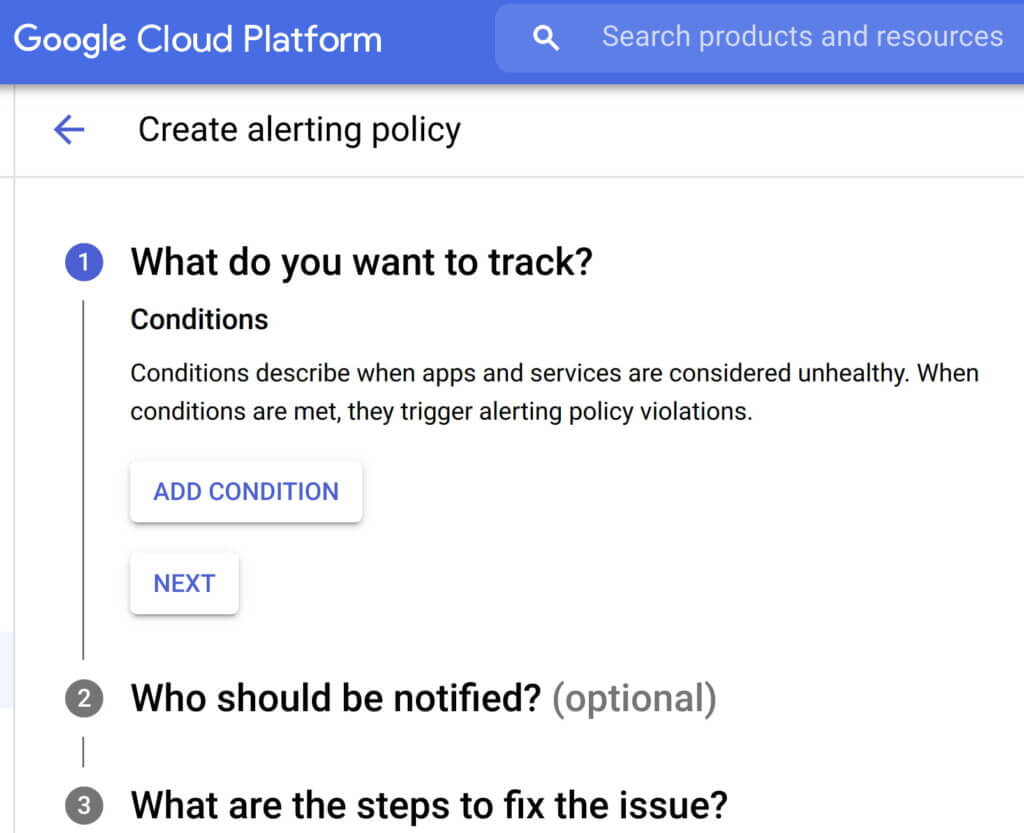
- Consider quality over quantity while defining new alert conditions where each new condition is urgent, actionable, and actively or imminently user-visible. Every alert condition created should also contain intelligence that requires active engagement from a user as opposed to a mere robotic response. Apigee’s API monitoring allows creation of alert conditions based on metrics or logs while providing actionable information (Ex: status code, rate etc.,) and playbooks for diagnosi
- In today’s multilayered systems, one team’s symptom (“what’s broken?”) is another downstream system’s cause (“Why?”). Even if some events are not suitable for actionable alerts, a failure needs to create an informational broadcast to a downstream system to mitigate the impact of the upstream dependency. In such cases, investing in automating alerts, grouping multiple incidents in notification channels, and incident tracking. For example, Apigee lets you integrate and group your alert notifications in channels like Slack, Pagerduty, webhooks etc.,
- Modern production systems are ever-evolving where an alert that’s currently rare might become frequent and automatable. Analogous to ticket backlog grooming, alert policies need to be reviewed periodically to make sure new conditions are identified and existing alerts are refined with new thresholds, prioritization and correlation. Controls like Advanced API Ops leverage AI and ML to detect anomalous traffic differentiated from random fluctuations to help define accurate alert definitions
Check out some examples of alerts here
#2 Isolate problem areas quickly with dashboards
Google’s Site Reliability Engineering book presents the case for efficient diagnosis by building dashboards that answer basic questions about every service, normally including some form of the four golden signals — latency, traffic, errors and saturation. But at the same time, capturing just these golden metrics at different levels of granularity can quickly add up. Like all software systems, monitoring can become an endless pit of complexity, complicated to change and a burden to maintain. In the same book, the most effective direction to create a well-functioning standalone system is to collect and aggregate basic metrics, paired with alerting and dashboards.
If you are running a large scale API program with a dedicated team to monitor your APIs, you can leverage the out-of-the-box monitoring dashboards in your API Management solution (like Apigee’s API monitoring) to gather real-time insights into your API performance, availability, latency, and errors. In other cases, you can use solutions like Cloud Monitoring that can provide visibility across your full application stack where individual metrics, events, and metadata can be visualized in a rich query language for rapid analysis. Leveraging a single system for your application stack provides observability in context and can reduce your time spent navigating between systems (Apigee customers can use Cloud Monitoring by default or integrate with other systems using Cloud Monitoring API)
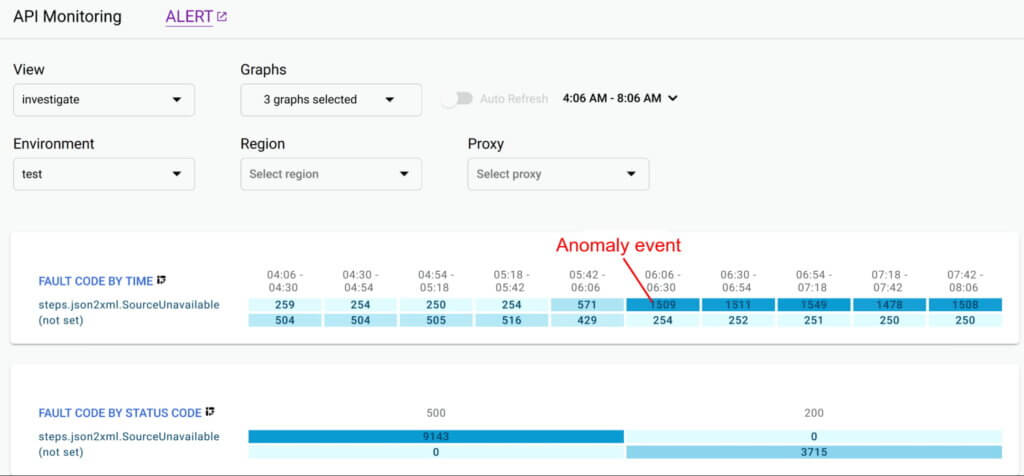
Even after you collect and aggregate the metrics, it is important to have impactful data visualizations to quickly understand the issue and identify correlations during diagnosis. In data visualizations as well, focusing on too many dashboards creates a steep learning curve and increases mean time for every diagnosis. For example, Apigee API Monitoring provides the following visualizations as a standard to balance simplicity and efficiency:
- Timeline view to diagnose traffic (in 1 min intervals), error rates (4xx and 5xx across traffic) and latencies (50th, 90th, 95th and 99th percentiles)
- Pivot tables of metrics and attributes for all API traffic, to help compare activity across different metrics
- Treemaps of recent API traffic by proxy to get a snapshot of incidents, error rates and latencies
#3 Incorporate distributed tracing into your end to end observability strategy
Modern application development accelerated the adoption of technologies and practices like cloud, containers, APIs, microservice architectures, DevOps, SRE etc. While this increases release velocity, it also introduces complexity and more points of failure in an application stack. For example, a slow response to a customer request spans across multiple micro services owned (and monitored) by various teams who might not observe any individual performance issues. Without an end-to-end contextual view of a request, it is nearly impossible to isolate the point of high latency.
In such cases, distributed tracing is the best way for DevOps, Operations and SREs to get answers to questions such as service health, root cause of defects, or performance bottlenecks in a distributed system. Organizations should invest in instrumenting their distributed applications using open source standards such as OpenCensus and Zipkin. Using tools like Cloud Trace with a broad platform, language and environment support can help easily ingest data from any source — open instrumentation or proprietary agents.
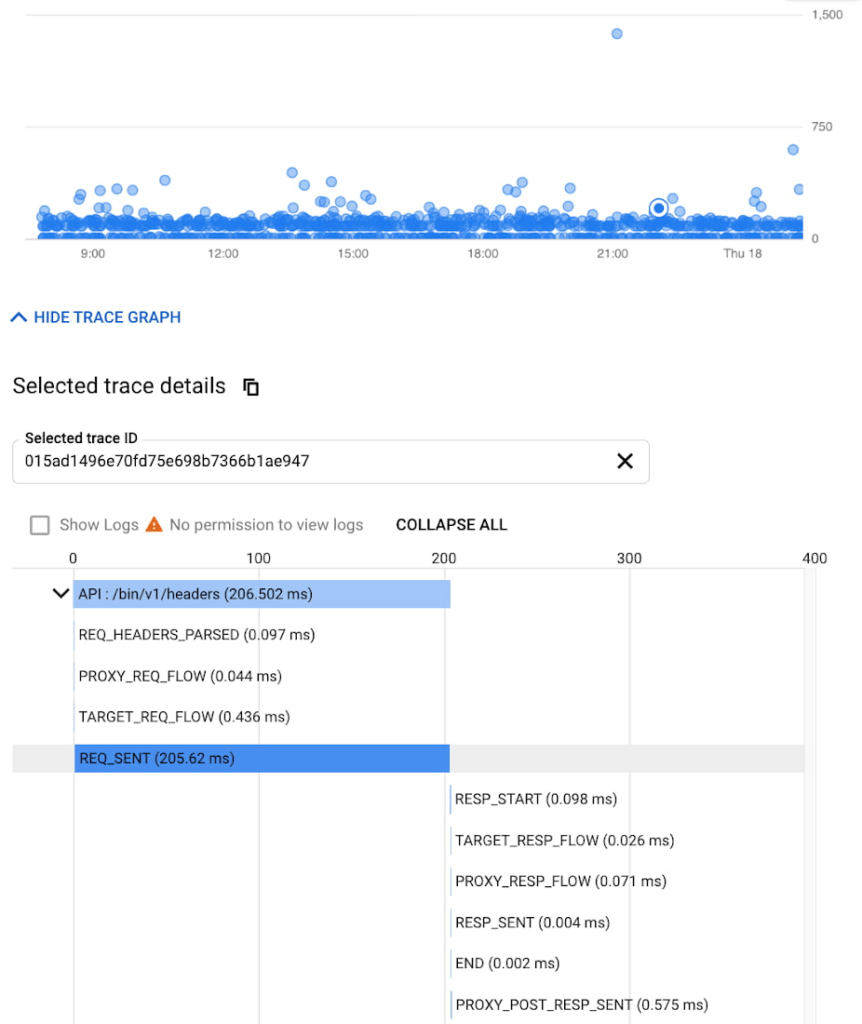
While distributed tracing helps in narrowing the issue to a given service, in some cases you might need further context to pinpoint the root cause. For example: Even if you have isolated the source of a performance issue to an API proxy, it is still a tedious process to identify the right bottleneck among multiple policies being executed. Tools like Apigee Debug enable you to zoom into an API proxy flow and probe the details of each step to see internal details like policy executions, performance issues, and routing etc.,
As soon as a request starts to span across a handful of microservices, tools like distributed tracing and Debug will become crucial elements of your monitoring strategy. When every service in a distributed system emits a trace, the amount of data can quickly become overwhelming leading to the classic “needle in the haystack” problem. In such scenarios, it becomes vital to ask the right questions and choose between head-based sampling (randomly selecting which traces will be sampled for analysis) and tail-based sampling (observe all trace information and sample the traces with unusual latency or errors) based on application complexity
Implement effective API monitoring in Apigee
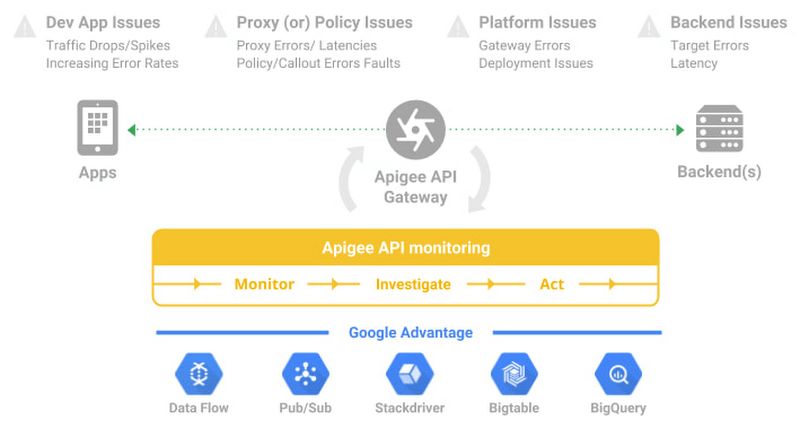
Apigee’s API monitoring (based on metrics exposed by the internals of the system) capabilities work with your existing monitoring infrastructure to help reduce mean time to diagnosis and increase application resiliency. Specifically, operations teams can leverage
- Monitoring dashboards to gain in-depth insights into API availability and performance metrics.
- Debug to precisely diagnose with deeper insights into an API proxy flow without toggling multiple tools.
- Alerts and notifications to gather contextual Insights, facilitate customization, and grouping with first class integrations to various tools (like Slack, PagerDuty, email and support for webhooks).
- Best of Google technologies such as Data Flow, Pub/Sub, Stackdriver, Bigtable and BigQuery to handle massive volumes and complex metrics at scale
Using Apigee’s API monitoring will help you maintain high application resiliency with comprehensive controls to reduce mean time to diagnosis and resolution. Get started with Apigee today or explore Apigee’s API monitoring for free here. Check out our documentation for additional information on API monitoring.
Report on API-led Digital Transformations in 2020 and the Future

6814
Of your peers have already read this article.
1:30 Minutes
The most insightful time you'll spend today!
In 2020, many businesses across industries turned their focus and investments towards digital strategies. APIs being an integral part of every organization’s digital disruption, will grow in relevance throughout 2021. Read the report to gain more insights on driving API-led digital transformations and in-depth analysis of Google Cloud’s Apigee API Management Platform usage data, case studies and third-party surveys conducted with tech leaders.
How to Modernize Your Apps with Migrate to Anthos

3395
Of your peers have already read this article.
3:10 Minutes
The most insightful time you'll spend today!
In a perfect cloud world, you would host all your applications in containers running on Kubernetes and Istio, benefitting from the portability and improved resource utilization of containers, plus a robust orchestration platform with advanced application management, networking, and security functionality. This is easy to do if you’re developing a new application, but it can be hard for existing applications to take advantage of those capabilities.
Many of the applications that you may want to move to the cloud have been around a long time, and you may not have the application-specific knowledge that would be required to rewrite them to be more cloud-native—or it would be incredibly time-consuming to do so.
Another option is to lift-and-shift to a virtual machine (VM) hosting platform like Compute Engine, but that means you still need to maintain the VMs. Even if you’re not able to fully modernize an existing app, it would still be great to get some of the benefits of containers and Kubernetes.
What is Migrate for Anthos?
Enter Migrate for Anthos, a fast and easy way to modernize your existing applications with a service that encapsulates them in a container. Moving your physical servers or existing VMs into Kubernetes containers gives you crucial portability and resource utilization benefits without having to rewrite the underlying application.
Since Migrate for Anthos is built for Google Kubernetes Engine (GKE), you also automatically capture the scaling and flexibility benefits of a managed Kubernetes environment in the cloud. Migrate for Anthos recently became generally available.
Converting an application with Migrate for Anthos happens in two phases. First, it creates a generic container wrapper around your application that makes it seem like it is still running in a full VM environment. Then, you launch Migrate for Anthos software on your Kubernetes cluster that runs the containerized application.
You can find more details about this in the documentation and in our blog post: Migrating from Compute Engine to Kubernetes Engine with Migrate for Anthos.
As the name suggests, Migrate for Anthos works with Anthos GKE. However, you can also use Migrate for Anthos with only GKE—all it requires is your application and a GKE cluster running the Migrate for Anthos software.
Getting started with Migrate for Anthos
Migrate for Anthos works with a variety of workloads, but not all. It’s particularly adept at migrating legacy applications, stand-alone applications, and monolithic applications. As you start the modernization process, here are some questions to ask to determine whether to use Migrate for Anthos with your applications:
1. Should this app be in the cloud?
By its nature, the cloud may not be able to support some characteristics of your on-prem environment, such as geography and legal compliance. The best way to find out whether the cloud will work for each of your applications is to plan out a full migration. That will allow you to identify groups of applications that can benefit from cloud offerings such as a global network and ease of resizing resources. After that, try out a proof of concept by testing the apps in the cloud to see if it fits your business needs.
2. Should this app be in Kubernetes?
Containerizing an application simplifies workload administration, improves scalability (both up and down), and increases host utilization. Kubernetes orchestrates the containers and GKE handles node upgrades, while add-ons like Istio let you manage network and security policies independently of your application.
With those advantages, it’s easy to think that containers are always the right way to go, but there are some cases where it may make sense to stick with VMs. Strict hardware requirements, specialized kernel modules, and license constraints may be harder to run with containers, negating their advantages.
3. Should this app migration use Migrate for Anthos?
Migrating your apps or workloads to the cloud isn’t just about shifting where the compute resources run; it’s also an opportunity to modernize them with containers. Using Migrate for Anthos (or Migrate for Compute Engine) gives you the ability to get your workloads in the cloud quickly, with minimal upfront downtime that’s easy to plan for.
However, even if you use the Migrate for Anthos wrapper, your application is still the same application. The benefits of the modern platform may not outweigh a legacy application and a rewrite may be the only way to meet your business needs. There are also some specific services from your VM that may not work with Migrate for Anthos, for example licensing requirements.
Migrate for Anthos can also be the first step in a larger migration effort. Once you’ve migrated the application to GKE, you can gradually break up a monolithic app into microservices by manually rewriting parts. Spreading out the migration effort gets you in the cloud sooner, giving you more time to modernize.
Next steps
A successful modernization starts with creating a full migration plan, testing the workloads, and monitoring them. You can experience the benefits of modernization with Migrate for Anthos by picking a small workload and trying it out for yourself!
Fully-managed-zero-trust Security Solution, Traffic Director Integrated with CA Service

4978
Of your peers have already read this article.
1:30 Minutes
The most insightful time you'll spend today!
We created Traffic Director to bring to you a fully managed service mesh product that includes load balancing, traffic management and service discovery. And now, we’re happy to announce the availability of a fully-managed zero-trust security solution using Traffic Director with Google Kubernetes Engine (GKE) and Certificate Authority (CA) Service.
When platform administrators and security professionals think about modernizing their applications with a forward-looking security posture, they look for “zero-trust” security. This security posture is based on few fundamental blocks:
- A means of allocating and asserting service identity (for example, using X.509 certificates)
- Mutual authentication (mTLS) or server authentication (TLS)
- Encryption for all traffic flows (TLS encryption)
- Authorization checks and minimal privileges
- Infrastructure to make all of the above manageable and reliable
Traffic Director does this by integrating with CA Service, a highly available private CA which issues private certificates expressing service identities, and provides a managed mTLS certificate infrastructure with full certificate lifecycle management. Together, these solve both certificate issuance and CA rotation complexities.
With Traffic Director managing your service-to-service security, you can now enjoy end-to-end encryption, service-level authentication and granular authorization policies for your service mesh.

With this new capability, you can now:
- Implement mutual TLS (mTLS) and TLS between your services, including certificate lifecycle management. Communications within your mesh are authenticated and encrypted.
- Enable identity-based authorization, as well as authorization based on other parameters (such as the request method). These concepts underpin role-based access controls (RBAC) and enable you to take a “least privileges” stance where only authorized services can communicate with each other based on ALLOW/DENY rules.
mTLS is supported whether you’re using Envoy or proxyless gRPC for your service mesh. Authorization support for proxyless gRPC is coming later this year. Check out our documentation to learn more and get started with Envoy or proxyless gRPC.
More Relevant Stories for Your Company

Business Evolution with API Ecosystems
During uncertain times, ecosystem partnerships that leverage APIs have proven to help companies scale and address gaps in their businesses. Apigee customers, like CHAMP Cargosystems, have pursued API-first ecosystem models to enter adjacent markets, create new customer interaction models, and rapidly grow their brand reach and partner ecosystems. As a

Woolaroo App and Vision AI are Helping Users Explore Native Languages
One of the most vibrant elements of culture is the use of native languages and the time-honored tradition of storytelling. Anthropologists and linguists have been vocal on the role that language plays in the preservation of culture and how it contributes to the appreciation of heritage. Unfortunately, of the more

A 100-year Old Business’ Digital Evolution with Apigee API Management
Editor’s note: James Fairweather, chief innovation officer at Pitney Bowes, has played a key role in modernizing the product offerings at this century-old global provider of innovative shipping solutions for businesses of all sizes. In today’s post, he discusses some key challenges the Pitney Bowes team overcame during its digital transformation,

Why Your Company Needs an Enterprise Gearbox
For most established businesses today, the disruptive start-up has emerged as the biggest and most intimidating competition. A start-up's digital prowess and astounding ability to innovate and scale massively in weeks, for what takes conventional businesses quarters, is daunting. How does one compete with that? To play in today’s digitally-connected
