






Pinterest Case: Pinning Its Past, Present, and Future on Cloud Native
READ FULL INTRODOWNLOAD AGAIN3750
Of your peers have already downloaded this article
1:30 Minutes
The most insightful time you'll spend today!
Lending DocAI Shortens Borrowers’ Journey on Roostify

11813
Of your peers have already read this article.
3:00 Minutes
The most insightful time you'll spend today!
The home lending journey entails processing an immense number of documents daily from hundreds of thousands of borrowers. Currently, home lending document processing relies on some outdated digital models and a high dependency on manual labor, resulting in slow processing times and higher origination costs. Scaling a business that sorts through millions of documents daily, while increasing efficacy and accuracy, is no small feat. When it comes to applying for a mortgage loan, consumers expect a digital experience that’s as good as the in-person one. Roostify simplifies the home lending journey for lenders and their customers.
No time to spare: Overcoming document processing challenges with AI
Roostify provides enterprise cloud applications for mortgage and home lenders. In order to empower its customers to deliver a better, more personalized lending experience, they needed to automate and scale their in-house document parsing functionality.
As a key component of its document intelligence service, Roostify is leveraging Google Cloud’s Lending DocAI machine learning platform to automate processing documents required during a home loan application process, such as tax returns or bank statements with multi-language support. This partnership delivers data capture at scale, enabling Roostify customers to automatically identify document types from the uploaded file and to extract relevant entities such as wages, tax liabilities, names, and ID numbers for further processing, and make things move faster in the cumbersome lending process.
Roostify’s solutions leverage Google Cloud’s Lending DocAI, which is built on the recently announced Document AI platform, a unified console for document processing. Customers can easily create and customize all the specialized parsers (e.g., mortgage lending documents and tax returns parsers) on the platform without the need to perform additional data mapping or training. All Google Cloud’s specialized parsers are fine-tuned to achieve industry-leading accuracy, helping customers and partners confidently unlock insights from documents with machine learning. Learn more about the solution from the GA launch blog and the overview video.
Integrating Lending DocAI’s intelligent document processing capabilities into the Roostify platform means more innovation for their customers and tangible results: faster loan processing times, fewer document intake errors, and lower origination costs. Additional support in Google Lending DAI for other languages and more documents like global Know Your Customer (KYC) documents or payroll reports is in the near future.
Full integration of AI solutions
Working together with Roostify’s platform team, we were able to help them solve their document processing challenge through integration of various GCP products such as Lending DocAI (LDAI), Data Loss Prevention (DLP) for redacting sensitive data, BigQuery for data warehousing and analytics, and Firestore for API status. To make it very safe and secure, all data was encrypted end-to-end at Rest and in Transit. LDAI won’t require any training data to process. It is an easy plug and play API.
Here is a sneak peek in the high level deployment architecture for LDAI in Roostify environment:

Here are the steps for processing data:
- Receives document processing request from the client.
- API Function directs requests to the pre-processing service. For Async requests a processing ID is generated and returned to the caller.
- Pre-processing service sends the request for further processing (Long/short PDF conversion), calling other microservices and receives back the responses. Any error in the response received is then sent to the response processing service.
- If the response is synchronous, the pre-processing service directs it to the LDAI Invoker service.
- If the response is asynchronous, the pre-processing service feeds it into the Cloud Pub/Sub service.
- Cloud Pub/Sub service feeds the response back to the LDAI Invoker service.
- LDAI Invoker service routes the request to the Google LDAI API for classification if there are multiple pages in the document.
- Document will be split based on LDAI response and then saved in a GCS bucket for temporary storage.
- LDAI entity interface for single page processing and then LDAI Invoker sends LDAI results to LDAI Response Processing
- If a request is a synchronous request the LDAI Response Processor sends results to the API Function so that it can complete the synchronous call and respond to the rConnect caller.
- If the request is an asynchronous request the LDAI Response Processor will respond to the caller’s webhook and complete the transaction.
- Finally, Data stored in the GCP bucket will be deleted.
All the responses that come from the LDAI API can optionally feed into BigQuery via the Response Processor, after parsing it through Data Loss Prevention (DLP) API to redact the PII/sensitive information. Throughout the processing of both asynchronous and synchronous requests all transactions are logged using Cloud Logging. For asynchronous transactions, the state is maintained throughout the process using Cloud Firestore.
Roostify currently uses this technology to power two different solutions: Roostify Document Intelligence and Roostify Beyond™. Roostify Document Intelligence is a real-time document capture, classification, and data extraction solution built for home lenders. It ingests documents uploaded by borrowers and loan officers, identifies the relevant documents, and extracts and classifies key information. Roostify Document Intelligence is available as a standalone API service to any home lender with any digital lending infrastructure already in place.
Roostify Beyond™ is a robust suite of AI-powered solutions that enables home lenders to create intelligent experiences from start to close. It combines powerful data, insightful analytics, and meaningful visualization to streamline the underwriting process. Roostify Beyond™ is currently available only to Roostify customers as part of an Early Adopter program and will be rolled out to the market later this year.


Through this partnership, Roostify has enabled its customers to adopt a data-first approach to their home lending processes, which will lead to improved user experiences and significantly reduced loan processing times.
Fast track end-to-end deployment with Google Cloud AI Services (AIS)
Google AIS (Professional Services Organization), in collaboration with our partner Quantiphi, helped Roostify deploy this system into production and fast-tracked the development multifold to generate the final business value.
The partnership between Google Cloud and Roostify is just one of the latest examples of how we’re providing AI-powered solutions to solve business problems.

3580
Of your peers have already downloaded this article
2:30 Minutes
The most insightful time you'll spend today!
After undergoing an agile transformation, ING realized it needed a standardized platform to support the work their developers were doing. “Our DevOps teams got empowered to be autonomous,” says Thijs Ebbers, Infrastructure Architect.
“It has benefits, you get all kinds of ideas. But a lot of teams are going to devise the same wheel. Teams started tinkering with Docker, Docker Swarm, Kubernetes, Mesos. Well, it’s not really useful for a company to have one hundred wheels, instead of one good wheel,” Ebbers added.
Using Kubernetes for container orchestration and Docker for containerization, the ING team began building an internal public cloud for its CI/CD pipeline and green-field applications. The pipeline, which has been built on Mesos Marathon, will be migrated onto Kubernetes.
The bank-account management app Yolt in the U.K. (and soon France and Italy) market already is live hosted on a Kubernetes framework. At least two greenfield projects currently on the Kubernetes framework will be going into production later this year. By the end of 2018, the company plans to have converted a number of APIs used in the banking customer experience to cloud-native APIs and host these on the Kubernetes-based platform.
“Cloud native technologies are helping our speed, from getting an application to test to acceptance to production,” says Infrastructure Architect Onno Van der Voort. “If you walk around ING now, you see all these DevOps teams, doing stand-ups, demoing. They try to get new functionality out there really fast.”
Find out how.
3360
Of your peers have already watched this video.
24:40 Minutes
The most insightful time you'll spend today!
A Guide to Anthos: the App Modernization Platform for Hybrid and Multi-cloud Deployments
Anthos gives you a consistent platform for all your application deployments, both legacy as well as cloud native, while offering a service-centric view of all your environments.
You can build enterprise-grade containerized applications faster with managed Kubernetes on cloud and on-premises environments. Create a fast, scalable software delivery pipeline with cloud-native tooling and guidance.
It also helps leverage a programmatic, outcome-focused approach to managing policies for apps across environments, and enable greater awareness and control with a unified view of your services’ health and performance.
Tune in to this brief explainer video for an overview of Anthos, deployment examples, and explore options to get started illustrated through a demo with Bradley Wong, Product Manager at Google Cloud. Learn to make the best first step in your journey of application modernization and gain a clear understanding of the value of Anthos for your hybrid and multi-cloud workloads.
The Latest in Spring Cloud GCP: Upgrading the Sample Bank of Anthos App

1405
Of your peers have already read this article.
3:30 Minutes
The most insightful time you'll spend today!
We’re excited to announce that Spring Cloud GCP version 4.0 is now generally available! In this post, we’ll be describing what the new major version has to offer, and demonstrating the process of using the migration guide on one of our reference architectures, Bank of Anthos.
What’s new?
With this release, Spring Cloud GCP officially supports Spring Boot 3.x. However, this migration involves a number of breaking changes as outlined in the migration guide. The full list of changes made is available on Github, but the one of the most significant differences is that Java 17 is now a minimum requirement.
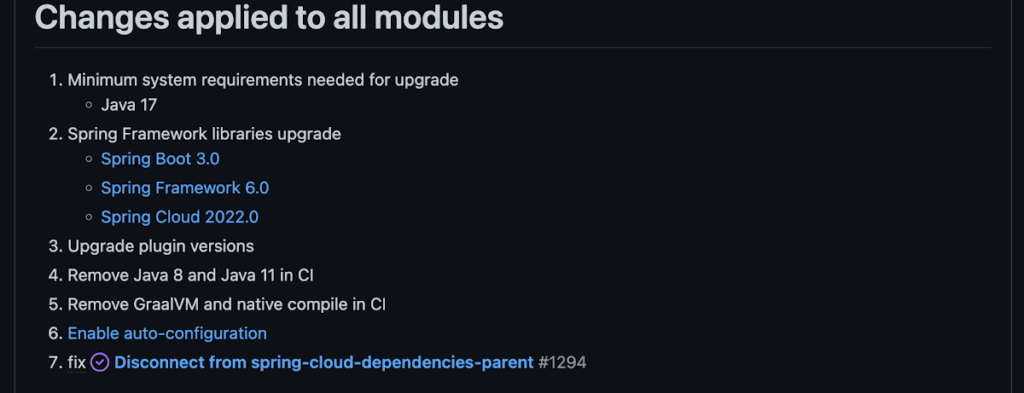
Another notable feature of this release is the addition of starter artifacts – Spring Boot starters for Google Cloud – that provide dependencies and auto-configurations for 80+ Google Client libraries. Just as the name suggests, these starters can serve as helpful starting points when working with a new client library. For now, they’re in preview.
These starters are not included in the BOM by default and need to be added as a dependency to your project before they can be used. For example, if you wanted to get started with Cloud Text-to-Speech, you would include the following:
<dependency>
    <groupId>com.google.cloud</groupId>
    <artifactId>google-cloud-texttospeech-spring-starter</artifactId>
    <version>4.0.0-preview</version>
  </dependency>
The upgrade process
We prepared a migration guide to help answer any questions involved with moving from 3.x to 4.x. Let’s follow those instructions to migrate Bank of Anthos.
We’ll start by cloning and building the application before the upgrade, according to the quickstart and development guide:
PROJECT_ID=<YOUR-PROJECT-ID>
gcloud services enable container --project ${PROJECT_ID}

git clone https://github.com/GoogleCloudPlatform/bank-of-anthos.git
cd bank-of-anthos/

gcloud services enable container.googleapis.com monitoring.googleapis.com \
  --project ${PROJECT_ID}

REGION=us-central1
gcloud container clusters create-auto bank-of-anthos \
  --project=${PROJECT_ID} --region=${REGION}

gcloud container clusters get-credentials bank-of-anthos \
  --project=${PROJECT_ID} --region=${REGION}

skaffold run --default-repo=gcr.io/${PROJECT_ID}/bank-of-anthos
At the end of this, you should see a “deployment stabilized” message:
Deployments stabilized in 9.657 secondsWith the environment set up for development, we’re ready to move on to the actual migration. The migration is already complete at time of writing, but here’s the full list of changes made:
- We began by checking the current Java, Spring Boot and Spring Cloud GCP versions.
- Our Java version is okay, but the other two are out of date, and will need to be updated.
We can also add the Spring Cloud GCP BOM to manage our versions going forward while we’re here.
- Our Java version is okay, but the other two are out of date, and will need to be updated.
- Then, in no particular order, we can make the following code changes:
- Remove the explicit type declarations from our ResponseEntity instantiations.
- Replace all javax.* imports with Jakarta.* counterparts, since Spring 3.0 makes use of Jakarta EE 9.0
With those changes in place, the app is upgraded and ready to re-deploy!
Live example
For a finished example of this migration, check out the Bank of Anthos repository on Github. It’s an excellent sample application that showcases a polyglot Java & Python app, served on Kubernetes and Google Cloud. All CI/CD and configurations are open source, so it may be instructive as you approach this migration.
Thanks for reading, and feel free to provide comments or feedback on Twitter, or in the issues section of the repository.
Contact Center AI (CCAI) with Agent Assist can Lower Opex and Handle 28% More Chats

4814
Of your peers have already read this article.
1:30 Minutes
The most insightful time you'll spend today!
Contact Center AI (CCAI) brings Google’s innovation in conversational AI to solve the most challenging customer service needs while lowering operational costs. More than a thousand customers have deployed CCAI and are steadily turning it on to power their production contact centers.
Today, we’re excited to announce that we’ve made CCAI even stronger with Agent Assist for Chat, now in public preview.
Agent Assist provides your human agents with continuous support during their calls and now chats by identifying the customers’ intent and providing them with real-time recommendations such as articles and FAQs as well as responses to customer messages to more effectively resolve the conversation.
Customers using Agent Assist for Chat have been able to manage up to 28% more conversations concurrently, while also driving up customer satisfaction by 10%. Additionally, we’ve seen them respond up to 15% faster to chats, reducing chat abandonment rates and solving more customer problems.
Agent Assist provides two key components to help agents manage conversations better:
- Smart Reply provides response suggestions to agents so they can quickly and appropriately respond to customer messages. These suggestions can be taken from your top performing agents as well as modified even further to ensure suggestions properly reflect the tone and voice of your brand. Agent Assist learns when and what recommendations to make by building a custom model that’s trained on your (and only your) data.
- Knowledge Assist unlocks the power of your knowledge base to provide articles and FAQ suggestions to agents in real-time as the conversation progresses. When using Knowledge Assist, agents no longer need to make the customer wait while they navigate multiple applications and data to find the resolution to the customer’s issue — the answer is delivered right to them.
“We’ve been very impressed by the chat capabilities of Agent Assist,” said Chris Smith, Vice President of Digital Service at Optus, one of the largest telecommunications companies in Australia
Optus has been using CCAI Dialogflow CX to send queries to virtual agents and sees great potential to use Agent Assist to provide recommendations to their customer support representatives. They expect Agent Assist to help minimize repetitive tasks by providing response and typeahead suggestions, helping improve the efficiency of their agents and the quality and consistency of service they provide.
Another customer, LoveHolidays, is using Agent Assist to support their agents and customers in the travel industry.
“Agent Assist has been a beneficial aid to agents and our customers alike… It gives us the power to flex our contact center staff levels in hours not weeks,” said Eugene Neale, Director of CX Engineering & Business IT at LoveHolidays
Analysts say online chat is becoming one of the most popular ways to reach out to businesses for customer support. IDC research finds that single-function contact centers worldwide are increasingly rare — in 2020, although phone/voice is still responsible for most interactions (at around 18%); email is responsible for around 13% of interactions, and live chat (without automation) is responsible for around 8% of interactions, according to IDC, Toward the AI-Powered Contact Center, Doc # EUR147017320, December 2020.
Deploying CCAI with Agent Assist for Chat
As part of Google’s Contact Center AI suite, Agent Assist provides a seamless handoff from chats managed by your Dialogflow CX virtual agents. If a conversation or customer requires a live agent, Agent Assist will help your team pick it up quickly and drive it to a satisfying resolution.
Historically, when managers saw contact center volumes increase they had two choices: allow customers to wait longer to speak to someone (lowering customer satisfaction) or bring on more agents (increasing cost to serve). Deploying CCAI provides contact center leaders with a third choice: equip agents with tools like, Agent Assist for Chat, to efficiently manage customer interactions while maintaining high quality service.
Global CCAI partners support Agent Assist for Chat
Agent Assist for Chat is a set of public APIs that your engineering team can integrate directly into an agent desktop to control the agent experience from end-to-end. For a more out-of-the-box solution, we have partnered with LivePerson and 247.ai to build Agent Assist directly into their agent desktops.
“Integrating our Conversational Cloud directly with Agent Assist means agents can leverage cutting-edge productivity AI to build even further on the massive ROI of conversational commerce, from reduced agent effort and time-to-respond to increased customer satisfaction and revenue,” said Alex Spinelli, CTO of LivePerson.
More Agent Assist resources
To learn more, check out the Agent Assist webpage. Give Agent Assist a try by training a model and then testing it using the Agent Assist simulator.
More Relevant Stories for Your Company

Google Cloud is a Leader in Q1 2022’s Public Cloud Container Platform: Forrester
We’re thrilled to share the news that leading global research and advisory firm Forrester Research has named Google Cloud a Leader in the recently published report The Forrester WaveTM: Public Cloud Container Platforms, Q1 2022. Forrester evaluated the container and cloud-native offerings of a select group of top public cloud container

How Experian Transformed its Business by Using APIs
Chances are, when you think of Experian you think of a traditional credit bureau that provides credit reports. But Experian has transformed into a true technology and software provider. We gather, analyze, and process data in ways that other companies just can’t. Businesses use this data to make smarter decisions about credit

What to Look for from Cloud CISO Perspective
May is a big month for the security industry. It's been over a year since we gathered for RSA in San Francisco for one of 2020’s last major in-person events. While we likely won’t be together in person this year, it's an important time for the security community to come

AI Features in Apigee X Helps Build and Manage APIs at Scale
APIs are the backbone of digital transformation. Via APIs, you can securely share data and functionality with developers both inside and outside of your organizational boundaries, letting you build applications faster, seamlessly connect and interact with partners, and drive new business revenue. Because APIs encompass business-critical information, any downtime or
