






Microservices: An Application Architecture Optimized for the Cloud
READ FULL INTRODOWNLOAD AGAIN3367
Of your peers have already downloaded this article
3:30 Minutes
The most insightful time you'll spend today!
Innovation in the Clouds: Sky’s Blue-Sky Approach to FinOps

2924
Of your peers have already read this article.
2:30 Minutes
The most insightful time you'll spend today!
Google Cloud’s partnership with Sky Group, one of Europe’s largest media and entertainment companies, dates back more than four years to when Sky first became a Google Cloud customer moving diagnostic data from millions of its Sky Q TV boxes to its Google Cloud data platform.
In June 2019, a few years into their cloud adoption journey, Sky was faced with a challenge they had anticipated from the start. Their recent bill across all major cloud providers had been increasing rapidly, reaching their planned yearly budget after only six months. Sky wasn’t sure if they’d undershot their forecasts, if they were overspending, or both.
“In the beginning, we were given a brief to investigate internal cloud spend with the aim of finding out where we could make savings, but in reality we didn’t know what we would expect to find,” said Nathan King, a cloud architect in the Cloud Enablement Center and now Head of Cloud Financial Management (FinOps) at Sky since the start of 2020.
Nathan assembled a small team who started to explore Google Cloud spend using the Cloud Billing tool. At first, they drilled into their biggest Google Cloud cost categories and discovered some immediate cost optimizations with BigQuery, Compute Engine and Cloud Storage. Over the course of the next six months, through careful analysis, they managed to find over $1.5m in immediate savings, exceeding expectations.
Yet they soon realized this was just the tip of the iceberg—it was clear there were millions of pounds more savings to be made, but actually achieving them at scale would require careful planning. “We formed a FinOps function to target these savings, but with 600 to 700 projects for Google Cloud alone, spanning four Google Cloud organizations, it would have been a manual process and difficult for teams to digest our recommendations,” Nathan said.
After attending a Google-led FinOps workshop and shaping their FinOps strategy, Nathan’s team focused on iterating through the FinOps lifecycle phases of Inform, Optimize, Operate and generating savings over time. Here’s how they did it:
Inform: Make Information Visible
The first step was focused on developing a clear vision for cost allocation and recharge, which required partnering closely with the finance, procurement and tax teams (particularly for international and affiliates) to understand the supporting business logic and processes. With a lot of hard work, the team managed to break down barriers to implement and embed new processes into broader business functions like finance.
WIth the recharge model in place, the team ran a number of pilots to find the right FinOps tooling to meet their needs. They ran a number of pilots, including using Data Studio and visualizing BigQuery exports. Given their ambitions to scale across the enterprise globally, the team chose Google Cloud’s Looker to realize their vision, building intuitive dashboards to visualize spend and recommendations across all cloud providers. “We wanted one view across all clouds, where customers can dynamically see cloud spend and intelligent optimization recommendations in just one place,” Nathan said.
After less than three weeks of development, the Looker dashboards were ready to go and have been a game changer ever since. “The moment our leadership and different departments started seeing the Looker dashboards, the value we were adding as a FinOps team became immediately clear,” Nathan said.
There are different report pages for each stakeholder group, each custom developed and automated using Looker and BigQuery. The BigQuery Optimization page, for example, provides insights on Slots consumed across the organization, down to granular query data like the cost of each query, how it was written, who submitted it and number of slots utilized. The dashboards also highlight potential areas of optimization, like BigQuery datasets without retention policies set or where data isn’t partitioned.
A recent breakthrough has been building pages for business teams, showing the related cloud spend contributing to a business unit of value, such as the cost per live stream or per subscriber in Sky’s case. Although this is an inherently difficult metric to capture, the opportunity has been made possible with the FinOps team’s progress and is starting to drive business investment decisions.
Optimize: Drive Cloud Efficiency
The second stage of the FinOps lifecycle focuses on delivering optimizations. As Sky’s FinOps dashboards were operationalized and highlighted savings opportunities, they enabled users to generate more than $3 million in Google Cloud savings alone in 2020 and over $800,000 in other cloud providers.
The team began with focusing on the top four products by spend: BigQuery, Compute Engine, Cloud Dataflow and Cloud Storage. Working with their Google account team and studying Google whitepapers and blog posts like Cloud cost optimization: principles for lasting success, they developed their own best practice guidance and embedded recommendations into the dashboards.
Creating their own recommenders and leveraging Google Cloud’s recommenders, the team discovered a plethora of cost optimization opportunities. “Key examples were overly expensive queries, storage buckets set without retention policies, and VMs without autoscaling enabled,” Nathan said. Teams were then empowered to make their own savings, like the NowTV business unit that had been forecast to overspend for the year until they received their dashboard with thousands of optimization recommendations. After just three weeks, the team had implemented more than 90% of recommendations and brought their spend under budget for the year, saving more than 50%.
The FinOps team still searches for new recommendations every day and have been collaborating with Google product managers to take their insights to the next level. “We’ve loved partnering with Google product managers, who encourage us to give feedback on new features before they go to market. We’ve also shared some of our in-house recommenders to influence the features being developed by Google, including the Idle VM and Idle Persistent Disk Recommenders as part of Active Assist,” Nathan said.
Operate: Embed FinOps & Drive Self-Sufficiency
Now that teams could visualize their cloud spend and make real-time decisions based on cost optimization recommendations, the FinOps team has begun working on embedding processes, leveraging machine learning, and improving efficiency in their own ways of working.
Looker’s extensive capabilities continue to play a role in this. “Before we started using Looker, our most popular report was an electricity bill showing customers’ detailed monthly cloud spend, previous month comparisons and forecasts for months ahead,” Nathan said. “This report took days, sometimes weeks to run. With Looker, we’ve automated the entire process and brought that time down to just minutes.”
More teams are embedding the dashboards into their own processes, like finance, which now uses the interactive dashboards in meetings instead of static report snapshots, or in-house Google Cloud architects, who use the recommendations to optimize their cloud spend before deploying any technology.
As the FinOps team continues to operate like a product function, designing with CX/UX in mind and iteratively releasing new features like anomaly reporting, budget alerts, and forecasting based on machine learning, it’s becoming clear that Cloud Financial Management is a key capability and mindset that can impact wide-reaching parts of the business at scale.
Elevating Sky’s FinOps journey to the next level
Indeed, as more business teams collaborate with the FinOps function, the opportunities are growing. “The FinOps team has changed the way we view and manage cloud spend, enabling us to partner with finance and show digestible reports to the CFO. We’re now looking further to broaden our range of insights, like elevating our dashboards to understand how using Google Cloud is supporting Sky’s Net carbon zero ambitions by incorporating Google’s data center sustainability metrics,” says Vince Marco, Architecture Manager at Sky.
So, after being unsure of drivers for their increasing cloud spend in 2019, 18 months later Sky is far more confident about its investment decisions. The team knows that every dollar spent is being used optimally and driving maximum value for its investment.
If you’re an enterprise using cloud, but want to better manage cloud costs, consider setting up a FinOps capability and creating a FinOps mindset. Looker can help you get started by providing reporting and insights into cloud expenditures to identify initial savings. As you learn more and scale, empower teams to make their own savings utilizing built-in actionality for monitoring and customizing for business billing activity nuances and department-specific chargebacks. Reimagine how cloud finances can be managed and optimized as Sky is doing.
To learn more about Looker’s Cloud Cost Management Block visit Looker Marketplace.
Giving Customers More Choice: Google Cloud’s New Product and Pricing Options

3299
Of your peers have already read this article.
3:00 Minutes
The most insightful time you'll spend today!
Over the past several years, Google Cloud has made significant investments in our infrastructure product portfolio. We launched new Tau T2D VMs, which deliver 42% better price-performance vs. other leading cloud providers. We upgraded Cloud Storage to offer more flexibility to support customers’ enterprise and analytics workloads, with dual-region buckets and upcoming Turbo Replication. And we’ve delivered numerous improvements to our global network, including expansion to 29 cloud regions.
However, from conversations with customers, we’ve also learned we can do more to align our capabilities and pricing with their varied workloads. So, today, we are announcing we will adjust our infrastructure product and pricing structure to give customers more choice in how they pay for what they use alongside new, flexible SKUs with new product options and capabilities. These changes are designed to help ensure better product fit for our customers’ use cases across a wider array of workloads. They are also designed to better align with how other leading cloud providers charge for similar products, so customers can more easily compare services between leading cloud providers.
Some of these changes will provide new, lower-cost options and features for Google Cloud products. Other changes will raise prices on certain products. Ultimately, our goal is to provide more flexible pricing models and options for how customers are using our cloud services. Here’s an overview of what customers can expect:
Which services are changing? What new services are being introduced?
We are changing prices for some storage, compute, and networking products. The changes provide customers with new ways to optimize their spending based on workload type and size, or data portability needs, as well as reducing costs on some services. Specific changes include:
- Cloud Storage pricing changes for data mobility, including replication of data written to a dual- or multi-region storage bucket, and inter-region data access
- Introduction of a new lower-cost archive snapshot option for Persistent Disk (PD), so that compliance/archiving use cases are charged less than compute-intensive DevOps workloads
- New outbound data processing pricing for Cloud Load Balancing, in line with other leading cloud providers
- New pricing for Network Topology, which will include Performance Dashboard within Network Intelligence Center at no additional charge
Will customers’ bills increase? Decrease?
The impact of the pricing changes depends on customers’ use cases and usage. While some customers may see an increase in their bills, we’re also introducing new options for some services to better align with usage, which could lower some customers’ bills. In fact, many customers will be able to adapt their portfolios and usage to decrease costs. We’re working directly with customers to help them understand which changes may impact them.
When will the new prices go into effect?
Today, we sent customers a six-month notice on the price changes, which go into effect on October 1, 2022. Customers under existing commit contracts with a floating or fixed discount will not face any changes until renewal. Our goal is to help our customers manage any impact of these changes and allow time for them to adjust or modify their implementations.
What should customers do next?
There are a number of things customers can do to prepare for the changes:
- Read through the Mandatory Service Announcement (MSA) sent on March 14.
- Consider what actions, if any, they may want to take based on current storage, networking, and compute needs. Many of these changes may have simple choices associated with them.
- Consider using the Storage Transfer Service to select the right Cloud Storage bucket locations. Storage Transfer Service will be available free-of-cost for transfers within Cloud Storage, starting April 2 until the end of the year.
For those customers under contract, Google Cloud account representatives are available to discuss these changes. Please visit our pricing page and the links below for more details on our updates to storage, networking, and PD pricing, including information on how to modify your implementations if needed. If you do not have an account manager and still have questions please review our public FAQ, which will be updated regularly, as well as the resource links below.
Note: This pricing analysis is valid as of February 2022.
Resources:
Achieving Scale, Intelligence and Speed with Google Cloud VMWare Engine for Retailers

3598
Of your peers have already read this article.
1:30 Minutes
The most insightful time you'll spend today!
COVID-19 drastically changed the way consumers purchased goods and services, but these changes merely accelerated trends that were well underway. While many retailers were caught off guard with the suddenness of the transition, most are stepping up their cloud transformation initiatives in response to changes in consumer behavior and expectations — changes that are likely to be permanent. These retailers realize they need to migrate on-premises workloads to the cloud to achieve the speed and responsiveness required to better promote their products, expand customer support, predict demand levels, and meet ever-rising customer expectations. The trick will be to do so as quickly, efficiently and cost-effectively as possible while minimizing disruption. By leveraging solutions such as Google Cloud VMware Engine, retailers can move their on-premises applications to the cloud, where they can achieve the scale, intelligence, and speed required to stay relevant and competitive.
Gaining the cloud advantage
In a recent survey from MIT1, 75% of retail IT leaders said the pandemic had accelerated their digital transformation projects to improve business processes, increase operational efficiency, and enhance customer experience. Cloud computing is at the heart of digital transformation. It gives retailers the scale, analytical power, and agility they need to respond to the increasing pace of change. By migrating IT resources to the cloud, retailers can develop and deploy innovative mobile apps, virtualize costly services such as call centers, automate business processes, and analyze massive volumes of data to improve the speed and accuracy of demand forecasts. Running applications in the cloud enables business managers and IT departments to replicate the functions of their on-premises system without changes, so that employees, customers, and partners can access those systems from anywhere and at any time. Operating in the cloud also allows retailers to avoid many of the limitations of legacy systems that may have been holding them back.
These are just some of the capabilities that retailers gain when they migrate their applications and data to the cloud:
- Build new revenue streams with omnichannel shopping that runs on the speed and reliability of cloud infrastructure.
- Leverage artificial intelligence and data analytics available in the cloud. Use Google Cloud’s BigQuery to run AI-powered forecasting models to predict demand and plan sales, orders, and other activities with greater precision. Deploy Recommendations AI, to deliver highly personalized product recommendations to your customers at scale.
- Improve operational efficiency with a highly scalable and elastic environment that lets you pay for the compute and storage you need instead of making major investments in physical infrastructure up front.
- Improve customer experience by analyzing behavior and other data to offer customers what they want, when they want it; build personalized mobile and web applications and provide real-time information to customer service and floor staff so they can address customer concerns quickly and effectively.
- Reduce costs by deploying AI-powered agents to help customers solve straightforward issues on their own and automate mundane back-office processes to let your team focus on more value-add work.
- Safeguard customer data with Google Cloud’s multi-layer, secure-by-design infrastructure, built-in protection, and global network.
- Improve control with integrated cloud management tools that enable IT staff to oversee the whole stack — across on-premises systems and cloud in a single location.
Easy lift and shift with Google Cloud VMware Engine
Retailers do not need to deploy entirely new applications to take advantage of Google Cloud. Rather, they can move their back-office applications and other business systems into the cloud as-is, without the need to rewrite a line of code.
Google Cloud VMware Engine enables businesses to migrate or extend their on-premises workloads and applications seamlessly to the cloud. This means that IT managers can move their existing applications into the cloud in just a few minutes without having to rebuild them. From there, retailers can run their existing applications — including point-of-sale (POS) systems, virtual desktops, and other devices — just as they did when those applications were installed in the store or office.
Google Cloud VMware Engine creates a software-defined infrastructure that natively runs VMware workloads without any changes to current tools. That infrastructure includes computing power, storage, network connections, and security services that are dedicated to the individual customer.
Cloud infrastructure for new retail realities
COVID-19 was a wakeup call for many retailers who realized they needed to energize their transformation initiatives in response to permanent shifts in consumer behavior and expectations. Essential to this transformation is getting to the cloud as quickly, efficiently, and cost-effectively as possible, without creating costly disruptions or downtime. Google Cloud VMware Engine lets retailers do exactly that with a straightforward lift-and-shift process that takes just a few minutes. Once in the cloud, retailers can take advantage of the many capabilities Google Cloud offers, including sophisticated data analytics, improved customer experience, enterprise-grade security, and reduced cost.
Read our retail white paper to learn more about how easy it is to migrate your retail IT systems to the cloud with Google Cloud VMware Engine
1. MIT Technology Review Insights’ survey on COVID-19 and its impact on technology, in association with VMware; N=100 Retail Senior Technology and Business leaders Worldwide.
Cloud Bigtable Helps Fraud-detection Company Meet Scalability Demands and Secure Customer Data

7126
Of your peers have already read this article.
3:00 Minutes
The most insightful time you'll spend today!
Editor’s note: Today we are hearing from Jono MacDougall , Principal Software Engineer at Ravelin. Ravelin delivers market-leading online fraud detection and payment acceptance solutions for online retailers. To help us meet the scaling, throughput, and latency demands of our growing roster of large-scale clients, we migrated to Google Cloud and its suite of managed services, including Cloud Bigtable, the scalable NoSQL database for large workloads.
As a fraud detection company for online retailers, each new client brings new data that must be kept in a secure manner and new financial transactions to analyze. This means our data infrastructure must be highly scalable and constantly maintain low latency. Our goal is to bring these new organizations on quickly without interrupting their business. We help our clients with checkout flows, so we need latencies that won’t interrupt that process—a critical concern in the booming online retail sector.
We like Cloud Bigtable because it can quickly and securely ingest and process a high volume of data. Our software accesses data in Bigtable every time it makes a fraud decision. When a client’s customer places an order, we need to process their full history and as much data as possible about that customer in order to detect fraud, all while keeping their data secure. Bigtable excels at accessing and processing that data in a short time window. With a customer key, we can quickly access data, bring it into our feature extraction process, and generate features for our models and rules. The data stays encrypted at rest in Bigtable, which keeps us and our customers safe.
Bigtable also lets us present customer profiles in our dashboard to our client, so that if we make a fraud decision, our clients can confirm the fraud using the same data source we use.

We have configured our bigtable clusters to only be accessible within our private network and have restricted our pods access to it using targeted service accounts. This way the majority of our code does not have access to bigtable and only the bits that do the reading and writing have those privileges.
We also use Bigtable for debugging, logging, and tracing, because we have spare capacity and it’s a fast, convenient location.
We conduct load testings against Bigtable. We started at a low rate of ~10 Bigtable requests per second and we peaked at ~167000 mixed read and write requests per second at absolute peak. The only intervention that was done to achieve this was pressing a single button to increase the number of nodes in the database. No other changes were made.
In terms of real traffic to our production system, we have seen ~22,000 req/s (combined read/write) on Bigtable in our live environment as a peak within the last 6 weeks.
Migrating seamlessly to Google Cloud
Like many startups, we started with Postgres, since it was easy and it was what we knew, but we quickly realized that scaling would be a challenge, and we didn’t want to manage enormous Postgres instances. We looked for a kind of key value store, because we weren’t doing crazy JOINS or complex WHERE clauses. We wanted to provide a customer ID and get everything we knew about it, and that’s where key value really shines.
I used Cassandra at a previous company, but we had to hire several people just for that chore. At Ravelin we wanted to move to managed services and save ourselves that headache. We were already heavy users and fans of BigQuery, Google Cloud’s serverless, scalable data warehouse, and we also wanted to start using Kubernetes. This was five years ago, and though quite a few providers offer Kubernetes services now, we still see Google Cloud at the top of that stack with Google Kubernetes Engine (GKE). We also like Bigtable’s versioning capability that helped with a use case involving upserts. All of these features helped us choose Bigtable.
Migrations can be intimidating, especially in retail where downtime isn’t an option. We were migrating not just from Postgres to Bigtable, but also from AWS to Google Cloud. To prepare, we ran in AWS like always, but at the same time we set up a queue at our API level to mirror every request over to Google Cloud. We looked at those requests to see if any were failing, and confirmed if the results and response times were the same as in AWS. We did that for a month, fine tuning along the way.
Then we took the big step and flipped a config flag and it was 100% over to Google Cloud. At the exact same time, we flipped the queue over to AWS so that we could still send traffic into our legacy environment. That way, if anything went wrong, we could fail back without missing data. We ran like that for about a month, and we never had to fail back. In the end, we pulled off a seamless, issue-free online migration to Google Cloud.
Flexing Bigtable’s features
For our database structure, we originally had everything spread across rows, and we’d use a hash of a customer ID as a prefix. Then we could scan each record of history, such as orders or transactions. But eventually we got customers that were too big, where the scanning wasn’t fast enough. So we switched and put all of the customer data into one row and the history into columns. Then each cell was a different record, order, payment method, or transaction. Now, we can quickly look up the one row and get all the necessary details of that customer. Some of our clients send us test customers who place an order, say, every minute, and that quickly becomes problematic if you want to pull out enormous amounts of data without any limits on your row size. The garbage collection feature makes it easy to clean up big customers.
We also use Bigtable replication to increase reliability, atomicity, and consistency. We need strong consistency guarantees within the context of a single request to our API since we make multiple bigtable requests within that scope. So within a request we always hit the same replica of Bigtable and if we have a failure, we retry the whole request. That allows us to make use of the replica and some of the consistency guarantees, a nice little trade-off where we can choose where we want our consistency to live.https://www.youtube.com/embed/0-eH5u7rrQQ?enablejsapi=1&
We also use BigQuery with Bigtable for training on customer records or queries with complicated WHERE clauses. We put the data in Bigtable, and also asynchronously in BigQuery using streaming inserts, which allows our data scientists to query it in every way you can imagine, build models, and investigate patterns and not worry about query engine limitations. Since our Bigtable production cluster is completely separate, doing a query on BigQuery has no impact on our response times. When we were on Postgres many years ago, it was used for both analysis and real time traffic and it was not the optimal solution for us. We also use Elasticsearch for powering text searches for our dashboard.
If you’re using Bigtable, we recommend three features:
- Key visualizer. If we get latency or errors coming back from Bigtable, we look at the key visualizer first. We may have a hotkey or a wide row, and the visualizer will alert us and provide the exact key range where the key lives, or the row in question. Then we can go in and fix it at that level. It’s useful to know how your data is hitting Bigtable and if you’re using any anti-patterns or if your clients have changed their traffic pattern that exacerbated some issue.
- Garbage collection. We can prevent big row issues by putting size limits in place with the garbage collection policies.
- Cell versioning. Bigtable has a 3d array, with rows, columns, and cells, which are all the different versions. You can make use of the versioning to get history of a particular value or to build a time series within one row. Getting a single row is very fast in Bigtable so as long as you can keep the data volume in check for that row, making use of cell versions is a very powerful and fast option. There are patterns in the docs that are quite useful and not immediately obvious. For example, one trick is to reverse your timestamps (MAXINT64 – now) so instead of the latest version, you can get the oldest version effectively reversing the cell version sorting if you need it.
Google Cloud and Bigtable help us meet the low-latency demands of the growing online retail sector, with speed and easy integration with other Google Cloud services like BigQuery. With their managed services, we freed up time to focus on innovations and meet the needs of bigger and bigger customers.
Learn more about Ravelin and Bigtable, and check out our recent blog, How BIG is Cloud Bigtable?
Learn to Access Process Metrics for Full-visibility into Software and Infrastructure behind Your Apps

3398
Of your peers have already read this article.
2:00 Minutes
The most insightful time you'll spend today!
When you are experiencing an issue with your application or service, having deep visibility into both the infrastructure and the software powering your apps and services is critical. Most monitoring services provide insights at the Virtual Machine (VM) level, but few go further. To get a full picture of the state of your application or service, you need to know what processes are running on your infrastructure. That visibility into the processes running on your VMs is provided out of the box by the new Ops Agent and made available by default in Cloud Monitoring. Today we will cover how to access process metrics and why you should start monitoring them.
Better visibility with process metrics
The data gathered by process metrics include CPU, memory, I/O, number of threads, and more, for any running processes and services on your VMs. When the Ops Agent or the Cloud Monitoring agent is installed, these metrics are captured at 60-second intervals and sent to Cloud Monitoring so you can visualize, analyze, track, and alert on them. A single VM may run tens or hundreds of processes, while you may have tens of thousands running across your fleet of VMs.
As a developer, you may only care about seeing inside a single VM to troubleshoot and identify memory leaks or the source of performance issues.
As an operator or IT Admin, you may be interested in aggregate resource consumption, building baseline views of compute, storage, and networking usage across your VM fleet. Then, when those baseline consumption levels break normal behaviors, you will know when to investigate your systems.
Built for scale and ease of use
Cloud Monitoring is built on the same advanced backend that powers metrics across Google. This proven scalability means your metrics ingestion will be supported despite the extremely high cardinality. Additionally, our agents do not require any config file changes to turn on process metric monitoring.
Lastly, our goal is to provide you the observability and telemetry data where, and when, you need it. So, like the rest of the operations suite, we deliver process metrics in the context of your infrastructure, directly in the VM admin console.
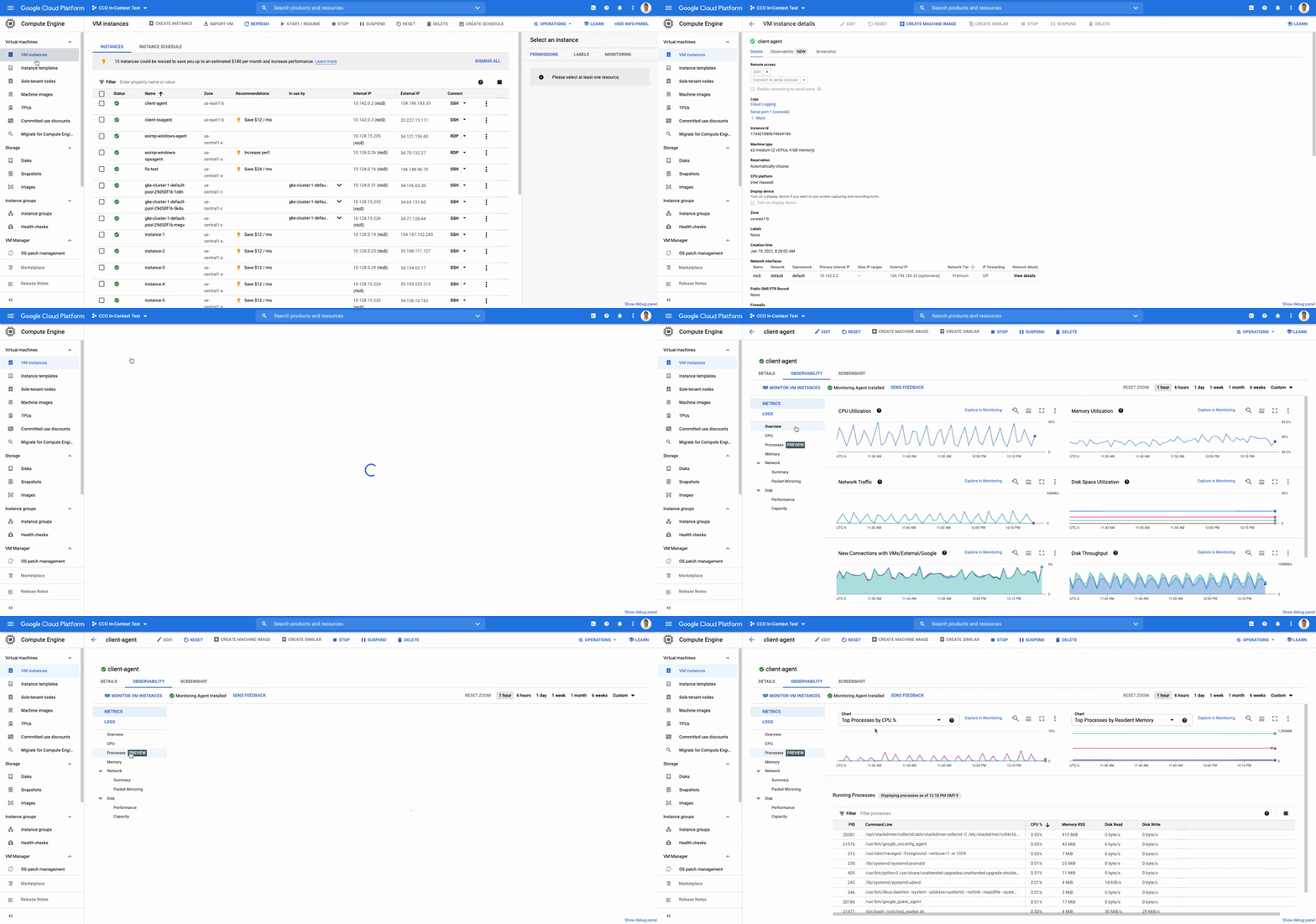
The navigation is simple. Once you have the Ops Agent or the Cloud Monitoring agent installed in your VMs:
- Go to the Compute Engine console page and click on VM Instances
- Select the VM that you want to investigate
- In the navigation menu on the top, click Observability
- Click on Metrics
- Lastly, click on Processes
In the window on the right you will see a chart and a table with all of the processes in your VM. You can also filter by time frame and sort by name or value. You do not need to do anything, other than have the agent installed, for the process to be detected and displayed.
Fleet-wide metrics monitoring
Cloud Monitoring gives you a look across your fleet of VMs so you can identify the aggregated usage of resources by processes. This level of broad, yet granular, insight can drive your decisions around which software to run or how many VMs you need to optimally power your apps and services. Admins can perform a cost-savings analysis if they determine that certain processes are slowing down the work of a large number of VMs. The larger numbers of less powerful VMs can be replaced by fewer, more capable VMs.
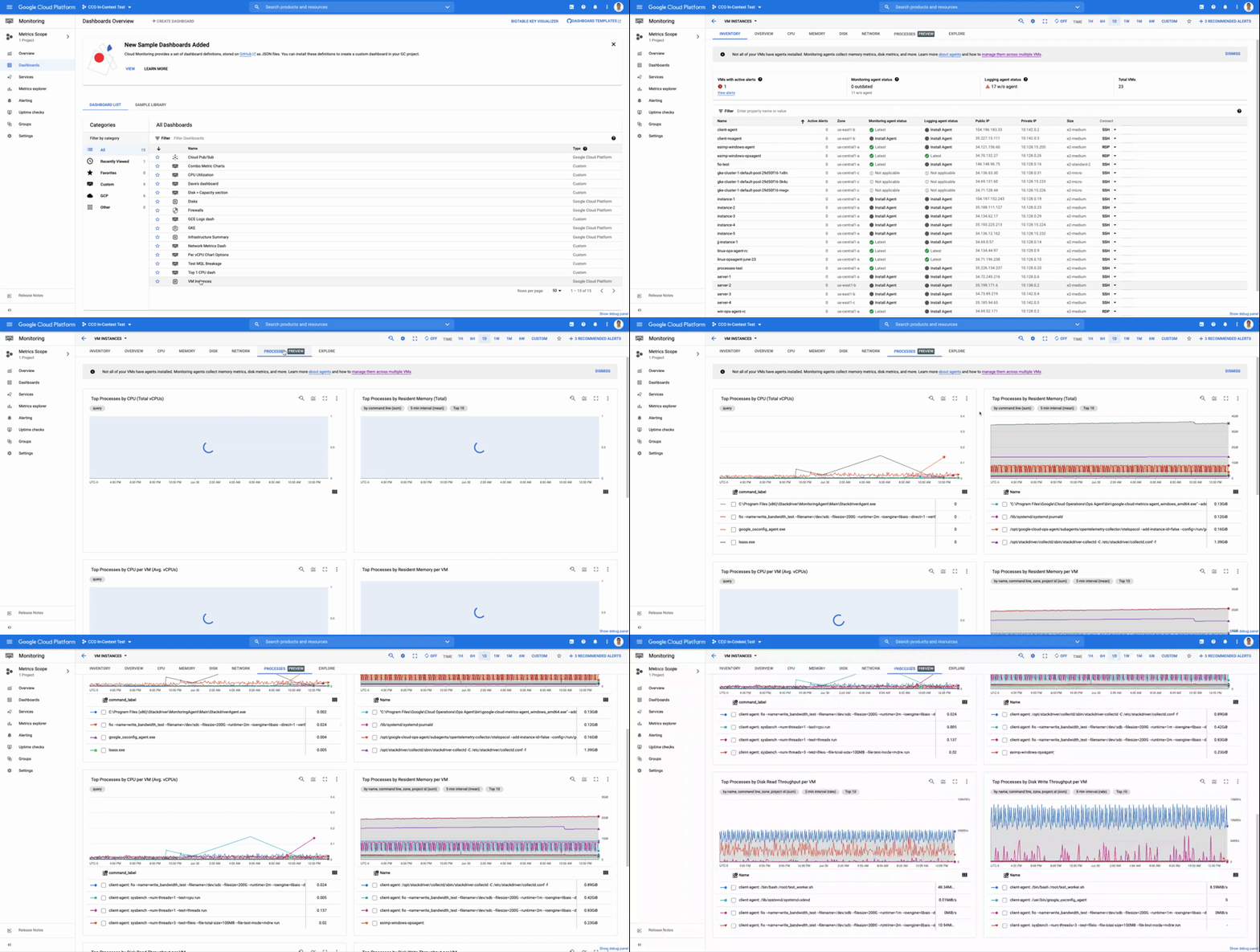
To get this fleet-wide view:
- Navigate to Cloud Monitoring
- Click Dashboards in the left menu
- In the All Dashboards list, click on VM Instances
- Towards the top of the window, click on Processes
This provides many charts detailing the processes running across your fleet of VMs.
Get started today
To start identifying and monitoring your process metrics, you must first install the Ops Agent, or have installed the legacy Cloud Monitoring agent. Once that is complete, the process metrics data will automatically be ingested into Cloud Monitoring and the VM admin console.
If you have any questions, or to join the conversation with other developers, operators, DevOps, and SREs, visit the Cloud Operations page in the Google Cloud Community.
More Relevant Stories for Your Company



The Transformative Journeys of Financial Firms on Google Cloud: Watch Video
The reliance on cloud-based architectures, high performance computing, big data and more are accelerating in the banking, capital, insurance and financial services industries. Google Cloud had a strong role in transforming many businesses especially in the pandemic to smoothly transition into the digital space and understand their customers. Two years

BURGER KING Germany: Serving Up Marketing Insights and Supply Chain Visibility Easily
Do hamburgers really come from Hamburg? This may still be a matter of debate, but the popularity of American-style burger joints not just in Hamburg but all over Germany, is clear. Germany’s top two fast food companies are both burger chains. One of them is BURGER KING®, a global brand that welcomes more

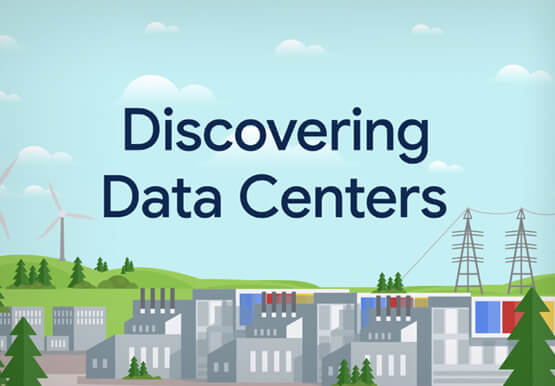

How does Google Pick its Data Center ?
Google is well known for its sustainable tech and hardware initiatives. Did you know alongside its environmental friendly designs of its data centers, it takes into account various factors such as redundant power supplies, data replication, network connectivity, etc. Watch the video to learn more.

Largest Beauty Retailer in the US Powers Digital Transformation with Google Cloud Smart Analytics
Digital technology offers increasing flexibility and choice to consumers. As a result, the retail industry is dramatically shifting toward more tailored and personalized experiences for shoppers, and businesses are rethinking how they deliver value to customers. This couldn’t be more true for the beauty retailing industry where leading companies are
