






6800
Of your peers have already downloaded this article
3:08 Minutes
The most insightful time you'll spend today!






Google Cloud’s No-Cost Skill Badge: Up Your Generative AI Game

1180
Of your peers have already read this article.
1:30 Minutes
The most insightful time you'll spend today!
Generative AI is a rapidly expanding technology with a wide range of potential applications. Google Cloud Learning is thrilled to offer a new, no-cost Generative AI Fundamentals skill badge. This skill badge is designed for anyone eager to learn about the power of generative AI. No technical skills or prior knowledge required!
For those new to digital credentials, Google Cloud skill badges are digital credentials issued by Google Cloud in recognition of your knowledge of Google Cloud products and services. Individuals can earn skill badges on Google Cloud Skills Boost, and can share their skill badge to their social media profile and resume.
Watch the short videos in the generative AI courses and complete the final quiz to earn the Generative AI Fundamentals skill badge pictured below. In as little as 120 minutes, you will learn the basics of how generative AI works, how Google Cloud AI technology can be used by businesses and individuals, and how the principles of responsible AI lead to ethical decisions about the use of generative AI.
By earning the skill badge, you will demonstrate your understanding of foundational concepts in generative AI.
The topics covered in the courses include:
1. Introduction to Generative AI
- Explain how generative AI works
- Describe generative AI model types
- Describe generative AI applications
2. Introduction to Large Language Models
- Define large language models (LLMs)
- Describe LLM use cases
- Explain prompt tuning
- Describe Google’s generative AI development tools
3. Introduction to Responsible AI
- Identify the need for a responsible AI practice within an organization
- Recognize that decisions made at all stages of a project make an impact in Responsible AI
- Recognize that organizations can design an AI infrastructure to fit their own business needs and values
Earn the skill badge and show off your generative AI knowledge today! And for more content to help you stay up to date with generative AI, check out “The Prompt” and our generative AI primer for executives on Transform with Google Cloud.
UKG Ready: Meeting the Needs of Complex Machine Learning Models and Distributed Data Sets

3976
Of your peers have already read this article.
2:30 Minutes
The most insightful time you'll spend today!
Business Problem
UKG Ready primarily operates in the Small and Medium Business (SMB) space, so inherently many customers are forced to operate and make key business decisions with less Workforce Management (WFM) / Human Capital Management (HCM) data. In addition to volume, SMB lacks the variety of data needed to create a dynamic and agile organization. This puts SMB at a major disadvantage compared to larger segments.
Project Goals
People Insights module is committed to surfacing insights to customers in the context of their day-to-day duties and aid in decision making. With the SMB customer data limitations mentioned above, the goal of this project was to create a global dataset that augments individual customer data to bring light to less obvious, yet important information.
Challenges
UKG Ready is a highly configurable application that gives customers the opportunity to build solutions on a platform that meets their specific business needs. High configurability gives high flexibility to customers in their usage of the software. However, it becomes nearly impossible to create a global dataset for machine learning and data insights. UKG Ready manages just under 4 million of the US workforce and some 30,000+ customers. Despite the large employee dataset size, machine learning models that are specific to customers are starved for data because the individual customers have a relatively small employee population. Does that mean we cannot support our SMB customers’ decision making with ML?
Result
Partnering with Google, we were able to develop an approach that allowed us to standardize various domain entities (pay categories, time off codes, job titles, etc.) so that we could build a global dataset to augment SMB customer data. Using machine learning we were able to build a common vocabulary across our customer base. This common vocabulary encapsulates the nuances of how our customers manage their business and yet is generalized and standardized such that the data can be aggregated over the variety of customer configurations. This allows us to serve up practical insights to customers through various use cases. Our partnership allowed us to leverage Google Cloud Services to meet the needs of our complex machine learning models, distributed data sets and CI/CD processes.
How
UKG Ready decided to partner with Google for an end-to-end solution for the analytics offering. This allowed us to focus on our core business logic without having to worry about the platform, environment configurations, performance and scalability of the entire solution. We make use of various Google Cloud services such as Cloud Triggers, Cloud Storage, Cloud Functions, Cloud Composer, Cloud Dataflow, Big Query, Vertex AI, Cloud Pub/Sub… to host our analytics solution. Jenkins manages the entire CI/CD pipelines and cloud environments are configured and deployed using Terraform.
The standardization of business entities problem was solved in three distinct steps:
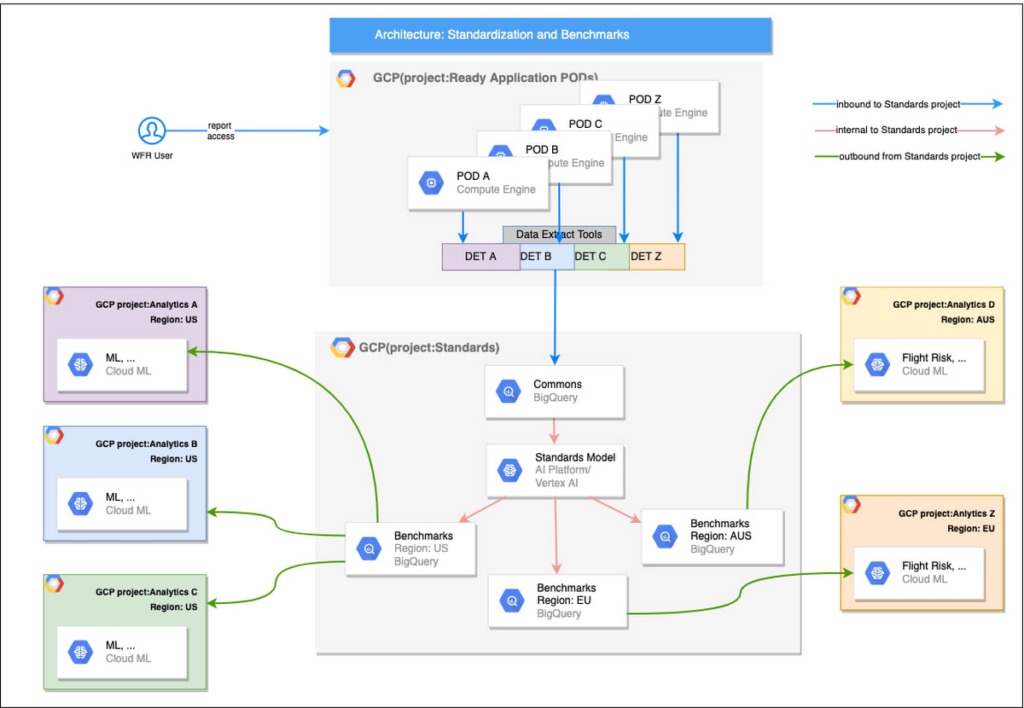
Step 1: Collecting aggregated data
We needed an approach to collect aggregated data from our highly distributed, sharded, multi-tenant data sources. We developed a custom solution that allows us to extract data aggregated at source for PII and GDPR considerations and transfer to Google Cloud Storage in the fastest manner possible. Data is then transformed and stored in Big Query. Services used: GCS, Cloud Functions, DataFlow, Cloud Composer and Big Query. All processes are orchestrated using Cloud Composer and detailed logging is available in Cloud Logging (Stackdriver).
Step 2: Applying NLP (Natural Language Processing)
Once we had the variety of customer configurations or the business entities available, we then applied NLP algorithms to categorize and standardize these in buckets. This approach assumes that customers use natural language for configurations like job titles, pay codes etc.
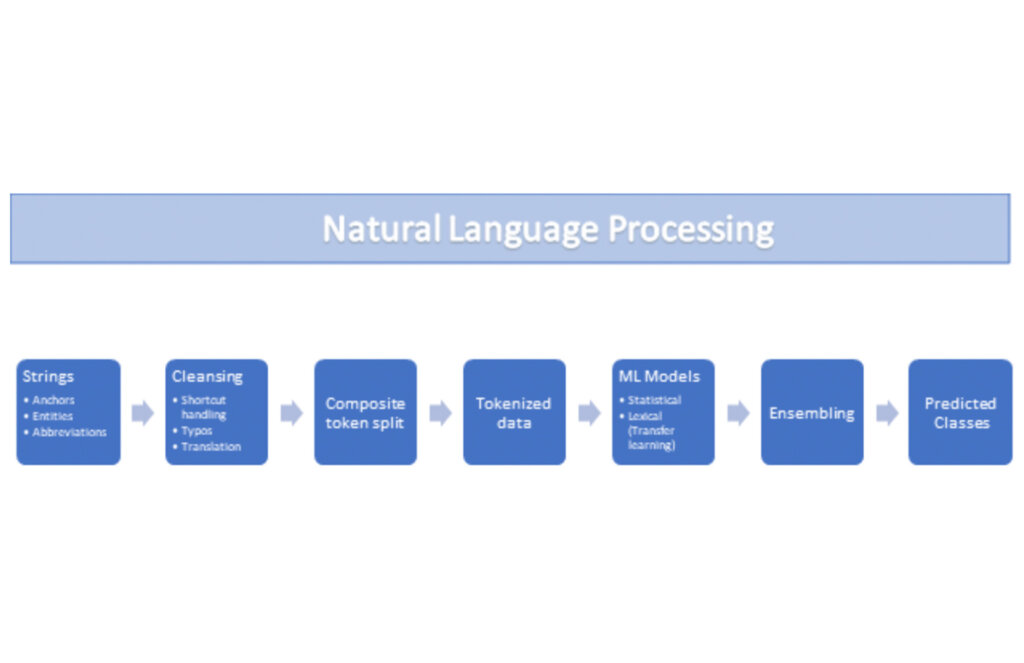
String Preparation
The input data for string preparation process is an entity string or several strings, that describe one entity object (like name-description pair or code-name pair). The output represents set of tokens that may be used to run a classification/clustering model. The process of string preparation tokenizes strings, replaces shortcuts, handles abbreviations, translates tokens, handles grammatical errors and mistypes
ML Models
Statistical
The idea of the model is to use defined target classes (clusters) and assign several tokens (anchors) to each of them an entity that has any of those tokens would be “attracted” to appropriate class. All other tokens are weighted according to frequencies of usage of theses tokens in the entities with anchor tokens:
Using anchor tokens, we are building kind-of Word2Vec - dimensionality of vector is equal to number of target classes. The higher the specific dimension (cluster) value, the higher the probability of entity to be included in appropriate cluster. Final prediction for entity tokens list for specific class is sum of weights of all the tokens included. Predicted cluster is a cluster that has maximal prediction score.
Lexical Model
We managed to generate reasonable amount of labeled data during statistical model implementation and testing. That opens a possibility to build “classical” NLP model that uses labeled data to train classification neural network using pretrained layers to produce token embeddings or even string embeddings. We started experimentation with pre-trained models like GloVe and got good results with single words and bi-grams but started getting issues in handling of n-grams. Our Google account team came to our rescue and recommended some white papers that helped formulate our strategy. We now use Tensorflow nnlm-en-dim128 model to produce string embeddings – it was trained on 200B records English Google News corpus and produces for each input string 128-dimensional vector. After that we use several Dense and Dropout layers to build a classification model.
Ensembling
To perform ensembling all the model results for each class are cast to probabilities using softmax transformation with scale normalization. Final predicted probability is maximal average score of both models among all the classes scores – appropriate class is predicted class.
The machine learning models are deployed on Vertex AI and are used in batch predictions. Model performance is captured at every prediction boundary and monitored for quality in production.
Step 3: Making available common vocabulary
Having the standardized vocabulary, we then needed a mechanism to have the results be available in UKG Ready reports and customer specific models like Flight Risk and Fatigue. For this we again used Google Services for orchestration, data transformation and data storage.
Once the modeling is complete, we made the customer specific models leveraging the above architecture be available in Reports. We utilized our proven existing technology choices in GCP for orchestration, data transformation and data storage
Results
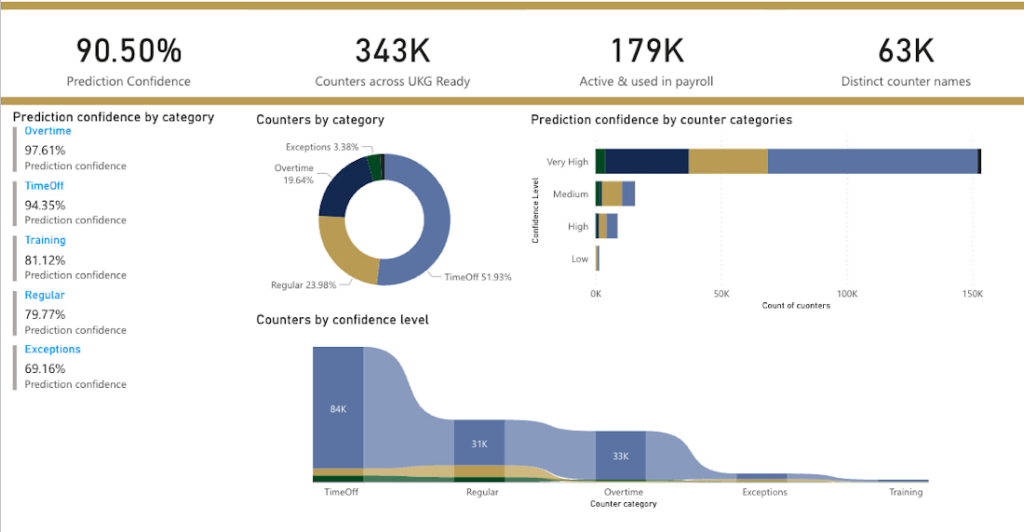
We are able to build a common vocabulary of our customers’ business entities with good confidence. And be an expert advisor to our SMB customers in their decision-making using machine learning. With the advice of our Google account team and using Google services we can add value to our product in a relatively short amount of time. And we are not done! We continue to use this platform for new use cases, complex business problems and innovative machine learning solutions.
Sample result:
Special thanks to Kanchana Patlolla , AI Specialist, Google for the collaboration in bringing this to light
6203
Of your peers have already watched this video.
13:00 Minutes
The most insightful time you'll spend today!
Google Cloud’s 2021 Data Analytics Launches
Google Cloud announced closed to 15 services and programs spanning database, analytics, business intelligence and AI to help businesses gain value out of their data. Here’s a rundown of announcements throughout 2021 on analytics solutions and services such as Dataplex, an intelligent data fabric solution, Datastream, a serverless change data capture and replication service and Google Cloud analytics hub. Watch the video to get started with Google Cloud’s Data Analytics offerings.
Simplifying Unstructured Data Analytics with BigQuery ML and Vertex AI: A Comprehensive Guide

1552
Of your peers have already read this article.
6:30 Minutes
The most insightful time you'll spend today!
Unstructured data such as images, speech and textual data can be notoriously difficult to manage, and even harder to analyze. The analysis of unstructured data includes use cases such as extracting text from images using OCR, sentiment analysis on customer reviews and simplifying translation for analytics. All of this data needs to be stored, managed and made available for machine learning.
The new BigQuery ML inference engine empowers practitioners to run inferences on unstructured data using pre-trained AI models. The results of these inferences can be analyzed to extract insights and improve decision making. This can all be done in BigQuery, using just a few lines of SQL.
In this blog, we’ll explore how the new BigQuery ML inference engine can be used to run inferences against unstructured data in BigQuery. We’ll demonstrate how to detect and translate text from movie poster images, and run sentiment analysis against movie reviews.
BigQuery ML’s new inference engine
Google Cloud is home to a suite of pre-trained AI models and APIs. The BigQuery ML inference engine can call these APIs and manage the responses on your behalf. All you have to do is define the model you want to use and run inferences against your data. All of this is done in BigQuery using SQL. The inference results are returned in JSON format and stored in BigQuery for analysis.
Why run your inferences in BigQuery?
Traditionally, working with AI models to run inferences required expertise in programming languages like Python. The ability to run inferences in BigQuery using just SQL can make generating insights from your data using AI simple and accessible. BigQuery is also serverless, so you can focus on analyzing your data without worrying about scalability and infrastructure.
The inference results are stored in BigQuery, which allows you to analyze your unstructured data immediately, without the need to move or copy your data. A key advantage here is that this analysis can also be joined with structured data stored in BigQuery, giving you the opportunity to deepen your insights. This can simplify data management and minimize the amount of data movement and duplication required.
Which models are supported?
For now, the BigQuery ML inference engine can be used with these pre-trained Vertex AI models:
- Vision AI API: This model can be used to extract features from images managed by BigQuery Object Tables and stored on Cloud Storage. For example, Vision AI can detect and classify objects, or read handwritten text.
- Translation AI API: This model can be used to translate text in BigQuery tables into over one hundred languages.
- Natural Language Processing API: This model can be used to derive meaning from textual data stored in BigQuery tables. For example, features like sentiment analysis can be used to determine whether the emotional tone of text is positive or negative.
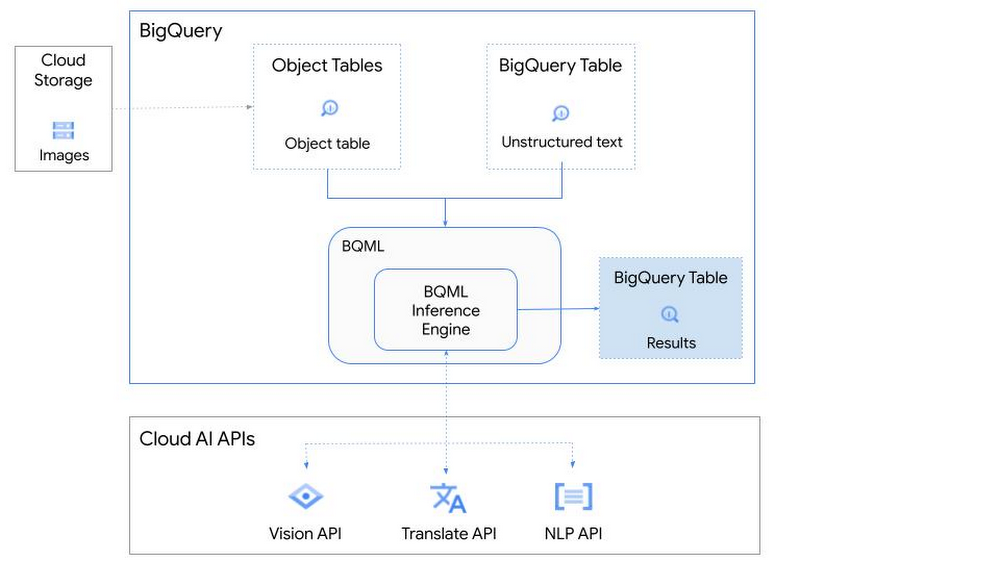
So, how does this work in practice? Let’s look at an example using images of movie posters

- We will define our pre-trained models for Vision AI, Translation AI and NLP AI in BigQuery ML.
- We’ll then use Vision AI to detect the text from some classic movie posters images.
- Next, we’ll use Translation AI to detect any foreign posters and translate them to a language of our choosing – English in this case.
- Finally, we’ll combine our unstructured data with structured data in BigQuery.
We’ll use the extracted movie titles from our movie posters to look up the viewer reviews from the BigQuery IMDB public dataset. We can then run sentiment analysis against these reviews using NLP AI.
Note: The BigQuery ML inference engine is currently in Preview. You will need to complete this enrollment form to have your project allowlisted for use with the BQML Inference Engine.
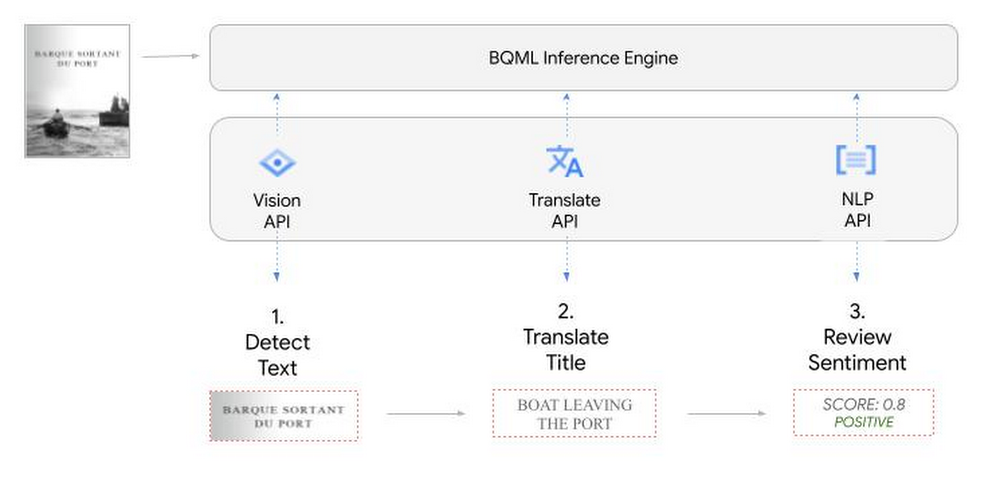
We’ll give examples of the BigQuery SQL needed to define your models and run your inferences. You’ll want to check out our notebook for a detailed guide on how to get this up and running in your Google Cloud project.
1. Define your AI Models in BigQuery
You will need to enable the APIs listed below, and also create a Cloud resource connection to enable BigQuery to interact with these services.
| API | Model Name |
| Vision AI API | Cloud_ai_vision_v1 |
| Translation AI API | Cloud_ai_translate_v3 |
| NLP AI API | Cloud_ai_natural_language_v1 |
You can then run the CREATE MODEL query for each AI service to create your pretrained models, replacing the model_name as required.
CREATE OR REPLACE MODEL
`{PROJECT_ID}.{DATASET_ID}.{VISION_MODEL_NAME}`
REMOTE WITH
CONNECTION `{PROJECT_ID}.{REGION}.{CONN_NAME}`
OPTIONS ( remote_service_type = '<model_name>' );
2. Use the Vision AI API to detect text in images stored in Cloud Storage
You will need to create an object table for your images in Cloud Storage. This read-only object table provides metadata for images stored in Cloud Storage:
CREATE OR REPLACE EXTERNAL TABLE
`{PROJECT_ID}.{DATASET_ID}.{OBJECT_TABLE_NAME}`
WITH
CONNECTION `{REGION}.{CONN_NAME}`
OPTIONS (object_metadata = 'SIMPLE', uris = ['{BUCKET_LOCATION}/*']);
To detect the text from our posters, you can then use ML.ANNOTATE_IMAGE and specify the text_detection feature.
SELECT
       ml_annotate_image_result.full_text_annotation.text AS text_content,
       *
FROM
       ML.ANNOTATE_IMAGE(
         MODEL `{PROJECT_ID}.{DATASET_ID}.{VISION_MODEL_NAME}`,
         TABLE `{DATASET_ID}.{OBJECT_TABLE_NAME}`,
         STRUCT(['TEXT_DETECTION'] AS vision_features));
A JSON response will be returned to BigQuery that includes the text content and language code of the text. You can parse the JSON to a scalar result using the dot annotation highlighted above.

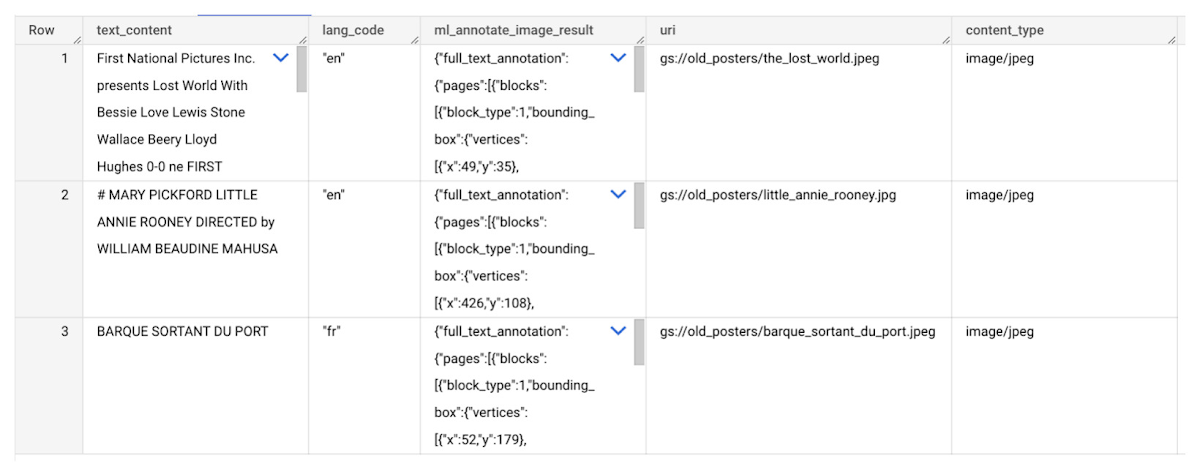
3. Use the Translation AI API to translate foreign movie titles
ML.TRANSLATE can now be used to translate the foreign titles we’ve extracted from our images into English. You just need to specify the target language and the table of the movie posters for translation:
SELECT
text_content,
STRING(ml_translate_result.translations[0].detected_language_code)
as original_language,
STRING(ml_translate_result.translations[0].translated_text)
as translated_title
FROM
  ML.TRANSLATE(
MODEL `{PROJECT_ID}.{DATASET_ID}.{TRANSLATE_MODEL_NAME}`,
TABLE `{DATASET_ID}.image_results`,
STRUCT('TRANSLATE_TEXT' as translate_mode, "en" as target_language_code));
Note: The table column with the text you want to translate must be named text_content:
The table of results will include json that can be parsed to extract both the original language and the translated text. In this case, the model has detected that title text is in French and has translated it to English:

4. Finally, use natural language processing (NLP) to run sentiment analysis against movie reviews
You can easily join inference results from your unstructured data with other BigQuery datasets to bolster your analysis. For example, we can now join the movie titles we extracted from our posters with thousands of movie reviews stored in BigQuery’s IMDB public dataset `bigquery-public-data.imdb.reviews`.
You can use ML.UNDERSTAND_TEXT with the analyze_sentiment feature to run sentiment analysis against some of these reviews to determine whether they are positive or negative:
SELECT
   primary_title, start_year, text_content AS review,
   FLOAT64(ml_understand_text_result.document_sentiment.score) AS score,
   FLOAT64(ml_understand_text_result.document_sentiment.magnitude) AS magnitude,
FROM
   ML.UNDERSTAND_TEXT(
     MODEL `{PROJECT_ID}.{DATASET_ID}.{NLP_MODEL_NAME}`,
           (
           SELECT
             primary_title, start_year, review AS text_content
           FROM
             `bigquery-public-data.imdb.title_basics` titles
           JOIN
             `bigquery-public-data.imdb.reviews` reviews
           ON
             reviews.movie_id = titles.tconst
           WHERE
             UPPER(titles.primary_title) = 'THE LOST WORLD' AND
             start_year = 1925
           ),
      STRUCT("analyze_sentiment" AS nlu_option)) ;
Note: The table column with the text you want to analyze must be named text_content:
The JSON response will include a score and magnitude. The score indicates the overall emotion of the text while the magnitude indicates how much emotional content is present:
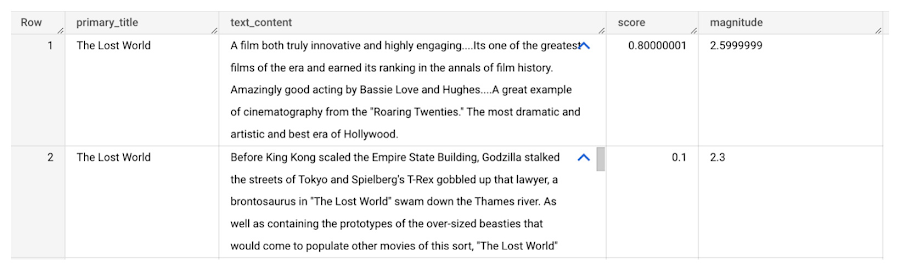
So, how did the Lost World compare with other movies that year?
To wrap up, we’ll compare the average review score of the 1925 Lost World movie to other movies released that year to see which was more popular. This can be done using familiar SQL analysis:
SELECT
 primary_title, start_year,
 AVG(FLOAT64(ml_understand_text_result.document_sentiment.score))AS av_score,
 AVG(FLOAT64(ml_understand_text_result.document_sentiment.magnitude)) AS av_magnitude
FROM
 ML.UNDERSTAND_TEXT(
   MODEL `{PROJECT_ID}.{DATASET_ID}.{NLP_MODEL_NAME}`,
         (
         SELECT
           primary_title, start_year, movie_id, review AS text_content
         FROM
           `bigquery-public-data.imdb.title_basics` titles
         JOIN
           `bigquery-public-data.imdb.reviews` reviews
         ON
           reviews.movie_id = titles.tconst
         WHERE
           start_year = 1925
         ),
   STRUCT("analyze_sentiment" AS nlu_option))
GROUP BY
   primary_title, start_year
ORDER BY
   av_score DESC;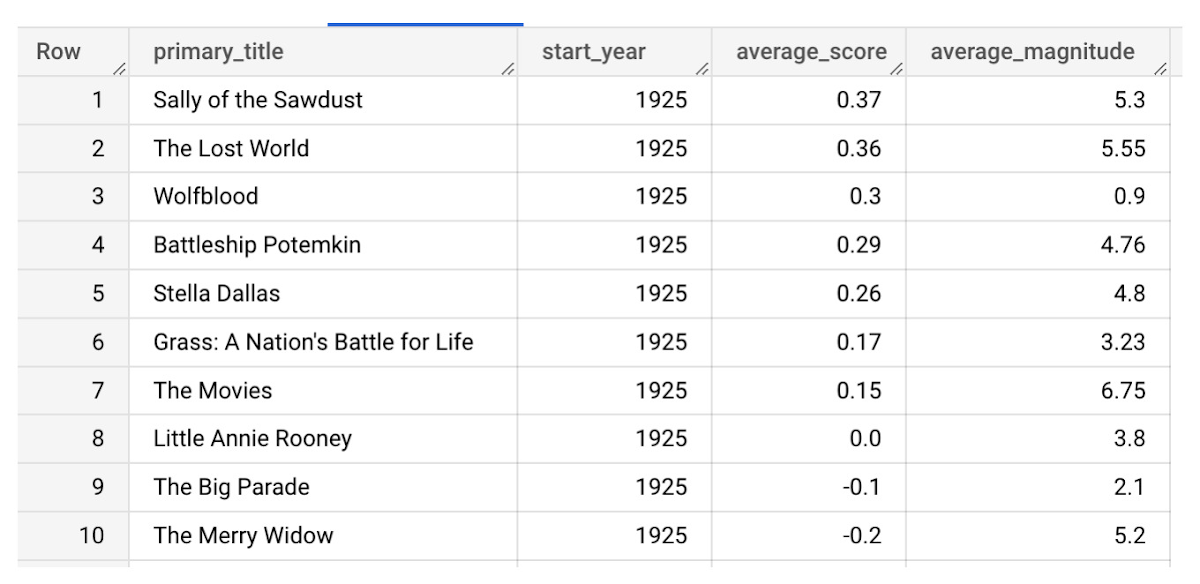
It looks like The Lost World narrowly missed out on the top spot to Sally of the Sawdust!
Want to learn more?
Check out our notebook for a step by step guide on using the BQML inference engine for unstructured data in Google Cloud. You can also check out our Cloud AI service table-valued functions overview page for more details. Curious about pricing? The BQML Pricing page gives a breakdown of how costs are applied across these services.
Tackling Real-Time Bidding Challenges: Arpeely’s Fresh Approach with Google Cloud

1132
Of your peers have already read this article.
4:30 Minutes
The most insightful time you'll spend today!
At Arpeely, we’ve developed some of the world’s most advanced advertising technology. Our machine learning (ML) media acquisition platform and “win-win” business model enables customers to bring highly intentful users to their offerings with precision, peace of mind and minimal overhead.
Real-time bidding is a dynamic and intricate process that involves buying and selling ad impressions in milliseconds. Each time a user opens an app or website, advertisers or ad-tech companies acting on behalf of advertisers have milliseconds to bid on ad spaces in real-time auctions, and the highest bidder wins the opportunity to display their ad. This is where Arpeely comes in, leveraging advanced algorithms, innovative UX and funnels to optimize the bidding process and maximize performance for advertisers.
At Arpeely, we use various signals often not used by traditional competitors to outperform the market and zero-down on high-intent and soon-to-be loyal users. For example, in advertising a mobile app, we predict, based on real-time conditions and user context, the user’s likelihood to make an in-app purchase many weeks into the future.
As for the ads themselves, gone are the days of simple banners; today’s ads are “mini products” that captivate and engage users. We employ a wide range of ad formats that go beyond industry standards. Our ads can be immersive videos, compelling messages, interactive experiences like mini-games or mini-apps, or even a multi-step mixture of all of the above. By integrating logic and interactivity, Arpeely enables users to engage with the ad content seamlessly and gauge user intent without leaving their main activity.
Our business model dictates that we don’t get paid if our advertiser doesn’t get paid. We like to say that our algorithms, like water, can trickle into hidden market opportunities missed by the rest of the industry that uses less granular tools. These and other capabilities make Arpeely a strategic partner in the challenging space of media and user acquisition.
Innovation at the edges of data science and engineering
Today, we handle millions of impressions per second and over a billion ML predictions daily. We are directly connected to seven of the world’s largest real-time bidding exchanges, including Google AdX. We also work very closely with our clients, ranging from prominent startups to companies in the S&P Top 20.
Daily, we tackle complex engineering and data challenges on multiple fronts. On the engineering side, we ensure that every real-time auction receives a lightning-fast response within a strict 150ms timeframe. On the data side, we fire multiple ML predictions per auction and ingest TBs of data daily. On the user-serving front, we serve A/B-tested assets across a long tail of geos and devices, with even the slightest fluctuations in load speeds affecting business dramatically.
Right from the start, we knew we couldn’t do it alone when it came to building our technology stack. When you look at available platforms, it’s clear Google Cloud has a robust architecture that is easy to manage, use and scale, especially for our use cases. They also have reliability and feature completeness which are critical in our line of business.
Under the hood
Building upon Google Kubernetes Engine (GKE), we run multiple services that handle our main bidding flows. We utilize Golang for services that run at a large scale and Python for when we prioritize development speed, community and readability. All of these can reach an immensely high scale, which is managed and monitored automatically in GKE. Communication between these services and our Redis (our Google Cloud partner) cluster happens in sub-millisecond latency over Google Cloud’s strong network infrastructure and enables us to run complex real-time logic for every impression.
Once we have tackled the actual bidding, we are left with the challenge of streaming our data into BigQuery for analytics and model training. We utilize a mix of Cloud Pub/Sub, Memorystore and Cloud Storage to create a mechanism capable of ingesting many TBs per day in near real-time without compromising on cost. Real-time data is critical for a company like Arpeely to test and reiterate at a fast pace.
BigQuery is our data warehouse for operational analysis and is an essential part of our business. We use it both as a warehouse, for large-scale computations and in an operational capacity that closes the loop between production, data, and ML retraining. A team of two or three people can manage petabytes at scale with minimal maintenance.
On top of these, we’ve built a state-of-the-art in-house model pipeline suited specifically for ad-tech industry purposes. It allows us to effectively deploy complex solutions — on-the-fly calibration, flexible conversion steps, sampling of heavily imbalanced data sets, adjusting weights, and A/B-tested model deployment and more.
Google Cloud also offers us an entry point for several very useful built-in products that have become deeply embedded in our daily stack and routine. Among them are Operations Suite (formerly Stackdriver), Cloud Profiler, Cloud Storage, Cloud CDN, Cloud SQL, Memorystore, Cloud Scheduler, Error Reporting, and more.
In addition to all the technology, there’s also a human touch. Google’s skilled Customer Success team possesses a unique blend of technical expertise and business acumen, acting as strategic advertisers and opening doors we did not know existed.
Opening the door to the future of advertising
Standardizing on Google Cloud enables us to focus our resources on innovation and growth. Instead of having to research business solutions and invest time integrating disparate technologies, we can tap into a wide range of Google Cloud tools as needed. Thus, it is crucial that we set up a good technological foundation and prepare for future growth of the business.
Google Cloud enables us to focus our resources on innovation rather than our infrastructure. This means we can put more effort into finding ways to match clients with high-value customers and grow their revenues. Even though online advertising has been around for over 20 years and pioneered by Google itself, Google Cloud gives us the impetus to disrupt the market and deliver greater levels of value to our customers today and in the future.
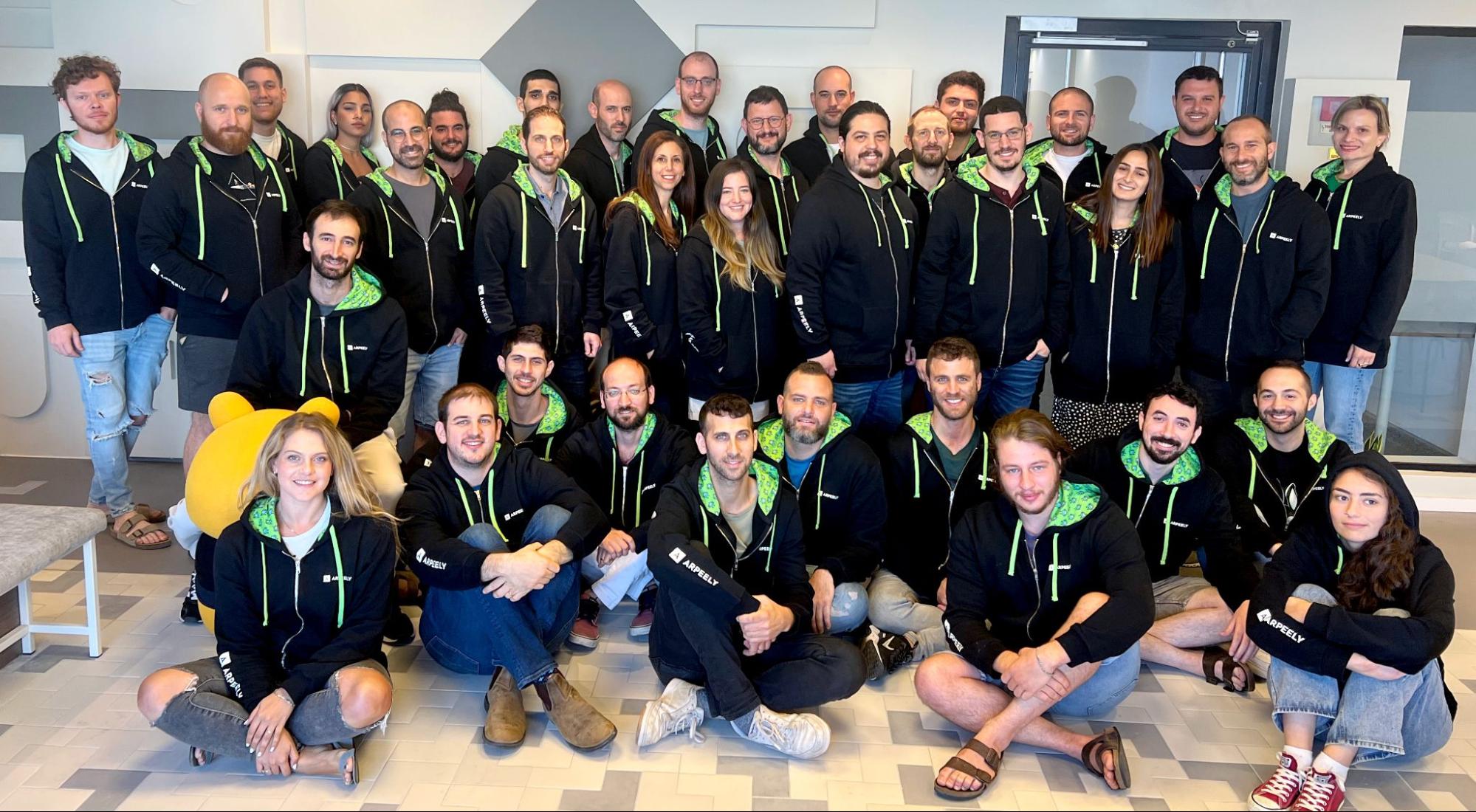
If you want to learn more about how Google Cloud can help your startup, visit our page here to get more information about our program, and sign up for our communications to get a look at our community activities, digital events, special offers, and more.
Check out the Redis listing on Google Cloud Marketplace. Please give it a try and let us know what you think!
More Relevant Stories for Your Company




Baking Gets Sweeter: Build ML Models that Help Predict the Best Recipe!
Baking recipes and ML models have one thing in common—they follow a pattern. Machine Learning is all about finding pattern in data sets, you can predict what you are baking based on the core ingredients and their respective amounts! Bread, cake or cookies, watch the video to make you make

Want to Code for the Cloud? Get Started with the Native App Development Track
Earlier this year, we launched the Google Cloud skills challenge, which provides 30 days of free access to training to build your cloud knowledge and an opportunity to earn skill badges that showcase your Google Cloud competencies. Today, we’re adding a Native App Development track to the skills challenge, joining the Getting Started,

Enabling Sustainable Agriculture: InstaDeep uses Cloud TPU v4
You are what you eat. We’ve all been told this, but the truth is what we eat is often more complex than we are – genetically at least. Take a grain of rice. The plant that produces rice has 40,000 to 50,000 genes, double that of humans, yet we know


Transitioning Kagglers to TPU with TF 2.x
Kaggle has, historically, become synonymous with machine learning competitions but it's much more than that. Kaggle is a data science platform. Over 5 million data scientists from all over the world come to Kaggle to not only not only participate in machine learning competitions but to learn data science build
