






5540
Of your peers have already downloaded this article
1:30 Minutes
The most insightful time you'll spend today!
Predicting Cyber Attacks: Security Command Center Introduces Attack Path Simulation

1161
Of your peers have already read this article.
3:30 Minutes
The most insightful time you'll spend today!
To help secure increasingly complex and dynamic cloud environments, many security teams are turning to attack path analysis tools. These tools can enable them to better prioritize security findings and discover pathways that adversaries can exploit to access and compromise cloud assets such as virtual machines, databases, and storage buckets.
Other attack path tools rely on static, point-in-time snapshots of an organization’s cloud footprint, which often contain sensitive data about their environment, how it is configured, and where the most sensitive data resides.
At Google Cloud, we are taking a different approach. We are excited to announce today at the Google Cloud Security Summit that we are adding attack path simulation to Security Command Center, our built-in security and risk management solution for Google Cloud. This new risk management capability automatically analyzes a customer’s Google Cloud environment to pinpoint where and, importantly, how vulnerable resources may be attacked, so security teams can stay one step ahead of adversaries.
We expect attack path simulation capabilities to be available in Security Command Center Premium later this summer.
Unlike some third-party security products, Security Command Center continuously scans an organization’s cloud environment gathering near real-time data about cloud resources and security vulnerabilities. Our attack path simulation engine uses this information to automatically generate and render high-risk attack paths, without the hands-on toil of having to repeatedly run manual queries.
A different approach to attack path analysis
Other attack path analysis tools involve significant operational toil. The static, point-in-time snapshots that these tools generate have to be sent to an external provider, which can add risk. Then security teams have to follow up with complex queries before they can identify likely attack paths.
Google Cloud’s advanced attack simulation engine leverages our first-party, agentless visibility of Google Cloud assets, the relationships between assets, and the current state of defenses. Attack path simulation is fully automated with no need to manually run queries. Simulations run in the Google Cloud environment, and do not send snapshots outside your environment, avoiding exposure of sensitive information.
See what attackers can see
Effective attack path analysis should mimic how a real-world attacker can reach and compromise high value resources. This is why Security Command Center simulates how attackers try many different ways to infiltrate a cloud environment. SCC then generates attack path graphs to give defenders insight into how adversaries could exploit a single security weakness or various combinations of security vulnerabilities to access valuable assets. SCC also provides detailed information on how to remediate issues and shore up defenses based on its findings
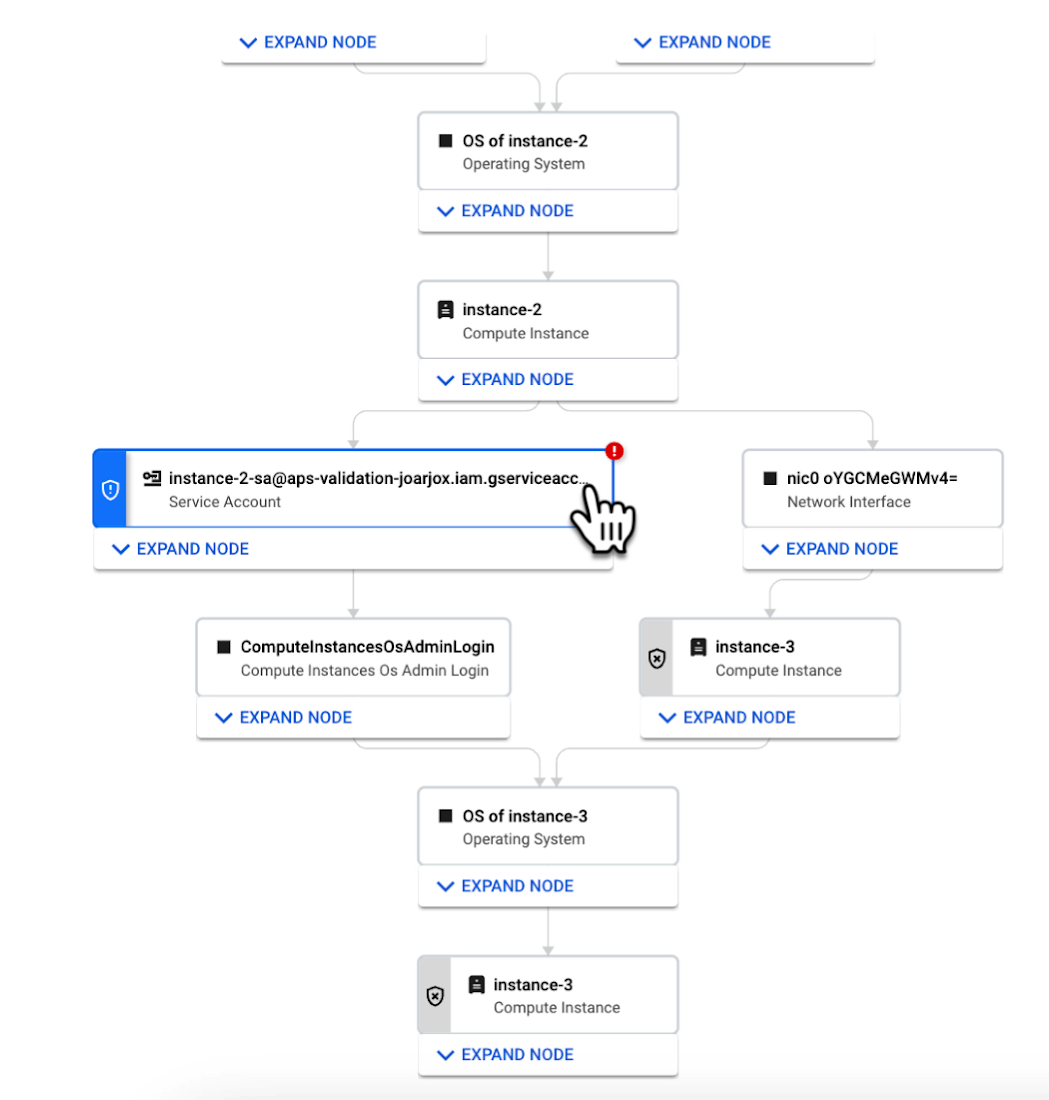
We are delivering combined attack path simulation and analysis as a managed service. There are no agents to install or manage. Results automatically reflect changes in your organization’s Google Cloud environment. Because our attack path simulations are conducted on models of an organization’s cloud resources, there is no performance or operational impact to the live production environment.
Better security prioritization
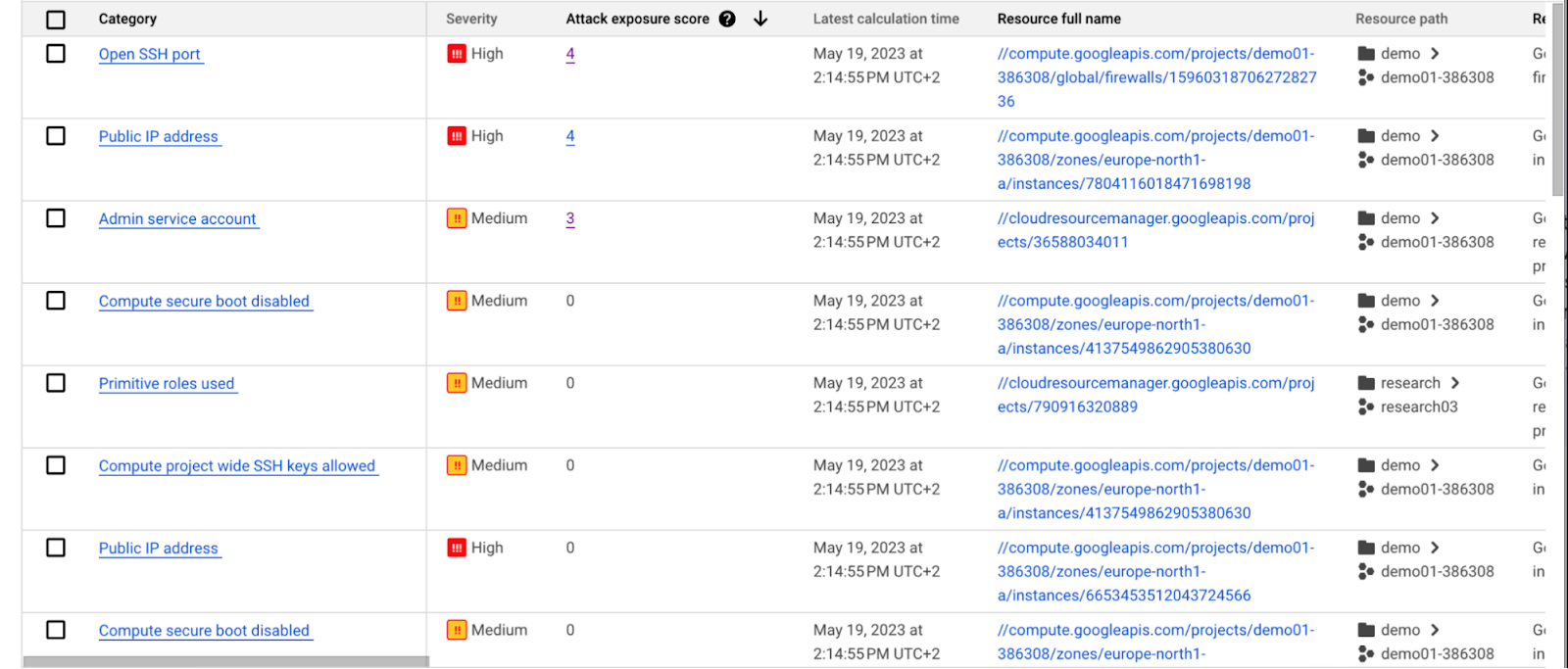
Security Command Center automatically computes an attack exposure score for misconfigurations and vulnerabilities that expose valuable resources to attackers. The score is a measure of cyber risk. It takes into account how exposed valued resources are, and the paths of least resistance for attackers to reach those resources.
Security teams can use these scores to prioritize remediation efforts and improve their overall risk posture.
How attack path analysis has already reduced risk for customers
Dozens of customers have already used our attack path capabilities in private Preview to improve their security posture and reduce their operational risk.
Security Command Center alerted one customer to a finding with a high attack exposure score. The finding was related to a service account whose keys were not being rotated. After reviewing the attack paths related to this finding, the cloud security manager discovered that even though the service account was named “test,” it provided access to storage buckets outside of the test environment.
If an attacker had been able to steal the credentials for this test account, they could have easily accessed production data. The security manager removed administrator privileges on the account. The attack path simulation enhanced their understanding of the severity of the finding, and helped convince them to make it a high-priority fix.
Another customer using attack path simulation needed to assess which security findings created the greatest risk. Two findings related to the same service account with high exposure scores rose to the top of the list. The attack paths revealed that the service account had access to more than 500 storage buckets. If an attacker were to gain access to this account they would be able to read, write, or delete data across any of those buckets, many of which contained sensitive business data and confidential customer information.
Using Security Command Center’s attack path results, the security team remediated the risk by limiting permissions to the storage buckets needed for that specific role.
Next steps
Attack path simulation capabilities are planned for availability later this summer. We expect forthcoming enhancements to use Security AI Workbench to translate complex attack graphs to human-readable explanations of attack exposure, including impacted assets and recommended mitigations.
You can learn more about Nordnet Bank’s experience using attack path simulation at our Security Summit session. To get started with Security Command Center today, please go to the Google Cloud console.
New Certificate Manager Helps Leverage Google’s Network Security and Performance

3037
Of your peers have already read this article.
2:00 Minutes
The most insightful time you'll spend today!
We’re excited to announce the public preview of Certificate Manager and its integration with External HTTPS Load Balancing. Certificate Manager enables you to use External HTTPS Load Balancing with as many certificates or domains as you need. You can bring your own TLS certificates and keys if you have an existing certificate lifecycle management solution you’d like to use with Google Cloud, or enjoy the convenience of our fully Managed TLS offerings.
Extend the security and performance of the Google network to your customers
Certificate Manager brings support for multiple certificates per customer. When coupled with our global anycast load balancing solution with automated autoscaling and failover, you now have a powerful platform for building robust SaaS and PaaS offerings. This enables custom domain support for your customers with the lowest latency and the highest level of availability.
Alon Kochba, the head of web performance at website-building service Wix, explained how the new features lighten their workload.
“As a SaaS product, we need to terminate SSL for millions of custom domains and certificates. GCP’s Certificate Manager and External HTTPS Load Balancing lets us do this at the edge, close to the clients, without having to rely on our own custom solution for terminating SSL,” Kochba said.
Customers who switch to External HTTPS Load Balancing can also now protect their SaaS users from denial of service attacks, OWASP Top 10 risks, and other common Web attacks by adopting Cloud Armor.
DNS authorization
This release also now enables you to provision your Google-managed certificates with DNS-based authorizations and have them ready to use before your load-balancing production environment is fully set up. This will help streamline the migration process to Google Cloud, for example. To create a DNS authorization, use the following command:
gcloud beta certificate-manager dns-authorizations create example-authorization --domain="example.com"
This command returns the CNAME record for _acme-challenge.example.com that you must add to your DNS configuration in the DNS zone of the target domain. This CNAME record points to a special Google Cloud domain, e.g.: “534959-1a8a-40cf-90b6-b1f5f8d22517.2.authorize.certificatemanager.goog” that is used to verify domain ownership.
When you request a certificate based on the above authorization, Cloud Certificate Manager will work with the Certificate Authority automatically to get and later renew your certificate for that domain.
Wildcard support
This DNS-based domain control authorization also allows us to bring you support for wildcard certificates. To configure the use of wildcard certificates you first must configure the DNS authorization as we’ve indicated above. Once that has been completed, you can configure the use of a wildcard certificate using the following command. Our example below is for a top-level registered domain and its wildcard subdomains.
gcloud beta certificate-manager certificates create example-wildcard-certificate --domains="example.com,*.example.com" --dns-authorizations="example-authorization"
Monitoring for Certificate Expiration
Another new feature that will be enabled with this product is the ability to monitor certificate expiration with Google Cloud Logging. Cloud Logging creates a record of certificate expiration, uses the `certificatemanager.googleapis.com/Project` monitored resource, and is represented by the following message:
message CertificatesExpiry {// Expiration state of the certificate.enum State {// Unspecified state, should never be reported.STATE_UNSPECIFIED = 0;// Certificate will expire soon.CLOSE_TO_EXPIRY = 1;// Certificate is expired.EXPIRED = 2;}// Number of reported certificates.int64 count;// Names of reported certificates. If there are too many, the list is sampled.repeated string certificates = 2;// State of reported certificates.State state = 3;// Approximate expiration time of reported certificates.// Multiple certificates with close expiration time are batched// together in a single log, so the timestamp is not precise.google.protobuf.Timestamp expire_time = 4;}
The log message is delivered every hour and contains a sample of the certificates being close to expiry or already expired.
Pricing
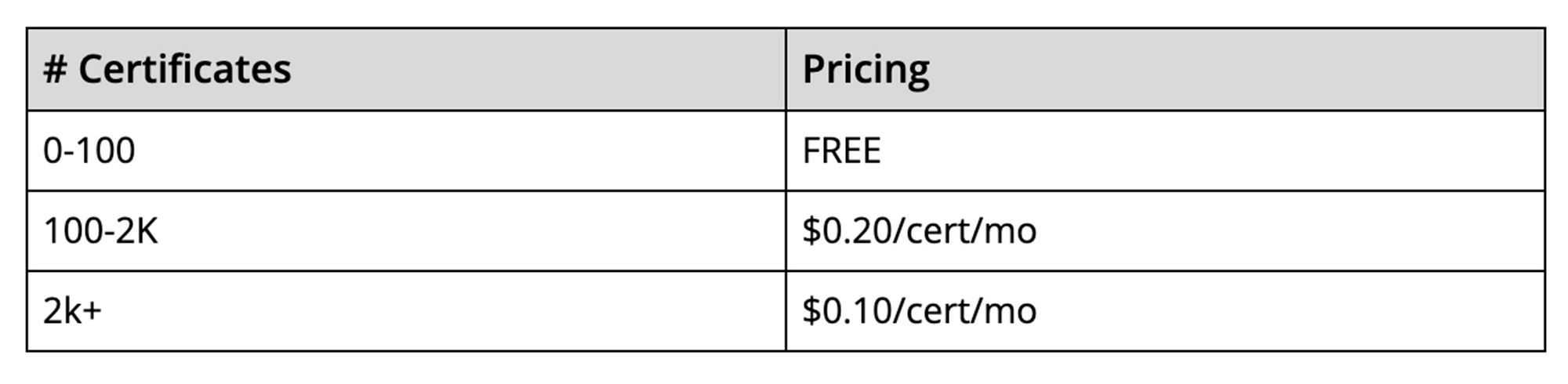
The best part is that there’s no additional charge to use the Certificate Manager for the first 100 certificates. To use more than 100 certificates with the management tools, we will charge on a per-certificate, per-month pricing structure. This empowers you to scale up to as many certificates as you need, and as cost-effectively as possible. The pricing will be enabled when the solution goes to General Availability.
It is our hope that these new features, combined with the programmability offered by Certificate Manager, will enable you to simplify the way you deploy HTTPS and offer a more scalable and secure service to your customers.
reCAPTCHA Keeps Unemployment Claims and COVID Vaccine Registration Portals Threat-free

3006
Of your peers have already read this article.
1:30 Minutes
The most insightful time you'll spend today!
More people than ever have been conducting more of their lives online due to the COVID-19 pandemic. This creates a new landscape for fraudsters to create and release new attacks. Research commissioned by Forrester Consulting showed 84% of companies have seen an increase in bot attacks. 71% of organizations have seen an increase in the amount of successful attacks. 65% of businesses have experienced more frequent attacks and greater revenue loss due to bot attacks. With so many people visiting government websites to learn more about the COVID-19 vaccine, make vaccine appointments, or file for unemployment, these web pages have become prime targets for bot attacks and other abusive activities. But reCAPTCHA Enterprise has helped state governments protect COVID-19 vaccine registration portals and unemployment claims portals from abusive activities.
Assisting with unemployment claims during COVID-19
Alongside the wave of unemployment claims caused by COVID-19, many state government agencies, such as Wisconsin’s Workforce Development, have seen an increase in attempted malicious bot logins on their external websites. Many states have had malicious actors visit unemployment claims portals and enter stolen credentials to file fraudulent unemployment claims. Because many unemployment claims portals are mandated to pay a recipient within 2 weeks, the claims portal processes this fraudulent information and bad actors receive unemployment checks weeks before their false claims are recognized. By then, the fraudsters have their money and have repeated this process using other stolen credentials.
reCAPTCHA Enterprise helps state governments reduce false claims by preventing adversaries from automatically reusing credentials on unemployment claims portals. reCAPTCHA Enterprise’s scale and speed to determine fraudster behavior across the Internet helped some of the largest states in the United States, such as Texas.
Registering for the COVID-19 Vaccine and accessing state-sponsored resources
Several states, such as Pennsylvania, are challenged by web traffic that fluctuates based on the COVID-19 Vaccine Phase. For example, during Phase 1, there was a large increase in web traffic from both humans and bots because of the demand for the very few available vaccination slots. As more states move into Phase 2 and Phase 3, and the vaccine is more widely available, traffic is increasing because bad actors know more people are coming to these websites to register to be vaccinated.
reCAPTCHA Enterprise was implemented to stop bad actors from scripting bots to book vaccine appointments and then sell those appointment slots on another website for profit. These fake web pages are falsely promoted as websites where people can register for the vaccine. Vaccine appointments are not the only government system from which fraudsters try to profit. Transportation and social service departments also face frequent attacks, wherein fraudsters try to profit by booking and then selling appointments with those organizations.
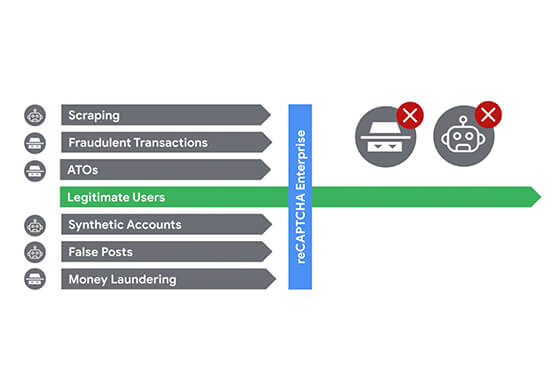
Fending off these attacks was made easier thanks to reCAPTCHA Enterprise, a frictionless fraud detection service that leverages our experience from more than a decade of defending the internet and data for our network of more than 5 million sites. The reCAPTCHA Enterprise platform can understand fraudulent behavior, introduce friction to block bots from booking appointments, and allow legitimate users to access the vaccine portals and other state portals.
Because reCAPTCHA Enterprise does not require end users to complete captcha challenges, several state governments installed reCAPTCHA Enterprise across search, login, and registration web pages. State governments are also placing reCAPTCHA Enterprise on webpages where end users can access healthcare, receive assistance for housing or food, register motor vehicles, or propose legislation. With reCAPTCHA Enterprise on more pages, it becomes more difficult for malicious software or bots to carry out their attacks against different pages, but not for end users to browse, login into accounts, book appointments, or apply for resources. Because reCAPTCHA Enterprise requires no action from end users to stop fraud, state governments implemented reCAPTCHA Enterprise on all points of interaction on their webpages to ensure maximum security without impacting the user experience.
Providing security everywhere and pricing for all
Many state governments are familiar with buying cloud services in a pay-as-you-go model. reCAPTCHA Enterprise eased the purchasing process by providing state governments with predictable, scalable, and customizable pricing. State governments know up front how much they can expect to pay each month based on the number of assessments reCAPTCHA Enterprise performs. reCAPTCHA Enterprise’s flexible pricing model keeps pace with the natural fluctuations of visitors to vaccination registration and unemployment claims. reCAPTCHA Enterprise has a dedicated sales team that can tailor pricing to your specific use cases so both your webpages and budget are not compromised.
reCAPTCHA Enterprise has helped many state governments serve their constituents by making it easier to get vaccinated and collect unemployment. It helps constituents take advantage of public services and makes it more difficult for fraudsters to manipulate and interfere with them.
To start protecting your web pages from credential stuffing and other attacks, get started with reCAPTCHA Enterprise today.
Efficient, Safe and Dynamic Gaming Experience: Aristocrat’s Digital Journey on Google Cloud

4766
Of your peers have already read this article.
2:00 Minutes
The most insightful time you'll spend today!
Since Aristocrat’s founding in 1953, technology has constantly transformed gaming and the digital demands on our gaming business are a far cry from challenges we faced when we started. As we continue to expand globally, security and compliance are top priorities.
Managing IT security for several gaming subsidiaries and our core business became more complex as we entered into new markets and scaled up our number of users. We needed a centralized platform that could give us full visibility into all of our systems and efficient monitoring capabilities to keep data and applications secure. We also needed the ability to secure our systems without compromising user experiences.
We turned to Google Cloud and Splunk to better manage complexity and support highly efficient, secure, and more dynamic gaming experiences for everyone. We are committed to using today’s modern technologies to give players more optimal experiences.
Bringing our digital footprint into the cloud
When we set out on our digital transformation, we looked to address many business requirements.
These requirements included:
- Regulation: We wanted a platform that could efficiently address our industry’s stringent and global regulatory compliance requirements.
- Player experience: Our IT environment must support smooth gaming experiences to keep users engaged and satisfied.
- Scalability: As we grow and diversify, meeting the changing demands of an increasingly global gaming community, we need an easily scalable platform to align with our current and future needs.
Google Cloud offered us the perfect foundation through solutions such as Compute Engine, Google Kubernetes Engine, BigQuery, and Google Cloud Storage. These acted as the right infrastructure components for us for the following reasons:
- Google Cloud is globally accessible and supports compliance, helping to streamline security and regulatory processes for our team.
- With Google Cloud, we can manage our entire development and delivery processes globally with fast and efficient reconciliation of regional compliance requirements.
- When we need to adjust existing infrastructure or deliver new capabilities, Google Cloud accelerates the process and takes the heavy lifting off of our team.
- Google Cloud allows us to support tens of thousands of players on each of our apps while experiencing minimal downtime and low latency. The importance of this support can’t be underestimated in an industry where players have little to no patience if lags in games occur.
We migrated our back-office IT stack alongside our consumer-facing production applications to Google Cloud given our positive experiences with compliance, security, scalability, and process management. This migration has significantly accelerated our digital transformation while streamlining our infrastructure for faster and more cost-effective performance.
In many ways, Google Cloud has been, with maybe a pun intended, a game-changer for us. For instance, when we suddenly had to support a lot of remote work during the COVID-19 pandemic, native identity and access management tools in Google Cloud allowed us to retire costly VPNs used for backend access and quickly adopt a more easily managed, cost-effective zero-trust security posture.
Accessing vital third-party partners and managed services
Aristocrat has many IT needs best addressed in a multi-cloud environment. Google Cloud is particularly attractive given its strong cloud interoperability, as well as the many products and services available on Google Cloud Marketplace. The marketplace accelerated our deployment of key third-party apps including Splunk and Qualys.
Given the personal information we store and the global regulatory compliance statutes we must oblige, security lies at the heart of our business. Splunk is a critical component of our digital transformation because it offers solutions that provide the enhanced monitoring capabilities and visibility we need. The integration between Splunk and Google Cloud gives us confidence that our data is secure. We know our data can be secure in Google Cloud, while simplified billing through Google Cloud Marketplace makes payments and license tracking easier for our procurement team.
As part of our protected environment, we use the Splunk platform as our security information and event management system, leveraging the InfoSec app for Splunk that provides continuous monitoring and advanced threat detection to significantly improve our security.
We can manipulate and present data in Splunk in a way that provides us with a single pane-of-glass for our hybrid, multi-cloud environment and our third-party apps and systems. Splunk observability tools have likewise helped us to track browser-based applications like our online gaming apps to monitor details related to security and performance.
Splunk and Google Cloud have transformed how we operate. We can now quickly ingest and analyze data at scale within our refined approach to security management by offloading software management to Splunk and Google Cloud. This ability enables us to approach security more strategically, and positions us to integrate more AI/ML capabilities into our products for even greater governance and performance.
This is just the beginning of our journey with Splunk and Google Cloud. We’re excited to see the innovation we can continue bringing to the gaming community worldwide.
3102
Of your peers have already watched this video.
23:30 Minutes
The most insightful time you'll spend today!
Three Lesser-Known Ways to Protect Your Customers and Business From Phishing and Fraud
Your users are critical to your business, and you need security controls to keep them — and your business — safe. Built from years of Google Cloud technology and experience, these security features focus on keeping users safe on the web.
You can reduce online fraud (chargebacks, hijackings, and abuse) with reCAPTCHA Enterprise, help protect your customers from phishing sites with Phishing Protection, and detect malicious links with the Web Risk API.
Fight Fraud: Fraudulent web activities cost enterprises billions of dollars each year. Security teams need to keep the bad actors out of their websites and ensure that their customers can always get in. reCAPTCHA has been defending millions of sites for almost a decade, and the reCAPTCHA Enterprise service builds on this technology with capabilities designed specifically for enterprise security concerns.
Combat Phishing: The majority of cyber attacks begin with phishing emails and websites. Attackers use many tricks, including by leveraging enterprise brand assets, such as company names and logos, to develop phishing websites that appear authentic and lure internet users to enter valuable information such as user names and passwords. Phishing Protection helps prevent users from accessing phishing sites by identifying various signals associated with malicious content.
Watch the video to find out how the third method and what impact it can create on your organization.
More Relevant Stories for Your Company


Learn to Use reCAPTCHA Enterprise to Protect Your Website from Fraud
One of the top questions enterprises have is: How can I use reCAPTCHA Enterprise to protect my website from online fraudulent activity? Fraudulent web activities cost enterprises billions of dollars each year. Security teams need to keep the bad actors out of their websites and ensure that their customers can

Ubuntu Pro Images Now Available on Google Cloud
Today, we’re pleased to announce the general availability of Ubuntu Pro images on Google Cloud, providing customers with an improved Ubuntu experience, expanded security coverage, and integration with critical Google Cloud features. In partnership with Canonical, we’re making it even easier for customers that have fully embraced open source to ensure

The {$persona} Survival Guide: A Roadmap for Successful Transformation
Part of being a security leader whose organization is taking on a digital transformation is preparing for hard questions – and complex answers – on how to implement a transformation strategy. In our previous CISO Survival Guide blog, we discussed how financial services organizations can more securely move to the

Create and Protect Admin Accounts
Setting up your new cloud infrastructure is scary. Extra scary when you realize that someone (is it gonna be you?) gets to have phenomenal cosmic power over the whole thing. Yes, I'm talking about the admin account, and today we'll dig into why they are important, dangerous and different. When
