






3728
Of your peers have already downloaded this article
5:30 Minutes
The most insightful time you'll spend today!
Business Evolution with API Ecosystems

3465
Of your peers have already read this article.
1:30 Minutes
The most insightful time you'll spend today!
During uncertain times, ecosystem partnerships that leverage APIs have proven to help companies scale and address gaps in their businesses. Apigee customers, like CHAMP Cargosystems, have pursued API-first ecosystem models to enter adjacent markets, create new customer interaction models, and rapidly grow their brand reach and partner ecosystems. As a result of building their API ecosystem, they are transacting 300 million electronic exchanges and 20 million shipments per year.
CHAMP selected Apigee to provide an API platform and developer self-service portal option to all of its SaaS customers. Google Cloud’s Apigee API management platform and portal allows CHAMP and its customers to quickly connect to a variety of backend systems, including in-house, third party apps, marketplace portals and more– thereby accelerating their digitization strategies and opening up new markets through an API ecosystem.
Join this webcast and hear from this leading Enterprise company on how to:
- Identify new revenue sources and markets using an API management platform
- Improve time to market while still complying with all industry requirements
- How to create a proof of concept to grow API adoption throughout your organization
- Align internal business leaders and partners to see the importance of an API-first platform vision
Budget-Friendly Log Management: Four Steps to Cost Optimization in Google Cloud

1216
Of your peers have already read this article.
4:30 Minutes
The most insightful time you'll spend today!
As part of our ongoing series on cost management for observability data in Google Cloud, we’re going to share four steps for getting the most out of your logs while on a budget. While we’ll focus on optimizing your costs within Google Cloud, we’ve found that this works with customers with infrastructure and logs on prem and in other clouds as well.
Step 1: Analyze your current spending on logging tools
To get started, create an itemized list of what volume of data is going where and what it costs. We’ll start with the billing report and the obvious line items including those under Operations Tools/Cloud Logging:
- Log Volume – the cost to write log data to disk once (see our previous blog post for an explanation)
- Log Storage Volume – the cost to retain logs for more than 30 days
If you’re using tools outside Cloud Logging, you’ll also need to include any costs related to these solutions. Here’s a list to get you started:
- Log vendor and hardware costs — what are you paying to observability vendors? If you’re running your own logging solution, you’ll want to include the cost of compute and disk.
- If you export logs within Google Cloud, include Cloud Storage and BigQuery costs
- Processing costs — consider the costs for Kafka, Pub/Sub or Dataflow to process logs. Network egress charges may apply if you’re moving logs outside Google Cloud.
- Engineering resources dedicated to managing your logging tools across your enterprise often are significant too!
Step 2: Eliminate waste — don’t pay for logs you don’t need
While not all costs scale directly with volume, optimizing your log volume is often the best way to reduce spend. Even if you are using a vendor with a contract that locks you into a fixed price for a period of time, you may still have costs in your pipeline that can be reduced by avoiding wasteful logs such as Kafka, Pub/Sub or Dataflow costs.
Finding chatty logs in Google Cloud
The easiest way to understand which sources are generating the highest volume of logs within Google Cloud is to start with our pre-built dashboards in Cloud Monitoring. To access the available dashboards:
- Go to Monitoring -> Dashboards
- Select “Sample Library” -> “Logging”
This blog post has some specific recommendations for optimizing logs for GKE and GCE using prebuilt dashboards.
As a second option, you can use Metrics Explorer and system metrics to analyze the volume of logs. For example, type “log bytes ingested” into the filter. This specific metric corresponds to the Cloud Logging “Log Volume” charge. There are many ways to filter this data. To get a big picture, we often start with grouping by both “resource_type” and “project_id”.
To narrow down the resource type in a particular project, add a “project_id” filter. Select “sum” under the Advanced Options -> Click on Aligner and select “sum”. Sort by volume to see the resources with the highest log volume.
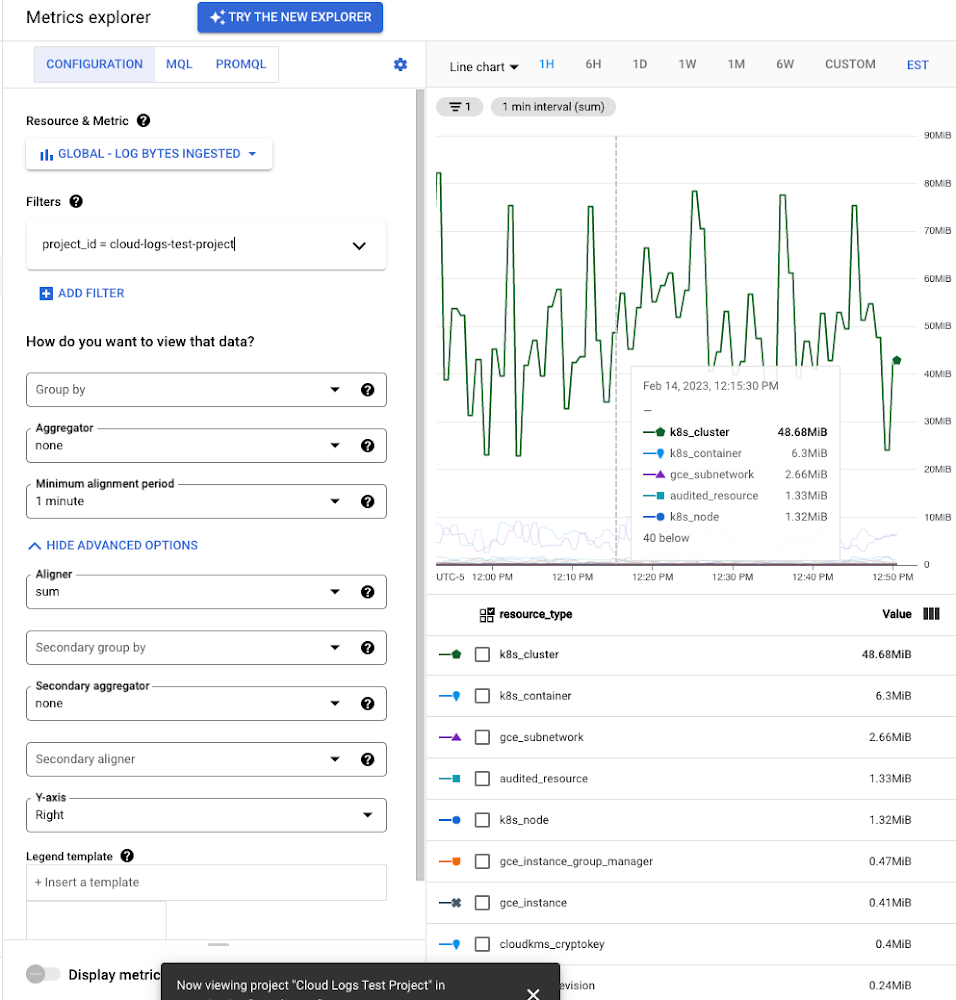
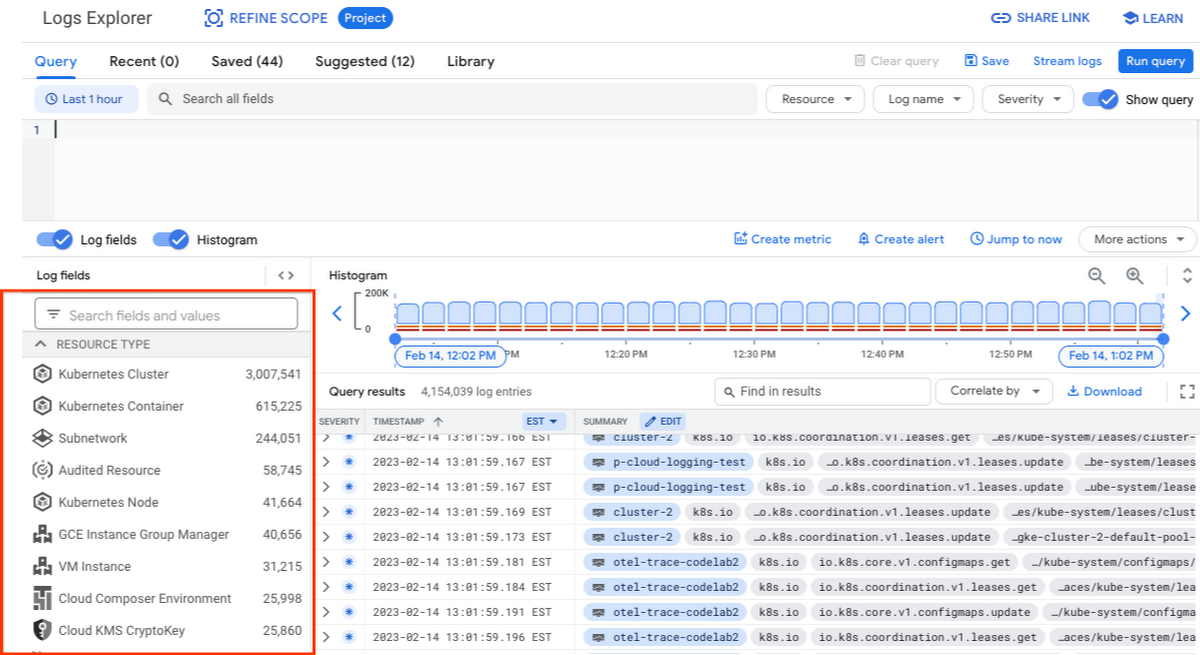
While these rich metrics are great for understanding volumes, you’ll probably want to eventually look at the logs to see whether they’re critical to your observability strategy. In Logs Explorer, the log fields on the left side help you understand volumes and filter logs from a resource type.
Reducing log volume with the Logs Router
Now that we understand what types of logs are expensive, we can use the Log Router and our sink definitions to reduce these volumes. Your strategy will depend on your observability goals, but here are some general tools we’ve found to work well.
The most obvious way to reduce your log volume is not to send the same logs to multiple storage destinations. One common example of this is when a central security team uses an aggregated log sink to centralize their audit logs but individual projects still ingest these logs. Instead, use exclusion filters on the _Default log sink and any other log sinks in each project to avoid these logs. Exclusion filters also work on log sinks to BigQuery, Pub/Sub, or Cloud Storage.
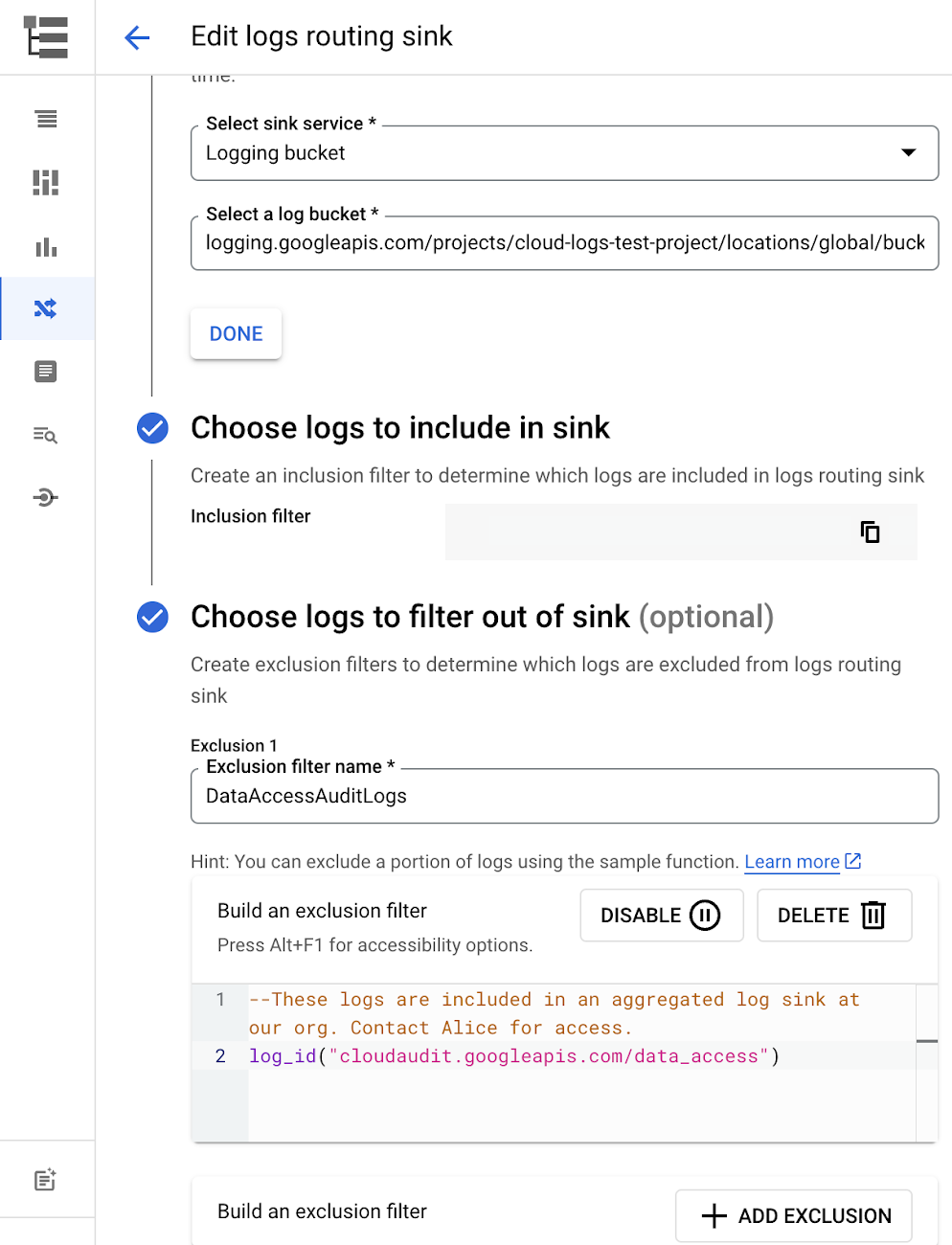
Similarly, if you’re paying to store logs in an external log management tool, you don’t have to save these same logs to Cloud Logging. We recommend keeping a small set of system logs from GCP services such as GKE in Cloud Logging in case you need assistance from GCP support but what you store is up to you, and you can still export them to the destination of your choice!
Another powerful tool to reduce log volume is to sample a percentage of chatty logs. This can be particularly useful with 2XX log balancer logs, for example. This can be a powerful tool, but we recommend you design a sampling strategy based on your usage, security and compliance requirements and document it clearly.
Step 3: Optimize costs over the lifecycle of your logs
Another option to reduce costs is to avoid storing logs for more time than you need them. Cloud Logging charges based on the monthly log volume retained per month. There’s no need to switch between hot and cold storage in Cloud Logging; doubling the default amount of retention only increases the cost by 2%. You can change your custom log retention at any time.
If you are storing your logs outside of Cloud Logging, it is a good idea to compare the cost to retain logs and make a decision.
Step 4: Setup alerts to avoid surprise bills
Once you are confident that the volume of logs being routed through log sinks fit in your budget, set up alerts so that you can detect any spikes before you get a large bill. To alert based on the volume of logs ingested into Cloud Logging:
- Go to the Logs-based metrics page. Scroll down to the bottom of the page and click the three dots on “billing/bytes_ingested” under System-defined metrics.
- Click “ Create alert from metric”
- Add filters (For example: use resource_id or project_id. This is optional).
- Select the logs based metric for the alert policy.
You can also set up similar alerts on the volume for log sinks to Pub/Sub, BigQuery or Cloud Storage.
Conclusion
One final way to stretch your observability budget is to use more Cloud Operations. We’re always working to bring our customers the most value possible for their budget such as our latest feature, Log Analytics, which adds querying capabilities but also makes the same data available for analytics, reducing the need for data silos. Many small customers can operate entirely on our free tier. Larger customers have expressed their appreciation for the scalable Log Router functionality available at no extra charge that would otherwise require an expensive event store to process data. So it’s no surprise that a 2022 IDC report showed that more than half of respondents surveyed stated that managing and monitoring tools from public cloud platforms provide more value compared to third-party tools. Get started with Cloud Logging and Monitoring today.
5061
Of your peers have already watched this video.
2:50 Minutes
The most insightful time you'll spend today!
FedEx Ground Makes Talent Recruitment More Effective with AI
FedEx Ground is a package shipping company and is a subsidiary of FedEx. It wanted to make hiring easier, and more intuitive so that it could hire the best people.
“We need to have every advantage we can to recruit and retain talent. That’s what led us to the work with Google and its capabilities,” says Matt Tokorcheck, VP, Operations, Support and Engineering, FedEx Ground
The challenge was the narrow slotting of job roles. The openings were listed under specific headings which revolved around job types or departments–and if applicants didn’t fit or understand those categories, they didn’t apply.
Take, for example, applicants that came from the military. “Many of my fellow service members and veterans expressed difficulty in finding a job post the military because a lot of the skill sets that they’ve developed and honed over their military career aren’t as useful in the civilian world,” says David Henderson, Industrial Engineer, FedEx.
So FedEx Ground decided to work with Google Cloud’s AI-powered talent solution.
“As a job seeker when you come to our career site to search for jobs, that search is powered by Jibe and the Google Jobs API. And it really matches the keywords that a job seeker inputs with the jobs that are available at FedEx Ground, says Shailesh Bokil, MD, Talent Acquisition and Planning, Fedx Ground.
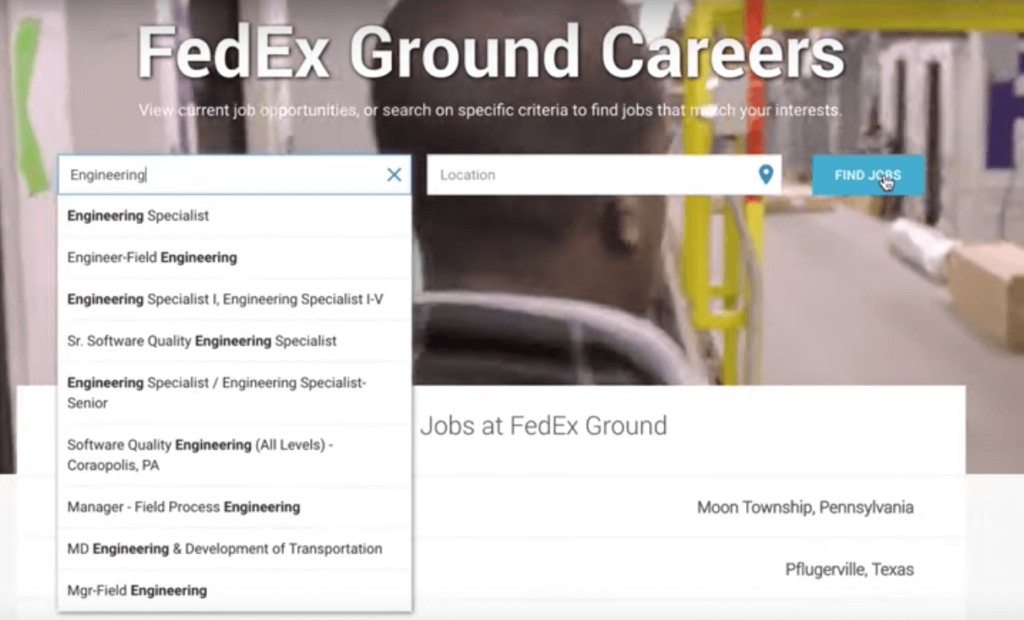
This makes job hunting a very intuitive experience for applicants.
“When I type into the search bar, I was immediately prompted to input my MOS, which is your military occupational specialty. And what it (the system) does is it takes the skills that are developed while serving in that MOS0 and matches them with skill sets that employers are looking. When I input 12A (an MOS), immediately I was getting results back for various engineer positions.
To find out more about how FedEx Ground employs AI-powered talent solution, watch the video.
Plainsight Vision AI Available for Google Cloud Customers to Unlock Accurate, Actionable Insights
4692
Of your peers have already read this article.
4:00 Minutes
The most insightful time you'll spend today!
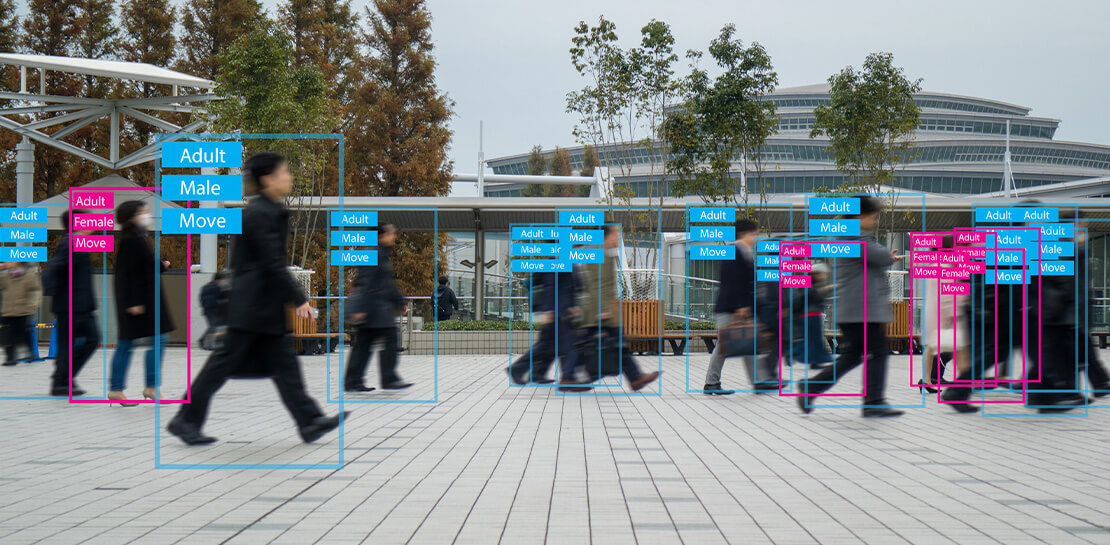
Data-savvy businesses increasingly rely on images and videos for critical functions, and yet are challenged by the sheer mass of information—more than 3.2 billion images and 720,000 hours of video are created daily. This explosion in visual data has paved the way for the growth of computer vision, a form of artificial intelligence (AI) that enables computers to “see” the world similarly to the way people do, but with unblinking consistency, and greater accuracy.
The transformational impact and value of computer vision solutions are significant and has been a guiding objective for companies and AI developers. And yet, even as the applications for computer vision increase dramatically, architecting and implementing vision AI solutions remain highly complex. Visual data, such as images and video, are made up of thousands of pixels of information that represent millions of different patterns and meanings, which can make interpreting even a single image overwhelming from a computational perspective.
Many organizations struggle with deployments and fail to operationalize vision AI solutions due to development delays, machine learning and data science hiring challenges, inaccurate output, a lack of integration with existing infrastructure, difficulty of use, and high cost. Plainsight, with the power of Google Cloud resources, is addressing all these challenges and helping businesses by enabling the deployment of vision AI within enterprise private networks that can be managed easily and scaled economically.
Plainsight has announced availability of its vision AI platform on Google Cloud Marketplace. Businesses can now easily deploy end-to-end vision AI to private clouds to realize the full value of their video and other visual data for accurate, actionable insights across diverse use cases.
Delivering on the Promise of AI: Seeing What’s Hiding In Plain Sight
For organizations to integrate AI and machine learning into their businesses successfully, the technology must be powerful enough to solve real challenges, yet fast, easy, and accessible enough to ensure the innovation potential is realized. Plainsight on Google Cloud delivers the power of enterprise vision AI that’s quick and easy to use with Google Cloud resources that enable global scale, increased security, bolstered privacy, unified billing, and cost savings.
To streamline vision AI workflows, Plainsight facilitates the entire pipeline, from visual data ingestion and annotation, through continuous model training, deployment, and monitoring for easier innovation and faster time-to-production. Our platform accelerates vision AI development in a manner that is complete, accurate, and accessible to non-technical business leaders. We believe that AI should be available and accessible to anyone and everyone—so that teams across entire organizations can reap the benefits.
By integrating Plainsight into their private networks, companies worldwide can now leverage one intuitive platform for centralized control of streamlined vision AI model creation and training with optimized visual data handling for diverse enterprise solutions. These use cases include: social distancing monitoring, medical imaging, drug compound screening, defect detection in manufacturing processes, identifying gas leaks, or even livestock counting and crop health monitoring for agriculture, to name a few.https://www.youtube.com/embed/A7U_0UkjvEg?enablejsapi=1&
We enable customers so they can create successful solutions that enable them to clearly see their business from all angles and to take advantage of the knowledge visual data can reveal by simply and quickly operationalizing practical vision AI applications.
AI-Powered Dataset Creation, Automated Model Training & Easy Deployment Without A Single Line Of Code
For vision AI applications, success is inextricably dependent on the quality and quantity of the datasets required to train the relevant models. To aid enterprises in this vital stage, the Plainsight platform provides built-in data annotation for the fast and easy creation of datasets. This includes AI-powered features that accelerate the speed and quality of labeling such as SmartPoly, for the automated polygon masking of objects, TrackForward, to predict and automatically label objects from frame to frame in video annotations, and AutoLabel for automated object recognition and labeling based on pre-trained machine learning models, to highlight a few.

In addition, to ensure the success of AI integration, we significantly reduce time-intensive processes with Plainsight vision AI’s automated machine learning with continuous model training and easy deployment capabilities. In just a few clicks, users can leverage optimizations for the most reliable model training without endless experimentation cycles. And, models are easily deployed at scale all within one, easy-to-manage model operationalization process for the business.
Growing With Google Cloud
Plainsight is a vision AI innovation leader, developing solutions that address unmet needs for challenger brands and Fortune 500s across vertical markets. As a team recognized for succeeding where others have failed, our expanding partnership with Google Cloud provides a powerful combination that helps customers see and activate the value of their visual data with a suite of services in a secure and private manner.
Our vision AI Platform simplifies building and operationalizing AI to solve business problems enterprises are facing every day—and the demand is increasing. To accelerate our journey to faster, more accessible AI for enterprises, we knew we needed strong support to grow Plainsight and scale our backend tools to match our vision.
Google Cloud delivered everything, and more, in one program. The Startup Program by Google Cloud provided the technology and services for scale and the support we needed to maximize the value the Program provided us. The Startup Program has been a springboard for architecting Plainsight vision AI in the cloud, accelerating our goals and optimizing innovation, efficiency, and growth. The team also helped us optimize Google Ads campaigns, fueling adoption of Plainsight.
After launching the SaaS version of Plainsight Data Annotation in November 2020, we grew our user base by nearly 110x in just three short months. Google Ads has also dramatically increased website traffic, growing new users by nearly 5.75X and page views by over 5X. The Google team helped us identify where Google Cloud offerings could be leveraged instead of developing in-house solutions and offered best practices that enabled us to deliver faster on our initiatives.
Kubernetes was already the underlying component of our platform and leveraging Google Kubernetes Engine (GKE) as a managed service removed a layer of complexity. By combining GKE and Anthos, we were able to standardize our deployments, aligning to how our customers leverage Anthos for enterprise applications in their own organizations. In addition, as a fast-moving, customer-centric company we use Google Workspace to help us centralize and manage our day-to-day work internally. By leveraging multiple products across Google’s ecosystem, we take advantage of a holistic partnership that has helped our business tremendously as we scale.
Leveraging Google’s Partners for Strategic Consultation
To facilitate this expansion of our partnership with Google and to maximize our use of Google Cloud services, we are working with DoiT International, a Google Managed Services Provider and 2020 Global Reseller Partner of the Year. DoiT provides us with ongoing technical consultation for cloud-native architecture, Google Cloud Marketplace integration, production-grade Kubernetes support, Google Cloud cost optimization, and technical support. The DoiT team has been invaluable in compiling best practices, tips, and strategies from their vast experience with various cloud customers to ease our Marketplace integration and is providing input for infrastructure strategy to support our continued rapid growth.
Plainsight Delivers Enterprise Vision AI Through The Google Cloud Platform Marketplace
Plainsight vision AI is now available to Google Cloud Customers on Google Cloud Marketplace enabling organizations across industries to deploy private Plainsight instances within their own environments. Marketplace customers will benefit from Google Cloud privacy, security, scalability and unified billing through their Google Cloud account.
Combining the powerful benefits provided by Google Cloud resources with Plainsight’s vision AI Platform into private networks, enterprises worldwide can now leverage one intuitive platform for centralized control of streamlined vision AI model creation and training with optimized visual data handling for diverse enterprise solutions.
Through our Google partnership, we’re able to leverage a powerful foundation that allows us to rapidly innovate, scale and accelerate delivery on our vision AI platform capabilities. By executing on our vision to make AI easier, faster and more accessible for all users across entire enterprises, we’re helping businesses see more and by seeing more, they’ll have the power to solve more.
If you want to learn more about how Google Cloud can help your startup, visit our page here where you can apply for our Startup Program, and sign up for our monthly startup newsletter to get a peek at our community activities, digital events, special offers, and more.
How Eventrac and Workflows Integration Helps Implement Hybrid Architecture in Google Cloud

6554
Of your peers have already read this article.
3:00 Minutes
The most insightful time you'll spend today!
I previously talked about Eventarc for choreographed (event-driven) Cloud Run services and introduced Workflows for orchestrated services.
Eventarc and Workflows are very useful in strictly choreographed or orchestrated architectures. However, you sometimes need a hybrid architecture that combines choreography and orchestration.
For example, imagine a use case where a message to a Pub/Sub topic triggers an automated infrastructure workflow or where a file upload to a Cloud Storage bucket triggers an image processing workflow. In these use cases, the trigger is an event but the actual work is done as an orchestrated workflow.
How do you implement these hybrid architectures in Google Cloud? The answer lies in Eventarc and Workflows integration.
Eventarc triggers
To recap, an Eventarc trigger enables you to read events from Google Cloud sources via Audit Logs and custom sources via Pub/Sub and direct them to Cloud Run services:

One limitation of Eventarc is that it currently only supports Cloud Run as targets. This will change in the future with more supported event targets. It’d be nice to have a future Eventarc trigger to route events from different sources to Workflows directly.
In absence of such a Workflows enabled trigger today, you need to do a little bit of work to connect Eventarc to Workflows. Specifically, you need to use a Cloud Run service as a proxy in the middle to execute the workflow.
Let’s take a look at a couple of concrete examples.
Eventarc Pub/Sub + Workflows integration
In the first example, imagine you want a Pub/Sub message to trigger a workflow.
Define and deploy a workflow
First, define a workflow that you want to execute. Here’s a sample workflows.yaml that simply decodes and logs the Pub/Sub message body:
main:params: [args]steps:- init:assign:- headers: ${args.headers}- body: ${args.body}...- pubSubMessageStep:call: sys.logargs:text: ${"Decoded Pub/Sub message data is " + text.decode(base64.decode(args.body.message.data))}severity: INFODeploy the workflow with a single command:gcloud workflows deploy ${WORKFLOW_NAME} --source=workflow.yaml --location=${REGION}
Deploy a Cloud Run service to execute the workflow
Next, you need a Cloud Run service to execute this workflow. Workflows has an execution API and client libraries that you can use for your favorite language. Here’s an example of the execution code from a Node app.js file. It simply passes the received HTTP request headers and body to the workflow and executes it:
const execResponse = await client.createExecution({parent: client.workflowPath(GOOGLE_CLOUD_PROJECT, WORKFLOW_REGION, WORKFLOW_NAME),execution: {argument: JSON.stringify({headers: req.headers, body: req.body})}});
Deploy the Cloud Run service with the Workflows name and region passed as environment variables:
gcloud run deploy ${SERVICE_NAME} \--image gcr.io/${PROJECT_ID}/${SERVICE_NAME} \--region=${REGION} \--allow-unauthenticated \--update-env-vars GOOGLE_CLOUD_PROJECT=${PROJECT_ID},WORKFLOW_REGION=${REGION},WORKFLOW_NAME=${WORKFLOW_NAME}
Connect a Pub/Sub topic to the Cloud Run service
With Cloud Run and Workflows connected, the next step is to connect a Pub/Sub topic to the Cloud Run service by creating an Eventarc Pub/Sub trigger:
gcloud eventarc triggers create ${SERVICE_NAME} \--destination-run-service=${SERVICE_NAME} \--destination-run-region=${REGION} \--location=${REGION} \--event-filters="type=google.cloud.pubsub.topic.v1.messagePublished"
This creates a Pub/Sub topic under the covers that you can access with:
export TOPIC_ID=$(basename $(gcloud eventarc triggers describe ${SERVICE_NAME} --format='value(transport.pubsub.topic)'))
Trigger the workflow
Now that all the wiring is done, you can trigger the workflow by simply sending a Pub/Sub message to the topic created by Eventarc:
gcloud pubsub topics publish ${TOPIC_ID} --message="Hello there"
In a few seconds, you should see the message in Workflows logs, confirming that the Pub/Sub message triggered the execution of the workflow:

Eventarc Audit Log-Storage + Workflows integration
In the second example, imagine you want a file creation event in a Cloud Storage bucket to trigger a workflow. The steps are similar to the Pub/Sub example with a few differences.
Define and deploy a workflow
As an example, you can use this workflow.yaml that logs the bucket and file names:
main:params: [args]steps:...- log:call: sys.logargs:text: ${"Workflows received event from bucket " + bucket + " for file " + file}severity: INFO
Deploy a Cloud Run service to execute the workflow
In the Cloud Run service, you read the CloudEvent from Eventarc and extract the bucket and file name in app.js using the CloudEvent SDK and the Google Event library:
const cloudEvent = HTTP.toEvent({ headers: req.headers, body: req.body });//"protoPayload" : {"resourceName":"projects/_/buckets/events-atamel-images-input/objects/atamel.jpg}";const logEntryData = toLogEntryData(cloudEvent.data);const tokens = logEntryData.protoPayload.resourceName.split('/');const bucket = tokens[3]
Executing the workflow is similar to the Pub/Sub example, except you don’t pass in the whole HTTP request but rather just the bucket and file name to the workflow:
const execResponse = await client.createExecution({parent: client.workflowPath(GOOGLE_CLOUD_PROJECT, WORKFLOW_REGION, WORKFLOW_NAME),execution: {argument: JSON.stringify({bucket: bucket, file: file})}});
Connect Cloud Storage events to the Cloud Run service
To connect Cloud Storage events to the Cloud Run service, create an Eventarc Audit Logs trigger with the service and method names for Cloud Storage:
gcloud eventarc triggers create ${SERVICE_NAME} \--destination-run-service=${SERVICE_NAME} \--destination-run-region=${REGION} \--location=${REGION} \--event-filters="type=google.cloud.audit.log.v1.written" \--event-filters="serviceName=storage.googleapis.com" \--event-filters="methodName=storage.objects.create" \--service-account=${PROJECT_NUMBER}-compute@developer.gserviceaccount.com
Trigger the workflow
Finally, you can trigger the workflow by creating and uploading a file to the bucket:
echo "Hello World" > random.txtgsutil cp random.txt gs://${BUCKET}/random.txt
In a few seconds, you should see the workflow log the bucket and object name.
Conclusion
In this blog post, I showed you how to trigger a workflow with two different event types from Eventarc. It’s certainly possible to do the opposite, namely, trigger a Cloud Run service via Eventarc with a Pub/Sub message (see connector_publish_pubsub.workflows.yaml) from Workflows or a file upload to a bucket from Workflows.
All the code mentioned in this blog post is in eventarc-workflows-integration. Feel free to reach out to me on Twitter @meteatamel for any questions or feedback.
More Relevant Stories for Your Company

Picsart’s Apigee-powered Pivot: From B2C to B2B, Bringing Graphic Design Capabilities to Businesses
With 150 million users and counting, Picsart was originally founded as a photo and video editing app we use to enhance our everyday life before uploading them to various social media platforms. As its user numbers continue growing, the company began exploring options for incorporating its easy-to-use editing tools into

Want to Code for the Cloud? Get Started with the Native App Development Track
Earlier this year, we launched the Google Cloud skills challenge, which provides 30 days of free access to training to build your cloud knowledge and an opportunity to earn skill badges that showcase your Google Cloud competencies. Today, we’re adding a Native App Development track to the skills challenge, joining the Getting Started,

Application Modernization Made Easy
Modernizing apps on the cloud isn’t an “all or nothing” decision. Businesses want the option to modernize on-premises or choose multi-cloud solutions that meet their needs. That’s why we created a new solution for running apps anywhere – simply, flexibly, and securely. Embracing open standards, Anthos lets you run your applications, unmodified,

Google’s Default Messaging Apps for AT&T Android Users Ensure Richer Conversations
Today, we’re announcing that we’re working with AT&T to establish Messages by Google as the default messaging application for all AT&T customers in the United States using Android phones. The collaboration aims to help accelerate the industry toward global Rich Communication Services (RCS) coverage and interoperability to offer a consistent, secure, and
