





Ways to Manage Extensions on Windows and Mac If You Haven’t Moved to Chrome Browser Cloud Management

3879
Of your peers have already read this article.
2:00 Minutes
The most insightful time you'll spend today!
Many enterprises are looking to better manage extensions on their corporate devices. Extensions themselves are a great tool for productivity and customization of Chrome. However, some extensions can have the potential for far reaching rights to sites your users visit and devices they browse from, giving IT the desire to closely manage which extensions are in their environment and how they behave.
In an earlier post in this series, we’ve detailed how Chrome Browser Cloud Management is the easiest way to audit installed extensions and manage them. However, some enterprises may need to still use Group Policy on Windows or plists on Mac to manage extensions. So lets touch on management through those methods, for organizations that haven’t quite made the move to Chrome Browser Cloud Management yet.
For starters, here are some of the most used options for managing extensions (some also apply to apps) via Windows Group Policy or via Plists on Macs:
Installing or allowing extensions
- Extension Install Allow List: These are the extensions that you have approved to be installed within your environment.
- Extension Install Force List: This will install the extension in the managed instance of Chrome. This setting overrides the extension block list policy, and the extension can’t be disabled on uninstalled.
- Extension Allowed Types: Here you can create a list of what types of extensions and apps you will allow to be installed. Extensions, themes, user scripts, hosted applications, legacy packaged applications and platform applications are the values that are supported. Note that whatever you want to allow must be included in the list. Anything left off the list will not be installed. For more information on the different types, here is a link on Extensions and Apps in the Chrome web store.
- Extension Install Sources: This policy allows you to get that older install functionality for specific URLs that you specify in this policy. Here is a link on the URL match patterns that can be used in this policy.
Blocking extensions
- Extension Install Block List: These are the extensions that you will not allow to be installed. If they are installed already, they will be disabled. If a user tries to install them, it will be blocked. In the Chrome web store, the Add to Chrome button will be red and advise the user that the extension can’t be installed.
- Block External Extensions: This setting will block extensions from external sources being installed. An example of this is if an installed application is adding an extension to Chrome via the registry, this setting will block that extension from loading.
Advanced management options
- Extensions Settings: This policy provides a varied amount of functionality and requires a JSON script to be created and formatted in a single line string. This setting can be complex. We recommend using Chrome Browser Cloud Management as almost all of the functionality is included without needing to write JSON as well as the ability to audit installed extensions. If you do want to use this policy, it is covered in detail in the Managing Extensions in your Enterprise technical document. Some of the functionality that you can use within this policy are:
- Install types: (Allowed, Blocked, Force Installed, Normal Installed)
- You can also display a custom message when the extension is blocked via the blocked installed message function.
- Prevent extensions from altering websites: You can prevent all or specific extensions from running on specific websites.
- Managing by permissions: You can allow or block extensions by the specific rights or “permissions” that they require to run.
- This provides a baseline of functionality that you will or will not allow extensions to run on your users machines.
- If an extension is updated, bought, sold and updates the permissions that it requires, this will dynamically protect your users from permissions that you will not allow.
- Install types: (Allowed, Blocked, Force Installed, Normal Installed)
Even if you decide that on-premises policy management is how you want to manage extensions long term, you can still use Chrome Browser Cloud Management to get much needed visibility into extensions that may exist in your environment. The newly improved apps and extension list is a great way to get a view of your current extension landscape, giving you more data to make better decisions around extension management.
You can enroll browsers to see this information, but still set policy through your existing tools if that’s your preference.
Well, that’s it for this edition of Chrome Insider. Here’s where you can find more posts in the series, or you can learn more about Chrome Browser Cloud Management.
A note on Google’s commitment to inclusive naming conventions. The following policies have been deprecated, however will still continue to work until Chrome 95 to give administrators time to migrate to the new policies.– ExtensionInstallWhitelist replaced with ExtensionInstallAllowlist
– ExtensionInstallBlacklist replaced with ExtensionInstallBlocklist
Building the future of work with Google Workspace

4405
Of your peers have already read this article.
7:30 Minutes
The most insightful time you'll spend today!
Since we launched Google Workspace last October, we’ve heard from many of our customers—from global enterprises to small businesses—about the new ways they’re connecting, creating, and collaborating, often across living rooms, time zones, and continents. This response propels us on our mission to build for the future with a solution that’s flexible, helpful, and inspires innovation. We’re proud to support the millions of customers and billions of end-users who trust Google Workspace to bring their own future visions to life.
Today, we’re excited to announce new innovations in Google Workspace that will further empower all the ways work happens—and deepen its impact—in an ever-changing world. These updates include a frontline worker solution, a set of features to help people find more time and focus, and powerful tools for strengthening collaboration.
Learning from our own transformation
At Google, like many of the organizations we support, we’ve been in a state of change, experimentation, and transformation this past year, as we reimagine what work will look like in the post-pandemic future. According to a Gartner survey, 90% of respondents plan to allow employees to work remotely at least part of the time even after the COVID-19 vaccine is widely adopted. This hybrid blend of at-home and in-office work will become the norm for many businesses.
As a company, we’ve been focused on how we can make this new hybrid work model support collaboration and innovation, and enhance inclusion and wellbeing for Google employees. We’re especially interested in what we call collaboration equity, or the ability to contribute equally, regardless of location, role, experience level, language, and device preference. We’ve been experimenting with ways to bridge the gap between the in-person and the “somewhere else” by pushing our technology and the physical spaces of our campuses to be more inclusive. We’re looking for ways to maximize participation everywhere we can—from personal desk space to conference rooms to group collaboration areas.
Google Workspace is at the nexus of Google’s own transformation. After all, Google Workspace was built in the cloud to power flexible, real-time, anywhere creation and equitable collaboration. Whether it’s with our Google Meet Series One hardware kits that enable safe, touch-free meetings and use Google AI to create immersive and inclusive experiences for all. Or the ways we help people focus their time and attention with intelligent, proactive suggestions that thoughtfully connect distributed content, people, and conversations. Or the features that promote inclusion, like live captions in multiple languages, so that everyone can participate effectively in video meetings.
It’s all part of Google Workspace’s mission to enable a hybrid work experience that enhances collaboration, strengthens human connection, and increases wellbeing for people—wherever they are and however they work.
And we’re inspired to hear how Google Workspace has been at the center of our customers’ evolving work plans, helping to forge human connection during a time of change for businesses like Sony Pictures Imageworks and Airbus.
“As we look to the next chapter in the future of work, Google Workspace will continue to keep us connected, wherever we are. Google Meet helps us build trust and relationships, not only within the studio, but with a worldwide network of talent. And Chat is our go-to for sharing ideas and feedback during production meetings in real-time. Google Workspace is how we work together to create together!”
– Mike Ford, VP, Software Development and Systems Engineering at Sony Pictures Imageworks
“Airbus has spent the past year thinking about what it actually means to return to work and we’re looking to support greater flexibility with Google Workspace in a leading role. In 2020, we held 5.6M Google Meet sessions and we now have more than 70,000 shared Drives where people collaborate. Google Workspace has changed the way people work at Airbus and that will continue as the solution empowers the hybrid work reality.”
– Andrew Plunkett, Airbus Vice President Digital Workplace
New ways to help businesses make an impact in changing times
Today, we’re announcing new tools and features to help people make the most of their time, collaborate equally, and deliver more impact. We’re also announcing new security tools with Assured Controls and expanded Data Regions coverage. Assured Controls will allow customers to make decisions about how to control provider access, while expanded Data Regions coverage helps customers choose where their data is geographically located at rest.
Enabling collaboration equity on the frontlines
From nurses to grocery store associates to warehouse employees, essential frontline workers have played a crucial and often heroic role during the pandemic. Despite their importance, those on the frontlines seldom have access to the same collaboration and communication tools that keep knowledge workers informed and connected. As a result, frontline workers often resort to their own personal devices and apps to get the information they need, when they need it.
In the coming weeks, we’ll be launching Google Workspace Frontline with these challenges in mind. This will open up communication and collaboration channels between frontline workers and corporate teams in a way that’s safe and secure. Workspace Frontline is a custom solution that includes communication and collaboration apps like Gmail, Chat, Docs, Drive, and more, as well as business-grade support and security features like advanced endpoint management that help keep a company’s data secure.
We’ve also made it easier for business teams to build custom AppSheet apps directly from Google Sheets and Drive, so that frontline workers can digitize and streamline their work, whether it’s collecting data in the field, reporting safety risks, or managing customer requests. By closing the gap between the frontline and the corporate team, we’re giving frontline workers secure access, on any device, to the information they need to be at their best.
Managing time and attention
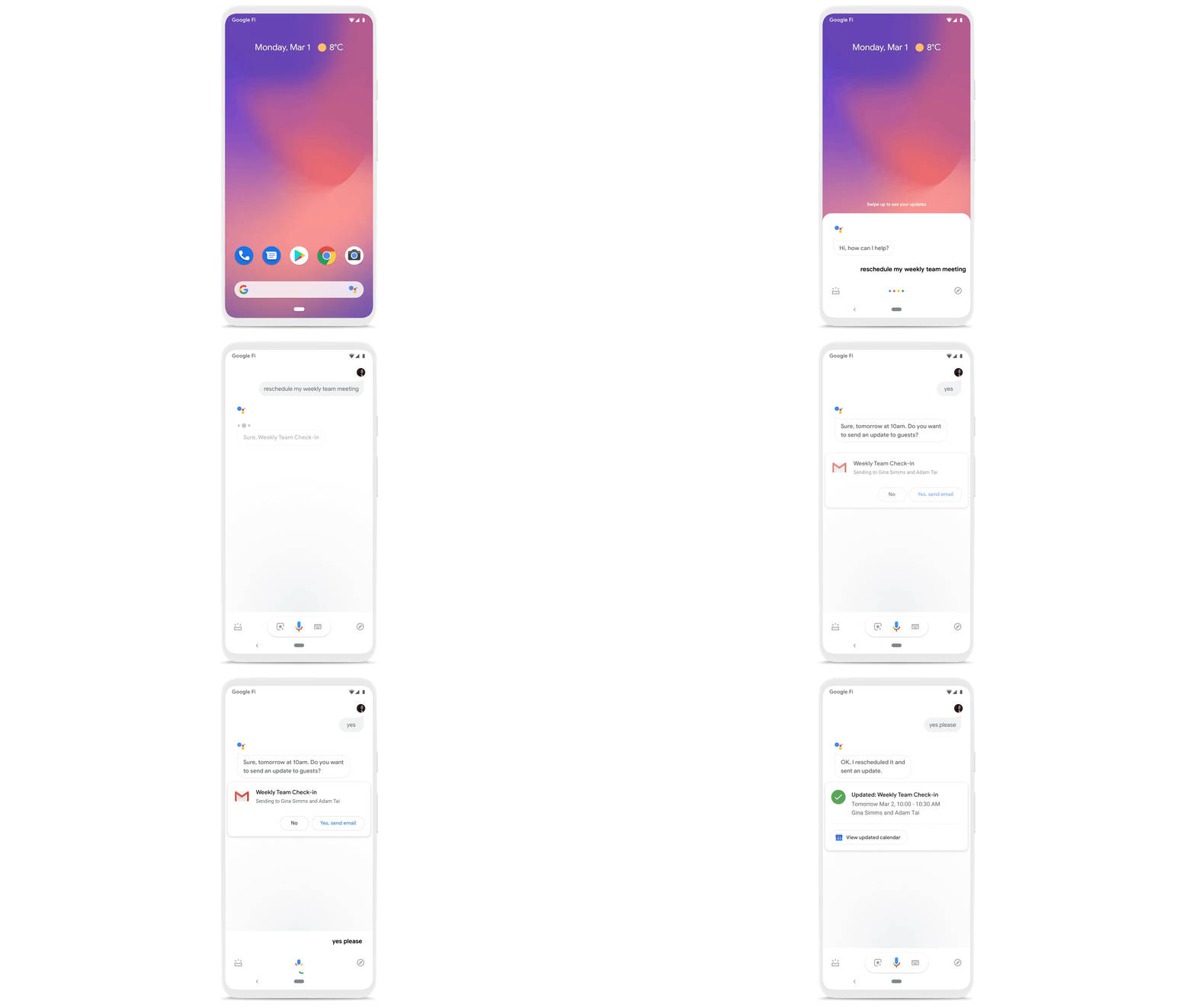
To help people save valuable time, we’re excited to share that using Google Workspace with Google Assistant is now generally available. You can ask Google what’s next on your work calendar, to quickly join meetings, or to send a message. Google Assistant is currently available for Google Workspace on supported mobile devices and is in beta for smart speakers and Smart Displays, like Nest Hub Max. Google Workspace customers can learn how to enable this feature for their users here.
Elsewhere on the time management front, a key trend we’re seeing in today’s workforce is the juggling of professional and personal responsibilities, with many employees now working in “sprints,” like two- to four-hour blocks of time instead of the traditional workday. As more businesses embrace a flexible, hybrid model, we expect this trend to continue, and we’ll all need tools to help us achieve better work-life balance and make the best use of our time.
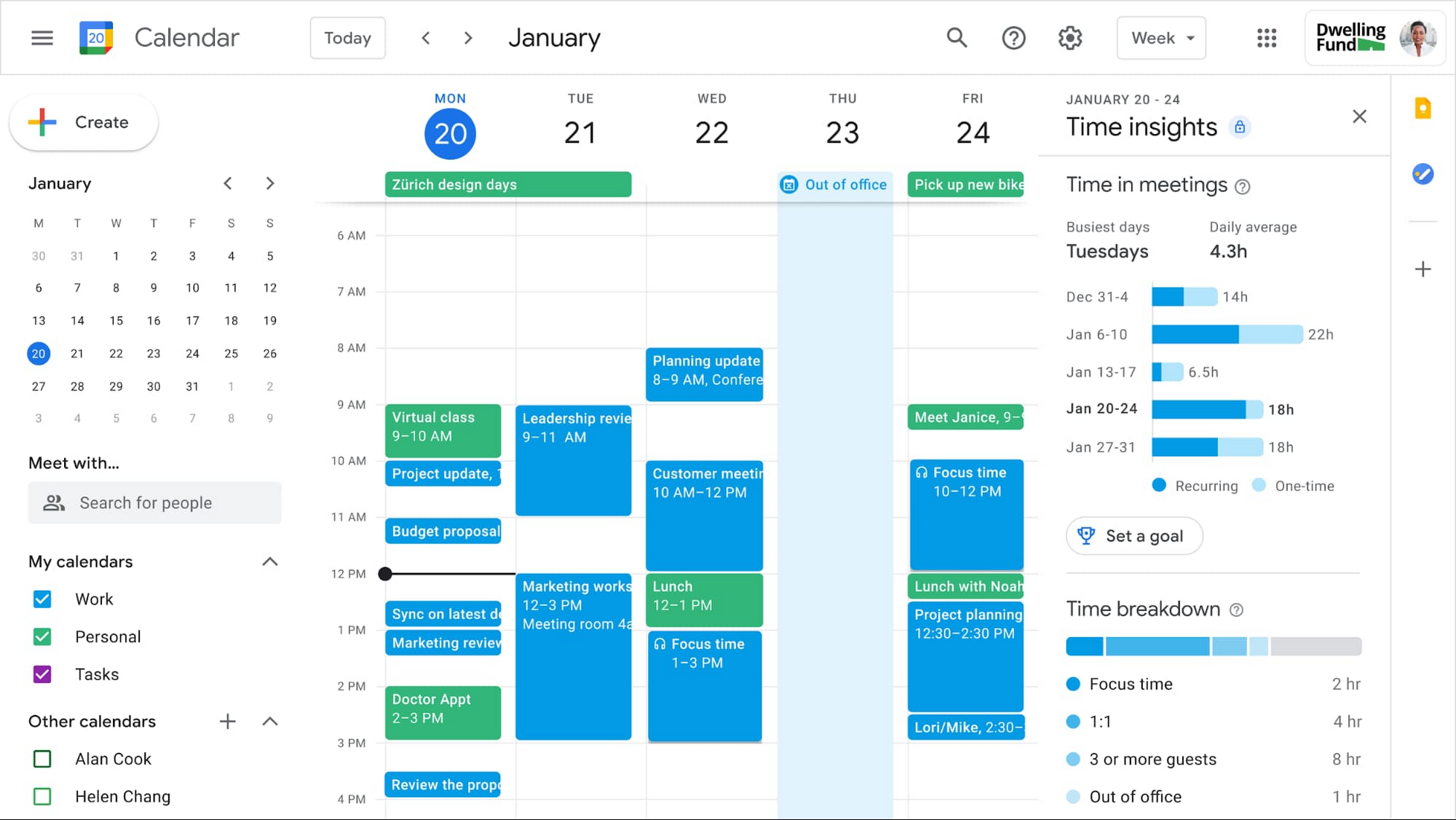
In the coming weeks, we’re releasing an integrated set of features in Google Workspace that help people easily share their work hours and location, while also finding more time to focus on what matters most. Features like segmentable working hours, recurring out-of-office entries, and location indicators let employees share their availability and location with their colleagues. Meanwhile, a new event type—Focus Time—lets people minimize distractions by limiting notifications during these event windows. All these availability and location indicators will show up seamlessly across Google Workspace, as teams engage with Calendar, Meet, Chat, and Gmail. We’ll also be delivering Time Insights to Google Workspace users (visible to the employee only, not their manager), so that employees can assess how they’re spending their time against their own priorities.
Strengthening collaboration equity for all
Ever since we pioneered real-time document editing fifteen years ago, collaboration has been a cornerstone for Google Workspace. In the coming months, we’ll make collaboration more equitable and accessible in a number of ways. First, we’re creating second-screen experiences in Google Meet for those using a mix of devices to host their meetings, like Google Meet hardware for those in conference rooms and Nest Hub Max for those at home. With new second-screen capabilities, people can present and fully participate in the Google Meet experience, including with chat, polls, and Q&As, from any device, no matter where they are.

And specifically for those joining meetings from their mobile devices, we’re making it easier to have a bigger impact on a smaller screen. We’re rolling out mobile tile view so you can see more people at once, while split-screen and picture-in-picture support on Meet mobile will help you seamlessly chat or browse your Gmail without missing the visual thread of a meeting. Mobile support for background replace, Q&A, and polls will also help you stay productive and connected on the go.
Live streams will also become more powerful and inclusive in Google Workspace with the addition of Q&A, polls, and live captions (in English, Spanish, German, Portuguese, and French). And because we recognize how organizations are connecting across different groups of people, we’re also enabling live streaming across multiple Google Workspace domains within the same organization.
Finally, to give teams even more ways to connect and collaborate, we’re adding Chat, Jamboard, and Calendar to Google Workspace Essentials.
Building the future of work—together
If there’s a mantra that captures the last year of work, it might be “flexibility in the face of change.” It’s how our customers and our own employees have bridged the physical distances to continue making an impact in a rapidly changing world. As work continues to evolve for all of us, Google Workspace is committed to providing a solution that’s flexible, helpful, and that fuels innovation. We’re also committed to enabling collaboration equity wherever and however we can. At its core, this has been our mission for more than a decade and we’re excited to partner with our customers and users to continue bringing it to life.
Cloud-Native Observability: Google Cloud and Chronosphere Join Forces

1356
Of your peers have already read this article.
2:30 Minutes
The most insightful time you'll spend today!
As digital transformation continues apace, cloud native adoption has skyrocketed — and so has the volume, velocity, and variety of data that organizations must monitor to maintain visibility over their IT environments. Rather than a fixed number of virtual machines (VMs) running a single application each, systems are more flexible and ephemeral — with thousands of containers and microservices emitting data — and services and systems have greater interdependencies. All of this has led to an explosion in complexity that makes it nearly impossible to reliably and efficiently operate cloud-native services using traditional observability solutions without dramatically increasing overhead.
Built on Google Kubernetes Engine (GKE), Chronosphere is the only cloud-native observability solution that helps teams quickly resolve incidents before they affect the customer experience and the bottom line. And the relationship between Google Cloud and Chronosphere has developed into a growing partnership. Chronosphere brings the ability to rapidly and reliably control observability data and costs to Google Cloud customers, while maintaining open source compatibility. Recently, GV (Google Ventures) participated in Chronosphere’s $115 million round of Series C funding. Chronosphere is also available on Google Cloud Marketplace, making it easy for customers to procure and deploy.
Why Chronosphere chose to build on Google Cloud
Chronosphere’s founders, CEO, Martin Mao, and CTO, Rob Skillington, wanted to build an observability solution that solved some of the same problems they encountered when leading the observability team at Uber. The challenges at Uber focused on scale, reliability and cost, with a key emphasis on how these were not easily solvable for monitoring of cloud-native applications. Martin and Rob were looking to build a solution that was cloud-native, highly reliable, and capable of managing the high volume of data that modern organizations process every day. For those reasons, Martin and Rob chose to build Chronosphere on top of Google Kubernetes Engine (GKE):
Cloud-native mindset: When Martin and Rob launched Chronosphere, one of the first considerations was this: A cloud-native problem needs a cloud-native solution. Google Cloud and Chronosphere work together to provide a purpose-built software-as-a-service (SaaS) observability solution platform for cloud-native technologies like Kubernetes. Chronosphere runs much of its critical infrastructure on Google Cloud, using the service’s global infrastructure to deliver secure and reliable services to hypergrowth customers.
Open platform: Martin and Rob have a commitment to openness — a commitment that Google Cloud makes to its customers as well. All of the ins and outs of Chronosphere are open source compatible –built on GKE, the platform ingests both metric and trace data in a variety of open source formats, such as Prometheus, OpenTelemetry, and StatsD, so teams can get onboard easily while avoiding vendor lock-in. And they remain fully in control of how much data to ingest, how it’s ingested, how it’s stored, and for how long. That way, customers remain in control of their observability costs while their systems and data continue to grow, and can troubleshoot and remediate issues more quickly.
Mission-critical performance: Observability is a mission-critical service because it is essential for the reliability and performance of mission-critical systems. For this reason, Martin and Rob wanted to offer the strongest service level agreements (SLAs) possible for availability, reliability, and performance. Google Cloud provides the secure global infrastructure that allows them to do so.
Data volume: Modern organizations emit huge volumes of data that they have to sift through in near-real time to gain full visibility. Google Cloud offers the same infrastructure and networks that Google uses to support billions of users every day, capable of processing petabytes of data with ease.
How Chronosphere works with Google Cloud
GKE provides specific technical benefits that Chronosphere leverages to offer customers the performance and availability they need to spend less time managing their observability systems and more time creating value.
The Chronosphere collector is a Kubernetes-native, Prometheus-compatible agent that collects, processes, and exports telemetry data, including metrics and traces. When you install the collector in a Kubernetes cluster, it automatically discovers all your workloads and starts to gather data from them.
The Chronosphere UI tailors the experience to each user based on what services that individual owns or which teams that person belongs to. This makes the overall user experience friendlier and less overwhelming while helping people get to the bottom of issues faster.
Running on GKE means that Chronosphere can leverage Google Cloud’s multiple zones in each geographic region to distribute workloads evenly, ensure customer data stores are isolated from each other, and build tolerance for zonal failures. It also allows for data persistence across multiple zones. At the same time, Google Cloud’s global load balancers bring the data physically closer to the customer, shortening the time it takes for a data point to be visible to a user after its emission.
What this means for customers
The partnership brings together the best in cloud-native services and cloud-native observability. With the power of Google Cloud and Chronosphere, observability teams can transform their observability data based on need, context, and utility, storing only the useful data to reduce costs and improve performance. With purpose-built solutions for a cloud-native world, teams gain faster issue detection and resolution, and also benefit from Chronosphere’s 99.99% availability and open source compatibility — eliminating vendor lock-in.
“Companies growing their online infrastructure risk huge hits to their bottom line if they don’t also manage increased complexity and cost,” says Martin. “Our partnership with Google Cloud brings together the world’s leading cloud services platform with our powerful observability solution to unlock the benefits of a cloud-native world, while optimizing for efficiency, reliability, and cost.”
Google Cloud and Chronosphere: The perfect match
Google Cloud and Chronosphere offer an industry-leading observability solution built from the ground up to abstract away the complexities of cloud computing for already stressed teams. And the future of this partnership is sure to bring new innovations around performance, reliability, and cost efficiency as both companies continue to invest in these three areas. The goal: to deliver the best performance for cost in the industry.
Learn more about what Chronosphere and Google Cloud are doing for customers, and check out the Chronosphere listing on Google Cloud Marketplace.

Collaboration Helps Nielsen Gain Better Consumer Insights and Save Costs by 20%
DOWNLOAD CASE STUDY4853
Of your peers have already downloaded this article
5:00 Minutes
The most insightful time you'll spend today!
The Nielsen Company is one of the world’s most well-known and respected marketing research firms, with operations in over 100 countries. Its 56,000 employees work to provide insights and data that give customers a better understanding of what people watch, listen to, and buy.
Those insights are essential to companies in a variety of industries, including media and entertainment, consumer products, and retail, that must stay in touch with customers in a fast-changing marketplace.
In order to help customers get the information they need to increase ad sales and boost market share, Nielsen must empower its employees to collaborate across markets and global offices.
But Nielsen’s employees were working out of individual e-mail inboxes that delayed decision-making and made it difficult for the company to take immediate action on time-sensitive information.
The company saw an opportunity to improve collaboration by moving productivity apps to the cloud—Google Cloud’s G Suite—allowing employees to work anytime, anywhere, and on any device and collaborating in real-time.
“In keeping with our cloud-first strategy and digital transformation, we wanted to give our employees state-of-the-art collaboration tools,” says Kimberly Anstett, CIO at Nielsen. “We knew that a global, cloud-based toolset would help change the way everyone in the company works and maximize the value we deliver to our customers.”
Google’s Latest ‘Carbon Footprint’ can Flag Users about Carbon Emission Levels from their Cloud Usage

7100
Of your peers have already read this article.
4:00 Minutes
The most insightful time you'll spend today!
Google Cloud is proud to support our customers with the cleanest cloud in the industry. For the past four years, we’ve matched 100% of our electricity use with renewable energy purchases, and we were the first company of our size to commit going even further by running on carbon-free energy 24/7 by 2030. As we work to achieve 24/7 carbon-free energy, we help you take immediate action to decarbonize your digital applications and infrastructure. We’re also working with our customers across every industry to develop new solutions for the unique climate change challenges that organizations face. Today, we’re excited to expand our portfolio of carbon-free solutions and announce new partnerships that will help every company build a more sustainable future.
First, we’re launching Carbon Footprint, a new product that provides customers with the gross carbon emissions associated with their Google Cloud Platform usage. Now available to every GCP user for free in the Cloud Console, this tool helps you measure, track and report on the gross carbon emissions associated with the electricity of your cloud usage. Of course, the net operational emissions associated with your Google Cloud usage is still zero. With growing requirements for Environmental Social and Governance (ESG) reporting, companies are looking for ways to show their employees, boards and customers their progress against climate targets. Using Carbon Footprint, you have access to the gross energy related emissions data you need for internal carbon inventories and external carbon disclosures, with one click.
Built in collaboration with customers like Atos, Etsy, HSBC, L’Oréal, Salesforce, Thoughtworks and Twitter, our Carbon Footprint reporting introduces a new standard of transparency to support you in meeting your climate goals. You can monitor your gross cloud emissions over time, by project, by product and by region, giving IT teams and developers metrics that can help them reduce their carbon footprint. Our detailed calculation methodology is published so that auditors and reporting teams can verify that their cloud emissions data meets GHG Protocol guidance.

“The power of knowledge combined with the power of technology innovation plays a vital role in proactively responding to the climate crisis we are facing. With Google Carbon Footprint reporting, Atos feeds emissions data in our Decarbonization Data Platform, demonstrating potential emissions reductions from the Google Cloud Platform to our customers. This reporting opens up new levels of emissions transparency, trajectory planning, and data insight to support our customers in meeting, and potentially accelerating towards, their climate goals.”—Nourdine Bihmane, Head of Decarbonization Business Line, Atos
“The capability to measure and understand the environmental footprint of our Public Cloud usage is among the key axis of our sustainable tech roadmap. With Google Cloud Carbon Footprint, we are now able to directly follow the impact of our sustainable infrastructure approach and architecture principles.”—Hervé DUMAS, Sustainability IT Director, L’Oreal
While digital infrastructure emissions are just one part of your environmental footprint, accurately accounting for IT carbon emissions is necessary to measure progress against the carbon reduction targets required to avert the worst consequences of climate change. To help you account for emissions beyond our cloud and across your organization, we’re excited to partner with Salesforce Sustainability Cloud, integrating our Google Cloud Platform emissions data into their carbon accounting platform.
“As we face unprecedented climate challenges, companies across the globe need to embed sustainability into the core of their business in order to meet growing customer and stakeholder expectations, and reduce their environmental impact. Together, Google Cloud and Salesforce Sustainability Cloud can help our joint customers accelerate their path to Net Zero, leveraging data-driven insights and visualizations to track and reduce their carbon emissions to drive sustainable change.”—Ari Alexander, GM of Salesforce Sustainability Cloud.
From information to action
With the gross energy-related emissions footprint of data associated with your Google Cloud usage now available, we’re committed to providing tools to not only measure your carbon footprint, but help you reduce it. We recently launched low-carbon region icons to help you choose cleaner regions to locate your Google Cloud resources. New users who see the icons are over 50% more likely to choose clean regions over others, ensuring their applications emit less carbon over time.
For current Google Cloud users, we’re pleased to announce that Active Assist Recommender will include a new sustainability impact category, extending its original core pillars of cost, performance, security, and manageability. Starting with the Unattended Project Recommender, you’ll soon be able to estimate the gross carbon emissions you’ll save by removing your idle resources. Unattended Project Recommender uses machine learning to identify, with a high degree of confidence, projects that are likely abandoned based on API and networking activity, billing, usage of cloud services, and other signals, and provides actionable recommendations on how to remediate those abandoned projects. By deleting these projects, not only can you reduce costs and mitigate security risks, but you can also reduce your carbon emissions. In August, Active Assist analyzed the aggregate data from all customers across our platform, and over 600,000 gross kgCo2e was associated with projects that it recommended for cleanup or reclamation. If customers deleted these projects they would significantly reduce future gross carbon emissions. Check out this blog to learn more about Active Assist.

Solutions for climate resilience
Many of our customers face difficult questions about how their business impacts the natural environment today, and how it will be affected by climate change in the future. Answering these questions requires rich datasets about the planet, better analytics tools and smarter models to predict potential outcomes. For over a decade Google Earth Engine has supported scientists and developers with hyperscale computing power and the world’s largest catalog of satellite image data. Today, we are delighted to announce the preview of Earth Engine as part of Google Cloud Platform. Now, you can access Earth Engine and combine it with other geospatial-enabled products like BigQuery. By extending Earth Engine’s powerful platform to enterprises through Google Cloud, we are bringing the best of Google together.
Over the past year we’ve worked with a number of organizations to use Earth Engine technology with tools like BigQuery and the Cloud AI Platform to develop new solutions for responsible commodity sourcing, sustainable land management and carbon emissions reduction. Earth Engine enables companies to track, monitor and predict changes in the Earth’s surface due to extreme weather events or human-caused activities, thus helping them save on operational costs, mitigate and better manage risks, and become more resilient to climate change threats. This new offering will wrap the unique data, insights and functionality of Earth Engine with a fully-managed, enterprise-grade experience and reliability.
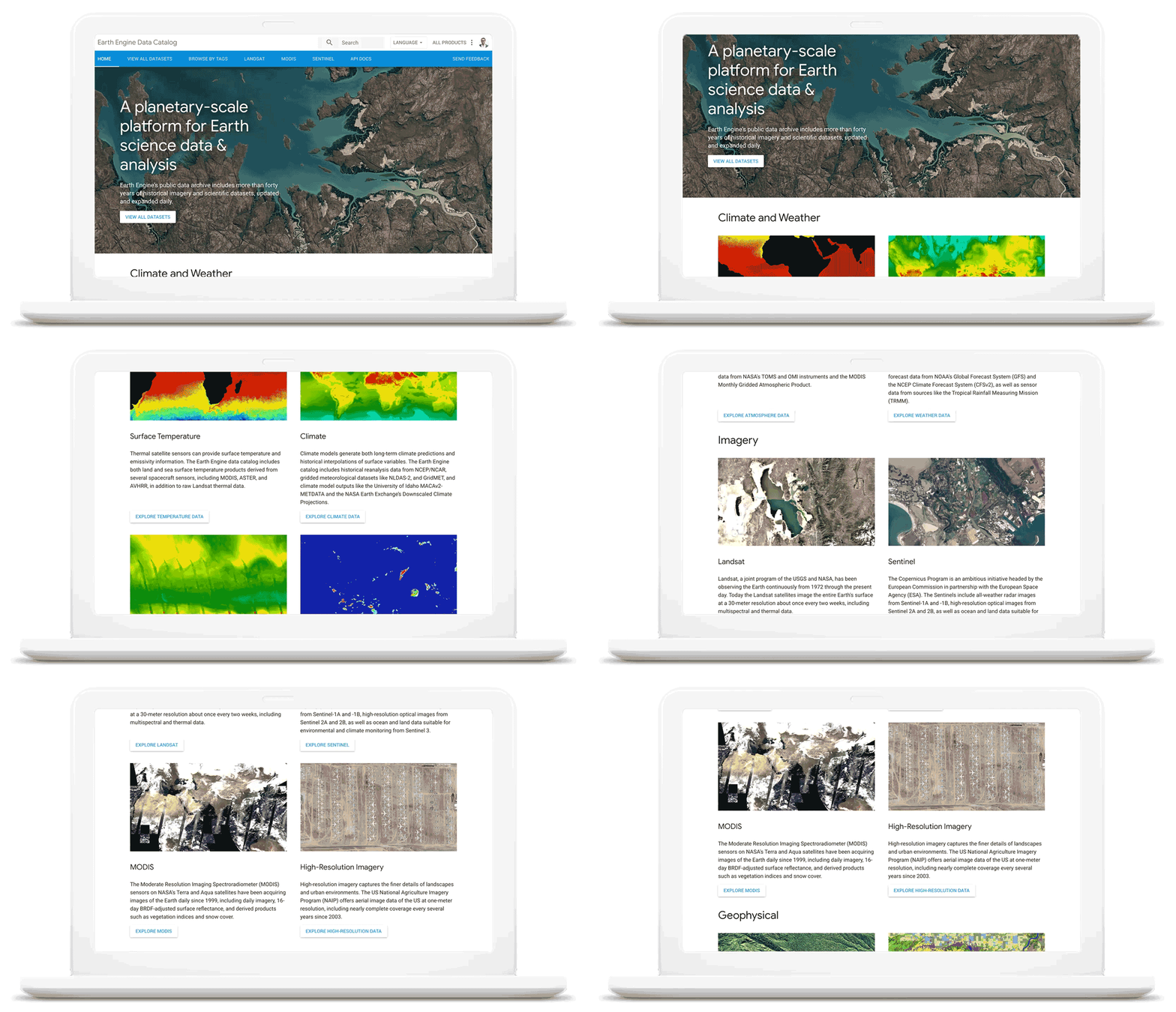
As we work with our customers to accelerate their sustainability initiatives, earth observation data is proving critical to effectively plan for the long-term impacts of climate change. To extend our geospatial and sustainability use cases we’re also expanding our partnerships with CARTO, Climate Engine, Geotab, NGIS, and Planet to bring their data and core applications to Google Cloud.
These partners will each make their existing platforms and datasets available globally on Google Cloud, giving you low-latency and reliable access to critical data and applications that will inform your sustainability initiatives. By integrating water availability, agricultural data, weather risks, and extensive daily satellite imagery into Earth Engine and BigQuery, you can achieve more ambitious goals for the sustainability of your business and our planet.
Committing to help you meet your climate goals
With each of these tools, we’re working to reduce the barriers you face in adopting more sustainable technology practices. We understand that building more sustainable applications and infrastructure is not easy. You face competing priorities, technical challenges, and the perception that climate action is costly.
It doesn’t have to be this way. Today, we are making a sustainability pledge to you: teams across Google Cloud are committing to eliminating the barriers you face in building a more sustainable digital future for your organization, and will help you take action today to realize your climate goals. We’ll do this in a number of ways:
- In digital transformation projects and workshops, sustainability teams will always have a seat at the planning table, so we can work together on using cloud technology to build a more sustainable future.
- We’re putting low-carbon signals natively into our products to help developers choose more sustainable options early in their application development.
- We’ll ensure carbon impact is measured consistently with other key performance indicators. Leveraging the social cost of carbon, the ROI models and value assessments you conduct with Google Cloud will project your emissions impact too.
- We’ll be transparent about our carbon impact, by publishing third-party reviewed reports and methodologies, so you can trust the data for your own reports and disclosures.
- We’ll continue to work with the industry on best practices, including educational resources like Sustainable IT – Decoded, a new masterclass created in partnership with Intel, that shares the expertise of sustainability thought leaders.
For the next decade we need to work together to avert the worst consequences of climate change. We’ve made tremendous progress in building technology that helps everyone do more for the planet, and we’re excited to see what you do with it. Visit this page to learn more about Google Cloud’s sustainability efforts.
5581
Of your peers have already watched this video.
1:30 Minutes
The most insightful time you'll spend today!
A Quick Guide to Cloud Monitoring
Cloud Monitoring is a tool that allows you to gain visibility into the performance, availability, and health of your applications and infrastructure. In this video, we show you what Cloud Monitoring is and how you can use it to custom define service-level objectives (SLOs), monitor application metrics, and the overall health of your applications infrastructure. Watch to learn how you can use Cloud Monitoring!
More Relevant Stories for Your Company

How Google Cloud Platform Delivers 5X Performance Boost to SMBs
Small and medium-sized businesses are increasingly adopting cloud solutions, with Google Cloud Platform offering significant benefits. IDC interviews reveal that SMBs using Google Cloud Platform experience improved performance, reliability, and scalability while reducing costs. Key findings include: Empowering application development teams with infrastructure agility and scalability Enabling business growth by

Google Cloud’s Virtual Appointment Scheduling Tool (VAST) Helps State of Arizona Recover from Unemployment Situation
When the world was forced to go primarily online, state governments also faced the reality of needing to provide community services without the health risk of meeting in person. Old systems that relied on interpersonal contact could not keep up. An unprecedented number of displaced workers swamped every unemployment system.
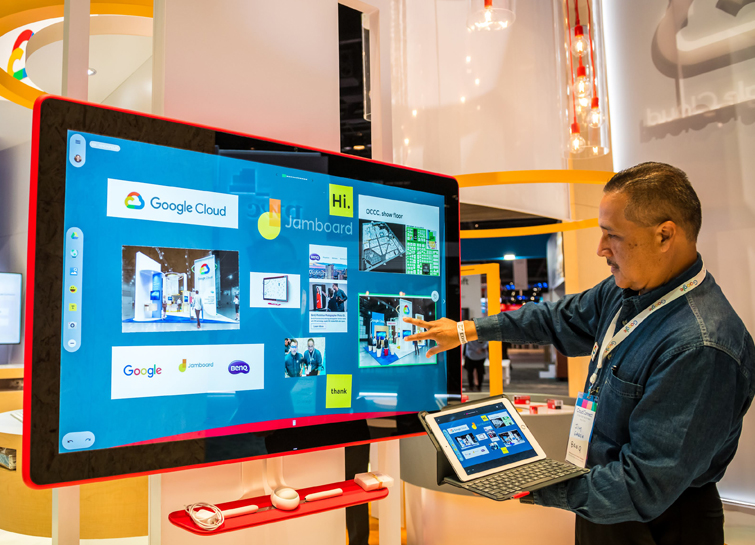
Forrester Report: Are You Listening to Your New-Age Cloud Workers?
Today’s modern workers are redefining organizations as we know it. They are no longer tied to a work desk or bound by geographies. And that’s how they ensure that your business is always-on, all the time, everywhere. This, in turn, points to the fact that today’s organizations need to ensure

Partnering with Google Cloud is the Key Behind Recent Healthcare Innovations
It’s simply amazing to witness how some of our systems integrators employ Google Cloud solutions to drive innovation in ways we at Google may never have considered—especially in healthcare. According to analyst firm MarketsandMarkets, the market for the Cloud in healthcare is projected to grow 43% between 2020 and 2025
