





Vodafone Leverages Google Cloud to Aid COVID-19 Frontline with Anonymized Insights on Population Mobility

11218
Of your peers have already read this article.
1:30 Minutes
The most insightful time you'll spend today!
Editor’s note: When Europe’s largest mobile communications company, Vodafone, was asked by the European Commission to help understand population movement across the European Union and the UK to help fight COVID-19, it was able to provide anonymized mobile network-based insights to answer the call. Here’s how Vodafone, with the support of Google Cloud, rapidly mobilized the COVID-19 frontline, while respecting its customers’ privacy.
With the emergence of COVID-19 in early 2020, the European Commission—the executive branch of the European Union (EU)—knew that technology would be instrumental in its fight to control the pandemic. With various lockdowns imposed across its member states, the Commission was keen to predict and prevent the spread of COVID-19 and to manage the related social, political and financial impacts.
Mobile network data helps track COVID-19 across the EU
Mobile networks produce location data, which can be turned into useful anonymous insights to understand population movement within a geographic area. The European Commission, working with mobile industry association GSMA (Groupe Speciale Mobile Association), asked Europe’s major mobile phone operators for help in producing insights to support the fight against COVID-19. As the largest mobile network operator within the EU, Vodafone saw this as a critical opportunity to participate.
Vodafone had previous experience of using mobile network data to support pandemic research. For example, in 2019, Vodafone provided mobility pattern analysis to help track the spread of Malaria in Mozambique. And, during the early stages of the COVID-19 pandemic (prior to working with the European Commission), Vodafone assisted the Italian and Spanish governments in understanding their citizens’ mobility patterns. Vodafone had also previously offered anonymized and aggregated population mobility insights to support public transport and tourism authorities and retail organizations in a number of countries. Consequently, Vodafone was perfectly placed to play a greater role in supporting the European Commission’s response to the pandemic.
When asked to assist the European Commission, Vodafone first considered how it could safely share its data with the governing body without providing details on the individual movements of its customers. It realized it could achieve this through an elaborate set of anonymization and aggregation techniques. Insights are aggregated from a minimum of 50 users and Vodafone only shared these anonymous insights and never the actual raw data with the Commission. As specified by the EU, these insights are then presented onto a large geographical region, typically a city or a county with thousands of people living in that area.
These insights illustrate how people move, helping to determine how lockdowns and self-isolation measures were impacting behaviors.
Using Google Cloud to collate and store population mobility data
In April 2020, Vodafone began migrating its operations, including its mobile data, to Google Cloud on servers in Europe and the UK with elaborate security safeguards, including encryption, building on a previous partnership.
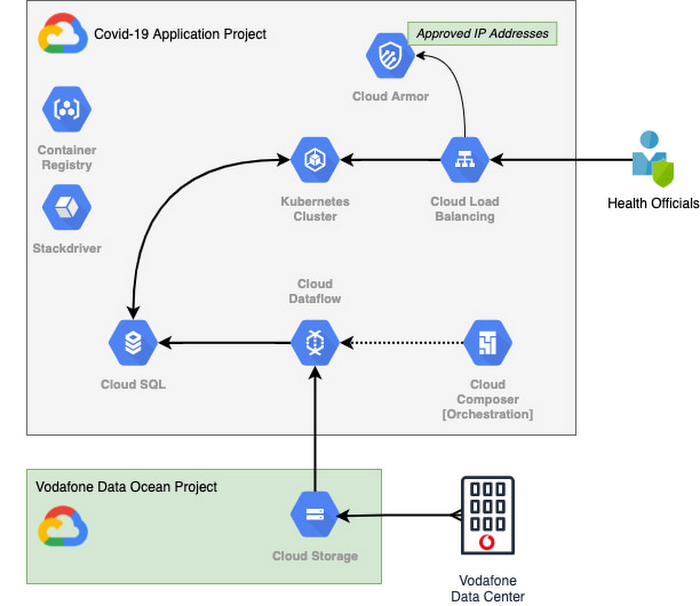
With the data residing in EU and UK data centers and not the United States, Vodafone could then retrieve anonymous insights from Google Cloud Storage instantaneously. Before supplying any information to the European Commission, however, Vodafone used Dataflow to validate the data and run a series of tests to ensure the database had accurate data, before ingesting and archiving the relevant metrics. For instant access, the data was then made available to the European Commission using a Redis database on Google Kubernetes Engine.
To ensure aggregate Vodafone customer data was always safe, secure, and anonymous, all entry points to the front-end were protected behind Google Cloud Armor, where only specific IP addresses were allowed. Using these tools, seamless data pipelines fed in predefined key performance indicators from each specified European market. While data quality measures ensured the definitions for metrics across markets were consistent and could be accurately compared.
The architecture (pictured below) shows how Vodafone integrated and anonymized its data on Google Cloud.
Live interactive dashboard shows population mobility in real-time
With its data integrated on Google Cloud, Vodafone created a live, interactive dashboard to track mobility patterns and share relevant information with the European Commission in real-time.
The European Commission Joint Research Center (JRC) was able to gather valuable information from these insights, which enabled them to see where population mobility was aiding the spread of the disease, when cross-referenced with health data. It could also assess the implications of lockdowns on different populations and forecast cross-country spreading.
Mobile data aids disease modeling for multiple stakeholders
The Vodafone data became instrumental in modeling the likely course of the disease too. For example, the University of Southampton in the UK used it to predict the outcome of different coordinated COVID-19 exit strategies across Europe. This research was published in Science Magazine in September 2020.
The Vodafone data dashboard continues to be used by individual governments, NGOs and organizations to further investigate the impacts of the pandemic and to measure the effectiveness of response strategies alongside the rollout of vaccination programs. The project also helped Vodafone win a DataIQ award for most effective stakeholder engagement.
Using the learnings from this project, Vodafone has been able to adapt its own B2B solution, called Vodafone Analytics, by adaptIng and migrating the code to work in Google Cloud Platform. This solution has been rolled out across Germany, Greece, Portugal and South Africa, and new countries are being onboarded every day. Vodafone Analytics already has more than 100 customers leveraging it for a variety of use cases—Italian fashion retailer OVS, uses it for its smart retail operation, while global real estate company, JLL, uses it to understand the footfall passing through its properties.
Working together, Vodafone and Google Cloud continue to help a range of organizations, governments, and NGOs navigate through the ongoing pandemic, optimize their operations, and help the greater good, without infringing individuals’ fundamental rights to privacy.
To learn more about Google Cloud and Vodafone, watch our full interview here.
Beyond Traditional Learning: AI-based Online Learning Platform and Google Cloud Solutions Push Learners to Get Ahead

10367
Of your peers have already read this article.
1:30 Minutes
The most insightful time you'll spend today!
The combination of a vital need for IT experts among businesses and a digital skills gap is making lifelong learning increasingly critical. Beyond professional development, learning new skills offers additional rewards from building peer connections to boosting your creativity. That’s why in 2020 Krishna Deepak Nallamilli and I launched KIMO.ai to reimagine how people approach learning, especially in developing markets. Our team is building the artificial intelligence needed to generate individual learning paths through a wide range of quality digital learning content.
Google Cloud and its Startup Program have been instrumental in connecting our team with the tools, people, processes, and best practices to grow our business.
Existing learning platforms lack engagement
Outside of traditional education settings, massive open online learning courses (MOOCs)—often modeled after university courses—can provide a flexible and affordable way to upskill or reskill. But the vast majority of people who participate in MOOC programs fail to complete courses. Based on our research, the challenge with existing learning platforms is a lack of engagement, primarily caused by limited direction on which skills to learn, whether AI, fintech, blockchain, or other in-demand disciplines.
We’ve also received feedback that many corporate learning management systems–developed as online training systems to upskill employees–tend to be poorly designed and time-consuming to use.
Overall, a significant challenge with most existing learning platforms is that they’re generic. For example, suppose you’re interested in learning about AI. In that case, you need AI-related coursework that applies to your industry and the job you want because AI in medicine is vastly different from AI in financial services. Today’s online learning options typically take a one-size-fits-all approach and fail to capture the nuances of what learners really need to get ahead.
Building a future-proof learning platform
The commitment to highly personalized, accessible learning inspired KIMO.ai, a platform that we believe is the future of education. Depending on your goals, current skills, location, and other factors, our AI-based platform will identify which coursework (and where to find those classes) to build the skills you need. The more personalized, relevant learning recommendations even take into account people’s preferences for podcasts, MOOCs, books, articles, videos, courses, publications, and more.
In a mix of cooperation and competition we call “coopetition,” KIMO.ai will regularly recommend courses from other established online learning systems if, based on our automated assessment, it’s the best option for a learner. There’s also the option to access free content only.
Google cultural alignment fosters trust
Our platform started with one developer exploring NLP models and Google APIs. As we’ve grown our team and launched our beta to 110,000 users in developing markets, we discovered there is a lot of interest in our platform, and we believe we can make a significant impact. In feedback forums, we also learned that we need to focus our efforts on the mobile experience to improve engagement since 99% of the beta testers use mobile devices.
Beyond our team’s high level of trust in Google Cloud solutions, our team also appreciates the cultural alignment with Google. We value Google’s developer-centric approach and rely on tools like Dataflow for batch data processing and Cloud TPU to reliably run machine learning models with AI services on Google Cloud. We also build all of our deployments on Google Kubernetes Engine (GKE), which makes it easy to manage all our containerized workloads
On the front end, Google App Engine makes it easy to deploy apps and experiment, and it integrates seamlessly with Firebase for authentication and more. BigQuery is our serverless data warehouse that efficiently scales to support the millions of articles, videos, and other learning resources we need to analyze to provide the targeted coursework recommendations our learners require.
As we grow our business having a network of trusted advisors is also extremely valuable. By working closely with DoIT International, the 2020 Google Cloud Global Reseller Partner of the Year, our team has access to their cloud, Kubernetes, and machine learning expertise. DoIT has already helped us quickly resolve IT issues and create analytics dashboards that give us insights to continually enhance our services.
Building for a growing industry
The dynamic edtech market is growing rapidly and estimated to become an $11B industry by 2025. We’re proud to be part of the next wave of personalized education that has the potential to empower people in developing markets and beyond to grow their skills with coursework tailored to their exact needs and how they like to learn. This year, we will deliver our platform to at least 400,000 more people. We’re excited to see how they use it and where it takes them.
If you want to learn more about how Google Cloud can help your startup, visit our Startup Program application page here to get more information about our program, and sign up for our communications to get a look at our community activities, digital events, special offers, and more.
Private Services Connect in Google Cloud Regions Enables Customers to Consume Services Faster

4627
Of your peers have already read this article.
2:00 Minutes
The most insightful time you'll spend today!
At Google Cloud, we believe in making it simple and secure to consume services whether they’re from Google, a third party or customer-owned. With Private Service Connect, we have adopted a service-centric approach to our network that abstracts the underlying networking infrastructure. And today, we are announcing Private Service Connect is generally available in all Google Cloud regions.
Private Service Connect allows you to create private and secure connections from your cloud networks to services like Cloud Storage or Cloud Bigtable and third-party services like Elastic, MongoDB or Snowflake. It creates service endpoints in your VPCs that provide private connectivity and policy enforcement, allowing you to easily connect to services across different networks and organizations.
Customers told us they want to consume services faster while making sure that the connectivity is private and secure. In the past, achieving this was a challenge: networking teams had to negotiate IP address blocks, mutually agree on policies and coordinate as applications evolved to newer versions. With Private Service Connect, you can delegate the consumption and delivery of services to different teams without having to coordinate between teams.
How it works
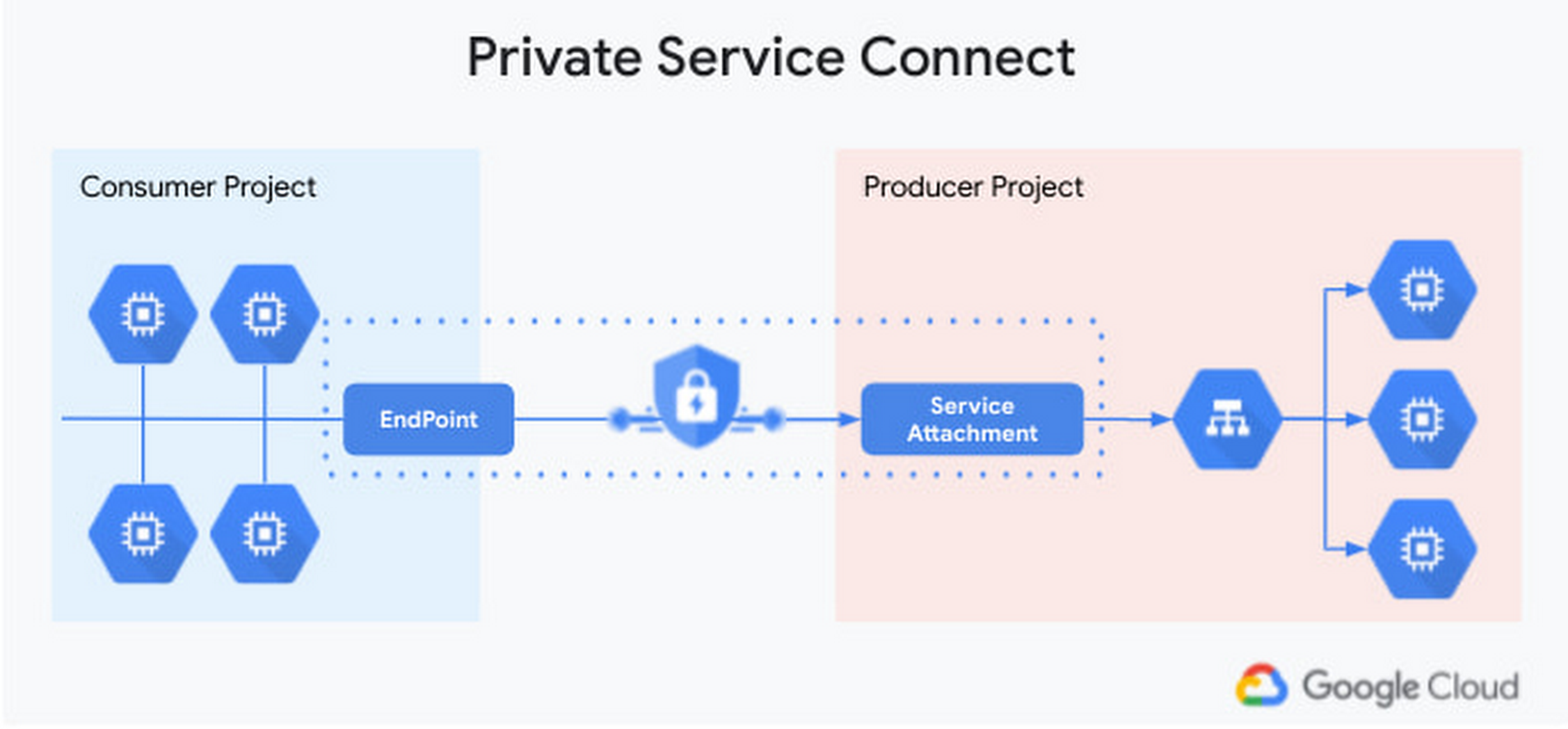
Private Service Connect makes it easy to consume services by leveraging service endpoints that are locally managed. The services can be in different projects or managed by different organizations. Access to the service is controlled by strict governance and IAM policies. Application teams and developers can focus on delivering their services easily by exposing their ‘service attachment’. No more worrying about networking constructs—Private Service Connect takes care of connecting to the service on the Google backbone for them.
Benefits to our partners
Being able to consume services from a variety of software vendors and service providers makes it possible for enterprises to innovate faster. For that, developers need to be able to compose services from third-party vendors, Google managed services, as well as their own services. To help, third-party partners can use Private Service Connect to deliver multi-tenant services securely and at massive scale, and make the connectivity to their services appear as if they are running on the enterprises’ network. Private Service Connect will also integrate with Service Directory to register many producer services, making service consumption even simpler.
“In today’s environment, where seamless access to real-time market information and the ability to handle increasingly vast volumes of data is essential, our clients are demanding native connectivity in the cloud. Google’s Private Service Connect offers the performance and reliability required by the types of mission critical apps that rely on Bloomberg’s tick for tick market data feed, B-PIPE.” —Cory Albert, Global Head of Cloud Strategy, Enterprise Data at Bloomberg
“One of the key goals for Elastic on Google Cloud is to monitor and protect our customers’ data. Google Cloud’s Private Service Connect with Elastic Cloud furthers our commitment to our customers that together we make it quick, easy and secure to gain insights and intelligence from their data.” —Uri Cohen, Product Lead for Elastic Cloud
“MongoDB’s partnership with Google is an integral part of our strategy to support modern apps and mission-critical databases and to become a cloud data company. Private Service Connect allows our customers to connect to MongoDB Atlas on Google Cloud seamlessly and securely and we’re excited for customers to have this additional and important capability.”—Andrew Davidson, VP of Cloud Product, MongoDB
Check out the Google Cloud Console to try it today.
Unlocking Efficient API Management with Apigee and CI/CD Pipelines

928
Of your peers have already read this article.
3:30 Minutes
The most insightful time you'll spend today!
In modern software development, automating delivery using Continuous Integration and Continuous Deployment (CI/CD) pipelines draws parallels to automotive assembly lines that doubled the production while cutting down costs by 65%. According to a recent report from Postman, over 51% of respondents indicated that their organizations devote more than half of their development efforts to APIs. APIs are a big part of development, so let’s explore why you should integrate them into your CI/CD pipelines. We will also share best practices and tools for integrating Apigee within your organization’s CI/CD processes.
4 reasons to automate your API delivery with CI/CD pipelines
Apigee is a feature-rich API management platform that provides developers with the necessary tools to build, secure, manage, and publish APIs. But what if you want to automate the process of deploying your APIs to Apigee? That’s where CI/CD comes in. By incorporating Apigee into your CI/CD pipeline, you can automate API deployment, promote consistency across environments, and monitor API performance in real-time. Four of these benefits include:
- Cut time to market by and respond faster to customer demands by automating API deployments.
- Catch defects earlier and improve API security by automating the process of testing and securing APIs.
- Slash costs by saving on staffing, tools, and infrastructure required to deploy and manage APIs.
- Improve visibility and compliance by tracking and auditing API usage.
Key tools and useful tips to effectively automate API delivery and management
Integrating API delivery into CI/CD pipelines using products like Cloud Build streamlines the development process. For example, a developer building an application on Google Cloud can deliver APIs side by side with other workloads in tools such as Cloud Run, Google Kubernetes Engine (GKE), Cloud Functions, and App Engine.
Operational automation can include a list of seemingly endless aspects of the development process. But at a high-level, the key components of an effective CI/CD pipeline for API management include:
1. Building and testing API proxies
- If you are new to Apigee, utilize the comprehensive visual tools in the console to build and deploy API proxies using a convenient drag and drop interface. You can elevate their API proxy development by leveraging the VS Code extension and Apigee Emulator. This local setup enables you to use auto-complete features along with local proxy deployment, testing, and seamless code commit to trigger the pipeline for further deployment across Apigee environments.
- Useful tip: Maximize the utility of Apigee, use the Debug tool to inspect every detail of an API transaction. Lastly, remember to export your proxy from the Apigee console and commit it to your source repository. With these best practices in hand, you’re all set to make the most of your Apigee journey.
2. Store and version your API code:
- Ensure robust source code management – foundation of every CI/CD pipeline – to easily track, and manage changes. Use Cloud Source Repositories, a fully managed Git repository for seamless integration with other GCP development (or) leverage common tools like GitHub, GitLab, BitBucket and many more depending on your organization’s approach
- Useful tip: Employing the right branching strategy helps reduce complexity and keeps delivery lean. Check out this community post for different branching strategies and choose the right one for your use case. Ensure frequent commits and merges to your source code to keep your codebase healthy and up-to-date. Regular code reviews also help refine your code and create quality checkpoints.
3. Ensure code quality with static code analysis:
- Regular static code analysis can help you to improve the quality of your code by detecting potential errors and security vulnerabilities. It can also help you to promote code standardization by ensuring that your code follows a consistent style. For static code analysis you can use apigeelint (for analyzing Apigee bundles), JSHint and ESLint (for JavaScript analysis), Checkstyle and PMD (for Java analysis), or SonarQube (for multi-language support)
- Useful tip: Integrate the tool with your code editor so that you can see the results of the analysis as you write code. Define quality gates/thresholds and run the tool as part of your build pipeline. Mark the build as failed if it does not meet the thresholds.
4. Ensure code resilience with unit testing and Code coverage:
- Unit tests focus on individual units of code, such as methods or classes. They help to ensure that each unit of code works as expected. Code coverage measures the percentage of code that is covered by unit tests. A high code coverage percentage indicates that more of your code is being tested, which can help to reduce the risk of errors. You can use these tools for unit testing and code coverage: Mocha and Chai (for JavaScript), JUnit (for Java), Cobertura and Istanbul (nyc) (for code coverage)
- Useful tip: Write unit tests for all of your code. This includes both new code and existing code. Run unit tests during the build process. This will help to ensure that your code is always passing unit tests before it is deployed. Set coverage thresholds and mark the build as failed if it does not meet the thresholds. This will help to ensure that your code is sufficiently covered by unit tests.
5. Configure, Package and Deploy your code:
- Creating a successful API deployment is like constructing a sturdy building. You need a strong blueprint (your Apigee code) that has been carefully planned, packaged into a deployable format (a zip file), and then implemented (imported into Apigee and deployed to an Apigee environment). During the packaging phase, the blueprint is detailed with metadata and manifest, similar to labeling and preparing architectural plans for construction. Moreover, all your Apigee configurations, except sensitive info, can be integrated into your blueprint, ready to be brought to life with the right tools. In terms of tooling, you can choose from a variety of open-source options that are built on Apigee APIs. Some of the commonly utilized ones are Apigee Deploy Maven plugin, apigee cli, apigee-sackmesser, and custom scripts using the Apigee APIs.
- Useful tip: Use an artifact system to store these bundles. This will make it easy to manage and track your bundles. Maintain all the necessary configurations like Target server, Key Value Map, etc as part of the source code repo. This will make it easier to deploy your code to different environments. Use the pipeline and the source code to promote the proxies from lower environments to production. This will help you to ensure that your code is always up-to-date in production.
6. Verify the changes with Functional or integration testing:
- Consider integration testing as a rigorous dress rehearsal for your API’s debut performance. It’s your chance to verify if your API plays its part flawlessly under various scenarios, including when it has to share the stage with third-party systems. To ensure the API is working as expected, you have some powerful tools at your disposal such as Apickli (based on cucumber.js), Postman, and JUnit
- Useful tip: Manage these tests as part of the source code and run different test suites based on the environment deploying to. This will make it easy to track and manage your tests. Run these tests right after the deployment and mark the build as failed if it does not meet the threshold. This will help you to identify and fix any issues that may have been introduced during the deployment. Create rollout plans when the functional tests fail by rolling out to the previous working/stable version. This will help you to minimize the impact of any issues that may have been introduced during the deployment.
Additionally, here are some optional trail markers you can consider on your journey to perfecting your pipeline:
- Testing Your API’s Endurance: Running performance tests ensures your API can withstand the long haul.
- Clear and Accessible Documentation: Keep your developer portal up-to-date with the latest API documentation. Tools like the Apigee Smartdocs Maven plugin can make this a breeze, particularly with the Drupal developer portal.
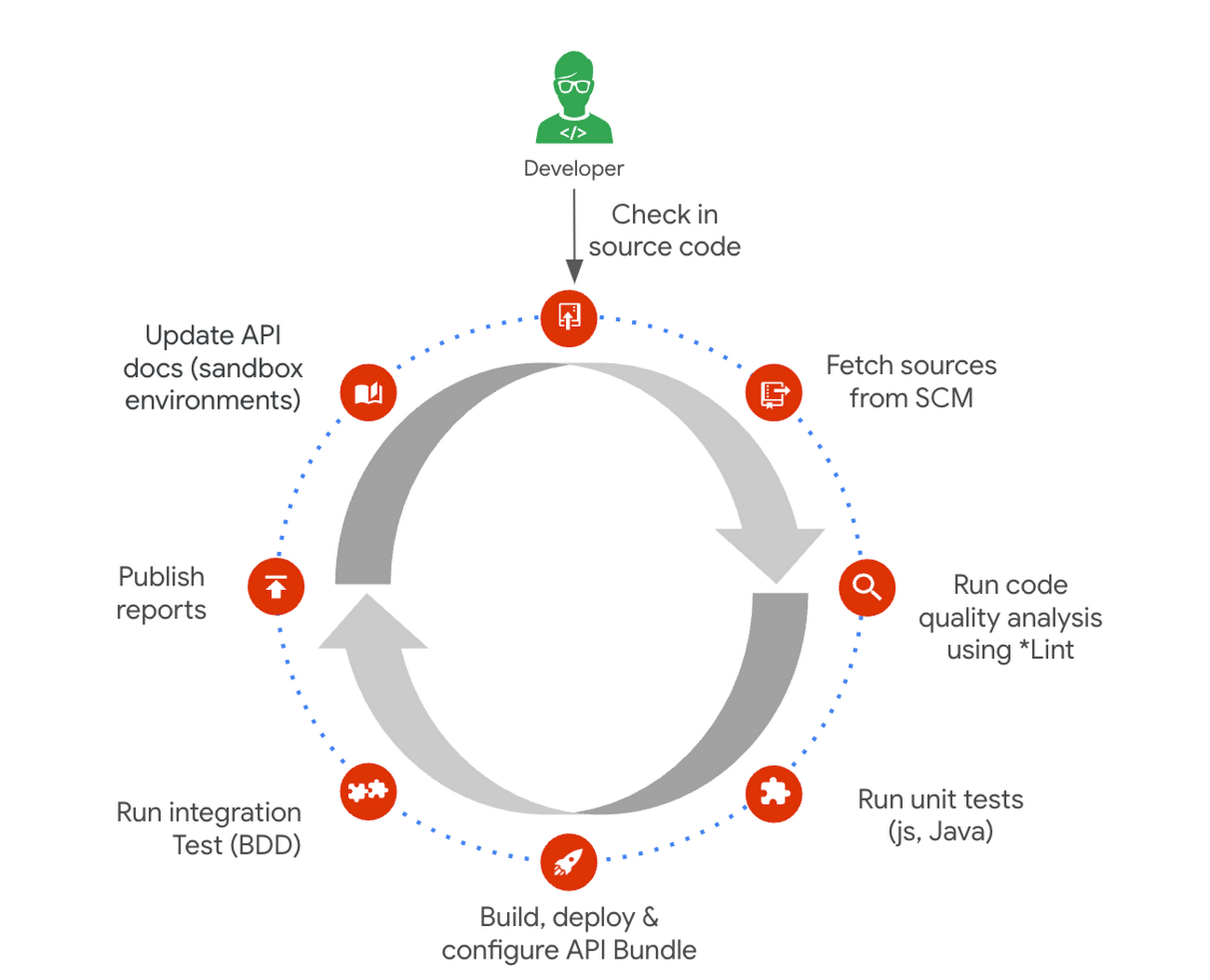
Here is a typical pipeline example with a comprehensive reference implementation we see with most of our customers. It triggers when the developer commits the code to the repo. The pipeline can be executed by any CI/CD platform like Cloud Build.
Get started today
Why wait? Kickstart your Apigee journey today directly from the console or evaluate it for free. Leverage our Accelerators to jumpstart your development using examples or advanced technical guidance. Should you have any questions or need support along the way, our Apigee Community is teeming with experts ready to lend a hand.
Centralized Analytics: Apigee and Cloud Run API Management

905
Of your peers have already read this article.
3:30 Minutes
The most insightful time you'll spend today!
Most enterprise companies enforce strict requirements for how APIs should be exposed to the public internet that require centralized handling of the authentication credentials, the collection of metrics metrics and other classic API management capabilities. Before the introduction of sidecars in Cloud Run, developers either had to implement these requirements within the service itself or add a full-lifecycle API management platform in front of their service as described in a previous blog post.
In this post we want to demonstrate a new way to fulfill the requirement for API management in Cloud Run. Specifically we want to look at how the recently announced multi-container feature in Cloud Run enables a sidecar pattern that can be used by developers of Cloud Run services to add pre-packaged API management capabilities. This includes self-service developer onboarding in a developer portal, credential validation and quota enforcements. As an additional operational benefit the described solution also adds centralized analytics and metrics for APIs that are exposed via Cloud Run.
Our solution for adding API management capabilities for Cloud Run is provided by the following three components:
- The Cloud Run service that hosts a traditional RESTful web application and is fronted by a vanilla Envoy proxy.
- An Apigee Envoy Adapter aka. Remote service that runs in GKE Autopilot and acts as a policy decision point PDP for Envoy’s external authorization filter and is responsible for accepting or rejecting calls to the Cloud Run service.
- An Apigee API Platform that is used to manage the API lifecycle of the Cloud Run service. Apigee also offers a turn-key developer portal where developers can obtain access credentials to access an API.
The user journey of an incoming request to our new Cloud Run Service with API management looks as follows:
- An API Developer self-registers in the Apigee Developer Portal and obtains access credentials for the API
- They call the Cloud Run endpoint and provide their credential for authentication
- In Cloud Run service the Envoy proxy container intercepts the request and initiates a gRPC call to the Apigee Envoy adapter to authenticate the client.
- The Apigee Envoy adapter verifies the request’s credentials and identifies the corresponding API product as defined in Apigee. The Envoy adapter also verifies the call quota associated with the client and sends the analytics data and access logs back to the control plane.
- If the credentials are valid and the client hasn’t exhausted their call quota the Apigee Envoy adapter forwards the request to its co-located container in the Cloud Run service.
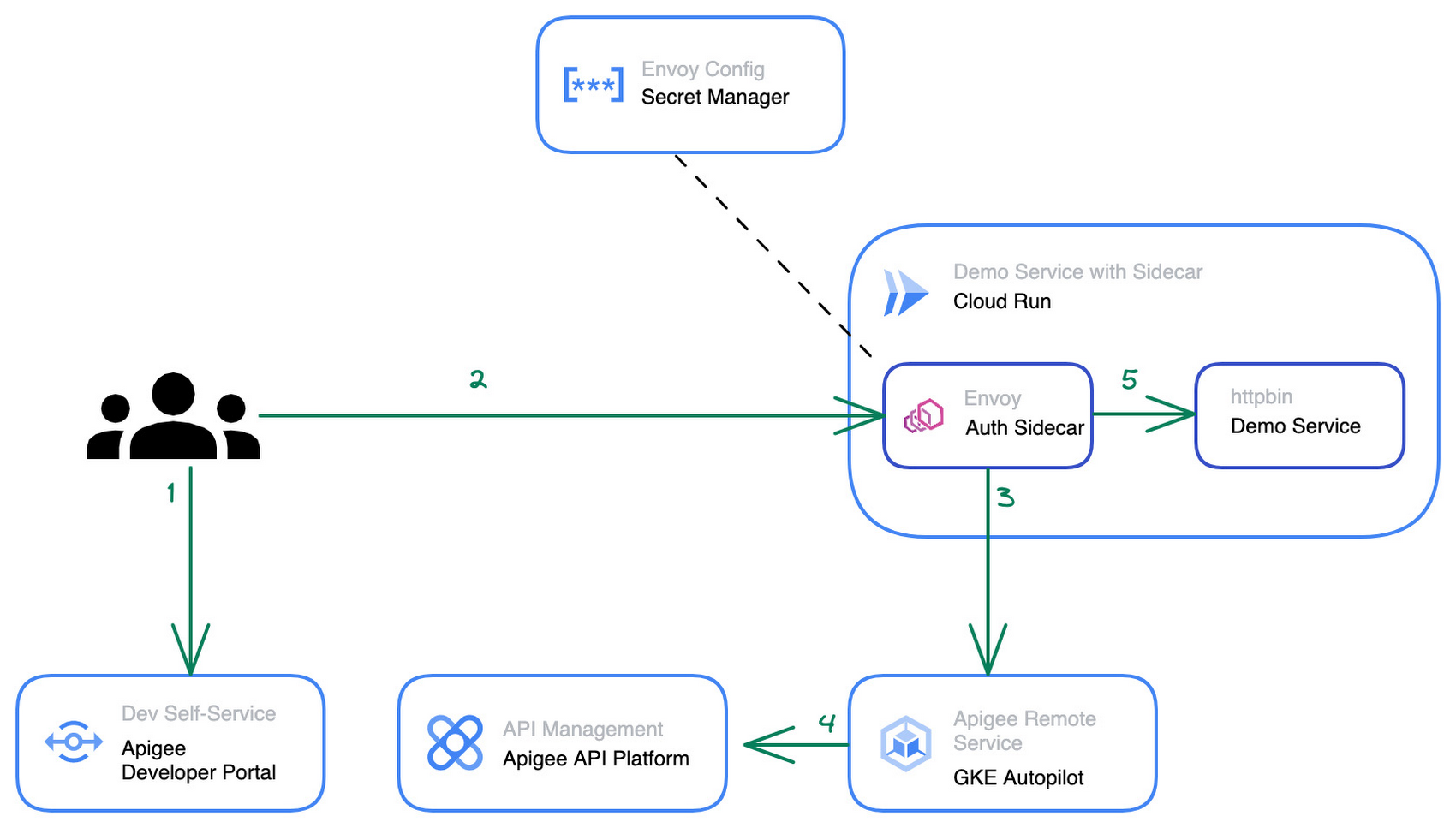
The step by step instructions for how to configure the architecture above can be found in this blog post.
Starting from a pre-existing Apigee installation the Apigee Envoy adapter is used to connect back to the Apigee runtime and control plane for accessing the API product definitions to link the incoming requests to the issued credentials and quotas. The Apigee remote service component can be replicated for high availability and is shared between multiple Cloud Run services that require a gRPC target for the sidecar’s external authorization filter.
The Cloud Run service connects to the Apigee Remote Service via an Envoy proxy that acts as a sidecar to the main application. The configuration for the envoy proxy can either be embedded within a customized Envoy image or mounted via the secret manager integration of cloud run as shown in the diagram above. Externalizing the configuration simplifies the maintenance and upgrade of the sidecar container as it can just pull the latest patch version of Envoy regularly.
The newly added API management capability is transparent for the primary application container within the Cloud Run service and does not require any changes in the application source code. Once the Cloud Run service is re-deployed with the sidecar in place, consuming applications can start to use credentials that they obtained via the Apigee API Management platform or the API developer portal to consume the Cloud Run service. At an operations level the platform operators will start to see requests to the Cloud Run service popping up in Apigee’s analytics dashboards and be able to track consumption and exposure at an API product level.
Next Steps
If you are interested in trying the multi-container support for Cloud Run yourself, check out the release announcement with many more use case descriptions. For another example and a detailed walkthrough on how to use sidecars in Cloud Run to report custom metrics to Google Cloud managed service for Prometheus you can head over to this tutorial in the Cloud Run documentation. Lastly, if you’re interested in the broader picture of how the latest features in Cloud Run are moving serverless forward, then make sure you check out this video.
Chrome OS’s Hybrid Work Model Powers Google’s Return to Work Strategy

7511
Of your peers have already read this article.
1:30 Minutes
The most insightful time you'll spend today!
The pandemic continues to deeply affect our lives around the globe. In some places, new cases are surging and returning to work is the last thing on people’s minds. In other areas, conditions are improving and companies are starting to think about transitioning their workforce back to the office.
Exactly when and how to do this remains complex and varies by country, industry, and company. What’s certain is that hybrid work will become an essential part of the business world moving forward. And finding solutions that bridge the gap between “in-person” and “somewhere else” are crucial.
At Google, we’ve been focused on what the hybrid transformation means for us. To prepare for hybrid work, using modern solutions is a key enabler.
Chrome OS: Supporting Google’s return to office strategy
At Google, we’ll move to a hybrid work week where most Googlers spend approximately three days in the office and two days wherever they work best. It’s no surprise that as the modern, secure, cloud-first platform, Chrome OS is playing a key role in our transition to a hybrid work model. Because Chrome OS devices can easily be shared, more flexible working models and spaces are now possible. And with user profiles stored in the cloud and collaboration solutions like Google Workspace, employees can log in to any Chrome OS device, access what they need and pick up where they left off.
Here are just a few ways we are using Chrome OS and its tools to support the return to the office:
- In select office locations, Googlers can reserve desks through an internal booking tool set up with a high-performance Chromebox, keyboard, mouse, and monitor. Employees can log in to the Chromebox which syncs their cloud profile, and start working with the same environment they have on all their Chrome OS devices.
- We’re announcing new docking stations that are designed for Chrome OS devices and allow employees to bring in their Chromebook from home, connect to the dock with one USB-C cable, and use a monitor, keyboard, and mouse for a full desktop experience.
- Every Chrome OS device enables a zero-trust security working model with BeyondCorp Enterprise providing our workforce with simple and secure access to applications while providing additional security controls for IT.
- We’ve deployed the new Chrome OS Readiness Tool to our extended workforce to identify employees that are able to switch to Chrome OS. This allows us to expand the latest security, deployment, and manageability benefits to more of the workforce.
Additional ways Chrome OS is helping organizations with return to office
We aren’t the only ones supporting our return to office and hybrid work strategy with Chrome OS. We’ve heard more ways our customers are using Chrome OS to make the transition as smooth as possible. These include:
- Streamlining deployment and management of Chrome OS devices using zero-touch enrollment which allows devices to automatically enroll into a corporate domain without IT configuration.
Grab & Go Chromebooks being used for frontline and hybrid information workers, allowing employees to grab a Chromebook from a cart and get to work right away. - Parallels Desktop for Chrome OS being deployed to allow employees to access Windows or legacy apps locally on their Chrome OS devices.
- Existing Windows and Mac devices being modernized and repurposed to run a Chrome OS experience using CloudReady. (Google is currently offering a CloudReady promotion. Learn more here.)
While the Chrome OS team has been working towards making remote working as seamless as possible for IT, we’ve also made advancements in supporting traditional technology that’s required in the office.
- In October, we announced Chrome Enterprise Recommended: a collection of identity, printing, productivity, communications, and virtualization solutions that are verified to run great on Chrome OS.
- With the increased usage of video conferencing on Chrome OS devices, we’ve made improvements to Google Meet and Zoom performance including camera and video improvements to reduce any unnecessary processing and features that intelligently adapt to your device, your network, and what you are working on.
- For improved access to Windows and legacy apps, VMware Horizon introduced multi-monitor support and USB redirection and Citrix Workspace released a tech preview with webcam enhancements and Microsoft Teams optimizations.
- We integrated with the Okta Workflows platform, so IT administrators can include Chrome OS in it’s access logic and deploy quickly without code. Recently, we’ve added the ability to require users to reauthenticate on their Chrome OS device once Okta has detected that the user has changed their password. Try out this new capability by signing up for our Trusted Tester program.
- We’ve increased our support for direct IP printing with additional printer models since the beginning of 2020. In addition, we have made improvements to management features, including support for multiple print servers and launched policy APIs to provide a better IT admin experience.
Join us for a digital event with Modern Computing Alliance and its newest member HP
Last year we announced the launch of the Modern Computing Alliance—a collaboration of industry leaders including Box, Chrome Enterprise, Citrix, Dell, Google Workspace, Imprivata, Intel, Okta, RingCentral, Slack, VMware, and Zoom aim to create the pioneering solutions that businesses need. We are thrilled to introduce HP, who brings their innovative hardware and enterprise hardware expertise to the Modern Computing Alliance and has been working closely with the alliance to ensure true silicon-to-cloud innovation.
As an alliance, we’ve been deeply engaged in the hybrid work shift. We invite you to join us for a digital event where we discuss questions about returning to work. Like how product design can encourage participation and collaboration regardless of where employees are, important security issues to keep in mind, and what factors businesses should consider to support a safe, working environment.
Home. Heading back. Hybrid.
Hear from the experts on hybrid work and return to office.
Date: May 20th, 2021
Register here.
If you are ready to try Chrome OS today, it’s easy to get started. You can contact us to get connected to a partner, sign up for a free 30-day trial of Chrome Enterprise Upgrade to start managing Chrome OS devices, or deploy the Chrome OS Readiness Tool to identify employees that are ready to switch to Chrome OS.POSTED IN:
More Relevant Stories for Your Company

Woolaroo App and Vision AI are Helping Users Explore Native Languages
One of the most vibrant elements of culture is the use of native languages and the time-honored tradition of storytelling. Anthropologists and linguists have been vocal on the role that language plays in the preservation of culture and how it contributes to the appreciation of heritage. Unfortunately, of the more

How Eventrac and Workflows Integration Helps Implement Hybrid Architecture in Google Cloud
I previously talked about Eventarc for choreographed (event-driven) Cloud Run services and introduced Workflows for orchestrated services. Eventarc and Workflows are very useful in strictly choreographed or orchestrated architectures. However, you sometimes need a hybrid architecture that combines choreography and orchestration. For example, imagine a use case where a message to a Pub/Sub topic




Start Your Serverless Expeditions Now!
Google Cloud's fully managed serverless platform like Cloud Run helps build and run highly scalable containerized applications. In traditional scenarios, over or under-provisioning enterprise applications can result in outages and cost hurdles. Severless Experts at the Google Cloud succinctly breakdown what serverless means for an organization and how Engineering Managers

How APIs Helped PWC Open New Revenue Streams Using Existing Data
PwC, one of the “Big Four” accounting firms, is well-known for professional services structured around auditing, insurance, tax, legal, and traditional management consulting. In Australia, the PwC Innovation and Ventures group has taken the global lead in building new, technology-based, turnkey lines of business outside of PwC’s traditional service areas.
