





Using Google Cloud’s Backup and DR Service with Logging and Monitoring Tools

1101
Of your peers have already read this article.
2:30 Minutes
The most insightful time you'll spend today!
Backup and DR data is a valuable business asset, and ensuring that it’s safe and accessible is essential. In particular, you want to be able to monitor your backups to ensure that the data is indeed protected and that you can quickly recover it in the event of a disaster, user error, or failed upgrade.
Users of Google Cloud’s Backup and DR service often ask:
- What are the best practices for monitoring my backup and recovery jobs?
- How can I proactively identify issues and troubleshoot?
- How can I create alerts and be notified about important events?
The good news is that Google Cloud Backup and DR now integrates with Cloud Logging and Cloud Monitoring tools. Now, you can monitor backup events, jobs, appliance health, resource consumption and user actions in the same way you monitor other Google Cloud workloads and services.
With this integration, you can now:
- Monitor events related to backup and restore – With detailed Google Cloud Backup and DR service event logs in Cloud Logging, you can now use log based alerts to create a customisable notification, in near-real time. This lets you monitor important events such as backup job failures, jobs that did not run, local backup storage saturation, and network failures.
- Configure fine grained alerting – You can write custom event queries on a wide variety of dimensions such as event severity, application type, application name, job type, job name, error message and many more. This gives a lot of flexibility to define alerts for specific events or conditions within a system, thus reducing noise and helping you identify and fix issues easily.
- Get notified on your preferred notification channel – Google Cloud offers seven pre-built notification channels that let you receive customisable notifications directly over email, SMS, Slack or the Google Cloud mobile app. Alternatively, you can integrate with your own monitoring and event management tools using webhooks or Pub/Sub.
- Derive useful insights to troubleshoot issues – With Log Analytics, you can use BigQuery to query your data using SQL queries and generate operational insights, which can help you reduce time spent troubleshooting. For example, you can analyze the key reasons that backup and restore jobs fail for a given application or application type.
The integration also lets you proactively discover deeper issues related to backup and recovery, such as capacity-related issues or certain job failures that happen periodically, by monitoring recurring events in the logs over time. With log-based metrics, you can:
- Create trend charts to track important metrics such as the number of backup or restore jobs that failed during a day/week/month
- Receive a notification when the number of occurrences crosses a threshold, for example receive a notification if a snapshot pool saturates more than five times a week
- Monitor trends in data, such as latency values in logs, and receive a notification if the values change in an unacceptable way.
Getting started
The time to learn that your backup failed should never be when you go to restore. By integrating our Backup and DR service with Cloud Monitoring and Cloud Logging, you can get valuable assurances about the health of your backup and business continuity processes with the same tools that you use to manage other Google Cloud workloads. To get started, check out the Backup and DR event logs page. You can also watch a video that shows you how to set up and use the service and configure some custom alerts.
What You Need to Know About Compute Engines

6533
Of your peers have already read this article.
1:30 Minutes
The most insightful time you'll spend today!
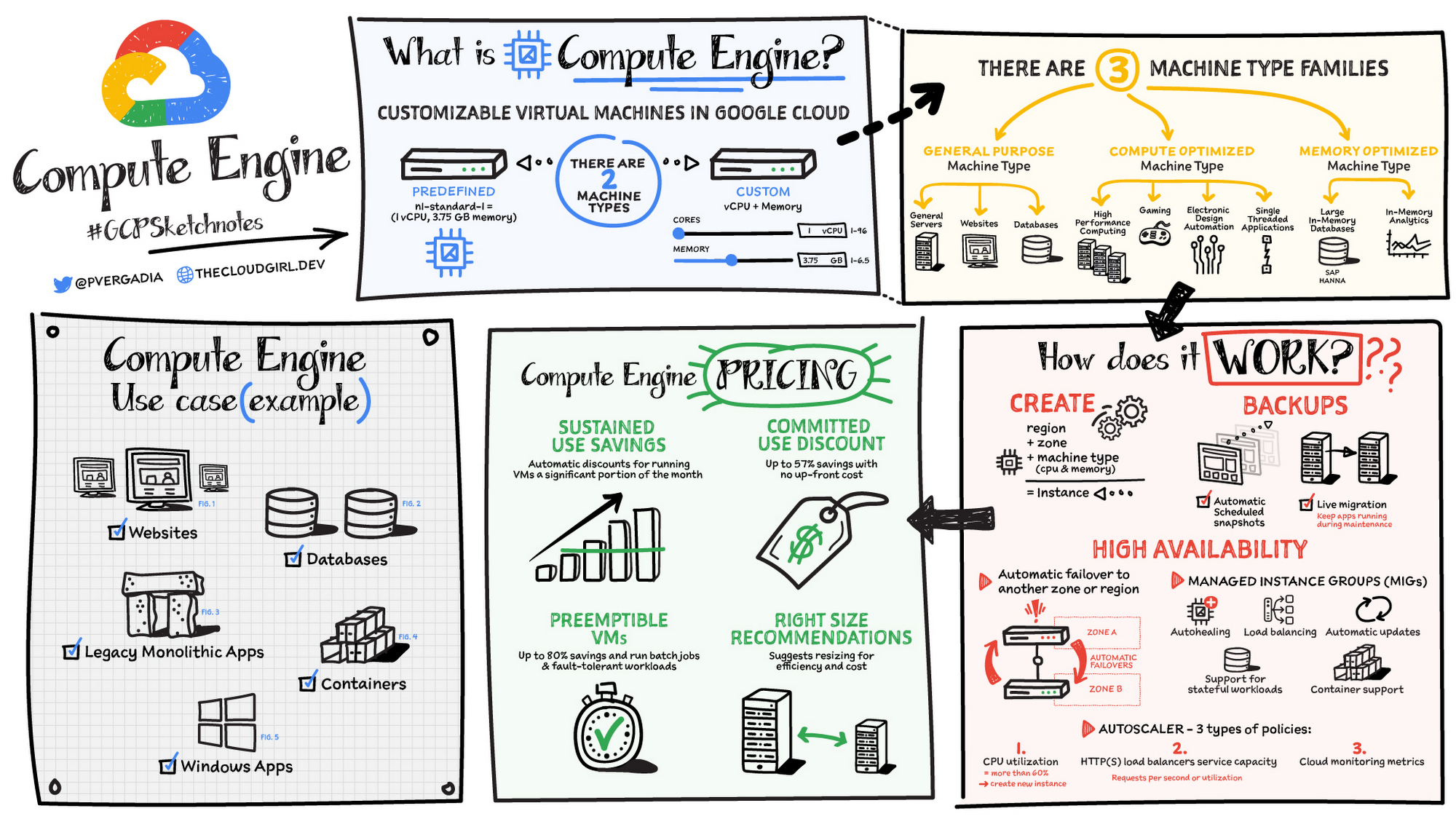
Compute Engine is a customizable compute service that lets you create and run virtual machines on Google’s infrastructure. You can create a Virtual Machine (VM) that fits your needs. Predefined machine types are pre-built and ready-to-go configurations of VMs with specific amounts of vCPU and memory to start running apps quickly. With Custom Machine Types, you can create virtual machines with the optimal amount of CPU and memory for your workloads. This allows you to tailor your infrastructure to your workload. If requirements change, using the stop/start feature you can move your workload to a smaller or larger Custom Machine Type instance, or to a predefined configuration.
Machine types
In Compute Engine, machine types are grouped and curated by families for different workloads. You can choose from general-purpose, memory-optimized, compute-optimized and accelerator-optimized families.
- General-purpose machines are used for Day-to-day computing at a lower cost and for balanced price/performance across a wide range of VM shapes. The use cases that best fit here are web serving, app serving, back office applications, databases, cache, media-streaming, microservices, virtual desktops, development environments.
- Memory-Optimized machine are recommended for ultra high-memory workloads such as in-memory analytics and large in-memory databases such as SAP HANA
- Compute-Optimized machines are recommended for ultra high performance workloads such as High Performance Computing (HPC), Electronic Design Automation (EDA), gaming, video transcoding, single-threaded applications.
- Accelerator-Optimized machines are optimized for high performance computing workloads such as Machine learning (ML), Massive parallelized computations and High Performance Computing (HPC)
How does it work?
You can create a VM instance using a boot disk image, a boot disk snapshot, or a container image. The image can be a public operating system (OS) image or a custom one. Depending on where your users are you can define the zone you want the virtual machine to be created in. By default all traffic from the internet is blocked by the firewall and you can enable the HTTP(s) traffic if needed.
Use snapshot schedules (hourly, daily, or weekly) as a best practice to back up your Compute Engine workloads. Compute Engine offers live migration by default to keep your virtual machine instances running even when software or hardware update occurs. Your running instances are migrated to another host in the same zone instead of requiring your VMs to be rebooted.
Availability
For High Availability (HA) Compute Engine offers automatic failover to other regions or zones in event of a failure. Managed instance groups (MIGs) help keep the instances running by automatically replicating instances from a predefined image. They also provide application based autohealing health checks. If an application is not responding on a VM, the auto healer automatically recreates that VM for you. Regional MIGs let you spread app load across multiple zones. This replication protects against zonal failures. MIGs work with load balancing services to distribute traffic across all of the instances in the group.
Compute Engine offers autoscaling to automatically add or remove VM instances from a managed instance group based on increases or decreases in load. Autoscaling lets your apps gracefully handle increases in traffic, and it reduces cost when the need for resources is lower. You define the autoscaling policy for automatic scaling based on the measured load, CPU utilization, requests per second or other metrics.
Active Assist’s new feature, predictive autoscaling, helps improve response times for your applications–When you enable predictive autoscaling, Compute Engine forecasts future load based on your Managed Instance Group’s (MIG) history and scales it out in advance of predicted load, so that new instances are ready to serve when the load arrives. Without predictive autoscaling, an autoscaler can only scale a group reactively, based on observed changes in load in real time. With predictive autoscaling enabled, the autoscaler works with real-time data as well as with historical data to cover both the current and forecasted load. That makes predictive autoscaling ideal for those apps with long initialization times and whose workloads vary predictably with daily or weekly cycles. For more information, see How predictive autoscaling works or check if predictive autoscaling is suitable for your workload, and to learn more about other intelligent features, check out Active Assist.
Pricing
You pay for what you use. But you can save cost by taking advantage of some discounts! Sustained use saving are automatic discounts applied for running instances for a significant portion of the month. If you know your usage upfront, you can take advantage of committed use discounts which can lead up to significant savings without any upfront cost. And by using short lived preemptive instances you can save up to 80%, they are great for batch jobs and fault tolerant workloads. You can also optimize resource utilization with automatic recommendations. For example if you are using a bigger instance for a workload that can run on a smaller instance you can save costs applying these recommendations.
Security
Compute Engine provides you default hardware security. Using Identity and Access Management (IAM) you just have to ensure that proper permissions are given to control access to your VM resources. All the other basic security principles apply, if the resources are not related and don’t require network communication amongst themselves, consider hosting them on different VPC networks. By default, users in a project can create persistent disks or copy images using any of the public images or any images that project members can access through IAM roles. You may want to restrict your project members so that they can create boot disks only from images that contain approved software that meet your policy or security requirements. You can define an organization policy that only allows Compute Engine VMs to be created from approved images. This can be done by using the Trusted Images Policy to enforce images that can be used in your organization.
By default all VM families are Shielded VMs. Shielded VMs are virtual machine instances that are hardened with a set of easily configurable security features to ensure that when your VM boots, it’s running a verified bootloader and kernel — is the default for everyone using Compute Engine, at no additional charge. For more details on Shielded VMs refer to the documentation here.
For additional security, you also have the option to use Confidential VM to encrypt your data in use, while it’s being processed in Compute Engine. For more details on Confidential VM refer to the documentation here.
Use cases
There are many use cases Compute Engine can serve in addition to running websites and databases. You can also migrate your existing systems onto Google Cloud, with Migrate for Compute Engine, enabling you to run stateful workloads in the cloud within minutes rather than days or weeks. Windows, Oracle or VMware applications have solution sets enabling a smooth transition to Google Cloud. To run windows applications either bring your own license leveraging Sole-tenant nodes or using the included licenced images.
Conclusion
Whatever your application use case may be, from legacy enterprise applications to digital native applications, Compute Engine’s families will fit it. For a more in-depth look into Compute Engine check out the documentation.
For more #GCPSketchnote, follow the GitHub repo. For similar cloud content follow me on Twitter @pvergadia and keep an eye out on thecloudgirl.dev
Google Maps Platform Can Elevate FinTech Experience with Less Risks and Higher Security

4738
Of your peers have already read this article.
3:00 Minutes
The most insightful time you'll spend today!
The financial services industry is changing—an estimated $68 trillion in wealth transferring from baby boomers to millennials.1 This means financial service providers will have to deliver the speed, ease-of-use, technological sophistication, and tailored services that millennials have come to expect. In fact, half of all millennials are willing to switch to a competing institution if it offers a better digital experience.2 This and many other trends are driving unprecedented growth for mobile Fintech experiences in banking, digital payments, financial management and insurance.3
Google Maps Platform financial services solutions
To help you respond to customer’s changing demands, we’re launching financial services solutions that can help you improve your customer experience, security and operations. We’ve outlined the technical guidance and APIs you need to build out three financial services solutions: Enriched Transactions, Quick and Verified Sign-up, and Branch and ATM Locator Plus. We’ve also highlighted two use cases that customers are using our APIs to solve: Contextual Experiences and Fraud Detection.
Clarify financial statements with Enriched Transactions solution
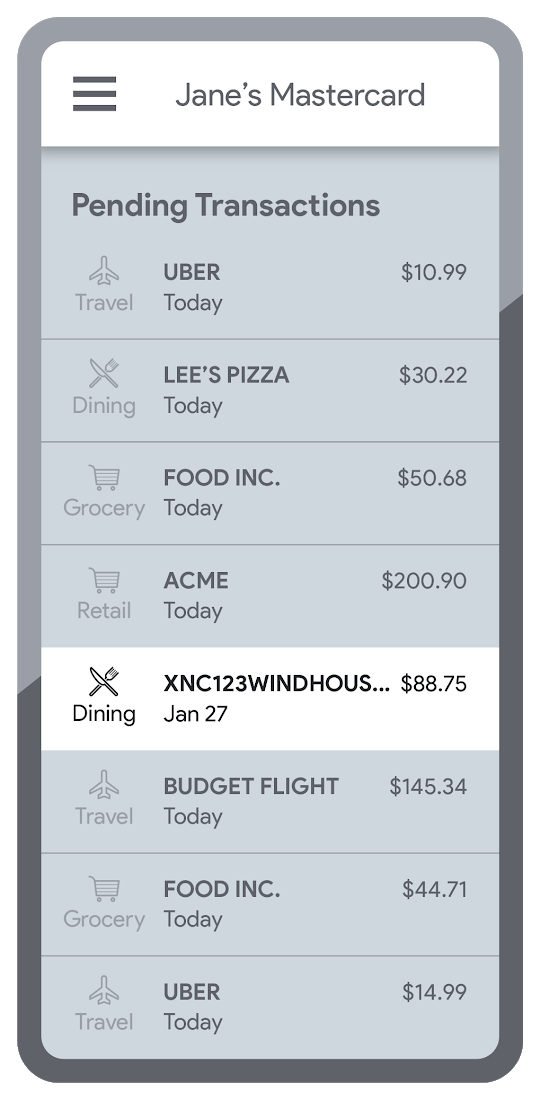
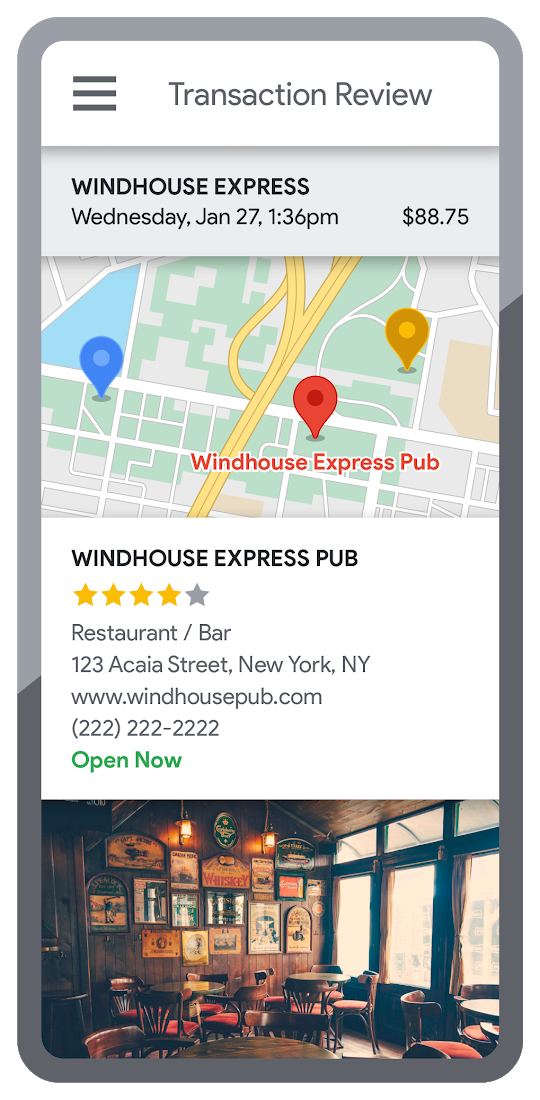
Transaction statements are often hard for customers to understand, using abbreviations like “ACMEHCORP” instead of customer-facing names like “Acme Houseware”. Our Enriched Transactions solution clarifies these transactions and makes them instantly recognizable by adding the merchant name and business category, a photo of the storefront, its location on a map, and full contact info. Making transactions easier to recognize not only boosts consumer confidence, with reported increases in NPS of 15% or higher, but decreases costly support calls by approximately 67%.4
In addition, you can help customers easily visualize a series of transactions by adding the merchant name to the transaction amount and date, and displaying their transactions on a Google map. This enables you to give customers insights about where and how they spend money. See the guide to implement Enriched Transactions today.
Enable faster sign-up with Quick and Verified Sign-up solution
Manually entered addresses can lead to lowered conversions, erroneous customer data, and costly delivery mistakes. Our Quick and Verified Sign-up solution makes sign-up faster, suggesting nearby addresses with just a few thumb taps—cutting sign-up time by up to 64% and increasing conversion rates by up to 15%.5
The solution also provides one additional level of address verification that helps reduce the risk of fraudulent account sign-ups—and companies have decreased fraudulent account setups by approximately 30% through using geospatial data to verify customer identities.4 See the Quick and Verified Sign-up solution guide to get started today.
- Faster sign-ups 1An application form requires an address
- Faster sign-ups 2Autocomplete quickly suggests addresses
- Faster sign-ups 3Select the address with visual confirmation
- Faster sign-ups 4Address verification options are presented
- Faster sign-ups 5Location permission is granted by the user
- Faster sign-ups 6The address is verified
Help customers visit you with Branch and ATM Locator Plus solution
74% of customers now search for specific details prior to their visit, which makes detailed, accurate profiles for each location a must.5 Our Branch and ATM Locator Plus solution enhances your own websites and apps with the same information shown about your branches and ATMs on Google Maps. Include hours of operation, available services, user reviews, photos of the location, driving directions and more.
Financial services companies using geospatial data to provide additional information (e.g. opening hours, available services, etc.) on branch and ATM services have seen a 14% increase in Net Promoter Score (NPS), and a 7% decrease in customer support calls.4 Implement Branch and ATM Locator Plus today using the guide or build it in minutes with Quick Builder.
- ATM locator 1Customers can enable location permissions, or enter their address
- ATM locator 2Quickly enter the address with Autocomplete
- ATM locator 3Nearby location listings, ranked by distance and ETA
- ATM locator 4Map view and directions
Enable offers and rewards with Contextual Experiences
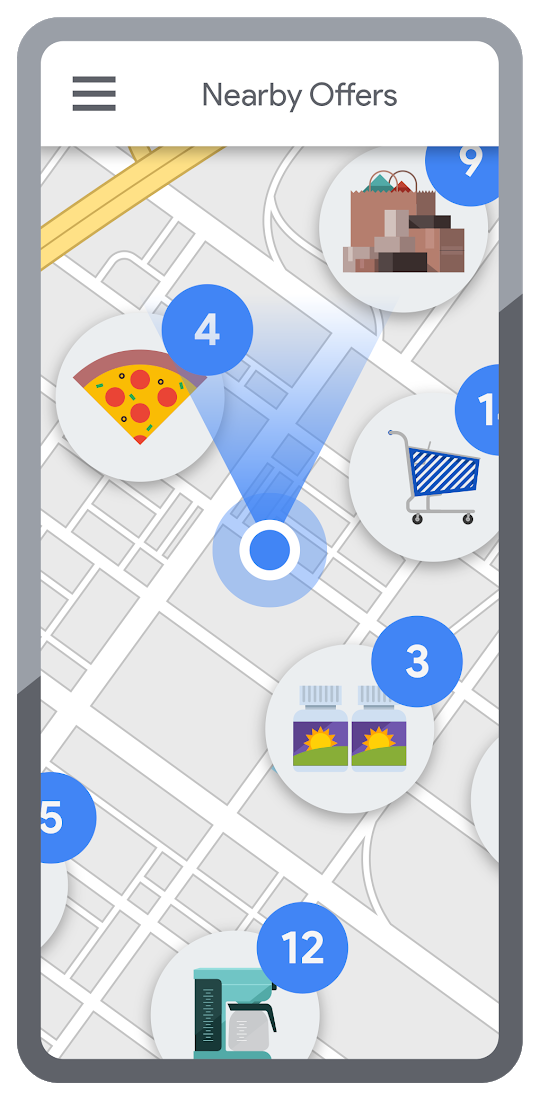
Real-time, geo-targeted offers can power deals, rewards, and cash-back programs—all visualized with rich Google Maps. By combining the insights of purchase histories with customer opt-in to location-based features, companies can implement the Contextual Experiences use case to enable personalized offers and rewards programs that drive engagement with brands while putting money in customers’ pockets at the same time.This is a win for banks and their customers, validated by encouraging metrics like NPS rating boosts of 8% or higher, and an increase of 8% or more time spent in-app.4 Learn how Current uses Google Maps Platform to create innovative customer rewards programs with location intelligence.

Detect suspicious transactions with Fraud Detection
With the Fraud Detection use case, companies can use customer opted-in mobile device location to flag suspicious activity based on geographic distance, such as an ATM withdrawal that is far from the customer’s phone. Our APIs can also help companies recognize suspicious transaction patterns such as a purchase made at a location that is physically distant from a recent transaction.
Financial services companies that use geospatial data to verify customers’ identities have reduced fraudulent transactions by approximately 70%, and false positives in fraud detection by 45%, on average.4 Learn how Starling Bank uses Google Maps Platform to enable real-time notification of transactions and their locations, and enhance data-driven decision-making.
Start elevating customer experiences, reducing risk and increasing efficiency today with our financial services offerings. Visit our financial services solutions page to learn more about how to start implementing these solutions.
For more information on Google Maps Platform, visit our website.
reCAPTCHA Keeps Unemployment Claims and COVID Vaccine Registration Portals Threat-free

3003
Of your peers have already read this article.
1:30 Minutes
The most insightful time you'll spend today!
More people than ever have been conducting more of their lives online due to the COVID-19 pandemic. This creates a new landscape for fraudsters to create and release new attacks. Research commissioned by Forrester Consulting showed 84% of companies have seen an increase in bot attacks. 71% of organizations have seen an increase in the amount of successful attacks. 65% of businesses have experienced more frequent attacks and greater revenue loss due to bot attacks. With so many people visiting government websites to learn more about the COVID-19 vaccine, make vaccine appointments, or file for unemployment, these web pages have become prime targets for bot attacks and other abusive activities. But reCAPTCHA Enterprise has helped state governments protect COVID-19 vaccine registration portals and unemployment claims portals from abusive activities.
Assisting with unemployment claims during COVID-19
Alongside the wave of unemployment claims caused by COVID-19, many state government agencies, such as Wisconsin’s Workforce Development, have seen an increase in attempted malicious bot logins on their external websites. Many states have had malicious actors visit unemployment claims portals and enter stolen credentials to file fraudulent unemployment claims. Because many unemployment claims portals are mandated to pay a recipient within 2 weeks, the claims portal processes this fraudulent information and bad actors receive unemployment checks weeks before their false claims are recognized. By then, the fraudsters have their money and have repeated this process using other stolen credentials.
reCAPTCHA Enterprise helps state governments reduce false claims by preventing adversaries from automatically reusing credentials on unemployment claims portals. reCAPTCHA Enterprise’s scale and speed to determine fraudster behavior across the Internet helped some of the largest states in the United States, such as Texas.
Registering for the COVID-19 Vaccine and accessing state-sponsored resources
Several states, such as Pennsylvania, are challenged by web traffic that fluctuates based on the COVID-19 Vaccine Phase. For example, during Phase 1, there was a large increase in web traffic from both humans and bots because of the demand for the very few available vaccination slots. As more states move into Phase 2 and Phase 3, and the vaccine is more widely available, traffic is increasing because bad actors know more people are coming to these websites to register to be vaccinated.
reCAPTCHA Enterprise was implemented to stop bad actors from scripting bots to book vaccine appointments and then sell those appointment slots on another website for profit. These fake web pages are falsely promoted as websites where people can register for the vaccine. Vaccine appointments are not the only government system from which fraudsters try to profit. Transportation and social service departments also face frequent attacks, wherein fraudsters try to profit by booking and then selling appointments with those organizations.
Fending off these attacks was made easier thanks to reCAPTCHA Enterprise, a frictionless fraud detection service that leverages our experience from more than a decade of defending the internet and data for our network of more than 5 million sites. The reCAPTCHA Enterprise platform can understand fraudulent behavior, introduce friction to block bots from booking appointments, and allow legitimate users to access the vaccine portals and other state portals.
Because reCAPTCHA Enterprise does not require end users to complete captcha challenges, several state governments installed reCAPTCHA Enterprise across search, login, and registration web pages. State governments are also placing reCAPTCHA Enterprise on webpages where end users can access healthcare, receive assistance for housing or food, register motor vehicles, or propose legislation. With reCAPTCHA Enterprise on more pages, it becomes more difficult for malicious software or bots to carry out their attacks against different pages, but not for end users to browse, login into accounts, book appointments, or apply for resources. Because reCAPTCHA Enterprise requires no action from end users to stop fraud, state governments implemented reCAPTCHA Enterprise on all points of interaction on their webpages to ensure maximum security without impacting the user experience.
Providing security everywhere and pricing for all
Many state governments are familiar with buying cloud services in a pay-as-you-go model. reCAPTCHA Enterprise eased the purchasing process by providing state governments with predictable, scalable, and customizable pricing. State governments know up front how much they can expect to pay each month based on the number of assessments reCAPTCHA Enterprise performs. reCAPTCHA Enterprise’s flexible pricing model keeps pace with the natural fluctuations of visitors to vaccination registration and unemployment claims. reCAPTCHA Enterprise has a dedicated sales team that can tailor pricing to your specific use cases so both your webpages and budget are not compromised.
reCAPTCHA Enterprise has helped many state governments serve their constituents by making it easier to get vaccinated and collect unemployment. It helps constituents take advantage of public services and makes it more difficult for fraudsters to manipulate and interfere with them.
To start protecting your web pages from credential stuffing and other attacks, get started with reCAPTCHA Enterprise today.
Towards Superior Cybersecurity: How SLSA and SBOM Help Build a Resilient Healthcare Industry

2939
Of your peers have already read this article.
3:30 Minutes
The most insightful time you'll spend today!
Taking prescription medication at the direction of anyone other than a trained physician is very risky—and the same could be said for selecting technology used to run a hospital, to manage a drug manufacturing facility and, increasingly, to treat a patient for a medical condition.
To pick the right medication, physicians need to carefully consider its ingredients, the therapeutic value they collectively provide, and the patient’s condition. Healthcare cybersecurity leaders similarly need to know what goes into the technology their organization’s use to manage patient medical records, manufacture compound drugs, and treat patients in order to keep them safe from cybersecurity threats.
Just like prescription medication, careful vetting and selection of the technology is required to ensure patient safety and establish visibility and awareness into the technology modern healthcare depends on to create a resilient healthcare system.
In this and our next blog, we focus on two topics critical to building resilience – software bill of materials (SBOM) and Google’s Supply chain Levels for Software Artifacts (SLSA) framework – and how to use them to make technology safe. Securing the software supply chain, or where the software we depend comes from, is a critical security priority for defenders and something Google is committed to helping organizations do.
Diving deeper into the technology we rely on
Cybersecurity priorities for securing healthcare systems usually focus only on protecting sensitive healthcare information, like Protected Health Information (PHI). Maintaining the privacy of patient records is an important objective and securing data and systems plays a big role in this regard.
Healthcare system leadership and other decision makers often depend on cybersecurity experts to select technologies and service providers that can meet regulatory rules for protecting data as a first (and sometimes only) priority. Trust is often placed on the reputations and compliance programs of the vendors who manufacture the technology they buy without much further inspection. Decision makers need to approach every key healthcare and life science technology or service provider choice as a high-risk, high-consequence decision, but few healthcare organizations have the skills, resources, and time to “go deep” in vetting the security built into the technology they buy before it enters a care setting.
Vetting needs to include penetrating analysis of all aspects of software and hardware, their architecture and engineering quality, the provenance of all parts that they’re made of, and assessing each component for risk. Doing this can sometimes require deep technical skills and advanced knowledge of medical equipment threats that may not be easy to acquire. Instead of making additional investments to help secure their networks and systems, many organizations choose simpler paths.
The failure to properly assess technological susceptibility to risk has exposed healthcare organizations and their patients to a variety of safety and security issues that may have been preventable. PTC (formerly Parametric Technology Corporation, which makes medical device software) disclosed seven vulnerabilities in March that impacted equipment used for robotic radiosurgery. In October 2019, the VxWorks Urgent 11 series of vulnerabilities was announced, affecting more than 1 billion connected devices, many used throughout healthcare and life sciences. More examples of medical devices and software found to have vulnerable components can be found on the FDAs cybersecurity website and in its recall database.
How a physician understands, selects, and prescribes medication parallels how we address these concerns when selecting technology. Recent FDA guidance suggests manufacturers must soon provide increased levels of visibility into the technologies they market and sell in the healthcare industry. Here’s where the SBOM, a key visibility mechanism, comes in.
What SBOMs do well, and how Google is helping make them better
The National Telecommunications and Information Administration defines the SBOM as a “nested inventory for software, a list of ingredients that make up software components.”
The concept of a SBOM appears to have found its start in enabling software makers back in the 1990s, although it originally stems from ideas popularized by visionary engineer and professor W. Edwards Deming. SBOM as a concept has advanced since then, with multiple standards for generating and sharing them now in use.
Thanks to the continued focus on improving and using SBOMs, we expect it will be much easier for defenders to use SBOMs to track software and its components, where they come from, what security vulnerabilities they contain, and equip protectors with their ability to stop those vulnerabilities from being exploited, at scale, and before they impact patient care.
“Software bills of materials help to bridge the knowledge gap created by running unknown, unpatched software and components as too many healthcare organizations currently do,” says Dan Walsh, chief information security officer at VillageMD, a tech-driven primary-care provider. “For security leaders, SBOM should be an extension of their asset inventory and management capability, regardless of whether that software was bought or built. At VillageMD, we are asking our vendors that store, transmit, receive or process PHI for an SBOM as part of our third-party vendor assessment program.”
Today’s SBOMs are most often basic text files generated by a software developer when the creation of software is complete and a product is assembled (or application is created from source code.) The text file contains information about the product’s software components and subcomponents, where those components and subcomponents came from, and who owns them. But unlike a recipe used to make a pharmaceutical, for example, an SBOM also tracks the software versions of components and subcomponents. SBOMs often capture:
- Supplier Name
- Component Name
- Version of the Component
- Other Unique Identifiers
- Dependency Relationship
- Author of SBOM Data
- Timestamp
Here’s the format of a SBOM generated using the SPDX v2.2.1 standard:
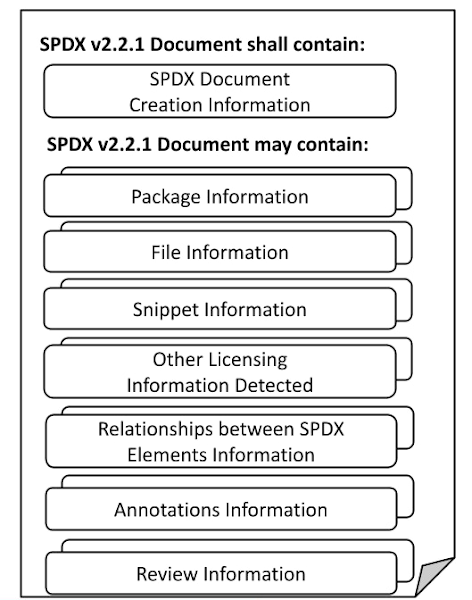
Technology producers, decision makers, and operators in any industry can use this information to deeply understand the risks the products pose to patients and the health system. An SBOM, for example, can show a reader if the software used on a medical device is merely out of date, or vulnerable to a cyber attack that could affect its safe use.
Google sponsors a number of initiatives focused on securing the software supply chain, including how to use SBOMs, through our work with U.S. government agencies, the Open Source Security Foundation, and Linux Foundation, including a project focused on building and distributing SBOMs. Learn about the SPDX project and Cyclone DX, read the ISO/IEC 5962:2021 standard (for SPDX), ISO ISO/IEC 19770-2:2015 (for SWID; another artifact that provides a SBOM), and other training resources from the Linux Foundation.
As an additional measure, healthcare organizations which use SBOM need to make sure they can trust that the SBOMs they rely on haven’t been changed since the manufacturer produced it. To defend against this, software makers can cryptographically sign their SBOMs making it easier to identify if a SBOM has been maliciously altered since it was first published.
While U.S. Executive Order 14028 created a federal mandate for the SBOM, and although many organizations have begun to incorporate that mandate into their software production workflows, many issues and roadblocks remain unresolved. At Google, we think the use of SBOM will help organization’s gain important visibility into the technologies that are entering our healthcare facilities and enable defenders to more capably protect both patient safety and patient data privacy.
Digging into the SLSA
We believe resilient organizations have resilient software supply chains. Sadly no single mechanism, like SBOM, can achieve this outcome. It’s why we created the SLSA framework, and services like Assured Open Source Software. SLSA was developed following Google’s own practices for securing its software supply chain.
SLSA is guidance for securing software supply chains using a set of incremental, enforceable security guidelines that can automatically create auditable metadata. This metadata will then result in a “SLSA certification” to a particular package or build platform. It’s a verifiable way to assure consumers that the software they use hasn’t been tampered with, something which doesn’t exist broadly today. We’ve recently explained more about how the SLSA works in blog posts on SLSA basics and more in-depth SLSA details.
Similarly, Assured Open Source Software gives organizations the ability to use the same regularly tested and secured software packages Google uses to build its software. Used in combination with a SBOM, technology makers can build reliable, safe, and verifiable products. Most technology buyers, such as those who run your local healthcare system, can use those same mechanisms to gain visibility into a technologies’ safety and fitness for use.
Where do we go from here?
Visibility into the components that make up the technology we use to care for patients is critically necessary. We can’t build a resilient healthcare system if our only priority is privacy of data. We must add resilience and safety to the list of our top priorities. Gaining deep visibility into the technology that decorates health system networks is a critical shift we must make. SBOM and SLSA help us make this shift. But remember, it’s not one or the other. As Dan Walsh from VillageMD says, the SBOM has a way to go:.
“It won’t solve all of your problems,” he cautions, but adds that when used correctly, “SBOM will help you improve visibility into the software that runs on the critical systems that keep societies safe and we’re excited to see it get traction.”
But when complemented with SLSA and topics we’ll cover next, such as a Vulnerability eXploitability Exchange (VEX), we are on a path to greater resilience.
Google Cloud’s Metric Scope Makes Multi-project Monitoring Simple

4750
Of your peers have already read this article.
2:00 Minutes
The most insightful time you'll spend today!
Customers need scale and flexibility from their cloud and this extends into supporting services such as monitoring and logging. Google Cloud’s Monitoring and Logging observability services are built on the same platforms used by all of Google that handle over 16 million metrics queries per second, 2.5 exabytes of logs per month, and over 14 quadrillion metric points on disk, as of 2020. However, you let us know through consistent feedback that the previous construct of Workspaces for Cloud Monitoring was not providing the flexibility needed for your larger scale projects.
Cloud Operation’s New Approach to Multi-Project Monitoring
We’re happy to announce a new model for multi-project monitoring, which replaces the concept of Workspaces. This overhaul is geared toward maximizing the flexibility you have to manage your monitoring environments by introducing Metrics Scopes. Starting today you can associate your Google Cloud projects with multiple Metrics Scopes! Like Workspaces, Metrics Scopes will still be used to store all of the configuration content for dashboards, alerting policies, uptime checks, notification channels, and group definitions. However there is no limit to the number of Metrics Scopes to which you can associate a project. Prior to this change, a project could only be scoped with a single Workspace. Now, there are virtually unlimited possibilities for how you can set up multi-project monitoring. This unlocks a large variety of options, from more granular permissions to mission-focused configurations. At its most simple implementation though: operators/SREs can now create org-wide Metrics Scopes with monitoring configurations focused on infrastructure health. And developers can leverage Metrics Scopes built on a subset of their organization’s projects that allow them to focus on their application’s performance.
How it works
- When you have a collection of projects, Metrics Scopes enable you to view each project’s metrics in isolation as well as in combination with metrics stored by other projects.
- The Metrics Scope is hosted by a scoping project. This scoping project is the Cloud project that is selected in the Cloud Console project picker.
Example
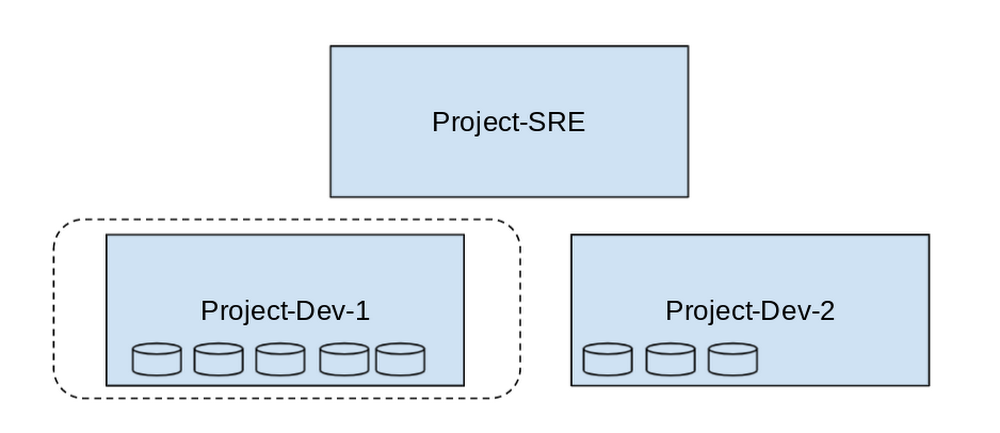
- In this example, Project-SRE is the name of a scoping project to monitor your fleet. You added two developer teams’ projects: Project-Dev-1 and Project-Dev-2, to Project-SRE’s Metrics Scope. If you select Project-SRE with the Cloud Console project picker and then go to the Monitoring page, you view the metrics for all three projects:

- If you select Project-Dev-1 with the Cloud Console project picker and then go to the Monitoring page, you view the Metrics Scope for Project-Dev-1 and you can only see the metrics for that project:
What else is new?
- Metrics Scopes can now monitor up to 375 projects (up from 100).
- New projects automatically start working in Cloud Monitoring without the previous 60-second Workspace creation process.
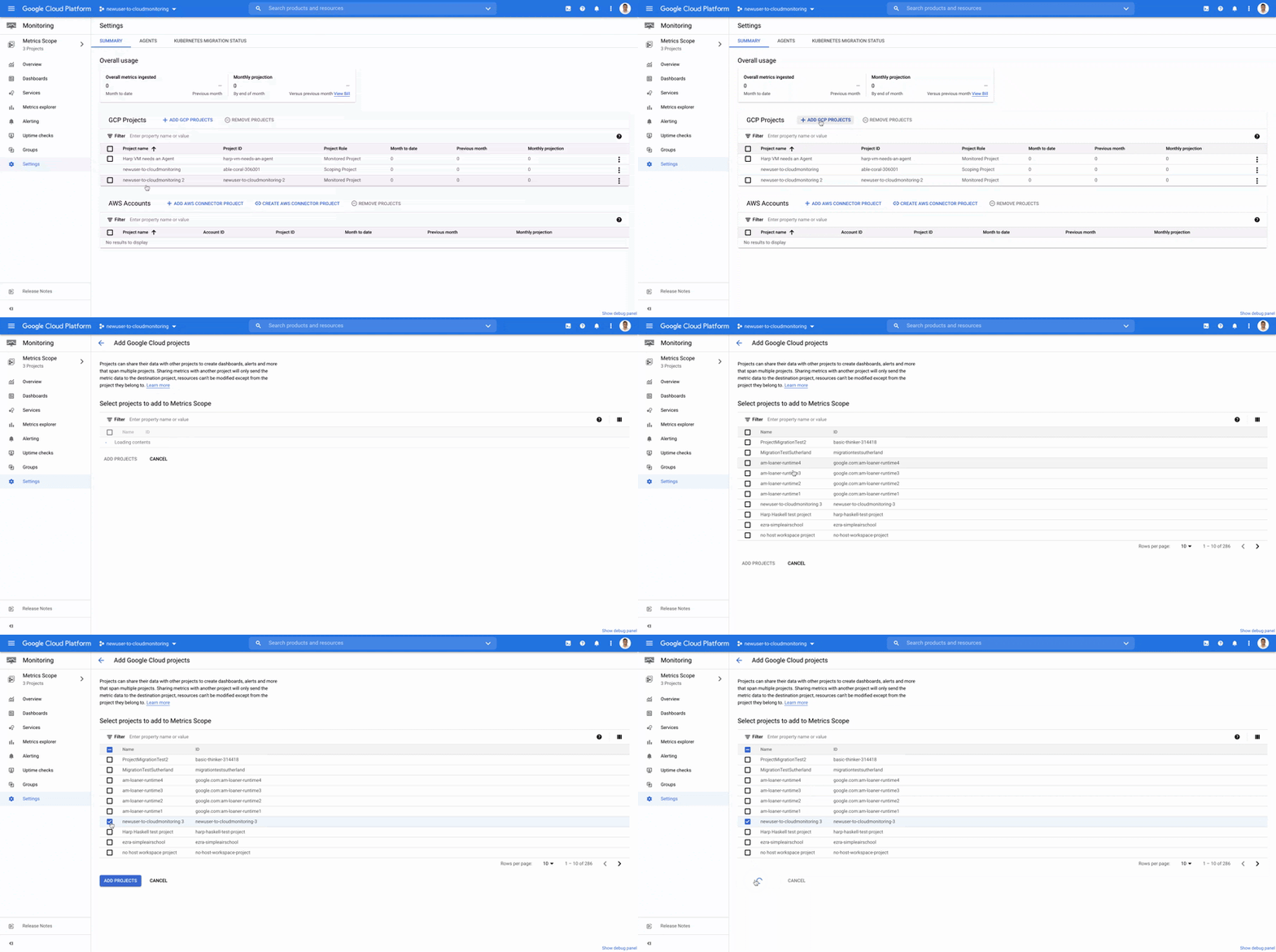
- If you want to monitor more than one project simply add it to your Metrics Scope:
Navigation
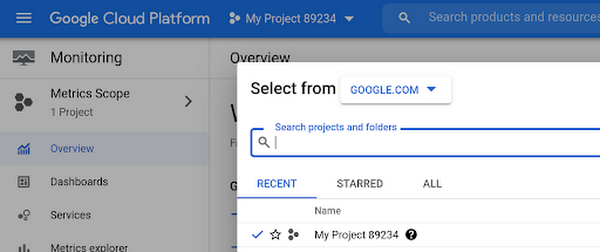
- Mentioned earlier, the Project Picker in the Cloud Console can be used to navigate between Metrics Scopes in Cloud Monitoring:
- This is now consistent with many other services across Google Cloud. Specifically, you can see how the project picker stays consistent when navigating from Cloud Monitoring to Cloud Logging:
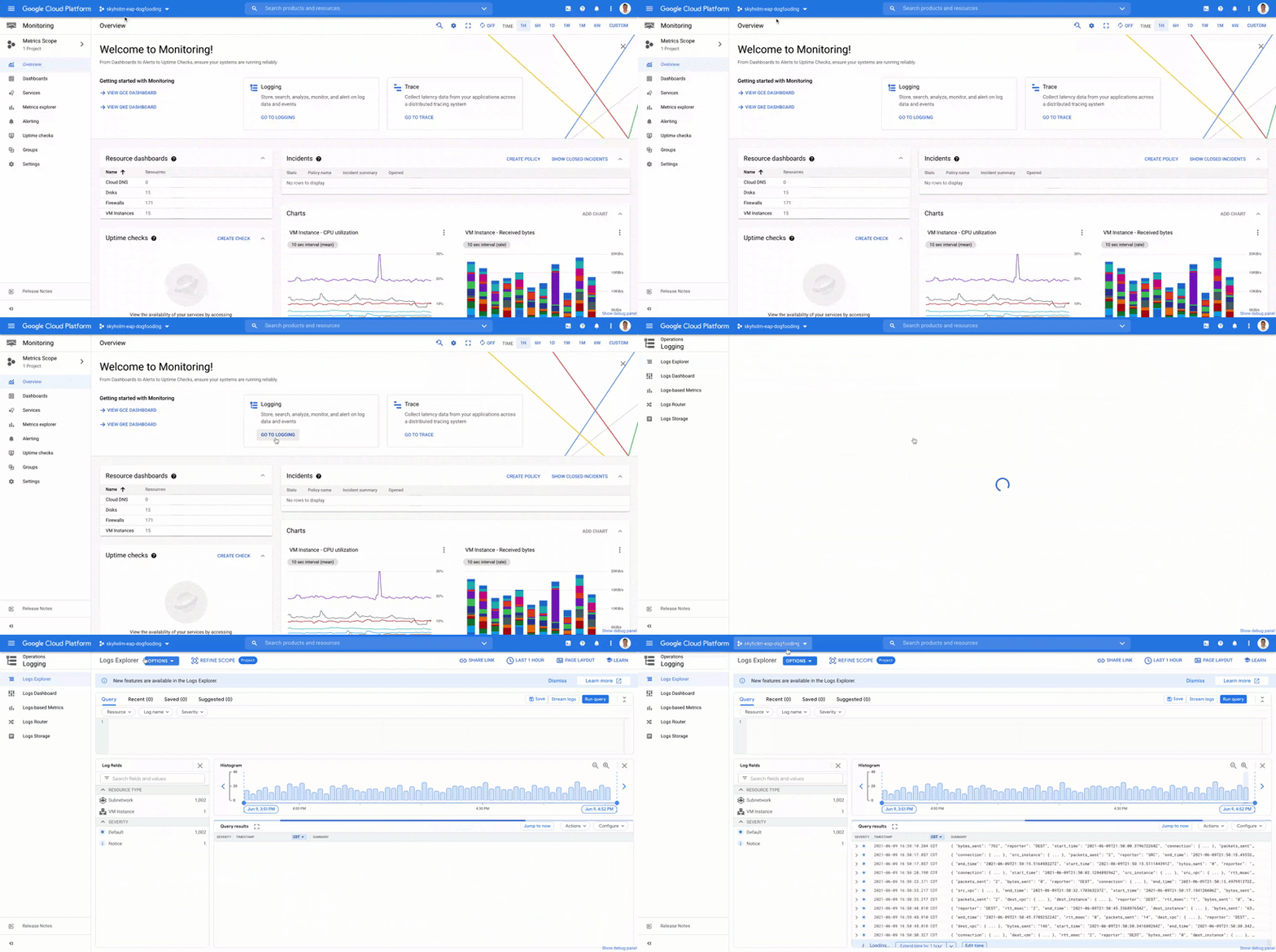
- Additionally, to make your navigation between Metrics Scopes easy we’ve added the new Metrics Scope Tab and Panel in the UI:
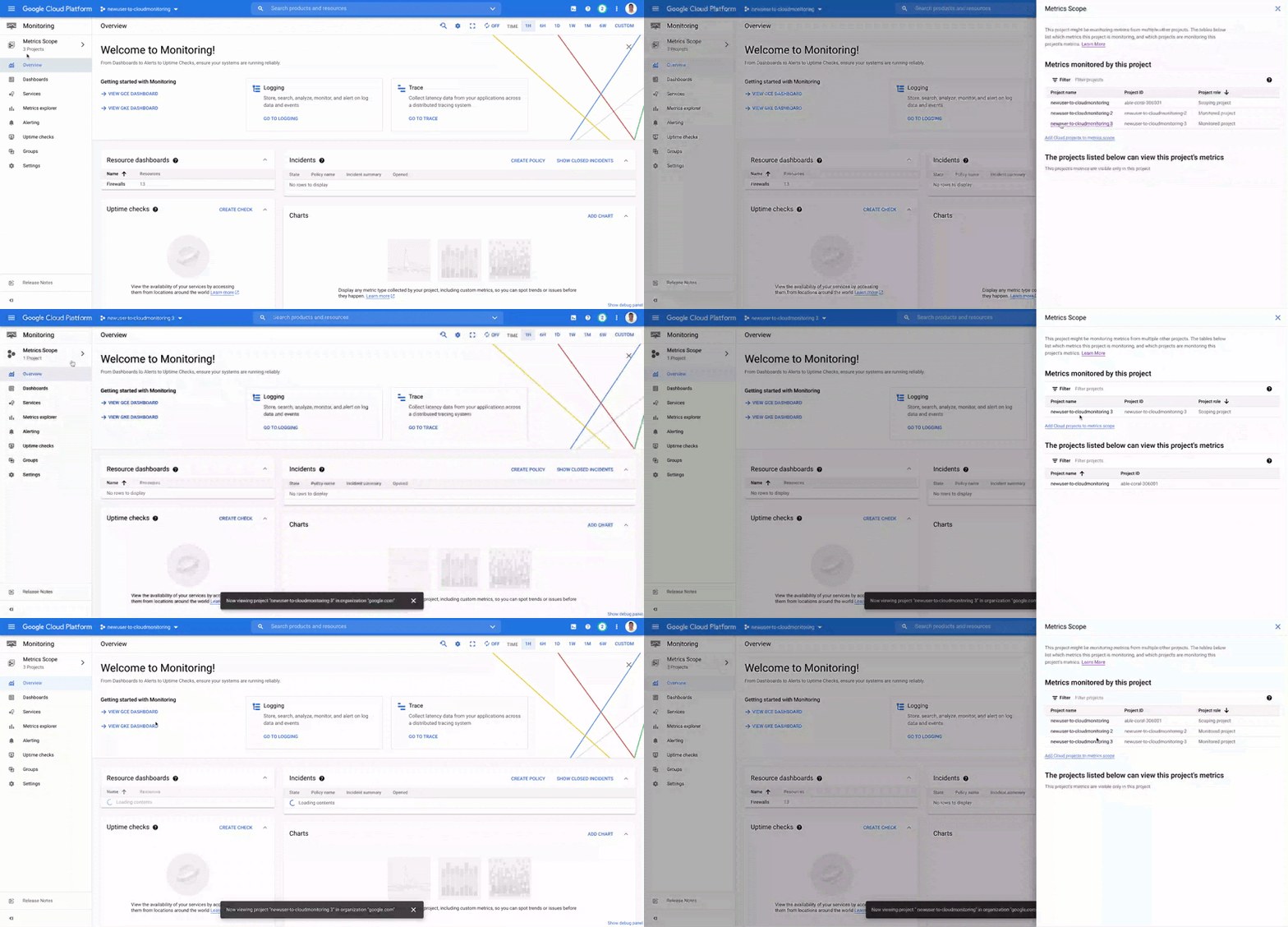
Coming Soon
- The Metrics Scope API is coming within the next quarter! This API will enable you to programmatically manage your monitoring configurations and Metrics Scopes.
Current Workspaces users
If you are already using Workspaces in Cloud Monitoring you may have noticed that they converted to Metrics Scopes weeks ago. There is no additional action required and you can start taking advantage of the additional features of Metrics Scopes today.
Get Started
Companies that are digitally native or in the process of digital transformation have placed an increased operational role on developers and this often creates overlapping sets of responsibilities with Operations and SRE teams. Now multiple developer teams can focus on optimizing the performance of their applications while operators can take a fleet-wide view when maintaining and improving the performance of all of the infrastructure under their purview.For information on configuring a Metrics Scope to include metrics for multiple projects, see Viewing metrics for multiple projects.
More Relevant Stories for Your Company

Google Cloud to Implement European Commission’s New Privacy Clauses to Safeguard Cross-border Data Transfer
The European Commission (EC) has recently published new Standard Contractual Clauses (SCCs, also known as Model Contractual Clauses) to help safeguard European personal data. Following the applicable transition period, these new SCCs will replace the SCCs previously adopted by the EC. Google Cloud plans to incorporate the new SCCs into our contracts

Confidential Computing at Google Cloud
This blog includes content from Episode One "Confidentially Speaking” of our Cloud Security Podcast, hosted by Anton Chuvakin (Head of Solutions Strategy) and Timothy Peacock (Product Manager). You should listen to the whole conversation for more insights and deeper context.LEARN MORECloud Security Podcast - Confidentially SpeakingListen to the Cloud Security Podcast with

Building Effective Visibility into Technology Assets Used in Healthcare
When technology just works, it's easy to trust. But too often, we place our trust in technology that doesn’t deserve it. When we do this with technology to provide healthcare, we put the safety of patients and the security and reliability of our global healthcare system at risk. The institutions

Google Cloud Announces General Availability of BigQuery Row-level Security
Data security is an ongoing concern for anyone managing a data warehouse. Organizations need to control access to data, down to the granular level, for secure access to data both internally and externally. With the complexity of data platforms increasing day by day, it's become even more critical to identify
