





Utilizing Google Cloud’s PII Security Features

2616
Of your peers have already read this article.
2:30 Minutes
The most insightful time you'll spend today!
BigQuery is a leading data warehouse solution in the market today, and is valued by customers who need to gather insights and advanced analytics on their data. Many common BigQuery use cases involve the storage and processing of Personal Identifiable Information (PII)—data that needs to be protected within Google Cloud from unauthorized and malicious access.
Too often, the process of finding and identifying PII in BigQuery data relies on manual PII discovery and duplication of that data. One common way to do this is by taking an extract of columns used for PII and copying them into a separate table with restricted access. However, creating unnecessary copies of this data and processing it manually to identify PII increases the risks of failure and subsequent security events.
In addition, the security of PII data is often mandated by multiple regulations and failure to apply appropriate safeguards may result in heavy penalties. To address this issue, customers need solutions that 1) identify PII in BigQuery and 2) automatically implement access control on that data to prevent unauthorized access and misuse, all without having to duplicate it.
This blog will discuss a solution developed by Google Professional Services for leveraging Google Cloud DLP to inspect and classify sensitive data and suggest a solution for using these insights to automatically tag and protect data in BigQuery tables.
BigQuery Auto Tagging solution overview
Automatic DLP can help to identify sensitive data, such as PII, in BigQuery. Organizations can leverage Automatic DLP to automatically search across their entire BigQuery data warehouse for tables that contain sensitive data fields and report detailed findings in the console (see Figure 1 below,) in Data Studio, and in a structured format (such as a BigQuery results table.) Newly created and updated tables can be discovered, scanned, and classified automatically in the background without a user needing to invoke or schedule it. This way you have an ongoing view into your sensitive data.
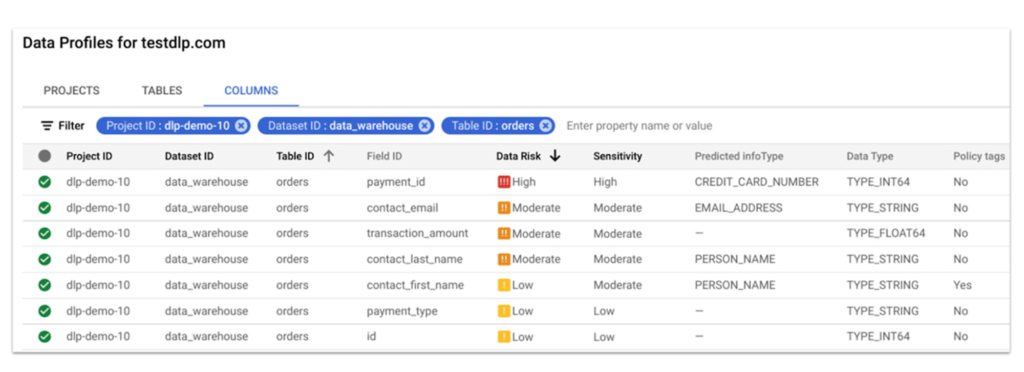
In this blog, we show how a new open source solution called BigQuery Auto Tagging Solution solves our second goal—automating access control on data. This solution sits as a layer on top of Automatic DLP and automatically enforces column-level access controls to restrict access to specific sensitive data types based on user-defined data classification taxonomies (such as high confidentiality or low confidentiality) and domains (such as Marketing, Finance, or ERP System.) This solution minimizes the risk of unrestricted access to PII and ensures that there is only one copy of data maintained with appropriate access control applied down to the column level.
The code for this solution is available on Github at GoogleCloudPlatform/bq-pii-classifier. Please note that while Google does not maintain this code, you can reach out to your Sales Representative to get in contact with our Professional Services team for guidance on how to implement it.
BigQuery and Data Catalog Policy Tags (now Dataplex) have some limitations that you should be aware of before implementing this solution to ensure that it will work for your organization:
- Taxonomies and Policy Tags are not shared across regions: If you have data in multiple regions you will need to create or replicate your taxonomy in each region that you want to apply policy tags.
- Maximum number of 40 taxonomies per project: If you require different taxonomies for different business domains or have replications to support multiple Cloud regions those will count against this quota.
- Maximum number of 100 policy tags per taxonomy: Cloud DLP supports up to 150 infoTypes for classification, however, a single policy taxonomy can only support up to 100 including any nested categories. If you need to support more than 100 data types, you may need to split these across more than one taxonomy.
High-level overview of the solution
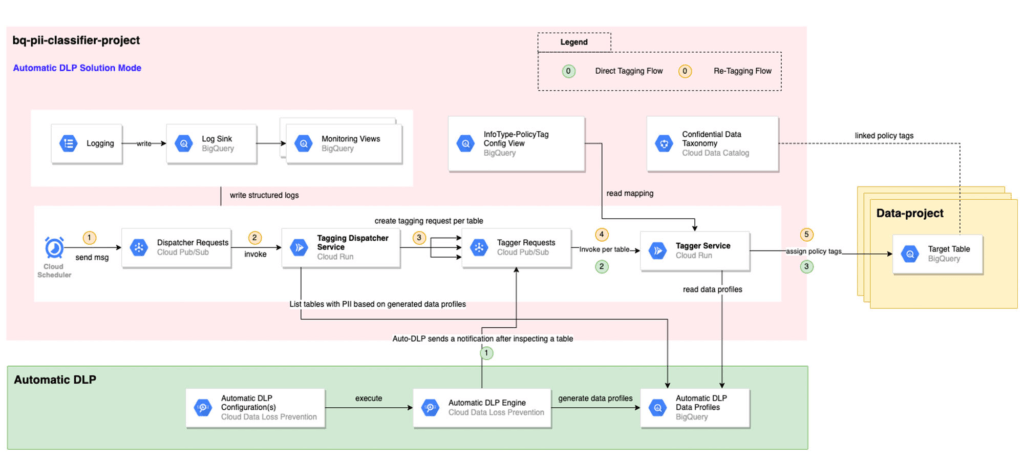
The solution is composed mainly of the following components: Dispatcher Requests topic, Dispatcher service, BigQuery Policy Tagger Requests topic, and BigQuery Policy Tagger service and logging components.
The Dispatcher Service is a Cloud Run service that expects a BigQuery scope to be expressed as inclusion and exclusion lists of projects, datasets, and tables. This Dispatcher service will query Automatic DLP Data Profiles to check if the tables in-scope have data profiles generated. For these tables, it will publish one request per table to the “BigQuery Policy Tagger Requests” PubSub topic. This topic enables rate limiting of BigQuery column tagging operations and apply auto-retries with backoffs.
The “BigQuery Policy Tagger” Service is also a Cloud Run service that receives the information of the DLP scan results of a BigQuery table. This service will determine the final InfoType of each column and apply the appropriate Policy Tags as defined in the InfoType – Policy Tags mapping. Only-one INFO_TYPE is selected and the function assigns the associated policy tag.
Lastly, all Cloud Run services maintain structured logs that are exported by a log sink to BigQuery. There are multiple BigQuery views that help with monitoring and debugging Cloud Run call chains and tagging actions on columns.
Deployment options
After deploying the solution, it can be used in two different ways:
[Option 1] Automatic DLP-triggered immediate tagging:
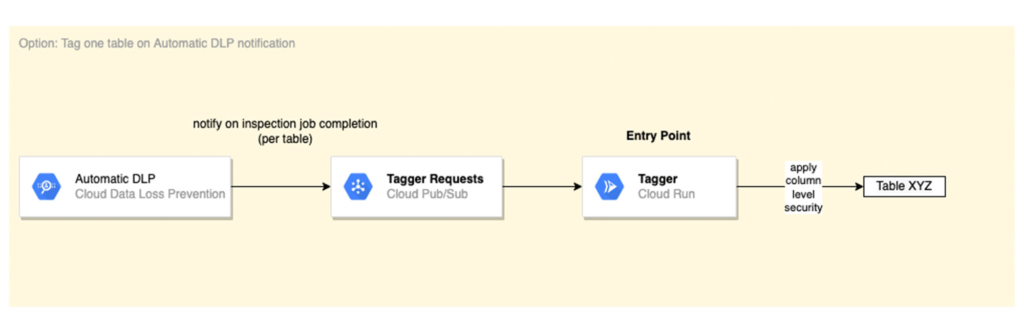
Automatic DLP is configured to send a Pub/Sub notification on each inspection job completion. The Pub/Sub notification includes the resource name and it triggers the Tagger service directly
[Option 2] Scheduled tagging:
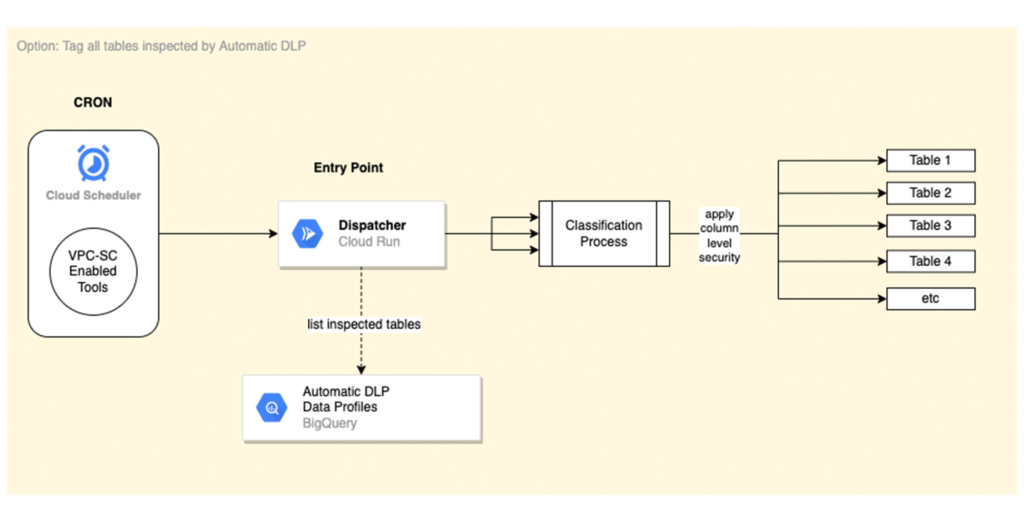
In this scenario, the Dispatcher service is invoked on a schedule with a payload representing a BigQuery scope to list inspected tables by Automatic DLP and create a tagging request per table. You could use Cloud Scheduler (or any Orchestration tool) to invoke the Dispatcher service. If the solution is deployed within a VPC-SC perimeter, other schedulers that support VPC-SC should be used (such as Composer or Custom App.)
In addition, more than one Cloud Scheduler/Trigger could be defined to group projects/datasets/tables that have the same tagging schedule (such as daily or monthly.)
To learn more about Automatic DLP, see our webpage. To learn more about the BQ classifier, see the open source project on Github: GoogleCloudPlatform/bq-pii-classifier and get started today!
Google Cloud Content Protection: Unlock the Power of CSAP for Security

1304
Of your peers have already read this article.
2:45 Minutes
The most insightful time you'll spend today!
Content production is increasingly happening in the cloud. While moving a creative process that spans three centuries into the modern era brings challenges and risks, MovieLabs is one organization that takes digital transformation seriously.
A nonprofit research and development group founded by a consortium of the major Hollywood studios, MovieLabs describes their mission as “exploring innovative solutions to industry challenges shared by both our member studios and the broader production, post-production and distribution ecosystem.”
In more than 50 pages of densely-packed ideas and principles, MovieLab’s The Evolution of Media Production lays out an ambitious and revelatory vision for streamlining media production in the cloud. The key themes are summarized in 10 declarative statements, which envision a new modality for media production by the year 2030:
- All assets are created or ingested straight into the cloud and do not need to be moved.
- Applications come to the media.
- Propagation and distribution of assets is a “publish” function.
- Archives are deep libraries with access policies matching speed, availability and security to the economics of the cloud.
- Preservation of digital assets includes the future means to access them and edit them.
- Every individual on a project is identified and verified, and their access permissions are efficiently and consistently managed.
- All media creation happens in a highly secure environment that adapts rapidly to changing threats.
- Individual media elements are referenced, accessed, tracked and interrelated using a universal linking system.
- Media workflows are non-destructive and dynamically created using common interfaces, underlying data formats and metadata.
- Workflows are designed around real-time iteration and feedback.
The four bolded statements above are further explored in a follow-up whitepaper from MovieLabs, The Evolution of Production Security, which likewise offers six statements about what secure production in the cloud should look like:
- Security is Intrinsic and does not Inhibit Creative Processes
- The Security Architecture Addresses Challenges Specific to Cloud Workflows
- Production Workflows, Processes, and Assets are Secure, even on Untrusted Infrastructure
- The Content Owner Controls Security and Workflow Integrity
- The Security Can Be Scaled to Appropriate Levels and Can Integrate
- The Security Architecture Limits the Spread of any Breach and is Adaptable
The key to understanding these two papers is repeated in their titles: Evolution. Neither document is meant to outline solely what’s possible today; rather they are beacons guiding us toward a future in which the movie business is truly transformed by the cloud operating model. That means a future where media productions run much more like software supply chains: with speed, agility, and scale, and without sacrificing availability or security.
The good news is that it is possible to deploy secure production workloads in the cloud today. Using some of the built-in security features of Google Cloud, content producers can achieve Common Security Architecture for Production (CSAP) “Level 100” security for their assets (using the CSAP scale L100-L300).
However, we think that “evolution” word is important. As many companies have learned, operating an infrastructure cloud can be costly and often presents new threat vectors for attackers. Our mission at Google Cloud is to provide scalable, reliable services for traditional IT functions and to accelerate the abilities of every organization to digitally transform its business.
We believe the era of the transformation cloud is dawning, and companies who have been successfully operating in the cloud for years are now looking for ways to reduce costs while maintaining the cloud-scale advantages of agility and global reach. This aligns perfectly with the evolutionary vision of the MovieLabs papers, which envision media workflows changing radically to embrace cloud dynamism without all the unnecessary asset movement and complexity.
An important part of that vision from Google Cloud is that cloud service providers should remain open and interoperable with other clouds and infrastructures.
Here is a quickstart guide to mapping the L100 CSAP requirements to Google Cloud:
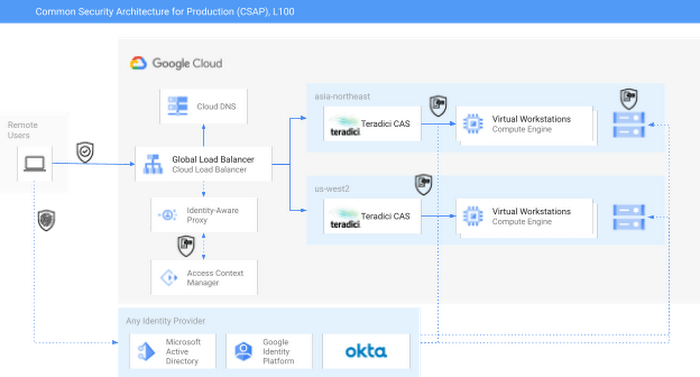
As you can see in the diagram, external identity providers (IdPs) such as Okta or Active Directory can serve as core security components of a CSAP L100 architecture. Alternatively, Google Cloud services such as Cloud Identity or Managed AD could be substituted.
Next, Google Cloud’s Identity-Aware Proxy (IAP) can be used in combination with Access Context Manager (ACM) to act as the first Policy Enforcement Point. This is an optional step, since it is somewhat redundant with the routing and authorization function performed by the native HP/Teradici Connection Brokers. However, IAP and ACM are core components of Google Cloud’s BeyondCorp architecture, on which CSAP is based. Additionally, adopting IAP with ACM offers productions the ability to swap out the Teradici PCoIP protocol for an alternative, such as Unity’s Parsec, without sacrificing security.
The Teradici Connection Broker is also a Policy Enforcement Point, since groups and role membership can be used to enforce access to specific workstations.
Finally, the identity context for each user is passed through to the storage layer. For some productions, Google Cloud Storage (GCS) buckets may offer enough functionality; GCS offers an S3-compatible API which should make it easy to immediately adopt OSS tools built for S3. Other options for this include the managed NetApp Cloud Volumes and Dell PowerScale for Google Cloud services. Both of these are managed shared storage services which offer file-level access controls using standard SMB/NFS permissions. There are also a variety of third-party filers available in the Google Cloud Marketplace, such as Nasuni. You can read more about those here.
For added security, both NetApp and PowerScale should be configured to use the private services access model in Google Cloud. This effectively limits any external access to these resources by only allowing traffic from user-managed VPCs into the Google-managed and peered VPC.
Following this architecture, you can see how to achieve CSAP L100 compliance by using either only Google Cloud services or a mix of managed and cloud-first services. In either scenario, access is managed through a unified control plane and based on both user identity and role. Zero Trust principles such as context-aware access and dynamic rulesets could further be applied to the Authentication step using either Google Cloud IAP or the equivalent services from Okta, Active Directory, or others.
At this weekend’s National Association of Broadcasters conference, Google experts will be talking about the cloud and content production, and the intersection of AI and media. The journey to 2030 is only just beginning.
Redefining Network Security with Google Cloud’s Secure Web Proxy

1199
Of your peers have already read this article.
3:30 Minutes
The most insightful time you'll spend today!
Google Cloud provides multiple layers of security to help customers stay ahead of evolving threats and keep their cloud workloads safe. Today at our annual Security Summit, we are excited to announce the general availability of Secure Web Proxy, a new cloud-first network security offering that provides web egress traffic inspection, protection, and control. Secure Web Proxy (Cloud SWP) can help networking and security teams implement Zero Trust networking principles, discover malicious activity, and support forensic investigations
How Secure Web Proxy works
You configure workloads to use Secure Web Proxy as a gateway. Web requests can originate from virtual machine (VM) instances, containers, serverless environments, and workloads outside of Google Cloud connected by Cloud VPN or Cloud Interconnect. Policies and rules in Cloud SWP will be applied to traffic sent from these workloads to the internet.
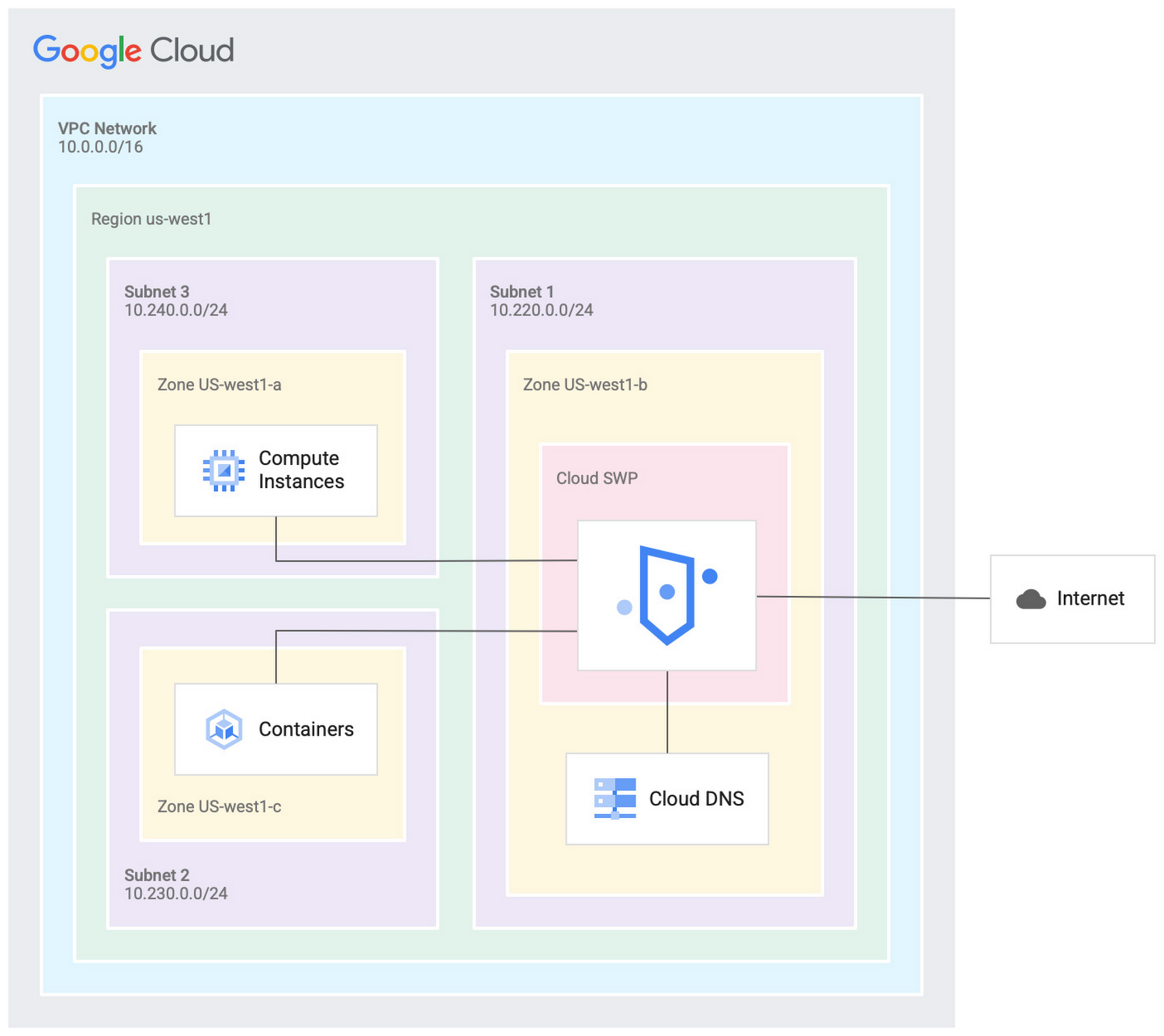
Cloud SWP helps enable organizations to enforce granular access policies, limiting egress web traffic based on source, identities, destination, or request types. With Cloud SWP you can create policies with Google Cloud Identity Access Management (IAM) context using service accounts and secure tags to block egress. For example, you can set a policy to limit a service account to sending traffic to a specific outbound destination.
Secure Web Proxy offers a scalable TLS inspection service that lets you intercept TLS traffic, inspect the encrypted request, and enforce your policies. Cloud SWP integrates with Cloud Logging to record metrics and transaction logs for requests handled by the proxy.
Common use cases for Secure Web Proxy
Many organizations employ a proxy like Cloud SWP to programmatically restrict workload access to only trusted external web services.
You can also use Cloud SWP to monitor outbound access. The proxy identifies traffic that doesn’t conform to policy and logs it to Cloud Logging. This allows you to monitor internet usage, discover and disrupt threats on your network by spotting command and control traffic or anomalous data transfers. Logs can be also used in forensics to investigate security events and incidents involving egress web traffic.
Operational benefits
Secure Web Proxy is another example of how Google Cloud continues to deliver built-in, cloud-first security capabilities that offer operational efficiencies for our customers.
Cloud SWP is easy to deploy and manage because it is a managed service. Unlike frequently deployed proxy solutions, it does not require users to configure virtual machines (VMs) to run and scale the proxy. Security patching is handled automatically. As your business and outbound traffic grows, Cloud SWP takes care of growing your proxy infrastructure for you.
Secure Web Proxy can also help make cloud migrations more seamless. If you are using an on-premises proxy, you can easily port the existing proxy’s policies to Cloud SWP when you migrate the app, maintaining the same egress protection in the cloud as you had on-premises.
Customer testimonials
Preview customers validated the operational and security value of implementing Cloud SWP:
“Google’s Secure Web Proxy is a powerful tool that can help businesses of all sizes protect their cloud workloads from online threats. By using the granular policy controls and TLS inspection, we are ensuring that our cloud applications only access approved external destinations. Additionally we are able to comply with data security regulations,” said David Saleh, director, Cloud Architecture and Application Security, ATB Financial.
“Secure Web Proxy has helped us to improve our security in Google Cloud. We are now able to filter outbound HTTP and HTTPS traffic from our applications. In addition, having a native solution will allow us to replace the VM-based solution we currently have, providing us with cost savings and continuing to deliver on our strategy of replacing products with cloud native services,” said Roberto Vega, cloud analyst, Carrefour.
Getting started with Secure Web Proxy
You can get started with Cloud SWP by visiting our documentation page to learn more about Cloud SWP prerequisite requirements and configuration options. If you want to quickly evaluate Cloud SWP for your cloud environment, use the SWP evaluation guide for step-by-step instructions. Be sure to check out all our sessions at this year’s Google Cloud Security Summit.
Nine Interesting Google Cloud Identity and Environment Features to Know About!

2919
Of your peers have already read this article.
2:00 Minutes
The most insightful time you'll spend today!
I’ve been at Google Cloud just a few weeks, following years of experience as an AWS Hero and building on other clouds. So last week’s Google Cloud Next–my first!—was a bit of a culture shock. On the GCP podcast, I used the word “intentionality” to describe what I’m seeing: a thoughtful, holistic approach that informs so much of how Google Cloud is put together. Not just in the headline-grabbing new announcements like Google Distributed Cloud, but in the everyday things too.
Things like IAM and project setup. Step 1 of any cloud project is to provision access to an environment, and that’s why I always found it so frustrating in my past life when I had to deal with outdated or clunky stuff like:
- Homebrewed, sketchy SSO tooling and config files
- No centralized identity—I was a different person in every cloud account
- Mysterious logouts, redirects, and missing project context within the cloud console
- Account organization features that were “bolted-on” rather than designed the right way from the beginning
In contrast, I recently shared a Twitter thread about how shockingly right Google Cloud gets identity and environments. It’s probably my favorite thing about Google Cloud so far, and so in this post I want to expand on what I’ve learned. If you’re searching for a better way to access and organize your cloud, let me make you one of today’s lucky 10,000.
Nine things to love about Google Cloud identity and environments
1. You are YOU!
Every user is just a Google account (personal or corporate) that works across projects. For beginners, this lowers the barrier to entry and makes cloud feel like an extension of things you already know. For experts, it reduces the friction of having to juggle a bunch of unrelated identities. I love that you can permit any Google account into a cloud project as a collaborator—even a contributor from outside your organization!
2. No non-IAM root accounts
Google Cloud has been designed from the ground up to avoid the chicken/egg problem of requiring a manually configured superuser that sits outside the rest of the identity management infrastructure. In the Google world, humans use Google accounts, and services use IAM-based service accounts —it’s as straightforward as that. (Even non-Google services can be IAM—yay, workload identity federation!)
3. Project discovery for humans
Project, folder, and organization discovery are baked into the console, like browsing a file system scoped to your access level. This hardly even feels like a feature, it’s so subtle and yet absolutely fundamental. But once you see it, you can’t imagine going back to a world where environments exist in a vacuum with no contextual awareness of each other.
The hierarchical organization model also means that project-per-application-per-environment best practices are the path of least resistance; if anything, I’ve erred on the side of setting up *too many* logical groupings. It’s just too much fun to play with projects and folders!
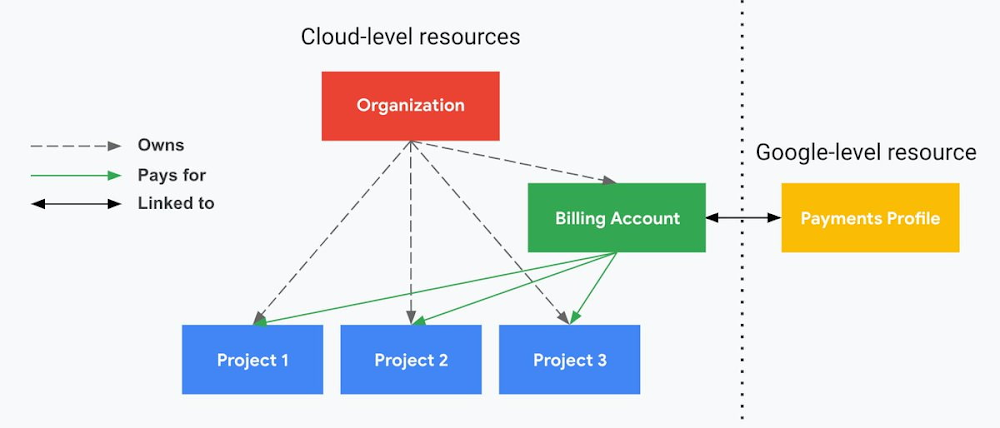
4. Billing that protects you from yourself
The project context gives you a logical container for the cost of the resources contained within it. My favorite part of this is that your billing entity is managed separately from the project itself. So you can delete a project and feel sure that all associated resources are gone and no longer racking up charges … without also trashing your ability to pay for future projects you might spin up.
(Related: the free tier does not charge you money unless you click a big button that basically says “YES, IT’S OK TO CHARGE ME MONEY.” This guarantee, combined with the familiarity of Google Accounts for access, are the main reasons I now recommend Google Cloud to beginners in my network who are looking for a safe place to learn and explore cloud.)
5. Organizational structure != billing structure
For organizations, billing is decoupled from the organization root. So permissions inheritance is a separate design decision from chargeback, as it should be. This keeps your Google Cloud footprint from converging toward Conway’s Law.
6. SSO that just works
Want to use the CLI? You get SSO out of the box with your Google Account—no corporate organization required, and no manual shuffling with config files and access keys. Or, better yet, you can use Cloud Shell to run gcloud commands right in your browser, even (especially?) on the docs pages. (Random trivia: I think Cloud Shell is the only native cloud service that has the same name across AWS, Azure, and Google Cloud–but Google’s version has been around the longest and as far as I can tell is the most fully-featured.)
7. One group to rule them all
Remember how user entities are just Google accounts? Guess what: you can use Google Groups to manage group access to IAM roles! That’s right: one set of users with permissions across docs, email, and cloud. It’s one reason why Google Workspace makes sense as a core piece of Google Cloud; it really does function like just another cloud service from an identity standpoint.
8. Never lose your place
In other clouds, I’ve experienced a problem I call the Timeout of Doom: when your console session expires, you’re left on a generic error screen and it’s up to you to figure out how to rebuild your context from scratch–starting with remembering what account you used in the first place. Imagine my delight to realize that reaching your Google Cloud console is as easy as bookmarking a single URL. console.cloud.google.com works and remembers who you are (or, at least, suggests the set of people you might be)—no mystery logouts or redirects.
9. Progressive complexity FTW
In my experience it’s been common for cloud providers to design most of their account features for organizations: if you’re an independent developer, you get more exposure to dangerous bills, less access to helpful SSO features, and generally must fend for yourself in a world that wasn’t really created with you in mind.
I love that Google Cloud has found a way to work with enterprises while still maintaining their roots as a cloud that developers love to use. Sign in with your personal Google account, attach it to an organization when-and-if you’re ready, and in the meantime you get the same thoughtfulness around SSO and billing as the giant shop down the street.
I’m not going to tell you my experience has been seamless; there are footguns here (every Google Workspace integration creates a new project?), and I’m still learning. But it’s that “intentionality” thing again. The Google Cloud identity and environment experience feels like it was designed, not just accreted; there’s an elegant simplicity to it that makes cloud feel fresh and exciting to me all over again. I can’t wait to see what’s next.
In the meantime, I highly encourage you to do what I did and spin up a free trial to try things out for yourself. Then hit me up on Twitter with your favorite Google Cloud identity or environment feature!
Cloud Security : The First Priority for Enterprises

3341
Of your peers have already read this article.
2:00 Minutes
The most insightful time you'll spend today!
Cloud-based solutions were a technology life raft for organizations during the COVID-19 pandemic as employees took to the virtual office and companies scrambled to adjust to a distributed, remote reality. However, these rapid and substantial changes in the role of cloud technologies on the business came with an increased focus on security.
The accelerated move to the cloud also meant companies needed to rapidly evolve existing security practices to protect everything that matters at the core of business—from their people and their operational and transactional data to customers and their most sensitive personal information. Suddenly, enterprises were keenly aware of where business practices, employee training, and security policies were falling short.
A recent Google-commissioned study by IDG explored the details behind the heightened focus on security solutions since the start of the pandemic while highlighting the role cloud-based security solutions are playing in helping keep customers safe. The survey of 2,000 global IT leaders serves to illustrate that in this new and unfamiliar world, enterprises are more ready than ever to embrace cloud security.LEARN MOREIT Leaders Research ReportWhat are the biggest IT priorities in 2021? Explore insights from a survey of 2,000 Senior IT leaders conducted by IDG, in collaboration with Google Cloud.
Security is an even higher priority post-pandemic
In the wake of the pandemic, many organizations are facing a broader attack surface than ever before as employees moved to temporarily working from remote home offices (and in some cases, encouraged to stay there for the foreseeable future). With fewer inherent security protections on personal internet connections and more work meetings happening via video conferencing, attackers have launched a cyber pandemic of their own designed to take advantage of and exploit new weaknesses.
However, even as businesses amp up security initiatives and preventative measures, the growing wave of threats continue to keep security top of mind for IT leaders. Security risks and concerns remain one of the top pain points impeding innovation according to the IDG study respondents—only surpassed by insufficient IT and developer skills.
Enterprises looking to cloud providers for help with security
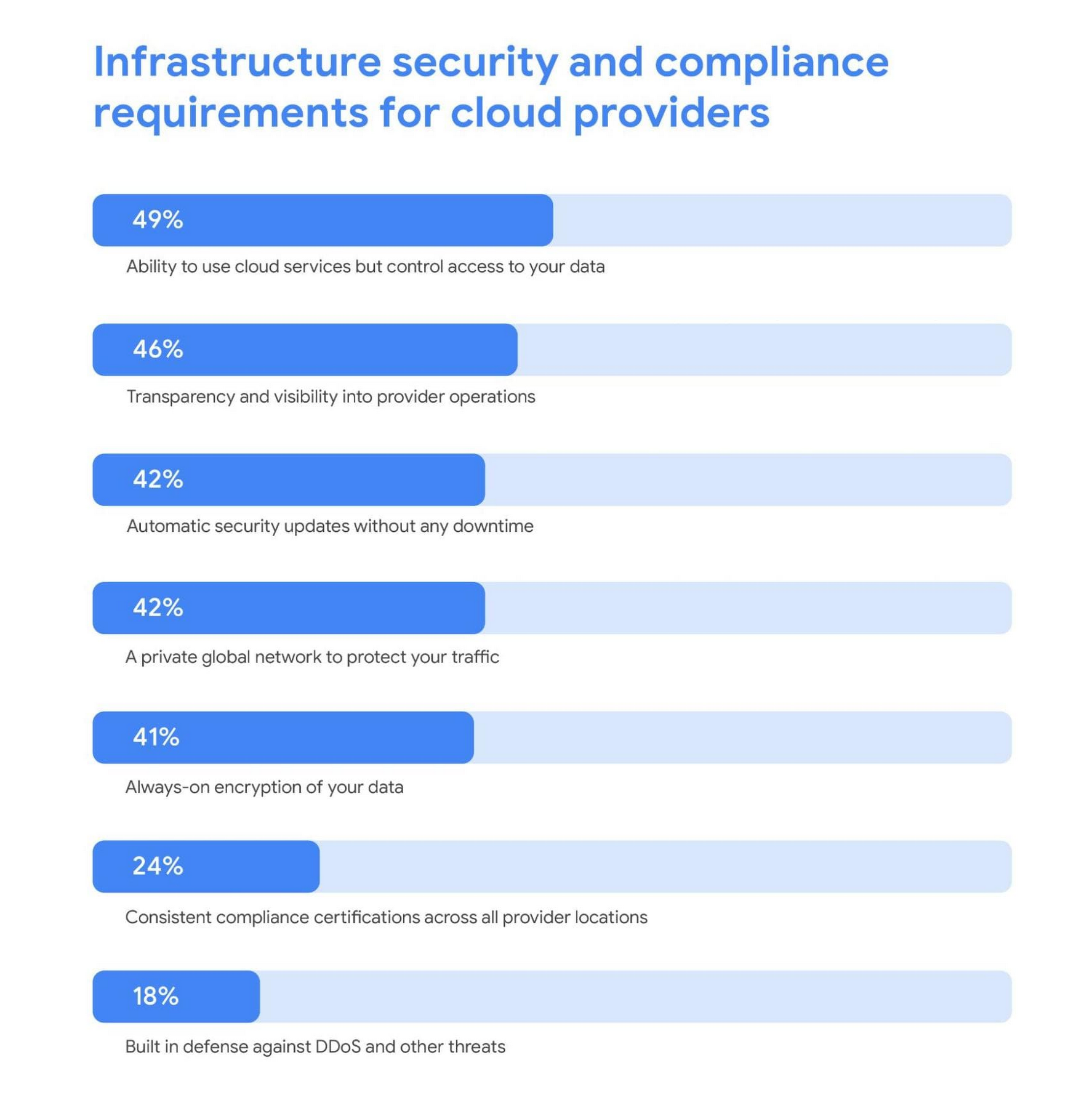
As a result, addressing security risks is a leading area where IT leaders turn to cloud providers for support. For these organizations, the ability to control access to data while using cloud services was the most required infrastructure security and compliance features from a cloud provider.
Cloud security is more trusted than ever
A deeper look into the results also revealed a shift in perspective about whether cloud security is really up to the task of protecting enterprises against modern attacks. Despite skepticism in the past, the majority of IT leaders are now comfortable with using cloud-based security solutions.
Confidence in the security of cloud infrastructure is extremely high with 85% of respondents stating they feel secure (or more secure) than on-premises infrastructure—compared to just 15% who believe on-premises is still safer.
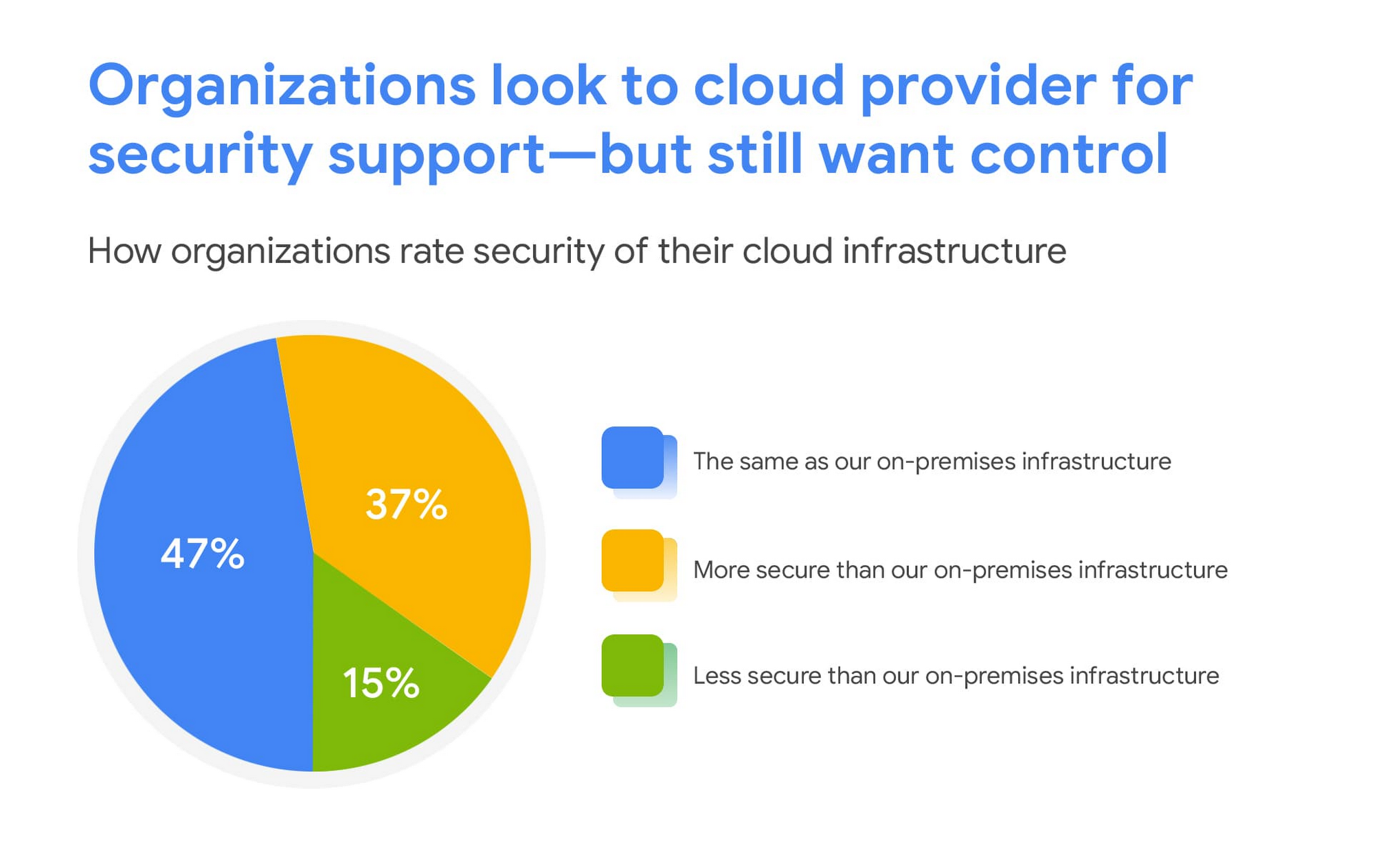
This is a clear indication that there are fewer reservations around the efficacy of cloud-based security solutions, signaling an increase in trust as organizations invest in cloud-based infrastructure and solutions.
We are committed to safe, secure solutions
Google Cloud protects your data, applications, and infrastructure, as well as your customers, from fraudulent activity, spam, and other types of online abuse. We protect you against a growing list of cybersecurity threats using the same infrastructure foundation and security services that we use for our own operations, so you never have to compromise between ease of use and advanced security.
To learn more about the IDG findings and how IT leaders are addressing security concerns post-COVID, download the full report.
Interested in how Google Cloud’s commitment to providing safe, secure solutions helps you address your security needs?
Our networking, data storage, and compute services encrypt data at rest and in transit to ensure the integrity, authenticity, and privacy of your data and your customers’ data. We also offer the ability to encrypt data in use, while it’s being processed in VM and container workloads, and our advanced security tools support compliance and data confidentiality with minimal operational overhead.
Ensuring Ironclad Security: Our Validation Process for the Confidential Space

2584
Of your peers have already read this article.
2:30 Minutes
The most insightful time you'll spend today!
We’re pleased to announce that Confidential Space, our new solution that allows you to control access to your sensitive data and securely collaborate in ways not previously possible, is now available in public Preview. First announced at Google Cloud Next, Confidential Space can offer many benefits to securely manage data from financial institutions, healthcare and pharmaceutical companies, and Web3 assets. Today, we will explore some security properties of the Confidential Space system that makes these solutions possible.
Confidential Space uses a trusted execution environment (TEE), which allows data contributors to have control over how their data is used and which workloads are authorized to act on the data. An attestation process and hardened operating system image helps to protect the workload and the data that the workload processes from an untrusted operator.
The Confidential Space system has three core components:
- The workload is a containerized image with a hardened OS that runs in a cloud-based TEE. You can use Confidential Computing as the TEE that offers hardware isolation and remote attestation capabilities.
- The attestation service, which is an OpenID Connect (OIDC) token provider. This service verifies the attestation quotes for TEE and releases authentication tokens. The tokens contain identification attributes for the workload.
- A managed cloud protected resource, such as a Cloud Key Management Service key or Cloud Storage bucket. The resource is protected by an allow policy that grants access to authorized federated identity tokens.
The system can help ensure that access to protected resources is granted only to authorized workloads. Confidential Space also can help protect the workload from inspection and tampering, before and after attestation.
In our published Confidential Space Security Overview research paper, we explore several potential attack vectors against a Confidential Space system and how it can mitigate those threats. Notably, the research notes how Confidential Space can protect against malicious workload operators and administrators, and malicious outside adversaries, who are attempting to create rogue workload attestations.
Through these protections, Confidential Space establishes confidence that only the agreed upon workloads will be able to access sensitive data. The research also highlights some of the extensive security reviews and tests executed to identify potential weak points in the system, including domain expert reviews, meticulous security audits, and functional and fuzz testing.
We asked the NCC Group for an independent security assessment of Confidential Space to analyze its architecture and implementation. NCC Group leveraged their experience reviewing other Google Cloud products to dig deep into Confidential Space.
The NCC Group’s extensive review, which included penetration testing and automated security scanning, found zero security vulnerabilities. In their report, the architecture review highlights how the security properties are achieved through the coordination of measured boot with vTPM attestation, reduced attack surface with constricted administrator controls and access, workload measurement and enforced launch policy, and resource protection policy based on attested workload runtime properties.
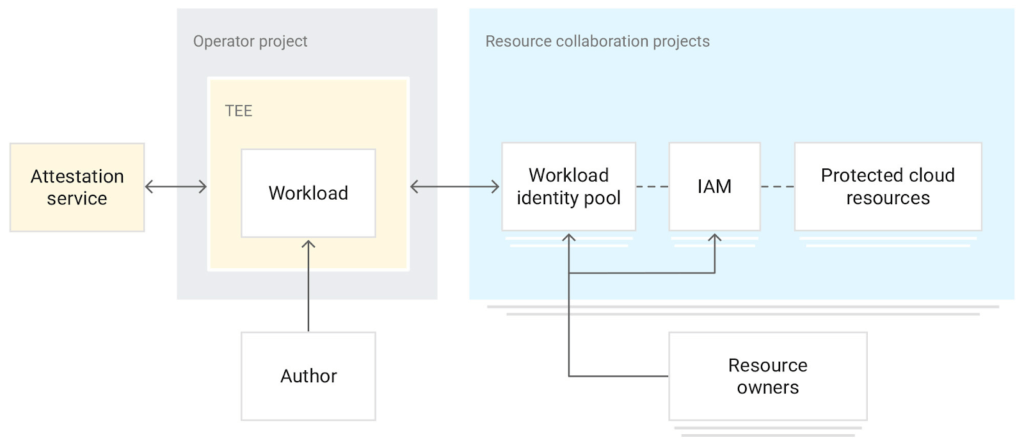
The combination of these attributes creates powerful security properties, gating release of data on runtime measurements of the actual workload code and environment instead of just user and service account credentials. Confidential Space provides a platform that includes:
- A dependable workload attestation, including workload code measurement, arguments and environment, and operating environment claims
- A fully-managed attestation verification service that validates expected environmental attestation claims
- A policy engine allowing for arbitrarily complex (or extremely simple) policy to be created around those claims
- A mechanism to attach those policies to Google Cloud resources
Together, the platform provides a mechanism where one can ensure that their data is only ever released into trusted workloads that will not abuse that data.
Take a look at our documentation and codelab and take it for a spin. We hope that Confidential Space can inspire organizations to solve their use cases around multi-party collaboration with sensitive data; please contact your Google Cloud sales representative if you have any questions.
More Relevant Stories for Your Company

Using Google Cloud’s Backup and DR Service with Logging and Monitoring Tools
Backup and DR data is a valuable business asset, and ensuring that it’s safe and accessible is essential. In particular, you want to be able to monitor your backups to ensure that the data is indeed protected and that you can quickly recover it in the event of a disaster,

Introducing New Capabilities for Secure Transformations
Organizations large and small are realizing that digital transformation and the changing threat landscape require a grounds up effort to transform security. At Google Cloud, we continue to invest in our vision of invisible security where advanced capabilities are engineered into our platforms, operations are simplified, and stronger security outcomes

Best Practices for Cost Optimization in the Cloud
When customers migrate to Google Cloud Platform (GCP), their first step is often to adopt Compute Engine, which makes it easy to procure and set up virtual machines (VMs) in the cloud that provide large amounts of computing power. Launched in 2012, Compute Engine offers multiple machine types, many innovative features, and is available in

Encryption in Transit: The Next Level in Cloud Security
Security is often a deciding factor when choosing a public cloud provider. At Google Cloud, security is of the utmost importance and the security strategy encompass authentication, integrity, and encryption, for both data at rest and in transit. Hence, Google Cloud encrypts and authenticates all data in transit at one
